Waves:
A Collaborative Navigation Technique for
Large Interactive Surfaces
by
Joseph Shum
A thesis
presented to the University of Waterloo in fulfillment of the
thesis requirement for the degree of Master of Applied Science
in
Systems Design Engineering
AUTHOR'S DECLARATION
I hereby declare that I am the sole author of this thesis. This is a true copy of the thesis, including any required final revisions, as accepted by my examiners.
Abstract
Digital tables offer the possibility of performing collaborative tasks where two or more people can share artifacts in the same virtual space. However, most interactive methods of navigating through virtual space most commonly have the effect of changing the entire digital display simultaneously. In this thesis, I performed an exploratory study providing evidence for differences between two popular collaborative navigation techniques used in video games, split screens and single shared screen, in situational awareness, interference between collaborators, and difficulties with automatic view adjustment. Drawing inspiration from guidelines formulated from the results of the exploratory study, as well as previous work in interactive tabletops, collaboration, and navigation in information
visualization, I designed and implemented Waves, a collaborative navigation technique for the tabletop. Waves simultaneously supports multiple personal workspaces, provides group workspace awareness, and mediates interference between workspaces.
Acknowledgements
It has been a long road. The fact that I was able to get here was due in no small part to kindness of many people to whom I owe my deepest gratitude.
First, I would like to thank my supervisor, Dr. Mark Hancock, for taking a chance on me and taking me in as a graduate student. I am extremely grateful for your guidance and teachings over the years. I will never forget your advice to me on “don’t try to write the Internet.” I truly tried. Hopefully, I did not disappoint. Most of all, I am most thankful for your tremendous patience and flexibility in letting me explore my career during these years.
Second, I would like to thank Dr. Stacey Scott, for first introducing me to Dr. Mark Hancock and agreeing to be my thesis reader. Thank you for opening my eyes to CSCW and tabletops. My thesis is built on a lot of your previously work.
I would also like to thank Dr. Michael Terry for introducing me to human computer interaction in your course CS489 and agreeing to be my thesis reader. Your insistence that I learn contextual design method properly greatly influenced my career direction. It was the primary reason why I pursued graduate school in this field.
Finally, I would like to thank my friends and family for encouraging me to never stop writing until I am done. I would like to thank my parents for their unconditional love, and my dear brother Wil, for running errands for my thesis and many other things when I am away.
Finally, to Xiaochen, you have been my constant source of encouragement, discipline, and emotional support throughout my entire graduate career. Thank you for being part of my life.
Dedication
To my grandmother, who had reminded me time and again that education is a privilege to be cherished.
Table of Contents
AUTHOR'S DECLARATION ... ii Abstract ... iii Acknowledgements ... iv Dedication ... v Table of Contents ... vi List of Figures ... ix List of Tables ... xi Chapter 1 Introduction ... 1 1.1 Motivation ... 21.2 Research Question and Objectives ... 2
1.3 Scope ... 3
1.4 Thesis Contributions ... 4
1.5 Thesis Organization ... 5
Chapter 2 Related Work ... 6
2.1 Interactive Tabletops ... 6
2.1.1 Multi-touch Techniques ... 7
2.1.2 Applications ... 8
2.2 Collaborating with the Tabletop ... 10
2.3 Information Visualization Techniques ... 11
2.3.1 Detail-in-context InfoVis Techniques ... 11
2.3.2 Multi-Focus Interaction... 13
2.3.3 Incorporation of Physical Metaphor ... 14
2.4 Summary ... 17
Chapter 3 Exploratory Study ... 19
3.1 Motivation for Studying Collaboration in Video Games ... 19
3.2 Methodology Overview ... 20
3.3 Contextual Inquiry ... 21
3.3.1 Method ... 21
3.4.2 Findings ... 40
3.4.3 Discussion ... 42
3.5 Critical Incident Technique ... 43
3.5.1 Method ... 43
3.5.2 Findings ... 43
3.5.3 Discussion ... 46
3.6 Summary of Findings ... 46
3.6.1 Difference in Situation Awareness ... 46
3.6.2 Interference between Collaborators ... 47
3.6.3 Difficulties of Automatic Perspective Adjustment ... 48
3.7 Exploratory Study Summary and Inspiration ... 48
Chapter 4 Design of Interaction Technique ... 50
4.1 Design Guidelines for Collaborative Navigation Techniques ... 50
4.1.1 Support Multiple Personal Workspaces ... 50
4.1.2 Provide Group Workspace Awareness ... 51
4.1.3 Mediate interference between workspaces ... 51
4.2 Collaborative Navigation Techniques ... 51
4.2.1 Single Shared Screen Navigation ... 52
4.2.2 Split Screen Navigation ... 53
4.2.3 Waves ... 54 4.3 Waves Implementation ... 60 4.3.1 Equipment ... 61 4.3.2 VectorNodes ... 62 4.3.1 Propagation ... 63 4.3.2 Wave ... 65
4.3.3 Collisions and Borders ... 66
4.3.4 Dynamic and Static Borders ... 68
4.4 Waves Limitations ... 72
4.4.1 View competition ... 72
4.4.2 No Support for Data Duplicity ... 72
4.4.3 Waves Requires a Large Table ... 73
4.5.1 Positives ... 73
4.5.2 Negatives ... 73
4.6 Summary ... 74
Chapter 5 Conclusion and Future Work ... 75
5.1 Summary of Literature Exploration ... 75
5.2 Summary of Exploratory Study on Games ... 76
5.3 Summary of Design and Implementation of Waves ... 76
5.4 Contributions... 77
5.5 Future Work ... 78
5.5.1 Explore the transient nature of waves and borders ... 78
5.5.2 Explore the use of alternative gesture to address view competition ... 78
5.5.3 Optimize prototype ... 79
5.5.4 Formal User Testing... 79
Appendix A Exploratory Study Material ... 80
A.1 Recruitment Script ... 80
A.2 Interview Script ... 81
A.3 Consent Form ... 83
Permissions ... 86
List of Figures
Figure 1: Classification space for CSCW (Rodden, 1991) and the focus of this thesis ... 4
Figure 2: Application of table in naval command and control scenario (Scott et al., 2010, with permission) ... 9
Figure 3: Information cloth implementation of Perspective Wall (Mikulecky et al., 2011, with permission) ... 14
Figure 4: Information cloth implementation of Graphical Fisheye (Mikulecky et al., 2011, with permission) ... 15
Figure 5: Information cloth implementation of Manhattan Lens (Mikulecky et al., 2011, with permission) ... 15
Figure 6: Information cloth implementation of Malange (Mikulecky et al., 2011, with permission) .. 16
Figure 7: Distortion affects the entire area in Information Cloth (Mikulecky et al., 2011, with permission) ... 17
Figure 8: Exploratory study overview ... 21
Figure 9: The video gaming environment at the participants’ living room (right) and the setup at the lab (left) ... 25
Figure 10: Flow model showing the interaction between players with different skills (represented by different colours) and the game environment in COD Black Ops... 27
Figure 11: Flow model showing the interaction between players and the game environment (LEGO Star Wars) ... 31
Figure 12: Two players collaborating in LEGO Star Wars ... 32
Figure 13: Artifact model of Call of Duty Black Ops’ split screen display mode (Part 1) ... 33
Figure 14: Icons indicating the various relative directions of Player 1’s partner ... 34
Figure 15: Artifact model of Call of Duty Black Ops’ split screen display mode (Part 2) ... 34
Figure 16: Artifact model of LEGO Star Wars. ... 36
Figure 17: Endsley’s (1995) situation awareness model is modified to illustrate the increasing collaboration as SA levels increase.. ... 39
Figure 18: SAGAT results showing the difference in SA between display models ... 41
Figure 19: A top down view of the most frustrating stage in LEGO Star Wars ... 44
Figure 20: At the camera perspective threshold players going in opposite directions were unable to go any further ... 45
Figure 22: Split screen on the tabletop... 53
Figure 23: Concept of Waves on Tabletops ... 55
Figure 24: On-demand workspaces separated by explicit borders ... 55
Figure 25: Simultaneous navigation by two different users ... 56
Figure 26: Ad-hoc workspaces separated by dynamic borders ... 56
Figure 27: Distortion between workspaces provides spatial awareness ... 57
Figure 28: Distortion shows continuity between workspaces ... 58
Figure 29: Wave’s workspace mediation behaviour shows expanding waves (blue and red) and the resulting border formation (yellow) ... 59
Figure 30: The forming of a dynamic border (yellow) in Waves between two expanding workspaces (blue and red) ... 59
Figure 31: A new workspace (green) expands to overwrite an existing dynamic border (yellow) that divided two existing workspaces (blue and red) ... 60
Figure 32: In Waves, one can prevent an existing workspace from being overwritten by creating another wave (orange) to block an incoming wave (green). ... 60
Figure 33: Waves running on the SMART Table ... 61
Figure 34: Waves running on a custom made infrared laser table ... 62
Figure 35: VectorNodes bound to map image ... 63
Figure 36: Propagation in the VectorNode Framework ... 63
Figure 37: Translation in the VectorNode Framework ... 64
Figure 38: Rotation in the VectorNode Framework ... 64
Figure 39: Zooming in the VectorNode Framework ... 65
Figure 40: Wave formation and propagation ... 65
Figure 41: Logic diagram of node movement and collision ... 67
Figure 42: Sequence of dynamic border creation ... 69
Figure 43: Dynamic borders are drawn based on positions of frozen lattice nodes ... 69
Figure 44: Dynamic borders are overwritten ... 70
Figure 45: User initiates a wave to defend her workspace from an incoming wave ... 70
Figure 46: Manual creation of an on-demand workspace using explicit border ... 71
List of Tables
Table 1: Comparison of how each navigation technique satisfy design guidelines ... 54
Chapter 1
Introduction
When two or more people gather to collaborate, each person’s perception of the space will be different, because each person will occupy a different physical location. For example, two architects can stand on opposite sides of a building model, with one looking closely at the front entranceway, while the other stands back and tries to get a sense of the overall appearance from the rear. Both architects can benefit from the freedom to navigate independently around the environment, but also can easily grasp the connection between their own perspective and where their collaborator is working in that same environment.
Digital tables offer the possibility of performing collaborative tasks where two or more people can share artifacts in the same virtual space. However, most interactive methods of navigating through virtual space most commonly have the effect of changing the entire digital display simultaneously. For example, if two people are interacting with the same map, one person might pan the map to the left (e.g., by dragging their finger across the screen), and the entire screen moves, potentially moving the second person’s work area off the edge of the screen. One application area that has begun to address navigation by two people in the same virtual world is video games, where multiple users can share a single screen in co-located gameplay. Very much like collaboration using the tabletop, video console game players engage in cooperative play scenarios and need to navigate the game
environment using a single display.
In this thesis, I investigate two popular video game screen sharing techniques in an exploratory study, paying particular attention to their impact on people’s understanding of the virtual space. The results show that providing separate control for navigation can improve people’s understanding of their own presence in the space, but can hinder understanding of their partner’s presence, while the shared control has the opposite effect. Adapting the findings from the study to the tabletop context, I designed and implemented Waves, a navigation technique that can allow independent control, while maintaining a connection between the collaborators’ viewpoints. Waves works by allowing each person to make local changes that eventually propagate across the screen. The speed and area of effect of this propagation can then be adjusted to provide a variety of design alternatives that gain some of the benefits from the physical world of the combination of independent control with an awareness of a collaborator’s perspective.
1.1 Motivation
There are many situations in which several collaborators need to maintain an awareness of each other and each other's work, yet perform activities individually within the shared workspace. For example, in emergency response situations, while the commanders need to focus on directing their own teams within their specific operational area, they would also need to be aware of the activities of teams managed by other emergency services commanders that are operating in the larger area in order to effectively collaborate in the overall relief effort. Similarly, in air traffic control settings, several air traffic controllers are each responsible for directing traffic inside a sector within a larger airspace. They must also have an awareness of the traffic situation in sectors outside of their own in order to smoothly handle aircraft travelling into their own sector from an adjacent sector. As such, there are two motivating factors behind this thesis: the need for interaction techniques that support
collaboration and group situation awareness on the tabletop, and the lack of an existing technique that allows a variation of coupling (Tang et al., 2006) between different users —the degree to which collaborators interact with each other’s work.
Studies in the past have looked into how the tabletop should support collaboration. For example, there are guidelines to help the design of tabletops systems for collaboration (Scott et al., 2003). These guidelines call for shared access to physical and digital objects, as well as to support
simultaneous user actions. There are techniques in information visualization that enable manipulation (zoom, pan and rotate) of various parts of a contiguous piece of visual data (Mikulecky et al, 2011) while maintaining the connection between the areas of interest and their surrounding space. What is missing is the exploration of how these individual spaces in the shared screen on the tabletop can interact in a multiuser environment such that members of the group can perform individual tasks while maintaining an awareness of the perspective and progress of their peers.
As tabletops are being used for board games (Chang, 2012) and real-time strategy games (Tse et al., 2006), an interaction technique that addresses both personal navigation and group awareness will enable the multiuser applications that designers have envisioned.
1.2 Research Question and Objectives
The three research objectives in this thesis are to:
• Identify existing interaction techniques for multi-user shared screen applications. A review of previous literature is conducted to find existing solutions to this problem. This work is presented in Chapter 2.
• Explore two screen sharing technique used in video games to develop an
understanding of how each affects interference between collaborators and situation awareness. I performed an exploratory study to find differences between two popular collaborative navigation techniques used in video games, split screens and single shared screen, in situational awareness, interference between collaborators, and difficulties with automatic view adjustment. This work is presented in Chapter 3.
• Design an interaction technique that bridges the gap between single screen and split screen in terms of group awareness and performance. The major work in this thesis is the development of a multi-user interaction technique for the tabletop called Waves. The differing perspective between users propagate against one another to create group situation awareness between workspaces while maintaining individual perspectives. This work is presented in Chapter 4.
1.3 Scope
Group work involves the collaboration of multiple individuals towards the completion of a common goal. Groupware is a computer system that supports multiple users in this effort. Computer Supported Cooperative Work (CSCW) is the research discipline that studies the nature of cooperative work and the design of computer-based technology that supports it (Schmidt & Bannon, 1992). CSCW systems can be classified depending on two major characteristics: interaction and location (Rodden, 1991). Figure 1 shows the classification space and example activities. This thesis focuses on the study of multi-user interaction techniques on the digital tabletop. Collaboration in this setting is co-located and synchronous.
Figure 1: Classification space for CSCW (Rodden, 1991) and the focus of this thesis
This thesis will limit itself to co-located synchronous collaboration as defined in CSCW (Rodden, 1991). Specifically, this thesis concentrates on multi-user touch interaction on large horizontal interactive surfaces, and orientation of the surface is not explicitly considered. I assume that the starting state of the system is a display showing a single top-down perspective of a contiguous virtual space. The major contribution of the thesis will be to address the challenge of dividing the workspace between the users when competing navigation commands are received, showing the discontinuity of the divided workspace, the interaction between the divided workspace, and the ultimate reintegration of the divided spaces.
1.4 Thesis Contributions In this thesis, I:
• Performed an exploratory study investigating the differences between two popular collaborative navigation techniques used in video games, split screens and a single shared screen. The study provided evidence to that there are differences in situational awareness, interference between collaborators, and difficulties with automatic view adjustment (Chapter 3).
simultaneously supports multiple personal workspaces, provides group workspace awareness, and mediates interference between workspaces (Chapter 4).
1.5 Thesis Organization
This thesis is presented in the following manner:
• Chapter 1, Introduction – presents the motivation and the research question of this thesis.
• Chapter 2, Related Works – shows existing research and how they relate to this work.
• Chapter 3, Exploratory Study – presents the summary of a preliminary study on the interaction methods used by two popular games in the PlayStation3 video game console.
• Chapter 4, Design of Interaction Technique – describes the design and rationale of a multi-user interaction technique for the digital tabletop that implements Waves, the proposed multiuser navigation technique of this thesis.
• Chapter 5, Conclusion and Future Work– summarizes the accomplishments of this thesis and how they relate to the completion of research objectives.
Chapter 2
Related Work
This thesis focuses on the development of an interaction technique that supports simultaneous navigation by multiple users around an interactive tabletop, informed by an exploratory study of navigation in multiplayer games. This related work section discusses existing work that has been done in the research areas of interactive tabletops, collaboration, and navigation in information
visualization. Much research has already been done in each of these individual areas. However, it is the combination of these three areas that makes the topic of this research unique. The section follows an incremental approach which starts with the introduction of interactive tabletops. This will then be followed by how the interactive tabletop facilitates collaboration. Then finally, how collaboration is supported on the tabletop by information visualization techniques.
2.1 Interactive Tabletops
Digital tabletops are large horizontally-oriented interactive surfaces. Examples include the Microsoft Surface, DiamondTouch (Dietz & Leigh, 2001), and SMART Table (www.smarttech.com). One of the first interactive tabletops was Wellner’s DigitalDesk (Wellner, 1991). Wellner combined what he described as the two desktops: the virtual desktop on the computer screen where electronic documents are read, and the physical desktop where paper documents are laid out horizontally. The DigitalDesk also experimented with direct touch interaction where virtual objects such as documents were manipulated using physical touch on screen as opposed to being manipulated indirectly by a mouse.
Benko et al. (2009) describe the benefits of horizontal interactive surfaces as “ease of use and intuitiveness due to multi-touch direct manipulation, quick learning time for novice users and support for collaborative work”. While the DigitalDesk was built with individual work in mind, advances in multi-touch sensing made simultaneous input from multiple users possible. This further enhances the digital tabletop as a collaborative tool.
The recent surge in technology allows for the use of multiple hands and fingers by multiple people around the display (Dietz & Leigh, 2001; Han, 2005) , and research on digital tables has been largely focused on the design of multi-touch interaction techniques, its evaluation as a collaborative medium,
2.1.1 Multi-touch Techniques
With Windows-Icons-Menu-Pointer (WIMP) graphical user interfaces (Bowman, 2004, p.91), users interact with the virtual environment indirectly through a physical device such as a mouse. The introduction of touch devices such as large interactive surfaces, smartphones and tablets in the post-WIMP world now allows users to directly touch and manipulate the virtual content on-screen. While the mouse is still effective for single point interaction, direct-touch inputs are found to be more effective and more preferred by users in bimanual tasks on surface devices such as the tabletop (Forlines et al., 2007). The multiple touch points of multi-touch interfaces afford additional degrees of freedom in 3D interaction and allow the user to perform navigation such as pan, zoom and rotation simultaneously (Westerman, 1999; Hancock et al., 2006).
Over the years, a number of multi-touch interaction techniques have been developed and proposed. The incorporation of physics such as friction, collision, and multiple touch points into touch
interaction affords the user the ability to interact with the virtual world in a natural way that they are accustomed to in the real world (Wilson et al., 2008). An example of this is Sticky Tools developed by Hancock et al. (2009), an interaction paradigm that provides six degrees of freedom (DOF) of manipulation through force-based interaction. A specific challenge in the development of touch interaction techniques on a surface is the use of coordinates generated from n touches on a 2D surface for the navigation or manipulation of objects in a 3D virtual environment (Ortego et al., 2013). The question is how separate touches should work together to perform navigation commands such as pan, zoom, and rotate, or in the case of object manipulation, translation, rotation, and scaling in all 3 axes.
At the time of writing this thesis, the Rotate, Scale, Translate (RST), introduced by Westerman (1999), is the de-facto method for the interaction with 2D data. Adopted by popular applications like Google Maps for Android (maps.google.com), this one to two-touch technique works by keeping the content under the touch points sticky as the user’s fingertips move. To perform navigation or
manipulation, the user uses two fingers to twist around a centre to rotate, two fingers to pinch or stretch to scale, and one finger to drag to translate. As this technique utilizes up to two touches, it is limited to 4DOF. Hancock et al. (2007) presented shallow-depth 3D interaction using one-, two- and three-touch techniques that uses the displacement of up to three touch points over time to determine the rotation as well as the displacement in all three axes for 6DOF.
techniques can be used to support multiple users wishing to interact with the tabletop at the same time. Using the single-person 3D touch manipulation techniques discussed above as the basis, this thesis explores additional techniques that allow the simultaneous navigation by multiple users in the context of interactive tabletops.
2.1.2 Applications
Since its introduction more than 20 years ago (Wellner, 1991), the interactive tabletop has received keen interested from the Computer Supported Collaborative Work (CSCW) community. Its large horizontal form factor facilitates co-located collaborative work. People typically gather around the tabletop and use artifacts displayed on the tabletop to establish grounding (Clark & Brennan, 1991) in their communication. Over the years, studies were carried out to evaluate the effectiveness of the interactive tabletop in a variety of settings. Scott et al. (2010) investigated the use of a digital tabletop application in a naval command and control setting. Hancock et al. (2010) looked into how a tabletop could support sandtray therapy. Antle et al. (2011) created a digital tabletop game to explore
collaborative learning. Common in these particular applications is the display and interaction of geospatial data from a bird’s-eye-view perspective.
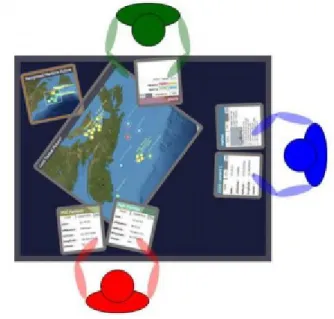
My particular research interest is the application of tabletop displays in scenarios where multiple people work together to make decisions, such as command-and-control or emergency response situations, when collaborative use of 2D data, such as a map with geographical information, can help provide situational awareness. An example of this is the investigation conducted by Scott et al. (2010) on the role of digital tabletops in a naval command-and-control environment. Figure 2 shows the top-down view of the prototype where it allowed multiple users around the table to interact with a windowed view of the area of interest as well as other data windows through a pen interface.
Figure 2: Application of table in naval command and control scenario (Scott et al., 2010, with permission)
Command and control involving the navigation of geospatial data is also found in entertainment. Real-time strategy (RTS) is a genre of video game that resembles in many ways the command and control environment. The player interacts with his/her units through a map interface with a bird’s eye view of the area of operation. In order to effectively manage his/her army, the player must navigate to different parts of the map to give commands to different units. Tse et al. (2006) ported Warcraft III, a popular RTS game by Blizzard Entertainment, onto the DiamondTouch and used a software wrapper to enable multiple players to collaboratively command the same army. While this concept shows how multiple players can use touch gestures simultaneously to command units on the map (i.e.,
simultaneously give commands to units on the screen), and collaborate when the view is stationary, it does not provide individual workspaces for each user. This thesis aims to provide these workspaces.
More recently, at Electronic Entertainment Exposition 2009 (www.e3expo.com), an annual video game conference where game developers demonstrate their new games for the year, game developer Ubisoft (www.ubisoft.com) showed R.U.S.E., an RTS game originally built for mouse and keyboard interaction, running on an interactive tabletop. The demonstrator used touch to both navigate the map and manipulate units on the screen1. In the video, it can be seen that the presenter was able to use
touch gesture to navigate the battlefield and issue commands to units. However, despite the tabletop form factor, it lacks the support for collaboration. Only one user can interact with the game at any one time.
While all of the applications above provide a collaborative environment in which multiple users can interact with the workspace, none of them provides the ability for users to navigate independently of one another in the same shared space. This thesis aims to address this issue by proposing a design that provides each collaborator with their own personal, but connected, workspace.
2.2 Collaborating with the Tabletop
Other research has explored collaboration around a table, and this work builds upon this literature by creating a technique that bridges collaboration and navigation. The Workspace Awareness
Framework for Real-Time Groupware (Gutwin & Greenberg, 2002) was created to help the development of software for distributed groups. The underlying concepts of workspace awareness also apply to co-located settings, such as tabletops. Workspace awareness (WA) is defined as the-up-to-the-moment understanding of how other people are interacting with a shared workspace (Gutwin & Greenberg, 1996, p.208-209). While situation awareness (SA) refers to a person’s awareness of what is happening around him/her (Endsley, 1995), WA is a specialized kind of SA that involves the state of the workspace and the domain task (Gutwin & Greenbergy, 2002, p.417). In a collaborative situation, WA further includes the collaboration and the state of the shared workspace. Workspace awareness supports collaboration by reducing effort, increasing efficiency, and reducing errors for the activities of collaboration. We hypothesize that an interaction technique that supports workspace awareness will better serve the user. This thesis intends to develop a multiuser interaction technique that facilitates WA.
One of Scott et al.’s (2003) system guidelines for tabletop displays calls for designs to support simultaneous user interaction. This is especially important, as the large size of the tabletop affords simultaneous use by multiple users. Research on territoriality (Scott et al. 2004) showed that tabletop users keep separate spaces for personal work and group work. Social conventions discourage users from intruding on another user’s personal workspace. This is related to the protection activity, a subtask in the Mechanics of Collaboration (Gutwin & Greenberg, 2000), which break down the
being changed by others using the groupware. Scott et al.’s (2004) territoriality study involves manipulation of pieces of discrete data/objects in a shared space. Territoriality is shown through placement of mobile virtual objects. Collaborators all share the perspective of the workspace while at the same time manually maintained their border through placement of virtual objects. This study shows that people around the tabletop implicitly created personal territories. This thesis builds on the idea of territoriality on the tabletop by using the system to allow individual users to manipulate their own view without interfering those of others, thus allowing territoriality.
2.3 Information Visualization Techniques
Information visualization (InfoVis) is a branch of research that studies the presentation of data. A known challenge in HCI is displaying a large amount of available information in the limited screen space. Despite the large size of the tabletop’s display space, it is not always possible to place every piece of data on it. In the case of collaboration, not only should the tabletop support the exploration (in the form of panning, zooming, and rotating) of the information as a group, but also that of individual users around the table. The connection between InfoVis techniques and collaboration was evident in Tang et al.’s study (2006) where the effects of InfoVis techniques on collaborative coupling, namely, the degree to which the participants interact with each other, in the exploration of fixed spatial data were investigated. The study’s goal was to find out whether different visualization techniques would change the degree to which partners collaborate with each other. Participants were given a pathfinding task on a large map and found that different visualization techniques affect collaboration styles. For example, collaborators that were provided with localized lenses spent more time working on the problem individually. Those who used filters, graphical overlays that cover that entire map, spent more time working in a more tightly coupled manner. Instead of looking at the amount of collaboration, this thesis will instead focus on InfoVis techniques that improve the quality of collaboration by reducing interference between user workspaces and facilitating workspace awareness between collaborators. In the following subsections, I discuss specific InfoVis techniques that are relevant to addressing the collaborative exploration of spatial data on the tabletop.
2.3.1 Detail-in-context InfoVis Techniques
When exploring spatial data such as maps and large graphs, Shneiderman’s Information-Seeking Mantra can be applied: overview, zoom and filter, details-on-demand, relate (Shneiderman, 1996). It can be useful to see an overview of the entire data set, to gain an understanding at a global level, such
as an entire route on a map, or a global view of how nodes are connected in a large graph. At the same time, it may also be necessary to drill down or zoom to specific areas of interest and see the data in finer detail. While in this detail view, some sort of connection between this view and the larger global view provides the user with the awareness of how this detail relates to its surrounding larger data set. This particular kind of information display where users can see details within a larger set of data is called detail-in-context presentation (Spence & Apperley, 1982; Furnas, 1986; Sarkar & Brown, 1994).
Spence and Apperley (1982) were some of the first researchers to present a detail-in-context display with their Bifocal Display. They describe a segmented touch screen in which the left most pane shows a “demagnified” graphical view of the contents of a database. The user could see the details of the contents by moving a selector onto an item. The contents of the item are then expanded onto the second pane. Furnas (1986) presented the generalized fisheyes which showed the current area of focus and its immediate surroundings in detail. For things further away, only major
“landmarks” are shown. The example in that paper showed a generalized text-based example where the code in the lines surrounding the cursor is shown in detail. Further away from the cursor, only lines with major keywords such as “if”, “else”, or “while” are shown.
Sarkar and Brown (1994) then adapted Furnas’ idea for graphs and the “graphical fisheyes”. The example in the paper shows how this detail-in-context method enlarges a particular item in a network graph and displays the items connected by surrounding edges in decreasing magnification. Other methods make use of 3D manipulation and perspective viewing to show the connection between the area in focus and the surrounding area. Perspective Wall (Mackinlay et al., 1991), Document Lens (Robertson & Mackinlay, 1993) and Pliable Surfaces (Carpendale et al., 1995) all show detail by bringing the area of focus closer while leaving the surrounding area further away. The Manhattan Lens also follows the same idea where the area of interest appears protruded from the map’s surface (Carpendale & Montagnese, 2001).
The many detail-in-context visualization techniques proposed were seen as distinct methods. Furnas and Bederson’s (1995) space-scale diagram provided an analytic framework to visualize and characterize different techniques. Drawing on the space-scale diagram framework, Carpendale & Montagnese’s (2001) Elastic Presentation Framework (EPF) presented a unified mathematical
differences in the characteristics in transition between the area of focus and the surrounding map. The EPF made it possible to incorporate a number of techniques in the same interface.
A highly emphasized part of EPF is the idea of resilient deformability. It is the display space’s ability to be stretched and the ability to return to its original shape. In collaboration, it is likely that personal workspace needs to be created and reintegrated with the larger workspace. This thesis will leverage the detail-in-context visualization techniques and workspace deformability discussed above to facilitate the creation and re-integration of personal views that will result from simultaneous navigation of multiple users.
2.3.2 Multi-Focus Interaction
To facilitate collaboration, the tabletop could integrate multiple detail-in-context views such that more than one user can explore the content being displayed. A specific technique that addresses this is the Mélange space folding method for multi-focus interaction (Elmqvist et al., 2008). This method was designed to have four requirements in mind.
1. Guaranteed focus visibility. Multiple areas of focus must be simultaneously visible. 2. Surrounding context visibility. The area surrounding the areas of focus should be visible. 3. Intervening context awareness. The space between focus regions should be shown to give a
frame of reference.
4. Distance awareness. Users should be able to tell how far the focus regions are apart. To accommodate multiple focus areas in a single display, the Mélange technique distorts the intervening regions between the two view areas in the form of folded space. The depth of the folded space gives the notion of distance between the two spaces. The compact folded region also provides context between the view areas. While this method supports multiple focus regions and has the potential to support collaboration, Elmqvist et al. only conducted a user study on single-user tasks. The search and estimation tasks call for dual focus regions. However, at any point, only one region was user controlled while the other was fixed to a primary focus view. It was unclear how the technique would behave when both views are manipulated simultaneously in a collaborative setting.
It can be argued that even though Mélange was created with single user, multiple-focus scenario in mind, the same requirements that it set out to satisfy, namely providing guaranteed focus visibility, surrounding context visibility, intervening context awareness, and distance awareness, are also
applicable to multiple-user, multiple focus scenarios in collaborative navigation. As such, a Melange-like distortion between workspaces is incorporated in the design of the proposed interaction technique proposed in this thesis to provide awareness between collaborators of the relations between their workspaces.
2.3.3 Incorporation of Physical Metaphor
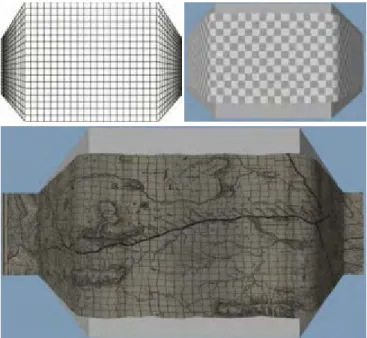
Mélange borrowed from the physical metaphor of folding maps. For example, in the real world, when a person needs to see two different areas on a paper map at the same time, the unneeded parts can be folded away. Another technique that borrowed heavily from physical metaphors is the Information Cloth (Mikulecky et al., 2011). Here data such as a geographical map is rendered as the texture of a malleable cloth that can be stretched, pinched, and folded. To create focus areas, various resizable shapes can be placed below the cloth. As the cloth is placed on top of the shapes, the physics engine deforms the cloth along with its data texture according to the shapes below. Various distortion techniques like Perspective Wall (Figure 3), Graphical Fisheye Lenses (Figure 4) and, to a certain degree, Manhattan Lenses (Figure 5) can be created by placing the appropriate object under the cloth.
Figure 3: Information cloth implementation of Perspective Wall (Mikulecky et al., 2011, with permission)
Figure 4: Information cloth implementation of Graphical Fisheye (Mikulecky et al., 2011, with permission)
Figure 5: Information cloth implementation of Manhattan Lens (Mikulecky et al., 2011, with permission)
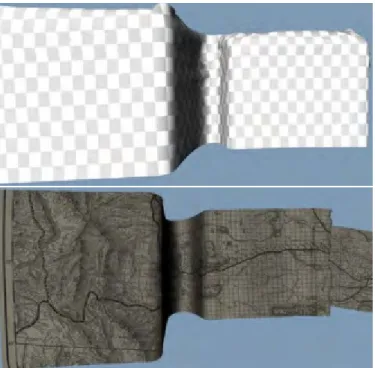
Other distortions like the fold in the Mélange technique can also be reproduced by draping the cloth over two shapes, leaving the middle hanging.
Figure 6: Information cloth implementation of Malange (Mikulecky et al., 2011, with permission)
The Information Cloth technique has the advantage of allowing multiple collaborators to interact with the data simultaneously. The cloth’s physical behaviour naturally addresses the issues of continuity between focus areas and provides context. When different focus areas are manipulated simultaneously, the cloth simply reacts by stretching or folding as defined by the physics engine. In many ways, this information visualization technique is very close to solving the issue for multiple focus areas in collaborative settings.
While this work uses a cloth-like interaction technique similar to the one described in this thesis, their work does not have a mechanism to dynamically separate individual workspaces. For example, when multiple users simultaneously pan away in different directions, the entire table view becomes stretched and deformed as seen in Figure 7.
Figure 7: Distortion affects the entire area in Information Cloth (Mikulecky et al., 2011, with permission)
The distortion can interfere with individual exploration. To address this, the interaction technique proposed by this thesis provides an undistorted view within each user’s workspace by limiting the distortion to the borders between workspaces. In addition, these borders adjust dynamically according to the movements within each individual workspace.
2.4 Summary
Much existing research has been done in the areas of multi-touch 3D navigation, collaboration using the tabletop, and information visualization. Important insights from each research area are:
• 3D multi-touch manipulation techniques such as Westerman’s RST (1999) and Hancock et al.’s shallow-depth 3D interaction (2007) allow multiple users around the tabletop to simultaneously manipulate objects on a shared workspace.
• Taking the subtask for protection from Gutwin & Greenberg’s Mechanics of Collaboration (2000) and applying it to Scott et al.’s concept of territoriality (2004) for the tabletop,
suggests that a collaborative navigation technique should include affordances for creating and isolating personal workspaces within the shared space.
• The idea of malleable workspaces like the information cloth (Mikulecky et al., 2011) and multi-focus interaction techniques like Mélange (Elmqvist et al., 2008) can be leveraged in the interaction between individual work spaces as a mechanism to facilitate workspace awareness by representing spatial relations between each individual’s view.
Moving forward, this thesis will build on the work above with the lessons learned from the exploratory study of popular screen-sharing techniques already in use in video games to inform the design and implementation of a novel collaborative navigation technique for tabletop displays.
Chapter 3
Exploratory Study
As very little research on collaborative navigation on the tabletop exists, my research effort began with an exploratory study on existing collaborative techniques in console video games featuring single screen cooperative play. While it could be argued that the players do not interact directly with the screen using touches as people do when using they use tabletops, the underlying screen sharing issues are very similar. In both cases, two collaborators need to navigate a virtual space while sharing a common display. Two games that employed very different screen-sharing techniques were selected. The first is the split screen technique used by Call of Duty: BlackOps, a first-person shooter video game. Players in this game mode simultaneously navigate the game’s virtual environment in their own halves of the split view. This is similar to each player having his/her own personal workspace. The second technique is LEGO Star War’s shared-view. In this adventure game, two players navigate the game’s virtual world via a single common perspective that adjusts continuously to keep both players’ avatars in view.
3.1 Motivation for Studying Collaboration in Video Games
There are two reasons why studying collaboration in video games is a good idea. The first reason was quality. The video game industry is competitive. Vast amounts of effort and resources have been spent by game studios to make their games fun and the user interfaces efficient. The most popular games were ones that had been refined over many iterations and had large fan bases. The two games chosen represented the state-of-the-art the gaming industry offered at the time of the study. The second reason was availability. Video games were one of the places where matching applications were readily available. While the concept of collaborative navigation on the table top was relatively rare, the same concept could be found in multiple console video game titles.
Two very popular video games had in them a built-in collaborative navigation component that would be examined in this study. The first game was called Call of Duty (COD) Black Ops. It was a first-person shooter in which players navigated through the game world in a first-person perspective. The second game was called LEGO Star Wars. Players here navigated the game world looking down on their avatars in a third person perspective. In both of these games, players had to collaborate with their partners in order to complete game objectives. In COD Black Ops, players were trapped in a
Star Wars, players took on different characters of the Star Wars movie trilogy and worked together to advance through the storylines of the movie.
More important was the fact that the two games sported different screen sharing techniques for collaborative play. Very much like Tang et al.’s study (2006) where different InfoVis techniques had an effect on the participants’ level of collaboration, this exploratory study aimed to find out how the different screen sharing modes affected how the players navigate collaboratively, and the interaction with their partners. To the author's knowledge, there are no existing techniques for collaboratively navigating on a tabletop display. Thus, in order to inform the design of a collaborative tabletop navigation technique, I look to existing collaborative navigation techniques in video games, of which there are several. The expected end result of this exploratory study was a set of implications that will inform the design of a collaborative navigation technique for the tabletop.
3.2 Methodology Overview
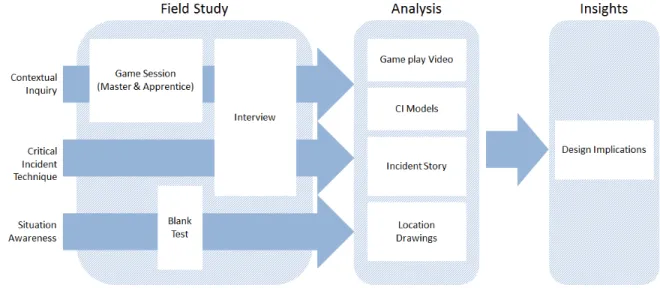
Three research techniques were used in this study: contextual inquiry (Holtzblatt et al., 1993), critical incident technique (Flanagan, 1954), and situation awareness analysis (Endsley, 1988). Figure 1The rationale and the application of specific techniques will be discussed in respective sections below.
Figure 8 illustrates how the methodologies were applied and the sequence of associated research tasks. A total of eight people in groups of two were recruited in this study. Participants were male, between the ages of 25 and 30. Six of the eight participants were graduate students at the time of the study. The two others were adults with undergraduate degrees and were working full-time in the technology industry.
The study began with the observation portion of the contextual inquiry. Each group was allowed to play the first game for up to 20 minutes. At some point during the 20-minute session, the game play was suspended and a blank test in which the game display was abruptly shut off and the players were asked to draw the details of the environment in which they were navigating was conducted to test the participants’ situation awareness. After the game play, an open-ended interview was conducted as part of the interview portion of the contextual inquiry. The participants would also be asked to recall any memorable moments in the game. This was to gather additional data for the critical incident technique. This process would be repeated for the second game. The order in which the groups played
At the end of the study, over six hours of video was recorded. The data were then reviewed and compiled. As well, contextual inquiry models were constructed to determine any breakdowns during the observation. Specific issues brought up by the participants as critical incidents are analyzed in more details. Design implications were then drawn from the analysis of the data collected.
Figure 8: Exploratory study overview
3.3 Contextual Inquiry
Contextual inquiry (CI) was chosen to jump start this exploratory study because its master/apprentice model (Beyer & Holtzblatt, 1997) provided the researcher (the apprentice) with the much needed exposure to the users’ (master) environment. As video gaming was largely an experiential activity, being there to observe and interact with the users first hand during game play served as a good starting point for the researcher to begin learning about the users’ tasks.
3.3.1 Method
According to Beyer & Holtzblatt (1997), CI’s core principles are context, partnership, interpretation, and focus. These principles were employed to provide systematic mechanisms with which to study the work task. The following explains how each of these principles was addressed in this study.
3.3.1.1 Context
This principle called for the research to be physically present in the users’ native work environment. This was so that the researcher could be immersed in the richness of the user environment to gather what Bayer called on-going experience rather than summary experience, and concrete data instead of abstract data (Beyer & Holtzblatt, 1997).
To address this, the researcher was physically present during all of the user game plays. Due to logistical limitations, it was not always possible to visit each participant in their native play environment. As such, the researcher initially conducted observations and interviews at a pair of users’ home where they normally play video games. Special attention was paid to the placement of the following: display, console, seating arrangements. A physical arrangement similar to the living room was then reproduced at the lab where subsequent participants were invited to be observed and interviewed. Participants were free to rearrange the setting as needed.
3.3.1.2 Partnership
This principle called for the adherence to the master/apprentice relationship between the researcher and the participants during the inquiry.
To do this, the researcher made an attempt to maintain a collaborative partnership by avoiding the use of a questionnaire or using technical jargon when asking questions. This was to avoid falling into the role of the interviewer/interviewee and the expert/novice.
3.3.1.3 Interpretation
This principle called for the researcher to confirm his interpretation of the on-going action with the participants. As the participants were engaged in the activity, they could directly use the knowledge in their working memory at the time to fine tune the researcher’s understanding.
To do this, the researcher in this study employed the watch and probe technique as described by Bayer & Holtzblatt (1997). Probing questions or statements were posted to the participants as the action occurred to encourage explanations. An example of this occurred in the following dialog between the researcher and Participant 1, an expert COD Black Ops player.
P1: Just waiting.
Researcher was not sure what he was waiting for at this point. Then a zombie materialized in the center of P1’s crosshairs and P1 promptly shot him.
Researcher: Oh! You wanted to get a good shot on him as they come in! P1: Yep!
Another zombie materialized again in the same spot and P1’s quickly shot him. P1: Ha ha, you like that? Another headshot.
3.3.1.4 Focus
This principle called for the researcher to allow the users to talk about things that they found were important. At the same time, since this was an exploratory study on the subject of 3D navigation, the researcher tried to place emphasis on collaboration and navigational matters. This was done by first interpreting correctly what the users were saying and what they, the masters, found important. If the matter was related to the mentioned area of interest, the researcher would then steer the conversation in that direction. The following is an example dialog in which this happened. P1 and P2 were both expert gamers, and were talking to the researcher about the PlayStation 3 controls in COD Black Ops. The researcher noticed something interesting in the dialog and steered the conversation in that
direction.
P2: This is nice [holding up the game pad], because you have all your buttons at your fingertips. P1 looked intently at his game pad
P1: How do you strafe? Because you aren’t using these. [P1 holds the gamepad up so P2 can see and wiggles the analog joysticks]
P2: You use these. [P2 wiggle the left analog joystick on his game pad] P1: So you can’t look around on this?
P2: Wait, sorry, hold on…
At this point, the researcher suspected that the players didn’t consciously remember specific controls. Researcher: Wait, can you guys tell me what the controls are?
P1 and P2 struggled and finally pieced it together. They then went on to explain that they didn’t explicitly remember what the controls were. It was just “instinct”.
3.3.2 Findings
CI models were constructed using the data gathered during the observation phase. The physical model shows the settings under which the observations were carried out. The artifact model shows the virtual environment in each of the screen sharing modes. The flow model shows the communication between the participants in each group.
3.3.2.1 Physical Model
Figure 9 shows the physical model with overlays identifying the physical components in the
environment over the photographs taken of the environment in which the gaming sessions occurred. On the right, the figure showed the native environment in which one of the participants regularly played video games. In this case, it was the participant’s living room. Items of interest were highlighted. The white dashed lines provide depth references of each item in the photos so that the relative position to each other was clearer.
To begin, located at the back of the room was the large screen display on which video and audio of the game were emitted. In front of it was the PlayStation 3 (blue square), the video game console on which both games were played. Moving towards the front, between the console and the user was the wireless controller (four-way directional icons) via which the user provide inputs to the game. The controller also provided vibrational feedback to the user. The users (circles) were observed to be sitting on coaches (clouds) facing the screen with the controllers in front of them. Two pieces of non-native equipment were introduced into the environment by the researcher. A camera (triangle) was placed in close proximity to the screen facing the users in order to capture the users’ physical actions during the play. A laptop equipped with an integrated webcam was placed in front of the game display in order to capture the users’ actions in the virtual world.
Due to logistical reasons, two of the groups were invited to play at the researcher’s lab space instead. An effort was made to ensure that all of the relevant components observed during previous sessions at participants’ native environment were present at the lab. They were also placed in very similar sequential order starting with the screen, then the console, the controllers, and finally some
Figure 9: The video gaming environment at the participants’ living room (right) and the setup at the lab (left)
While not explicitly told to do so, the participants were not kept from moving the items (or to move about on their own) in either their native environment or the lab. Participants were not observed to be very mobile over the course of the gaming session. Movements were observed to be limited to their heads and upper bodies.
During the follow-on interview, the participants were asked if they had any comments regarding the physical environment. There appeared to be a preference for large displays and comfortable seating. No apparent breakdowns were observed in this model.
3.3.2.2 Flow model
CI’s flow model was used in the following to represent the information flow between players. Normally, each flow model diagram is constructed in the perspective of a single user. Due to the collaborative nature of the task being studied, it was modified to include the player and his partner (labeled Player 1 and Player 2). Two flow models were constructed, one for split screen mode, and one for single screen mode.
3.3.2.2.1Split Screen Mode (Call of Duty Black Ops)
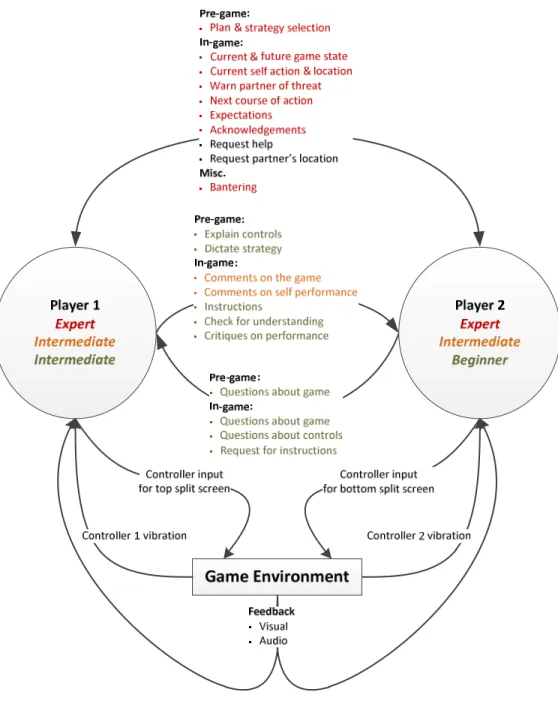
The model in Figure 10 uses colour codes to show a composite view of the interaction between players of varying expertise. The colour red represented the information flow between expert players, amber represented that between intermediate players, and green represents that between the
players, the communication was almost always two-way. The amount of information flow was very symmetrical. This was represented by the dual arrow connectors between expert players. For each piece of information or comment voiced by one player, the other expert player would either respond with another piece of related information or with an acknowledgement. The following was an example exchange between two expert players during Call of Duty Black Ops.
P1 was at the top of a long stair case, fighting off enemies that were coming up.
P1: There is three coming up the stairs… P2: That’s not good, P1!
P2 started running up a different staircase to get to P1.
P1: Are you upstairs yet? Ah… I can’t get headshots on them. P2: I am coming up on the other side. HEY, guys RIGHT behind you! P1: Ack! Running.
P2 started shooting the enemies behind P1 as P1 started running for cover.
P2: Got your back! I got them. I got them. You got a guy chasing you still.
Also being illustrated in the diagram was the flow of information between Intermediate-intermediate (amber) and intermediate-beginner (green) players. They tended to employ more one-way
communication and the flow was not necessarily symmetrical. This was illustrated by the single direction arrows. Figure 10 further highlighted specific types of information that flowed between players. The model divided the specific types of exchanges into those that occurred pre-game and in-game.
Figure 10: Flow model showing the interaction between players with different skills (represented by different colours) and the game environment in COD Black Ops.
3.3.2.2.1.1Pre-game
The difference in information exchange began early. Expert players were observed to have begun their planning before entering the game environment (while the game was loading). They would bring up a set of possible strategies, discuss them, and then choose one. Such planning or pre-game
exchange did not occur between the intermediate-intermediate players. The Intermediate-beginner pair did have a pre-game exchange. The intermediate player began by reminding the beginner player of the buttons on the controller. The intermediate player also picked a plan and told the beginner player that “I will let you know what to do.”
3.3.2.2.1.2In-game
Similar to pre-game planning, there was also a significant difference in the communication flow between the pairs of players of various expertise levels.
During the actual game play, expert players were constantly exchanging with each other the current game state, where they were, and what they were doing. These were listed as the top two types of communication between expert players in the flow diagram (Figure 10). The information was always given voluntarily, without being prompted by the partner. For instance, one of the players would say, “I am upstairs.” His partner would immediately reply, “I am downstairs.”
The exchanges also exhibited a degree of least collaborative effort (Clark & Brennan, 1991). It was a principle in communication grounding that stated participants in a conversation would do the least work possible to achieve mutual understanding. The following exchange was one of the examples.
P1: You watching the… uh… [pause]
P1 became occupied with an enemy who just appeared.
P2: Main door? P1: Yeah. P2: I’m out.
P1: Out? [pause] Oh you left! Ah, vanity! P2: Ha yes!
judging from P2’s response. P2 also exercised least collaborative effort when he simply said he was out and left P1 to figure out what he meant. P1, puzzled at first, quickly figured out that “out” meant outside the current room they were in, where there were better weapons and more enemies outside that would give P2 more points. Hence he made the “vanity” comment, to which P2 laughed. It was likely that their ability to communicate using what would appear to a newcomer as disjointed exchanges was supported by their prior experience and history together as well as visual clues provided by the game.
While the expert players did not always have their partner in view, when they spotted possible threats moving towards their partner’s approximate location, they always passed that information along. In between waves of enemies, when it was not busy, the expert players would turn their conversation to planning their next move (i.e, when to unlock the next level and move onto the next location). Silence was rare.
Two-way communication that was common to players of all levels was requesting help and requesting their partner’s location (both in black text in the diagram). The latter request was often a response to the former. This was interesting, since players still requested this information verbally when visual aid showing the relative location of their partner was available on the display.
There was significantly less traffic between intermediate players during the game. They made comments about the game such as, “I wish the shotgun comes with more than two shells,“ and “Oh, that didn’t work.” These comments did not appear to be directed at anyone in particular. A response was rarely given by the partner. In between rounds, where expert players would talk about the game in great details, breaking down what happened and what went wrong, intermediate players simply had much less to say.
The information flow between the intermediate and beginner player was very much like that of a teacher and a student. The intermediate player mostly gave instructions and told the beginner player if he was performing the right actions. The beginner in turn mostly asked about what he should do next, what controls perform specific action, and general questions about the game. The following were two observed exchanges between P3 (intermediate player) and P4 (beginner player).
P4: How do you change weapons?
P3: Triangle [button]. But you don’t want to, because the zombies right now takes six or seven shots to kill them.
Here, the beginner started asking a question. The intermediate player provided the answer, as well as advice that he should keep his current weapon rather than switching to one that’s less powerful. The following example dealt with directions.
P3: Okay, let’s go outside. Do you see me? Okay, I am coming back in. Do you see me now? [P3 could see P4 in his view] Right behind you, right behind you.
P4: Okay… [P4 turned around to follow P3]
P3: So it’s to your left. See the light [shining in through the door from the outside]? Just follow the light… just follow me…
Note that P3 provided redundant instructions in the last comment. He told P4 to follow the light, as well as to follow him. When asked why he did that, P3 commented that he was in front of P4 (in the game) and couldn’t tell if P4 was following him or what he was seeing. He decided to give both instructions just in case. This was interesting. In split screen mode, P3 only had to look down to see what P4 was looking at. Despite this, all the players, expert, intermediate and beginners alike, stated that they rarely look at the bottom screen.
3.3.2.2.2Single Screen Mode (LEGO Star Wars)
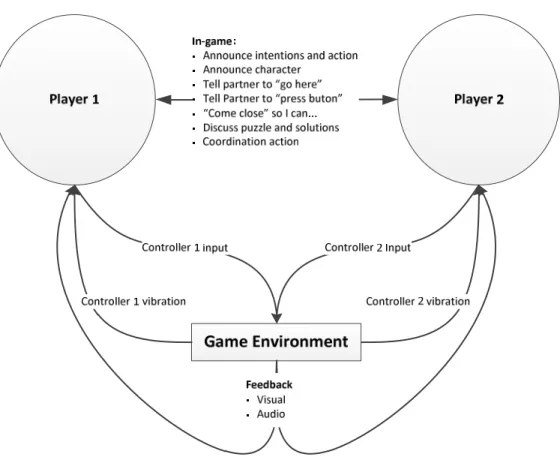
The following (Figure 11) shows the flow model for LEGO Star Wars. Since none of the participants recruited for this study had ever played the game, skill level was not a factor in this model. As such, the pair of participants was simply labeled as Player 1 and Player 2. There was also a difference in the players’ interaction with the game environment between this and the previous flow model. Referring back to the flow model for Call of Duty Black Ops’ split screen mode (Figure 10), even though both players had equal access to the game environment, the controller input from each player affected only the viewing perspective of the split screen that was under his control. Here, since there was only a single viewing perspective, action from either player affected the entire visual display (illustrated by both arrows joining in the controller input). The details of the controls will be discussed later in with the artifact model.
Figure 11: Flow model showing the interaction between players and the game environment (LEGO Star Wars)
The interaction between the participants while playing LEGO Star Wars was different from when they were playing Call of Duty Black Ops. The LEGO game play required much closer cooperation between the players. In many case, in order to advance to the next level of the game, both players must each press a button or toggle a lever at different parts of the map at the same time to unlock a door or a gate. This promoted heavy two-way communication between the two players. Information used to coordinate flowed continuously between players through the game as they coordinated with each other to solve puzzles. Figure 12 showed an example of such collaboration. Here, the two players were trying to get to the control panel at the top via the yellow elevators. These elevators could only be operated by a player’s telekinesis ability. The catch here was that a passenger could not operate his own elevator. Here, the players solved this puzzle by each getting on an elevator, and then using his telekinesis ability (shown by the respective blue and green aura) to lift his partner’s elevator. Exchanges that facilitate this type of coordination such as those described in the model represented the bulk of the communication traffic.
Figure 12: Two players collaborating in LEGO Star Wars
3.3.2.3 Artifact Model
According to Bayer & Holtzblatt (1997), artifacts are things that people create, use, and modify during the course of their task. CI’s artifact model captured the details of these artifacts and used them to tell a story on how people worked. While the users did not create anything during their gaming session, they were actively using the feedback provided by the display and modifying the 3D virtual environment through the PlayStation 3 controller. The following artifact models explored the two different display modes and the controller.
3.3.2.3.1Split Screen Mode
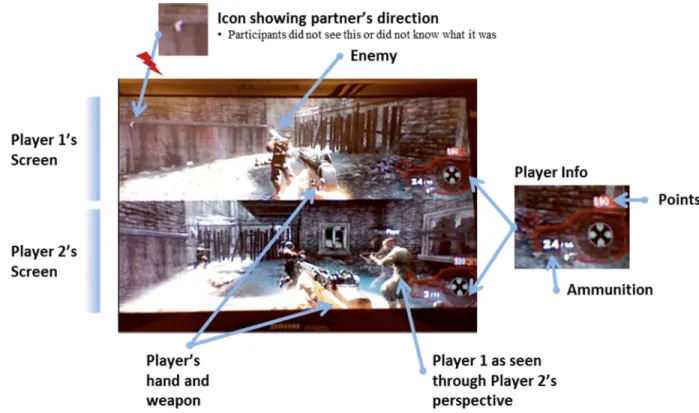
In Call of Duty Black Ops, the users were presented with a split screen that provided the display for Player 1 on the top and that for Player 2 on the bottom. The artifact model is illustrated in Figure 13. In Part 1 of the model (Figure 13), the display showed the virtual environment through an eye-level first person perspective of the player’s virtual presence in the environment. A hand holding a weapon could be seen extended from the bottom of the player’s screen to show the direction of fire and to provide the user with a reference for depth perception.
The display also sported a virtual heads-up display (HUD) that provided support information related to the virtual world by overlaying it onto the screen in real time. For example, player
bottom right. In the center of the player’s view (not labeled) was a small crosshair that showed where a player’s shot would land.
Figure 13: Artifact model of Call of Duty Black Ops’ split screen display mode (Part 1)
To support situation awareness, the HUD employed arrow icons (top left in Figure 13) to indicate the relative direction of the player’s partner. In Figure 13, looking at Player 2’s screen (bottom split screen), it could be seen that Player 1’s avatar (with a white label above its head) was standing in Player 2’s view. This meant that from a top down point of view, Player 2 was standing to Player 1’s left, and a little in front. To represent this spatial relationship, Player 1’s HUD displayed an arrow icon that was pointed at the screen’s 10 o’clock position. In this convention, the 12 o’clock position was directly forward. As an example, if the partner were directly behind the player, the arrow would be pointed at the six o’clock position (drawn at the bottom where the “hand and gun” was, and pointed towards the ground). Figure 14 showed where the icon would appear in a player’s split screen depending on the partner’s relative position (gray circles) to a player facing 12 o’clock (blue figure in the middle).
Figure 14: Icons indicating the various relative directions of Player 1’s partner
A similar technique was used by the game to show the direction of enemy attacks. Figure 15 showed how the HUD used a red circular arc to indicate that the player was being attacked from a certain direction. In the top split screen in Figure 15, the lower left arc indicated that Player 1 was being attacked from the 8 o’clock direction. Player 2, whose screen was showing the top arc, was being attacked directly from the front. The enlarged insert on the right was from a separate instance in the game where the player was being attacked from both 7 and 8 o’clock direction.