Mobile Capture for Wearable Computer Usability Testing
Kent Lyons and Thad Starner
College of Computing, GVU Center
Georgia Institute of Technology
Atlanta, GA 30332-0280 USA
{
kent,thad
}
@cc.gatech.edu
Abstract
The mobility of wearable computers makes usability test-ing difficult. In order to fully understand how a user inter-acts with the wearable, the researcher must examine both the user’s direct interactions with the computer, as well as the external context the user perceives during their interac-tion. We present a tool that augments a wearable computer with additional hardware and software to capture the infor-mation needed to perform a usability study in the field under realistic conditions. We examine the challenges in doing the capture and present our implementation. We also describe VizWear, a tool for examining the captured data. Finally, we present our experiences using the system for a sample user study.
1. Introduction
Wearable computers offer their users great advantages. Because the machine is always with the wearer, the user has quick access to the computer for use in any situation. Likewise, since the machine is worn like an article of cloth-ing and is constantly with the user, the computer can take advantage of the user’s context to anticipate and better re-spond to their needs. However, the great flexibility these machines afford also poses a challenge for studying their use. With the user’s mobility, the wearable can be used in a large variety of contexts which may significantly in-fluence the interaction. Therefore, to fully understand the interaction between the user and the machine the researcher must also examine the context in which the interaction takes place.
There are similarities between wearable and desktop ma-chines. For instance, to study the use of a desktop computer, a researcher must be able to see how a user interacts directly with the machine [4]. However, with a wearable computer, the context of a situation also influences the interactions a user has with the machine. This occurs in two ways. First,
the user may operate the machine differently in various sit-uations. For example, the wearable computer user might use a calendar differently if in the middle of a conversa-tion with another person than when walking down the street alone. With these types of interactions the user is changing her behavior based on her environment. The computer may also change its interactions with the user based on context. Such context-aware applications may significantly change the user experience [3, 9], creating a challenge in designing usability studies. This makes traditional desktop research tools, in general, inadequate for studying wearables.
Previous efforts have often relied on custom solutions to perform user studies [1, 7, 8, 11]. A video camera is of-ten used to record how a user operates in the context of the environment. Some of these studies also record video of the screen shown to the user or record data about the applications used. However, what is needed is a general, reusable tool so that the researcher can focus on performing a study, as opposed to spending efforts building a data col-lection system. This generic tool would aid the researcher in studying wearable computer interactions by capturing the use of the machine in the field under natural circumstances. This paper discusses the design and implementation of such a tool. We provide a capture system that enables a re-searcher to record the interaction a user has with a wearable computer. We also save video from the user’s perspective enabling the researcher to determine the context the user was in when the interactions occurred. Next, we present VizWear, a tool that allows visualization of the captured in-formation and environmental context. Finally, we present a sample study focusing on the effectiveness of our system.
2. System goals
We envision a diverse set of studies for which this tool may be helpful. Our system allows the researcher to study a user’s actions which depend both on his direct interaction with the machine as well as the user’s physical environment.
Some potential studies might include determining the ef-fect of user movement on input and output devices. For example, the researcher could measure how sitting, stand-ing, and walking affect how well the machine can be used to enter data, or how well the machine conveys needed in-formation to the user. Other studies might look into how different social conditions affect the use of the machine. These studies could be difficult to perform in general, but the effectiveness of the input and output peripherals could again be used as a metric. The researcher could measure the number of interactions, typing speed, reaction times, or the number of errors in different social situations such as a one-on-one conversation, giving a talk, or when the user is alone. Other studies might focus on specific tasks such as examining how a calendar is used in different situations.
With all of these studies, the wearable user is very mo-bile, and the context the user is in affects the interactions with the machine. Our primary goal in building this system is to allow researchers to begin studying these types of sit-uations by providing a basic set of tools. We have built a capture system that can be used on a wearable computer in a mobile setting. Additionally, we have provided a tool that allows the researcher to examine this data for both qualita-tive and quantitaqualita-tive effects.
3. Capture requirements
In order to fully capture the experience a user has with the wearable computer, our capture system has two funda-mental requirements. First, the system needs to work in the field under realistic conditions. The second capture re-quirement is the ability of the system to record the wearable user’s perspective. To satisfy the first requirement our sys-tem augments a user’s existing wearable. In order to satisfy the second, we record the user’s direct interactions with the machine and save video taken from the user’s perspective so that the researcher can assess the context of any given situation.
3.1
Capture in the field
The mobility of the user makes studying a user’s interac-tions with a wearable in a laboratory setting difficult. Per-forming studies in a laboratory is convenient, but makes it hard to capture the subtleties of the user’s interactions that would occur in their normal environment. Although much less controlled, a real environment allows the full effects of context on the user and machine to be evaluated. Such a study requires a tool that collects data about interactions between a user, his machine, and the environment. This tool needs to work in the field and capture data from the user’s perspective to give the researcher as much information as possible.
In trying to keep the experience in the field realistic, we need to minimize the impact on the wearable computing ex-perience. We therefore augment an existing wearable in-stead of designing a machine specifically built to capture the needed information. This allows the user the benefit of their normal machine while still allowing the researcher to collect the needed information.
We developed our tool using a Lizzy style wearable com-puter [13]. However, we designed our system to work with as many types of wearable computer hardware as possi-ble. These machines have x86 based processors, often use a Twiddler for input and have head mounted displays such as the MicroOptical [12] or M1. These computers typically run Linux and the X Window System. Our tool augments such a machine with additional hardware and software giv-ing it the ability to capture a view of the user’s experience.
3.2
Wearable user’s perspective
To study the interactions a user has with a wearable in the field, ideally a researcher would have access to the wearer’s perspective. This would allow the researcher to see the in-teractions the user has with the machine and to see how con-text affects those interactions. To get a sense of this perspec-tive, our tool captures the interactions between the user and the machine along with video from the user’s perspective.
We use two techniques to capture the interactions be-tween the the machine and the user. First, we record video of the display shown to the user. This gives the researcher an overview of the machine’s output as seen by the user. Sec-ond, we equip the wearable with additional software that gives the machine the ability to log events generated by ap-plications, input devices such as mice, and output devices such as displays.
Capturing the context of the user is more difficult. Our goal in capture is to collect enough data to allow the re-searcher to see as the user sees and hear as the user hears [13]. This is difficult, but as an approximation, our system records video from cameras placed near the eye.
Figure 1 shows a typical setup used to capture the user’s context which includes a camera on the user’s eyeglasses. The camera points forward, recording in the general direc-tion the user is looking. Another camera, placed in a hat, looks down towards the user’s hands. The hands are inter-esting because they are a major effector on the environment. This camera captures the area directly in front of the user and records any manipulation the user does in this space. Our system is flexible in the number of video streams it can capture. The researcher can configure the system to use only one camera looking forward, or to add more cam-eras looking in other directions such as down towards the hands. This ability gives the researcher the ability to collect as much information as desired.
Figure 1. A sample configuration of cameras used to capture the user’s context. The first camera is mounted on the user’s glasses looking forward, and the second is mounted in a hat looking down towards the user’s hands.
4. Data capture
The capture system has two fundamental tasks. The first is to log the events generated by the applications run on the wearable computer, including all of the input and out-put of the machine. The second task is recording the video needed. The researcher later uses this to aid in the analy-sis of the interaction with the machine, seeing the wearable user’s perspective of his environment. These tasks need to work with the user’s existing wearable computer and min-imize the impact on both the user and the machine, while still recording all of the necessary information.
4.1
Logging application interactions
The capture of application interactions is designed around events. An event is either generated automatically by an application or in response to a user’s input. The event consists of the data the application wants to record and a timestamp of when the event happened. A server is respon-sible for collecting all of the events and logging them to disk. This design was chosen to make it as easy as possible to store information to the capture log.
One method of capturing events is to modify each ap-plication. For example, a library of replacement function calls can output appropriate logging information as well as provide the normal functions expected by the original pro-grammer. This method gives very rich semantic informa-tion about the applicainforma-tion’s run. While our logging and vi-sualization tools are compatible with this methodology we choose instead to augment the underlying windowing sys-tem to log all events generated by its application clients and interface devices. This technique allows our system to work
with unmodified applications and permits testing of legacy applications.
One use of our tool is comparative studies between an old application and a new test application. In addition to writing the new application and performing a user study, both the new and old application would need to be aug-mented to generate information about the interactions so that they could be compared. If each application requires modification, the researcher would need to be very careful to insure that all of the information needed was collected. Since collecting data from users is time consuming, it would be convenient if the system could collect all information available about the interaction. If another piece of infor-mation is desired after completing a study, the raw data is still complete and the information can be extracted. This is difficult to do for any one application and augmenting all applications used on a wearable to provide a complete pic-ture of the machine’s use would be quite tedious.
As a result, we choose to take an approach that captures all interactions the user has with the machine, regardless of the applications run. Since the machine we designed the tool for uses X, we log the X Protocol[10]. The X Proto-col contains all information sent between the X Server and the X Client applications. By logging this information, all of the user’s input and all of the wearable’s output is saved. This is a general solution in that any X Windows applica-tion can be logged automatically, and most applicaapplica-tions de-signed to run on the console can be run inside an Xterm and likewise saved.
The major issue with capturing the X Protocol stream is that the information is removed from the actual application. Instead of being semantically rich, the log contains infor-mation about key presses, and rectangles along with text drawn to the screen. As a result, the burden of recovering the needed semantic information is shifted to the analysis tools.
For example, consider a key press. When the user presses a key on the keyboard, the X Server sends a “Key-Press” event to the client that is to process the key press. The event consists of bookkeeping information in addition to the KeyCode that corresponds to the key pressed. With our system, all of this information is logged automatically when we save the X Protocol data. For example, a key pressed during entry of an appointment in a calendar pro-gram has the form:
KeyPress<root window> <event> <child> < root-x> <root-y> <event-x> <event-y> <state> <time> To later recover which key was pressed for analysis, we must scan the log of events searching for X KeyPress events. We can then use a filter to extract the data and translate it into something meaningful such as the name of the key pressed. Using the above example the raw KeyPress event may become:
Calendar: appointment entry dialog box - “I” A similar process can be used to extract any other informa-tion desired about the interface.
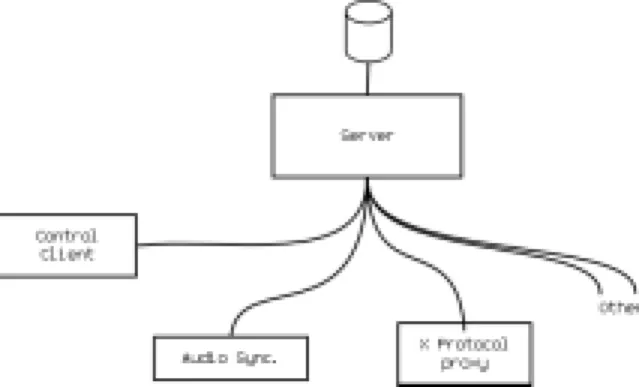
To log all of the events needed to capture the user’s in-teractions with the wearable, we have created a server and set of clients to record events. Each client generates events that log an application’s behavior or the user’s input. The client sends its data to the server to be recorded. The server collects all of the data from the various clients and logs it to disk. This relationship can be seen in Figure 2.
Figure 2.Software architecture for logging interface events. The clients generate data to be logged and send it to the server. The server aggregates the data and writes it to disk.
Our current generic configuration requires three clients. The first is a special client used to inform the server when to start and stop logging information to disk. The audio syn-chronization client controls a custom circuit used for video synchronization. The last client is an X Proxy that inter-cepts the X Protocol. This client is a modified version of Xmond [6]. We changed it so that each message sent be-tween the X Server and an X Client is logged.
The server is capable of accepting data from additional clients. These could be device drivers modified to log more detail information about user input, such as the buttons pressed on a Twiddler. Applications could also be modi-fied to act as clients to send semantic information directly into the log.
4.2
Capturing video
Capturing the user’s perspective in the field requires cap-turing several streams of video. We need to save the video from cameras that provide the researcher with the wearable user’s perspective and the video from the head mounted dis-play. Storing several streams of video data on the wearable while minimizing the impact on both the user and the wear-able computer is a challenge. We explored two options to save the required video data.
First, we investigated recording Digital Video (DV) di-rectly to the wearable’s hard drive using the IEEE 1394 [5] bus. After careful examination, we decided against this op-tion because saving the multiple video streams would drain too many resources from the wearable. This is very unde-sirable since we are trying to keep the wearable experience as realistic as possible. In addition, very few wearable com-puters currently have 1394 capabilities. This could be added to some machines, but we wanted our tool to be compatible with as many different types of wearables as possible.
As a result we record the video directly to DV tape us-ing DV camcorders. This allows us to store two hours of video at a time with each stream of video requiring one cam-corder. Unfortunately this means the user must carry more equipment, where each camcorder weighs approximately one pound. One potential solution to reduce the weight is to use a commercial piece of hardware that combines four ana-log video inputs into one output by putting a video stream in each quadrant of the resulting video. Our current con-figuration only requires 2 or 3 video streams, and only one camcorder would be needed. However, this has the disad-vantage of reducing the resolution of each image. While the loss of resolution might be acceptable for the video record-ing the user’s context in the environment, the loss in resolu-tion would be unacceptable for the video stream recording the view of the head mounted display. Some wearable dis-plays already have greater resolution than the video and any reduction in resolution would limit the system’s utility.
Another problem with recording the video is synchro-nization. The video streams must be synchronized with each other and with the log of application events recorded on the wearable. All of the camcorders and the logging soft-ware can not be started at the exact same moment. Even if they could, the clocks drift relative to each other. There is a timecode written to the DV tape, but this could not be set externally for all of the equipment we found. As a result we have dedicated one of the audio channels to keeping the synchronization.
With a small piece of custom hardware we inject a tone to the audio track under control of the audio synchronization client. A special sequence of tones marks the start of the recording session. The software also puts a one second tone onto the audio track once a minute. After the recording is complete, we synchronize the video to the log by finding the sequence of audio saved in the DV stream that marks the start of the recording. The periodic tones can be compared with the data log to check for and fix any drift in the clocks of the camcorders relative to the wearable’s clock.
5. Capture vest
All of the additional hardware needed to capture the video is placed in a vest worn by the wearable user. Figure
3 shows how all of the additional components are connected to the machine.
Figure 3.Hardware architecture for context capture.
In the normal configuration the wearable computer is at-tached directly to the head mounted display (HMD) through a VGA connection. With the capture hardware added into the system, a VGA to NTSC converter is placed in se-ries. The converter generates the video signal of the screen shown to the user that the camcorder records to the DV tape. The VGA signal is also passed through to the HMD. This configuration works for the current generation of HMDs be-cause the resolution is less than that of NTSC. However as displays increase in resolution more detail is lost and is an-other reason why we also capture the X Protocol. The video gives a sense of the overall interaction, while the X events can be used to recover any details lost.
A camera is attached to the second camcorder. This al-lows the bulky camcorder to be placed conveniently in a vest while the camera head can be placed where needed in order to capture the desired view. Although only one camera is shown in the diagram additional camera / camcorder pairs can be added to allow additional views from the wearable user’s perspective to be captured as in Figure 1.
The last component is “Audio Sync.” This is the cir-cuit that generates the signal used to synchronize the video tapes. This circuit is controlled by the audio synchroniza-tion client program through the wearable computer’s par-allel port (labeled LPT). The output of the circuit is con-nected to each camcorder’s left audio channel input. The audio synchronization circuit is designed around the 555 timer and generates a 4kHz square wave. The circuit is attached to the parallel port allowing the audio tone to be silenced or enabled as needed under software control.
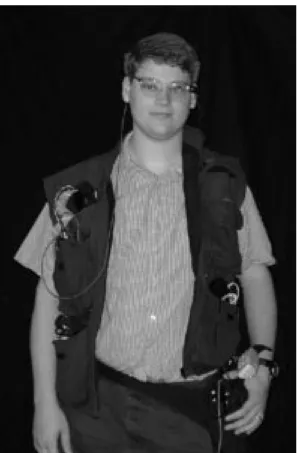
Figure 4 shows the vest on a user with all of the addi-tional hardware attached to the wearable. Here the user has a MicroOptical display attached to the left arm of his glasses. In this configuration only one camera is used to capture the view from the user’s perspective, and it is at-tached to the right arm of the glasses looking forward. The
Figure 4. The capture vest and wearable computer worn by a user. The vest contains the hardware needed to capture the video from the user’s perspec-tive.
vest contains the 2 camcorders, one for the camera and the other recording the HMD display. The vest also contains the NTSC to VGA converter, the camera driver box, the audio synchronization circuit and all of the necessary cables and batteries. The user’s original wearable computer is worn on his left hip.
6. VizWear: an interaction and context
visual-ization program
The components of the system described above enable a researcher to capture the data of a wearable user’s interac-tions in the field. To aid in the analysis of this data we also created VizWear, an application run on a Linux PC. This tool allows the researcher to visualize the interaction infor-mation saved in the event log and relates this data to the video captured. VizWear is used by the researcher for data examination and can also be used to walk the user through his interactions in a post-trial analysis.
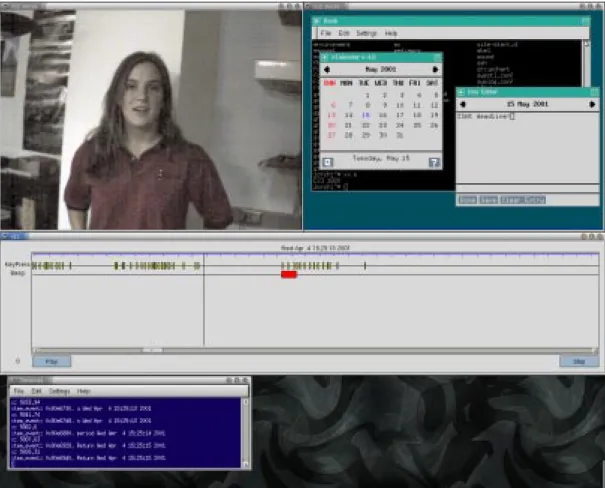
Figure 5.A screenshot of VizWear. In the upper left is the view from a camera placed on the user’s head. The upper right shows the video captured of the user’s HMD. In the middle is the timeline showing the application events. The bottom is the terminal window where the details of the events are printed. All views are synchronized to301 of a second.
the video and application events from a capture session. In this screenshot, the top left window shows the view from the camera mounted on the user’s glasses. The top right window shows information on the user’s HMD at the time. Here, the user has his calendar open. The middle window is a timeline showing the application events. The bottom window shows event details. All video in VizWear is syn-chronized to the timeline of events. For example, scrolling the timeline advances to the correct point in the video and playing the video also plays the timeline.
6.1
Visualizing events
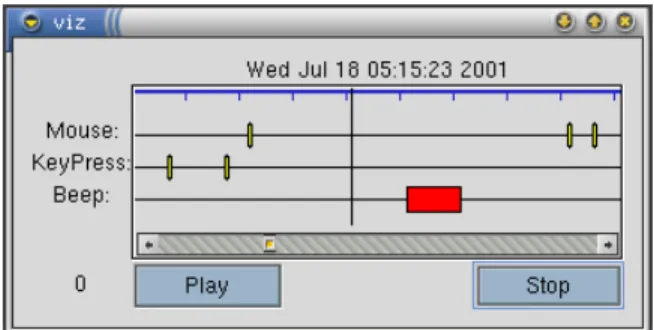
Event data is displayed in VizWear on a timeline. This view is similar to the timeline view of the MITRE Multi-Modal Logger [2]. There are two types of events displayed: points and intervals. A point is represented on the timeline as a vertical line. The KeyPress line in the timeline shown in Figure 6 is an example of this. These are events that have no duration. Intervals are synthesized from two events stored
in the log and are represented by a rectangle that spans the amount of time between the pair of events. For example, the Beep line in the figure shows when a tone is present in the log and on the DV tapes. This is created by combining a pair of ToneOn and ToneOff events to get the duration of the interval.
Each point on the X axis of the timeline is one frame or 1
30of a second. Each small tick mark at the top of the time-line is one second. Larger tick marks denote minutes and hours. Time progresses from earlier on the left to later on the right. The vertical line is the current time under exami-nation and displayed in the above the timeline.
The researcher can use the timeline to examine the data of the event. By using the mouse and hovering over an event the underlying data is printed in the terminal window. Hov-ering over a KeyPress event, for example, prints out the time and name of the key.
Under the timeline are the main controls for the applica-tion. The researcher can use the scroll bar under the timeline
Figure 6. The VizWear timeline shows when events occur and is also the main control for the program.
to move through the data. The Play button starts advancing the events displayed in real time, and Stop halts the play-back. These buttons also control the simultaneous playback of the video.
7. A sample user study
Now that we have presented all of the components of the system we will present a small sample user study. The goal of this study was not to get rigorous results, but instead to evaluate our system. We wanted to try our system on a simple yet realistic study to examine the effectiveness of our tools.
7.1
Study setup
For this sample study we chose to compare two differ-ent mouse input devices. We chose the two versions of the Twiddler, a one-handed chording keyboard / mouse com-monly used on wearable computers. The original Twiddler uses a fluid sensor to detect tilt. The user presses a mouse button then tilts the device forward and backward to move the mouse up and down, and side to side for left and right. The Twiddler2 uses a IBM TrackpointTMcontrolled by the user’s thumb to move the mouse cursor.
In our experiment a single novice wearable user navi-gated through an unmodified version of XCalendar using both input devices. The mouse was used to navigate through a predetermined random set of tasks in the calendar. The user had practiced beforehand with both types of mice on this type of task.
The user performed a set of interactions with each device while sitting and while walking. We used VizWear to ana-lyze the data collected by our system to measure the time it took to perform each mousing operation. The preliminary results were as anticipated. While walking the user took longer using the Twiddler compared to walking with the
Twiddler2. The user also took more time using the mouse while walking that while sitting.
7.2
System evaluation
When asked, the user’s only complaint about the capture was the weight of the vest, but he thought it was bearable es-pecially given that he was already carrying around the wear-able computer. Even so, the weight could be reduced. The easiest way to do this would be to wire up a common power system for the vest. During this study there was one bat-tery for each of the camcorders and another for the camera and VGA to NTSC converter. With a little work these could be consolidated into one battery significantly reducing the weight.
From the researcher’s point of view, the system worked rather well, but there were a few concerns. Reducing the number of cables in the vest and consolidating the power system would aid in starting all of the equipment at the be-ginning of a capture session. Another issue was access to the equipment in the vest while on the user. In order to start the camcorders and make the appropriate connections a great deal of interaction with the vest is required. Our current vest has several pockets and distributes the weight evenly, but it could benefit from customization that would ease access to the necessary components.
Another minor issue during the capture phase of the ex-periment was that there was a slight problem with the au-dio synchronization tone on one of the camcorders during startup. Audio feedback from the camcorder during this time would be useful to verify that the tones are being prop-erly recorded.
The first issue with analyzing the data was the large vol-ume of video collected. During the study, about 20 minutes of video was recorded. This resulted in 7GB of compressed Digital Video between the two video streams.
For our analysis we measure the amount of time it takes the user to move the mouse between two elements in the calendar interface. With VizWear we easily determined when the mouse button was pressed by using the timeline as shown on the first line in Figure 6. Likewise, the user’s HMD view allows us to determine what each mouse press corresponds to in the application and we easily determined when errors were made in the interaction.
The view captured from the camera provides interest-ing insight even in this simple study. This data indicates the user took longer with the original Twiddler during the walking phase of the experiment. It can be seen that as the user walked, the mouse jittered more than in the stationary condition. The user would frequently stop or slow his pace significantly to accommodate for the motion. This effect would have been very difficult to see without access to all of the data our system captures. The synchronization of the
user’s first person view of both the machine and the envi-ronment made performing this type of observation simple.
VizWear could benefit from annotation and simple anal-ysis capabilities. For instance, it would have been conve-nient to select the mouse events of interest on the VizWear timeline. VizWear could then output the desired statistics. As the system is currently implemented, all of this must be done manually.
8. Future work
We feel this system can be a very powerful tool for en-abling the study of the interactions a user has with a wear-able computer in the field. Besides the potential improve-ments mentioned above, there are other ways the tools could be extended.
For instance, it would be useful to improve VizWear’s ability to extract information from the event log. The ad-dition of a simple scripting capability would enhance the functionality of the tool by allowing the researcher to more easily parse the log. The scripting capability could be used to make complex queries on the log that are then displayed in VizWear. Currently all of the data is shown and there is no way to only select subsections of the log.
VizWear could also be modified to playback the applica-tions executed. One possible way to do this is to parse all of the X events and recreate the display shown to the user. If the application itself could be replayed it might be interest-ing to show the context recorded by the video and explore other options available in the application.
Further additions could be made to the system as a whole. For instance, changing the logging tools to send data back to a researcher in real time would be another inter-esting extension. This addition could enable Wizard of Oz style experiments. A researcher could monitor the wearable user’s interaction with a machine through the logging ca-pabilities of the system. The researcher could then control how the wearable applications responded to the user, for in-stance simulating how a software agent might respond to a situation.
Finally, additional clients could be written to monitor more of the wearable’s state. For example, replaying an application would likely require recording additional com-puter state such as network and disk access. Important or commonly used applications could also me modified to di-rectly capture more semantic data about the user’s interac-tion.
9. Conclusion
We have described a mobile context capture architecture designed to assist the study of usability in wearable com-puter applications. Of particular concern is how interactions
vary depending on the context of the user. Additionally, the extreme mobility and weight and size constraints of wear-able computers complicate the design of a generic capture tool.
We have demonstrated a visualization tool that can si-multaneously display the wearable’s interface and the user’s visual environment. This tool is designed to assist experi-menters by placing interactions in context. It can also help subjects remember details of the interaction in post-trial analysis. After using our tools for our sample study, we feel that the system is well suited for its task of enabling the researcher to perform a wearable computer studies.
References
[1] M. Bauer, G. Kortuem, and Z. Segall. Where are you point-ing at?: A study of remote collaboration in a wearable video-conference system. In IEEE Intl. Symp. on Wearable
Com-puters. IEEE Computer Society, 1999.
[2] S. Bayer, L. E. Damianos, R. Kozierok, and J. Mokwa. The MITRE Multi-Modal Logger: its use in evaluation of col-laborative systems. ACM Computing Surveys, 1999. [3] A. Dey. Providing Architectural Support for Building
Context-Aware Applications. PhD thesis, Georgia Institute
of Technology, Atlanta, GA, December 2000.
[4] K. D. Eason. Towards the experimental study of usability.
Behaviour and Information Technology, 1984.
[5] IEEE. 1394 standard for a high performance serial bus. 1995.
[6] G. McFarlane and J. L. Peterson. xmon - interac-tive x protocol monitor, March 1996. Available at: ftp://ftp.x.org/contrib/devel tools/xmon.1.5.6.tar.gz. [7] J. Moffett, D. Wahila, C. Graefe, J. Siegel, and J. Swart.
Enriching the design process: Developing a wearable opera-tor’s assistant. In IEEE Intl. Symp. on Wearable Computers, pages 35–42, Atlanta, GA, 2000.
[8] J. Ockerman. Task Guidance and Procedure Context: Aiding
Workers in Appropriate Procedure Following. PhD thesis,
Georgia Institute of Technology, Atlanta, GA, April 2000. [9] B. Rhodes. Just-In-Time Information Retrieval. PhD thesis,
MIT Media Laboratory, Cambridge, MA, June 2000. [10] R. W. Scheifer. X windows system protocol. 1994. [11] J. Siegel and M. Bauer. A field usability evaluation of a
wearable system. In IEEE Intl. Symp. on Wearable
Comput-ers, pages 18–22, Cambridge, MA, 1997.
[12] M. Spitzer, N. Rensing, R. McClelland, and P. Aquilino. Eyeglass-based systems for wearable computing. In IEEE
Intl. Symp. on Wearable Computers. IEEE Computer
Soci-ety, 1997.
[13] T. Starner. Wearable Computing and Context Awareness. PhD thesis, MIT Media Laboratory, Cambridge, MA, May 1999.