275
Calculus Problem Solution And Simulation Using
GUI Of Matlab
Syaharuddin, Habib Ratu Perwira Negara, Vera Mandailina, Lalu Sucipto
Abstract: This research aims to develop the project application in teaching and learning Calculus using Grapichal User Interface (GUI) of Matlab. The scope of the development result includes (1) PreCalculus, (2) Function Limit, (3) Derivative and its application, and (4) Integral and its application. Every aspect of development is presented according to the standards of material competence, learning achievement indicators, and solutions or settlement steps on each issue presented. This project application can be used by lecturers and students in universities to improve motivation, mastery of material and student learning outcomes in the Calculus course. Development of this project application is done through 4 stages called 4-D namely: Define, Design, Development, and Dissemination. Based on the data analysis, the results obtained at the validation stage of expert validity level average of 3.575, which means "quite valid". Then on a limited trial the average student gave a response of 92.00% which means "very good". While in the first field trial the average student gave a response of 89.30% which means "very good", and in the second field trial the average student gave a responded of 90.15% which means "very good". Besides that, we also solve computational calculus problems in Edwin J. Purcell Dale Varberg's Book of Volume 1 of Edition 5 of 48 questions that are divided into 64 cases.
Index Terms: GUI of Matlab, Teaching, Learning, Calculus.
————————————————————
1
I
NTRODUCTIONCalculus is one of the areas of mathematics that deals mostly with the basic concepts of mathematics, such as (1) Real Number Systems, (2) Functions, (3) Limit, (4) Derivatives, and (5) Integral [1]. Calculus serves as one of the compulsory courses of students throughout Indonesia, especially in the field of science, as a basis for studying various other fields of mathematics. Therefore, Calculus serves as a prerequisite course for other courses such as Advanced Calculus, Differential Equations, Numerical Methods, Real Analysis, Mathematical Statistics, Complex Variable Functions, and others.However, field facts are still found lecturers gives abstractly and not optimal in learning calculus, it is necessary media solution and simulation based to explain the material in order to improve understanding of the concept in each student and able to help students to comprehend widely Calculus material. Development of ICT-based learning especially Calculus must use accurate and optimal simulation based software [1, 2], so MATLAB is the recommended software in this case. MATLAB (matrix laboratory) is a program for numerical analysis and computer, is an advanced mathematical programming language that is in the form of rationale using the properties and form of matrix [6]. Another opinion says that MATLAB is a high-compliant programming language in the computing field, not only has the ability in terms of computing, but also the ability of good visualization. MATLAB has the ability to integrate computing, visualization (simulation) and programming [7].
2
G
UIO
FM
ATLABMatlab (matrix laboratory) which consists of 5 main components namely:
a. Toolbar contains various control tools for Matlab.
b. Current Folder as a place of folders or files that have been stored and connected with Matlab.
c. Windows Command as the main worksheet in Matlab where users build regular scribs direct execution.
d. Workspace as a workspace where files or variables are stored in Command Windows [3.7].
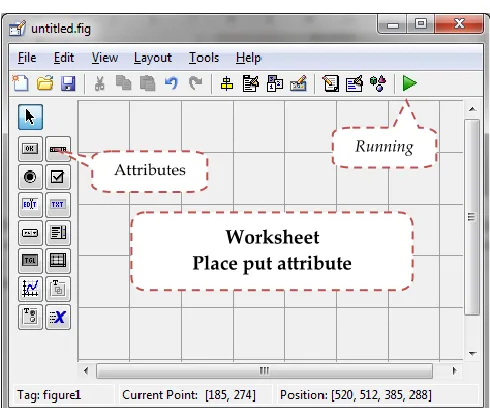
e. Grapichal User Interface (GUI) is one of the components of Matlab to create a more efficient and appealing mathematical problem solving interface [4].
Fig. 1 Grapichal User Interface Matlab
MATLAB has the following benefits: (1) mathematical calculation, (2) numerical computation, (3) simulation and modeling; (4) visualization and data analysis; (5) graphics for science and engineering; and (6) application development, For example by utilizing the GUI. The structure of the programming language used in the application development consists of three logic namely (1) sequential structure, (2) looping structure like: for, while, and repeat until and (3)
Worksheet Place put attribute
Running Attributes
_________________________
Syaharuddin, Muhammadiyah University of Mataram, Indonesia, Email: [email protected]
Habib Ratu Perwira Negara, STMIK Bumigora of Mataram,Indonesia, Email: [email protected]
Vera Mandailina, Muhammadiyah University of Mataram, Indonesia,Email: [email protected]
branching structure like: if then else, and case of. Looping structure is generally used for graph-based simulation-based application development while branching structures are used to solve optimization cases. The attributes used are tailored to the built application, there are seven attributes that are often used in application development besides toolbar as additional settings and attributes when running. But in this study not all attributes are used. The attributes used in the development of this application that is EditText, StatisText, PushButton, Table,
Axes, Panel, and BtnGroup. While the usefulness of each attribute is described in Table 1 below.
TABLE 1 : ATTRIBUTES OF GUI AND ITS FUNCTIONS [5]
Name Icons Function
Push Button As a button (process, delete, etc.) Slider Minimize the screen display RadioButton To put a choice
CheckBox To put a choice
EditText As a place of input or output StaticText As the property label is used Pop-upMenu Same with Check Box
ListBox Output in a large number of strings ToggleButton Same with Push Button
Table Make output in tabular form. Axes To draw a graph / histogram Panel Unify attributes in one group BtnGroup Unify attributes in one group Activex
Control
Brings up some important controls.
3
D
EVELOPMENTM
ETHODS3.1 Development Model
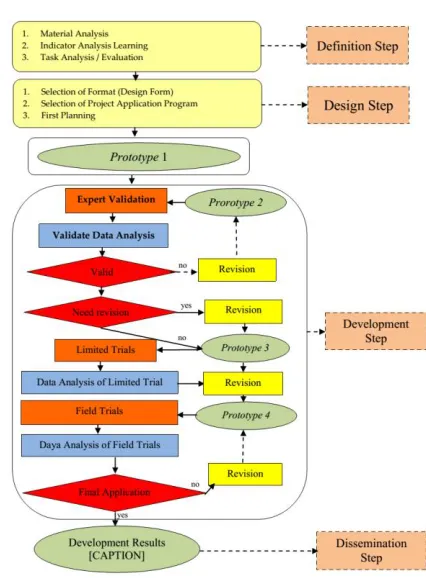
The product produced in this development research is application program as teaching and learning media of Calculus. The development model used in this research is 4-D (Define, Design, Development, and Dissemination) developed by Thiangarajan, Semmel and Semmel (1974) modified [8, 9]. 1. Define. At this stage, the researcher performs a final
preliminary analysis, learning achievement indicator, test model used, and selection of application outline.
2. Design. At this stage, the researcher builds the initial GUI design, selects the formats and attributes, optimizes the layout of the form design, resulting in the first prototype. 3. Development. At this stage the researchers divide the 3
activities of validation, limited trials, and field trials. We select expert experts in their respective fields as validators to assess and provide feedback to build a reliable and optimal GUI. After the application is "quite valid" level, we then proceed to the limited trial stage to see the practicality of the product being developed, and lastly we conducted a field trial involving many respondents and cross-colleges.
4. Dissemination. The last stage is the distribution of product development to the general audience, especially lecturers and students of the early semester who are taking Calculus courses to be used as media and tools in order to improve understanding and learning outcomes.
Fig. 2. Product Development Model
3.2 Data Collection Instruments
Instruments used in this research are (1) Expert Validation Sheet/Format, (2) Questionnaire Sheet of Limited Trials, and (3) Questionnaire Sheet of Field Trials. At the validation stage, we selected 3 experts as assessors according to their respective fields of programming, media, and materials. The respective assessment aspects are described in Table 2 below.
TABLE 2: VALIDATOR AND ASPECT ASSESSMENT
No Validator Aspect
1 Programming Media efficiency, Function keys, and physical quality
2 Media Quality of design (appearance), quality of buttons
3 Material Quality of material (input), quality of language, and quality of output (reporting) While in the questionnaire of respondents combined from the assessment of experts is aspects of programming, content and appearance (design).
3.3 Data Analysis Techniques
Technical Analysis of Validity
277 n
V
R n
i i
1 … (1)
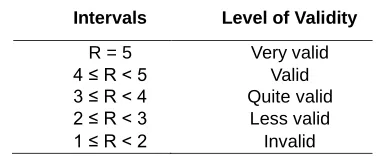
1. Determine the degree of validity based on the conversion of the average values obtained with the validity level interval as shown in Table 3 below:
TABEL 3: INTERVALS OF VALIDITY VALUE
Intervals Level of Validity
R = 5 Very valid
4 ≤ R < 5 Valid
3 ≤ R < 4 Quite valid 2 ≤ R < 3 Less valid
1 ≤ R < 2 Invalid
2. Declare a product that meets the validity criteria, if the minimum validity level achieved is quite valid. Then the product continued to be used or used in limited trials and field trials.
Technical Analysis of Product Trials
Data of student response result through questionnaire collected, then tabulated. The result of tabulation of each response is calculated for percentage, by formula [9]:
100 %
) (
Score Maximum
Item Per Score P
Percentage … (2)
TABLE 4: CATEGORY INTERVALS OF APPLICATION
Percentage (%) Categories P20 Not Good
20P < 40 Less Good 40P < 60 Pretty Good 60P < 80 Good
P 80 Very Good
4
D
EVELOPMENTR
ESULT4.1 Result of Expert Validation
Expert validation is performed after initial design or Prototype 1 is completed. Expert validation is performed to ask for advice or input related to 3 aspects, there are content (outline of material), programming, and display. At this stage, the expert team places more emphasis on visualization of the applications being built, such as the suitability of colors in each component with the background of each GUI, the breadth of performance indicators, the compatibility and consistency of the button display, and the memory capacity of the files for easy distribution. Based on the validation results obtained the average expert assessment is 3.575 which means "quite valid". From the results of this validation then proceeded to a limited trial and field trials. Some revisions in this stage such as (1) the position of some buttons is set well, (2) maximize tools have been activated, (3) sub menu hints and programmer and some simulation picture have been completed.
4.2 Result of Limited and Field Trials
Result of Limited Trials
After the revision according to the instructions or input from the expert, then obtained the design or Prototype 2 for later conducted a limited trial. Limited trials were conducted on 5 students. The results of the limited trial are according to Table 5 below.
TABLE 5: RESULT OF LIMITED TRIALS
Variables Respondents Average
1 2 3 4 5
Average 4.25 4.65 4.60 4.70 4.80 4.60 Percentage 85.0 93.0 92.0 94.0 96.0 92.0 Based on the calculation of Table 5 above, the average student gave a response of 92.00% which means the application being developed is categorized "very good". However, based on the results of questionnaires from respondents there are still some shortcomings such as the sentence part of the solution case, the suitability of the use of images, clarity and language communication used, the suitability of the selection of the size and typeface. Some sections are revised in Prototype 2 such as (1) improvements in size and typeface, (2) Simulation size (graph) is maximal, and (3) Sub menu is adjusted indicator of learning achievement.
Result of Field Trials
After conducting a limited trial, then some revision of the advice of the students (respondents) in the limited trial stage so that obtained Prototype 3 which is then used for field trials. Field trials were conducted twice, with 20 respondents (students) each trial. In the first field test, the respondent gave an additional assessment on the aspect of the speed of the button reaction, this is because the file size is too large and the number of attributes used so that it is rather slow in displaying the output both the completion step and simulation graph. In addition, there is also the use of less communicative language, the suitability of the selection of the size and type of letters, the layout of text and images, the suitability of GUI background selection, and there are words / sentences that have not match the performance indicators. The results of field trials are as in Figure 3 and Figure 4 below.
Fig. 3 Result of First Field Trials
Fig. 4 Result of Second Field Trials
While in the second field trial obtained the average students gives a response of 90.15% response which means the application is being developed categorized "very good". Nevertheless, there are still some drawbacks regarding the aspect of the display which is almost identical to the outcome in the first field trial. The remaining deficiencies in Prototype 3 have been enhanced as follows: (1) Regular color combinations on some GUI forms, (2) some "Exit" buttons have been removed because they have no significant functionality, and (3) Already in running in project form.
4.3 Final Product
From the validation and trial activities both limited and field of the application has been developed there are some advice from the validator and respondent, both related to the content (outline) of the application, programming settings (input, output and graphics), and display. Based on the results of validation and product testing obtained the following chart:
Fig. 5 Step Product Development Activity
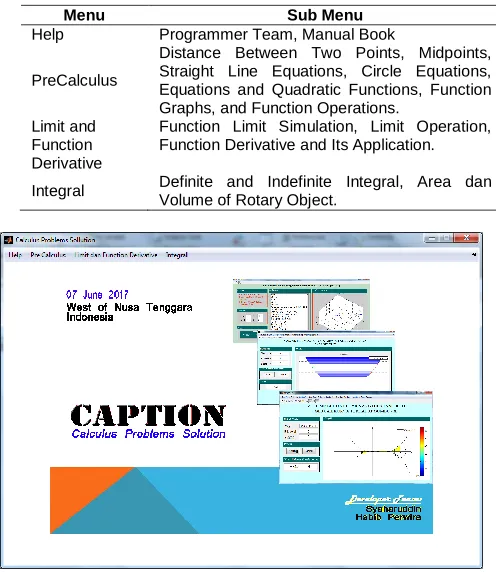
The result of the revision resulted in the application of GUI Matlab-based project for the settlement of Calculus cases, so the research team gave the name of this application as "CAPTION (Calculus Problems Solution)", we have successfully developed 25 GUI for simulation of kalulus case with the details of the development result as follows:
TABLE 6: OUTLINE OF CAPTION APPLICATION
Menu Sub Menu
Help Programmer Team, Manual Book PreCalculus
Distance Between Two Points, Midpoints, Straight Line Equations, Circle Equations, Equations and Quadratic Functions, Function Graphs, and Function Operations.
Limit and Function Derivative
Function Limit Simulation, Limit Operation, Function Derivative and Its Application. Integral Definite and Indefinite Integral, Area dan
Volume of Rotary Object.
Fig. 6. Font Design of CAPTION
CAPTION (Calculus Problem Solution) is a specially constructed application of Calculus, especially Basic Calculus given to early semester students. Based on the results of the development that has been done, we provide more value to the application in terms of simulation and solution-based.
1. Presented in menus and sub menus easily operated by users (students and lecturers)
2. Indicators are adapted to the curriculum applicable to Indonesian universities in general.
3. In each GUI given input components, process (count), and output in the form of problem solving and graph simulation.
4. In the simulation part of the graph is given the time rhythm so that the simulation looks effective.
5. Each performance indicator is presented with multiple case solutions
6. Each graph is given a 3-dimensional attribute
7. Can be developed in more directions using GUI by adding many more features.
In addition to the application development in the form of GUI above, we also developed a computing algorithm that plays at the m-file level to solve the calculus problems contained in Edwin J. Purcell Dale Varberg's Book of Volume 1 Issue 5, which comprises 48 computing categories of divided problems In 64 cases. Because these problems require computational scribs to perform simulations and determine their numerical solutions.
: Revision : After Revision : Path of activity : Design
Initial Design Prototype 1
Prototype 2
Prototype 3
Prototype 4
279
4
D
ISCUSSIONThis CAPTION (Calculus Problems Solution) project application needs to be developed on a larger scale and a broader range of indicators (outlines) in order to be fully utilized by students at every level of the university. For example for numerical problems such as:
1. The derivative and integral application in the transcendent function, the volume of the broader rotary object with multi variables.
2. Numerical methods such as simulation equation solutions and systems of nonlinear equations, approximation and interpolation, derivatives and numerical integral, and numerical differential equations.
5
C
ONCLUSION1. The result of the product developed in the form of an application program which is then called "CAPTION" abbreviated as "Calculus Problems Solution".
2. The final product results developed in the form of Grapichal User Interface (GUI) based applications include: (1) Precalculus (Distance Between Two Points, Middle Point, Straight Line Equation, Equation of Circles, Equations and Quadratic Functions, Function Graphs, and Function Operations), (2) Function and Derivative Limit (Function Limit Simulation, Limit Operation, Derivative Function and Its Application), (3) Integral (Definite and Indefinite Integral, Area and Volume of Rotary Object).
3. In the expert validation stage obtained the level of validity and the average of 3.575 which means "quite valid". Then on a limited trial the students gave an average response of 92.00% which means "very good". While in the first field trial the student gave an average response of 89.30% which means "very good", and in the second field trial the student gave an average response of 92.15% which means "very good".
A
CKNOWLEDGMENTThe research team would like to thank the manager of Mathematics Laboratory FKIP UM Mataram and FITK UIN Mataram who have given permission to conduct field trials.
R
EFERENCES[1] A. F. M. Ayub, “Teaching and Learning Calculus Using Computer”, Universidad Politécnica de Madrid, pp. 1-11, September 2015.
[2] A. Kilicman, M. A. Hassan, and S. K. S. Husain, “Teaching and Learning using Mathematics Software ”The New Challenge””, Procedia Social and Behavioral Sciences, no. 8, pp. 613-619, 2010.
[3] A. F. M. Ayub, M. Z. Mokhtar, W. S. Luan, and R. A. Tarmizi, “A Comparison of Two Different Technologies Tools in Tutoring Calculus”, Procedia Social and Behavioral Sciences, no. 2, pp. 481-486, January 2010.
[4] C. Reddy, S. Ravi, and Giriraja C. V, “Baby Monitoring Through MATLAB Graphical User Interface”, International Journal Of Scientific & Technology Research, vol. 3, no. 7, pp. 174-177, July 2014.
[5] D, Ibrahim, “Engineering Simulation with MATLAB: Improving Teaching and Learning Effectiveness”, Procedia Computer Science, no. 3, pp. 853-858, 2011.
[6] L. Guangpu and G. Yuchun, “The Application of MATLAB in Communication Theory”, Procedia Enginerring, no. 29, pp. 321-324, 2011.
[7] S. K. Sen and G. A. Shaykhian, “MatLab Tutorial for Scientific and Engineering Computations International Federation of Nonlinear Analysts (IFNA); 2008 World Congress of Nonlinear Analysts (WCNA)”, Nonlinier Analysis, no. 71, pp. 1005-1020, 2009.
[8] S. Thiagarajan, D. S. Semmel and M. I. Semmel, Instructional Development for Training Teachers of Exceptional Children: A Sourcebook, .Washington, D. C: National Center for Improvement of Educational Systems DHEW/OE, pp. 6-9, 1974.