INFUSE: Interactive Feature Selection for Predictive Modeling of
High Dimensional Data
Josua Krause, Adam Perer, Enrico Bertini
Josua Krause
IG
FS
OR
RR
Tree LogisticRegression NaiveBayesian KNN
.6383 .6108 .6203 .4594
.6309 .6110 .6124 .4693
.5721 .5752 .5805 .5048
.5721 .5748 .5798 .5050
Breast, Prostate, Colorectal and Other Cancers and Tumors Breast, Prostate, and Other Cancers and Tumors Cardio-Respiratory Failure and Shock Cellulitis, Local Skin Infection Cerebral Palsy
Chronic Obstructive Pulmonary Disease Cirrhosis of Liver
Colorectal, Bladder, and Other Cancers
Congenital/Developmental Skeletal and Connective Tissue Disorders Congestive Heart Failure
Coronary Atherosclerosis/Other Chronic Ischemic Heart Disease Dementia Without Complication
Diabetes with Neurologic or Peripheral Circulatory Manifestation Diabetes with Renal Manifestation
Disorders of the Vertebrae and Spinal Discs Drug/Alcohol Abuse, Without Dependence
Sort by selection Sort by name
Evaluate Model Reset View
Inward Pie Glyph Pick Count Average Rank Switch Layout DIAGNOSIS PROCEDURE Medication Lab
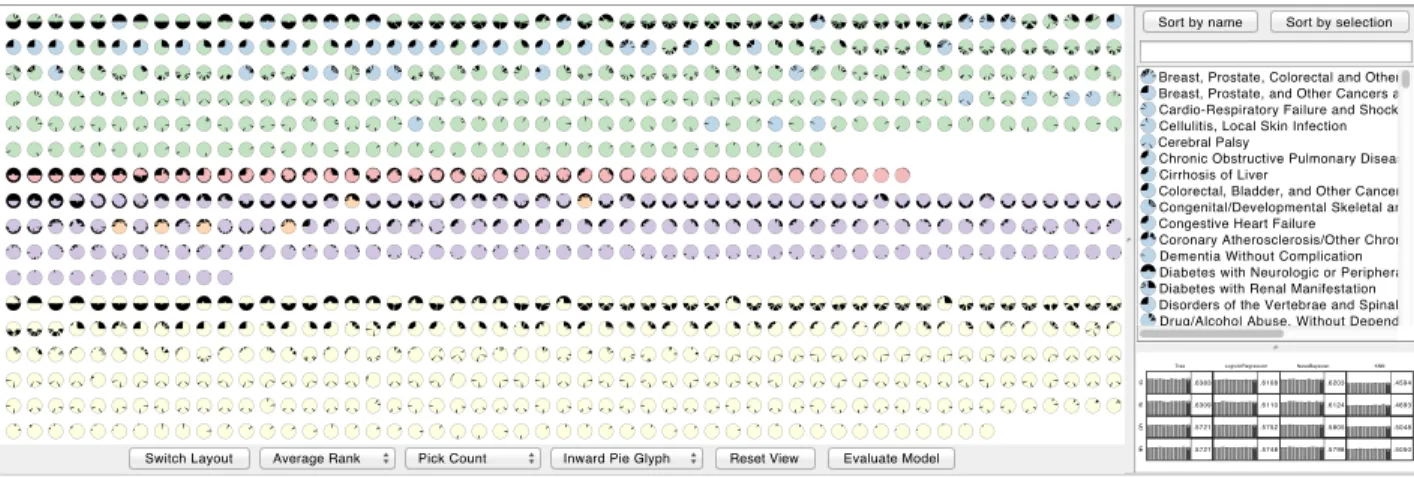
Fig. 1. An overview ofINFUSE, a visual analytics tool that supports users to understand the predictive power of features in their models. Each feature is ranked by various feature selection algorithms, and the ranking information is visualized in each of the three views within the system. On the left, the Feature View provides a way to visualize an overview of all features according to their rank using a variety of layouts. On the top-right, the List View provides a sorted list of all features, useful for selections. On the bottom-right, the Classifier View provides access to the quality scores of each model. Each of the views are coordinated, and users can brush between all three views.
Abstract— Predictive modeling techniques are increasingly being used by data scientists to understand the probability of predicted outcomes. However, for data that is high-dimensional, a critical step in predictive modeling is determining which features should be included in the models. Feature selection algorithms are often used to remove non-informative features from models. However, there are many different classes of feature selection algorithms. Deciding which one to use is problematic as the algorithmic output is often not amenable to user interpretation. This limits the ability for users to utilize their domain expertise during the modeling process. To improve on this limitation, we developedINFUSE, a novel visual analytics system designed to help analysts understand how predictive features are being ranked across feature selection algorithms, cross-validation folds, and classifiers. We demonstrate how our system can lead to important insights in a case study involving clinical researchers predicting patient outcomes from electronic medical records.
Index Terms—Predictive modeling, feature selection, classification, visual analytics, high-dimensional data
1 INTRODUCTION
The visualization research community has usually focused on devel-oping techniques and systems to support the analysis of datasets, with limited analysis of the relationship between datasets and the construc-tion of models on top of them. However, there are a growing number of data scientists interested in more than just interpreting their data: they want to understand their data and predictive probabilities asso-ciated with them. Providing visual support for this kind of task has become important as many existing applications on the market and in scientific settings need to solve problems that are predictive in nature, e.g. prediction of customer behavior, diseases, drug effectiveness.
• Josua Krause is with NYU Polytechnic School of Engineering. E-mail: [email protected].
• Adam Perer is with IBM T.J. Watson Research Center. E-mail: [email protected].
• Enrico Bertini is with NYU Polytechnic School of Engineering. E-mail: [email protected].
Manuscript received 31 Mar. 2014; accepted 1 Aug. 2014; date of publication xx xxx 2014; date of current version xx xxx 2014. For information on obtaining reprints of this article, please send e-mail to: [email protected].
Predictive modeling is defined as the process of developing a math-ematical tool or model that generates an accurate prediction [10]. However, building an accurate predictive model is far from trivial. First, modelers must construct cohorts, or distinct groups, to divide their datasets into cases and controls. Then, they must use a feature construction technique to define the feature vector. Next, they must define the parameters for cross-validation to ensure the results are sta-tistically valid and robust. Then, they need to choose a feature se-lection algorithm to extract the informative features and include them in a model. And finally, they need to choose a classifier to evaluate the predictiveness of the model. For each of these decisions, there are a variety of techniques for cohort construction, feature construction, cross-validation, features selection, and classification to choose from, and there are currently no systematic guidelines to decide which al-gorithms are most appropriate for which types of datasets. Making the wrong choices can cause predictive models to fail. Kuhn and John argue that many predictive models fail because, “predictive modelers often only explore relatively few models when searching for predictive relationships [...] due to either modeler’s preference for, or knowledge of, or expertise in, only a few models or the lack of available software that would enable them to explore a wide range of techniques” [10]. We use these current limitations as motivation to research how visual analytics may improve the process of predictive modeling.
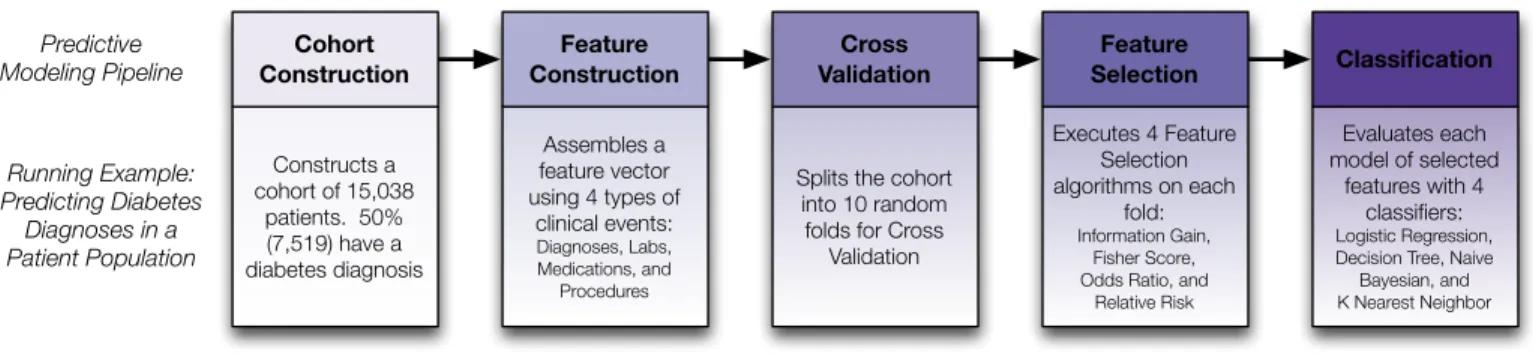
Predictive Modeling Pipeline Running Example: Predicting Diabetes Diagnoses in a Patient Population Constructs a cohort of 15,038 patients. 50% (7,519) have a diabetes diagnosis Assembles a feature vector using 4 types of clinical events: Diagnoses, Labs, Medications, and Procedures
Splits the cohort into 10 random
folds for Cross Validation Executes 4 Feature Selection algorithms on each fold: Information Gain, Fisher Score, Odds Ratio, and
Relative Risk Evaluates each model of selected features with 4 classifiers: Logistic Regression, Decision Tree, Naive Bayesian, and K Nearest Neighbor Cohort Construction Feature Construction Cross Validation Feature Selection Classification
Fig. 2. Steps of a typical predictive modeling pipeline. For each step, we provide the details of the running example we use throughout the paper. Our proposed research focuses on an important step in the
pre-dictive modeling pipeline: feature selection. When data is high-dimensional, feature selection algorithms are often used to remove non-informative features from models. Again, the analyst is con-fronted with the decision of which feature selection algorithm to uti-lize, and even if the analyst decides to try out multiple types, the algo-rithmic output is often not amenable to user interpretation. This limits the ability for users to utilize their domain expertise during the mod-eling process. To improve on this limitation, we developedINFUSE
(INteractive FeatUre SElection), a novel visual analytics system de-signed to help analysts understand how predictive features are being ranked across feature selection algorithms, cross-validation folds, and classifiers. We describe the tasks associated to the feature selection and understanding process and provide a design rationale for our solu-tion. We also demonstrate, through case studies, how the system can lead to important insights for clinical researchers predicting patient outcomes from electronic medical records.
Concretely, our contributions include:
• A design and implementation of a predictive modeling explo-ration system, INFUSE, for understanding how predictive fea-tures are being ranked across feature selection algorithms, cross-validation folds, and classifiers.
• An Interactive Model Builder, where users can create customized models based on insights reached withINFUSE, and then have their results evaluated in comparison to automated methods. • A case study of domain experts usingINFUSEto explore
predic-tive models in electronic health records.
2 MOTIVATION
2.1 Predictive Modeling in Healthcare
Predictive modeling is a common and important methodology used in medical informatics and healthcare research. For instance, it can be used to detect diseases in patients early before they progress [3] and to personalize treatment guidelines to understand which populations will benefit from an intervention [8]. In order to derive such insights and build successful predictive models, it is common for healthcare researchers to implement, evaluate, and compare many models with different parameters and algorithms. A common workflow for pre-dictive models is a 5-step process, illustrated in Figure 2: (1) cohort construction, (2) feature construction, (3) cross-validation, (4) feature selection, and (5) classification. There are currently few tools that sup-port this complex workflow for predictive modelers.
A recent platform, PARAllel predictive MOdeling (PARAMO) [13], enables users to specify a small number of high-level parameters to support this 5-step workflow.PARAMOthen uses Map-Reduce to ex-ecute these many tasks in parallel. After the models have been con-structed and evaluated by classifiers, users can compare area under curve (AUC) scores of different models and select the ones with the highest predictive power. While this ability to construct and evaluate models at scale is an important breakthrough for clinical researchers,
the clinical experts are still left out of the loop at each of these 5 stages, as each of the algorithms act as a black box.
This type of workflow limits the ability of clinical researchers to use their domain knowledge to assist in the model building phase. While multiple models may have similar performance in terms of prediction accuracy, there is a desire to ensure that models with more clinically meaningful features are selected [5].
2.2 Running Example: Diabetes Prediction
In order to make our contributions concrete, we utilize a running exam-ple from our case study. Our case study involves a team of four clinical researchers interested in using predictive modeling on a longitudinal database of electronic medical records. The research team consisted of one MD researcher with a background in emergency medicine, and three PhD researchers with backgrounds in healthcare analytics. Their database features over 300,000 patients from a major healthcare provider in the United States. The team is interested in building a pre-dictive model to predict if a patient is at risk of developing diabetes, a chronic disease of high blood sugar levels that causes serious health complications.
From this database, the team constructs a cohort (Step 1) of 15,038 patients. 50% of these patients (7,519) are considered incident cases with a diagnosis of diabetes. Each case was paired with a control pa-tient based on age, gender, and primary care physician resulting in 7,519 control patients without diabetes. From the medical records of these patients, they extract four meaningful types of features (Step 2): diagnoses, lab tests, medications, and procedures. In total, there were 1,627,736 diagnosis events (6,709 unique types), 361,026 lab events (193 types), 818,802 medication events (344 types), and 853,539 pro-cedures (4,403 types). For our visualization, we only consider types of features that were picked by feature selection algorithms which results in 859 features to display.
Next, in order to reduce the bias of the predictive models, the team uses 10 cross-validation folds (i.e. random samples) (Step 3) to divide the population randomly into 10 groups. After cohorts, features, and folds are defined, the clinical researchers are ready to use feature selec-tion. The team has four feature selection algorithms implemented and available to them (Step 4): these includeInformation GainandFisher
Score, which have been used extensively by the researchers, as well
as two new ones which were recently implemented by their technolo-gists: Odds RatioandRelative Risk. Finally, the team evaluates each selected feature set as a model using four classifiers (Step 5):Logistic
Regression,Decision Trees,Naive Bayes, andK-Nearest Neighbors.
Typically, this team executes a pipeline of multiple feature selec-tion algorithms, and chooses the model that ends up with the best scores from the classifier. Although this team has an interest in em-bedding domain knowledge into their models, their current platform for running predictive models does not have a user interface where users can view or edit the specific features that make up each model. Therefore, resulting models are typically not interpretable by domain experts, and do not support bringing in their medical expertise by pri-oritizing or removing features that may not be relevant to the disease they are modeling.
Josua Krause
IG
FS
OR
RR
Tree LogisticRegression NaiveBayesian KNN
.6383 .6108 .6203 .4594
.6309 .6110 .6124 .4693
.5721 .5752 .5805 .5048
.5721 .5748 .5798 .5050
GLOM FILT RATE, EST GLUCOCORTICOIDS GLUCOSE GLUCOSE - 1 HOUR GLUCOSE - 2 HOUR GLUCOSE - 3 HOUR GLUCOSE, 1 HOUR GLUCOSE, 1/2 HOUR GLUCOSE, 2 HOUR GLUCOSE, 3 HOUR
GLUCOSE, TWO-HOUR POSTPRANDIAL HEMOGLOBIN A1C/HEMOGLOBIN.TOTA HYPERGLYCEMICS
ANTIHYPERGLY,INCRETIN MIMETIC(GLP-1 RECEP.AGONIST) ANTIHYPERGLY, (DPP-4) INHIBITOR & BIGUANIDE COMB. ANTIHYPERGLYCEMIC, AMYLIN ANALOG-TYPE ANTIHYPERGLYCEMIC, DPP-4 INHIBITORS
ANTIHYPERGLYCEMIC, INSULIN-RELEASE STIMULANT TYPE ANTIHYPERGLYCEMIC, INSULIN-RESPONSE ENHANCER (N-S) ANTIHYPERGLYCEMIC,BIGUANIDE TYPE(NON-SULFONYLUREA) ANTIHYPERGLYCEMIC,INSULIN-REL STIM.& BIGUANIDE CMB ANTIHYPERGLYCM,INSUL-RESP.ENHANCER & BIGUANIDE CMB DIGITALIS GLYCOSIDES
Prim Open Angle Glaucoma Hypoglycemia NOS Abn Glucose Toler-Deliv Abn Glucose-Antepartum Pure Hyperglyceridemia Abnormal Glucose NEC Impaired Fasting Glucose
g l
Sort by selection Sort by name
Evaluate Model Reset View
Inward Pie Glyph Pick Count Average Rank Switch Layout DIAGNOSIS PROCEDURE Medication Lab PROCEDURE - Cpt code Medication - Orders Medication - Ingredient Lab - Lab DIAGNOSIS - ProblemList DIAGNOSIS - HCC
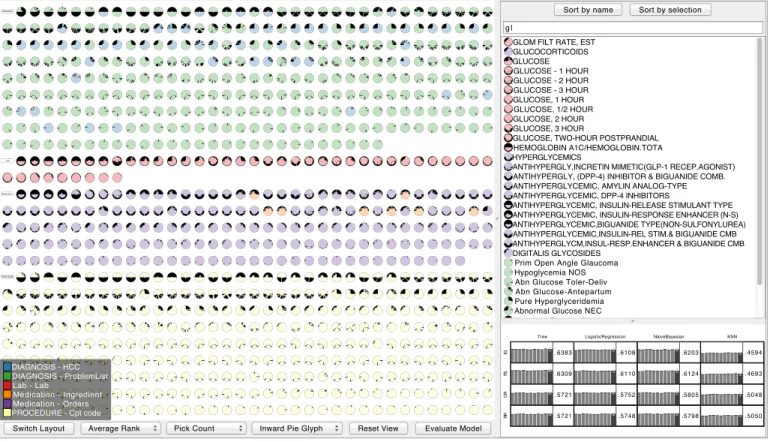
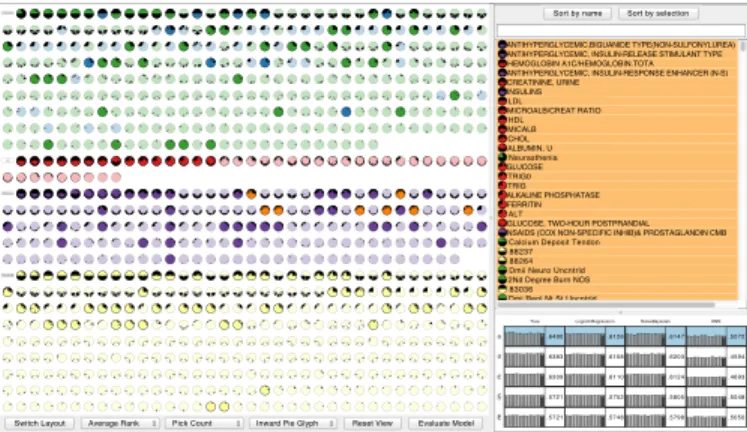
Fig. 3. An overview ofINFUSE, a system for interactive feature selection. On the left, the Feature View provides a way to visualize an overview of all features grouped by type and then sorted by importance. The color key for the feature types and subtypes are shown at the bottom. The buttons and combo boxes at the bottom can be used to switch layouts and define the axes of the scatterplot view shown in Figure 6. On the top-right, the List View provides a sorted list of all features, useful for selections. This list can be filtered using the search box above. Currently only features containing the term “gl” are shown. The remaining features are sorted by the number and position of the search term occurrences. On the bottom-right, the Classifier View (Figure 7) provides access to the quality scores of each model. Users can also select features and build custom models with the Interactive Model Builder.
2.3 Task Analysis
The data analysis team initially expressed an interest of having a vi-sual analytics system to aid them in making sense of the complex in-formation generated by the modeling pipeline. During our interviews we agreed to focus on the feature selection and classification steps, as they needed visualizations to reason about the effects of choosing different combinations of the available algorithms. Without such visu-alizations, the researchers ability to choose among different algorithms is ineffective.
Through our interactions with the analysts we derived three main tasks that guided the design ofINFUSE:
Task1 - Comparison of feature selection algorithms. In data sets
with thousands of features, it is important to have a quick way to understand how feature selection algorithms rank different fea-tures differently. Some of the typical questions the researchers ask are: “Which features are consistently ranked highly by all
the algorithms?”; “How much do the algorithms differ in their
ranking?”; “Are there features that have a high rank with some
algorithms and a low rank with some others?”; “How robust are
the rankings with respect to different data samples?”
Task 2 - Comparison of classification algorithms. The output of
each feature selection algorithm is used to feed a series of clas-sification algorithms. At the end of this process, the user is left with aF⇥Cnumber of performance comparisons, whereF is the number of feature selection algorithms andCthe number of classification algorithms. Typical questions our researchers ask are: “Which combinations of feature selection and classification
algorithms give the best scores?”; “Are there feature selection
algorithms that score consistently better across the set of
clas-sification algorithms?”; “Are there classification algorithms that
score consistently better across the set of feature selection
al-gorithms?”; “Which sets of features are selected in the model(s)
that give the highest performance?”
Task 3 - Manual selection and testing of new feature sets. Related
to the last question of Task 2, the researchers see value in being able to add or remove features of interest from models. This is desired because there can be additional domain-relevant knowledge, beyond model performance, to introduce a desired feature or remove an undesired one. Typical questions our researchers ask are: “How does the performance of the model
increase or decrease if I remove or add these features?”; “How
does a new model compare to the models automatically built by
the system?”
INFUSEwas designed to support these three tasks by providing a
visualization of large sets of features and how these features are used by the modeling algorithms. After several design iterations, we con-verged on a visual design where features are first-class citizens of the visual representation: that is, each visual object in the main view rep-resents a feature and its design and layout reflects information obtained from the algorithms. A representation centered on features aligns well with the analysts’ mental model and makes features easily identifiable through their names. Each feature, in fact, represents real-world enti-ties like medications, lab tests and diagnoses, that have rich semantics and can be easily identified and understood by domain experts.
3 RELATEDWORK
While visualization of multidimensional data has traditionally focused more on the visualization of the data space, visualizing data features has important applications in real-world scenarios; especially when confronted with hundreds or even thousands of dimensions. In this context, visualization helps data analyst making sense of the feature space while including their background knowledge in the process. Vi-sual feature selection can, for instance, help rank features according to predefined scores, detect similarities among dimensions (thus gauging intrinsic dimensionality of feature spaces), merge or combine features into composite features. In the following we review visualization lit-erature that consider the specific problem of visualizing large sets of features.
3.1 Visual Feature Selection
Several approaches to feature selection and dimensionality reduction, in general, exist in visualization. The early work of Guo [7] introduced the idea of visualizing relationships between features sets. His system is based on an interactive matrix view where rows and columns repre-sent features and the cells are colored according to feature similarity (calculated as entropy andc2). The matrix is automatically sorted to
allow selection of subspaces (feature subsets) where data shows inter-esting clusters. Visual hierarchical dimension reduction [20] allows detection and grouping of similar features as well. The technique is based on a hierarchical clustering algorithm which clusters dimensions in terms of their similarity and present them in asunburstvisualization [22]. Users can interactively choose an aggregation level and use the aggregated dimensions to display data with the reduced set of dimen-sions. Johansson and Johansson [9] present an integrated environment based onparallel coordinatesvisualization where the number and or-der of dimensions (axes) presented at any time is guided by a ranking algorithm that takes into account associations as well as intrinsic inter-estingness of each feature to interactively choose how many features to visualize. Similar in spirit is therank-by-featureframework [14] in which the data features are organized, ranked and visualized in 1D and 2D visual representations (e.g. histograms, bar charts and scat-terplots). The user can for instance inspect a matrix of feature pairs, ranked by one of the available ranking functions, and single out those that show interesting associations. A similar mechanism is also used
inscagnostics[21] a quality metric approach [4] that ranks axis pairs
according to the pattern/shape they create in a scatterplot visualization. More similar to the solution presented in this paper are visualiza-tions that focus on plotting dimensions as data points in the visual rep-resentation (rather than, for example, as axes of a visualization where the data items represent records of a data table). Value and Relation
Displayvisualizes data features as icons in a scatter plot visualization
[23]. The icons are positioned using amultidimensional scaling al-gorithm which positions dimensions with similar distributions close together. The icons are designed to represent the distribution of the data values within the feature. Such a display allows to detect groups of similar dimensions and to construct multidimensional visualizations by subsetting the original feature space.Brushing Dimensions[18] is a similar approach where data features are plotted as dots in a scatter plot using descriptive statistics as axes (e.g. variance, median, kurto-sis). The plot is paired with a data item scatter plot which allows for data and feature linking and exploration.
All of the methods described above are based on the calculation of statistical parameters from the data as a way to characterize and ex-pose relationships between the features. Our approach differs in that
INFUSEinteracts directly with feature selection and classification
al-gorithms to help in the discovery of predictive feature sets. A similar approach is found inSmartStripes[11], a visual analytics system that allows tight interaction between feature selection algorithms and visu-alization. Our system differs in that our focus is on the comparison of the output of multiple feature selection algorithms rather than a single one.
3.2 Visualization in Predictive Modeling
Visualization has also been used to aid in the creation of predictive models, not only in the selection of features that might be helpful in constructing such models. Visual construction and assessment of de-cision tree models have been the subject of a good number of works in the field. Ankerstet al., introduced the idea of using pixel-based visualization as a way to manually construct decision trees by giving the user the ability to observe class distributions within each node and to interactively select splitting points [1, 2]. A similar idea is pro-posed inPaintingClassa visualization technique to manually build a decision tree through interaction of parallel coordinates and mensional scaling techniques to identify coherent groups of multidi-mensional data [17]. More recently,BaobabViewhas been presented as a system to inspect and validate a classification model through a tree representation. The paper presents a thorough analysis of the number of tasks that visualization can support in this area and how they are covered by the proposed system [19].
While all the aforementioned systems focus largely on decision trees, visualization has been used in other classification and regres-sion systems that leverage other prediction models. TheiVisClassifier
[6] for instance useslinear discriminant analysis (LDA), a supervised dimensionality reduction method, to project multidimensional data in a scatterplot visualization taking into account information provided by the data labels. The technique allows to visually link the high-dimensional structure to the low-high-dimensional representation and build clusters. The clusters are then used to classify new data that is pro-gressively introduced into the system to refine the model. Steedet al., in theircyclone trend analysisprovide a parallel coordinates visualiza-tion that leverage computavisualiza-tional analysis to identify features with high predictive power in stepwise regression tasks and allows to build pre-dictive models for multidimensional climate data [16, 15]. Recently, a visual analytics system for regression analysis has been proposed by M¨uhlbacher and Piringer [12]. The system is more similar to our work in nature as it also focuses on the predictive power of feature sets and guides the user in the predictive modeling process. The main differ-ence between this work and ours is our focus on classification rather than regression models and the use of multiple feature selection and classification models to better understand how features score across multiple models.
4 INFUSE
In this section, we describe the design ofINFUSE, which aims to as-sist predictive modelers with the tasks introduced in Section 2.3. By providing visualizations for users to interpret the results of feature se-lection algorithms, as well as the ability to customize the models with domain knowledge that may have been missed by the automated algo-rithms,INFUSEprovides a user-centric way of manipulating predic-tive models.
4.1 Data and Design
We provide a brief overview of data types utilized by the system. A predictive model, in our setting, is a model trained and validated with machine learning using a high number of features as an input to train the model. These features are the primary data items ofINFUSE. Each feature has a label representing the feature name (e.g. Diabetes), a cat-egory to which the feature belongs to (e.g. Diagnosis), and a subtype (e.g. Problem List, the health problems that led to the diagnosis).
Feature selection algorithms receive as an input the whole set of existing features and return a subset of features selected and ranked according to their estimated predictive power. Since in our setting we use the output of multiple algorithms at once, each feature can further be described by the rankings they receive from all these algo-rithms (where features that are not selected are marked as unranked). Furthermore, since cross-validation is used, each feature actually gets ranked multiple times by each algorithm, leading to a total number
of #feature selection algorithms⇥#foldsranks that quantitatively
Josua Krause Josua Krause Information Gain Fisher Score Odds Ratio Relative Risk Josua Krause 112 3 4 5 6 7 8 9 10 (a) (b) (c)
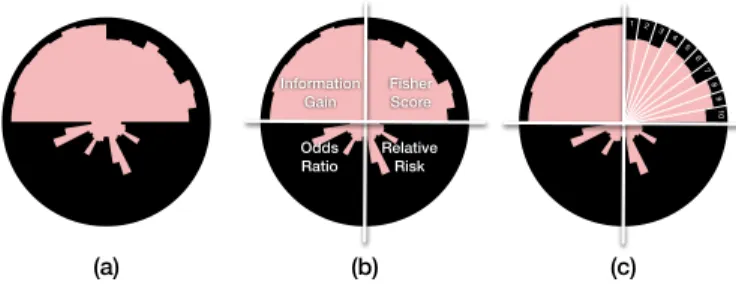
Fig. 4. (a) The glyph representation of a feature in theINFUSE sys-tem. (b) Multiple models for each feature are represented asmodel sections. In this example, the feature is divided into four sections, as it was ranked by four feature selection algorithms (Information Gain, Fisher-Score, Relative Risk, and Odds Ratio.). (c) Each section is fur-ther divided intofold slices representing each of the cross-validation folds. Each fold slices features a inward-filling bar that represents the rank of this feature in that fold. A longer bar implies the feature has a better rank. If no bar appears, the feature was unranked in the fold, and thus did not meet the importance threshold.
Josua Krause (a) Josua Krause (b) Josua Krause (c) Josua Krause (d)
Fig. 5. Different glyph designs. (a) showsfold sliceswith bars growing from perimeter to center whereas (b) grows from center to perimeter. (c) shows a typical starburst glyph and (d) shows a matrix using luminance to show the ranks. Note that in (b) and (c) it is difficult to see that this feature is unranked in the third fold from the right in the top left quadrant. The values in (c) are difficult to read because there is no reference to how big the values are. Luminance, as used in (d) is a harder perceptual attribute for users to interpret and distinguish than length and area are, as used by the other glyphs.
The predictive models built using the output generated by feature selection also provide useful information that we use in our system. Each feature set generated by the process described above is used as an input to a classification algorithm. The algorithm builds a model that corresponds to the specific pair of feature set and classification algorithm used for its training. The classifier, in turn, can be described in terms of its performance using the Area Under Curve (AUC), a measure that is commonly used by modelers to give numerical per-formance scores to models [10].
The primary goal ofINFUSEis to visualize this information so that users can understand the predictive power of features in their models. The user interfaces is organized around three main coordinated views as shown in Figure 3: theFeature Viewprovides a way to visualize an overview of all features providing information about their attributes and ranking received from feature selection; theList Viewprovides a sorted list of all features to get easy access to their labels and to assist the user in searching features according to some predefined criteria like their name or category; theClassifier Viewprovides access to the quality scores of each model built using the process described above. The views are coordinated so that selections in one view are propa-gated to all the other views. In the following we provide additional information about the design of each view.
4.2 Feature View
The primary component ofINFUSEis theFeature View, a zoomable visualization that displays all features as glyphs. Each glyph repre-sents a feature from the original data set and is designed to provide the information outlined above. The main purpose of the feature view
is to allow comparison between features and detection of interesting commonalities and differences in terms of how the algorithms rank them. The view allows the user to display the feature set according to two different configurable layouts: a grid layout (the default), which favors legibility, and a scatter plot layout which aims at laying out and grouping the features according to various statistics we collect from the ranks. In the following sections, we describe the design of the glyph as well as the different layouts.
4.2.1 Feature Glyph Design
As described in Section 2.1, the features are ranked by multiple fea-ture selection algorithms and across multiple cross-validation folds.
INFUSE’s glyph design embeds all of this information in a circular
glyph that shows all the rankings obtained from each algorithm/fold pair. As shown in Figure 4(a), the glyph is divided into equally-sized circular segments; where each segment represents one of the ranking algorithms. For instance, in Figure 4(b), since the feature was ranked by four feature selection algorithms, the circular glyph is divided into four sections. Each of these sections are then divided further into a
fold slicefor each cross-validation fold. For instance, in Figure 4(c),
each feature selection algorithm was executed on 10 cross-validation folds, therefore there are 10 fold slices.
Within each fold slice, there is an inward-growing bar (that is, start-ing from the perimeter and growstart-ing towards the center) that represents the rank of the feature in a particular fold. For example, in Figure 4(c), the feature is higher ranked in Fold 3 than in Fold 4 as the bar in Fold 3 stretches closer towards the center than in Fold 4. Features that are unranked, because their scores are too low to meet the mini-mum threshold requirement of the algorithm, are represented as empty slices with no bars. We designed fold slices with inward-growing bars on purpose to help distinguishing between slices with empty values from those with low values. During our design iterations we realized in fact that outward pointing bars would make this distinction too hard to make. Since the information of whether a features is picked up by an algorithm is crucial for its interpretation we decided to opt for this design.
Multiple glyph designs were considered and tested withinINFUSE. For instance, Figure 5(b) shows an example of a glyph where the fold slices grow from the center towards the perimeter. This makes it dif-ficult to identify fold slices with poor ranks. Consider the situation where there is a lowly-ranked feature only ranked in one fold slice section. When zoomed-out, the glyph would just appear as a circle with a dot in the center, and the user would not know which model or fold ranked the feature. Furthermore, it is difficult to see in which fold a feature is unranked when the surrounding models rank the feature. Other glyph designs that were tried involve a star glyph (Figure 5(c)) and a matrix glyph (Figure 5(d)). The star glyph was less effective as users were not afforded a reference point for the maximum rank-ing and the design leads to some visual artifacts (like high density in the center and lower density in the outer part). The matrix glyph was less effective, as perceiving differences is more difficult when using luminance than length and area as we do in our final design.
Users can gain more details about each section and slice by hover-ing over the region of interest to view an informative tooltip. Further-more, an overview key is available to remind users of the position of each model type. The background color of the glyph corresponds to the subtype of the feature and a color key can also be shown as a ref-erence to remember the meaning of the color coding (see bottom-left corner of Figure 3).
4.2.2 Ranked Layout
The first layout available to users is the ranked layout, which arranges glyphs by their feature type, and sorts them by their overall impor-tance. The name of the feature type is shown at the first position in the group, after that the features are laid out row-first in a grid-like manner, as shown in Figure 3. This space-filling approach results in features that are always visible without overlaps.
Josua Krause 40 Pick Count 1 1 9 1 Average Rank 1 (a) Josua Krause 1 Importance 383 1 9 4 Median Rank 1 (b) Josua Krause 1 Average Rank 191 1 8 0 Best Rank 1 (c) Josua Krause 1 Importance 383 8 2 Rank Std-Dev 0 (d)
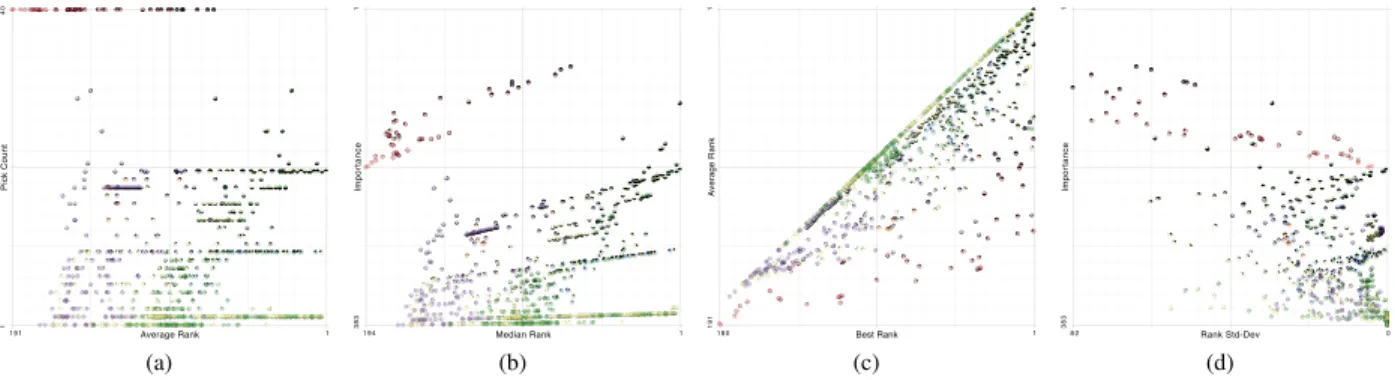
Fig. 6. Different axis combinations for the scatter-plot layout. In (a) the average rank is plotted against the pick count. Most of the features appear in the lower half because features are rarely picked by more than two algorithms in this example. The bottom-right shows features that are only chosen by two models but were ranked very high by them. (b) shows the median rank plotted against the importance. Notice that the plot looks similar to (a) since importance is a combination of the axes from (a). The axes in (c) are best rank versus average rank. Features can only appear below the diagonal. The standard deviation of the ranks is plotted against the importance in (d). The peak to the bottom right corner consists of features that are rarely picked and therefore have lower variance. The peak to the top right consists of features that are consistently high ranked.
Features within a group are sorted by their importance. Importance is computed as average rank with penalized unranked features:
rankbest= min
m2M⇥V,f2F[rankm(f)]
i(f) = 1
|M⇥V|[2·rankbest·unrankedM⇥V(f) +m2
Â
M⇥Vrankm(f)]
whereMis the set of models,V is the set of cross-validation folds,
F is the set of features, rankm(f) is the rank of a feature f in the combined model and cross-validation foldm, andunrankedM⇥V(f)is the number of such combined models that did not choosef. Assume
rankm(f) =0 for unranked features fin the combined modelmonly when computingi(f). Note that a small value fori(f)means higher importance. The optimal value is 1.
4.2.3 Scatterplot Layout
The second layout available to users is the scatterplot layout, where users can select choices for both axes of the scatterplot. The choices for axes include:
• theaverage rankof a feature
(ignores unranked folds and models)
• thepick countof the number of combined models
and cross-validation folds that picked the feature
• theimportanceof a feature (defined above)
• thebest rankof the feature
• themedian rankof the feature
(ignores unranked folds and models)
• thestandard deviationof the feature’s ranks
(ignores unranked folds and models)
By default, the average rank is chosen for the horizontal axis and the pick count is chosen for the vertical axis, as shown in Figure 10. This combination of axes led to the most insights during the case stud-ies. However, if users choose to select different axes or pivot to a different layout, animation is used for the transition. By using slow-in and slow-out animation, users are given time to anticipate the move-ment direction of the feature, and are able to track features during the transition easily.
4.2.4 Interaction
The Feature View provides a number of interactions. Zooming and panning enables a user to get an overview of the displayed data and focus on the details of a small number of glyphs. This exploration can be reset by clicking on the “Reset View” button, or double clicking on the background. Double clicking on a feature glyph zooms in on the feature so that it fills the viewport. In addition, a tooltip is shown when a user hovers the mouse over a glyph. This tooltip provides informa-tion about the name, type, and subtype of the represented feature, as well as all of the statistical information used for the scatterplot lay-out. Hovering over a fold slice in the glyph gives further information about the feature selection algorithm, the cross-validation fold, and the feature’s rank in question. In order to select features for interactive model building (see Section 4.5) the user can click on glyphs to toggle the selection or use a lasso gesture to select a group of features. As mentioned in the previous section, users can change the layout of the glyphs with the buttons below the Feature View.
4.3 List View
A simple yet important view of features is the List View, which pro-vides a sorted list of all features, useful for selecting features by name. Each list item contains the name of the features along with its glyph. The selection of a feature can be toggled in the list by clicking its list item. As the selection of features is linked between views, this sorted and labeled view supports users finding particular features of interest and highlighting them in the complementary views.
The list view can be sorted in a few different ways. By default, features are first sorted by the type of the feature, then by its subtype, and finally by its name. Users can also sort the list by selection, which means currently selected features are displayed at the top and the un-selected features appear after them. Within these groups, the features are then sorted by their importance.
In addition to sorting, a user can filter the list view via the search box on the top. Search terms are separated by white-spaces and the list view shows all features that contain all search terms in the name, type, or sub-type. The results are ranked by the sum of the inverse positions of the search terms within the feature description. This favors terms occurring at the beginning of the feature’s name and terms that occur multiple times in one feature description (see the top right panel of Figure 3 for an example query).
4.4 Classifier View
The Feature View and the List View both focus on supporting users to interpret the rankings of features across multiple predictive models. However, it is also important for users to understand the quality of each model in predicting the appropriate outcome. The Classifier View,
Josua Krause
IG
FS
OR
RR
Tree LogisticRegression NaiveBayesian KNN
.6383 .6108 .6203 .4594
.6309 .6110 .6124 .4693
.5721 .5752 .5805 .5048
.5721 .5748 .5798 .5050
Fig. 7. The Classifier View displays the results of the classification algo-rithms for all models. Rows represent feature selection algoalgo-rithms and columns represent classification algorithms. A more detailed descrip-tion of the cells can be seen in Figure 8. The currently selected model is highlighted in orange, and the results for the same fold in different feature selection algorithms are highlighted in yellow. When users se-lect a model, the features that make up the model are highlighted in the Feature and List views.
Josua Krause
IG
FS
OR
RR
Tree LogisticRegression NaiveBayesian KNN
.6383
.6108
.6203
.4594
.6309
.6110
.6124
.4693
.5721
.5752
.5805
.5048
.5721
.5748
.5798
.5050
Fig. 8. Each cell in the Classifier View represents the scores of a particular model by a particular classifier. On the left, there is a bar for each of the validation folds. The height of each bar corresponds to the AUC score for each fold. Immediately to the right of the fold bars, the thicker and darker bar and its height represents the average value across all folds. This bar also features an error bar depicting the standard deviation across the folds. Finally, to the right of the bars, there is a numerical representation of the average AUC score.
shown in the bottom-right panel ofINFUSE, is where the quality of each the predictive models can be analyzed.
Typically, predictive models are evaluated using classification al-gorithms which provide an AUC score (area under ROC curve, the sensitivity as function of the false positive rate). Perfect models will have an AUC score of 1, whereas random guessing will have an AUC score of 0.5. The Classifier View was designed to show AUC scores for each model and fold.
As illustrated in Figure 7, each row of the Classifier View repre-sents the predictive model that resulted from each feature selection algorithm. Each column represents a classification algorithm. Mul-tiple classifiers are used because there are a variety of techniques to evaluate models, and in order to avoid biases,INFUSE provides the ability to compare the output from multiple classifiers.
Each cell, as shown in Figure 8, has several components. On the left, there is a bar for each of the validation folds. The height of each bar corresponds to the AUC score for each fold. There is also a slightly thicker and darker bar immediately to the right of the fold bars, and its height represents the average value across all folds. This bar also features an error bar depicting the standard deviation across the folds. Finally, to the right of the bars, there is a numerical representation of the average AUC score. As this information is important for predictive modelers to reason about the quality of models, these values are given visual prominence. The bars, however, can be used to also reason about the quality across all folds.
Rows are sorted by the average AUC scores across all classification algorithms, so more accurate predictive models appear at the top of this view. Users can interact with this view in several ways. Clicking on a fold bar selects all features that were a part of this model and highlights them in the List and Feature views. The selected fold bar is highlighted in orange, and other scores this fold received by the other classifiers are highlighted in yellow so that they can easily be compared (as shown in Figure 7.)
4.5 Interactive Model Builder
One of the most important aspects ofINFUSE is that in addition to allowing the comparison of models, it also enables the creation of new
Josua Krause S1 IG FS OR RR
Tree LogisticRegression NaiveBayesian KNN
.6490 .6126 .6147 .5072 .6383 .6108 .6203 .4594 .6309 .6110 .6124 .4693 .5721 .5752 .5805 .5048 .5721 .5748 .5798 .5050 ANTIHYPERGLYCEMIC,BIGUANIDE TYPE(NON-SULFONYLUREA) ANTIHYPERGLYCEMIC, INSULIN-RELEASE STIMULANT TYPE HEMOGLOBIN A1C/HEMOGLOBIN.TOTA ANTIHYPERGLYCEMIC, INSULIN-RESPONSE ENHANCER (N-S) CREATININE, URINE INSULINS LDL MICROALB/CREAT RATIO HDL MICALB CHOL ALBUMIN, U Neurasthenia GLUCOSE TRIG0 TRIG ALKALINE PHOSPHATASE FERRITIN ALT
GLUCOSE, TWO-HOUR POSTPRANDIAL NSAIDS (COX NON-SPECIFIC INHIB)& PROSTAGLANDIN CMB Calcium Deposit Tendon
88237 88264 Dmii Neuro Uncntrld 2Nd Degree Burn NOS 83036 Dmi Renl Nt St Uncntrld
Sort by selection Sort by name
Evaluate Model Reset View Inward Pie Glyph Pick Count Average Rank Switch Layout DIAGNOSIS PROCEDURE Medication Lab
Fig. 9. INFUSE’s Interactive Model Builder allows users to select sets of features and measure its quality. Selected feature glyphs are high-lighted by saturating their color. The List View is sorted to show the selected features by their importance. After a user has made their se-lections, they can evaluate their model by clicking the “Evaluate Model” button. This adds a new blue row to the the Classifier View, showing the results of the evaluation for the user-defined model.
models based on insights. Users can select features for model building in a variety of ways. They can select all of the features from existing models by clicking on a model in the Classifier View. This will high-light and select all of the features that were used in the model. Users can then augment these lists, or start from an empty set, by select-ing individual features when clickselect-ing on them in the Feature or List view. In order to select multiple features, a lasso selection technique is available in the Ranked and Scatterplot layouts.
After a feature set has been collected,INFUSEcan automatically evaluate the predictive performance of the user-defined model. By clicking the “Evaluate Model” button, the new model is scored across all cross-validation folds and classifiers, and the results are added in the Classifier panel as a new blue row. In the example in Figure 9, the user-defined model out-performed the automated models and it is ranked at the top of the Classifier View. Note that the user created model does not appear in the glyph. This is due to the fact that the user does not need to rank the features in order to obtain a classification result and that the feature set is equal for all cross-validation folds.
5 CASESTUDY
Throughout our paper, we have used a running example of a team of clinical researchers using predictive modeling to classify patients at high risk of developing diabetes. In this section, we describe how
INFUSEhas led to a variety of insights when exploring the features of
the models.
5.1 Insight 1: Data issues
When the clinical researchers learned of INFUSE’s capabilities to compare multiple feature selection algorithms, they decided to expand their pipeline’s feature selection algorithms from 2 to 4. The team has used Information Gain and Fisher Score extensively in prior work, and typically uses these same techniques due to their familiarity and past success. Nonetheless, the diabetes dataset introduced in Section 2.2 was new to them, and they were unsure which techniques would be the most appropriate. So, they asked their technologists to implement two new techniques: Odds Ratio and Relative Risk.
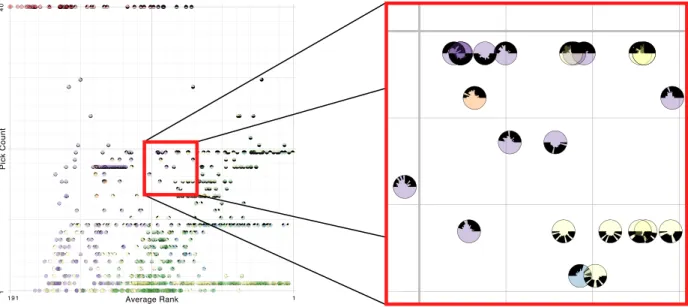
After all four algorithms were available, they executed their mod-eling pipeline usingPARAMO[13] and connected the results to IN-FUSE. Instantly, the team was surprised at the patterns that the visu-alization made evident. The visuvisu-alization indicated that there seemed to be little agreement between their two old algorithms, and their two new algorithms for the best features. The glyphs clearly indicated that many of the features were highly ranked by two of the four feature se-lection algorithms, and unranked by the other two, resulting in glyphs resembling alternating half-circles, as shown in Figure 11. The team
Josua Krause
40
Pick Count
1
1 9 1 Average Rank 1 Josua Krause
Fig. 10. The scatterplot view allows users to compare multiple types of rankings. In the case study, users became curious of the medication features that were chosen by only half of the models. When reviewing these medications with domain experts, it became clear that features picked by the upper-half algorithms were as clinically significant as those picked by the bottom-half. This indicates that merging results from feature selection algorithms makes sense for this predictive model.
was quick to note that the resulting accuracy across all four models were not significantly different, so this non-overlap would have proba-bly gone unnoticed if the team just looked at resulting predictive scores at the end of the pipeline as they typically do.
AsINFUSEgave them the opportunity to examine multiple
algo-rithms at the feature-level, they were curious as to why this trend of non-overlapping feature rankings occurred. They investigated the scores associated with each feature rank and noticed that many of the features had scores of•from the Relative Risk algorithm. It turned out there was a bug within the Relative Risk implementation where a divide by zero error could happen if a feature did not occur in any of the control patients. After fixing this bug, they noticed that much of the non-overlap still was evident. Looking more closely at the algorithms provided a reason why the two new algorithms behave very differently: they realized that both of the new algorithms only look at the presence and absence of the feature between the case and controls, and do not pay attention to the feature values in any other way (e.g. distribution of values). This is in contrast to the Fisher Score and Information Gain algorithms that take the actual feature values into account. This means that for features that are present in both case and control groups in the same proportion, there is no discrimination value.
One of the team members mentioned, “Each feature selection algo-rithm captures different types of information.INFUSEallows you to see what the effect of that information is being captured and gives you insight into the robustness of your predictive model.”
As different algorithms will make sense for different purposes de-pending on the dataset and goals,INFUSEprovides an ability to in-spect the features and determine which algorithms produce ranked sets of domain-relevant features.
5.2 Insight 2: Clinically relevant features
After the data issues were solved, the researchers began investigating the content of the predictive features. Using the scatterplot view, they inspected all of the medications that were ranked by all feature selec-tion algorithms and folds and found that they wereantihyperglycemic
medications, which are common treatments to lower the blood sugar of diabetes patients, and made clinical sense to be ranked high.
However, looking towards the center of the scatterplot, where the features are only ranked by half of the algorithms and folds, the re-searchers noticed a cluster of medications that had half-circle patterns like those described above. This region is highlighted in Figure 10. By mouse-hovering these features to read their names, it became clear that
those ranked high by the upper-half of the circle (Information Gain and Fisher Score) were as clinically relevant and similar as those ranked by the bottom-half algorithms (Relative Risk and Odds Ratio). This provided feedback that in predictive modeling it is not safe to assume that one single feature selection algorithm is able to detect all pos-sible interesting features and also that having a system likeINFUSE
allows them to build a much richer picture of what kind of feature sets may lead to effective modeling. Without such a tool they would be restricted at evaluating one single algorithm at a time or, at best, restricting the comparison to a small number of features.
After interacting with the system one of the team members said,
“If you just use one feature selection algorithm, you’re only getting
certain types of features.INFUSEgives you a guide to what you might
be missing. Using a combination type approach [with the Interactive
Model Builder] will lead to stronger predictive models.”
The clinical team is now going to re-think their strategy about how they build predictive models and may consider using features by merg-ing top ranked features from different types of feature selection algo-rithms. The researchers are convinced that by merging features, in addition to the interactive model building capability, their predictive models will be improved.
Josua Krause
Fig. 11. The clinical researchers found an interesting pattern among the glyphs indicating non-overlap of feature selection algorithm results. These features were highly ranked by 2 of the 4 feature algorithms, and unranked by the other 2, resulting in glyphs that resemble half-circles.
6 FUTUREWORK ANDCONCLUSION
There remains a great deal of research to further improve the analytical process of predictive modelers. INFUSEonly focuses on the feature selection step of predictive modeling. Each of the other steps would benefit from a visual interface to explore and parameterize the pipeline as well.
The search capabilities also have room for improvement by allow-ing more complex queries like features with a given range of ranks or features picked by a given algorithm, which would ease the task of finding relevant features for a user. Also, expanding the range of the search box to filter also in the Feature View may reduce the number of overlapping glyphs in the scatterplot view. Other clutter reduction techniques could also be available to users, such as a semantic zoom-ing overlap resolution strategy that can jitter glyphs that overlap when the view is zoomed in.
Finally, to date, this tool has been used extensively for predictive modeling on clinical data. However, INFUSE was designed to be domain-independent and can easily be used for other domains in need of high-dimensional predictive modeling. Our future work includes additional case studies in other domains to ensure the robustness of our tools. This would also give the opportunity to explore the scal-ability of the design. Typically, the number of cross-validation folds is not more than ten. However, certain analysts may wish to com-pare a larger number of feature selection algorithms which would de-crease the amount of space available per algorithm in the glyph. While similarly-ranked features would still appear visually alike, it may be-come difficult to identify certain algorithms or folds without the help of interaction. The overall number of features also plays a role in scal-ability concerns.
In conclusion, predictive modeling techniques are increasingly be-ing used by data scientists to understand the probability of predicted outcomes. We present INFUSE, a tool that lets users interactively create predictive models. Typically, the predictive modeling pipeline leaves users out of the loop, and the algorithms operate as a black box. By giving users the power to interact with the results of feature selection, cross validation folds, and classifiers,INFUSEhas shown promise to improve the predictive models of analysts. We further demonstrated how our system can lead to important insights in a case study involving clinical researchers predicting patient outcomes from electronic medical records.
ACKNOWLEDGMENTS
The authors thank Kenney Ng for providing his expertise in predictive modeling. The authors also thank the anonymous healthcare institu-tion who provided the data for the clinical researchers experiments.
REFERENCES
[1] M. Ankerst, C. Elsen, M. Ester, and H.-P. Kriegel. Visual clas-sification: an interactive approach to decision tree construction.
InProceedings of the fifth ACM SIGKDD international
confer-ence on Knowledge discovery and data mining, pages 392–396.
ACM, 1999. 3.2
[2] M. Ankerst, M. Ester, and H.-P. Kriegel. Towards an effective cooperation of the user and the computer for classification. In
Proceedings of the sixth ACM SIGKDD international conference
on Knowledge discovery and data mining, pages 179–188. ACM,
2000. 3.2
[3] R. Bellazzi and B. Zupan. Predictive data mining in clinical medicine: current issues and guidelines. International journal
of medical informatics, 77(2):81–97, 2008. 2.1
[4] E. Bertini, A. Tatu, and D. Keim. Quality metrics in high-dimensional data visualization: an overview and systematization.
Visualization and Computer Graphics, IEEE Transactions on, 17
(12):2203–2212, 2011. 3.1
[5] H. Chen, S. S. Fuller, C. Friedman, and W. Hersh.Medical
infor-matics: knowledge management and data mining in biomedicine,
volume 8. Springer, 2006. 2.1
[6] J. Choo, H. Lee, J. Kihm, and H. Park. iVisClassifier: An inter-active visual analytics system for classification based on super-vised dimension reduction. InVisual Analytics Science and
Tech-nology (VAST), 2010 IEEE Symposium on, pages 27–34. IEEE,
2010. 3.2
[7] D. Guo. Coordinating computational and visual approaches for interactive feature selection and multivariate clustering.
Infor-mation Visualization, 2(4):232–246, Dec. 2003. 3.1
[8] P. B. Jensen, L. J. Jensen, and S. Brunak. Mining electronic health records: towards better research applications and clinical care.Nature Reviews Genetics, 13(6):395–405, 2012. 2.1 [9] S. Johansson and J. Johansson. Interactive dimensionality
reduc-tion through user-defined combinareduc-tions of quality metrics.IEEE
transactions on visualization and computer graphics, 15(6):993–
1000, 2009. 3.1
[10] M. Kuhn and K. Johnson.Applied Predictive Modeling. Springer London, Limited, 2013. (document), 4.1
[11] T. May, A. Bannach, J. Davey, T. Ruppert, and J. Kohlhammer. Guiding feature subset selection with an interactive visualization.
2011 IEEE Conference on Visual Analytics Science and
Technol-ogy (VAST), pages 111–120, Oct. 2011. 3.1
[12] T. Muhlbacher and H. Piringer. A partition-based framework for building and validating regression models.Visualization and
Computer Graphics, IEEE Transactions on, 19(12):1962–1971,
2013. 3.2
[13] K. Ng, A. Ghoting, S. R. Steinhubl, W. F. Stewart, B. Malin, and J. Sun. PARAMO: A PARAllel predictive MOdeling platform for healthcare analytic research using electronic health records.
Journal of Biomedical Informatics, 2013. 2.1, 5.1
[14] J. Seo and B. Shneiderman. A rank-by-feature framework for in-teractive exploration of multidimensional data. Information
Vi-sualization, 4(2):96–113, 2005. 3.1
[15] C. A. Steed, P. J. Fitzpatrick, J. E. Swan, and T. Jankun-Kelly. Tropical cyclone trend analysis using enhanced parallel coordi-nates and statistical analytics. Cartography and Geographic
In-formation Science, 36(3):251–265, 2009. 3.2
[16] C. A. Steed, J. Swan, T. Jankun-Kelly, and P. J. Fitzpatrick. Guided analysis of hurricane trends using statistical processes integrated with interactive parallel coordinates. InVisual Analyt-ics Science and Technology, 2009. VAST 2009. IEEE Symposium on, pages 19–26. IEEE, 2009. 3.2
[17] S. T. Teoh and K.-L. Ma. PaintingClass: Interactive Construc-tion, Visualization and Exploration of Decision Trees. In Pro-ceedings of the Ninth ACM SIGKDD International Conference
on Knowledge Discovery and Data Mining, KDD ’03, pages
667–672, New York, NY, USA, 2003. ACM. 3.2
[18] C. Turkay, P. Filzmoser, and H. Hauser. Brushing dimensions– a dual visual analysis model for high-dimensional data. IEEE
transactions on visualization and computer graphics, 17(12):
2591–9, Dec. 2011. 3.1
[19] S. van den Elzen and J. J. van Wijk. BaobabView: Interactive construction and analysis of decision trees. InVisual
Analyt-ics Science and Technology (VAST), 2011 IEEE Conference on,
[20] J. Wang, W. Peng, M. O. Ward, and E. A. Rundensteiner. In-teractive hierarchical dimension ordering, spacing and filtering for exploration of high dimensional datasets. InInformation
Vi-sualization, 2003. INFOVIS 2003. IEEE Symposium on, pages
105–112. IEEE, 2003. 3.1
[21] L. Wilkinson, A. Anand, and R. L. Grossman. Graph-Theoretic Scagnostics. InINFOVIS, volume 5, page 21, 2005. 3.1 [22] J. Yang, M. O. Ward, and E. A. Rundensteiner. Interactive
hi-erarchical displays: a general framework for visualization and exploration of large multivariate data sets.Computers & Graph-ics, 27(2):265–283, 2003. 3.1
[23] J. Yang, A. Patro, S. Huang, N. Mehta, M. O. Ward, and E. A. Rundensteiner. Value and Relation Display for Interactive Ex-ploration of High Dimensional Datasets. InIEEE Symposium on
Information Visualization, pages 73–80. IEEE Computer