Development of a Planet Tool for an interactive School Atlas
as eBook
Stephan Wondrak
aa Swiss Federal Statistical Office, Espace de l’Europe 10, 2010 Neuchâtel; [email protected]
Abstract: The present thesis describes the development of a planet tool for an interactive school atlas using an eBook format. Especially the technical and cartographical capabilities of the open standard ePUB 3 are evaluated. An eBook application with interactive and dynamic 2-dimensional visualizations is developed especially to show whether the re-al-world dimensions and distances in the solar system can be mapped in a cartographical correct and for students easy understandable manner. In the first part of the work, the requirements of the planet tool are evaluated in co-operation with experts. The open standards PDF and ePUB 3 are investigated with regard to the requirements for the development of the planet tool. Another chapter describes in detail all significant steps of the development process for a prototype of the planet tool. A graphic file originally created for print production is prepared and enhanced with interactive features to generate one of the eBook pages. This serves to show a potential workflow for the generation of eBook pages in a cross-media atlas production. All sample pages of the prototype show different layouts and contain the entire spectrum of interactive features and multimedia content of modern eBooks. The sample pages are presented and discussed in an own chapter. The results of the present work aim at answering the question concerning the suitability of the open standard ePUB 3 for the development of a multimedia eBook for high school education.
Keywords: School Atlas, interactive, Solar System, Planets, Moons, eBook, Multimedia, ePUB, Cartography, Visualization
1.
Introduction
The Swiss World Atlas (SWA) is the most widely used school atlas in Switzerland. Its first web version, the Swiss World Atlas interactive (SWAi), was designed as a freely usable desktop application with web connectivity. As the use of mobile devices has increased dramatically in recent years, the second version of the SWAi could have the format of an eBook. Therefor a prototype of a planet tool is developed which could be used in future school les-sons. The requirements on the planet tool are determined in co-operation with experts. Basis for this evaluation are the contents of the SWA print edition 2010 and some interactive illustrations of the solar system. The open eBook standards ePUB 3 and PDF are evaluated with regard to technical and cartographical capabilities. In the design and development process a focus is placed on accurate and easy understandable depictions of natural size ratios and distances in the solar system. The results of the work, presented with four sample pages of the planet tool, are dis-cussed in detail. The conclusion of the work leads to a decision whether or not the second version of the SWAi should be developed as an eBook.
2.
Aims and research issue
The prototype of the planet tool should include the full range of content elements of modern multimedia eBooks: interactive (2-dimensional) graphics, video, audio, spreadsheets, photos and text. One sample page of the prototype should contain a cartographic application with
the distances in the solar system. One sample page of the prototype should be produced by enhancing a graphic file of a print production with interactive contents. This is about the question of how a multimedia eBook can be developed in the process of a cross-media atlas production, concurrent with the production of a printed atlas. Finally, the following research question should be answered: Can a planet tool be developed with the technical and especially the cartographical capabilities of the open standard ePUB 3? And, does such a planet tool meet the requirements for modern high school education?
3.
Methods and approach
compared in terms to technical and cartographical capabilities. Then the choice of the standard for the development of the planet tool is made. In the third (the main) part of the work the prototype of the planet tool is designed, developed and implemented. Four sample pages are compiled with a fixed layout and are filled with content which was assessed by the experts as “relevant for high school education”. Common known methods of application development (e. g. structural design, coding, testing) are applied. The sample pages of the prototype have comprise the full range of interactive and multimedia contents of modern eBooks. The usability and readability of the illustrations and features of the prototype have to be evaluated. Systematical user tests with a larger group of teachers and students can lead to improvements of the planet tool and must be conducted and evaluated before the planet tool can be applied “officially” in school lessons.
4.
Requirements for the planet tool
The requirements for the planet tool can be devided into various categories. Content requirements are derived from the assessment of all information of the SWA print edition 2010 in terms of relevance to school lessons. Planet characteristics can be divided into the following categories:
• Physical characteristics • Orbital characteristics • Further characteristics
According to the results of the expert interviews, the following interactive representations of the solar system have the greatest relevance to school lessons:
• Solar System overview and detail views • Planets in a direct comparison
Thus, two themes for sample pages of the prototype can already be fixed. Each planet and the major moons can be introduced on a separate sample page. Saturn and its moon Enceladus are chosen for the creation of two further sample pages. A ranking of features and content elements of modern multimedia eBooks is the result of the evaluation of presentation types for teaching content in terms of effectiveness in school lessons:
1)Interactivity 2)Animation 3)Graphic 4)Video 5)Photo 6)Spreadsheets 7)Sound 8)Text.
Technical requirements for the planet tool are mainly set by the practical conditions in school lessons. Since stu-dents use their own tablets or laptops, different models from various manufacturers, the planet tool must be adapted to the technical capabilities of each device. The development with an open eBook standard such as ePUB
3 creates the best preconditions for a fault-free operation of the planet tool on an arbitrary device.
5.
Development of the Planet Tool
5.1 Choice of the standard
The appropriate eBook standard must be set prior to the beginning of the development. The technical and carto-graphical capabilities of the open standard PDF (Adobe, 2008) are initially evaluated for the creation of dynamic and interactive 2D and 3D graphics as well as for the integration of multimedia content. It is stated that the use of the open graphic standard Scalable Vector Graphics (SVG) is not possible with PDF. The open standard ePUB 3, however, includes the Web technologies HTML, SVG, CSS and JavaScript and therefore offers the most extensive capabilities for the development of the described prototype. The decision is therefore taken in favor of ePUB 3 as the application format for the planet tool.
5.2 ePUB 3
The open standard ePUB was developed by the International Digital Publishing Forum (IDPF), and its current version 3.0.1 was released in June, 2014. “EPUB defines a means of representing, packaging and encoding structured and semantically enhanced Web content — including XHTML, CSS, SVG, images, and other resources — for distribution in a single-file format” (IDPF, 2016). The substandards of ePUB 3 must also be fulfilled in the development of the planet tool: The “Open Packaging Format” (OPF) defines the folder structure of the application and a central content file with a list of all linked application files. The “Open Publication Structure” (OPS) defines every usable file format for the contents of the eBook, and the “Open Container Format” (OCF) the inclusion and compression of all files in a single container file and the structure of the file system in it (Wikimedia Foundation, 2016). The required metadata of the application is stored in the central content file and is defined by the specification of the “Dublin Core Metadata Element Sets” (DCMES) (DCMI, 2016).
5.3 Concepts
Some basic decisions must be made prior to the development of the planet tool. A content structure has to be de-fined where each planet gets its own chapter. The major moons are presented in subsections of the planet chapters:
1)Solar system overview 1)Sun
2)Mercury 3)Venus 4)Earth (Moon)
5)Mars (Moons: Phobos, Deimos)
6)Jupiter (Moons: Io, Europa, Ganymed, Kallisto) 7)Saturn (Moons: Enceladus, Tethys, Dione, Rhea,
8)Uranus (Moons: Miranda, Ariel, Umbriel, Titania, Oberon)
9)Neptune (Moon: Triton)
All pages of the planet tool have landscape orientation. Each sample page is designed separately. Layout proper-ties such as the number of columns and the exact position of block elements are defined using a “fixed” layout. The separation of data (JSON), functions (JavaScript), page structures (XHTML) and definitions of graphical representations (CSS stylesheets) is respected as a principle of application architecture. All planetary data is stored in one file. The substandards of ePUB 3 must be fulfilled (see 5.2). The planet tool should be usable as a standalone application, independent of an internet connection.
Each page content which cannot be displayed by a device (e. g. a vector graphic enlarged with a huge zoom factor) requires a substitute representation, provided by a “fallback solution”. “Fallbacks in EPUB have two principal uses. One is to ensure that content documents can be rendered, and the other is to provide content alternative for potentially unsupported features and markups” (Garrish and Gylling, 2013).
Two production processes are tested for the creation of the sample pages for the prototype: In the first process, all page contents are developed in a programming environment and are generated dynamically when the page is loaded by an eBook reader. In the second process, a graphic file from a print production is modified in a program-ming environment and enriched with interactive features. In this case, all contents are already included in the page file before it is loaded by an eBook reader. The second production process could be part of a cross-media atlas production workflow.
5.4 Planet data
The planet data is taken from Wikipedia (Wikimedia Foundation, 2016), and the Jet Propulsion Laboratory (JPL) of the California Institute of Technology (NASA, 2016). The data is adapted to a feasible structure and converted to the CSV file format. A second conversion to the JSON format is carried out which is used for central data storage.
5.5 Programming
The interactive and dynamic page contents (e. g. graphics, spreadsheets) are generated dynamically with JavaS-cript functions. Therefor the JavaScript library D3 (Bostock, 2016) is well suited. “D3 [...] is ideal for building inter-active SVG, HTML, and other DOM-based animations, visualizations, and applications. [...] It has been well received by the SVG and web visualization communities.” (Daley et al., 2012). The Document Object Model (DOM) is used to define a clear content structure for the dynamically generated graphics. “The Document Object Model is a platform- and language-neutral interface that will allow programs and scripts to dynamically access and update the content, structure and style of documents” (W3C, 2016). A few manipulations of the DOM are necessary during the use of the planet
tool, for the realization of several dynamic and interactive features. The freely usable JavaS-cript library “Astronomy.js” (Cross, 2016) is used and adapted to calculate and display the exact planet positions in real time (see 6.1). One fallback solution is required during the development of the first sample page of the proto-type (see 6.1): A detailed view of each planet cannot be generated by a transformation of the 2D vector graphic of the solar system, due to a scale factor larger than 10000. This problem can be solved by providing a substitute representation of each planet in form of a photographic raster image. The developed prototype of the planet tool is checked with a validation software against the rules of the applied eBook standard ePUB 3. “The rules are there to ensure that your content can be opened and rendered by any reading system. They can’t tell you how your content will look on any given reading system, but they can alert you to bugs that are the result of bad markup.” (Garrish and Gylling, 2013).
6.
Discussion of the results
6.1 Solar System overview
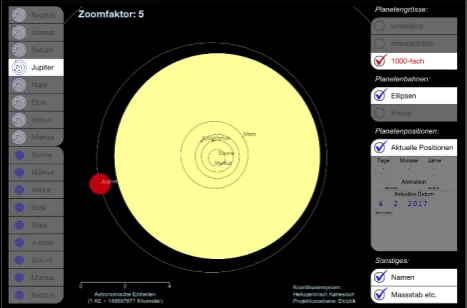
The first page of the prototype is developed as a complete eBook application. The map of the solar system is generated dynamically when the page is loaded and shows a heliocentric cartesian projection of the planetary orbits in the plane of the ecliptic.
Fig. 1. Solar System overview (Sun and planets are enlarged with factor 1000).
The following tools allow the emphasis of natural size ratios and distances in the solar system (see Fig. 1):
• Zoom buttons for each planet: Planet orbit views (top left) and detailed resp. natural views (bottom left)
• Scaling buttons for planet sizes (top right): equal size (all planets have the same size), true to scale (planets are too small for being visible), 1000 times enlarged (all planets are visible).
• Display of the current zoom factor (top left) and scale bar (bottom left)
• Buttons for the depiction of planet orbits: Ellipsis and Circles
• Button for the depiction of planet positions in realtime
• Buttons and input elements for the depiction of planet positions at any time1
• Buttons for the animation of planet movements (forward, backward)
Switching between the three variants of planet size users modify the scale of the planets while the scale of the orbits remains the same. This is the key function to point out the natural size of the planets in proportion to their orbits. It is important that the different scales for planets and planetary orbits are known at any time. Furthermore, rounded and thus better memorable scaling values are useful for this function. Therefor a scale factor of 1000 is predefined. More optional scale factors may be provided in a second version of the prototype. The author assumes that a scale function with continuously variable scale factors (usually served with a slider) would be less feasible, since odd numerical values are probably less memorable for students.
6.2 Planet Saturn
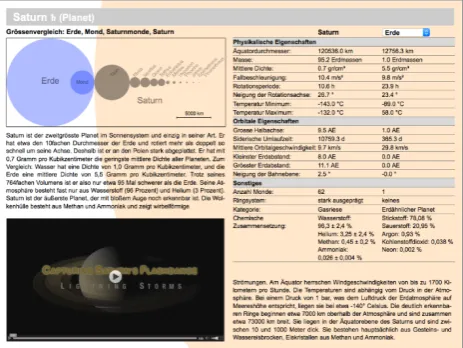
The second page of the prototype introduces the planet Saturn (see Fig. 2). An interactive 2D graphic shows a size comparison of Saturn with the Earth and Saturn's largest natural satellites with the Moon (top left). The graphic can be enlarged with a “tap” to full screen size. Two text blocks contain introductory information about the planet (middle left and bottom right). A video offers an insight into the work of a research project of NASA, which is part of a current satellite mission (bottom left). A table contains selected physical and orbital data, and further characteristical data of the planet (top right). A direct comparison with the data of a second planet (e.g. the Earth) is provided.
Fig. 2. Introduction of Saturn.
1 The calculation of the planet positions is valid from 1800 until
2050 A.D.
6.3 Planets in a direct comparison
A graphic file originally created for print production was prepared and enhanced with interactive features to gen-erate the third sample page of the prototype. The atlas page had originally a portrait format and was too large for a tablet display. Therefor it was divided into two parts with landscape format. This sample page shows the planets of the inner Solar System in comparison with the Sun (see Fig. 3, from left to right):
• A photographic comparison (with different image scales) is complemented by the view of the apparent planet size in the night sky (minimum and maximum, all in the same scale). • The main physical and orbital characteristics of
the planets are listed in the following section. • Interactive 2D graphics show a direct size
comparison of the planets and the sun. The average density of each celestial body is represented by a grey value of the fill color. The rotation speed of each planet is visualized with an animation in a separate window which pops up after a “tap” on the respective planet graphic. • Orbital speed, orbital inclination and the
inclination of the rotation axis are visualized with interactive graphics in the right section of the page. The animation starts after a “tap” in a popup window.
• The footer of the page contains the explanation of the tap symbol (left) and the used abbreviations. A scale bar complets the cartographic depictions (right).
Fig. 3. A direct comparison of the planets of the inner Solar System and the Sun.
6.4 Saturn moon Enceladus
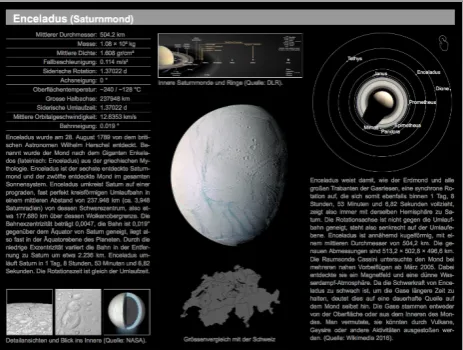
The fourth sample page of the prototype introduces Saturn's moon Enceladus (see Fig. 4). A table with selected physical and orbital characteristics of the moon is dynamically generated when the page loads (top left). Two text blocks contain introductory information about the moon (middle left and bottom right). Photos are composed in a gallery and show detailed views of Enceladus’ surface and its inner structure. All photos can be interactively enlarged to full screen size. The image on top of the second column shows the rings and inner moons of Saturn (in correct size-ratio) in an oblique view to the orbital plane of the moons. An audio file sounds after the image is enlarged (with a tap) to full screen size. The largest image, in the middle of the page, is a current photographic view of Enceladus. The land area of Switzerland is shown below the image for size comparison. Saturn and the orbits of its inner moons are shown in a view perpendicular to the orbital planes (top right). Enceladus’ velocity of circulation is shown with an animation in a popup window. An audio file sounds at the beginning of the animation. At the end of the animation, the following textual information is faded in sequentially: Length of the orbit (in km), Duration of a revolution (in h, min, s) and Orbital velocity (in km/s).
Fig. 4. Introduction of Saturns moon Enceladus.
Switzerland's land area is a well-known geographical comparative figure (especially for Swiss students) which enables them to make a relation to their own environment. The size of Enceladus is shown in an illustrative way. For a direct comparison the positions of the current photographic view (middle of the page) and the graph of the moon orbits (top right) should be the same on each moon page of the planet tool. The photo gallery, the image of Saturn's rings and inner moons as well as the animated graphic of Enceladus’ circulation around Saturn are further examples of how selected content can be presented enlarged in a popup window. Animations and sounds are used to increase the students' attention.
7.
Conclusion and Outlook
The presented prototype of a planet tool contains the full range of content elements of a multimedia eBook: 2
• A complete HTML-application (on the first sample page), with the separation of graphic window and graphical user interface (GUI) • Interactive 2-dimensional graphics, scalable to
full screen size, partially animated and enhanced with sound3
• A video, integrated with a preview image, scalable to full screen size
• An interactive table that allows a direct comparison of the most important characteristics of two planets.
• A gallery with photos of a recent NASA mission and an information graphic about the inner structure of Enceladus. All images can be enlarged to full screen size.
• A size comparison with a well-known geographical comparative figure.
From the perspective of the author, the research question of this master thesis (see section 2) can be answered with a clear “Yes”: The technical and cartographical capabilities of the open standard ePUB 3 are sufficient to develop a multimedia eBook for modern high school education. During the development process there was only one case in which a desired function could not be implemented (see section 5.5). Actually, the provided fallback solution turned into an enhancement of the application: A photo shows a natural view of the planet instead of a simple vector outline. However, all requirements for the planet tool (see section 4) could be fulfilled. The evaluation of us-ability and readability of the prototyp is still an outstanding task. As mentioned in section 3, systematical user tests should be conducted with a larger group of teachers and students. Another pending task is the enhancement of the planet tool with an automatic adaption to an arbitrary screen size. With the applied “fixed layout” the aspect ratio of a sample page is always maintained and the block elements of a certain page are always at the same relative position. To answer the research question, all functional tests and user tests can be conducted with only one device type (e. g. an iPad). However, the planet tool has to pass all tests at least on the commonly most popular device types (see section 3). With the “EPUB 3 Support Grid” (IDPF, 2016) the International Digital Publishing Forum (IDPF) leads a list of supported EPUB features by popular eBook readers (70 reading systems on 20th February 2017). The number of supported ePUB features and the variety of design capabilities for multimedia eBooks increases over
2 The open standard ePUB 3 does not support interactive
3-dimensional graphics.
3 Any mathematically describable 2-dimensional vector
time. Therefore, fault-free functional tests on a new reading system resp. device type become more and more probable.
Especially through the support of multimedia content and scripting, opportunities for the design and development of multimedia eBooks are vast. “The boundaries between the capabilities of native apps and ePUB ebooks can blur with JavaScript support in the longer term.” (Kämmerle, 2012). In the near future, multimedia eBooks can enrich the media market both as “standalone” eBooks and as supplements for printed books.
The open standard ePUB 3 does not support interactive 3-dimensional graphics.
Any mathematically describable 2-dimensional vector graphic can be dynamically generated with the technical and cartographical capabilities of ePUB 3.
8.
References
Adobe (2017): PDF Reference and Adobe Extensions to the PDF Specification. Website of Adobe Systems Inc.,
Accessed 20 February 2017. http://www.adobe.com/devnet/pdf/pdf_reference.html
Bostock M. (2017): Data-Driven Documents. Website of the JavaScript library D3, Accessed 20 February 2017. http://d3js.org/
Cross D. (2017): Solar System Calculator. Website of Don Cross, Accessed 20 February 2017. http://cosinekitty.com/solar_system.html
Daley D., Frost J., Strazzullo D. (2012): Building Web Applications with SVG (Developer Reference). Microsoft Press.
DCMI (2017): Dublin Core Metadata Initiative: Dublin Core Metadata Element Set, Version 1.1. Website of the DCMI, Accessed 20 February 2017. http://dublincore.org/documents/dces/
Garrish M. & Gylling M. (2013): EPUB 3 Best Practices (1. Aufl.). O’Reilly Media, Inc. Sebastopol, CA.
IDPF (2017): International Digital Publishing Forum: EPUB Feature Support. Webseite des International Digital Publishing Forums, Accessed 20 February 2017. EPUB 3: http://idpf.org/ePUB/301.
EPUB Test: http://ePUBtest.org/features/.
OCF: http://www.idpf.org/ePUB/31/spec/ePUB-ocf.html.
OPF:
http://www.idpf.org/ePUB/20/spec/OPF_2.0.1_draft.ht m.
OPS:
http://www.idpf.org/ePUB/20/spec/OPS_2.0.1_draft.ht m
Kämmerle, A. (2012): EPUB3 und KF8 verstehen. 1. Edition 2012, Pagina GmbH, Tübingen.
NASA (2017) Solar System Dynamics. Website of the Jet Propulsion Laboratory (California Institute of
Technology). Accessed 20 February 2017. http://ssd.jpl.nasa.gov/
Schweizer Weltatlas (2010) EDK Schweizerische Konferenz der kantonalen Erziehungsdirektoren (Publ.). Schweizer Weltatlas – Atlas Mondial Suisse – Atlante Mondiale Svizzero. Lehrmittelverlag Zürich. Zurich (CH).
Schweizer Weltatlas interaktiv (2010) EDK Schweizerische Konferenz der kantonalen
Erziehungsdirektoren (Publ.) (2010).
Ac-cessed 20 February 2017. http://www.schweizerweltatlas.ch
W3C (2016): Document Object Model (DOM). Website of the World Wide Web Consortiums, Accessed 20 February 2017.
https://www.w3.org/DOM/ - what
Wikimedia Foundation (2016) Wikipedia, The Free Encyclopedia.
Accessed 20 February 2017.