Reviewed v1
Guidelines
Foundational Practices of Research Data
Management
Kristin A Briney, Heather Coates, Abigail Goben
‡ California Institute of Technology, Pasadena, CA, United States of America
§ Indiana University-Purdue University at Indianapolis, Indianapolis, IN, United States of America | University of Illinois at Chicago, Chicago, IL, United States of America
Corresponding author: Kristin A Briney ([email protected])
Received: 14 Jul 2020 | Published: 27 Jul 2020
Citation: Briney KA, Coates H, Goben A (2020) Foundational Practices of Research Data Management. Research Ideas and Outcomes 6: e56508. https://doi.org/10.3897/rio.6.e56508
Abstract
The importance of research data has grown as researchers across disciplines seek to ensure reproducibility, facilitate data reuse, and acknowledge data as a valuable scholarly commodity. Researchers are under increasing pressure to share their data for validation and reuse. Adopting good data management practices allows researchers to efficiently locate their data, understand it, and use it throughout all of the stages of a project and in the future. Additionally, good data management can streamline data analysis, visualization, and reporting, thus making publication less stressful and time-consuming. By implementing foundational practices of data management, researchers set themselves up for success by formalizing processes and reducing common errors in data handling, which can free up more time for research. This paper provides an introduction to best practices for managing all types of data.
Keywords
data management, research data management, data management plan, open data
‡ § |
Introduction
Researchers regularly lose data. Whether it is on the small scale like one scientist’s thesis data disappearing with a lost laptop or on the large scale like historically significant scientific data from NASA that was likely overwritten during a magnetic tape shortage in the 1970’s (Pearlman 2009), there is a long history of data not being available when researchers need it. A study by Vines, et al. found that biological data disappears at a rate of 17% per year after a study is published Vines et al. (2014). And even when researchers still have access to the data, countless research hours have been spent trying to locate specific data files on a computer and then understand exactly what that data means. Data management offers safeguards and solutions to prevent and solve many of these problems.
Well managed data is a benefit to any researcher as it requires less digging to find, less effort to understand, and less processing to prepare for collaboration, reuse, and sharing. Good data management prevents a failed hard drive or the loss of a key collaborator from ending a project or requiring re-collection of data. The primary motivation for data management, however, is that it makes research go more smoothly, allowing the researcher to focus on the problems of science rather than data adminstravia. Beyond the individual researcher, good data management can contribute to scientific communities as a whole -- improving the speed of discovery, enhancing the veracity of new findings, allowing for increased collaboration, and providing new opportunities for educational use of data. The practices described in this article are foundational and broadly applicable, though projects may also benefit from advanced data management practices and discipline-specific standards, not addressed here, that are tailored to the needs of individual projects.
Data management, as referred to in this article, is a set of processes and project management strategies that actively occur throughout a project. This is distinct from building a living data management plan (DMP), as recommended by Michener (2015). Here data management is used to refer to practices that make it easier for any researcher to find and use data when it is needed, whether it is old or new. When used effectively, data management behaviors (which can be described in a DMP) make using, sharing and reusing data easier. Many of these practices extend or build upon project management techniques. This is because, in order for scientific teams to collaborate effectively, they need to establish a shared understanding of a project’s tasks, including procedures for data management, and how the team will function. For this reason, good data management practices also include behavioral changes and clearly identified roles and responsibilities.
formal as a computational workflow (Verdi et al. 2007); it may be also be helpful to structure this information using a data lifecycle (DataONE 2020, UK Data Service 2020).
This article provides ten foundational practices to improve the management of research data and files across all disciplines. While not exhaustive, this is a guide to adding small routine practices to research workflows that provide maximum impact. These practices can be applied within the standards, cultural norms, and funder requirements of individual disciplines. If you would like additional recommendations or assistance, seek out your local librarian, as academic libraries now regularly support research data management and can connect you with disciplinary resources. Much like preventative medicine, a little time spent managing data at the beginning of a research project can save a huge amount of time later in having to deal with a data disaster.
Practice 1: Keep sufficient documentation
When planning for documentation, it is useful to consider what you, your supervisor, or team members may need to know in a year when preparing for a presentation, drafting a report, or responding to questions during peer review. The most effective method for improving data management is the simplest: record the most important information for the anticipated needs. Who ran the experiment? Which procedure were used? What materials
Figure 1.
were used when they did the experiment? What were the conditions under which the observation was measured? What was the citation for the work referenced? Documentation often means the difference in being able to use an older data file or not, especially as details are forgotten over time. As funders and research communities increasingly emphasize the value of reproducibility/replication, also consider documenting additional information needed to validate or defend the results after publication.
Documentation is contained in many formats depending on the research workflow. Options include paper and electronic notebooks, README files, codebooks, data dictionaries, simple templates, etc. README files are flexible text files that provide added context, and are especially helpful in bridging the gap between physical notes and digital data (Cornell Research Data Management Service Group 2020, Dryad 2020). Codebooks and data dictionaries describe variables in a dataset, what measurements or content they represented, and how they were gathered or transformed (ICPSR 2011, Bowman 2019, USGS 2020). Templates are useful for ensuring that the same information is recorded every time and provide a starting place for repeating or replicating a research project. Many disciplines have also created metadata standards which can provide guidance to documenting and creating shareable datasets, such as NetCDF, which is commonly used in oceanography and atmospheric sciences, or CDSIC, which is a set of standards used for clinical research (Unidata 2020, Consortium 2020). Additionally, there are resources for those looking to improve their research notebook (Kanare 1985, Thomson 2007) or e-lab notebook documentation (Harvard Biomedical Data Management 2019, Kwok 2018). No matter the format, the process and data should be described at a level comprehensible to someone with similar training and with enough detail so that the research can be picked up after a year-long hiatus or by a collaborator. Remember that documentation is an ongoing process rather than a one-time effort.
Practice 2: Organize files and name them consistently
Organizing files is a ubiquitous challenge (Dinneen and Julien 2019), yet keeping files organized will save significant time in the future when searching through folders for a specific file. Most computer users will eventually need to find an old file and logical organization and naming can make the difference between finding something quickly or wasting an hour digging.
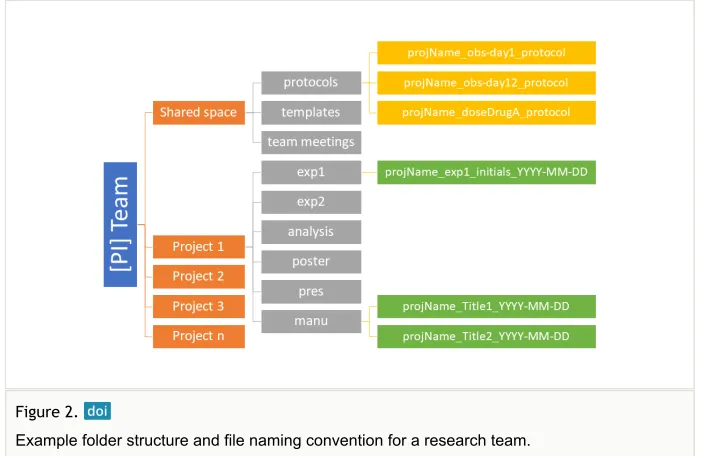
application is key. Get in the habit of always putting the data where it belongs for easy access later (Fig. 2).
Once data is structurally organized, file naming will take searching and sorting to the next level and make it easy to distinguish between related files. A good file naming convention works for a group of related files, displays about 3 pieces of key information about any file, and is easy to visually scan (Table 1). Place the most important sorting information or context (e.g. project name, experiment number, location, etc) at the beginning of a file name and don’t be afraid to use coded abbreviations – though do record the codes in a prominent place. Keep file names short, avoid special characters, and opt to use dashes and underscores over spaces as some programs and operating systems don’t easily deal with spaces in filenames. Different groups of files can have different naming conventions, though do be sure to document each of them.
File Type Sample File Name Template File Name Example
Outputs generated from a basic science experiment
ExperimentNumber_OutputType_Version Experiment25_Assay_v05.csv Experiment18_SPSSOutput_v02.tsv
Manuscript drafts Project_Manuscript_vXX.docx CityHIVInc_Manuscript_v23.docx Meeting notes YYYYMMDD_TeamName_MeetingNotes.docx 20181022_DDTeam_MeetingNotes.docx Literature Author_YYYY_ShortTitle.pdf Doubleday_2018_CopyrightNarrativeLitRev.pdf
Figure 2.
Example folder structure and file naming convention for a research team.
Table 1.
File Type Sample File Name Template File Name Example
IRB Submission documents (sorted by order needed for IRB)
SortingNumber_IRBType_DocumentSubject 02_IRBExemption_MyDataSurvey
One useful strategy for file naming and managing version controls leverages the international date convention, ISO 8601, with the format YYYY-MM-DD (or YYYYMMDD) (Briney 2018). Not only does ISO 8601 provide consistent and clear dates, but it allows files to be sorted chronologically, especially when dates appear at the beginning or end of a file name. If dates are an important piece of information about your data, such as for meeting minutes, use ISO 8601 formatting in file names.
Practice 3: Version the Files
Versioning, or keeping distinct copies of a document as it changes over time, is traditionally considered in the context of computer code or software, but can just as easily be applied to data, draft manuscripts, or any other file type iteratively generated during research. Procedures (either laboratory or analysis) are especially good candidates to version, as they often change over time. Applying version control to research files offers a low-barrier way to document provenance. Versioning allows a researcher to return to an earlier copy of a document, such as to rescue a portion of deleted text or to fix an analysis procedure, without having to recreate the entire thing from scratch. A Nature survey from 2015 found that 70% of researchers had tried and failed to reproduce someone else’s data and this may have been impacted by the unavailability of the procedures and document of the process (Baker 2016).
Versioning does not need to be complex. At its most basic, versioning files means keeping an untouched copy of the original file or raw data that won’t be overwritten, separate copies of content that undergo cleaning, analytical, and visualization processes , and a clean version of the finalized file. A step above this is to periodically save new versions of a file, such as by appending a new version number like “_v03” at the end of a file name. This method is very helpful when sending paper drafts between multiple authors and allows a researcher to rescue content or analyses that appeared in an earlier version of the document. Versioning can also be done with a date (see ISO 8601 format described in Practice 2) instead of version number, depending on researcher preference. While you may consider using the marker “_FINAL” at the end of the file name only once a file will no longer receive any changes, this should be used with caution as many researchers find their work still underway or receiving revisions after peer review, leading to examples like “File_FINAL_FINAL_v6.2”. Denoting that a file is the submitted version or revised version can prevent confusing names.
different branches of data as they are modified, it also comes with a steep learning curve and may not be necessary for a single project or a lone researcher.
When making choices about versioning, it is important to understand what will meet the workflow and educational demands of the research team. However, even where a simple approach is enough, always keep a master copy of the raw data in the event that processing and analysis must be redone from scratch.
Practice 4: Create a security plan, when applicable
Sensitive or confidential data — such as data about human subjects, protected intellectual property, or data regulated by privacy law or policy — will often be required to have a documented plan for how to handle that data. This makes procedure clear for anyone who interacts with that data and helps ensure that security protocols are being followed. A data security plan will be specific to the data and technology, but should include information such as: security controls, who has access to the data during the project, what happens when someone leaves the institution or needs to have their access cut off, retention period for the data, obligations to share data after the completion of the project, and how the data will be discarded or destroyed, and any requirements for training. In addition, researchers should consider the ethical responsibilities surrounding data capture and use (Zook et al. 2017).
At academic institutions, there are likely to be offices and resources available to assist with security. Universities will have a HIPAA compliance officer and data security officers within the information technology department and possibly individual colleges or departments. Many universities also have an information security officer or office. Beyond observing HIPAA and FERPA regulations, there may be preferred university-provided tools for encryption, classification and storage of sensitive data, and protocols. Knowing your responsibilities and using institutional resources can prevent a lack of clarity about obligation and security protocols, which has in the past resulted in a researcher being held solely accountable for an IT breach of health data (Barber 2011, Kolowich 2011).
As security needs will continue to evolve with a project, review the security plan at least annually, coordinate with institutional security officers, and update as needed.
Practice 5: Define roles and responsibilities
The onboarding process should provide an introduction to the processes and standards adopted by the team and be provided to all new members for consistency. For most, this includes team-wide elements such as compliance training, safety protocols, documentation standards (including lab notebooks), data management practices, etc. Onboarding should also include training specific to the assigned projects and a discussion of how contribution to the project is recognized, whether through authorship, acknowledgement, or some other means. The completion of this process should, of course, be documented and signed by the team lead and new team member (see Practice 1). Similarly, the exit process should provide consistent closure for a team member’s involvement with projects. This process should ensure that both the departing team member and the team retain access to the information necessary as indicated by institutional policy or funder agreement. In many cases, a trainee may continue to collaborate on manuscripts or other products after leaving the team. Continued access to the necessary data and information should be discussed and documented to enable this progression; on the other hand, immediately revoking access to all project related accounts and resources may be necessary. Updating documented roles and responsibilities quarterly, or as team members join or exit the team, is necessary for this record to be effective.
Implementing these practices within an existing team or ongoing project can be challenging. One option is to choose a new project wherein a team can implement a prenuptial roles and responsibilities agreement (Gadlin and Jessar 2020, NIH Office of the Ombudsman 2011). When done during the start-up phase of a project, this open negotiation can build trust among team members. However, roles on a project often change over time, which can lead to changes in authorship on articles, presentations, posters, data publications, etc. Ongoing discussions of roles and responsibilities throughout the lifespan of a project can normalize these expectations and foster a culture of transparency and accountability. Teams who create documentation reflecting their shared understanding of the work to be done and identify those responsible for carrying out that work are more effective (Lim and Klein 2006, Van den Bossche et al. 2010).
Practice 6: Back up the data
The best backups are automated and run at a regular frequency: daily, weekly, etc. The ideal backup system and schedule are the ones that fit best into your research workflow and account for the speed and scale of data production . Once a backup system is implemented, take some time to learn how to restore data. It’s much less stressful to figure this out at the beginning than when you’re panicking over a crashed hard drive. Finally, it’s recommended to periodically confirm that backups are functioning properly to avoid unpleasant surprises when trying to recover data in a crisis.
Practice 7: Identify tool constraints
Creating a research workflow is often shaped by the available tools or the technical requirements that chosen tools have for systems, data, and interoperability. For example, many social science researchers have a preferred analytical package. Decisions about processes and tools used for data collection, storage, visualization, archiving, and sharing are primarily driven by the affordances of the analytical tool. For bench scientists, the key components of their workflow may exist outside the digital realm, while the resulting data are routinely stored in spreadsheets or databases. Whether the common component of a research workflow is a data collection instrument, a data storage platform, or an analytical package, it is helpful to consider the implications of those decisions on other aspects of the workflow.
When the primary consideration is a data collection tool, the team should consider the options for exporting data from that system or instrument, whether the data storage platform can integrate or connect directly, and whether the tools used for processing data are compatible. For example, when collecting publication metadata in XML, transforming the XML into a structured table may require use of a specific Python package. When data storage is the fixed component, considerations may include availability on mobile devices, integration with data collection and analysis tools, file size limitations, connection speeds, and file transfer rate limits. Analytical tools frequently require data to be in a specific set of structures and formats. Many specialized tools are also limited in the ways in which data can be exported and still maintain the integrity of the data (e.g., databases, NVivo or Atlas.ti, Qualtrics).
and information security offices are available to help researchers think through these decisions and build an appropriately secure and feasible research workflow.
Practice 8: Close out the project
Closing out a project involves identifying, preparing, and collocating key research files so as to identify provenance, improve future retrieval, and reduce effort when preparing for handoff or data sharing. A formalized and documented end-of-project close out can occur at the conclusion of a grant, after publication of an article, after the completion of a portion of the project, or when a colleague is transitioning off the team (e.g. when students graduate). No matter the timing, the close out process enables you to revisit projects and find the most important documents as easily and quickly as possible.
There are two approaches to picking files while closing out a project. Creating master copies of all key files is typically done at the end of a project, while snapshotting is used for capturing files at defined phases of the project (e.g. between data collection and data processing). Both approaches will require the appraisal of which data to keep. This varies greatly by size and type of project as well as funder and disciplinary expectations. Refer to disciplinary standards or other identified obligations to your institution, funder, and journal in order to appropriately assess what data will need to be preserved for the long term.
Master copies are records of the project’s most important files and are typically fully processed and have undergone quality control procedures. Master copies are a part of an audit trail, which is required in clinical trials and other regulated research. Master copies may include protocols, final raw data, processed data, analytical scripts and logs, tables and figures, and copies of submitted and accepted manuscripts, posters, and presentations.
Creating a snapshot is useful for projects that are large, complex, or still in process; for instance, snapshots may be useful when developing a model or algorithm based on a dynamic dataset. Snapshots may include:
• Data collection instruments, protocols, and other key study documents • Processed data that is ready for analysis
• Analytical scripts or procedures and resulting figures, tables, and other visualizations to be included in research outputs
• Outputs such as grant reports, posters, presentations, and articles
In addition to setting aside copies of key files, project close out is a good time to review file formats and storage media. This is because, at some point, file types and storage hardware become obsolete and make that data unreadable (McGlynn 2017). Future-proof planning includes converting to better file types and migrating storage solutions.
preferred because they often lead to many software programs being able to read the data. An example of the spectrum for tabular data stretches from .CSV to .XSLX to .SPSS: the first is an open format which can be read by a number of spreadsheet-type programs; the second is proprietary and owned by Microsoft but is in wide use and can be opened by some programs; and the last is both proprietary and has very few programs that can read it. A good rule of thumb is if you’re depending on an expensive piece of software to be able to read the data, plan to also save the data to a more open format to preserve access after the license ends or the software company goes out of business. Even with potential formatting loss during file format conversion, it’s better to be able to open the data in some format rather than not being able to read the data at all.
Migration, both for hardware and file formats, is another step in making your data future-friendly. Storage hardware should be updated before the hardware format falls out of regular usage and becomes difficult to read (e.g., floppy disks). File formats should be checked for upgrades (e.g., .DOC to .DOCX) and for alternatives closer to the “better” end of the format spectrum. During file format conversion, it’s a good idea to retain content in the original file format in the event that some information is lost. Migration activities can be reviewed every year or two, but are critical to ensuring that older data remains usable.
Master copies, snapshotting, using good file formats, and migration can pay off in time savings and lower stress when writing or revising manuscripts, presentations, or posters, or if someone questions the results. Following both file naming and organization conventions (Practice 2) and versioning files (Practice 3) during a project will facilitate connecting all copies of the files, should you need to dig further. Additionally, having clear roles and responsibilities (Practice 5) will indicate the person(s) responsible for maintaining the authoritative version of the master files.
Practice 9: Put the data in a repository
to rely upon the expertise of repository staff to perform ongoing digital preservation. Finally, some repositories have staff who perform curation of data (Dryad 2019, ICPSR 2020a, University of Minnesota 2020), which may additionally enhance discoverability and reuse.
Depositing data into a repository is made easier by good data management practices and consists of activities such as data appraisal, selection, cleaning, documentation, and submission. The data selected for deposit will vary based on the project and field, however enough data should be provided to allow for reproduction of analysis or replication of the data capture processes. The data and documentation selected for project close out can serve as a starting point for selection for data sharing. The next step is to ensure that the selected data is clean and error free, a part of which includes documenting the data to the level that an outsider (or your future self) can pick up the data and start using it without needing extra information. More complex data may also need to be packaged with one of several tool options (Frictionless Data 2020, ReproZip 2020) to ensure usability by peers and future colleagues. At this point, the data can be submitted to a repository, which may be: a disciplinary-specific repository (PLOS 2020), a funder- or journal-based repository, a restricted data repository, or a more general repository such as an institutional repository; your local librarian may be able to help determine the best repository for the data. In addition to the project specific documentation, a data deposit should also include important information such as title, author(s), abstract, reuse restrictions, etc. so that others can find and properly give credit for the data.
Practice 10: Write these conventions down [in a data
manage-ment plan]
This would not be an article about data management without a recommendation to have a data management plan. But rather than being a required document for a funding application (Michener 2015), here the DMP is recommended as a living document that describes all of the conventions decided on under the previous Practices. Recording conventions in a data management plan comes with all of the benefits of improved documentation described in Practice 1: ease of reference, aid in remembering, and ensuring all project partners understand expectations — refer back to decisions made under Practice 5 about roles and responsibilities and document those decisions here. Tools (The University of California Curation Center of the California Digital Library 2020) and guidelines (ICPSR 2020b) are available to help write the DMP. While this document is traditionally called a “data management plan,” it can alternatively be a README file stored with the data or a write up in the front of a research notebook.
Under this philosophy, the data management plan is a living, working document meant to be frequently referred to and updated as necessary. Setting a schedule to review the plan will also help refresh all project members of data expectations. Decisions made under Practice 5 will suggest who should enforce DMP conventions and shepherd the updating process. Framing the DMP as a living document does not preclude its use in other contexts, such as for a top-level overview in a grant. In particular, this form of the DMP is effective for onboarding new researchers to a project or any time project personnel change.
Conclusion
Data management is the sum of a number of small practices that add up to being able to find and use data when you need it. Data management is most effective when these practices are habitual — consistent routines performed without extra effort. This does not mean a researcher has to totally upend her workflows to see benefits. Data management can be adopted when a significant change occurs such as a new collaboration or funding or when you get a new piece of equipment. These situations provide an excellent opportunity to take 5 minutes to determine a naming convention, for example, that can save significant time later when looking for a specific file. Alternatively, an established researcher or team could try out one new Practice per month and have better data management within a calendar year.
An incremental approach to changing data management behaviors is generally the most practical. Any changes should be discussed as a group and prioritized for implementation. Don’t try to implement all 10 Practices above all in one week, or even one month. Choose one change to adopt at a time and give people enough time to make it a habit. Once the new habit is formed, choose another to implement. In some cases, it may make more sense to significantly modify a particular workflow through multiple changes. If this approach is necessary, don’t modify all the workflows for a project at the same time. Change is stressful and new habits take time to develop. Finally, remember that when your collaborators are expressing confusion and asking “how” questions, it is usually an indication that they are open to the changes and moving toward acceptance and adoption.
Acknowledgements
The authors would like to thank Kara Woo who read and provided thoughtful comments on the manuscript. The authors acknowledge the Research Open Access Publishing (ROAAP) Fund of the University of Illinois at Chicago for financial support towards the open access publishing fee for this article.
Author contributions
Kristin Briney: Conceptualization, Project Administration, Writing – Original Draft Preparation, Writing – Review & Editing.
Heather Coates: Visualization, Writing – Original Draft Preparation, Writing – Review & Editing.
Abigail Goben: Writing – Original Draft Preparation, Writing – Review & Editing.
Conflicts of interest
The authors report no conflicts of interest.
References
• Backblaze (2020) Hard drive data and stats. https://www.backblaze.com/b2/hard-drive-test-data.html. Accessed on: 2020-2-10.
• Baker M (2016) 1,500 scientists lift the lid on reproducibility. Nature 533 (7604): 452‑454. https://doi.org/10.1038/533452a
• Barber C (2011) Yankaskas settles appeal, agrees to retire from UNC. https:// www.dailytarheel.com/article/2011/04/
yankaskas_settles_appeal_agrees_to_retire_from_unc. Accessed on: 2020-2-10. • Borghi J, Abrams S, Lowenberg D, Simms S, Chodacki J (2018) Support your data: A
research data management guide for researchers. Research Ideas and Outcomes 4 https://doi.org/10.3897/rio.4.e26439
• Bowman S (2019) How to make a data dictionary. http://help.osf.io/m/bestpractices/l/ 618767-how-to-make-a-data-dictionary. Accessed on: 2020-2-10.
• Briney K (2015) Data management for researchers: organize, maintain and share your data for research success. Pelagic Publishing, Exeter, UK. [ISBN 9781784270124] • Briney KA (2018) The problem with dates: Applying ISO 8601 to research data
management. Journal of eScience Librarianship 7 (2). https://doi.org/10.7191/jeslib. 2018.1147
• Colavizza G, Hrynaszkiewicz I, Staden I, Whitaker K, McGillivray B (2020) The citation advantage of linking publications to research data. arXiv URL: https://arxiv.org/abs/ 1907.02565
• Cornell Research Data Management Service Group (2020) Guide to writing "readme" style metadata. https://data.research.cornell.edu/content/readme. Accessed on: 2020-2-10.
• Corti L, Eynden VVd, Bishop L, Woollard M (2019) Managing and sharing research data: A guide to good practice. 2. SAGE [ISBN 978-1526460257]
• Cousijn H, Feeney P, Lowenberg D, Presani E, Simons N (2019) Bringing citations and usage metrics together to make data count. Data Science Journal 18 https://doi.org/ 10.5334/dsj-2019-009
• DataONE (2020) Data life cycle. https://www.dataone.org/data-life-cycle. Accessed on: 2020-2-10.
• Digital Curation Center (2020) Overview of funders' data policies. http://www.dcc.ac.uk/ resources/policy-and-legal/overview-funders-data-policies. Accessed on: 2020-3-06. • Dinneen JD, Julien C (2019) The ubiquitous digital file: A review of file management
research. Journal of the Association for Information Science and Technology 71 (1): E1‑E32. https://doi.org/10.1002/asi.24222
• Dryad (2019) Terms of Service, Curation. https://www.datadryad.org/pages/ policies#curation. Accessed on: 2020-3-06.
• Dryad (2020) Describe your dataset in a README file. https://datadryad.org/stash/ best_practices#describe. Accessed on: 2020-2-10.
• Fearon D, Boehm R, Chiu C (2019) Grant reviewer's guide for data management plans. https://osf.io/SNYFB/. Accessed on: 2020-3-06.
• Frictionless Data (2020) Data packages. https://frictionlessdata.io/data-packages/. Accessed on: 2020-3-06.
• Gadlin H, Jessar K (2020) Preempting discord: Prenuptial agreements for scientists. https://ori.hhs.gov/preempting-discord-prenuptial-agreements-scientists. Accessed on: 2020-2-10.
• Harvard Biomedical Data Management (2019) Electronic lab notebooks. https:// datamanagement.hms.harvard.edu/electronic-lab-notebooks. Accessed on: 2020-2-10. • ICPSR (2011) Guide to Codebooks.
https://www.icpsr.umich.edu/files/deposit/Guide-to-Codebooks_v1.pdf. Accessed on: 2020-2-10.
• ICPSR (2020a) ICPSR: A case study in repository management. https://
www.icpsr.umich.edu/icpsrweb/content/datamanagement/lifecycle/index.html. Accessed on: 2020-3-06.
• ICPSR (2020b) Guidelines for effective data management plans. https:// www.icpsr.umich.edu/icpsrweb/content/datamanagement/dmp/. Accessed on: 2020-3-06.
• Kanare H (1985) Writing the laboratory notebook. American Chemical Society [ISBN 978-0841209336]
• Kolowich S (2011) Security Hacks. https://web.archive.org/web/20110128163359/ https://www.insidehighered.com/news/2011/01/27/
unc_case_highlights_debate_about_data_security_and_accountability_for_hacks. Accessed on: 2020-2-10.
• Kriesberg A, Frank R, Faniel I, Yakel E (2014) The role of data reuse in the
apprenticeship process. Proceedings of the American Society for Information Science and Technology 50 (1): 1‑10. https://doi.org/10.1002/meet.14505001051
• Library of Congress (2019) Recommended formats statement. https://www.loc.gov/ preservation/resources/rfs/. Accessed on: 2020-3-06.
• Lim B, Klein K (2006) Team mental models and team performance: a field study of the effects of team mental model similarity and accuracy. Journal of Organizational Behavior 27 (4): 403‑418. https://doi.org/10.1002/job.387
• McGlynn T (2017) Keeping data readable in the long run. https://smallpondscience.com/ 2017/05/15/keeping-data-readable-in-the-long-run/. Accessed on: 2020-3-06.
• Michener W (2015) Ten simple rules for creating a good data management plan. PLOS Computational Biology 11 (10): e1004525. https://doi.org/10.1371/journal.pcbi.1004525 • NIH Office of the Ombudsman (2011) Questions for scientific collaborators. https://
ombudsman.nih.gov/sites/default/files/
Sample%20Partnering%20Agreement%20Template.pdf. Accessed on: 2020-2-10.
• Nosek BA, Alter G, Banks GC, Borsboom D, Bowman SD, Breckler SJ, Buck S,
Chambers CD, Chin G, Christensen G, Contestabile M, Dafoe A, Eich E, Freese J, Glennerster R, Goroff D, Green DP, Hesse B, Humphreys M, Ishiyama J, Karlan D, Kraut A, Lupia A, Mabry P, Madon T, Malhotra N, Mayo-Wilson E, McNutt M, Miguel E, Paluck EL, Simonsohn U, Soderberg C, Spellman BA, Turitto J, VandenBos G, Vazire S, Wagenmakers EJ, Wilson R, Yarkoni T (2015) Promoting an open research culture. Science 348 (6242): 1422‑1425. https://doi.org/10.1126/science.aab2374
• Pascal C (2006) Managing data for integrity: Policies and procedures for ensuring the accuracy and quality of the data in the laboratory. Science and Engineering Ethics 12 (1): 23‑39. https://doi.org/10.1007/s11948-006-0004-0
• Pearlman R (2009) NASA erased first moonwalk tapes, but restores copies. https:// www.space.com/6994-nasa-erased-moonwalk-tapes-restores-copies.html. Accessed on: 2020-2-10.
• Pinheiro E, Weber W, Barroso LA (2007) Failure trends in a large disk drive population. In: USENIX (Ed.) 5th USENIX Conference on File and Storage Technologies. URL: https://www.usenix.org/legacy/events/fast07/tech/full_papers/pinheiro/pinheiro_old.pdf • Piwowar H, Vision T (2013) Data reuse and the open data citation advantage. PeerJ 1
https://doi.org/10.7717/peerj.175
• PLOS (2020) Recommended repositories. https://journals.plos.org/plosone/s/ recommended-repositories. Accessed on: 2020-3-06.
• ReproZip (2020) ReproZip. https://www.reprozip.org/. Accessed on: 2020-3-06. • SPARC (2016) Browse data sharing requirements by Federal Agency. http://
datasharing.sparcopen.org/data. Accessed on: 2020-3-06.
• Swearingen J (2018) When Amazon web services goes down, so does a lot of the web. https://nymag.com/intelligencer/2018/03/when-amazon-web-services-goes-down-so-does-a-lot-of-the-web.html. Accessed on: 2020-3-06.
• The University of California Curation Center of the California Digital Library (2020) DMPTool. https://dmptool.org/. Accessed on: 2020-3-06.
• Thomson J (2007) How to start–and keep–a laboratory notebook: Policy and practical guidelines. http://www.iphandbook.org/handbook/ch08/p02/. Accessed on: 2020-2-10. • UK Data Service (2020) Research data lifecycle. https://www.ukdataservice.ac.uk/
manage-data/lifecycle. Accessed on: 2020-2-10.
• University of Minnesota (2020) DRUM services. https://conservancy.umn.edu/pages/ drum/services/. Accessed on: 2020-3-06.
• USGS (2020) Data dictionaries. https://www.usgs.gov/products/data-and-tools/data-management/data-dictionaries. Accessed on: 2020-2-10.
• Van den Bossche P, Gijselaers W, Segers M, Woltjer G, Kirschner P (2010) Team learning: building shared mental models. Instructional Science 39 (3): 283‑301. https:// doi.org/10.1007/s11251-010-9128-3
• Verdi KK, Ellis HJ, Gryk MR (2007) Conceptual-level workflow modeling of scientific experiments using NMR as a case study. BMC Bioinformatics 8 (1). https://doi.org/ 10.1186/1471-2105-8-31
• Vines T, Albert AK, Andrew R, Débarre F, Bock D, Franklin M, Gilbert K, Moore J, Renaut S, Rennison D (2014) The availability of research data declines rapidly with article age. Current Biology 24 (1): 94‑97. https://doi.org/10.1016/j.cub.2013.11.014 • Whitmire A, Carlson J, Westra B, Hswe P, Parham S (2017) The DART Project: using
data management plans as a research tool. https://doi.org/10.17605/OSF.IO/KH2Y6. Accessed on: 2020-3-06.
• Zook M, Barocas S, boyd d, Crawford K, Keller E, Gangadharan SP, Goodman A,