A Brief Study of Android Versions, Architecture and Its
Application Components.
Anusha Yamijala
Asst Prof in IT, SNIST, Ghatkesar, Hyderabad
1. Introduction:
Android is an operating system, which is widely used over the world. Most of the smart phones and other electronic devices namely, tablet pc, palm top etc, are also using Android as their operating system because of its flexibility in app development.
Android is the software platform from Google and the Open Handset Alliance that some say has the potential to revolutionize the global cell phone market.
For mobile devices we are using an operating system, Android is one of such operating system. The components of this underlying OS are written C or C++, java is the programming language that is used for building user applications.
In July 2005, Google acquired Android, Inc., a small startup company based in Palo Alto; CA. 4 of Android's co-founders went to work at Google.
At Google, the team developed a mobile device platform powered by the Linux kernel which they marketed to handset makers and carriers on the premise of providing a flexible, upgradeable system.
On 5 November 2007, the Open Handset Alliance, a consortium of several companies including Texas Instruments, Google, Intel, Motorola, and Sprint Nextel (just to name a few) announced the goal to develop open standards for mobile devices and unveiled their first product, Android, a mobile device platform built on the Linux kernel.
Open Handset Alliance is an alliance of approximately 30 organizations committed to bringing a “better” and “open” mobile phone to market. A quote taken from its website says it best: “Android was built from the ground up with the explicit goal to be the first open, complete, and free platform created specifically for mobile devices.”
From October 2008, Android is available as an Open Source. This is one of the products of Google, which is being used under Apache License.
With the Apache License, vendors are free to add proprietary extensions without submitting those back to the open source community.
On 9 December 2008, 14 new members joined the Android project including Garmin, Sony Ericsson, Toshiba, and Vodafone Group.
2. History of Android:
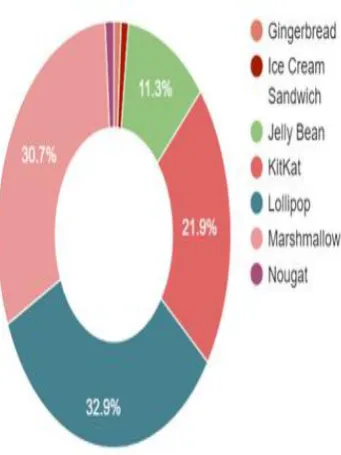
It is very interesting to know the history and versions of android. The code names of android ranges from A to N currently, such as Aestro, Blender, Cupcake, Donut, Eclair, Froyo, Gingerbread, Honeycomb,
Ice Cream Sandwitch, Jelly Bean, KitKat, Lollipop, Marshmallow and Nougat
Cupcake: Android 1.5
Donut: Android 1.6
Eclair: Android 2.0
Abstract: Android is the first free, open source mobile platform for application development. Now a day‟s developing applications by using Android had been increased drastically. Not only smart phones, tablet pc, palm top, notebook, eBook reader many of electronic devices are using Android as their operating system. In this paper, I will describe about the history and Basics of Android, Application components and fundamentals of android application development, versions of android. I assure and hope that the reader will understand or come to know about the android application development with the help of this paper.
\ Android 2.1
Froyo: Android 2.2
Gingerbread: Android 2.3
Honeycomb: Android 3.0
Android 3.1
Android 3.2
Ice Cream Sandwich: Android 4.0
Jelly Bean: Android 4.1
Android 4.2
Android 4.3
KitKat: Android 4.4
Lollipop: Android 5.0
Android 5.1
Marshmallow: Android 6.0
Nougat: Android 7.0 August 22, 2016 Figure 1.1 Versions of Android.
Android is operated with Linux kernel to interface with hardware. We have many built in apps in android; by using them we can write our won code by inheriting the required code. Use the built in code according to our requirement. Applications are created in the SDK (Software Development Kit). As android is an open source platform it is easy for the global community to use and develop application by using this Android Operating System,
3. Android Features: 3.1. Reuse and replacement of components
In Android, we will be provided with sample codes; by using them we can write the code for our current application by reusing the sample codes. We can inherit required methods and use it in the code.
3.2. Dalvik virtual machine
3.3 Integrated browser
In Android, we have Google Chrome as our in built browser, whenever we click any link, then we are provided with options to open that particular link, with browser or if any we app relating to that application. Almost most of the applications are provide with web apps, so we can use them fastly and efficiently. Integrated web browser is the fastest way to show rich content and to make cross-platform application. Also it is a good way to make app development cheaper,
3.4 Optimized graphics
GLTools is a custom OpenGL ES driver that's compatible with any familiar OGL ES 2.0-compatible GPU and ARM or x86-based CPU. Experienced users could think of it as a Chain Fire 3D alternative. Whisking control away from the system and into users' hands, this app has enough toggles and switches to turn you into an optimization obsessive. Here's a glance at what you can achieve with it!
3.5 SQLite
SQLite is the inbuilt database that is provided by the Android Os. We can manage the database by using SQLite in Android for application development. For this we have some tutorials, inbuilt code which makes us easy in the development process.
3.6 Media support
As a developer, we can use any type of media which Android Powered Device supports.
3.6.1. Core media formats [2]
The tables below describe the media format support built into the Android platform. Note that any given mobile device may provide support for additional formats or file types not listed in the table.
Note: Media codec‟s that are not guaranteed to be available on all Android platform versions are accordingly noted in parentheses—for example "(Android 3.0+)".
3.6.2. Audio format and codec support:
Android supports .3GPP, .MPEG-4, 3GPP (.3gp),•MPEG-4 (.mp4, .m4a) , ADTS raw AAC (.aac, decode in Android 3.1+, encode in Android 4.0+, ADIF not supported), MPEG-TS (.ts, not seekable, Android 3.0+), FLAC (.flac) only, Type 0 and 1 (.mid, .xmf, .mxmf), RTTTL/RTX (.rtttl, .rtx), OTA (.ota), iMelody (.imy), MP3 (.mp3), Matroska (.mkv), WAVE (.wav), Ogg (.ogg), Matroska (.mkv, Android 4.0+) audio formats.
3.6.3. Video format and codec support:
Android supports 3GPP (.3gp), MPEG-4 (.mp4), 3GPP (.3gp), MPEG-4 (.mp4), MPEG-TS (.ts, AAC audio only, not seekable, Android 3.0+), MPEG-4 (.mp4),3GPP (.3gp), WebM (.webm), Matroska (.mkv, Android 4.0+), WebM (.webm), Matroska (.mkv, Android 4.0+) video formats.
3.6.4. Image format and codec support:
Android supports BMP (.bmp), GIF (.gif), JPEG (.jpg), PNG (.png), WebP (.webp) image formats.
In addition to these encoding parameter recommendations, a device's available video recording profiles can be used as a proxy for media playback capabilities. These profiles can be inspected using the CamcorderProfile class, which has been available since API level 8.
For video content that is streamed over HTTP or RTSP, there are additional requirements:
For 3GPP and MPEG-4 containers, the moov atom must precede any mdat atoms, but must succeed the ftyp atom.
\
3.7 GSM Telephony
Provides APIs for monitoring the basic phone information, such as the network type and connection state, plus utilities for manipulating phone number strings. [3]
3.7.1 android.telephony.gsm [4]
Provides APIs for utilizing GSM-specific telephony features, such as text/data/PDU SMS messages.
Classes
Table 1.1 Classes of GSM
GsmCellLocation Represents the cell location on a GSM phone.
SmsManager This class was deprecated in API level 4. Replaced by android.telephony.SmsManager
that supports both GSM and CDMA.
SmsMessage This class was deprecated in API level 4. Replaced by android.telephony.SmsMessage
that supports both GSM and CDMA.
SmsMessage.SubmitPdu This class was deprecated in API level 4. Use android.telephony.SmsMessage.
Enums
Table 1.2. Enums of GSM
SmsMessage.MessageClass This enum was deprecated in API level 4. Use android.telephony.SmsMessage.
Android provides API for supporting GSM networks; we have embed telephony support by using API‟s. All GSM devices use a SIM, a secure smart card, which holds information about the network and the user setting. Android currently provides a read-only interface via the telephony APIs, to access the physical device and SIM information.
3.8. Bluetooth, EDGE, 3G, and Wi-Fi
In Android we can connect all types of tethering in the applications. It will be very useful for the developers for coding.
3.9. Rich development environment [4]
Android provides a rich application framework that allows you to build innovative apps and games for mobile devices in a Java language environment. The documents listed in the left navigation provide details about how to build apps using Android's various APIs.
If you're new to Android development, it's important that you understand the following fundamental concepts about the Android app framework:
Apps provide multiple entry points
Android apps are built as a combination of distinct components that can be invoked individually. For instance, an individual activity provides a single screen for a user interface, and a service independently performs work in the background.
From one component you can start another component using an intent. You can even start a component in a different app, such as an activity in a maps app to show an address. This model provides multiple entry points for a single app and allows any app to behave as a user's "default" for an action that other apps may invoke.
Apps adapt to different devices
Android provides an adaptive app framework that allows you to provide unique resources for different device configurations. For example, you can create different XML layout files for different screen sizes and the system determines which layout to apply based on the current device's screen size.
4. Android Architecture[5]
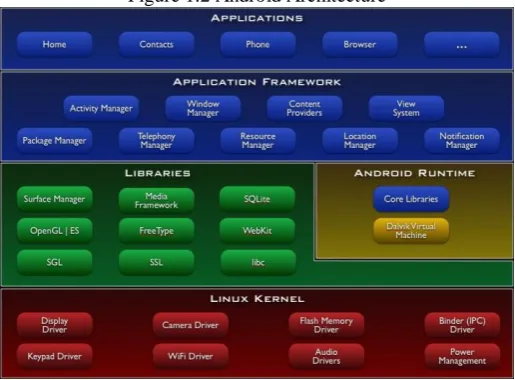
Android is not a single piece of hardware; it's a complete, end-to-end software platform that can be adapted to work on any number of hardware configurations. Everything is there, from the boot loader all the way up to the applications.
Figure 1.2 Android Architecture
4.1. Android S/W Stack – Application
Figure 1.3. Android Applications
• Android provides a set of core applications:
Email Client
SMS Program
Calendar
Maps
Browser
Contacts
Etc
• All applications are written using the Java language.
4.2. Android S/W Stack – App Framework
\ • Most of the application framework accesses these core libraries through the Dalvik VM, the gateway to
the Android Platform
4.3.Android S/W Stack – Libraries
• Including a set of C/C++ libraries used by components of the Android system
• Exposed to developers through the Android application framework.
• The media libraries are based on Packet Video‟s (http://www.packetvideo.com/) Open CORE. These libraries are responsible for recording and playback of audio and video formats.
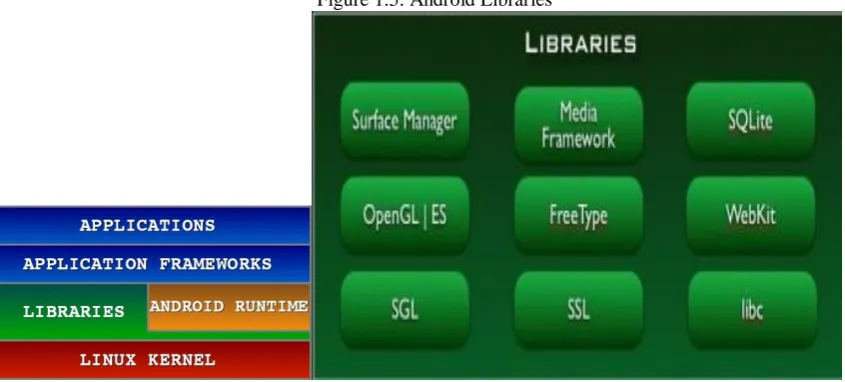
Figure 1.5. Android Libraries
A library called Surface Manager controls access to the display system and supports 2D and 3D.
• The Web Kit library is responsible for browser support; it is the same library that supports Google Chrome and Apple Inc.‟s Safari.
The Free Type library is responsible for font support.
SQLite (http://www.sqlite.org/) is a relational database that is available on the device itself. SQLite is also an independent open source effort for relational databases and not directly tied to Android. You can acquire and use tools meant for SQLite for Android databases as well.
5. Application Components 5.1. Activity
Present a visual user interface for one focused endeavor the user can undertake
Example: a list of menu items users can choose from
Typically correspond to one UI screen
But, they can:
Be faceless
Be in a floating window
Return a value
5.2. Services
Run in the background for an indefinite period of time
Example: calculate and provide the result to activities that need it
Faceless components that run in the background
E.g. music player, network download etc…
5.3. Broadcast Receivers
Receive and react to broadcast announcements
Components that respond to broadcast „Intents‟
Way to respond to external notification or alarms
Apps can invent and broadcast their own Intent
5.4. Content Providers
Store and retrieve data and make it accessible to all applications
Example: For using common data types in Android we have many number of content providers.( e.g., images , video, audio etc..)
Enables sharing of data across applications
E.g. address book, photo gallery
Provides uniform APIs for:
querying
delete, update and insert.
Content is represented by URI and MIME type
5.5. Intents
Hold the content of a message
Example: convey a request for an activity to present an image to the user or let the user edit some text
Think of Intents as a verb and object; a description of what you want done
E.g. VIEW, CALL, PLAY etc..
System matches Intent with Activity that can best provide the service
Activities and Intent Receivers describe what Intents they can service
6. Advantages:
The following are the other advantages for the developer of Android
• The Android SDK is available for Windows, Mac and Linux, so you do not need to pay for new hardware to start writing applications.
• An SDK built on Java. If you‟re familiar with the Java programming language, you‟re already halfway there.
• By distributing your application on Android Market, it‟s available to hundreds of thousands of users instantly. You‟re not just limited to one store, because there are alternatives, too. For instance, you can release your application on your own blog. Amazon has recently been rumored to be preparing their own Android app store also.
• As well as the technical SDK documentation, new resources are being published for Android developers as the platform gains popularity among both users and developers.
7. Conclusion:
Finally, Android is the first open source for app development, it is very easy to use it or coding by using Android is very simple, most efficient and effective. In this paper, I had explained about history and versions of Android. Its features, platforms used in coding, components and its architecture in brief.
In future, we can expect many more versions and much more efficient in Android in built system or in Android Architecture.
8. References:
[1]. ANDROID BASED MOBILE APPLICATION DEVELOPMENT and its SECURITY Suhas Holla#1 , Mahima M Katti#2 # Department of Information Science & Engg, R V College of Engineering Bangalore, India
[2]. Challenges and Issues in Android App Development- An Overview Deepa V. Jose* , Lakshmi Priya C, G. Priyadarshini, Monisha Singh Department of Computer Science, Christ University, Karnataka, India [3]. Study on Android Operating System And Its Versions M. Narmatha 1 , S. Venkata KrishnaKumar2 1.
MPhil scholar, PSG College of Arts & Science, Coimbatore, India. 2. Associate Professor, Department of Computer Science, P.S.G College of Arts and Science, Coimbatore, India
\
MATS University, RAIPUR C.G. India(492001) shwetayadav299gmail.com Assistant Professor MATS University, RAIPUR C.G. India (492001) [email protected]
[5]. A Study of Android Application Security William Enck, Damien Octeau, Patrick McDaniel, and Swarat Chaudhuri Systems and Internet Infrastructure Security Laboratory Department of Computer Science and Engineering The Pennsylvania State University {enck, octeau, mcdaniel,
swarat}@cse.psu.edu