
Volume 2, Issue 3, 2015
147 Available online at www.ijiere.com
International Journal of Innovative and Emerging
Research in Engineering
e-ISSN: 2394 - 3343 p-ISSN: 2394 - 5494
Enhancing User Privacy on Android Mobile Devices
Ms. Pal Bhavna Shyamlal
Student of Third Year of Computer Science & Engineering, 2014-2015 Department of Computer Science & Engineering,
Shri Sant Gadge Baba College of Engineering and Technology, Bhusawal. North Maharashtra University, Jalgaon, Maharashtra – 425203, India
ABSTRACT:
Android is known for giving the user control; it falls short when it comes to enabling and disabling the permissions on applications. Existing research on enhancing user privacy on Android devices can generally be classified as Android modifications. To reduce their potential operating system modifications, are required. This proposes the reverse engineering process is use of permissions removal, where it is used to remove an app’s permission. Study of seven popular social networking apps for Android mobile devices are based on our findings indicate that the difficulty of permissions removal may vary between types of permissions.
Keywords: Virtual Machine, android, apps, mobile, permissions.
I. INTRODUCTION
The usage of mobile devices increases in ubiquity and capability, so will the need for increased privacy and security. Mobile devices are now being used for tasks once primarily undertaken on personal computers and notebooks. The most common operating system (OS) for mobile device, as of early 2013, is the Android OS by Google [1]. The Android platform is designed with openness in mind, meaning all of the system’s source code is available for download, modification and review [9]. Android relies on its permissions system in order to reduce the risk of a malicious app on a device. A user can manually check the list of permissions required by the app upon installation as a method to determine if it is a legitimate app.
An app without the appropriate permissions cannot perform tasks requiring that resource. For example, a phone app requires the CALL_PHONE permission in order to make phone calls. By default, an app that is installed on an Android device can only be granted all of its requested permissions. It is a common finding in current research in Android privacy that the Android OS requires improvements in order to become a system that is capable of providing an adequate amount of user privacy [9]. Third party frameworks that are built into customized versions of Android showcase what is possible through direct OS improvements. These improvements include enhancing the user friendliness of the current permissions system (e.g. permission categories). Another method of improving user privacy is the use of fine-grained permissions and this allows for users to allow specific permissions on a per application basis [8].
II. ARCHITECTURE OF THE ANDROID OPERATING SYSTEM
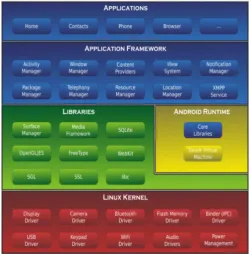
Though many versions of Android have been released so far, of which the latest is 5.0 dubbed as Android Lollipop, the core architecture remains the same. It is a layered architecture with the layers consisting of the base Linux kernel, libraries and an application framework to manage the applications [4].
A. PLATFORM
The Android Operating System is based on the Linux Kernel. It uses the version v2.6.x of the Kernel tree. The Kernel is an intermediary of the software stack and the hardware.
B. CORE LIBRARIES
The various components within the Android OS use libraries written in C/C++. Application framework also uses these libraries. These are not the standard libraries present in conventional Linux systems and it is a specialized version of a subset of them. For example, there is no glibc present [4].
Android Runtime
Volume 2, Issue 3, 2015
148 Figure 1:- Android Architecture
Virtual Machine
The Java class files are been converted into .dex format by the Dalvik Virtual Machine. The Dalvik VM is designed, so as to run optimally on a machine with slow CPU, less RAM, and without swap space OS, while having the additional power constraint of running on the battery [3]. It is optimized to weed out redundancy that a regular .jar file has, while integrating every existing Java class file. Thus, memory saved via minimal repetition, implicit typing and labeling. Dalvik VM is register-based and it helps in avoiding unnecessary memory access and getting more meaning per instruction.
C. APPLICATION FRAMEWORK
Application framework layer defines how applications are built and how they behave. The Android application framework includes:
User interface
A set of Content Providers
Access to resources is provided by a Resource Manager
Notification Manager
Activity Manager.
D. APPLICATION DEVELOPMENT ON ANDROID
Java programming language is used to develop the applications in Android. Compilation of code is done by various Android tools with the help of other information in an archive with an .apk suffix. One can publish the application over the Android Market so that it can be distributed to other users as well.
III.ANDROIDSTRUCTURE
Android apps are stored and distributed within an Android Application Package File (APK), a ZIP format file. Apps are commonly installed via the Google Play Store platform, which contains hundreds of thousands of apps created by third-party programmers and companies [9]. The use of the Google Play Store allows automatic selection of appropriate app installation packages based on the device that is installing the app [2].
A. ANDROID PERMISSIONS SYSTEM
Volume 2, Issue 3, 2015
149 Obtaining permissions is a two-step process. First, an application developer declares that his or her application requires certain permissions in a file that is packaged with the application. Second, the user must approve the permissions requested before installation. Each application has its own set of permissions that reflects its functionality and requirements [9]. Users can weigh the permissions against their trust of the application and personal privacy concerns [9].
IV.ENHANCINGUSERPRIVACYONANDROIDMOBILEDEVICESVIAPERMISSIONSREMOVAL
A total of seven Android apps were chosen to be examined and repackaged. A list of the apps selected along with the permissions they requested upon installation is shown in Table 1. An X symbol in a cell in Table 1 represents the app from the top row requesting this permission within its AndroidManifest.xml file. Permissions which two or less apps requested have been omitted from the table for clarity [9].
Table 1:- App Permission Requests [9]
A. PERMISSIONS SELECTION
Android permissions have two additional important characteristics. First, permission levels restrict install-time approval. Signature permissions are primarily used to prevent third-party apps from using core system functionality. The second characteristic is Android’s limited ability for permission delegation. Permissions protecting exported database interfaces can be delegated to other applications with row-level granularity (which is not default and if allowed by the database).
In app permissions selection process, the first step is for the user to determine whether the app requires this permission. The second step determines whether the app actually requires this permission in order to function. For example, in order to function a mapping app will require location resources such as the GPS system. The next two steps will determine whether the permission is harmless and feasible to be removed from the app [9]. For example, many app permissions allow an app to access sensitive information such as contact information, phone logs and SMS. The feasibility of removing an app’s permission is considered [9]. A user may choose to expressly disallow a particular permission even
Permission Face b o o k
Twitter Instag
ram Tan g o tex t Pin ter est Lin k ed In T u m b lr ACCESS_FINE_
LOCATION X X X
ACCESS_NETWORK_
STATE X X X X X X
AUTHENTICATE_
ACCOUNTS X X X X X
CAMERA
X X X
GET_ACCOUNTS
X X X X X X
INTERNET
X X X X X X X MANAGE_ACCOUNTS
X X X X X
READ_CONTACTS
X X X X X X
READ_PHONE_STATE
X X X
READ_SYNC_SETTING
X X X X X
VIBRATE
X X X X
WAKE_LOCK
X X X X X X X WRITE_CONTACTS
X X X X
WRITE_EXTERNAL_
STORAGE X X X X X X X
WRITE_SYNC_SETTINGS
Volume 2, Issue 3, 2015
150 when the app has well defined justifications. Some apps may be so heavily integrated with a certain resource that it may not run without it.
B. PERMISSIONS REMOVAL
Permissions removal is used in order to improve user privacy on Android devices. Permissions removal is the process wherein an app’s package installer is reverse engineered to remove unnecessary or privacy-intruding permissions [10]. The benefit of this method is that the app can be installed on any version of Android that supports the unmodified app. This means no additional third party software or rooted/custom Android OS is required which may have been an additional privacy/security risk. Figure 2 shows the ideal method of manual permissions removal to be performed on an Android app. The reason this method is considered ideal is that this process results in the entire app’s source code being readable and modifiable in Java. An app is first decompiled using a decompilation tool. In our case, APK Multi Tool is used. Decompilation results in several files, as shown with importance placed on the “smali” code files and AndroidManifest.xml file [9]. The smali code files are the source code of the particular Android app in a human readable format. The problem with this format is that it is difficult to read and debug apps; the language is complicated and hard to understand. As this is the case, the smali code files are then converted to a single .dex or Dalvik Executable file using a tool called smali/baksmali.
Figure 2:- Ideal permissions removal process [9]
This results in a .jar file, simply a Java archive file containing Java classes which can be read and extracted to .java files using JD-GUI. At this point, by modifying its Java files changes to the app can be made easily. After the source code changes are made, the app must be converted back into smali code in order for the recompilation process to be successful. The smali/baksmali software package is used once again to convert the Java code to smali code [9]. To recompile, APK Multi Tool is then used and sign the repackaged app. The result should be a working app installation package with some resource access removed, thus improving user privacy.
C. ANDROID APP PERMISSIONS
This section discusses the process through which we decided which permissions are reasonable to remove. The most commonly requested Android permissions were INTERNET, WAKE_LOCK and WRITE_EXTERNAL_STORAGE. These three permissions were requested by all seven apps [9]. Descriptions of each Android permission entails are available on the Android Developers website.
WRITE_EXTERNAL_STORAGE allows an app to modify the contents of external storage devices such as attached USB drives and SD cards. This also includes permission to write on the internal storage of a device, which is also defined as external storage. The next most common among the apps examined were the ACCESS_NETWORK_STATE, GET_ACCOUNTS and READ_CONTACTS permissions, with only the Instagram app not requesting the permissions in each case. ACCESS_NETWORK_STATE allows an app to detect whether Internet connectivity is currently available.
Volume 2, Issue 3, 2015
151 Finally, ACCESS_FINE_LOCATION and READ_PHONE_STATE are requested by three of the seven examined apps – see Table .The Android OS has two methods to provide an app with location information. A general location can be obtained by accessing cell tower and Wi-Fi information [9]. This can be accessed by an app that has requested the ACCESS_COARSE_LOCATION permission. A more accurate location can be obtained when an app requests the ACCESS_FINE_LOCATION. This uses the inbuilt GPS hardware to derive very accurate location information. Facebook, Twitter and Instagram are the three apps that request this permission. Location information is another questionable permission when requested by apps that are not intrinsically GPS apps or mapping apps. Studies by Zhou et al. found that apps do leak location data. Therefore, this permission should be removable from apps without affecting functionality while enhancing privacy.
D. REPACKAGING ANDROID APPS
Following the steps presented in Figure 2, we encountered a major problem. The current process for converting smali code to Java code is not yet fully functional. The resulting Java code, upon conversion, contains many thousands of errors [9]. Another reason this approach may not be so ideal is that the most commonly used software package to convert the smali code into Java files, DEX2JAR [1], has a known backdoor that could be exploited. Therefore, an alternative approach must be undertaken in order to ensure a working app at the end of the decompilation and recompilation process – see Figure 3.
The approach outlined in Figure 3 is capable of recompiling to an error-free app as the smali code is a direct representation of the app. We decided to use Virtuous Ten Studio due to its ability to decompile and recompile apps without the need for an external tool as well as accommodate the editing of smali and xml files. The program also includes an inbuilt documentation system that allows for the syntax highlighting of smali code files.
Figure 3:- Alternative removal process [9]
V. ADVANTAGESANDDISADVANTAGES
A. ADVANTAGES:
Multitasking
Ease of Notification
Easy access to thousands of applications via the Android App Market ,Google Android
Phone options are diverse
Can install a modified ROMB. DISADVANTAGES:
Continuous Internet connection
AdvertisingVI.CONCLUSION
From the apps, it was found that ACCESS_FINE_LOCATION could be removed from social networking apps without requiring direct source code changes. The only change required was to actually remove the permission request from the AndroidManifest.xml file and then recompile the app. The apps, with the location permissions removed, were functionally stable after the permission removal.
Volume 2, Issue 3, 2015
152 implemented onto an Android device. This would result in a self-functioning system that could enhance the privacy of apps on the device.
ACKNOWLEDGMENT
I feel great pleasure in submitting this Paper on “Enhancing user privacy on android mobile devices”. I wish to express true sense of gratitude towards my H.O.D., Prof. D. D. Patil and my teacher Prof. A.D.Pathak who at very discrete step in preparation of this Paper contributed their valuable guidance and help to solve every problem that arose. Also, most likely I would like to express my sincere gratitude towards my family & friends for always being there when I needed them the most. With all respect and gratitude, I owe my all success to the writers of reference papers that are referred by me in completion of this paper work activity which will be useful in presenting my survey paper.
REFERENCES
[1] M. Oleaga, 2013, “OS vs. Android Market Share 2013: Google Mobile Platform Dominating Apple Worldwide in March Figures”, http://www.latinospost.com/articles/15039/20130322/ios-vs android-market-share-2013-googlemobileplatform dominating.htm, accessed 25 March 2013.
[2] O. Hou, 2012, “A Look at Google Bouncer”,http://blog.trendmicro.com/trendlabs-securityintelligence/a-look-at-google-bouncer/, accessed 14 April 2013.
[3] J. Helfer & T. Lin, 2012, “Giving the User Control over Android Permissions”, http://css.csail.mit.edu/6.858/2012/projects/helfer-ty12.pdf, accessed 25 March 2013.
[4] Saranya .T1, Shalini .A.P.2, Kanchana .A3, “Detection and Prevention for Malicious Attacks for Anonymous Apps”, International Journal of Innovative Research in Computer and Communication Engineering (An ISO 3297: 2007 Certified Organization) Vol. 2, Issue 3, March 2014.
[5] P. Berthome, T. Fecherolle, N. Guilloteau & JF. Lalande, “Repackaging Android Applications for Auditing Access to Private Data”, ARES 2012, pp. 388-396.
[6] A. Shabtai, Y. Fledel, U. Kanonov, Y. Elovici, S. Dolev & C. Glezer, “Google Android: A Comprehensive Security nAssessment”, IEEE Security & Privacy Magazine, vol. 8, no. 2, 2012, pp. 35-44.
[7] A.P. Felt, E. Ha, S. Egelman, A. Haney, E. Chin & D. Wagner, “Android permissions: User attention, comprehension, and behavior”, SOUPS 2012, p. 3.
[8] W. Enck, P. Gilbert, BG. Chun, L.P. Cox, J. Jung, P. McDaniel & AN. Sheth, “TaintDroid: an information-flow tracking system for realtime privacy monitoring on smartphones”, 9th USENIX conference on Operating systems design and implementation, 2012, pp. 1-6.
[9] Quang Do1 Ben Martini2 Kim-Kwang Raymond Choo3,” Enhancing User Privacy on Android Mobile Devices via Permissions Removal”,’ Information Assurance Research Group, University of South Australia’, 2014 47th Hawaii International Conference on System Science.
![Table 1:- App Permission Requests [9]](https://thumb-us.123doks.com/thumbv2/123dok_us/8873837.1815651/3.595.162.433.185.616/table-app-permission-requests.webp)
![Figure 2:- Ideal permissions removal process [9]](https://thumb-us.123doks.com/thumbv2/123dok_us/8873837.1815651/4.595.137.461.235.432/figure-ideal-permissions-removal-process.webp)
![Figure 3:- Alternative removal process [9]](https://thumb-us.123doks.com/thumbv2/123dok_us/8873837.1815651/5.595.153.444.312.475/figure-alternative-removal-process.webp)
