University of New Orleans
University of New Orleans
ScholarWorks@UNO
ScholarWorks@UNO
University of New Orleans Theses and
Dissertations
Dissertations and Theses
Summer 8-11-2015
API-Based Acquisition of Evidence from Cloud Storage Providers
API-Based Acquisition of Evidence from Cloud Storage Providers
Andres E. Barreto
University of New Orleans, [email protected]
Follow this and additional works at: https://scholarworks.uno.edu/td
Part of the Data Storage Systems Commons, and the Information Security Commons
Recommended Citation
Recommended Citation
Barreto, Andres E., "API-Based Acquisition of Evidence from Cloud Storage Providers" (2015). University of New Orleans Theses and Dissertations. 2030.
https://scholarworks.uno.edu/td/2030
This Thesis-Restricted is protected by copyright and/or related rights. It has been brought to you by
ScholarWorks@UNO with permission from the rights-holder(s). You are free to use this Thesis-Restricted in any way that is permitted by the copyright and related rights legislation that applies to your use. For other uses you need to obtain permission from the rights-holder(s) directly, unless additional rights are indicated by a Creative Commons license in the record and/or on the work itself.
API-Based Acquisition of Evidence from Cloud Storage Providers
A Thesis
Submitted to the Graduate Faculty of the
University of New Orleans
in partial fulfillment of the
requirements for the degree of
Master of Science
in
Computer Science
by
Andres E. Barreto
B.Eng. Escuela Superior Polit´ecnica del Litoral (ESPOL), 2006
Abstract
Cloud computing and cloud storage services, in particular, pose a new challenge to digital forensic investi-gations. Currently, evidence acquisition for such services still follows the traditional approach of collecting artifacts on a client device. In this work, we show that such an approach not only requires upfront substantial investment in reverse engineering each service, but is also inherently incomplete as it misses prior versions of the artifacts, as well as cloud-only artifacts that do not have standard serialized representations on the client.
In this work, we introduce the concept of API-based evidence acquisition for cloud services, which addresses these concerns by utilizing the officially supported API of the service. To demonstrate the utility of this approach, we present a proof-of-concept acquisition tool, kumodd, which can acquire evidence from four major cloud storage providers: Google Drive, Microsoft One, Dropbox, andBox. The implementation provides both command-line and web user interfaces, and can be readily incorporated into established forensic processes.
Contents
1 Introduction 1
2 Background 3
2.1 Cloud computing . . . 3
2.1.1 Infrastructure as a Services (IaaS) . . . 3
2.1.2 Platform as a Service (PaaS) . . . 3
2.1.3 Software as a Service (SaaS) . . . 4
2.1.4 Issues at each stage of a forensic investigation . . . 4
2.2 Cloud forensics . . . 5
2.2.1 Saas Forensics . . . 5
2.3 Summary . . . 6
3 Design and Implementation 8 3.1 Architecture . . . 8
3.2 Tool Use . . . 9
3.2.1 Command-line arguments . . . 9
3.2.2 User authentication . . . 11
3.2.3 Content discovery and acquisition . . . 12
3.2.4 Web GUI . . . 15
3.3 Implementation . . . 18
3.3.1 Development environment . . . 18
3.3.2 Python . . . 18
3.3.3 Packages . . . 18
3.4 Installation . . . 19
3.4.1 Requirements . . . 19
3.4.2 Package installation . . . 19
3.5 Configuration . . . 20
4 Cloud Storage Providers APIs 21 4.1 Google Drive . . . 21
4.1.1 API authorization . . . 21
4.1.2 Filesresource . . . 23
4.2 Dropbox . . . 26
4.2.1 API authorization . . . 26
4.2.2 Account information . . . 27
4.2.3 Files and metadata . . . 28
4.3 OneDrive . . . 29
4.3.1 API authorization . . . 29
4.3.2 Drive resource . . . 30
4.3.3 Item resource . . . 31
4.4 Box . . . 33
4.4.1 API authorization . . . 33
4.4.3 Folder object . . . 35
5 Evaluation 37 5.1 Functionality . . . 37
5.1.1 Filtering . . . 37
5.1.2 Acquisition . . . 37
5.2 Download times . . . 37
5.3 Completeness . . . 38
5.3.1 Mirrored data . . . 38
5.3.2 Cloud-only data . . . 38
5.4 Discussion . . . 38
5.5 Future work . . . 39
6 Conclusion 40 Appendix A Google Drive API 43 A.1 Google Drive resources . . . 43
A.1.1 About Resource . . . 43
A.1.2 Children resource . . . 44
A.1.3 Revisions resource . . . 46
A.2 Google Drive resource representations . . . 48
A.2.1 About resource . . . 48
A.2.2 Files resource . . . 49
A.2.3 Children resource . . . 51
A.2.4 Revisions resource . . . 52
List of Figures
2.1 Cloud service models and ownership of layers . . . 4
3.1 Kumodd architectural diagram . . . 9
3.2 Authentication step 2: Provide account credentials . . . 11
3.3 Authentication step 3: Authorize access to the account bykumodd . . . 12
3.4 Steps of evidence acquisition . . . 13
3.5 Contents of the generated CSV file . . . 13
3.6 Drive contents downloaded to a local directory . . . 14
3.7 Metadata of every downloaded file saved in a local directory . . . 15
3.8 Web GUI: Service selection . . . 16
3.9 Web GUI: File selection . . . 17
3.10 Web GUI: Results . . . 17
3.11 Service credentials in the developer console (Google Drive) . . . 20
4.1 Google Developers Console . . . 22
4.2 Files:list method response example (abbreviated) . . . 24
4.3 Files:get method response example (abbreviated) . . . 25
4.4 Dropbox App Console . . . 26
4.5 OAuth 2 flow diagram. [1] . . . 27
4.6 OAuth 2 flow diagram. [2] . . . 30
4.7 Box Developers Console . . . 33
4.8 Get file response example (abbreviated) . . . 34
A.1 About:get method response example (abbreviated) . . . 44
A.2 Children:get method response example . . . 45
List of Tables
4.1 Files resource methods; all URIs relative to https://www.googleapis.com/drive/v2. A com-plete list of methods is available in in the Drive REST API reference provided by Google [26] . . . 23 4.2 OneDrive API authorization scopes . . . 30
5.1 Kumodd download times . . . 38
A.1 Children resource methods; URIs relative to https://www.googleapis.com/drive/v2. A com-plete list of methods is available in in the Drive REST API reference provided by Google . . 45 A.2 Revisions resource methods; URIs relative to https://www.googleapis.com/drive/v2. A
Listings
3.1 Listing all files stored in a Dropbox account . . . 10
3.2 Listing only images stored in a Box account . . . 10
3.3 Download just PDF files stored in OneDrive and save the in the Desktop folder . . . 10
3.4 Download files from Google Drive using files listed in a CSV file stored in /home/user/Desktop/ 10 3.5 Authentication step 1: Connect to Google Drive for the first time . . . 11
3.6 Authentication step 4: Input access code in the terminal (if necessary) and allow the applica-tion to retrieve results . . . 12
3.7 Output of listing all files in a Google Drive account (partial results are being shown) . . . 13
3.8 Starting the web GUI . . . 15
3.9 Kumodd download . . . 19
3.10 Obtaining the Python version . . . 19
3.11 Installation of Python 2.7.6 and its dependencies on Debian/Ubuntu . . . 19
3.12 python-gflags installation command . . . 20
3.13 google-api-python-client installation command . . . 20
3.14 dropbox installation command . . . 20
3.15 boxsdk installation command . . . 20
3.16 Flask and Flask-Classy installation command . . . 20
4.1 Google Drive Authorization scopes [28] . . . 22
4.2 Files:list response tructure . . . 23
4.3 Dropbox user information example . . . 27
4.4 get file request using the Dropbox Python library . . . 28
4.5 Metadata of a file in Dropbox . . . 28
4.6 revision request using the Dropbox Python library . . . 28
4.7 Revisions method response body example . . . 29
4.8 Drive resource response example . . . 31
4.9 Item resource response example . . . 31
4.10 OneDrive list children example . . . 32
4.11 Successful download file response . . . 32
4.12 Successful Content API authorization response . . . 33
4.13 Array of versions . . . 35
4.14 Items inside a folder . . . 36
A.1 Children:list response body structure . . . 46
A.2 Revisions:list response body structure . . . 48
A.3 About resource representation . . . 48
A.4 Files resource representation . . . 49
A.5 Children resource representation . . . 51
Chapter 1
Introduction
Cloud computing (or,the cloud) is the emerging primary model for delivering information technology (IT) services to Internet-connected devices. It abstracts away the physical compute and communication infras-tructure, and allows customers to effectively rent, instead of own and maintain, as much compute capacity as needed. As per NIST’s definition [3], there are five characteristics–on-demand self service,broad network access,resource pooling,rapid elasticity, andmeasured service–that distinguish the cloud service model from previous ones.
The underpinning technology development that has made the cloud possible is the massive adoption of virtualization on commodity hardware systems. Ultimately, it allows for a large pool of resources, such as a data center, to be provisioned and load-balanced at a fine granularity, and for the computations of different users (or uses) to be strongly isolated.
The first public cloud services–Amazon Web Services (AWS)–were introduced by Amazon in 2006. As of 2015, according to RightScale’sState of the Cloud Report [4], cloud adoption has become ubiquitous: 93% of businesses are at least experimenting with cloud deployments, with 82% adopting a hybrid strategy, which combines the use of multiple providers (usually in a public-private configuration). Nonetheless, much of the technology transition is still ahead as 68% of enterprises have less than 20% of their application portfolio running in a cloud setup. Similarly, Gartner [5] predicts another 2-5 years will be needed before cloud computing reaches the “plateau of productivity” marking the period of mass mainstream adoption and widespread productivity gains.
Unsurprisingly, cloud forensics is still in its infancy; there are few practical solutions for the acquisi-tion and analysis of cloud evidence and most of them are minor adaptaacquisi-tions of existing methods and tools. Indeed, NIST–the main standardization body in the US–is still working to build consensus on what the
challenges are with respect to performing forensics of cloud data; in [3] they have enumerated 65 separate ones.
In this work, we are concerned with one particular problem–the acquisition of data from cloud storage services. These have emerged as one of the most popular services with the average consumer as many providers, such asDropbox,Box,Google Drive, and Microsoft’sOneDrive, allow between 2 and 15GB of cloud storage for free. Cloud storage is also widely used on mobile devices to share data across applications (which are otherwise isolated from each other). Therefore, having a robust evidence acquisition method is a necessity today; further, due to the wide variety of these services, and the rapid introduction of new ones, the tool and methodology should be adaptable and extensible.
In traditional forensic models, the investigator works with physical evidence carriers, such as storage media or integrated compute devices. Thus, it is possible to identify the computer performing the compu-tations and the media that store (traces of) the processing, and to physically collect, preserve and analyze information content. Because of this, research has focused on discovering and acquiring every little piece of log and timestamp information, and extracting every last bit of discarded data that applications and the OS have left behind.
being spread among numerous providers. Applying the conventional model creates a long list of procedural, legal, and technical problems that are unlikely to have an efficient solution in the general case. Second, both computations and storage contain a much more ephemeral record as virtual machine (VM) instances are created and destroyed with regularity and working storage gets sanitized.
As we discuss in more detail in the next chapter, current work on cloud storage forensics has treated the problem as just another instance of application forensics. It applies basic differential analysis techniques to gain a basic understanding of the artifacts left on client devices by taking before and after snapshots of the target compute system, and deducing relevant cause and effect relationships. During an actual investigation, the analyst would be interpreting the state of the system based on these known relationships.
Unfortunately, there are several serious problems with this extension of existing client-side methods:
• Completeness. The reliance in client-side data can leave out critical case data. One example is older versions of the files, which most services provide; another one is cloud-only data, such as aGoogle Docs
document, which literally has no serialized local representation other than a link. Some services, such as a variety of personal information management applications, live only in the browser so a flush of the cache would make them go away.
• Reproducibility. As cloud storage applications get updated on a regular basis and versions have a relatively short live span, it becomes harder to maintain the reproducibility of the analysis and make require frequent repetition of the original procedure.
• Scalability. As a continuation of the prior point, manual client-side analysis is burdensome and simply does not scale with the rapid growth of the variety of services and their versions.
In this work, we propose an alternative approach for the acquisition of evidence data from cloud storage providers that uses the official APIs provided by the services. Such an approach has the major advantage of taking all the reverse-engineering work out of the picture:
• APIs are well-documented, official interfaces through which cloud applications on the client commu-nicate with the service; they tend to change slowly and changes are clearly marked–only new features need to be incrementally incorporated into the acquisition tool.
• It is easy to demonstrate completeness (based on the API specification) and reproducibility becomes straightforward.
• Web APIs tend to follow patterns, which makes it possible to adapt existing code to a new (similar) service with modest effort. It is often feasible to write an acquisition tool for a completely new service from scratch in a short time.
To demonstrate the feasibility of our approach, and to gain first-hand experience with the process, we have developed a proof-of-concept prototype called kumodd1, which can perform complete (or partial) acquisition of a cloud storage account’s data. It works with four popular services–Dropbox, Box, Google Drive, and Microsoft’sOneDrive–and supports the acquisition of revisions and cloud-only documents. The prototype is written inPython and offers both a command line and web-based user interfaces.
Chapter 2
Background
2.1
Cloud computing
The reference definition of cloud computing provided by the National Institute of Standards and Technology (NIST) states that “cloud computing is a model for enabling ubiquitous, convenient, on-demand network access to a shared pool of configurable computing resources (e.g., networks, servers, storage, applications, and services) that can be rapidly provisioned and released with minimal management effort or service provider interaction” [3]. With respect topublic cloud services–the most common case–this means that the physical hardware on which the computation takes place is owned and maintained the provider, as is at least part of the deployed software stack. Generally, customers have the option to pay per unit of CPU/storage/network use, although other business arrangements are also possible.
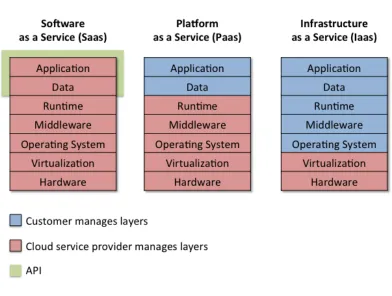
Depending on which part of the software stack is managed by the provider, there are three baseline deployment options:
2.1.1
Infrastructure as a Services (IaaS)
In IaaS, cloud service providers create virtual machines and assign their full control to customers. Cus-tomers then install operating system, and applications within the machine without any interference from the service providers. Amazon Web Service (AWS), Microsoft Azure, Google Compute Engine (GCE) are popular examples of IaaS. IaaS provides capabilities to take snapshots of the disk and physical memory of virtual machines, which has significant forensic value for quick acquisition of disk and memory. Since virtual machines have closely represent physical machines, the traditional forensic tools for data acquisition and analysis can also be used inside the virtual machines as remote investigation of a physical machine is per-formed. Furthermore, virtual machine introspection provided by hypervisor enables cloud service providers to examine live memory and disk data, perform instant data acquisition and analysis. However, since the functionality is supported at hypervisor level, customers cannot take advantage of this functionality [6]. In summary IaaS consists of the rental and use of hardware and the user is in charge of operating system and applications deployment.
2.1.2
Platform as a Service (PaaS)
2.1.3
Software as a Service (SaaS)
In SaaS, the provider is responsible for everything and customers access the functionality as either a web application, or a platform-specific mobile client. Cloud service manage all the layers including application layer that runs the software offered as a service to customers. In other words, customer has no control on the underlying operating infrastructure and application. However, since cloud service provider manages the infrastructure (including application), the maintenance cost on customer side is almost zero.. Google Gmail, Microsoft 365, Salesforce, Citrix GoToMeeting, Cisco WebEx are popular examples of SaaS, which run directly from web browser without downloading and installing any software. Their desktop and smartphone versions are also available to run on client machine. The applications whether running on web browser or desktop have limited presence on the client machine making investigators rely on server-side logs. SaaS applications log extensively, which has significant forensic value. For instance, Google Docs records every insert, update, and delete operation of characters performed by user along with the timestamps, which makes it possible to identify specific changes made by different user in a document [6].
Figure 2.1: Cloud service models and ownership of layers
2.1.4
Issues at each stage of a forensic investigation
Data identification
One of the main issues in analyzing evidence that could lead to information stored in the cloud is to identify where the data resides and what services where being used. In these cases the source of evidence on the client system will be web browser information such as history caches. In the case of cloud storage services it will be remnants of client application installations and also files downloaded for local use and edition using them.
Data preservation
Data stored in the cloud can appear and disappear or change from location rapidly, which makes it difficult to collect. Volatility of data have to be considered when undertaking collection from cloud resources. Tools that collect data from a cloud storage service with a focus on forensic investigations are not currently available [8]. As present, there are only two ways of getting information from a cloud drive account; via web browser login or using a client application provided by the service. It is important to have access to a tool that does not manipulate evidence from its source in any way.
Data analysis
One fast growing problem is the large amount of data may need to be obtained. Therefore, an important feature of the next generation of acquisition and analysis tools will be the ability to pre-screen and selectively obtain relevant data. In traditional, client-centric forensics, much of the filtering is based on file crypto hashes and timestamp data. However, these will need to be adapted to a new environment where neither filesystem metadata (such as theMS Windows registry), nor standard crypto hashes (e.g. Dropbox) are available [8]. At the same time, individual services may offer search capabilities that can potentially save substantial amounts of processing time.
2.2
Cloud forensics
Cloud forensics is defined as ”the application of digital forensics in cloud computing as a subset of network forensics. It is a cross reference between cloud computing and digital forensics” [9]. This paper focuses in SaaS forensics (cloud storage forensics specifically) as the proposed application was developed to work with cloud storage providers which fall in the Software as a Service classification.
Cloud storage related crimes fall in the electronic crime category which involves the use of a computer as a tool, target or storage device. Data stored in cloud services can be a target for criminals, while cloud storage can be used to save illicit data or crime related data. Computer related crime has three factors that attract people to commit them; motivation, opportunity and the absence of capable guardianship [10]. As online services adoption grow, criminal are tempted to exploit these opportunities.
2.2.1
Saas Forensics
Overall, there have been very few publications and practical tools to address identification, preservation and analysis of cloud-stored data. The main approach has been to analyze trace data and remnant artifacts left behind by the client applications. Since the applications are accessed from a client machine, remnants of digital artifacts pertaining to user activities on the applications are present and can be forensically retrieved and analyzed from the hard disk of the machine.
Cloud application forensics
Somers’ work on Google Docs, although not motivated by forensics, is probably the single best example of SaaS analysis that does not rely on trace data resident on the client–all results are produced solely by querying the web application’s interface. Assuming that an investigator is in possession of valid user credentials, the examination can be performed on the spot. This is likely to be sufficient for most informal scenarios; however, in order to make it to the court room, some additional tooling and procedure need to be developed. Clearly, the acquisition and long-term preservation of the evidence is yet to be addressed; yet another concern is the ability to replay the acquired log in the application. Unlike client-side applications, a web app resides entirely in the server, and there is no practical way to acquire an archival copy of the execution environment as of a particular date. One possible solution is to record a screencast video of the entire user editing session.
Microsoft Office 365 also keeps detailed revisions based on edits as it supports real-time collaboration, so–in principle–it should be possible to develop aDraftback-like tool. Other cloud drive services offer generic file revision history, however, the available data is more limited as it is stored as simple snapshots.
Cloud drive forensics
Chung et al. [12] analyzed four cloud storage services (Amazon S3, Google Docs, Dropbox, and Evernote) in search for traces left by them in the client system that can be helpful to investigate criminal cases. In their research, Chung et al. reported that the analyzed services may create different artifacts depending on specific features of the services. Chung et al. proposed a process model for forensic investigation of cloud storage services which is based in the collection and analysis of artifacts of the analyzed cloud storage services from client systems. The procedure includes gathering volatile data from a Mac or Windows system (if available), and then retrieving data from the Internet history, log files, and directories. In mobile devices they rooted an Android phone to gather data and for iPhone they used iTunes information like backup iTunes files. The objective was to check for traces of a cloud storage service exist in the collected data.
Hale [13] analyzed Amazon Cloud Drive and discusses the digital artifacts left behind after an Amazon Cloud Drive account has been accessed or manipulated from a computer. There are two possibilities to manipulate an Amazon Cloud Drive Account; one is via the web application accessible using a web browser and the other is a client application provided by Amazon and can be installed in the system. After analyzing the two methods he found artifacts of the interface on web browser history, and cache files. He also found that the client application left artifacts on Windows registry, application installation files on default location, and an SQLite database used by the application to hold upload and download tasks while the status of the task is pending.
Quick et al. [14] analyzed Dropbox and discusses the digital artifacts left behind after a Dropbox account has been accessed or manipulated. Using hash analysis and keyword searches they try to determine if the client software provided by Dropbox has been used. They get the Dropbox account username from browser history (Mozilla Firefox, Google Chrome, and Microsoft Internet Explorer), and the use of the Dropbox through several avenues such as directory listings, prefetch files, link files, thumbnails, registry, browser history, and memory captures.
Martini and Choo [15] discuss the digital artifacts of ownCloud (server and client side). They were able to recover artifacts including Sync and file management metadata (logging, database and configuration data), cached files describing the files the user has stored on the client device and uploaded to the cloud environment or vise versa, and browser artifacts.
Clark [16] performed metadata analysis of pictures in SkyDrive (now called OneDrive), Windows Azure and Flickr discovering that information like positioning can be obtained from publicly shared pictures.
2.3
Summary
Chapter 3
Design and Implementation
The traditional local storage forensic processing pipeline–physical acquisition, file carving, analysis of unal-located space, etc–which is historically based on the properties of file systems for magnetic disks, is quickly becoming obsolete. For example, the mass adoption of solid-state drives (SSD), which automatically sanitize unused space for performance reasons has eliminated unallocated space as a source of evidence. Large HDD drives are increasingly encrypted as the performance penalty is gone; also, sanitizing a slow 6/8/10TB drive is only practical by encrypting it and disposing of the key.
More generally, all storage devices are becoming “smart” by incorporating ever more powerful processors and ever more complex data layout algorithms. The concept of “physical” acquisition is on its way out as the CPU does not have direct access to the media and all data access becomesde facto logical, even for local storage. To be sure, storage devices still support legacy protocols that nominally contain addresses, however, there is no promise that this maps to the actual physical layout. In cloud deployments, all storage including HDD-backed is pooled (RAID-ed), virtualized, shared, and automatically sanitized to avoid data leaks. Therefore, attempting a traditional “physical” acquisition creates a long list of legal, procedural, and technical problems.
Considering cloud storage services from a user perspective, they offer a similar functionality to a physical drive–persistent file storage and retrieval. As files are not stored locally, an Internet connection is clearly necessary, as is a client application (or web browser) to provide a convenient UI to retrieve, edit or share them. This setup, as explained in Section 2.1.4, is a new challenge for forensics as none of the traditional approaches for retrieving evidence can be considered valid.
Fortunately, cloud storage providers offer a well-defined mechanism to work their service via a public API. Indeed, the applications installed on client devices work through the same mechanism (with the possible addition of undocumented API calls). An API opens up the opportunity to build a forensic-specific client, which can enumerate and acquire cloud-hosted artifacts in a controlled fashion. Further, an API has well-defined semantics, which can be modeled and tested to ensure sound acquisition. This is in stark contrast to the traditional approach of collecting leftover client artifacts, which treats the application as a black box whose functionality is to be reverse engineered. One clear limitation here is that an application can only work with the functionality exposed by the service; however, this is not likely to be a major restriction for basic forensic processing, such as data acquisition.
For the remainder of this chapter, we describe the design and implementation of a proof-of-concept prototype calledkumodd; it employs the public API of four popular cloud storage services to obtain a usable forensic image of the content of a user account.
3.1
Architecture
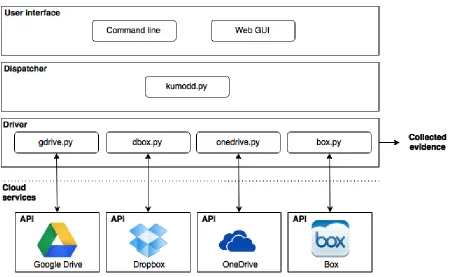
the public API supplied by the cloud provider and return the data in different, user-specified formats, such as JSON and CSV.
Figure 3.1: Kumodd architectural diagram
Overall, the service APIs are similar in the type of capabilities they provide. However, as our further discussion will show, they vary substantially in their implementation and provide varying levels of detail in terms of artifact metadata. Eventually, we expect the different drivers to provide a common, high-level interface that can abstract away most of the implementation details.
3.2
Tool Use
Afterkumoddis properly configured–a process described later in this chapter–it is ready to be used from the terminal.
3.2.1
Command-line arguments
The general format of the commands is:
p y t h o n k u m o d d . py - s [ s e r v i c e ] [ a c t i o n ] [ f i l t e r ]
The following are the currently supported argument values:
[service]
The type of cloud service being accessed:
gdrive Google Drive
onedriveMicrosoft OneDrive
box Box
[action]
The action to be perform using the selected service:
-l List files stored in an account drive as a plain text table.
-d Download files stored in an account drive in an specified location.
-csv Use a CSV file to specify which files to download.
[filter]
The[filter]parameter specifies the subset of files to be listed/downloaded based on file type:
all All files stored in an account drive;
doc Only .doc/.docx/.odf files;
xls Only spreadsheet files;
ppt Only presentation files;
text Only text/source code files;
pdf Only PDF files;
officedocs All document, spreadsheet and presentation files;
image Only images;
audio Only audio files;
video Only video files;
<file> Only with-csvaction: CSV file containing the files to be downloaded.
-p <path> Used with -d and -csv action: Used to specify the path in which the files will be downloaded.
Command line examples
p y t h o n k u m o d d . py - s d b o x - l all
Listing 3.1: Listing all files stored in a Dropbox account
p y t h o n k u m o d d . py - s box - l i m a g e
Listing 3.2: Listing only images stored in a Box account
p y t h o n k u m o d d . py - s o n e d r i v e - d all - l / h o m e / u s e r / D e s k t o p /
Listing 3.3: Download just PDF files stored in OneDrive and save the in the Desktop folder
p y t h o n k u m o d d . py - s g d r i v e - csv / h o m e / u s e r / D e s k t o p / g d r i v e _ l i s t . csv
3.2.2
User authentication
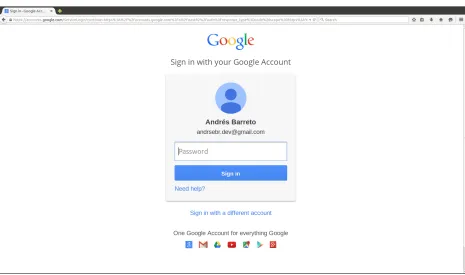
Whenkumodd is used for the first time to connect to a cloud service, the respective driver will initiate the authorization process which requires the user to provide access credentials (user/password) for the account. The tool provides the user with a URL that needs to be opened in a web browser, where the standard authentication interface for the service will request the relevant username and password:
a n d r e s @ u b u n t u :~/ k u m o d d $ p y t h o n k u m o d d . py - s g d r i v e - d all Y o u r b r o w s e r has b e e n o p e n e d to v i s i t :
h t t p s :// a c c o u n t s . g o o g l e . com / o / o a u t h 2 / a u t h ? s c o p e = h t t p s %3 A %2 F %2 F w w w . g o o g l e a p i s . com ...
- - n o a u t h _ l o c a l _ w e b s e r v e r
Listing 3.5: Authentication step 1: Connect to Google Drive for the first time
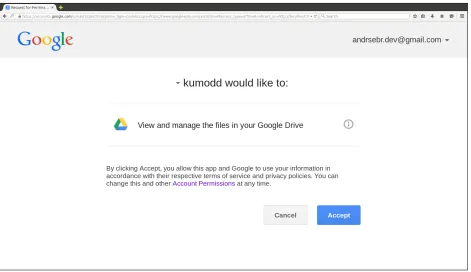
After supplying the correct credentials, the service returns an access code which the user has to input in the command line to finish the authentication process and authorizekumoddaccess to the account (Figures 3.2, 3.3). If the authentication is successful, the provided access token is cached persistently in a .datfile is saved under/configfolder with the name of the service. Future requests will find the token and will not prompt the user for credentials.
Figure 3.3: Authentication step 3: Authorize access to the account by kumodd
a n d r e s @ u b u n t u :~/ k u m o d d $ p y t h o n k u m o d d . py - s g d r i v e - d all W o r k i n g ...
T I M E ( UTC ) A P P L I C A T I O N U S E R FILE - ID R E M O T E P A T H R E V I S I O N L O C A L P A T H H A S H ( MD5 ) 2015 -06 -25 0 3 : 4 8 : 4 3 . 6 0 0 0 2 8 kumodd - 1 . 0 a n d r s e b r . d e v @ g m a i l . com 1 L -7
o 0 r g P T 2 f 6 o X 6 0 O P t F 4 Z U F O m O J W 1 C r k t r 3 D P r i l 8 o My D r i v e / ppt t e s t v .2 d o w n l o a d e d / a n d r s e b r . d e v @ g m a i l . com / My D r i v e / ppt t e s t
-2015 -06 -25 0 3 : 4 8 : 4 4 . 9 5 1 1 3 1 kumodd - 1 . 0 a n d r s e b r . d e v @ g m a i l . com 1
h u a R T O u d V n L e 4 S P M X h M R n N Q 9 Y _ D U r 6 9 m 4 T E e D 5 d I W u A My D r i v e / r e v i s i o n doc t e s t v .3 d o w n l o a d e d / a n d r s e b r . d e v @ g m a i l . com / My D r i v e / r e v i s i o n doc t e s t
-...
2015 -06 -25 0 3 : 4 8 : 5 4 . 2 5 4 1 0 4 kumodd - 1 . 0 a n d r s e b r . d e v @ g m a i l . com 0 B 4 w S l i H o V U b h U H d h Z l F 4 N l R 5 c 3 M My D r i v e / t e s t f o l d e r / s t u f f / m o r e s t u f f / t r e e . py v .1 d o w n l o a d e d / a n d r s e b r . d e v @ g m a i l . com / My D r i v e / t e s t f o l d e r / s t u f f / m o r e s t u f f / t r e e . py 6 1 3 6 6 4 3 5 0 9 5 c a 0 c a 5 5 e 7 1 9 2 d f 6 6 a 0 f e 8
9 f i l e s d o w n l o a d e d and 0 u p d a t e d f r o m a n d r s e b r . d e v @ g m a i l . com d r i v e D u r a t i o n : 0 : 0 0 : 1 3 . 6 7 1 4 4 2
Listing 3.6: Authentication step 4: Input access code in the terminal (if necessary) and allow the application to retrieve results
3.2.3
Content discovery and acquisition
a separate program (text editor/spreadsheet/etc.) for manual or custom processing. In all cases, the end result is a file of the same format that specifies anacquisition planthat is passed on tokumoddfor execution.
Figure 3.4: Steps of evidence acquisition
Discovery
In the current implementation, the discovery is implemented by thelist (-l) command, followed by a[filter] following the format shown earlier.
Output: A list of files that meet the provided criteria will be displayed with general information such as the file ID, remote path, number of revisions and (cryptographic) hashes.
a n d r e s @ u b u n t u :~/ k u m o d d $ p y t h o n k u m o d d . py - s g d r i v e - l all W o r k i n g ...
FILE - ID R E M O T E P A T H R E V I S I O N H A S H ( MD5 ) . . . 1 q C e p B p Y 6 N c h k l p l q q q c My D r i v e / t e s t 1
-... o V U b h a G 5 v e S 0 3 U k J i U 1 U My D r i v e / v e r s i o n _ t e s t 3 -... b c d e e 3 7 0 e 5
...
... o V U b h U H d h Z l F 4 N l R 5 c 3 M My D r i v e / t e s t f o l d e r / s t u f f / m o r e s t u f f / t r e e . py . . . 2 d f 6 6 a 0 f e 8
Listing 3.7: Output of listing all files in a Google Drive account (partial results are being shown)
A CSV file with a list of the displayed files is saved under /localdata folder with the name of the service and the user. The generated file can be edited or used to download files listed in it. Figure 3.5 shows the file opened in a spreadsheet application.
Figure 3.5: Contents of the generated CSV file
Acquisition
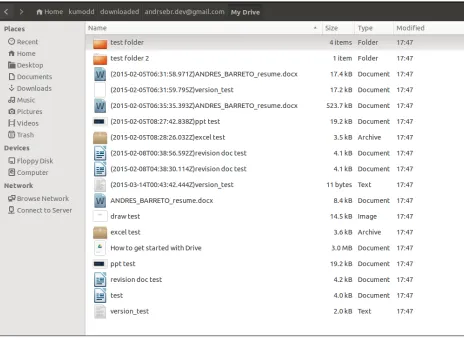
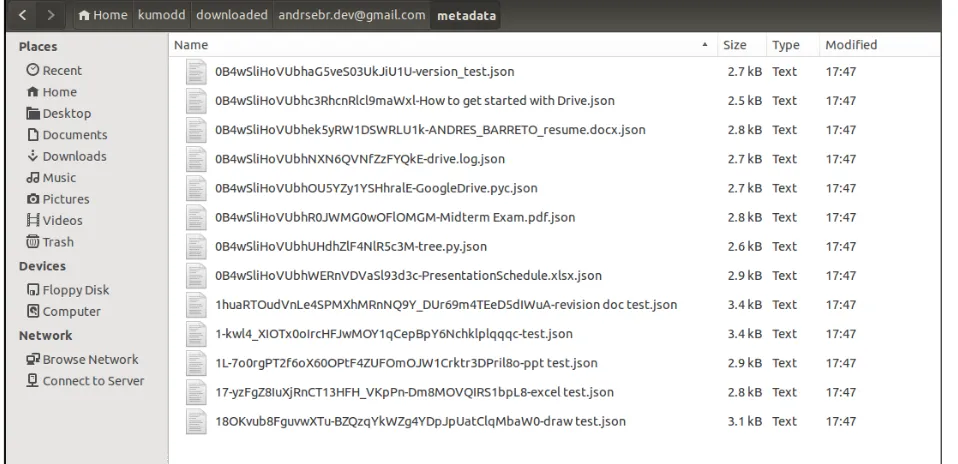
Output: A list of successfully downloaded files be displayed with information such as download date, application version, username, file ID, remote path, download path, revisions, and cryptographic hashes. This information is also logged in the log file/downloaded/<username>/<service-name>.logDownloaded files will be located in the /downloaded/<username>/ directory. Figure 3.6. Metadata files with detailed information of downloaded files is stored in/downloaded/< username>/metadata/in JSON format.
Another acquisition option is the-csvcommand, which takes as an input a CSV file, which contains the acquisition plan and must be in the correct format. For this the directory in which the CSV file is located must be specified.
Figure 3.7: Metadata of every downloaded file saved in a local directory
3.2.4
Web GUI
Another alternative to use kumodd is using the provided Web GUI, which is run from a local web server invoked with thekumodd-gui.pymodule:
p y t h o n kumodd - gui . py
The application GUI will be available at http://localhost:5000 and is accessible via any web browser. (Note: At this point, the server is not secure, so it should not be run on a remote system, unless security is assured by other mechanisms.)
a n d r e s @ u b u n t u :~/ k u m o d d $ p y t h o n kumodd - gui . py
* R u n n i n g on h t t p : / / 1 2 7 . 0 . 0 . 1 : 5 0 0 0 / ( P r e s s C T R L + C to q u i t ) * R e s t a r t i n g w i t h s t a t
Listing 3.8: Starting the web GUI
The web GUI uses the same modules used with the command line application for authenticate, discovery and acquisition.
Authentication
As kumoddwas originally planed to be a command line application; there is a step that involves inputting data in the command line while the web server is running. This step is the authentication, once the access code is retrieved from a service it has to be put in the command line while the application waits to retrieve this value (this step is not necessary while using Google Drive).
Just like using the command line interface; after the authentication is granted all the authorization information is saved locally so the user will not have to go through the authentication step again unless a new user account needs to be accessed or the access token provided by the service has expired and need to be retrieved again.
Discovery and acquisition
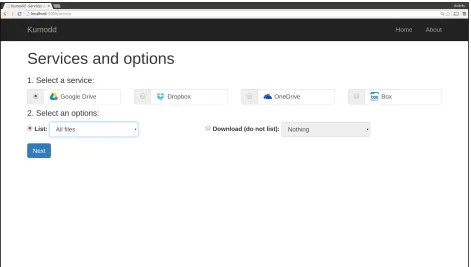
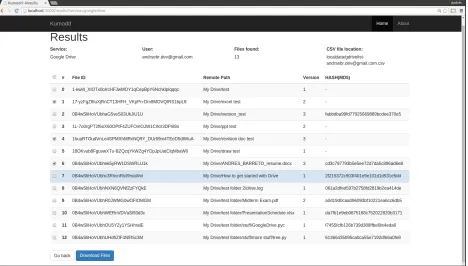
After pressing theGet started! button, the user is presented with the choice of the target service and the action to perform (Figure 3.8). After this step a detailed window with a list of files and the option of choosing which to download is presented (Figure 3.10). Once the files to acquire are selected, a result screen is presented with paths to files and other relevant information. (Note: Every step of the process can be seen in the terminal as well.)
Figure 3.9: Web GUI: File selection
3.3
Implementation
3.3.1
Development environment
Kumodd was developed and tested using the following environment:
• Operating System: Ubuntu Linux 14.04 LTS (64-bit)
• Python 2.7.6
• Packages:
– python-gflags 2.0
– google-api-python-client 1.3.1
– dropbox 2.2.0
– boxsdk 1.1.3
– Flask 0.10.1
– Flask-Classy 0.6.10
• Google Chrome 43.0.2357.81 (64-bit)
3.3.2
Python
Python is a multi-platform, interpreted, object-oriented, high-level programming language with dynamic semantics. It supports modules and packages for program modularity and code reuse. [17]
3.3.3
Packages
python-gflags
This package is a an equivalent of the C++ command line flag implementation developed by Google (gflags). This package contains a library that implements command line flags processing. It includes built-ins support for Python types and allows to define flags in the source file which they are used. [18] [19]
google-api-python-client
This package contains the Python client library provided by Google for discovery-based APIs. [20]
dropbox
This package contains Python specific libraries that wrap the raw HTTP calls to the Dropbox API. [21]
boxsdk
This package contains Python specific libraries that wrap the raw HTTP calls to the Box API. [22]
Flask
Flask is a web application framework written in Python. It is based on the Jinja2 template engine and Wekzeug toolkit. This framework is used to give back-end applications a web based interface. [23]
Flask-Classy
3.4
Installation
3.4.1
Requirements
1. Unix-based operating system
2. Python 2.7.x or above
3. Required packages:
• python-gflags
• google-api-python-client
• dropbox • boxsdk
• Flask
• Flask-Classy
4. Google Chrome or Firefox web browser (for web interface)
5. User credentials for account access
3.4.2
Package installation
Kumodd
Kumodd can be downloaded from its Gitlab repository using the following command:
git c l o n e h t t p s :// g i t h u b . com / a n d r e s e b r / k u m o d d . git
Listing 3.9: Kumodd download
Python
Python comes preloaded in almost every Linux distribution and OSX by default. It is possible to know if the system has Python installed and its version by running the command. (For package installations, either theeasy install, or thepippackage managers can be used.)
p y t h o n - - v e r s i o n
Listing 3.10: Obtaining the Python version
If Python is not installed in the system:
s u d o apt - get i n s t a l l build - e s s e n t i a l
s u d o apt - get i n s t a l l l i b r e a d l i n e - gplv2 - dev l i b n c u r s e s w 5 - dev libssl - dev l i b s q l i t e 3 - dev tk - dev libgdbm - dev libc6 - dev libbz2 - dev
cd ~/ D o w n l o a d s /
w g e t h t t p :// p y t h o n . org / ftp / p y t h o n / 2 . 7 . 6 / Python - 2 . 7 . 6 . tgz tar - xvf Python - 2 . 7 . 6 . tgz
cd Python - 2 . 7 . 6 ./ c o n f i g u r e m a k e
s u d o m a k e i n s t a l l
python-gflags
s u d o e a s y _ i n s t a l l python - g f l a g s
Listing 3.12: python-gflags installation command
google-api-python-client
s u d o e a s y _ i n s t a l l - - u p g r a d e google - api - python - c l i e n t
Listing 3.13: google-api-python-client installation command
dropbox
s u d o e a s y _ i n s t a l l d r o p b o x
Listing 3.14: dropbox installation command
boxsdk
s u d o e a s y _ i n s t a l l b o x s d k
Listing 3.15: boxsdk installation command
Flask and Flask-Classy
s u d o e a s y _ i n s t a l l f l a s k flask - c l a s s y
Listing 3.16: Flask and Flask-Classy installation command
3.5
Configuration
Oncekumoddhas been downloaded from the repository, it is necessary to configure the services that are be going to be used. The first step is registering the application in its respective service consoles. See sections 4.1.1, 4.2.1, 4.3.1, and 4.4.1. For this step a developer account must be created in every service intended to be used.
Once the application is registered, two unique keys will be provided; an application identifier and a secret key. The keys needed will be available in the credentials section. In the developer consoles it is also possible to configure application redirections and permission settings (Figure 3.11).
The keys provided by the services must be used in thekumoddconfiguration file/configuration/ config.cfgbefore first use. For Google Drive the credentials must be specified in/configuration/gdrive_ config.json.
Chapter 4
Cloud Storage Providers APIs
This chapter provides additional technical details in the form of descriptions of the service APIs thatkumodd utilized. Namely, each of the four providers in our study–Google, Dropbox, Microsoft, and Box–provide a REST API and a Python SDK that simplifies its use druting development. As our discussion will show, the various services carry both substantial similarities and non-trivial differences.
4.1
Google Drive
The main functionality of the Drive API provided by Google is to upload and download in Google Drive. It also supports other features, such as file searching, file sharing and collaboration, and conversion and export of Google Docs [25], [26].
4.1.1
API authorization
All requests to the Google Drive API need to be authorized by an authenticated user; this process is performed using the OAuth 2.0 protocol [27]. Applications using Google Drive (or any of the Google services) must follow the same basic authorization pattern:
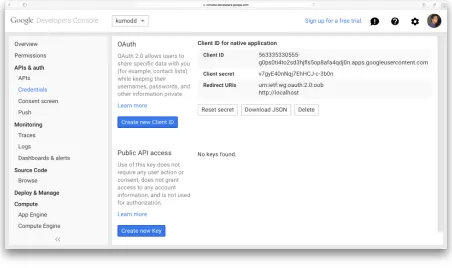
1. Register the application in the Google Developers Console (Figure 4.1).
2. Request that the user grant access to data in their account.
3. If the user allows grants access, the application request and receives access token credentials to access the Drive API.
Figure 4.1: Google Developers Console
Authorization scopes are used to express the permissions requested to users when they use authen-ticate using an application that request access to their account. In Listing 4.1 all the authorization scopes supported by Google Drive are explained.
h t t p s :// www . g o o g l e a p i s . com / a u t h / d r i v e . f i l e " Per - f i l e a c c e s s to f i l e s c r e a t e d or o p e n e d by the app "
h t t p s :// www . g o o g l e a p i s . com / a u t h / d r i v e " Full , p e r m i s s i v e s c o p e to a c c e s s all of a user ’ s f i l e s . R e q u e s t t h i s s c o p e o n l y w h e n it is s t r i c t l y n e c e s s a r y . T o k e n s w i t h s c o p e h t t p s :// d o c s . g o o g l e . com / f e e d s are a c c e p t e d and t r e a t e d the s a m e as t o k e n s w i t h s c o p e h t t p s :// www . g o o g l e a p i s . com / a u t h / d r i v e ."
h t t p s :// www . g o o g l e a p i s . com / a u t h / d r i v e . a p p s . r e a d o n l y " A l l o w s a p p s read - o n l y a c c e s s to the l i s t of D r i v e a p p s a u s e r has i n s t a l l e d ."
h t t p s :// www . g o o g l e a p i s . com / a u t h / d r i v e . r e a d o n l y " A l l o w s read - o n l y a c c e s s to f i l e m e t a d a t a and f i l e c o n t e n t "
h t t p s :// www . g o o g l e a p i s . com / a u t h / d r i v e . m e t a d a t a . r e a d o n l y " A l l o w s read - o n l y a c c e s s to f i l e m e t a d a t a , but d o e s not a l l o w any a c c e s s to r e a d or d o w n l o a d f i l e c o n t e n t "
h t t p s :// www . g o o g l e a p i s . com / a u t h / d r i v e . m e t a d a t a " A l l o w s read - w r i t e a c c e s s to f i l e m e t a d a t a , but d o e s not a l l o w any a c c e s s to read , d o w n l o a d , w r i t e or u p l o a d f i l e c o n t e n t . D o e s not s u p p o r t f i l e c r e a t i o n , t r a s h i n g or d e l e t i o n . A l s o d o e s not a l l o w c h a n g i n g f o l d e r s or s h a r i n g in o r d e r to p r e v e n t a c c e s s e s c a l a t i o n ."
h t t p s :// www . g o o g l e a p i s . com / a u t h / d r i v e . i n s t a l l " S p e c i a l s c o p e u s e d to let u s e r s a p p r o v e i n s t a l l a t i o n of an app "
h t t p s :// www . g o o g l e a p i s . com / a u t h / d r i v e . a p p f o l d e r " A l l o w s a c c e s s to the A p p l i c a t i o n D a t a f o l d e r "
h t t p s :// www . g o o g l e a p i s . com / a u t h / d r i v e . s c r i p t s " A l l o w s a c c e s s to A p p s S c r i p t f i l e s "
4.1.2
Files
resource
Thefilesresource has several methods that allow external access to the files stored in a Google Drive account. These are summarized in Table 4.1 with the two methods used forkumodddevelopment shown in bold.
Table 4.1: Files resource methods; all URIs relative to https://www.googleapis.com/drive/v2. A complete list of methods is available in in the Drive REST API reference provided by Google [26]
Method HTTP request Description
list GET /files Lists the user’s files.
get GET /files/fileId Gets a file’s metadata by ID.
Files:list
This method lists the files stored in an user account; this includestrashed files as long as they have not been entirely deleted from the server.
• HTTP Request: GET https://www.googleapis.com/drive/v2/files
• Parameters: No parameter is required.
• Authorization: For this request an authorization with at least one of he following scopes is required:
– https://www.googleapis.com/auth/drive
– https://www.googleapis.com/auth/drive.file
– https://www.googleapis.com/auth/drive.readonly
– https://www.googleapis.com/auth/drive.metadata.readonly
– https://www.googleapis.com/auth/drive.appdata
– https://www.googleapis.com/auth/drive.apps.readonly
– https://www.googleapis.com/auth/drive.metadata
• Response: If successful, this method returns a response body with the following structure:
{
" k i n d ": " d r i v e # c h a n g e L i s t " , " e t a g ": etag ,
" s e l f L i n k ": string , " n e x t P a g e T o k e n ": string , " n e x t L i n k ": string , " l a r g e s t C h a n g e I d ": long , " i t e m s ": [
c h a n g e s R e s o u r c e ]
}
Files:get
Obtains the metadata of a file by its (service-provided) ID.
• HTTP Request: GET https://www.googleapis.com/drive/v2/files/fileId
• Parameters: fileId
• Response: JSON with a File resource in the response body. Figure 4.3
Figure 4.3: Files:get method response example (abbreviated)
4.2
Dropbox
Like other cloud storage platforms, Dropbox allows developer access to user documents through its Core API which is based on HTTP and OAuth. There are SDK libraries that handle low-level calls to access and manipulate Dropbox accounts for a wide range of programming languages such as Java, Python, PHP, and popular mobile platforms [29].
To start using the Dropbox API it is necessary to register the application in the Dropbox App Console as shown in Figure 4.4. The App Console is also used to manage general application settings and permissions that are required to access user information.
Figure 4.4: Dropbox App Console
4.2.1
API authorization
For an application to connect to a Dropbox account it is necessary that a user authenticate through Dropbox for identity verification and to give the application permission to access their data. Dropbox API uses OAuth v2 for the authentication process [1]. At the end of the authorization process the application receives an access token–a string generated by Dropbox which uniquely identify both the app and the end user. The access token is provided with all requests made to Dropbox through the application (Figure 4.5).
Figure 4.5: OAuth 2 flow diagram. [1]
4.2.2
Account information
The following sections explains the method used to obtain general information form the analyzed Dropbox account.
/account/info
Retrieves account information of the user.
• HTTP Request: GET https://api.dropbox.com/1/account/info
• Parameters: No parameter required.
• Response: User account information:
{
" uid ": 1 2 3 4 5 6 7 8 ,
" d i s p l a y _ n a m e ": " J o h n U s e r " , " n a m e _ d e t a i l s ": {
" f a m i l i a r _ n a m e ": " J o h n " , " g i v e n _ n a m e ": " J o h n " , " s u r n a m e ": " U s e r " } ,
" r e f e r r a l _ l i n k ": " h t t p s :// www . d r o p b o x . com / r e f e r r a l s / r 1 a 2 n 3 d 4 m 5 s 6 t 7 " , " c o u n t r y ": " US " ,
" l o c a l e ": " en " , " i s _ p a i r e d ": false , " t e a m ": {
" n a m e ": " A c m e Inc ." ,
} ,
" q u o t a _ i n f o ": {
" s h a r e d ": 2 5 3 7 3 8 4 1 0 5 6 5 , " q u o t a ": 1 0 7 3 7 4 1 8 2 4 0 0 0 0 0 , " n o r m a l ": 6 8 0 0 3 1 8 7 7 8 7 1 }
}
Listing 4.3: Dropbox user information example
4.2.3
Files and metadata
In the following sections the methods used in the development of kumodd to handle files an metadata that belongs to an authenticated user are explained.
/files(GET)
This method is used to download a file from a Dropbox account using the remote file path as identifier.
f , m e t a d a t a = c l i e n t . g e t _ f i l e _ a n d _ m e t a d a t a (’ / magnum - o p u s . txt ’) out = o p e n(’ magnum - o p u s . txt ’, ’ wb ’)
out . w r i t e ( f . r e a d () ) out . c l o s e ()
Listing 4.4: get file request using the Dropbox Python library
• HTTP Request: GET https://api-content.dropbox.com/1/files/auto/path
• Parameters: path
• Response: The specified file content.
{
’ bytes ’: 77 ,
’ icon ’: ’ p a g e _ w h i t e _ t e x t ’ , ’ is_dir ’: False ,
’ m i m e _ t y p e ’: ’ t e x t / plain ’ ,
’ m o d i f i e d ’: ’ Wed , 20 Jul 2 0 1 1 2 2 : 0 4 : 5 0 +0000 ’ , ’ path ’: ’/ magnum - o p u s . txt ’ ,
’ rev ’: ’362 e 2 0 2 9 6 8 4 f e ’ , ’ r e v i s i o n ’: 221922 , ’ root ’: ’ dropbox ’ , ’ size ’: ’77 bytes ’ , ’ t h u m b _ e x i s t s ’: F a l s e }
Listing 4.5: Metadata of a file in Dropbox
/revisions
Obtains metadata for all available revisions (max. 1,000) of a specific file by providing its remote path as an identifier. Revision are only available for thirty days unless the user has an extended version history which is a paid feature.
r e v i s i o n s ( p a t h )
Listing 4.6: revision request using the Dropbox Python library
• HTTP Request: GET https://api.dropbox.com/1/files/auto/path
• Response: A list of revisions:
[ {
" i s _ d e l e t e d ": true , " r e v i s i o n ": 4 , " rev ": " 4 0 0 0 0 0 0 0 d " , " t h u m b _ e x i s t s ": false , " b y t e s ": 0 ,
" m o d i f i e d ": " Wed , 20 Jul 2 0 1 1 2 2 : 4 1 : 0 9 +0000" , " p a t h ": "/ hi2 " ,
" i s _ d i r ": false , " i c o n ": " p a g e _ w h i t e " , " r o o t ": " a p p _ f o l d e r " ,
" m i m e _ t y p e ": " a p p l i c a t i o n / octet - s t r e a m " , " s i z e ": "0 b y t e s "
} , {
" r e v i s i o n ": 1 , " rev ": " 1 0 0 0 0 0 0 0 d " , " t h u m b _ e x i s t s ": false , " b y t e s ": 3 ,
" m o d i f i e d ": " Wed , 20 Jul 2 0 1 1 2 2 : 4 0 : 4 3 +0000" , " p a t h ": "/ hi2 " ,
" i s _ d i r ": false , " i c o n ": " p a g e _ w h i t e " , " r o o t ": " a p p _ f o l d e r " ,
" m i m e _ t y p e ": " a p p l i c a t i o n / octet - s t r e a m " , " s i z e ": "3 b y t e s "
} ]
Listing 4.7: Revisions method response body example
4.3
OneDrive
Microsoft OneDrive API provides access to data stored in an authenticated OneDrive user account. Inter-action with OneDrive API is done using RESTful patterns. [30]
OneDrive API support OData V4; an open protocol used to standardize the way RESTful APIs are consumed. It defines an abstract data model and a protocol that let any client access information stored in any data source. [31]
OneDrive has classified its API functions by resource type. The two major resources are:
• Drive (top-level object)
• Item (files, folders, etc)
4.3.1
API authorization
To have access to OneDrive API and start sending requests; an application must be registered in the Microsoft Developer Center before starting using the OneDrive API. [2]
Like Google Drive and Dropbox; Ondrive uses OAuth 2.0 for authentication and the procedure (flow) is almost the same. In this case it is a three-step process with separate calls. The first step of the process is to get an authorization code which will allow the app to retrieve an access token to start sending requests.
Figure 4.6: OAuth 2 flow diagram. [2]
For every request the access token can be specified in the HTTP header (Authorization: bearer {token}) or as a query parameter to the end of the request URL (?access token=token).
Authentication scopes
Authentication scopes are used to determine the access will be granted to an application when an user authenticates trough it. Table 4.2
Scope name Description Required
wl.signin Allows sign-on capabilities. No
wl.offline access Receive refresh token. No onedrive.readonly Grants read-only permission Yes onedrive.readwrite Read and write permission. Yes onedrive.appfolde Read and write permission to a folder Yes
Table 4.2: OneDrive API authorization scopes
4.3.2
Drive resource
/drive
This request is used to get metadata with general information about the default drive of an user account.
• HTTP Request: GET https://api.onedrive.com/v1.0/drive
• Parameters: No parameter required.
• Request body: No request body is necessary.
• Response: If successful, a Drive resource is returned in the response body:
{
" id ": " 0 1 2 3 4 5 6 7 8 9 abc " , " d r i v e T y p e ": " c o n s u m e r " , " o w n e r ": {
" u s e r ": {
" id ": " 1 2 3 9 1 9 1 3 bac " ,
" d i s p l a y N a m e ": " R y a n G r e g g " }
} ,
" q u o t a ": {
" t o t a l ": 1 0 2 4 0 0 0 , " u s e d ": 514000 , " r e m a i n i n g ": 1 0 1 0 1 1 2 , " d e l e t e d ": 0 ,
" s t a t e ": " n o r m a l " }
}
Listing 4.8: Drive resource response example
4.3.3
Item resource
Items are the folders or files that reside in OneDrive file system. The main item methods used to develop Kumodd are explained.
/drive/items/{id}
Retrieve metadata of an item on OneDrive by giving its remote path or id.
• HTTP Request: Any of the following requests are valid:
– GET https://api.onedrive.com/v1.0/drive/items/item-id
– GET https://api.onedrive.com/v1.0/drive/root:/item-path
• Authorization scope: Read access.
• Parameters: item-id oritem-path.
• Request body: No request body is necessary.
• Response: If successful, an Item resource is returned in the response body:
{
" id ": " 0 1 2 3 4 5 6 7 8 9 abc " , " n a m e ": " e x a m p l e . x l s x " , " e T a g ": " e t a g " ,
" c T a g ": " e t a g " ,
" c r e a t e d B y ": { " u s e r ": { " id ": "1234" , " d i s p l a y N a m e ": " R y a n G r e g g " } } , " c r e a t e d D a t e T i m e ": " d a t e t i m e " ,
" l a s t M o d i f i e d B y ": { " u s e r ": { " id ": "1234" , " d i s p l a y N a m e ": " R y a n G r e g g " } } , " l a s t M o d i f i e d D a t e T i m e ": " d a t e t i m e " ,
" w e b U r l ": " h t t p :// o n e d r i v e . com /..." ,
" p a r e n t R e f e r e n c e ": { " d r i v e I d ": " 1 2 3 4 5 " , " id ": " r o o t " , " p a t h ": "/ d r i v e / r o o t :" } , " f o l d e r ": { " c h i l d C o u n t ": 4 }
}
Listing 4.9: Item resource response example
/drive/items/{id}/children
This request is used to get a list of items inside a folder by specifying it id or remote path.
• HTTP Request: Any of the following requests are valid:
– GET https://api.onedrive.com/v1.0/drive/items/item-id/children
– GET https://api.onedrive.com/v1.0/drive/root:/item-path/children
• Authorization scope: Read access.
• Parameters: item-id oritem-path.
• Request body: No request body is necessary.
• Response: If successful, an list of items that are children of the target item resource is returned in the response body:
{
" v a l u e ": [
{" n a m e ": " m y f i l e . jpg " , " s i z e ": 2048 , " f i l e ": {} } , {" n a m e ": " D o c u m e n t s " , " f o l d e r ": { " c h i l d C o u n t ": 4} } , {" n a m e ": " P h o t o s " , " f o l d e r ": { " c h i l d C o u n t ": 2 0 3 } } , {" n a m e ": " my s h e e t (1) . x l s x " , " s i z e ": 197 }
]
Listing 4.10: OneDrive list children example
/drive/items/{id}/content
Method to download an item from OneDrive by providing its id or remote path.
• HTTP Request: Any of the following requests are valid:
– GET https://api.onedrive.com/v1.0/drive/items/item-id/content
– GET https://api.onedrive.com/v1.0/drive/root:/item-path/content
• Authorization scope: Read access.
• Parameters: item-id oritem-path.
• Request body: No request body is necessary.
• Response: If successful, the method returns a 302 Found response directing to the URL of the item to proceed to download it.
H T T P / 1 . 1 302 F o u n d
L o c a t i o n : h t t p s :// b0mpua - b y 3 3 0 1 . f i l e s .1 drv . com / y 2 3 v m a g a h s z h x z l c v h a s d h a s g h a s o d f i
4.4
Box
Box allows developers to access user documents through its RESTful Content API. Libraries that simplify development are available for different programming languages such as Java, Python, Objective-C, etc. [32] To start using the Dropbox API it is necessary to register the application in the Box Developers Console. Figure 4.7. The console is also used to manage general settings and authorization scopes. Box has classified its API in objects; the objects used for Kumodd development are Files and Folders.
Figure 4.7: Box Developers Console
4.4.1
API authorization
Box uses OAuth 2.0 for authentication. The process it uses to authenticate an is similar to the other services. After a user authenticates and gives the application the permissions necessary to interact with its Box account; it receives an access token that will be used in every request header. [33]
{
" a c c e s s _ t o k e n ": " T 9 c E 5 a s G n u y Y C C q I Z F o W j F H v N b v V q H j l " , " e x p i r e s _ i n ": 3600 ,
" r e s t r i c t e d _ t o ": [] , " t o k e n _ t y p e ": " b e a r e r " ,
" r e f r e s h _ t o k e n ": " J 7 r x T i W O H M o S C 1 i s K Z K B Z W i z o R X j k Q z i g 5 C 6 j F g C V J 9 b U n s U f G M i n K B D L Z W P 9 B g R "
}
Listing 4.12: Successful Content API authorization response
4.4.2
File object
Figure 4.8: Get file response example (abbreviated)
/files/{id}
Method to get information of a file.
• Parameters: file-id.
• Response: If successful, the method returns a File object in the response body. Figure 4.8
/files/{id}/content
Method to get the content and download a file.
• HTTP Request: GET https://api.box.com/2.0/files/file-id/content
• Parameters: file-id.
• Response: If successful, the method returns 302 Found response along with the download URL of the target file.
/files/{id}/versions
Method to retrieve older versions of a file.
• HTTP Request: GET https://api.box.com/2.0/files/file-id/versions
• Parameters: file-id.
• Response: If the target file has older versions an array of version objects is returned:
{
" t o t a l _ c o u n t ": 1 , " e n t r i e s ": [ {
" t y p e ": " f i l e _ v e r s i o n " , " id ": " 6 7 2 2 5 9 5 7 6 " ,
" s h a 1 ": " 3 5 9 c 6 c 1 e d 9 8 0 8 1 b 9 a 6 9 e b 3 5 1 3 b 9 d e c e d 5 9 c 9 5 7 f 9 " , " n a m e ": " D r a g o n s . js " ,
" s i z e ": 92556 ,
" c r e a t e d _ a t ": "2 012 - 08 - 20 T10 : 2 0 : 3 0 - 0 7 : 0 0 " , " m o d i f i e d _ a t ": "2 01 2 -1 1 - 28 T13 : 1 4 : 5 8 - 0 8 : 0 0 " , " m o d i f i e d _ b y ": {
" t y p e ": " u s e r " , " id ": " 1 8 3 7 3 2 1 2 9 " , " n a m e ": " s e a n r o s e " ,
" l o g i n ": " s e a n + a p i t e s t @ b o x . com " }
} ] }
Listing 4.13: Array of versions
4.4.3
Folder object
/folders/{FOLDER-ID}/items
Retrieves all files and folders contained in the target folder.
• HTTP Request: GET https://api.box.com/2.0/folders/FOLDER-ID/items
• Parameters: FOLDER-ID.
{
" t o t a l _ c o u n t ": 24 , " e n t r i e s ": [ {
" t y p e ": " f o l d e r " , " id ": " 1 9 2 4 2 9 9 2 8 " , " s e q u e n c e _ i d ": "1" , " e t a g ": "1" ,
" n a m e ": " S t e p h e n C u r r y T h r e e P o i n t e r s " } ,
{
" t y p e ": " f i l e " , " id ": " 8 1 8 8 5 3 8 6 2 " , " s e q u e n c e _ i d ": "0" , " e t a g ": "0" ,
" n a m e ": " W a r r i o r s . jpg " }
] ,
" o f f s e t ": 0 , " l i m i t ": 2 , " o r d e r ": [ {
" by ": " t y p e " , " d i r e c t i o n ": " ASC " } ,
{
" by ": " n a m e " , " d i r e c t i o n ": " ASC " }
] }
Chapter 5
Evaluation
5.1
Functionality
As explained in Chapter 3. The current version of Kumodd has three main functions–content discovery, filtering, and acquisition (Figure 3.4).
Discovery
Discovery is implemented by means of listing the files in the target account–by default, all files and revisions are exhaustively listed. An abbreviated version of the results is sent to the standard output device, with the complete data returned placed in a log file. The fields listed include the ID of the file which is important for request the actual file content and metadata at the time of the data acquisition step. Also other important information is included such as the remote path where the file is contained, the number of revisions and cryptographic hash information.
5.1.1
Filtering
The tool has built-in filters for a number of common (groups of) file types–documents, text, images, audio, video, etc.–which can be used to quickly filter both the list of discovered files and the list of files to acquire. For more complex filtering criteria, the analyst can build on-the-fly text filters from Unix-style text processing commands.
5.1.2
Acquisition
When the investigator has discovered and filtered relevant files. Then the last step would be to download the local files.
It is important to note that the data downloaded is preserved as it is in the cloud, no information is manipulated in the process. Kumodd also recreates the directory structure of the cloud drive and download every change made to a file as a separate files.
Metadata information of each file will also be downloaded which contain more detailed information about the file. Like creation dates, owners, etc.
If a file already exists locally the application will perform an update to that if necessary, or will skip it if no changes were made.
Every download or update operation is logged; this way the investigator would be aware of errors and what files where downloaded including directory information.