Cicles Formatius de Grau Superior Desenvolupament d’Aplicacions Informàtiques
D06
PROGRAMMING with JAVA
Ch20 – Data Structures I
PowerPoint presentation, created by Angel A. Juan - ajuanp(@)gmail.com, for accompanying the book “Big Java”, by Cay S. Horstmann (2006)
Chapter Goals
To learn how to use the
linked lists
provided in the standard
library
To be able to use
iterators
to traverse linked lists
To understand the implementation of linked lists
To distinguish between
abstract
and
concrete data types
To know the efficiency of fundamental operations of lists
and arrays
Using Linked Lists
A linked list is a data structure used for collecting a sequence of objects, which allows efficient addition and removal of elements in the middle of the sequence Rather than sorting the values in an array, a linked list uses a sequence of
nodes, each of which stores a value and a reference to the next node in the sequence
Linked lists allow speedy insertion and removal, but element access can be slow since it uses sequential access (you must traverse the first four elements to
locate the fifth one) instead of random access (elements are accessed in arbitrary order)
You use linked lists when you are concerned about the efficiency of inserting or removing elements and you rarely need element access in random order
Figure 1:
Java's
LinkedList
class
The Java library provides a linked list class. The
LinkedList
class in the
java.util
package is a generic
class, just like the
ArrayList
class
Æ
specify type of
elements in angle brackets:
LinkedList<E>
The following methods give you direct access to the first and
the last element in the list (here,
E
is the element type of
LinkedList<E>
):
How do you add and remove elements in the middle of the
list? The Java library supplies a
ListIterator
type
void addFirst(E element) void addLast(E element) E getFirst()
E getLast() E removeFirst() E removeLast()
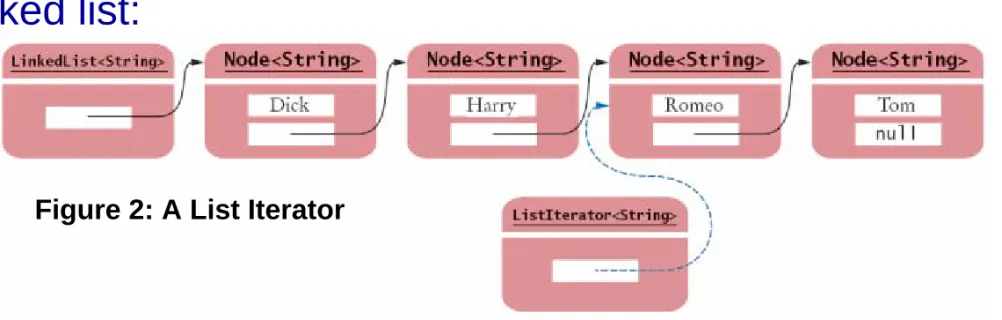
A
list iterator
encapsulates a position anywhere inside the
linked list:
Think of an iterator as pointing between two elements (like a
cursor in a word processor)
A List Iterator
Figure 2: A List Iterator
Figure 3:
List Iterator
You obtain a list iterator with the listIterator method of the
LinkedList class:
Initially, the iterator points before the first element. You can move the iterator position with the next method:
The next method throws a NoSuchElementException if you are
already past the end of the list. You should always call the method
hasNext before calling next:
LinkedList<String> employeeNames = . . .;
ListIterator<String> iterator = employeeNames.listIterator();
iterator.next();
if (iterator.hasNext()) iterator.next();
List Iterator
The next method returns the element that the iterator is passing. You traverse all elements in a linked list of strings with the following loop:
As a shorthand, if your loop simply visits all elements of the linked list, you can use the “for each” loop:
Behind the scenes, the for loop uses an iterator to visit all elements while iterator.hasNext()
{
String name = iterator.next();
Do something with name }
for (String name : employeeNames) {
Do something with name }
List Iterator
The nodes of the LinkedList class store two links: One to the next element, and
One to the previous element
You can use the previous and hasPrevious methods of the
ListIterator interface to move the iterator position backwards
The add method adds an object after the iterator, the moves the iterator position past the new element:
The remove method removes the object that was returned by the last
call to next or previous:
If you call remove improperly, it throws an IllegalStateException
iterator.add("Juliet");
//Remove all names that fulfill a certain condition while (iterator.hasNext())
{
String name = iterator.next(); if (name fulfills condition)
iterator.remove(); }
File
ListTester.java
ListTester is a sample program that Inserts strings into a list
Iterates through the list, adding and removing elements Prints the list
01: import java.util.LinkedList;
02: import java.util.ListIterator;
03: 04: /**
05: A program that demonstrates the LinkedList class
06: */
07: public class ListTester
08: {
09: public static void main(String[] args)
10: {
11: LinkedList<String> staff = new LinkedList<String>();
12: staff.addLast("Dick");
13: staff.addLast("Harry");
14: staff.addLast("Romeo");
15: staff.addLast("Tom");
16:
17: // | in the comments indicates the iterator position
File
ListTester.java
19: ListIterator<String> iterator
20: = staff.listIterator(); // |DHRT
21: iterator.next(); // D|HRT
22: iterator.next(); // DH|RT
23:
24: // Add more elements after second element
25:
26: iterator.add("Juliet"); // DHJ|RT
27: iterator.add("Nina"); // DHJN|RT
28:
29: iterator.next(); // DHJNR|T
30:
31: // Remove last traversed element
32:
33: iterator.remove(); // DHJN|T
34:
File
ListTester.java
35: // Print all elements
36:
37: for (String name : staff)
38: System.out.println(name);
39: }
40: }
Dick Harry Juliet Nina Tom
Self Test
1.
Do linked lists take more storage space than arrays of
the same size?
Answers
1.
Yes, for two reasons. You need to store the node
references, and each node is a separate object. (There is
a fixed overhead to store each object in the virtual
machine.)
2.
An integer index can be used to access any array
location.
Implementing Linked Lists
In the previous section you saw how to use the linked list class supplied by the Java library (LinkedList class)
Now, we will look at the implementation of a simplified version of this class. It will show you how the list operations manipulate the links as the list is modified
To keep it simple, we will implement a singly linked list, and the list class will supply direct access only to the first list element, not the last one
Our list will not use a type parameter. Store raw Object values and insert casts when retrieving them
The result will be a fully functional list class that shows how the links are updated in the add and remove operations and how the iterator
Private class Node
A Node object stores an object and a reference to the next node
Because the methods of both the linked list class and the iterator class have frequent access to the Node instance variables, we do not make the instance variables private. Instead, we make a Node a private inner class of the LinkedList class. Because none of the list methods
returns a Node object, it is safe to leave the instance variables public: public class LinkedList
{
. . .
private class Node {
public Object data; public Node next; }
Reference to the first node
The LinkedList class holds a reference first to the first node (or
null, if the list is completely empty) public class LinkedList
{
public LinkedList() {
first = null; }
public Object getFirst() {
if (first == null)
throw new NoSuchElementException(); return first.data;
} . . .
private Node first; }
Adding a New First Element
When a new node is added
to the list
It becomes the head of the list
The old list head becomes its next node
public class LinkedList {
. . .
public void addFirst(Object element) {
Node newNode = new Node(); newNode.data = element; newNode.next = first; first = newNode; }
. . . }
Figure 4:
Removing the First Element
When the first element is
removed
The data of the first node are saved and later returned as the method result
The successor of the first node becomes the first node of the shorter list
The old node will be garbage collected when there are no further references to it
public class LinkedList {
. . .
public Object removeFirst() {
if (first == null)
throw new NoSuchElementException(); Object element = first.data;
first = first.next; return element;
} . . . }
Figure 5:
Linked List Iterator
Our LinkedList class defines aprivate inner class
LinkedListIterator
Because it is an inner class, it has access to the private features of the LinkedList class –the first field and the private Node class
Clients of LinkedList don't actually know the name of the
iterator class (they only know it is a class that implements the
ListIterator interface)
Each iterator object has a reference
position to the last visited node.
We also store a reference to the last node before that
public class LinkedList {
. . .
public ListIterator listIterator() {
return new LinkedListIterator(); }
private class LinkedListIterator implements ListIterator {
public LinkedListIterator() {
position = null; previous = null; }
. . .
private Node position; private Node previous; }
. . . }
The Linked List Iterator's
next
Method
The next method is simple: the position reference is advanced to
position.next, and old position is remembered in previous
Special case: if the iterator points before the first element of the list, then the old position is null and position must be set to first
public Object next() {
if (!hasNext())
throw new NoSuchElementException();
previous = position; // Remember for remove if (position == null)
position = first; else
position = position.next; return position.data;
The Linked List Iterator's
hasNext
Method
The
next
method should only be called when the iterator is
not at the end of the list
The iterator is at the end
if the list is empty (first == null)
if there is no element after the current position (position.next == null)
private class LinkedListIterator implements ListIterator {
. . .
public boolean hasNext() {
if (position == null) return first != null; else
return position.next != null; }
. . . }
The Linked List Iterator's
remove
Method
If the element to be removed is the first element, call removeFirst
Otherwise, the node preceding the element to be removed needs to have its next reference updated to skip the removed element
Figure 6:
The Linked List Iterator's
remove
Method
If the previous reference equals position:
this call to remove does not immediately follow a call to next Æ throw an IllegalArgumentException
It is illegal to call remove twice in a row
remove sets the previous reference to position
public void remove() {
if (previous == position)
throw new IllegalStateException(); if (position == first)
{
removeFirst(); }
else {
previous.next = position.next; }
position = previous; }
The Linked List Iterator's
set
Method
The
set
method changes the data stored in the previously
visited element:
public void set(Object element) {
if (position == null)
throw new NoSuchElementException(); position.data = element;
The Linked List Iterator's
add
Method
The most complex operation is the addition of a node
add
inserts the new node after the current position and
sets the successor of the new node to the successor of the
current position
Figure 7:
The Linked List Iterator's
add
Method
public void add(Object element) {
if (position == null) {
addFirst(element); position = first; }
else {
Node newNode = new Node(); newNode.data = element;
newNode.next = position.next;
position.next = newNode;
position = newNode; }
previous = position; }
File
LinkedList.java
001: import java.util.NoSuchElementException;
002:
003: /**
004: A linked list is a sequence of nodes with efficient
005: element insertion and removal. This class
006: contains a subset of the methods of the standard
007: java.util.LinkedList class.
008: */
009: public class LinkedList
010: {
011: /**
012: Constructs an empty linked list.
013: */
014: public LinkedList()
015: {
016: first = null;
017: }
018:
File
LinkedList.java
019: /**
020: Returns the first element in the linked list.
021: @return the first element in the linked list
022: */
023: public Object getFirst()
024: {
025: if (first == null)
026: throw new NoSuchElementException();
027: return first.data;
028: }
029:
030: /**
031: Removes the first element in the linked list.
032: @return the removed element
033: */
034: public Object removeFirst()
035: {
File
LinkedList.java
036: if (first == null)
037: throw new NoSuchElementException();
038: Object element = first.data;
039: first = first.next;
040: return element;
041: }
042:
043: /**
044: Adds an element to the front of the linked list.
045: @param element the element to add
046: */
047: public void addFirst(Object element)
048: {
049: Node newNode = new Node();
050: newNode.data = element;
051: newNode.next = first;
052: first = newNode;
053: }
File
LinkedList.java
055: /**
056: Returns an iterator for iterating through this list.
057: @return an iterator for iterating through this list
058: */
059: public ListIterator listIterator()
060: {
061: return new LinkedListIterator();
062: }
063:
064: private Node first;
065:
066: private class Node
067: {
068: public Object data;
069: public Node next;
070: }
071:
File
LinkedList.java
072: private class LinkedListIterator implements ListIterator
073: {
074: /**
075: Constructs an iterator that points to the front
076: of the linked list.
077: */
078: public LinkedListIterator()
079: {
080: position = null;
081: previous = null;
082: }
083:
084: /**
085: Moves the iterator past the next element.
086: @return the traversed element
087: */
File
LinkedList.java
088: public Object next()
089: {
090: if (!hasNext())
091: throw new NoSuchElementException();
092: previous = position; // Remember for remove
093:
094: if (position == null)
095: position = first;
096: else
097: position = position.next;
098:
099: return position.data;
100: }
101:
102: /**
103: Tests if there is an element after the iterator
104: position.
File
LinkedList.java
105: @return true if there is an element after the // iterator
106: position
107: */
108: public boolean hasNext()
109: {
110: if (position == null)
111: return first != null;
112: else
113: return position.next != null;
114: }
115:
116: /**
117: Adds an element before the iterator position
118: and moves the iterator past the inserted element.
119: @param element the element to add
120: */
File
LinkedList.java
121: public void add(Object element)
122: {
123: if (position == null)
124: {
125: addFirst(element);
126: position = first;
127: }
128: else
129: {
130: Node newNode = new Node();
131: newNode.data = element;
132: newNode.next = position.next;
133: position.next = newNode;
134: position = newNode;
135: }
136: previous = position;
137: }
File
LinkedList.java
139: /**
140: Removes the last traversed element. This method may
141: only be called after a call to the next() method.
142: */
143: public void remove()
144: {
145: if (previous == position)
146: throw new IllegalStateException();
147:
148: if (position == first)
149: {
150: removeFirst();
151: }
152: else
153: {
154: previous.next = position.next;
155: }
File
LinkedList.java
156: position = previous;
157: }
158:
159: /**
160: Sets the last traversed element to a different
161: value.
162: @param element the element to set
163: */
164: public void set(Object element)
165: {
166: if (position == null)
167: throw new NoSuchElementException();
168: position.data = element;
169: }
170:
171: private Node position;
172: private Node previous;
173: }
File
ListIterator.java
01: /**02: A list iterator allows access of a position in a linked list.
03: This interface contains a subset of the methods of the
04: standard java.util.ListIterator interface. The methods for
05: backward traversal are not included.
06: */
07: public interface ListIterator
08: {
09: /**
10: Moves the iterator past the next element.
11: @return the traversed element
12: */
13: Object next();
14:
15: /**
16: Tests if there is an element after the iterator
17: position.
File
ListIterator.java
18: @return true if there is an element after the iterator
19: position
20: */
21: boolean hasNext(); 22:
23: /**
24: Adds an element before the iterator position
25: and moves the iterator past the inserted element.
26: @param element the element to add
27: */
28: void add(Object element);
29:
30: /**
31: Removes the last traversed element. This method may
32: only be called after a call to the next() method.
33: */
File
ListIterator.java
34: void remove();
35:
36: /**
37: Sets the last traversed element to a different
38: value.
39: @param element the element to set
40: */
41: void set(Object element);
Self Check
3.
Trace through the
addFirst
method when adding an
element to an empty list.
4.
Conceptually, an iterator points between elements (see
Figure 3). Does the position reference point to the element
to the left or to the element to the right?
Answers
3.
When the list is empty,
first
is
null
. A new Node is
allocated. Its
data
field is set to the newly inserted object.
Its
next
field is set to
null
because
first
is
null
. The
first
field is set to the new node. The result is a linked list
of length 1.
4.
It points to the element to the left. You can see that by
tracing out the first call to
next
. It leaves position to point
to the first node.
5.
If position is
null
, we must be at the head of the list, and
inserting an element requires updating the
first
reference. If we are in the middle of the list, the
first
Abstract and Concrete Data Types
There are two ways of looking at a linked list:
To think of the concrete implementation of such a list as a sequence of node objects with links between them
To think of the abstract concept of the linked list, i.e., an ordered sequence of data items that can be traversed with an iterator
An
abstract data type
defines the fundamental operations
on the data but does not specify an implementation
Figure 8:
A Concrete View of a Linked List
Figure 9:
Abstract and Concrete Data Types
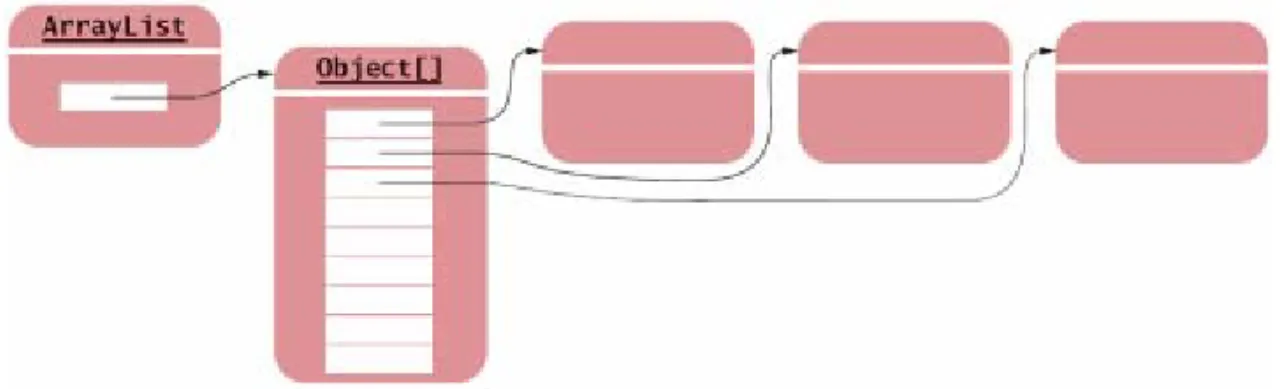
As with a linked list, there are two ways of looking at an
array list:
To think of the concrete implementation: a partially filled array of object references
To think of the abstract concept: an ordered sequence of data items, each of which can be accessed by an integer index
Figure 10: A Concrete View of an Array List
Figure 11:
Abstract and Concrete Data Types
Concrete implementations of a linked list and an array list are quite
different. On the other hand, the abstractions seem to be similar at first glance
To see the difference, consider the public interfaces stripped down to their minimal essentials:
public class LinkedList {
public ListIterator listIterator() { . . . } . . .
}
public interface ListIterator {
Object next(); boolean hasNext();
void add(Object element); void remove();
void set(Object element); . . .
}
public class ArrayList {
public Object get(int index) { . . . }
public void set(int index, Object element) { . . . } . . .
}
In a linked list, elementaccess is sequential. You need to ask the linked list for an iterator. Using the iterator, you can traverse the list elements one at a time (but if you want to go to a particular element, you first have to skip all elements before it)
An array list allowsrandom accessto all elements. You specify an integer index, and you can get or set the corresponding element
Abstract and Concrete Data Types
We will call the abstract types array and list. The Javalibrary provides concrete implementations
ArrayList and LinkedList for these abstract types.
Other concrete implementations are possible in other libraries. In fact, Java arrays are another
implementation of the abstract array type.
To understand an abstract data type completely, you need to know not just its fundamental operations but also their relative efficiency:
In an array list, random access takes O(1) time (it is constant)
In an array list, adding or removing an arbitrary element takes O(n) time, where n is the size of the array list, because on average n/2 elements need to be moved
In a linked list, random access takes O(n) time because on average n/2 elements need to be skipped
In a linked list, an element can be added or removed in O(1) time (it is constant)
Operation Array List Random Access 0(1) 0(n) Linear Traversal Step 0(1) 0(1) Add/Remove an Element 0(n) 0(1) Abstract list
• Ordered sequence of items that can be traversed sequentially
• Allows for insertion and removal of elements at any position
Abstract array
• Ordered sequence of items with random access via an integer index
Self Check
6.
What is the advantage of viewing a type abstractly?
7.
How would you sketch an abstract view of a doubly linked
list? A concrete view?
8.
How much slower is the binary search algorithm for a
linked list compared to the linear search algorithm?
Answers
6.
You can focus on the essential characteristics of the data
type without being distracted by implementation details.
7.
The abstract view would be like Figure 9, but with arrows in
both directions. The concrete view would be like Figure 8,
but with references to the previous node added to each
node.
8.
To locate the middle element takes
n
/ 2 steps. To locate
the middle of the subinterval to the left or right takes
another
n
/ 4 steps. The next lookup takes
n
/ 8 steps.
Thus, we expect almost n steps to locate an element. At
this point, you are better off just making a linear search
that, on average, takes
n
/ 2 steps.
Stacks and Queues
Stacks and queues are two common abstract data types that allow insertion and removal of items at the end only, not in the middle
Stack: collection of items with "last in first out“ (LIFO) retrieval
Allows insertion and removal of elements only at one end, traditionally called the top of the stack
New items are added to the top of the stack
Items are removed at the top of the stack
Called last in, first out or LIFO order
Traditionally, addition and removal operations are called push and pop
Think of a stack of books
Queue: collection of items with "first in first out“ (FIFO) retrieval
Add items to one end of the queue (the tail)
Remove items from the other end of the queue (the head)
Queues store items in a first in, first out or FIFO fashion
Items are removed in the same order in which they have been added
Think of people lining up: people join the tail of the queue and wait until they have reached the head of the queue
Stacks and Queues: Uses in
Computer Science
Queue
Event queue of all events, kept by the Java GUI system
Queue of print jobs
Stack
Run-time stack that a processor or virtual machine keeps to organize the variables of nested methods
A stack implementation in Java
Stack
class: concrete implementation of a stack in the Java
library
The
Stack
class uses an array to implement a stack
Stack<String> s = new Stack<String>(); s.push("A");
s.push("B"); s.push("C");
// The following loop prints C, B, and A while (s.size() > 0)
A queue implementation in Java
Queue implementations in the standard library are designed
for use with multithreaded programs
However, it is simple to implement a basic queue yourself:
public class LinkedListQueue {
/** Constructs an empty queue that uses a linked list. */
public LinkedListQueue() {
list = new LinkedList(); }
/**
Adds an item to the tail of the queue. @param x the item to add
*/
public void add(Object x) {
list.addLast(x);
A queue implementation in Java
}/**
Removes an item from the head of the queue. @return the removed item
*/
public Object remove() {
return list.removeFirst(); }
/**
Gets the number of items in the queue. @return the size
*/
int size() {
return list.size(); }
private LinkedList list; }
Self Check
9.
Draw a sketch of the abstract queue type, similar to
Figures 9 and 11.
10.
Why wouldn't you want to use a stack to manage print
jobs?
Answers
9.
10.
Stacks use a "last in, first out" discipline. If you are the
first one to submit a print job and lots of people add print
jobs before the printer has a chance to deal with your
job, they get their printouts first, and you have to wait
until all other jobs are completed.
Chapter Summary
A linked list consists of a number of nodes, each of which has a reference to the next node
Adding and removing elements in the middle of a linked list is efficient
Visiting the elements of a linked list in sequential order is efficient, but random access is not
You use a list iterator to access elements inside a linked list
Implementing operations that modify a linked list is challenging –you need to make sure that you update all node references correctly
An abstract data type defines the fundamental operations on the data but does not specify an implementation
An abstract list is an ordered sequence of items that can be traversed sequentially and that allows for insertion and removal of elements at any position
Chapter Summary
An abstract array is an ordered sequence of items with random access via an integer index
A stack is a collection of items with “last in first out” retrieval