ACKNOWLEDGEMENGT
I would like to express my special thanks of gratitude to my Professor Dr. Sandeep Nagar who helped me select the project and his guidance and constant supervision through the course of the project which helped me in learning so many new things.
CERTIFICATE
It is certified that the project work entitled “sending a simple email through java and discussing the email protocols” is an original project work carried out by Miss Yukta Thapliyal in partial fulfillment for the course Data Communication in Semester IV under the degree Bachelors of Electronics and Communication Engineering.
TABLE OF CONTENTS
S.No
TOPIC
Page
1. Introduction 4
2. Email System 5
3. Email Protocols 7
3.1 SMTP 7
3.2 POP 9
3.3 IMAP 12
4. MIME 15
1. INTRODUCTION
The history of computer began when Scientist George Stibitz developed a demonstration of adder, called “Model K” using relays in Bell Laboratories in 1937. Thereafter in a gap of two years, Hewlett and Packard founded HP in Palo Alto, California and introduced their first product HP 200A Audio Oscillator which was a testing equipment for engineers. What thereafter followed was a wave of computer devices like the Complex Number Calculator (CNC) in 1940, Z3 computer by German engineer Konrad Zuse in 1941, etc. But the personal computers that we have at home came into existence after the first generation computer Atanasoff-Berry Computer (ABC). ABC was the first electronic digital computer successfully completed in 1942 by Dr. John V. Atanasoff and Clifford Berry. During the given time period, we saw electronic computers like Colossus which was built for military, ENIAC (Electronic Numerical Integrator and Computer) a general purpose digital computer, the first ever. Following the first generation, was the second generation of computers which saw machines like UNIVAC1( Universal Automatic Computer), IBM(International Business Machine) 650 and 700 series. Thereafter followed the third and fourth generation of computers. The computers of today are fifth generation which possesses artificial intelligence.
This progress of computers in times has evolved the world leading to globalization as it facilitates effective communication between parties situated all around the globe. One of the most popular mechanisms that have helped in party-to-party communication is electronic mail or email. Email exchange is exceedingly quick, completed in fraction of seconds depending on network speed and size of file, asynchronous i.e. it does not require the sender and receiver to be connected to the internet at the same time and in all, it provides opportunity for quick and highly effective communication. Official emails have become prominent in workplaces.
Note : The above statistical figure is for both business and consumer email users.
2. EMAIL SYSTEM
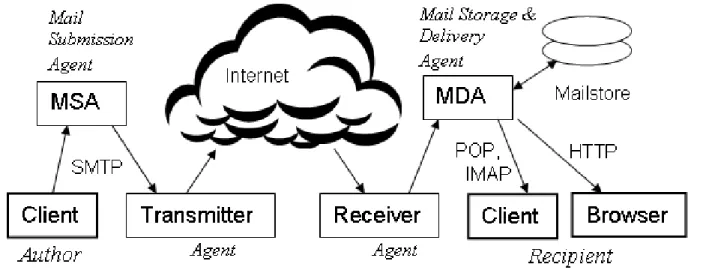
The network of computers that handle email on the internet is the email system and this system is built through user machines, running programs that send, receive, compose, and view messages and agent machines.
Fig: Actors and their roles in ideal email system
Image source : http://en.citizendium.org/wiki/Email_system
To proceed further with the details of the emails system, firstly we require an understanding of message handling:
has become more popular than its counterpart due its ease. Similar to the client, a server directs the exchanging of emails. While in Client email, the emails are stored in the user’s computer memory; in the web interface email system, the emails are stored with the server thus saving the computer’s storage memory. The messages deleted in web browser are stores in server memory. Examples of web browser email services are : Gmail (comes with a client as well), Yahoo! Mail, AOL, Hotmail, etc.
2. When the sender hits send , the mail will be sent to a Mail submission Agent (MSA) machine which checks the syntax validity of the submitted email and conforms to the related policies. It enforces submission rights to guarantee the sender address is valid and authorized. The authentication can be performed by a password, assigning the client machine a static IP address, or the client can connect through MSA’s local network instead of internet. After authentication is achieved, the mail is transferred using a variant of Simple Mail Transfer Protocol (SMTP).
3. The MSA thereafter passes the email to a transmitter which is an agent and whose job is to prevention of outgoing scam, and providing means to prove their identity to unrelated receivers. This can be done by providing a service like DNS, where the DNS records provide a public key, a list of IP addresses or any data for the receiver to use. The transmitter can have a dozen of relays, operating in parallel or widely dispersed. Exceedingly high amount of large ISPs (Internet Service Providers ) have their own transmitter relays in addition to MSA. 4. Now that the email has reached the receiver which is again an agent, the receiver will perform “border defence” which includes authenticating the sender, blocking DoS (Denial of Service) attacks, blocking spams to obtain legitimate mails.
3. EMAIL PROTOCOLS
A protocol is a defined standard used at each ends of communication network for proper transmission of information. There are three email protocols used while transferring message:
1. SMTP 2. POP 3. IMAP
image source: http://www.opus1.com/www/presentations/emailproto/sld003.htm
3.1 SMTP
Simple Mail Transfer Protocol is the technology which we make use of when sending email messages. As you send an email to someone, SMTP is the protocol that runs and transfers it on the internet from one server to another. And when the email finally arrives at the other end server, the server can download it using either POP or IMAP. Although systems like IBM Notes
servers, but all of these services use the SMTP for receiving or sending emails from outside their own systems.
The SMTP functions in two ways:
To begin with, it will verify the configuration of the computer from where we are sending the email and then grant permission for the process to continue.
Thereafter, it will send out our message and follow the path to successful delivery of our email. And in the way of circumstances that the email cannot be delivered, then it is bounced back or returned to the sender. There exists an enhanced of SMTP Extended SMPT or ESMTP and it is being employed for sending images and other various file attachments along with emails.
3.1.1 SMTP AND SPAMMING
The main issue with SMTP is that of authentication, and this issue occurs as the protocol does not authenticate the sender. Since there is no authentication for sender, SMTP is widely used for sending spam messages. Due to the stated reason, it becomes mandatory for the ISPs to keep an eye on the number of emails sent from each account. As a counter measure, often ISPs do not grant access to account holders to send email from other SMTP address but their own and this can be done by effectively the blocking ports 25 and/or 26. But this measure can lead to another type of error -cannot send email- from subscribers who configure a non ISP email account. For example, when you configure from a web site or web based email provider but in an email client. And a solution to this complain can be achieved if we contact the ISP and ask for their SMTP outgoing server address, port number and authentication information..
Image source : https://tools.ietf.org/html/rfc5321
1. Session Initiation: In this very first stage, a session of SMTP is started as soon as a client opens a connection to a server. Following, the server will reply with an opening message. This stage can involve identification of their software and version information in the greeting stage. And wherever security errors are caused, an implementation for the disabling of software and version announcement.
2. Few of the commands specified in the SMTP are:
HELO which identifies the SMTP client process to the SMTP server process, EHLO which is a newer version of HELO and includes services extensions, MAIL FROM will identify the sender,
RCPT TO will identify the recipient ,
DATA will identify the body of the message.
3. Client initiation: At this stage, as the server sends out the greeting (welcoming) message and the client receives it, the client then normally sends out the EHLO command to server, representing the client's identity. Further in addition to opening the session, use of EHLO command verifies that client has the capacity to process service extensions and requests that the server provide a list of the extensions it supports.
4. Mail Transactions:
SMTP facilitates three types of mail transfers:
The MAIL command starts the transaction gives the sender identification.
Thereafter, a series of one or more commands are followed for giving the receiver information.
And finally, the DATA command will initiate the transfer of email data and it would be terminated by "end of mail" data indicator, which also confirms the transaction is supported.
5. Silent forwarding: the message can be silent forwarded i.e. without any notification to sender for non-disclosure purposes or security reasons.
3.2 POP
and its popularity can be attributed to its simplicity to configure, operate and maintain. And it is fairly easy to access emails through POP. You just need a username, password and the email server address. Typically the incoming email server address is pop.THE-DOMAIN-NAME.com / THE-DOMAIN-NAME.com.
POP1 was enlisted in RFC918, POP2 in RFC 937. While POP3 originated with RFC 1081, but its current specification is in RFC 1939 with an extension from RFC2449.
"POP4" exists only as an informal proposal but has not progressed since 2003.
Email servers hosted by Internet service providers also use POP3 to receive and hold emails intended for their subscribers. Periodically, these subscribers will use email client software to check their mailbox on the remote server and download any emails addressed to them. Once the email client has downloaded the emails, they are usually deleted from the server, although some email clients allow users to specify that mails be copied or saved on the server for a period of time. Email clients generally use the well-known TCP port 110 to connect to a POP3 server. If encrypted communication is supported on the POP3 server, users can optionally choose to connect either by using the STLS command after the protocol initiation stage or by using POP3S, which can use the Transport Layer Security (TLS) or Secure Sockets Layer (SSL) on TCP port 995 to connect to the server.
The POP builds connection network between an email client and server by defining a set of rules for downloading email messages which are stored in an online hard disk to the local hard disk of our computer. POP enables us to download all our emails to our computer and thus enabling us to view them anytime, anywhere we want without requiring an internet connection. However, initially to load the emails from server an active internet connection is necessary. This feature of POP has an advantage in scenarios where one does not have access to internet connection or email server is down and needs to view old messages.
3.2.1 IS POP BEING USED BY ALL EMAIL SERVERS?
ones which we create on our website come with POP access. While online email service providers have varied policies regarding the POP access. Gmail allows you to enable POP for free for your account. Yahoo! Mail earlier used to charge $20/year for enabling POP access to your account but now it is free. One main reasons why email based web services readily do not support POP is because once you have downloaded the messages into the computer, you no longer need to check messages on the web server, meaning no need to constantly login to the account and thus, we would not “pay” for the free access by either not viewing or clicking the advertisements. These advertisements sponsor the revenue for these free services we use.
3.2.2 PROTOCOL OVERVIEW
1. Server host will start the POP3 service listening through TCP port 110. If a client host wants to use the service, a TCP connection will be established with server host. Encrypted communication for POP3 is either requested after protocol initiation, using the STLS command, if supported, or by POP3S, which connects to the server using Transport Layer Security (TLS) or Secure Sockets Layer (SSL) on well-known TCP port 995.
2. After a connection is established, POP3 server sends a greeting.
3. Thereafter, the client and POP3 server exchange commands and responses until the connection between the two is aborted or closed. One thing to note, POP3 consists of commands in case-insensitive keyboard, and possibly followed by one or more arguments. The keywords and arguments in POP consist of printable ASCII characters, and are separated by a single SPACE character. Keywords are mainly three of four characters long, while an argument can be 40 characters long. Responses in POP can be up to 512 characters long. There are presently two statuses indicators: “+OK” – representing a positive and “-ERR” representing a negative.
5. After which, the server will attain resources associated with client’s maildrop and the session enters TRANSACTION state. During this state, client will request actions on part of the POP server. This state has the LIST, RETR, DELE, NOOP, RSET commands.
6. As soon as the client issues the QUIT command, the session will enter the UPDATE state where the POP3 server releases any resources that we acquired during the TRANSACTION state and afterwards says goodbye.
7. The TCP connection is then terminated.
A POP3 server usually has a inactivity auto logout timer of atleast 10 min duration. If the timer expires, the session does not enter UPDATE state, i.e. the server closes the TCP connection without removing any messages or sending a response to client.
8. Message format in POP: All messages transmitted during POP3 session abide by standard for the format of Internet text messages RFC822. Generally, during the AUTHORISATION state, the POP server calculates the size of each message in octets as soon as it opens the maildrop.
3.3 IMAP
Incoming mail messages are sent to an mail server that stores messages in the recipient's mail box. The user retrieves the messages with an mail client that uses one of a number of e-mail retrieval protocols. Some of the clients and will attempt to use vendor-specific, proprietary protocols, but majorly support SMTP for sending e-mail and POP and IMAP for retrieving e-mail, allowing interoperability with other servers and clients. For example, Microsoft's Outlook client uses MAPI which is a Microsoft proprietary protocol and it uses MAPI to communicate with a Microsoft Exchange Server. Definitely, all of these products will additionally support POP, IMAP, and outgoing SMTP. Support for the Internet standard protocols allows many e-mail clients like Mozilla Thunderbird or Pegasus Mail to access these servers, and which allows the clients to be used with other servers as well.
IMAP holds an advantage in facilitating Email to any machine that has a client configured with the same IMAP account. In contrast to POP, Email messages will not be lost in the event of stolen PC or system crash because they are stored online. Another scoring point of IMAP is that it provides ability is to provide remote mailbox management (list/create/rename/delete) and set message status flags. Also, it provides for support for simultaneous update in shared folders over different clients. In IMAP, we can have selective subscription of relevant mailboxes. And one of biggest aspect is of having freedom to preview only parts of the message without downloading the whole email and also we can decide when to download attachments.
However, IMAP is not without any disadvantages. The two main downsides to IMAP can be that new incoming mails will not be available if there is no data connection as existing messages are usually not available offline if there is no cache copies downloaded. And large amounts of email and attachments may fill up and hit the space limit designated to the IMAP account on the server, in which case, the server asks you to delete some messages so that it can continue to receive mail, or rarely, it automatically deletes old mail to create new space.
3.1 PROTOCOL OVERVIEW
2. Commands and Responses: An IMAP4rev1 connection comprises of the establishment of network connection of client and server, an initial greeting through the server’s side, and server/client interactions. These server/client interactions will contain a server data, client command, and completion result response of server.
3. Client Protocol Sender and Server Protocol Receiver: The client command will start an operation. Each client command is prefixed with an identifier which is typically a short alphanumeric string, e.g., A0001, A0002, etc. and is called a "tag". For each command, a different tag is generated by the client. The Clients surely must follow the syntax that is specified in this specification strictly.
4. Server Protocol Sender and Client Protocol Receiver: The data that the server transmits to
the client and the status responses that do not show command completion will be prefixed with the token "*", and are therefore called untagged responses.
5. Unique Identifier (UID) Message Attribute: In IMAP4rev1, messages will be accessed by one of the two numbers; the message sequence number or the unique identifier. A 32-bit value will be assigned to each message, which when used with the unique identifier validity value will form a 64-bit value that should not refer to any other message in the mailbox or any other subsequent mailbox with the same name. In a strictly ascending fashion, unique identifiers are assigned in the mailbox; here as each message is added to the mailbox, a higher UID will be assigned than the message(s) which were previously added.
6. Message Sequence Number Message Attribute: This can be defined as the relative position from starting i.e. 1 to the number of messages in the mailbox. The rule here is to assign this position by ascending unique identifier. Thereafter, as we add each new message, a message sequence number will be assigned that will be 1 higher than the number of messages in the mailbox before that new message was added. Similarly, as a message is to be deleted permanently from the mailbox, there will be a decrement in the message sequence number for all subsequent messages.
7. Internal Date Message Attribute: Here, the internal date and time of the message on the
server is reflected here and it is the date and time when the message was received.
8. State and Flow Diagram: as soon as the connection between server and client is established,
2. Authenticated state where the client gets authenticated,
3. Selected state, in this step the mailbox has been selected for client access, 4. Logout state where the connection is terminated.
4. MIME (MULTIPURPOSE INTERNET MAIL EXTENSION)
MIME stands for Multipurpose Internet Mail Extension and is an internet standard. MIME was proposed in 1991 by Bell Communications to expand the limited capabilities in email, and specifically to allow documents such as images, sound, and text to be attached in a message. It was originally defined in June 1992 by RFCs 1341 and 1342. Virtually, all Internet email written by humans and a fairly large proportion of automated email is transmitted via SMTP in MIME format. Originally, MIME was designed mainly for SMTP, but now the content types defined by MIME standards hold importance outside of email. An example can be in communication protocols such as HTTP for the World Wide Web.
MIME using headers describes the type of message content and the encoding that is used. The features offered by MIME to email services are as follows:
Support for multiple attachments in a single message
Support for non-ASCII characters
Support for layouts, fonts and colors which are categorized as rich text.
Providing support for attachments which may contain executables, audio, images and video files, etc.
Providing support for unlimited message length .
Primary MIME types
MIME types that are used in the Content-Type header, are generally there to classify documents that are attached to an email.
A MIME type is composed as follows:
text: readable text data text with reference to RFC822 ; text/plain with reference to RFC2646; text/html with reference to RFC2854 .
image: that is binary data representing digital images, images can be of format jpeg, gif, png.
audio: digital sound data of formats basic, wav
video: data can be of format MPEG
application: application/octet-stream, application/pdf
MIME types often are also used on Web to classify documents that are transferred using HTTP protocol. Therefore, during a transaction between a browser and web server, the foremost thing the server would do would be to send the MIME type of file to the browser, so that the browser can determine how to display the document.
5. SENDING AN EMAIL USING JAVA THROUGH SMTP
Getting started with Java
step 1. Install the Java Development Kit (JDK) through oracle site. JDK is a software development environment which is used for developing Java applications and applets. It consists of the Java Runtime Environment (JRE), an interpreterc(java), a compiler (javac), an archiver (jar), a documentation generator (javadoc) and other tools that may be needed in Java development.
step 2: Download the JavamailAPI which is a framework in Java to build mail and messaging applications. The JavaMail API facilitates in providing for a set of abstract classes defining objects that comprise a mail system.
Step3: There will be a mail.jar file in the JavamailAPI, copy it in the bin directory of the JDK.
Step 4. Download the Activation framework through which we can take advantage of standard services to determine the type of an arbitrary piece of data, access to it, discover the operations available on it. Similar to previous step, find the activation.jar file and place it in the bin folder of JDK.
Step 6: Hereafter we are ready to atleast write .java files
Step 7: Start with creating a new let’s say SendEmail.java on the notepad or you can create it as a new project in NetBeans which is a software that helps in easy writing of Javacodes.
> Write the code and save the file and close it.
> Thereafter, open the command prompt window and set the current direction to where you have saved the SendEmail.java file.
Step 8: To compile run the command javac SendEmail.java
Step 9: If the file compiles without any error, execute it using the java SendEmail
Step 10: A message should appear indicating that the email has been sent successfully.
5.1 CODE
// File Name SendEmail.java
import java.util.*;
import javax.mail.*;
import javax.mail.internet.*;
import javax.activation.*;
public class SendEmail
{
public static void main(String [] args)
{
final String username = "[email protected]";
final String password = "godbless@";
String from = "[email protected]";
System.setProperty("java.net.preferIPv4Stack" , "true");
String host = "localhost";
Properties properties = System.getProperties();
properties.setProperty("mail.smtp.host", "smtp.gmail.com");
properties.setProperty("mail.smtp.auth","true");
properties.setProperty("mail.smtp.starttls.enable","true");
properties.setProperty("mail.smtp.port","587");
Session session = Session.getInstance(properties,
new javax.mail.Authenticator() {
protected PasswordAuthentication getPasswordAuthentication() {
return new PasswordAuthentication(username, password);
}
});
try{
message.addRecipient(Message.RecipientType.TO, new InternetAddress(to));
message.setSubject("Subject line");
message.setText("text message-hey!");
Transport.send(message);
System.out.println("Sent message successfully!!");
}catch (MessagingException mex) {
mex.printStackTrace();
}