Release Notes
Accops HyWorks v3.2-SP2-Hotfix5
Last Updated: 08 Apr 2020
Copyright (c) 2020, Accops Systems Private Limited 1
Copyright © 2020, Accops Systems Private Limited. All Rights Reserved.
The information contained in this document represents the current view of Accops Systems Private Limited. on the issues discussed as of the date of publication. Because Accops Systems Private Limited. must respond to changing market conditions, it should not be interpreted to be a commitment on the part of Accops Systems Private Limited., and Accops Systems Private Limited. cannot guarantee the accuracy of any information presented after the date of publication.
This white paper is for informational purposes only. ACCOPS SYSTEM PRIVATE LIMITED. MAKES NO WARRANTIES, EXPRESS OR IMPLIED, IN THIS DOCUMENT.
Complying with all applicable copyright laws is the responsibility of the user. Without limiting the rights under copyright, no part of this document may be reproduced, stored in or introduced into a retrieval system, or transmitted in any form or by any means (electronic, mechanical, photocopying, recording or otherwise) or for any purpose, without the express written permission of Accops Systems Private Limited.
Contact Accops Systems Private Limited. Email: [email protected]
Copyright (c) 2020, Accops Systems Private Limited 2
Release Notes Document Revision History
Date Changes
08-Apr-2020 Details of v3.2-SP2-Hotfix5 appended
04-Feb-2020 Draft of release notes document for v3.2-SP2-Hotfix4 prepared
Copyright (c) 2020, Accops Systems Private Limited 3
Table of Contents
Table of Contents ... 3
Introduction ... 5
HyWorks Components being Released in HyWorks V3.2-SP2-Hotfix5... 5
Important for Installation, Upgrade or HyWorks Deployments ... 6
HyWorks Patch for HyWorks Controller and Session Host Servers ... 6
HyWorks Patcher Compatibility ... 6
Details of HyWorks v3.2-SP2-Hotfix5 Release ... 7
Features, Enhancements and Bug Fixes in v3.2-SP2-HF5 Patch ... 7
Authentication Enhancement: Additional hostname lookup removed ... 7
Management Console Login re-direction via web.config setting ... 7
Disable Alerts on Dashboard to optimize loading... 7
Session Management Enhancement: App session validity timeouts support added ... 8
Enhancement in Score Calculation Logic for Least Connection Load Balancing ... 8
Active-Active support added ... 8
Performance Enhancement... 8
Previous Releases ... 10
Details of v3.2-SP2-Hotfix4 ... 10
#10235 Preserve MAC address in during recompose of desktop pool ... 10
#10183: Shell apps reconnect enhancements with HyLite re-login ... 10
Defect #6583: HyWorks monitoring service crash on session host server with event id: 0xC0000374 ... 11
Defect #: Desktop pool cloning with Nutanix 5.10/ 5.11 fails with error ‘Object reference not set to an instance of an object’ ... 11
Details of v3.2-SP2-Hotfix3 ... 11
Feature# 9635 Automatic screen lock for idle sessions ... 11
Feature #7931 Ubuntu x64 New Platform ID support in HyWorks controller ... 12
Defect #7566 - High CPU usage on Controller ... 12
Defect #8744 Device page showing object ref error for some devices and not able to find it on grid ... 13
Defect #7138: Session shadow for application session was not working ... 13
Details of HyWorks v3.2-SP2-Hotfix2 Release ... 13
#7280 : Unable to remove/disable the session host from controller in sessions team if the "Session Host Agent Status" is not responding... 13
Copyright (c) 2020, Accops Systems Private Limited 4
#7281 The value of "connected since" in status column of VDI session's is showing garbage value
... 13
#7270: "Object reference not set to an instance of an object" error while configuring LDAP with SSL enabled... 13
Details of HyWorks v3.2-SP2-Hotfix1 Release ... 14
Bug-Fixes and details of changes in HyWorks Controller ... 14
Bug-Fixes and details of changes in HyWorks Session Host ... 16
Bug-Fixes and details of changes in HyDesk Hy4000 v321154 Client ... 16
All About HyWorks v3.2-SP2 Release ... 18
Patcher Installation Known Issues ... 19
Appendix-A: How to Install HyWorks Patch on HyWorks Controller Server ... 20
Appendix-B: How to Install HyWorks Patch on HyWorks Session Host Server... 20
Appendix-C: How to change log database to SQL ... 20
Copyright (c) 2020, Accops Systems Private Limited 5
Introduction
HyWorks v3.2-SP2-Hotfix5 is integrated patch having some bug-fixes and all previous changes of HyWorks v3.2-SP2-Hotfix1/Hotfix2 and Hotfix4.
HyWorks v3.2-SP2-Hotfix5 release notes document is published to provide following details: 1. Information of hotfix being released and download links of v3.2-SP2-Hotfix5
2. Important bug fixes, enhancements taken in Hotfix5
HyWorks Components being Released in HyWorks V3.2-SP2-Hotfix5
In this section of the document, details of different HyWorks Module are being provided, which are being delivered as part of HyWorks v3.2-SP2-Hotfix5 release:Important Notes:
➢ HyWorks Patch can only be applied on servers (HyWorks Controller/ Session Host) running v3.2-SP2 (3.2.0.8928) or later
➢ If multiple HyWorks components (e.g. session host server, controller and management console are running on same server), then installing patch once will apply the fixes for all components
Module Version Remarks Download location
HyWorks Patch
[HyWorks
Patcher_v3.2-SP2-HF5.exe]
NA Integrated hotfix setup for
➢ HyWorks Controller
➢ Management Console
➢ Session Host Server
Download HyWorks Patch-Hotfix5 MD5:
7938dcbf84a1eec13 c35ea2fa01810b0
Copyright (c) 2020, Accops Systems Private Limited 6
Important for Installation, Upgrade or HyWorks Deployments
HyWorks Patch for HyWorks Controller and Session Host Servers
• Controller Servers configured to have Embedded DB for logs must be moved to SQL Server before applying HF5 patch.
o Logs will stop coming post patch apply and require manual execution of SQL script to
start getting logs
• Same patcher can be used to install hotfixes on session host or controller servers
• For shared hosted desktop environments, patcher must be installed on all session host servers and HyWorks Controller.
• On uninstall/repair of Controller/Session Host Server, the changes of patcher will get removed and the patcher must be reinstalled to restore the changes.
HyWorks Patcher Compatibility
• HyWorks v3.2-SP2-Hotfix5 should only be applied on HyWorks servers running any of following version
o v3.2-SP2 o v3.2-SP2-HF1 o v3.2-SP2-HF2 o v3.2-SP2-HF3 o v3.2-SP2-HF5
• Servers running HyWorks v3.2-GA or SP1 must be first upgraded to v3.2-SP2 before applying patch HyWorks v3.2-SP2-HF4
Copyright (c) 2020, Accops Systems Private Limited 7
Details of HyWorks v3.2-SP2-Hotfix5 Release
HyWorks v3.2-SP2-Hotfix4 has all integrated fixes of Hotfix-1, Hotfix-2 and Hotfix-3. The list of changes available in this section, previous changes can be found in later section of this document:
Features, Enhancements and Bug Fixes in v3.2-SP2-HF5 Patch
Authentication Enhancement: Additional hostname lookup removed
In order to enhance controller performance, an additional hostname lookup has been removed. This will reduce additional time being taken during logon process.
Management Console Login re-direction via web.config setting
Once too much configuration data (endpoints, logged-in users) are present, logon becomes very slow as user by default lands on dashboard page.
To avoid, this has been made configurable so that administrator on logon will navigate to user sessions page [This is default behavior of v3.2-SP2-HF5]
The configuration can be changed from HyWorks Controller Management Console -> Web.config file.
Default location: C:\Program Files (x86)\Accops\HyWorks\Mmc\web.config In AppSettings section, locate key IsChangeHyworksLandingPage, Set value as,
• True to change default landing page to user sessions page
• False to keep default landing page as dashboard
Disable Alerts on Dashboard to optimize loading
By default, on management console dashboard, alerts for devices are shown. This alert calculation be disabled, and management console loading can be made faster from following advanced
configuration:
Management Console -> System -> Advanced -> Show Dashboard Device Alert
Default is set to true, which display alert count as well. Set it as False to stop showing device counts with alert and make management console dashboard faster.
Copyright (c) 2020, Accops Systems Private Limited 8
Session Management Enhancement: App session validity timeouts support added
While retrieving session information from controller, session host will also pull the timeouts and sessions will be managed and removed as per fetched timeouts
Enhancement in Score Calculation Logic for Least Connection Load Balancing
In previous versions, HyWorks Controller was waiting for session connection updates from session host server and thus in case of late updates, it was putting some load on one server until update comes for session connection.
The logic is improved to tackle situations where number of concurrent are higher. Now controller will consider the sessions which are given to any session host server instead of connected sessions.
Advance Config to control max number of sessions to be given to any session host
server
Earlier controller was giving sessions to session host servers even when it was being over utilized or running out of resources.
To manage this critical failure prone condition, an advance configuration can be done in HyWorks Controller Management Console -> System -> Advance Configuration ➔Max session per server
• Set Max session per server as zero (0) to provide unlimited sessions or as per team configurations
• Set Max session per server as non-zero number to force stop controller from allowing number of sessions more than specified count
Active-Active support added
Support for active-active deployment has been added. But it is recommended to deploy v3.3 instead.
Performance Enhancement
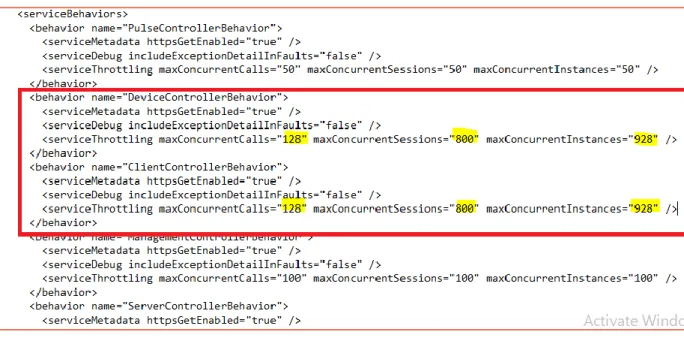
To enhance Controller capabilities to manage concurrent sessions from clients and session host servers, following parameters can be modified in controller service configuration file:
Default File Location: C:\Program Files (x86)\Accops\HyWorks\Service\EDC.Service.exe.config
Recommended Changes:
• DeviceControllerBehavior and ClientControllerBehavior configurations needs to be optimized based on vCPUs of the server
• Following three settings to be updated:
k. maxConcurrentCalls : default is 16 times the processor count. l. MaxConcurrentSessions : 100 times the processor count
m. maxConcurrentInstances = maxConcurrentCalls + MaxConcurrentSessions
• Example, if server has eight vCPUs (shown following figure) n. maxConcurrentCalls = 16 x 8 = 128
o. MaxConcurrentSessions = 100 x 8 =800 p. maxConcurrentInstances = 128 + 800 =928
Copyright (c) 2020, Accops Systems Private Limited 9
Copyright (c) 2020, Accops Systems Private Limited 10
Previous Releases
This section will have information of changes being done in previous HyWorks releases:
Details of v3.2-SP2-Hotfix4
#10235 Preserve MAC address in during recompose of desktop pool
Provisioning of HyWorks works perfectly fine with IPs being allocated using DHCP.
But in few cases, it was required to preserve the MAC addresses post recomposing of desktops, few such cases are mentioned below:
• Where DHCP is not able to allot new address due to limited IP pool
• Where same IP should be allotted to the same machine to let other IP based configurations will not get broken e.g. session host servers configured
The feature is available in HyWorks now and is supported from VMware and Nutanix dedicated session providers. The settings are available in desktop pool wizard – Deployment tab:
#10183: Shell apps reconnect enhancements with HyLite re-login
With HyLite endpoints, shell apps reconnection was not working correctly when user was logging-in from another location.
To improve this, on receiving a re-login request from new HyLite:
Copyright (c) 2020, Accops Systems Private Limited 11
2. When user will click on application icon from new HyLite session, it will be provided the connection of last disconnected session first.
Defect #6583: HyWorks monitoring service crash on session host server with
event id: 0xC0000374
The issue has been fixed in HyWorks v3.2-SP2-HF4 patch. The patch should be applied on session host servers as well.
Defect #: Desktop pool cloning with Nutanix 5.10/ 5.11 fails with error ‘Object
reference not set to an instance of an object’
The issue was because of change in boot configurations in new version of Nutanix. The defect has been fixed and being delivered with v3.2-SP2-HF4
Details of v3.2-SP2-Hotfix3
Hotfix-3 has been merged in Hotfix4 before being released generally. Following changes are incorporated in hotfix3:
Feature# 9635 Automatic screen lock for idle sessions
The feature was required for all types of HyWorks deployments, where if user is idle on his endpoint, the screen should get locked. The feature is especially useful for Linux based endpoints which are not controller through group policies.
Now if user will keep its session idle for more than configured screen lock-out time, its session will be locked and to unlock it must enter the password. The implementation requires followings:
1. Hotfix4 is applied on HyWorks v3.2-SP2
2. Lock screen timeout is set as more than 0 in minutes
3. Latest client v326023 or later is running. The feature is released in Ubuntu-x64 client v326023 first.
The feature is not yet available for HyLite. Connection Profile Configuration:
Copyright (c) 2020, Accops Systems Private Limited 12
Screenshot of Lock screen on client-side:
Feature #7931 Ubuntu x64 New Platform ID support in HyWorks controller
Earlier versions of HyWorks were not supporting Ubuntu-x64 platform. The support has been added and first Ubuntu-x64 client v326023 has been released. Please check Ubuntu-x64 client release details for more information on client features and compatibility.
Note: Ubuntu client x64 will only be supported after applying hotfix4 on HyWorks Controller running v3.2-SP2.
Defect #7566 - High CPU usage on Controller
High CPU usage by HyWorks Controller was observed in systems, where controller has been running from a long time.
Copyright (c) 2020, Accops Systems Private Limited 13
Defect #8744 Device page showing object ref error for some devices and not able
to find it on grid
In some cases, administrator was not able to access HyWorks Management Console – Endpoints
page and was shown error ‘Object reference not set to an instance of an object’
Fix is provided in Hotfix4.
Defect #7138: Session shadow for application session was not working
In earlier versions of HyWorks, session shadow was not working for application sessions. The issue is fixed in now being delivered with Hotfix4.
Details of HyWorks v3.2-SP2-Hotfix2 Release
HyWorks v3.2-SP2-Hotfix2 consists of following changes:
#7280 : Unable to remove/disable the session host from controller in sessions
team if the "Session Host Agent Status" is not responding
An existing issue, where once a shared session host is moved to unreachable state, administrators were not able to change the provider to inactive mode. The issue is fixed in HyWorks v3.2-SP2-Hotfix2 patch.
#7382 : User unable to get session from session host
On receiving bulk connection and disconnection requests, session host server was taking time to execute new requests and thus new connections were getting timed out. Processing of requests have been optimized to handle this issue.
#7281 The value of "connected since" in status column of VDI session's is
showing garbage value
In case of automatic reconnection of sessions, value of connected since value was getting reset and was showing garbage value in VDI session page.
#7270: "Object reference not set to an instance of an object" error while
configuring LDAP with SSL enabled
While configuring LDAP server with SSL enabled, error ‘Object reference not set to an instance of an object’ was shown and thus administrator was not able to configure LDAP server with SSL.
Copyright (c) 2020, Accops Systems Private Limited 14
Details of HyWorks v3.2-SP2-Hotfix1 Release
HyWorks v3.2-SP2-Hotfix1 consists of following changes:
Bug-Fixes and details of changes in HyWorks Controller
[#6839] Reconnection of same shared hosted desktop session was not happening,
when user was logging-in from HyWorks Client and then HyLite or vice versa.
The issue has been fixed. The following flag should be enabled in HyWorks Controller Management Console -> System -> Advanced Configurations -> Enable Win Alternate Shell
[#6949] While reconnecting remote app through HyLite argument displays undefined
in session host logs
The issue has been fixed in Hotfix1 patch.
[#7008] Enhancement in cluster removal process
In some cases, on removing HyWorks controller from cluster, database clean-up was not getting done completely.
Enhancements have been introduced in hotfix1 for proper clean-up of cluster tables.
[#7096] Configurable option in Advanced Configurations for group retrieval logic from
active directory
HyWorks Controller uses two alternate mechanisms to retrieve user groups from configured active directory. In some cases, it was needed to change the order of these two mechanisms and thus the same control has been provided in Advanced Configurations -> AD group retrieval type. Available options are 1,2,3 and 4; where
• 1 will use only method#1
• 2 will use only method#2
• 3 will use method#1 then method#2 as fallback mechanism (Default and recommended Configuration)
Copyright (c) 2020, Accops Systems Private Limited 15
Note:
➢ The configurations should not be changed unless advised by Accops team, as this may affect entitlements.
[#7112] Advanced configurations for TCP timeout and time zone settings on HyDesk
Hy4000 v321154
Hy4000 v321154 is having multiple configurations available as supporting lossy network configurations, these configurations can be controlled from HyWorks Management Console -> Advanced Configurations. Few such configurations are:
• KeepAlive interval: Keepalive interval is the duration between two successive keepalive retransmissions, if acknowledgement to the previous keepalive transmission is not received. Value in Second, Default value is 3.
• KeepAlive count: Keepalive count is the number of retransmissions to be carried out before declaring that remote end is not available. Value in Second, Default value is 2.
• KeepAlive idle: Keepalive Idle is the duration between two keepalive transmissions in idle condition. Value in Second, Default value is 5.
• TCP user timeout: The TCP user timeout controls how long transmitted data may remain unacknowledged before a connection is forcefully closed. Value in Second, Default value is 9. Time zone settings:
• Enforce time zone: Enforce time zone to HyDesk. Expected values: True or False, Default value: False
Copyright (c) 2020, Accops Systems Private Limited 16
Note:
➢ The TCP Timeout configurations can affect the user experience and session connectivity and hence should not be modified unless advised by Accops Team.
➢ The configurations are only supported on latest Hy4000 v321154 client only and support will be extended to other Linux based clients in future.
Bug-Fixes and details of changes in HyWorks Session Host
[#7042] False logout detected by session host [Internal]
In some random cases, HyWorks session host was getting the session status as logged-out though it was running. Using hotfix1 session host will recheck the session status before removing it from database and notifying HyWorks Controller.
[#7112] Support for configurable TCP timeouts
HyDesk Hy4000 will support automatic reconnections, in case of network disruptions. To support this automatic reconnection, session host has been improvised.
Bug-Fixes and details of changes in HyDesk Hy4000 v321154 Client
HyDesk Hy4000 v321154 client is having following changes implemented:
[#7088] Automatic reconnect support
With flag +auto-reconnect and /auto-reconnect-max-retries:20, HyWorks client will show a dialog of reconnection on identification of network disruptions. The dialog will be shown as per timeouts configured in HyWorks Controller advanced configurations.
The dialog will get automatically dismissed on network restore.
[#7088] Configurable TCP timeouts
HyDesk Hy4000 will support configurable TCP timeouts for RDP10 protocols. These configurations can be set from HyWorks Controller Management Console -> System -> Advanced Configurations. The timeouts can be modified to support remote sessions in lossy network or other relevant network conditions.
Copyright (c) 2020, Accops Systems Private Limited 17
Option to Connect Again Closed FreeRDP Session
In previous client versions, sign-out dialog being displayed was not having any option to reconnect to closed session. V3.2-SP2 client will have an additional button, which can be clicked to reconnect to any closed remote session.
Earlier users were prompted with dialog and were needed to cancel that to reconnect to disconnected sessions.
The dialog will also change button to Signoutdynamically based on selection of checkbox “Close all
applications running inside session”
Important Note:
➢ Connect Again will allow fetching the existing SHD session only when the earlier session has closed. If previous session is signed-out or the SHD server is not reachable then it will
provide a new session.
Enhancement# 2: Disabling multiple clicks when session launch is in progress
If client or user has already initiated the session and user again tries to re-click on same application or desktop icon, message will be displayed suggesting, the session launch is in progress.
The message will automatically disappear in predefined time of 30 seconds and will allow user to click again after 30 seconds.
Copyright (c) 2020, Accops Systems Private Limited 18
Important Note:
➢ ‘Multiple clicks’ has been identified as one of the reasons for session disconnect and mismanaged sessions on SHD servers.
Enhancement#3: Integration of FreeRDP v2.0.0-
RC4 addressing issue of “
Failed to
connect to desktop post disconnection”
Few users have faced the issue that after experiencing the remote session disconnection, clicking on desktop icon again, was showing an error “Failed to connect to your desktop”. The issue was related to security protocol negotiation between client and server.
FreeRDP 2.0.0-RC4 is having enhancements over previous versions and will help addressing this problem.
All About HyWorks v3.2-SP2 Release
Please refer release notes document available on Accops Support Portal to know the detailed features and bug fixes in HyWorks v3.2-SP2 release.
The following article contains all the relevant details:
Copyright (c) 2020, Accops Systems Private Limited 19
Patcher Installation Known Issues
#
Subject
HyWorks Patcher
# Post installation logs will not be displayed.Workaround: Additional SQL query to be executed for enabling logging. See appendix.
7157 Patcher will fail to install, if server is having old version of HyWorks Controller and
SP2 session host
[Workaround] Apply patch manually. Please contact Accops support team to acquire patch contents
7161 Older version of session host server will also get upgraded if server is running HyWorks Controller v3.2-SP2
[Workaround] Revert back the changes from backup taken by patcher for session host server
7165 Patcher is failed to install due to dependency version check when only
management console is installed on server.
[Workaround] Apply patch manually. Please contact Accops support team to acquire patch contents
Copyright (c) 2020, Accops Systems Private Limited 20
Appendix-A: How to Install HyWorks Patch on HyWorks Controller
Server
To apply hotfix5 patch on HyWorks Controller server v3.2-SP2, follow the below steps:
1. Download and install Hotfix5:
a. Download HyWorks Hotfix5 patcher from download link specified in section HyWorks Components being Released in HyWorks V3.2-SP2-Hotfix5
b. Copy the hotfix5 setup on HyWorks Controller/ Management Console/Session Host server
c. Right click on setup and select option Run as Administrator
d. Follow the installation wizard to complete the installation
e. Patcher-setup will automatically detect the installed components and will apply relevant fixes to different components
Appendix-B: How to Install HyWorks Patch on HyWorks Session Host
Server
Follow the same process, as described in Step# 2 of section Appendix-A: How to Install HyWorks
Patch on HyWorks Controller Server to run the Hotfix patch on HyWorks Session Host server.
Appendix-C: How to change log database to SQL
Check Log database type: 1. Check following registry value:
HKEY_LOCAL_MACHINE\SOFTWARE\Accops\Controller\EDC\SERVICE => LOGDBTYPE a. If LOGDBTYPE=1 -> The Log database is embedded and mustbe changedto SQL
i. Move to Appendix-C how to change log database to SQL
b. If LOGDBTYPE=2 -> The Log database is SQL and the patcher installation can be done as specified in step# 2
Copyright (c) 2020, Accops Systems Private Limited 21
Pre-requisites:
• Another instance of SQL Server must be created for logging. To create another database instance, run the SQL installer again and follow the installation process.
Configuration Process:
1. Open Microsoft SQL Server Management Studio and Connect using appropriate
administrator credentials to the newly created SQL Server instance to be configured as Log server
2. Open a new SQL query and paste the following queries to create a new logs DB
CREATEDATABASE HyLog GO
3. Now new database is created, run the following query to create appropriate tables in LOGDB
USE HyLog
GO
CREATETABLE [Log](
[LogId] bigintIDENTITY (1,1)NOTNULL , [Date] datetimeNOTNULL
, [Level] nvarchar(100)NOTNULL , [Logger] nvarchar(100)NOTNULL , [Message] ntextDEFAULTNULLNULL , [StackTrace] ntextDEFAULTNULLNULL , [StackTraceDetail] ntextDEFAULTNULLNULL , [ORGID] nvarchar(128)NOTNULL
Copyright (c) 2020, Accops Systems Private Limited 22
, [UserName] nvarchar(128)NOTNULL );
GO
ALTERTABLE [Log] ADDCONSTRAINT [PK_Log] PRIMARYKEY ([LogId]);
GO
4. SQL Server is ready to be configured in HyWorks Controller.
5. Connect to HyWorks Controller Server system using remote desktop connection or console session (if in HA, first connect to secondary HyWorks Controller server)
6. Go to HyWorks Controller Installation location (default installation path is mentioned below) C:\Program Files (x86)\Accops\HyWorks\Service
7. Locate the configuration file EDC.Service.exe.config
8. Copy the file and paste it as some safe location for backup
9. Download the EncryptDecryptAppConfigFile tool (Please ask the Accops support team for the download link)
10. Copy the tool on HyWorks Controller Server installation folder, default installation path is C:\Program Files (x86)\Accops\HyWorks\Service
11. Run the tool with admin privileges and browse the EDC.Service.exe file and click on button
Decrypt Config
Copyright (c) 2020, Accops Systems Private Limited 23
12. It will decrypt the EDC.Service.exe.config file for next operation 13. Open the EDC.Service.exe.config with WordPad
14. In ConnectionStrings section, locate the connection strings for LogsDBContext which should be like the below screenshot
15. Replace it with the following Connection String
<add name="LogDBContext" connectionString="Data Source=<ServerAddress or FQDN>\sqlexpress,1433;Initial Catalog=HyLog;User
ID=sa;Password=password@123;Encrypt=False;Min Pool Size=100;Max Pool Size=500;Pooling=true;TrustServerCertificate=False;MultipleActiveResultSets=true; "
providerName="System.Data.SqlClient" />
a. Please note the highlighted sections should be changed as per SQL Server instance configurations, the configurations are
i. SQL Server Address ii. SQL Server Instance Name iii. SQL Server Static Port to be used
iv. User Id: to be used to connect to SQL Server v. Password: User password
16. Save the file
17. Run the tool with admin privileges and browse the EDC.Service.exe file and click on button
Encrypt Config
Default Location is C:\Program Files (x86)\Accops\HyWorks\Service\EDC.Service.exe 18. Open Services (Open Run Prompt, type Services.msc and press Enter)
19. Locate and select Accops HyWorks Controller Service and click on Restart link
20. Accops HyWorks Controller Service will get restarted and will now start sending the logs to configured SQL Server
21. Perform couple of activities on HyWorks Controller Management Console, go to Logs section and verify if appropriate logs entries are being created
Copyright (c) 2020, Accops Systems Private Limited 24
HKEY_LOCAL_MACHINE\SOFTWARE\Accops\Controller\EDC\SERVICE => LOGDBTYPE And set value as 2.
Note:
➢ Old logs will not be moved to the new SQL Server but will remain in previous embedded
logsdb, the location of the file is:
Copyright (c) 2020, Accops Systems Private Limited 25
Support
Copyright (c) 2020, Accops Systems Private Limited 26 About Accops
Accops Systems Private Limited. under “Accops” brand is a globally leading developer and provider of
Enterprise Mobility solutions involving Application and Desktop Virtualization, Secure Remote Access and Privilege Access Management solutions.
Accops’ s software and hardware products enable businesses to efficiently virtualize, secure and deliver business applications, corporate workspace and network services to their employees, partners, vendors, home users and mobile users, enabling instance access from anywhere using any device.
Accops, HyWorks, HyDesk, HyID, HyLite, HySecure and HyAssist are registered trademarks of Accops Systems Private Limited. Other names may be trademarks of their respective owners. Accops System has the right to change, modify, transfer or otherwise revise the publication without notice.
Tel: India +91 9595 277 001 | Europe +49 341 3315 78 30 Email: [email protected] | Web: www.accops.com