Sierra Moore A Mobile Security Document Collection. A Master’s Paper for The M.S. in I.S. degree. November 18, 2015. 45 pages. Advisor: Robert Capra
Mobile security refers to the safeguarding of a device’s (often a smartphone) data against potential viral threats resulting in a user invasion of privacy. As part of this Master’s paper, a Mobile Security document collection and an accompanying Wordpress website were created. The intent of this project is to make it easier for smartphone users to learn about security issues. The collection is composed of
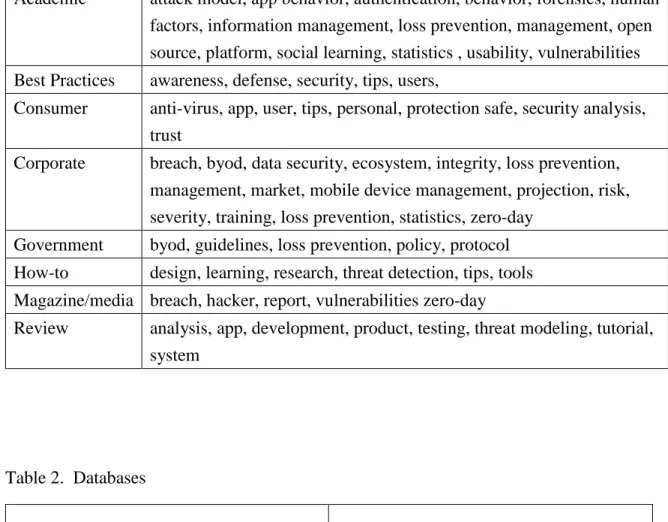
documents categorized as: academic, best practices, consumer, corporate, government document, how-to, magazine and product review. Each category is associated with key term subject tags.
Headings:
Mobile security
Smartphones
A MOBILE SECURITY DOCUMENT COLLECTION
By Sierra Moore
A Master's paper submitted to the faculty of the School of Information and Library Science of the University of North Carolina at Chapel Hill
in partial fulfillment of the requirements for the degree of Master of Science in
Information Science.
Chapel Hill, North Carolina
November 18, 2015
Approved by
Table of Contents
1. An Introduction to Smartphone Security
A device once relegated to the realm of science fiction; the modern smartphone has
rapidly become one of the most ubiquitous mobile technologies. According to the Pew
Research Center’s Internet and American Life Project Survey, “90% of American adults
now own a cellphone and 58% of American adults have a smartphone device. The age
group owning the most smartphones includes the 18-29 set; 93% having higher than a
college level degree of education.” (Pew Research Center, 2014 , p. 2) In 2015 Pew
Research’s A Portrait of Smartphone Ownership reported that, “Approximately 2/3 of
American adults now own a smartphone, of some kind, up from 58% in 2014” (Pew
Research Center, 2015 , p. 1). These data suggest that the smartphone has become a
prominent and integral part of the average American adult’s lifestyle. Traveling with its
user from primary residence to workplace, subway to school -- it acts as a touch point
privy to activities such as chats with friends, business communications, employment
searches, and of course -- idle web browsing, collecting throughout its lifetime various
calendars, conversations and personal data. The smartphone is an interface key that
digitally. More than 65% of U.S. smartphone users store sensitive data (both business and
personal related) on their devices (Han, Wu & Windsor, 2014, p. 1). These data are
being collected by both native and downloaded apps. Smartphone users rarely stick to
their device’s innate or local programs installed as part of its factory conditions, such as
its messaging service, web browser and voice calling functionality. The emergence of
accompanying app stores has coincided with the U.S. (and worldwide) smartphone
explosion. The Apple iTunes store, app stores designed for the Android Platform, and
apps for Windows OS are the main three. Users can visit these stores and download as
many apps as their devices have space to hold. Many of these apps share data with one
another and store data in data clouds beyond the smartphone’s physical data bank. Apps
are designed to facilitate multiple use cases such as shopping, photo editing and browsing
vendor specific stores. Although most app stores require a rigorous vetting process of
Smartphone users exist in a web with many other users, services and corporations, along
with that cluster of data they need preserved in some modicum of privacy.
The sheer number of mobile smartphone apps being downloaded has also led to
an increased user increased awareness of mobile privacy issues. According to a Pew
Research Internet Project 2012 study:
54% of app users have decided not to install a cell phone app when they discovered how much personal information they would need to share in order to use it, and 30% of app users have uninstalled an app previously on their cellphone because they discovered that it was collecting personal information that they didn’t wish to share. In total, 57% of app users have uninstalled or declined to install an app over concerns of sharing their private information (Pew Research Center, 2012, p. 2) .
Even if App store vendors ever manage to perfect their evaluation and testing of third
party apps -- users of jail broken iOS devices can access apps elsewhere. The appearance
of numerous third party apps intended for all platforms, but Android in particular, has
nonetheless presented a multitude of challenges for vendors, developers and users. In
April 2014, the Los Angeles Times reported the occurrence of “malware apps falsely
advertised as wallpaper apps that actually engaged in bitcoin mining. Users thought that
they were downloading wallpapers, but in the background the apps began mining their
security apps, has been cited with identifying the malware—which they then reported to
Google Inc. The offending malware apps have since been removed from the Google Play
store. Yet, how many can possibly remain in the present and future?
The Android flaw referred to as ‘Certifi-gate’ relies on software (which can not be
uninstalled). In the event of a malware infection, the flaw masquerades as a tool, uses
fake security certificates, and can then gain access to the device (Titcomb, 2015). 24
manufacturers were affected and Google and Samsung have pledged to release regular
Android security updates. Both companies also mention that in order for the malware to
attack it must be downloaded by the user, and recommend that users install applications
only from trusted sources e.g., Google Play (Titcomb, 2015). The flaw was discovered by
the security firm called Check Point.
The global app economy was worth $53Bn in 2012 and is expected to reach $143Bn in
2016 according to a Vision Mobile report on the global app economy. (Vision Mobile,
2014, p.5) Vision Mobile is a UK research company focusing on understanding,
forecasting and analyzing the app economy. However, along with the growth of apps
malware files for Android OS were identified; and these were only the files that were
detected by mobile security analysis tools (Lemos, 2013).
Mobile devices are vulnerable to many of the same attacks that personal
computers have been for decades. Cyber criminals and spammers now have access to a
greater amount of personal data than ever before due to the proliferation of smartphones
(banking information, phone numbers, home addresses and other personal data). PCs of
nearly all operating systems face a variety of threats coming from other devices, through
emails, wireless networks and downloads. In order to understand exactly how mobile
space has grown to accommodate entrepreneur, user and malicious coder, it’s best to
overview the history of mobile viral attacks. In the year 2000, the first mobile virus was
identified as “Timofonica” which sent annoying, but harmless SMS messages (Kaspersky
Lab, 2000). Then the first worm,“Cabir” was developed in 2004 for the now discontinued
Symbian OS. Mobile threats have been increasing as rapidly. Issues that concern both
users and developers of mobile applications originate from a variety of sources, or
pathways. In order to understand the magnitude of these problems it’s necessary to view
them categorically. The authors of “A Survey on Security For Mobile Devices” (La
Polla, Martinelli, & Sgandurra, 2013, p. 447) explain how the mobile device’s
be targeted through the same wireless telecommunications technologies they rely upon,
the most common are GSM, GPRS, EDGE and UTMS. The speeds associated with and
the capabilities of each telecommunications technology present an increasingly greater
risk to the device, in the event that it becomes compromised (La Polla, Martinelli &
Sgandurra, 2013, p. 448). Mobile devices such as smartphones greatly rely upon the
WLAN (Wireless Local Area Network), specifically its Bluetooth and Wireless LAN
IEEE standards. IEEE has an infrastructure-less mode in which no referee in the form of
an AP (Access Point) monitors the network. Bluetooth is specifically configured to
support short-range communications and slower consumption. These protocols are
important; for they can be part of the infection route malware takes in order to access the
device (La Polla, Martinelli & Sgandurra, 2013, p.449). Mobile malware is defined as
being: “any kind of hostile, intrusive or annoying software or program code designed to
use a device without the owner’s consent” (La Polla, Martinelli & Sgandurra, 2013, p.
448). The five categories of malware include the virus, worm, Trojan, as well as rootkits
and botnets (La Polla, Martinelli & Sgandurra, 2013, p.448). Mobile malware can be
placed into 4 broad categories: spyware and adware, Trojans and viruses, phishing apps
and bot processes (Dinesh, 2013, p. 4). A rootkit is designed to infect the OS by hiding
programs; the rootkits are among the most stealthy as they apply changes directly to the
OS. A botnet is a series of devices infected by a virus that allows the attacker the ability
to control them; they typically send spam DoS (Denial of Service) or collect information
for illegal purposes. Within the Information Assurance and Computer Science fields these
networks are sometimes referred to as “zombie networks.” Botnets are considered one of
the most serious security threats and are sometimes utilized in organized crime. Malware
can be spread through an SMS containing a link to malicious code or even infected
programs received through Bluetooth. Malware is best classified by its behavior, such as
“annoying a user, selling user information, stealing user credentials, premium-rate calls,
SMS spam and Web page-rank manipulation” (Felt, Finifter, Chin , 2011, p. 3).
The increasing appearance and spread of mobile malware is directly correlated
with the spread of mobile devices; smart phones in particular. La Polla, Martinelli and
Sgandurra recommend specific solutions and countermeasures for various groups,
highlighting the importance of user education and the encouragement of software
developers to develop security apps themselves (La Polla, Martinelli & Sgandurra, 2013,
p. 466). Future threats are already being predicted, such as an attack designed to affect an
individual’s personal or political reputation (La Polla, Martinelli & Sgandurra, 2013, p.
resulting from device loss or theft, the unintentional disclosure of data, attacks on
decommissioned devices, phishing attacks, spyware attacks, network spoofing attacks,
surveillance attacks, diallerware attacks, financial malware attacks and network
congestion (La Polla, Martinelli & Sgandurra, 2013, p. 450).” Attacks may be designed to
steal private data or assets from users, secure the success of organized criminals, or be
conducted by individuals or “script kiddies” who attack and tamper with user data for
amusement purposes. A few mobile malware examples associated with apps include the
“Cardblock” virus, which uses a fake SIS application that encrypts a memory card with a
random password, a Trojan called Locknut that exploits an OS vulnerability in order to
create entries for a new malicious application, and a fake application called “Flexispy”
that tracks and logs a device’s usage. (La Polla, Martinelli & Sgandurra, 2013, p. 449).”
There are many lines of defense against malware, yet relatively few mobile users decide
to implement them. The reason may lie in their complexity and insufficiency of use by
the average mobile operator.
Currently, the methods of detecting mobile malware are complicated and many threat
detection packages remain inaccessible and unappealing to smartphone users. And even
when equipped by users, security apps are not necessarily able to detect app-based
but inaccurate ratings proliferate online. The main three techniques an application uses
for detecting malware are currently anomaly-based detection, specification-based
detection, and signature-based detection (Idika & Mathur, 2007, p. 7). Anomaly-based
detection utilizes the detector’s knowledge of what constitutes as normal behavior in
order to calculate the maliciousness of programs. The signature-based detection uses its
characterization of what is known to be malicious as its criteria. Specification-based
detection is a type of signature-based detection (Idika & Mathur, 2007 , p. 7). Users
could benefit from understanding the capacities and limitations of both malware detectors
and the methods of analysis they engage in. Despite the varied array of malware in
existence that exploits code vulnerabilities and malware inherent in malicious apps, not
every corporate entity considers it to be a top priority for its stakeholders.
The 2015 Data Breach Investigations Report administered by Verizon indicates
that mobile malware is less damaging, short lived and causes substantially less damage
than threats using other systems (Verizon, 2015, p.5). More than 5 billion downloaded
Android Apps are vulnerable to remote attacks (Verizon, 2015 p.19). Verizon reports that
mobile attacks represent a tiny percentage of overall attacks. Their advice to the
managers of mobile devices on company networks is to strive for visibility and control
reports that the amount of mobile malware discovered grows weekly and 96% targets
Android systems. Many South Korean users’ “private data fell prey to the KorBanker
malware disguised as a Google Play app, which stole device admin permissions and
provided their login credentials to attacks in Hong Kong. It accomplished this by tricking
users into installing a top level Google Play App embedded with a phony banking app ”
(Fire Eye, 2015 , p. 5).
Lin evaluates security-oriented approaches in mobile app security from a user
perspective (Lin, 2013, p. 2). Permission analysis involves analyzing permission lists
declared by app developers—then risky functionalities can be identified, highlighting
common usage patterns and missuses. Static analysis can provide a user with a complete
and automated scan of mobile apps, but its accuracy varies depending upon performance
and the specific decompiler used. Dynamic analysis identifies what actually happens
when an application is running; however, it cannot infer user’s expectations of privacy or
distinguish between behaviors. Each analysis method is inadequate on its own. Lin
between app security and analysis while resolving users privacy concerns. Many threat
detection methods in fact already exist today.
A 2012 mobile study conducted by Chin, Felt, Sekar and Wagner involving the input
of 60 smartphone users suggests that users do care about their private information. In fact
they were less likely to make purchases on their phones than their laptops due to their
concern. They ultimately found that the “users’ apprehensions largely stemmed from
misconceptions about the security of the applications and gaps in their understanding
between the security of their wireless connections vs. end to end security” (Chin, Felt,
Sekar & Wagner, 2012, p. 1).
There is not one single solution to providing adequate means of defense against
mobile malware for mobile device users. Nor is there a panacea for insuring that users
will not experience privacy violations or incur private data loss during their day-to-day
mobile communications. A variety of research entities have and are currently working on
devising mobile anti-virus programs, despite the fact that the architecture of many
smartphones is not conducive to accommodating a non-vendor manufactured firewall.
iOS and Android equipped systems represent the largest of the worldwide smartphone
market share. An incredible array of tools, guides, lists and research projects dedicated to
only to university affiliates or members of specific trade organizations. Not all users have
equal access to this knowledge, nor do they all know how to locate it. In an effort to help
absolve this quandary, a Mobile Security document collection and an accompanying
Wordpress website has been created as part of this project. The project’s intent was to
make it easier for smartphone users to learn about security issues, risks and solutions to
website makes the information in the collection easy to access. The information in the
2. Methods
For this Master’s paper project, a mobile security website was developed to
collect and categorize research projects, essays, guides and how-to’s in one place, with an
emphasis on scholarly peer-reviewed articles. The mobile security site was not designed
to turn all mobile users into security experts, but was created to support users who wish
to read and learn about mobile security. This project is inspired by my desire to spread
awareness of mobile (specifically smartphone) security concerns. After taking an
Information Assurance course, I made a twitter security bot. Its job was to pull web
security articles from a database and tweet them to followers. Twitter is useful as a
notification service, but it is not intended for housing, organizing (and making readily
accessible) large amounts of data. The mobile security web site was an outgrowth of
these earlier ideas to integrate the concepts of usability and security into an online
resource. It was decided that limiting the website to only scholarly sources would be
detrimental to its usability. The idea underwent expansion and the collection grew to
technology writers. It seemed that a variety of sources had useful advice, insight,
research, tips and reviews to impart.
The search began with academic scholarly articles that had undergone rigorous
peer-review processes. Here, a collection of concepts, terms, technologies and specific
risks were first encountered. The searching process often required moving from
academic databases to the Google Scholar search engine in order to discover new content,
follow citation trails and exclude irrelevant results. The search process involved
beginning with only academic journal articles, and limiting the search to peer-reviewed,
scholarly articles. Then it involved locating trade publications and magazine articles that
often existed alongside academic journal articles. From these sources then blog and news
media articles made reference to academic reports and studies. Most broad preliminary
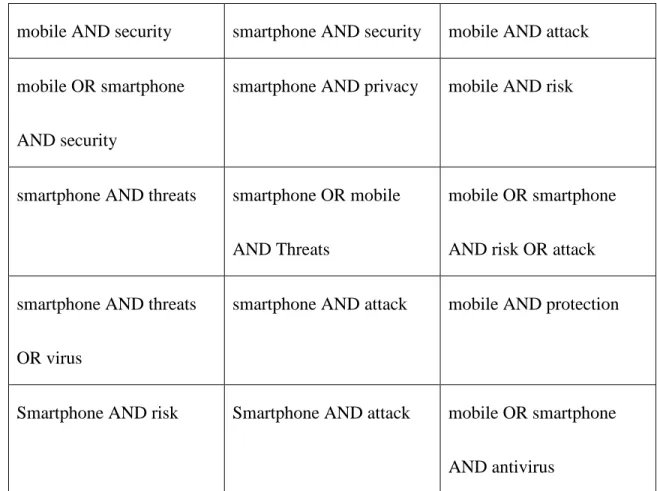
searches included the keywords “mobile” AND “security” or “mobile AND
“smartphone” (see Table 1 for a list of queries) and limited the search to works published
within the past decade (preferably within the past 5 years). This was accomplished in
order to insure the recency and, henceforth relevancy of the articles retrieved. A decision
was made to exclude articles published before the year 2000 because information related
to earlier cell phones is often not applicable to newer touchscreen smartphones. I began
most relevant databases. These databases included the Web of Science, Scopus, and
ACM Digital Library (see Table 2 for a list of databases). Many of the articles I chose as
relevant to my searches were often from the IEEE Xplore Digital Library. IEEE Xplore’s
search interface allows for search by Advanced Keywords or Phrases, Command Search
or Citation Search. The second most popular discipline-specific database was the ACM
Digital library and the third most used the UNC Library Article search. Articles were also
found using Google Scholar. Mostly, articles were first located by using terms such as
“smartphone” (more specific than mobile) AND “security” AND “risk” OR “privacy”.
Results that focused on non-security related apps or that required a large amount of
programming knowledge were disregarded. Google Scholar was very useful for browsing
citations. Finding a useful project or conference proceeding such as the CHI
(Human-Computer Interaction) or the CSE (Computation Science and Engineering) conference led
to increased familiarity with the field specific terminology. This knowledge was then
used to find useful sources outside of academic spaces.
First, documents in the collection were selected based on several factors such as:
currency, readability, utility and innovation. Current documents were published within
the last decade, preferably within the past 5 years. These documents are relevant to the
document retained in the collection was published in the year 2000. Readable documents
were judged to be accessible for an average person (with at least high-school reading
level) interested in enhancing the security capacity of their cellular device. Eliminated
then, were some articles with undefined jargon more suited to only an audience
well-versed in information and computing technologies. Documents with high utility are
practical and cite tips from field experts. Innovative documents were product reviews
testing out new systems and examining infrequently discussed subjects such as mobile
crowd sourcing or how to go about ‘building your own security interface’.
3. Categories
The document collection consisted of a variety of materials with different
purposes and intended for differing audiences. The documents were sorted according to
document type, content, form and user group. The four factors involved in the process of
selecting documents (described in the previous section) as currency, readability, utility
and innovation naturally helped influence the creation of document category groups.
Ultimately, 7 document categories were created in order to organize the documents based
on various characteristics such as the document’s intended audience, level of complexity
documents were placed in at least one category. The decision to include or exclude
articles was based on the 8 document categories: academic, best practices, consumer,
corporate, government, how-to, magazineand review.
• The academic category features only peer-reviewed journal articles and
conference proceedings. These articles often include the examination of
systems, conducting studies and undertaking projects in order to detect
and solve problems. The academic category houses articles published by
and for an audience in the fields of information science and management,
information technology and systems and computational science, systems
and engineering. The documents housed in this category served as a guide
for the issues, ideas and topics discovered elsewhere. Many of the
academic documents make use of the scientific method of examining a
hypothesis, setting out to answer research questions and using methods in
order to collect, and then analyze data. Not all academic articles in the
collection are quantitative but most involve themselves in the collection
of information.
• The category titled best practices was designed to include short, simple
category is that many smartphone owners can benefit from reading these
documents.
• The consumer category focuses on documents of possible interest to
users of mobile smartphones who are operating a device primarily for
personal use. A good example of a consumer-targeted document is
Apple’s iOS security documentation (Apple, June 2015). Written with the
consumer in mind, it’s written in simple language and defines all
processes, terms and concepts for the user. The idea behind this document
is that a consumer can pick it up and use it to set up their device’s Apple
ID or look into utilizing some of Apple’s less known functions such as
“remote wipe” which enables a user with admin privileges to wipe the
device remotely. Consumer targeted articles also incorporate visuals in
order to promote user friendliness.
• Documents sorted into the corporate category are oriented towards
achieving organizational effectiveness. Most of the corporate documents
are oriented towards managerial interests and economic concerns.
Corporate tags such as “byod” (bring your own device) and “loss
corporate oriented documents these concepts appear more frequently.
Byod policies allow employees to use their own smart phones, laptops or
mobile devices for workplace use. The concept of byod defines the object
interactions of corporate culture by delineating the distinction between
company owned property and personal property. Loss prevention is a field
in which data, objects and other information is protected and preserved
form theft. Both tags illustrate economic principles at play in the
corporate world.
• The how-to category features documents of an instructional nature. A few
key term tags highly associated with this category are: research, threat
level, tips and tools. How-to documents are guides to performing certain
actions such as making one’s smartphone more secure, making smart
choices regarding app downloading and how one might detect or isolate
malware. How-to documents vary in the level of complexity and detail.
How-to documents of an academic nature and audience such as
“Proximity-Based Security Techniques for Mobile Users in Wireless
mathematical theorems and display the output of a system in statistical
data.
• Magazine documents are part of periodicals, blogs or posts elsewhere
online. They are written for a popular audience ranging from computer
hobbyists to professionals in computing and information fields. Often
these documents obtain a broader audience by linking to news media
posts, although they are regularly housed on the blogs of industry
professionals. The article “Not so Great Expectations” (McDaniel and
Enck, 2010) was written by researchers at Pennsylvania University and
published in the magazine IEEE Security & Privacy. It features a
multi-column format, one reference and has a strong focus on exploring one
specific idea. Although it is published in a periodical, it was written by
academics for a broad professional audience, including readers working in
industry. A more typical magazine document would be the WIRED
magazine publication “Security News: Be careful with your Apple Watch
and Starbucks App” (Wired, 2015). Both these articles include brief
paragraphs with summarizing sub-headings. Documents of this format
new area, include visual images and colors, and strive for a high level of
readability by a general audience. Magazine documents are often direct,
easy to comprehend, and serve a specific media related purpose.
• Review documents examine a system, product or concept and provide an
assessment of its overall functionality. Typically review documents
consist of a product review designed to determine whether the product is
feasible or functional and for what purpose or user audience category.
The “Security Analysis of Consumer Grade Anti-Theft Solutions” (Simon
& Anderson, 2015) document was placed in both the academic and
consumer categories because it could be useful for both groups.
The document collection has two main sorting mechanisms: 1) by categories
(audience and document type), and 2) by document key terms. The 8 document
categories (academic, best practices, consumer, corporate, government document,
how-to, magazine and product review) have been assigned at least 5 relational key terms per
category. The key terms were derived from the documents’ abstracts and topical terms
listed on scholarly databases. Other terms were pulled from the documents themselves
and that were used in discussions on informal posts such as blogs and discussion forums.
document categories themselves. In the future, key terms could possibly be used to
4. Wordpress Website
The Mobile Security Website created for this project
(www.mobilesecuritysite.wordpress.com) is a user-friendly approach to smartphone
security document management. The visual organization of the document collection
consists of a simple web page organizational layout. The website tagline “smartphone
security resources made accessible” specifies the type of mobile documents it is designed
for. The choice of the WordPress publishing format also allows for future expansion
being that it possesses both a blog posting format and webpage navigational linking
capacity. WordPress was a prime web-publishing platform for this project due to its
variety of add-ons, themes and tools. Although known for and used as a blogging
platform, non-profit organizations, academic projects and experiments have been hosted
on WordPress. WordPress was ultimately chosen as a host since it provided efficiency in
updating materials (either by web page or blog post) and due to its ability to make a large
number of links accessible.
In order to support increased website usability there are three ways for users to
navigate its documents; either by the top navigational bar in Screenshot 1, the descriptive
listing of its categories on the home page as depicted in Screenshot 2, or the listing of all
supports the user who has a specific category in mind, or can be viewed in one place on
the “All Articles” page, for users who prefer to browse. All documents have been posted
in the “All Articles” section in alphabetical order by the authors’ last name. The 8
document categories have the same layout as the “All Articles” section. Users can begin
by reading the category descriptions on the home page and then select a chosen category.
Each document category possesses a title, description of the page, and a listing of the
document citations in APA format, followed by 5 or more key terms illustrated in
Screenshots 3 and 4. Each of the document category pages has a brief description
explaining how the documents fit the selected category. An example from the “Review”
page is as follows: “Review documents examine systems, products or concepts for
assessment. These documents are designed to provide an overview of how effective a
product is and whether it should be used and how.” Many of the listed documents are
linked to a source online. The category description effectively contextualizes the
documents. Document links either lead to Google Scholar citations, a pdf, online source
or a database citation listing. The reason why documents are linked is so that users to the
website can access them, as well as their citations. It’s important for visitors to the
WordPress to be able to read each document in its own context. A blog posting may
content. Academic journal databases and Google Scholar citations often feature citation
counts, abstracts and act as a good point of access to understand the mobile security
context. The inclusion of content links encourages users to explore the topic of mobile
security in their own fashion and to seek out primary source information. The website’s
layout has been designed to suit the needs of all audiences. The academic audience is
particularly interested in reading or verifying document citations, accessing journal
content and reading articles.
The WordPress website is a launch point for the setup of a larger document
collection. It currently serves as an assess point in which documents are easy to locate. A
larger document collection would require a method of searching, beyond the sorted
category arrangement. The key terms would serve as a starting point for the website’s
further development. Each document, rather than each category would then be assigned
5. Conclusion
The lack of security awareness of many smartphone users may implicate an area
of vulnerability in both private and corporate worlds. It was found that:
“60% of smartphone users do not search for security software, 27% were not aware of the fact that smartphone security software exists and that 75% of users from each
platform believed that downloaded apps were secure, yet Android apps had not undergone security testing” (Mylonas, Kastania & Gritzalis, 2013 , p.52).
Uninformed decision-making among smartphone users may expose a vast array of user
and enterprise data to attackers. Many corporate entities and researchers have also made
predictions about future mobile and smartphone device threats. Increased focus on mobile
devices has been predicted by Sophos (Sophos, 2015 , p. 6). Mobile apps have begun
using encryption, which has lessened these occurrences. Bitdefender, a company offering
an Android anti-virus app predicted the use of mobile devices as an effort to attack
Enterprises in 2015 (Ban, 2015).
Consumers are not alone in the fight to preserve and protect their private data, as
researchers continue to test, promote and discover new safeguards against threats. In the
future, the study of mobile security defense tools, the examination of new viral threat
can contribute to thwarting the future challenges smartphone users may face. It is
important that consumers educate themselves and learn to make informed decisions
regarding their mobile activities, transactions and practices. The mobile security website
and document collection created for this project are intended to help users become more
informed about mobile security issues.
Users may desire to make informed decisions, but may lack the associated
knowledge in order to take the first steps. The Mobile Security Document Collection
supports the consumer’s quest in discovering the vast array of smartphone security tools
at their disposal. The collection has been categorized in order to facilitate user fact
finding in the arena of smartphone security awareness and could be expanded with the
6. Images (WordPress Screenshots and tables)
Screenshot 1 – Wordpress home page
Screenshot 3 – WordPress Consumer category
Table 1. Key terms
Academic attack model, app behavior, authentication, behavior, forensics, human factors, information management, loss prevention, management, open source, platform, social learning, statistics , usability, vulnerabilities
Best Practices awareness, defense, security, tips, users,
Consumer anti-virus, app, user, tips, personal, protection safe, security analysis, trust
Corporate breach, byod, data security, ecosystem, integrity, loss prevention, management, market, mobile device management, projection, risk, severity, training, loss prevention, statistics, zero-day
Government byod, guidelines, loss prevention, policy, protocol
How-to design, learning, research, threat detection, tips, tools
Magazine/media breach, hacker, report, vulnerabilities zero-day
Review analysis, app, development, product, testing, threat modeling, tutorial, system
Table 2. Databases
General databases Domain specific databases
Google Scholar Web of Science
Ebsco host ACM Digital Library
Academic Search Premier IEEE Xplore
ERIC ScienceDirect
Table 3. Query Combinations
mobile AND security smartphone AND security mobile AND attack
mobile OR smartphone
AND security
smartphone AND privacy mobile AND risk
smartphone AND threats smartphone OR mobile
AND Threats
mobile OR smartphone
AND risk OR attack
smartphone AND threats
OR virus
smartphone AND attack mobile AND protection
Smartphone AND risk Smartphone AND attack mobile OR smartphone
7. References/works cited
Allam, S., Flowerday, S., & Flowerday, E. (2014). Smartphone information security
awareness: A victim of operational pressures. Computers & Security, 42, 56-65. Retrieved November 28, 2015, from ScienceDirect.
Amrutkar, C., Traynor, P., & Oorschot, P. (2014). An Empirical Evaluation of Security Indicators in Mobile Web Browsers. IEEE Transactions on Mobile Computing IEEE Trans. on Mobile Comput., 14(5), 889-903. Retrieved October 28, 2015,
from IEEE Computer Society.
Androulidakis, I., & Kandus, G. (2011). Ramifications of mobile phone advanced O/S on security perceptions and practices. 2011 Third International Workshop on
Cyberspace Safety and Security (CSS), 33-38. Retrieved October 29, 2015.
Annual Report 2011. (2011). Cisco. Retrieved from
https://www.cisco.com/assets/cdc_content_elements/docs/annualreports/media/20 11-ar.pdf
Ban, E. (2015, July 10). Mobile Application Security: Soon Enough, Hackers’ Attack Vector of Choice. Bitdefender. Retrieved October 13, 2015.
Beach, A., Gartrell, M., & Han, R. (2009). Solutions to Security and Privacy Issues in Mobile Social Networking. 2009 International Conference on Computational Science and Engineering, 4. Retrieved October 25, 2015, from IEEE Xplore.
Bohyun, K. (2014). Mobile Consumer Behavior: Myths and Realities. Library
Technology Reports, 49(6), 9–14, Retrieved on September 12, 2015, from ALA Tech Source
Chin, E., Felt, A., Sekar, V., & Wagner, D. (2012). Measuring user confidence in smartphone security and privacy. Proceedings of the Eighth Symposium on Usable Privacy and Security - SOUPS '12, 12(1). Retrieved October 13, 2015, from ACM Digital Library.
Coture, E. (2010). Mobile Security: Current threats and emerging protective measures. Sans Institute Reading Room. Retrieved July 10, 2015, from Sans Institute
Website
Damopoulos, D., Kambourakis, G., Anagnostopoulos, M., Gritzalis, S., & Park, J. (2012). User privacy and modern mobile services: Are they on the same path? Personal and Ubiquitous Computing, 17(4), 1437-1448. Retrieved October 18, 2015
Dezfouli, F., Dehghantanha, A., Mahmod, R., Sani, N., & Shamsuddin, S. (2013). A Data-centric Model for Smartphone Security. International Journal of
Advancements in Computing Technology IJACT, 5(9), 9-17. Retrieved November 29, 2015, from EbscoHost.
Dharmdasani, H. (2014, September 3). We Steal SMS: An insight into
Android.KorBanker Operations Threat Research. Retrieved November 29, 2015, from
https://www.fireeye.com/blog/threat-research/2014/09/we-steal-sms-an-insight-into-android-korbanker-operations.html.
Enterprise Mobile Threat Report 2015. (2015). Retrieved September 27, 2015, from http://info.appthority.com/hubfs/website-LEARN-content/Appthority-Mobile-Threat-Report-Q12015.pdf
Farrell, S., & Nielsen, J. (2014). User Experience Careers, 194. Retrieved from
http://s3.amazonaws.com/media.nngroup.com/media/reports/free/User_Experienc e_Careers.pdf
20, 2015 , from Google Scholar.FireEye, “Out of Pocket: A Comprehensive Mobile Threat Assessment of 7 million iOS and Android Apps” February 2015
Fischer, I. T., Kuo, C., Huang, L., & Frank, M. (2012). Short Paper: Smartphones: Not Smart Enough?Association , 27–32. Retrieved September 5, 2015, from ACM Digital Library.
Friedman, J., & Hoffman, D. V. (2008). Protecting data on mobile devices: A taxonomy of security threats to mobile computing and review of applicable defenses. Information Knowledge Systems Management, 7(1/2), 159-180. Retrieved
October 5, 2015, from ACM Digital Library.
General Services Administration. United States. Dept. of Health and Human Services. (2006). Research-based web design & usability guidelines. Version 2.
Washington, D.C.: U.S. Dept. of Health and Human Services.
Google. (2014). Android Security 2014 Year in Review Table of Contents.
Grzonkowski, S., Mosquera, A., Aouad, L., & Morss, D. (n.d.). Smartphone Security: An overview of emerging threats. IEEE Consumer Electron. Mag. IEEE Consumer Electronics Magazine, 3(4), 40-44.
Han, Bo; Yu Wu,; John Windsor,. "User's Adoption of Free Third-Party Security
Apps." The Journal of Computer Information Systems. International Association for Computer Information Systems. 2014.
Harris, Mark A., Karen Patten, and Elizabeth Regan. "The need for byod mobile device security awareness and training." (2013). Retrieved September 5, 2015, from AIS Electronic Library.
He, D., Chan, S., & Guizani, M. (2015). Mobile application security: malware threats and defenses. Wireless Communications, IEEE, 22(1), 138-144. Retrieved October 13, 2015, from IEEE Xplore
Hettig, M., Kiss, E., Kassel, J. F., Weber, S., Harbach, M., & Smith, M. (2013, July). Visualizing Risk by Example: Demonstrating Threats Arising From Android Apps. In Symposium on Usable Privacy and Security (SOUPS). Retrieved August 15, 2015, from Carnegie Mellon University.
Hu, B., Eds, A. E., & Hutchison, D. (2012). LNCS 7719 – Pervasive Computing and the Networked World. Retrieved September 5, 2015, from Springer Link.
Husted, N., Saïdi, H., & Gehani, A. (2011). Smartphone security limitations. Proceedings of the 2011 Workshop on Governance of Technology, Information, and Policies -
GTIP '11. Retrieved October 14, 2015, from ACM Digital Library.
Imgraben, J., Engelbrecht, A., & Choo, K. (2014). Always connected, but are smart mobile users getting more security savvy? A survey of smart mobile device users. Behaviour & Information Technology, 33(12), 1347-1360. Retrieved August 18, 2015 From ACM Digital Library.
IOS Security iOS 9.0 and Later. (2015, September 1). Retrieved November 29, 2015, from http://www.apple.com/business/docs/iOS_Security_Guide.pdf
Jain, A., & Shanbhag, D. (2012). Addressing Security and Privacy Risks in Mobile Applications. IT Professional IT Prof., 14(5), 28-33. Retrieved November 29, 2015, from IEEE Xplore. Retrieved July 5, 2015, From IEE Xplore.
Kataria, A., Anjali, T., & Venkat, R. (2014). Quantifying Smartphone Vulnerabilities, 645–649. Retrieved July 5, 2015 From IEEE Xplore.
King, N. J., & Jessen, P. W. (2010). Profiling the mobile customer – Is industry self-regulation adequate to protect consumer privacy when behavioral advertisers target mobile phones? – Part II. Computer Law and Security Review, 26(6), 595– 612. Retrieved September 5, 2015 From Science Daily.
La Polla, M., Martinelli, F., & Sgandurra, D. (2013). A Survey on Security for Mobile Devices. IEEE Communications Surveys & Tutorials, 15(1), 446-471. Retrieved August 24, 2015, From IEE Xplore.
Leavitt, N. (2005). Mobile phones: The next frontier for hackers? Computer, 38(4), 20– 23. Retrieved July 1, 2015 From IEEE Xplore.
Leavitt N.(2000), “Malicious Code Moves to Mobile Devices,” IEEE Computer, 33(12)
Lemos, R. (2015, September 1). Pre-Installed Android Malware Raises Security Risks in Supply Chain. EWeek. Retrieved October 15, 2015
Li, X., Ren, S., Cheng, W., Xiang, L., & Liu, X. (2014). Smartphone: Security and
Privacy Protection. Pervasive Computing and the Networked World Lecture Notes in Computer Science, 289-302. Retrieved July 30, 2015, From Springer Link.
Lin, J. (2013). Understanding and Capturing People’s Mobile App Privacy Preferences. (No. CMU-CS-13-27) Carnegie Mellon University Pittsburgh PA School of Computer Science. Retrieved July 15, 2015, from Google Scholar.
Mahinthan Chandramohan, Hee Beng Kuan Tan. (2012). Detection of Mobile Malware in the Wild. Computer, 45(9), 65-71. Retrieved August 1, 2015, from IEEE Xplore.
Malware Attacks on Android? How to prevent them. (n.d.). Retrieved October 8, 2015, from http://www.combofix.org/malware-attacks-on-android-how-to-prevent-them.php
McDaniel, P., & Enck, W. (2010). Not So Great Expectations: Why Application Markets Haven’t Failed Security. Security and Privacy, IEEE, 8(5), 76–78. Retrieved October 5, 2015, from IEEE Xplore.
Mobile privacy: A better practice guide for mobile app developers. (2014, September 1). Retrieved November 29, 2015, from
Mylonas, A., Kastania, A., & Gritzalis, D. (2013). Delegate the smartphone user? Security awareness in smartphone platforms. Computers & Security, 24, 47-66. Retrieved October 1, 2015, From IEE Xplore.
Oh, T., Stackpole, B., Cummins, E., Gonzalez, C., Ramachandran, R., & Lim, S. (2012). Best security practices for android, blackberry, and iOS. The First IEEE
Workshop on Enabling Technologies for Smartphone and Internet of Things (ETSIoT), 42-47. Retrieved October 1, 2015.
Park, J., Yi, K., & Jeong, Y. (2014). An enhanced smartphone security model based on information security management system (ISMS). Electronic Commerce Research Electron Commer Res, 321-348. Retrieved November 1, 2015, from Springer
Link.
Paullet, K., & Pinchot, J. (2014). Mobile Malware: Coming to a Smartphone Near You? Issues in Information Systems, 15(2). Retrieved October 20, 2015, from
EBSCOhost.
Peng, S., Yu, S., & Yang, A. (2014). Smartphone malware and its propagation modeling: A survey. IEEE Communications Surveys and Tutorials, 16(2), 925–941.
Retrieved October 5, 2015, from IEEE Xplore.
Penning, N., Hoffman, M., Nikolai, J., & Wang, Y. (2014). Mobile malware security challenges and cloud-based detection. 2014 International Conference on Collaboration Technologies and Systems (CTS). Retrieved October 16, 2015,
from IEEE Xplore.
Ruggiero, P., & Foote, J. (2011). Cyber Threats to Mobile Phones. Us-Cert, 1–6.
Security News This Week: Be Careful With Your Apple Watch and Starbucks App. (2015, May 16). Wired. Retrieved May 1, 2015.
Shahandashti, S. F., Safavi-Naini, R., & Safa, N. A. (2015). Reconciling User Privacy and Implicit Authentication for Mobile Devices. Computers & Security, 53, 215– 233. Retrieved July 10, 2015, from IEE Xplore
http://www.npr.org/sections/alltechconsidered/2015/07/27/426613020/major-flaw-in-android-phones-would-let-hackers-in-with-just-a-text .
Siddiqui, A. T., Wahid, A., & Ph, D. (2014). Mobile OS Security and Threats : A Critical Review, International Journal of Computer Applications , 86(9), 8–13. Retrieved November 1, 2015, from research.ijcaonline.org.
Simon, L., & Anderson, R. (n.d.). Security Analysis of Consumer-Grade Anti-Theft Solutions Provided by Android Mobile Anti-Virus Apps. Retrieved November 1, 2015, from ieee-security.org.
James, Lyne. “Security Threat Trends 2015” Retrieved October 1, 2015, From Sophos.com.
Stavrou, A., Voas, J., Karygiannis, T., & Quirolgico, S. (2012). Building Security into Off-the-Shelf Smartphones. Computer, 45(2), 82–84. Retrieved October 1, 2015, from from IEEE Xplore.
The New Era of Mobile Malware: 4 Steps to Reduce Your Risk. (2014, March 6). Retrieved September 29, 2015, from
http://intelligent-defense.softwareadvice.com/4-steps-to-reduce-mobile-malware-risk-0314/.
The Ten Most Critical Wireless and Mobile Security Vulnerabilities. (2006, June 29). Retrieved November 29, 2015, from
http://www.net-security.org/article.php?id=927&p=2
Titcomb, J. (2015, August 6). Android security breach puts millions at risk of smartphone hijacking. Retrieved September 23, 2015, from
http://www.telegraph.co.uk/technology/internet-security/11788184/Android-security-breach-puts-millions-at-risk-of-smartphone-hijacking.html .
Tu, Z., Turel, O., Yuan, Y., & Archer, N. (2015). Learning to cope with information security risks regarding mobile device loss or theft: An empirical examination.
2015 Data Breach Investigations Report (DBIR). (2015). Retrieved November 29, 2015, from http://www.verizonenterprise.com/DBIR/2015/
Xiao, C. (2015, August 30). Keyraider: IOS Malware Steals Over 225,000 Apple Accounts to Create Free App Utopia. Retrieved September 15, 2015.
Xiao, L., Yan, Q., Lou, W., Chen, G., & Hou, Y. T. (2013). Proximity-based security techniques for mobile users in wireless networks. IEEE Transactions of Information Forensics and Security, 8(12), 2089–2100. Retrieved October 5,
2015, from IEEE Xplore.
Xing, L., Bai, X., Li, T., Wang, X., Liao, X., & Chen, K. (2015). Unauthorized Cross-App Resource Access on MAC OS X and iOS. Retrieved October 1, 2015, from Cornell University Library website.
Wang, Y., Streff, K., & Raman, S. (2012). Smartphone security challenges. Computer, 45(12), 52–58. Retrieved October 15, 2015, from IEEE Xplore.
Watkins, J. (2014). Outmaneuvering Cyber adversaries using Commercial Technologies Journal of Information. Journal of Information Warfare (JIW), 13(2). 76-86. Retrieved October 10, 2015, from nsa.gov.
We Live Security. (2015). “11 Security Mistakes You Probably Keep Making.” From http://www.welivesecurity.com/2015/07/22/11-security-mistakes/.
Wu, L., Du, X., & Fu, X. (2014). Security threats to mobile multimedia applications: Camera-based attacks on mobile phones. IEEE Communications Magazine, 52(3), 80-87. Retrieved September 16, 2015, From IEEE Xplore.
Wu, F., Narang, H., & Clarke, D. (2014). An Overview of Mobile Malware and
Solutions. JCC Journal of Computer and Communications, 2(12), 8-17. Retrieved October 15, 2015, From Scientific Research.
Zonouz, S., Houmansadr, A., Berthier, R., Borisov, N., & Sanders, W. (2013). Secloud: A cloud-based comprehensive and lightweight security solution for smartphones. Computers & Security, 37, 215-227. Retrieved October 15, 2015, from