© 2017, IRJET | Impact Factor value: 5.181 | ISO 9001:2008 Certified Journal | Page 2166
Controlling Mouse Movements Using hand Gesture And X box 360
Prof: P.Biswas ,
Rajesh Patil , Siddharth Pagar
1
Prof :
P.Biswas Dept of Computer Engineering Sanghavi College of Engineering Maharashtra ,India
2
Rajesh Patil Student Department of Computer Engineering Sanghavi College of Engineering
3
Siddharth Pagar Student Department of Computer Engineering Sanghavi College of Engineering
---***---Abstract -
Computers are developed today have increase in amount of power. Most of this used by software for processing data. Our project is gesture user interface implementation for human computer Interaction. The project presents a new approach for controlling the computer system and mouse movements using the X-BOX 360. The X-BOX 360 was developed by Microsoft especially for the home video game console. But in this project, we are trying to use this device for human interaction with computer system. This will make interaction with computer easy, interesting more users friendly. Our method is to use X-BOX 360 and Computer vision technology, such as image segmentation Gesture recognition to control mouse tasks and we are show how it can be perform everything on current mouse can. For the persons who are not able to interact with computer system physically, we are developing the voice recognition technology in our project. The X-BOX 360 supports the MP3 audio format for the voice recognition. So, this project shows how to build this mouse control system.1. INTRODUCTION
The development of ubiquitous computing and the need to communicate in a more natural, flexible, efficient but powerful way has rendered most current user interaction approaches which is utilizes keyboard, mouse and pen insufficient.
Human Computer Interaction technology is seen significant changes the years which is range from the text based User Interface which is relies heavily on the keyboard as input device to 2-D graphical interfaces based on mice, to multimedia support interfaces to fully fledged multi participant virtual environment systems. These devices like keyboard and mouse have a Human Computer Interaction within different type of applications and their limitations also have limits .
To Desire therefore provide a more user Friendly interaction between human and machines brought the focuses on gesture recognition. Gestures have a long consider the most natural form of the interaction among humans and it is defined as a motion of body that contains
information . It involves physical movements of hands, Head, face, arm or body .
To develop system which is use to recognize the users and understand their intentions With machine using a user interface consisting of the gestures. To implement the skeletal tracking of the Kinect sensor is utilized as well as both depth map and the colour image obtained by sensor which enables the user to operate Windows 7 Operating System and explore its functionality with no physical contact to a peripheral device such as mouse. The gestures recognized by the kinet device allow the different commands and mouse behaviours.
2 .Gesture Recognition: Overview
Gesture Recognition is type of technology in which that achieves dynamic human interactions Of Machine without requiring Any physical touch, or contact input mechanisms. The main goal of gesture recognition involves creating a system capable of interpreting specific human gestures via mathematical algorithms and using them to convey meaningful information or for device control
2.1 Tracking Technologies
© 2017, IRJET | Impact Factor value: 5.181 | ISO 9001:2008 Certified Journal | Page 2167 Figure 1: Glove-based system
[image:2.595.336.529.347.471.2]On the other hand vision approach which is shown bellow figure (visually perceive Figure 2) more way For HCI requires no physical contact with any kind of contrivances and Camera placed at fine-tuned location on a mobile platform in the environment are utilized for the capturing the input of image at a frame rate of 30 HZ or more. agnize human gestures, this images are interpreted to engender the visual features which can be habituated to interpret The human activity . Major drawback of this approach is the quandary of a occlusion. The camera view is always circumscribed as there are always components of the user’s body that are not visible. More details about vision approache are mentioned by Porta.
Figure 2: Vision-based system
2.2 Gesture Recognition System
Gesture Recognition is assignment which is includes numerous angles a there might be minor departure from the technique utilized and acknowledgment stages relying upon the application region , a regular motion acknowledgment framework includes such process like information securing, hand motion displaying, highlight extraction
3. Microsoft’s Kinect
Of recent, gesture apperception has been integrated in sundry consumer contrivances for the purport of
regalement. An example of such contrivance is Microsoft’s Kinect, which sanctions a utilizer to utilize gestures that are typically intuitive and relatively simple to perform sundry tasks such as controlling games, starting a movie
3.1 The Kinect Sensor
The Kinect sensor is a kineticism sensing input contrivance it was developed in November 2010 for use with the Xbox 360 ,X Box CPU but has recently been opened up for use with Windows PCs for commercial purposes And gaming Purport.
Figure 3: The Kinect Sensor Components
3.1.1 Architecture
[image:2.595.77.245.448.618.2]© 2017, IRJET | Impact Factor value: 5.181 | ISO 9001:2008 Certified Journal | Page 2168
3.1.2 Hardware Interface
He sensor interface with the PC via a standard USB 2.0 port; however a supplemental power supply is needed because the USB port cannot directly support the sensor’s power consumption
3
.2 Hardware and Software Requirements
[image:3.595.38.288.253.302.2]According to Microsoft, the PC that is to be utilized with the Kinect sensor must have the following minimum
Figure 4: Kinect Interaction with an Application
4.Methodologies or algorithm details
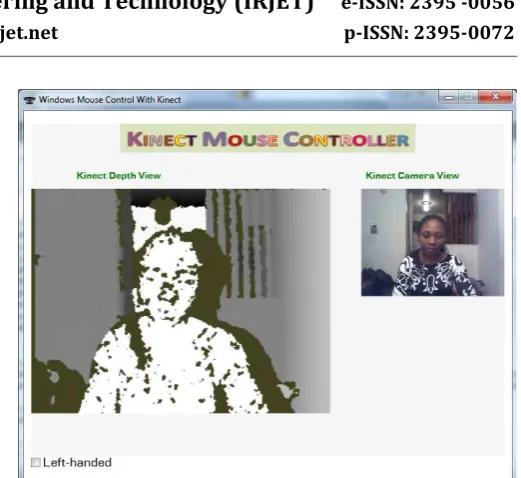
Developing Application Establishing the Kinect Sensor Once the installation of the required software and hardware is consummated, the first step in developing this interface involves referencing Microsoft.Kinect.dll assembly in the C# application and including the utilizing directive for the namespace Microsoft.Kinect. This assembly calls unmanaged functions from managed code and is utilized to control the Kinect sensor. Withal a connection must be made to the sensor bar. This is done by obtaining an instance of the KinectSensor class which is a component of the Kinect SDK. must withal be able to acquire the capabilities (such as the depth stream, the color stream, skeleton stream) needed from the Kinect sensor which is essential for the prosperous implementation of the proposed system. This is finished by empowering through coding the Color Stream part of the Kinect which gives the RGB video stream; the Depth Stream which gives the 3D portrayal of the picture before the sensor as appeared in Figure 6, and empowering the Skeleton Stream which is used for getting the skeleton information.
5.Validation and verification used
Validation checks that the product design satiates or fits the intended use (high-level checking), i.e., the software meets the utilizer requisites. This is done through dynamic testing and other forms of review.
Verification and validation is not identically tantamount thing, albeit they are often discombobulated. Boehm succinctly expressed the distinction between
Validation Are we building the right product This is dynamic process for checking and testing the authentic product. Software validation always involves with executing the code
Verification: Are we building the product right? (This is static method for verifying design, code. Software verification is human predicated checking of documents and files)
6. S/w testing
Software testing is an investigation conducted to provide stakeholders with information about the quality of the product or accommodation under test. S/w testing can moreover give a target, free perspective of the product to authorize the business to acknowledge and comprehend the perils of programming execution. Test strategies incorporate, yet are not obliged to, the way toward executing a program or application with the aim of discovering S/W bugs.
Software testing can be verbally expressed as the process of validating and verifying that a computer program application product Meets the requisites that guided its design and development Works as expectedCan be implemented with the same characteristics Slakes the desiderata of stakeholders. Software testing, depending on the testing method employed, can be implemented at any time in the development process. Customarily the greater part of the test exertion happens after the requirements have been characterized and the coding procedure has been culminated, yet in the Supple methodologies the greater part of the test exertion is never-ending . As such, the methodology of the test is governed by the culled software development methodology. Distinctive programming advancement models will center the test exertion at various focuses in the improvement procedure.
More incipient development models, such as Supple, often employ test-driven development and place an incremented portion of the testing in the hands of the developer, afore it reaches a formal team of testers. In a more traditional model, most of the test execution occurs after the requisites have been defined and the coding process has been consummated.
6.1 White-Box Testing
© 2017, IRJET | Impact Factor value: 5.181 | ISO 9001:2008 Certified Journal | Page 2169 as opposed to the functionality exposed to the
terminus-utilizer. In white-box testing an internal perspective of the system, as well as programming skills, are acclimated to design test cases. The tester culls inputs to exercise paths through the code and determine the congruous outputs. This is analogous to testing nodes in a circuit, e.g. in-circuit testing (ICT).
While white-box testing can be associated at the unit, system levels of the item testing process, it is commonly done at the unit level. It can test ways inside a unit, ways between units amid mix, and between subsystems amid a system–level test. Despite the fact that this technique for test configuration can expose numerous mistakes or binds, it won't not distinguish un implemented parts of the assignment or missing imperatives.
6.2 Black-Box Testing
Ebony box testing is treats the software as ebony box examining The functionality without any cognizance of internal implementation. The tester is only vigilant of what the software is supposed to do not how it does it. The Ebony box testing is type of methods include equipollence partitioning, And boundary value analysis all-pairs testing, state transition tables, decision table testing, model-predicated testing, utilize case testing, exploratory testing and designation-predicated testing. Designation-predicated testing aims to test the functionality of software according to the applicable requisites.
This caliber of testing customarily requires exhaustive test cases to be provided to the tester, who then can simply verify that for a given input, the output value (or deportment), either "is" or "is not" equipollent to the expected value designated in the test case. Test cases are built around designations and requisites, i.e., what the application is supposed to do. It utilizes external descriptions of the software, including designations, requisites, and designs to derive test cases. These tests can be functional or non-functional, though customarily functional.
Designation-predicated testing may be compulsory to assure correct functionality, but it is inadequate to sentinel against involute or high-risk situations. This method of test can be applied to all levels of software testing: unit, integration, system and acceptance. It typically comprises most if not all testing at higher calibers, but can withal dominate unit testing as well.
6.3 Unit Testing
Unit testing, additionally kenned as component testing refers to tests that verify the functionality of a concrete section of code, conventionally at the function level. In an object-oriented environment, this is conventionally at the class level, and the minimal unit tests include the constructors and destructors. These types of tests are customarily indited by developers as they work on code (white-box style), to ascertain that the concrete function is working as expected. One function might have multiple tests, to catch corner cases or other branches in the code. Unit testing alone cannot verify the functionality of a piece of software, but rather is utilized to assure that the building blocks the software uses work independently of each other.
6.4 Integration Testing
Integration testing is any sort of programming testing that looks to check the interfaces between segments against a product outline. Programming parts might be coordinated in an iterative way or through and through. Mundanely the former is considered a better practice since it sanctions interface issues to be localised more expeditiously and fine-tuned. Integration Mix testing attempts to uncover surrenders in the interfaces and association between coordinated parts modules. Progressively more immensely colossal groups of tested software components corresponding to elements of the architectural design are integrated and tested until the software works as a system.
7.1 Functional model and description
© 2017, IRJET | Impact Factor value: 5.181 | ISO 9001:2008 Certified Journal | Page 2170 Figure 5: Kinect consists of Infra-red (IR) projector, IR
camera and RGB camera
7.2 Kinect as a 3D measuring device
Kinect is a composite contrivance consist of an IR projector of a pattern and IR camera, which is utilized to triangulate points in space. It works as a depth sense camera, and a color (RGB)camera, which can be acclimated to apperceive image content andtexture 3D points, As a quantifying contrivance, Kinectdelivers three outputs: IR image, RGB image, and (inverse) Depth image.
How Kinect Works: Overview
[image:5.595.37.290.253.405.2]Figure 6: How Kinect Works: Overview
Figure 7: Depth and Camera Image Obtained From The Sensor
.
Figure 8: (a) A Kinect Skeleton
[image:5.595.310.564.338.481.2] [image:5.595.48.558.535.754.2]© 2017, IRJET | Impact Factor value: 5.181 | ISO 9001:2008 Certified Journal | Page 2171 Figure 10: (a) Gesture for Moving a Presentation
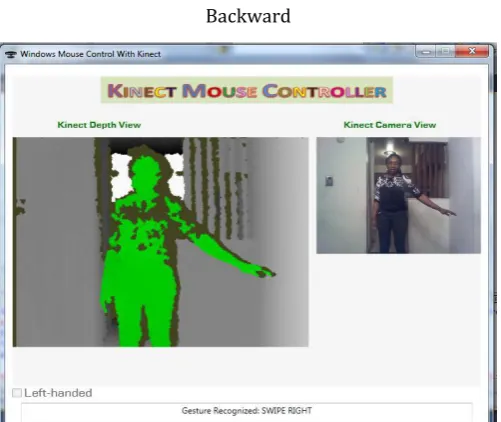
Backward
Figure 11: (b) Gesture for Moving a Presentation Forward
7.3 Limitations
Kinect has the following constraints which are primarily predicated on the optical lenses: For a smooth skeleton tracking, the utilizer distance from the sensor must be between 1m and 3m. Kinect cannot perform Finger Detection. This is due to the low-resolution of the Kinect depth map which, albeit works well when tracking an astronomically immense object such as the human body; it is however arduous to track human hand which occupies a minutely minuscular portion of the image especially gestures made with fingers Joint discombobulation may additionally occur when certain human joints are in the same position.
8. CONCLUSIONS
Human movements (human motion analysis) in recent years has been become a natural interface for The HCI and has been the focus of recent researchers in modelling and analyzing and recognition of gestures.
Hand gesture recognition still remains a prominent research area in the field of HCI as it provides a more natural way of interaction between the humans and machine so building a richer bridge between the machines and humans than primitive text user interfaces or even GUIs graphical user interfaces which still limit the majority of input to keyboard and mouse.
Gesture recognition especially hand gestures is applicable over a wide spectrum of topics such as medicine and surveillance and robot control and teleconferencing, sign language recognition facial gestures recognition games and animation
9. REFERENCE
[1] Kurtenbach, G. & E.A. Hulteen. Gestures in Human-Computer Communication. In: The Art and Science of Interface Design, Laurel, B. (Ed.). Reading, Mass: Addison-Wesley Publishing Co., Wasley, pages 309-317, 1990.
[2] Kawade Sonam P & V.S. Ubale. Gesture Apperception - A Review. In OSR Journal of Electronics and Communication Engineering (IOSR-JECE), pages 19-26.
[3] Zimmerman, T., Lanier, J., Blanchard, C., Bryson, S. and Harvil, Y. A Hand Gesture Interface Contrivance. In Proceedings of CHI 87 and GI, pages 189-192, 1987.
[4] Dipietro, L., Sabatini, A. M., & Dario, P. Survey of glove-predicated systems and their applications. IEEE Transactions on systems, Man and Cybernetics, Part C: Applications and reviews, 38(4), pages 461-482, 2008.
[5] [Untitled photograph of Data-glove]. Retrieved March 10, 2013, from:
[image:6.595.38.286.93.287.2] [image:6.595.37.288.315.526.2]© 2017, IRJET | Impact Factor value: 5.181 | ISO 9001:2008 Certified Journal | Page 2172
10. BIOGRAPHIES
Rajesh Jeevan Patil
BE( Computer Engineering ) Sangahvi College Of Enginnering, Nashik,Maharashtra
Siddharth Rajendra Pagar BE( Computer Engineering )