A COMPREHENSIVE AND PRACTICAL FRAMEWORK FOR
SUSTAINABLE ICT MANAGEMENT
Dr. Riyaz A. Sheikh, Associate Professor,
Dept of MIS, College of Business Administration, Jazan University, Jazan (KSA).
ABSTRACT
Today technology has greatly affected how people live. One of the vital products of technology is the computer. It is very evident how computers changed the way of life. Instant communication is possible through electronic mails. Research is easier and faster with the help of the computer. There is also an easy access for all business transactions. In modern business, the ICT is single department can affect the entire system in ways no other department can. However the IT department is usually always the one department that uses the most amount of power which in turn is an excessive amount of overhead for a business as well as a source for toxic waste when the systems are outdated and thrown in the landfill as trash. While using PC’s, many of us are a
source for excessive power use, excessive spending of resources, and uses many toxic materials. All of these items are bad practices. Making IT “Green” can not only save money but help save
our world by making it a better place through reducing and/or eliminating wasteful practices and using non-toxic materials.
This paper examines and provides a guideline which highlights our responsibilities as computer users and encourages us to take actions that optimize the usefulness of these computing resources while minimizing the negative consequences that may occur during their use. The paper proposes a system life cycle approach for resource management for optimizing the performance and power.
1. INTRODUCTION
Technology has greatly affected how people live today. The advancement of technology has
brought great improvement to all sectors like business, medicine, entertainment and a lot more. It
is undeniable that it has increased productivity and efficiency in how people work.
One of the vital products of technology is the computer. It is very evident how computers
changed the way of life. Work becomes easier with the help of the computers. Data and
information can be stored easily. Large numbers can be calculated and can be accounted
immediately. Instant communication is possible through electronic mails. Research is easier and
faster with the help of the computer. There is also an easy access for all business transactions. In
modern business, the ICT is single department can affect the entire system in ways no other
department can. However the IT department is usually always the one department that uses the
most amount of power which in turn is an excessive amount of overhead for a business as well as
a source for toxic waste when the systems are outdated and thrown in the landfill as trash. While
using PC’s, many of us are a source for excessive power use, excessive spending of resources, and uses many toxic materials. All of these items are bad practices. Making IT ―Green‖ can not
only save money but help save our world by making it a better place through reducing and/or
eliminating wasteful practices and using non-toxic materials.
2. OBJECTIVES OF THE PAPER
To define a model for effective use of ICT
To identify the effective methods for purchase of computing devices To identify the effective methods for use of computing devices To identify the effective methods for reuse of computing devices To identify the effective methods for recycle of computing devices
3. BACKGROUND
3.1 What is Green Computing?
It is observed that in past few years everybody from a user to big corporation everybody is
innovation and creativity. Of course, it’s also possible that businesses have discovered that green
sells. And many people are discovering that real green technology is more efficient and can save
them some real cash.
The result is that more and more people are becoming aware that they need to make good
choices about the way they use the earth’s resources water, energy, land, and air. That’s where
green computing fits in. The overall goal of green home computing is to use our systems
efficiently and effectively, being smart about the energy we’re consuming and responsible about
the way we dispose of the components we no longer need. Green computing asks you to interrupt
your routine and consider these five simple ways you can reduce your consumption, make the
most of what you have, and be more conscious of your earth-impacting computing choices:
1. Reuse what you can.
2. Rebuild or restore systems and peripheral devices.
3. Share resources.
4. Replace energy hogs with energy-efficient equipment.
5. Recycle safely.
Green computing or green IT, refers to environmentally sustainable computing or IT. It is the
study and practice of designing, manufacturing, using, and disposing of computers, servers, and
associated subsystems—such as monitors, printers, storage devices, and networking and
communications systems efficiently and effectively with minimal or no impact on the
environment. Green IT also strives to achieve economic viability and improved system
performance and use, while abiding by our social and ethical responsibilities. Thus, green IT
includes the dimensions of environmental sustainability, the economics of energy efficiency, and
the total cost of ownership, which includes the cost of disposal and recycling. It is the study and
practice of using computing resources efficiently. [15]
4. LITERATURE REVIEW
Regulations, standards, and design concepts are only a start in Green IT. The next step must be
Magazine (2009) and Steve Ballmer, the CEO of Microsoft said, "Addressing global warming is a responsibility we take very seriously at Microsoft." Thinking such as this is necessary to create a better company, especially with the IT department. And many of the major technology
company’s have started their own green movement programs.
“In a December 2008 report published by the Ceres investor coalition, IBM was named the top
company for climate change strategy and practices across all major technology and consumer companies. The report analyzed climate change governance practices at 63 of the world's largest retail, pharmaceutical, technology, apparel and other consumer-facing companies.” IBM.com (2010)
IBM has created a new service called Green Sigma. This service is designed to help governments
and companies reduce their effect on the environment and decrease costs on a permanent basis.
IBM.com (2010) and “12 steps to a greener, more sustainable electronics supply chain” is an article by Paul Brody, partner for IBM. In this article he describes 12 ways that a company can
create a greener supply chain. These steps are 1. Redesign the product, 2. Reconfigure
Manufacturing, 3. Shift to green suppliers, 4. Shorten distances, 5. Alter service level
agreements, 6. Shrink packaging, 7. Plan for reverse supply chain activity, 8. Consolidate
shipments, 9. Plan shorter routes, 10. Coordinate with partners, 11. Take a lifecycle view, and
lastly but most importantly 12. Start Now. IBM.com (2010)
Microsoft has implemented a number of programs to reduce its environmental footprint and is
working to make its datacenters more energy efficient. One example is they use hydroelectricity
to power its Quincy, Wash datacenter. [12]
Dell’s approach to Green IT is simple: Greener, Scalable, Upgradable Architecture; Efficient
Configuration and Delivery; Engagement and Empowerment; and Product Recovery and Recycling.
And lastly Apple works on its Green practices by watching its products entire life cycle from
Clean Production Action has created a method they call the Green Screen and it is based on the
Principles of Green Chemistry and the work of the US Environmental Protection Agency’s
Design for Environment program. This method uses four benchmarks (1) Avoid – Chemical of
High Concern, (2) Use – But search for safer substitute, (3) Use – but still opportunity for
improvement, and (4) Prefer – safer chemical. These 4 steps create a standard by which to
measure themselves in an effect to become greener. cleanproduction.org(2010)
“Hewlett-Packard (HP) began using the Green Screen to assess alternatives to chemicals being
restricted in their products and has assessed more than 50 replacement materials for brominated and chlorinated flame retardants, phthalates, PVC and other substances of concern. HP is now the world's leading practitioner of the Green Screen tool, and the results of assessments have begun to inform decision making on key replacement materials.” cleanproduction.org(2010)
Some of these green organizations are:
1. ―The Green Grid is a global consortium of IT companies and professionals seeking to improve
energy efficiency in data centres and business computing ecosystems around the globe.‖ Board
members of The Green Grid include AMD, EMC, Intel, APC, HP, Microsoft, Dell, IBM, and
Oracle.[15]
2. The U.S. Environmental Agency is a government agency that was created to protect human
health and to safeguard the natural environment. This agency also created a joint program called
Energy Star with the U.S. EPA and the U.S. Dept of Energy.[5]
―The ENERGY STAR label was established to: Reduce greenhouse gas emissions and other
pollutants caused by the inefficient use of energy; and Make it easy for consumers to identify and
purchase energy-efficient products that offer savings on energy bills without sacrificing
performance, features, and comfort.‖[1]
5. MAIN FOCUS OF THE PAPER
5.1 Why Go Green?
Green computing is a very hot topic these days, not only because of rising energy costs and
operate, and cool computing systems has grown significantly in the recent years. This is
primarily due to the volume of systems and computing that companies now heavily rely upon.
Computing power consumption of companies has reached a critical point. For example, an
Ecommerce business with 100,000 servers can easily spend up to $30 million a year in power
alone. Clearly there is a huge potential for savings in their infrastructure.[11]
Despite the huge surge in computing power demands, there are many existing technologies and
methods by which significant savings can be made. This series is dedicated to the ways a typical
organization can reduce their energy footprint while maintaining required levels of computing
performance.
What is carbon footprint?
Just how much does Information and Communication Technology (ICT) contribute to the
deterioration of our environment? Carbon footprint is the total of all the CO2 (carbon dioxide)
that your activities directly and indirectly contribute to the environment. We can’t change the
sizes of our real, physical footprints; however, we can change the sizes of the carbon footprints
we currently make. By discovering where you’re currently using outdated technologies or
accidentally or unconsciously burning fuel that you don’t need to burn, you can reduce your
footprint’s size and be a little kinder to the earth. Taking a closer look helps you learn more
about ways you can shrink your footprint — by making simple choices about things like light
bulbs and power supplies. And the best thing about that is that if we all make small, simple
changes to the way we use energy, it translates to a whopping reduction to carbon emissions all
over the earth. Focusing on carbon emissions is important because carbon dioxide is a
greenhouse gas. The figure 1 shows the monthly CO2 concentration level.
Here’s how it works: In the natural course of events, sunlight shines down on the earth, and most
of that light is absorbed and warms the surface of the planet; some of that warmth is then
radiated back out into space. Not all of it reaches space, because greenhouse gases, which are made up of carbon dioxide (CO2), methane, nitrous oxide, and fluorocarbons, trap a percentage
hotter the earth and air gets. And as the earth’s temperature rises, the polar ice caps melt (you’ve
seen the heartbreaking commercials showing the polar bears in trouble, no doubt); the seas rise;
farming cycles are disrupted; and new strains of viruses and who-knows-what-else appear. And
that may be just the good news.
Some of the components of greenhouse gases occur because of natural processes; in fact, simple
water vapor is the single biggest contributor. But the second biggest contributor is CO2, which
can range from 9 to 26 percent of all greenhouse gases. The amount of CO2 is one factor we can
do something about — and that’s what you’re affecting when you reduce your carbon footprint.
Polar ice reflects 90% of solar radiation back into space, whereas water absorbs 90% of the
energy it receives. In addition, the warm surface of the earth emits long wavelength radiation
(infrared) and this is absorbed by the greenhouse gases. It is observed that Ice cap at the North
Pole continues to shrink. As shown in Figure 2 the Global surface temperature increased by 0.74
± 0.18 °C (1.33 ± 0.32 °F) during the 100 years ending in 2005. Most conspicuously, according
to the latest IPCC report the global surface temperature will likely to rise a further 1.1 to 6.4 °C
(2.0 to 11.5 °F) during the twenty-first century.[9]
3.3 Global Effect
Green house gases stay can stay in the atmosphere for an amount of years ranging from decades
to hundreds and thousands of years. No matter what we do, global warming is going to have
some effect on Earth. Here are the 6 deadliest effects of global warming.
1. Polar ice caps melting (Shown in Figure 3)
2. Spread of disease
3. Warmer waters and more hurricanes
4. Increased probability and intensity of droughts and heat waves
5. Economic consequences
6. E-Waste
Climate Change: First and foremost, conclusive research shows that CO2 and other
emissions are causing global climate and environmental damage. Preserving the planet is
a valid goal because it aims to preserve life. Planets like ours, that supports life, are very
rare. None of the planets in our solar system, or in nearby star systems have m-class
planets as we know them.[9]
Savings: Green computing can lead to serious cost savings over time. Reductions in
energy costs from servers, cooling, and lighting are generating serious savings for many
corporations.
Reliability of Power: As energy demands in the world go up, energy supply is declining
or flat. Energy efficient systems helps ensure healthy power systems. Also, more
companies are generating more of their own electricity, which further motivates them to
keep power consumption low.
Computing Power Consumption has Reached a Critical Point: Data centers have run
out of usable power and cooling due to high densities.
5.2 Problems
Performance-wise, computer design has progressed splendidly well and amazingly fast but
looking at it from a green perspective, the work is at its epoch. It takes a lot of energy to create,
package, store, and move. Conventionally, manufacturing computers includes the use of lead,
cadmium, mercury, and other toxics in general. Usually, computers can contain 4 to 8 pounds of
lead alone, according to green experts. It's no wonder that computers and other electronics make
up two-fifths of all lead in landfills. To counter this growing pollution threat all over the world
due to the growing use of electronic device in general and computers in particular there is a need
to look for a eco-friendly computer.
According to the Environmental Protection Agency (EPA), 30 to 40% of personal computers and
printers are kept on during the night and on weekends and are left to idle as much as much as
90% of the time during the work day.[5]
A chip that weighs close to nothing creates a total of 89 pounds of waste, 7 of which are
Laser printers use energy even when turned off. Unplug your printer when not in use. About 40%
of the heavy metals in landfills, including lead, mercury, cadmium, and other toxic materials,
come from electronic equipment discards. Just 1/70th of a teaspoon of mercury can contaminate
20 acres of a lake, making the fish unfit to eat.[7]
One computer left on 24 hours a day dumps 1,500 pounds of CO2 into the atmosphere. A tree
absorbs between 3-15 lbs of CO2 annually. That means that 100-500 trees would be needed to
offset these yearly emissions.[14]
6. SOLUTIONS & RECOMMENDATIONS
The problems are many. You need to work together to handle it. The work habits of computer
users and businesses can be modified to minimize adverse impact on the global environment.
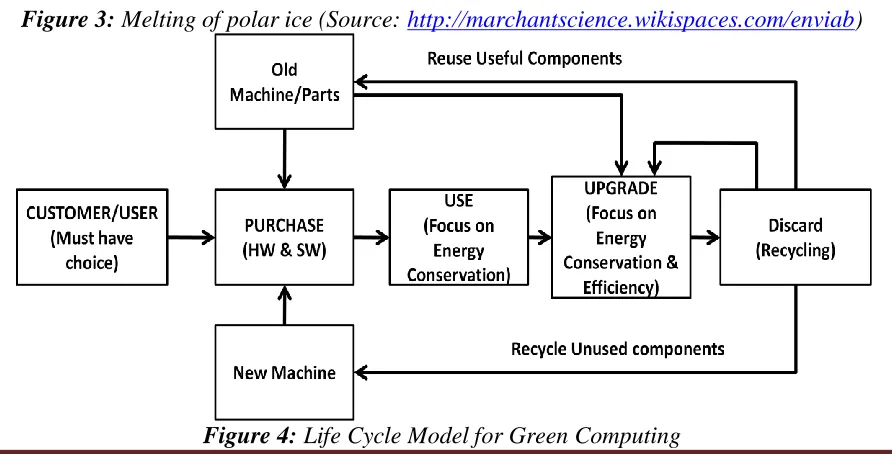
There is a need of holistic approach to optimize the use of available computer resources. The
figure 4 shows the proposed model for sustainable green computing.
The proposed model focuses on four areas:
1. Purchase
2. Usage
3. Reuse
4. Recycle
1) Purchase Model
In the life cycle approach the first phase is very important. In this phase you need to first identify
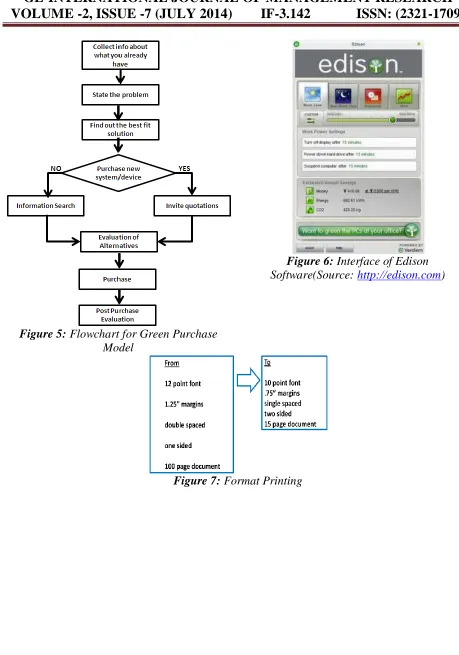
your real need and the best suitable solution for it. Figure 5 shows the steps involve in it:
Step I: Collect information about the existing computing equipments
When you begin to look at energy use and computers, you realize there are a few givens: Every computer uses some sort of power to do what it does.
There is little uniformity about energy use different computer systems use different
When you add peripherals such as mobile devices, printers, and cameras you increase the
amount of energy involved to run it all.
The challenge comes in determining how much energy this all adds up to for your PC and
finding ways to scale back or upgrade to a higher efficiency, as the case may be. For example,
how many computers, printers, sets of speakers, game consoles, and more are in your system?
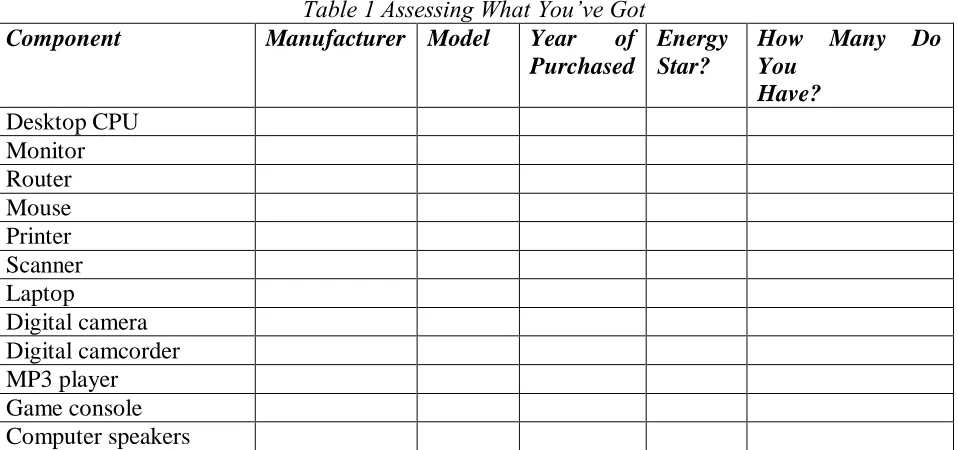
Also, take a closer look at when you bought those items and whether they’re Energy Star
[image:10.612.69.548.269.494.2]certified. You can use Table 1 to get started.
Table 1 Assessing What You’ve Got Component Manufacturer Model Year of
Purchased
Energy Star?
How Many Do You
Have? Desktop CPU
Monitor Router Mouse Printer Scanner Laptop
Digital camera Digital camcorder MP3 player Game console Computer speakers
What you gain from completing Table 1 is a picture of not only what you have but also how old
and thus how energy-efficient your equipment is. In general, older computers don’t have the
same green consciousness of newer computers. The working wellcomes with age and refinement
(which is true for some computers and programs, anyway). If you have a PC that works on
Windows XP or a Mac that came with OS 9, chances are that energy efficiency wasn’t foremost in the designer’s mind when that system was on the drawing board. More often than not, however, you can’t just look at a list of what you have and determine how green your current
A more holistic inventory of your computing environment gives you a clearer picture of your
energy use and helps you pinpoint realistic ways to green your computing based on your needs
and activities.
Step II: State the problem
Once the initial inventory is over, you will be in a position to identify your real problem. It is
very important to state your problem before trying to fix it. For example if your computer speed
degrades doesn’t mean that you need to replace your processor or RAM. It can be because of so
many other reasons. In most of the cases it is because of excessive data/programs, HDD speed,
antivirus, firewalls, etc.
Step III: find out the best fit alternative
There are number of solutions exists for a single problem. Your job is to find out the best fit. For
this you are required to collect information about various alternatives. For information collection
you can take the help of one or more of following sources: Personal sources: family, friends, neighbours etc
Commercial sources: advertising; salespeople; retailers; dealers; packaging; point-of-sale
displays
Public sources: internet, newspapers, radio, television, consumer organisations; specialist
magazines
Experiential sources: handling, examining, using the product
Step IV: Purchase New Device
The next decision is whether to purchase a new device or an old one. The latter option is always
better. It saves money and resources. The information about used components can be easily
found in the Yellow Pages.
produces sulphur dioxide, which causes acid rain.[14]
If you have decided to purchase a new machine or device, invite quotations from at least three
vendors.
Step V: Evaluation of Alternatives
The evaluation of alternatives should be done critically to ensure best fit for the problem. The
following parameters can be considered for it:
Brand
Compatibility
Energy Star Certificate CO2 Emission
Green Initiatives Cost Vs Benefit Energy Consumption Recyclable
The above information can also be collected from the vendors website. For CO2 emission
calculation you can visit the following websites:
http://nature.org/initiatives/climatechange/calculator
www.mycarbonfootprint.eu/index.cfm?language=en
www.carboncalculator.com
www.click4carbon.com/CarbonCalculator.php
Step VI: Purchase
Place a purchase order having the detail specification of the product. Don’t forget to collect the
proper receipt of payment, warranty card etc.
Step VII: Post-Purchase Evaluation
The final stage is the post-purchase evaluation of the decision. It is common for customers to
experience concerns after making a purchase decision. This arises from a concept that is known
would have been preferable. In these circumstances that customer will not repurchase
immediately, but is likely to switch brands next time.
2) Computer Usage Model
1. Power Management
According to EPA surveys, about 44% of all PC users do not have or do not use
power-management software.[5] For those who do have the software installed and enabled, it is still
more energy efficient to shut down because computers and monitors continue to draw power
even when sleeping. Some even draw power when completely shut down, so consider plugging
all peripherals into one power strip/surge protector and turn that off when the computer is not in
use.
Of course, it is not practical for everyone to shut down their computers when not in use. The
ideal approach is to use the power management system settings to meet your specific needs.
Turning on power management isn’t very difficult, but some users may be confused about what the various options mean. If you need assistance, try the system’s built-in ―help‖ system. Or, log
onto one of the following sites:
www.energy-solution.com/off-equip/ www.pcpowermanagement.com www.microtech.doe.gov/EnergyStar/
The Energy Star® certification program is offered by the EPA. When activated, equipment
meeting the Energy Star® guidelines enters a power-saving sleep mode after a period of
inactivity.
The Demons behind Green Computing
Power supply: Desktop computer power supplies (PSUs) are generally 70–75%
efficient, dissipating the remaining energy as heat. An industry initiative called 80
PLUS certifies PSUs that are at least 80% efficient; typically these models are drop-in
20, 2007, all new Energy Star 4.0-certified desktop PSUs must be at least 80%
efficient.
Storage: Smaller form factor (e.g. 2.5 inch) hard disk drives often consume less
power than physically larger drives. Unlike hard disk drives, solid-state drives store
data in flash memory or DRAM. With no moving parts, power consumption may be
reduced somewhat for low capacity flash based devices. Even at modest sizes,
DRAM based SSDs may use more power than hard disks, (e.g., 4GB i-RAM uses
more power and space than laptop drives). Flash based drives are generally slower for
writing than hard disks.
Video card: A fast GPU may be the largest power consumer in a computer.
Energy efficient display options include: No video cards used in a shared
terminal, shared thin client, or desktop sharing software if display required.
Use motherboard video output - typically low 3D performance and low power.
Reuse an older video card that uses little power; many do not require heat
sinks or fans.
Select a GPU based on average wattage or performance per watt.
Materials: Computer systems that have outlived their particular function can be
repurposed, or donated to various charities and non-profit organizations. However, many
charities have recently imposed minimum system requirements for donated
equipment. Additionally, parts from outdated systems may be salvaged and recycled
through certain retail outlets and municipal or private recycling centers. Recycling
computing equipment can keep harmful materials such as lead, mercury, and hexavalent
chromium out of landfills, but often computers gathered through recycling drives are
shipped to developing countries where environmental standards are less strict than in
North America and Europe. The Silicon Valley Toxics Coalition estimates that 80% of
as China, India, and Pakistan. Computing supplies, such as printer cartridges, paper,
and batteries may be recycled as well.
Display: LCD monitors typically use a cold-cathode fluorescent bulb to provide light for
the display. Some newer displays use an array of light-emitting diodes (LEDs) in place of
the fluorescent bulb, which reduces the amount of electricity used by the display.
Chilling of data: To keep servers at the right temperature, companies mainly rely on air
conditioning. The more powerful the machine, the more cool air needed to keep it from
over heating. By 2005, the energy required to power and cool servers accounted for about
1.2 % of total U.S electricity conception. By 2010, half of the Forbes Global 2000
companies will spend more on energy than on hardware such as servers.
Power Management Settings
Follow these instructions to enable the power management feature on your computer:
PCs running Windows (2000, XP)
1. Right click on your desktop and a dialog box
will appear
2. Select ―properties‖ 3. Select ―screen saver‖ tab 4. Select ―energy saving features‖ 5. Select ―settings‖
6. Select the number of minutes you would like
to keep your computer and your monitor on
before they power down.
Macs (OS7.1 - OS9, OSX) 1. Click on Apple icon
2. Select ―control panels‖ in OS9 and ―system preferences‖ in OSX
3. Select ―energy saver‖
4. Select ―show details‖ in OS9
5. Check separate timing for display sleep
6. Select the number of minutes you would like
to keep your computer and your monitor on
before they power down.
Note: A screen-saver doesn’t really save energy? Turn your monitor off when it is not in use for more than 15 minutes.
Dell Inspiron 600M (Centrino): 27 watts on, 2 watts stand-by Dell Inspiron 1150 (Pentium IV): 43 watts on, 4 watts stand-by HP LaserJet 1012: 400 watts on, 1 watt stand-by
HP All-in-One 1350 (Inkjet): 14 watts on, 5 watts stand-by
Use Power-Management Software
If you really like managing the way your computer uses power, you don’t have to stop with the
power-management features your operating system offers you. Power-management software is
available from other sources. The software makes it easy for you to keep an eye on the power
you’re using, whether you’re watching your own system resources or coordinating the power for
a whole department — or a whole company — of computers. Power-management software can
monitor a computer’s activity so that when the system goes into Idle mode, system resources are
managed as effectively as possible. In a business, these power-saving strategies can add up and
save a lot of money and energy — not to mention the headaches they can save the IT department
when they run well!
Monitoring energy for free with Edison
Edison is a free, easy-to-use energy monitoring utility that helps you evaluate when you use the
most PC power and create a schedule for use. Versions of Edison are available for both Windows
Vista and Windows XP. As Figure 6 shows, you can set different power settings depending on
the time of day and the types of tasks you’ll be using your computer to do. As shown in Figure 6 Edison shows you the amount of money, energy, and CO2 you’re saving with the energy choices you make, and it’s a great motivator for saving even more![17]
Reducing CO2 with Snap’s CO2 Saver
Snap’s CO2 Saver is another free personal power management utility that lets you optimize your system’s power in its idle state. The tool works with both Windows XP and Windows Vista,
displaying a running total of energy savings in a toolbar that includes a search feature you can
Note: One computer left on 24 hours a day dumps 1,500 pounds of CO2 into the atmosphere. A tree absorbs between 3-15 lbs of CO2 annually. That means that 100-500 trees would be needed to offset these yearly emissions.[14]
2. Reducing Consumption
1. Paper
There are many negative impacts that result from the mass consumption of paper - money lost,
pollution emitted, energy consumed, water used, landfills running over. Many of them can be
avoided by using paper made from post-consumer waste, agricultural by-products, or sustainably
harvested fibers. These impacts can also be avoided by reducing paper consumption by simply
adjusting printing formats. As shown in figure 7 just by simple formatting 100 page document
can be converted to 15 page document.
Of course, reducing font size and single-spacing are not always an option, but switching to
slimmer margins and printing on both sides is a good start. Reusing paper saves the energy used
to make new paper - an average of 15 watt-hours of energy is used to produce a single sheet of
paper - and it saves you the money of purchasing it, not to mention the economic and
environmental cost of transportation from plant to user.[8]
Note: Your computer is made up of plastics, metals, glass, silicon and about 1,000 other materials and chemicals – half of which are hazardous. It contains scores of toxic materials that pose health threats to the people who produced it and to the people living near the factory where it was created.[14]
2. Editing
Use the power of your software to edit on screen. For example, use the ―track changes‖ tool in
Word instead of editing from a paper copy. Also, send e-mail or transfer data files through the
internet.
3. Printing
If you use Microsoft Word and your printer does not allow for double-sided printing, try using
―Print‖ and select ―odd pages.‖ Then, put the paper back in the printer on its reverse side and print again, selecting ―even pages.‖ This is especially useful for larger jobs, saving paper, money
and storage space for your documents.
Wordperfect has a ―multiple pages‖ tab in the print window allowing even more options for ink
reduction. You can also reduce the amount of ink used by choosing draft, low resolution, or low
saturation level settings under ―printing preferences.‖
Note: Studies estimate that 315 to 600 million desktop and laptop computers in the US will soon be obsolete and contain a total of more than 1.2 billion pounds of lead. Discarded computers and electronics - so called e-waste - are hazardous wastes and there is no good system for safely handling them. This waste is the fastest growing portion of our waste stream, growing almost three times faster than our municipal waste stream. Less than 10% of discarded computers are currently recycled, and many older computers are either stored somewhere awaiting a decision or are tossed out with the trash without realizing the hazards contained in them.
Keeping all computers and consumer electronics out of landfills and incinerators is imperative if we want to protect our public health and the environment. Even recycling them is difficult because they’re full of toxic materials.[14]
3) Computer Reuse Model
It is our natural tendency that whenever we have to buy, we tend to buy new. Green efforts
would suggest that this consumerist lifestyle is more fabricated than inborn. We don’t really
need a brand-new desk; a $700 ergonomically designed earth-friendly office chair, and a
completely new super-green laptop to telecommute successfully.
Your office can be green without a much investment. In fact, some would say that the more you
spend, the less green it may ultimately be. So knowing when to reuse what you have and when to
buy something new is part of the equation you need to weigh as you set up your home office.
Simple is good, but efficient is just as good if not better. Here are some points to consider as you
Is the computer (or monitor, printer, desk, chair, lamp) working now? How much power does it use?
Is it missing any features I really need to have to work successfully? What materials were used to make it?
Does it do what I need it to do?
Does it emit any toxic chemicals into my environment? Does it have a greener counterpart?
What is the replacement made of?
What is the cost (in dollars and CO2) of using this computer (or monitor, printer, desk,
chair, or lamp) over time?
How much energy does the possible replacement use?
What is the cost (in dollars and CO2) of using the replacement instead?
Chances are that as you work through this list, some items jump out at you as deal breakers,
either for or against buying the new system. Think through the costs — in terms of your own
financial considerations and the longer-term planetary impact — before you decide either way.
One other idea to think about: If you or your employer is at all tentative about the work at home
thing, hold off making an investment in a new greener computer system or renovating a green
workspace until you know the idea is going to stick (unless you plan to continue doing some
work at home, regardless).
4) Computer Recycle Model
What is E-Waste?
Illegally discarded computers, known as e-waste, represent one of the fastest-growing problems facing the environment today. Recent statistics show that the average home life of a computer is
only three years. Following the reduce, reuse, recycle mantra, it’s a good green practice to plan to hold on to the computer you’ve got for as long as you can. Make it work; use it well; and
when the time comes to retire it, do so responsibly by using a bona fide recycling program that
systems, monitors, and peripherals either add to the problem or helps with the cleanup. As a
responsible human being, you should aware of that really you are throwing.
What e-waste are we throwing away?
Anything that you would call ―computer equipment‖ can be recycled somewhere. In addition,
you can recycle MP3 players, cellphones, digital cameras, game systems, and personal digital
assistants (PDAs). Right now, however, the majority of electronic equipment goes directly to
landfills. Here are the statistics, according to the U.S. Environmental Protection Agency (EPA).
Be forewarned that they are not pretty.
Americans own nearly 3 million electronic products.
In 1998, an estimated 20 million computers became obsolete.
In 2007, an estimated 37 million computers almost double the 1998 estimate
became obsolete.
In addition to computers, 304 million electronic devices monitors, cellphones, and
other gadgets were thrown away in 2005.
Discarded electronics constitute 70 percent of metals and 40 percent of the lead in
U.S. landfills.
As of 2007, of the 2.25 million tons of electronic equipment ready to be disposed of, 414,000 tons (or 18 percent) were recycled, and 1.84 million tons (82 percent)
were dumped into landfills all across the country.
Only 15 percent of computer equipment was recycled until 2006–2007, when
several states started mandatory recycling for electronic equipment.[9]
What’s really in computer waste?
If the computer you put out with the trash actually makes it to the landfill, it leaks hazardous
chemicals into the ground, and those toxins eventually find their way into the water supply for
surrounding areas. Here are some of the problems with the various computer components that are
Lead: Cathode-ray tube (CRT) monitors contain lead and other hazardous metals. The
glass of the screens, when broken, releases a dust that is harmful as well. Lead in the
environment can cause respiratory problems and cognitive-development issues.
Mercury: Liquid-crystal display (LCD) monitors contain mercury (also used in
cellphones, MP3 players, and television sets), which can damage the brain, nervous
system, reproductive system, kidneys, and lungs.
Copper: Computers contain copper. The process of creating usable copper and etching
the wires on the computer boards adds to acid rain and contributes to global warming.
High doses of copper can cause headaches, stomachaches, dizziness, vomiting, and
diarrhea. It can also cause liver and kidney damage.
Chemicals: Each semiconductor used in computer chips includes hundreds (no kidding)
of hazardous chemicals, which can contribute to a variety of physical problems in
children and adults.
Plastics: The treated, flame-retardant plastics used in computers, called polybrominated
diphenyl ethers (PBDEs), can contribute to neurodevelopmental problems and some
cancers.
To see a sobering video report on the e-waste problem in China, visit
www.engadget.com/2008/11/10/video-chinas-toxic-wastelands-of-consumerelectronics-Revealed You can read the Basel Action Network’s report on its research in Africa, The Digital Dump:
Exporting Re-Use and Abuse to Africa, at
www.ban.org/BANreports/10-24-05/documents/TheDigitalDump.pdf
Seeing Reasons to Recycle Computers
In the reduce, reuse, recycle mantra, recycle may sound like the end of the line, where the computer moves beyond your concern and becomes somebody else’s problem. In reality, your recycled computer may be somebody else’s beginning. A growing market exists for second-life
computers: desktops, laptops, monitors, and peripherals that have been donated, refurbished, and
Wonder what the difference is between refurbishing and recertifying? A refurbished computer has parts that someone has fixed or updated to make the computer ready to rock again. A
recertified computer gets similar treatment, except the manufacturer takes a look and gives it the thumbs-up if it meets the manufacturer’s standards. So a recertified computer gets a slightly
higher level nod.
When you decide to recycle a computer, you might
Donate the computer to a not-for-profit organization, school, or person who needs it. Give your computer to a recycler in your local area.
Take or send your computer to a manufacturer’s or retailer’s recycling program.
The rest of this paper explores these options in more detail so you can decide what’s best to do
with the system you’ve got.
Planning Your Computer’s Retirement
We assume that you have decided about reducing your energy use and staying on top of your
computing resources. Perhaps you just purchased a new and greener computer. Good for you!
The next step is deciding what you will do with the old one. Here are some guidelines to help
you begin the process of donating or recycling your old system in an earth-friendly way:
Know what you are giving. Before you donate a system to someone else, have a technical
friend look it over and make sure that someone else can actually use it. Some computers are
so old there really isn’t anything to do but recycle them. If the machine is still usable in other
words, you used it until you got the new one. Chances are that it can be a blessing to
someone else.
Know where you would like to give it. If you plan to donate your computer to someone in
your own circle of friends and relatives, cool. If, however, you want to donate the system to a
school, not-for-profit organization, or another charity that you are not personally involved
with, it is usually not a good idea to donate the item directly. Consider giving your system to
should and has legal copies of software. The recycler can then give your refurbished
computer to the school, not-forprofit organization, or charity.
Know what doesn’t work, and find a recycler to take it. If you have equipment that doesn’t work at all — such as a printer with a dead head, a scanner that doesn’t scan, or a computer that doesn’t power up — find a computer recycler for the item. A computer
recycler can salvage the usable parts before recycling what remains. Some manufacturers
have recycling programs. (In fact, Energy Star now requires manufacturers qualifying for the
Energy Star logo to run their own recycling programs.) Independent recyclers exist, too, and
you may find several in your local area.
Include the peripherals. Donating your computer is helpful, but it is even better for the
recipient if you include the keyboard, mouse, printer, and other devices that you use with the
computer. Schools and not-for-profit organizations often have very limited tech budgets, and
though receiving the computer may be a good thing, if they don’t have what they need to go
with it, your donation may go unused.
Include the software. This point is a confusing one for people who are concerned about
honouring the software license on operating systems and packaged software. If you
purchased software to run on the computer that you’re now donating, it’s perfectly fine to
send along the software package and CDs. In fact, the recipient will thank you for it big time.
Also, the Refurbisher will want to see the documentation and authentic seal on the software
package so it knows it is donating legal copies of software. The same thing applies to the
computer’s operating system. One big challenge in recycling and refurbishing computers in years past was that ―clean‖ refurbished systems didn’t have an operating system installed, and most users weren’t interested in systems that were that clean.
Know how to clean off your personal information. Before you donate your computer
anywhere — whether you’re taking it to a friend’s house, donating it to a school, or
You have Web settings, cookies, browsing history, e-mail messages, contacts, documents,
files, and much more stored on that system, and even though you may think that you’ve gotten rid of it by deleting the files, the data isn’t actually ―all gone.‖ To eliminate it for
good, you need to use a disk-cleaning program
Keep a record of where you took the system. Yes, this point seems to be pretty basic, but as time goes on, you may wonder where that computer went. Also, if you don’t get a receipt
or some kind of documentation, you may miss out on a tax break, and every little bit helps.
Before you give your computer to recyclers or refurbishers, be sure to do the following things:
Uninstall the software that you intend to use again on another system.
Move the files and folders that you need to a backup device or new computer. Delete files and folders.
Clear your browser cache (uninstalling software seldom removes all of your data from
the machine).
Remove all user accounts on the computer.
Use a disk-cleaning program to remove everything else.
Finding a Refurbisher
As the green-tech industry matures, some organizations and businesses are getting in on the
certification game, which is good because, ultimately, it means that more people care about the
standards we expect for quality green products. This trend also helps educate consumers and
safeguard them against green washing.
Microsoft, for example, offers the Microsoft Authorized Refurbisher (MAR) program to large
scale refurbishers that take care to wipe computers clean before installing Windows, commit to
using only legal software, use adequate security controls, and act in accordance with health and
safety regulations for electronics. Microsoft gives each MAR partner low-cost Windows
software to install on each machine before delivering it to the recipient.[25] A version of this
program called Secondary PC is available for refurbishers in the Czech Republic, Nigeria,
To find a list of refurbishers in your area, go to
www.techsoup.org/resources/index.cfm?action=resource.view_summary&resourcelist_id=144&
range=10&order=1&start=126
Finding a Reputable Recycler
You may be surprised to discover the number of organizations in your area that offer computer
recycling. When you begin to explore this option, keep the following pointers in mind.
Do your research
Your friends may be able to help steer you toward a good recycler. Follow their leads, but also
do your own research. Check large Web sites or those that are affiliated with groups you trust,
such as the EPA. Several of the following sites may offer lists of recyclers in your area:
E-cycling Central (www.eiae.org) Earth911.com (www.earth911.org)
Find Your Local e-Stewards (www.e-stewards.org/local_estewards.html; see the nearby
sidebar)
myGreenElectronics (www.mygreenelectronics.org) TechSoup’s Donate Hardware
(www.techsoup.org/resources/index.cfm?action=resource.view_summary&resourcelist_id=1
44)
One of the easiest recycling options and one that reduces the amount of legwork you have to do
are to use your computer manufacturer’s recycling program. Some manufacturers including Dell,
Hewlett-Packard, and Apple have great recycling programs and a true green commitment. Other
manufacturers may be a little late to the party but are no less committed.
In addition to computer manufacturers, some retail outlets provide drop-off recycling programs.
In general, you will find that computer manufacturers and retailers offer services reflecting one
or more of these options:
They partner with local organizations that receive recycled equipment. They sponsor collection events.
As you might expect, companies set up their programs differently. Dell, for example, doesn’t care what kind of computer you’re trading in as long as you buy a Dell; other companies want
only their brands sent in for recycling.
Most companies seem to know that maintaining responsibility for their computer equipment
through that equipment’s entire life cycle is the right thing to do. Some companies, such as Dell and HP, make it very easy for customers to recycle their old systems. You don’t hear as much about Toshiba’s green efforts, but that manufacturer is making great strides as well.
See Table 2 for a list of manufacturers offering recycling programs that you may want to investigate.
Table 2 Computer Manufacturers’ Recycling Programs
Company Web Site
Apple www.apple.com/environment/recycling
Dell http://www.dell.com/content/topics/segtopic.aspx/dell_recycling
Epson www.epson.com/cgi-bin/Store/Recycle/RecycleProgram.jsp
Gateway www.gateway.com/about/corp_responsibility/env_options.php
HP
www.hp.com/hpinfo/globalcitizenship/environment/recycling/product-recycling.html
IBM www.ibm.com/ibm/environment
Lexmar www.lexmark.com/lexmark/content/withoutnav/home/
0,7316,204816596_1099884817_0_en,00.html
Panasonic www.panasonic.com/environmental
Sharp www.sharpusa.com/about/AboutEnvironment
Sony www.sony.tradeups.com/Default.aspx
Toshiba www.explore.toshiba.com/innovation-lab/green
There are all kinds of roads to green advocacy; the journey is limited only by your imagination!
How can you help let people know that e-waste is something to care about on a global scale?
Here are just a few ideas to get you started:
Spread the word. The Electronics TakeBack Coalition has a variety of information
about global e-waste on its site at
www.electronicstakeback.com/problem/export_problem.htm. You’ll find the latest data on tech dumping, as well as a ―60 Minutes‖ video of the deplorable conditions in China.
Download the e-waste briefing book. The Electronics TakeBack Coalition published a
briefing book, e-Waste: The Exploding Global Electronic Waste Crisis, in February 2009 to help you talk to businesses, government leaders, friends, and family members about
the realities of global e-waste. Download the free book at
www.electronicstakeback.com/legislation/Ewaste%20Briefing%20Book.pdf
Find out about the recycling laws that are in effect in your state. Visit the State by
State e-Waste Law Summary at
www.electronicstakeback.com/legislation/States%20Summary%202009.pdf
to find out what’s happening in your area and get involved.
Tell the story your way. If you’re a teacher, design a lesson plan about responsible computer recycling. If you’re a painter, create something that inspires people to love the
earth and to care about her misuse and under appreciation. If you’re a businessperson,
make and model green computing choices at work and when people ask why, share the
reasons why.
It is time to evaluate your real needs...
Do you really need that new computer? Should you upgrade your existing computer? What about
7. FUTURE RESEARCH DIRECTION
Green Software: This paper is mainly focused on the hardware part although software also
plays an important role in making IT greener. From inception to final installation of software,
there is a need of green guidelines to be set to ensure optimum utilization of computing
resources.
Internet has become a tool for social networking. However, it is also a major source of CO2
emission. People like to search, read, write and edit online. Hundreds of millions of users access
Google services through the web, and supporting this traffic requires lots of computers. Energy
used per Google search is minimal. In fact, in the time it takes to do a Google search, your own
personal computer will use more energy than we will use to answer your query. There is need to
design optimized search algorithm resulting in minimum CO2 emission.
Computer virtualization can also play an important role in reducing the emission at the same
can help to optimize the use of available resources. It refers to the abstraction of computer
resources, such as the process of running two or more logical computer systems on one set of
physical hardware. With virtualization, a system administrator could combine several physical
systems into virtual machines on one single, powerful system, thereby unplugging the original
hardware and reducing power and cooling consumption. However a lot of research is to be done
in this area before implementation.
Telecommuting, e-commuting, e-work, telework, working at home (WAH), or working from
home (WFH) is a work arrangement in which employees enjoy flexibility in working location
and hours. A frequently repeated motto is that "work is something you do, not something you travel to". Telecommuting enables you to work virtually anywhere, reducing travel times and CO2 emissions, helping you save time, money, and resources. Telecommuting can drastically
affect the CO2 emission problem.
Cloud computingis the ability to get the services and software you need without being tied to a
service for example, the Calendar and Web-based e-mail tools, when you need them, from
wherever you happen to be. And there are multiple ways to access the services, too. You can
check e-mail on your phone; post a blog item via e-mail; or look up your favourite song and
download it so you can add it to your Window Media playlist, even though you’re accessing
your account through your friend’s iPhone. There is debate going on whether cloud is really
green. We have to find out ethical ways of using cloud in greener ways. By reducing real-world
hardware requirements, cloud computing in theory, anyway could potentially help to slow the
rate at which our landfills and small villages are filling up with illegally dumped computers.
Because cloud computing enables sharing reusable resources globally and is a scalable
technology, the lion’s share of the power consumption happens in the data centers supporting the
cloud.
8. CONCLUSION
As society becomes more environment-conscious, businesses have been forced to become more
responsible for the impact of their operations, both legally and morally. A business owes this
duty of care not only to its shareholders and employees, who demand that it should invest wisely
and generate income most efficiently, but also to society. Businesses must start to think green for
pragmatic economic motives, and not just for environmental and ethical reasons. For businesses,
it is important to consider the entire lifespan of IT systems. As a user, we can no longer be
thoughtless about the resources we use because that mindset is slowly destroying our
environment.
It is well said “We are not passive spectators, but active contestants in the drama of our existence. We need to take responsibility for the kind of life we create for ourselves”
- Nathaniel Branden, Ph.D[18]
It’s up to each of us to take responsibility for our own health and our family’s. We must exercise
caution. It’s far better to be safe than sorry. It’s preferable to put a fence at the edge of the cliff,
every way possible. Reduce as much paper as possible and recycle it when you can.
Eco-efficiency and Econnovation are the need of the hour, and have the potential to transform our
world into a low carbon economy.
“God loves you and me. If we do what we can do, He’ll do what we can’t.”
REFERENCES
[ 1 ] Energy Star Program (2010) Retrieved from http://www.energystar.gov/
[ 2 ] Energy, the Environment and IBM (2010) Retrieved from
http://www.ibm.com/ibm/green/index.shtml
[ 3 ] http://computing.acd.ucar.edu/power_conservation/
[ 4 ] http://hes.lbl.gov/hes/makingithappen/no_regrets/homeoffice.html
[ 5 ] http://www.epa.gov/
[ 6 ] http://www.gartner.com/it/products/research/topics/topics.jsp
[ 7 ] http://www.nwf.org/
[ 8 ] http://www.peninsula.wednet.edu/conservation/Energy/office.htm
[ 9 ] http://www.theglobalwarmingstatistics.org/global-warming-essays
[ 10 ] http://www.uh.edu/infotech/news/story.php?story_id=130
[ 11 ] Leonhard, Murray, ―Green Home Computing for Dummies‖,Wiley Publishing,
E-Book
[ 12 ] Microsoft: Green IT taking the first step (2010) Retrieved from
http://www.microsoft.com/environment/our_commitment/articles/green_guide.aspx
[ 13 ] Recycle-it America (2010) Retrieved from http://www.recycleitamerica.com/
[ 14 ] Ryan, John C. & Durning, Alan T. Stuff: The Secret Lives of Everyday Things. 1997
[ 15 ] The Green Grid (2010) Retrieved from http://www.thegreengrid.org/
[ 16 ] www.dell.com/earth
[ 17 ] www.edison.com
Graphs & Figures
[image:31.612.321.526.126.285.2]Figure 1: Monthly CO2 Concentration (Source: http://globalwarming.house.gov)
Figure 2: Increase in Global Temperature (Source: http://www.cheaperpetrolparty.com)
[image:31.612.89.281.127.249.2] [image:31.612.177.437.329.470.2] [image:31.612.85.531.478.705.2]Figure 5: Flowchart for Green Purchase Model
Figure 6: Interface of Edison Software(Source: http://edison.com)
[image:32.612.68.527.47.702.2]