2530 San Pablo Avenue Berkeley,CA. 94702
_ .
. 415/549-3854 • TELEX 172029 SPXCPU/68000
USER'S MANUAL
68000-BASED
CENTRAL PROCESSING UNIT BOARD
FOR THE I.E.E.E. 696/5-100 BUS
Dual Systems Control Corp.
2530 San Pablq AveDueBerkeley, CA
94702COPYRIGHT
@
1982 BY DUAL SYSTEMS CONTROL CORP.
Dual Systems CPU/68ooo User's Manual
Introduction
Specifications
Table of Contents
· .
. .
.
. .
.
.
.
.
. .
. .
.
.
.
. .
.
. .
.
.
. . .
. .
.
.
. .
Booting with the Monitor
On-Board ROM
Address Bus
Data Bus
·
. .
. . .
.
.
.
.
.
.
. . .
. . .
.
.
. . .
.
.
.
.
.
.
.
. . . .
·
.
. . .
.
.
.
. . .
.
.
.
.
.
.
. .
.
.
.
.
. .
.
.
.
. .
. . . .
. . .
. .
. .
.
.
.
.
. . . .
.
.
.
.
.
.
.
. .
. . .
. . . .
.
.
.
.
.
.
TMA Control
Interrupt Modes
.
.
.
.
. . .
. . .
. .
. .
.
.
.
.
.
.
. .
. .
.
. . . .
.
.
.
.
Appendix A.
Selecting ROMs
. .
.
.
.
.
.
.
.
. .
.
.
.
.
.
.
.
. . .
Appendix B.
Details of S-100 interface
. . .
.
.
Appendix C.
Special Configurations
.
. .
.
.
.
.
. .
. .
. .
Appendix
D.
A Few Programs
. .
.
. .
.
. .
.
.
.
. .
. .
. .
. . . .
2
3
4
8
12
14
14
15
16
17
18
INTRODUCTION
The Dual Systems
CPU/68oo0
is a high-performance CPU board
combining the Motorola MC68000 chip, the logic circuitry
necessary for interfacing to the S-100 bus in full compliance
with the IEEE-696 specification, and ROMs containing a powerful
monitor.
Among its highlights are:
o
8 MHz 68000 microprocessor
o 4 MHz S-100 bus operation
o
24 bit extended address bus
o
16 bit data transfers
o 8 bit transfers for compatibility with older peripherals
o On chip interrupt controller
o Operation with up to 16 DMA devices
o Up to
8 Kilobytes of on board ROM
o Supports I/O mapped peripherals
The Dual Systems CPU/68000 board is based on the Motorola
68000 processor, a high-performance microprocessor wi th 32-bi t
internal architecture and a large, uniform memory space. The
68000 features 16 32-bit registers, eight for addresses and eight
for data. Data can be accessed in byte, word, and long word
(32 Bit) quantities.
The board is designed to take' full advantage of new IEEE-696
S-100
features.
16 bit memory accesses double the effective
transfer
rate of the 4 MHz S-100 bus.
The processor fully
complies with IEEE specifications for a permanent bus master and
supports
temporary bus master operation. Twenty-four address
lines allow direct access to 16 Megabytes of memory.
SPECIFICATIONS
Processor: Motorola MC68000-L8
Clock Speed: 8 Megahertz
Bus: Meets all requirements of IEEE-696 (S-100)
Address Bus: 24 bits; conforms to S-100 extended addressing
specifications
(16
Megabytes)
Data Bus: 16 bit bidirectional data transfers.
Also
supports byte data transfers to eight-bit
peripherals.
ROM: Two
sockets are provided on board for up to
8K of ROM.
This ROM can be used for program
storage or excepti?n vectors or both.
Control: Configured as bus master,
provides TMA
proto-col per IEEE-696.
Provides automatic 8/16 bit
data path selection.
(requires 16 bit memory
for
program
execution).
Provides
64k
programmable I/O space.
Machine Cycle Time:Standard S-100 cycle: 750nS (min)
Fast Mode: 500nS (min)
Memory Speed: Memory must have data on the bus no later than
450 nS after address is valid on bus.
Status Indicators: RUN (Green LED)
HALT (Red LED)
HOLD (Yellow LED)
PC board: High quality epoxy,
solder masked both sides,
screened component
legend,
plated through
holes, gold plated edge connector fingers.
Sockets: Provided for all IC's
Power Consumption: 950 rnA nominal at 5 V.
User-Selectable
Options: Hardware relocatable boot and exception vectors.
AO
line of address bus may be asserted for
high byte or low byte.
Booting the CPU/68000 with Macsbug'
The CPU'/68000 comes wi th the Macsbug 1 moni tor installed in
the on-board ROM sockets. The monitor is factory configured for
use with a Godbout Interfacer· I serial I/O board.
If the
, Cpu/68000 is ordered with the Interfacer 2 and CMEM memory cards,
then the system can be brought up immediately.
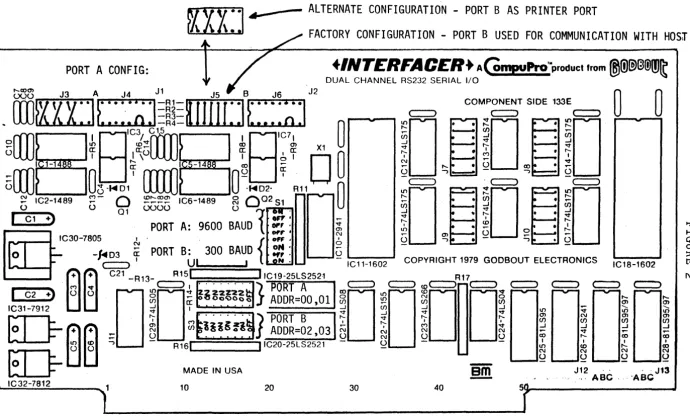
Set the dip-switches on the CPU/68000, Interfacer2 , and CMEM
cards as shown in figures 1, 2, and 3.
After the dip-switches 'have been set properly, insert the
CPU/68000, the Interfacer, and the CMEM boards into the S-100
card cage.
Then connect the serial I/O cables between the
Interfacer card and the terminal. Be sure to connect pin 1 on the
ri bbon cable by the index on the edge connector.
Set the
terminal
tor 9600 BAUD and upper case only. Now apply power.
If
everything was done properly, you should see the Macsbug prompt
on the terminal:
MACSBUG 1.31
•
If this does not appear, turn off the power and recheck all
connections and dip-switch settings. Be sure the Interfacer and
the terminal are set for identical BAUD rates. Try again.
If
there is still no response please call Dual Systems.
The dip-switch settings on the CPU/68000 map the monitor
program to location 020000H and provide for the boot vectors to
be read from the ROMs.
These switches are described fully in
this manual.
The Interfacer2 switch setting define the first port to be
at I/O location OH and the second port (for printer or host
computer) at I/O location 2H.
In order to configure the board for use wi th your terminal
and printer, the port 1 baud rate must be set for the speed of
the
console terminal and the Port 2 baud rate must match the
speed of the printer or the connection to the host computer.
In
the figure these rates are 9600 and 300 respectively. Parity and
stop bi ts are set for use wi th an ADM 3A or ADM
5
terminal. For
more information regarding baud rates, stop bits, parity etc.,
refer to the Godbout Interfacer I manual.
The CMEM is set to span memory locations OH to 7FFFH. The
stacks reside in the top 1 Kbyte of this memory, the exeptlon
vectors in the low 1 Kbytes and the middle is available for user
programs.
The remaining switches are set to enable extended
addressing, initially enable the board, and to allow writing to
the board. For more details refer to the CMEM manual.
1 Macsbug is a trademark of Motorola.
RI§
R2RS ·VAI
CIO
[image:6.797.30.754.85.516.2]PORT B CONFIG:
~-
ALTERNATE CONFIGURATION - PORT B AS PRINTER PORT
FACTORY CONFIGURATION - PORT B USED FOR COMMUNICATION WITH HOSr
+INTCRFACCR+
AGmpuPro'MprOduct from®ID~@(!)m~
DUAL CHANNEL RS232 SERIAL liD
PORT A CONFIG:
tx3~ J3 A J4 J 1 J5 B J6 J2
OJ
--I rr - ex> ..-
~
I'- - - :G
ex> - - - :~
~
IC2-1489~-
0
~~~~
IC6-1489~
0
02 51~.
U> ---:~
() 0 01 lX)OO 0
1
=lO;i, ".~
0 • .0~I
I
C1 +]PORT A: 9600 BAUD
~,.' ~
~N""
~
,_OOT .... m 0 ..---
..-IC30-7805 ~ . . {
0".
0 ~ -, • - -, • ~o
-ffD3Ci
PORT B: 300 BAUD
~~
:
U
" ' - _ - - - Jc=:::J ' UI , III • IC11-1602 COPYRIGHT 1979 GODBOUT ELECTRONICS IC18-1602
M
~
c=::::>, . . . . . )
PO
RT A
c:::::>
c::=) to c::::::>R 17c::::::::>
c::::::::>
C==>c:::>
c:::=JI
C2+)
U Ug
~ ~~~~~~~~
J
ADDR=OO ,01!O
10
to
Oi
~ ~
i
~
ED-
(3<3
-,
R1:~DE
IN USA !,C20-25LS2521em
J,~
ABC§'ABCJ1~
IC32-7812 10 20 30 40
[image:7.797.64.755.55.471.2]EXTENDED
ADDRESSING
ENABLED
[/16
BIT OPERATION ENABLED
[image:8.794.35.745.73.535.2]ON-BOARD ROM
Two ROM sockets are available on the CPU board to store up
to 8K
bytes of data.
The ROMs can be used to store programs,
interrupt vectors, or both. A variety of fi ve vol t only,
8
bi t
EPROMs or ROMs may be used.
The CPU/68000 is factory configured
for use with 2732 EPROMs, see Appendix A for jumper installation
for alternate EPROMs.
Switches 81 and 82
determine the ROMs base address and their
mode of operation. Ei ther one of two condi tions may enable the
ROMs:
Using the ROMs to 8tore Programs:
The ROMs may be
selected on any read from the address space
starting at the address specified by 81. This mode is selected
if 82-3 is on.
8ince only the most significant
8
address bits
are decoded the ROMS occupy a full
64
kilobytes of memory.
Hardware relocation of the Exception Vectors:
The ROMs can be enabled on memory reads to the exception
vector address space.
The MC68000 expects to find the exception
vectors stored in
the first 1024 bytes of memory.
Typically it
is desirable to
store most vectors in RAM to allow software
control of traps,
interrupts etc.
However, the power on
sequence requires two 32
bit vectors for the initial stack
pointer and program counter.
The 68000 expects these
8
bytes at
memory locations zero (0) through 7 and they should be stored in
ROM to ensure their validity on power up.
Switch 82-1 ("EV", Enable for Vectors) determines whether
the vectors are read from on-board ROM or off-board memory
(usually ROM).
If switch 82-1 is
ON
the on-board ROMs will be
accessed on a read from the exception vector space. If switch
82-1 is
OFF,
the vectors will be read from off-board memory.
Switch 82-2
("XV", eXception Vectors) determines which
exception vectors enable the
ROMs.
82-2 in an
ON
position
enables the ROMs only for the two
reset vectors. 82-2 in an
OFF
position enables the ROMs for the first 64 exception vectors.
Normally 82-2 is kept in an on
position.
However, for some
dedicated applications it may be
desirable to store the many
system exception vectors (divide by
zero, trap, interrupt etc.)
in ROM.
If the address translation feature is not desired,
81should
be set to all zeros. In this case the address appearing on the
bus is identical to the processor's address lines.
The
user
must not disable this feature unless non-volatile (and
previously set) memory resides in the first 8 bytes of memory.
Switch 2
1) "EV"
2 ) "XV"
3)
"R"
4)
OFF
Read vectors from
OFF-BOARD memory
at 31 address
Enable for ALL
system vectors.
ROMs for vectors
only.
Unused.
Summary
ON
Read vectors from
ON-BOARD ROMS
Enable ONLY for reset
vectors.
Enable ROMs when reading from
address space set by switch 1.
Unused.
The possible configurations are:
S2-1
32-3
Effect
OFF
OFF
Read exception vectors from off-board memory
starting at S1 address.
OFF
ON
Read exception vectors from off board memory
and program starting at 31 address from ROM.
ON
OFF
Read vectors only from ROM.
ON
ON
Read vectors and programs from ROM.
Program
starts at 31 address.
For each of these configurations, if 32-2 is ON then
"vectors" only means the first two· boot vectors,
otherwiS'e all
the system vectors (the first 64) are referred to.
Note that even though the program address space starts at
the 31 address,
you must not overlap the program with the
exception vectors.
If S2-2 is ON then the program can start at
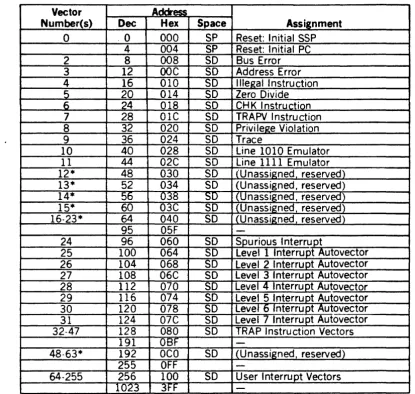
Exception Vector Assignment
Vector Address
Number(s) Dec Hex Space Assignment
0 .0 000 SP Reset: I nitial SSP 4 004 SP Reset: Initial PC
2 8 008 SD Bus Error
3 12
DOC
SO Address Error 4 16 010 SO Illegal Instruction 5 20 014 SO Zero Divide6
24 018 SO CHK Instruction 7 28 OlC SD TRAPV Instruction 8 32 020 SO Privilege Violation9 36 024 SO Trace
10 40 028 SO Line 1010 Emulator 11 44 02C SO Line 1111 Emulator 12* 48 030 SO (Unassigned reserved) 13* 52 034 SO (Unassigned, reserved) 14* 5f) 038
SO
:Unassigned, reserved) 15*60
03C SO Unassigned reserved) 16·23* 64 040 SO Unassigned reserved)95 05F
-24 96 060 SO Spurious Interrupt
25 100 064 SO Level 1 Interru pt Autovector 26 104 068 SO Level 2 Interrupt Autovector 27 108 06C SO Level 3 Interrupt Autovector 28 112 070 SO Level
.:t
Interrupt Autovector 29 116 074 SO Level 5 Interrupt Autovector 30 120 078 SO Level 6 Interrupt Autovector 31 124 07C SO Leve I 7 I nterru pt Autovector 32·47 128 080 SO TRAP Instruction Vectors191 OSF
-48·63* 192 OCO SO (Unassigned, reserved)
255 OFF
-64·255 256 100 SO User Interrupt Vectors
1023 3FF
-*Vector numbers 12 through 23 and 48 through 63 are reserved for future enhancements by
Motorola. No user peripheral devices should be assigned these numbers.
Figure 4. Exception Vector Ass1gnment
Level 1 interrupt autovector: VI5
Level 2 interrupt autovector: VI4
Level 3 interrupt autovector: VI3
Level
4
interrupt autovector: VI2
Level
5
interrupt autovector: VI1
Level
6
interrupt autovector: VIO
Level 7 interrupt autovector: NMI
[image:11.615.122.537.63.457.2]What happens on Power Up
After power up the 68000 loads the system stack pointer
and program counter from the first two exception vectors.
These
two 32 bit
vectors are stored in the least significant eight
bytes of memory.
Since these vectors are required when power is
first applied, they should be stored in ROM.
In this example,
the program
counter vector points to location 020008H which is
the
first instruction in the program in ROM, (after the boot
vectors).
If you wish to modify the moni tor, you could copy the
contents of the ROMS into another memory board, preferably
non-volatile RAM.
(To read the ROMS, simply read from locations
20000 through 21 FFF.)
Then you can modi fy the copy in RAM.
To
execute the new version you must relocate the RAM to location
20000 and set S2-1 and S2-3 to OFF, so the monitor and the boot
vectors are read from the RAM.
A sample program for a block move
is listed in Appendix D.
Format of Data Stored in ROMs
Since the ROMs support word transfers, sequential addresses
are stored in alternate ROMs. That is, one ROM (U2) holds the low
byte of each word and the other (U 1) holds the hi gh byte of each
word.
NOTE:
ADDRESS BUS
The processor board supports an extended 24 bit address bus.
This allows the CPU to directly address up to 16 megabytes of
memory.
Such a vast address space eliminates the need for
cumbersome bank select schemes.
Older boards responding to only
the 16 bit address bus may be used with this CPU but this would
restrict the total system address space to 64 kilobytes.
1/0
Space vs. Memory Space
The 68000 instruction set does not have an explicit
Input/Output instruction.
Motorola archi tects intended for all
68000 I/O to be memory mapped.
Memory mapped I/O takes advantage
of the many powerful addressing modes for fast, efficient I/O
routines.
To support S-100 I/O mapped peripherals the processor board
dedicates the most significant 64 kilobytes of memory to I/O.
As
a result, any memory access to hex address FFOOOO through FFFFFF
results in an I/O bus cycle.
That is, such an access asserts
status outputs sINP or sOUT.
This configuration allows efficient
memory mapped software while maintaining full compatibility with
existing I/O devices.
For example, hex address FF0002 corresponds to I/O port with
address 02.
So the 68000 instruction:
MOVE.B
OFF0002H,DO
is similar to the 8080 instruction:
IN
02H
Note that 64 kilobytes of address space are dedicated to I/O
devices.
This allows over 64 thousand input and output ports.
To support this many ports requires that I/O devices decode the
least significant 16 address bits.
The IEEE specification allows
extended I/O addressing but does not require it.
The majority of current I/O boards decode only the least
significant 8 address bits.
This gives 256 input and output
ports.
The processor board can be used with such an I/O device.
Since the I/O board does not decode the full 16 bit I/O address
its ports address is replicated throughout the 64 kilobyte I/O
address space.
The processor board functions quite well with
existing I/O boards and is capable of fully supporting future
extended I/O address boards as well.
If you are using an I/O board which only decodes the low
eight bits of the address then you can use the 16-bit word
addressing mode of the 68000.
Since to the I/O board address
OFF0002 is indistinguishable from OFFFF02, and the 68000 sign
OFF02.
So the above example could also be coded:
MOVE.B
OFF02.W,DO
AO
The 68000 address bus directly drives A1 through A23. The
CPU / 68000 comes factory j umpered for the updated IEEE-696
standard.
That is, the most significant byte of each word is
stored at an even address and the least significant byte is
stored at the next odd address. Note that instructions, operands,
stack data, address vectors etc. are all stored at even
addresses.
The definition of AO may be reversed by
carefully
cutting
DATA BUS
The 68000 transfers data over a single 16 bit bidirectional
bus. Programs must reside in
,16bit memory, however, data bytes
may be accessed from byte wide memory.
Long words must be
transferred in sequential 16 bit bus cycles.
Byte data is
transferred over the corresponding data lines; high order (even
address) bytes on D15-DB, low order (odd address) bytes on D7-DO.
The S-100 bus has two 8 bit data paths, Data Odd and Data
Even).
For byte transfers data is sent over the Data Even bus
for write operations and over the Data Odd bus for read
operations.
For word transfers Data Even and Data Odd are
ganged, forming a 16 bit bidirectional bus.
During word bus
cycles the even (AO=O) byte is transferred over the Data Even bus
and the odd (AO= 1) byte over the Data Odd bus. On the 68000 the
even byte is most significant (D15-D8).
If you have changed the
AO jumper on the CPU board then these definitions are reversed.
TEMPORARY BUS MASTER INTERFACE (TMA CONTROL)
The 68000 processor board functions as a permanent bus
master as specified in the IEEE proposed S100 standard.
Temporary bus masters (DMA devices) request the bus by asserting
control input HOLD.
They receive control of the bus when the bus
master (68000 CPU) asserts control output hold acknowledge
(pHLDA) •
Upon receipt of HOLD the 68000 completes the current bus
cycle and then asserts pHLDA.
The 68000 suspends all processing
until HOLD is released.
A temporary master may now disable the
permanent bus masters address, data, status and control buses by
asserting the four disable lines ADSB, DODSB, SDSB and CDSB.
The
temporary master now has complete control of the bus for as long
as it wishes.
When the bus is no longer needed control is
returned to the permanent
ma~terby releasing the bus disable
signals and finally, releasing HOLD.
The method of transferring the bus from the permanent bus
master to a temporary master is explicitly specified in the IEEE
bus standard section 2.8.
Of significance is the method used to
transfer ownership of the control output bus. To ensure gl itch
free transfer, both the permanent and temporary master drive the
control output bus during the transfer period.
Except for pHLDA,
all lines are driven at their non-asserted levels.
After a
specified time (125 nanoseconds) the temporary master asserts
CDSB, disabling the permanent master,s control output bus drivers
and acquiring control of the bus.
In general, ,the 68000 will relinquish control of the bus
after the current bus cycle. However, if HOLD is received just
before the start of a bus cycle, the 68000 will go ahead with the
bus cycle, relinquishing control after its completion.
The 68000 instruction TAS (Test And Set) results in
different CPU timing than other instructions.
Motorola defines
it as a read-modify write cycle.
The instruction results in
sequential read and write cycles on the S-100 bus.
The two
cycles are indivisible, that is, the write cycle must follow the
read cycle.
This type of instruction allows meaningful
communications wi thin a mu1 tiprocessor or mul tiprocessing
environment.
TAS is designed to prevent transfer of bus control
until the entire instruction has completed execution.
Note that
two distinct S-100 cycles are completed, but no interrupts or bus
requests will be accepted until the second cycle has completed.
INTERRUPTS
The 68000 has a powerful internal interrupt controller.
There are seven levels of interrupt priority.
All except the
non-maskable interrupt are software maskable via the system
status word.
The processor board is configured to accept seven of the
S-100 interrupt signals, VI5 through VIa and NMI, where VI5 has
the lowest priority.
Note that NMI will always
generate an
interrupt when asserted.
VI6 and VI7 are not supported.
The
S-lOa interrupt signals correspond to the MC68000 IPL interrupt
levels as follows:
S-100 definition:
68000 CPU notation:
VI5
IPl
VI4
IP2 IP3 IP4
VI3
VI2
Vll
IP5
VIO
IP6
NMI
IP7
Appendix A
Selecting ROMS
The ROM type is selected
byjumpers on H1.
ROMs supported
are the 2716, 2732, 2516, and 2532.
The CPU comes
configured for use wi th 2732 ROMs. Following is a diagram of H1:
G P P
P
ROM pins
N
e
2
2
D
0
1• • • •
• •
• •
A A
E
+EN is active low
1
1
N~
3
2
Examples:
:-: I I
,
•
~
:-: I I
: I I 1
Appendix B
Details of the
S-100
bus Interface for the
68000
FUNCTION OF M1
Status signal sM1 is asserted during any program (as opposed
to data) fetch.
Historically, sM1 indicated that the current bus
cycle would require four clock periods instead of three clock
periods.
The extra clock period, required for instruction
decode, allowed time to refresh dynamic memory.
With the
68000,
no assumption can be made about the length of a bus cycle based
on the level of sM1.
SIXTN Line
The
CPU/68000 does not support seqential byte operations to
implement a sixteen-bit data transfer.
Therefore it has no need
Appendix C
Special Configurations
Faster Memory Access When Used with Dual Systems Memories
When the CPU/68000 is used with the Dual Systems line of
FAST CMEM
(Rev. B and later) memories, memory cycle time is
decreased by
25%.
This allows the CPU/68000 to run at absolutely
full speed with no CPU wait states.
This increased speed is
possible through the use of an asynchronous bus transfer
protocol.
When the CPU commences a memory cycle, the CMEM
memories respond to a valid address on the·bus by asserting a
manufacturer-definable line
(166)
called FASTACK* and either
gates data onto or latches the data from the data bus.
Immediately after the CPU detects that FASTACK* has been
asserted, the processor completes the cycle.
If the memories being accessed do not respond with FASTACK*
a standard S-100 bus cycle is completed.
Thus, both Dual FAST
CMEM and regular 16 bi t S-100 memories may be used in the same
system.
The CPU/68000 must have the pins 1abled "FAST" and "66"
jumpered together to enable fast mode.
Using the Phantom Line for System Protection
The 68000 is always in one of two modes: system mode or user
mode.
When in user mode, it is usually desirable to not allow
the user access to anything which might impair the integrity of
the operating system or file system.
Appendix D
A Few Utility Programs
This program performs a block move, enter it with:
AO
Starting address of source
A1
Starting address of destination
A2
Last address to move
+,1
0000
0002
0004
0006
32DB
LP1: MOVW AO@+,A2@+
B1CA
CMPL A2,AO
6DFA
BLTS·LP1
4EF9 0002 OODB JMP /200DB
This fills a block with a word.
AO
ADDRESS of word to fill with
A1
Starting address of block
A2
Last address of block
+1
0000
0002
0004
0006
32DO
LP2: MOVW AO@,A1@+
B3CA
CMPL A2,A1
6DFA
BLTS LP2
4EF9
OOa2
OODB JMP
/200DB
MOVE A WORD
DONE?
REPEAT
.RETURN TO MACSBUG
MOVE A WORD
DONE?
REPEAT
RETURN TO MACSBUG
For testing hardware with a scope, this repeatedly sends a
byte to any address (could be an I/O port).
Sends the byte in DO
to the address pointed to by AO.
10BO
LP3: MOVB DO,AO@
60FC
BRAS LP3
This reads from the address in AO and puts the result in DO.
1010
LP4: MOVB AO@,DO
60FC
BRAS LP4
All of these routines are relocatable.
They can be entered
into any free area of memory (such as 2000) with the MACSBUG OP
command.
The entry parameters can be directly placed in the
MACSBUG OPERATING INSTRUCTIONS
1. INTRODUCTION
This document describes the operation of the MACSbug monitor after it has
been installed. It includes a complete description of all the commands
and examples of its use.
2. OPERATIONAL PROCEDURE
After the CPU/68000 board has been installed, as per the manual, the user
should perform the following:
a. Turn power ON to the system.
b. Depress the RESET (black) button.
-The system should initialize and print:
MACSBUG 1.31
*
If these two lines do not print out, go back and check the CPU/68000 manual.
Check especially that the terminal and I/O board have the same BAUD rates.
3.
CO~~DLINE FORMAT
Commands are entered the same as in most other buffer organized computer
systems. A standard input routine controls the system while the user types
a line of input. The delete (RUBOUT) key or control 'H' will delete the
last character entered. A control 'X' will cancel the entire line.
Control '0' will redisplay the line. Processing begins only after the
carriage return has been entered.
During output to the console the control 'W' will suspend the output until
another character is entered. The BREAK key will abort most commands.
The format of the command line is:
*COmmand parameters; options
co
mmand
parameters
joptions
is the necessary input for the command.
Each
command has one or two upper case letters necessary
in its syntax.
In the examples, the entire command
may be used, but only those letters in upper case
in the syntax definition are necessary.
is the unnecessary part of the command.
It is given
in the syntax definition only to improve readability.
If this part of the command was actually entered on
the command line, it would be ignored.
depends upon the particular command.
Data is usually
in hex but most printable ASCII characters may be
entered if enclosed in single quotes. The system
also supports a limited symbolic feature allowing
symbols to be used interchangeably with data values.
modifies the nature of the command.
A typical option
might be to disregard the checksum while reading a file.
Note:
MACSbug requires all commands to be entered in upper case letters.
If lower case letters are used, MACSbug will respond with
WHAT?
*
4. EXAMPLE OF COMMAND PROCEDURES
MACSBUG 1.0
Power up or reset condition
*P2
MACSbug prompts with '*' user enters P2 to enter
transparent mode.
(see page 3-19)
*TRAN SPARE
NT*
Message printed to indicate user is now directly
connected with host system
User may now communicate directly with the host system. Typing a
control
A
at any time will exit to MACSbug.
(Control A)
*MACSBUG*
*READ ;=COPY FILE.MX,#CN
*DM 1000
001000 70 01 70 02 70 03 70 04
*PC 1000
*TD CLEAR
*TD PC.22 00.1
*TD
PC=lOOO 00=00
*BR 1004
*T TILL 0
Message put out by MACSbug to indicate user is
now in MACSbug command mode
Download from EXORciser host
Display memory
70
OS
4E
F8
10 00 FF FF p.p.p.p.p.N •••••
Set program counter to START
Clear the trace display
Specify which registers to print in display
Print the trace display
3.6 MACSbug COMMAND SUMMARY
COMMAND
reg#
reg # hexdata reg # 'ASCII' reg#: class class:
OM start end SM address data OPen address SYmbol NAME value W#
W#. len EA M# data Go
Go address Go TILL add BReakpoint BR add: count BR -address BR CLEAR TO
TD reg#. format TD Clear
TDAU
TD A. 1 D. 1 L c T
T count T TILL Address :*(CR)
OFfset address CV decimal CV $hex CV value, value REad; =text VErify; =text PUnch start end FOrmat hex NUll hex
I CR hex
TErminal baud CAli address P2
* ..
data ..Break CTL·A CTL·D CTL·H CTL·W CTL·X Rubout Del DESCRIPTION
Print a register
Put a hex value in the register
Put hex·equivalent characters in register Print the old value and request new value Print all registers of a class (A or D)
Sequence through-print old value request new Display memory, hex-ASCII memory dump Set memory with data
Open memory for read/change Define and print symbols
Print the effective address of the window Define window length and addressing mode Memory in window, same syntax as register Start running from address in program counter Start running from this address
Set temporary breakpoint and start running Print all breakpoint addresses
Set a new breakpoint and optional count Clear a breakpoint
Clear all breakpoints Print the trace display Put a register in the display
Take all registers out of the display Set all registers to appear in the display Set register blocks or line separator Trace one instruction
Trace the specified number of instructions Trace until this address
Carriage return-trace one instruction Define the global offset
Convert decimal number to hex Convert hex to decimal
Calculate offset or displacement Expect to receive'S' records Check memory against'S' records Print'S' records (tape image) Program/initialize an ACIA Set character null pads Set carriage return null pads
Set terminal null pads to default values JSR to user utility routine
Enter transparent mode Transmit command to host
)
The BREAK key will abort most commands The control A key ends transparent mode The control 0 key redisplays the line
The control H key deletes the last character entered
PAGE 3·5 3-6 3-7 3·8 3-9 3-10 3-11 3-12 3-13 3·14 3-15 3-16 3·17 3·18 3·19
The control W key suspends output until another character is entered The control X key cancels the entire line
3.6.1
Set
and Display Registers 68000 REGISTER MNEMONICS 00,01,02,03,04,05,06,07 AO,A1,A2,A3,A4,A5,A6,A7 PC SR SS US COMMAND FORMATS reg# hexdatareg# 'ascii data' reg#:
reg#
class (where class=O or A) class: EXAMPLES -A5123 -A5 A5=00000123 -04 FFFFFF -DO: DO=~=?45FE
-0:
DO=000045FE=?9EAB3 Dl=~=?(CR) D2=~=?(CR) D3=~=?(CR)D4=OOF F FFFF =? (CR)
D5=~=? 55555
D6=~=?(CR)
D7=~=?(CR)
DESCRIPTION Data registers Address registers Program counter
Status register (condition codes)
REGISTER DISPLAY
Supervisor stack pointer (A7 in supervisor mode) User stack pointer (A7 in user mode)
DESCRIPTION
Put a hex value into register 'reg#' Put ASCII value into register 'reg#'
Print register value and take in new value Print register value
Print values of all registers in the class
Cycle through all registers in the class printing old value and requesting new value
COMMENTS
Set address register A5 to hex value 123 Command to print the value of register A5 Computer response
Set a data register
Command to print old value and take in new value Computer prompts with old value; new value entered Command to cycle through all data registers
Change value of register DO from 45FE to 9EAB3
Carriage return (null line) means the value remains the same.
Change register 05 to a new value
-0 Display all data registers
DO=OOO9EAB3 ol=~ 02=~ 03=00000000
D4=OOFFFFFF 05=00055555 06=00000000 07=00000000
-PC: Display and request input for program counter PC=OOO8B3=? 2561 Set the program counter to new value
-SR 0 Set status register to zero (user mode) -A74321 Set address register (same as US now)
3.6.2 Display and Set Memory
MEMORY DISPLAY
COMMAND FORMAT
OM start end OM start count OM2 start end SM address data SM address 'ASCII" SM address data N
EXAMPLES
-SM 2000 'ABC' ·SM 2003444546 'G'
-OM 2000 2010
DESCRIPTION
Display Memory in hex and ASCII where start
<
end Where start> countSend output to PORT 2 Set Memory to hex Set Memory to ASCII
The 'N' as the last character means start a new line; the system will prompt with the current address
COMMENTS
Set memory to some ASCII data Set some more locations Command to dump memory
002000 41 424344 4546 4700 00 00 00 00-00 00 00 00 ABCDEFG ... . 002010 00 00 00 00 00 00 00 00 00 00 00 00 00 00 00 00
-OM 200312
In this version of the command the second number is smaller than the first
so
it is decoded as a count002003 44 45 46 47 00 00 00 00 00 00 00 00 00 00 00 00 DEFG . . . . 002013 00 00 00 00 00 00 00 00 00 00 00 00 00 00 00 00 . . . . -SM
1000
1 23456 7890 ABCDE 12345678 Size can be up to 8 characters -OM 1000001000 01 23 04 56 78 90 OA Be DE 12 34 56 78 00 00 00 . . . . -SM 1000 'TABLE
oooolOOC
?
'START-OM 100020
• 00005678N , 00023456
Use of the 'N' parameter to start a new line
001000 54 41 42 4C 45 20 20 200000 56 78 53 54 41 52 TABLE ... VxSTAR 001010 54 20 20 20 00 02 34 5600 00 00 00 00 00 00 00 T ... 4V ... . -OFFSET 2030 Global offset will be added to command parameters
-OM 1000 A
003030 FF FF FF FF FF FF FF FF FF FF FF FF FF FF FF FF
...
·SM 1005 1234N
00003037
?
AB -OM 1000Global offset added to address 1005
003030 FF FF FF FF FF 12
34
ABFF
FF FF FF FF FF FF FF...
-SM 20000
ABCD
EFERROR
•
3.6.3 Open Memory for Read/Change OPEN MEMORY
COMMAND FORMAT DESCRIPTION
OPen address Open memory at specified address and enter subcommand mode
SUBCOMMAND FORMAT
USER
ADDRESS CONTENT ENTERS COMMENTS
·OP 1000 Open memory location 1000
001000 = FF? 12 User enters data and system goes to next location 001001 = AB? (CR) Carriage return means go to the next location 001002 = 44 ?
341
Up arrow means go to previous location 001001 = AB?l
Can be entered without data001000 = 12 ? 77= Equal sign means stay at same address 001000 = 77 ? = Can be used without any data
001000 = 77? Period means return to MACSbug
* Returns to command level
*OP 1234
021234 = FF? 99= Example of trying to change ROM
**NOCHANGE** Warning message
3.6.4 Define and Print Symbols
SYMBOLS
COMMAND FORMAT
SYmbol name hex value
SY -name
SY name
SY value SY
DESCRIPTION
Put a symbol in the symbol table with
a
hex value or assign a new value to a previously defined one. NAME can be8
characters long, consisting of: A·Z,0·9,
(period), and$
(dollar sign). It must begin with letter (A·Z) or period.Remove a symbol from the symbol table
Print the current value of the symbol (absolute) Print the first symbol with the given value Print the sorted symbol table
NOTE
Offset is not used by this command. Some commands rec· ognize the words TILL, ALL, and CLEAR as key words and
will
not interpret them as symbols.EXAMPLES
·SY XYZ 5000 ·SY XYZ XYZ =5000 ·SY XYZ 123 ·SY ABC34 2500 ·SY Z17.RTS XYZ ·SY 123
XYZ =123
·SY B$67ABC 4300 ·SY RFLAG 2300 ·SY MVP2
9990
·SYABC34 00002500 RFLAG 00002300 ·SYnT
T IS NOT A HEX DIGIT ·SYS67 00000567 =567 SYNTAX EXAMPLES -SRMVP2 -CALLRFLAG -PCABC34 -OM MVP210 COMMENTS
Puts the symbol in the table
Command prints out the symbol's current value Change a symbol's value
Define another symbol
Define a symbol with value from another symbol Print first symbol with value of 123
Define some more symbols
Print the sorted symbol table
B$67ABC 00004300 MVP2
00009990
XYZ 00000123 Z17.RT5 00000123
Print a value for symbol not in table, when not found, it tries to convert parameter to number
Attempt to print value for symbol not in table
COMMENTS
Set a symbolic breakpoint User defined routine Set a register
Display some memory
EXAMPLES OF KEY WORDS IN COMMANDS
·BRCLEAR -GO TILL Z17.RTS ·T TILL ABC34
The word CLEAR is not considered a symbol here The word TILL is part of the command
3.6.5 Displaying and Accessing Memory through Windows
WINDOWS
A "window" is an effective address through which the user can "see" memory. The windows are labeled WO to W7 and are defined using the syntax listed below. The windows address corresponding memory locations labeled MO to M7 which use the same syntax as registers. These memory locations can be examined, set or defined in the display the same as a register.
COMMAND FORMAT
W#
W#.len EA
M# data or 'ASCII'
EA SYNTAX EXAMPLES
EXAMPLES
·W3.4 (A6) ·A62ooo ·W3
FE84 (A6)
1 00 (A6) -10(A6,D2)
-100(*) 10(*,A4)
W3.4 (A6) =2000 ·M387342 ·M3
M3=OOO87342
DESCRIPTION
Print the effective address of a given window Define a window size and effective address
# is the window number 0 to 7 len is the. length in bytes
l=byte; 2=word; 3=3 bytes; 4=long word O=close a window (undefine it)
EA is Effective Addressing mode
(see EA SYNTAX EXAMPLES in table below) Pseudo registers have same syntax as registers
DESCRIPTION
Absolute address
Address register indirect Indirect with displacement
Indirect with index and displacement Program counter with displacement
Program counter with index and displacement
COMMENTS
Define a window
Enter a value for the address register Print the effective address of a window
Set memory through the window
Command to print memory through the window
·DM 2000 Display a line of memory
002000 00
08
73 42 00 00 00 00 00 00 00 00 00 00 0000. .
sB ... . ·TD CLEAR Clear all registers from the trace display ·TD PC. 2 A6.3
M3. 1 Define some registers for the display·TD Command to print the trace display
PC=OOA2 A6=002000 M3=42 NOTE: W3. 4 and M3. 1 only lowest byte displayed ·W3. 2 (A6) Change width of window
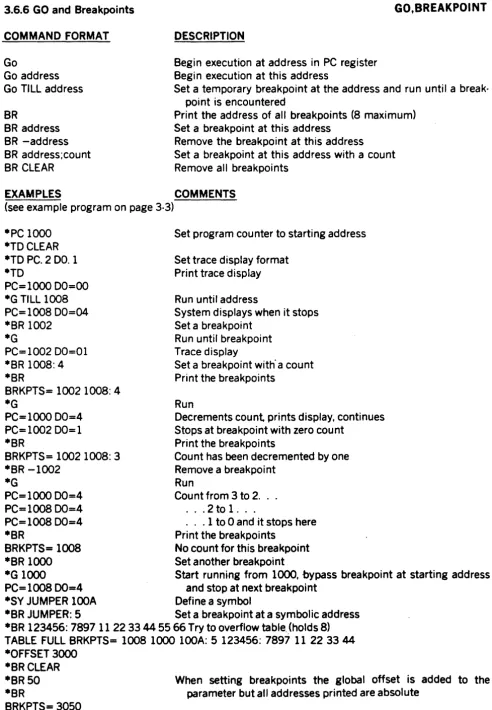
3.6.6 GO and Breakpoints
COMMAND FORMAT
Go
Go address
DESCRIPTION
Begin execution at address in PC register Begin execution at this address
GO,BREAKPOINT
Go TILL address Set a temporary breakpoint at the address and run until a break·
BR
BR address BR -address BR address;count BR CLEAR
point is encountered
Print the address of all breakpoints (8 maximum) Set a breakpoint at this address
Remove the breakpoint at this address Set a breakpoint at this address with a count Remove all breakpoints
EXAMPLES COMMENTS
(see example program on page 3·3)
·PC 1000 ·TDCLEAR ·TD PC. 2 DO. 1 ·TD
PC=l000 00=00 ·G TILL 1008 PC=1008DO=04 ·BR 1002
·G
PC=1002DO=01 ·BR 1008: 4 ·BR
BRKPTS= 1002 1008: 4
Set program counter to starting address
Set trace display format Print trace display
Run until address
System displays when it stops Set a breakpoint
Run until breakpoint Trace display
Set a breakpoint with' a count Print the breakpoints
·G
RunPC= 1000 00=4 Decrements count prints display, continues PC= 1002 00= 1 Stops at breakpoint with zero count
·BR Print the breakpoints
BRKPTS= 1002 1008: 3 Count has been decremented by one
·BR -1002 Remove a breakpoint
·G
RunPC=l000 00=4 Count from 3 to 2 . . . PC= 1008 00=4 . . . 2 to 1 . . .
PC=lOO8 00=4 . . .
1
to 0 and it stops here·BR Print the breakpoints
BRKPTS=
1008
No count for this breakpoint ·BR1000
Set another breakpoint·G 1000
Start running from1000,
bypass breakpoint at starting address PC=1008
00=4 and stop at next breakpoint·SY JUMPER
l00A
Define a symbol·BR JUMPER: 5 Set a breakpoint at a symbolic address ·BR 123456: 7897 11 223344 55 66 Try to overflow table .. (holds 8) TABLE FULL BRKPTS= 1008 1000 100A: 5 123456: 7897 11 22 3344 ·OFFSET 3000
·BRCLEAR ·BR50 ·BR
[image:29.617.55.548.41.752.2]3.6.7 Set the Trace Display Format (Individual Registers)
TRACE DISPLAY
COMMAND FORMATTO TO CLear TO ALI
TO reg#. format
EXAMPLES ·TDCLEAR ·TO PC. 3 01. 1 ·TO
PC=OOOOOO 01=05 ·TD PC. OA6
·TO
01=05 A6=OOOOOO8F ·W3. 2 2000
·M320 ·TO M3. 2 ·TO
DESCRIPTION
Print the trace display
Take everything out of the display
Put all registers in display (see page 3-12)
Add or delete registers in display where reg# is 00-07, AO-A7, WO-W7, MO-M7, PC. SR. US, SSt A, 0, or L (see page 3-12 for A,D,L) . format can be 0,1,2,3,4,Z,0,R, or 5
O=remove the item from the display
1,2,3,4=print this number of bytes as hex characters, include all leading zeros
Z=signed long word hex with zero suppress O=signed long word decimal with zero suppress R=subtract offset (see OFfset command) then print
with Z format with letter 'R' at end S=search symbol table for 4 byte value,
if found print symbol name as 8 characters, if not found print hex value as 8 characters COMMENTS
Turn off all the registers in display Define PC as 3 bytes and 01 as one Command to display
This is the trace display
Remove PC and add A6 which defaults to 4 bytes Display
Display with two new registers Define a window
Set value of memory pseudo register
Add a memory pseudo register to the display Display
01=05 A6=OOOOOO8F M3=OO20 ·TD A6. 1 01. 3 M3. Z
New display
Change length of registers already in display Display
·TO
01=000005 A6=8F M3=20 ·TD 01. R M3. 0
·OFFSET 12345 ·TO
01 =-12340R A6=8F M3=32 ·SYTABLE 8F
·TO A6. 5 M3. 0 ·TO
01=-12340R A6=TABLE
New display, M3 now suppresses leading zeroes 01 is relative and M3 is decimal
Set the offset (see OFfset command) Display
3.6.8
Set the
Trace Display Format (Blocks of Re&isters)TRACE DISPLAY
COMMAND FORMAT DESCRIPTION
Take everything out of the display
Put all data registers in display as a block TO CLear
TO 0.1
TO
A.
1
Put all address registers in display as a block (for O. 1 andA.
1 the format is fixed at 4 bytes)TO L character
TO ALI
EXAMPLES
Define a line separator at the end of display (,0 will reverse
A.
1,D.
1.
andL
char commands) Same as keying in:·TO PC. 3 SR. 2 US. 4 SS. 4 O. 1 A. 1 L
-does not affect other registers and windows that have been previously defined to display
COMMENTS
·TO CLEAR Clear the display
·TO 0.1 Define all data registers in a block
·TO Print the trace display
00=00000000 01=00000000 02 =00000000 03 =00000000 04=00000000 05=00000000 06=00000000 07=00000000
. ·TDCLEAR
·TD A.
1
Define all address registers in a block ·TOAO=OOOOOOOO Al =00000000 A2=00000000 A3=OOOOOOOO A4=OOOOOOOO A5=OOOOOOOO A6=OOOOOOOO A7=00007FFE
·TO L
@
Oefine a line separator (a row of ,@,)·TO
AO=OOOOOOOO Al =00000000 A2=00000000 A3=OOOOOOOO A4=00000000 A5=OOOOOOOO A6=00000000 A7=OOOO7FFE
@@@@@@@@@@@@@@@@@@@@@@@@@@@@@@@@@@@@@@@@@@@
·TO L
&
Define a line separator (a row of '&') -TOAO=OOOOOOOO A1=OOOOOOOO A2=OOOOOOOO A3=00000000 A4=00000000 A5=00000000 A6=OOOOOOOO A7=OOOO7FFE
&&&&&&&&&&&&&&&&&&&&&&&&&&&&&&&&&&&&&&&&&&&&&&&&&&&&
·TO ALL Turn on commonly used registers . . .
·TO . . . this is also the default or reset condition
pc=OOOOOO SR=2000 US=OOOO7FOO SS=OOOO7FFE
00=00000000 01=00000000 02=00000000 03=00000000 04=00000000 05=00000000 06=00000000 07=00000000 AO=OOOOOOOO Al=OOOOOOOO A2.=00000000 A3=00000000 A4=00000000 A5=00000000 A6=00000000 A7=OOOO7FFE
3.6.9
TracineCOMMAND FORMAT Trace
Trace count
Trace TILL address
:*
(CR)DESCRIPTION
Execute one instruction and print trace display Trace specified number of instructions
Trace to the given address (breakpoint will stop the trace)
TRACE
A colon (:) before the prompt indicates a special trace mode is in effect a carriage return will trace the next instruction
EXAMPLES COMMENTS
(see example program on page 3·3)
·DM 1000 Example program in memory
001000 70 01 70 02 70 03 70 04 70 05 4E F8 10 00 FF FF p.p.p.p.p.N. ·PC 1000
·TO
PC=looo 00=00 *T
PC= 1002 00=01
:*
(CR)PC=I004 00=02 :*T 3
PC=l006 00=03 PC=100800=04 PC=IOOA 00=05 :*T TILL 1004 PC=I000 00=05 PC=I002oo=01 PC=IOO4 00=02
.*
Set the program counter Print the trace display Trace one instruction
Special prompt appears, carriage return will trace the next instruction
Trace three instructions
3.6.10
OffsetOFFSET
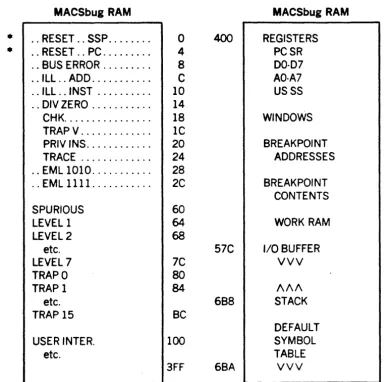
The 68000 instruction set lends itself to relocatability and position independence. A general purpose, global offset feature has been provided. The single offset address applies to all of the commands listed below. Registers displayed in the trace display may have the offset subtracted by using 'R' as the format See paragraph 3.6.7 on trace display.The offset may be overriden by entering a comma and alternate offset All commands do not use the offset but any number can be forced to be relative (have the offset added) by entering an 'R' as the last character of the number.
WARNING: This is a very simple offset feature and may not be able to solve complex relocation prob-lems. The user is encouraged to experiment with the global offset and the window features to deter-mine their limitations and usefulness in a particular application.
COMMAND FORMAT DESCRIPTION
OFfset
OFfset hex value OFfset 0
Display offset
Set the offset to a given value command data,alternate
command data, command data,OR
Set the offset to zero - begin absolute addressing Disregard offset add alternate offset to data Data is absolute, no offset added
Used in commands that do not normally use offset adds offset to data
The offset affects the following commands: TO reg.R
BReakpoint Go SM
OM
PUnch REad EXAMPLE -PC 2010 -TO PC.R -TO PC=2010R -OF 2000 -TO PC=10R -BR6 -BR BRKPTS=2006 *BR 24,3000 *BRTrace display, subtract offset from register value Set breakpoint (display is in absolute)
All addresses
All
addressesAll
addresses (display is in absolute)All
addressesAll
addresses COMMENTSSet the program counter
Set trace display
.R
means hex long word minus offsetDisplay ,
Displayed relative to offset (zero now) Set the offset to 2000
Display
PC - offset = 2010-2000
=
10 RelativeSet a breakpoint: hex data+offset
=
6+2000 = 2006 Display breakpoint3.6.11 Number Base Conversion
COMMAND FORMAT
CV
decimalCV
$hexCV
symbolCV
value,offsetDESCRIPTION
Decimal to hex conversion Hex to decimal conversion Use value from symbol table Calculate offset or displacement
NOTE
NUMBER CONVERSION
This command DOES NOT automatically use the global offset. The default base for this command only is decimal. All numbers are signed 32 bit values.
EXAMPLES
·CV 128 $80=&128 ·CV$20 $20=&32 ·CV -$81
$FFFFFF7F=-$81 =-&129
·CV
$444,III
$555=&1365 ·CV $444,
-Ill
$333=&819 ·CV $111,-444$FFFFFBBC= -$333= -&819 ·SYTEN &10
·SY THIRTY &30 ·CVTEN
$A=&10 ·CV -TEN
$FFFFFFF6=-$A=-&10 ·CV THIRTY, -TEN $14=&20
·OF 2000
·CV $123R $2123=&8483 ·CVTEN,OR $200A=&8202
COMMENTS
Command to convert decimal to hex Computer response
Hex to decimal Negative numbers
Adding an offset (second number's base defaults to first num-ber's)
Subtracting an offset (forward displacement) Backward displacement
Defining a symbolic decimal constant Command can be used with symbols
Define a global offset
3.6.12 Upload, Download and Verify
COMMAND FORMAT
REad ; -CX =text
DESCRIPTION
Load'S' records·default PORT 2 option -C means ignore checksum; option X means display data being read;
LOAD
if equal sign is used in this command line everything after it is sent to PORT 2
VErify ; =text
PUnch add. add. PU address count
Verify memory with '5' records'print difference; verify does not use checksum
Write'S' records between address range
Write specified number of bytes where count
<
addressNOTE
These commands use the offset. No attempt is made to con· trol the host transmissions. For the REad and VErify, any line received not beginning with an '5' is ignored. If an error oc· curs causing the system to take the time to print out an error message, one or more lines sent during the error message may have been ignored.
EXAMPLE COMMENTS
(See example program on page 3·3)
*READ ;=COPV FILE. MX,#CN Download from an EXORciser *DM 1000 10 Check to see if data was loaded
001000 7001 7002 7003 7004 7005 4E F8 1000 FF FF p.p.p.p.p.N . . . *VERIFY ;=COPV FILE. MX,#CN Normal verify returns with prompt
*SM 1005 FF Deliberately change memory to show verify *DM 1000 Verify that 03 was changed to FF
001000 70 01 70 02 70 FF 70 04 70 05 4E F8 10 00 FF FF p.p.p.p.p.N . . . *VERIFY ;=COPV FILE. MX,#CN
S1111000 03 Displays only nonmatching data bytes *RE ;=COPV FILE!. MX,#CN Example of file with bad character SIIII0007001700270/3700470054EF8100049 NOT HEX=/
*RE ;=COPV FILE2. MX,#CN Example of file with bad checksum SIIII000700170027003700470054EF8100039 CHKSUM=49
*RE ;=COPV FILE. MX,#CN Normal read returns with prompt *PUNCH 1000 0 Print'S' records on console
SOO 1 0000 FE Header
S1111000700170027003700470054EF8100049 Data with address of 1000
S9120000A4 End·of·file
*OF 1000 Define a global offset
*PUNCHOD,O SOOI0000FE
SI110000700170027003700470054EF8100049 S9120000A4
*OF5423
*RE ;=COPV FILE. MX,/lCN Download with offset
Header
Data with address
at
zero End·ot·file3.6.13 Configure Ports
SET TERMINALS
There are two serial ports numbered1
and2.
The following commandsmay program a specific port or i f a port number is not used in the command, both ports will be set by the cOl11T1and.
For port commands shown below, '#' may be either 1 for PORT 1 (console), or 2 for PORT 2 (host). If the '#' field is left blank, the command applies to both ports.
COMMAND FORMAT DESCRIPTION FO#
NU# CR# TE#
EXAMPLE *NU15 *NU
hex
hex hex baud
NU1=5 NU2=O *TE21200 *NU
NU1=5 NU2=3 *CR
CR1=O CR2=17 *TE
2400
·CR CR=2F *NU NU=7 *NU8FOrmat - initialize ACIA
(default=$15 = 8 bit words, no parity, 1 stop bit and clock/16.) NUll pads; nulls sent after each character
Carriage return null pads sent after each CR
TErminal format; set NU and CR null parameters for TI 700 series ter· minals
BAUD NU CR
110
0
0 (default)300
0
4
1200 3 $17
2400 7 $2F
NOTE
The TE command does not change the hardware BAUD rate.
Port BAUD rates are changed by
swi
tches
on the seri a1 I/O
board. COMMENTSSet character null padding on PORT #1 to 5 nulls Print out current NU parameters
Zero is the default at system restart
Set PORT #2 to
3
character nulls and $17 CR nullsPrint null parameters. . . the NU and CR parameters for PORT #2 were set by the TE2 command
Change both ports to 2400 baud null pattern Print the CR parameters
If both ports have the same parameter, one number is printed
3.6.14 The CALL Command and Adding Commands to MACSbug
CALL
There are two ways for the user to add commands. The simplest way is for the user to write the new command as a subroutine which ends with an RTS. The user can then use the CAli command. This command does not affect the user's registers and is not to be confused with the GO command. The user may use a symbol as the command parameter instead of an absolute starting address. Reg· isters A5 and A6 point to the start and end of the liD BUFFER (see RAM equate file listing, paragraph 3.11) so the user may pass additional parameters on the command line.COMMAND FORMAT CAli address
EXAMPLE
·CALL 3000 23 45 ZZ
·SY FIXUP 2300 ·CALLFIXUP
DESCRIPTION
JSR to user subroutine, routine ends with RTS COMMENTS
JSR to user routine at location 3000
note that 23 45 & ZZ may be additional parameters that the user's subroutine will decode and are ignored by MACSbug Define a symbol as absolute address 2300
JSR to symbolic address
The second method of adding commands involves MACSbug's command table. There is a RAM loca· tion CMDTABLE that is MACSbug's pointer to the start of the command table. The user may wish to copy this table into RAM, add his own commands or change the names of the existing ones, and change CMDTABLE to point to the new table.
The format of the table is very simple. Each command occupies six bytes in the table. The first two bytes are the command name and the next four bytes are the starting address of the code. The com· mands are not subroutines and all end by reentering the command decoder routine. The last entry in the table has $FFFF as the two byte name.
3.6.15 Transparent Mode and Host Communication
TRANSPARENT
COMMAND FORMAT
P2
(control A)
* ...
data . . .EXAMPLES MACSBUG 1.0
*P2
*TRANSPARENT*
DESCRIPTION
Enter transparent mode:
Transparent mode sends all characters typed at the terminal to the
host computer. All transmissions from the host are typed on the
local terminal. For this mode to work properly, the BAUD rate of
the host connection MUST be slower than than the terminal.
Control ·A' ends the transparent mode
Asterisk, '*', as the first character of the console input buffer means transmit the rest of the buffer to the host (PORT2), the BAUD rates DO NOT have to be the same
COMMENTS
Start up or reset condition
Command to enter transoarent mode
(NOTE: the BAUD rate of the host must be slower than the terminal)
MACSbug prints this
User talks directly to the host uses the editor, assembler, etc. (CONTROL A)
*MACSBUG* **MAID **E800;G
Ends the transparent mode
MACSbug prints this and system is ready for new command System prompts with '.' and user enters ·*MAID'