121
LIDA: Lightweight Interactive Dialogue Annotator
Edward Collins
Wluper Ltd. London, United Kingdom
Nikolai Rozanov
Wluper Ltd. London, United Kingdom [email protected]
Bingbing Zhang
Wluper Ltd. London, United Kingdom [email protected]
Abstract
Dialogue systems have the potential to change how people interact with machines but are highly dependent on the quality of the data used to train them. It is therefore impor-tant to develop good dialogue annotation tools which can improve the speed and quality of di-alogue data annotation. With this in mind, we introduce LIDA, an annotation tool designed specifically for conversation data. As far as we know, LIDA is the first dialogue annotation system that handles the entire dialogue anno-tation pipeline from raw text, as may be the output of transcription services, to structured conversation data. Furthermore it supports the integration of arbitrary machine learning mod-els as annotation recommenders and also has a dedicated interface to resolve inter-annotator disagreements such as after crowdsourcing an-notations for a dataset. LIDA is fully open source, documented and publicly available1.
1 Introduction
Of all the milestones on the road to creating arti-ficial general intelligence perhaps one of the most significant is giving machines the ability to
con-verse with humans. Dialogue systems are
be-coming one of the most active research areas in Natural Language Processing (NLP) and Machine Learning (ML). New, large dialogue datasets such
as MultiWOZ (Budzianowski et al., 2018) have
allowed data-hungry deep learning algorithms to be applied to dialogue systems, and challenges such as the Dialogue State Tracking Challenge
(DSTC) (Henderson et al., 2014) and Amazon’s
Alexa Prize (Khatri et al., 2018) encourage
com-petition among teams to produce the best systems. The quality of a dialogue system dependents on the quality of the data used to train the system.
1https://github.com/Wluper/lida
Creating a high-quality dialogue dataset incurs a large annotation cost, which makes good dialogue annotation tools essential to ensure the highest possible quality. Many annotation tools exist for a range of NLP tasks but none are designed specifi-cally for dialogue with modern usability principles in mind - in collecting MultiWOZ, for example,
Budzianowski et al.(2018) had to create a bespoke annotation interface.
In this paper, we introduce LIDA, a web ap-plication designed to make dialogue dataset cre-ation and annotcre-ation as easy and fast as possible. In addition to following modern principles of us-ability, LIDA integrates best practices from other state-of-the-art annotation tools such as
INCEp-TION (Klie et al.,2018), most importantly by
al-lowing arbitrary ML models to be integrated as an-notation recommenders to suggest anan-notations for data. Any system with the correct API can be in-tegrated into LIDA’s back end, meaning LIDA can be used as a front end for researchers to interact with their dialogue systems and correct their re-sponses, then save the interaction as a future test case.
When data is crowdsourced, it is good prac-tice to have multiple annotators label each piece
of data to reduce noise and mislabelling (Deng
et al.,2009). Once you have multiple annotations, it is important to be able to resolve conflicts by highlighting where annotators disagreed so that an arbiter can decide on the correct annotation. To this end, LIDA provides a dedicated interface which automatically finds where annotators have disagreed and displays the labels alongside a per-centage of how many annotators selected each la-bel, with the majority annotated labels selected by default.
1.1 Main Contributions
Annotation Tool Turn/Dialogue Seg-mentation
Classification Labels Edit Dialogues/Turns Recommenders Inter-Annotator Disagreement Resolution
Language
LIDA YES YES YES YES YES PYTHON
INCEpTion (Klie et al.,2018) NO YES NO YES YES/NO4 JAVA GATE (Cunningham,2002) NO YES NO NO YES/NO5 JAVA
TWIST (Pluss,2012) YES NO YES NO NO
-BRAT (Stenetorp et al.,2012) NO YES NO YES NO PYTHON
DOCCANO3 NO YES NO NO NO PYTHON
[image:2.595.70.534.61.136.2]DialogueView (Heeman et al.,2002) YES YES YES NO NO TcK/TK
Table 1: Annotator Tool Comparison Table
Turn/Dialogue Segmentation: segment raw text into turns and dialogues. Classification Labels: label classification data. Edit Dialogues/Turns: allow users to add/edit/delete new turns or dialogues. Recommenders: ML models to suggest annotations. Inter-Annotator Disagreement Resolution: whether the system has an interface to resolve disagreements between different
annotators. Language: what programming language the system uses
• A modern annotation tool designed
specifi-cally for task-oriented conversation data
• The first dialogue annotator capable of
han-dling the full dialogue annotation pipeline from turn and dialogue segmentation through to labelling structured conversation data
• Easy integration of dialogue systems and
rec-ommenders to provide annotation sugges-tions
• A dedicated interface to resolve
inter-annotator disagreements for dialogue data
2 Related Work
Various annotation tools have been developed for
NLP tasks in recent years. Table1compares LIDA
with other recent annotation tools. TWIST (Pluss,
2012) is a dialogue annotation tool which consists
of two stages: turn segmentation and content fea-ture annotation. Turn segmentation allows users to highlight and create new turn segments from raw text. After this, users can annotate sections of text in a segment by highlighting them and select-ing from a predefined feature list. However, this tool doesn’t allow users to specify custom anno-tations or labels and doesn’t support classification or slot-value annotation. This is not compatible with modern dialogue datasets which require such
annotations (Budzianowski et al.,2018).
INCEpTION (Klie et al., 2018) is a semantic
annotation platform for interactive tasks that re-quire semantic resources like entity linking. It pro-vides machine learning models to suggest annota-tions and allows users to collect and model
knowl-edge directly in the tool. GATE (Cunningham,
2002) is an open source tool that provides
prede-fined solutions for many text processing tasks. It is powerful because it allows annotators to enhance the provided annotation tools with their own Java
code, making it easily extensible and provides an enormous number of predefined features. How-ever, GATE is a large and complicated tool with a significant setup cost - its instruction manual alone
is over 600 pages long2. Despite their large
fea-ture sets, INCEpTION and GATE are not designed for annotating dialogue and cannot display data as turns, an important feature for dialogue datasets.
BRAT (Stenetorp et al.,2012) and Doccano3are
web-based annotation tools for tasks such as text classification and sequence labeling. They have intuitive and user-friendly interfaces which aim to make the creation of certain types of dataset such as classification or sequence labelling datasets as fast as possible. BRAT also supports annotation suggestions by integrating ML models. However,
like INCEpTION4 and GATE5, they are not
de-signed for annotating dialogues and do not support generation of formatted conversational data from a raw text file such as may be output by a transcrip-tion service. LIDA aims to fill these gaps by pro-viding a lightweight, easy-to-setup annotation tool which displays data as a series of dialogues, sup-ports integration of arbitrary ML models as rec-ommenders and supports segmentation of raw text into dialogues and turns.
DialogueView (Heeman et al., 2002) is a tool
for dialogue annotation. However, the main use-cases are not focused on building dialogue sys-tems, rather it is focused on segmenting recorded conversations. It supports annotating audio files as well as discourse segmentation - hence, granu-lar labelling of the dialogue, recommenders,
inter-2
https://gate.ac.uk/sale/tao/tao.pdf 3
https://github.com/chakki-works/doccano
4Getting the scores is available as a plugin: https://dkpro.github.io/dkpro-statistics/dkpro-agreement-poster.pdf - resolving the issues seems to be not supported
annotator agreement, and slot-value labelling is not possible with DialogueView.
3 System Overview
LIDA is built according to a client-server architec-ture with the front end written in standard web lan-guages (HTML/CSS/JavaScript) that will run on any browser. The back end written in Python
us-ing the Flask6web framework as a RESTful API.
The main screen which lists all available
dia-logues is shown in Figure3, in the Appendix. The
buttons below this list allow a user to add a blank or formatted dialogue file. Users can also drag and drop files in this screen to upload them. The user is then able to add, delete or edit any particular dialogue. There is also a button to download the whole dataset as a JSON file on this page. Click-ing on a dialogue will take users to the individual
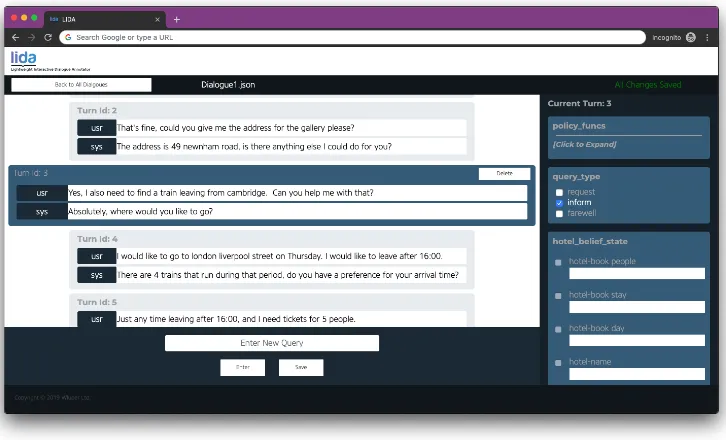
dialogue annotation screen shown in Figure1.
LIDA uses the concept of a “turn” to organise how a dialogue is displayed and recorded. A turn consists of a query by the user followed by a re-sponse from the system, with an unlimited num-ber of labels allowed for each user query. The user query and system response are displayed in the large area on the left of the interface, while the labels for each turn are shown in the scrol-lable box on the right. There are two forms that these labels can currently take which are particu-larly relevant for dialogue: multilabel classifica-tion and slot-value pair.
An example of multilabel classification is whether the user was informing the system or re-questing a piece of information. An example of a slot-value pair is whether the user mentioned the type of restaurant they’d like to eat at (slot: restaurant-type) and if so what it was (value: ital-ian, for example). The front-end code is written in a modular form so that it is easy for researchers us-ing LIDA to add custom types of labels and anno-tations, such as sequence classification, to LIDA.
Once annotation is complete, users can resolve inter-annotator disagreements on the resolution screen. Here, each dialogue is listed along with the number of different people who have annotated it. More annotations can be added by dragging and dropping dialogue files into this screen. When the user clicks on one of these dialogues, they are
taken to the resolution screen shown in Figure2.
Here, all of the disagreements in a dialogue are
6http://flask.pocoo.org/
listed and the label which annotators disagreed on is also shown. The label most frequently selected by annotators is assigned as correct by default, and the arbiter can accept this annotation simply by pressing “Enter” or else re-label the data item. Once the arbiter has checked an annotation, it is displayed as “Accepted” in the error list and the dialogue file automatically saved.
3.1 Use Cases
3.1.1 Experimenting with Dialogue Systems
While generic evaluation metrics are important for understanding the performance of a dialogue sys-tem, another important method of evaluation is to talk to the dialogue system and see if it gives subjectively satisfying results. This gives the re-searcher insight into which part of the system most urgently needs improvement faster than perform-ing more complex error analysis. However, if the user talks to their dialogue system through a ter-minal interface, they have no way of correcting the system when it answers incorrectly. The re-searcher should be able to record every interaction they have with their system and correct the predic-tions of the system easily and quickly. That way, the researcher will be able to use each previous recorded interaction as a test case for future ver-sions of their system.
LIDA is designed with this in mind - a dialogue system can be integrated in the back end so that it will run whenever the user enters a new query in the front end. The user will then be able to eval-uate whether the system gave the correct answer and correct the labels it gets wrong using the front end. LIDA will record these corrections and allow the user to download the interaction with their di-alogue system with the corrected labels so that it can be used as a test case in future versions of the system.
3.1.2 Creating a New Dialogue Dataset
Users can create a blank dialogue on LIDA’s home screen, then enter queries in the box shown at the
bottom of Figure1. Along with whole dialogue
Figure 1: Turn List : A list of turns for one specific dialogue, users can add new turns, delete turns, edit utterances and annotate labels here.
name of the dialogue being annotated can be seen next to the “Back” button at the top left of the screen and can be edited by clicking on it.
3.1.3 Annotating An Existing Dataset
Datasets can be uploaded via drag-and-drop to the home screen of the system, or paths can be spec-ified in the back end if the system were being used for crowdsourcing. Datasets can be in one of two forms, either a “.txt” file such as may be produced by a transcription service, or a format-ted “.json” file, a common format for dialogue data (Budzianowski et al.,2018;Henderson et al.,
2014). Once the user has uploaded their data, their
dialogue(s) will appear on the home screen. The user can click on each dialogue and will be taken to the single dialogue annotation screen shown
in Figure 1 to annotate it. If the user uploaded
a text file, they will be taken to a dialogue and
turn segmentation screen. Following the same
constraints imposed in MultiWOZ (Budzianowski
et al.,2018) and DSTC (Henderson et al.,2014), this turn segmenter assumes that there are only two participants in the dialogue: the user and the sys-tem, and that the user asks the first query. The user separates each utterance in the dialogue by a blank line, and separates dialogues with a triple equals sign (“===”). Once the user clicks “Done”, the text file will automatically be parsed into the correct JSON format and each query run through the recommenders in the back-end to obtain
anno-tation suggestions.
3.1.4 Resolving Annotator Disagreement
Researchers could use LIDA’s main interface to crowdsource annotations for a dialogue dataset. Once they have several annotations for each dia-logue, they can upload these to the inter-annotator resolution interface of LIDA. The disagreements between annotators will be detected, with a per-centage shown beside each label to show how many annotators selected it. The label with the highest percentage of selections is checked by de-fault. The arbiter can accept the majority label simply by pressing “Enter” and can change er-rors with the arrow keys to facilitate fast resolu-tion. This interface also displays an averaged (over
turns) version of Cohen’s Kappa (Cohen, 1960),
the total number of annotations, total number of errors and averaged (over turns) accuracy.
3.2 Features7
Specifying Custom Labels LIDA’s configura-tion is controlled by a single script in the back end. This script defines which labels will be dis-played in the UI and is easy to extend. Users can define their own labels by altering this configura-tion script. If a user wishes to add a new label, all they need to do is specify the label’s name, its type
Figure 2: Screenshot of the inter-annotator disagreement resolution screen.
(classification or slot-value pair, currently) and the possible values the classification can take. Along-side the label specification, they can also specify a recommender to use for the label values. The label will then automatically be displayed in the front end. Note that labels in uploaded datasets will only be displayed if the label has an entry in the configuration file.
Custom Recommenders When creating a dia-logue dataset from scratch, LIDA is most power-ful when used in conjunction with recommenders which can suggest annotations for user queries to be corrected by the annotator. State-of-the-art
tools such as INCEpTION (Klie et al.,2018)
em-phasise the importance of being able to use recom-menders in annotation systems. Users can spec-ify arbitrary ML models to use for each label in
LIDA’s back end. The back end is written in
Python, the de facto language for machine learn-ing, so researchers can directly integrate models written in Python to the back end. This is in
con-trast to tools such as INCEpTION (Klie et al.,
2018) and GATE (Cunningham, 2002) which are
written in Java and so require extra steps to inte-grate a Python-based model. To inteinte-grate a rec-ommender, the user simply provides an instanti-ated Python object in the configuration file that has a method called “transform” that takes a single string and returns a predicted label.
Dialogue and Turn Segmentation from Raw
Data When uploading a .txt file, users can
seg-ment each utterance and each dialogue with a sim-ple interface. This means that raw dialogue data with no labels, such as obtained from a transcrip-tion service, can be uploaded and processed into a labelled dialogue. Segmented dialogues and turns are automatically run through every recommender to give suggested labels for each utterance.
4 Evaluation
Table1shows a comparison of LIDA to other
an-notation tools. To our knowledge, LIDA is the only annotation tool designed specifically for di-alogue systems which supports the full pipeline of dialogue annotation from raw text to labelled dia-logue to inter-annotator resolution and can also be used to test the subjective performance of a dia-logue system.
These annotators annotated an average of 79 di-alogues in one hour with a standard deviation of 30, which corresponds to an average of 816.5 indi-vidual annotations. The annotators who had never seen the system before annotated an average of 60 dialogues corresponding to an average of 617 in-dividual annotations.
Once we had these six annotations, we per-formed a second experiment whereby a single ar-biter resolved inter-annotator disagreements. In one hour, the arbiter resolved 350 disagreements and noted that resolution was slowest when resolv-ing queries with a high degree of disagreement.
These results show that LIDA provides fast an-notation sufficient for collecting large scale data. At the recorded pace of the annotators who had not seen the system before, 100 workers could cre-ate a dialogue dataset of 6000 dialogues with
ap-proximately6000∗3.5 = 21000turns with three
annotations per turn in one hour. In large scale
col-lections, such as MultiWOZ (Budzianowski et al.,
2018) where 1249 workers were used, much larger
datasets with richer annotations could be created. Clearly annotation quantity will depend on the dif-ficulty of the task, length of dialogue and number of labels to be assigned to each utterance but our results suggest that a high speed is achievable.
5 Conclusion
We present LIDA, an open source, web-based an-notation system designed specifically for dialogue data. LIDA implements state-of-the-art annotation techniques including recommenders, fully cus-tomisable labels and inter-annotator disagreement resolution. LIDA is the only dialogue annotation tool which can handle the full pipeline of dia-logue dataset creation from turn and diadia-logue seg-mentation to structured conversation data to inter-annotator disagreement resolution.
Future work will look at adding new label types to LIDA, adding the possibility to have more than two actors in the conversation, a centralised ad-min page, additional labelling (e.g. co-reference resolution) and in general enhancing usability as users provide feedback. Our hope is that this work will find applications and usability beyond what we have outlined and developed so far and that with a community effort a modern and highly ac-cessible tool will become widely available.
References
Paweł Budzianowski, Tsung-Hsien Wen, Bo-Hsiang Tseng, I˜nigo Casanueva, Stefan Ultes, Osman Ra-madan, and Milica Gaˇsi´c. 2018. Multiwoz-a large-scale multi-domain wizard-of-oz dataset for task-oriented dialogue modelling. arXiv preprint arXiv:1810.00278.
Jacob Cohen. 1960. A coefficient of agreement for nominal scales. Educational and psychological measurement, 20(1):37–46.
Hamish Cunningham. 2002. Gate, a general architec-ture for text engineering. Computers and the Hu-manities, 36(2):223–254.
Jia Deng, Wei Dong, Richard Socher, Li-Jia Li, Kai Li, and Li Fei-Fei. 2009. Imagenet: A large-scale hier-archical image database. In2009 IEEE conference on computer vision and pattern recognition, pages 248–255. Ieee.
Peter A. Heeman, Fan Yang, and Susan E. Strayer. 2002. DialogueView - an annotation tool for dia-logue. In Proceedings of the Third SIGdial Work-shop on Discourse and Dialogue, pages 50–59, Philadelphia, Pennsylvania, USA. Association for Computational Linguistics.
Matthew Henderson, Blaise Thomson, and Jason D Williams. 2014. The second dialog state tracking challenge. InProceedings of the 15th Annual Meet-ing of the Special Interest Group on Discourse and Dialogue (SIGDIAL), pages 263–272.
Chandra Khatri, Behnam Hedayatnia, Anu Venkatesh, Jeff Nunn, Yi Pan, Qing Liu, Han Song, Anna Got-tardi, Sanjeev Kwatra, Sanju Pancholi, et al. 2018. Advancing the state of the art in open domain dia-log systems through the alexa prize. arXiv preprint arXiv:1812.10757.
Jan-Christoph Klie, Michael Bugert, Beto Boullosa, Richard Eckart de Castilho, and Iryna Gurevych. 2018. The inception platform: Machine-assisted and knowledge-oriented interactive annotation. In
Proceedings of the 27th International Conference on Computational Linguistics: System Demonstrations, pages 5–9.
Brian Pluss. 2012. Twist dialogue
annota-tion tool. http://mcs.open.ac.uk/
nlg/non-cooperation/resources/ user-guide.pdf.