Received Mar 30, 2016 / Accepted Jun 1, 2016
Node Based Visual Editor for Mobile Augmented Reality
Ramón Iván Barraza Castillo
a, Vianey Guadalupe Cruz Sánchez
b,
Osslan Osiris Vergara Villegas
band Anita Loya Lozoya
ca
Architecture, Design and Art Institute,
Ciudad Juárez Autonomous University,
Ciudad Juárez, Chihuahua, México
[email protected]
b
Engineering and Technology Institute,
Ciudad Juárez Autonomous University,
Ciudad Juárez, Chihuahua, México
{vianey.cruz, overgara}@uacj.mx
c
Ciudad Juárez Technological Institute,
Ciudad Juárez, Chihuahua, México
[email protected]
Abstract. Creating interactive Augmented Reality (AR) applications is still a rather technical matter; it requires programming skills that increase with the complexity of the application. This paper proposes a flexible and scalable node based visual editor, built on the entity system architecture; the creation a simple, yet interactive water cycle educational application is presented to demonstrate how the tool can be used. A usability test is conducted with six participants divided into two contrasting groups (developers and non-developers), a questionnaire is used to gather insight on the experiences from the users, the results that are presented, show that both groups found the tool to be appealing and useful.
Keywords: Mobile augmented reality; authoring tools; visual editor; node based; entity systems.
1
Introduction
Augmented Reality is a field of study within Virtual Reality (VR); it can be thought of as one of the possibilities that exist between the real world and a fully virtual environment. The core of Augmented Reality (AR) is the human computer interaction paradigm, in which graphics generated by a computer are overlaid with real world objects or places in order to create the illusion of a seamless scene. This fits in with one of the most commonly accepted definitions given by Ronald Azuma [1] that sees AR as a technology that takes information from the real world and blends it with virtual elements; it is tracked in 3D space and interactive in real time. AR is henceforth, an interactive system that takes real world information and provides superimposed output data in real time.
Since its beginning, AR has experienced considerable progress in research and adoption by the growing community of interested users. In this sense, both the academic community and large companies have view the potential of AR technology in a various fields like education, medicine, military and industrial training, marketing and entertainment. That is why more researchers and companies have begun developing solutions focused on content authoring to accelerate the widespread adoption of the technology AR.
Content authoring tools are a type of computer program used by developers to create and pack content that will be delivered to end users. In the case or AR it refers to a type of Software that provides tools to organize and edit multimedia features inside a project. Authoring tools provide integrated environments to combine functionality and content in a single project. It allows the developer to combine graphics, text, animations as well as video and audio into a single interactive, professional and engaging production.
Authoring systems include tools for creating, editing, converting and visualizing multimedia content, as well as visual editors. Flowcharting and storyboarding are tools often used during the different parts of the multimedia production process, as they simplify the organization and design and give an overall view of the project.
One of the common problems on most AR authoring tools is the balance between ease of development and functionality of the final application. In other words, some important features are sacrificed in favor of a friendlier user interface and vice versa, more robust frameworks require more technical knowledge and programming skills by the designer. According to Martin et al. [8], there are almost no tools intended specifically for education authoring furthermore, creating virtual content, particularly 3D objects can be a daunting task; because of this, AR has seen limited use in teaching.
Visual programming provides a solution for rapid application development, as well as providing ideas that can be used to understand the generic architecture of the systems and virtual environments [9]. This type of programming is not really new; it is been around since the 1970s when Computer Aided Design (CAD) began to be used for the design of logic circuits.
Visual programming basically refers to the creation of programs through spatial manipulation of visual elements within an editor; because communication between the computer and the developer is more straightforward, is considered to be more intuitive than traditional programming and given the right conditions, allows the user a better understanding of the connections among entities and therefore the interconnection of the components. Thus, the goal of visual programming is to exploit the natural human instinct and reuse their cognitive resources to perform the tasks, more efficiently and intuitively [10].
Projects like Alice [11] at Carnegie Mellon University in 1999, Greenfoot [12] at the University of Kent in 2006 and Scratch [13] at the MIT Media Lab are examples of visual editors, used to teach programming without engaging in intricate detail the syntax and semantics of traditional programming languages like C, C ++, Java. Even big names on the industry such as Microsoft have taken this approach with Visual Programming Language (VPL) as part of their Robotics Developer Studio environment, Kismet/Blueprints on Epic Games Unreal Engine and Blender Graphical Logic Editor, to name a few.
As previously stated, one of the key difficulties with the authoring of robust AR applications, lies in the complexity of its programming, while it is true that most available AR libraries show simple examples that almost anyone with a certain level of computer technical knowledge can reproduce, it is also true that these examples are relatively simple and not very useful in understanding the intricate process of adding custom functionality.
AR authoring tools can provide different levels of abstraction in the creation of applications and just like in conventional digital content creation; a balance in low-level programming and content-based high-level tools must be found, since it affects various aspects of the final product.
This paper introduces a novel, easy to use editor based on the visual programming paradigm in the likes of the one proposed by Baik et al. [16], allowing for easy creation of mobile AR applications. Leveraging the highly programmable nature of the Unity3D [17] game engine editor and its encapsulation model, a flexible and scalable node based visual editor that appeals to experienced, novice designers and enthusiasts is featured. The paper also presents a simple user case study regarding the creation of an AR water cycle application, and the results of a usability questionnaire of the visual editor.
The remainder of the paper is structured as follows. In Section 2 the proposed visual editor is introduced, while Section 3 describes the sample application and system assessment through the use of a questionnaire. Section 4 presents the evaluation and its results. Finally, the conclusions are presented in Section 5.
2
Node Based Visual Editor
This section depicts the creation of the proposed node based visual AR scene editor as a plug-in for Unity3D game engine. The section only covers three custom nodes, enough to create functional AR applications.
Entities systems have become a popular method for game development due to its advantages in code reuse, ease of functionality addition to entities, linking new components without rewriting the behavior of the entity and minimizing code duplication. Building on the idea that an AR application, can be thought of as a kind of game, the development of a node centered visual editor based on entities methodology is proposed.
2.1 Development
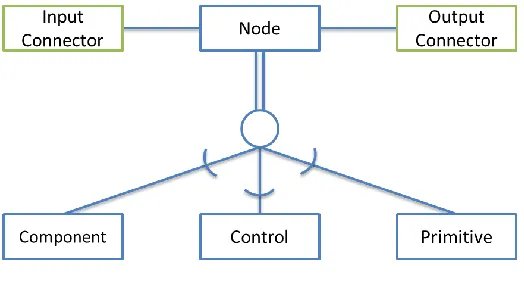
[image:3.612.178.440.414.556.2]The basic components of the editor are the nodes and connections. As it is shown in Fig. 1, the nodes are classified as componentNode, controlNode and primitiveNode. Regardless of the type of node, they can have a collection of input and output points which act as properties modifiers. The connections are lines that link one node’s output connector to another node’s input; is this linking, that describes the flow of the entire scene.
Fig. 1. Component Diagram
The formal implementation was done by defining a base abstract class called Node from which classes can derive and serve as template for new custom nodes.
2.2 Nodes
public class Node : Object { string titulo = ""; Vector2 posicion;
Vector2 tamano = Vector2(200,100); boolean seleccionable;
int indice = -1;
List<Conectores> entradas; List<Conectores> salidas; void Awake() {
entradas = new List<Conectores>(); salidas = new List<Conectores>(); seleccionable = true;
} }
Listing 1. Class Node.cs
As previously mentioned, three types of custom nodes were produced as proof of how easy is to define new components and reusable behaviors in the visual editor. The first node represents a Vuforia [18] FrameMarker object; it is a cornerstone component of the application, used to tell the rendering subsystem where to superimpose the virtual object on the real scene. In Listing 2 a simplified definition of the class that is used to instantiate such nodes is shown.
public class FrameMarkerNode : Node { void Awake() {
base.Awake();
titulo = "Marcador";
entradas.Add(new Conector(this)); entradas.Add(new Conector(this)); salidas.Add(new Conector(this)); entradas[0].titulo = "Id";
entradas[1].titulo = "Hijo"; salidas[0].titulo = "Salida"; }
}
Listing 2. Class FrameMarkerNode.cs
The second node represents a GameObject inside Unity3D; this element symbolizes the computer generated models that are superimposed. Listing 3 shows an abstract of the class created for this purpose.
public class GameObjectNode : Node { void Awake() {
base.Awake(); titulo = "Objeto";
} }
Listing 3. Class GameObjectNode.cs
The previous nodes are classified as componentNode, since they only expose the properties that can be set when instantiating a new object or modified at runtime.
The third custom node belongs to the primitiveNode classification, it is used to define primitive data type such as integer, floating point numbers, characters, string or vector, to name a few. This type of nodes is used to establish and or modify the properties of other nodes. The class used to describe these elements is shown in Listing 4.
public class NumberNode : Node { void Awake() {
base.Awake(); titulo = "Numero";
entradas.Add(new Conector(this)); salidas.Add(new Conector(this)); entradas[0].titulo = "Entrada"; salidas[0].titulo = "Salida"; }
}
Listing 4. Class NumberNode.cs
Finally controlNodes are us to perform mathematical calculations or to regulate behaviors; Listing 5 shows the definition for MergeNode, which takes as many as four inputs and combine them into a single output. This is useful when creating hierarchical parent/child relationships like the ones used in Unity3D.
public class MergeNode : Node { void Awake() {
base.Awake();
titulo = "Combinar";
entradas.Add(new Conector(this)); entradas.Add(new Conector(this)); entradas.Add(new Conector(this)); entradas.Add(new Conector(this)); salidas.Add(new Conector(this)); entradas[0].titulo = "Entrada 1"; entradas[1].titulo = "Entrada 2"; entradas[2].titulo = "Entrada 3"; entradas[3].titulo = "Entrada 4"; salidas[0].titulo = "Salida"; }
}
Listing 5. Class MergeNode.cs
2.3 Editor
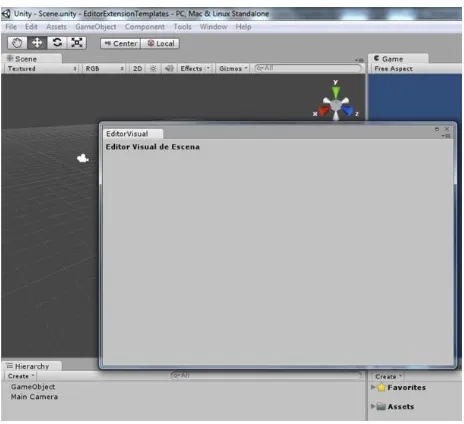
Following the selected plug-in development paradigm, it was necessary to build the window that serve as the canvas for the visual editor in Unity3D. Listing 6 shows the structure of the class derived from EditorWindow with the necessary methods to implement in order to get the results shown on Fig. 2.
[MenuItem("Window/Editor Visual de Escena")] public static void ShowWindow() {
EditorWindow.GetWindow(typeof(VisualEditor)); }
void Awake() {
lstNodos = new List<Node>(); }
void OnGUI() {
GUILayout.Label ("Editor Visual de Escena",EditorStyles.boldLabel); }
}
[image:6.612.190.422.254.466.2]Listing 6. Class VisualEditor.cs
Fig. 2. Visual editor window
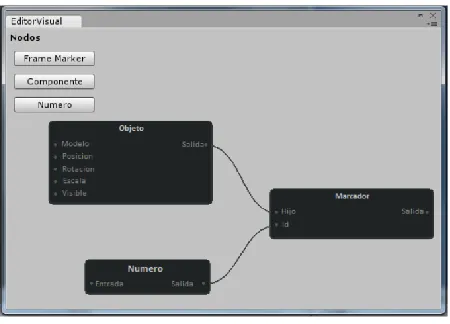
[image:6.612.191.422.534.696.2]Based on the previous structure, a series of buttons were added to the graphical interface so that when pressed, an instance of the different type of nodes is created. Fig. 3 shows the editing window with these changes.
Given the nature of Unity3D, everything related to the Graphical User Interface (GUI), happens inside the OnGUI function; which runs on an infinite loop, thus every onscreen control must be constantly redrawn. It is also required to listen for any event fired up by the input devices (keyboard, mouse, touchscreen) in order to react to them. Each time the user clicks on one of the buttons, an event is fired, evaluated and if required, an instance of the corresponding node class is created and added to the list of active nodes.
[image:7.612.192.417.221.383.2]The active node list is continuously looped through and for each element contained in it, a graphical representation is drawn on the editor window, as seen in Fig. 4. The number of input and output connectors is drawn according to the type of node, while the values for the parameters, connections and position are constantly monitored and stored within the instance variables to update the node at the next OnGUI call.
Fig. 4. Graphical representation of the scene through interconnected nodes
The final step is to create the scene within Unity3D with the GameObjects and necessary scripts. To do so; the tool iterate through the nodes in the active node list, identifying their type and the correct value assignment for each of its properties. Listing 7 shows an excerpt of code required for this activity.
public class VisualEditor : EditorWindow { List<Node> lstNodos;
void Awake() {
lstNodos = new List<Node>(); }
void OnGUI() {
if(GUI.Button(new Rect(10,200,105,20),"Generar Escena")) { foreach(Node n in lstNodos) {
if(n instanceof FrameMarkerNode) {
GameObject fm = (GameObject)Instantiate( Resources.Load("FrameMarker"));
GameObject go = (GameObject)Instantiate( Resources.Load(n.entradas[1].value)); go.transform.parent = fm.transform; }
} } } }
To conclude this section, it’s essential to note that by following the entity system architecture, it guarantees that the visual editor is flexible enough for changes to be easily made in the node definition and scalable to incorporate new type of nodes for future proofing the tool. It is also domain independent; meaning that it can be used to create any type of AR application regardless of the field it will support.
3
Sample application and system assessment
[image:8.612.175.429.243.393.2]After going through several school books and reading the works of Tarng, Ou, Yu, Liou and Liou [19] on an AR application to study the life cycle of the butterflies, the authors decided on the subject of the water cycle as a good example of how AR can be used as a complementing tool to teach the topic and prove the effectiveness of the proposed tool in the creation of AR content. The techniques used to present the information to the students, are simple illustrations like the one shown in Fig. 5, limiting to describe the components and phases of the cycle.
Fig. 5. Water Cycle
The idea behind the AR application to illustrate the water cycle is that students can identify each of the components seen in class and have control over the elements that trigger each phases of the cycle.
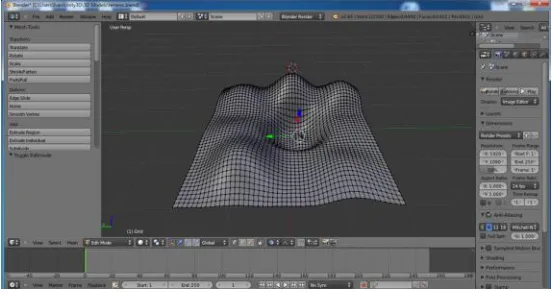
The process begins with the creation of the three-dimensional models that will be used. Unity3D does not have an integrated models editor, so Blender [20] was used to create a surface that simulates a terrain with elevations, depressions and a basin with a small island in the center, as shown in Fig. 6.
Fig. 6. Blender surface modeling
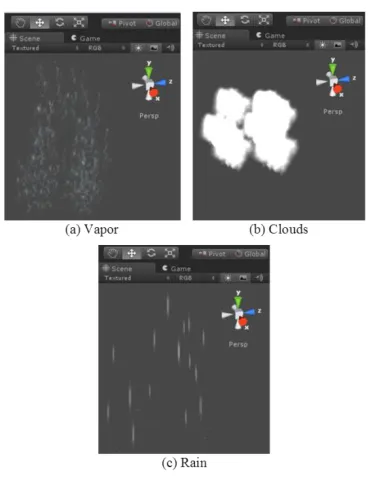
[image:8.612.168.445.499.646.2]Fig. 7. Particle emitters
[image:9.612.167.450.379.470.2]Combining the FrameMarker seen in Fig. 8, GameObject and Timer nodes along with the previously created assets, the AR scene with all the necessary components and scripts is created.
Fig. 8. Terrain, temperature drop and sun FrameMarker
As observed in Fig. 9 the terrain is now fully texture and details such as the pond in the basin, water ripples and the palm tree are rendered.
[image:9.612.154.457.538.683.2]When the user starts the application and point the device’s camera to any of the markers, the three-dimensional model associated with it will be shown, ranging from a sun with a bright halo to a complex surface with a body of moving water. The user has full control over when evaporation, condensation and precipitation occur; by keeping a marker visible in the scene a phase of the water cycle can be trigger.
For example, if the water body is visible on stage, the evaporation point has not yet been reached and the marker representing the sun is detected, the evaporation timer is updated and if it is threshold is exceeded, the vapor particle emitter starts, the depth of the water body will decrease and a visual notification is displayed to inform the user that it has reach evaporation phase.
3.1 Assessment
As part of the assessment for the node based visual editor an experiment and usability questionnaire were conducted, this helped evaluate the usefulness, satisfaction with the user interface design and ease of use.
3.2 Participants
Six people participated in the study, two groups of three each. In order to contrast results, the first group was comprised of people with no experience in application development and or programming; while members of the second group were inexperienced in AR Software Developers. The tests were performed individually by following the steps described below.
3.3 Procedure
The first step was to describe the basic concept of a scene in Unity3D and the relationship with the visual editor to the participants. In the second step, the purpose of each of the components of the visual editor GUI was presented as well as how they can be used in the process of producing AR content. The third step was to allow each participant to use the editor for a short period of time to familiarize with it.
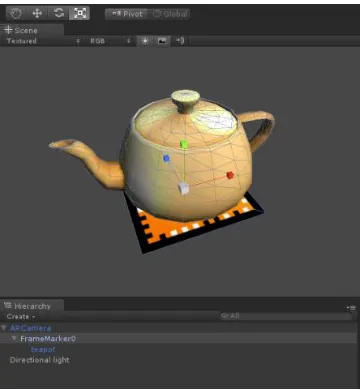
[image:10.612.216.396.479.674.2]Once all participants experienced firsthand the tool, in the fourth step they were asked to create a scene using only the visual editor. The scene should contain a correctly identified AR marker and a three dimensional model of a teapot associated with it, as shown in Fig. 10.
The last step of the study, participants were asked to expressed their comments and answer a questionnaire based on the “USE Questionnaire: Usefulness, Satisfaction, and Ease of use” [21], to evaluate the usefulness, satisfaction and ease of use of the visual editor. The questionnaire comprises of 25 seven-point Likert scale statements to assess the degree of agreement with each of them.
4
Results
An explanation of the findings observed after the assessment and responding of the questionnaire are explained in the following subsections.
4.1 Questionnaire
The questionnaire is based on the “USE Questionnaire: Usefulness, Satisfaction, and Ease of use” it consists of 25 seven-point Likert scale statements to assess the degree of agreement with each of them.
4.2 Data
[image:11.612.210.402.338.400.2]The information presented in Table 1, shows that in general the participants expressed positive views, with an overall average score of 5.62 for the first group and 5.31 for the second.
Table 1. Average general and dimension rating
Dimension Group 1 Group 2
Usefulness 5.76 5.05
Ease of use 5.24 5.45
Satisfaction 5.86 5.43
General 5.62 5.31
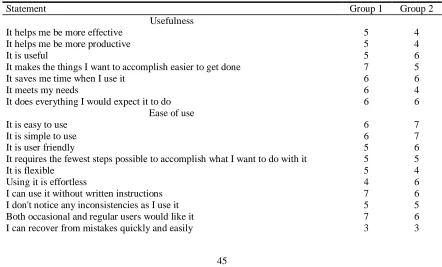
While the previous results are just a measure of central tendency, in Table 2 the mode for each statement in the questionnaire is calculated and shown for both groups.
Table 2. Score mode per statement
Statement Group 1 Group 2
Usefulness
It helps me be more effective 5 4
It helps me be more productive 5 4
It is useful 5 6
It makes the things I want to accomplish easier to get done 7 5
It saves me time when I use it 6 6
It meets my needs 6 4
It does everything I would expect it to do 6 6
Ease of use
It is easy to use 6 7
It is simple to use 6 7
It is user friendly 5 6
It requires the fewest steps possible to accomplish what I want to do with it 5 5
It is flexible 5 4
Using it is effortless 4 6
I can use it without written instructions 7 6
I don't notice any inconsistencies as I use it 5 5
Both occasional and regular users would like it 7 6
[image:11.612.84.526.478.745.2]I can use it successfully every time 5 5 Satisfaction
I am satisfied with it 7 6
I would recommend it to a friend 6 6
It is fun to use 6 6
It works the way I want it to work 6 6
It is wonderful 6 4
I feel I need to have it 5 5
It is pleasant to use 6 6
[image:12.612.83.527.76.184.2]A difference can be observed while comparing the results between the groups without experience in developing and or programming and those with some experience; while the former gave a greater score to the usefulness and satisfaction dimension, the later granted a better score to the ease of use one.
Fig. 11shows a detailed breakdown of the scores given by the participants for each of the statements.
Fig. 11. Breakdown score per statement
According to the views expressed by the members of the group with experience, the visual editing tool is easy to use, yet they feel it can limit the structure of the application, although this is due to the limitations of the current version of the visual editor. Similarly, the higher the level of abstraction for a content creation tool, the lower the level of fine control that author has on the final product.
Experts want tools that offer more features and finer control over the appearance and behavior of content being created. However, more features and finer control normally lead to more complex user interfaces, which in turn make the editing tool harder for people with less experience as the participants in the first group.
[image:12.612.138.475.276.528.2]complexity involved with programming; on the other hand the developers group despite finding satisfactory experience, has reservations about the need for such a tool.
5
Conclusions
This paper describes an exciting take on AR authoring tools, following on the steps of powerful scripting environments like Kismet/Blueprints; a flexible and scalable node based visual editor built on the entity system architecture is presented.
The proposed node based visual editor leverages two main aspects of AR authoring, the reuse of code and an easy to read and understand visual design. The reusability of objects provided by the entity system paradigm enables adding a component from a project into another and to be used with very little work. The open nature of the editor allows the definition of new nodes and the ability to manage a common repository where users easily share their creations. To showcase the editor features, a simple application to interact with the water cycle was created. Finally the results of the usability test conducted after the experiment; showed that both groups (developers and non-developers) found the tool appealing and useful.
The editor is still in early stages of development, the amount of different nodes available is limited at this moment, restricting the complexity of the applications that can be created. Future iterations of the editor will incorporate new node definitions to extend its functionality, as well as tools to complement the editor and turn it into a full-fledged authoring environment.
References
[1] R. T. Azuma, "A survey of augmented reality," Presence: Teleoperators and virtual environments, vol. 6, no. 4, pp. 355-385, 1997.
[2] R. I. Barraza Castillo, V. G. Cruz Sánchez and O. O. Vergara Villegas, "A Pilot Study on the Use of Mobile Augmented Reality for Interactive Experimentation in Quadratic Equations," Mathematical Problems in Engineering, vol. 2015, pp. 1-13, 2015.
[3] M. B. Ibáñez, A. Di Serio, D. Villarán and C. D. Kloos, "Experimenting with electromagnetism using augmented reality: Impact on flow student experience and educational effectiveness," Computers & Education, vol. 71, pp. 1-13, 2014.
[4] K.-H. Cheng and C.-C. Tsai, "Affordances of augmented reality in science learning: Suggestions for future research," Journal of Science Education and Technology, vol. 22, no. 4, pp. 449-462, 2013.
[5] P. Sommerauer and O. Müller, "Augmented reality in informal learning environments: A field experiment in a mathematics exhibition," Computers & Education, vol. 79, pp. 59-68, 2014.
[6] A. M. Borrero and J. A. Márquez, "A pilot study of the effectiveness of augmented reality to enhance the use of remote labs in electrical engineering education," Journal of Science Education and Technology, vol. 21, no. 5, pp. 540-557, 2012.
[8] S. Martin, G. Diaz, E. Sancristobal, R. Gil, M. Castro and J. Peire, "New technology trends in education: Seven years of forecasts and convergence," Computers & Education, vol. 57, no. 3, pp. 1893-1906, 2011.
[9] Hirakawa, Masahito, Ichikawa and Tadao, "Advances in visual programming," in International Conference on Systems Integration, 1992.
[10] K. Zhang, Visual languages and applications, Springer Science & Business Media, 2010.
[11] S. Cooper, W. Dann and R. Pausch, "Alice: a 3-D tool for introductory programming concepts," Journal of Computing Sciences in Colleges, vol. 15, no. 5, pp. 107-116, 2000.
[12] M. Kölling, "The greenfoot programming environment," ACM Transactions on Computing Education (TOCE), vol. 10, no. 4, p. 14, 2010.
[13] M. Resnick, J. Maloney, A. Monroy-Hernádez, N. Rusk, E. Eastmond, K. Brennan, A. Millner, E. Rosenbaum, J. Silver and B. Silverman, "Scratch: programming for all," Communications of the ACM, vol. 52, no. 11, pp. 60-67, 2009.
[14] H.-K. Jee, S. Lim, J. Youn and J. Lee, "An immersive authoring tool for augmented reality-based e-learning applications," in International Conference on Information Science and Applications (ICISA), 2011.
[15] J. Cubillo, S. Martin, M. Castro and I. Boticki, "Preparing augmented reality learning content should be easy: UNED ARLE—an authoring tool for augmented reality learning environments," Computer Applications in Engineering Education, vol. 23, no. 5, pp. 778-789, 2015.
[16] S. W. Baik, M. Azha, M. S. Fahad, I. Mehmood, B. W. Gu, W. J. Par, W. Kim, M. Y. Lee, J. S. Han and Y. Jang, "Flowchart Based Storyboard System for Authoring Visual Contents in Mixed Reality Space," International Journal of Electronics and Electrical Engineering, vol. 3, no. 3, pp. 240-244, 2015.
[17] Unity Technologies, "Unity - Game Engine," 2016. [Online]. Available: http://www.unity3d.com. [Accessed 5 Feb 2016].
[18] PTC, "Vuforia - Home," 2016. [Online]. Available: https://www.vuforia.com/. [Accessed 7 Feb 2016]. [19] W. Tarng, K.-L. Ou, C.-S. Yu, F.-L. Liou and H.-H. Liou, "Development of a virtual butterfly ecological system
based on augmented reality and mobile learning technologies," Virtual Reality, vol. 19, no. 3-4, pp. 253-266, 2015.
[20] Blender, "Home of the Blender project," Blender Foundation, 2016. [Online]. Available: http://www.blender.org. [Accessed 1 Feb 2016].