Digital Reminder: Real-World-Oriented
Database System
Atsuo Yoshitaka
Graduate School of Engineering, Hiroshima University, 1-4-1 Kagamiyama, Higashi-Hiroshima, Hiroshima 739-8527, Japan
Email:[email protected]
Yasuhiro Hori
Graduate School of Engineering, Hiroshima University, 1-4-1 Kagamiyama, Higashi-Hiroshima, Hiroshima 739-8527, Japan
Email:[email protected]
Hirokazu Seki
Graduate School of Engineering, Hiroshima University, 1-4-1 Kagamiyama, Higashi-Hiroshima, Hiroshima 739-8527, Japan
Email:[email protected]
Received 30 June 2002; Revised 29 November 2003
Digital Reminder is a system which manages a person’s view images based on gaze detection. A real-world-oriented database that consists of one’s view is constructed by one’s implicit behavior of watching objects. Digital Reminder provides a user with WYSIWYR- (what-you-see-is-what-you-retrieve-)based interaction for view image retrieval. WYSIWYR is a new framework in information retrieval. In retrieving image data in a database, we generally enter a query by specifying one or more image attributes such as color or shape with a keyboard and/or a pointing device. Unlike former image retrieval, WYSIWYR framework identifies the user’s current view of watching as a query condition, and the user’s behavior of watching an object is regarded as a trigger for the retrieval. Since the context of watching, that is, the type of visual information and gaze duration, is also recognized as a view frame attributes (VFA), a more appropriate result is presented to the user. The result of performance evaluation showed that the view images similar to one’s current view of gazing were ranked higher in the result of retrieval, compared with the retrieval without VFAs.
Keywords and phrases:WYSIWYR framework, gaze detection, image database, context aware.
1. INTRODUCTION
Personal digital assistants (PDAs) are widely used in our daily life. One of the purposes of using them is to enforce and enhance our memory. They basically manage textual infor-mation such as meeting schedules. It may also be possible to store nontextual information, for example, digital photo image, illustration, or sound; however, accessing such data is often performed via textual description associated with it. Compared with textual information management, au-dio/visual information management in mobile environment is still an open issue. We think it lies in two areas; one is the method of data storage and the other is that of accessing au-dio/visual data.
Digital still/video cameras are widely used in our daily life not only for long-term archiving of special events but
The results of content-based retrieval for image/video database [1,2,3,4] are applicable for view retrieval in mo-bile environments as well; however, there are essential dif-ferences between it and ordinary video database retrieval. One is that the computation time for retrieval needs to be short enough for immediate access under mobile environ-ments. This is because the visual data that relates to the user’s current view may be the target of instant retrieval. An-other reason, which is more important to be taken into ac-count, is the fact that a query condition is explicitly spec-ified with color, shape, and/or trajectory of object in ordi-nary image/video database retrieval. This type of querying may also be applicable for the retrieval of the user’s view; however, it is independent from the current state of the user.
In this paper, we describe a system namedDigital Re-minder, which captures a user’s view every time they watch objects. Since capturing one’s view is performed based on gaze detection, a real-world-oriented database (RWODB) is created without one’s explicit operations, and thus the prob-lems mentioned above are evaded. In addition, we propose a WYSIWYR (what you see is what you retrieve) framework for view image retrieval. Instead of retrieving video data by submitting a query specifying conditions with input devices such as a keyboard and a mouse, retrieval is triggered sim-ply by watching an object that is similar to what one wants to retrieve. That is, the user’s behavior of watching the ob-ject is regarded as “Find past views which contain an obob-ject that is similar to what I’m currently watching.” Context, that is, how the user concentrates on watching the object, as well as the features of the object, such as color, is captured from a head-mounted camera. Therefore, the user does not have to enter query conditions explicitly. Since the WYSIWYR is based on gaze detection, it fits to mobile computing environ-ments, and the accessibility and the quality of retrieval are improved.
There are studies on storing a person’s views into a mo-bile computer for the recall of visual information. WareCAM [5] and DyPRES [6] are examples of context-aware systems which provide a person with information associated with a situation. The information relates to the situation which the person faces; however, they do not capture the information the person once concentrated on.
Forget-me-not [7] is a system which acquires the context of a person’s activity with a mobile computer. The context information is stored into a server computer via a network and is provided as the supplement of the person’s memory. Since this is a large system working on the network, it is not a portable system.
Utilizing human biosignals for information acquisition is studied in [8]. StartleCam [8] captures a person’s views by detecting the state of surprise from the transition of the per-son’s electrical skin resistance. A method of capturing one’s view by the trigger of the head movement such as rotation is discussed in [9]. In these two methods, a lot of unnecessary and redundant information is filtered. However, capturing visual information only when the person is surprised does not always capture noticed information, and view
captur-ing based on head movement detection contains inevitable “noise.” Retrieval of one’s view triggered by one’s current view is also studied in [10], which aims at the same objective as our study. However, the view object is associated with the movement of head, and the eye movement of the user is not captured. Therefore, neither the duration of watching objects nor the area of interest (AoI) of the person’s view is taken into account. There is a study to capture a person’s view with that person’s reaction, which is based on brain wave analysis, in [11]. This method enables to capture the user’s interest for visual information; however, it is hard to recognize the type of visual information. As far as we know, there is no sys-tem except Digital Reminder that captures one’s view selec-tively by gaze detection. We think this is one of the promis-ing approaches for detectpromis-ing one’s attention for visual ob-jects.
The organization of this paper is as follows. Overview of Digital Reminder is described in Section 2.Section 3 intro-duces the fundamental idea of detecting a person’s behav-ior by eye movement.Section 4discusses WYSIWYR frame-work. The experimental results related to gaze detection and retrieval performance are described inSection 5. Concluding remarks are described inSection 6.
2. DIGITAL REMINDER
2.1. System organization
The system organization of Digital Reminder is illustrated in Figure 1. A head-mounted CCD camera is placed below an eye, directed toward the eye. Video is captured by 160×120 pixels, full color, 10 fps. A mirror is located above the eye so that the small CCD camera shoots both eye movement and the view of the user. Each of the video frames is separated into a view region and an eye image region. The eye image region is referred to for iris extraction, and a user’s gaze is detected as described inSection 3.
As a default, Digital Reminder is operated in “store mode.” When a gaze is detected, the user’s view is turned over horizontally and stored into an RWODB as the vi-sual information which the user noticed. Then, view frame attributes (VFAs), a gaze duration, and a time stamp are associated with the view frame. The view frame may also be associated with PDA data by the user’s explicit oper-ations. The prototype system is shown in Figure 2. Note that the mirror is a bit large since the physical configura-tion between camera (lens) and mirror is not optimized yet, and we will improve it in the future version of Digital Re-minder.
Retrieval results
Filtering VFA
Gaze duration Info type Time stamp PDA data
Object color comp. Object area comp.
Retrieval engine RWODB PDA data
Gaze detection Iris extraction
Eye motion Eye image
Detected gaze Segmentation
Retrv. mode View image
Mirroring Store mode Video processor
Mobile PC
CCD camera Eye image View User Mirror
Figure1: System organization.
Figure2: An overview of digital reminder.
2.2. Real-world-oriented database
A RWODB is created in Digital Reminder based on an object-oriented data model. The object-object-oriented data model is suit-able for managing multimedia information including image, video, as well as alphanumeric data with the facility of poly-morphism.
The RWODB is a database that stores occurrences in the real world into the database. Every occurrence is represented by various types of data such as video or alphanumeric data. The purpose of RWODB is to store the history of the real-world events and enable oneself to access it in order to en-hance one’s memory.
It is also possible to create an RWODB simply by cap-turing all of the user’s view as a long stream of continuous video data. However, inevitable redundancy of the data is not
negligible and less context is referred to in information re-trieval. Therefore, it is preferable to introduce a mechanism to acquire the state of gazing implicitly for eliminating the redundancy of information and gathering all the gazed infor-mation, part of which may be missed under explicit, manual operations by the user.
The database schema in Digital Reminder is illustrated in Figure 3. Ovals represent classes and gray circles cor-respond to objects. Instance variables are represented by links between objects, which are identified by instance vari-able names attached to the links. As shown in the figure, a time stamp and personal schedule information are asso-ciated with a gazing frame. An VFA is composed of the type of visual information, info type, such as an article, a figure/picture/landscape, and a gaze durationwhich corre-sponds to the degree of importance/complexity of the visual information.
2.3. User interface
View frame Image
Info type Desc
Text
Min Sec
Day Hour Min Sec
Month Year
Month Hour Integer
View frame Info type
Gaze duration Day
Year
VFA Date
VFA Date
Date Date
View Schedule
Figure3: RWODB schema in Digital Reminder.
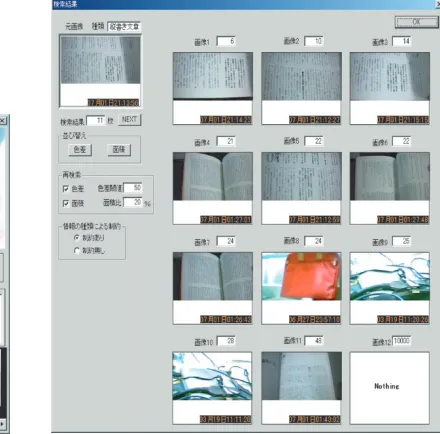
(a) Retrieving nondocumentary object by gaze pattern. (b) WYSIWYR-based retrieval for vertical writing. Figure4: User interface for view image retrieval.
Figure 4b shows an example of WYSIWYR-based re-trieval. In WYSIWYR-based retrieval, retrieval is invoked only by watching an object that is similar to what the user wants to retrieve. In this example, reading vertical writings on a paper is interpreted as “Find view frames that contain vertical writing,” and retrieval is invoked without manipu-lating a keyboard or a mouse. As a consequence, view frames containing vertical writing are presented in the window. An upper and leftmost view frame corresponds to one’s current view, and the rest of the view frames are the result of retrieval, where the upper-left one is evaluated as the highest match. If a user points one of the retrieved view frames, this user is able to access other information related to the view frames.
3. VIEW ACQUISITION IN DIGITAL REMINDER
3.1. Characteristic of eye movement
Moreover, the directions of saccades take a typical pattern depending on the type of information the person is watch-ing. In the case where a person is reading horizontal writ-ing, periodic, horizontally-long saccades directed from right to left are observed. Similarly, periodic, vertically-long sac-cades are observed in the case of reading vertical writing such as Japanese literature. When one is watching graphics, land-scapes, or visual objects except writing, saccades of random directions are observed.
As stated above, the state of a person in the sense of whether they gaze at an object can be detected by eye move-ment. Therefore, it is possible to construct a visual database of the person’s view, which consists of only the views that person watched. Moreover, gaze-based view detection is ad-vantageous in classifying the type of visual contents, since the way the person is watching the information can be classified by the pattern of eye movement and the duration of a series of saccades.
3.2. Gaze detection
Eye movement is captured by a small video camera mounted below an eye. Video is captured by 160×120 pixels, 10 fps. First, each video frame is binarized to extract an iris. Since the binarized frame contains edges around eyelids, they are eliminated by excluding vertically narrow areas. The coordi-nates of the center of a pupil are then obtained as the center of the extracted iris. Note that this simple process is enough for extracting the occurrence and the direction of saccade.
Thexandycoordinates of a pupil at timet(frame,t >0) are denoted asx(t) andy(t), respectively. Letd(t) denote the distance of saccades betweentandt−1:
d(t)=x(t)−x(t−1)2+y(t)−y(t−1)2, t=2, 3,. . . .
(1) The state of gazing at objects is detected when the following condition is satisfied, fort >4:
d(t−3) +d(t−2) +d(t−1)< hf, d(t)> hs. (2)
In the above description, hf andhs are thresholds for determination of fixation and saccade, respectively. Under the video capturing condition stated above, hf andhsare set to 2 (pixels). These thresholds are determined by experi-ment, which results in the highest precision under the above-mentioned hardware configuration. When the above condi-tion is satisfied, the eyes alternate fixacondi-tion and saccade, which means the person gazes at objects. Therefore, it is possible to store only the visual information that the person gazed by storing the person’s view if condition (2) is satisfied.
3.3. State classification by the pattern of eye movement
The pattern of eye movement is evaluated to classify the type of information the person gazes. The classification is based on frequencies,CxandCy, that satisfy the conditionx(t)−
x(t−1)> nx,y(t)−y(t−1)> nyfor a period, respectively. Parametersnx andnyare calibration factors which depend on a CCD camera.
Figure5: Eye movement in reading horizontal writing.
3.3.1. Gazing at formatted sentences
In case of reading horizontal writing such as articles in a newspaper or a book in English, relatively longer saccades are periodically observed, which move from right to left. Mean-while, long-distance vertical saccades are hardly observed. In case of reading vertical writing such as a book of Japanese literature, saccades of long distance directed from bottom to top of a page are periodically observed. Therefore, we regard a person to be in the state of reading a document/writing when either of the following conditions is satisfied:
Cx=0, Cy> by, (3)
Cx> bx, Cy=0. (4)
In the above expression, bx andby are thresholds. Both of them take 1, which is determined by experiment.
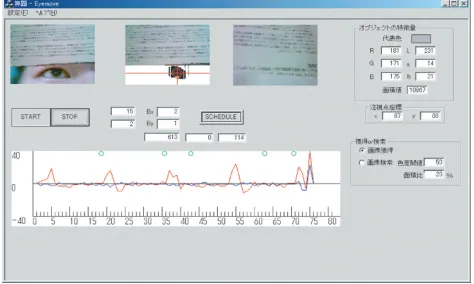
Figure 5is an example of detecting the state of reading horizontal writing. The upper-right video frame shows the current object (i.e., book) which a user is reading, and the upper-middle video frame shows the user’s view and iris. The lower-middle graphs show the user’s eye movement. One that takes conspicuous periodic local maxima corre-sponds to horizontal movement with respect tox-axis, and the other one corresponds to vertical movement along y -axis. In the figure, we can observe periodic long saccades along x-axis, though there are no conspicuous long sac-cades alongy-axis. That is, this movement satisfies condition (4), and it is detected that he is reading a horizontal writ-ing.
3.3.2. Gazing at figures or landscapes
When a person gazes at figures, pictures, or landscapes, sac-cades that follow the edges of them are observed. Since this is the movement of random direction, there are few periodic vertical or horizontal saccades. We classify the state of gaze into “gazing at figures/landscapes” if the following condition is satisfied:
Figure6: Eye movement in watching objects except writing.
Another example of gaze detection is shown inFigure 6. In this case, the object of interest is not writing but a com-puter display. Therefore, saccades of random direction are observed instead of periodic horizontal or vertical saccades. Note that circles on top of the graphs denote view frames stored into the database.
3.3.3. Gazing at a moving object
Smooth pursuit does not arise in gazing at static objects; however, it arises in the case of gazing at a moving object. Therefore, we extract smooth pursuit in order to detect the gaze for a moving object. That is, the state of a person is de-tected as gazing at moving objects if the following condition is satisfied for more than 7 frames (i.e., 0.7 seconds). The threshold,bc, is set to 2, which is determined by experiment:
0< d(t)< bc. (6)
3.4. View frame attributes
In this section, we describe view frame acquisition and its attributes. When a video frame satisfies condition (2), it is temporarily held in a video buffer. Hereafter, we call a video frame which satisfies condition (2) agazing frame. If the fol-lowing gazing frame is not detected within the intervalvidle,
it is regarded as anoiseor a state oflittle attentionto an ob-ject. Therefore, the gazing frame is discarded from the video buffer.
When one or more gazing frames are detected within
vidle, the first gazing frame is regarded as the view frame
which is to be stored into a database. The view frame is asso-ciated with aview frame attribute, which is composed ofgaze duration andvisual information type (denoted asinfo type in Figure 3). The number of gazing frames is counted as far as gazing frames are detected within vidle, and it is
re-garded as the gaze duration that corresponds to the impor-tance/complexityof the visual information for the user. This is based on an observation that the longer the user watches an object, the more importance or complexity it implies.
In case of watching still objects, the visual information type is also evaluated based on the criteria in Section 3.3. That is, its value takes one of “vertical writing,” “horizontal writing,” and “graphics/landscapes.” For example, suppose
the user watches the leaflet of a product which consists of horizontal writing and photos. In this case, a gazing frame is extracted since condition (5) is satisfied, and the visual in-formation type of the view frame is recognized as “graph-ics/landscapes.”
The evaluation of the importance of gazing frames of moving objects follows another procedure: video frames are stored in the video buffer when the coordinates of iris vary in three consecutive frames. The video frames are continu-ously stored as far as the coordinates vary. When the number of the stored frames exceeds 6, they are stored into database as a sequence of gazed visual information.
4. WYSIWYR FRAMEWORK
4.1. Overview
WYSIWYR framework is one of the interaction methods in information retrieval, especially for image retrieval. Or-dinary retrieval is invoked by specifying a query by input devices such as a keyboard and a mouse. Retrieval based on WYSIWYR framework is triggered by spontaneous eye movement of gazing at objects, which does not require ex-plicit operations such as pointing/entering a query condition by a mouse/keyboard. This way of triggering is possible since a user’s state, that is, whether the user gazing at an object or not, is detected by eye movement. Since retrieval opera-tion for visual database does not require hand-operated in-put devices, we think WYSIWYR framework fits well to mo-bile computing environments.
We categorize the retrieval based on WYSIWYR as a class ofQuery-by-Example(QBE) in the sense that a view frame acquired by eye movement analysis corresponds to the exam-ple (i.e., condition) of a query. However, WYSIWYR is diff er-ent from ordinary QBE [13,14] in the following senses.
(a) The example (i.e., view frame) is automatically ac-quired by gaze detection.
(b) The context of the example, that is, the attributes of visual information, is extracted from the user’s spon-taneous, implicit behavior.
When a gazing frame is detected as described in Section 3.2, the AoI is first extracted. During the user’s gaze, a sequence of coordinates of the viewpoints is held to obtain the AoI. The AoI is one of the regions segmented by lumi-nance, where vertices correspond to the coordinates when an eye is in fixation.
The size and the dominant color of the AoI are then cal-culated in order to compare them with those of view frames stored in the database. Note that those features of AoI for each view frame in the database are stored when the view frame is obtained.
In addition to the size and the dominant color of the AoI, view frames in the database are filtered by one or the combi-nation of the following attributes:
(i) VFA (visual information type and gaze duration); (ii) time stamp (date and time);
4.2. Feature extraction
When a view frame is obtained in retrieval, regions are ex-tracted by merging the pixels whose difference of luminance is less than a threshold. Then one of the regions where most of the coordinates of viewpoints are located is regarded as the AoI.
The dominant color and the size of AoI are then calcu-lated. The size of AoI is the number of pixels of the AoI. The dominant color of the AoI is represented byLabcolor rep-resentation, which is determined as the mode of color his-togram of the AoI.
4.3. Visual object retrieval
When a view frame is obtained in retrieval, the similarity of size and dominant color of an AoI is first evaluated. The sim-ilarity of dominant color is evaluated as a Euclidean distance between the dominant color of a view object in the database and that of detected view frame as follows:
Dc=Ld−Lv
In the above formula, Lab values of the AoI in the database are denoted asLd,ad, andbd, and those of the cur-rent view frame are denoted asLv,av, andbv, respectively.
The similarity of the AoI is evaluated as the ratio of the size of AoI of a view frame in the database to that of the cur-rent view frame. That is, the ratioRais represented as
Ra=Sd
Sv
, (8)
where Sd denotes the size of AoI of a view frame in the database andSvdenotes that of the current view frame ac-quired as a query condition.
The candidates of the result of retrieval are a set of view frames which satisfy the condition
Dc < hDc, |1−Ra|< hRa. (9)
Thresholds forDcandRaare denoted ashDcandhRa, respec-tively, which are specified by a user.
In order to take thecontextof retrieval into account, the candidates are further filtered by the attributes associated with the video frames. This is described in the next section.
4.4. Filtering by associated attributes
Gaze duration and time stamp are also evaluated so as to ar-range the result in the order of importance or recentness. In some cases, the gaze duration implies the importance or the complexity of the information in the view frame; the rear-rangement of the candidates by the gaze duration reflects the context of gazing.
Visual information type, which is a part of VFA, is also referred to so as to percolate only the same type of infor-mation to the result that is presented to a user. By evaluat-ing the visual information type of the object as well as AoI
Table1: Result of view classification.
Recall Precision
Sentences 67% (640/951) 79% (640/811)
Figures/landscapes 85% (397/468) 83% (397/478) Moving object 74% (122/164) 76% (122/160)
Others 56% (270/480) 79% (270/342)
No attention 94% (1055/1125) 76% (1055/1397)
and its color, it is possible to take the context of access to the database into account. That is, we can exclude visual objects whose color attributes are similar but whose contexts are dif-ferent. This implicit percolation is achieved by WYSIWYR framework but not by ordinary QBE approaches.
A time stamp associated with the view object is referred to for rearranging the retrieval result in the ascending or de-scending temporal order.
It is also possible to retrieve view objects by specifying visual information type, gaze duration, and/or time stamp as a prime condition(s). In this case, the evaluation of dominant color and region size is set to be lower priority.
5. EXPERIMENTAL RESULTS
5.1. Gaze detection
The experimental result of gaze detection is shown inTable 1. The number of frames extracted/sampled is indicated in parentheses. We implemented Digital Reminder on a Pen-tium II 266 MHz mobile PC, and video data is captured via PCMCIA interface in NTSC format. One of the reasons why the precision and recall still need to be improved is due to video format and resolution of the CCD camera.
In the table, “others” corresponds to the state where fre-quent saccades are observed but the pattern of movement corresponds to none of “sentences,” “figures,” and “moving object.” The state of “idle” denotes the state where a user is watching no objects with attention. Though the average pcision and the recall of gaze detection are 79% and 70%, re-spectively, most of the user’s views without gaze are eff ec-tively discarded since the recall for the state of no attention to visual object is about 94%. Since Digital Reminder stores view frames only when the user was in concentration on vi-sual objects, it eliminates redundancy in storing a user’s view. In addition, implicit gaze detection enables to capture most of the gazed information without explicit operations for stor-ing the user’s view into the database.
5.2. Performance improvement by view frame attribute
With VFA
Figure7: Performance of retrieval.
only by object color and area. Ranking denotes the position where the view frame containing the object that is the same as the one in the gazing frame is placed in the result.
In most of the cases, the view frame containing the same object as the user gazes is ranked at higher posi-tion by evaluating VFA in retrieval. Therefore, we conclude that the quality of retrieval is improved by the proposed method.
6. CONCLUSION
In this paper, we described the system named Digital Re-minder, which captures view frames automatically and cre-ates a real-world-oriented database. Since capturing view frames is performed based on gaze detection, database cre-ation does not require one’s explicit opercre-ation for storing one’s view. Eight hours of continuous use of Digital Re-minder accumulated approximately 8.3 MB of visual data, whereas continuous storage of view by 10 fps, 1.5 Mbps MPEG1 requires approximately 1.8 GB. This result shows that the proposed method effectively reduces the amount of storage by discarding views without one’s attention. In addition, our approach is advantageous in the sense that the database is created without explicit operations and that even the visual object whose importance is realized later is also captured as far as the user gazes at the object. Dur-ing the process of visual information acquisition, Digital Re-minder recognizes the type of visual information by spa-tial pattern of saccades and the importance or the complex-ity of information based on gaze duration, which are as-sociated with each of the view frames as a view frame at-tribute.
WYSIWYR framework enables a user to retrieve image objects not by the explicit operation for retrieval but by the implicit action of gazing at an object that is similar to what the user wants to retrieve. The WYSIWYR framework is in the class of QBE (Query-by-Example) approach; however, it differs from other QBE studies in the sense of implicit query composition and visual object type evaluation.
These remarkable features are due to the method of ac-quiring the object of interest by eye movement. Experimental result showed that query evaluation with VFAs improves the quality of QBE, and users’ review showed that about 10% of acquired view frames were helpful to recall or enforce their memory.
ACKNOWLEDGMENT
We would like to acknowledge Mr. Masashi Yoshida and Mr. Takashi Kawamura for their implementation work of the prototype system, and Prof. Masahito Hirakawa for his dis-cussion.
REFERENCES
[1] A. Yoshitaka, S. Kishida, M. Hirakawa, and T. Ichikawa, “Knowledge-assisted content based retrieval for multimedia databases,”IEEE Multimedia, vol. 1, no. 4, pp. 12–21, 1994. [2] A. Yoshitaka, Y. I. Hosoda, M. Yoshimitsu, M. Hirakawa, and
T. Ichikawa, “VIOLONE: Video retrieval by motion example,” Journal of Visual Languages & Computing, vol. 7, no. 4, pp. 423–443, 1996.
[3] M. J. Egenhofer, “Query processing in spatial-query-by-sketch,” Journal of Visual Languages & Computing, vol. 8, no. 4, pp. 403–424, 1997.
[4] P. Pala and S. Santini, “Image retrieval by shape and texture,” Pattern Recognition, vol. 32, no. 3, pp. 517–527, 1999. [5] T. Starner, S. Mann, B. Rhodes, et al., “Wearable computing
and augmented reality,” Tech. Rep. TR-355, MIT Media Lab Vision and Modeling Group, Cambridge, Mass, USA, 1995. [6] T. Jebara, B. Schiele, N. Oliver, and A. Pentland, “DyPERS:
Dynamic Personal Enhanced Reality System,” Tech. Rep. 463, MIT Media Lab Perceptual Computing Section, Cambridge, Mass, USA, 1998.
[7] M. Lamming and M. Flynn, ““Forget-me-not:” intimate com-puting in support of human memory,” inProc. FRIEND21 ’94 International Symposium on Next Generation Human In-terface, pp. 125–128, Tokyo, Japan, February 1994.
[8] J. Healey and R. Picard, “StartleCam: A Cybernetic Wearable Camera,” Tech. Rep. 468, MIT Media Lab Perceptual Com-puting Section, Cambridge, Mass, USA, 1998.
[9] Y. Nakamura, J. Ohde, and Y. Ohta, “Structuring personal experiences—analyzing views from a head-mounted camera,” in Proc. IEEE International Conference on Multimedia and Expo (ICME ’00), vol. 2, pp. 1137–1140, New York, NY, USA, July–August 2000.
[10] T. Kawamura, Y. Kono, and M. Kidode, “A novel video re-trieval method to support a user’s recollection of past events aiming for wearable information playing,” inProc. IEEE Sec-ond Pacific-Rim Conference on Multimedia (PCM ’01), pp. 24– 31, Beijing, China, October 2001.
[11] K. Aizawa, K. Ishijima, and M. Shiina, “Summarizing wear-able video,” inProc. IEEE International Conference on Image Processing, vol. 3, pp. 398–401, Thessaloniki, Greece, October 2001.
[12] M. Ikeda, What the Eyes are Watching, Heibonsha Limited Publishers, Tokyo, Japan, 1988.
[13] M. M. Zloof, “QBE/OBE: A language for office and business automation,”IEEE Computer, vol. 14, no. 5, pp. 13–22, 1981. [14] M. Flickner, H. Sawhney, W. Niblack, et al., “Query by image
Atsuo Yoshitaka graduated from Hi-roshima University in March 1989, and received his M.S. and Doctor of Engineering in March 1991 and March 1997, respec-tively. He is currently serving as a Research Associate in the Information Systems Lab-oratory at Hiroshima University in Japan. His research interests include content-based retrieval for multimedia databases, visual user interfaces for database retrieval, and
real-world-oriented interfaces. He is a Member of the IEEE, the IEEE Computer Society, and the Information Processing Society of Japan.
Yasuhiro Horireceived the B.S. degree in the Faculty of Engineering at Hiroshima University, Hiroshima, Japan, in 2002. He is currently studying at the Graduate School of Engineering of Hiroshima University.