Dissertation Template for Princeton
University
First Middle Last
A Dissertation
Presented to the Faculty of Princeton University in Candidacy for the Degree
of Doctor of Philosophy
Recommended for Acceptance by the Department of Electrical Engineering Adviser: Professor Smith
c
Copyright by First Middle Last, 2010. All rights reserved.
Abstract
This is a LATEX template and document class for Ph.D. dissertations at Princeton
University. It was created in 2010 by Jeffrey Dwoskin, and adapted from a template provided by the math department. Their original version is available at: http:
//www.math.princeton.edu/graduate/tex/puthesis.html
This is NOT an official document. Please verify the current Mudd Library dis-sertation requirements [4] and any department-specific requirements before using this template or document class.
Your abstract can be any length, but should be a maximum of 350 words for a Dissertation for ProQuest’s print indicies (or 150 words for a Master’s Thesis); otherwise it will be truncated for those uses [3].
Dwoskin Ph.D. Dissertation Template — version 1.0, 5/19/2010
Acknowledgements
I would like to thank the Math department for providing the original documentclass file that this class is based upon. I would like to thank my parents, without whom my life would not be possible. I would also like to thank my advisor, my dissertation committee, and my research collaborators because every graduate student needs to do so. And finally, I thank the members of my research group, to whom I leave this template to save you some of the trouble I had to go through getting my dissertation to compile in LATEX.
Don’t forget to ask your advisor if your work was sponsored by a grant that needs to be acknowledged in this section.
To my parents.
Contents
Abstract . . . iii
Acknowledgements . . . iv
List of Tables . . . viii
List of Figures . . . ix 1 Introduction 1 2 Related Work 3 2.1 Tables . . . 3 2.2 Figures . . . 4 3 Usage 6 3.1 Options . . . 7 4 Conclusion 10 4.1 Future Work . . . 10 A Implementation Details 11 A.1 Switching Formats . . . 11
A.2 Long Tables . . . 11
A.3 Booktabs . . . 12
A.4 Bibliography and Footnotes . . . 13
B Printing and Binding 14 B.1 Printing . . . 14 B.2 Binding . . . 15
Bibliography 16
List of Tables
2.1 Thesis Publishing Options . . . 4 3.1 Options Provided by the PUthesis Class . . . 7
List of Figures
2.1 Sample Title Page Layout . . . 5
Chapter 1
Introduction
This documentclass, puthesis.cls, is setup for a Ph.D. dissertation for Princeton University. The Mudd Library website [4] provides detailed specifications for how to format your disseration [2]. Please review those documents, as the requirements may have changed since this template was created. Also, review the ProQuest Dissertation Guide [3], which has additional formatting rules that are important for the submission of the electronic copy of your dissertation.
This template includes many details about the requirements and common practices for writing, printing, and submitting your dissertation. However, this isNOTan offi-cial document. It was written by Jeffrey Dwoskin and is current as of May 2010 based on requirements for the Electrical Engineering department, but the requirements may have changed. Please verify all information, deadlines, costs, requirements, and for-matting rules with the Mudd Library website [4], with the Graduate School, and with your department.
This document serves as a template to demonstrate how to use the puthesis doc-umentclass for a Princeton University Ph.D. Disseration. Some of the requirements for a master’s thesis or an undergraduate thesis are different, especially the text on
the title page, so you will need to make some modifications to use this template for those purposes.
This template is setup to easily make a few different versions of your dissertation. The version you will print and have bound should generally be single spaced (and single-sided), and not contain any hyperlinks. The electronic version that you submit to your readers to review and to be published by ProQuest will be double spaced, and will contain PDF features such as bookmarks for each section and internal links to citations, footnotes, and other internal references.
During the writing process, you may want to disable some of the frontmatter (list of tables, list of figures, acknowledgements, and maybe even the table of contents. I have not tested this template with equations or a list of symbols, but those are available.
Chapter 2
Related Work
Everyone needs a chapter about related work, so here is a placeholder.
2.1
Tables
Tables are also quite important. Any table that can fit entirely on one page can be a floating table. If a table is longer and will span multiple pages, a long table can be inserted in-line with the text. This is demonstrated in Table 3.1, and explained in Appendix A.
Tables that fit on one page use normal floating figures. Keep the ’p’ placement option (in addition to ’h’ and ’t’) so that if the float cannot fit in-line with the document text, it can be on a separate page by itself immediately after it is placed. Without the ’p’ option, the float may get pushed to the end of the chapter, along will all other floats in the chapter that follow it.
Table 2.1 lists the various options for publishing your dissertation, with costs, as of 2010. You will have to bring a check for the appropriate amount, made out to “Princeton University Library”, when you submit your bound dissertation copies to Mudd Library, along with the appropriate forms and the electronic copy of your dissertation burned to a CD (not a DVD) as a single PDF file. (See [2].)
Traditional publishing is cheaper initially and lets you earn royalties if the pub-lisher sells many copies of your dissertation. However, most of us won’t have a best-seller dissertation and most likely won’t earn royalties anyway. Instead, by choosing open access publishing, your dissertation will be available online for free to anyone who is interested. I strongly advocate for open access, to maximize the impact of your research.
Your dissertation is protected by copyright regardless of whether or not you have the copyright registered. However, registration establishes a public record of your copyright claim [2]. ProQuest will submit the copyright registration for an extra fee (about $55). Alternatively, you can register it yourself at the Copyright Office’s website for only $35: http://www.copyright.gov/eco/.
Table 2.1: Thesis publishing options [4], as of May 2010. Publishing Method Publishing
Fee Diploma Fee Copyright Registra-tion Fee Total Traditional Publishing Traditional without
copy-right registration
65 15 – 80
Traditional with copy-right registration
65 15 55 135
Open Access Open access without
copyright registration
160 15 – 175
Open access with copy-right registration
160 15 55 230
2.2
Figures
Everyone needs floating figures in their dissertation.
As shown in Figure 2.1, the Mudd Library dissertation requirements [2] specify additional options for formatting the title page. For example, if your thesis has multiple volumes, or to indicate the proper formatting for a master’s thesis.
Chapter 3
Usage
To start, in your main .tex file, use this class as your main documentclass instead of ‘report’ or ‘book’. For example:
\documentclass[12pt, lot, lof]{puthesis}
In this example, we setup our document to use the PU Thesis style, with 12pt font for body text, and to include a List of Tables and List of Figures in the front matter. You could instead set an 11 point or 10 point font by changing the first option. You can also add ‘los’ to include a list of symbols.
To use single spacing, add the option ‘singlespace’. This is a special option for the puthesisdocumentclass, which sets single spacing for both the front matter and for the document itself. Additional parameters should be set in your main .tex file, and are described in detail in Section 3.1.
The template itself declares two other options, to be set immediately after the
documentclass command. First is ‘printmode’, declared with the command:
\newcommand{\printmode}{}
This command, used later in the thesis.tex file, turns off the hyperref package and all internal links in the PDF file. This removes any colored links and highlighting that
would not be appropriate in a printed and bound thesis. Instead the url package is loaded, so that
url commands in your document will continue to work and urls will break properly across multiple lines.
When ‘printmode’ is not specified, the hyperref package is included. It creates colored links for citations, footnotes, and internal references, which can be used to navigate the PDF document more easily. It also adds bookmarks to the PDF file, mirroring the table of contents. By default, it is set to use colored links. For the PDF file that you will submit electronically to ProQuest, this may not be desirable since some copies may be printed, while others will be used electronically. Thus another option, ‘proquestmode’, is defined that keeps hyperref but disables colored links:
\newcommand{\proquestmode}{}
This mode has no effect when used in combination with ‘printmode’.
3.1
Options
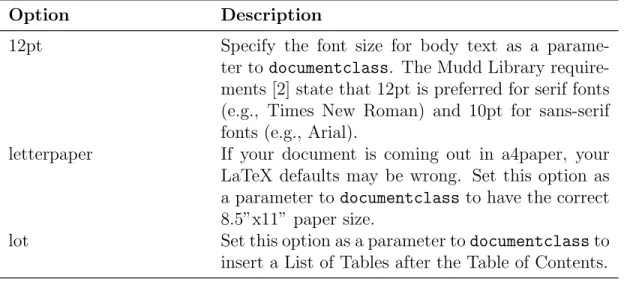
In this section, we describe the options you can set when using this thesis class.
Table 3.1: List of options for the puthesis document class and template
Option Description
12pt Specify the font size for body text as a parame-ter todocumentclass. The Mudd Library require-ments [2] state that 12pt is preferred for serif fonts (e.g., Times New Roman) and 10pt for sans-serif fonts (e.g., Arial).
letterpaper If your document is coming out in a4paper, your LaTeX defaults may be wrong. Set this option as a parameter todocumentclass to have the correct 8.5”x11” paper size.
lot Set this option as a parameter todocumentclassto insert a List of Tables after the Table of Contents. (Continued on next page)
Table 3.1: (continued)
Option Description
lof Set this option as a parameter todocumentclassto insert a List of Figures after the Table of Contents and the List of Figures.
los Set this option as a parameter todocumentclassto insert a List of Symbols after the Table of Contents and the other lists.
singlespace Set this option as a parameter to documentclass
to single space your document. Double spacing is the default otherwise, and is required for the elec-tronic copy you submit to ProQuest. Single spacing is permitted for the printed and bound copies for Mudd Library.
draft Set this option as a parameter to documentclass
to have LATEXmark sections of your document that
have formatting errors (e.g., overfull hboxes). \newcommand
{\printmode}{}
Insert this command after thedocumentclass com-mand to turn off the hyperref package to produce a PDF suitable for printing.
\newcommand
{\proquestmode}{}
Insert this command after thedocumentclass com-mand to turn off the ‘colorlinks’ option to the hy-perref package. Links in the pdf document will then be outlined in color instead of having the text itself be colored. This is more suitable when the PDF may be viewed online or printed by the reader. \makef rontmatter Insert this command after the \begin{document}
command, but before including your chapters to insert the Table of Contents and other front matter. \title Set the title of your dissertation. Used on the title
page and in the PDF properties.
\submitted Set the submission date of your dissertation. Used on the title page. This should be the month and year when your degree will be conferred, generally only January, April, June, September, or Novem-ber. Check the Mudd Library rules [4] for the ap-propriate deadlines.
\copyrightyear Set the submission year of your dissertation. Used on the copyright page.
\author Your full name. Used on the title page, copyright page, and the PDF properties.
(Continued on next page) 8
Table 3.1: (continued)
Option Description
\adviser Your adviser’s full name. Used on the title page. \departmentpref ix The wording that precedes your department or
pro-gram name. Used on the title page. The default is “Department of”, since most people list their de-partment and can leave this out (e.g., Dede-partment of Electrical Engineering), however if yours is a pro-gram, set \departmentpref ix{P rogramin}
\department The name of your department or program. Used on the title page.
\renewcommand
{\maketitlepage}{}
Disable the insertion of the title page in the front matter. This is useful for early drafts of your dis-sertation.
\renewcommand∗
{\makecopyrightpage}{}
Disable the insertion of the copyright page in the front matter. This is useful for early drafts of your dissertation.
\renewcommand∗ {\makeabstract}{}
Disable the insertion of the abstract in the front matter. This is useful for early drafts of your dis-sertation.
I’ve seen other people print their dissertations using\pagestyle{headings}, which places running headings on the top of each page with the chapter number, chapter name, and page number. This documentclass is not currently compatible with this option – the margins are setup to be correct with page numbers in the footer, placing them 3/4” from the edge of the paper, as required. If you wish to use headings, you will need to adjust the margins accordingly.
Chapter 4
Conclusion
In this work, we explain how to use the puthesis.cls class file and the accompanying template.
4.1
Future Work
Future work should include options in the template for a masters thesis or an un-dergraduate senior thesis. It should also support running headings in the headers using the ‘headings’ pagestyle. The print mode and proquest mode included in the template might also be candidates to include in the class itself.
Appendix A
Implementation Details
Appendices are just chapters, included after the\appendix command.
A.1
Switching Formats
When switching printmode on and off (see Section 3.1), you may need to delete the output .aux files to get the document code to compile correctly. This is because the hyperref package is switched off for printmode, but this package inserts extra tags into the contents lines in the auxiliary files for PDF links, and these can cause errors when the package is not used.
A.2
Long Tables
Long tables span multiple pages. By default they are treated like body text, but we want them to be single spaced all the time. The class therefore defines a new command, \tablespacing, that is placed before a long table to switch to single spac-ing when the rest of the document is in double spacspac-ing mode. Another command, \bodyspacing, is placed after the long table to switch back to double spacing. Normal
tables using tabular automatically use single spacing and do not require the extra commands.
When the documentclass is defined with the ‘singlespace’ option, these commands are automatically adjusted to stay in single spacing after the long table.
Make sure there is always at least one blank line after the\bodyspacing command before the end of the file.
Some times long tables do not format correctly on the first pass. If the column widths are wrong, try running the LATEXcompiler one or two extra times to allow it
to better calculate the column widths.
If you want your long table to break pages at a specific point, you can insert the command \pagebreak[4], to tell LATEXthat it really should put a page break there.
\pagebreak[2] gives it a hint that this is a good place for a page break, if needed. If there’s a row that really should not be broken across a page, use \\∗, which will usually prevent a pagebreak.
A.3
Booktabs
The booktabs package is included to print nicer tables. See the package documen-tation [1] for more details and motivation. Generally, all vertical lines are removed from the tables for a better visual appearance (so don’t put them in), and better spacing and line thicknesses are used for the horizontal rules. The rules are defined as\topruleat the top of the table,\midrulein between the heading and the body of the table (or between sections of the table), and \bottomruleat the end of the table. \cmidrule can be used with the appropriate options to have a rule that spans only certain columns of the table.
A.4
Bibliography and Footnotes
The bibliography and any footnotes can also be single spaced, even for the electronic copy. The template is already setup to do this.
Bibliography entries go in the .bib file. As usual, be sure to compile the LATEXcode,
then run BibTeX, and then run LATEXagain.
To cite websites and other electronically accessed materials, you can use the ‘@elec-tronic’ type of BibTeX entry, and use the ‘howpublished’ field to include the URL of the source material.
The formatting of bibliography entries will be done automatically. Usually the titles are changed to have only the first word capitalized. If you’d prefer to have your original formatting preserved, place the title in an extra set of curly braces, i.e., “title = {{My title has an AcroNyM that should stay unchanged}},”.
A.5
Figures and Tables
The captions of figures and tables take an optional parameter in square brackets, specifying the caption text to be used in the Table of Contents. The regular caption in curly braces is used for the table itself.
Generally captions for tables are placed above the table, while captions for figures are placed below the figure.
Appendix B
Printing and Binding
B.1
Printing
For the library copies of your dissertation, you must use archival quality printing and binding. This means acid-free paper, containing at least 25% cotton fiber. Triangle Repocenter on Nassau Street in Princeton offers both 25% cotton paper and 100% cotton paper. Most people choose the 25% cotton paper, and this is generally rec-ommended by the binders. The 100% copy paper is somewhat thicker and the extra expense is unnecessary.
Triangle offers online submission of your printing and binding order at: http:
//triangleprinceton.com/collegiatebinding/thesis/. If you request binding from them, they will deliver the paper copies to Smith-Shattuck Bookbinding for you and allow you to pick up the completed copies at their store on Nassau Street. The whole process takes 2-3 business days, but check with them in advance during the busy thesis-printing season in April and May.
Currently, your printed and bound dissertation copies can be single spaced. Only the electronic copy submitted to ProQuest must be double spaced. All copies must be printed single-sided, with specific margins.
B.2
Binding
An archival-quality sewn binding is required for the library copies of your disser-tation. Smith-Shattuck Bookbinding is highly recommended, and is used by most students. Triangle Repocenter will send your copies there for you, greatly simplifying the process, but you can call Smith-Shattuck with special requests.
The “library standard” sewn binding is sufficient for the copies to be sent to Mudd Library. It uses a black buckram cloth cover, which is the most popular option. For extra copies for yourself and your family members, you can choose “buckram roundback binding”, which adds decorative lines on the spine, and printing of the title and author on the front cover. For a small additional fee, you can include the Princeton University shield on the front cover and a ribbon bookmark. Leather covers are also available. See Smith-Shattuck’s website for more details at: http:
Bibliography
[1] S. Fear. Publication quality tables in LaTeX. Available from CTAN, macros/latex/contrib/booktabs, http://www.ctan.org/tex-archive/macros/ latex/contrib/booktabs/booktabs.pdf, 2005.
[2] Princeton University Library. Doctor of Philosophy Dissertation and Master’s Thesis Requirements. http://www.princeton.edu/~mudd/thesis/
MuddDissertationRequirements.pdf, September 2009.
[3] ProQuest. PQ/UMI GradWorks Guide F2006. http://www.princeton.edu/ ~mudd/thesis/Submissionguide.pdf, 2006.
[4] Seeley G. Mudd Manuscript Library. Submitting your Doctoral Dissertation or Masters Thesis to the Mudd Manuscript Library. http://www.princeton.edu/ ~mudd/thesis/, May 2009.
![Table 2.1: Thesis publishing options [4], as of May 2010.](https://thumb-us.123doks.com/thumbv2/123dok_us/1652421.2726154/13.918.163.838.533.876/table-thesis-publishing-options.webp)