Vocational Teacher Education College
TECHNICAL AND PEDAGOGICAL COMPARATIVE
STUDY OF E-LEARNING PLATFORMS FOR OPEN
AND DISTANCE LEARNING
Djamal Amalou
Development Project Report
JYVÄSKYLÄ UNIVERSITY OF APPLIED SCIENCES DESCRIPTION Date 20.12.2006
Author(s) Type of Publication
Development project report Djamal Amalou Pages 50 Language English Confidential Until_____________ Title
TECHNICAL AND PEDAGOGICAL COMPARATIVE STUDY OF E-LEARNING PLATFORMS FOR OPEN AND DISTANCE LEARNING
Degree Programme
Vocational teacher education Tutor(s)
Assigned by Eila Burns Abstract
The aim of this development project report is to be a guideline for educational institution who wants to create an E-learning based environment, to develop
pedagogy on the net, to accelerate the development of web-based courses or develop a resources centre for cooperative work with other institutions. The necessity of implementing E-learning platforms is seen as a first step towards these previous objectives. Being a pre study for a long-term project, this report start by addressing the needs and asking key questions before any move is made.
The structure of this report uses Khan’s orthogonal framework. It contains a detailed description of its dimensions such as institutional, pedagogical, ethical and technical. The pedagogical dimension not only describe the classical approaches such the constructivism, behaviourism…and their important value in the teaching of ICT but focuses on the trendy blended learning. This new approach is analysed under various point like the dimension of the blend, the benefits and its challenges.
The criteria’s for an appropriate platform are discussed and analysed under two major points: technically and pedagogically. Different views are taken in consideration such as the users (teachers, students) and administrators. Two platforms (BSCW and R5) are described. Several of their properties are analysed, mainly the compatibility with actual servers, the various cost of such a project, the requirement for administrating and tutoring the users. Full descriptions of criteria’s of choice are given in the appendix.
This report conclusion consists in an answer to the questions raised before starting the project and a description of the various phases to follow when developing an E-learning environment in an education institution.
Keywords
E-learning, Blended learning, Learning environment, E-learning platform, Cooperative work, BSCW, R5, Khan’s octagonal framework.
Content
1. Introduction……….4
2. Khan’s Octagonal Framework………5
2.1 Presentation of the framework...6
2.2 The dimensions of the framework……….…….6
3. Institutional point of view………9
3.1 Definition of E-learning in the information society………...9
3.2 E-learning in educational institutes………9
4. Pedagogical dimension: Models of learning………...12
4.1 Behaviourist, cognitive, constructivist and cooperative learning…….12
4.2 Blended learning……….16
4.3 Dimension of the blend………..17
4.4 Guideline of blended learning………...…18
4.5 Benefits and challengesof blended learning………..18
5. Technological aspect and interface design……….20
5.1 Presentation of E-learning platform……….21
5.2 General characteristics………..22
5.3 Client configuration……….22
5.4 Interface languages.………..23
5.5 Editor support……….……….24
5.6 Server requirements and cost of platform………..24
6. Evaluation………..25
6.1 Teacher’s role……….25
6.2 Adaptation of standard courses………26
6.3 Functions of remote tutoring and evaluation………..26
6.4 Student’s tools……….26
7. Management and technical administration………29
7.1 Users’ registration……….….…29
7.2 Course creation, standard course and test editing………...29
7.3 Administration of material……….………....30
7.4 Lesson creators’ competences………..……..31
7.5 Technical administration………32
7.6 Resource support………...32
8. Ethical aspect………...………33
9. Comparison of two platforms: R5 and BSCW………34
10.1 BSCW, Basic Support for Cooperative Work………34
10.2 R5 Generation………37
10. Conclusion for implementing E-learning platform in schools……39
References………..41
Appendices……….44
Appendix 1: List of E-learning platforms on the market………...44
Appendix 2: Glossary………45
Appendix 3: Summary of comparison criteria’s………...……….46
Figures
Figure 1:
Khan’s Octagonal Framework.
Figure 2: BSCW user interface Figure 3: R5 user interface
1. INTRODUCTION
The idea of this development project was generated two years ago when the ministry of education through its representative in the school managing board launched the idea that the French Finnish School of Helsinki could act as a pedagogical resource center.
My work institution, the French Finnish School of Helsinki provides tuition in both Finnish and French languages for pupils from age 6 to 19. One third of the teachers are either French or native French language speakers. Diverse subjects are taught in French such as French language, mathematics, physics, geography etc. A large amount of pedagogical material and
experienced staff could be used and shared with other schools, particularly those remote ones that do not have access to teaching material or cannot provide tuitions in French language.
We had our first distance teaching experience using video conferencing. We provided a language and cultural lecture to a remote school in northern Finland. In addition to video conferencing, other appropriate tools should be found. The use of learning environments such a Portal or an E-learning platform would be very useful. Before any steps are taken to implement E-learning in our school, a few questions arise and need to be answered:
• Is E-learning of real value in teaching & learning?
• What benefits does it bring?
• What are the difficulties?
• How to embed E-learning in an existing courses?
• Approaches to E-learning?
- More ambitious E-learning
• Is there a future for E-learning approaches?
My project is a kind of pre-study before implementing the use of the E-learning platform. The objective of the project was to find the pedagogical context, study the structure of an E-learning platform, find the appropriate approaches and models, make a review of choice criteria and give general
recommendations.
Although this report is directed to my school project, its content is also
applicable for any school, which wants to start using E-learning platform as a learning environment.
2. KHAN’S OCTAGONAL FRAMEWORK
Varieties of factors are required to create a meaningful learning environment. Many of these factors are interrelated and interdependent. A systemic
understanding of these factors can enable designers to create meaningful distributed learning environments. Harvey Singh1 in his paper: Building
effective Blended Learning program, as an answer to the main concern:
getting the right blend which provide learners with the right amount of each type of learning intervention, suggest Khan’s Octagonal Framework.
1
November - December 2003 Issue of Educational Technology, Volume 43, Number 6, Pages 51-54.
Building Effective Blended Learning Programs Harvey Singh
2.1 Presentation of the framework
Khan’s Octagonal Framework enables one to select appropriate ingredients. Khan’s framework serves as a guide to plan, develop, deliver, manage, and evaluate blended learning programs. The framework has eight dimensions: institutional, pedagogical, technological, interface design, evaluation,
management, resource support and ethical.
Figure 1. Khan’s Octagonal Framework
2.2 The dimensions of the framework
Following is a description of the eight dimensions:
- Institutional
The institutional dimension addresses issues concerning organizational, administrative, academic affairs, and student services. Personnel involved in the planning of a learning program could ask questions related to the
readiness of the organization, availability of content and infrastructure, and learners’ needs.
- Pedagogical
The pedagogical dimension is concerned with the combination of content that has to be delivered (content analysis), the learner needs (audience analysis), and learning objectives (goal analysis). The pedagogical dimension also comprises the design and strategy aspect of E-learning. This dimension addresses a scenario where all learning goals in a given program are listed and then the most appropriate delivery method is chosen.
- Technological
This dimension addresses the need for the most suitable learning management system that would manage multiple delivery types and a
learning content management system that catalogs the actual content for the learning program. Technical requirements, such as the server that supports the learning program, access to the server, bandwidth and accessibility, security, and other hardware, software, and infrastructure issues are addressed.
- Interface Design
The interface design dimension addresses factors related to the user interface of each element in the blended learning program. This will enable the learner to use each delivery type and switch between the different types. The usability of the user interface will need to be analyzed. Issues like content structure, navigation, graphics, and also help can be addressed in this dimension.
- Evaluation
The evaluation dimension is concerned with the usability of a blended learning program. The program should have the capability to evaluate how effective a learning program has been as well as evaluating the performance of each
learner. In a blended learning program, the appropriate evaluation method should be used for each delivery type.
- Management
The management dimension deals with issues related to the management of a blended learning program, such as infrastructure and logistics to manage multiple delivery types. Delivering a blended learning program is more work than delivering the entire course in one delivery type. The management dimension also addresses issues like registration and notification, and scheduling of the different elements of the blend.
- Resource Support
The resource support dimension deals with making different types of resources (offline and online) available for learners as well as organizing them. Resource support could also be a counselor/tutor always available in person, via E-mail, or on a chat system.
- Ethical
The ethical dimension identifies the ethical issues that need to be addressed when developing a blended learning program. Issues such as equal
opportunity, social and cultural diversity, should be addressed.
The structure of this development project report is based on dimensions of Khan’s octagonal framework. In the following paragraphs, we are going to examine with more details these height dimensions.
3. INSTITUTIONAL POINT OF VIEW
3.1 Definition of E-learning in the information society
The Finnish government has adopted the Information Society Program to promote the use of Information and Communication technology (ICT) in all areas of society. The Ministry of Education has had its own information strategy since 1995, because educational development is an important factor in advancing the intellectual infrastructure of society. The information
strategies of 1995-1999 and 2000-2004 complement the Ministry of Education Strategy 2005 and the Development Plan for Education and Research 2003-2008. These strategies are harmonised with the European Program and the EU goal adopted to transform Europe into the most competitive economy in the world by the year 2010.
The current implementation plan, the Information Society Programme for
Education, Training and Research 2004-2006, promotes the following four
areas:
- To develop all citizens’ skills and knowledge for an information based society
- To enable educational institutions to use ICT in a versatile way in their activities
- To establish ICT-based procedures in education, training and research
- To promote social innovation using ICT. Specifically, the aim by the year 2007 is to promote the use of ICT in teaching and learning at all
educational levels.
Flexible teaching arrangements using ICT
- Strengthen equal opportunity in society (age, gender, origin) via distance learning, adult education and the Virtual Institution.
A t t h e E u r o p e a n l e v e l , a programme for the effective integration of Information and Communication Technologies in education and training systems in Europe (2004 – 2006) has been launched.
Information and communication technologies, properly used, contribute to the quality of education and training and to Europe’s move to a knowledge-based society. The European Commission has been very active in supporting and complementing the efforts of the EU member states in this field. Through the E-learning Initiative and Action Plan, it has gained considerable experience in encouraging co-operation, networking and exchange of good practice at a European level.
The E-learning programme is a further step towards realising the vision of technology serving lifelong learning. It focuses on a set of actions in high priority areas, chosen for their strategic relevance to the modernisation of Europe’s education and training systems. The four action lines of the E- learning programme are:
- Promoting digital literacy - European virtual campuses
- E-twinning of schools in Europe and promotion of teacher training - Transversal actions for the promotion of E-learning in Europe.
Building on the E-learning Action Plan, these actions aim to promote the best practice, products and services stemming from the many projects and
programmes that have been funded at European or member state level and strengthen co-operation between all those involved.
Particular emphasis will be placed on disseminating the results of E-learning projects and other relevant information, on supporting European networks,
specific surveys, studies and events and on co-operation with existing international projects, such as those of the OECD and UNESCO.
3.2 E-learning in educational institutes
Actually, the use of the E-learning platform is generalised in higher education. Most universities worldwide provide access to such software for their students, who manage the progress of their studies and, at the same time, learn through an exchange platform. The best example is Jyväskylä vocational college who use a well-developed platform called R5 Generation. Such education with E-learning platforms is being developed in enterprises mainly for continuous training of staff. This relatively decreases the costs by having an In-house specific training, which causes fewer problems with attendance.
Concerning basic education, there are few schools using E-learning platforms since most of them are in the experimental stage, no publication related to work on this implementation have been found yet. There are many reasons for this. The relatively high costs, the use of a trained administrator and the
absence of previously described experiences are only a few of the reasons why the generalisation of E-learning platforms is not yet implemented.
For optimal implementation in basic education
- The services should be available from centrally maintained servers. That way educational establishment need not worry about maintenance and software installation.
- User-initiated tools should be developed in collaboration with project members.
- The applications would have to be independent from any particular operating system.
- There should be consideration for special needs by designing applications with a structure that takes special needs such as those of the visually handicapped, into account or makes the implementation of any special user interfaces as easy as possible
- There should be several language versions.
- The applications should be built based on open-source software.
Jyväskylä University (faculty of education) has developed two projects called Portal and Peda.net. From a technical point of view, all Peda.net software products are based on open standards (e.g. HTML), which means that they can be used under a maximum range of operating systems. Portal is a
platform for collecting and distributing material maintained by the teacher and used by the learner. There are many possible uses. Users can adapt their own portal to suit their personal needs and wishes. Neither project is a Real E-learning platform but more a kind of portal for pedagogical tools access.
Helsinki city school board has developed administrative software called WILMA. It is a Web-based interface for student administration. In Wilma, a student can register for courses, update personal information and print out, for example a transcript. Both parents and teachers have access to it in real time for a follow of the students’ grads and attendance. Actually, Helsinki city school board is experimenting a project of E-learning platform. Our school is on stand by, waiting for the results before joining this program.
4. PEDAGOGICAL DIMENSION: MODELS OF LEARNING
4.1 Behaviourist, cognitive, constructivist and cooperative learning
In this paragraph, we will review a few learning theories and their support to computer assisted learning. However, these theories were developed at a time when learning was not as influenced by technology. Over the last twenty years, technology has reorganized how we live, how we communicate, and how we learn. Learning needs and theories that describe learning principles and processes should be reflective of the underlying social environments.
Learners as little as forty years ago would complete the required schooling and enter a career that would often last a lifetime. Information development was slow. The life of knowledge was measured in decades. These
fundamental principles have been changed. Knowledge is growing
exponentially. In many fields, the life of knowledge is now measured in months and years.
Some significant trends in learning:
- Many learners will move into a variety of different, possibly unrelated fields of technology over the course of their lifetime
- Informal learning is a significant aspect of our learning experience. Formal education no longer comprises the majority of our learning. Learning now occurs in a variety of ways, through project groups, personal networks, and through completion of work-related tasks
- Learning is a continual process and lasts for a lifetime. Learning and work related activities are no longer separate. In many situations, they are the same
- Technology is altering (rewiring) our brains. The tools we use define and shape our thinking
- The organization and the individual are both learning organisms. Increased attention to knowledge management highlights the need for a theory that attempts to explain the link between individual and organizational learning
- Many of the processes previously handled by learning theories (especially in cognitive information processing) can now be off-loaded to, or supported by, technology
- Know-how and know-what is being supplemented with know-where (the understanding of where to find knowledge needed).
Even these trend shows limitations to behaviourism, cognitive learning, and constructivism and an alternative theory should be found, they are the three broad learning theories most often utilized in the creation of instructional environments. These three main theories of learning apply to E-learning as well: the design of digital courses and task materials can include principles from all three.
Behaviourists believe that learning takes place as the result of a response that follows from a specific stimulus. By repeating the stimulus - response cycle the organism is conditioned into repeating the response whenever the same stimulus is present. Behaviour can be modified and learning is measured by observable change in behaviour.
The most positive point Behaviourism bring to computer assisted learning are: - Guarantees specific learning. Objectives are predetermined by the
educator
- Specific and objective outcomes for learning can be set: the learner knows what is expected of him. The learner focuses on a clear goal and can respond automatically to the goal
- Stimulus-Response theory: learning is assumed to have occurred when the learner reacts correctly according to the stimulus. The educator (as set out in the objectives/outcomes) predetermines the correctness of the response
- Uses time more efficiently
- Success of outcomes is easily measurable - Easy to implement and automate
- Classes can be prepared with high level of control by educator. What are the positive aspects of constructivism and what does it bring to computer-assisted instruction?
- The learner uses active mental processes to develop meaning and knowledge
- Learning occurs in life-like situations
- The learner develops holistic problem solving skills that can be transferred to other situations
- Reflective and metacognition abilities of the learner are developed - The learner is internally motivated to solve problems through discovery
and experience
- Internal motivation leads to development of long-term memory
- The learner is in control of their own learning: they learn to organize and manage themselves
- Social and communication skills are developed
- Teamwork/cooperation is developed among learners and educator. - The learner learns to accommodate various perspectives on an issue - Higher cognitive levels, like analysis, synthesis and evaluation are
developed.
Cooperative Learning refers to instructional methods in which pairs or small groups of learners work together to accomplish a shared goal. The aim of this cooperation is for learners to maximize their own and each other's learning, with members striving for joint benefit. By deliberately applying cooperative techniques, educators aim to correct the unconscious societal and educational bias that favours competition.
The most positive points cooperative learning brings to computer assisted learning are:
- Develops interdependence
- Students develop pro-social behaviour
- Improved self-esteem and appreciation of school - Students develop positive peer relationships
- Social and communication skills are developed - Improved intrinsic motivation
- Groups provide an academic and personal support system
- Reflective and metacognition abilities of learner are developed as student seek to clarify, explain and justify their stand
- Promote greater competencies in critical thinking
- The learner learns to accommodate various perspectives on an issue - Develops positive attitudes toward the subject areas studied
- Promotes higher achievement and greater productivity.
4.2 Blended learning
Blended learning is now a very popular word in corporate training and education. Below, a general introduction of blended learning is given. The benefits and challenges of blended learning are also exposed.
The term “blended learning” is used to describe a solution that combines several different delivery methods. These can be a mix of various even-based activities such as face-to-face classrooms, live E-learning, software sharing and self-paced learning. The teaching methodology has been developed through many stages. Its fundamental theories are cognitive theories and constructivism. Guided by these fundamental theories, we have to consider factors described by the multidimensional Khan’s Framework.
There are five key ingredients emerging as important elements of a blended learning process
- Live events: synchronous, instructor-led learning events in which all learners participate at the same time, such as in a live “virtual classroom”
- Self-paced learning: learning experiences that the learner completes individually at his own speed and on his own time, such as interactive, Internet-based or CD-ROM training
- Collaboration: environments in which learners communicate with others by e-mail, multi-threaded discussions or online chat
- Assessment: a measure of learners’ knowledge. Assessments can come before live or self-paced events, to determine prior knowledge, and post-assessments can occur following live or self-paced learning events, to measure learning transfer
- Performance support materials: materials that enhance learning retention and transfer, including printable references, summaries, and learning process guides.
4.3 Dimensions of the blend
Blended learning programs may include several forms of learning tools, such as real-time virtual/ collaboration software, self-paced Web-based courses, electronic performance support systems embedded within the job-task environment, and knowledge management systems. Blended learning mixes various event-based activities, including face-to-face classrooms, live E-learning, and self-paced learning. This often is a mix of traditional instructor-led training; synchronous online conferencing or training,
asynchronous self-paced study, and structured on-the-job training from an experienced worker or mentor.
There are several dimensions of the blend
- Blending offline and online Learning
- Blending self-paced and live, collaborative learning - Blending structured and unstructured learning
- Blending custom content with off-the-shelf content - Blended learning, practice, and performance support.
4.4 Guideline of blended learning
When we do blend, we should notice the following items. These are the basic principles that we should follow to give an effective blended learning.
- Completely integrated instructional design: a blended solution works when all the instructional components are considered holistically. A plan for blended delivery should include conducting the upfront analysis necessary, and ensuring the inclusion of these key components of successful
instruction: interaction, instructional goals tied to performance, and learner engagement.
- Each method delivering its best: each delivery method should be chosen for what it can deliver best. For instance, online training can often
effectively provide learners with factual knowledge about a specific skill. However, the content and desired learning outcome should determine whether the practice of that skill is appropriately accomplished online, or best done in a classroom or authentic context.
- Flexibility and variety: the choice of whether to offer alternative delivery options for the same instruction, or combine delivery methods will depend on a number of factors. Learners can often benefit from multiple delivery methods that accomplish the same learning objective. Barriers to access are eliminated, and learners have more choice in how they learn.
4.5 Benefits and challenges of blended learning
The concept of blending grew out of the successes and failures of E-learning. So, besides the features of E-learning, blended has more unique benefits of it.
We know that people learn in different ways, and different media applies to different people. Blended learning is to select the right combination of media that will drive highest teaching impact for the lowest possible cost. Each media type has its own strengths and weakness. In blended learning, when it comes to how to blend, the first step is to looking at the media as options. These
options are classroom teaching, web-based teaching, video etc. Blended learning is a continuous process, rather than just a "learning event." For example, one of the simplest approaches of blended learning is to create electronic content and surround it with human, interactive content. It offers great potential and attraction for those designing, delivering, and learning and extending experience over time. During blended learning, one can blend the self-paced (asynchronous) E-learning with the live classes (synchronous) together to make an advanced virtual classroom. This can engage students and make them feel a part of “class” but with some extent of freedom in self-paced study. With blended learning, technology-delivered learning and the classroom come together to generate the best possible offering.
However, there are challenges of applying the blended learning. Teachers need to know what tools are available and understand how they can affect their classroom teaching as well. They would need to be sure that the mix or blend of learning tools, met the needs of the prescribed learning objectives.
Teachers need to be computer literate and understand the impact that technology can have on the learning experience. They would also need to ensure that any of the learning content, no matter in what form presented, is accurate and relevant. Teachers need to consider the learner in the whole process, how would they need to adapt to learning in this new environment where it can be more confusing as there are so many tools that are being used to teach, train and educate. Teachers must motivate and support learners, build more support for online learning. Thus, blended learning requires more human resources and higher cost, which would constrain its large-scale applying. It requires more involvement of teacher and learner, such as there are more communication and coordinate work between teacher and learner. We should consider learner’s characteristics before designing the course. Teachers should determine which course and which section of a course are appropriate to be learned online or by face-to-face, and the online course or related learning materials should be prepare in advance, and there must be appointed faculty to be responsible for each segment of the teaching process.
There are still some issues in the blended learning to research in order to facilitate the teaching and the learning. Such as:
• What are the best ways to blend delivery types?
• When to blend?
• What blends work best with what?
• What combination of tools and media will make the biggest impact for the lowest investment?
Blended learning is not out of reach for anyone, learner or educator, it is how you make the most use of the tools available to you, to enhance the learning experience for the learner and add value to education.
5. TECHNOLOGICAL ASPECT AND INTERFACE DESIGN
5.1 Presentation of E-Learning platform
An E-learning platform is software that assists the conduct of distance and open teaching. This type of software consists of a group of tools necessary for the three main users – teacher, learner and administrator. It also contains a process whose main purpose is the distance consulting of pedagogical content, the individualisation of learning and tutoring. In this system, the teacher creates typical pedagogical content and individualised ones from his teaching, including multimedia pedagogical resources and does a follow up of his student’s activities. The students consult the teacher online or download the pedagogical contents which are recommended to them, organise
themselves and view their work progress, do exercises, auto evaluate
themselves and submit their assignments reports for correction. Teachers and students communicate individually or in groups, create topics of discussion and collaborate on common tasks.
The administrator installs and assumes the maintenance of the system, is in charge of the access and the right of each user, creates the links with the external resources, such as catalogues, personal study plans etc.). The administrator has a specific role to the platform.
To these points, we could add other functions and roles. The platform could also have functions related to the competencies management, catalogues of training product, administrative management, training quality management, pedagogical resources management etc. Due to continuous evolution of technology and networks, a platform could use more diverse and
sophisticated media and communication means and contribute to getting more exchange possibilities between training resources and other information
systems.
We should notice that the platform has to function on the student computer without requiring any other software. Only universal Internet browsers are needed. However, certain platforms need installation of plug-in associated tools and external modules. They should function on basic use requiring a normal connection (ADSL, Broadband); certain platforms could generate contents such that a normal connection is insufficient, concerning capacities of data transmission.
Many platforms exist on the market; some could be downloaded from the Internet. A large number are free of charge although other more sophisticated ones can be purchased or leased. There is quite often a free basic version with a limited number of functions. These are useful for a first approach and testing before any investment. For a school, those based on a pedagogical dimension would be preferred to those with an administrative management module Most platforms actually work on a synchronic mode, which means they are equipped for possibilities of live communication, such as chat and discussion forums, etc.
Technical improvements are expected in different fields such as:
- Interaction between platforms and other systems of information - Interaction between platforms and existing tools, such as video
conferencing
- Interaction between platforms and different pedagogical resources, for example: libraries or scientific journals.
A lot of improvement is expected on the user side, the learner space needs more and more functionality, considering the diversity of learners.
5.2 General characteristics
General organization of platform structure is built around “roles” and around groups of features assuring the management of the platforms function (communication, notation, etc.). A role is all the features to which an
individual has access. These features will be different according to the people who interact with the platform. Therefore, the creator of lessons can modify educational documents, which is forbidden for a student. A management is a set of functions at the arrangement of a role; in this way, we will administer courses, educational resources, tests, etc. A platform should have at least three roles: administrator of the platform, creator of courses / trainer and student.
With regard to interoperability, the possibility of using a teaching resource with various platforms and for a platform to use teaching resources of different origin. The possibility for a platform to interoperate with a module inside a teaching resource, the storage of the results from the activities (tests,
simulations) and traces obtained at the time of the follow-up of the activities of learning are all requirements.
5.3 Client configuration
By client, we mean the users of the system, such as students, learners and teachers/trainers. The configuration client side is a basic parameter for any
application of on-line training since the installation of equipment and a familiarization with general vocabulary and technology are required for good use and effective functioning. The investments (organisation, maintenance and training) can be heavy if there are too many options among the choices made.
For the comparison of platforms, two aspects have to be taken into account:
- The existence of software owners who must be installed on the customers posts and who must be adapted to any evolution of the configurations on which they work
- The number of accepted technical configurations.
5.4 Interface languages
Most platforms provide various interfaces giving the possibility to change the work language. The choice of the language has to be appropriate for the client of the education institution. A platform with at least a four-language interface is required in higher education (Finnish, Swedish, English and German). For a specific school such as the French Finnish School, the strategy is to use most software in English, language most understood by either French or Finnish speakers. The platforms recommended have to provide an interface in French, Finnish and English.
5.5 Editor support
The publishing support is characterized by the possibility of downloading versions of test and by the quality of the available documentation. Certain platform supplies possibilities of test of the before acquisition. The technical support brought by the editors distributing in the form of licence of use seems to agree: existence of an on-line and printing documentation, forum of users, network of distribution are point to privilege when it comes to making a choice.
5.6 Server requirements and cost of E-learning platform
From the server side, the platforms require the use of several categories of tools:
- Operational systems - HTTP servers
- DBMS, Database management system - Other servers (communication, mails, etc.).
The list of tools and software accepted server side (Appendix 3) is not restrictive but corresponds to the necessary tools for a basic use. Based on the specific needs of every school, other tools can be added: for example, servers of audio or video stream for the distribution of audiovisual sequences through the Internet.
Licenses granted by the publishers are calculated according to two modes of fixing of a price scale: annual license, by number of users, and license without limitation of duration (with or without annual maintenance, global or by number of users). To consider the start up cost, On going cost and site pricing in case of server hosting. Certain publishers privileges the formulae of hosting server, which means the software and its entire component, are stored in their own
server. This has advantage of less investment for the school in hardware but it has its cost monthly or annual fees. For a local community schools willing to share the same server this is a good solution.
6. EVALUATION
6.1 Teacher’s role
Two dimensions make it possible to characterize the role of teacher:
- Scale, which is given to him in the functionalities, and in particular the possibility of having a vision on several lessons
- Possibility of division of tasks during the teaching period
The teachers in general have a single identifier for the whole of the lesson in which they intervene but they do not have a tool to see the whole of their tasks from the point of view of including several lessons.
With certain exceptions, the platforms authorize an intervention of several teachers in the same teaching. In all the cases, there are mechanisms allowing the limitation of their sphere of activity (interested parties have to coordinate each other themselves, without particular support of the platform).
There are platforms with a strict logic of segmentation by teachers and they allow neither single identifier, nor seen transverse view of several lesson, nor division of materials or tasks between teachers.
6.2 Adaptation of standard courses
The first function of the trainers is to be able to modify the standard course. All platforms make it possible to modify the standard once those have been created. If dynamic courses exist, those are also modifiable.
6.3 Functions of remote tutoring and evaluation
The functions of remote tutoring concern:
- The communication with learners, through a forum or mail software, the possibility of following the activities of students on the platform, and of setting up groups according to the follow-up
- The management of shareable personal diaries
- The possibility of organizing synchronous activities of tutoring in real time For the three groups of remote tutoring functionalities the choice has to go to the platform that offers most of them. In a general way, the forums are a common functionality, whereas the synchronous communication is not very frequent but it is the consequence of the initial choice of the platforms in this study. The functions of evaluation are the functions making it possible to carry out or manage evaluations. The platforms, which integrate functionalities, such as evaluation of work of the students, comments, the update of the evaluation, the messages with the students, the export of results for external treatment present an advanced functionalities.
6.4 Student tools
In the platforms, the general functionalities of communication suggested to the students are the same ones as those proposed to the trainers. However, there can be differences in the functionalities of detail or the scenarios of use
concerning the identity of and information on students or learners, four indicators are used:
- A single identifier on several lessons
- Homogeneous workspace on several lessons - Personal space of presentation
- Possibility of changing the password.
Most platforms allow the student to have a single identifier and an overall picture of its login, in general with the first page. However, the "transverse" functionalities with the lesson stop here with impossibility to intervene on other students’ space or access to the teacher’s functionalities. A personal space of presentation and management by the student himself of its password are also common.
The personal tools of the students concern three categories:
- Workspace tools, task management allowing them to follow their progression
- Tools of appropriation of the documents of the course
- Tools of personal organization, such as a diary, folders, a calendar.
It is important that the functionalities of the platforms provide access from any computer connected to the World Wide Web and have a universal navigator. The workspace provided to the students has to be as rich as possible. When making a choice of the platform, one must avoid the ones that present a less complete whole of functionalities or return these functionalities to external tools.
For the collective student’s tools, two indicators are used for any comparison:
- Forums and their use by the students - Functionality of white board.
The forums are a very common tool in all the platforms. In all the cases, the students can create topics of discussion inside the forums, if the rights have been granted to them. The forum functionality could be more elaborate and provide a tool of white board and integrated NetMeeting.
6.5 Submitting work and assignments
The administrative management of the work submitted by the students is a significant point in any form of remote teaching. Several questions arise:
- Safety of the contents - Safety of the sending - Safety of the local copies - Followed deadlines
- Legibility of the comments.
The platform can propose specific, more or less elaborate functionalities of submitting work and assignment. Some platforms based on the existing functionalities of mail and file transfer protocol. An elaborate platform
proposes a module of work submitting with functionalities of collaboration with other students and the trainers under the form of portfolios that are private sorters, consultable by the student, which contains the whole of the corrected results of the various tests and directed work suggested in a course.
7. MANAGEMENT AND TECHNICAL ADMINISTRATION
7.1 Users’ registration
The functions relative to the schooling considerations in the comparison of platforms are:
- Registration in the platform
- Registration in an education program - Modalities of registration
- Possibility of auto-registration - Import of data of schooling
- Export of data useful for the schooling.
7.2 Course creation, standard course and test editing
With all platforms, a central task of the courses creator consists of building a standard course of its education, which defines the temporal frame and organization for the activities of learning of the students.
This task will be completed:
- By the construction of links between this standard course route and documents which are or are not as integral part of the platform
- By the creation of tests and exercises, with a tool which will or will not be in the platform
- By the insertion of more or less structured activities of communication with the individual or collective choice.
In every case, the creator of the standard course will include features allowing the modification of typical course by moving parts, by getting rid of them, by
adding and by modifying their content. The administrators of the standard course proposed by platforms supply diversified features to their creator.
Certain platforms propose features to parameterise the structure of the standard courses, while others do not propose specific features.
The tests are a tool largely implemented in all the devices of open and remote formation. They can have various forms such as: questions with a single answer Yes/No, Right/wrong, questions with multiple answers, open
questions, texts with holes, pairing, QCM etc. The questions can be questions of self-evaluation, evaluations and investigations. The evaluation can be automatic or manual.
The products are divided into three categories:
- Those, that do not integrate a tool for creation of tests - Those, that manage techniques of interoperability - Those, that integrate a tool for creation of tests.
The ideal platforms will propose functionalities of integration between the tests and the administrative management of the lesson.
7.3 Administration of material
The administration of materials is a function distinct from the creation of the materials (pagination, development of interactive products). It relates to the storage, research, sharing and importation of materials.
All the platforms propose functionalities of assistance for the material
fastening to the standard, except those that have the choice of an architecture where the materials are completely independent of the platform. Certain propose as a native a shareable teaching material base (according to granted
rights) between the creators of course. The other platforms either manage this in-house without division between lessons or turn it to external tools.
7.4 Lesson creators’ competences
The competences required as regards technical language or formal operations for the control of the role of creator of course result in distinguishing several types of tasks:
- The construction of Web pages containing the text and the fixed images - The construction of Web pages containing of other media (animation,
video)
- The importation and the transcription of documents in files to HTML - The construction of the tests and questionnaires
- Control of technical architectures server side. Two types of platforms are to be considered:
- Those, that integrate the creation of the documents - Those that return this function to external tools.
For the first, competences of the type HTML are not necessary for creation and the up-date of a course, when they are basic contents (text, images, and tests). Certain will more require a certain technical qualification level of the trainers. For the second, there is by principle, no requirement of the platform itself, (it would be a requirement related to the external tools). On the other hand, because of a choice of a non-integrated architecture, these platforms require a certain control of the technical configurations on the side server.
A particular point relates to the importation of structured files corresponding to tests. This possibility exists for certain platforms. It requires having textual files structured according to particular syntaxes. According to the adopted
scenario, the operations of creation/importation can require a need for
training. For all the platforms, specific technical skills become necessary when the creators of a course wish to incorporate media, such as video, animated image, etc.
7.5 Technical administration
The tasks of technical administration presented in this study concern:
- The installation of the platform - The adaptation of the platform - Administration of the courses - Access security procedures.
The choice of a platform has to be toward the one that presents the lightest requirements with regard to the installation of the server. The same applies to the installation of the infrastructure; it could not be long and complicated. There are platforms that ask for procedures of update, which can make the situation more complex if the platform parameters have been set beforehand according to the wishes of the users, that is the customisation. These points have to be taken into consideration.
7.6 Resource support
The resource support has two sub dimensions:
- Pedagogical resources (offline and online), available for learners. - Human resources consisting in an individual or a team who support the
student’s learning. They have such roles as a counselor, tutor, teacher or a peer and are always available in person, via E-mailing, or on a chat
8. ETHICAL ASPECT
Khan’s framework contains an important dimension, which must be taken in consideration under various angles. When developing a blended learning program, should be addressed, the issues such as equal opportunity for student:
- From different gender
- With different social and cultural background
- With special needs such as those of the visually handicapped - With various handicap and disabilities.
In bilingual country such Finland and considering the European dimension, the various language diversity must be priority. The platform described in the paragraph 10.1 (BSCW) take care of this point since the interface is multilingual.
9. COMPARISON OF TWO PLATFORMS: R5 AND BSCW
9.1 BSCW, Basic Support for Cooperative Work
BSCW (Basic Support for Cooperative Work) enables collaboration over the Web. BSCW is a 'shared workspace' system, which supports document upload, event notification, group management and much more. To access a workspace you need only a standard Web browser.
The editor maintains a public server which all interested users are invited to use free of charge. If you want to use your own BSCW server, you can download and install the server software (works on most UNIX systems, Windows NT and Windows 2000). Licence fees apply.
BSCW allows groups of any size to cooperate across organizational boundaries and system platforms.
The BSCW system provides the following functionality:
- Creation of shared workspaces
- Joint information storage for a group (documents, tables, graphics, spreadsheets, etc.)
- Hierarchical structure of workspaces (folders) - Access control (user, password)
- Management of groups (add/delete members) - Information about activities in the workspace - Simple version management of documents - Different access rights
- Discussion groups
- Multi-Language support (currently there are versions in English, Finnish, French and German).
For asynchronous (not simultaneous) cooperation, BSCW offers shared workspaces that groups can use to store, manage, jointly edit and share information (documents, notes, URLs, tasks etc.).
The essential advantages:
- With a BSCW workspace, workgroups can share information - independent of the specific computer systems that the members use
- You do not need to install any software before using BSCW. You only need a standard Web browser
- You access BSCW workspaces, browse folders and download documents to your local system just like "normal" Web pages
- BSCW keeps you informed of all relevant events in a shared workspace - You can upload documents to a shared workspace or create notes, URLs,
tasks etc. using any standard Web browser
For synchronous (simultaneous) cooperation, BSCW provides tools for
- Planning and organizing meetings
- Starting 'virtual' meetings on the basis of conferencing programs or by telephone
- Ad hoc communication with partners who are currently logged in to a shared workspace and therefore are likely to be working on a common task.
9.2 R5 Generation
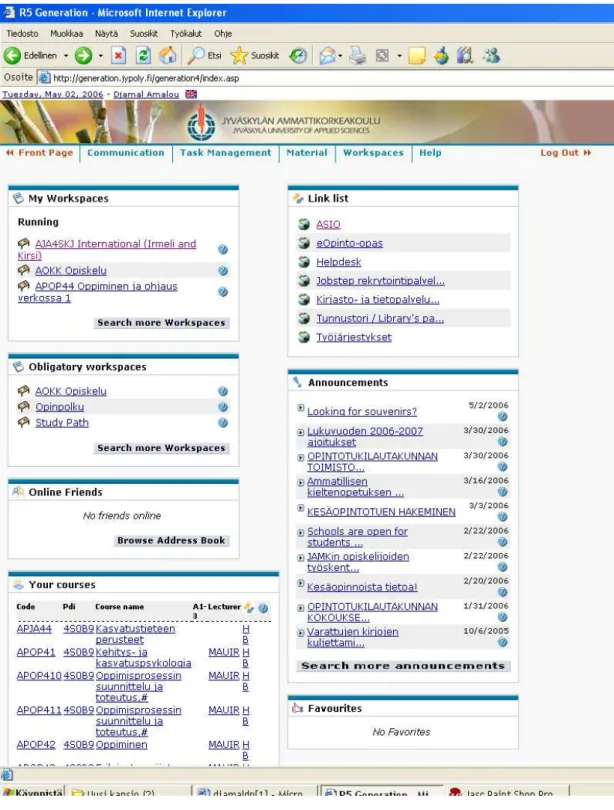
Figure 3: R5 user interface
R5 Generation is a versatile and flexible working and learning platform with both a strong pedagogical dimension and a well-developed administrative
management module. The cornerstones of R5 Generation are its open standards, usability, modularity and easy integration with other systems.
The ease of use associated with Generation is increased by a functionality that has been developed – a learning portal. The learning portal enables the personalisation of the content by different user groups. The learning portal’s functionality is combined with existing document management and user management functionalities. Reporting tools, questionnaires and chat functionalities are all state-of-the-art in user-friendliness.
R5 Generation is a platform for sharing knowledge and developing
pedagogical resources in an information secure environment. It is easy to use; so easy that a learner can begin to use it without any user training. It offers a variety of language versions (for example English, Finnish, Swedish) and it can be tailored from the user management and content creation point of view. R5 Generation can be utilised for different types of learning events and
services. Different learner groups and ready-made E-Learning content solutions can be linked to R5 Generation. By doing this different virtual courses and projects can be created, where virtual teamwork or individual distance work can be conducted successfully.
The functionality behind R5 Generation lies in dynamic technical structures and its user-friendliness has been proven in of different learning events. R5 Generation possesses 61 different tools or functionalities for accomplishing and supporting the following tasks:
- Communication - Task management - Handling material - Course management
- Maintenance and up-date tools - Maintenance and guides.
10. CONCLUSION FOR IMPLEMENTING E-LEARNING PLATFORM IN SCHOOLS
In the introduction of this report, few preliminary questions where raised:
• In teaching & learning is E-learning a real value?
• What are the difficulties?
• What benefits does it bring?
• Is there a future for E-learning approaches?
Successful experiences in education or corporate sector show the increasing part of this trend who contributes to the quality of education and training and a move to a knowledge-based society. Even there are fewer experiences to mention in the lower education, at higher education and universities, there are considerable experiences in co-operation, networking and exchange of good practice at different level. Embedding E-learning in an existing courses, training the human resources and slow progresses in lower education are the main difficulties. The low-tech approach to embedding E-learning or more ambitious E-learning both require a considerable amount of human and economic resources. The E-learning programme is a further step towards realising the vision of technology serving lifelong learning.
Before implementing an E-learning platform in schools, an accurate evaluation of the needs, clear objectives, analyses of the context of E-learning progress, and preliminary questions have to be taken into consideration, such as:
• Do we have a strategy for this move?
• Do we have technical and pedagogical competencies?
• What are the results of human resources survey?
• What are the schedules and dead lines?
Referring to my work institution, we have the strategy for implementing the E-learning even there are point to specify such for which kind of student: these with special need or all with no distinction. What are the subject, courses or tuition to provide by E-learning?
The human resource survey is done during the teaching staff evaluation in autumn 2005. The survey show a lack of expertise concerning the use of E-learning and real need of more training. A first joint course was organised for both teacher of my institution and the Russian Finnish School of Helsinki, school with lot of similitude and background. This course was an overview of E-learning and a first approach to various tools such those for website editing. The financial support is an important question to be raised before any further development. The schedules and dead lines are still open.
After all these questions have been answered, a second, more technical phase will be interactive communication between the future users: teachers/ students, administrative staff and a technically orientated intervening person. The purpose of this interaction is to define the technical needs and to make a choice for the most convenient platform. This process is long and needs a lot of documentation and cooperation. Once acquired, the next step concerns the training of intervening persons. This phase could be the longest and the most demanding.
The last phase before use is the creation of the standard course that require both technical abilities and pedagogical knowledge for the blended learning or an advanced theory of learning that is consistent with the needs of the twenty- first century and then digital age.
REFERENCES
Friedrich Buchberger 1996. Some remarks on the current state of teacher education in the European Union
Henri Dieuzeide. Les nouvelles technologies, outils d’enseignement (Nathan pédagogie)
Engeström, Y. 1994. Training for Change: New approach to instruction and learning in working life.
Ermel 2001. Apprentissage numériques et résolution de problèmes. Jukka Koivisto, Liisa Huovinen ja Leena Vainio 1999. Opettajat oppimisympäristöjen rakentajina (Opetushallitus)
Robert Mager. Comment définir des objectifs pédagogiques (Dunod) Veijo Meisalo1996. The integration of remote classrooms. A distance education project using video conferencing (Research report, university of Helsinki)
G. Mialaret 1985. Introduction to educational sciences (Unesco publication) Guy Palmade. Les méthodes en pédagogie (Presses universitaires de France)
Mari Räkköläinen and Kathryn Ecclestone 2005. The implications of using skills tests as basis for a national evaluation system in Finland (Finnish national board of education)
Harvey Singh. Building Effective Blended Learning Programs November - December 2003 Issue of Educational Technology, Volume 43, Number 6, Pages 51-54.
Seppo Tella 1996. Teacher education in Finland - Present and future trends and challenges (studia pedagogic, university of Helsinki)
Seppo Tella 1996. Virtual school in a networking learning environment (OLE publication, university of Helsinki)
Seppo Tella 1997. La formation multimédia - Vers une citoyenneté de la société de communication et d’information. (OLE publication, university of Helsinki)
L’enseignement en Finlande. Brochure de présentation du ministère de l’éducation
Competence-based qualifications for adults. Brochure published by the Finnish board of education
Les styles d’apprentissage : Le modèle de Kolb
http://www.cegep-chicoutimi.qc.ca/reflets/refletsv9n2/reflet05.htm Trousse pédagogique du portfolio professionnel de formation http://www.csdeschenes.qc.ca/snaps/trousseportfoliop.htm
Plates-formes E-learning : le dilemme des « fonctionnalités de gestion » et du mode d’évaluation http://thot.cursus.edu/rubrique.asp?no=17216
Démarches et modèles pédagogiques
http://www.prepaclasse.net/fichiers/demarch.html#ancre514630
Styles d'enseignement, styles d'apprentissage et pédagogie différenciée en sciences
http://www.geoeco.ulg.ac.be/lmg/competences/chantier/eleves/lem_art2.html Le profil d'apprentissage des étudiants inscrits dans un certificat de cycle offert à distance et sur campus
http://cade.athabascau.ca/vol8.2/07_sauve_et_al.html L’apprentissage coopératif
http://www.tact.fse.ulaval.ca/fr/html/coop/2app_coo/cadre2.htm Principes constructivistes
http://www.tact.fse.ulaval.ca/fr/html/cours/coursgcr/textes/capsule13.htm Evolution de la notion d'apprentissage expérientiel en éducation des adultes : vingt-cinq ans de recherche
http://www.erudit.org/revue/rse/2000/v26/n2/000123ar.html Nouvelles stratégies pédagogiques et méthode traditionnelle : Où est la différence ?
http://www.fedecegeps.qc.ca/carrefour_pdf/06-05-01-texte.pdf Tutoring systems and pedagogical theory: representational tools for understanding, planning and reflection in problem solving
http://tecfa.unige.ch/~scherly/STAF15/Reusser.html
Evolution de diverses composantes de la motivation relative au travail scolaire au cours de l'adolescence
http://www.sidos.ch/fw_query/siweb2.fwx?htm.sel0=6265 Pourquoi enseigner l'entreprenariat
http://www.iae.univnantes.fr/recherch/travaux/cahiers99/pub9.html Modèles pédagogiques et choix technologiques
http://sd.alinea.free.fr/Documents/Guidmethodo/guidmet18.htm Le poinçonneur des curricula
Planification d'un scénario pédagogique
http://www2.csduroy.qc.ca/mission/scenarios/scairemr.htm Préparer des séquences d'enseignement http://web.upmf-grenoble.fr/sciedu/pdessus/sapea/planif.html BSCW software
http://bscw.fit.fraunhofer.de/index.html
Basic Support for Cooperative Work and Tele working
http://www.fim.uni-linz.ac.at/research/telework/seminar/T6/index.htm Josh Bersin, What Works in Blended Learning www.learningcircuits.org A background to blended E-learning http://www.kolieh.com/blended.htm
APPENDIX 1: LIST OF SOME E-LEARNING PLATFORMS ON THE MARKET
Blackboard
http://www.blackboard.com/
Blackboard is a free environment making it possible to the trainers to create complete educational sites and learning to reach, via a navigator, in a centre of resources line, a space of communication (synchronous and asynchronous) and in a centre of tests. Demonstration on line.
ClassLeader
http://www.classleader.com/
Collaborative platform of remote formation offering the access to a dashboard allowing learning how to reach basic functionalities, and to the trainer with additional services for the creation of course, the inscription of learning or the realization from tests or exercises.
E-teachserver
http://www.e-teach.ch/
Customer-server environment allowing the development, the deployment and the management of remote training (creation and management of modular courses multimedia, follow-up and evaluation on line).
WebCT
http://www.webct.com/
Platform conceived in 1996 and has currently more than 24000 teachers and 90000 courses in line, and concerning a community of more than 4,7 million students divided in 45 countries throughout the world
WebTutor
http://www.cyberion.fr/
WebTutor is an interface client/server directed towards the individualized tutoring remotely conceived mainly for the companies and the organizations of training.
APPENDIX 2: GLOSSARY
Activities: components of the course of formation or teaching.
Administrator (institutional): role likely to manage the platform in the environment of the establishment and inter universities.
Administrator (technical): role likely to manage the installation and the technical maintenance of all that concerns the platform, and technical relation with the customers of the platform.
Client: this term indicates the software installed on the computer of the student or the trainer and necessary to make function the analyzed platform. Course: support of course to be consulted answering a set of themes
(compound of lessons).
Creator of course: role likely to manage the preparation of the contents of course (integration, assembly and/or creation of the materials multimedia). External tool: software or utility which can be called or which can use exported data of the platform.
Interoperability: capacity of software to communicate or interact together. Lesson: element of course made up of materials
Materials: files of various media: text, image, video...
Navigator: software installed on the microcomputers of the users (student, formative) and allowing consulting the Web.
Plug-in (external module): software incorporated in a navigator who allows him to interpret files, which are not able treated in a native way.
Standard course: for a session or a given formation, the list of the topics and objectives to be reached, a plan or summary of the generally organized
teaching contents in a chronological way, the list of the activities, stage by stage, and the resources and tools available.
System-author: software for development of teaching wares and pedagogical multimedia teaching resources.
Trainer: role likely to manage the management of a class (relation with the students, individualization).
APPENDIX 3: SUMMARY OF COMPARISON CRITERIA’S
DEVELOPMENTAL FEATURES
- Platform uses open data standard so that it can communicate with existing school database applications
- Content can be authored on PCs running Windows newer version - Courses can be taken using a PC running Windows newer version - Platform utilizes standard HTML for content creation
- Platform is structured so students can view all of their current courses when they log on
- Platform's server software will run on Windows NT
- Multiple choice questions can be created\scored with platform's authoring software
- True\False questions can be created\scored with platform's authoring software
- Matching questions can be created\scored with platform's authoring software
- Short answer questions can be created\scored with platform's authoring software
- Essay questions can be created\cored with platform's authoring software - Platform supports question database for management of test questions - Platforms supports reporting features for test questions
- Platform supports Microsoft Internet Explorer and newer browsers - Platform supports testing stage for courses to debugged before making
them live to students
- Platform allows author to view course as student without logging out - Platform has built-in threaded discussion list capabilities
- Platform has built-in chat capabilities
- Platform can be integrated with networks video and audio products - Platform can be integrated with Macromedia Shockwave products - Vendor provides development services
- Management component will create reports for tracking student progress - Platform has a feature to import existing test questions in a tab-delimited
INSTRUCTOR TOOLS
- Course planning and managing - Fast course revising
- Course monitoring - Instructional designing - Presenting information - On-line testing - On-line grading - Managing records - No HTML knowledge required - Customization of student curriculum - Student tracking
- Automated grading
- Level of control over design
- Instructor assign specific course material to individual or group of students - Multiple choice self test tutorial questions - (automatic marking)
- "Fill in the blank" self test tutorial questions - (automatic marking) - Customized feedback to tutorial questions
- Redirect path of tutorial depending on question answers - Timed quizzes (graded with permanent mark retention) - On line marking and grades management of timed quizzes - Generate random set of questions
- Allows developer to preview course as a student
INSTRUCTIONAL FEATURES
- student asynchronous communication is possible - student synchronous communication is possible - student can make their changes to own content - Training is provided for
- Courses can have consistent interface
- Platform supplies access to external resources
- Online help is available to help student use external resources - Platform includes an internal E-mail client
- Platform has E-mail management capabilities for students - Platform supports multiple instructors for a single course
STUDENT TOOLS - Identification - Bookmark management - Multimedia support - Private e-mail - File submissions - Threaded discussions - Course Chat rooms - Logged chat
- Whiteboard - Self-assessing - Progress tracking
- Desktop based file management for uploading to server - Bulletin board/conferencing tools
- Image database
- Student access to own grades - Access to course grade distribution - Online assistance
- Search tool for course content - Student presentations area
- Allows students to view all current courses in which they are registered after logging in
TECHNICAL SUPPORT - External e-mail - Security features
- Assignable administrator role - Batch add instructors
- Batch add students - Template creations tools - Built-in instructor manual - Built-in student manual - Database