Cascading Style Sheets
D E S I G N I N G F O R T H E W E B
Third Edition
Cascading Style Sheets
DESIGNING FOR THE WEB
Cascading Style Sheets
DESIGNING FOR THE WEB
Third Edition
Håkon Wium Lie
Bert Bos
° ° ° ° °
Table of Contents
Table of Contents... vii
Preface... viii
Chapter 1 The Web and HTML ...1
The Web ...1
Development of the Web...2
Adding images ...2
Chapter 2 CSS ...3
Rules and Style Sheets ...3
Index ...5
Table of Contents
° ° ° ° °
Preface
This is a sample document whose purpose is to show how CSS can be used to print a book. To make the document more lively, excerpts from the third edition of “Cascading Style Sheets — designing for tbe Web” has been included.1The excerpts have been selected for their example
values and they appear, in this document, out of order.
The PDF version of this document is produced directly from the HTML and CSS sources by the Prince formatter.
We encourage you to reuse the structure, markup and style sheet of this sample document. In your own book, however, you need to provide the content yourself.
Håkon Wium Lie & Bert Bos Oslo/Antibes November 2005
1. That bookwasproduced using the methods described in the document,
and it was published by Addison-Wesley in 2005.
The box “CSS Specifications” on page 4 lists the different CSS specifications.
Chapter 1
The Web and HTML
Cascading Style Sheets (CSS) represent a major breakthrough in how Web-page designers work by expanding their ability to control the appearance of Web pages, which are the documents that people publish on the Web.
For the first few years after the World Wide Web (the Web) was created in 1990, people who wanted to put pages on the Web had little control over what those pages looked like. In the beginning, authors could only specify structural aspects of their pages (for example, that some piece of text would be a heading or some other piece would be straight text). Also, there were ways to make text bold or italic, among a few other effects, but that's where their control ended.
THE WEB
The Web is a vast collection of documents on theInternetthat are linked together via hyperlinks. The Internet consists of millions of computers worldwide that communicate electronically. Ahyperlinkis a predefined link between two documents. The hyperlinks allow a user to access documents on various Web servers without concern for where they are located. AWeb serveris a computer on the Internet that serves out Web pages on request. From a document on a Web server in California, the user is just one mouse click away from a document that is stored, perhaps, on a Web server in France. Hyperlinks are integral to the Web. Without them, there would be no Web.
Chapter 1: The Web and HTML
Figure 1:The image has been loaded.
Development of the Web
The Web was invented around 1990 by Tim Berners-Lee with Robert Cailliau as a close ally. Both of them were then working atCERN, which is the European Laboratory for Particle Physics. Tim is a graduate of Oxford University and a long-time computer and software expert, and is now the director of theWorld Wide Web Consortium (W3C), an
organization that coordinates the development of the Web. He also is a principal research scientist at Massachusetts Institute of Technology's Laboratory for Computer Science and Artificial Intelligence (MIT CSAIL). Robert is a 30-year veteran at CERN, where he still works. Robert organized the first Web conference in Geneva in 1993. Both Tim and Robert were awarded the ACM Software System Award in 1995 because of their work on the Web.
Adding images
Images proliferate on the Web. It wasn't until the Mosaic browser added support for images in 1993 that a critical mass of people realized the potential of the Web. You can add images to your documents with the IMGelement –IMGis short for image.
When the image is ready, the page looks like Figure 1.
Cascading Style Sheets
HTML is the most popular document format on the Web, and it is used in most of the examples in this book.
Chapter 2
CSS
As we explained in Chapter 1, “The Web and HTML,” HTML elements enable Web-page designers to mark up a document's structure. The HTML specification lists guidelines on how browsers should display these elements. For example, you can be reasonably sure that the contents of aSTRONGelement will be displayed as boldfaced. Also, you can pretty much trust that most browsers will display the content of anH1element using a big font size – at least bigger than thePelement and bigger than theH2element. But beyond trust and hope, you don't have any control over your text's appearance.
RULES AND STYLE SHEETS
You can create style sheets in two ways. You can either use a normal text editor and write the style sheets “by hand” or you can use a dedicated tool – for example, a Web authoring tool. The dedicated tools enable you to create style sheets without learning the syntax of the CSS language. However, in many cases, the designer wants to tweak the style sheet by hand afterwards, so we recommend that you learn to write and edit CSS by hand. Let's get started! Here is a simple example:
h1 { color: green }
This code is a simple CSS rule that contains one rule. Aruleis a statement about one stylistic aspect of one or more elements. Astyle sheetis a set of one or more rules that apply to an HTML document. This rule sets the color of all first-level headings (H1).
Chapter 2: CSS
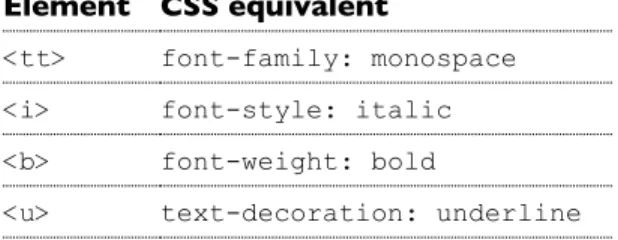
Table 1:HTML extension elements and their CSS equivalent.
CSS SPECIFICATIONS
Cascading Style Sheets is formally described in three W3C specifications: CSS1, CSS2, and CSS 2.1. (As discussed in the previous chapter, W3C is the organization that coordinates the technical development of the Web.) The first specification, CSS1, was issued in December 1996 and describes a simple style sheet language mostly for screen-based presentations. CSS1 has around 50 properties (for example,colorand font-size). CSS2 was finalized in May 1998 and builds on CSS1. CSS2 includes all CSS1 properties and adds around 70 of its own, such as properties to describe aural
presentations and page breaks.
CSS 2.1 is the most recent specification published by W3C. It adds some new features, but CSS 2.1 is mostly a scaled-down version of CSS2. CSS2 was an ambitious attempt to describe functionality, which Web authors had requested. However, not all the functionality is reliably supported by all browsers. CSS 2.1 is a specification that describes the parts thataresupported by two or more browsers. Because CSS 2.1 is similar to CSS2, the specification was given a minor version number (that is, 2.1) rather than a major number (such as CSS3).
Element CSS equivalent
<tt> font-family: monospace
<i> font-style: italic
<b> font-weight: bold
<u> text-decoration: underline
Cascading Style Sheets
° ° ° ° °
Index
CERN, 2 Internet, 1 hyperlink, 1 rule, 3 style sheet, 3 W3C, 2 Web server, 1World Wide Web Consortium, 2
Index