User‑elicited dual‑hand interactions
for manipulating 3D objects in virtual reality
environments
Vijayakumar Nanjappan
1, Hai‑Ning Liang
1*, Feiyu Lu
2, Konstantinos Papangelis
1, Yong Yue
1and Ka Lok Man
1,3Abstract
Virtual reality technologies (VR) have advanced rapidly in the last few years. Prime examples include the Oculus RIFT and HTC Vive that are both head‑worn/mounted dis‑ plays (HMDs). VR HMDs enable a sense of immersion and allow enhanced natural inter‑ action experiences with 3D objects. In this research we explore suitable interactions for manipulating 3D objects when users are wearing a VR HMD. In particular, this research focuses on a user‑elicitation study to identify natural interactions for 3D manipulation using dual‑hand controllers, which have become the standard input devices for VR HMDs. A user elicitation study requires potential users to provide interactions that are natural and intuitive based on given scenarios. The results of our study suggest that users prefer interactions that are based on shoulder motions (e.g., shoulder abduc‑ tion and shoulder horizontal abduction) and elbow flexion movements. In addition, users seem to prefer one‑hand interaction, and when two hands are required they prefer interactions that do not require simultaneous hand movements, but instead interactions that allow them to alternate between their hands. Results of our study are applicable to the design of dual‑hand interactions with 3D objects in a variety of virtual reality environments.
Keywords: Virtual reality, Head‑mounted displays, Dual‑hand input devices, Interaction design, 3D manipulation, Interaction techniques, User‑elicitation study
Open Access
© The Author(s) 2018. This article is distributed under the terms of the Creative Commons Attribution 4.0 International License (http://creat iveco mmons .org/licen ses/by/4.0/), which permits unrestricted use, distribution, and reproduction in any medium, provided you give appropriate credit to the original author(s) and the source, provide a link to the Creative Commons license, and indicate if changes were made.
RESEARCH
*Correspondence: [email protected] 1 Department of Computer Science and Software Engineering, Xi’an Jiaotong‑ Liverpool University, Suzhou, Jiangsu, China
Full list of author information is available at the end of the article
Introduction
Virtual reality (VR) is still an emergent technology but it is rapidly advancing and mar-keted as a productivity and entertainment device. Examples include the HTC Vive1 and
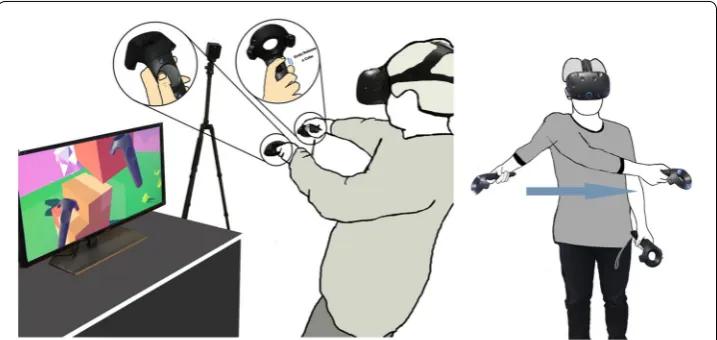
Oculus RIFT2 head-mounted displays (HMDs). Figure 1 below shows a picture of the
HTC Vive and a scenario requiring a user to manipulate 3D virtual objects, one of the most common and basic activities in VR-based environments. There has been rapid progress in their displays in terms of portability and resolution and more recently there has been also a renewed focus on interaction (or input) devices. The HTC Vive for instance is the first to introduce its custom-designed dual-hand input controllers which
Fig. 1 The HTC Vive dual‑hand controller with a user interacting with a virtual environment to manipulate 3D objects (right); an example of a user‑defined gesture using the Vive controller (left)
Fig. 2 The HTC Vive dual‑hand controller and controls (right); oculus touch dual‑hand controller and controls (left)
represent a significant departure from the traditional devices like the mouse +
key-board or game controller. The Oculus RIFT has followed soon after with the introduc-tion of its own dual-hand controller, the Touch, which in many ways is very similar to the Vive controller. Figure 2 shows these two different dual-hand input devices. Further, recently-marketed mixed reality (MR) systems also come with these types of dual-hand devices. Typical examples include the Windows-based Lenovo and Samsung Odyssey MR HMDs. This trend in both VR and MR HMDs shows that dual-hand interaction is becoming standard across these systems.
a VR world: moving around or navigation, selection, rotation, translation, scaling, slic-ing and so on. These forms correspond to the actions we perform in the real world (e.g. navigation or rotation). There have been a great number of games and other types of applications coming out which require users to interact with 3D objects in a virtual envi-ronment. Minecraft for VR, a popular game that is supported by both the HTC Vive and Oculus, is a typical example of these types of games and requires users to use the dual-hand controllers to manipulate the 3D objects. Given their repaid introduction, further research is needed to know whether those forms of interaction based on dual-hand con-trollers are intuitive and preferable by typical users.
This research explores the suitability of dual-hand interactions for 3D manipulation in VR environments. Given that VR HMD have only become widely available, it is timely that we take a closer look at what types of interactions are considered natural and suit-able for 3D manipulations by users. It is likewise important to know how people tend to perform manipulations when they are interacting with 3D objects inside a virtual reality environment. In this research, we conduct a study to elicit user-defined gestural inter-actions for dual-hand input devices for manipulating 3D virtual objects. This approach allows us to evaluate a series of tasks performed by users and extrapolate the set that is considered useful and intuitive by most of these users. This approach can also help extrapolate factors and rules that contribute to the design of these 3D manipulation techniques.
The main contributions of this paper are: (1) a set of user-elicited interactions for dual-hand manipulation of 3D objects in VR environments; and (2) recommendations for the design of these interactions.
Background and related work
This research is related to three themes: (1) content manipulation of 3D objects in VR environments, (2) dual-hand interaction, and (3) user elicited gestures.
Manipulating 3D objects in VR environments
gloves are arguably the true hand gesture input device for direct manipulation of the 3D objects in virtual environments [5]. The traditional game controller for the Xbox and PlayStation systems are often used for interacting with 3D VR content—e.g., for playing games [6] and for navigation activities [7, 8].
Aside from the traditional game controllers, mobile devices have also been explored as input devices for interacting with 3D objects [9, 10]. The advantages of mobile devices include their portability and flexibility that allow customization and modification for a particular context [7, 11, 12]. Researchers have introduced several implementations based on the touch-enabled display and motion sensors of these mobile devices in order to turn them into controllers (e.g., see [11, 13–19]). It has also been shown that mobile devices could be useful for performing certain 3D tasks [15, 16, 18]. However, they are not frequently used to support activities in VR because of several limitations, such as the lack of tactile feedback and users not being able to see the touch display when they are wearing a VR HMD. Similarly, augmented reality (AR), serving as a technology that combines both real and virtual objects, requires the interaction with virtual objects to be quick, simple and intuitive. Such affordance can make the users more focused on the interactive contents themselves [20]. Device-free, mid-air interactions on 3D objects have also been evaluated by researchers in both AR and VR contexts [21, 22]. Le Ché-néchal et al. [21] for example proposed a system to support hand-based manipulations in VR. Hand gestures are mapped and reconstructed to support collaboration activities. Bang et al. [23] have designed an interactive VR system that can be controlled by user postures. The Kinect is used to recognize human postures without the need for addi-tional devices to be attached on the users’ body.
We are now witnessing the introduction of a new generation of input controllers for VR HMDs. For example, the HTC Vive Controller, the Oculus RIFT Touch, and the PlayStation VR Move are all examples of these devices that allow dual-hand interactions. Given this development, it is timely that we investigate further dual-hand interaction with 3D objects in VR environments.
Dual hand vs. single hand input devices
Humans are proficient at using two hands but not for all types of tasks—some tasks can be proficiently done using both hands simultaneously, while others are better done by alternating their hands. Guiard [24] has proposed the Kinematic Chain Theory to describe the way people’s hands work together to perform tasks in parallel. For biman-ual tasks, it is often found that hands are assigned asymmetric roles, where one hand, usually the non-dominant one, determines the frame of references, while the other, dominant hand carries out more precise interactions within this frame. In some cases, researchers have also found that both hands can do symmetric roles with both hands performing similar actions [25].
typing and marking menus) can increase performance, the accuracy would get affected negatively in significant ways [25, 26]. Some efforts have also been made to develop interaction techniques for two-handed interactions using motion tracking devices [27]. However, it is shown that to be better than traditional input devices, they often require more training time and practice. This suggest that the design of such devices needs to be improved so that users could spend less time to get used to them.
In the context of VR HMDs, input devices like the Vive Controller or Oculus Touch are meant for dual hand interactions and it would appear that they are meant for syn-chronous, simultaneous interaction given that the pair of devices are physically exactly the same and have the same functionality. Given that they are relatively new, it is impor-tant to increase our understanding of how users would want to use them for 3D task manipulations in VR environments.
User‑defined interaction gestures via elicitation
An elicitation technique is one type of data collection with the aim to help design inter-actions; it relies on potential users, rather than being based on the designers or devel-opers themselves, as the source of inspiration [28]. The user elicitation approach is meant to guide the design of intuitive and natural interactions, as opposed to arbitrary designs that are technology- or designer-centric (e.g., to enhance the speed and accu-racy of an algorithm in detecting spatial gestures). Earlier research by Nielsen et al. [29] has used elicitation to distil intuitive designs for ergonomic gestural interfaces. Besides being more intuitive and natural, user-defined gestures are easier to remember and are preferred by their potential non-technical users [12, 30–34]. Some researchers have reported that user-elicitation can actually help develop more complete sets of gestures than those defined only by experts or designers [34, 35]. There have been a number of researchers who have followed this approach to elicit users-defined gestures for mobile devices [33], tabletop systems [31, 34], public displays [36], skin input [37], cross-device interaction [38], and using tokens [39].
User‑elicitation study
In order to find out what interactions are both natural and supportive for 3D manipula-tion in VR HMDs, we conducted an elicitamanipula-tion study. We wanted to conduct this study because we hoped to develop a more complete set of gestures and distil a set of design recommendations for such input devices. As stated earlier, user-elicitation can help to achieve this [34, 35, 40].
Apparatus and participants
Twelve right-handed non-paid participants (six females) with an average age of 21 were recruited for this experiment. They were all from a local university from differ-ent educational backgrounds. They had not had much first-hand experience with VR; 6 had seen how VR HMDs work in online videos. They all had normal or corrected-to-normal eye vision.
Our experimental prototype was based on the HTC Vive headset and its paired con-troller. Participants were given freedom to use any of the features of the controller, using one or both hands.
Task, procedure, and experimental design
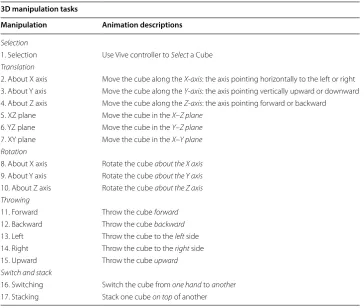
Participants were asked to design and perform a gesture via the Vive Control-ler (a cause) to carry out the interaction (the effect). There were 17 tasks that had been identified based on reviewing relevant literature on 3D task manipulation (see Table 1). These tasks correspond to the fundamental forms of direct manipulation tasks in any kind of VR environments. We asked participants to do a gesture twice and explain why they chose a particular way of enacting the interaction. Before the experiment, participants were given a brief description of the features and interaction possibilities of the Vive Controller and asked to perform some movements they felt natural, intuitive, and comfortable with the device. The participants were asked to be standing during the experiment and were allowed to rest at any time if they feel tired during the experiment.
or write a brief description of the interaction on a piece of paper. The process was repeated for all 17 manipulation interactions shown in Table 1.
Results
From the collected gestures, we were able to create a set that were natural to users. We grouped identical gestures for each task, and the largest group was chosen as the user-defined gesture for the task. We then calculated an agreement score [34, 41] for each task using the group size. The score reflected in one number the degree of consensus among participants. The formula for calculating the agreement score is shown below
where t is a task in the set for all tasks T; Pt is the set of proposed gestures for t; and Pi is a subset of identical gestures from Pt. The range for At is between 0 and 1 inclusive. As an example, let us assume that for a task, four participants gave each a gesture, but only two are very similar. Then the agreement score calculated following the process shown in Fig. 3.
At=
Pi
P
i
Pt
2
Table 1 The 3D tasks given to participants organized by category
3D manipulation tasks
Manipulation Animation descriptions
Selection
1. Selection Use Vive controller to Select a Cube
Translation
2. About X axis Move the cube along the X‑axis: the axis pointing horizontally to the left or right 3. About Y axis Move the cube along the Y‑axis: the axis pointing vertically upward or downward 4. About Z axis Move the cube along the Z‑axis: the axis pointing forward or backward 5. XZ plane Move the cube in the X–Z plane
6. YZ plane Move the cube in the Y–Z plane
7. XY plane Move the cube in the X–Y plane Rotation
8. About X axis Rotate the cube about the X axis
9. About Y axis Rotate the cube about the Y axis
10. About Z axis Rotate the cube about the Z axis Throwing
11. Forward Throw the cube forward
12. Backward Throw the cube backward
13. Left Throw the cube to the left side 14. Right Throw the cube to the right side
15. Upward Throw the cube upward
Switch and stack
16. Switching Switch the cube from one hand to another
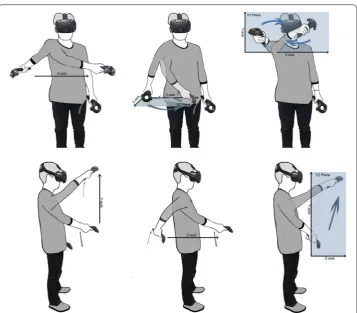
Figure 4 shows the agreement scores for the gesture set, ordered in descending order. The scores show consistent high agreement of participants based on the tasks. Figures 5, 6, 7, 8, and 9 show all the user-defined gestures based on category.
In this section we present the general observations of the study and then present some design considerations derived from the results.
From Fig. 6, we can observe that, in broad terms, there is high consistency for tasks requiring translation, especially along one axis only. There is lower agreement for
Fig. 3 An example of calculating the agreement score for a user elicited gesture
Fig. 4 The agreement scores for the tasks arranged in descending order
translation tasks dealing with the Z-axis (e.g., translation along the XZ axes). This obser-vation agrees with results from [18] whose authors have examined user-elicited interac-tions for tasks using a mobile device and found that 3D tasks dealing with the Z-axis are not easy to perform and that users would give a wider range of possible interactions.
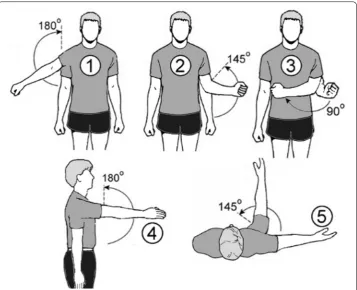
Another important pattern we observed is that most users liked doing large gestures with their arms. This is aligned with studies by [42, 43], where participants seem to have used stretch-out arm motions to select targets around their body. Table 2 shows the parts of the arms used to perform the category of gestures for the given 17 tasks by the participants. To understand why and how these patterns have emerged, we would need to look at the possible range of motions afforded by the human arm (see Fig. 10).
The human arm has three joints: shoulder, elbow, and wrist. They connect the arm proper, forearm, and hand. The shoulder and elbow joints allow people to carry out 5 distinct types of motions (see Fig. 10), while the wrist joint allows us to perform 3 types of rotations [44, 45]. Our study shows that participants have not made use of wrist motions but instead they have used either shoulder and elbow movements, or combina-tions of the two. That is, it is based on shoulder abduction, elbow flexion, shoulder inter-nal rotation, shoulder flexion, and shoulder horizontal abduction.
In the exit questionnaire and interview, we asked participants why they had not made much use of their wrist. The common response was that given that the more natural way to work with the Vive Controller was to be standing, it was then also easier and more practical to use arm movements. In addition, they indicated that wrist motions were more suitable for small, minute movements that required precision and accurate control. They also commented that wrist rotations/twists were limited and physically difficult to
Fig. 7 Gestures for rotation (Tasks 8, 9, 10). Elbow flexion was mostly applied for Tasks 8 and 9 to rotate an object around the X‑axis and Y‑axis. Shoulder abduction was used for task 10 to rotate an object around the Z‑axis
do. Such comments were in line with research that had dealt with using the wrist for doing tilt gestures (e.g., see [45]), which had pointed out that the range of motions for human wrist was rather limited. Furthermore, participants also felt that VR should not be for very accurate tasks and that they would prefer to use a different controller for such tasks. One reason was that viewing through the HMD to focus on small elements for a prolonged time was tiring for their eyes; the other reason was that performing interactions that required precision in mid-air was not that easy (but was actually tiring). Although the touchpad located on top of each device could be used for accurate interac-tions, participants felt that it was not natural and convenient to use. Also, they suggested that the touchpad did not fit into their model of how the handheld device ought to work. They also indicated that it was not easy to interact with the touchpad while also carrying out motion gestures with the device. This seemed to agree with earlier research about input devices, where it was found that despite providing multiple features that were con-sidered useful, actual users may not be able to take advantage of them and use more than one feature simultaneously [18, 46].
In terms of the 5 shoulder/elbow motions, participants seem to prefer shoulder motions (e.g., Task 1-right, 2, 3, 4, 5, 6, 7, 10, 13, 14, 15), followed by elbow ones (e.g., Tasks 1-left, 8, 9, 11, Task 12-left). There were some cases when both shoulder and elbow
Fig. 9 Gestures for throw (Tasks 11, 12, 13, 14, 15). Elbow flexion was used for Task 11 to throw objects forward. Shoulder abduction was applied for Tasks 13, 14 to throw objects left and right. For Tasks 12 and 15, to throw objects backward and upward, participants gave two ways to doing the two tasks; Task 12: left: elbow flexion, right: both elbow flexion and shoulder flexion; Task 15: left: shoulder flexion from the abdomen moving above the shoulder; right: shoulder flexion from the chest moving above the shoulder
Table 2 Types of gestures performed by the participants based on the part of arm used
Part of the arm Abduction Flexion
Shoulder Selection (Task 1)
Translation (Tasks 2, 5, 7) Rotation (Task 10)
Switch and stack (16 and 17)
Elbow Selection (Task 1)
were used together (e.g. 12-right, 16, 17) and at least one gesture which required bending (e.g., 17). In a way, most of the gestures appear to be a combination shoulder abduction, flexion, and horizontal abduction. We asked participants to provide their preferences for each type of shoulder and elbow motion. Participants’ responses were to a large extent consistent in this order: Shoulder flexion→ shoulder abduction → elbow flexion →
shoulder horizontal abduction → shoulder internal rotation. When asked why, most of them said that they had more flexibility of motion and felt less tired with the first three motions, while the last two would increase their fatigue level but provided them with small range of motions. Support for this can be found in literature for gestural interac-tions. For example, techniques proposed by [42, 43] rely on shoulder flexion accompa-nied by small shoulder horizontal abduction movements; and techniques recommended in [47] for menu selection of self-portrait cameras are based on shoulder flexion plus elbow flexion with small shoulder horizontal motions.
In terms of using the two hand-held devices together, it would appear that for most tasks participants were able to do the tasks with one of the devices. In addition, par-ticipants commented that the two devices were identical and sometimes was difficult to tell them apart and because of this it was not easy to think in terms of using the two together. In terms of its design, participants said that it would have been more cogni-tively easier if the two devices had a different feeling, tactile wise or in terms of its shape, something akin to the Nintendo Wii Remote and the Nunchuk combination. Despite the
form factor, participants were observed using two devices for coordinated tasks, such as Task 16, which was primarily based on elbow flexion/internal rotation. We asked par-ticipants if they would want to use two hands more often. They said that they prefer not to because it is not easy to coordinate two hands moving together, especially when they were wearing the VR HMD. This was rather surprising. They said that if they had to use two hands, they would not mind doing so but they would rather use one hand. If they had to use two hands, a number of participants suggested it would be preferable if the two hands were going in the same direction or doing the same activity—for exam-ple, both hands doing elbow flexion. In addition, they said that they would find it dif-ficult if two hands were doing things simultaneously. They further said that it would be better if interactions requiring two hands to have asynchronous actions, with one hand doing one action first, and afterward the other hand can perform a follow up action. This is in line with research about dual hand interaction techniques [20, 25, 26, 48, 49]. For example, for text entry activities, when using two hands at the same time, it can lead to faster performance, but it can also decrease their accuracy [26, 48]. In addition, when performing two-handed simultaneous marking menu strokes, it has been reported that the participants had the slowest reaction time because of the extra cognitive burden in “remembering and planning their strokes when coordinating simultaneous motions of two hands” [42; p. 16.14].
Discussion and conclusions
Lessons learned
The following design guidelines are based on the lessons gathered from our results.
• 3D manipulations with a handheld device should attempt to minimize the use of the wrist.
• VR environments should minimize requiring users to carry out precise actions that require focusing on small elements for a long time.
• Interactions should try to leverage shoulder flexion and shoulder abduction in com-bination with elbow flexion.
• Stretching-out and lifting of the arms appears to be more preferred and easier to per-form.
• Simultaneous dual hand interactions seem suitable for tasks that may not require precise movements.
Future work
controllers for manipulating 3D objects in VR environments. All current dual-hand VR controllers appear to have symmetrical design and functionalities for both hands. With an asymmetrical design, it will be possible to explore how one can leverage Guiard’s the-ory of Kinematic Chain [50] in VR environments. For example, we can answer questions like how to use one hand to serve as the reference frame to support and complement the other simultaneous, more precise tasks that need to be performed with the other hand; or whether asymmetrical controllers can lead to better synchronization of simultaneous activ-ities using both hands at the same time in VR environments.
In addition, manipulating 3D objects in VR environments can be affected by the nature and properties of the objects themselves. This effect can be multi-faceted and these factors include size of the objects, their distance from the users, their shape (e.g., regular vs. irreg-ular), and whether the objects are moving or static. To identify any correlations between these properties of virtual 3D objects and users’ preferred choice of gestures requires fur-ther investigation, especially when these gestures are based on dual hand devices.
Summary and conclusions
In the paper we have presented our work on the exploration of suitable manipulations to interact with 3D objects in virtual reality head-mounted display (HMD) environments. We conducted a user-elicitation study to explore what interactions are more natural and intuitive for dual-hand controllers for manipulating 3D objects in these environments. The results of the study suggest that for dual-hand devices users prefer interactions that are based on shoulder motions (e.g., shoulder abduction, shoulder horizontal abduction) and elbow flexion movements. In addition, users seem to prefer one-hand interaction, and when two hands are required they prefer interaction that do not require simultaneous hand or arm movements for precise interactions. Our research is limited to one type of dual-hand controller (based on the HTC Vive). Despite this, our results are applicable to similar dual hand devices, like the Oculus Touch and PlayStation Move. In the future we plan to explore design issues of these dual-hand controllers to see if we can increase users’ prefer-ence and ability to use two hands to interact with 3D objects in virtual environments.
Authors’ contributions
VN, H‑NL, and FL framed the ideas of the paper and the design of the study. VN and FL run the experiment to collect the data and, with the help of H‑NL, did the analysis of the results. All 6 authors (VN, H‑NL, FL, KP, YY and KLM) contributed to the writing of the paper. All authors read and approved the final manuscript.
Author details
1 Department of Computer Science and Software Engineering, Xi’an Jiaotong‑Liverpool University, Suzhou, Jiangsu, China. 2 Department of Computer Science, Virginia Tech, Blacksburg, VA, USA. 3 Faculty of Engineering, Computing, and Science, Swinburne University of Technology Sarawak, Sarawak, Malaysia.
Acknowledgements
We would like to thank the experiment participants for their time. We would like to also thank the reviewers for the com‑ ments and suggestions that have helped improve the quality of our paper.
Competing interests
The authors declare that they have no competing interests.
Availability of data and materials Available upon request.
Funding
This research was partially funded by the XJTLU Key Program Special Fund and XJTLU Research Development Fund.
Publisher’s Note
Received: 6 June 2018 Accepted: 9 October 2018
References
1. Shneiderman B (1983) Direct manipulation: a step beyond programming languages. Computer (Long Beach Calif ) 16:57–69. https ://doi.org/10.1109/MC.1983.16544 71
2. Hutchins EL, Hollan JD, Norman DA (1987) Direct manipulation interfaces (excerpt). Hum Comput Interaction 1:468–470
3. Cruz‑Neira C, Sandin DJ, DeFanti TA et al (1992) The CAVE: audio visual experience automatic virtual environment. Commun ACM 35:64–72. https ://doi.org/10.1145/12988 8.12989 2
4. Flasar J (2000) 3D interaction in virtual environment. In: Proceeding 4th central European Semin
5. Bowman DA, Wingrave C, Campbell J, Ly V (2001) Using pinch gloves (TM) for both natural and abstract interaction techniques in virtual environments. HCI Int, pp 629–633
6. Tan CT, Leong TW, Shen S et al (2015) Exploring Gameplay Experiences on the Oculus Rift. In: Proceeding 2015 annual symposium computer interact Play—CHI Play, vol 15, pp 253–263. https ://doi.org/10.1145/27931 07.27931 17 7. Liang H‑N, Lu F, Shi Y et al (2018) Evaluating the effects of collaboration and competition in navigation tasks
and spatial knowledge acquisition within virtual reality environments. Futur Gener Comput Syst https ://doi. org/10.1016/j.futur e.2018.02.029
8. Liang H‑N, Shi Y, Lu F et al (2016) VRMController: an input device for navigation activities in virtual reality environ‑ ments. In: Proceeding 15th ACM SIGGRAPH conference virtual‑reality contin its applied—VRCAI, vol 16, pp 455–460. https ://doi.org/10.1145/30139 71.30140 05
9. Ballagas R, Borchers J, Rohs M, Sheridan JG (2006) The smart phone: a ubiquitous input device. IEEE Pervasive Com‑ put 5:70–71. https ://doi.org/10.1109/MPRV.2006.18
10. Pering BT, Ballagas R (2014) Spontaneous marriages of mobile devices and interactive spaces. Commun ACM 48:53–59
11. Dearman D, Truong KN (2009) BlueTone—a framework for interacting with public displays using dual‑tone multi‑frequency through bluetooth. In: Proceeding int conference ubiquitous computer, pp 97–100. https ://doi. org/10.1145/16205 45.16205 61
12. Nacenta MA, Kamber Y, Qiang Y, Kristensson PO (2013) Memorability of pre‑designed and user‑defined gesture sets. In: Proceeding SIGCHI annual conference on human factors in computing system—CHI’13, pp 1099. https ://doi. org/10.1145/24706 54.24661 42
13. Boring S, Altendorfer M, Broll G et al (2007) Shoot & copy: phonecam‑based information transfer from public dis‑ plays onto mobile phones. Proc Mobil 07:24–31. https ://doi.org/10.1145/13780 63.13780 68
14. Jeon S, Hwang J, Kim GJ, Billinghurst M (2010) Interaction with large ubiquitous displays using camera‑equipped mobile phones. Pers Ubiquitous Comput 14:83–94. https ://doi.org/10.1007/s0077 9‑009‑0249‑0
15. Katzakis N, Hori M (2009) Mobile phones as 3‑DOF controllers: a comparative study. 8th IEEE Int Symp Dependable. Auton Secur Comput DASC 2009:345–349. https ://doi.org/10.1109/DASC.2009.76
16. Katzakis N, Hori M (2010) Mobile devices as multi‑DOF controllers. In: 3DUI 2010—IEEE symposium 3D user inter‑ faces 2010, pp 139–140. https ://doi.org/10.1109/3dui.2010.54447 00
17. Liang H‑N, Trenchard J, Semegen M, Irani P (2012) An exploration of interaction styles in mobile devices for navigat‑ ing 3D environments. In: Proc 10th Asia Pacific conference computer human interaction—APCHI’12 309. https ://doi. org/10.1145/23500 46.23500 62
18. Liang HN, Williams C, Semegen M et al (2013) An investigation of suitable interactions for 3D manipulation of distant objects through a mobile device. Int J Innov Comput Inf Control 9:4737–4752
19. Mccallum DC, Irani PP (2009) ARC‑Pad : absolute + relative cursor positioning for large displays with a mobile touchscreen. Hum Factors. https ://doi.org/10.1145/16221 76.16222 05
20. Jeon J, Hong M, Yi M et al (2016) Interactive authoring tool for mobile augmented reality content. J Inf Process Syst 12:612–630. https ://doi.org/10.3745/JIPS.02.0048
21. Duval T, Arnaldi B (2016) Vishnu: virtual immersive support for helping users. 9–12
22. Krichenbauer M, Yamamoto G, Taketomi T et al (2017) Augmented reality vs virtual reality for 3D object manipula‑ tion. IEEE Trans Vis Comput Graph 24:1–1. https ://doi.org/10.1109/TVCG.2017.26585 70
23. Bang G, Yang J, Oh K, Ko I (2017) Interactive experience room using infrared sensors and user’s poses. J Inf Process Syst https ://doi.org/10.3745/jips.02.0068
24. Guiard Y (1987) Asymmetric division of labor in human skilled bimanual action. J Mot Behav 19:486–517. https ://doi. org/10.1080/00222 895.1987.10735 426
25. Kin K, Hartmann B, Agrawala M (2011) Two‑handed marking menus for multitouch devices. ACM Trans Comput Interact 18:1–23. https ://doi.org/10.1145/19930 60.19930 66
26. Ng A, Brewster SA, Williamson JH (2014) Investigating the effects of encumbrance on one‑ and two‑handed interac‑ tions with mobile devices. In: Proceeding 32nd annual ACM conference human factors comput system—CHI’14, pp 1981–1990. https ://doi.org/10.1145/25562 88.25573 12
27. Schultheis U, Jerald J, Toledo F et al (2012) Comparison of a two‑handed interface to a wand interface and a mouse interface for fundamental 3D tasks. In: Proceeding IEEE symposium 3D user interfaces 2012, 3DUI 2012, pp 117–124. https ://doi.org/10.1109/3dui.2012.61841 95
28. Cooke NJ (1994) Varieties of knowledge elicitation techniques. Int J Hum Comput Stud 41:801–849. https ://doi. org/10.1006/ijhc.1994.1083
30. Kane S, Wobbrock J, Ladner R (2011) Usable gestures for blind people: understanding preference and perfor‑ mance. In: Proceeding 2011 annual conference human factors computer system—CHI’11, pp 413–422. https ://doi. org/10.1145/19789 42.19790 01
31. Morris MR, Wobbrock JO, Wilson AD (2010) Understanding users’ preferences for surface gestures. Proc Graph Inter‑ face 2010:261–268. https ://doi.org/10.1016/j.actam at.2009.07.058
32. Morris MR, Danielescu A, Drucker S et al (2014) Reducing legacy bias in gesture elicitation studies. Interactions 21:40–45. https ://doi.org/10.1145/25916 89
33. Ruiz J, Li Y, Lank E (2011) User‑defined motion gestures for mobile interaction. In: Proceedings of the 2011 annual conference on Human factors in computing systems—CHI’11. ACM Press, New York, p 197
34. Wobbrock JO, Morris MR, Wilson AD (2009) User‑defined gestures for surface computing. In: Proceedings of the 27th international conference on human factors in computing systems—CHI 09. ACM Press, New York, p 1083 35. Pyryeskin D, Hancock M, Hoey J (2012) Comparing elicited gestures to designer‑created gestures for selection
above a multitouch surface. In: Proceedings 2012 ACM international conference interaction tabletops surfaces, pp 1–10. https ://doi.org/10.1145/23966 36.23966 38
36. Kray C, Nesbitt D, Dawson J, Rohs M (2010) User‑defined gestures for connecting mobile phones, public displays, and tabletops. In: Proceeding 12th international conference on human factors in computing mobile devices ser‑ vices—MobileHCI’10, p 239. https ://doi.org/10.1145/18516 00.18516 40
37. Weigel M, Mehta V, Steimle J (2014) More than touch : understanding how people use skin as an input surface for mobile computing. In: Proceeding on 32nd annual ACM annual conference on human factors in computing systems—CHI’14, pp 179–188. https ://doi.org/10.1145/25562 88.25572 39
38. Rädle R, Jetter H‑C, Schreiner M et al (2015) Spatially‑aware or spatially‑agnostic?: elicitation and evaluation of user‑defined cross‑device interactions. In: Proceeding 33rd annual ACM conference on human factors in computing systems, pp 3913–3922. https ://doi.org/10.1145/27021 23.27022 87
39. Valdes C, Eastman D, Grote C et al (2014) Exploring the design space of gestural interaction with active tokens through user‑defined gestures. In: Proceedings 32nd annual ACM conference on human factors in computing systems—CHI’14, pp 4107–4116. https ://doi.org/10.1145/25562 88.25573 73
40. Tung Y‑C, Hsu C‑Y, Wang H‑Y et al (2015) User‑defined game input for smart glasses in public space. In: Proceed‑ ing 33rd annual ACM conference on human factors in computing systems—CHI’15, pp 3327–3336. https ://doi. org/10.1145/27021 23.27022 14
41. Vatavu R‑D, Wobbrock JO (2015) Formalizing agreement analysis for elicitation studies: new measures, significance test, and toolkit. In: Proceedings of the 33rd annual ACM conference on human factors in computing systems— CHI’15. ACM Press, New York, pp 1325–1334
42. Khambadkar V, Folmer E (2013) GIST: a gestural interface for remote nonvisual spatial perception. In: Proceed‑ ing 26th annual ACM symposium user interface software technology—UIST’13, pp 301–310. https ://doi. org/10.1145/25019 88.25020 47
43. Li F, Dearman D, Truong K (2009) Virtual shelves: interactions with orientation aware devices. Uist 2009:125–128. https ://doi.org/10.1145/16221 76.16222 00
44. Grandjean E (1969) Fitting the task to the man : an ergonomic approach. Taylor & Francis, New York
45. Rahman M, Gustafson S, Irani P, Subramanian S (2009) Tilt techniques: investigating the dexterity of wrist‑based input mahfuz. In: Proceedings of the 27th international conference on human factors in computing systems—CHI 09. ACM Press, New York, p 1943
46. Liang H‑N, Sedig K (2010) Role of interaction in enhancing the epistemic utility of 3D mathematical visualizations. Int J Comput Math Learn 15:191–224. https ://doi.org/10.1007/s1075 8‑010‑9165‑7
47. Chu S, Tanaka J (2015) Design of a motion‑based gestural menu‑selection interface for a self‑portrait camera. Pers Ubiquitous Comput 19:415–424. https ://doi.org/10.1007/s0077 9‑014‑0776‑1
48. Azenkot S, Zhai S (2012) Touch behavior with different postures on soft smartphone keyboards. In: Proceeding 14th international conference on human‑computer Interact with mobile devices services—MobileHCI’12, p 251. https :// doi.org/10.1145/23715 74.23716 12
49. Odell DL, Davis RC, Smith A, Wright PK (2004) Toolglasses, marking menus, and hotkeys: a comparison of one and two‑handed command selection techniques. In: Proceeding on graph interface—GI’04, p 17–24. https ://doi. org/10.20380 /gi200 4.03