User-Driven Applications—New Paradigm for Interface
Design
Sergey Andreyev
Freelance Scientist, Moscow, Russia. Email: [email protected]
Received June 4th, 2013; revised July 2nd, 2013; accepted July 10th, 2013
Copyright © 2013 Sergey Andreyev. This is an open access article distributed under the Creative Commons Attribution License, which permits unrestricted use, distribution, and reproduction in any medium, provided the original work is properly cited.
ABSTRACT
40 years ago the outcome of computer programs was in the form of long listings covered by numbers; even the format of those numbers was determined by developers. Throughout the latest 30 years program views and results are shown in a wide variety of shapes and variants, but all these possibilities are predefined and fixed in code by developers; nothing outside of their approved solutions is allowed. My vision from now on into the future: developers are responsible only for correct work of a program (calculations, link with the database, etc.) and suggest a good default interface but not determine all possible scenarios; only users decide WHAT, WHEN, and HOW to show. This will be a revolution in our interaction with computers, but there are obvious questions. How this step can be made? Do all users need such change? Is it going to be a burden for users or a welcome revolution?
Keywords: Human-Computer Interaction
1. Introduction
We all use the programs written by somebody else. The majority of users never write programs of their own; some people call the programming their profession, but even the authors of the best known programs spend most of their time working inside the programs written by somebody else, so these people are also very well famil- iar with the role of a user. You—the reader of this arti- cle—may be an amateur developer or you may be a world known programmer with a number of rewards for your achievements. Regardless of your programming level and achievements, try to look at the following text as a user. We are all users and we all have the same problems with the programs we are dealing with.
There is a widest variety of applications, so I don’t want to say that whatever I am writing further on is needed for absolutely all the programs. My proposals must not be applied to every program in a mandatory way. At the same time the new ideas can be applied to applications from many different areas, so it is possible that they can be of high demand in the area you are in- terested in.
It is a very rare situation that any developer will start working on a new program when he is absolutely satis- fied with the existing one. I am not an exception. I started
to work on the proposed ideas when I became disap- pointed with the main ideas and trend in interface design and when I understood that those ideas caused the stag- nation in development of very sophisticated and highly needed applications. Throughout my entire career I was involved in development of complicated scientific and engineering applications for different areas. Some of them were used locally in a group of researchers or in several companies; others were and still are used around the world. The areas of use for those programs were far away from each other, but years ago I began to feel that there was some common problem with all of them. The problem was definitely not specific to the area of use; there was something more general. To understand this general problem, we have to look briefly at the history of interface design and the main tendencies in this area.
2. A Brief History of Interface Design
receive some results from computer, and to analyse those results. If that person didn’t like the view of the outcome, then he had to change the code in order to receive the output in more suitable form.
In a while you could see more specialization in pro- gramming area with different people being researchers and program developers, but they worked in very close collaboration. This collaboration between researchers and programmers was so close that any requirements on changing the output were solved after a short discussion on a personal level. The interface was occasionally changed by programmer but at any moment it was fixed and absolutely controlled by developer.
Things started to change rapidly with the beginning of PC era and especially for programs used by thousands or millions. It is impossible to imagine the situation when all those users are satisfied with the designer’s ideas of interface and the disappointment of many users became a huge problem. The solution to this problem was obvious: give users a chance to adapt the interface to their de- mands. Sounds interesting and the scores of scientists and programmers began to generate the ideas. For the last 30 years the design of interfaces for computer pro- grams is influenced mostly by the ideas of adaptive in- terface. Those numerous ideas are described in hundreds (more likely—thousands) of papers and books. Adaptive interface became an axiom, a dogma for interface de- signers.
The golden age of adaptive interface was somewhere 15 years ago. There were so many interesting results which were widely discussed and used! At the same time there is one thing that is well known to all good pro- grammers but is never mentioned in any publication. From time to time you can find the announcement of this thing in some discussions on the web, so this is not the top secret thing. Similar situation happened in physics (and engineering) many years ago and scientists in that area turned out to be much more honest in their dealing with a problem. Maybe because it happened long ago?
For a long period of time people were trying again and again to develop a perpetual motion machine. Certainly, it never happened. Physics already explained that it was impossible, but again and again the new author of the new machine declared that he knew where the problem was; just one more effort and it will really work. In 1775 the Royal Academy of Sciences in Paris issued the state- ment that the Academy “will no longer accept or deal with proposals concerning perpetual motion”. Never mind: some people continue to think that they can outwit the laws of Nature.
Compare the mentioned case with the situation in in- terface design. Adaptive interface has one fundamental flaw which is hidden deep inside and never publicly dis- cussed: adaptive interface is based on the postulate that
designers know better than any user what is really good for each and all situations. As I sad, you can find the an- nouncement of this fact on the web, but I never saw this fact mentioned in any book or article. It is tabooed. The whole situation was perfectly described by Hans Chris- tian Andersen in his famous The Emperor’s New Clothes: “…clothes made of this cloth had a wonderful way of becoming invisible to anyone who was unfit for his of- fice, or who was unusually stupid”. Try to say or write a word against the adaptive interface and you will be clas- sified according to the previous sentence.
The adaptive interface is usually called friendly be- cause it gives users a choice; however, any selection can be made only among the possibilities which beforehand were considered as appropriate by developers and only these variants are allowed. The interface is not fixed any more; it gives users some choices but it is still controlled by developer. Certainly, no collection of choices can satisfy all users (hundreds, thousands, or millions). You say that you are not satisfied? Well, wait a bit for the next version of our excellent program and you will be really happy. As the King said in that famous tale: “The procession must go on!”
I see the direct analogy of the situations in physics and programming and from my point of view the physicists were much more honest and much wiser.
The adaptive interface produces some choices for us- ers. When users are not satisfied with a set of allowed solutions and demand something different, then a new set of possibilities is coded or another instrument to select among them is developed. The number of commands and possibilities in new programs increases; the interface becomes so sophisticated that… This situation is per- fectly described in the preface to [1]: “You have to figure out how to cast what you want to do into the capabilities that the software provides. You have to translate what you want to do into a sequence of steps that the software already knows how to perform, if indeed that is at all possible. Then, you have to perform these steps, one by one.” As a result, users often are not doing exactly what they—users—want to do; instead, they try to find how to ask an application to do something as close to their need as possible.
At the beginning the adaptive interface was declared as the way to adapt programs to users’ demands. After 15 or 20 years of hard work by many researchers and practi- tioners it turned out that users have to adapt to programs. I call it a whim of evolution. But this is not the end of the funny story. One more twist was needed to turn the whole story into a farce and this step was made.
ties. Microsoft decided to save those users (and develop- ers!) from the hard labour of thinking and began to pro- mote the dynamic layout. In 2006 Charles Petzold wrote in his book [2] that “dynamic layout is…an important part of future Windows user-interface design philosophy”. Petzold is not only a very good author but he knows very well, what is going to be cooked at the Microsoft’s kitchen. That statement was definitely not the Petzold’s speculation on the item but the Microsoft’s decision. An extremely wrong one, but when Microsoft invests a lot of money into something, there is usually some result. At least, temporarily but not necessarily for best.
The idea of dynamic layout is simple: user changes the outer sizes of the form (window) and, as a reaction to this single command, the program changes the sizes of the inner elements according to the algorithm predefined and fixed by developer. The result is obvious: there are no more choices for users; everything is predetermined by developer. The interface design made the full loop and now we are back in the situation that we had 40 years ago: everything is again controlled by developer. What is really funny is the fact that “big specialists” try to ex- plain even this as a huge achievement. Two years ago I got such an explanation in a private letter from one of the MIT professors: “Without dynamic layout, the end user would have to manually, one by one, resize and reposi- tion the elements inside. So dynamic layout does confer usability benefits by making the user interface more effi- cient: one resize action by the user results in many auto- matic resizes and repositions of dependent objects.” In the same way the proponents of slavery can declare that slavery is the best form of social organization because slaves don’t need to think about food or shelter; slaves are provided with both and can focus entirely on their work. This is not the place to discuss the moral aspects of slavery; I only want to remind that slavery died of the economical issues. As a result of its economical ineffi- ciency, it simply lost the competition.
Dynamic layout is the dominant idea of interface de- sign throughout the last years. Well, it is not the first time in the history of science when the wrong idea becomes dominant. Certainly, not forever. One of my friends and former colleagues (an excellent physicist, head of the De- partment of Mathematical Modelling) perfectly described the situation: “You can fool one person as long as you want, you can fool all people once, but you can’t fool all and forever”. The dynamic layout is used nearly every- where now, but it doesn’t mean that it is a good idea. Dynamic layout is a well constructed highway into the dead end.
If so, and I am sure about it, then where the wrong turn was made and where we have to return back to take an- other road? And what is that other road can be?
3. The Idea of the Different Way
To catch the main idea of another way on which the whole interface design can be based, let us consider the situation from absolutely different area. Suppose that you have rented for some time a house with the furniture, fully equipped kitchen, and all other needed things. The owner tried to do the best and before your arrival put everything in such an order that, from his point of view, would be the best for you. On your arrival, you can be satisfied with all you see and keep everything in the same order, but chances are high that you will move some pieces of furniture and other things around the house according to your own preferences. And throughout your stay at the house you will continue to move the things around whenever you feel any need for it. You want to feel comfortable at any moment and this can be easily achieved by moving things around. Those movements can be caused by many different things: rainy or sunny day outside and your desire to have more or less light, a home party will require more free space while a private conversation will need two armchairs close to each other, a dog will need some special corner, and so on. When you leave the house, another tenant will arrive and will move the things around the house according to his pref- erences. The same circumstances will result in similar actions by different tenants; similar but not identical be- cause everyone has his own taste and estimation of com- fort. A complicated problem of organizing a comfortable living for every tenant is solved easily enough and does not require a special course: everyone knows that all things are movable and can do it himself. As much as he wants and whenever he feels any need for it. The solution to important problem of organizing a comfortable living is the movability of each and all pieces. The movability without restrictions and without involvement of anyone else.
In the same way the movability of the screen objects can help us in our problem with interface design, but before announcing any new steps, let us analyse the use of movability of the screen objects throughout the past years. Maybe this was already done before?
Let us return back for nearly 30 years. The first com- mercially successful product to use a multi-panel window GUI was the Macintosh, released in 1984; next year the Windows system was released. Throughout the years there were different variations, but for the last 20 years we—users of computers—deal with the two-level system.
of elements can be moved freely around the screen and placed anywhere. Users and only users decide about the best place for each object and there are no restrictions on those movements. When user starts any application, it is represented by a rectangle which can be not only moved but also resized by user at any moment. Rectangles rep- resenting different programs can be positioned side by side, or overlap, or be placed far away from each other. There are no restrictions on the number of those rectan- gles, their sizes, and positions. The movability and the sizes are under full users’ control. The developer (for example, Microsoft) provides the instrument and guar- antees the unlimited movability and resizability of the specific elements (!); users may use this instrument and organize the screen (at this level!) in any way they want. When user starts any application, he gets to another level. This is the level where the real work is done, so the situation at this level is much more important for users. The variety of different objects that you can see in appli- cations is infinitive because those objects are produced by the imagination and skill of developers all round the world. The mechanism which was used to move icons and rectangles on the level of operating system was never released as an instrument to be used on another level. If you are a designer and want to organize the movability of objects inside your program, you have to develop it yourself. It is not an easy thing to create such mechanism, so throughout the years there are only few applications with the movable elements inside. There is not a single application in which everything can be moved! There are programs in which users have to draw different elements and to move these elements in order to construct other needed objects. For such programs the ability to move elements is crucial and in several of them this mechanism was developed. These are the programs like Paint and several others, but the number of such applications is tiny. Even in such programs there is some mechanism which allows users to construct the needed objects of different movable parts, but everything else that surrounds those movable elements is still unmovable as in all other pro- grams.
I’ll repeat two very important statements again:
There was not a single program consisting of exclu- sively movable/resizable elements;
There was not a single article in which the behaviour of an application entirely consisting of movable/re- sizable elements was analysed.
The second statement is mostly the result of the first one and also the consequence of peculiarity of the pro- gramming world. In physics, it’s not a rare thing to theo- rize about some unknown things and then try to approve those theories with some experiments. In programming the statements are based on the existing (working) appli- cations, so it’s not strange that the behaviour and peculi-
arity of the programs based entirely on the movable ele- ments was never discussed. Simply because no such ap- plications were ever demonstrated.
I have got several reviews in which the same program was mentioned again and again to show me the error of my last statement. The next paragraph is for those spe- cialists in interface design who continue to mention Mor- phic system as an example of program with total mov- ability of elements.
I don’t know who was the first to mention that objects in the Morphic system were movable. Looks like none of those specialists on interface design ever saw this system alive; somebody well known in the area wrote the wrong thing, and it turned into an authorized statement. I hope that at least the words by the authors of that system can clarify the situation. In their article [3] the authors of the Morphic system wrote (see page 22, second column, paragraph at the bottom): “Currently all layout in Mor- phic is accomplished using just two types of layout morphs: row morphs and column morphs. A row morph packs its submorphs in a tight horizontal row with no overlaps, while a column morph does the analogues pack- ing vertically. A justification parameter controls place- ment in the secondary dimension; for example, the tops,
bottoms, or centers of a row’s submorphs can be aligned with the top, bottom, or center of the row.” The picture in their paper illustrates the last phrase. There is not even a glimpse of any movement; this is a classical adaptive interface with three possibilities for positioning. This is all! It wasn’t anything new even at the time of Morphic’s design and authors honestly wrote that “Automatic layout based on rows and columns was done in…” (page 27, left column, paragraph in the middle under the title Related work). Morphic has a classical adaptive interface. De- signers of Morhic did what they knew and what they could. Just a good piece of work. Three variants of lining for the elements; no movability at all.
4. Movability Is Only a Feature of New
Programs
chances to control their own work, and with this we all got into a trap.
On receiving a new version of any popular program we spend a lot of time trying to find out how to do the familiar things that we were doing in the previous ver- sion. Maybe it wasn’t organized in the best way in that old version, but we got used to it and now we can’t do even these simple things. Users are turned into an addi- tion to programs. It is definitely an absurd and not right situation. We need to return back and take another road for interface design. Developer has to organize the work of an application according to its main purpose (calcu- lations in scientific and engineering programs, exchange of the data with the database, and so on), but the interface must be controlled by users. Easily and totally. All pro- grams must be designed in such a way that USERS and only users have to decide WHAT, WHEN, and HOW to show on the screen. I call such programs the user-driven applications. While analysing the applications of the new type, we need to look at two different, though related, parts.
The first one is the algorithm of movability.
The second one is the design and work of such appli- cations which are based on several rules.
I am sure that there can be different algorithms of movability. The crucial things are the easiness of its use and the possibility of applying it to any object. Some- where 20 years ago I used one of my old algorithms for moving and resizing only the particular objects. At that time I needed the movability of some objects in my pro- gram and that old algorithm worked exactly with those objects.
The algorithm which I invented several years ago can be used with arbitrary objects. This algorithm is simple in use for developers, while the most important for users is the easiness of moving/resizing and the uniformity of the whole process regardless of the involved objects: any object is resized by the border and moved by its inner points. The most detailed description of this algorithm can be found in the book World of Movable Objects [4].
It is important to have an easy to use algorithm, but the most important are the programs which can be based on the movable elements. Regardless of the used algorithm, such applications will work according to the same rules. Reading about these new programs is not enough; you have to try such applications and only then formulate your own decision about the user-driven applications. Theoretical discussions are definitely not enough as users begin to work with the new applications in the way dif- ferent from what we have now. The change is much bigger than years ago when the MS-DOS was replaced by Windows system (I hope that some readers can still remember that step).
Some time ago I wrote a book World of Movable
Objects and put it on the web [4]. The book is read now all round the world; there is a statistics by countries and periods of time. The book is accompanied by a huge Demo program with more than 170 examples. This appli- cation is written in C# and all its codes are available. Some of the examples demonstrate the creation of mov- able objects so these examples are a bit artificial and were especially designed for the purpose of explanation. There are also examples of real working applications. Throughout my entire career I preferred to use my ideas in scientific and engineering applications. For several years in a row I was developing the programs of the new type for the staff of the Department of Mathematical Mo- delling. It was a very interesting experience which I men- tioned in [5]. Examples in the book are from different areas and I hope you can find those of them which are closer to your area of interests and on which you can test and estimate the features of user-driven applications in the best way.
There are few rules for development of user-driven applications. None of these rules can be excluded; they all work together and only the implementation of them all produces the user-driven applications. Users don’t need to know about these rules (except the first one) but they will quickly find the effects of these rules; I’ll mention about it. These rules were not formulated as an assignment for the programs of the new type. The rules were born and updated throughout the work on user- driven applications. The initial version of the main rule— the first one—was not so strict, but the iron logic of mov- ability demanded the current wording which you can see further on; I wrote about this iron logic of movability in my book [4]. These rules are formulated mostly for dev- elopers, but we are all users, so for each rule I’ll try to add some words from the users’ point of view.
5. Rules of User-Driven Applications
5.1. Rule 1
All elements are movable.
This is the only new feature about which users have to be informed because the movability is not visible. This is an invisible feature that changes everything. Users don’t need any special detailed instructions about the mov- ability of one or another object; any graphical object is moved by inner points and resized by its border. Mouse press inside the controls is predefined; the reaction on such press is well known to all users, so it cannot be overruled or changed. Accordingly, controls are resized and moved by different parts of their border (I write about it in the book); this puts some dissonance into straightforward technique of moving, but there are a lot of applications which work without controls.
5.2. Rule 2
All parameters of visibility must be easily controlled by users.
Rules 1 and 2 are the projections of the full users’ con- trol over programs on the different sets of parameters. The first rule deals with the locations and sizes; the second rule deals with the colors, fonts, and some au- xiliary things.
In the complex programs it is always a problem for users to find the way of changing the parameters. De- velopers often think that the way they propose is simple and obvious, while users can’t find this “obvious” way. (It is a standard thing that I can’t find in Word the way to change one or another parameter. Am I the only one to have such problems?) In all my programs I always or- ganize the tuning in the same way through the commands of context menus.
Menu on any object shows the commands to change the parameters of this particular object.
Menu on any group allows to modify all objects of this group.
All elements of the form (dialogue) can be tuned via the menu which can be called at any empty spot.
5.3. Rule 3
Users’ commands on moving/resizing of objects or on changing the parameters of visualization must be imple- mented exactly as they are; no additions or expanded interpretation by developers are allowed.
Changing of the visualization parameters by users is not an unknown thing and is implemented in the majority of applications. But in the standard applications, espe- cially those that are built on the ideas of dynamic layout, users change one parameter, for example, font, and a lot of related things are changed automatically, because this is the nature of dynamic layout. With the user-driven ap- plications a designer has to stop thinking in the way like this: “You changed the font. I am smart, I know what you really wanted to do, so I will do it for you: I will adjust
the sizes of this, this, and that object. Be happy, because I save you several clicks.” This is an absolutely wrong way of design for user-driven applications. The devel- oper must not interfere in the users’ commands and add anything of his own.
It can be a bit strange at the beginning of new design to control yourself and not to add anything of your own to the users’ commands. You may be a designer with many years of practice; you really know what must be done to make the view of an application better in one or another situation. But this is another world; if you gave users the full control over an application, it must be really full, so you do not leave anything for yourself as a second control circuit. Whatever is gone is gone.
Eventually you will find that nobody needs your even excellent experience on adjusting the forms to their needs. Where you have to apply all your skills in design (the higher—the better) is in construction of the default view of every form. The highest credit to your skills is the big percentage of users who will not change anything at all but work exactly with your proposed design. Yet, the possibility of all those moving, resizing, and tuning must be there for users to try them at the first wish.
5.4. Rule 4
All parameters must be saved and restored.
Saving the parameters for restoring them later and us- ing them the next time is definitely not a new thing and is practiced for many years. But only the passing of the full control to the users and the significant increase of the number of parameters that can be changed, turned this saving/restoring of parameters from the feature of the friendly interface into a mandatory thing. If user spent some time on rearranging the view of the program to whatever he prefers, then the loss of these settings is in- admissible. The full users’ control means the possibility of changing any parameter, so saving and restoring of all the parameters must be implemented.
5.5. Rule 5
The above mentioned rules must be implemented at all the levels beginning from the main form and up to the farthest corners.
to use it. They got so used to this total movability that expect it everywhere; they automatically try to move and resize everything not only in the main form of an appli- cation but in all the auxiliary forms; that is why the above mentioned rules must be applied on all the levels. This expectation of total movability is so strong that us- ers are really disappointed when in parallel with the new applications they continue to work with the old well known programs and find out that those programs didn’t get the new features in some magic way but still contain unmovable and nonresizable elements. But this is not the problem of the user-driven applications; people simply expect that good solutions are used everywhere.
6. Let Us Try to Look at Some Results
It is impossible to write an article about the interface design without any figures and I am going to illustrate some of my results, but beforehand I need to write sev- eral words about those illustrations. User-driven applica- tions are based on the total movability of all the involved elements, but this movability is never visualized. Well, in some situations there can be tiny visual tips for users, but I think that in general such tips are not needed. Occa- sionally I include such tiny visual marks into my exam- ples but with them I always add a simple instrument for users to decide about showing or erasing these marks. The only needed tip is the information that everything is movable. One of the big pluses of the new applications is the use of exactly the same objects as were used before. If you liked the view of the elements in the well known, familiar, and often used program, then you are going to see exactly the same view on starting your work with the new version of the same program. What are you going to do with these familiar elements which are now movable and resizable, is up to you. I am sure that you will change the view of some elements and the overall view of an application and will continue to do it again and again (my experience allows me to make such prediction), but initially there is no visual difference between the old ele- ments and the new movable elements. Maybe the best way to understand the difference between two types of programs is to try some well known application but transformed according to the new rules. Especially for such comparison I prepared the exact copy of the stan- dard Calculator; it can be found among the examples accompanying the book [4].
One reviewer (unfortunately, unknown) of one of my previous articles wrote that there was nothing new be- cause the illustrations could be prepared with some stan- dard application. Certainly, the same illustration can be prepared in many different ways, and I underline again and again that the view of the objects does not change at all when the movability is added to their features. You have to try the new applications in order to understand
the novelty. You can’t understand and estimate the dif- ference in work of applications without trying such pro- grams in which everything is movable. The illustrations which you see further on are taken from the working examples accompanying the book. There is the whole project with all the files available, but to try the appli- cation, you need only two files: World Of Moveable Ob- jects.EXE and Move Graph Library.DLL.
The first example which I want to mention works with personal data. From time to time nearly everyone has to deal with an application which asks us to type in some personal data, stores this data somewhere in database, and can display the stored data later on request. If you have to deal with such an application once in several years then you have a chance to live through each of those encounters regardless of the implemented interface, but there are people, like HR personal, who have to work with such programs for many hours every day and for those people the design of such application and the easi- ness of its change according to personal taste and current task at any moment are crucial.
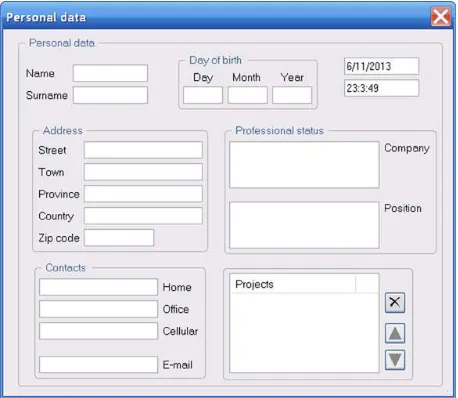
[image:7.595.309.538.520.719.2]Personal information can include a wide variety of data. Let us decide that in our case the maximum set of data about any person includes a name, date of birth, ad- dress, contact information, and some information about professional activity; Figure 1 shows the default view of this application. This application can be used for many different tasks; in each of them the really needed part of information is different. The screen space is always very valuable, so it would be a high quality program if any user can rearrange it in seconds in such a way that at any moment it will show exactly the required part of in- formation and nothing else. Whatever is needed and what is considered unnecessary is decided only by user. The number of possible variants is infinitive, so there are no
chances that any form of adaptive interface with its pre- defined scenarios would fulfil such a task. For user- driven application it’s an easy task and anyone can set the needed view.
The default view of our program shows one main group which contains seven blocks of data; five of them are represented as real groups with a frame; two others have no frames but the close positioning of their ele- ments show them as blocks. Via the commands of con- text menu in the main group each block can be hidden or unveiled at any moment. Elements of the blocks can be arbitrarily hidden and unveiled through the commands of other context menus; the groups are designed in such a way that each frame is automatically adjusted to any moving or changing of the inner elements. I have already mentioned the rules of hiding, unveiling, and changing the visual parameters of any element; these rules work at all the levels (big group, inner group, or an individual ob- ject). With these commands user can transform the whole view just in seconds; the next two figures show my ver- sions for two different tasks.
Figure 2(a) shows the same application for the period when Christmas cards have to be sent, while Figure 2(b)
demonstrates the view which is more suitable for or- ganizing some professional meeting. Switch to any of these views takes only a couple of seconds; the default view can be reinstalled in an instant via a command of context menu. There is nothing common between two views at Figure 2, but also don’t forget that these are the
(a)
(b)
Figure 2. Possible variants of the same Personal data pro- gram but for different tasks. (a) Sending Christmas cards; (b) Preparing professional meeting.
possible views of the same program that is shown at Fig- ure 1. Compare all three pictures, remember that the number of variants is infinitive, and try to answer a sim- ple question: “Is there any type of adaptive interface which can allow such flexibility?”
There are a lot of examples in the book and accompa- nying Demo application and those examples are from absolutely different areas. The movability is limited nei- ther by the area nor by the complexity of the program, though I think that advantages of the new programs in- crease with the complexity of the task.
For the scientists from the Department of Mathema- tical Modelling I developed several programs about which they thought for years but didn’t see any way to design them in a standard way. These are the programs to support the research work, so the requirements cannot be strictly formulated beforehand. The new results are ob- tained throughout the research work; the requirements on applications depend on these results and change on the fly. In any solid book on the program development you can find the first basic rule of success (or disaster, if you don’t obey it): “Do not start any development until the detailed specification on the system is thoroughly dis- cussed and fixed”. When you are involved in the research work, you cannot predict the future results and you can- not give out to the developers the detailed specification of what you may need from the program in the future. It may happen so that you can describe only some contours and wishes. For user-driven applications it can be enough because these applications are developed as instruments to be used in one or another area (for one or another pur- pose), while the exact use of this instrument is decided by its user at each particular moment.
The view of the next example must be familiar to everyone. The Calculator application, if there are no aberrations of my memory, appeared with the very first version of the Windows system, so regardless of when you personally became familiar with this system, the
Calculator was already there. Similar applications exist for all other operating systems. The main thing is that everyone is familiar with this application and can make his own opinion on the usefulness of turning it into a user-driven application without waiting for some author- ized opinion.
[image:8.595.56.290.453.698.2]Figure 3. Copy of the standard Calculator.
buttons are definitely not at the places where I would like them to be. This search of the needed button is not a big problem if you use this Calculator as often as I do, but this problem can be easily solved.
A couple of years ago during a conversation with one of the colleagues I heard a complaint: having a poor vision, the colleague had big problem with the standard
Calculator program because even the combined efforts
of several specialists did not reveal any way to increase the font used by this application. Another mystery from Microsoft. So I sat down and developed a Calculator
[image:9.595.309.538.87.205.2]which that colleague could use. The program had to work as a normal Calculator with operations and functions;
Figure 4 demonstrates its default view.
The positioning of numbers in this view is not standard but it is exactly as I would like them to be. This is my
Calculator and I want it to be comfortable (and thus most efficient) for my work. When you work with your ver- sion of this program, you can change it in any way you want. Any other user can do the same. There can be a de- fault view which marketing department of the unknown company declares to be the best for everyone. This de- fault view can be reinstalled at any moment by calling a single command, but anyone who has different opinion from that marketing department (I have a feeling that nearly every user will have his own view on the problem) can do with the view of this Calculator whatever he wants.
All the changes are organized according to the de- clared rules. Every control is movable and resizable. Oc- casionally it would be easier to move synchronously a whole group of elements; this is done by rounding them into a group by a mouse and then moving the group. Pa- rameters of visibility can be changed through the com- mands of context menus. There are three obvious groups of elements: numbers, operations, and functions. These groups have no frames, but the contents of each group are obvious. Commands of menus can be applied to indi- vidual controls, to all controls of particular group, or to
Figure 4. The default view of another Calculator.
all the controls. There are other useful variants which are available through the commands of context menus.
My work on movability of the screen objects was ini- tiated by the need of such features in the scientific ap- plications and all new results were immediately checked in scientific and engineering programs. Those are some of the most complicated programs with a lot of different objects; many different situations allow to test all the new solutions. The new features allowed to get away from the standard fixed applications that were used for decades; the new programs are closer to our dealing with surrounding objects in our everyday life. We put them in the places we like and they stay there untouched but at any moment when we wish to move them, we do it with- out any problems.
Movability is not only for complex programs. The re- designed Calculator demonstrates that movability is very useful even in a simple program with few inner elements. It is like serving your table when you eat alone and need only several things (plate, fork, knife, maybe something else). Each time you place those utensils in nearly the same positions but not exactly. There are small variations which make you feel comfortable at each particular mo- ment. The same happens with the programs when all the screen elements are movable.
7. Conclusions
even with the simplest programs but the most important things happen with the sophisticated applications for the complex tasks. Instead of being the toys with the pre- determined behaviour (simple or sophisticated) such ap- plications become real instruments and their use is now limited only by the skills of their users.
Throughout the years I saw how quickly users under- stood the advantages of new applications and none (!) of those users voted for taking out the movability and re- turning to the old programs. At the same time those re- viewers who only read some text and do not want to spend even minimal time on trying user-driven applica- tions write the same things against the new idea. So I de- cided that answering those remarks and questions which are repeated again and again will be the best conclusion to the article.
1) Because this is all about the interface design then it is the prerogative of specialists on design to make a de- cision about the viability of these new ideas.
Not interface designers but only users have to decide whether they want to use this movability of the screen elements or not. This decision has to be made not by po- pular voting but each user has to do it personally. Even if you are an excellent interface designer, look at the pro- blem as a user because you are definitely a user of many programs. Interior of your house, things on your desk, and the objects on the screen of your computer—these are the parts of your own world. Their configuration is not decided by city or country voting on election day. The first two things—interior of the house and the order of things on the desk—are not argued by anyone today, though it wasn’t always this way. About the third thing— positions and sizes of elements in programs—people have doubts and many professionals reject the users’ control over them. The source of these doubts and negative re- actions is obvious: it happens only because users were never given a chance to try but were always told that only specialists can make the decisions about the inter- face. Remember how many times you were mad with interface designed by very good specialists? They are really excellent specialists in design and they tried to do the best for you, but nevertheless you were angry with their results. Try the applications which you can rear- range yourself in any way you want (in addition to very good default views), and only then make your decision about the total movability of elements in the programs.
2) Specialists on interface design know better than anyone else how a good interface must look like, so only such specialists must be allowed to make a decision about the applications’ views.
I strongly believe in specialization and always prefer specialists to do the job instead of amateurs. But the de- cision about the use of the work force must be made only voluntary and only by the person who needs some work
to be done. (Life threatening jobs are the exceptions, but we are not discussing such issues.) If you organize a party for several dozens or more people then chances are high that you will hire some specialist to organize every- thing in order, but I doubt that you need to call a waitress from a nearby restaurant to serve a quick meal for your kids before they rush to school. The majority of people are qualified enough to put plates, spoons, forks, knives, and cups on the table for their ordinary meal and rarely wait for somebody’s direct orders for such action.
The same happens with the applications. There are some very special programs in which the placement of the screen objects is so essential that it can be done only after long considerations and better not to be changed. But the majority of programs deal with objects that can be placed anywhere and resized in any way without do- ing any harm to the application itself. Such programs can be easily changed by users; in addition, there is always a good default view which can be reinstalled at any mo- ment.
I never declare a rule “either designer or users”. Each program has to have a good professional design, but users must get an opportunity to change programs in any way they want.
3) The end users want to accomplish the task that the application is intended to support rather than configure the interface.
Certainly, the main goal of using any program is to accomplish some task. But the variety of tasks is so wide that they cannot be solved with the fixed interface, so there are decades of work on the ways to adjust interface to the particular tasks. Users are also very different in their eagerness to spend time on interface changes. For those who do not want to spend even an extra second, the movability is not needed at all; such users always work with the provided configuration and for this group of users the movability can be simply switched off (by the users themselves!). In user-driven applications the mov- ability is always available on the first wish of each user. It is not a feature which is imposed on everyone as a burden; it is a new possibility that is provided in full but is used by each user individually at his wish. The moving is easy and standard for all objects, so no new learning is needed except the knowledge of the fact that everything is movable.
4) Experiments are conducted to test which alternative interfaces are best for the majority of users; programs are designed according to the results of these experiments.
don’t see how the first case can be better than the second. What do you prefer as a user of any program: the infor- mation that this program has the best view for majority and that is why you have to agree with whatever you get or an application that is always organized according to your wish even if your demands can significantly change from one moment to another? You can switch to that “best for majority” view at any moment but you can also organize whatever you prefer.
5) The computer should observe user’s work, antici- pate the needs of the user, and take on work that the user has not even asked for yet.
I absolutely disagree with such view; I don’t want pro- grams to do anything on their own. If there are ques- tions on which I am not sure; then I can ask a program to do something of its own. In each of those cases there are some variants which were coded by developer and there is a predefined algorithm of selection. In all other cases user has to make a decision. In any situation computer (program) must do only what it was asked to do but nothing of its own.
6) It is very annoying that applications often change their layout and then users have to go hunting for the data they need.
I write all the time that developers of programs must be banned from ruling the view. Developers must pro- vide the information but only users (each one personally) have to decide about the view. Developers can propose the new views that they consider to be better than previ- ous but only user has to decide whether to accept the new view or not. In this way there will be no searching for the needed data which developer has hidden somewhere else in the new version. All the objects will be exactly in the places which user ordered them to be.
If you cut developers from controlling the view of ap- plications, then the full control is passed to users. In or- der to change the view in an arbitrary way, users need an easy way of moving/resizing all the elements. It turned out that the easiness of moving and resizing the screen objects changes not only the view of the programs but our whole work with applications. It is impossible to understand and estimate the changes without trying these user-driven applications. As one very good scientist wrote: “In the discovery of secret things, and in the in- vestigation of hidden causes, stronger reasons are ob- tained from sure experiments and demonstrated argu- ments than from probable conjectures and the opinions of philosophical speculators” [6].
Go on, try yourself. Enjoy the world of new programs.
REFERENCES
[1] H. Lieberman, F. Paterno and V. Wulf, “End-User De- velopment,” Springer, Berlin, 2006.
doi:10.1007/1-4020-5386-X
[2] C. Petzold, “Programming Microsoft Windows Forms,” Microsoft Press, 2006
[3] S. J. Maloney and R. Smith, “Directness and Liveness in the Morphic User Interface Construction Environment,”
UIST’95, New York, 15-17 November 1995, pp. 21-28.
[4] S. Andreyev, “World of Movable Objects,” Moveable- Graphics Project, SourceForge, 2010.
http://sourceforge.net/projects/movegraph/files
[5] S. Andreyev, “Into the World of Movable Objects,”
Computing in Science and Engineering, Vol. 13, No. 4,
2011, pp. 79-84. doi:10.1109/MCSE.2011.64