A 3-Tier Framework Web-based Document,
Content and Enterprise Resource Management
Systems
Adesanya Sunday Adelaja, Member, IAENG
AbstractThe business world is tremendously changing with the myriad of activities to be carried out on a daily basis. This, thus, inculminates in proliferation of high volumes of data which according to various observations and reports are growing at an alarming rate of 1000/0 every two years, which
equivocally was evidenced on the fact that 800/0 of data
generated were dormant and even more pitiful unused 90 days after its creation. But, today, with the enormous challenges in the business world, information has become so dynamic, critical and vital as the engine that propels lives of all business activities and must be available as and at when due to avert business extinction. This is very important because in time-critical projects, task schedules; responsibilities have to be maintained in such manner to ascertain information accessibility to the various disciplines in the project so as to keep the project on course. Moreover, to control such an enormous explosion of data, business organizations need a one-stop Software Based Solution that is capable to effectively and efficiently manage the three vital aspects of business resources-document, content and enterprise. It is, in view of this, that this paper, with its accompanying web-based software-SOD Business Platform, thus, referred to as SUNX ODU Business Platform, was intended to provide a reliable but all-encompassing cost-effective and easily accessible 3-Tier Framework Web application for managing content, document and enterprise resources by employing industrial standard with best practices in web-based application development for all business organizations.
Index Terms 3 Tier Web-based, Document, Content, Enterprise Resource Management System
I. INTRODUCTION A. Background Information
Content management system (CMS), document management system (DMS) and enterprise resource planning (ERP) are relatively new areas of exploration in web-based software development. The market leaders in these technologies which include Oracle, IBM, Microsoft SAP and EMC provide solutions for these three different but related classes of application in different standalone packages which are installed and independently from each in such a scenario, data sharing and administration are always issues. In some cases, a bolted-on approach is used. This involves on-the-fly integration of add-on modules which in some cases may be messy. SOD Business Platform is, thus, designed to be a one-stop all-encompassing business solution which handles all the three aspects of content, document and enterprise resource management in a seamlessly integrated fashion within a browser environment.
Adesanya Sunday Adelaja. Manuscript received January 20, 2012; revised August 8, 2012, Department of Computer Sciences, School of Technology, Lagos State Polytechnic, Ikorodu, Lagos. +2347083872359; email: [email protected]
Additionally, most ERP and DMS solutions available today are based on desktop development platforms like Visual Basic, Java and C++. The limitation of a desktop based client system has a far reaching effect on the overall usability and accessibility of the software. This is because for a user who is outside of his office environment, who needs to quickly access documents from the company’s document repository through a mobile device will find it easier if the application is web/browser based. This is the major drive for the implementation of SOD Business Platform on a web based platform.
CMS, DMS and ERP solutions integration is a rare occurrence in the global software market. This is partly due to the time and effort required to plan the development of the three systems together at the start of the project and partly to a commercial value of such product. The purpose of this paper is to develop a well integrated system comprising of three tiers in one package. Also, to present the solution in a web environment other than the classical desktop GUI presentation which imposes accessibility constraints? The CMS, DMS and ERP software market is a relatively new market with many blue-chip companies already taking advantage of it. But, the market is still a long way from being saturated as most of the available solutions have failed or performed below expectations of most businesses. Different organizations have different requirements. When all these requirements are gathered and carefully analyzed optimally, it is possible to strike a balance or a common ground among the various users’ requirements which can then help to design a system that can meet the need of an average business. This is one of the cardinal points and focus of this paper.
II. LITERATURE REVIEW
Electronic Content Management Systems began as far back as 1975 with the Mainframe CM or Electronic Publishing according to History of CMS. Document Management began in the 1980s while Enterprise Resource Planning started in the 1960s [7]. Within the period of their birth and evolution, hundreds of products have been released both as commercial products or open source free products but only a handful of them are complete enough to be tagged a CMS, DMS or ERP system.
For content management system, a CMS Report in 2009 reveals that more than 200 companies are offering commercial product called content management system. This does not include most of the 80 no-cost open-source products described on emsinfo.org, the Google and DMOZ directories list hundreds more CMS offerings [8]. There are many thousands of ISPs (Internet Service Providers) who have transformed themselves into ASPs (Application Service Providers) by providing online editing of web site pages – which they often describe as Content Management. With dozen of CMS framework tools available thousands (may be tens of thousands) of companies are building their own CMS. And, half of them think they will sell their work to the world and make a fortune. So how do you sift through this enormous market and understand what you should build or buy? Based on its popularity, we would briefly review the SharePoint content management system developed by Microsoft Inc. in line with the following list of expectations required of a typical content management system that exhibits the following listed capabilities; ease of deployment, ease of extension and customization, resource usage and efficiency, available documentations, security, cost, platform independence and portability so as to be able to draw common needs of businesses which will facilitate the development of an easy to use software solution that meets the requirement of an average business organization.
Microsoft SharePoint first release was in 1998. It is the family name of Microsoft’s suite of content and document management systems with a growing selection of components among which includes; browser-based collaboration function, process management modules, search modules and a document management platform as in Windows SharePoint Services (WSS), which is included with Windows Server Services such as Microsoft Office SharePoint Server (MOSS) provide additional functional features that are licensed accordingly. SharePoint, as a collection of technologies, is not intended to simply replace a full server or a single use solution. Instead, it is geared and positioned to play various roles in the business and enterprise environment. A major drawback [10] according to JoatBlog Knowledge Tree includes; no records management and digital asset management, the Wiki capability is low for an enterprise deployment, SharePoint does not support Ajax natively, customization is complex and expensive and limited, content management capability is low and limited, poor analysis, Non-Active Directory authentication capabilities not supported.
For Document management system, in its broad sense, involves the process of managing documents and other means of information such as images and videos from creation, review and storage to its dissemination and finally,
archiving. It also involves the indexing storage and retrieval of documents in an organized manner. Since its birth and evolution in the 1980s, a number of software vendors have developed systems to manage paper based documents (known as document imaging system) and electronic documents (known today as document management system).
Knowledge Tree (KT) is a well known document management system. Being a document management system built on the popular PHP web scripting language, it is a commercial open source product which competes side by side with Alfresco, another powerful document management system. It allows organizations to secure, share track and manage documents in various formats and possesses the following stated capabilities; usability, scanning capacity, application integration, work flow automation, client access, technology, cost. Major drawbacks [11] according to MYSQL Tutorial includes; file stored in KT do not bear the original file name of the document. This might create an issue where filenames are confused with their actual content.
The KT user interface is not as appealing as one would have expected given its high cost.
Search and indexing command is only available to the administrator.
Also, considering Enterprise resource planning (ERP), it is a business management system that integrates all facets of a business, including product planning manufacturing, sales, marketing inventory etc. ERP evolved in the 1960s from MRP (Materials Requirement Planning) from a joint effort between J.I Case, the manufacturer of tractor and other construction machinery and IBM. As the ERP methodology evolved and has become more popular, software applications have emerged to help business managers implement ERP in business activities such as inventory control, order tracking, customer service, finance and human resources. One of the most widely used ERP software is SAP ERP SAP means Systems Applications and Products (systeme, Anwendugen, und Produkte in the original German) SAP AG, the company that developed SAP ERP, was founded in 1972 by five engineers in Mannhelm, Germany. The purpose of creating SAP ERP is to produce and market standard software for integrated business solutions. Unfortunately, SAP ERP has failed in so many areas which are worth mentioning while not undermining its numerous features and strength [2,3,4,5].
The strengths of SAP ERP is highly rated in the following areas; rich in software features and functionality, automation of workflow and business process and scalable for any business size. While, one of the major reasons why an ERP system is adopted is to enable its users to carry out daily business activities without having to waste too much time learning new software. This has been the major weakness of SAP. Many online reviews from SAP ERP users shows how user unfriendly the application is coupled with the high cost of development and continuous paid support required in using SAP ERP. Some of its most noted weakness includes:
Complexity in installation and usage It is very expensive
Difficult and high risk application software implementation
High cost of recurring software maintenance and upgrade
Takes too much to develop
Data access is a great issue due to its proprietary backend database
Inflexibility, because the SAP ERP package may not fit a company’s business model exactly and customization can be very expensive
Return on Investment may take too long to be profitable
Generated and printed output is poor Learning curve of the proprietary ABAP
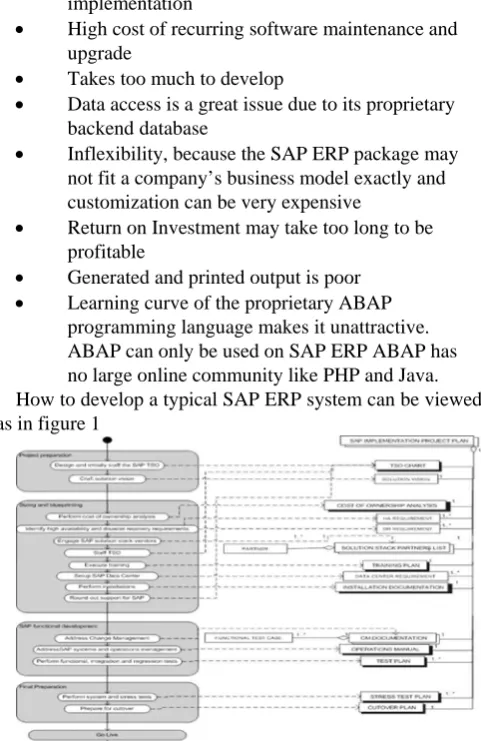
[image:3.595.49.290.226.597.2]programming language makes it unattractive. ABAP can only be used on SAP ERP ABAP has no large online community like PHP and Java. How to develop a typical SAP ERP system can be viewed as in figure 1
Figure 1: SAP implementation Process-Data Diagram
III. SURVEY OF PROBLEM
Globally, every business faces a challenge of resource management ranging from product planning to material requirement planning from financial planning to human resource management. Every business tends to have a unique requirement for their business and, thus tend to have a sketch idea of what their CMS, DMS or ERP system should look like. One of the major problems associated with existing business class applications including learn and adapt to the new system is of utmost importance if such an application will succeed in the market. In a business environment, time is very crucial. No user will want to spend half of his working hours learning or figuring out how
to do a simple task on software when he can easily and speedily carry out the same task on a manual system.
Secondly, users input in the analysis and design stages of the software are invaluable. The software vendor should investigate in depth the users’ requirements at every stage of the project and strive to streamline those requirements with the software. It really does not matter how bulky or robust or popular a software is, if its users cannot use it because of unnecessary complexities, the software will certainly end up in the trash. While developing the SOD Business Platform, the above factors were considered in depth and used in the implementation of the software.
A. Inference from findings
A cross-examination of the above findings reveals that there are common problems associated with all the three aspects of systems which include, thus;
Time wastage: Time is so critical in modern day business. In a situation where members of staff of an organization use a quarter of their working hours sifting through stacks of documents in order to locate records, such a business is highly inefficient in the proper use of its staff strength and productive labour hour.
Customer relationship: When there is a need to offer a customer support service, customers will always assume that their service providers have the most up-to-date information about them and also their transaction history. If these information are not stored in such a way that it is easily accessible, any delay or unavailability of such information will create a negative impression on the customer thereby leading to unsatisfied customer service.
Project management:-In a mission-critical and time-bound project sophisticated software system is needed to avoid project failures and unnecessary postponement of completion. Some projected success or failure may result in loss of lives when not properly managed; example is a medical research project which may require analysis of huge amount of historical data which humans cannot handle. So a robust electronic data management system is of utmost importance to the success of such a project.
Cost:- Using electronic management system has been known to have a high return on investment. This is accrued from the reduction of paper usage; emails delivered same day, file transfer, preparation of various types of reports, human resource management and so on.
IV. ANALYSIS OF SYSTEM
A. Content management system Users’ requirements
Content Management System, as defined earlier, is a software application used to upload, manage and publish content displayed on a website. In the early days of web design and web page publishing, content are usually presented as a collection of static HTML (Hypertext mark-up language) codes with linked images and audiovisual content. Each page is a standalone file on the web server. If there is a need to edit any line on any page, that page will be loaded into an editor known as a WYSIWYG (What You See Is What You Get) editor or a plain text editor like Notepad. Examples of WYSIWYG editors include the Microsoft FrontPage Adobe Dreamweaver: PageMaker and a host of others. After the creating or editing of the content the web designer or developer proceeds to the publishing stage by using an FTP applications or console to log into the website server and individually upload updated content on the website. Content published through the static web publishing methods remain online until they are physically removed from the server. Static web content file are usually in html or html file extension.
Web requirements
A web content management system is a complete solution which takes care of all the activities involved in creation editing publishing and even control of content on a website. The software application is expected to do the following.
Creation: The CMS must enable anyone to create a new content/page
Editing: It should be allow upload of media files and text and all files relating to content.
Control: It should incorporate a system of control to allow such things as access control to information automatically expiring outdate published information etc.
Indexing and searching: Information stored must be indexed and searchable so that site visitors can easily locate what they want through a simple search.
No programming knowledge required in its usage.
B. Document management system
A document management system is a software application that manages documents and files of any type and keeps track of such information as revision number, author, access rights and privileges, date created and edited and a whole lot more information which can be used as a resource for auditing a documents
DMS requirements
A document management system must be able to index and sort documents based on various criteria which can be set within the application. It should provide a search tool for immediate filtering and access to documents in a repository.
It must feature and audit trail capability which helps in knowing the history of a particular document.
A document management system should provide a mean of uploading documents into its repository. It must feature user account management document
authorization access control and document security. It can optionally provide a context-based editor for various file formats within the application or link to appropriate external application upon edit or
view request by a user.
A document management system must provide a backup and restore routine as well as disaster recovery in case of system failures or file outbreak.
C. Enterprise resource planning (ERP)
An ERP solution manages the overall business activities of an organization, from product design to implementation, product ordering invoicing, supply chain management, human resource management, financial according and management reports inventory etc.
ERP requirements
Sales orders management
Customer relationship management Inventory/store updates
Invoicing
Supplier information Asset management
Financial account (both internal and external bank account)
Financial and Management reporting Purchasing
D. System specification
The SOD Business Platform was designed to be used as minimal system resources as possible and input specifications were made as intuitive as possible leaving the bulk of the work to the application middle layer. This enables the user of the application focus on their business processes while the application intelligently manages and validates their input and output data.
A. Input specification
i. Content management system
The content management system module is a two facet module which comprises the front end and the back end (control panel or admin). The front end is the website pages that users of the website see and browse while the control panel is the administrator’s is administered. The front end website may support user login but it does not require users to log in before using the site but he control panel side requires users to authenticate themselves before being granted access. In the control panel, i.e after logging in the admin is presented with a row of menus which he can click and carry out tasks like creating a new content, editing content deleting content etc. all with a click of buttons.
ii. Document management system
The DMS module, unlike the CMS has only one part it requires users to login before using it. The input specifications of the DMS module ranges from typed in file descriptions. Comments, physical files upload and images. The DMS is built to handle any type of input.
iii. Enterprise resource planning
input, other forms of input data such as office files and images are supported.
B. Process specification i. Content management system
- The process specification for the CMS module emails:
- Parsing and validation of input data before storing them in the database and to generate and display error messages when the input data does not comply with the expected input.
- Connection storage and retrieval of input records and content from the database for display at the
front end.
- Authorization of users before accessing the control panel
- Processing incoming request from site users and validating such requests before sending output - Processing images and razing them for optimal performance
- Sorting content and displaying them based on set paraments in the control panel.
ii. Document management system
- Display files and folders to users based on their authorization level.
‐ Displays only files and folders that were uploaded by users or that users have priviledges to processes file uploads and meta data insertion into the database.
‐ Processes user search by connecting and fetching relevant records from the database.
‐ Processes GUI display and events
‐ Ajax communication with the backend server
‐ Processes document indexing for search as a cron job or scheduler.
‐ Processes notification and emailing from time to time as required e.g when a project task is due
‐ Processes chat request within users
‐ Manages user Sessions. iii. Enterprise resource planning
‐ Process creation updating and deletion of records and related child records in an hierarchical structure
‐ Processes sales order
‐ Processes inventory request intelligently to determine which product should be assigned to customers orders at any given time.
‐ Monitors and store regarding movement of asset within the system
‐ Processes employees information
‐ Processes priviledges to documents and forms in
the system
‐ Processes email sending
‐ Processes priviledges to documents and forms in
the system
‐ Process email sending
‐ Process invoices
C. Output specification
i. Content management system
The CMS has a mini templating system which enables customization of the look of the output it allows for
switching between site designs templates at any given time. The output specification of the CMS module is an aesthetically pleasant dynamic website whose content can be dynamically modified from the control panel. Usually, a website is made up of the
- Header or banner carrying the company logo - The search box if supported
- The top menu bar - The side menu bar(s)
- The main content at the center - And the footer bar
ii. Document management system
The DMS, like the CMS module, does not generate any other output other than pages displayed on a web browser. The reason is the main function these two modules are to help organization mange store and manage content they have already created and not to create a new content. The DMS manages files and folders uploaded by the users, manage projects and task and chat sessions between users etc. But unlike the CMS module, the DMS can generate output such as.
‐ Project report
‐ Usage report
‐ Error logs report
‐ Tasks and Calendars
‐ Contacts report
‐ File audit trail report
‐ Users activity report
iii. Enterprise resource planning system
The ERP module generates more printable output than others. ERP module generates output such as:
‐ Sales report
‐ Purchase Orders
‐ Assets report
‐ Customers report
‐ Inventory report
‐ Suppliers report
‐ Shippers report
‐ Inward Good report
‐ Error logs report
‐ User activity report
‐ System status report
D. Entity- relationship (E-R) diagram
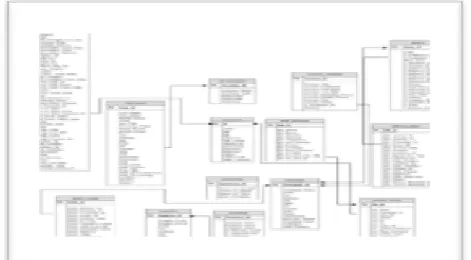
[image:5.595.318.554.637.767.2]The SDO Business Platform was designed with scalability and extensibility in mind. Below are the E-R diagrams of the internal modules of the Database Model in figure 2.
Figure 3: Application Model
[image:6.595.56.291.50.167.2]User interface display
Figure 4: SOD Business Platform
V. SYSTEM DESIGN A. Introduction
System design commences after the analysis report including the technical, economical and financial feasibility have been approved by the project stakeholders. This is the stage where the system analyst will use his/her technical expertise and the knowledge gained of the business processes to design and efficient computerized system.
B. Program Design
A software development methodology, an object- oriented programming paradigm that makes it possible to refer to a framework that can be used to structure, plan, and control the process of developing an information system was used prior to its high degree of robustness, ease of software management and reusability that virtualizes programming elements as natural objects. A wide variety of such frameworks have evolved over the years, each with its own recognized strengths and weaknesses but best suited to specific kinds of projects, based on various technical organizational, project and team considerations was adopted. There is a set of more general approaches, which are developed into several specific methodologies as was easily depicted in figure 3 and 4 respectively. A combination of the Waterfall and Incremental development approach was employed in the SOB Business Platform development because of the size of the project. The waterfall approach allowed for flexibility during development while incremental approach helped to manage future additions and development of the project.
Thus, the SOD Platform, in its top level of hierarchy, consists of three main tiers which include the CMS, DMS and the ERP tier in a web page which features three buttons on which a user who has been authenticated is granted access to the application, can click to branch to the CMS, DMS or the ERP module. These three applications are
placed in three different directories under the root directory of the application folder, individual tier of application uses different database to store their data with the exception of the authentication data which are stored in a central data table.. In future enhancement to the SOD Business Platform, a unified authentication process can be implemented such as a single-on module using LDAP protocol.
In a typical web application development scenario user input validation and security is always a top priority in the internal design of such an application. This is due to the level of malicious programs running on the Internet which are capable of attacking any insecure application. The SOD Business Platform is equipped with a revolutionary input validation module which automatically sanitizes all user input data viz-a-viz POST and GET data. Each of the modules has a unique output specification. The content management module generates less printable output. Its’ main output is the page being browsed by the site visitors which can be printed out if they so desire. The outputs are html pages generated by the server side code are being formatted by the Cascading Style Sheet (CSS) codes attached to each of the pages.
Figure 5: Software Development Approaches
C. Program Modules Description
The SOD Business Platform is made up of three parent modules which includes;
‐ Content Management Module
‐ Document Management Module
‐ Enterprise Resource Management Module
Each of the program modules is in turn made up of other smaller modules which are outlined below:
i. Content management modules includes;
‐ Web front: The web front module is a made up of frontlines that facilities the display of the content website to the site visitors.
‐ Content: the content module is the major module in the CMS module and it consists of routines that handles content creation and management.
‐ Adverts: The adverts module consists of routines that manages the creation and display of adverts and announcements at the web front.
‐ Comments: The comments modules handle feedbacks from site visitors.
‐ Newsletter: The newsletter modules manage creation and distribution of email newsletters.
‐ Login: The login module manages the display of login form and authentication of users
[image:6.595.319.546.335.454.2]management of user accounts.
- Security: The security module manages user profiles and authorizations.
‐ User Interface: The UI module manages the display of various user interface components.
ii. Document management modules includes;
‐ File Explorer: Works like the Windows explorer: Helps users browse the file repository.
‐ Login: The login module manages the display of login form and authentication of users
‐ Users: The users module manages the creation and management of user accounts
‐ Security: The security module manages user profiles and authorizations
‐ User Interface: The UI module manages the display of various user interface components
iii. Enterprise resource planning modules includes;
‐ Sales: Manages sales information and process
‐ Invoices: Manages generation of invoices
‐ Employees: Manages employee data and user login information.
‐ Inventory: Manages product creation and movement of goods
‐ Purchasing: Manages purchasing processes and data
‐ Assets: Manages asset information depreciation etc.
‐ Accounts: Manages both internal and bank accounts.
‐ General Ledger: manages general ledger reporting
‐ Email: Manages sending of emails from within the system
‐ Login: The login module manages the display of login form and authentication of users
‐ Security: The security module manages user profiles and authorizations.
‐ User Interface: The UI module manages the display of various user interface components.
VI. IMPLEMENTATION A. Introduction
This phase actually involves the setting up of the application on the target server or servers. Prior to installation of a new system, it is important to ensure that the old system is not totally scrapped because of unforeseen occurrences which may arise as a result of poor implementation strategy.
B. Implementation requirement
The minimum system requirement for the SOD Business Platform is as follows: Intel Pentium IV processor, I Gb RAM, Apache HTTP Server 2.0, PHP 5.3, MySqI 5.1, a larger hard drive for storing the documents library in the DMS module.
C. Methodology
The SOB platform methodology includes the following;:
‐ Collection of users’ requirements and data
‐ Interview with business managers and users
‐ Review of existing system and documents
‐ Design of prototypes
‐ Approval process
‐ Application framework design
‐ Application frame work development
‐ Database design and implementation
‐ ERP modules development and testing
‐ CMS module development and testing
‐ DMS module development and testing
D. Results
The true result of this work can only be appropriately determined by embarking on the process on change-over procedure. Changing from one system to another requires some standard procedures that must be followed to ensure smooth migration if accurate result is required. Thus, in deploying the SOD Business Platform, either of Pilot or Parallel change –over scheme can be employed. Though the three modules are installed at once, any of the modules can be used independently of each other.
To start with, changing over to the content management modules requires that all existing content should be converted to electronic format either by type-setting or OCR scanning and uploaded onto the content database by an expert user Meanwhile, changing over to the DMS module is usually a slower process due to many factors such as time taken for employees to adapt to the new system, conversion of existing documents into electronic formats, uploading of converted documents into the DMS, setting up rights and privileges on the system. And, the ERP system is the most sensitive aspect of the entire system as it manages sensitive business information and processes. Changing over to the ERP system will require the most planning and strategizing.
VII. CONCLUSION AND RECOMMENDATION Business and technology are two inseparable Siamese twins. One cannot succeed without the other. Business is the platform on which technological advancements are applied while technology is the driver of business. Another vital component of any business is information. Information drives business and technology is the vehicle used. Over the decades and even centuries, the importance of a robust content, document, and enterprise resource management system cannot be over emphasized. Many attempts have been made in the development of these solutions by various software vendors, giving rise to multiplicities of confusing products. This paper is an effort to bring together all the three solutions under one umbrella in a well integrated fashion. It is a one-stop business solution for any business organization because there is no need to install multiple softwares which at the end of the day will not be able to integrate properly.
A. Problems encountered
browsers to read user local files, interface with custom hardware ports like USB etc. This problem at present can only be overcome by using ActiveX components which automatically limits the application to Microsoft Internet Explorer. For several reasons, this option cannot be considered in the work.
B. Contributions to knowledge
SOD Business Platform is a practical illustration of what is achievable with a simple, open source but powerful web-based scripting language like PHP and MySQL database. It is also an eye-opening concept of integration of three different but complementary business oriented applications in a browser environment. The SOD Business Platform was written in clear and easier object-oriented syntax with minimal procedural functions in such manner that any other programmer can pick up the source code in future, learn the programming style and techniques and use it to extend SOD Business Platform by developing more creative program modules, improve on the foundational framework codes and even build new systems based on the framework.
C. Application/Usage areas
SOD Business Platform can be used in the following ways:
• As a total business management system: SOD BP can be used for virtually any type of business involved in buying and selling, projects execution and monitoring etc. SOD BP has the features for adding products, generating and printing invoices, warehousing, employee records management, asset management, supplier records management and supply chain management etc.
• As an internal communication tool within a small or large corporation. SOD BP features an Ajax instant messaging module and emailing facility which is ideal for censored in-office chatting.
• As a document management system for managing documents in any organization.
• As a content management system for managing websites like news websites where a non-technical person is required to edit news content online.
D. Recommendation for further researches
The following recommendations may be considered in future development efforts:
• Model-View-Controller (MVC): MVC approach can be used to implement a better templating system for the SOD application. MVC helps to achieve the goal of separating code from design. Currently, SOD uses a basic custom templating system which is lacking in the power and flexibility of other well established templating systems like Smarty and XML/XSLT.
• Pure OOP: Pure OOP implementation is recommended for future developments as the current version of SOD uses a mix of procedural and OOP styles, though it has more of OOP than procedural.
• External hardware integration: It is possible to implement external hardware integration like bar code scanning, OCR scanning, POS printer etc into SOD using ActiveX or standalone desktop application. These areas
need to be researched further especially given the current state of browsers in use today.
• Ajax: Ajax stands for Asynchronous JavaScript and XML/JSON. This is a newer approach in developing modern web based applications such as Google Maps, Gmail etc. Ajax helps to improve the responsiveness of web based applications and gives the users a desktop-like experience within a browser. It combines the power of JavaScript XMLHttpRequest object, Document Object Model (DOM), XML and JSON to drastically transform any web based application.
E. Conclusion
This paper has proved that a hitch-free integration of CMS, DMS and ERP is not only possible, but economical and desirable. Software vendors should begin to look towards this direction by creating well integrated systems like this to make life easier for business users. Also, web based development should be given more priority as opposed to desktop GUI development due to the flexibility and accessibility that the web offers.
Reference
[1] HGS Data Growing at Alarming Rate (2009, November 6).
Retrieved from http://www.zycko.se/news/19324788‐
HGS_Data_growing_at_alarming_rate
[2] Content Management System (2009, November 6). Retrieved from
http://www.businessdictionary.com/definition/contentmanageme nt-system-CMS.html
[3] Glossary (2009, November 6). Retrieved from
http://www.ischool.utexas.edu/~scisco/lis389c.5/email/gloss.ht ml
[4] Enterprise Resource Planning (2009, November 6). Retrieved from http://en.wikipedia.org/wiki/Enterprise_resource_planning
[5] World Wide Web (2009, November 6). Retrieved from http://en.wikipedia.org/wiki/World_Wide_Web [6] IT Jargons (2009, November 8). Retrieved from http://www.octimum.co.uk/jargon.aspx [7] History of CMS (2009, November 9). Retrieved from
http://www.cmswiki.com/tiki-index.php?page=HistoryOfCms [8] The CMS Report (2009, November 9). Retrieved from
http://www.cmswatch.com/TheCMSReport/
[9] 15 Seconds: SharePoint Security and .NET Impersonation (2009, November 17). Retrieved from http://www.15seconds.com/issue/040511.htm
[10] JoatBlog KnowledgeTree (2009, November 17). Retrieved from http://www.757.org/~joat/2009/08/09
[11] Connect to MySQL Database – PHP MySQL Tutorial (2010, June 5). Retrieved from
database.aspx.