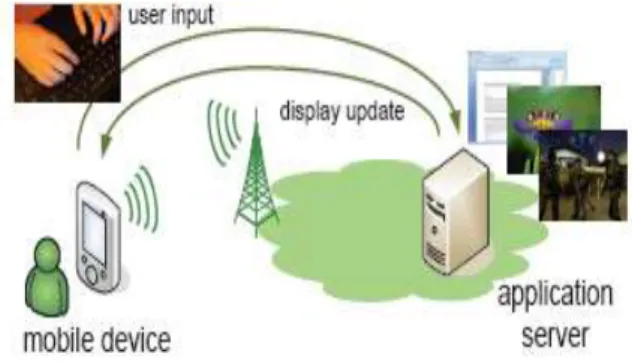
Abstract- The objective of this project is to control the PC by accessing the desktop remotely We can work as like as our normal desktop on Java enabled mobile phone. Mobile cloud computing can give mobile device users a number of compensation. corporation users are able to share resources and applications without a high level of capital expenditure on hardware and software resources. Mobile cloud computing provides a explanation to meet the increasing functionality demands of end-users, as all function logic is executed on distant servers and only user interface functionalities reside on the mobile device. The mobile device acts as a remote show, capturing user input and depiction the show updates received from the distant server. The normal pc desktop can be taken remotely and we can access from any part of the world using internet and wap support service. The operations such as accessing the internet, sending emails, and also system controls like shutdown, log off, restart through the mobile Phone In our system the remote computer’s desktop can be accessed from the normal mobile phone. The remote desktop connection can be made wireless and can be accessed from any part of the world. We can control the remote computer as like our normal local computer by using a java enabled mobile phone.
Index Terms— Remote show,capturing user input,depiction the
show updates received from the distant server. I.INTRODUCTION A. Purpose
To access the remote desktop from mobile phone. To see the contents of the file placed on the desktop of
the remote computer.
To reboot a remote server as an manager B. Scope
VNC stands for Virtual Network Computing. It is, in spirit, a remote display system which allows you to view a computing 'desktop' environment not only on the machine where it is management, but from anywhere on the Internet and as of a wide variety of machine architectures.
Virtual network computing based architecture for accessing the desktop of various remote systems (such as MS Windows, Macin-tosh, and UNIX systems) from a cellular handset. It is tacit that the remote computer system is running a VNC server and that it is attached to a system. The cellular customer can see and maneuver the desktop on the cellular handset.
Manuscript received Jul, 2013.
R.Manikandasamy is with Computer Science Department, Anna University Chennai / A.S.L Pauls College of Engineering and Technology,Coimbatore-642109.
No state is stored at the watcher. This means you can go away your desk, go to one more machine, whether next door or several hundred miles gone, reconnect to your desktop from there and finish the sentence you be typing. Even the cursor will be in the similar position. With a PC X server, if your PC crashes or is restarted, all the distant applications will expire. With VNC they go on successively.
It is small and simple. The Win32 watcher, for model, is concerning 150K in size and can be run directly from a soft. There is no setting up wanted.
It is truly platform-independent. A desktop management on a Linux mechanism may be displayed on a PC. Or a Solaris machine. Or any numeral of other architectures.
The simplicity of the protocol makes it easy to port to fresh platforms. We have a Java watcher, which will sprint in any Java-capable browser.
In a Windows NT server, allowing you to view the desktop of a remote NT machine on any of these platforms using exactly the same viewer
C. Suppress Network Traffic
The wireless transmission bandwidth available for a cellular phone is limited. Currently; it is 384k bps, even on IMT-2000 based services (only downstream at this transmission rate). D. Recover from an unscheduled disconnection
Because of its wireless nature, stable network connectivity cannot be expected. For example, when t.he user goes into a tunnel or a building, established connections can be lost. In addition, in order to use the same cellular phone to talk to someone, the user must terminate the network connection. E. Suppress computational resource use
CPU performance and memory size are limited on a cellular phone to achieve portability and to lower power consumptions
II. EXISTING SYSTEM
In the existing system we make use of BLUETOOTH to right to use the organization contents in a mobile.
In this, only particular application can be accessed.
The files of the system can be alive accessed just within short distances
Remote Desktop Connection Using Mobile Phone
R.ManikandasamyIII. PROPOSED SYSTEM
Virtual Network Computing (VNC) is a desktop sharing system which uses the RFB (Remote Frame Buffer) protocol to remotely control another computer. It transmits the user events from one computer to another relaying the screen updates back in the additional track, more than a network.
1) The standard of mobile cloud computing actually separates the user interface from the application logic. 2) Here, a Viewer component is executed on the mobile
device, which is operating as a remote display for the applications running on distant servers in the cloud. 3) distant display framework is collected of three
components: a server side component that intercepts encodes and transmits the application graphics to the client, a viewer component on the client and a remote display protocol that transfers display updates and user events between both endpoints.
4) In a mobile cloud computing environment, the remote display protocol deliver complex multimedia graphics over wireless links and render these graphics on a resource constrained mobile device. Offloading
applications to the cloud is a straight forward way to save on energy consumption because the amount of local processing is reduced.
5) well-organized density techniques to decrease the amount of exchanged data are done using compression techniques and versatile graphics encoding, downstream data peak reduction and Optimization of upstream packetization overhead.
FIG- ARCHITECTURE OF REMOTE DESKTOP IV.NEED FOR PROPOSED SYSTEM
Conventional VNC System comprises accessing of remotely located computer desktop via internet by another computer.
This system lacks ease of portability & hence in our proposed system we are using cellular device as the client which enables itinerancy across any part of the world.
A. Problem Description
The development of a computer based system or a product is more likely plagued by resources and release dates. Probability study helps the analyst to choose whether or not to proceed, amend, postpone or withdraw the project,
particularly significant while the project is huge, composite and costly.
Once the analysis of the user requirement is complement, the system has to check for the compatibility and feasibility of the software package that is aimed at. An important outcome of the preliminary investigation is the determination that the system requested is feasible.
B. Technical Feasibility
The expertise used can be urbanized with the current equipments and has the technical capacity to hold the data required by the new system.
This knowledge supports the recent trends of technology
Easily accessible,more secure technologies. Technical feasibility on the existing system and to what extend it can support the proposed addition. We can add new modules easily without affecting the Core Program. Most of parts are running in the server using the concept of stored procedures. Mobile devices have become an essential part of our daily life. Their portability is well appreciated by end-users and smart phones sales will soon surpass desktop sales. As mobile device attractiveness grows, end-user demands to scamper heavier applications are evenly increasing. Although advances in neatness persist, the longing to preserve the compensation.
V. SYSTEM DESIGN
In existing system, the PC’s desktop can be accessed from the mobile phone by using the WIFI and Bluetooth. But there is some disadvantages arrived because both are having constraints on the distance. In our project, we are about to overcome the above existing problems by using the GPRS technology which eliminates the constraints on the distance and as well as increases the speed. We can access the PC’s desktop remotely from any part of the world.
A. Input Design
FIG - SYSTEM FLOW DIAGRAM B. Display Protocol
The display side of the protocol is based around a single graphics primitive: “put a rectangle of pixel data at a given x,y position”. At rest glance this might appear an inefficient way of drawing many user interface instrument. However, allowing various dissimilar encodings for the pixel data gives us a large degree of exibility in how to trade off various parameters such as network bandwidth, client sketch speed and server dispensation speed.
A sequence of these rectangles makes a frame buffer update (simply update). An update represents a modify from
Volume 2, Issue 8, August 2013
one suitable frame buffer state to another, so in some ways issimilar to a border of video. The rectangles in an keep informed are regularly disjoint but this is not necessarily the case.
The update protocol is demand-driven by the customer. That is, an keep conversant is only sent beginning the server to the client in response to an explicit request from the customer. This gives the protocol an adaptive superiority. The slower the customer and the network are, the lesser the speed of updates becomes. With representative applications, changes to the same area of the frame buffer tend to happen soon following one more. With a slow customer and/or network, passing states of the border bumper can be unnoticed, resultant in fewer network traffic and smaller amount drawing for the customer.
C. Input Protocol
The input side of the protocol is based on a standard workstation model of a keyboard and multi-button pointing device. contribution actions are simply sent to the server by the client whenever the user presses a key or pointer switch, or whenever the pointing device is stimulated. These contribution events can also be synthesized from other non-standard I/O policy. For example, a pen-based calligraphy acknowledgment engine might generate keyboard events.
D. Representation of Pixel Data
Initial interaction between the RFB client and server involves a negotiation of the for-mat and encoding with which pixel data will be send. This cooperation has been designed to craft the job of the customer as easy as probable. The base line is that the server have to always be able to supply pixel data in the form the client needs. However if the customer is able to cope evenly with several different formats or encodings, it may decide one which is easier for the server to produce.
Pixel format refers to the representation of individual colors by pixel principles. The the majority general pixel formats are 24-bit or 16-bit “true color”, where bit-ends within the pixel value translate straight to red, green and blue intensities, and 8-bit “color map” where an arbitrary mapping can be used to translate from pixel values to the RGB intensities.
Encoding refers to how a rectangle of pixel data will be sent on the lead. Every quadrangle of pixel data is prefixed by a header generous the X,Y location of the rectangle on the monitor, the breadth and elevation of the rectangle, and an encoding type which specifies the encoding of the pixel information. The information itself then follows using the individual encoding. The encoding types distinct at current are Raw, CopyRect, RRE, Hex cover and ZRLE.
In practice we normally use only the ZRLE, Hex tile and CopyRect encodings since they provide the best compression for typical desktops.
E. Protocol Extensions
There are numerals of performance in which the protocol can be extended. They are,
1. New Encodings
A new encoding type can be added to the protocol relatively easily whilst maintaining compatibility with
existing customers and servers. Existing servers will just disregard requests for a new encoding which they don't hold up. Existing customers will never request the new encoding so will never see rectangles encoded that way.
2. Pseudo Encodings
In addition to genuine encodings, a client can request a “pseudo-encoding” to declare to the server that it supports a certain extension to the protocol. A server which does not support the conservatory will simply ignore the pseudo-encoding. Note that this means the customer must presume that the server does not support the extension until it gets some extension-specific conformation from the server. 3.New Security Types
Adding a new security type gives the ultimate exibility in modifying the behavior of the protocol without sacricing compatibility with existing clients and servers. A customer and server which concur on a new security type can effectively talk whatever protocol they like after that - it doesn't necessarily have to be anything like the RFB protocol. Protocol versions are denied by the maintainers of the RFB protocol, Real VNC Ltd. If you use a dissimilar protocol version number then you are not RFB / VNC well-matched. To make sure that you stay well-matched with the RFB protocol it is important that you contact Real VNC Ltd to make sure that your encoding types and security types do not clash.
3. Protocol Messages
The RFB protocol can operate over any dependable transport, moreover byte-stream or message- based. Conservatively it is used over a TCP/IP link. There are three stages to the protocol. initial is the handshaking phase, the principle of which is to concur leading the protocol version and the type of security to be used. The next stage is an initialization phase where the customer and server exchange ClientInit and ServerInit messages.
VI. OUTPUT DESIGN
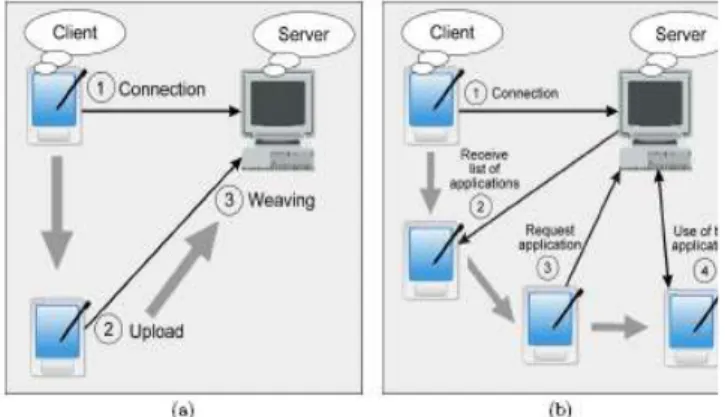
Remote Display Using Java-Based Mobile Application Remote presentation is an interesting model for executing applications in portable devices, since applications can be executed on a server and their interfaces displayed on mobile clients. This paper describes a non-invasive and translucent remote presentation system for legacy J2ME applications, called RDA (Remote Display by aspect). RDA relies on aspect-oriented indoctrination to instrument J2ME applications with remote presentation system. Our initial presentation results reveal that remote presentation is a promising solution for executing CPU-intensive applications in mobile devices or for running applications demanding resources not available in such devices. The growing popularity of mobile computing devices, such as personal digital assistants (PDA) and smartphones, presents new challenges to software engineers .
To copy otherwise, to republish, to post on servers or to reallocate to lists, requires past specific consent and/or a fee. SAC’08 March 16-20, 2008, Fortaleza, Ceara, Brazil Copyright 2008 ACM 978-1-59593-753-7/08/0003 ...$5.00. mobile devices, keeping the gap in terms of CPU and memory capacity between the two architectures constant. For this reason, remote presentation is an interesting model for
executing applications in mobile devices. Accordingly to this model, mobile applications should be decomposed in two layers: one to be executed in workstations located in energetic networks, contain the submission reason and the other containing just the interface of the system to be executed in mobile devices . This decomposition relies on wireless communication just to transmit results and input data between the components in charge of the application logic and interface.
Several solutions have been proposed to support remote presentation over wireless networks. The first kind of solution requires manual decomposition of the target application, in order to insulate application logic and presentation code in different components. An example is the Chroma system [1]. However, such solutions require maintaining two versions of the application: the monolithic version (that executes solely in mobile computers) and the remote presentation version. Other solutions require the use of proprietary frameworks that extend or replace existing GUI frameworks. Examples include ULC and TCPTE .ULC lasses resembles the Swing API, but with a ULC prefix (e.g. ULCFrame, ULCLabel, etc).
RDA implementation is based on the half-object design pattern [6]. This pattern prescribes dividing an object into two half-objects, one in every address gap, with a protocol among them. The plan is to make an object accessible in two address spaces. In RDA, the half-object prototype is applied over objects associated to GUI widgets, including buttons, lists, manuscript areas, panels, and so on. The half-object that reside in the server side of the system is called server half-object (SHO); the half-object located in the mobile computing device is called client half-object (CHO). Moreover, in the remote presentation server, aspects are used to implement the synchronization protocol between SHOs and CHOs. When a method or constructor of a GUI component is invoked in the server, aspects interrupt the incantation and two threads are ongoing. The initial thread continues the usual.
This paper describes a remote presentation system for J2ME applications, called RDA (Remote Display using Aspects). RDA offers a non-invasive and transparent remote presentation system. In other words, legacy J2ME system can be executed remotely, without requiring source code modification. furthermore, the system takes advantage of aspect oriented programming to instrument the original J2ME Limited Connected User Interface (LCDUI) classes with remote presentation code (i.e. the system does not rely on a library substitution approach).
FIG - Data Flow Diagram
In this way, RDA is robust to changes in the internal logic of the original LCDUI classes. Our first performance results obtained with RDA shows that the speedup gains can be expressive for CPU-bound tasks (such as the Dijkstra shortest path algorithm used in the experiment described in the paper).. Usually, bitmaps transferred from the proxy to the viewer are encoded in 120x130x8 bits with compression. However, during scrolling and exhausted, bitmaps are gray-scaled into 120x130x3 bits with density. A sequence of these rectangles makes a frame buffer update (simply renew). An update represents a modify from one suitable frame buffer state to one more, so in some ways is equivalent to a frame of videotape. The rectangles in an renew are usually disjoint but this is not necessarily the case.
VII. FEATURES
In this paper the remote computer’s desktop can be accessed from the normal mobile phone.
The remote desktop connection can be made wireless and can be accessed from any part of the world.
We can control the remote computer as like our normal local computer by using a java enabled mobile phone.
The viewer can view the desktop image by zooming or normal mode.
Pointing and clicking mouse buttons are achieved by the translation of these events on the proxy surface. When the proxy accepts a command from the viewer, it generates corresponding event sequences and sends the sequences to the VNC server.
VIII.CONCLUSION
This project is designed to make pc automation. The PC appliances are controlled automatically through the mobile phone with the help of GPRS technology. We can also implement this type of system in modern industries. In this modern world everybody is using mobile phone and it becomes one of the essential device. Embedding this remote accessing in a mobile phone may help the user in a various ways.
In this fast growing technical world makes us to do all the operations in a single hand held device. We can access the remote computer from any part of the world by using various communication techniques.
Volume 2, Issue 8, August 2013
REFERENCES
1. V. S. Pendyala and S. S. Y. Shim, “The Web as the Ubiquitous Computer,” (SEP- 2009).
2. Tristan Richards on,“Virtual Network Computing”, IEEE computing ,(Jan/Feb-2003)
3. F.Lamberti and A.Sanna,“A streaming-based solution for remote visualization of 3D graphics on mobile devices,” IEEE TRANSACTIONS ON VISUALIZATION AND COMPUTER GRAPHICS”,(MAR/APR -2007).
4. H.Kawashima, K. Koshiba, K. Tuchimochi, K. Futamura, M. Enomoto, and M. Watanabe, “Virtual PC-type thin client system,” NEC TECHNICAL JOURNAL,( SEP- 2007).
5. P. Simoens, F. A. Ali, B. Vankeirsbilck, L. Deboosere, F. De Turck, B. Dhoedt, P. Demeester, and R. Torrea-Duran,“Cross-Layer Optimization of Radio Sleep Intervals to Increase Thin Client Energy Efficiency,” IEEE COMMUNICATIONS LETTERS, (DEC- 2010). 6. V. Rivoira and F.Pascali, “HSDPA: High-speed internet over your
mobile phone”, IEC newsletter, (June -2007).
7. Michael Lloyd Lee, “J2ME VNC”, codigo fonte, (February-2005). 8. John W. Muchow, “CORE J2ME - TECNOLOGIA E MIDP”, Makron
Books,2004.
9. Microsoft corporation, “Windows Server 2003 Remote Access Overview”, White Paper,(March- 2003).
10. V.S.Pendyala and S. S. Y. Shim, “The Web as the Ubiquitous Computer,” (SEP-2009).
11. R.Chakravorty, J. Cartwright and I. Pratt, “Practical Experience with TCP over GPRS”, Proc.of IEEE GLOBECOM 2002, (November-2002).
12. SunJ2ME, “Mobile Information Device Profile (MIDP1.0); JSR 37 Specification”,(December-2000)
13. http://java.ittoolbox.com 14. Java – www.sun.com 15. www.tutorialspoint.com 16. Complete reference J2ME –Keogh
17. Tristan Richards on, “The RFB Protocol” version 3.8, PDF,(June-2007). 18. Remote control of mobile devices in android platform Angel,Gonzalez Villan, Student Member, IEEE and Josep Jorba Esteve member IEEE. 19. Tristan Richardson; Quentin Stafford-Fraser; Kenneth R. Wood; & Andy Hopper (January/February 1998). "Virtual Network Computing" (PDF). IEEE Internet Computing
R.Manikandasamy received the B.Tech degree(first-class) in Information Technology from the Anna University Chennai 2011.currently doing the ME degree in Computer Science at Anna University Chennai/A.S.L Pauls College of Engineering & Technology ,Coimbatore .His research interest include reliability/security of cloud computing and storage, distributed systems and networks. He is member of the ISTE.