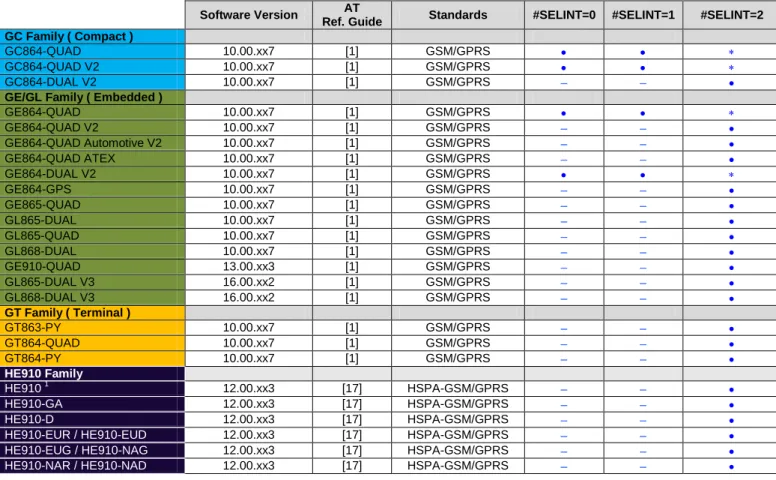
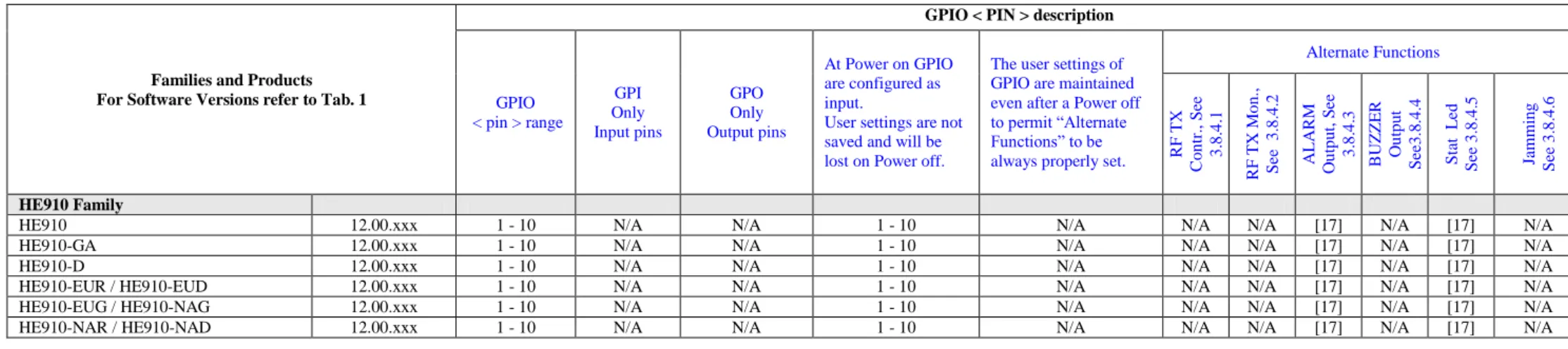
APPLICABILITY TABLE
Table Legend: command is supported; command is not supported; factory setting
Software Version AT
Ref. Guide Standards #SELINT=0 #SELINT=1 #SELINT=2 GC Family ( Compact )
GC864-QUAD 10.00.xx7 [1] GSM/GPRS
GC864-QUAD V2 10.00.xx7 [1] GSM/GPRS
GC864-DUAL V2 10.00.xx7 [1] GSM/GPRS
GE/GL Family ( Embedded )
GE864-QUAD 10.00.xx7 [1] GSM/GPRS GE864-QUAD V2 10.00.xx7 [1] GSM/GPRS GE864-QUAD Automotive V2 10.00.xx7 [1] GSM/GPRS GE864-QUAD ATEX 10.00.xx7 [1] GSM/GPRS GE864-DUAL V2 10.00.xx7 [1] GSM/GPRS GE864-GPS 10.00.xx7 [1] GSM/GPRS GE865-QUAD 10.00.xx7 [1] GSM/GPRS GL865-DUAL 10.00.xx7 [1] GSM/GPRS GL865-QUAD 10.00.xx7 [1] GSM/GPRS GL868-DUAL 10.00.xx7 [1] GSM/GPRS GE910-QUAD 13.00.xx3 [1] GSM/GPRS GL865-DUAL V3 16.00.xx2 [1] GSM/GPRS GL868-DUAL V3 16.00.xx2 [1] GSM/GPRS GT Family ( Terminal ) GT863-PY 10.00.xx7 [1] GSM/GPRS GT864-QUAD 10.00.xx7 [1] GSM/GPRS GT864-PY 10.00.xx7 [1] GSM/GPRS HE910 Family HE910 1 12.00.xx3 [17] HSPA-GSM/GPRS HE910-GA 12.00.xx3 [17] HSPA-GSM/GPRS HE910-D 12.00.xx3 [17] HSPA-GSM/GPRS
HE910-EUR / HE910-EUD 12.00.xx3 [17] HSPA-GSM/GPRS
HE910-EUG / HE910-NAG 12.00.xx3 [17] HSPA-GSM/GPRS
HE910-NAR / HE910-NAD 12.00.xx3 [17] HSPA-GSM/GPRS
Tab. 1: Products, Software Versions and Interface Style supported
The following list, organized in alphabetical order, shows the AT commands covered by this User Guide. The number close to each command indicates the page of the first AT command occurrence.
SPECIFICATIONS SUBJECT TO CHANGE WITHOUT NOTICE
Notice
While reasonable efforts have been made to assure the accuracy of this document, Telit assumes no liability resulting from any inaccuracies or omissions in this document, or from use of the information obtained herein. The information in this document has been carefully checked and is believed to be entirely reliable. However, no responsibility is assumed for inaccuracies or omissions. Telit reserves the right to make changes to any products described herein and reserves the right to revise this document and to make changes from time to time in content hereof with no obligation to notify any person of revisions or changes. Telit does not assume any liability arising out of the application or use of any product, software, or circuit described herein; neither does it convey license under its patent rights or the rights of others.
It is possible that this publication may contain references to, or information about Telit products (machines and programs), programming, or services that are not announced in your country. Such references or information must not be construed to mean that Telit intends to announce such Telit products, programming, or services in your country.
Copyrights
This instruction manual and the Telit products described in this instruction manual may be, include or describe copyrighted Telit material, such as computer programs stored in semiconductor memories or other media. Laws in the Italy and other countries preserve for Telit and its licensors certain exclusive rights for copyrighted material, including the exclusive right to copy, reproduce in any form, distribute and make derivative works of the copyrighted material. Accordingly, any copyrighted material of Telit and its licensors contained herein or in the Telit products described in this instruction manual may not be copied, reproduced, distributed, merged or modified in any manner without the express written permission of Telit. Furthermore, the purchase of Telit products shall not be deemed to grant either directly or by implication, estoppel, or otherwise, any license under the copyrights, patents or patent applications of Telit, as arises by operation of law in the sale of a product.
Computer Software Copyrights
The Telit and 3rd Party supplied Software (SW) products described in this instruction manual may include copyrighted Telit and other 3rd Party supplied computer programs stored in semiconductor memories or other media. Laws in the Italy and other countries preserve for Telit and other 3rd Party supplied SW certain exclusive rights for copyrighted computer programs, including the exclusive right to copy or reproduce in any form the copyrighted computer program. Accordingly, any copyrighted Telit or other 3rd Party supplied SW computer programs contained in the Telit products described in this instruction manual may not be copied (reverse engineered) or reproduced in any manner without the express written permission of Telit or the 3rd Party SW supplier. Furthermore, the purchase of Telit products shall not be deemed to grant either directly or by implication, estoppel, or otherwise, any license under the copyrights, patents or patent applications of Telit or other 3rd Party supplied SW, except for the normal non-exclusive, royalty free license to use that arises by operation of law in the sale of a product.
USAGE AND DISCLOSURE RESTRICTIONS
License Agreements
The software described in this document is the property of Telit and its licensors. It is furnished by express license agreement only and may be used only in accordance with the terms of such an agreement.
Copyrighted Materials
Software and documentation are copyrighted materials. Making unauthorized copies is prohibited by law. No part of the software or documentation may be reproduced, transmitted, transcribed, stored in a retrieval system, or translated into any language or computer language, in any form or by any means, without prior written permission of Telit
High Risk Materials
Components, units, or third-party products used in the product described herein are NOT fault-tolerant and are NOT designed, manufactured, or intended for use as on-line control equipment in the following hazardous environments requiring fail-safe controls: the operation of Nuclear Facilities, Aircraft Navigation or Aircraft Communication Systems, Air Traffic Control, Life Support, or Weapons Systems (High Risk Activities"). Telit and its supplier(s) specifically disclaim any expressed or implied warranty of fitness for such High Risk Activities.
Trademarks
TELIT and the Stylized T Logo are registered in Trademark Office. All other product or service names are the property of their respective owners.
Contents
1.
Introduction ... 11
1.1. Scope ...11
1.2. Audience ...11
1.3. Contact Information, Support ...11
1.4. Related Documents ...12
2.
Basic Operations ... 13
2.1. RTS/CTS handshaking ...14
2.2. Module Identification ...17
2.3. AT Interface Style Selection ...18
2.4. Enable Extended Error Result codes ...19
2.5. Main Serial Port Speed Configuration ...19
2.6. Auxiliary Serial Port Arrangement ...22
2.7. Select Cellular Network ...23
2.8. Band Configuration ...24
2.9. Software Shutdown ...25
2.10. SIM ...26
2.10.1. SIM Presence and PIN Request ...26
2.10.2. Enter PIN code...26
2.10.3. Enter PUK code ...27
2.10.4. SIM Status ...27
2.10.5. SIM Detection Mode ...29
2.10.6. SIM/USIM Access File ...30
2.10.7. MSISDN ...31
2.10.8. Preferred Operator List ...33
2.11. Network Information ...35
2.11.1. Network Status ...35
2.11.2. Network Operator Identification...36
2.11.3. Signal Strength & Quality ...38
2.11.4. Fast Network Status Check ...38
2.11.5. Network Survey ...42
2.11.6. BCCH Survey ...43
2.11.7. Enhanced Network Selection and AT&T functions ...43
2.11.7.1. Software Versions: greater than or equal 10.00.xx5/16.00.xx2 ... 44
2.11.7.2. Software Version: greater than or equal 13.00.xx2 ... 46
2.11.7.4. Software Version: greater than or equal 12.00.xx3 ... 50
2.12. Voice Call Establishment - Originate ...53
2.12.1. Set Module in Voice Mode ...53
2.12.2. Set Audio Path Active ...53
2.12.3. Set Volume on Speaker ...55
2.12.4. Set Microphone Mute ...55
2.12.5. Hand Set Path Commands ...56
2.12.5.1. HS Microphone Gain ... 56
2.12.5.2. HS Sidetone ... 56
2.12.5.3. HS Echo Canceller ... 57
2.12.5.4. HS Automatic Gain ... 57
2.12.5.5. HS Noise Reduction... 58
2.12.6. Hands Free Path Commands ...59
2.12.6.1. HF Microphone Gain ... 59
2.12.6.2. HF Sidetone ... 60
2.12.6.3. HF Echo Canceller ... 60
2.12.6.4. HF Automatic Gain ... 61
2.12.6.5. HF Noise Reduction... 61
2.12.7. Dialing a Phone Number ...63
2.12.8. Audio Codec Information ...63
2.12.9. Setting Audio Codec ...64
2.12.10. Disconnect a Call ...64
2.12.11. Modules: HE910-D/DG/EUD/EUG/NAD ...65
2.13. CSD Data Call Establishing - Originate ...65
2.13.1. Set Module in Data Mode ...65
2.13.2. Set Modulation and Speed ...66
2.13.3. Dialing a Phone Number ...67
2.13.4. Exit Data Mode and Enter Command Mode ...67
2.13.5. Disconnect Data Call ...67
2.14. Answering an Incoming Call ...68
2.15. GSM Single Numbering Scheme ...68
2.16. TTY Feature ...69
3.
Advanced Operations ... 71
3.1. Access to the Phonebook ...71
3.1.1. Select Phonebook Memory Storage...73
3.1.2. Search Phonebook Entries ...75
3.1.3. Read Phonebook Entries ...76
3.1.4. Write Phonebook Entry ...76
3.1.5. Delete Phonebook Entry ...77
3.1.6. Dial Phonebook Entry ...78
3.2. Encryption Algorithm ...79
3.3. Automatic Data/Time updating ...80
3.4.1. Identifying the Call Type ...81
3.4.2. Identify the Caller ...82
3.4.3. Calling Line Indication ...83
3.4.3.1. CLIR Service Status ... 83
3.4.3.2. Restrict/Allow Caller Line ID Indication ... 83
3.4.4. Call Barring Control ...85
3.4.4.1. Lock/Unlock the Module ... 85
3.4.4.2. Call Barring Service Status ... 86
3.4.4.3. Bar/Unbar All Incoming Calls ... 87
3.4.4.4. Bar/Unbar Incoming Calls in International Roaming... 88
3.4.4.5. Bar/Unbar All Outgoing Calls... 89
3.4.4.6. Bar/Unbar All Outgoing International Calls ... 90
3.4.4.7. Bar/Unbar All Outgoing International Calls except to Home Country ... 91
3.4.4.8. Unbar All Calls ... 92
3.5. DTMF Tones ...94
3.5.1. DTMF Decoder...95
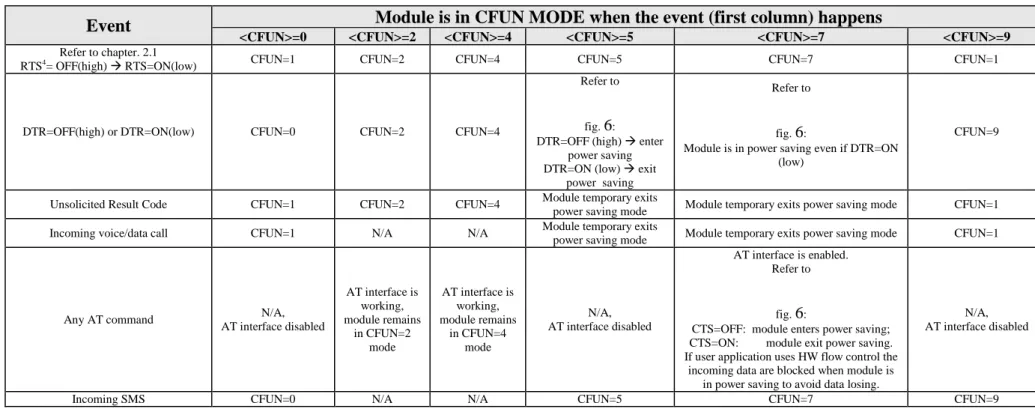
3.6. GSM Power Saving Modes ...98
3.7. SMS Management ...104
3.7.1. Select SMS Format Type ...104
3.7.1.1. Set Text Mode Parameters ... 105
3.7.1.2. Character Sets ... 106
3.7.1.3. IRA Character Set ... 108
3.7.1.4. UCS2 Character Set ... 109
3.7.2. Read SMSC Number ...110
3.7.3. Set SMSC Number ...110
3.7.4. Select/Check SMS Memory ...111
3.7.5. Select Message Indication ...113
3.7.6. Write a new SMS ...115
3.7.7. Send a Stored SMS ...118
3.7.8. Send a New SMS without Storing It...119
3.7.9. Send a New SMS using GPRS service ...120
3.7.10. Delete an SMS ...122
3.7.11. Read an SMS ...123
3.7.12. SMS Status ...124
3.7.13. Cell Broadcast Service ...126
3.7.14. Read concatenated SMS ...127
3.8. GPIO Pins ...129
3.8.1. Set GPIO Pin as OUTPUT ...129
3.8.2. Set GPIO Pin as INPUT ...132
3.8.3. GPIO Pin Status ...132
3.8.4. GPIO & Alternate Function ...133
3.8.4.1. GPIO4 Pin as RF Transmission Control ... 133
3.8.4.2. GPIO5 Pin as RFTXMON OUTPUT ... 133
3.8.4.3. GPIO6 Pin as ALARM OUTPUT ... 134
3.8.4.4. GPIO7 Pin as BUZZER OUTPUT ... 134
3.8.4.5. Set STAT_LED GPIO... 135
3.8.5. Clock and Alarm Functions ...137
3.8.5.1. Set Module Clock ... 138
3.8.5.2. Read the Current Date and Time ... 138
3.8.5.3. Set Alarm Time ... 139
3.8.5.4. Postpone Alarm Time ... 143
3.8.5.5. Stop Alarm Activity ... 143
3.8.5.6. Alarm Status ... 144
3.8.5.7. A simple Alarm Application ... 144
4.
Firmware Update Tool ... 146
4.1. Xfp Tool ...146
4.1.1. Upgrade Procedure ...146
4.1.1.1. Command Line running Xfp tool ... 149
5.
Document History ... 151
Figures
1.
Introduction
The purpose of this document is to describe the more significant standard and proprietary AT commands supported by Telit Modules. Several module functions are taken into consideration and for each one of them the pertaining AT commands are described by mean of examples.
1.1.
Scope
The Tab. 1 summarizes the Telit Modules and the relating Software Versions covered by the present document.
1.2.
Audience
This User Guide is intended for users that need to learn and try quickly standard and proprietary AT commands provided by the Telit Modules. The reader can approach to the AT commands by means of the examples showed by the present document and then deepen the interested AT commands reading the documents [1], [17].
1.3.
Contact Information, Support
For general contact, technical support, to report documentation errors and to order manuals, contact Telit Technical Support Center (TTSC) at:
[email protected] [email protected] [email protected] [email protected] Alternatively, use: http://www.telit.com/en/products/technical-support-center/contact.php
For detailed information about where you can buy the Telit modules or for recommendations on accessories and components visit:
http://www.telit.com
To register for product news and announcements or for product questions contact Telit Technical Support Center (TTSC).
Our aim is to make this guide as helpful as possible. Keep us informed of your comments and suggestions for improvements.
1.4.
Related Documents
[1] AT Commands Reference Guide, Telit document: 80000ST10025a [2] Refer to the specific “Telit Product Description” document
[3] Refer to the specific “Telit Hardware User Guide” document [4] Easy GPRS User Guide, Telit document: 80000ST10028 [5] ETSI GSM 07.07, 27.07
[6] EVK2 User Guide, Telit document: 1vv0300704 [7] ETSI GSM 03.38, 23.038
[8] /
[9] Device Requirements AT&T, Document Number 13340
[10] /
[11] /
[12] ITU-T Recommendation E.164
[13] ETSI GSM 11.11, 51.011, 31.101, 31.102 [14] ITU-T Recommendation V.24
[15] UC864/CC864 Windows 2000, XP and Vista Driver, Telit document: 1vv0200903. [16] ETSI GSM 11.14, 51.014
[17] HE910 AT Commands Reference Guide, Telit document: 80378ST10091A
[18] /
[19] ETSI GSM 27.005
2.
Basic Operations
Before dealing with the description of the AT commands examples, it is advisable to define a way to point out the differences, if any, among modules belonging to different families, or having different software versions. The rules listed below will be used:
Under GSM/GPRS Standards label are reported features and AT commands examples concerning the modules supporting the GSM/GPRS standards. Where needed, software version is specified.
Under HSPA-GSM/GPRS Standards label are reported features and AT commands examples concerning the modules supporting the HSPA-GSM/GPRS standards. Where needed, software version is specified.
If features and AT command examples are not concerning a specific product but are generally valid, no labels are indicated.
AT commands syntax is described in the documents [1] and [17] in accordance with the used module The AT commands described in this guide refer to the #SELINT=2 AT Interface Style.
2.1.
RTS/CTS handshaking
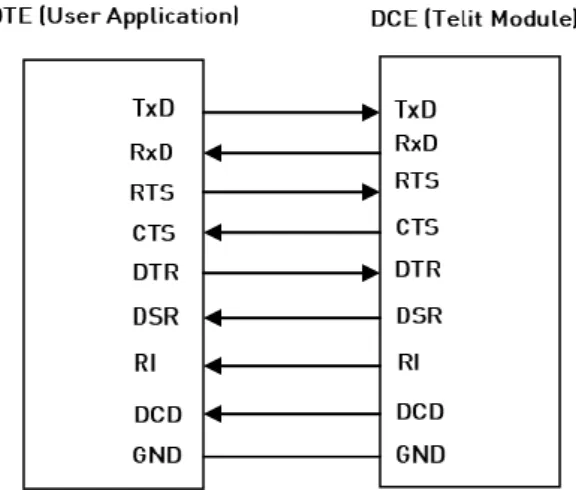
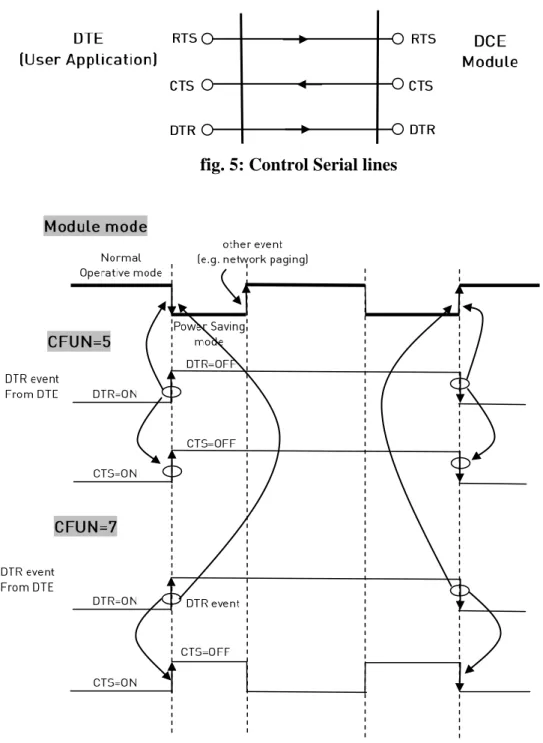
For reader convenience hereafter is showed the V.24 serial interface provided by the Telit Modules.
After power on, the Telit Module is ready to receive AT commands on its Main Serial Port. In general, its second serial port, called Auxiliary, is used for factory test. To have more hardware information refer to [3] in accordance with the module under test. The figures below show the RTS/CTS handshaking of the Main Serial Port:
GSM/GPRS Standards
RTS control line
The RTS control line indicates permission to the DCE (module) to send data to the DTE (user equipment). The RTS (output) of DTE is checked by the module every GSM TDMA frame (4.61 ms). As soon as the RTS of the DTE is detected as not asserted, the module immediately stops the transmission of the bytes toward the DTE.
fig. 2: RTS control line
The maximum number of characters that Telit Module can send to the DTE after the transaction RTS asserted to RTS NOT asserted depends upon the used serial port speed. In any case, to take into account delays due to software tasks priorities it is necessary to consider a detection interval equal to 4,61 x 2 = 9,22 ms.
Example:
at 115200 8N1 the maximum number of transmitted characters (bytes) by DCE is 107: 115200 8N1 => 115200 bit/s = 11520 char/s = 11.52 char/ms = 106.2 char/GSM frame x 2;
at 57600 8N1 the maximum number of transmitted characters (bytes) by DCE is 54;
at 9600 8N1 the maximum number of transmitted characters (bytes) by DCE is 9.
NOTE: for the GE910-QUAD the maximum number of transmitted bytes is 288, regardless the selected baud rate.
HSPA-GSM/GPRS Standards
RTS control line
The RTS control line indicates permission to the DCE (module) to send data to the DTE (user equipment). The low-high RTS transition generates an interrupt signal. Between the RTS transition and the interrupt signal recognition the module can send at most one character toward DTE.
GSM/GPRS Standards,HSPA-GSM/GPRS Standards
CTS control line
The CTS control line indicates permission to the DTE (user equipment) to send data to the DCE (module). The CTS (output) of the DCE is not asserted when the data in its receiver buffer is grater than 75% of its capacity, the DTE transmission is stopped. The CTS is asserted when data in the receiver buffer of the module is lower than 25% of its capacity, the DTE transmission starts again.
2.2.
Module Identification
Use the following AT command (as example) to verify if the DTE/DCE connection is working. Refer to chapter 2.5 to see the factory setting of the Main Serial Port speed of the module (DCE).
AT
OK
Use the following AT commands to verify the Software Versions and Telit Module Identification:
AT+CGMR: Returns the Software Versions information
AT+CGMM: Returns the Telit Module identification
Examples
Check the Software Versions
AT+CGMR
10.00.004 OK
Check the Module Identification
AT+CGMM
GM862-QUAD OK
Check the Module Identification
AT+CGMM
HE910-EU OK
2.3.
AT Interface Style Selection
Use the following AT command to check the current AT Interface Style:
AT#SELINT?
GSM/GPRS Standards
Examples
After powering ON the module, check the current AT command Interface Style:
AT#SELINT?
#SELINT: 0 OK
Check the AT command Interfaces Set supported:
AT#SELINT=?
#SELINT: (0-2) OK
Select the desired AT command Interface Set:
AT#SELINT=2
OK
Select a wrong AT command Interface Set just to see the response:
AT#SELINT=7
ERROR
Check which AT command Interface is active:
AT#SELINT?
#SELINT: 2 OK
HSPA-GSM/GPRS Standards
Check the supported AT Command Interface Style:
AT#SELINT=?
#SELINT: (2) a single interface style: 2 OK
2.4.
Enable Extended Error Result codes
Disable the Error Report in numerical and verbose format:AT+CMEE=0
OK
Enable the Error Report in numerical format:
AT+CMEE=1
OK
Enable the Error Report in verbose format:
AT+CMEE=2
OK
2.5.
Main Serial Port Speed Configuration
Standards
(refer to Tab. 1) Software Version equal/greater than: Main Serial Port Speed Configuration
GSM/GPRS 10.00.xx5, 16.00.xx2 Autobauding
GSM/GPRS 13.00.xx2 No autobauding, use 115200 bit/sec
HSPA-GSM/GPRS 12.00.xx.2 No autobauding, use 115200 bit/sec
GSM/GPRS Standards
Use the following AT command to specify the Main Serial Port speed:
AT+IPR=<rate>
Examples
Check the current Main Serial Port speed (factory setting: autobauding = 0):
AT+IPR?
+IPR: 0 OK
Software versions: 10.xx.xxx, 16.xx.xxx AT+IPR=? +IPR: (0,300,1200,2400,4800,9600,19200,38400,57600,115200),(0,300,1200,2400,4800,9600,19200,3 8400,57600,115200) OK Software version 13.xx.xxx AT+IPR=? +IPR: (300,1200,2400,4800,9600,19200,38400,57600,115200,230400,460800,921600) OK
Set up the Main Serial Port speed to 38400 bps:
AT+IPR=38400
OK
Before entering the following AT commands set up the DTE serial port speed to 38400 bps
AT&W0 store the setting on profile 0 OK
AT&P0 at power on use profile 0 OK
Check the current Main Serial Port speed.
AT+IPR?
+IPR: 38400 OK
HSPA-GSM/GPRS Standards
Use the following AT command to specify the Main Serial Port:
AT+IPR=<rate>
Examples
Check the current Main Serial Port speed (factory setting = 115200 bit/sec):
AT+IPR?
+IPR: 115200 OK
Check the Main Serial Port speed range:
AT+IPR=?
+IPR: (300,1200,2400,4800,9600,19200,38400,57600,115200)
OK
Set up the Main Serial Port speed of to 38400 bps:
AT+IPR=38400
OK
Before entering the following AT commands set up the DTE serial port to 38400 bps
AT&W0 store the setting on profile 0 OK
AT&P0 at power on use profile 0 OK
Check the current Main Serial Port speed.
AT+IPR?
+IPR: 38400 OK
2.6.
Auxiliary Serial Port Arrangement
GSM/GPRS StandardsUse the following AT command to connect/disconnect the Auxiliary Serial Port to/from one of the three Services:
AT1 Parser (Instance # 2)
AT2 Parser (Instance # 3)
Trace Service
AT#SII = <inst>
Examples AT#SII?
#SII: 0 the Auxiliary Serial Port is connected to Trace Service; see the table below OK
AT#SII=1 Auxiliary Serial Port is disconnected from Trace Service and connected to AT1 OK parser. Main Serial Port is still connected to AT0 Parser as showed on the table.
Refer to [3], in accordance with the module under test, to know detailed information concerning the Main Serial Port and Auxiliary Serial Port provided by Telit Modules .
Power on / AT#SII AT0 Instance #1
AT1 Instance #2
AT2
Instance #3 Trace Service Power on Main Serial Port X X Aux. Serial Port AT#SII=1 Main Serial Port Aux. Serial Port X X AT#SII=2 Main Serial Port X Aux. Serial Port X AT#SII=0 Main Serial Port X X Aux. Serial Port
2.7.
Select Cellular Network
GSM/GPRS StandardsThe following AT command selects the Cellular Network: the only valid value is 12. It selects the single supported technology: GSM digital cellular (GERAN):
AT+WS46=12 OK
HSPA-GSM/GPRS Standards
The following AT command selects the Cellular Network:
AT+WS46=[<n>]
Examples
Select GSM digital cellular (GERAN)
AT+WS46=12
OK
Select UTRAN only
AT+WS46=22
OK
Select 3GPP System (both GERAN and UTRAN)
AT+WS46=25
OK
NOTE: the <n> parameter is stored on NVM and the command will take effect on the next power on. If on the air are present both technologies GERAN and UTRAN, the second one is preferred.
2.8.
Band Configuration
GSM/GPRS StandardsThe following AT command enables the automatic band selection:
AT#AUTOBND=2
OK
The following AT command disables the automatic band selection (manual band selection):
AT#AUTOBND=0
OK
In manual band selection the following AT command selects the current band:
AT#BND=[<band>]
Examples
AT#BND=0 selected band: GSM 900MHz + DCS 1800MHz
OK
HSPA-GSM/GPRS Standards
The following AT command enables the automatic band selection:
AT#AUTOBND=2
OK
The following AT command disables the automatic band selection (manual band selection):
AT#AUTOBND=0
OK
In manual band selection the following AT command selects the current band for both technologies GERAN and UTRAN:
AT#BND=[<band>][,<UMTS band>]
Examples
AT#BND=0,0 selected band: GSM 900MHz + DCS 1800MHz
NOTE: the module uses a band out of the two entered with the previous command. The selected band will be in accordance with the +WS46 command and the technologies available on the air.
Check the bands supported by the module
AT#BND=?
#BND: (0-3),(0-6) OK
2.9.
Software Shutdown
Enter the following AT command:
AT#SHDN
OK
During shutdown the module executes the following actions:
Detachment from the network
Module Power off
To get more information about procedure and timing refer to [3] in accordance with the module under test.
2.10.
SIM
2.10.1.
SIM Presence and PIN Request
The following AT command checks if the SIM device needs the PIN code:
AT+CPIN?
Examples
Assume that the SIM is inserted into the module and the PIN code is needed. AT+CPIN?
+CPIN: SIM PIN OK
Assume that the SIM is not inserted and Extended Error result code is not enabled. Check if PIN code is needed, just to see the response command:
AT+CPIN?
ERROR
Assume that the SIM is not inserted and Verbose Extended error result code is enabled. Check if PIN code is needed, just to see the response command:
AT+CPIN?
+CME ERROR: SIM not inserted
Assume that the SIM is not inserted and Numerical Extended error result code is enabled. Check if PIN code is needed, just to see the response command:
AT+CPIN?
+CME ERROR: 10
2.10.2.
Enter PIN code
Use the following AT command to enter the PIN code:
Examples
Assume to enter a wrong PIN code, and Extended Error result is not enabled.
AT+CPIN=1235
ERROR
Now, enter the right PIN code:
AT+CPIN=1234
OK
Enable Verbose Extended error result code:
AT+CMEE=2
OK
Enter a wrong PIN code:
AT+CPIN=1235
+CME ERROR: incorrect password.
NOTE: after 3 PIN code failed attempts, the PIN code is no longer requested and the SIM is locked. Use SIM PUK to enter a new PIN code and unlock the SIM.
2.10.3.
Enter PUK code
Enter the following AT command if PUK or PUK2 code is required:
AT+CPIN=<pin>[,<newpin>]
NOTE: after 10 PUK code failed attempts, the SIM Card is locked and no longer available.
2.10.4.
SIM Status
Use the following AT command to enable/disable the SIM Status Unsolicited Indication.
AT#QSS = <mode>
Example 1
Enable the unsolicited indication concerning the SIM status change.
AT#QSS=1 enable URCs: #QSS:0/1
#QSS: 0 unsolicited indication: the SIM is extracted. #QSS: 1 unsolicited indication: the SIM is inserted.
Example 2
AT#QSS=2 enable URCs: #QSS:0/1/2/3
OK
AT+IPR=19200 select the Main Serial Port speed = DTE speed OK
AT&W0 store the setting on profile 0 OK
AT&P0 at Power on use profile 0 OK
Now, power off the module:
#QSS:1 unsolicited indication: SIM inserted Now, power on the module:
#QSS:1 unsolicited indication: SIM inserted
AT+CPIN?
+CPIN: SIM PIN SIM is locked OK
AT+CPIN=<PIN> enter PIN
OK
#QSS: 2 unsolicited indication: SIM is unlocked
#QSS: 3 unsolicited indication: SMS and Phonebook are accessible
NOTE: the time interval between the two unsolicited indications (#QSS: 2 and #QSS: 3) depends from the number of SMS stored on the module and the Phonebook dimension.
2.10.5.
SIM Detection Mode
Use the following AT command to manage the SIM Detection Mode:
AT#SIMDET=<mode>
Example AT#SIMDET?
#SIMDET: 2,1 OK
2 = automatic SIM detection through SIMIN pin (Factory Setting) 1 = SIM inserted
Enable the unsolicited indication concerning the SIM status change.
AT#QSS=1
Now, extract the SIM
#QSS: 0 unsolicited indication: SIM is extracted Now, insert the SIM
#QSS: 1 unsolicited indication: SIM is inserted
AT#SIMDET=0 simulate SIM not inserted, but it is still physically inserted OK
#QSS: 0 unsolicited indication, but SIM is NOT physically extracted
AT#SIMDET?
#SIMDET: 0,1 0 = simulate the status SIM not inserted, 1 = SIM is physically inserted OK
Now, extract/insert the SIM, no unsolicited indication appears on DTE! Extract the SIM again
AT#SIMDET=1 simulate SIM inserted, but it is still physically extracted OK
AT#SIMDET?
#SIMDET: 1,0 1 = simulate the status SIM inserted, 0 = SIM is physically not inserted OK
Now, insert/extract the SIM, no unsolicited indication appears on DTE! Extract the SIM and set automatic SIM detection
AT#SIMDET=2
OK
AT#SIMDET?
#SIMDET: 2,0 2 = automatic SIM detection through SIMIN pin (Factory Setting), OK 0 = SIM not inserted
Now, insert/extract the SIM, unsolicited indication appears again on DTE! #QSS: 1 unsolicited indication: SIM is physically inserted #QSS: 0 unsolicited indication: SIM is physically extracted
2.10.6.
SIM/USIM Access File
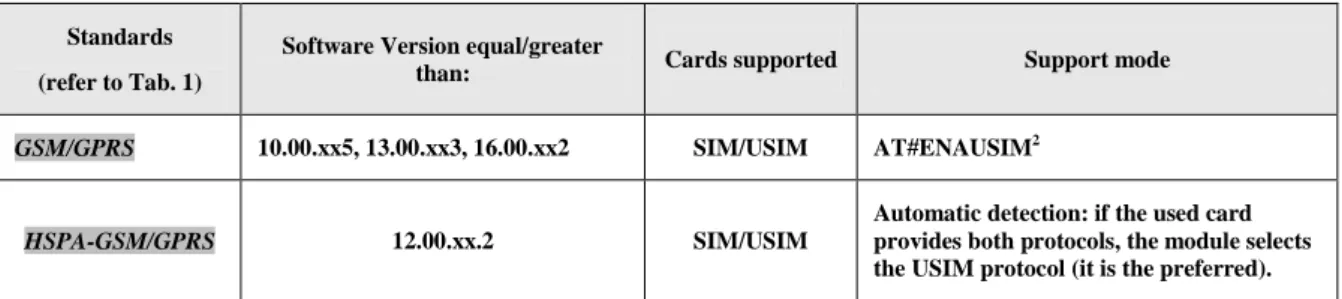
SIM and USIM devices are accessible using two different protocols. A generic device can support one or both protocols. Telit Modules, in accordance with the installed software version, can access only SIM or both SIM/USIM cards; refer to the table showed below:
Standards (refer to Tab. 1)
Software Version equal/greater
than: Cards supported Support mode
GSM/GPRS 10.00.xx5, 13.00.xx3, 16.00.xx2 SIM/USIM AT#ENAUSIM2
HSPA-GSM/GPRS 12.00.xx.2 SIM/USIM
Automatic detection: if the used card provides both protocols, the module selects the USIM protocol (it is the preferred).
Tab. 2: SIM/USIM
Use the +CSIM command to read/write SIM/USIM files. The format of the +CSIM parameters and the sequence of the +CSIM commands must be in accordance with the required protocol device: SIM or USIM protocol. This distinction between SIM and USIM <commands> format is needed because the +CSIM command works directly on the device (card), consequently it must use the right format.
AT+CSIM=<length>,<command>
Example
AT+CSIM=1 Lock SIM interface
OK ••••
To read/write files refer to [13], [16] to get information concerning the commands format that must by used with +CSIM in accordance with the protocol used: SIM or USIM.
••••
AT+CSIM=0 Unlock SIM interface
OK
2.10.7.
MSISDN
MSISDN is a number uniquely identifying a subscription in a GSM or UMTS mobile network. MSISDN is defined by the ITU-U Recommendation [12] which defines the numbering plan: a number uniquely identifies a public network termination point and typically consists of three fields, CC (Country Code), NDC (National Destination Code), and SN (Subscriber Number), up to 15 digits in total.
GSM/GPRS Standards
The following AT command can be used to store the MSISDN on the assigned field (EF_MSISDN) of the SIM card.
AT+CRSM=<command>[,<file id>[,<P1>,<P2>,<P3>[,<data>]]]
Using this command, the user needs to know the structure of the field used by the SIM card to storage the MSISDN number, refer to [5], [13].
The #SNUM is an AT command more “user friendly”. In addition, it is valid also for USIM card, see the following example:
Before entering the MSISDN in international phone number format, it is mandatory to enter the command #ENS=1. It is worth to remind that the following command enable the functionalities described on paragraph 2.11.7.
AT#ENS=1
OK
Write phone number and memo string
AT#SNUM=1,"+393X912Y45Z7","MY NUMBER"
OK
If the functionalities activated with #ENS=1 are not needed enter the command #ENS=0.
AT#ENS=0
OK
Read phone number and memo string
AT+CNUM
+CNUM: "MY NUMBER","+393X912Y45Z7",145 OK
HSPA-GSM/GPRS Standards
Example
Select the "ON" storage:
AT+CPBS="ON"
OK
Write a new record on the selected storage:
AT+CPBW=1,"+393X912Y45Z7",145,"MyNumber"
OK
Read the just entered number:
AT+CPBF="MyNumber"
+CPBF: 1," +393X912Y45Z7",145," MyNumber " OK
2.10.8.
Preferred Operator List
Use the following AT command to manage the Preferred Operator List stored on SIM.
GSM/GPRS Standards
AT+CPOL=[<index>][,<format>[,<oper>]]
Examples
Check the supported number of operators in the SIM Preferred Operator List and the format:
AT+CPOL=?
+CPOL: (1-20),(2) The used SIM supports 20 positions; the supported format (2) is
OK numeric
Reading the entire list:
AT+CPOL? +CPOL: 1,2,"20801" +CPOL: 2,2,"20810" +CPOL: 3,2,"23205" +CPOL: 4,2,"22802" +CPOL: 5,2,"29341" . +CPOL: 19,2,"23802" +CPOL: 20,2,"24201" OK
The meaning of the string “XXXYY” is: - XXX = Mobile Country Code - YY = Mobile Network Code
Delete the first entry using a non-existent <format> value just to see the response when the Extended Error result code is enabled:
AT+CPOL=1,3
+CME ERROR: operation not supported
Now, delete the first entry using the right <format> value:
AT+CPOL=1,2
Check if the first entry is deleted: AT+CPOL? +CPOL: 2,2,"20810" +CPOL: 3,2,"23205" . +CPOL: 19,2,"23802" +CPOL: 20,2,"24201" OK
The entry on first position is deleted
AT+CPOL=1,2,20801 Write a new entry in the first position OK
Check if the new entry is written on first position:
AT+CPOL?
+CPOL: 1,2,"20801" The new entry is written on first position +CPOL: 2,2,"20810" . +CPOL: 20,2,"24201" OK HSPA-GSM/GPRS Standards AT+CPOL=[<index>][,<format>[,<oper>[,<GSM_AcT>,<GSM_Compact_AcT>,<UTRAN_AcT]]] Examples
Check the supported number of operators in the SIM preferred operator list and the format:
AT+CPOL=?
+CPOL: (1-35),(2) The used SIM supports 35 positions; the supported format (2) is
OK numeric AT+CPOL? +CPOL: 1,2,"20801",1,0,1 +CPOL: 2,2,"21407",1,0,1 . +CPOL: 35,2,"73001",1,0,1 OK
2.11.
Network Information
2.11.1.
Network Status
Enter the following AT command to verify if the module is registered on a Network:
AT+CREG?
GSM/GPRS Standards
Examples:
Now, disconnect the antenna from the module and enter again the command:
AT+CREG?
+CREG: 0,3 OK
Connect again the antenna to the module and select the Network Registration Report format: Local Area Code and Cell Id:
AT+CREG=2
OK
AT+CREG?
+CREG: 2,1,55FA,12EB OK
Now, enter a wrong parameter just to see the result format when Verbose Extended Error result is enabled:
AT+CREG=9
+CME ERROR: operation not supported
HSPA-GSM/GPRS Standards
Let’s suppose that GERAN and UTRAN technologies are present on the air.
Example
Force the module in GSM/GPRS mode.
AT+WS46=12
Select the Network Registration Report format: Local Area Code and Cell Id: AT+CREG=2 OK AT+CREG? +CREG: 2,1,"D5BD","520F",0 OK Example
Use the command AT+WS46=22 or AT+WS46=25 to force the module in HSPA mode.
AT+WS46=25
OK
Select the Network Registration Report format: Local Area Code and Cell Id:
AT+CREG=2
OK
AT+CREG?
+CREG: 2,1,"EF8D","52D2388",2 OK
2.11.2.
Network Operator Identification
Use the following AT command to query the mobile for Network Operators Identifications Codes and Names:
AT+COPS=?
GSM/GPRS Standards
Examples
Assume that the module is registered on some Network:
AT+COPS=?
+COPS: (2,"I WIND",,"22288"),(3,"vodafone IT",,"22210"),(1,"SI.MOBIL",,"29340"),,(0-4),(0,2)
OK
Now, disconnect the antenna and assume that Verbose Extended Error result is enabled. Enter again the previous AT command:
AT+COPS=?
HSPA-GSM/GPRS Standards
Let’s suppose that GERAN and UTRAN technologies are present on the air.
Example
Force the module in GSM/GPRS mode.
AT+WS46=12
OK
Check if the module is in GSM/GPRS mode
AT+COPS?
+COPS: 0,0,"I TIM",0 OK
Yes, it is.
Collect information about GERAN Networks:
AT+COPS=?
+COPS: (2,"I TIM",,"22201",0),(1,"SI MOBITEL GSM",,"29341",0),(3,"I WIND",,"2228 8",0),(3,"vodafone IT",,"22210",0),(1,"SI VEGA 070",,"29370",0),(1,"SI.MOBIL",," 29340",0),,(0-4),(0,2)
OK
Example
Use the command AT+WS46=22 or AT+WS46=25 to force the module in HSPA mode.
AT+WS46=25
OK
Check if the module is in HSPA mode
AT+COPS?
+COPS: 0,0,"I TIM",2 OK
Yes, it is.
Collect information about UTRAN and GERAN Networks:
AT+COPS=?
+COPS: (2,"I TIM",,"22201",2),(2,"I TIM",,"22201",0),(1,"SI MOBITEL GSM",,"29341 ",0),(3,"I WIND",,"22288",2),(1,"SI.MOBIL",,"29340",0),(1,"3 ITA",,"22299",2),(3 ,"vodafone IT",,"22210",2),(3,"I WIND",,"22288",0),(3,"vodafone IT",,"22210",0), (1,"SI VEGA 070",,"29370",0),,(0-4),(0,2)
2.11.3.
Signal Strength & Quality
Assume that the mobile is registered on a Network that can be: GERAN or UTRAN. The following AT command can be useful to know the received signal strength & quality to have an indication about the radio link reliability.
AT+CSQ
Examples
Assume that the antenna is not connected to the Telit Module or Network coverage is not present at all.
AT+CSQ
+CSQ: 99,99 OK
Now, the antenna is connected to the Telit Module and Network coverage is present. Enter again the previous AT command:
AT+CSQ
+CSQ: 17,0 OK
17 = <rssi> = Received Signal Strength Indication 0 = <ber> = Bit Error Rate
Now, a wrong parameter is entered just to see the result format when Verbose Extended Error result is enabled
AT+CSQ?
+CME ERROR: operation not supported
2.11.4.
Fast Network Status Check
Once the Telit Module is registered on a Network, doesn’t matter about the technology (GERAN or UTRAN), it could be useful to know the received signal strength and the Network on which the Telit Module is registered. This information can be gathered by means of the following standard AT commands: +CREG, +COPS and +CSQ. These commands are not fast in the response due to Network response time, especially the +COPS command.
If the User objective is to keep its Software Application as general as possible, he can use the standard AT commands above mentioned and described on the previous paragraphs.
In addition, Telit Modules provide the user with proprietary AT commands to gather all the information needed in a faster and simpler way, they are:
#MONI
#SERVINFO
Use the following AT command to select cells and collect their information:
AT#MONI[=[<number>]]
GSM/GPRS Standards
The following examples are valid also for HSPA-GSM/GPRS Standards when the module is forced in GSM mode by means of the command AT+WS46=12.
Examples
Assume that the antenna is connected to the module and only serving cell information is needed. Check if the module is using GSM/GPRS standard:
AT+COPS?
+COPS: 0,0,"I TIM",0 OK
Yes, it is using GSM standard. The last parameter displayed by the command response is reported only by the HSPA-GSM/GPRS Standards, it gives information concerning access technology.
Select the Serving Cell:
AT#MONI=0
OK
Collect information:
AT#MONI
#MONI: I WIND BSIC:70 RxQual:0 LAC:55FA Id:12EB ARFCN:979 PWR:-75dbm TA:0 OK
The module is registered on "I WIND" Network, the signal strength is -75dBm.
Now, disconnect the antenna from the module and trying to collect cell information just to see the format response:
AT#MONI
ERROR OK
The antenna is again connected to the module and Serving Cell and Neighboring Cells information is needed.
Select all available cells:
AT#MONI=7
OK
Collect information:
AT#MONI
#MONI: Cell BSIC LAC CellId ARFCN Power C1 C2 TA
RxQual PLMN
#MONI: S 70 55FA 12EB 979 -75 dbm 29 29 0 0 I WIND
#MONI: N1 75 55FA 1297 983 -86 dbm 18 18 #MONI: N2 70 55FA 12EA 985 -87 dbm 17 17 #MONI: N3 73 55FA 1D23 754 -100 dbm 2 16 #MONI: N4 72 55FA 12EC 977 -101 dbm 3 3 #MONI: N5 72 55FA 1D0D 751 -107 dbm -5 -5 #MONI: N6 FF FFFF 0000 1007 -107 dbm -1 -1 OK
HSPA-GSM/GPRS Standards
Let’s suppose that the UTRAN technology is present on the air. Use the command AT+WS46=22 or AT+WS46=25 to force the module in HSPA mode.
Examples
Check if the module is using HSPA standard:
AT+COPS?
+COPS: 0,0,"I TIM",2 OK
Yes, it is using HPSA standard. Select the Serving Cell:
AT#MONI=0
OK
AT#MONI
#MONI: I TIM PSC:49 RSCP:-102 LAC:EF8D Id:52D2388 EcIo:-2.5 UARFCN:10638 PWR:-97 dbm DRX:64 SCR:784
OK
Use the following AT command to collect only the Serving Cell Information:
AT#SERVINFO
This Modules Family provides also this command to get the current network status:
AT#RFSTS
#RFSTS: "222 01",10638,49,-5.0,-95,-85,EF8D,00,-128,128,19,4,2,,52D2388,"2220170 02413217","I TIM",3,0
OK
GSM/GPRS Standards
The following examples are valid also for HSPA-GSM/GPRS Standards when the module is forced in GSM mode by means of the command AT+WS46=12.
Examples
Collect only the Serving Cell Network Information:
AT#SERVINFO
#SERVINFO: 979,-75,"I WIND","22288",70,55FA,00,1,,"II",01,6
HSPA-GSM/GPRS Standards
Let’s suppose that the UTRAN technology is present on the air. Use the command AT+WS46=22 or AT+WS46=25 to force the module in HSPA mode.
Examples
Collect only the Serving Cell Network Information:
AT#SERVINFO
#SERVINFO: 10638,-94,"I TIM","22201",49,EF8D,64,3,-101,"II",00 OK
NOTE: #MONI and #SERVINFO commands should be used only to collect Network Name and Signal Strength information. To check if mobile is registered or is looking for a suitable network to register on, use +CREG command. In fact, if the network signal is too weak and mobile looses the registration, until a new network is found the two commands report the last measured valid values and not the real ones. The TA (timing advance parameter) is valid only during a call. Check network registration with +CREG command. When mobile is registered, query the mobile for network operator name and signal strength with #MONI command.
2.11.5.
Network Survey
Use the following AT command to perform a quick survey though channels belonging to the current band (it is not supported by HSPA-GSM/GPRS Standards), refer to [20]:
AT#CSURV [=<s>,<e>] Examples AT#BND? #BND: 0 OK AT#CSURV=4,8
Network survey started ...
arfcn: 7 bsic: 18 rxLev: -78 ber: 0.00 mcc: 222 mnc: 01 lac: 54717 cellId: 21007 cellStatus: CELL_SUITABLE numArfcn: 3 arfcn: 7 13 27
arfcn: 4 bsic: 16 rxLev: -85 ber: 0.00 mcc: 222 mnc: 01 lac: 54717 cellId: 21094 cellStatus: CELL_SUITABLE numArfcn: 2 arfcn: 4 1021
arfcn: 8 rxLev: -92 arfcn: 6 rxLev: -93 arfcn: 5 rxLev: -98 Network survey ended OK
2.11.6.
BCCH Survey
Use the following AT command to perform a quick survey of the channels belonging to the current band. The survey stops as soon as <n> BCCH carriers are found. It is not supported by HSPA-GSM/GPRS Standards.
AT#CSURVB = [<n>] Examples
AT#CSURVB=2
Network survey started ...
arfcn: 104 bsic: 63 rxLev: -68 ber: 0.00 mcc: 222 mnc: 88 lac: 22010 cellId: 4737 cellStatus: CELL_FORBIDDEN numArfcn: 3 arfcn: 114 989 995
arfcn: 761 bsic: 57 rxLev: -72 ber: 0.00 mcc: 222 mnc: 88 lac: 22010 cellId: 7437 cellStatus: CELL_FORBIDDEN numArfcn: 4 arfcn: 776 785 794 803
Network survey ended OK
2.11.7.
Enhanced Network Selection and AT&T functions
Use the following AT command to enable/disable the Enhanced Network Selection and the AT&T functions.
AT#ENS=[<mode>]
The features concerning this command are conditioned by the SIM card type used on the module. It is worth to remind that the factory setting is:
AT#ENS=0
OK
Using this setting, the module follows the European Standard R98/R4/R7, in accordance with the module under test.
Example
AT#ENS=1 After module power on, enter the AT command
OK
After entering the command, it is needed to power OFF/ON the module to activate the new entered command. The following chapters describe the functionalities enabled via the AT#ENS command for each module, refer to Tab. 1.
Configuration 1: module with no AT&T SIM cards Assume that #ENS is set to 1. The module supports:
EONS features (refer to [9], § 15)
ENS features for Network selection (refer to [9], §13)
special requirements for USSD strings (refer to [9], <CDR-GSM-255>)
special ATD dial string format (ATDxxxxxPyyyyyy), refer to [9] <CDR-CON-3074>,
<CDR-CON-3342>;
10.00.xx5: if #AUTOBND=0 then, automatically, #AUTOBND is forced to 1. If #AUTOBND=2 (factory setting) no action is taken.
>= 10.00.xx6/16.00.xx2: if #AUTOBND=0 then, automatically, #AUTOBND is forced to 2. If #AUTOBND=2 (factory setting) no action is taken.
+PACSP AT command to display the PLMN Mode Bit read from CPHS file on SIM (refer to [9])
AT#STIA=2,1 as default
the max length of the telephone number that can be stored in SIM phonebooks is greater than the default value (20)
AT#PLMNMODE=1 as default
different coding and encoding for MCC and MNC for SAT functions (refer to [9])
MWI messages (refer to [9], §16)
Configuration 2: module with an AT&T SIM card
Assume that #ENS is set to 1. The module supports the features indicated in Configuration 1, plus the following:
Acting Home PLMN (refer to [9], § 12)
When AT#ENS=1, it is recommended to use the following setting:
AT#AUTOBND=2
AT#NITZ=7,X (X if the user wants the URC)
Regardless the SIM card used, the module supports the following features in accordance with the #ENS setting:
Concerning Phonebook string management:
#ENS=1
BCD format conversion ASCII format
0x0D (wild char) ?
? 0x0D (wild char)
0x0C P
0x0C p
#ENS=0
BCD format conversion ASCII format
0x0D (wild char) @
@ 0x0D (wild char)
0x0C P
#ENS=1: USSD MT event is notified via the tone associated to an SMS MT. If #ENS=0, the event is not notified via the tone, but is notified via an unsolicited message (if it is enabled).
#ENS=1: the default GSM band parameter of #BND AT command is 3. If #ENS=0, the default GSM band parameter is 0.
#ENS=1: #BND=1 or #BND=2 are not permitted. If #ENS=0, they are permitted.
#ENS=1: ATD 0; and ATD 00; AT commands execute a call to the phone number 0 and 00 respectively. If #ENS=0, 0 and 00 are interpreted as USSD strings and sent to the network.
#ENS=1: enter AT+CLCK=”FD”,1,PIN2 AT command to select the FD phonebook as current phonebook. If #ENS=0, enter the following commands:
AT+CPBS=”FD” ERROR
AT+CPIN=PIN2 OK
OK
In alternative of the three above listed AT commands the following one can be used: AT+CLCK=”FD”,1,PIN2
#ENS=1: after activating the context via AT+CGACT=1,<cid> AT commands, the DNS information is not received. Enter ATD*99***1# to execute the dial up. If #ENS=0, after activating the context via AT+CGACT=1,<cid> AT commands, the DNS information is received. Enter ATD*99***1# to execute the dial up.
Configuration 1: module with no AT&T SIM cards
The module supports the following features independently from the #ENS setting:
EONS features (refer to [9], § 15)
special requirements for USSD strings (refer to [9], <CDR-GSM-255>
special ATD dial string format (ATDxxxxxPyyyyyy), refer to [9] <CDR-CON-3074>, <CDR-CON-3342>;
+PACSP AT command to display the PLMN Mode Bit read from CPHS file on SIM (refer to [9])
the max length of the telephone number that can be stored in SIM phonebooks is greater than the default value (20)
The module supports the following features when #ENS is set to 1:
If #AUTOBND=0 then, automatically, #AUTOBND is forced to 2. If #AUTOBND=2 (factory setting) no action is taken.
AT#BND supports only values 0 and 3
AT#STIA=2,1 as default
different coding and encoding for MCC and MNC for SAT functions (refer to [9])
MWI messages (refer to [9], §16)
ENS features for Network selection (refer to [9], §13)
Configuration 2: module with an AT&T SIM card
Assume that #ENS is set to 1. The module supports the features indicated in Configuration 1, plus the following:
Acting Home PLMN (refer to [9], § 12)
When AT#ENS=1, it is recommended to use the following setting:
AT#AUTOBND=2
AT#NITZ=7,X (X if the user wants the URC)
AT#SMSMODE=1
Regardless the SIM card used, the module supports the following features in accordance with the #ENS setting:
Concerning Phonebook string management:
#ENS=1
BCD format conversion ASCII format
0x0D (wild char) ?
? 0x0D (wild char)
0x0C P
0x0C p
#ENS=0
BCD format conversion ASCII format
0x0D (wild char) @
@ 0x0D (wild char)
0x0C P
#ENS=1: USSD MT event is notified via the tone associated to an SMS MT. If #ENS=0, the event is not notified via the tone, but is notified via an unsolicited message (if it is enabled).
#ENS=1: the default GSM band parameter of #BND AT command is 3. If #ENS=0, the default GSM band parameter is 0.
#ENS=1: ATD 0; and ATD 00; AT commands execute a call to the phone number 0 and 00 respectively. If #ENS=0, 0 and 00 are interpreted as USSD strings and sent to the network.
#ENS=1: after activating the context via AT+CGACT=1,<cid> commands, the DNS information is not received. Enter ATD*99***1# to execute the dial up. If #ENS=0, after activating the context via AT+CGACT=1,<cid> commands, the DNS information is received. Enter ATD*99***1# to execute the dial up
Configuration 1: module with no AT&T SIM cards Assume that #ENS is set to 1. The module supports:
EONS features (refer to [9], § 15)
special requirements for USSD strings (refer to [9], <CDR-GSM-255>
special ATD dial string format (ATDxxxxxPyyyyyy), refer to [9] <CDR-CON-3074>, <CDR-CON-3342>;
If #AUTOBND=0 then, automatically, #AUTOBND is forced to 2. If #AUTOBND=2 (factory setting) no action is taken.
AT#BND supports only values 0 and 3, no restriction on second parameter
+PACSP AT command to display the PLMN Mode Bit read from CPHS file on SIM (refer to [9])
AT#STIA=2,1 as default
the max length of the telephone number that can be stored in SIM phonebooks is greater than the default value (20)
different coding and encoding for MCC and MNC for SAT functions (refer to [9])
MWI messages (refer to [9], §16)
Configuration 2: module with an AT&T SIM card
Assume that #ENS is set to 1. The module supports the features indicated in Configuration 1, plus the following:
Acting Home PLMN (refer to [9], § 12)
When AT#ENS=1, it is recommended to use the following setting:
AT#NITZ=7,X (X if the user wants the URC)
Regardless the SIM card used, the module supports the following features in accordance with the #ENS setting:
Concerning Phonebook string management:
#ENS=1
BCD format conversion ASCII format
0x0D (wild char) ?
? 0x0D (wild char)
0x0C P
0x0C p
#ENS=0
BCD format conversion ASCII format
0x0D (wild char) @
@ 0x0D (wild char)
0x0C P
#ENS=1: USSD MT event is notified via the tone associated to an SMS MT. If #ENS=0 the event is not notified via the tone, but is notified via an unsolicited message (if it is enabled).
#ENS=1: the default GSM band parameter of #BND AT command is 3. If #ENS=0, the default GSM band parameter is 0.
#ENS=1: #BND=1 or #BND=2 are not permitted. If #ENS=0, they are permitted.
#ENS=1: ATD 0; and ATD 00; AT commands execute a call to the phone number 0 and 00 respectively. If #ENS=0, 0 and 00 are interpreted as USSD strings and sent to the network.
#ENS=1: after activating the context via AT+CGACT=1,<cid> commands, the DNS information is not received. Enter ATD*99***1# to execute the dial up. If #ENS=0, after activating the context via AT+CGACT=1,<cid> commands, the DNS information is received. Enter ATD*99***1# to execute the dial up
Configuration 1: module with no AT&T SIM cards
The module supports the following features independently from the #ENS setting:
EONS features (refer to [9], § 15)
special requirements for USSD strings (refer to [9], <CDR-GSM-255>
special ATD dial string format (ATDxxxxxPyyyyyy), refer to [9] <CDR-CON-3074>, <CDR-CON-3342>;
+PACSP AT command to display the PLMN Mode Bit read from CPHS file on SIM (refer to [9])
the max length of the telephone number that can be stored in SIM phonebooks is greater than the default value (20)
The module supports the following features when #ENS is set to 1:
If #AUTOBND=0 then, automatically, #AUTOBND is forced to 2. If #AUTOBND=2 (factory setting) no action is taken.
AT#BND supports only values 0 and 3, no restriction on second parameter
AT#STIA=2,1 as default
different coding and encoding for MCC and MNC for SAT functions (refer to [9])
MWI messages (refer to [9], §16)
Configuration 2: module with an AT&T SIM card
Assume that #ENS is set to 1. The module supports the features indicated in Configuration 1, plus the following:
Acting Home PLMN (refer to [9], § 12)
When AT#ENS=1, it is recommended to use the following setting:
AT#AUTOBND=2
Regardless the SIM card used, the module supports the following features in accordance with the #ENS setting:
Concerning Phonebook string management:
#ENS=1
BCD format conversion ASCII format
0x0D (wild char) ?
? 0x0D (wild char)
0x0C P
0x0C p
#ENS=0
BCD format conversion ASCII format
0x0D (wild char) @
@ 0x0D (wild char)
0x0C P
#ENS=1: USSD MT event is notified via the tone associated to an SMS MT. If #ENS=0, the event is not notified via the tone, but is notified via an unsolicited message (if it is enabled).
#ENS=1: the default GSM band parameter of #BND AT command is 3. If #ENS=0, the default GSM band parameter is 0.
#ENS=1: #BND=1 or #BND=2 are not permitted. If #ENS=0, they are permitted.
#ENS=1: ATD 0; and ATD 00; AT commands execute a call to the phone number 0 and 00 respectively. If #ENS=0, 0 and 00 are interpreted as USSD strings and sent to the network.
#ENS=1: AT+CFUN=0 is the same of AT+CFUN=4. If #ENS=0, +CFUN=0 and +CFUN=4 have the standard behavior.
#ENS=1: the Radio Policy Management (RPM) is supported. If #ENS=0, RPM is not supported.
#ENS=1: the default class parameter is 12 (AT#MSCLASS=12). If #ENS=0, the default class parameter is 33.
#ENS=1: the following CPC features are disabled:
-HSPA and HSPA+ 7.4 HSPA+ <CDR-HSD-491> UL DPCCH Gating (Uplink DTX)
-HSPA and HSPA+ 7.4 HSPA+ <CDR-HSD-492> E-DCH Tx Start Timer Restriction (Uplink DRX) -HSPA and HSPA+ 7.4 HSPA+ <CDR-HSD-493> Downlink DRX
-HSPA and HSPA+ 7.4 HSPA+ <CDR-HSD-494> New UL DPCCH Slot Format -HSPA and HSPA+ 7.4 HSPA+ <CDR-HSD-496> CQI Reporting Reduction
If #ENS=0, the features are enabled.
#ENS=1: after power on the module executes the SIM reading and the network registration in sequential way. The call establishment is immediately available after the network registration. If #ENS=0, the module executes the SIM reading and the network registration in parallel. It can happen that the module is registered, but the reading SIM is not ended, for this reason wait for some seconds after network registration before calling.
#ENS=1: after activating the context via AT+CGACT=1,<cid> commands, the DNS information is not received. Enter ATD*99***1# to execute the dial up. If #ENS=0, after activating the context via AT+CGACT=1,<cid> commands, the DNS information is received. Enter ATD*99***1# to execute the dial up
2.12.
Voice Call Establishment - Originate
Before setting up the Voice Call, it is assumed that Telit Module is registered on a network and the signal strength is enough to carry on a reliable radio link.
2.12.1.
Set Module in Voice Mode
Use the following AT command to set up the module for a Voice Call:
AT+FCLASS=8
OK
NOTE: +FCLASS=8 command may be omitted if the ";" modifier is added at the end of the ATD command, after the entered phone number.
2.12.2.
Set Audio Path Active
The present section is applicable to the Telit Modules supporting one or two connections to audio devices, refer to [2], [3].
Standards (refer to Tab. 1)
Software Version equal/greater than:
Physical audio paths supported
GSM/GPRS 10.00.xx5, 16.00.xx2 HS, HF
GSM/GPRS 13.00.xx2 HS
HSPA-GSM/GPRS 12.00.xx.2 HS
The modules that provide two audio paths, feature the capability to switch between them using two modes: software and hardware.
Use the following AT command to switch between the audio paths (when the used module provides two physical audio paths).
AT#CAP=<n>
Examples 1
AT#CAP=2 Use software mode to select HS audio path
OK
Examples 2
AT#CAP=1 Use software mode to select HF audio path
OK
Examples 3
AT#CAP=0 Use hardware mode to select audio path
OK
After entering the previous command, select the audio path by means of the pin AXE, refer to [3]:
pin AXE = HIGH to select HS audio path.
pin AXE = LOW to select HF audio path.
NOTE: the audio paths can be switched also during a call in both ways. When hardware control is not used, AXE pin can be left unconnected.
GSM/GPRS Standards having Software Version 13.xx.xxx HSPA-GSM/GPRS Standards
AT#CAP=<n> is a dummy command, returns OK response and no actions are performed by the module. It was introduced for backward compatibility reasons.
2.12.3.
Set Volume on Speaker
Use the following AT command to set up the output volume level on the active audio path:
AT+CLVL=<vol>
OK
If the used module provides two audio paths (HS and HF), when moving from one path to the new one, the volume level does not change.
2.12.4.
Set Microphone Mute
The microphone of the active path can be muted with the following AT command:
AT+CMUT=1
OK
Check the microphone mute setting:
AT+CMUT?
+CMUT: 1 OK
Refer to chapter 2.12.2.
Use the following AT command to set up microphone input gain:
AT#HSMICG=<n>
Examples
Check the available gain levels
AT#HSMICG=?
#HSMICG: (0-7)
OK
Check the current gain level
AT#HSMICG?
#HSMICG: 0 OK
Set up a new gain level
AT#HSMICG=1
OK
Use the following AT command to enable/disable the sidetone on HS audio path.
AT#SHSSD=<mode>
Examples
Check the available values
AT#SHSSD =?
#SHSSD: (0-1)
OK
AT#SHSSD? #SHSSD: 0 OK Enable sidetone AT#SHSSD=1 OK
Use the following AT command to enable/disable the echo canceller function on HS audio path.
AT#SHSEC=<mode>
Examples
Check the available values
AT#SHSEC =?
#SHSEC: (0-1)
OK
Check the current value
AT#SHSEC?
#SHSEC: 0 OK
Enable echo canceller function
AT#SHSEC=1
OK
Use the following AT command to enable/disable the automatic gain control function on HS audio path.
AT#SHSAGC=<mode>
Examples
AT# SHSAGC =?
#SHSAGC: (0-1)
OK
Check the current value
AT# SHSAGC?
# SHSAGC: 0 OK
Enable automatic gain control function
AT# SHSAGC =1
OK
Use the following AT command to enable/disable the noise reduction function on HS audio path.
AT#SHSNR=<mode>
Examples
Check the available values
AT# SHSNR =?
#SHSNR: (0-1)
OK
Check the current value
AT# SHSNR?
# SHSNR: 0 OK
Enable the noise reduction function
AT# SHSNR =1
The Hands Free (HF) Path Commands showed on the following sub-chapters are dummy commands for the Modules that do not provide the HF audio path, refer to chapter 2.12.2. The commands return OK response and no actions are performed by the Modules. This solution was adopted for backward compatibility reasons.
Use the following AT command to set up the microphone input gain:
AT#HFMICG=<n>
Examples
Check the available gain levels
AT#HFMICG=?
#HFMICG: (0-7)
OK
Check the current gain level
AT#HFMICG?
#HFMICG: 0 OK
Set up a new gain level
AT#HFMICG=1
Use the following AT command to enable/disable the sidetone on HF audio path.
AT#SHFSD=<mode>
Examples
Check the available values
AT#SHFSD =?
#SHFSD: (0-1)
OK
Check the current value
AT#SHFSD? #SHFSD: 0 OK Enable sidetone AT#SHFSD=1 OK
Use the following AT command to enable/disable the echo canceller function on HF audio path.
AT#SHFEC=<mode>
Examples
Check the available values
AT#SHFEC =?
#SHFEC: (0-1)
OK
Check the current value
AT#SHFEC?
#SHFEC: 0 OK
AT#SHFEC=1
OK
Use the following AT command to enable/disable the automatic gain control function on HF audio path.
AT#SHFAGC=<mode>
Examples
Check the available values
AT# SHFAGC =?
#SHFAGC: (0-1)
OK
Check the current value
AT# SHFAGC?
# SHFAGC: 0 OK
Enable automatic gain control function
AT# SHFAGC =1
OK
Use the following AT command to enable/disable the noise reduction function on HF audio path.
AT#SHFNR=<mode>
Examples
Check the available values
AT# SHFNR =?
#SHFNR: (0-1)
OK
AT# SHFNR?
# SHFNR: 0 OK
Enable the noise reduction function
AT# SHFNR =1
2.12.7.
Dialing a Phone Number
Use the following AT command to dial up a phone number.
ATD<number>[;] Examples
Assume that the module is set in voice mode: AT+FCLASS=8 has been executed. After that, call the national number 040-4X92XYX.
ATD 0404X92XYX
OK
Now, call the national number 040-4X92XYX in international format +39-040-4X92XYX.
ATD +390404X92XYX
OK
Call the national number 040-4X92XYX in international format +39-040-4X92XYX. The module is not set in voice mode (AT+FCLASS=8 has not been executed). In this case to perform the Voice Call the User must use the “;” character at the end of the command.