KOMA-Script
a versatile LATEX 2ε bundleNote: This document is a translation of the German KOMA - Script manual. Several authors have been involved to this translation. Some of them are native English speakers, others like me are not. Improvements of the translation by native speakers or experts are welcome at all times!
KOMA-Script
Markus Kohm
2015-10-03
There is no warranty for any part of the documented Software. The authors have taken care in the preparation of this book, but make no expressed or implied warranty of any kind and assume no responsibility for errors or omissions. No liability is assumed for incidental or consequential damages in connection with or arising out of the use of the information or programs contained here.
Many of the designations used by manufacturers and sellers to distinguish their products are claimed as trademarks. Where those designations appear in this book, and the authors were aware of a trademark claim, the designations have been printed with initial capital letters or in all capitals.
English translation of this manual by: Kevin Pfeiffer, Gernot Hassenpflug, Krickette Murabayashi, Markus Kohm, Jens-Uwe Morawski, Jana Schubert, Jens Hühne, Harald Bon-gartz, Georg Grandke, Raimund Kohl, Stephan Hennig, Melvin Hendrix, and Arndt Schubert. Free screen version without any optimization of paragraph and page breaks
This guide is part of KOMA - Script, which is free under the terms and conditions of LATEX Project Public License Version 1.3c. A version of this license, which is valid to KOMA -Script, is part of KOMA - Script (see lppl.txt). Distribution of this manual — even if it is printed — is allowed provided that all parts of KOMA - Script are distributed. Distribution without the other parts of KOMA - Script needs a explicit, additional authorization by the authors.
Preface to the English KOMA-Script Guide
The translation of the German KOMA-Script guide is still a work in progress and a never ending story. I always try to have an English user guide with all descriptions of the German one. But as long as I have to do the primary translation, these translations not only can but should be improved.
Currently, wholechapter 15 is not a translation from the German manual but the primary description from the implementation of the package. Nevertheless, a native or very advanced English speaker with basic TeX knowledge is urgently needed to translate the German text or to improve my own translation.
A real gap is the chapter about scrjura. Currently there isn’t such a chapter, neither in the German nor in the English manual. But there is a chapter at the GermanKOMA-Scriptbook. If someone would translate it, I would add this chapter and the translation to the manuals.
So this English guide is complete but nevertheless not as good as the German one. Currently there are only a few editors for the English guide, who improve my translation for free. Many thanks to them for their very good job! Nevertheless, additional editors or translators would be welcome!
Contents
Preface to the English KOMA-Script Guide 7
1. Introduction 19
1.1. Preface. . . 19
1.2. Structure of the Guide. . . 19
1.3. History of KOMA-Script . . . 20
1.4. Special Thanks . . . 21
1.5. Legal Notes . . . 22
1.6. Installation. . . 22
1.7. Bug Reports and Other Requests . . . 22
1.8. Additional Information . . . 22
Part I: KOMA-Script for Authors 23 2. Construction of the Page Layout with typearea 24 2.1. Fundamentals of Page Layout . . . 24
2.2. Page Layout Construction by Dividing . . . 26
2.3. Page Layout Construction by Drawing a Circle . . . 28
2.4. Early or late Selection of Options . . . 28
2.5. Compatibility with Earlier Versions of KOMA-Script. . . 29
2.6. Options and Macros to Influence the Page Layout . . . 30
2.7. Paper Format Selection . . . 44
2.8. Tips . . . 46
3. The Main Classes: scrbook, scrreprt, and scrartcl 50 3.1. Early or late Selection of Options . . . 50
3.2. Compatibility with Earlier Versions of KOMA-Script. . . 50
3.3. Draft Mode . . . 51
3.4. Page Layout. . . 51
3.5. Selection of the Document Font Size. . . 52
3.6. Text Markup . . . 53
3.7. Document Titles . . . 59
3.8. Abstract. . . 65
3.9. Table of Contents . . . 66
3.11. Detection of Odd and Even Pages. . . 72
3.12. Head and Foot Using Predefined Page Styles . . . 73
3.13. Interleaf Pages. . . 78 3.14. Footnotes. . . 80 3.15. Demarcation . . . 84 3.16. Structuring of Documents . . . 85 3.17. Dicta . . . 104 3.18. Lists. . . 106 3.19. Math . . . 114
3.20. Floating Environments of Tables and Figures. . . 115
3.21. Margin Notes. . . 131
3.22. Appendix. . . 132
3.23. Bibliography . . . 132
3.24. Index . . . 135
4. The New Letter Classscrlttr2 137 4.1. Variables . . . 137
4.2. Pseudo-Lengths . . . 142
4.3. Early or late Selection of Options . . . 143
4.4. Compatibility with Earlier Versions of KOMA-Script. . . 143
4.5. Draft Mode . . . 143
4.6. Page Layout. . . 143
4.7. General Structure of Letter Documents . . . 143
4.8. Selection of Document or Letter Font Size . . . 153
4.9. Text Markup . . . 155
4.10. Note Paper . . . 158
4.11. Paragraph Markup . . . 187
4.12. Detection of Odd and Even Pages. . . 188
4.13. Head and Foot Using Predefined Page Style . . . 188
4.14. Interleaf Pages. . . 192
4.15. Footnotes. . . 192
4.16. Lists. . . 192
4.17. Math . . . 192
4.18. Floating Environments of Tables and Figures. . . 193
4.19. Margin Notes. . . 193
4.20. Closing. . . 193
4.21. Letter Class Option Files. . . 195
5. Adapting Page Headers and Footers with scrlayer-scrpage 206
5.1. Early or late Selection of Options . . . 206
5.2. Head and Foot Height . . . 207
5.3. Text Markup . . . 207
5.4. Usage of Predefined Page Styles . . . 209
5.5. Manipulation of Defined Page Styles. . . 219
6. The Day of the Week Using scrdate 230 7. Getting the Time with Package scrtime 235 8. Access to Address Files with scraddr 237 8.1. Overview . . . 237
8.2. Usage. . . 238
8.3. Package Warning Options . . . 239
9. Creating Address Files from a Address Database 240 10. Making Basic Feature of the KOMA-Script Classes Available with Package scrextend while Using Other Classes 241 10.1. Early or late Selection of Options . . . 241
10.2. Compatibility with Earlier Versions of KOMA-Script. . . 241
10.3. Optional, Extended Features. . . 242
10.4. Draft Mode . . . 242
10.5. Selection of the Document Font Size. . . 242
10.6. Text Markup . . . 242
10.7. Document Titles . . . 242
10.8. Detection of Odd and Even Pages. . . 243
10.9. Head and Foot Using Predefined Page Styles . . . 243
10.10. Interleaf Pages. . . 243
10.11. Footnotes. . . 243
10.12. Dicta . . . 244
10.13. Lists. . . 244
10.14. Margin Notes. . . 244
Part II:
KOMA-Script for Advanced Users and Experts 246
12. Basic Functions of Package scrbase 247
12.1. Loading the Package . . . 247
12.2. Keys as Attributes of Families and their Members . . . 248
12.3. Conditional Execution. . . 259
12.4. Definition of Language-Dependent Terms . . . 263
12.5. Identification of KOMA-Script . . . 266
12.6. Extension of the LATEX Kernel. . . 267
12.7. Extension of the Mathematical Features ofε-TEX . . . 268
13. Control Package Dependencies withscrlfile 269 13.1. About Package Dependencies . . . 269
13.2. Actions Prior to and After Loading. . . 270
13.3. Replacing Files at Input . . . 274
13.4. Prevent File Loading. . . 277
14. Economise and Replace Files Using scrwfile 280 14.1. General Modifications of the LATEX Kernel . . . 280
14.2. The Single File Feature . . . 281
14.3. The Clone File Write Feature . . . 281
14.4. Note on State of Development. . . 282
14.5. Known Package Incompatibilities . . . 283
15. Management of Tables and Lists of Contents Using tocbasic 284 15.1. Basic Commands. . . 284
15.2. Creating a Table of Contents or List of Something. . . 287
15.3. Internal Commands for Class and Package Authors . . . 294
15.4. A Complete Example. . . 296
15.5. Everything with One Command Only. . . 298
16. Hacks for Third-Party Packages by Packagescrhack 303 16.1. State of Development Note . . . 303
16.2. Early or late Selection of Options . . . 303
16.3. Usage oftocbasic . . . 303
16.4. Incorrect Expectations to\@ptsize . . . 304
16.5. Special Casehyperref. . . 304
17. Defining Layers and Page Styles Usingscrlayer 306
17.1. State of Development Note . . . 306
17.2. Early or late Selection of Options . . . 306
17.3. Some Generic Information. . . 306
17.4. Declaration of Layers. . . 308
17.5. Declaration and Management of Page Styles. . . 319
17.6. Head and Foot Height . . . 327
17.7. Manipulation of Defined Page Styles. . . 327
17.8. End User Interfaces . . . 329
18. Additional Features of scrlayer-scrpage 332 18.1. Manipulation of Defined Page Styles. . . 332
18.2. Definition of new Pairs of Page Styles. . . 335
18.3. Definition of Simple Page Styles with Three Parts in Head and Foot. . . 337
18.4. Definition of Complex Page Styles. . . 339
19. Note Columns with scrlayer-notecolumn 343 19.1. Note about the State of Development . . . 343
19.2. Early or late Selection of Options . . . 344
19.3. Declaration of new Note Columns. . . 344
19.4. Making a Note. . . 348
19.5. Force Output of Note Columns . . . 351
20. Additional Information about packagetypearea 354 20.1. Expert Commands. . . 354
20.2. Local Settings with File typearea.cfg. . . 356
20.3. More or Less Obsolete Options and Commands . . . 356
21. Additional Information about the Main Classesscrbook, scrreprt, and scrartcl as well as the Package scrextend 357 21.1. Additional Information to User Commands . . . 357
21.2. Cooperation and Coexistence of KOMA-Script and Other Packages . . . 357
21.3. Expert Commands. . . 357
21.4. More or Less Obsolete Options and Commands . . . 378
22. Additional Information about the Letter Classscrlttr2 and the Letter Package scrletter 379 22.1. Pseudo-Lengths for Experienced Users . . . 379
22.1.1. Folding Marks . . . 385
22.1.2. Letterhead . . . 387
22.1.4. Sender’s Extensions . . . 390
22.1.5. Business Line. . . 390
22.1.6. Subject. . . 391
22.1.7. Closing. . . 392
22.1.8. Letter Footer . . . 392
22.2. Variables for Experienced Users . . . 393
22.3. Differences in the Page Styles ofscrletter . . . 395
22.4. Differences in the Handling oflco-Files inscrletter . . . 396
22.5. lco-Files for Experienced Users . . . 396
22.5.1. Survey of Paper Size . . . 396
22.5.2. Visualization of Positions . . . 397
22.6. Language Support . . . 400
22.7. From Obsoletescrlettrto Current scrlttr2 . . . 403
A. Japanese Letter Support forscrlttr2 405 A.1. Japanese standard paper and envelope sizes . . . 405
A.1.1. Japanese paper sizes . . . 405
A.1.2. Japanese envelope sizes . . . 406
A.2. Providedlcofiles . . . 410
A.3. Examples of Japanese letter usage . . . 412
A.3.1. Example 1:. . . 412 A.3.2. Example 2:. . . 413 Change Log 414 Bibliography 423 Index 428 General Index. . . 428
Index of Commands, Environments, and Variables . . . 432
Index of Lengths and Counters. . . 442
Index of Elements with Capability of Font Adjustment. . . 443
Index of Files, Classes, and Packages. . . 444
List of Figures
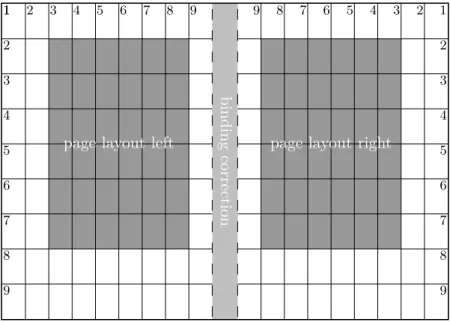
2.1. Double-sided layout with the box construction of the classical division factor
of 9, after subtraction of a binding correction. . . 27
3.1. Parameters that control the footnote layout. . . 83
3.3. Example: Usage of \captionaboveofinside another floating environment . . . . 121
3.2. Example: A rectangle . . . 121
3.4. Example: Figure beside description . . . 123
3.5. Example: Description centered beside figure . . . 124
3.6. Example: Figure title top beside . . . 125
3.7. Example: Default figure caption. . . 127
3.8. Example: Figure caption with slightly hanging indention . . . 127
3.9. Example: Figure caption with hanging indention and line break. . . 127
3.10. Example: Figure caption with hanging indention at the second line . . . 127
4.1. General structure of a letter document with several individual letters. . . 144
4.2. General structure of a single letter within a letter document. . . 145
4.3. Example: letter with addressee and opening . . . 148
4.4. Example: letter with addressee, opening, text, and closing . . . 149
4.5. Example: letter with addressee, opening, text, closing, and postscript . . . 150
4.6. Example: letter with addressee, opening, text, closing, postscript, and distribution list . . . 152
4.7. Example: letter with addressee, opening, text, closing, postscript, distribution list, and enclosure . . . 153
4.8. Example: letter with addressee, opening, text, closing, postscript, distribution list, enclosure, and insane large font size. . . 156
4.9. schematic display of the note paper with the most important commands and variables for the drafted elements . . . 159
4.10. Example: letter with addressee, opening, text, closing, postscript, distribution list, enclosure, and hole puncher mark . . . 161
4.11. Example: letter with sender, addressee, opening, text, closing, postscript, distribution list, and enclosure . . . 165
4.12. Example: letter with sender, separation rule, addressee, opening, text, closing, signature, postscript, distribution list, enclosure, and puncher hole mark . . . 166
4.13. Example: letter with extended sender, separation rule, addressee, opening, text, closing, signature, postscript, distribution list, enclosure, and puncher hole mark; standard vs. extended letterhead . . . 170
4.14. Example: letter with extended sender, separation rule, addressee, opening, text, closing, signature, postscript, distribution list, enclosure, and puncher
hole mark; left vs. right aligned letterhead. . . 171
4.15. Example: letter with extended sender, logo, separation rule, addressee, opening, text, closing, signature, postscript, distribution list, enclosure, and puncher hole mark; left vs. right aligned vs. centered sender. . . 173
4.16. Example: letter with extended sender, logo, addressee, additional sender information, opening, text, closing, signature, postscript, distribution list, enclosure, and puncher hole mark. . . 179
4.17. Example: letter with extended sender, logo, addressee, additional sender information, place, date, opening, text, closing, signature, postscript, distribution list, enclosure, and puncher hole mark . . . 183
4.18. Example: letter with extended sender, logo, addressee, additional sender information, place, date, subject, opening, text, closing, signature, postscript, distribution list, enclosure, and puncher hole mark . . . 186
4.19. Example: letter with extended sender, logo, addressee, additional sender information, place, date, subject, opening, text, closing, modified signature, postscript, distribution list, enclosure, and puncher hole mark . . . 195
4.20. Example: letter with extended sender, logo, addressee, additional sender information, place, date, subject, opening, text, closing, modified signature, postscript, distribution list, enclosure, and puncher hole mark using a lco-file . 198 5.1. Commands to define the page head . . . 211
5.2. Commands to define the page footer . . . 214
18.1. Elements of a three parts page style. . . 338
19.1. An example page to the example of chapter 19 . . . 353
List of Tables
2.1. Type area dimensions dependent onDIV for A4 . . . 32
2.2. Predefined settings of DIV for A4. . . 33
2.3. Symbolic values for theDIV option and the DIV argument to\typearea . . . 35
2.4. Symoblic BCOR arguments for \typearea. . . 37
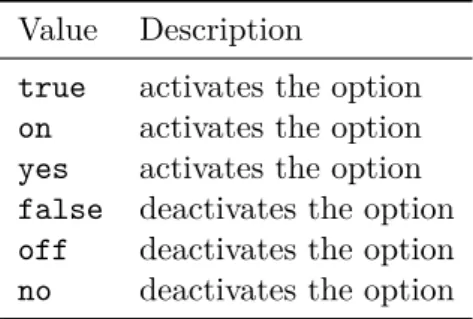
2.5. Standard values for simple switches in KOMA-Script . . . 38
2.6. Output driver for option pagesize=output driver . . . 47
3.1. Class correspondence. . . 50
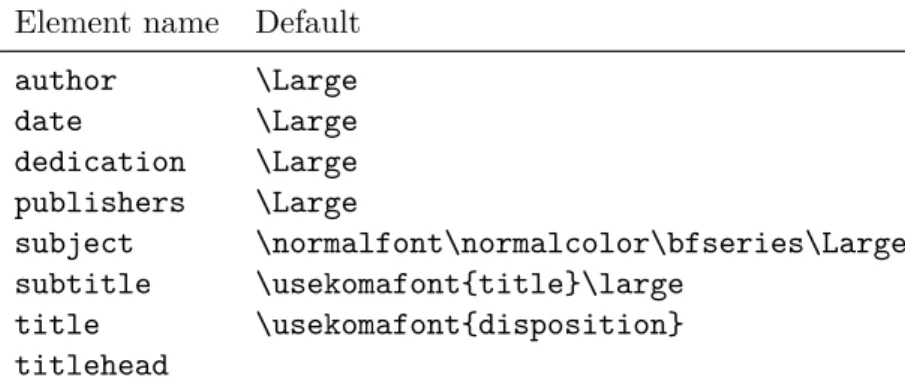
3.2. Elements whose type style can be changed with the KOMA-Script command \setkomafont or\addtokomafont. . . 55
3.3. Font defaults for the elements of the title. . . 63
3.4. Main title . . . 63
3.5. Possible values of option toc . . . 67
3.6. Font style defaults of the elements of the table of contents . . . 69
3.7. Possible values of option parskip. . . 71
3.8. Default values for the elements of a page style . . . 75
3.9. Macros to set up page style of special pages. . . 76
3.10. Available numbering styles of page numbers. . . 78
3.11. Available values for option footnotes . . . 81
3.12. Available values for option open . . . 86
3.13. Available values for option headings . . . 87
3.14. Available values of optionnumbers . . . 90
3.15. Default font sizes for different levels of document structuring . . . 93
3.16. Default settings for the elements of a dictum . . . 105
3.17. Available values for option captions . . . 117
3.18. Font defaults for the elements of figure or table captions. . . 120
3.19. Example: Measure of the rectangle in figure 3.2. . . 121
3.20. Available values for option listof . . . 130
3.21. Available values of optionbibliography . . . 134
3.22. Available values of optionindex. . . 136
4.1. Alphabetical list of all supported variables in scrlttr2. . . 137
4.2. Alphabetical list of elements whose font can be changed in scrlttr2using the commands\setkomafont and\addtokomafont. . . 155
4.3. Combinable values for the configuration of folding marks with option foldmarks. . . 160
4.4. Available values for option fromalign withscrlttr2 . . . 163
4.6. Predefined descriptions of the variables of the letterhead. . . 168
4.7. Predefined description and content of the separators at the letterhead without option symbolicnames. . . 168
4.8. available values for option addrfield using scrlttr2. . . 175
4.9. Predefined font style for the elements of the address field.. . . 176
4.10. available values for option priorityinscrlttr2 . . . 176
4.11. Possible values of option locfieldwithscrlttr2. . . 177
4.12. Possible value of option reflinewithscrlttr2 . . . 180
4.13. predefined descriptions of variables of the reference line. . . 181
4.14. font style default of elements of the reference line . . . 182
4.15. predefined descriptions of subject-related variables . . . 183
4.16. available values of option subjectwithscrlttr2 . . . 184
4.17. available values of option pagenumberwithscrlttr2 . . . 190
4.18. predefined lco-files . . . 199
5.1. Elements ofscrlayer-scrpage whose type style can be changed with KOMA-Script command\setkomafont or\addtokomafont . . . 208
5.2. Possible values for optionmarkcase . . . 223
5.3. Symbolic values for options headwidthand footwidth . . . 228
10.1. optional available extended features of scrextend . . . 242
12.1. Overview of usual language dependent terms . . . 265
15.1. Options for command \DeclareNewTOC . . . 299
15.2. Comparison of example environment remarkbox and environmentfigure . . . . 302
17.1. Options for the definition of page layers with description of the corresponding layer attribute . . . 310
17.2. The hook options for page styles (in order of execution) . . . 321
18.1. The layers scrlayer-scrpagedefines to a page style. . . 340
19.1. Options for the declaration of note columns. . . 346
21.1. Style-independent attributes at the declaration of section-like commands . . . 363
21.2. Attributes of the stylesection declaring a section-like command. . . 364
21.3. Attributes of the stylechapter declaring a section-like command. . . 365
21.4. Attributes of the stylepart declaring a section-like command. . . 366
21.5. Defaults of the chapter headings ofscrbook and scrreprt subject to option headings. . . 367
21.6. Default of the headings ofscrbook and scrreprt. . . 367
22.1. Pseudo-lengths provided by class scrlttr2 . . . 380
22.2. Language-dependent forms of the date. . . 402
22.3. Default settings for language-dependent terms . . . 403
A.1. ISO and JIS standard paper sizes. . . 406
A.2. Japanese B-series variants. . . 406
A.3. Main Japanese contemporary stationary . . . 407
A.4. Japanese ISO envelope sizes . . . 408
A.5. Japanese envelope sizes 3 . . . 409
A.6. Supported Japanese envelope types and the window sizes and locations . . . 411
Introduction
This chapter includes important information about the structure of the manual and the history of KOMA-Script, which begins years before the first version. You will also find information for those who have not installed KOMA-Script or encounter errors.
1.1. Preface
KOMA-Scriptis very complex. This is evidenced by the fact that it consists of not only a single class or a single package, but a bundle of many classes and packages. Although the classes are designed as a counterpart to the standard classes, that does not necessarily mean that they only have the commands, environments, and setting of the standard classes or imitate their appearance. The capabilities of KOMA-Scriptsurpass the capabilities of the standard classes considerably. Some of them are to be regarded as a supplement to the basic skills of the LATEX
kernel.
The foregoing means that the documentation of KOMA-Script has to be extensive. In addition, KOMA-Script usually is not taught. That means there is no teacher who knows his students and can therefore choose the teaching and learning materials and adapt them accordingly. It would be easy to write the documentation for any specific audience. The difficulty is, however, that the guide must service all potential audiences. We, the authors, have tried to create a guide that is suited for the computer scientist as well as the secretary or the fishmonger. We have tried, although this is actually an impossible task. The result consists of several compromises and we hope that you will keep this in mind when using it. Your suggestions for improvement are, of course, always welcome.
Despite the volume of the manual, it is recommended to consult the documentation. Atten-tion is drawn to the multi-part index at the end of this document. In addiAtten-tion to this guide, documentation includes all the text documents that are part of the bundle. Seemanifest.tex for a list of all of them.
1.2. Structure of the Guide
This manual consists of several parts. There’s a part for average users, another part for advanced users and experts, and an appendix with additional examples and information for those who always want to know more.
Part I is recommended for all KOMA-Script users. This means that you may find here even some information for newcomers to LATEX. In particular, this part is enhanced by many
examples to the average user that are intended to illustrate the explanations. Do not be afraid to try these examples yourself and in modifying them to find out how KOMA-Script works. Nevertheless theKOMA-Script user guide is not intended to be a LATEX primer. Those new
to LATEX should look at The Not So Short Introduction to LATEX 2ε [OPHS11] or LATEX 2ε for Authors [Tea05b] or a LATEX reference book. You will also find useful information in
the many LATEX FAQs, including the TEX Frequently Asked Questions on the Web [FAQ13].
Although the length of theTEX Frequently Asked Questions on the Web is considerably long,
it is nevertheless quite useful not only to those having problems using LATEX orKOMA-Script.
Part IIis recommended for advancedKOMA-Scriptusers. These are all of you who already know LATEX, maybe worked with KOMA-Script for a while, and want to learn more about KOMA-Script internals, interaction of KOMA-Script with other packages, and how to use
KOMA-Script as an answer to special demands. For this purpose we will have a closer look at some aspects frompart Iagain. In addition some instructions that have been implemented for advanced users and experts, especially, will be documented. This is complemented by the documentation of packages that are normally hidden to the user insofar as they do their work under the surface of the classes and user packages. These packages are specifically designed to be used by other authors of classes and packages.
The appendix, which may be found only in the German book version, contains information which is beyond what is covered inpart Iandpart II. Advanced users may find background in-formation on issues of typography to give them a basis for their own decisions. In addition, the appendix provides examples for aspiring authors of packages. These examples are less intended to be simply transferred. Rather, they convey knowledge of planning and implementation of projects as well as some basic LATEX instructions for authors of packages.
If you are only interested in using a singleKOMA-Scriptclass or package you can probably successfully avoid reading the entire guide. Each class and package typically has its own chapter; however, the three main classes (scrbook,scrrprt, andscrartcl) are introduced together inchapter 3. Where an example or note only applies to one or two of the three classes, e. g.,
scrartcl, it is called out in the margin, as shown here withscrartcl.
scrartcl
The primary documentation for KOMA-Script is in German and has been translated for your convenience; like most of the LATEX world, its commands, environments, options, etc., are in English. In a few cases, the name of a command may sound a little strange, but even so, we hope and believe that with the help of this guide, KOMA-Script will be usable and useful to you.
1.3. History of KOMA-Script
In the early 1990s, Frank Neukam needed a method to publish an instructor’s lecture notes. At that time LATEX was LATEX2.09 and there was no distinction between classes and packages —
there were only styles. Frank felt that the standard document styles were not good enough
for his work; he wanted additional commands and environments. At the same time he was interested in typography and, after reading Tschichold’sAusgewählte Aufsätze über Fragen der Gestalt des Buches und der Typographie(Selected Articles on the Problems of Book Design and
Typography) [Tsc87], he decided to write his own document style — and not just a one-time solution to his lecture notes, but an entire style family, one specifically designed for European
and German typography. ThusScriptwas born.
Markus Kohm, the developer of KOMA-Script, came across Script in December 1992 and added an option to use the A5 paper format. At that time neither the standard style nor
Script provided support for A5 paper. Therefore it did not take long until Markus made the first changes to Script. This and other changes were then incorporated intoScript-2, released by Frank in December 1993.
Beginning in mid-1994, LATEX2εbecame available and brought with it many changes. Users
of Script-2 were faced with either limiting their usage to LATEX2ε’s compatibility mode or
giving upScriptaltogether. This situation led Markus to put together a new LATEX2εpackage,
released on 7 July 1994 asKOMA-Script; a few months later Frank declaredKOMA-Scriptto be the official successor to Script. KOMA-Script originally provided no letter class, but this
deficiency was soon remedied by Axel Kielhorn, and the result became part of KOMA-Script
in December 1994. Axel also wrote the first true German-language user guide, which was followed by an English-language guide by Werner Lemberg.
Since then much time has passed. LATEX has changed in only minor ways, but the LATEX
landscape has changed a great deal; many new packages and classes are now available and
KOMA-Script itself has grown far beyond what it was in 1994. The initial goal was to pro-vide good LATEX classes for German-language authors, but today its primary purpose is to
provide more-flexible alternatives to the standard classes. KOMA-Script’s success has led to e-mail from users all over the world, and this has led to many new macros — all needing documentation; hence this “small guide.”
1.4. Special Thanks
Acknowledgements in the introduction? No, the proper acknowledgements can be found in the addendum. My comments here are not intended for the authors of this guide — and those thanks should rightly come from you, the reader, anyhow. I, the author of KOMA-Script, would like to extend my personal thanks to Frank Neukam. Without hisScriptfamily,
KOMA-Script would not have come about. I am indebted to the many persons who have contributed to KOMA-Script, but with their indulgence, I would like to specifically mention Jens-Uwe Morawski and Torsten Krüger. The English translation of the guide is, among many other things, due to Jens’s untiring commitment. Torsten was the best beta-tester I ever had. His work has particularly enhanced the usability ofscrlttr2and scrpage2. Many thanks to all who encouraged me to go on, to make things better and less error-prone, or to implement additional features.
Thanks go as well to DANTE, Deutschsprachige Anwendervereinigung TEX e.V, (the German-Language TEX User Group). Without the DANTE server, KOMA-Script could not have been released and distributed. Thanks as well to everybody in the TEX newsgroups and mailing lists who answer questions and have helped me to provide support forKOMA-Script.
1.5. Legal Notes
KOMA-Scriptwas released under the LATEX Project Public License. You will find it in the file
lppl.txt. An unofficial German-language translation is also available in lppl-de.txtand is valid for all German-speaking countries.
This document and the KOMA-Scriptbundle are provided “as is” and without warranty of any kind.
1.6. Installation
The three most important TEX distributions, MacTEX, MiKTEX, and TEX Live, make KOMA-Script available by their package management software. It is recommended to make installa-tions and updates of KOMA-Script using these tools. Nevertheless the manual installation without using the package managers has been described in the file INSTALL.txt, that is part of every legalKOMA-Scriptbundle. You should also read the documentation that comes with the TEX distribution you are using.
1.7. Bug Reports and Other Requests
If you think you have found an error in the documentation or a bug in one of theKOMA-Script
classes, one of the KOMA-Script packages, or another part of KOMA-Script, please do the following: first have a look on CTAN to see if a newer version of KOMA-Scriptis available; if a newer version is available, install the applicable section and try again.
If you are using the most recent version of KOMA-Scriptand still have a bug, please provide a short LATEX document that demonstrates the problem. You should only use the packages
and definitions needed to demonstrate the problem; do not use any unusual packages.
By preparing such an example it often becomes clear whether the problem is truly a KOMA-Script bug or something else. To find out the version numbers of all packages in use, simply put\listfilesin the preamble of your example and read the end of the log-file.
Please report KOMA-Script (only) bugs to [email protected]. If you want to ask your question in a Usenet group, mailing list, or Internet forum, you should also include such an example as part of your question.
1.8. Additional Information
Once you become an experienced KOMA-Script user you may want to look at some more advanced examples and information. These you will find on theKOMA-Scriptdocumentation web site [KDP]. The main language of the site is German, but nevertheless English is welcome.
KOMA-Script for Authors
In this part you may find information for authors of articles, reports, books, and letters. It is assumed that the average user is less interested in the implementation of KOMA-Scriptor in the problems of implementingKOMA-Script. Also, the average user isn’t interested in obsolete options and instructions. He wants to know how he can achieve things using current options and instructions. Some users may be interested in typographic background information.
In this part, the few passages that contain additional information and justification, and therefore are of less interest for the impatient reader, have been set in sans serif font and can be skipped if necessary. For those who are interested in more information about implementation, side effects with other packages, and obsolete options and instructions, please refer topart II onpage 247. Furthermore, that part of theKOMA-Scriptguide describes all the features that were created specially for writers of packages and classes.
Construction of the Page Layout with
typearea
Many LATEX classes, including the standard classes, present the user with the largely fixed
configuration of margins and typearea. With the standard classes, the configuration deter-mined is very much dependent on the chosen font size. There are separate packages, such as
geometry (see [Ume10]), which give the user complete control, but also full responsibility, of the settings of typearea and margins.
KOMA-Script takes a somewhat different approach with its typearea package. Here the user is given several construction setting and automatization possibilities based on established typography standards in order to help guide him or her in making a good choice.
It should be noted that the typearea package makes use of thescrbase package. The latter is explained in the expert section of this document inchapter 12frompage 247 onwards. The majority of the rules documented there are however not directed at the user, but rather at authors of classes and packages.
2.1. Fundamentals of Page Layout
If you look at a single page of a book or other printed materials, you will see that it consists of top, bottom, left, and right margins, a (running) head area, the text block, and a (running) foot area. There is also a space between the head area and the text block, and between the text block and the foot area. The relations between these areas are called the page layout.
The literature contains much discussion of different algorithms and heuristic approaches for constructing a good page layout [Koh02]. Often mentioned is an approach which involves diagonals and their intersections. The result is a page where the text block proportions are related to the proportions of the page. In a single-sided document, the left and the right margin should have equal widths. The relation of the upper margin to the lower margin should be 1:2. In a double-sided document (e. g. a book) however, the complete inner margin (the margin at the spine) should be the same as each of the two outer margins; in other words, a single page contributes only half of the inner margin.
In the previous paragraph, we mentioned and emphasized the page. Erroneously, it is often thought that with the page format the page is the same as the paper format. However, if you look at a bound document, it is obvious that part of the paper vanishes in the binding and is no longer part of the visible page. For the page layout, it is not the format of the paper which is important, it is the impression of the visible page to the reader. Therefore, it is clear that the calculation of the page layout must account for the “lost” paper in the binding and add this amount to the width of the inner margin. This is called thebinding correction. The binding correction is therefore calculated as part of thegutter, not the visible inner margin.
The binding correction depends on the process of actually producing the document and thus cannot be calculated in general. Every production process needs its own parameter. In professional
binding, this parameter is not too important since the printing is done on oversized paper which is then cropped to the right size. The cropping is done in a way so that the relations for the visible double-sided page are as explained above.
Now we know about the relations of the individual parts of a page. However, we do not yet know about the width and the height of the text block. Once we know one of these values, we can calculate all the other values from the paper format and the page format or the binding correction.
textblock height:textblock width=page height:page width top margin:foot margin=1:2
left margin:right margin=1:1 half inner margin:outer margin=1:2
page width=paper width−binding correction top margin+bottom margin=page height−textblock height
left margin+right margin=page width−textblock width half inner margin+outer margin=page width−textblock width half inner margin+binding correction=gutter
The values left margin and right margin only exist in a single-sided document while half inner margin and outer margin only exist in a double-sided document. In these equations, we work with half inner margin since the full inner margin belongs to a double-page. Thus, one page has only half of the inner margin, half inner margin.
The question of the width of the textblock is also discussed in the literature. The optimum width depends on several factors:
• size, width, type of the font used • line spacing
• word length • available room
The importance of the font becomes clear once you think about the meaning of serifs. Serifs are fine strokes finishing off the lines of the letters. Letters whose main strokes run orthogonal to the text line disturb the flow rather than keeping and leading the eye along the line. Those letters then have serifs at the ends of the vertical strokes so that the horizontal serifs can help lead the eye horizontally. In addition, they help the eye to find the beginning of the next line more quickly. Thus, the line length for a serif font can be slightly longer than for a sans serif font.
With leading is meant the vertical distance between individual lines of text. In LATEX, the leading is set at about 20% of the font size. With commands like\linespreador, better, packages like setspace (see [TF11]), the leading can be changed. A wider leading helps the eye to follow the
line. A very wide leading, on the other hand, disturbs reading because the eye has to move a wide distance between lines. Also, the reader becomes uncomfortable because of the visible stripe effect. The uniform gray value of the page is thereby spoiled. Still, with a wider leading, the lines can be longer.
The literature gives different values for good line lengths, depending on the author. To some extent, this is related to the native language of the author. Since the eye jumps from word to word, short words make this task easier. Considering all languages and fonts, a line length of 60 to 70 characters, including spaces and punctuation, forms a usable compromise. This requires well-chosen leading, but LATEX’s default is usually good enough. Longer line lengths should only be considered for highly-developed readers who spend several hours daily reading. However, even for such readers, line lengths greater than 80 characters are unsuitable. In any case, the leading must be appropriately chosen. An extra 5% to 10% is recommended as a good rule of thumb. With fonts such as Palatino, which require some 5% more leading even at normal line lengths, even more can be required.
Before looking at the actual construction of the page layout, there are just some minor things left to know. LATEX does not start the first line in the text block of a page at the upper edge of the text block, but sets the baseline at a defined distance from the top of the text block. Also, LATEX knows the commands \raggedbottom and \flushbottom. \raggedbottom specifies that the
last line of a page should be positioned wherever it was calculated. This means that the position of this line can be different on each page, up to the height of one line — in combination of the end of the page with titles, figures, tables or similar, even more. In double-sided documents this is usually undesirable. \flushbottom makes sure that the last line is always at the lower edge of
the text block. To achieve this, LATEX sometimes needs to stretch vertical glue more than allowed. Paragraph skip is such a stretchable, vertical glue, even when set to zero. In order to not stretch the paragraph skip on normal pages where it is the only stretchable glue, the height of the text block should be set to a multiple of the height of the text line, including the distance from the upper edge of the text block to the first line.
This concludes the introduction to page layout as handled by KOMA-Script. Now, we can begin with the actual construction.
2.2. Page Layout Construction by Dividing
The easiest way to make sure that the text area has the same ratios as the page is as follows: • First, subtract the part BCOR, required for the binding correction, from the inner edge of
the paper, and divide the rest of the page vertically intoDIVrows of equal height. • Next, divide the page horizontally into the same number (DIV) of columns.
• Then, take the uppermost row as the upper margin and the two lowermost rows as the lower margin. If you are printing double-sided, you similarly take the innermost column as the inner margin and the two outermost columns as the outer margin.
binding
correction
page layout left page layout right
9 8 7 6 5 4 3 2 1 2 3 4 5 6 7 8 9 1 9 8 7 6 5 4 3 2 1 9 8 7 6 5 4 3 2
Figure 2.1.: Double-sided layout with the box construction of the classical division factor of 9, after subtraction of a binding correction
• Then add the binding correction BCORto the inner margin.
What now remains of the page is the text area. The width and the height of the text area and margins result automatically from the number of rows and columnsDIV. Since the margins always need three stripes,DIV must be necessarily greater than three. In order that the text area occupy at least twice as much space as the margins,DIV should really be equal to or greater than 9. With this value, the construction is also known as theclassical division factor of 9 (see figure 2.1).
In KOMA-Script, this kind of construction is implemented in the typearea package, where the bottom margin may drop any fractions of a line in order to conform with the minor condition for the text area height mentioned in the previous paragraph, and thereby to minimize the mentioned problem with \flushbottom. For A4 paper, DIV is predefined according to the font size (see
table 2.2, page 33). If there is no binding correction (BCOR = 0 pt), the results roughly match the values oftable 2.1,page 32.
In addition to the predefined values, one can specifyBCORandDIVas options when loading the package (seesection 2.4, frompage 30 onwards). There is also a command to explicitly calculate the type area by providing these values as parameters (also seesection 2.4,page 36).
The typearea package can automatically determine the optimal value of DIV for the font and leading used. Again, seesection 2.4,page 33.
2.3. Page Layout Construction by Drawing a Circle
In addition to the page layout construction method previously described, a somewhat more classical method can be found in the literature. The aim of this method is not only to obtain identical ratios in the page proportions, but it is considered optimal when the height of the text block is the same as the width of the page. The exact method is described in [Tsc87].
A disadvantage of this late Middle Age method is that the width of the text area is no longer dependent on the font. Thus, one does not choose the text area to match the font, but the author or typesetter has to choose the font according to the text area. This can be considered a “must”. In the typearea package this construction is changed slightly. By using a special (normally meaningless) DIV value or a special package option, a DIV value is chosen to match the perfect values of the late Middle Age method as closely as possible. See alsosection 2.4,page 33.
2.4. Early or late Selection of Options
In this section a peculiarity of KOMA-Script is presented, which, apart from the typearea
package, is also relevant to otherKOMA-Scriptpackages and classes. Such that the user can find all information corresponding to a single package or a single class in the relevant chapter, this section is found almost identically in several chapters. Users who are not only interested in a particular package or class, but wish to gain an overview of KOMA-Script as a whole, may read the section in one chapter and may thereafter skip it wherever coming across it in the document.
\documentclass[option list]{KOMA - Script class} \usepackage[option list]{package list}
In LATEX, provision is made for the user to pass class options as a comma-separated list of
keywords as optional arguments to \documentclass. Apart from being passed to the class, these options are also passed on to all packages which can understand the options. Provision is also made for the user to pass optional arguments as a comma-separated list of keywords as optional arguments to\usepackage. KOMA-Scriptexpands
v3.00 the option mechanism for the
KOMA-Script classes and various packages to use further possibilities. Thus, most KOMA-Script options can also take a value. An option may have not only the form Option, but may also have the form option=value. Apart from this difference \documentclass and \usepackagefunction the same inKOMA-Scriptas described in [Tea05b] or any introduction to LATEX, for example [OPHS11].
When using a KOMA-Script class, no options should be passed on unnecessary, explicit loading of thetypearea orscrbasepackages. The reason for this is that the class already loads these packages without options and LATEX refuses multiple loadings of a package with different
option settings.
You should note, that in opposite to the interface described below the options interface of \documentclass and \usepackage is not robust. So commands, lengths, counters and such
constructs may break inside the optional argument of these commands. Because of this, the usage of a LATEX length inside the value of an option would cause an error beforeKOMA-Script
can get the control over the option execution. So, if you want to use a LATEX length, counter
or command a part of the value of an option, you have to use\KOMAoptionsor\KOMAoption. These commands will be described next.
\KOMAoptions{option list} \KOMAoption{option}{value list}
KOMA-Script
v3.00 offers most class and package options the opportunity to change the value of
options even after loading of the class or package. One may then change the values of a list of options at will with the \KOMAoptions command. Each option in the option list has the form option=value.
Some options also have a default value. If one does not give a value, i. e., gives the option simply in the formoption, then the default value will be used.
Some options can assume several values simultaneously. For such options there exists the possibility, with the help of \KOMAoption, to pass a single option a list of values. The individual values are given as a comma-separatedvalue list.
If in the option list one sets an option to a disallowed value, or the value list contains
an invalid value, then an error is produced. If LATEX is run in an interactive mode, then it stops at this point. Entering “h” displays a help screen, in which also the valid values for the corresponding
option are given.
If a value includes an equal sign or a comma, then the value must be enclosed in curly
brackets.
To implement this possibility KOMA-Script uses the commands \FamilyOptions and \FamilyOption with the family “KOMA”. More information on these commands is found in sec-tion 12.2,page 252.
2.5. Compatibility with Earlier Versions of KOMA-Script
Those who achieve their documents in source code set utmost value to the fact that future LATEX runs will yield exactly the same result. Nevertheless, in some cases improvement and bug
corrections of packages will result in changes of the behaviour and make-up. But sometimes this is not wanted.
version=value
version=first version=last
Since
v2.96av2.9t
v3.01b version 2.96a of KOMA-Script, for scrlttr2 since version 2.9t, and for typearea since
version 3.01b, it’s your choice if your source code should result in the same make-up at fu-ture LATEX runs or if you like to participate in all improvements of new releases. You may
select the compatible version of KOMA-Script with option version. Compatibility to the lowest supported KOMA-Scriptrelease may be achieved by version=firstorversion=2.9 or version=2.9t. Setting value to an unknown release number will result in a warning message and selects version=firstfor safety.
Withversion=lastthe most recent version will be selected at every LATEX run. Be warned,
though, that using version=last poses possibilities of compatibility issues for future LATEX
runs. Optionversion without any value means the same.
v3.01a This is the default behaviour as
long as you do not use any deprecated options.
If you use a deprecated option of KOMA-Script 2, KOMA-Script 3 will switch to version=firstautomatically. This will also result in a warning message that explains how to prevent this switching. Alternatively you may select another adjustment using optionversion with the wanted compatibility after the deprecated option.
Compatibility is primarily make-up compatibility. New features not related to the mark-up will be available even if you switch compatibility to a version before first implementation of the feature. Option version does not influence make-up changes that are motivated by bug fixes. If you need bug compatibility you should physically save the usedKOMA-Scriptversion together with your document.
Please note that you cannot change option version anymore after loading the package
typearea. Therefore, the usage of option version within the argument of \KOMAoptions or \KOMAoptionis not recommended and will cause an error.
2.6. Options and Macros to Influence the Page Layout
The package typearea offers two different user interfaces to influence type area construction. The more important method is to load the package with options. For information on how to load packages and to give package options, please refer to the LATEX literature, e. g. [OPHS11]
and [Tea05b], or the examples given here. Since the typeareapackage is loaded automatically when using theKOMA-Scriptmain classes, the package options can be given as class options (see section 3.1).
In this section the protocol class will be used, not an existing KOMA-Script class but a hypothetical one. This documentation assumes that ideally there exists a class for every specific task.
BCOR=correction
With the aid of the optionBCOR=correction
v3.00 one may specify the absolute value of the binding
correction, i. e., the width of the area which will be lost from the paper width in the binding process. This value is then automatically taken into account in the page layout construction and in the final output is added to the inner (or the left) margin. For the correction specification any measurement unit understood by TEX is valid.
Example: Assume one is creating a financial report, which should be printed out single-sided on A4 paper, and finally kept in a clamp folder. The clamp will hide 7.5 mm. The stack of pages is very thin, thus through paging at most another 0.75 mm will be lost. Therefore, one may write:
\documentclass[a4paper]{report} \usepackage[BCOR=8.25mm]{typearea}
or
\documentclass[a4paper,BCOR=8.25mm]{report} \usepackage{typearea}
when using BCORas a global option.
When using aKOMA-Scriptclass, the explicit loading of thetypeareapackage can be omitted:
\documentclass[BCOR=8.25mm]{scrreprt}
The optiona4papercould be omitted withscrreprt, since this is a predefined setting for all KOMA-Scriptclasses.
If the option is only later set to a new value, one may then use, for example, the following:
\documentclass{scrreprt} \KOMAoptions{BCOR=8.25mm}
Thus, at the loading of the scrreprt class standard settings will be used. When changing the setting with the use of the command\KOMAoptionsor\KOMAoption a new page layout with new margins will automatically be calculated.
Please note that when using this option with one of the KOMA-Script classes as in the example above, it must be used either as a class option, or passed via \KOMAoptions or \KOMAoptionafter loading the class. Thetypearea package should neither be loaded explicitly with \usepackage when using a KOMA-Script class, nor should the option be given as an optional argument thereto. If the option is changed via \KOMAoptionsor \KOMAoptionafter loading the package, the textblock and margins are automatically recalculated anew.
DIV=Factor
With the aid of the optionDIV=Factor
v3.00 the number of stripes into which the page is divided
horizontally and vertically during the page layout construction is set. The exact construction method is found insection 2.2. Of importance is that the larger the Factor, the larger the text block and the smaller the margins. Any integer value greater than 4 is valid forFactor. Please note that large values can lead to unfulfillment of various minor conditions in the type area, depending on further options chosen. Thus, in an extreme case, the header may fall
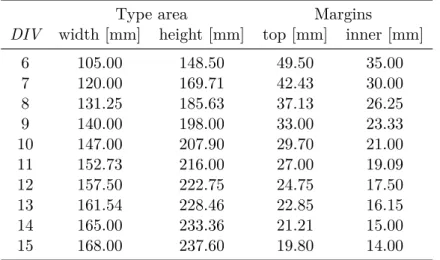
Table 2.1.: Type area dimensions dependent on DIVfor A4 regardless of\topskip
Type area Margins
DIV width [mm] height [mm] top [mm] inner [mm]
6 105.00 148.50 49.50 35.00 7 120.00 169.71 42.43 30.00 8 131.25 185.63 37.13 26.25 9 140.00 198.00 33.00 23.33 10 147.00 207.90 29.70 21.00 11 152.73 216.00 27.00 19.09 12 157.50 222.75 24.75 17.50 13 161.54 228.46 22.85 16.15 14 165.00 233.36 21.21 15.00 15 168.00 237.60 19.80 14.00
outside of the page. Users applying the option DIV=Factor are themselves responsible for fulfillment of the marginal conditions and setting of a typographically aesthetic line length.
In table 2.1 are found the type area sizes for several DIV factors for an A4 page without
binding correction. Here the minor conditions dependent on font size are not considered.
Example: Assume one wants to write a meeting protocol, using the protocol class. The document should be double-sided. In the company 12 pt Bookman font is used. This font, which belongs to the standard PostScript fonts, is activated in LATEX
with the command \usepackage{bookman}. The Bookman font is a very wide font, meaning that the individual characters have a large width relative to their height. Therefore, the predefined value for DIVintypearea is insufficient. Instead
of the value of 12 it appears after thorough study of this entire chapter that a value of 15 should be most suitable. The protocol will not be bound but punched and kept in a folder. Thus, no binding correction is necessary. One may then write:
\documentclass[a4paper,twoside]{protocol} \usepackage{bookman}
\usepackage[DIV=15]{typearea}
On completion, it is decided that the protocols will from now on be collected and bound quarterly into book format. The binding is to be a simple glue binding, because it is only done to conform with ISO 9000 and nobody is actually going to read them. For the binding including space lost in turning the pages, an average of 12 mm is required. Thus, one may change the options of the typearea package accordingly, and use the class for protocols conforming to ISO 9000 regulations:
Table 2.2.: Predefined settings of DIV for A4
base font size: 10 pt 11 pt 12 pt
DIV: 8 10 12
\usepackage{bookman}
\usepackage[DIV=15,BCOR=12mm]{typearea}
Of course, it is equally possible to use here aKOMA-Script class:
\documentclass[twoside,DIV=15,BCOR=12mm]{scrartcl} \usepackage{bookman}
Thea4paperoption can be left out when using thescrartclclass, as it is predefined in all KOMA-Scriptclasses.
Please note that when using the DIV option with one of the KOMA-Script classes as in the example above, it must be used either as a class option, or passed via \KOMAoptions or \KOMAoptionafter loading the class. Thetypearea package should neither be loaded explicitly with \usepackage when using a KOMA-Script class, nor should the option be given as an optional argument thereto. If the option is changed via \KOMAoptionsor \KOMAoptionafter loading the package, the textblock and margins are automatically recalculated anew.
DIV=calc DIV=classic
As
v3.00 already mentioned in section 2.2, for A4 paper there are fixed predefined settings for the DIV value. These can be found in table 2.2. If a different paper format is chosen, then the typearea package independently calculates an appropriate DIV value. Of course this same
calculation can be applied also to A4. To obtain this result, one simply uses the DIV=calc option in place of the DIV=Factor option. This option can just as easily be explicity given for other paper formats. If one desires an automatic calculation, this also makes good sense, since the possibility exists to configure different predefined settings in a configuration file (see section 20.2). An explicit passing of theDIV=calc option then overwrites such configuration settings.
The classical page layout construction, the Middle Age book design canon, mentioned in section 2.3, is similarly selectable. Instead of the DIV=Faktor orDIV=calc option, one may use the DIV=classic option. A DIV value closest to the Middle Age book design canon is
then chosen.
Example: In the example using the Bookman font with the DIV=Factor option, exactly that problem of choosing a more appropriate DIV value for the font arose. As a
variation on that example, one could simply leave the choice of such a value to the
\documentclass[a4paper,twoside]{protocol} \usepackage{bookman}
\usepackage[DIV=calc]{typearea}
Please note that when using this option with one of the KOMA-Script classes as in the example above, it must be used either as a class option, or passed via \KOMAoptions or \KOMAoptionafter loading the class. Thetypearea package should neither be loaded explicitly with \usepackage when using a KOMA-Script class, nor should the option be given as an optional argument thereto. If the option is changed via \KOMAoptionsor \KOMAoptionafter loading the package, the textblock and margins are automatically recalculated anew.
DIV=current DIV=last
Readers
v3.00 who have followed the examples with acuity actually already know how to calculate
a DIVvalue dependent on the chosen font, when a KOMA-Script class is used together with
a font package.
The problem is that the KOMA-Script class already loads thetypearea package itself. Thus, it is not possible to pass options as optional arguments to\usepackage. It would also be pointless
to pass theDIV=calcoption as an optional argument to\documentclass. This option would be
evaluated immediately on loading thetypeareapackage and as a result the text block and margin would be chosen according to the LATEX standard font and not for the later loaded font. However, it is quite possible to recalculate the text block and margins anew after loading the font, with the aid of \KOMAoptions{DIV=calc} or \KOMAoption{DIV}{calc}. Via calc an appropriate DIV value for a good line length is then chosen.
As it is often more practical to set the DIV option not after loading the font, but at a more
visible point, such as when loading the class, the typearea package offers two further symbolic values for this option.
With DIV=current
v3.00 a renewed calculation of text block and margin is requested, in which
the currently setDIV will be used. This is less of interest for renewed type area calculations
after loading a different font; it is rather more useful for determining, for example, after changing the leading, while keepingDIVthe same, that the marginal condition is fulfilled that \textheightless\topskipis a multiple of \baselineskip.
WithDIV=last
v3.00 a renewed calculation of text block and margin is requested, where exactly
the same setting is used as in the last calculation.
Example: Let us take up the previous example again, in which a good line length is required for a type area using the Bookman font. At the same time, aKOMA-Scriptclass is to be used. This is easily possible using the symbolic valuelastand the command \KOMAoptions:
Table 2.3.: Possible symbolic values for theDIVoption or theDIV argument to\typearea[BCOR]{DIV}
areaset
Recalculate page layout. calc
Recalculate type area including choice of appropriateDIV value. classic
Recalculate type area using Middle Age book design canon (circle-based calculation). current
Recalculate type area using current DIVvalue. default
Recalculate type area using the standard value for the current page format and current font size. If no standard value exists,calc is used.
last
Recalculate type area using the same DIV argument as was used in the last call.
\usepackage{bookman} \KOMAoptions{DIV=last}
If it should later be decided that a different DIVvalue is required, then only the
setting of the optional argument to\documentclass need be changed.
A summary of all possible symbolic values for the DIV option can be found in table 2.3. At this point it is noted that the use of the fontencpackage can also lead to LATEX loading a
different font.
Often the renewed type area calculation is required in combination with a change in the line spacing (leading). Since the type area should be calculated such that an integer number
of lines fit in the text block, a change in the leading normally requires a recalculation of the page layout.
Example: For a thesis document, a font of size 10 pt and a spacing of 1.5 lines is required. By default, LATEX sets the leading for 10 pt at 2 pt, in other words 1.2 lines. Therefore,
an additional stretch factor of 1.25 is needed. Additionally, a binding correction of 12 mm is stipulated. Then the solution could be written as follows:
\documentclass[10pt,twoside,BCOR=12mm,DIV=calc]{scrreprt} \linespread{1.25}
Since typearea always executes the command \normalsize itself upon calcula-tion of a new type area, it is not necessary to activate the chosen leading with \selectfontafter \linespread, since this will be used already in the recalcula-tion.
When using thesetspacepackage (see [TF11]), the same example would appear as follows:
\documentclass[10pt,twoside,BCOR=12mm,DIV=calc]{scrreprt} \usepackage{setspace}
\onehalfspacing
\KOMAoptions{DIV=last}
As can be seen, with the use of thesetspacepackage one no longer neesds to know the correct stretch value.
At this point it should be noted that the line spacing for the title page should be reset to the normal value.
\documentclass[10pt,twoside,BCOR=12mm,DIV=calc] {scrreprt} \usepackage{setspace} \onehalfspacing \AfterTOCHead{\singlespacing} \KOMAoptions{DIV=last} \begin{document} \title{Title}
\author{Markus Kohm} \begin{spacing}{1} \maketitle \end{spacing} \tableofcontents \chapter{Ok} \end{document}
See further also the notes in section 2.8. The command \AfterTOCHead will be described in chapter 15of part IIon page 291.
Please note that when using this option with one of the KOMA-Script classes as in the example above, it must be used either as a class option, or passed via \KOMAoptions or \KOMAoptionafter loading the class. Thetypearea package should neither be loaded explicitly with \usepackage when using a KOMA-Script class, nor should the option be given as an optional argument thereto. If the option is changed via \KOMAoptionsor \KOMAoptionafter loading the package, the textblock and margins are automatically recalculated anew.
Table 2.4.: Possible symbolicBCOR arguments for\typearea[BCOR]{DIV}
current
Recalculate type area with the currently valid BCORvalue.
\typearea[BCOR]{DIV} \recalctypearea
If theDIVoption or the BCOR option is set after loading of thetypearea package, then internally
the command \typearea is called. When setting the DIV option the symbolic value current
is used internally for BCOR, which for reasons of completeness is found also in table 2.4. When
setting theBCOR option, the symbolic valuelastis used internally forDIV. If it is instead desired
that the text block and margins should be recalculated using the symbolic valuecurrentfor DIV,
then\typearea[current]{current} can be used directly.
If both BCOR and DIV need changing, then it is recommended to use \typearea, since then the text block and margins are recalculated only once. With \KOMAoptions{DIV=DIV,BCOR=BCOR} the text block and margins are recalculated once for the change toDIV and again for the change to BCOR.
The command \typearea is currently defined so as to make it possible to change the type
area anywhere within a document. Several assumptions about the structure of the LATEX kernel are however made and internal definitions and sizes of the kernel changed. There is a definite possibility, but no guarantee, that this will continue to function in future versions of LATEX2ε. When used within the document, a page break will result.
Since\typearea[current]{last}or\KOMAoptions{DIV=last}are often needed for recal-culation of the type area, there exists specially the abbreviated command\recalctypearea
v3.00 .
Example: If one finds the notation
\KOMAoptions{DIV=last}
or
\typearea[current]{last}
for the recalculation of text block and margins too complicated for reasons of the many special characters, then one may use more simply the following.
\recalctypearea
twoside=simple switch
twoside=semi
As already explained in section 2.1, the margin configuration is dependent on whether the document is to be typeset single- or double-sided. For single-sided typesetting, the left and right margins are equally wide, whereas for double-sided printing the inner margin of one
Table 2.5.: Standard values for simple switches inKOMA-Script
Value Description
true activates the option on activates the option yes activates the option false deactivates the option off deactivates the option no deactivates the option
page is only half as wide as the corresponding outer margin. In order to implement this distinction, the typeareapackage must be given the twoside option, if the document is to be typeset double-sided. Being asimple switch, any of the standard values for simple switches in table 2.5 are valid. If the option is passed without a value, the value true is assumed, so double-sided typesetting is carried out. Deactivation of the option leads to single-sided typesetting.
Apart from the values intable 2.5 the valuesemi
v3.00 can also be given. The valuesemiresults
in a double-sided typesetting with single-sided margins and single-sided, i. e., not alternating, margin notes. Nevertheless
v3.12 , since KOMA-Script version 3.12 binding corrections (see BCOR,
page 30) will be part of the left margin on odd pages but part of the right margin on even pages. But if you use compatibility with prior versions of KOMA-Script(see section 2.5, page 29), binding correction will be part of the left margin on both pages while usingtwoside=semi.
The option can also be passed as class option in \documentclass, as package option to \usepackage, or even after loading of the typearea package with the use of \KOMAoptionsor \KOMAoption. Use of the option after loading the typearea package results automatically in recalculation of the type area using\recalctypearea(see page 36). If double-sided typeset-ting was active before the option was set, then before the recalculation a page break is made to the next odd page.
twocolumn=simple switch
For the calculation of a good type area with the help of DIV=calc it is useful to know in advance if the document is to be typeset one-column or two-column. Since the observations about line length in section 2.1 then apply to each column, the width of a type area in a two-column document can be up to double that in a one-column document.
To implement this difference, the typearea package must be told via thetwocolumn option whether the document is to be two-column. Since this is asimple switch, any of the standard values for simple switches from table 2.5is valid. If the option is passed without a value, the value true is assumed, i. e., two-column typesetting. Deactivation of the option results in one-column typesetting.