V-NetLab: A Cost-Effective Platform to Support
Course Projects in Computer Security
Kumar Krishna, Weiqing Sun, Pratik Rana, Tianning Li and R. Sekar
Department of Computer Science, Stony Brook University.
Abstract— Network and computer courses need dedicatedlaboratories for students to carry out hands-on assignments and course projects. Typically, these projects require each student to be givenadministrative access to anentire, isolated networkof computers. The obvious approach of creating one dedicated physical network for each student is prohibitively expensive, both in terms of hardware costs, as well as the management overhead in setting up and administering these networks. We have therefore developed a platform where logically isolatedvirtual networksof computers can be set up very easily. The platform greatly simplifies administration of virtual networks by automating the startup and shutdown of these networks. In addition, our platform simplifies cus-tomization of the configurations of different computers on a virtual network, and moreover, provides features to per-mute these configurations across different student groups. A novelty of our approach is that these networks are realized on a modest size physical networks consisting of commod-ity PCs. In our experiments to date, classes of 50 students have been supported with a hardware platform costing un-der $30K, where each student has access to a dedicated, logical network of 6 to 8 (virtual) computers.
I. Introduction
Students and faculty involved in computer and network security courses require laboratory setup to carry out prac-tical assignments and hands-on projects. Typically, these projects require a student to have complete access to an entire network of computers. For instance, a firewall con-figuration project requires a student to be given access to a network that consists of one or more hosts that model com-puters on the Internet, one or more comcom-puters that model the hosts on the internal network protected by the fire-wall, and the firewall itself. To complete the assignment, students will first need to configure the firewall with appro-priate rules. Following this step, the student needs to run tests to determine if the firewall permits access to autho-rized services, while denying access to others. To complete these steps, the student will need administrative access on the firewall itself, as well as the internal hosts that run services accessible from outside. She may also need admin-istrative access to run testing tools on the “outside” hosts. Network monitoring, network forensics and intrusion de-tection are other obvious examples of projects that require a similar level of access for all students in the course.
There are several challenges in providing the type of ac-cess described above. First, students may make
configu-This research is supported by NSF grant DUE-0313858 and ONR grant N000140110967.
ration errors that have the potential to damage the entire operating system, and hence render a computer unusable. Thus, it is necessary to rely on techniques that can restore damaged operating system installations without any sig-nificant effort on the part of the course staff (Throughout this paper, we use the term “course staff” to refer to in-structors, teaching assistants or dedicated system staff that are involved in setting up and administering the laboratory and assignments for a course.)
A second challenge is that some students may misuse administrative privileges to carry out activities that harm other students in the class (or others on the Internet) by snooping on their traffic or carrying out active attacks. To eliminate this threat, the networks used by each student should be disjoint and isolated from that of the others. However, the cost of developing such physically isolated networks can be prohibitive for moderate to large classes. For instance, to support a class of 50 students, the above experiments will require in the neighborhood of 300 com-puters. Thus, the hardware costs alone will amount to hundreds of thousands of dollars.
The third challenge is due to the cost of administering these networks. Most institutions cannot afford dedicated system staff to support a single course, with the result that the job falls on a teaching assistant or the instructor. In this case, it will be next to impossible to offer these projects if the course staff need to manually configure and admin-ister one network for each student.
In this paper, we describe a new approach to address these challenges and present ourvirtual network laboratory
software (V-NetLab) that implements this approach. It is realized over physical hardware that is a small fraction of the sum of the sizes of virtual networks used by all students. In our experiments, we have supported as many as 250 vir-tual hosts, partitioned into 30+ networks, using a physical hardware of 6 dual-processor PCs. These virtual networks can be accessed remotely by students over any broadband connection using SSH and X-Windows software.
The virtual networks are isolated from each other and the Internet so as to provide the necessary level of security. The virtual networks can be set up easily and quickly, in a small fraction of the time needed for setting up physi-cal networks. The hardware platform can be simultane-ously used by multiple students, while ensuring that the use by one student will not unfairly impact others.
V-NetLab provides a number of software tools that ease its configuration and management to the point where its op-erational costs become a very small fraction of that needed with a real testbed. Based on our experience to date, we estimate that virtual networks can reduce acquisition and operational costs for such laboratories by an order of mag-nitude.
The use of virtual machine software (such as VMware and User-Mode Linux) to provide administrative access to
individualcomputers is well-established in OS and security courses. However, to the best of our knowledge, there has been no previous approach that can provide the same kind of access to entire networks of computers in such a way that these networks can be easily replicated for different students. The work presented in this paper addresses this problem.
A. Overview of Approach and Salient Features
Our virtual networks comprise of virtual machines (VMs) interconnected by virtual network devices such as hubs and switches that are implemented in software. We re-fer to emulated hubs and switches as v-hubs and v-switches respectively. Network virtualization is implemented at the datalink layer, which provides the added benefit that the same IP address may be used in different virtual networks, which in turn simplifies the set up of assignments. (Net-work configurations, including IP addresses, can be blindly copied across all student networks.) Virtual networks faith-fully duplicate the behavior of physical networks with the same topology. Specifically, our V-NetLab platform pro-vides the following features:
• Isolate virtual networks from each other. V-NetLab
en-sures that the operation of one virtual network does not affect the operation of any other networks, except possibly due to resource contention issues that arise as a result of sharing the same underlying hardware.
• Faithfully simulate network configurations. Since
net-work security projects often involve tasks such as packet sniffing, it is necessary that networks be emulated accu-rately after they are overlaid on physical workstations, so that all and only those packets that are supposed to be visible at any network node become visible there.
• Cost-effective and scalable. The software design provides
good performance and scales well.
• Ease of setup and management. The software allows
vir-tual networks to be configured and operated very easily. Our design enables virtual networks to be accessed re-motely, so that they may be accessed by students without
requiring physical access to the hardware platform. More-over, it offers the possibility that a lab in one institution be accessed by students in a different institution that lacks the requisite facilities.
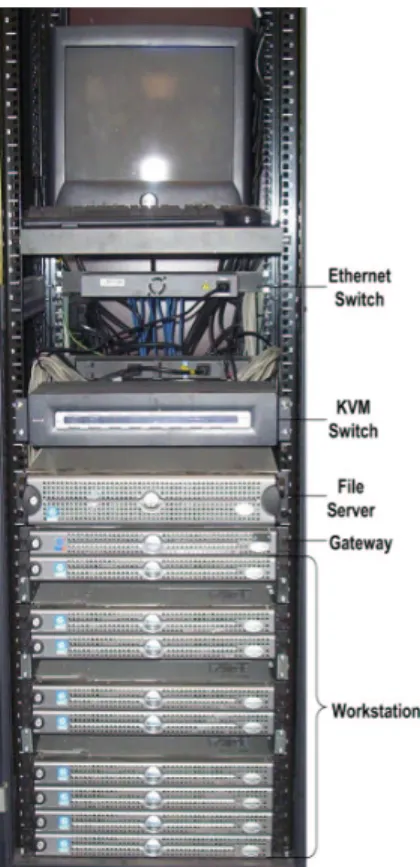
Fig. 1. V-NetLab Hardware Platform
II. Hardware Platform
At one extreme, we can build our virtual network envi-ronment over a single powerful multiprocessor server. The benefit of this approach is that commercial virtual machine software for such platforms already provides some of the management functions needed to support virtual networks. However, it may not support large networks due to the limitation of resources such as disk space, processor speed and virtual network performance. Moreover, the desired degree of isolation among different networks may not be supported. Finally, large multiprocessor server hardware tends to be much more expensive as compared to a collec-tion of PCs providing comparable computing power, and is inherently not scalable. As a result of this analysis, we concluded that the most cost-effective approach would be to build virtual networks using a hardware platform con-sisting of networked workstation-class PCs.
Our current hardware platform shown in Figure 1 con-sists of dual-processor workstation class PCs connected to-gether by a switched gigabit network. To simplify develop-ment of virtual network control and managedevelop-ment software, we are using Linux as the host OS. The virtual machines themselves may run Linux, Windows, or any other OS sup-ported by the VM software, although our course projects so far have been based only on Linux. The components of our setup are the following:
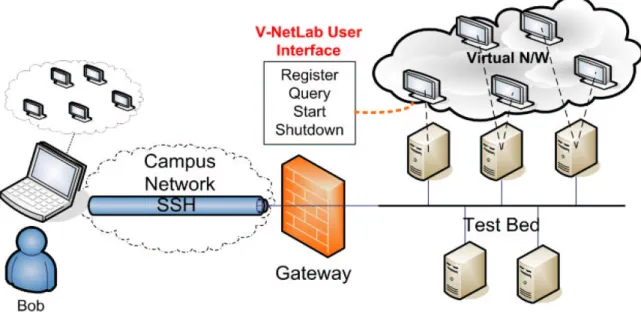
Fig. 2. Logical View for V-NetLab Laboratory
• One PC-based NFS Server. The server provides storage
for all virtual machine disk images. Our server currently uses 6-way RAID to provide excellent I/O performance and a disk storage of 600GB, which is enough to store 200 to 500 distinct virtual machine images.
• 9 PC-based workstations. Each of them has 3 to 4 GB
memory and 2.8 to 3.0 GHz dual-processor Intel CPUs running Linux operating system and virtual machine soft-ware from VMsoft-ware Inc. [1]. Currently, these workstations are partitioned into 6 PCs that are used in “production mode,” supporting courses, and 3 PCs in “development mode,” supporting continued development and testing of V-NetLab software.
• A gateway host. Users access their virtual network by
logging into this machine. It provides a management in-terface through which students and course staff access the V-NetLab. The gateway host does not forward packets, so there is no direct connectivity between the V-NetLab and the Internet.
The testbed also includes gigabit Ethernet switches and a management console, as shown in Figure 1.
Overall, this hardware platform can host between 130 to 300 virtual machines simultaneously, which translates to a lab session for 30 to 60 students, each running his/her own virtual network. The entire setup shown in Figure 1, together with software, cost about $29,000 last year.
III. Student’s View
The operating environment in the V-NetLab, as viewed by students, is illustrated in Figure 2. The laboratory is hosted in an isolated network. The only entry to the net-work is through a gateway host namedGatewayin Figure 2.
This gateway does not forward packets, so there is no net-work connectivity between the testbed (and hence the vir-tual networks) and the external world. Users (students as well as course staff) need to first log into the gateway, from which they can access their virtual networks. Stu-dents cannot directly access the machines that are part of the testbed. They can only use management software on the gateway to start or control their virtual networks.
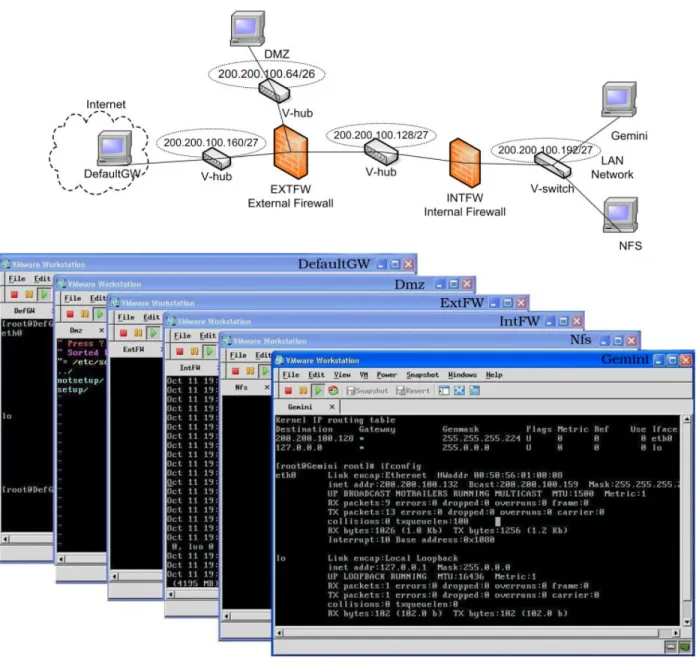
A user can access V-NetLab from any computer con-nected to the Internet, as long as this computer runs an X-Windows server and Secure Shell (SSH) software. The user needs to first log into the gateway using SSH, and then start up the virtual network. The consoles of the VMs are displayed on the user’s computer, as shown in Figure 3.
Figure 3 shows screen shot of VMs for a network topol-ogy. Each visible console corresponds to a VM. Depending on the configuration of these machines, students may be given a normal user or administrative account on them. The user’s home directory on the NFS server can be mounted on one or more of the virtual machines to fa-cilitate movement of data into the virtual network from outside or vice-versa.
The details of the interface provided to the users are de-scribed below. The interface is implemented using scripts that run on the gateway machine and it provides the fol-lowing functions:
• Registration. A user should first register his/her network
by submitting the network definition in a configuration file. A network is defined in terms of VMs and interconnecting entities. Our system validates the network definition by performing lexical, syntactical and semantical checks on it. After validation, this network is associated with the user.
Fig. 3. Sample Virtual Network Topology and its Screen Shot
The registration step may not always be done by a student — instead, course staff may preregister the network that is supposed to be used by each student.
• Startup. A user is permitted to start his network only if
it has been previously registered. If the network is started for the first time then a mapping of virtual machines onto physical network hosts is computed. This mapping at-tempts to (a) minimize copying of large VM disk images (of the order of GBs), and (b) balance the load across phys-ical machines. Optimal allocation algorithms turn out to be computationally expensive, so simple heuristics are em-ployed in our current implementation. After computing the mappings, any VM disk images that may need copying are copied from the file server to the workstations, the VMs
started up and their console displays tunneled to the user’s desktop.
• Shutdown. This command shuts down the user’s
net-work. Depending upon the configuration of the virtual ma-chines, their states (disk images) may be saved or simply discarded.
• Query. This command displays user’s virtual network
status (running, registered or unregistered) and available capacity of hardware platform (estimated) in terms of num-ber of VMs.
IV. Instructor’s view
In this section, we present the procedure for setting up virtual networks for course assignments using our
V-NetLab. Before a student is able to use virtual network setup, the instructor needs to define the virtual network for students. It consists of following steps:
• Network definition • Preparing VM images
• Randomizing mapping/services
A. Network Definition
For preparing the network topology for a particular ex-periment, the course staff needs to define the configuration of each virtual machine, and the overall network topology. For instance, the configuration file for the network shown in Figure 3 is given below. The definitions of some virtual machines and hubs are abbreviated with “...” to conserve space. (The complete configuration file has 50 lines.)
vm ExtFW { os : LINUX ver : "7.3" src : "/mnt/qinopt/vmnetwork/vmSrc/assgn1" eth0 : "200.200.100.162" eth1 : "200.200.100.65" eth2 : "200.200.100.130" } vm Nfs { os : LINUX ver : "7.3" src : "/mnt/qinopt/vmnetwork/vmSrc/assgn1" eth0 : "200.200.100.195" } vm IntFW { ... } vm DefaultGW { ... } vm Dmz { ... } vm Gemini { ... } hub hub1 {
inf : DefaultGW.eth0, ExtFW.eth0 subnet : "200.200.100.160" netmask : "255.255.255.224" } hub hub2 { ... } hub hub3 { ... } switch s1 {
IntFW.eth1, Gemini.eth0, NFS.eth0 }
Virtual machines are specified in terms of their IP ad-dresses, host names and the file containing their disk im-age. Hubs are specified in terms of the host interfaces or other hubs/switches that they are connected to, as well as the range of network addresses associated with the hub. Switches are specified in a similar manner.
B. Preparing VM Images
As described above, the virtual network configuration file references one or more VM disk images which store the contents for the virtual machine’s hard disk drive. These images need to be prepared by the course staff. In order to minimize students’ effort in non-essential administrative activities, these VM images should include all the software required for the course assignment.
Typically, VMs in a virtual network differ in many ways from each other. For instance, they will have distinct IP addresses and host names, and run different services. One approach to support this diversity is to create a unique disk image for each VM. This requires the course staff to manu-ally configure each VM separately, and then save the result-ing VM images. The primary benefit of this approach is its generality. Its drawback is that it increases the workload on course staff, as they have to manually configure many distinct VMs. Even worse, this approach complicates the mapping of virtual network onto physical network, since there are many different VM images to deal with. A non-optimal mapping can easily require many VM images to be copied from the file server to the workstations, thereby greatly increasing the startup time.
To overcome the above problem, we typically use the ex-act same image (master image) for all VMs, but modify the boot scripts (which are part of this image) so that different sets of services can be started up on different VMs. Note, however, that this approach is specific to a given guest OS. In our implementation, this feature has been implemented for Linux, but not Windows. The modified boot scripts also take care of routine network configuration aspects such as the set up of IP address, host name, DNS server, and de-fault gateway, based on the contents of the virtual network configuration file.
C. Randomizing IP addresses and Services
Some assignments may require different configuration of virtual network in terms of IP addresses of VMs and ser-vices running on VMs. For instance, in a network map-ping assignment, it would be preferable that the networks given to different students will “look” different, so that so-lutions cannot be copied. Yet, creating distinct network topologies for different students can greatly increase the administrative work to set up the assignments. To address this problem, we have developed an approach where the same network topology can be given to different students, but the IP address and hostname assignments to these net-work nodes can be randomized at boot time. As a result, the work of the course staff remains the same as if they were setting up one network for all students, but the students will not be able to easily copy the assignments.
The randomization feature is also built into boot scripts (and is hence specific to guest OS), and hence can be used to randomize network services run by different hosts.
V. Sample Assignments
This section describes a few sample assignments that have been used successfully in the V-NetLab.
A. Configuring a Network
This assignment is designed to introduce students to set-ting up networks, rouset-ting tables, and a few network servers.
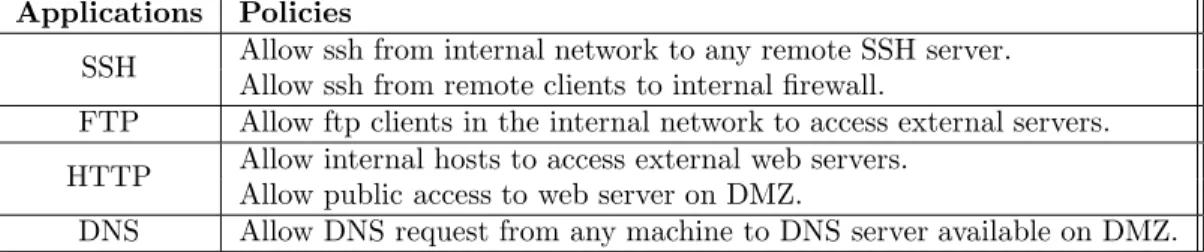
Applications Policies
SSH Allow ssh from internal network to any remote SSH server. Allow ssh from remote clients to internal firewall.
FTP Allow ftp clients in the internal network to access external servers. HTTP Allow internal hosts to access external web servers.Allow public access to web server on DMZ.
DNS Allow DNS request from any machine to DNS server available on DMZ.
Fig. 4. Sample Firewall Policies Corresponding to Topology in Figure 3.
We used the network shown in Figure 3. When network is started, VM consoles will be tunneled through ssh and ap-pear on user’s screen. A screen shot of the virtual network is shown in Figure 3, where each window corresponds to a VM. The students were asked to set up routing tables on the firewall, DMZ and internal machines. In addition, they were asked to configure NFS. Other possibilities in-clude configuration of alternative services such as DNS and HTTP.
B. Firewall Configuration
In this assignment, students were given the virtual net-work of six VMs shown in Figure 3. Students used the
IPtablessoftware on Linux to construct firewall rules. In this exercise, students learned to setup stateful as well as stateless firewall rules using IPtables, with the goal of en-forcing a specified high-level security policy. Sample poli-cies for the network of Figure 3 are shown in Figure 4. The students need to configure the firewalls and then carry out tests to verify that the specified high level policy is being enforced.
C. Network Discovery and Surveillance
In this assignments, students are given console access to one or two hosts on an unspecified virtual network, and asked to discover the rest of the hosts on the network, and identify the network topology. To ease their task, the stu-dents were given additional information such as the range of subnetwork addresses and the total number of hosts on the network. They use tools such asping,tracerouteand
nmapfor network discovery.
The surveillance part of this assignment dealt with ana-lyzing network activity usingtcpdump. Students learn and use various options of the tcpdump tool to zoom in on the traffic of interest to them, and discover what is going on in the network. In particular, they were asked to identify the services running in the network, the hosts involved in the services, and provide some details of the service such as the contents of the most common request from a client to a server.
D. Network Intrusion Detection
In this project, students experimented with the open-source intrusion detection toolsnort. The experiment
con-sists of configuring snort on one of the VMs of the network, launching different types of attacks and analyzing the re-sults. The students were asked to write a critique of the tool that addresses aspects such as the ease of setting up and using the tool, understanding and/or creating signa-tures, analyzing the quality of selected signatures available on the Internet, and developing evasion attacks.
VI. Related Work
A number of previous works have addressed the prob-lem of providing safe and convenient administrative ac-cess to individual hosts. Such acac-cess is required in OS courses, as well as security courses. They allow students to experiment with building custom OS kernels or kernel modules, as well as experiment with server configuration and administration. These experiments require support for booting systems from a customized disk image, and providing console access to users of these systems. Mayo and Kearns [2] describe a laboratory for advanced under-graduate and under-graduate students that provides automated support for copying disk images (stored in files on an NFS server) into hard drives of dedicated client machines, and booting these clients. With the advent of low-cost virtual machines such as VMware and User-Mode Linux, focus has shifted to using virtual machines, rather than dealing with copying hard disks. For instance, Yasinac et al. [3] suggest this approach for simplifying the setup of machines for se-curity experiments. The IWAR lab [4] uses a combined approach, using virtual machines as well as dedicated PCs. Although the above approaches have simplified the preparation and setup of individual hosts for security ex-periments, creation of entire networks is still a cumbersome task. This can be particularly problematic for experiments involving large networks. Planetlab [5] is a distributed laboratory that provides convenient management tools to start up and/or control a large collection of hosts that run identical software. Emulab [6] is another similar approach that provides such facilities. Emulab supports light-weight virtualization, based on FreeBSD Jails, but this approach does not provide the degree of flexibility needed for our ap-proach, where computers running different OSes may need to be hosted on the same physical machine. An alternative mode supported in Emulab is one where physical nodes on the testbed can be dedicated to run a custom OS image.
This approach provides the desired degree of flexibility to support security course assignments, but does not allow sharing of underlying hardware across multiple OSes.
In contrast to these approaches, our work provides an approach that combines flexibility and versatility with low hardware and administration/management costs.
VNET [7] and VIOLIN [8] have some similarity with our work in that they also use virtual networks. VNET is con-cerned with distributed computing applications, and their virtual networks span a wide-area network. Their approach is based on tunneling Ethernet packets over TCP/IP. VIO-LIN uses an application-level virtual network architecture built on top of an overlay infrastructure such as Planetlab. They use UDP tunneling in the Internet domain to emulate the physical layer in the VIOLIN domain.
In contrast with VNET and VIOLIN, our approach achieves network virtualization at the Ethernet layer. This provides better performance, as it eliminates the need for higher layers of the protocol (such as TCP, UDP or IP) from having to process the same packet twice. Moreover, our approach provides accurate reproduction of hubs in an efficient way. Finally, our approach allows for easy and unlimited replication of identical virtual networks so that essentially the same environment can be given to all stu-dents in a class. In this aspect, our approach differs from all of the previous works discussed in this section.
VII. Conclusion and Future Work
V-NetLab provides a platform to experiment in a net-worked environment similar to that of a physical network. Our approach relies on the concept of virtualization. In particular, we use virtual machines to create arbitrary net-works on the fly. It involves minimal management over-head and is very cost effective. With a single network con-figuration file, we can create as many virtual networks as supported by the host machines. All the virtual networks are totally isolated from each other — one network cannot sense the existence of other networks. Lastly, our approach is scalable in the context of course projects, i.e. by adding hosts we can support more virtual networks.
So far, we have used it in a graduate as well as under-graduate course in network security, with the sample as-signments described earlier in the paper. In an informal survey after the course, students have expressed very pos-itive views of V-NetLab. They were able to access it from both campus and home using a high bandwidth network connection such as the campus LAN, DSL, and Cable.
Presently, we use virtual machine software from VMware Inc. in our system. In the near future, we plan to experi-ment with lower-cost alternatives such as User-mode Linux. We are also working on mapping algorithm that overlays virtual networks over physical workstations to make it more flexible and scalable.
References [1] “Vmware.” http://www.vmware.com/.
[2] J. Mayo and P. Kearns, “A secure unrestricted advanced systems laboratory,” in SIGCSE ’99: The proceedings of the thirtieth SIGCSE technical symposium on Computer science education, pp. 165–169, ACM Press, 1999.
[3] A. Yasinsac, J. Frazier, and M. Bogdanov, “Developing an aca-demic security laboratory,” inNCISSE ’02: 6th National Collo-quium for Information System Security Education, 2002. [4] S. D. Lathrop, G. J. Conti, D. J. Ragsdale, and W. Schepens,
“Information warfare in the trenches: Experiences from the fir-ing range,” in WISE3: 3rd World Conference on Information Security Education, 2002.
[5] “Planetlab.” http://www.planet-lab.org/. [6] “Emulab.” http://www.emulab.net/.
[7] A. I. Sundaraj and P. A. Dinda, “Towards virtual networks for virtual machine grid computing,” inUSENIX-VM ’04: 3rd Vir-tual Machine Research and Technology Symposium, pp. 177–190, 2004.
[8] X. Jiang and D. Xu, “Violin: Virtual internetworking on over-lay infrastructure,” inInternational Symposium on Parallel and Distributed Processing and Applications (ISPA) 2004, 2004.