facebook.com/redhatinc @redhatnews
Table of ConTenTs
Introduction 2
How IT organizations benefit from subscriptions 3
What is included in your Red Hat subscription? 3
Support for the production environment 5
Subscription packaging model 6
Assembling your subscription order 8
Sample worksheet 1: Provisioning physical servers 9
Sample worksheet 2: Adding guests to a virtual environment 9
Sample worksheet 3: Setting up a virtual environment 9
Subscription scenarios and recommendations 10
Physical production environment 10
Sample worksheet 4: Setting up a physical, mission-critical production environment 11
Virtual production environment 11
Sample worksheet 5: Calculating subscriptions for guests 12 Sample worksheet 6: Calculating subscriptions for Red Hat Enterprise Linux
on virtual environments 13
Open hybrid cloud 13
Sample worksheet 7: Calculating subscriptions for a private cloud 14 Sample worksheet 8: Calculating subscriptions for a public cloud 14
Disaster recovery 14
Development environment 15
Desktops and workstations 15
Managing subscriptions 16
Renewing subscriptions 17
Subscription terms 17
Purchasing guide
System coverage 17
Support services levels 18
Proper use of subscriptions and services 18
Next steps 19
Registering on the Red Hat Customer Portal 19
Activating subscriptions 19
Downloading software 19
Entitling subscriptions 19
Red Hat Enterprise Linux products 20
InTroduCTIon
The Red Hat® Enterprise Linux® Purchasing Guide is your key to selecting the subscriptions that best meet your technical and business requirements and, once you have purchased your subscriptions, to getting the entire value of a Red Hat subscription. The guide also outlines the terms of your sub-scriptions and includes information on managing and renewing subsub-scriptions.
Designed for the purchasing manager and those within the procurement function, this guide focuses on the details of aligning subscriptions to architectures rather than on the architectures themselves. It supplements pricing information with scenario-based worksheets that cover common development and production deployments. The guide also describes Red Hat Global Support Services (GSS) and the many ways in which customers and users can benefit from their Red Hat subscriptions, includ-ing the service-level agreements (SLAs) for the support offerinclud-ings. [For brevity, in some graphics or tables within this guide, Red Hat Enterprise Linux may be referred to as RHEL.]
Compared to community-supported projects, a Red Hat subscription provides:
• An IT partner who is always at your side. By working with Red Hat, the industry’s top enterprise Linux vendor, you have a partner in the planning, deployment, and maintenance of your infra-structure. Red Hat Global Support Services is your connection to the knowledge and experience of some of the top Linux engineers. Your collaborative relationship with Red Hat includes assistance whenever you have a question — not just when you have a problem.
• Freedom through platform stability. Red Hat integrates, tests, and tunes all releases of Red Hat Enterprise Linux to help ensure performance, reliability, and stability. Also, through our many partnerships, Red Hat helps ensure that hardware platforms and software applications are cer-tified and optimized. Each version of Red Hat Enterprise Linux has a 10-year life cycle with an assurance of application programming interface (API) and application binary interface (ABI) com-patibility over that life cycle.
• An unprecedented ecosystem of support. Red Hat’s ecosystem is one of the largest in the world, with over 9,200 certified applications and over 3,000 hardware certifications. Collaboration with those partners means that the solution provided by the operating system and hardware or appli-cations has been tested and optimized before it reaches our customers. And, because this eco-system is built on firm commitment to the open source way, you have the ability to shape Red Hat Enterprise Linux to meet future needs by participating in community projects.
• Industry leadership and world-class expertise. For over a decade, Red Hat Enterprise Linux has supplied organizations around the world — including stock exchanges, government agencies, and more than 90% of Fortune 500 enterprises — with innovation, stability, and security.
How IT organIzaTIons benefIT from subsCrIpTIons
In the traditional model of software purchase and delivery, companies can be locked into licenses where upgrades are costly, access to help is limited, and if they want the latest technology, they have to wait until the next release. Red Hat pioneered the model that provides customers tested and qual-ity-controlled features, updates, and upgrades in a low-cost, high-value subscription.
Because Red Hat delivers software and services through a subscription, there are no license or upgrade fees. Nor does Red Hat charge additional maintenance fees, per-incident support fees, or user access fees. Simply maintain one active subscription per resource running Red Hat software to take advantage of the value we provide.
By subscribing to software instead of buying licenses, your software inventory can expand or con-tract as business requirements change, so there is less risk that you will be over-purchasing. A sub-scription model also allows you to purchase software as an operating expense, rather than a capital expenditure with a burdensome amortization schedule. With licenses, the entire cost is paid up front and value derived over time. With subscriptions, you pay on an annual basis, as you derive value, which many organizations find is a useful way to manage cash flow.
wHaT Is InCluded In your red HaT subsCrIpTIon?
A Red Hat subscription to open source software reduces business and technical risks, increases IT productivity, and speeds time to deployment. It offers much more than support services typically expected from software vendors; compared to community-supported open source projects, it is geared toward meeting enterprise-class operational requirements.
A Red Hat subscription includes software, maintenance, security updates, technical support, knowl-edge exchanges, and access to an ecosystem of thousands of expert Red Hat Enterprise Linux administrators and developers. These services, combined with a product life cycle timed to meet enterprise expectations around stability and change, make up the value of your subscription: Predictability. Subscriptions are typically offered on an annual basis and include access to new ver-sions of software at no additional cost. The subscription model results in no up-front license fees or hidden costs.
Regular upgrades and updates. Included in the subscription are product enhancements, new fea-tures, new hardware certifications, bug fixes, and security patches.
Security response. Red Hat’s industry-recognized security response process helps customers proactively address potential security issues in their Linux environments.
Long-term stability. Red Hat Enterprise Linux products have a ten-year product lifespan with strict update policies that maintain application stability and compatibility — API compatibility between minor releases and ABI compatibility between major releases. See the Red Hat Application Compatibility paper at www.redhat.com/f/pdf/rhel/RHEL6_App_Compatibility_WP.pdf.
World-class technical support. Included in the subscription are unlimited incident support calls with Linux experts. Two service-level agreements (SLAs), Standard and Premium, are available so you can select the response and coverage times that best support your organization.
Red Hat Customer Portal. An award-winning portal for accessing all of the benefits of your Red Hat subscription, including subscription management, software delivery, critical issue notifications, an extensive knowledgebase, expert communities, and case management.
Subscription management services. Red Hat subscription management services and tools help you take full advantage of your subscription. Services and tools delivered as part of your subscription provide status information, clarify relationships between subscriptions and systems, and simplify IT inventory reporting.
Legal assurance. The Red Hat Open Source Assurance program provides our customers who are developing and deploying open source solutions with some level of protection from legal harm. For more information, see www.redhat.com/legal/open_source_assurance_agreement.html.
supporT for THe produCTIon envIronmenT
Red Hat customers benefit from a collaborative support relationship. Traditional software business models are based on licenses, technical support contracts, and maintenance agreements. These tra-ditional models only allow you to call the vendor when something goes wrong, and you often have to pay each time. Your Red hat subscription entitles you to a different kind of support. We encour-age you to call us — but not just when there’s a problem. When you engencour-age in the Red Hat support process, you will often work with the people who write and test the software and oversee the open source development of the underlying technologies. Contact us to take advantage of our expertise during all phases of planning, testing, deploying, maintaining, and upgrading your infrastructure. These interactions are provided as part of your subscription.
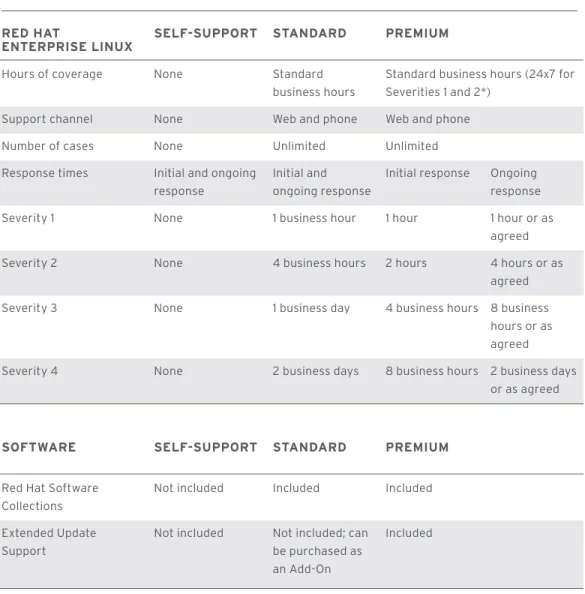
Red Hat provides two modes of support: development and production. Production support is some-times delivered in conjunction with our partners, where they will provide the first level of customer engagement. Development support is described in the “Development environment” section. For production environments, Red Hat subscriptions have two levels of support — Standard and Premium — which are distinguished by different service-level agreements (SLAs) that define initial and ongoing response times. In addition to technical support, production-level subscriptions include Red Hat Software Collections and Extended Update Support.
• Red Hat Software Collections provides a set of dynamic programming languages, database servers, and various related packages that are either more recent than their equivalent versions included in the base Red Hat Enterprise Linux system, or are available for use with Red Hat Enterprise Linux for the first time. Red Hat Software Collections is available as part of the Standard and Premium support levels.
• Extended Update Support extends the stability of a company’s standard operating environment while minimizing change and risk to business-critical deployments. Extended Update Support is available as part of the Premium support level or sold separately as an Add-On with the Standard support level.
SERvICE LEvELS
red HaT
enTerprIse lInux self-supporT sTandard premIum Hours of coverage None Standard
business hours
Standard business hours (24x7 for Severities 1 and 2*)
Support channel None Web and phone Web and phone Number of cases None Unlimited Unlimited Response times Initial and ongoing
response
Initial and ongoing response
Initial response Ongoing response Severity 1 None 1 business hour 1 hour 1 hour or as
agreed Severity 2 None 4 business hours 2 hours 4 hours or as
agreed Severity 3 None 1 business day 4 business hours 8 business
hours or as agreed Severity 4 None 2 business days 8 business hours 2 business days
or as agreed
sofTware self-supporT sTandard premIum
Red Hat Software Collections
Not included Included Included
Extended Update Support
Not included Not included; can be purchased as an Add-On
Included
Table 1: Service-level agreements for Red Hat Enterprise Linux subscriptions
* In order to provide you with 24x7 coverage, Red Hat requests that you identify a dedicated point of contact who will be available until the issue is resolved.
Red Hat Global Support Services works with customers to classify severity of issues using the following definitions:
SEvERITy 1 (URgEnT)
A problem that severely impacts your use of the software in a production environment (such as loss of production data or production systems not functioning). The situation halts your business opera-tions and no procedural workaround exists.
SEvERITy 2 (HIgH)
A problem where the software is functioning but your use in a production environment is severely reduced. The situation is causing a high impact to portions of your business operations and no pro-cedural workaround exists.
SEvERITy 3 (mEdIUm)
A problem that involves partial, non-critical loss of use of the software in a production environment or development environment. For production environments, there is a medium to low impact on your business, but your business continues to function, including by using a procedural workaround. For development environments, the situation is causing your project to no longer continue or migrate into production.
SEvERITy 4 (LoW)
A general usage question, reporting of a documentation error, or recommendation for a future product enhancement or modification. For production environments, there is low to no impact on your business or the performance or functionality of your system. For development environments, there is a medium to low impact on your business, but your business continues to function, including by using a procedural workaround.
glossary
guest: An instance of the software running in a virtual machine, which in turn is running on a hyper-visor. In the Red Hat subscription model, a guest is associated with a physical system.
socket: A CPU socket on a motherboard.
socket-pair: A socket-pair is up to two sockets where each is occupied by a CPU on a system. Note that two servers with a single occupied socket on each must be entitled separately; therefore, you would purchase two subscriptions—one for each server.
system: A system on which you install or execute all or a portion of the Red Hat software. A system includes each instance of the software installed or executed on a server, workstation, laptop, virtual machine, device, and so on.
stacking: The ability to purchase multiple subscriptions to cover a multi-socket machine. For example, the base subscription unit is a socket-pair. In order to entitle an 8-socket machine, you would purchase four socket-pair subscriptions.
virtual instance: A virtual machine running on a hypervisor. When you deploy a guest operating system in a virtualized environment, you are responsible for securing the required license rights for any third-party operating system or other software that you use. In the Red Hat subscription model, a virtual instance is not associated with a physical system.
subsCrIpTIon paCkagIng model
Today’s complex infrastructure environments built from combinations of physical, virtual, and cloud deployments require a purchasing model that provides choice and flexibility. The Red Hat Enterprise Linux Server subscription model lets you choose the basis on which you purchase, stack subscriptions to streamline purchasing, and move subscriptions from physical to virtual to cloud and back to adapt to changing requirements.
SUbSCRIPTIon modELS
As a Red Hat customer, you have the choice of purchasing your Red Hat Enterprise Linux products on either a physical or virtual basis. If you are deploying Red Hat Enterprise Linux on physical hard-ware, your subscriptions are based on the number of socket-pairs in the systems used. This model is best for provisioning to physical hardware or as host servers in the cloud. If you are deploying Red Hat Enterprise Linux in a virtual environment, your subscriptions are based on the number of virtual instance pairs running the product. This model is best for low- and medium-density virtual environments.
The subscriptions that follow this model are: • Red Hat Enterprise Linux Server
• Red Hat Enterprise Linux Server Entry Level • Red Hat Enterprise Linux Add-Ons
Red Hat also offers a subscription model that allows you to run an unlimited number of Red Hat Enterprise Linux virtual instances and is best for high-density virtual environments. This subscrip-tion model is offered on a physical socket-pair basis.
The subscriptions that follow the unlimited guest model are: • Red Hat Cloud Infrastructure
• Red Hat Enterprise Linux OpenStack® Platform • Red Hat Enterprise Linux for Virtual Datacenters • Red Hat Enterprise Linux Add-Ons
STACkIng
Stacking gives you the flexibility to aggregate Red Hat Enterprise Linux subscriptions to accommo-date any size physical server. The base Red Hat Enterprise Linux model includes entitlements for two sockets, which is all you need for a 2-socket server. If you have a 4-socket server, you would need two Red Hat Enterprise Linux subscriptions. For an 8-socket machine, you would need four subscrip-tions, and so forth. In this way, your Red Hat Enterprise Linux subscriptions can “stack” to scale to any size system. Moreover, as your physical infrastructure changes, you can adjust your subscrip-tions to match your infrastructure. You can replace two 2-socket systems with a 4-socket system and vice-versa without increasing the number of subscriptions. Of course, you would need to assign the Red Hat Enterprise Linux subscription to the new system.
RE-PURPoSIng
Subscription re-purposing gives you another degree of flexibility. It lets you change a physical 2-socket Red Hat Enterprise Linux subscription into a two virtual instance subscription without contacting Red Hat to adjust your terms. Re-purposing virtual instance pairs as physical socket-pairs is also possible. This allows you to convert your infrastructure from physical to virtual and have your Red Hat Enterprise Linux subscriptions convert along with you. The ability to re-purpose between physical and virtual deployment applies to the Red Hat Enterprise Linux Server product and its Add-Ons.
assemblIng your subsCrIpTIon order
The Red Hat Enterprise Linux Server subscription model is:• Based on socket-pairs or virtual-instance-pairs. • Usable in physical or virtual deployments. • Stackable.
• Available with Standard or Premium support.
Below are the basic questions to answer when determining the number and type of subscriptions you need. For simplicity’s sake they assume that you have either a physical environment or a virtual environment and that it is a low-density environment—that is, you are running four or fewer guests per system. In reality, you will most likely have a hybrid environment with various hypervisors and even a blend of high- and low-density environments. The section called “Subscription scenarios and recommendations” will walk you through several examples of blended and open hybrid cloud deployments.
1. Are you purchasing subscriptions for a physical or a virtual environment? If you answered physical, go to step 2. If you answered virtual environment, go to step 3.
2. You are purchasing subscriptions for a physical environment. How many systems do you have of each kind of socket configuration? Typical configurations are 1-, 2-, 4-, and 8-socket systems. (Single-processor systems should be counted as one socket-pair.)
(a) Count the number of 1-socket systems you have. Each of these must be entitled separately with a socket-pair subscription. That is, you cannot split a socket-pair subscription across two systems.
(b) Count the remainder of the sockets and divide by two. Add the result to the number of 1-socket systems. This total is the number of subscriptions you will purchase to entitle your physical servers.
3. You are purchasing subscriptions for virtual instances. How many do you need?
(a) Divide the number of virtual instances by two. This is the number of subscriptions you will purchase for the guests in your virtual environment.
4. Which Add-Ons do you want to purchase? The Add-Ons must match the counting method you used for the Server subscriptions. For example, if your Server subscription is based on socket-pairs, the High Availability Add-On for that Server will also be based on socket-pairs. The Add-On tions can be re-purposed from socket-pairs to virtual instance-pairs, just like the Server subscrip-tions can.
THE FoLLoWIng WoRkSHEETS PRESEnT THE CALCULATIonS FoR SomE SImPLE dEPLoymEnT SCEnARIoS.
SAmPLE WoRkSHEET 1: PRovISIonIng PHySICAL SERvERS
Counting method: Systems Socket-pairs Subscriptions
number of 1-socket systems: 10 10 10 (one per
system)
number of 2-socket systems: 10 10 10 (one per
socket-pair)
number of 4-socket systems: 2 4 4 (one per
socket-pair)
number of 8-socket systems: 2 8 8 (one per
socket-pair)
number of subscriptions to purchase: 32
SAmPLE WoRkSHEET 2: AddIng gUESTS To A vIRTUAL EnvIRonmEnT
Counting method: Virtual instances
number of guests: 20
divide number of guests by 2 for the number of subscriptions to purchase:
10
SAmPLE WoRkSHEET 3: SETTIng UP A vIRTUAL EnvIRonmEnT
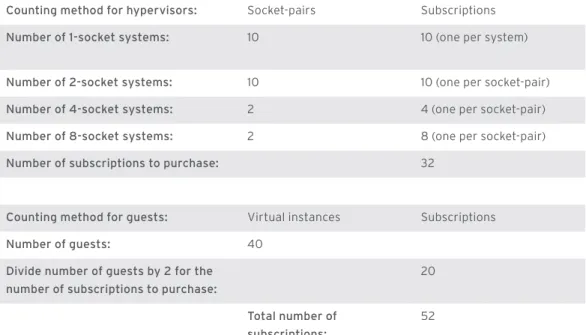
A virtual environment includes a mix of physical machines (to run hypervisor software) and virtual instances (the guests). Red Hat will support up to four concurrently running guests with the virtual-ization capabilities (based on the KVM hypervisor) supplied with Red Hat Enterprise Linux Server. If you are planning on entitling five or more Red Hat Enterprise Linux guests per socket-pair, we rec-ommend purchasing subscriptions to Red Hat Enterprise Linux for Virtual Datacenters or Red Hat Enterprise Linux OpenStack Platform. These solutions are aimed at use-cases for dense virtualiza-tion, and are more cost-effective overall for those types of deployments. See the “Subscription scenarios and recommendations” section for information on more complex virtual environments.
Counting method for hypervisors: Socket-pairs Subscriptions
number of 1-socket systems: 10 10 (one per system)
number of 2-socket systems: 10 10 (one per socket-pair)
number of 4-socket systems: 2 4 (one per socket-pair)
number of 8-socket systems: 2 8 (one per socket-pair)
number of subscriptions to purchase: 32
Counting method for guests: Virtual instances Subscriptions
number of guests: 40
divide number of guests by 2 for the number of subscriptions to purchase:
20
Total number of subscriptions:
52
subsCrIpTIon sCenarIos and reCommendaTIons
The subscription scenarios in this section expand on the previous worksheets by adding elements found in real-world deployments like high availability.
PHySICAL PRodUCTIon EnvIRonmEnT
A physical production environment often has servers with 1, 2, 4, 8, or more sockets and typically includes Red Hat Add-Ons that enhance availability, performance, or scalability. Figure 1 shows how many Red Hat Enterprise Linux Server subscriptions are needed to cover a mission-critical produc-tion environment.
This worksheet details the subscription allocations shown in Figure 1. Note that there are no 1-socket systems in this example.
Figure 1: Subscriptions for a physical, mission-critical production environment
10 RHEL Server Subscriptions 20 RHEL Servers Subscriptions 8 RHEL Servers Subscriptions RHEL0050 10 4-socket
systems
2 8-socket systems
10 20 30
10 2-socket systems
SAmPLE WoRkSHEET 4: SETTIng UP A PHySICAL, mISSIon-CRITICAL PRodUCTIon EnvIRonmEnT
Counting method: Socket-pairs
number of sockets: 76
divide number of sockets by 2 for the number of subscriptions for Red Hat Enterprise Linux Server:
38
number of subscriptions for the High Availability Add-on (HA): 38
vIRTUAL PRodUCTIon EnvIRonmEnT
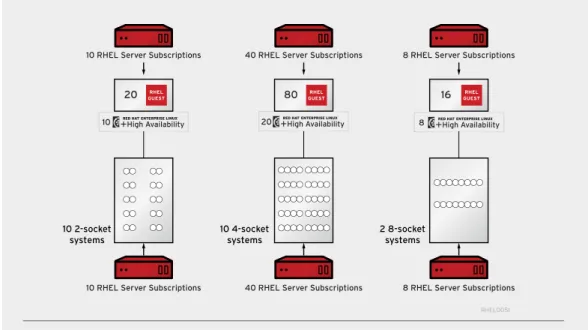
A virtual environment includes virtual guests in addition to physical servers that host the hypervisors. The configuration shown in Figure 2 assumes that the hypervisor and the guests are all Red Hat Enterprise Linux Server. This configuration is a low-density production environment, meaning that there are 4 or fewer guests running concurrently on a hypervisor.
Note: Red Hat will support up to four concurrently running guests on any supported operating system running on a hypervisor on Red Hat Enterprise Linux Server. If you want to run five or more guests per hypervisor, consider Red Hat Enterprise Virtualization or the Red Hat Enterprise Linux OpenStack Platform, which provide a supported hypervisor and management tools for large-scale virtualization.
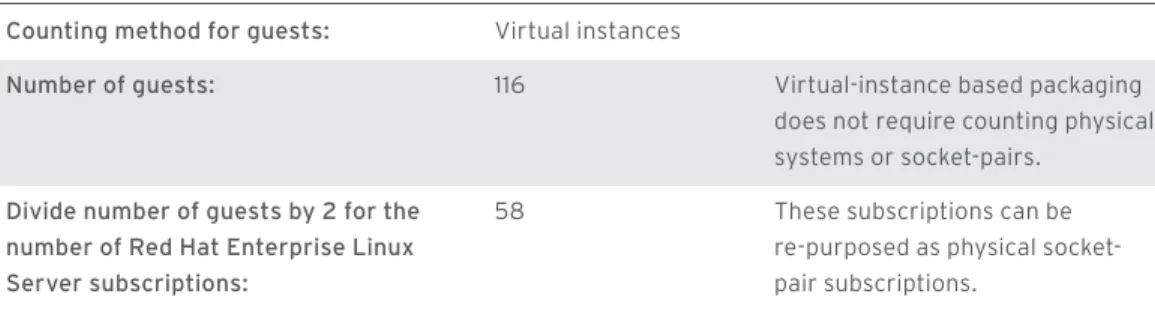
Figure 2 is the same as Figure 1 except for the added virtual guests. The assumption is that in a mission-critical environment, every node in this cluster must run as highly available. The virtualized production environment would have the same High Availability Add-Ons as a physical production environment. The following worksheet shows the calculations for the added guests.
Figure 2: Virtual mission-critical production environment
RHEL0051
10 4-socket systems
2 8-socket systems
10 20
10 2-socket systems
8 RHEL
GUEST
20 RHEL
GUEST
80 RHEL
GUEST 16
10 RHEL Server Subscriptions 40 RHEL Server Subscriptions 8 RHEL Server Subscriptions 10 RHEL Server Subscriptions 40 RHEL Server Subscriptions 8 RHEL Server Subscriptions
SAmPLE WoRkSHEET 5: CALCULATIonS FoR THE AddEd gUESTS
Counting method for guests: Virtual instances
number of guests: 116 Virtual-instance based packaging
does not require counting physical systems or socket-pairs.
divide number of guests by 2 for the number of Red Hat Enterprise Linux Server subscriptions:
58 These subscriptions can be re-purposed as physical socket-pair subscriptions.
The scenario in Figure 2 assumes that the virtual environment is a 100% Red Hat Enterprise Linux environment. Figure 3 shows an environment where the hypervisors are VMware and the guests are Red Hat Enterprise Linux.
Figure 3: Red Hat Enterprise Linux Server deployed on VMware
RHEL0052
VMWARE
10
20
INSTANCESVIRTUALThe following worksheet shows the calculations for the subscriptions required to cover the deploy-ment in Figure 3.
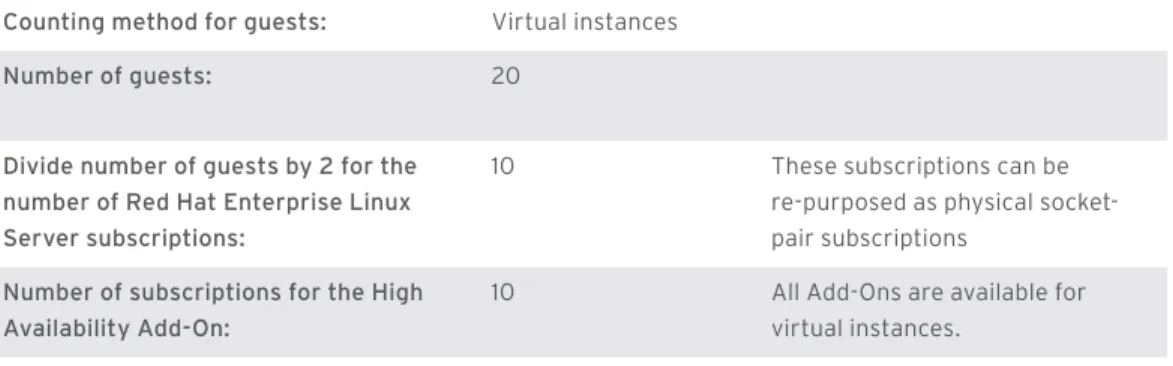
SAmPLE WoRkSHEET 6: CALCULATIng SUbSCRIPTIonS FoR REd HAT EnTERPRISE LInUx on vIRTUAL EnvIRonmEnTS
Counting method for guests: Virtual instances
number of guests: 20
divide number of guests by 2 for the number of Red Hat Enterprise Linux Server subscriptions:
10 These subscriptions can be re-purposed as physical socket-pair subscriptions
number of subscriptions for the High Availability Add-on:
10 All Add-Ons are available for virtual instances.
oPEn HybRId CLoUd
Red Hat defines the open hybrid cloud as an environment that includes physical, virtual, and private or public cloud deployments. The Red Hat Enterprise Linux portfolio has subscriptions that serve all of these environments. The following example builds on the previous ones — the physical and virtual environments are the same; private and public cloud components have been added in Figure 4. For more information on the architecture and products the make up Red Hat’s open hybrid cloud portfolio, see www.redhat.com/about/news/archive/2013/5/destination-iaas-open-hybrid-cloud.
Figure 4. Open hybrid cloud production environment
Open Hybrid Cloud
Physical Virtual Private Cloud
RHEL0053
Public Cloud 100 2-socket
systems
RHEL GUEST Unlimited
100 RHEL OpenStack Platform Subscriptions
2 8-socket systems
8
8 RHEL Server Subscriptions VMWARE
10 VIRTUAL
INSTANCES
20 VIRTUAL
INSTANCES
20
The physical host systems in the open hybrid cloud and the guests are covered by subscriptions for Red Hat Enterprise Linux OpenStack Platform. The following worksheets show the calculations for purchasing subscriptions for private and public clouds.
SAmPLE WoRkSHEET 7: CALCULATIng SUbSCRIPTIonS FoR A PRIvATE CLoUd
Counting method for physical machines: Socket-pairs
number of sockets: 200
divide number of sockets by 2 for the number of subscriptions for Red Hat Enterprise Linux openStack Platform:
100 Note that there are no 1-socket systems in this example.
Counting method for guests: Virtual instances
Number of guests in private cloud: Unlimited
The unlimited guests are included in the Red Hat Enterprise Linux OpenStack Platform subscription:
0
SAmPLE WoRkSHEET 8: CALCULATIng SUbSCRIPTIonS FoR A PUbLIC CLoUd
Counting method for public cloud: Virtual instances number of virtual instances: 20
divide the number of virtual instances by 2 for the number of subscriptions for Red Hat Enterprise Linux Server:
10 These are the same type of subscription as the ones for the physical server. You choose whether you want to deploy it in a physical, virtual, or cloud environment.
dISASTER RECovERy
Disaster recovery is an important component of production environment design. Red Hat Enterprise Linux has purchasing policies for disaster recovery systems that address the most common scenarios — hot, warm, and cold backups.
Hot backup: The server is frequently turned on and ready to move into production mode immedi-ately. This is typically what failovers do within a cluster. In this case, you purchase two subscriptions — one for the production server and one for the hot-backup server. Both server subscriptions must be the same in terms of support SLA and configuration. The list price of the hot backup recovery server is 100% of the list price of the production server.
Warm backup: The server is turned on periodically to receive backups of data from the production server and updates from Red Hat. These periodic updates are performed no more frequently than every 60 days. For example, warm backups are used in mirroring, replication, and log-shipping sce-narios. In this case, you purchase two subscriptions. Both server subscriptions must be the same in terms of support SLA and configuration. The price of the warm-backup recovery server is 50% of the production server subscription’s list price.
Cold backup: The server has software installed and is configured, but then is turned off until the disaster occurs or for periodic disaster recovery procedure tests. Red Hat allows you to pre-load the bits as a courtesy, but you may apply updates only after the cold-backup system is running instead of the production server. In this case, you need not purchase an additional subscription because the assumption is that the production server and the cold-backup server will never be running at the same time and can thus “share” a subscription.
dEvELoPmEnT EnvIRonmEnT
Red Hat Enterprise Linux offers several types of subscriptions to support development teams. Team size and required support level are the factors to consider when selecting subscriptions.
1. Size of team
• For 25 or more, Red Hat Enterprise Developer Support, Professional includes developer support with a response time of two business days.
• For 25 or more, Red Hat Enterprise Developer Support, Enterprise offers the highest level of developer support with a response time of four hours.
• For small teams or an individual contributor, the Red Hat Developer Workstation offers the same tools and products as the Red Hat Enterprise Developer Support subscription, but it can be pur-chased on an individual basis.
2. Support service
• Self-support includes access to software updates, the Red Hat Knowledgebase, and technical content on the Customer Portal. It does not include phone or web support from Red Hat. • Professional support additionally includes unlimited web and phone requests during standard
business hours with a response time of two business days.
• Enterprise support also includes unlimited web and phone requests during standard business hours, but with a response time of four hours.
All of the Development subscriptions include membership in the Red Hat Enterprise Linux Developer Program, which helps developers derive maximum benefit from Red Hat Enterprise Linux. Intended for end-user developers building custom applications, independent software vendors (ISVs) and value-added resellers (VARs) building portable applications, and system integrators customizing applications for customers, the Red Hat Developer Program includes industry-leading developer tools, subscriptions, support, and training.
dESkToPS And WoRkSTATIonS
Another category of Red Hat Enterprise Linux subscriptions are those for desktops and worksta-tions. Subscriptions to these are purchased per installed system. Consider the users’ requirements when selecting subscriptions.
• Users of business-productivity tools—Red Hat Enterprise Linux Desktop
• Users of complex applications, especially graphics-intensive — Red Hat Enterprise Linux Workstation
• Application developers — Red Hat Enterprise Linux Developer Workstation
These subscriptions can be purchased with one of two Developer support options: Professional, with a two-day response time; and Enterprise, with a four-hour response time.
Red Hat Enterprise Linux Desktop
Red Hat Enterprise Linux Workstation
Red Hat Enterprise Linux Developer Workstation desktop architecture support
x86 (32, 64) Yes Yes Yes
desktop support limits as defined by Red Hat Enterprise Linux product subscription Maximum physical CPUs
(sockets)
1 2 2
Maximum memory 8GB Unlimited Unlimited Maximum virtualized guests 1 1 or 4 1 or 4
managIng subsCrIpTIons
There are several services and tools that can help you manage your Red Hat Enterprise Linux subscriptions, each addressing different use cases:
• Red Hat Customer Portal. Red Hat offers services that can help you get the most out of your Red Hat subscriptions. Systems, whether physical or virtual, can be registered and connect with the Red Hat Customer Portal. Get the latest versions of the software, query our knowledgebase, browse product documentation, and gain access to the latest bug fixes, security errata, and feature enhancements.
• Red Hat Satellite. For an additional subscription, Red Hat Satellite provides patch manage-ment, provisioning, configuration managemanage-ment, and monitoring capabilities that ensure Red Hat Enterprise Linux systems are properly secured, operating efficiently, and in compliance with various standards. It also helps you manage your subscription inventory by providing fine-grained reporting on allocated and available subscriptions and their expiration dates. Systems, both physical and virtual, that connect to the Red Hat Satellite server require the Smart Management Add-On.
• Red Hat Subscription Asset manager. For customers who do not wish to connect to the Red Hat Customer Portal or purchase Red Hat Satellite, Red Hat offers Subscription Asset Manager for no additional charge. It can be used to generate reports on subscription usage, as well as report on which errata advisories are relevant for each system. There is no additional Add-On requirement for systems to connect to the Subscription Asset Manager.
In order to manage your Red Hat subscriptions and take full advantage of the services and tools offered you must register your systems using the Subscription Manager tool (or its command-line interface) included in Red Hat Enterprise Linux. See the product documentation for step-by-step instructions. Once the system is registered, you will be able to attach a subscription to that system and start the downloading and installation process.
renewIng subsCrIpTIons
Red Hat subscriptions are valid for a limited time span according to the contract your organization signed with Red Hat. One-year subscriptions are most common. The only way to continue receiving the full benefit of your Red Hat subscriptions, including technical support, security patches, product upgrades, and full participation in an ecosystem of partners and experts, is to renew on schedule. At 90, 60, and 30 days prior to a subscription’s expiration, the person designated in the contract will receive email reminders from Red Hat. These reminders include instructions for renewing subscrip-tions. The method of renewal depends on how the subscriptions were purchased. If you believe your organization is not receiving emails or that the emails might be going to the wrong individual, please contact Red Hat Customer Service 1-888-REdHAT-1.
subsCrIpTIon Terms
This section summarizes some of the terms and conditions pertaining to Red Hat subscriptions as described in Appendix 1 of the Red Hat Enterprise Agreement. Note that Appendix 1 is the binding document, and nothing written in this purchasing guide supersedes the terms made in Appendix 1. If you have questions, contact your Red Hat salesperson.
SySTEm CovERAgE
• You must purchase subscriptions for every system and virtual instance in your organization where Red Hat Enterprise Linux is installed. For example, if you have Red Hat Enterprise Linux installed on five development machines and 10 2-socket production systems, you must purchase enough subscriptions to cover these machines. If they are 2-socket machines, then you must purchase five developer subscriptions and 10 subscriptions to cover the production systems.
• You may migrate a subscription from one system to a system with similar characteristics without purchasing additional subscriptions as long as the total number of subscriptions still matches the total number of installed systems.
• You may migrate Red Hat Enterprise Linux Server (and related Add-On) subscriptions back and forth from physical to virtual to cloud deployments without having to change subscription terms, purchase additional subscriptions, or notify Red Hat. For example, if you have purchased a sub-scription for one socket-pair that you allocate to a physical machine, you can than convert that socket-pair subscription to cover two virtual instances in a virtualized or cloud deployment. And you can then convert a two-instance subscription back into a socket-pair allocation.
• You may not migrate non-Red Hat Enterprise Linux Server subscriptions off-premises or to the cloud without obtaining written permission from Red Hat to do so. Please see Appendix 1 of your Red Hat Enterprise Agreement for more information.
SUPPoRT SERvICES LEvELS
• A Red Hat subscription gives you support services. When you purchase a subscription, you choose a level of support services. Developer support levels are Professional and Enterprise, while Production support levels are Self-support (available only in some regions and on Red Hat Enterprise Linux Server Entry Level), Standard, and Premium.
• Developer support provides assistance with installation, usage, problem diagnosis, and bug fixes. It also includes advice on architecture, design, development, and prototyping of applica-tions. It does not include assistance with software made available through supplementary chan-nels and preview technologies.
• Production support provides assistance with installation, application testing, usage, problem diagnosis, and bug fixes for software used for production purposes. It does not include assis-tance with code development, system design, network design, architectural design, optimiza-tions, tuning recommendaoptimiza-tions, development or implementation of security rules or policies, third-party software made available with Red Hat software, supplementary channels, and preview technologies.
• You may purchase subscriptions at different support levels. For example, you might purchase sub-scriptions for mission-critical workloads with Premium support services and for less critical work-loads with Standard support services. However, you cannot use your higher-level support services to get support for systems to which you have allocated lower-level support services. For example, you may not call for support for a system with Standard support and request Premium support based on a different subscription.
• Add-Ons inherit the underlying SLA for Red Hat Enterprise Linux subscription to which they are attached. For example, if the High Availability Add-On is attached to a Premium SLA 1-socket-pair subscription of Red Hat Enterprise Linux Server, it too must be purchased with a Premium SLA for a 1-socket-pair system.
PRoPER USE oF SUbSCRIPTIonS And SERvICES
• Evaluation versions of Red Hat Enterprise Linux subscriptions may not be used beyond their term or for any purpose not explicitly defined in the evaluation terms and conditions.
• Subscriptions to software and support services are for internal use only (“internal” includes affili-ates). Subscriptions cannot be transferred to a third party.
• Use subscriptions for the use case for which they are intended. For example, you may not use a Red Hat Enterprise Linux Workstation subscription as a production server. You also may not seek production support using a developer subscription.
nexT sTeps
After purchasing your Red Hat Enterprise Linux subscriptions there are a few steps to follow before your team can start using them and taking full advantage of the software and services included in your subscriptions:
• Register on the Red Hat Customer Portal • Activate subscriptions
• Attach subscriptions • Download software
REgISTERIng on THE REd HAT CUSTomER PoRTAL
The first step to your organization getting the complete value of your Red Hat subscriptions is to register on the Red Hat Customer Portal. Every single member of your IT organization can be regis-tered — there are no limitations to the number of registrants per account.
The Customer Portal is the gateway to your subscription management services and tools. Here you can activate, entitle, renew, manage, and report on your subscriptions. In addition to these ser-vices and tools, the Customer Portal has a knowledgebase and an extensive library of information resources that supports users ranging from novices to experts.
ACTIvATIng SUbSCRIPTIonS
If you created a Red Hat account before ordering your subscriptions, you can skip this step — your software will have been delivered to your account and you can begin the entitlement process. If you create your Red Hat account after ordering subscriptions, you will first activate your subscrip-tions. You must activate subscriptions that correspond to the software that your team will install. For example, if you only have an activated subscription for Red Hat Enterprise Linux Server, you will not be able to download Red Hat Enterprise Linux Desktop.
You activate subscriptions in the Customer Portal using tools available from the Subscription tab. From the Subscription Activation tool, you will enter the product activation codes (also referred to as subscription numbers) that you received in an email from Red Hat.
ATTACHIng SUbSCRIPTIonS
The final step is to register systems and attach subscriptions. The process for attaching subscrip-tions to systems varies depending on the Red Hat subscription management service or tool that you are using. See the appropriate Red Hat product documentation for instructions on how to attach, manage, report on, and renew your inventory of subscriptions.
doWnLoAdIng SoFTWARE
Those members of your team who have been granted permission to download software by your organization’s administrator(s) can begin downloading and installing software. Note that by default the admin is the person who first created your Red Hat account. An admin can then designate multiple admins for the account.
red HaT enTerprIse lInux produCTs
REd HAT PRodUCTS ARE AvAILAbLE on A SUbSCRIPTIon bASIS.
produCT desCrIpTIon
desktop
Red Hat Enterprise Linux Desktop Red Hat Enterprise Linux Desktop enables users to be productive with a comprehensive set of leading user applications including LibreOffice, a full office productivity suite with word processing, spreadsheet, presentation, drawing, and database applications. With built-in KVM virtualization, users also can run Windows and legacy Windows applications on their Linux desktops.
Red Hat Enterprise Linux Workstation Designed for advanced Linux users working on more powerful systems, Red Hat Enterprise Linux Workstation includes those capabilities and appli-cations included in the Red Hat Enterprise Linux Desktop client and more. Red Hat Enterprise Linux Workstation includes deployment tools to make provisioning and administration of Red Hat Enterprise Linux Desktops more efficient and cost-effective, and it is optimized for high performance activities such as graphics, animation, and scientific computing.
Red Hat Enterprise Linux Developer Workstation For software developers who need a flexible envi-ronment for code development and testing, Red Hat Enterprise Linux Developer Workstation combines all of the capabilities of Red Hat Enterprise Linux Workstation with the contents of the Red Hat Enterprise Linux Developer Suite for development and testing purposes.
produCT desCrIpTIon developer
Red Hat Enterprise Developer Suite The Red Hat Enterprise Linux Developer Suite subscription includes Red Hat Enterprise Linux Server, High Availability Add-On, Load Balancer Add-On, Resilient Storage Add-On, Scalable File Systems Add-On, High Performance Network Add-On, Extended Update Support, Smart Management, MRG Real Time, Red Hat Software Collections, and the Red Hat Developer Toolset. This subscription is not available with Developer support services (Professional and Enterprise) or with Production support services (Standard and Premium). The contents of this subscription are for development purposes only and cannot be used in production environments.
Red Hat Enterprise Developer Support, Professional
Red Hat Enterprise Linux Developer Support, Professional, includes a two-business-day response for developer-related incidents. Each includes 25 Developer Suite subscriptions and an unlimited number of support incidents. Developers provide Red Hat with a single designated point of contact for support calls. Enterprise support is available for this subscription, which includes a four-hour response to incident reports. This subscription is for development purposes only.
Platform Portfolio
Red Hat Enterprise Linux Server Red Hat Enterprise Linux Server is a versatile platform that can be deployed on physical systems, as a guest on the most widely available hypervisors, or in the cloud. This subscription can be purchased on a socket-pair or instance-pair basis. The subscrip-tions can be stacked.
Red Hat Enterprise Linux Server Entry Level Red Hat Enterprise Linux Server Entry Level can be deployed only on physical systems. It is available only with Self-support. This subscription cannot be stacked. The Smart Management Add-On is the only Add-On which can be purchased for this subscrip-tion. This subscription is not intended for production environments.
produCT desCrIpTIon
Red Hat Enterprise Linux for IBM POWER Deploy applications with confidence using the advanced hardware features in IBM Power Systems and the consistency and flexibility of the market-leading Red Hat Enterprise Linux operating system. Included is support for the latest features in POWER7, PowerVM, and LPAR hardware partitioning.
Red Hat Enterprise Linux for IBM System z Built on more than a decade of industry collabo-ration, Red Hat Enterprise Linux for IBM System z brings Linux applications to the mainframe (z10 Business Class and z10 Enterprise Class). Red Hat Enterprise Linux for SAP business
applications
Streamline SAP deployments with an infrastruc-ture software stack needed for the best possible operation of SAP applications.
Red Hat Enterprise Linux for Virtual Datacenters Deploy unlimited guests in dense virtualized environ-ments on supported hypervisors (Red Hat
Enterprise Virtualization, VMware, Microsoft HyperV). This subscription does not include a physical entitlement.
Red Hat Enterprise Linux OpenStack Platform Build an OpenStack-powered cloud. The Red Hat Enterprise Linux Open Stack Platform includes the Red Hat Enterprise Linux operating system, unlimited Red Hat Enterprise Linux guests, Red Hat
Enterprise Virtualization hypervisor and manage-ment, and the OpenStack cloud platform to provide a comprehensive foundation for advanced cloud builders. This subscription is based on socket-pairs and is stackable.
Red Hat Enterprise Cloud Infrastructure Move from traditional datacenter virtualization to OpenStack-powered clouds supported by this comprehensive offering that includes higher level management functionality such as chargeback, self-service, advanced monitoring and metering, orches-tration, and governance.
Red Hat Enterprise Linux Add-ons
High Availability Add-On The High Availability Add-On provides failover services between nodes within a cluster, making applications highly available. It supports up to 16 nodes and may be configured for most applications that use customizable agents, as well as for virtual guests. This subscription can be purchased for socket-pairs or virtual instance-pairs.
produCT desCrIpTIon
Resilient Storage Add-On Red Hat’s Resilient Storage Add-On enables a clustered file system to access the same block storage device over a network. By providing consis-tent storage across a cluster of servers, it creates a pool of data available to each server in the group that is protected if any one server fails. The Resilient Storage Add-On includes the High Availability Add-On. This subscription can be purchased for socket-pairs or virtual instance-pairs.
Load Balancer Add-On The Load Balancer Add-On provides redundancy for web serving, databases, networking, and storage to maximize throughput, decrease response time, and increase reliability and uptime. By creating a virtual address that can be directed to a real server for load balancing or traffic shaping, it allows administrators to quickly add or remove servers or change balancing algorithms across physical, virtual, and cloud instances by using a browser-based graphical user interface (GUI). This subscription can be purchased for socket-pairs or virtual instance-pairs.
Scalable File System Add-On The Scalable File System Add-On provides support for file systems that are up to 100 terabytes in size, making it one of the highest performing file systems on large systems with enterprise workloads. This Add-On allows for the use of the XFS® file system, which in addition to supporting very large files and file systems on a single host, also performs well on smaller systems running multi-threaded parallel I/O workloads . This subscription can be purchased for socket-pairs or virtual instance-pairs.
High Performance Network Add-On The High Performance Network Add-On reduces CPU overhead and infrastructure costs by placing data directly into remote system memory using standard 10GbE instead of going through an independent network infrastructure. It delivers remote direct memory access (RDMA) over converged Ethernet (RoCE). This subscription can be purchased for socket-pairs or virtual instance-pairs.
produCT desCrIpTIon
Extended Update Support Add-On The Extended Update Support Add-On gives customers the flexibility to decide when to take advantage of new features in Red Hat Enterprise Linux and new server hardware by extending the support period of a specific Red Hat Enterprise Linux minor release for up to 24 months after its general availability. It lets customers effi-ciently plan resource and deployment cycles based on internal requirements while maintaining a secure system. This subscription can be purchased for socket-pairs or virtual instance-pairs. It is included at no additional cost in the Premium subscription. Smart Management Add-On The Smart Management Add-On provides modules
that allow you to provision, patch, configure, and fully control your Red Hat Enterprise Linux devel-opment, test, and production systems. The Smart Management Add-On is required by Red Hat Satellite to reside on each managed system. This subscrip-tion can be purchased for socket-pairs or virtual instance-pairs.
Red Hat Systems management Platform
Red Hat Satellite Server Red Hat Satellite Server is a systems management platform for efficiently managing Red Hat
Enterprise Linux systems. It provides superior patch management, multi-system provisioning, configu-ration management, fine-grained reporting, and monitoring capabilities, ensuring that systems are properly secured and in compliance with various standards. This subscription is priced by server, with the quantity needed based on the size and complexity of your Red Hat Enterprise Linux environment. Red Hat Satellite Proxy Server Red Hat Satellite Proxy Server is used in conjunction
with Red Hat Satellite Server to provide customers with additional bandwidth, federation of content, and the ability to cache content at a local level. This subscription is priced by server to augment the capa-bilities you receive with Red Hat Satellite.
Note: Red Hat Enterprise MRG is not included in this Purchasing Guide. Please work with your Red Hat sales representative to determine your subscription needs for the Red Hat Enterprise Messaging, Realtime, and Grid products.
Copyright © 2013 Red Hat, Inc. Red Hat, Red Hat Enterprise Linux, the Shadowman logo, and JBoss are trademarks of Red Hat, Inc., registered in the U.S. and other countries. Linux® is the registered trademark of Linus Torvalds in the U.S. and other countries.
XFS is a trademark or registered trademark of Silicon Graphics International Corp. or its subsidiaries in the United States and other countries. The OpenStack Word Mark is either a registered trademark/service mark or trademark/service mark of the OpenStack Foundation, in the United States and other countries and is used with the OpenStack Foundation’s permission. We are not affiliated with, endorsed or sponsored by the OpenStack Foundation, or the OpenStack community. All other trademarks are the property of their
NORTH AMERICA
1 888 REDHAT1 ABOUT RED HAT
Red Hat is the world’s leading provider of open source solutions, using a community-powered approach to provide reliable and high-performing cloud, virtualization, storage, Linux, and middleware technologies. Red Hat also offers award-winning support, training, and consulting services. Red Hat is an S&P company
with more than 70 offices spanning the globe, empowering its customers’ businesses.
EUROPE, MIDDLE EAST AND AFRICA
00800 7334 2835 [email protected]
ASIA PACIFIC
+65 6490 4200 [email protected]
LATIN AMERICA
+54 11 4329 7300 [email protected]
facebook.com/redhatinc @redhatnews linkedin.com/company/red-hat redhat.com