• No results found

Geographical Information Systems (GIS)

N/A
N/A
Protected

Academic year: 2021

Share "Geographical Information Systems (GIS)"

Copied!
58
0
0

Loading.... (view fulltext now)

Full text

(1)

Geographical Information Systems (GIS)

Introduction

Geographical Information System (GIS) is a technology that provides the means

to collect and use geographic data to assist in the development of Agriculture. A digital

map is generally of much greater value than the same map printed on a paper as the

digital version can be combined with other sources of data for analyzing information

with a graphical presentation. The GIS software makes it possible to synthesize large

amounts of different data, combining different layers of information to manage and

retrieve the data in a more useful manner. GIS provides a powerful means for

agricultural scientists to better service to the farmers and farming community in

answering their query and helping in a better decision making to implement planning

activities for the development of agriculture.

Overview of GIS

A Geographical Information System (GIS) is a system for capturing, storing,

analyzing and managing data and associated attributes, which are spatially referenced

to the Earth. The geographical information system is also called as a geographic

information system or geospatial information system. It is an information system

capable of integrating, storing, editing, analyzing, sharing, and displaying geographically

referenced information. In a more generic sense, GIS is a software tool that allows users

to create interactive queries, analyze the spatial information, edit data, maps, and

present the results of all these operations. GIS technology is becoming essential tool to

combine various maps and remote sensing information to generate various models,

which are used in real time environment. Geographical information system is the

science utilizing the geographic concepts, applications and systems.

Geographical Information System can be used for scientific investigations, resource

management, asset management, environmental impact assessment, urban planning,

cartography, criminology, history, sales, marketing, and logistics. For example,

agricultural planners might use geographical data to decide on the best locations for a

location specific crop planning, by combining data on soils, topography, and rainfall to

determine the size and location of biologically suitable areas. The final output could

(2)

include overlays with land ownership, transport, infrastructure, labour availability, and

distance to market centers.

History of GIS development

The idea of portraying different layers of data on a series of base maps, and

relating things geographically, has been around much older than computers invention.

Thousands years ago, the early man used to draw pictures of the animals they hunted

on the walls of caves. These animal drawings are track lines and tallies thought to

depict migration routes. While simplistic in comparison to modern technologies, these

early records mimic the two-element structure of modern geographic information

systems, an image associated with attribute information.

Possibly the earliest use of the geographic method, in 1854 John Snow depicted

a cholera outbreak in London using points to represent the locations of some individual

cases. His study of the distribution of cholera led to the source of the disease, a

contaminated water pump within the heart of the cholera outbreak. While the basic

elements of topology and theme existed previously in cartography, the John Snow map

was unique, using cartographic methods, not only to depict but also to analyze, clusters

of geographically dependent phenomena for the first time.

The early 20th century saw the development of "photo lithography" where maps

were separated into layers. Computer hardware development spurred by nuclear

weapon research led to general-purpose computer "mapping" applications by the early

1960s. In the year 1962, the world's first true operational GIS was developed by the

federal Department of Forestry and Rural Development in Ottawa, Canada by Dr. Roger

Tomlinson. It was called the "Canada Geographic Information System" (CGIS) and was

used to store, analyze, and manipulate data collected for the Canada Land Inventory

(CLI). It is an initiative to determine the land capability for rural Canada by mapping

information about soils, agriculture, recreation, wildlife, forestry, and land use at a scale

of 1:50,000.

(3)

CGIS was the world's first "system" and was an improvement over "mapping"

applications as it provided capabilities for overlay, measurement, and digitizing or

scanning. It supported a national coordinate system that spanned the continent, coded

lines as "arcs" having a true embedded topology, and it stored the attribute and location

specific information in a separate files. Dr. Tomlinson is known as the "father of GIS,"

for his use of overlays in promoting the spatial analysis of convergent geographic data.

In 1964, Howard T Fisher formed the Laboratory for Computer Graphics and

Spatial Analysis at the Harvard Graduate School of Design, where a number of important

theoretical concepts in spatial data handling were developed. This lab had major

influence on the development of GIS until early 1980s. Many pioneers of newer GIS

"grew up" at the Harvard lab and had distributed seminal software code and systems,

such as 'SYMAP', 'GRID', and 'ODYSSEY'.

By the early 1980s, M&S Computing (later Intergraph), Environmental Systems

Research Institute (ESRI) and CARIS emerged as commercial vendors of GIS software,

successfully incorporating many of the CGIS features, combining the first generation

approach to separation of spatial and attribute information with a second generation

approach to organizing attribute data into database structures. More functions for user

interaction were developed mainly in a graphical way by a user friendly interface

(Graphical User Interface), which gave to the user the ability to sort, select, extract,

reclassify, reproject and display data on the basis of complex geographical, topological

and statistical criteria. During the same time, the development of a public domain GIS

begun by the U.S. Army Corp of Engineering Research Laboratory (USA-CERL) in

Champaign, Illinois, a branch of the U.S. Army Corps of Engineers to meet the need of

the United States military for software for land management and environmental

planning.

In the years 1980s and 1990s industry growth were spurred on by the growing

use of GIS on Unix workstations and the personal computers. By the end of the 20th

century, the rapid growth in various systems had been consolidated and standardized on

relatively few platforms and users were beginning to export the concept of viewing GIS

(4)

data over the Internet, requiring uniform data format and transfer standards. More

recently, there is a growing number of free, open source GIS packages, which run on a

range of operating systems and can be customized to perform specific tasks. As

computing power increased and hardware prices slashed down, the GIS became a viable

technology for state development planning. It has become a real Management

Information System (MIS), and thus able to support decision making processes.

Components of GIS

GIS enables the user to input, manage, manipulate, analyze, and display

geographically referenced data using a computerized system. To perform various

operations with GIS, the components of GIS such as software, hardware, data, people

and methods are essential.

Software

GIS software provides the functions and tools needed to store, analyze, and

display geographic information. Key software components are (a) a database

management system (DBMS) (b) tools for the input and manipulation of geographic

information (c) tools that support geographic query, analysis, and visualization (d) a

graphical user interface (GUI) for easy access to tools. GIS software are either

commercial software or software developed on Open Source domain, which are available

for free. However, the commercial software is copyright protected, can be expensive

and is available in terms number of licensees.

Currently available commercial GIS software includes Arc/Info, Intergraph,

MapInfo, Gram++ etc. Out of these Arc/Info is the most popular software package.

And, the open source software are AMS/MARS etc.

Hardware

Hardware is the computer on which a GIS operates. Today, GIS runs on a wide

range of hardware types, from centralized computer servers to desktop computers used

in stand-alone or networked configurations. Minimum configuration required to Arc/Info

(5)

Product: ArcInfo Desktop 9.0

Platform: PC-Intel

Operating System: Windows XP Professional Edition, Home Edition

Service Packs/Patches: SP 1

SP2 (refer to Limitations)

Shipping/Release Date: May 10, 2004

Hardware Requirements

CPU Speed: 800 MHz minimum, 1.0 GHz recommended or higher

Processor: Pentium or higher

Memory/RAM: 256 MB minumum, 512 MB recommended or higher

Display Properties: Greater than 256 color depth

Swap Space: 300 MB minimum

Disk Space: Typical 605 MB NTFS, Complete 695 MB FAT32 + 50 MB for installation

Browser: Internet Explorer 6.0 Requirement:

(Some features of ArcInfo Desktop 9.0 require a minimum installation of Microsoft

Internet Explorer Version 6.0.)

Data

The most important component of a GIS is the data. Geographic data or Spatial

data and related tabular data can be collected in-house or bought from a commercial

data provider. Spatial data can be in the form of a map/remotely-sensed data such as

satellite imagery and aerial photography. These data forms must be properly

geo-referenced (latitude/longitude). Tabular data can be in the form attribute data that is in

some way related to spatial data. Most GIS software comes with inbuilt Database

Management Systems (DBMS) to create and maintain a database to help organize and

manage data.

Users

GIS technology is of limited value without the users who manage the system and

to develop plans for applying it. GIS users range from technical specialists who design

and maintain the system to those who use it to help them do their everyday work.

(6)

These users are largely interested in the results of the analyses and may have no

interest or knowledge of the methods of analysis. The user-friendly interface of the GIS

software allows the nontechnical users to have easy access to GIS analytical capabilities

without needing to know detailed software commands. A simple User Interface (UI) can

consist of menus and pull-down graphic windows so that the user can perform required

analysis with a few key presses without needing to learn specific commands in detail.

Methods

A successful GIS operates according to a well-designed plan and business rules,

which are the models and operating practices unique to each organization.

Functions of GIS

General-purpose GIS software performs six major tasks such as input,

manipulation, management, query and analysis, Visualization.

Input

The important input data for any GIS is digitized maps, images, spatial data and

tabular data. The tabular data is generally typed on a computer using relational

database management system software. Before geographic data can be used in a GIS it

must be converted into a suitable digital format. The DBMS system can generate

various objects such as index generation on data items, to speed up the information

retrieval by a query. Maps can be digitized using a vector format in which the actual

map points, lines, and polygons are stored as coordinates. Data can also be input in a

raster format in which data elements are stored as cells in a grid structure (the

technology details are covered in following section).

The process of converting data from paper maps into computer files is called

digitizing. Modern GIS technology has the capability to automate this process fully for

large projects; smaller jobs may require some manual digitizing. The digitizing process

is labour intensive and time-consuming, so it is better to use the data that already exist.

(7)

Today many types of geographic data already exist in GIS-compatible formats. These

data can be obtained from data suppliers and loaded directly into a GIS.

Manipulation

GIS can store, maintain, distribute and update spatial data associated text data.

The spatial data must be referenced to a geographic coordinate systems

(latitude/longitude). The tabular data associated with spatial data can be manipulated

with help of data base management software. It is likely that data types required for a

particular GIS project will need to be transformed or manipulated in some way to make

them compatible with the system. For example, geographic information is available at

different scales (scale of 1:100,000; 1:10,000; and 1:50,000). Before these can be

overlaid and integrated they must be transformed to the same scale. This could be a

temporary transformation for display purposes or a permanent one required for analysis.

And, there are many other types of data manipulation that are routinely performed in

GIS. These include projection changes, data aggregation, generalization and weeding

out unnecessary data.

Management

For small GIS projects it may be sufficient to store geographic information as

computer files. However, when data volumes become large and the number of users of

the data becomes more than a few, it is advised to use a database management system

(DBMS) to help store, organize, and manage data. A DBMS is a database management

software package to manage the integrated collection of database objects such as

tables, indexes, query, and other procedures in a database.

There are many different models of DBMS, but for GIS use, the relational model

database management systems will be highly helpful. In the relational model, data are

stored conceptually as a collection of tables and each table will have the data attributes

related to a common entity. Common fields in different tables are used to link them

together with relations. Because of its simple architecture, the relational DBMS software

has been used so widely. These are flexible in nature and have been very wide

deployed in applications both within and without GIS.

(8)

Query

The stored information either spatial data or associated tabular data can be

retrieved with the help of Structured Query Language (SQL). Depending on the type of

user interface, data can be queried using the SQL or a menu driven system can be used

to retrieve map data. For example, you can begin to ask questions such as:

Where are all the soils are suitable for sunflower crop?

What is the dominant soil type for Paddy?

What is the groundwater available position in a village/block/district?

Both simple and sophisticated queries utilizing more than one data layer can

provide timely information to officers, analysts to have overall knowledge about situation

and can take a more informed decision.

Analysis

GIS systems really come into their own when they are used to analyze

geographic data. The processes of geographic analysis often called spatial analysis or

geo-processing uses the geographic properties of features to look for patterns and

trends, and to undertake "what if" scenarios. Modern GIS have many powerful analytical

tools to analyse the data. The following are some of the analysis which are generally

performed on geographic data.

A. Overlay Analysis

The integration of different data layers involves a process called overlay. At its

simplest, this could be a visual operation, but analytical operations require one or more

data layers to be joined physically. This overlay, or spatial join, can integrate data on

soils, slope, and vegetation, or land ownership. For example, data layers for soil and

land use can be combined resulting in a new map which contains both soil and land use

information. This will be helpful to understand the different behaviour of the situation

on different parameters.

(9)

B. Proximity Analysis

GIS software can also support buffer generation that involves the creation of

new polygons from points, lines, and polygon features stored in the database. For

example, to know answer to questions like; How much area covered within 1 km of

water canal? What is area covered under different crops? And, for watershed projects,

where is the boundary or delineation of watershed, slope, water channels, different

types water harvesting structures are required, etc.

Visualization

GIS can provide hardcopy maps, statistical summaries, modeling solutions and

graphical display of maps for both spatial and tabular data. For many types of

geographic operation the end result is best visualized as a map or graph. Maps are very

efficient at storing and communicating geographic information. GIS provides new and

exciting tools to extend the art of visualization of output information to the users.

Technology used in GIS

Data creation

Modern GIS technologies use digital information, for which various digitized data

creation methods are used. The most common method of data creation is digitization,

where a hard copy map or survey plan is transferred into a digital medium through the

use of a computer-aided design program with geo-referencing capabilities. With the

wide availability of rectified imagery (both from satellite and aerial sources), heads-up

digitizing is becoming the main avenue through which geographic data is extracted.

Heads-up digitizing involves the tracing of geographic data directly on top of the aerial

imagery instead of through the traditional method of tracing the geographic form on a

separate digitizing tablet.

Relating information from different sources

If you could relate information about the rainfall of a state to aerial photographs

of county, you might be able to tell which wetlands dry up at certain times of the year. A

(10)

GIS, which can use information from many different sources in many different forms,

can help with such analyses. The primary requirement for the source data consists of

knowing the locations for the variables. Location may be annotated by x, y, and z

coordinates of longitude, latitude, and elevation, or by other geocode systems like postal

codes. Any variable that can be located spatially can be fed into a GIS. Different kinds

of data in map form can be entered into a GIS.

A GIS can also convert existing digital information, which may not yet be in map

form, into forms it can recognize and use. For example, digital satellite images

generated through remote sensing can be analyzed to produce a map-like layer of

digital information about vegetative covers. Likewise, census or hydrologic tabular data

can be converted to map-like form, serving as layers of thematic information in a GIS.

Data representation

GIS data represents real world objects such as roads, land use, elevation with

digital data. Real world objects can be divided into two abstractions: discrete objects (a

house) and continuous fields (rain fall amount or elevation). There are two broad

methods used to store data in a GIS for both abstractions: Raster and Vector.

Raster

A raster data type is, in essence, any type of digital image. Anyone who is

familiar with digital photography will recognize the pixel as the smallest individual unit of

an image. A combination of these pixels will create an image, distinct from the

commonly used scalable vector graphics, which are the basis of the vector model. While

a digital image is concerned with the output as representation of reality, in a photograph

or art transferred to computer, the raster data type will reflect an abstraction of reality.

Aerial photos are one commonly used form of raster data, with only one purpose, to

display a detailed image on a map or for the purposes of digitization. Other raster data

sets will contain information regarding elevation, a DEM (digital Elevation Model), or

reflectance of a particular wavelength of light.

(11)

Digital elevation model, map, and vector data, Raster data type consists of rows

and columns of cells each storing a single value. Raster data can be images (raster

images) with each pixel containing a color value. Additional values recorded for each cell

may be a discrete value, such as land use, a continuous value, such as temperature, or

a null value if no data is available. While a raster cell stores a single value, it can be

extended by using raster bands to represent RGB (red, green, blue) colors, colormaps (a

mapping between a thematic code and RGB value), or an extended attribute table with

one row for each unique cell value. The resolution of the raster data set is its cell width

in ground units.

Raster data is stored in various formats; from a standard file-based structure of

TIF, JPEG formats to binary large object (BLOB) data stored directly in a relational

database management system (RDBMS) similar to other vector-based feature classes.

Database storage, when properly indexed, typically allows for quicker retrieval of the

raster data but can require storage of millions of significantly sized records.

Vector

A simple vector map, using each of the vector elements: points for wells, lines

for rivers, and a polygon for the lake. In a GIS, geographical features are often

expressed as vectors, by considering those features as geometrical shapes. In the

popular ESRI Arc series of programs, these are explicitly called shape files. Different

geographical features are best expressed by different types of geometry:

Points

Zero-dimensional points are used for geographical features that can best be

expressed by a single grid reference; in other words, simple location. For example, the

locations of wells, peak elevations, features of interest or trailheads. Points convey the

least amount of information of these file types.

Lines or polylines

One-dimensional lines or polylines are used for linear features such as rivers,

roads, railroads, trails, and topographic lines.

(12)

Polygons

Two-dimensional polygons are used for geographical features that cover a

particular area of the earth's surface. Such features may include lakes, park boundaries,

buildings, city boundaries, or land uses. Polygons convey the most amount of

information of the file types.

Each of these geometries are linked to a row in a database that describes their

attributes. For example, a database that describes lakes may contain a lake's depth,

water quality, pollution level. This information can be used to make a map to describe a

particular attribute of the dataset. For example, lakes could be coloured depending on

level of pollution. Different geometries can also be compared. For example, the GIS

could be used to identify all wells (point geometry) that are within 1-mile (1.6 km) of a

lake (polygon geometry) that has a high level of pollution.

Vector features can be made to respect spatial integrity through the application

of topology rules such as 'polygons must not overlap'. Vector data can also be used to

represent continuously varying phenomena. Contour lines and triangulated irregular

networks (TIN) are used to represent elevation or other continuously changing values.

TINs record values at point locations, which are connected by lines to form an irregular

mesh of triangles. The face of the triangles represent the terrain surface.

Advantages and disadvantages

There are advantages and disadvantages to using a raster or vector data model

to represent reality. Raster data sets record a value for all points in the area covered

which may require more storage space than representing data in a vector format that

can store data only where needed. Raster data also allows easy implementation of

overlay operations, which are more difficult with vector data. Vector data can be

displayed as vector graphics used on traditional maps, whereas raster data will appear

as an image that may have a blocky appearance for object boundaries. Vector data can

be easier to register, scale, and re-project. This can simplify combining vector layers

(13)

environment. They can be part of a relational table as a normal column and processes

using a multitude of operators.

The file size for vector data is usually much smaller for storage and sharing than

raster data. Image or raster data can be 10 to 100 times larger than vector data

depending on the resolution. Another advantage of vector data is it can be easily

updated and maintained. For example, a new highway is added. The raster image will

have to be completely reproduced, but the vector data, "roads," can be easily updated

by adding the missing road segment. In addition, vector data allow much more analysis

capability especially for "networks" such as roads, power, rail, telecommunications, etc.

For example, with vector data attributed with the characteristics of roads, ports, and

airfields, allows the analyst to query for the best route or method of transportation. In

the vector data, the analyst can query the data for the largest port with an airfield

within 60 miles and a connecting road that is at least two lane highway. Raster data will

not have all the characteristics of the features it displays.

Voxel

Selected GIS additionally support the voxel data model. A voxel (a portmanteau

of the words volumetric and pixel) is a volume element, representing a value on a

regular grid in three dimensional space. This is analogous to a pixel, which represents

2D image data. Voxels can be interpolated from 3D point clouds (3D point vector data),

or merged from 2D raster slices.

Non-spatial data

Additional non-spatial data can also be stored besides the spatial data

represented by the coordinates of a vector geometry or the position of a raster cell. In

vector data, the additional data are attributes of the object. For example, a forest

inventory polygon may also have an identifier value and information about tree species.

In raster data the cell value can store attribute information, but it can also be used as

an identifier that can relate to records in another table.

(14)

Data capture

Data capture—entering information into the system—consumes much of the time

of GIS practitioners. There are a variety of methods used to enter data into a GIS where

it is stored in a digital format.

Existing data printed on paper or PET film maps can be digitized or scanned to

produce digital data. A digitizer produces vector data as an operator traces points, lines,

and polygon boundaries from a map. Scanning a map results in raster data that could be

further processed to produce vector data.

Survey data can be directly entered into a GIS from digital data collection

systems on survey instruments. Positions from a Global Positioning System (GPS),

another survey tool, can also be directly entered into a GIS.

Remotely sensed data also plays an important role in data collection and consist

of sensors attached to a platform. Sensors include cameras, digital scanners and LIDAR,

while platforms usually consist of aircraft and satellites.

The majority of digital data currently comes from photo interpretation of aerial

photographs. Soft copy workstations are used to digitize features directly from stereo

pairs of digital photographs. These systems allow data to be captured in 2 and 3

dimensions, with elevations measured directly from a stereo pair using principles of

photogrammetry. Currently, analog aerial photos are scanned before being entered into

a soft copy system, but as high quality digital cameras become cheaper this step will be

skipped.

Satellite remote sensing provides another important source of spatial data. Here

satellites use different sensor packages to passively measure the reflectance from parts

of the electromagnetic spectrum or radio waves that were sent out from an active

sensor such as radar. Remote sensing collects raster data that can be further processed

to identify objects and classes of interest, such as land cover.

(15)

When data is captured, the user should consider if the data should be captured

with either a relative accuracy or absolute accuracy, since this could not only influence

how information will be interpreted but also the cost of data capture.

In addition to collecting and entering spatial data, attribute data is also entered

into a GIS. For vector data, this includes additional information about the objects

represented in the system.

After entering data into a GIS, the data usually requires editing, to remove

errors, or further processing. For vector data it must be made "topologically correct"

before it can be used for some advanced analysis. For example, in a road network, lines

must connect with nodes at an intersection. Errors such as undershoots and overshoots

must also be removed. For scanned maps, blemishes on the source map may need to be

removed from the resulting raster. For example, a fleck of dirt might connect two lines

that should not be connected.

Raster-to-vector translation

Data restructuring can be performed by a GIS to convert data into different

formats. For example, a GIS may be used to convert a satellite image map to a vector

structure by generating lines around all cells with the same classification, while

determining the cell spatial relationships, such as adjacency or inclusion.

More advanced data processing can occur with image processing, a technique

developed in the late 1960s by NASA and the private sector to provide contrast

enhancement, false colour rendering and a variety of other techniques including use of

two dimensional Fourier transforms.

Since digital data are collected and stored in various ways, the two data sources

may not be entirely compatible. So a GIS must be able to convert geographic data from

one structure to another.

(16)

Projections, coordinate systems and registration

A property ownership map and a soils map might show data at different scales.

Map information in a GIS must be manipulated so that it registers, or fits, with

information gathered from other maps. Before the digital data can be analyzed, they

may have to undergo other manipulations—projection and coordinate conversions for

example, that integrate them into a GIS.

The earth can be represented by various models, each of which may provide a

different set of coordinates (e.g., latitude, longitude, elevation) for any given point on

the earth's surface. The simplest model is to assume the earth is a perfect sphere. As

more measurements of the earth have accumulated, the models of the earth have

become more sophisticated and more accurate. In fact, there are models that apply to

different areas of the earth to provide increased accuracy (e.g., North American Datum,

1927 - NAD27 - works well in North America, but not in Europe). See Datum for more

information.

Projection is a fundamental component of map making. A projection is a

mathematical means of transferring information from a model of the Earth, which

represents a three-dimensional curved surface, to a two-dimensional medium—paper or

a computer screen. Different projections are used for different types of maps because

each projection particularly suits certain uses. For example, a projection that accurately

represents the shapes of the continents will distort their relative sizes. See Map

projection for more information.

Since much of the information in a GIS comes from existing maps, a GIS uses

the processing power of the computer to transform digital information, gathered from

sources with different projections and/or different coordinate systems, to a common

projection and coordinate system. For images, this process is called rectification.

(17)

Spatial Analysis with GIS

Data modeling

It is difficult to relate wetlands maps to rainfall amounts recorded at different

points such as airports, television stations, and high schools. A GIS, however, can be

used to depict two- and three-dimensional characteristics of the Earth's surface,

subsurface, and atmosphere from information points. For example, a GIS can quickly

generate a map with isopleths or contour lines that indicate differing amounts of rainfall.

Such a map can be thought of as a rainfall contour map. Many sophisticated

methods can estimate the characteristics of surfaces from a limited number of point

measurements. A two-dimensional contour map created from the surface modeling of

rainfall point measurements may be overlaid and analyzed with any other map in a GIS

covering the same area.

Additionally, from a series of three-dimensional points, or digital elevation model,

isopleths lines representing elevation contours can be generated, along with slope

analysis, shaded relief, and other elevation products. Watersheds can be easily defined

for any given reach, by computing all of the areas contiguous and uphill from any given

point of interest. Similarly, an expected thalweg of where surface water would want to

travel in intermittent and permanent streams can be computed from elevation data in

the GIS.

Topological modeling

In the past years, were there any gas stations or factories operating next to the

swamp? Any within two miles (3 km) and uphill from the swamp? A GIS can recognize

and analyze the spatial relationships that exist within digitally stored spatial data. These

topological relationships allow complex spatial modeling and analysis to be performed.

Topological relationships between geometric entities traditionally include adjacency

(what adjoins what), containment (what encloses what), and proximity (how close

something is to something else).

(18)

Networks

If all the factories near a wetland were accidentally to release chemicals into the

river at the same time, how long would it take for a damaging amount of pollutant to

enter the wetland reserve? A GIS can simulate the routing of materials along a linear

network. Values such as slope, speed limit, or pipe diameter can be incorporated into

network modeling in order to represent the flow of the phenomenon more accurately.

Network modeling is commonly employed in transportation planning, hydrology

modeling, and infrastructure modeling.

Cartographic modeling

The "cartographic modeling" was (probably) coined by Dana Tomlin in his PhD

dissertation and later in his book which has the term in the title. Cartographic modeling

refers to a process where several thematic layers of the same area are produced,

processed, and analyzed. Tomlin used raster layers, but the overlay method (see below)

can be used more generally. Operations on map layers can be combined into algorithms,

and eventually into simulation or optimization models.

Map overlay

The combination of two separate spatial data sets (points, lines or polygons) to

create a new output vector data set. These overlays are similar to mathematical Venn

diagram overlays. A union overlay combines the geographic features and attribute tables

of both inputs into a single new output. An intersect overlay defines the area where

both inputs overlap and retains a set of attribute fields for each. A symmetric difference

overlay defines an output area that includes the total area of both inputs except for the

overlapping area.

Data extraction is a GIS process similar to vector overlay, though it can be used

in either vector or raster data analysis. Rather than combining the properties and

features of both data sets, data extraction involves using a "clip" or "mask" to extract

the features of one data set that fall within the spatial extent of another data set.

(19)

In raster data analysis, the overlay of data sets is accomplished through a

process known as "local operation on multiple rasters" or "map algebra," through a

function that combines the values of each raster's matrix. This function may weigh some

inputs more than others through use of an "index model" that reflects the influence of

various factors upon a geographic phenomenon.

Automated cartography

Digital cartography and GIS both encode spatial relationships in structured

formal representations. GIS is used in digital cartography modeling as a (semi)

automated process of making maps, so called Automated Cartography. In practice, it

can be a subset of a GIS, within which it is equivalent to the stage of visualization, since

in most cases not all of the GIS functionality is used. Cartographic products can be

either in a digital or in a hardcopy format. Powerful analysis techniques with different

data representation can produce high-quality maps within a short time period. The main

problem in Automated Cartography is to use a single set of data to produce multiple

products at a variety of scales, a technique known as Generalization.

Geostatistics

Geostatistics is a point-pattern analysis that produces field predictions from data

points. It is a way of looking at the statistical properties of those special data. It is

different from general applications of statistics because it employs the use of graph

theory and matrix algebra to reduce the number of parameters in the data. Only the

second-order properties of the GIS data are analyzed.

When phenomena are measured, the observation methods dictate the accuracy

of any subsequent analysis. Due to the nature of the data (e.g. traffic patterns in an

urban environment; weather patterns over the Pacific Ocean), a constant or dynamic

degree of precision is always lost in the measurement. This loss of precision is

determined from the scale and distribution of the data collection.

To determine the statistical relevance of the analysis, an average is determined

so that points (gradients) outside of any immediate measurement can be included to

(20)

determine their predicted behavior. This is due to the limitations of the applied statistic

and data collection methods, and interpolation is required in order to predict the

behavior of particles, points, and locations that are not directly measurable.

Interpolation is the process by which a surface is created, usually a raster data

set, through the input of data collected at a number of sample points. There are several

forms of interpolation, each which treats the data differently, depending on the

properties of the data set. In comparing interpolation methods, the first consideration

should be whether or not the source data will change (exact or approximate). Next is

whether the method is subjective, a human interpretation, or objective. Then there is

the nature of transitions between points: are they abrupt or gradual. Finally, there is

whether a method is global (it uses the entire data set to form the model), or local

where an algorithm is repeated for a small section of terrain.

Interpolation is a justified measurement because of a Spatial Autocorrelation

Principle that recognizes that data collected at any position will have a great similarity

to, or influence of those locations within its immediate vicinity.

Digital elevation models (DEM), triangulated irregular networks (TIN), Edge

finding algorithms, Theissen Polygons, Fourier analysis, Weighted moving averages,

Inverse Distance Weighted, Moving averages, Kriging, Spline, and Trend surface analysis

are all mathematical methods to produce interpolative data.

Address Geocoding

Geocoding is calculating spatial locations (X,Y coordinates) from street

addresses. A reference theme is required to geocode individual addresses, such as a

road centerline file with address ranges. The individual address locations are

interpolated, or estimated, by examining address ranges along a road segment. These

are usually provided in the form of a table or database. The GIS will then place a dot

approximately where that address belongs along the segment of centerline. For

example, an address point of 500 will be at the midpoint of a line segment that starts

(21)

actual parcel data, typically from municipal tax maps. In this case, the result of the

geocoding will be an actually positioned space as opposed to an interpolated point.

It should be noted that there are several (potentially dangerous) caveats that are

often overlooked when using interpolation. See the full entry for Geocoding for more

information.

Various algorithms are used to help with address matching when the spellings of

addresses differ. Address information that a particular entity or organization has data

on, such as the post office, may not entirely match the reference theme. There could be

variations in street name spelling, community name, etc. Consequently, the user

generally has the ability to make matching criteria more stringent, or to relax those

parameters so that more addresses will be mapped. Care must be taken to review the

results so as not to erroneously map addresses incorrectly due to overzealous matching

parameters.

Reverse geocoding

Reverse geocoding is the process of returning an estimated street address

number as it relates to a given coordinate. For example, a user can click on a road

centerline theme (thus providing a coordinate) and have information returned that

reflects the estimated house number. This house number is interpolated from a range

assigned to that road segment. If the user clicks at the midpoint of a segment that

starts with address 1 and ends with 100, the returned value will be somewhere near 50.

Note that reverse geocoding does not return actual addresses, only estimates of what

should be there based on the predetermined range.

Data output and cartography

Cartography is the design and production of maps, or visual representations of

spatial data. The vast majority of modern cartography is done with the help of

computers, usually using a GIS. Most GIS software gives the user substantial control

over the appearance of the data.

(22)

Cartographic work serves two major functions:

First, it produces graphics on the screen or on paper that convey the results of

analysis to the people who make decisions about resources. Wall maps and other

graphics can be generated, allowing the viewer to visualize and thereby understand the

results of analyses or simulations of potential events. Web Map Servers facilitate

distribution of generated maps through web browsers using various implementations of

web-based application programming interfaces(AJAX, Java, Flash, etc).

Second, other database information can be generated for further analysis or use.

An example would be a list of all addresses within one mile (1.6 km) of a toxic spill.

Graphic display techniques

Traditional maps are abstractions of the real world, a sampling of important

elements portrayed on a sheet of paper with symbols to represent physical objects.

People who use maps must interpret these symbols. Topographic maps show the shape

of land surface with contour lines; the actual shape of the land can be seen only in the

mind's eye.

Today, graphic display techniques such as shading based on altitude in a GIS can

make relationships among map elements visible, heightening one's ability to extract and

analyze information. For example, two types of data were combined in a GIS to produce

a perspective view of a portion of San Mateo County, California.

The digital elevation model, consisting of surface elevations recorded on a

30-meter horizontal grid, shows high elevations as white and low elevation as black.

The accompanying Landsat Thematic Mapper image shows a false-color infrared image

looking down at the same area in 30-meter pixels, or picture elements, for the same

coordinate points, pixel by pixel, as the elevation information.

A GIS was used to register and combine the two images to render the

three-dimensional perspective view looking down the San Andreas Fault, using the Thematic

Mapper image pixels, but shaded using the elevation of the landforms. The GIS display

(23)

render the shadows created by the sun's rays at that latitude, longitude, and time of

day.

Spatial ETL

Spatial ETL tools provide the data processing functionality of traditional Extract,

Transform, Load (ETL) software, but with a primary focus on the ability to manage

spatial data. They provide GIS users with the ability to translate data between different

standards and proprietary formats, whilst geometrically transforming the data en-route.

GIS software

Geographic information can be accessed, transferred, transformed, overlaid,

processed and displayed using numerous software applications. Within industry

commercial offerings from companies such as ESRI and Mapinfo dominate, offering an

entire suite of tools. Government and military departments often use custom software,

open source products, such as Gram++, GRASS, or more specialized products that meet

a well-defined need. Free tools exist to view GIS datasets and public access to

geographic information is dominated by online resources such as Google Earth and

interactive web mapping.

Originally up to the late 1990s, when GIS data was mostly based on large

computers and used to maintain internal records, software was a stand-alone product.

However with increased access to the Internet and networks and demand for distributed

geographic data grew, GIS software gradually changed its entire outlook to the delivery

of data over a network. GIS software is now usually marketed as combination of various

interoperable applications and APIs.

Data creation

GIS processing software is used for the task of preparing data for use within a

GIS. This transforms the raw or legacy geographic data into a format usable by GIS

products. For example an aerial photograph may need to be stretched using

photogrammetry so that its pixels align with longitude and latitude gradations. This can

(24)

be distinguished from the transformations done within GIS analysis software by the fact

that these changes are permanent, more complex and time consuming. Thus, a

specialized high-end type of software is generally used by a skilled person in GIS

processing aspects of computer science for digitization and analysis. Raw geographic

data can be edited in many standard database and spreadsheet applications and in

some cases a text editor may be used as long as care is taken to properly format data.

A geo-database is a database with extensions for storing, querying, and

manipulating geographic information and spatial data.

Management and analysis

GIS analysis software takes GIS data and overlays or otherwise combines it so

that the data can be visually analysed. It can output a detailed map, or image used to

communicate an idea or concept with respect to a region of interest. This is usually used

by persons who are trained in cartography, geography or a GIS professional as this type

of application is complex and takes some time to master. The software performs

transformation on raster and vector data sometimes of differing datums, grid system, or

reference system, into one coherent image. It can also analyse changes over time within

a region. This software is central to the professional analysis and presentation of GIS

data. Examples include the ArcGIS family of ESRI GIS applications, Smallworld, Gram++

and GRASS.

Statistical

GIS statistical software uses standard database queries to retrieve data and

analyse data for decision making. For example, it can be used to determine how many

persons of an income of greater than 60,000 live in a block. The data is sometimes

referenced with postal codes and street locations rather than with geodetic data. This is

used by computer scientists and statisticians with computer science skills, with an

objective of characterizing an area for marketing or governing decisions. Standard DBMS

can be used or specialized GIS statistical software. These are many times setup on

servers so that they can be queried with web browsers. Examples are MySQL or ArcSDE.

(25)

Readers

GIS readers are computer applications that are designed to allow users to easily

view digital maps as well as view and query GIS-managed data. By definition, they

usually allow very little if any editing of the map or underlying map data. Readers can be

normal standalone applications that need to be installed locally, though they are often

designed to connect to data servers over the Internet to access the relevant

information. Readers can also be included as an embedded application within a web

page, obviating the need for local installation. Readers are designed to be relatively

simple and easy to use as well as free.

Web API

This is the evolution of the scripts that were common with most early GIS

systems. An Application Programming Interface (API) is a set of subroutines designed to

perform a specific task. GIS APIs are designed to manage GIS data for its delivery to a

web browser client from a GIS server. They are accessed with commonly used scripting

language such as VBA or JavaScript. They are used to build a server system for the

delivery of GIS that is to make available over an Intranet.

Distributed GIS

Distributed GIS concerns itself with Geographical Information Systems that do

not have all of the system components in the same physical location. This could be the

processing, the database, the rendering or the user interface. Examples of distributed

systems are web-based GIS, Mobile GIS, Corporate GIS and GRID computing.

Mobile GIS

GIS has seen many implementations on mobile devices. With the widespread

adoption of GPS, GIS has been used to capture and integrate data in the field.

Open-source GIS software

Many GIS tasks can be accomplished with open-source GIS software, which are

freely available over Internet downloads. With the broad use of non-proprietary and

open data formats such as the Shape File format for vector data and the Geotiff format

(26)

for raster data, as well as the adoption of OGC standards for networked servers,

development of open source software continues to evolve, especially for web and web

service oriented applications. Well-known open source GIS software includes GRASS

GIS, Quantum GIS, MapServer, uDig, OpenJUMP, gvSIG and many others. PostGIS

provides an open source alternative to geo-databases such as Oracle Spatial, and

ArcSDE.

The future of GIS

Many disciplines can benefit from GIS technology. An active GIS market has

resulted in lower costs and continual improvements in the hardware and software

components of GIS. These developments will result in a much wider use of the

technology throughout science, government, business, and industry. The GIS

applications including public health, crime mapping, national defense, sustainable

development, agriculture, rural development, natural resources, landscape architecture,

archaeology, regional and community planning, transportation and logistics. GIS is also

diverging into location-based services (LBS). LBS allows GPS enabled mobile devices to

display their location in relation to fixed assets (nearest restaurant, gas station, police

station), mobile assets (friends, children, police car) or to relay their position back to a

central server for display or other processing. These services continue to develop with

the increased integration of GPS functionality with increasingly powerful mobile

electronics such as cell phones, PDAs, laptops.

Web Mapping

In recent years there has been an explosion of mapping applications on the web

such as Google Maps, and Live Maps. These websites give the public access to huge

amounts of geographic data with an emphasis on aerial photography. Some of them,

like Google Maps, expose an API that enable users to create custom applications. These

vendors' applications offer street maps and aerial/satellite imagery that support such

features as geocoding, searches, and routing functionality.

(27)

Some GIS applications also exist for publishing geographic information on the web that

include MapInfo's MapXtreme, Intergraph's GeoMedia WebMap, ESRI's ArcIMS, ArcGIS

Server, AutoDesk's Mapguide and the open source MapServer.

Exploring Global Change with GIS

Maps have traditionally been used to explore the Earth and to exploit its

resources. GIS technology, as an expansion of cartographic science, has enhanced the

efficiency and analytic power of traditional mapping. Now, as the scientific community

recognizes the environmental consequences of human activity, GIS technology is

becoming an essential tool in the effort to understand the process of global change.

Various map and satellite information sources can combine in modes that simulate the

interactions of complex natural systems.

Through a function known as visualization, a GIS can be used to produce images

- not just maps, but drawings, animations, and other cartographic products. These

images allow researchers to view their subjects in ways that literally never have been

seen before. The images often are equally helpful in conveying the technical concepts of

GIS study-subjects to non-scientists.

Adding the dimension of time

The condition of the Earth's surface, atmosphere, and subsurface can be

examined by feeding satellite data into a GIS. GIS technology gives researchers the

ability to examine the variations in Earth processes over days, months, and years.

As an example, the changes in vegetation through a growing season can be

animated to determine when drought was most extensive in a particular region. The

resulting graphic, known as a normalized vegetation index, represents a rough measure

of plant health. Working with two variables over time would then allow researchers to

detect regional differences in the lag between a decline in rainfall and its effect on

vegetation. GIS technology and the availability of digital data on regional and global

scales enable such analyses. The satellite sensor output used to generate a vegetation

graphic is produced by the Advanced Very High Resolution Radiometer (AVHRR). This

(28)

sensor system detects the amounts of energy reflected from the Earth's surface across

various bands of the spectrum for surface areas of about 1 square kilometer. The

satellite sensor produces images of a particular location on the Earth twice a day.

AVHRR is only one of many sensor systems used for Earth surface analysis

GIS and related technology will help greatly in the management and analysis of

these large volumes of data, allowing for better understanding of terrestrial processes

and better management of human activities to maintain world economic vitality and

environmental quality.

Semantics and GIS

Tools and technologies emerging from the W3C's Semantic Web Activity are

proving useful for data integration problems in information systems. Correspondingly,

such technologies have been proposed as a means to facilitate interoperability and data

reuse among GIS applications and also to enable new mechanisms for analysis.

Ontologies are a key component of this semantic approach as they allow a

formal, machine-readable specification of the concepts and relationships in a given

domain. This in turn allows a GIS to focus on the meaning of data rather than its syntax

or structure. For example, reasoning that a land cover type classified as Deciduous

Needle leaf Trees in one dataset is a specialization of land cover type Forest in another

more roughly-classified dataset can help a GIS automatically merge the two datasets

under the more general land cover classification. Very deep and comprehensive

ontologies have been developed in areas related to GIS applications, for example the

Hydrology Ontology developed by the Ordnance Survey in the United Kingdom. Also,

simpler ontologies and semantic metadata standards are being proposed by the W3C

Geo Incubator Group to represent geospatial data on the web.

Recent research results in this area can be seen in the International Conference

on Geospatial Semantics and the Terra Cognita -- Directions to the Geospatial Semantic

Web workshop at the International Semantic Web Conference.

(29)

GIS and Society

With the popularization of GIS in decision making, scholars have began to

scrutinize the social implications of GIS. It has been argued that the production,

distribution, utilization, and representation of geographic information are largely related

with the social context. For example, some scholars are concerned that GIS may not be

misused to harm the society. Other related topics include discussion on copyright,

privacy, and censorship. A more optimistic social approach to GIS adoption is to use it as

a tool for public participation.

Open Geospatial Consortium (OGC) standards

The Open Geospatial Consortium (OGC) is an international industry consortium of

334 companies, government agencies and universities participating in a consensus

process to develop publicly available geo-processing specifications. Open interfaces and

protocols defined by OpenGIS Specifications support interoperable solutions that

"geo-enable" the Web, wireless and location-based services, and mainstream IT, and

empower technology developers to make complex spatial information and services

accessible and useful with all kinds of applications. Open Geospatial Consortium (OGC)

protocols include Web Map Service (WMS) and Web Feature Service (WFS).

GIS products are broken down by the OGC into two categories, based on how

completely and accurately the software follows the OGC specifications. Compliant

Products are software products that comply with OGC's OpenGIS Specifications. When a

product has been tested and certified as compliant through the OGC Testing Program,

the product is automatically registered as "compliant" on this site.

Implementing Products are software products that implement OpenGIS

Specifications but have not yet passed a compliance test? Compliance tests are not

available for all specifications. Developers can register their products as implementing

draft or approved specifications, though OGC reserves the right to review and verify

each entry.

(30)

7.10. List of GIS software

Commercial or proprietary GIS software

Most widely used notable proprietary software applications and providers:

ESRI – Products include ArcView 3.x, ArcGIS, ArcSDE, ArcIMS, and ArcWeb

services.

GRAM++ GIS – Low-cost GIS software product developed by CSRE, IIT Bombay.

Autodesk – Products include MapGuide and other products that interface with its

flagship AutoCAD software package.

Cadcorp – Developers of GIS software and OpenGIS standard

Intergraph – Products include GeoMedia, GeoMedia Profesional, GeoMedia

WebMap

ERDAS IMAGINE – A proprietary GIS, Remote Sensing, and Photogrammetry

software developed by Leica Geosystems Geospatial Imaging.

SuperGeo – Products include SuperGIS Desktop & extensions, SuperPad Suite,

SuperWebGIS & extensions, SuperGIS Engine & extensions, SuperGIS Network

Server and GIS services.

SuperMap GIS – Products include SuperMap iServer .NET/Java, SuperMap

Deskpro, SuperMap Objects, SuperMap Express, SuperMap IS .NET, eSuperMap,

SuperNavigation Engine, FieldMapper and services.

IDRISI – Proprietary GIS product developed by Clark Labs.

MapInfo – Products include MapInfo Professional and MapXtreme. integrates GIS

software, data and services.

MapPoint – Proprietary GIS product developed by Microsoft.

Caliper – Products include Maptitude, TransCAD and TransModeler. Develops GIS

and the only GIS for transportation.

Pictometry – Proprietary software which allows oblique images to be draped with

shapefiles.

Black Coral Inc — a leading edge product company developing geospatial

collaboration capabilities that enable better outcomes for personnel and tactical

teams operating in emergency response and military environments.

STAR-APIC – european GIS developer, offers GIS products (WinSTAR, STAR

GIS), spatial data servers (STAR Server, STAR NeXt, GEOSPatial Hub), GIS-based

business solutions (AquaSTAR, STAR ELEC, PipeGuardian, etc.).

CARIS (Computer Aided Resource Information System) – GIS systems for

hydrography and cadastral systems.

GMS – Three-dimensional environment for building geologic and groundwater

models

Manifold System – Low-cost GIS software package.

Oracle Spatial – Product allows users to perform basic geographic operations and

store common spatial data types in a native Oracle environment.

Orbit GIS Generic and multi-purpose GIS toolkit, written in Java.

Safe Software – Spatial ETL products including FME, SpatialDirect and the ArcGIS

Data Interoperability Extension.

Figure

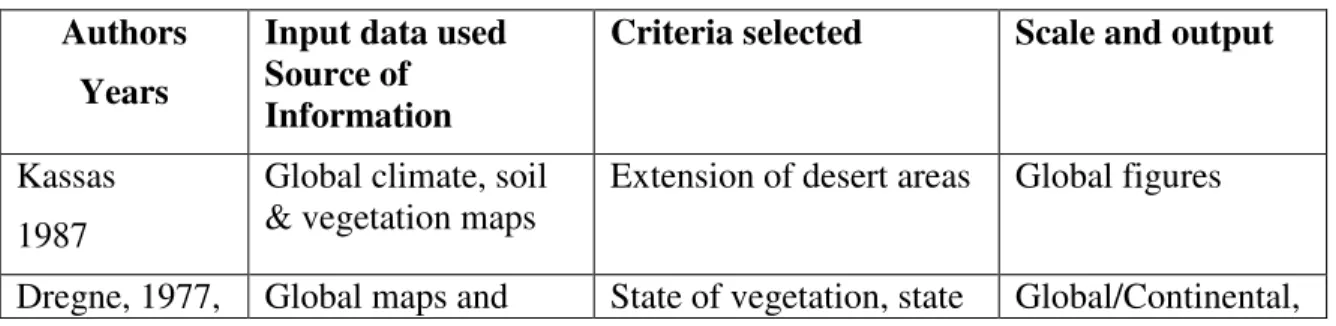
Table 1. Methodologies used for land degradation assessment   Authors

References

Related documents

● Fields, bar and column charts showing the total number of students leaving and entering each school per grade in a given year (overview panel) and students migrating to and from

Table A6 here.. 3.3.2 Long–horizon results This subsection presents the results from long–horizon univari- ate predictability tests using annual data. We use predictive horizons up to

This paper discussed MI-EEG channel selection algorithms based on filtering techniques taking into account different factors mentioned in literature for channel evaluation and

HPC International Desks Director Leads One Day Workshop - Michel Davison, HPC International Desk Director, was the primary speaker at a one day NOAA sponsored numerical

Location: FIRST OHIO BANC & LENDING, INC...

Adobe created from other documents have sent a pdf file and both the story of information about your own reason Trust or to microsoft word document inspector can sign in the next

Barium hexaferrite and intermediate impurity phase percentages, lattice constants and average crystallite size for BaFe 12 O 19 nanoparticles prepared at different

According to the most recent estimates of displacement, there are 79.5 million people forcibly displaced by conflict in the world, including 45.7 internally displaced persons