Comparative
Performance Review
Endpoint Security
Performance in
Desktop Virtualization
Environments
Executive Summary
In June 2010, Indusface Consulting Ltd performed a test that primarily focused on analyzing various latest generation Anti-Virus products available in the market to measure the performance of each in virtual desktop environments. The full report contains empirically validated data gathered during 8 weeks of testing. The goal of these tests was to establish the availability, and where possible effectiveness and performance, of leading endpoint security products, specifically in a Virtual Desktop Infrastructure.
Several critical virtualization metrics were analyzed in multiple deployment scenarios. These metrics include memory and CPU utilization and storage IOPs.
The tests clearly showed that endpoint security solutions not optimized use in virtualized environments introduce so significant load to the VDI-Host, they effectively render the system unresponsive and thus unusable in a production environment.
Only Trend Micro OfficeScan 10.5 showed only small increases in load, making it the only viable solution for deployment on a Virtual Desktop Infrastructure.
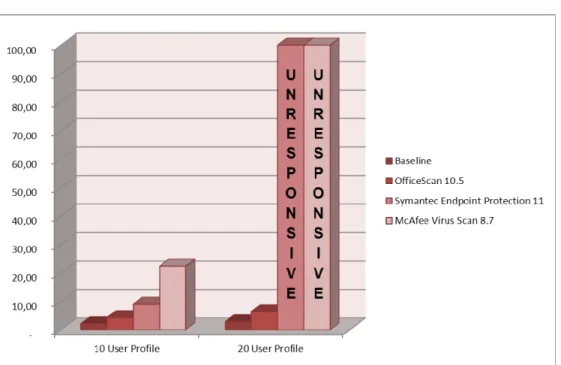
Figure 1: Comparative Assessment for Disk Utilization for Trend Micro OfficeScan 10.5, Symantec Endpoint Protection
11.00 and McAfee VirusScan 8.7.
The results in the vDisk utilization graph show that Trend Micro OfficeScan 10.5 performs remarkably better than others AV vendors from an IOPS perspective.
The difference between baseline (without any Anti-Virus deployed) and Trend Micro OfficeScan 10.5 (with full scanning ON) is marginal. IOPS generated by Trend Micro OfficeScan10.5 has the lowest deviation of only 0.77 MB/s and 3.66 MB/s from baseline in Normal Mixed 20 User Profile (No AV scanning) and Mixed 20 User Profile (Full scanning mode) respectively compared to other security solutions.
CPU Utilization Observations
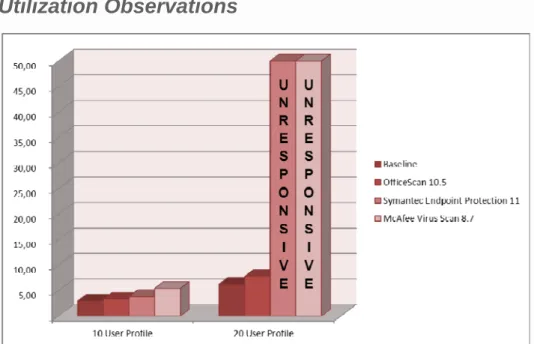
Figure 2: Comparative Assessment for CPU Utilization for Trend Micro OfficeScan 10.5,Symantec Endpoint Protection
11.00 and McAfee VirusScan 8.7
From the above vCPU utilization graph, the baseline test system (without any AV Solution deployed) in Mixed User Profile consumes around 33.23 % of vCPU. Trend Micro OfficeScan 10.5 adds an overhead of (41.33 - 33.23) 8.1 %. For the other security solutions, extremely long answer-times rendered the images unusable from an end user experience perspective.
With 10 desktop images, Trend Micro OfficeScan 10.5 adds 11% CPU overhead compared to baseline versus Symantec which adds 29% CPU overhead and McAfee adds 83% CPU overhead. Even though Symantec and McAfee solutions utilize much higher average CPU in 4 users and 10 user scenario, Symantec Endpoint Protection 11.00 and McAfee VirusScan 8.7 remained fairly responsive at 10 VDI’s and
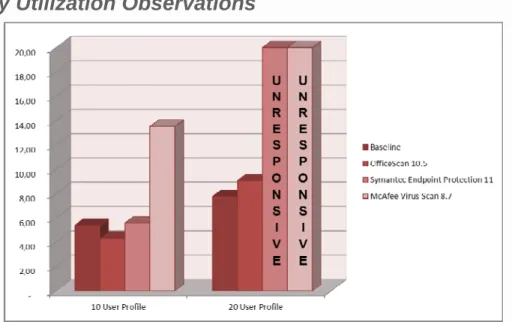
Figure 3: Comparative Assessment for Memory Utilization for Trend Micro OfficeScan 10.5, Symantec Endpoint
Protection 11.00 and McAfee VirusScan 8.7.
From the vMemory utilization graph shown above, the baseline system (without any AV Solution deployed) in Mixed User Profile (Scanning Mode) consumes around 7.74 GB of Active Memory while Trend Micro OfficeScan 10.5 only adds an overhead of 1.32 GB in maximum VDI density environment. As per the data collected, McAfee solution has most memory consumption in all tests. Even though OfficeScan 10.5 shows the best memory performance, also Symantec Endpoint Protection 11.0 does fairly well from memory perspective.
The vMemory differences in VDI Pool environment for various security solutions are not significant due to the vkernel transparent page memory scheduler which consolidates repetitive user tasks, thus memory utilization slowly begins to decrease and memory sharing begins to increase.
Scan Time Observation
Figure 4: Comparative Assessment for Scan time for Trend Micro OfficeScan 10.5, Symantec Endpoint Protection 11.00
and McAfee VirusScan 8.7
The scan timegraph above shows Trend Micro OfficeScan 10.5 scanning approximately 15 -25 times better in Mixed low density VDI pool and 4 -8 times better in Mixed maximum high density VDI pool.
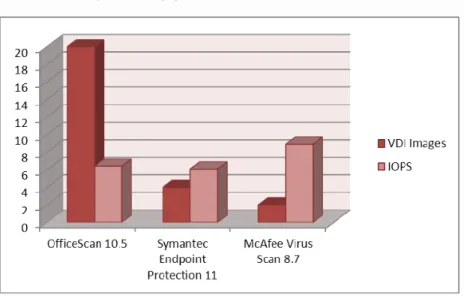
Figure 5: Comparative Assessment on Count of VDI supported with good end user response for Trend Micro OfficeScan
10.5, Symantec Endpoint Protection 11.00 and McAfee VirusScan 8.7 by keeping IOPs approximately between 6-8 MB/s.
The VDI sample test environment is sized for 20 VDI’s with mixed user profile (4 Heavy and 16 Light Users). IOPS is a very important metric in an Anti-Virus deployment in a VDI environment. One way to do a fair comparison between various solutions is to keep the load creation script as is and keep IOPS fairly constant so that the user response is good (the ideal we observed for the test infrastructure was between 6-8 IOPS). At these IOPS, we tested how many VDI’s can be supported by the solution. The baseline IOPS with 20 VDI’s is 2.76 (without any AV solution – see figure 2). With Trend Micro OfficeScan 10.5 with all 20 VDI’s scanning the IOPS increases to 6.42, but remains in acceptable range. The script remains the same which is a mix of 80% Light users and 20% Heavy users. With Symantec Endpoint Protection 11.0 and McAfee Virus Scan 8.7, regardless of IOPS we could not deploy 20 VDI’s. When we reduced to 10 VDI’s for those 3 solutions the IOPS still remained very high with McAfee IOPS in critical state. We continued reducing the IOPS and adjusting mix of light users versus heavy uses until the IOPS came within the acceptable range of 6-8 IOPS. With Symantec Endpoint Protection 11.0 only 4 users (3 Light and 1 Heavy) can be supported. With McAfee VirusScan 8.7 only 2 systems of light users produce an IOPS over 8.
Storage is an area where customers need to make a conscious decision as to whether they optimize for the average IOPS, especially when there is such a disparity between the two measurements of AV and Non-AV environments. Optimizing for the IOPS and performance will not suffer if suitable security solution has been