√r
Note: This is an example of comments, the more experienced programmer would probably miss out many of the above comments as the effect of the code is easily understandable.
Comments that do not add to a reader’s understanding of the program code should be avoided. In some circumstances the choice of meaning full names for memory locations is all that is required. As
begin
Deposit( My_Account, 100.00 );
Object-oriented Software in Ada 95 Second Edition
Michael A. Smith
CONTENTS ...IV
1.1 GLOSSARY OF TERMS USED...XV
1 INTRODUCTION TO PROGRAMMING...1
1.1 COMPUTER PROGRAMMING...1
1.2 PROGRAMMING LANGUAGES...1
1.3 RANGE OF PROGRAMMING LANGUAGES...2
1.3.1 Computer programming languages ...2
1.3.2 The role of a compiler ...2
1.4 A SMALL PROBLEM...3
1.5 SOLVING THE PROBLEM USING A CALCULATOR...3
1.5.1 Making the solution more general ...4
1.6 SOLVING THE PROBLEM USING THE ADA 95 LANGUAGE...4
1.6.1 Running the program...6
1.7 THE DECLARE BLOCK...6
1.8 THE ROLE OF COMMENTS...7
1.9 SUMMARY...8
1.10 A MORE DESCRIPTIVE PROGRAM...8
1.10.1 Running the new program ...9
1.11 TYPES OF MEMORY LOCATION...9
1.11.1 Warning ... 10
1.12 REPETITION...10
1.13 INTRODUCTION TO THE WHILE STATEMENT...11
1.13.1 Conditions ... 12
1.13.2 A while statement in Ada 95 ... 12
1.13.3 Using the while statement ... 13
1.14 SELECTION...14
1.14.1 Using the if statement ... 15
1.15 SELF-ASSESSMENT...16
1.16 PAPER EXERCISES...17
2 SOFTWARE DESIGN ...18
2.1 THE SOFTWARE CRISIS...18
2.2 A PROBLEM, THE MODEL AND THE SOLUTION...18
2.2.1 Responsibilities... 19
2.3 OBJECTS...19
2.3.1 The car as an object... 20
2.4 THE CLASS...21
2.5 METHODS AND MESSAGES...21
2.6 CLASS OBJECTS...21
2.7 INHERITANCE...22
2.8 POLYMORPHISM...23
2.9 SELF-ASSESSMENT...23
3 ADA INTRODUCTION: PART 1...25
3.1 A FIRST ADA PROGRAM...25
3.2 THE CASE OF IDENTIFIERS IN A PROGRAM...26
3.3 FORMAT OF AN ADA PROGRAM...26
3.3.1 Variable names ... 26
3.3.2 Comments ... 27
3.7.1 for... 29
3.7.2 loop... 30
3.8 OTHER SELECTION CONSTRUCTS...31
3.8.1 case ... 31
3.9 INPUT AND OUTPUT...32
3.10 ACCESS TO COMMAND LINE ARGUMENTS...33
3.10.1 Putting it all together ... 34
3.11 A BETTER CAT PROGRAM...34
3.11.1 Putting it all together ... 35
3.12 CHARACTERS IN ADA...35
3.13 SELF-ASSESSMENT...36
3.14 EXERCISES...37
4 ADA INTRODUCTION: PART 2...38
4.1 INTRODUCTION...38
4.2 THE TYPE FLOAT...38
4.2.1 Other Integer and Float data types... 39
4.3 NEW DATA TYPES...39
4.3.1 Type conversions... 40
4.3.2 Universal integer ... 40
4.3.3 Constant declarations ... 40
4.4 MODIFIED COUNTDOWN PROGRAM...41
4.5 INPUT AND OUTPUT IN ADA...41
4.6 THE PACKAGE ADA.FLOAT_TEXT_IO...41
4.6.1 Output of floating point numbers ... 42
4.6.2 Input of floating point numbers ... 42
4.7 THE PACKAGE ADA.INTEGER_TEXT_IO...42
4.7.1 Output of integer numbers... 42
4.7.2 Input of integer numbers... 43
4.8 CONVERSION BETWEEN FLOAT AND INTEGER TYPES...43
4.9 TYPE SAFETY IN A PROGRAM...44
4.10 SUBTYPES...44
4.10.1 Types vs. subtypes ... 45
4.11 MORE ON TYPES AND SUBTYPES...45
4.11.1 Root_Integer and Root_Real... 46
4.11.2 Type declarations: root type of type ... 46
4.11.3 Arithmetic with types and subtypes... 47
4.11.4 Warning ... 47
4.11.5 Constrained and unconstrained types ... 48
4.11.6 Implementation optimizations... 48
4.12 COMPILE-TIME AND RUN-TIME CHECKS...49
4.12.1 Subtypes Natural and Positive... 50
4.13 ENUMERATIONS...50
4.13.1 Enumeration values ... 51
4.13.2 The attributes 'Val and 'Pos... 51
4.14 THE SCALAR TYPE HIERARCHY...52
4.14.1 The inbuilt types ... 53
4.15 ARITHMETIC OPERATORS...53
4.15.1 Exponentiation ... 54
4.15.2 Monadic arithmetic operators ... 54
4.21 EXERCISES...59
5 PROCEDURES AND FUNCTIONS ...60
5.1 INTRODUCTION...60
5.2 FUNCTIONS...60
5.2.1 Local variables ... 61
5.2.2 Separate compilation of functions... 61
5.3 PROCEDURES...62
5.3.1 Separate compilation of procedures ... 63
5.4 FORMAL AND ACTUAL PARAMETERS...64
5.5 MODES OF A PARAMETER TO A FUNCTION OR PROCEDURE...64
5.5.1 Example of mode in out... 65
5.5.2 Putting it all together ... 65
5.5.3 Summary of access to formal parameters ... 66
5.6 RECURSION...66
5.6.1 The procedure Write_Natural... 67
5.6.2 Putting it all together ... 67
5.7 OVERLOADING OF FUNCTIONS...67
5.8 DIFFERENT NUMBER OF PARAMETERS...69
5.9 DEFAULT VALUES AND NAMED PARAMETERS...69
5.9.1 Putting it all together ... 70
5.10 SELF-ASSESSMENT...71
5.11 EXERCISES...71
6 PACKAGES AS CLASSES ...73
6.1 INTRODUCTION...73
6.2 OBJECTS, MESSAGES AND METHODS...74
6.3 OBJECTS, MESSAGES AND METHODS IN ADA...74
6.3.1 An object for a bank account ... 75
6.3.2 The procedure Statement... 76
6.3.3 Putting it all together ... 76
6.3.4 Components of a package... 76
6.3.5 Specification of the package ... 76
6.3.6 A class diagram showing a class... 78
6.3.7 Representation of the balance of the account ... 78
6.3.8 Implementation of the package... 78
6.3.9 Terminology ... 79
6.4 THE PACKAGE AS SEEN BY A USER...79
6.5 THE PACKAGE AS SEEN BY AN IMPLEMENTOR...79
6.6 THE CLASS...80
6.7 CLAUSES WITH AND USE...80
6.7.1 To use or not to use the use clause ... 81
6.7.2 The package Standard... 81
6.7.3 Positioning of with and use in a package declaration ... 81
6.7.4 Conflict in names in a package ... 82
6.8 MUTATORS AND INSPECTORS...82
6.9 TYPE PRIVATE...83
6.9.1 Type limited private... 83
6.10 INITIALIZING AN OBJECT AT DECLARATION TIME...84
6.10.1 By discriminant ... 84
6.10.2 Restrictions ... 85
6.10.3 By assignment ... 85
7 DATA STRUCTURES ...94
7.1 THE RECORD STRUCTURE...94
7.2 OPERATIONS ON A DATA STRUCTURE...94
7.2.1 Other operations allowed on data structures... 95
7.3 NESTED RECORD STRUCTURES...96
7.4 DISCRIMINANTS TO RECORDS...96
7.5 DEFAULT VALUES TO A DISCRIMINANT...97
7.5.1 Constrained vs. unconstrained discriminants ... 98
7.5.2 Restrictions on a discriminant ... 98
7.6 VARIANT RECORDS...98
7.7 LIMITED RECORDS...100
7.8 DATA STRUCTURE VS. CLASS...100
7.9 SELF-ASSESSMENT...100
7.10 EXERCISES...101
8 ARRAYS ... 102
8.1 ARRAYS AS CONTAINER OBJECTS...102
8.2 ATTRIBUTES OF AN ARRAY...104
8.3 A HISTOGRAM...104
8.3.1 Putting it all together ...107
8.4 THE GAME OF NOUGHTS AND CROSSES...108
8.4.1 The class Board ...109
8.4.2 Implementation of the game ...109
8.4.3 Displaying the Board...110
8.4.4 The class Board ...111
8.4.5 Putting it all together ...113
8.5 MULTIDIMENSIONAL ARRAYS...113
8.5.1 An alternative way of declaring multidimensional arrays...114
8.5.2 Attributes of multidimensional arrays ...115
8.6 INITIALIZING AN ARRAY...115
8.6.1 Multidimensional initializations...116
8.7 UNCONSTRAINED ARRAYS...117
8.7.1 Slices of an array ...117
8.7.2 Putting it all together ...118
8.8 STRINGS...118
8.9 DYNAMIC ARRAYS...119
8.9.1 Putting it all together ...119
8.10 A NAME AND ADDRESS CLASS...120
8.10.1 Putting it all together ...122
8.11 AN ELECTRONIC PIGGY BANK...122
8.12 SELF-ASSESSMENT...125
8.13 EXERCISES...126
9 CASE STUDY: DESIGN OF A GAME... 127
9.1 REVERSI...127
9.1.1 A program to play reversi...128
9.2 ANALYSIS AND DESIGN OF THE PROBLEM...128
9.3 CLASS DIAGRAM...130
9.4 SPECIFICATION OF THE ADA CLASSES...130
9.5 IMPLEMENTATION OF THE MAIN CLASS GAME...132
10.1 INTRODUCTION...147
10.2 TAGGED TYPES...148
10.2.1 Terminology ...148
10.3 THE CLASS INTEREST_ACCOUNT...148
10.3.1 Terminology ...152
10.4 VISIBILITY RULES (NORMAL INHERITANCE)...152
10.5 CONVERTING A DERIVED CLASS TO A BASE CLASS...152
10.6 ABSTRACT CLASS...153
10.6.1 Putting it all together ...155
10.6.2 Visibility of base class methods...156
10.7 MULTIPLE INHERITANCE...156
10.7.1 Putting it all together ...159
10.8 INITIALIZATION AND FINALIZATION...159
10.8.1 Implementation...161
10.8.2 Putting it all together ...162
10.8.3 Warning ...162
10.9 HIDING THE BASE CLASS METHODS...163
10.9.1 Visibility rules (Hidden base class) ...164
10.9.2 Putting it all together ...164
10.10 SELF-ASSESSMENT...164
10.11 EXERCISES...165
11 CHILD LIBRARIES ... 166
11.1 INTRODUCTION...166
11.1.1 Putting it all together ...167
11.1.2 Warning ...167
11.2 VISIBILITY RULES OF A CHILD PACKAGE...168
11.3 PRIVATE CHILD...169
11.3.1 Visibility rules of a private child package ...169
11.4 CHILD PACKAGES VS. INHERITANCE...169
11.5 SELF-ASSESSMENT...170
11.6 EXERCISES...170
12 DEFINING NEW OPERATORS... 171
12.1 DEFINING OPERATORS IN ADA...171
12.2 A RATIONAL ARITHMETIC PACKAGE...172
12.2.1 Ada specification of the package...172
12.2.2 Ada implementation of the package...173
12.3 A BOUNDED STRING CLASS...176
12.3.1 Overloading = and /=...177
12.3.2 Specification of the class Bounded_String...177
12.3.3 Putting it all together ...180
12.3.4 Ada.Strings.Bounded a standard library ...180
12.3.5 use type...181
12.4 SELF-ASSESSMENT...181
12.5 EXERCISES...181
13 EXCEPTIONS... 183
13.1 THE EXCEPTION MECHANISM...183
13.2 RAISING AN EXCEPTION...184
13.3 HANDLING ANY EXCEPTION...184
13.4 THE CAT PROGRAM REVISITED...186
14 GENERICS ... 191
14.1 GENERIC FUNCTIONS AND PROCEDURES...191
14.1.1 Advantages and disadvantages of generic units ...193
14.2 SPECIFICATION OF GENERIC COMPONENT...194
14.3 GENERIC STACK...195
14.3.1 Putting it all together ...197
14.3.2 Implementation techniques for a generic package...198
14.4 GENERIC FORMAL SUBPROGRAMS...198
14.4.1 Example of the use of the generic procedure G_3Order...200
14.4.2 Summary ...200
14.5 SORTING...201
14.5.1 Efficiency ...201
14.6 A GENERIC PROCEDURE TO SORT DATA...202
14.6.1 Putting it all together ...203
14.6.2 Sorting records...203
14.7 GENERIC CHILD LIBRARY...204
14.7.1 Putting it all together ...206
14.8 INHERITING FROM A GENERIC CLASS...206
14.8.1 Putting it all together ...207
14.9 SELF-ASSESSMENT...208
14.10 EXERCISES...208
15 DYNAMIC MEMORY ALLOCATION... 209
15.1 ACCESS VALUES...209
15.1.1 Access to an object via its access value ...210
15.1.2 Lvalues and rvalues ...210
15.1.3 Read only access ...211
15.2 DYNAMIC ALLOCATION OF STORAGE...212
15.2.1 Problems with dynamically allocated storage ...215
15.3 RETURNING DYNAMICALLY ALLOCATED STORAGE...215
15.3.1 Summary: access all, access constant, access...216
15.4 USE OF DYNAMIC STORAGE...216
15.4.1 Putting it all together ...219
15.5 HIDING THE STRUCTURE OF AN OBJECT (OPAQUE TYPE)...220
15.5.1 Putting it all together ...222
15.5.2 Hidden vs. visible storage in a class...223
15.6 ACCESS VALUE OF A FUNCTION...223
15.6.1 Putting it all together ...224
15.7 ATTRIBUTES 'ACCESS AND 'UNCHECKED_ACCESS...225
15.8 SELF-ASSESSMENT...226
15.9 EXERCISES...226
16 POLYMORPHISM... 227
16.1 ROOMS IN A BUILDING...227
16.1.1 Dynamic binding ...228
16.2 A PROGRAM TO MAINTAIN DETAILS ABOUT A BUILDING...228
16.2.1 Putting it all together ...231
16.3 RUN-TIME DISPATCH...232
16.4 HETEROGENEOUS COLLECTIONS OF OBJECTS...232
16.4.1 An array as a heterogeneous collection...233
16.8.1 Converting a base class to a derived class...239
16.9 THE OBSERVE-OBSERVER PATTERN...240
16.9.1 The Observer’s responsibilities ...241
16.9.2 The responsibilities of the observable object ...241
16.9.3 Putting it all together ...242
16.10 USING THE OBSERVE-OBSERVER PATTERN...244
16.10.1 The observed board object ...244
16.10.2 An observer for the class Board...246
16.10.3 The driver code for the program of nought and crosses ...246
16.11 SELF-ASSESSMENT...247
16.12 EXERCISES...248
17 CONTAINERS ... 249
17.1 LIST OBJECT...249
17.1.1 List vs. array...251
17.2 METHODS IMPLEMENTED IN A LIST...251
17.2.1 Example of use ...251
17.3 SPECIFICATION AND IMPLEMENTATION OF THE LIST CONTAINER...253
17.3.1 The list iterator...256
17.3.2 Relationship between a list and its iterator...260
17.4 LIMITATIONS OF THE LIST IMPLEMENTATION...260
17.5 REFERENCE COUNTING...262
17.6 IMPLEMENTATION OF A REFERENCE COUNTING SCHEME...264
17.6.1 Ada specification...265
17.6.2 Ada implementation...266
17.6.3 Putting it all together ...268
17.7 A SET...269
17.7.1 Putting it all together ...271
17.8 SELF-ASSESSMENT...271
17.9 EXERCISES...272
18 INPUT AND OUTPUT... 273
18.1 THE INPUT AND OUTPUT MECHANISM...273
18.1.1 Putting it all together ...274
18.2 READING AND WRITING TO FILES...275
18.3 READING AND WRITING BINARY DATA...276
18.4 SWITCHING THE DEFAULT INPUT AND OUTPUT STREAMS...278
18.4.1 Putting it all together ...278
18.5 SELF-ASSESSMENT...279
18.6 EXERCISES...279
19 PERSISTENCE... 280
19.1 A PERSISTENT INDEXED COLLECTION...280
19.1.1 Putting it all together ...282
19.1.2 Setting up the persistent object ...282
19.2 THE CLASS PIC...282
20 TASKS ... 289
20.1 THE TASK MECHANISM...289
20.1.1 Putting it all together ...290
20.1.2 Task rendezvous ...291
20.1.3 The task’s implementation...292
20.5.1 Barrier condition entry ...298
20.5.2 Putting it all together ...300
20.6 DELAY...300
20.7 CHOICE OF ACCEPTS...300
20.7.1 Accept alternative ...301
20.7.2 Accept time-out...301
20.8 ALTERNATIVES TO A TASK TYPE...302
20.8.1 As part of a package ...302
20.8.2 As part of a program unit ...304
20.9 SELF-ASSESSMENT...304
20.10 EXERCISES...305
21 SYSTEM PROGRAMMING... 306
21.1 REPRESENTATION CLAUSE...306
21.1.1 Putting it all together ...307
21.2 BINDING AN OBJECT TO A SPECIFIC ADDRESS...307
21.2.1 Access to individual bits ...308
21.3 SELF-ASSESSMENT...310
21.4 EXERCISES...310
22 A TEXT USER INTERFACE... 311
22.1 SPECIFICATION...311
22.2 API FOR TUI...312
22.2.1 To set up and close down the TUI ...312
22.2.2 Window API calls ...313
22.2.3 Dialog API calls ...313
22.2.4 User interaction with the TUI ...314
22.2.5 Classes used ...314
22.3 AN EXAMPLE PROGRAM USING THE TUI...314
22.3.1 How it all fits together ...316
22.3.2 Putting it all together ...317
22.4 THE MENU SYSTEM...317
22.5 NOUGHTS AND CROSSES PROGRAM...320
22.5.1 The class Board...320
22.5.2 Package Pack_Program...322
22.5.3 Putting it all together ...326
22.6 SELF-ASSESSMENT...326
22.7 EXERCISES...327
23 TUI: THE IMPLEMENTATION ... 328
23.1 OVERVIEW OF THE TUI ...328
23.1.1 Structure of the TUI ...329
23.2 IMPLEMENTATION OF THE TUI...329
23.2.1 Constants used in the TUI...330
23.2.2 Raw input and output ...330
23.2.3 Machine-dependent I/O...331
23.2.4 The class Screen...333
23.3 THE CLASS ROOT_WINDOW...334
23.4 THE CLASSES INPUT_MANAGER AND WINDOW_CONTROL...335
23.4.1 Specification of the class Input_manager...335
23.6.3 The specification for the class Window...341
23.6.4 Implementation of the class Window...343
23.7 THE CLASS DIALOG...348
23.7.1 Implementation of the class Dialog...349
23.8 THE CLASS MENU...350
23.8.1 Implementation of the class Menu...352
23.9 THE CLASS MENU_TITLE...354
23.9.1 Implementation of the class Menu_title...354
23.10 SELF-ASSESSMENT...355
23.11 EXERCISES...355
24 SCOPE OF DECLARED OBJECTS ... 357
24.1 NESTED PROCEDURES...357
24.1.1 Advantages of using nested procedures ...359
24.1.2 Introducing a new lexical level in a procedure or function ...359
24.1.3 Holes in visibility ...359
24.1.4 Consequences of lexical levels...359
24.2 SELF-ASSESSMENT...360
25 MIXED LANGUAGE PROGRAMMING... 361
25.1 LINKING TO OTHER CODE...361
25.2 SELECTED TYPES AND FUNCTIONS FROM INTERFACES.C...361
25.2.1 Integer, character and floating point types ...361
25.2.2 C String type ...361
25.2.3 Selected functions...361
25.3 AN ADA PROGRAM CALLING A C FUNCTION...362
25.3.1 Another example ...363
25.4 AN ADA PACKAGE IN C...363
25.5 LINKING TO FORTRAN AND COBOL CODE...365
APPENDIX A: THE MAIN LANGUAGE FEATURES OF ADA 95... 366
SIMPLE OBJECT DECLARATIONS...366
ARRAY DECLARATION...366
TYPE AND SUBTYPE DECLARATIONS...366
ENUMERATION DECLARATION...366
SIMPLE STATEMENTS...366
BLOCK...366
SELECTION STATEMENTS...366
LOOPING STATEMENTS...367
ARITHMETIC OPERATORS...367
CONDITIONAL EXPRESSIONS...367
EXITS FROM LOOPS...367
CLASS DECLARATION AND IMPLEMENTATION...368
INHERITANCE...368
PROGRAM DELAY...369
TASK...369
COMMUNICATION WITH A TASK...369
RENDEZVOUS...369
PROTECTED TYPE...370
APPENDIX B: COMPONENTS OF ADA ... 371
B.1 RESERVED WORDS AND OPERATORS IN ADA 95...371
B.2.3 Scalar objects and types ...372
B.2.4 Discrete objects ...372
B.2.5 Task objects and types...372
B.2.6 Floating point objects and types ...372
B.3 LITERALS IN ADA...373
B.4 OPERATORS IN ADA 95...373
B.4.1 Priority of operators from high to low ...374
B.5 ADA TYPE HIERARCHY...374
B.6 IMPLEMENTATION REQUIREMENTS OF STANDARD TYPES...375
B.7 EXCEPTIONS...375
B.7.1 Pre-defined exceptions...375
B.7.2 I/O exceptions...376
B.8 ADA 95, THE STRUCTURE...376
B.9 SOURCES OF INFORMATION...376
B.8.1 Copies of the Ada 95 compiler...376
B.8.2 Ada information on the World Wide Web ...377
B.8.3 News groups...377
B.8.4 CD ROMs...377
B.8.5 Additional information on this book ...377
APPENDIX C: LIBRARY FUNCTIONS AND PACKAGES... 378
C.1 GENERIC FUNCTION UNCHECKED_CONVERSION...378
C.2 GENERIC FUNCTION UNCHECKED_DEALLOCATION...378
C.4 THE PACKAGE STANDARD...378
C.5 THE PACKAGE ADA.TEXT_IO...382
C.6 THE PACKAGE ADA.SEQUENTIAL_IO...389
C.7 THE PACKAGE ADA.CHARACTERS.HANDLING...390
C.8 THE PACKAGE ADA.STRINGS.BOUNDED...391
C.9 THE PACKAGE INTERFACES.C...397
C.10 THE PACKAGE ADA.NUMERICS...399
C.11 THE PACKAGE ADA.NUMERICS.GENERIC_ELEMENTARY_FUNCTIONS...399
C.12 THE PACKAGE ADA.COMMAND_LINE...400
C.13 THE PACKAGE ADA.FINALIZATION...400
C.14 THE PACKAGE ADA.TAGS...401
C.15 THE PACKAGE ADA.CALENDAR...401
C.16 THE PACKAGE SYSTEM...402
APPENDIX D: ANSWERS TO SELECTED EXERCISES ... 404
FROM CHAPTER 2 ...404
FROM CHAPTER 3 ...405
FROM CHAPTER 4 ...407
FROM CHAPTER 5 ...408
FROM CHAPTER 6 ...410
FROM CHAPTER 9 ...411
FROM CHAPTER 13 ...413
FROM CHAPTER 14 ...415
FROM CHAPTER 19 ...417
REFERENCES ... 419
This book is aimed at students and programmers who wish to learn the object-oriented language Ada 95. The book illustrates the language by showing how programs can be written using an object-oriented approach. The book treats Ada 95 as a language in its own right and not just as an extension to Ada 83.
The first chapter provides an introduction to problem solving using an object-oriented design methodology. The methodology illustrated in this introductory chapter is based on Fusion.
The next three chapters concentrate on the basic constructs in the Ada 95 language. In particular the use of types and subtypes is encouraged. By using types and subtypes in a program the compiler can help spot many errors and inconsistencies at compile-time rather than run-time.
The book then moves on to discuss the object-oriented features of the language, using numerous examples to illustrate the ideas of encapsulation, inheritance and polymorphism. A detailed case study of the design and implementation of a program using an object-oriented design methodology is included.
An introduction to the tasking features of Ada is included. Finally a text user interface API is developed to illustrate in a practical way the use of object-oriented components in a program. Several programs that use this interface are shown to illustrate the processes involved.
Exercises and self assessment questions are suggested for the reader at the end of each chapter to allow the reader to practise the use of the Ada components illustrated and to help reinforce, the reader's understanding of the material in the chapter. Answers to many of the practical exercises are given at the end of the book.
I would in particular like to thank Corinna for putting up with my many long hours in the ‘computer room’ and her many useful suggestions on the presentation and style used for the material in this book.
Website
Support material for the book can be found on the Authors website:
http:// www.it.brighton.ac.uk/~mas. The material consists of further solutions, source code, artwork and general information about Ada 95.
Michael A. Smith Brighton, May 2001
The example programs shown in this book use the following conventions:
Item in program Example Convention used
Attribute of an object or type
Integer'Last Starts with an upper-case letter.
Class package Class_cell i s type Cell is
private
private
end Class_cell;
Is declared as a package prefixed with the name ‘Class_’. The class name is given to the private type that is then used to elaborate instances of the class.
Instance method: function or procedure
Display(The:in Cell) The function or procedure is in lowercase and the first parameter passed to it is an instance of the class which is named the.
Instance attribute: a data item contained in an object.
Balance: Float; Starts with an upper-case letter in the private part of the package.
Class attribute: a global data item that is shared between all instances of the class
The_Count: Integer; Starts with The_ and is declared in the private part of the package.
Constant or enumeration
Max Starts with an upper-case letter.
Function or procedure Deposit Starts with an upper-case letter..
Package Pack_Account Starts with ‘Pack_’.
Formal parameter Amount Starts with an upper-case letter.
Protected type protected type PT_Ex is
entry Put(i:in T); entry get(i:out T);
end PT_ex;
Starts with ‘PT_’
Reserved word procedure Is in bold lower-case.
Task type task type Task_Ex is entry Start;
end Task_Ex;
Starts with ‘Task_’.
Type or subtype Colour Starts with an upper-case letter.
Variable name Mine P_Ch
Starts with an upper-case letter.. An access value for an item will start with ‘P_’.
Actual parameter
The physical object passed to a function, procedure, entry or generic unit. For example, in the following statement the actual parameter to the procedure Put is Number.
Print( Number );
Ada 83 The version of the language that conforms to ANSI/MIL-STD 1815A ISO/IEC 8652:1983, 1983. Ada 83 is superseded by Ada 95. The language is named after Ada Augusta the Countess of Lovelace, daughter of the poet Lord Byron and Babbage's ‘programmer’.
Ada 95 The version of the language that conforms to ANSI/ISO/IEC 8652:1995, January 1995. The ISO standard was published on 15th February 1995. Ada 95 is now often referred to as Ada
Ada class In Ada the terminology class is used to describe a set of types. To avoid confusion this will be termed an Ada class.
Allocator An allocator is used to claim storage dynamically from a storage pool. For example, storage for an Integer is allocated dynamically with:
P_Int := new Integer;
Base class A class from which other classes are derived.
Class The specification of a type and the operations that are performed on an instance of the type. A class is used to create objects that share a common structure and behaviour.
The specification of a class Account is as follows:
package Class_Account is type Account is private; subtype Money is Float;
function Balance ( The:in Account ) return Money; -- Other methods on an instance of an Account private
type Account is record
Balance_Of : Money := 0.00; --Amount in account end record;
Class attribute A data component that is shared between all objects in the class. In effect it is a global variable which can only be accessed by methods in the class. A class attribute is declared in the private part of the package representing the class. For example, the class attribute The_Interest_Rate in the class
Interest_Account is declared in the private part of the package as follows:
package Class_Interest_Account is type Interest_Account is private;
procedure Set_Rate( Rate:in Float );
private
type Interest_Account is new Account with record Balance_Of : Money := 0.00;
Accumulated_Interest : Money := 0.00; end record;
The_Interest_Rate : Float := 0.00026116; end Class_Interest_Account;
Class method A procedure or function in a class that only accesses class attributes. For example, the method Set_Rate in the class Interest_Account which sets the class attribute The_Interest_Rate is as follows:
procedure Set_Rate( Rate:in Float ) is begin
The_Interest_Rate := Rate; end Set_Rate;
Note: As Set_Rate is a class method an instance of the class is not passed to the procedure.
Controlled object
An object which has initialization, finalization and adjust actions defined. A limited controlled object only has initialization and finalization defined as assignment is prohibited.
Discriminant The declaration of an object may be parameterized with a value. The value is a discriminant to the type. For example, the declaration of corinna is parameterized with the length of her name.
type Person( Chs:Str_Range := 0 ) is record Name : String( 1 .. Chs );
Height : Height_Cm := 0; Sex : Gender;
end record;
Corinna : Person(7);
Elaboration At run-time the elaboration of a declaration creates the storage for an object. For example:
Mike : Account;
creates storage at run-time for the object Mike.
Encapsulation The provision of a public interface to a hidden (private) collection of data procedures and functions that provide a coherent function
Formal parameter
In a procedure, function, entry or generic unit the name of the item that has been passed. For example, in the procedure print shown below the formal parameter is Value.
procedure Print( Value:in Integer ) is begin
-- body end print;
Generic A procedure, function or package which is parameterized with a type or types that are used in the body of the unit. The generic unit must first be
instantiated as a specific instance before it can be used. For example, the package Integer_Io in the package Ada.Text_Io is parameterized with the integer type on which I/O is to be performed. This generic unit must be instantiated with a specific integer type before it can be used in a program.
Inheritance The derivation of a class (derived class) from an existing class (base class). The derived class will have the methods and instance/class attributes in the class plus the methods and instance/class attributes defined in the base class. In Ada this is called programming by extension.
The class Interest_Account that is derived from the class Account is specified as follows:
with Class_Account; use Class_Account;
package Class_Interest_Account is
type Interest_Account is new Account with private;
procedure Set_Rate( Rate:in Float ); procedure Calc_Interest( The:in out
Interest_Account ); private
Daily_Interest_Rate: constant Float := 0.00026116; type Interest_Account is new Account with record Accumulated_Interest : Money := 0.00
end record;
Instance attribute
A data component contained in an object. In Ada the data components are contained in a record structure in the private part of the package.
type Account is record
Balance_Of : Money := 0.00; --Instance attribute end record;
Instance method A procedure of function in a class that accesses the instance attributes (data items) contained in an object. For example, the method Balance accesses the instance attribute Balance_Of.
function Balance( The:in Account ) return Money is begin
return The.Balance_Of; end Balance;
Instantiation The act of creating a specific instance of a generic unit. For example, the generic package Integer_Io in the package Ada.Text_Io can be instantiated to deliver the package Pack_Mark_Io which performs I/O on the integer type Exam_Mark as follows:
type Exam_Mark is range 0 .. 100;
package Pack_Mark_Io is new
Ada.Text_Io.Integer_Io(Exam_Mark);
Then a programmer can write
Miranda : Exam_Mark;
Pack_Mark_Io.Put( Miranda );
to write the contents of the Integer object Miranda.
Message The sending of data values to a method that operates on an object. For example, the message 'deposit £30 in account Mike' is written in Ada as:
Deposit( Mike, 30 );
Note: The object to which the message is sent is the first parameter.
Meta-class An instance of a meta-class is a class. Meta-classes are not supported in Ada.
Object An instance of a class. An object has a state that is interrogated / changed by methods in the class. The object mike that is an instance of Account is declared as follows:
Mike: Account;
Overloading When an identifier can have several different meanings. For example, the procedure Put in the package Ada.Text_Io has several different meanings. Output an instance of a Character, output an instance of a
String.
Put("Hello Worl"); Put('d' );
Overriding
Polymorphism The ability to send a message to an object whose type is not known at compile-time. The method selected depends on the type of the receiving object. For example the message 'Display' is sent to different types of picture elements that are held in an array.
Display( Picture_Element(I) );
Rendezvous The interaction that occurs when two tasks meet to synchronize and possibly exchange information.
Representation clause
Directs the compiler to map a program item onto specific hardware features of a machine. For example, location is defined to be at address
16#046C#.
Mc_Address : constant Address := To_Address( 16#046C# );
Location : Integer;
for Location'Address use Mc_Address;
Static binding The binding between an object and the message that it is sent to it is known at compile-time.
Type A type defines a set of values and the operations that may be performed on those values. For example, the type Exam_Mark defines the values that may be given for an exam in English.
type Exam_Mark is range 0 .. 100;
1
Introduction to programming
A computer programming language is used by a programmer to express the solution to a problem in terms that the computer system can understand. This chapter looks at how to solve a small problem using the computer programming language Ada 95.
1.1
Computer programming
Solving a problem by implementing the solution using a computer programming language is a meticulous process. In essence the problem is expressed in terms of a very stylized language in which every detail must be correct. However, this is a rewarding process both in the sense of achievement when the program is completed, and usually the eventual financial reward obtained for the effort.
Like the planet on which we live where there are many different natural languages, so the computer world also has many different programming languages. The programming language Ada 95 is just one of the many computer programming languages used today.
1.2
Programming languages
In the early days of computing circa 1950s, computer programs had to be written directly in the machine instructions of the computer. Soon assembly languages were introduced that allowed the programmer to write these instructions symbolically. An assembler program would then translate the programmer’s symbolic instructions into the real machine code instructions of the computer. For example, to calculate the cost of a quantity of apples using an assembly language the following style of symbolic instructions would be written by a programmer:
LDA AMOUNT_OF_OF_APPLES ; Load into the accumulator # pounds MLT PRICE_PER_POUND ; Multiply by cost per pound of apples STA COST_OF_APPLES ; Save result
Note: Each assembly language instruction corresponds to a machine code instruction.
In the period 1957—1958 the first versions of the high-level languages FORTRAN & COBOL were developed. In these high-level programming languages programmers could express many ideas in terms of the problem rather than in terms of the machine architecture. A compiler for the appropriate language would translate the programmer’s high level statements into the specific machine code instructions of the target machine. Advantages of the use of a compiler include:
l Gains in programmer productivity as the solution is expressed in terms of the problem rather than in terms of the machine.
l If written correctly, programs may be compiled into the machine instructions of many different machines. Hence, the program may be moved between machines without having to be re-written.
1.3
Range of programming languages
Since the early days of computer programming languages the number and range of high level languages has multiplied greatly. However, many languages have also effectively died through lack of use. A simplistic classification of the current paradigms in programming languages is shown in the table below:
Type of language Brief characteristics of the language Example
Functional The problem is decomposed into individual functions. To a function is passed read only data values which the function transforms into a new value. A function itself may also be passed as a parameter to a function. As the input data to a function is unchanged individual functions may be executed simultaneously as soon as they have their input data.
ML
Logic The problem is decomposed into rules specifying constraints about a world view of the problem.
Prolog
Object-oriented The problem is decomposed into interacting objects. Each object encapsulates and hides methods that manipulate the hidden state of the object. A message sent to an object evokes the encapsulated method that then performs the requested task.
Ada 95 Eiffel Java Smalltalk
Procedural The problem is decomposed into individual procedures or subroutines. This decomposition is usually done in a top down manner. In a top down approach, once a section of the problem has been identified as being implementable by a procedure, it too is broken down into individual procedures. The data however, is not usually part of this decomposition.
C Pascal
1.3.1
Computer programming languages
A computer programming language is a special language in which a high level description of the solution to a problem is expressed. However, unlike a natural language, there can be no ambiguity or error in the description of the solution to the problem. The computer is unable to work out what was meant from an incorrect description. For example, in the programming language Ada 95, to print the result of multiplying 10 by 5 the following programming language statement is written:
Put( 10 * 5 );
To the non programmer this is not an immediately obvious way of expressing: print the answer to 10 multiplied by 5.
1.3.2
The role of a compiler
they expected. The computer obeys the programming language statements exactly. However, in their formulation the novice programmer has formulated a solution that does not solve the problem correctly.
1.4
A small problem
A local orchard sells some of its rare variety apples in its local farm shop. However, the farm shop has no electric power and hence uses a set of scales which just give the weight of the purchased product. A customer buying apples, fills a bag full of apples and takes the apples to the shop assistant who weighs the apples to determine their weight in kilograms and then multiples the weight by the price per kilogram.
If the shop assistant is good at mental arithmetic they can perform the calculation in their head, or if mental arithmetic is not their strong point they can use an alternative means of determining the cost of the apples.
1.5
Solving the problem using a calculator
For example, to solve the very simple problem of calculating the cost of 5.2 kilos of apples at £1.20 a kilo using a pocket calculator the following 4 steps are performed:
Pocket calculator Step Steps performed
1
2
3
4
5
6
+
-7
8
9
0
.
S
M
/
*
6.24
C
=
1
2
3
4
Enter the cost of a kilo of apples:
C 1 . 2 0
Enter the operation to be performed:
*
Enter the number of kilos to be bought:
5 . 2
Enter calculate
=
Note: The keys on the calculator are:
C Clear the display and turn on the calculator if off S Save the contents of the display into memory M Retrieve the contents of the memory
+ - * / Arithmetic operations
* Multiply / Division
+ plus - minus
= Calculate
1.5.1 Making the solution more general
The calculation using the pocket calculator can be made more general by storing the price of the apples in the calculator's memory. The price of a specific amount of apples can then be calculated by retrieving the stored price of the apples and multiplying this retrieved amount by the quantity required. For example, to setup the price of apples in the calculator's memory and calculate the cost of 4.1 kilos of apples, the process is as follows:
Pocket calculator Step Steps performed
1
2
3
4
5
6
+
-7
8
9
0
.
S
M
/
*
4.92
C
=
1
2
3
4
5
6
Enter the cost of a kilo of apples:
C 1 . 2 0
Save this value to the calculator’s memory:
S
Retrieve the value from memory:
M
Enter the operation to be performed:
*
Enter the number of kilos to be bought: 4 . 1
Enter calculate =
To calculate the price for each customer’s order of apples, only steps 3—6 need be repeated. In essence, a generalized solution to the problem of finding the price of any quantity of apples has been defined and implemented.
1.6
Solving the problem using the Ada 95 language
To solve the problem of calculating the cost of a quantity of apples using the programming language Ada 95, a similar process to that used previously when using a pocket calculator is followed. This time, however, the individual steps are as follows:
Step Description
1 Set the memory location Price_per_kilo to the cost per kilogram of the apples.
2 Set the memory location Kilos_of_apples to the kilograms of apples required.
3 Set the memory location Cost to the result of multiplying the contents of memory location Price_per_kilo by the contents of the memory location
Kilos_of_apples.
4 Print the contents of the memory location Cost.
Note: Although a shorter sequence of steps can be written to calculate 1.2 multiplied by 5.2 the above solution can easily be extended to allow the price of any number of kilograms of apples to be calculated.
In Ada 95 like most programming languages when a memory location is required to store a value, it must first be declared. This is done for many reasons, some of these reasons are:
l The programmer does not accidentally store a value into a memory location C0st when they meant Cost. The programmer accidentally typed zero (0) when they meant the letter (o). The sequence of steps written in pseudo English is transformed into the following individual Ada 95 statements which, when obeyed by a computer, will display the cost of 5.2 kilograms of apples at £1.20 a kilogram.
Step Line Ada 95 statements
1 2
3
4
1 2 3
4 5
6
7
8
Price_per_kilo : Float; Kilos_of_apples : Float; Cost : Float;
Price_per_kilo := 1.20; Kilos_of_apples := 5.2;
Cost:= Price_per_kilo*Kilos_of_apples;
Put( Cost );
New_Line;
Note: Words in bold type are reserved words in the Ada 95 language and cannot be used for the name of a memory location.
The name of the memory location contains the character _ to make the name more readable. Spaces in the name of a memory location are not allowed.
Each Ada 95 statement is terminated with a ;. Multiplication is written as *.
The individual lines of code of the Ada 95 program are responsible for the following actions:
Line Description 1
2—3
4
5
6
7
8
Allocates a memory location calledPrice_per_kilothat is used to store the price per kilogram of apples. This memory location is of type
Float and can hold any number that has decimal places. Allocates memory locations: Kilos_of_applesand Cost.
Sets the contents of the memory location Price_per_kilo to 1.20. The := can be read as 'is assigned the value'.
Assign 5.2 to memory location Kilos_of_apples.
Sets the contents of the memory location Cost to the contents of the memory location Price_per_kilo multiplied by the contents of the memory location Kilos_of_apples.
Writes the contents of the memory location Costonto the computer screen.
An animation of the above Ada 95 program is shown below. In the animation the contents of the memory locations are shown after each individual Ada 95 statement is executed. When a memory location is declared in Ada 95 inside a function its initial contents are undefined.
Ada 95 statements price kilos Cost
Price_per_kilo : Float; Kilos_of_apples : Float; Cost : Float;
U
U
U
Price_per_kilo := 1.20;
1.20
U
U
Kilos_of_apples := 5.2;
1.20
5.2
U
Cost := Price_per_kilo *
Kilos_of_apples;
1.20
5.2
6.24
Put( Cost );1.20
5.2
6.24
Note: U indicates that the contents of the memory location are undefined.
Due to lack of room in the title column the variable Price_per_kilo is represented by price
and Kilos_of_apples by kilos.
1.6.1
Running the program
The above lines of code, though not a complete Ada 95 program, form the core code for such a program. When this code is augmented with additional peripheral code, compiled and then run, the output produced will be of the form:
6.24
A person who knows what the program does, will instantly know that this represents the price of 5.2 kilograms of apples at £1.20 a kilogram. However, this will not be obvious to a casual user of the program.
1.7
The
declare
block
In Ada a declaration is separated from an executable statement. One way of expressing this split is the declare
block that is specified as follows:
declare
Cost : Float; begin
Cost := 5.2 * 1.20; Put( Cost );
end;
The section of a declare block are illustrated below in Figure 1.1
Declare
Cost : Float;
Begin
Cost := 5.2 * 1.20; Put( Cost );
end;
Declaration of variables used in the code section.
Executable code
Figure 1.1 The declare block in Ada.
1.8
The role of comments
To make an Ada 95 program easier to read, comments may be placed in the program to aid the human reader of the program. A comment starts with -- and extends to the end of the line. It is important however, to realize that the comments you write in a program are completely ignored by the computer when it comes to run your program. For example, the previous fragment of code could be annotated with comments as follows:
declare
Price_Per_Kilo : Float; --Price of apples Kilos_Of_Apples : Float; --Apples required Cost : Float; --Cost of apples begin
Price_Per_Kilo := 1.20; --Set cost £1.20 Kilos_Of_Apples := 5.2; --Kilos required
Cost := Price_Per_Kilo * Kilos_Of_Apples; --Evaluate cost Put( Cost ); --print the cost New_Line; --Print a new-line end;
Note: This is an example of comments, the more experienced programmer would probably miss out many of the above comments as the effect of the code is easily understandable.
1.9
Summary
The statements in the Ada 95 programming language seen so far are illustrated in the table below:
Ada 95 statement/declaration Description
Cost : Float; Declare a memory location called cost.
Cost := 1.2 * 5.2; Assign to the memory location cost the result of evaluating 1.2 multiplied by 5.2.
Put( "Hi!" ); Print the message Hi!.
Put( Cost ); New_Line; Print the contents of the memory location
Cost followed by a newline.
Statements of this form allow a programmer to write many different and useful programs.
1.10
A more descriptive program
By adding additional Ada 95 statements, the output from a program can be made clear to all who use the program. For example, the program in Section 1.6 can be modified into the program illustrated below. In this program, a major part of the program’s code is concerned with ensuring that the user is made aware of what the results mean.
Line Ada 95 statements 1
2 3 4 5 6 7 8
9 10 11
12 13 14
15 16 17 18
declare
Price_Per_Kilo : Float; --Price of apples
Kilos_Of_Apples: Float; --Apples required
Cost : Float; --Cost of apples
begin
Price_Per_Kilo := 1.20; Kilos_of_apples := 5.2;
Cost := Price_per_kilo * Kilos_of_apples;
Put( "Cost of apples per kilo : " );
Put( Price_per_kilo ); New_Line;
Put( "Kilos of apples required K " ); Put( Kilos_of_apples );
New_Line;
Put( "Cost of apples £ " ); Put( Cost );
New_Line;
Line Description 1
2—4
5
6-8
9
10
11
12—14
15—17
18
Start a declare block.
Declare the variables used in this fragment of code.
Begin the code section of the block.
Calculate the cost of 5.2 kilograms of apples at £1.20 per kilogram.
Displays the message Cost of apples per kilo £ onto the computer screen. The double quotes around the text message are used to signify that this is a text message to be printed rather than the contents of a memory location.
Displays the contents of the memory location Costonto the computer screen after the above message.
Starts a new line of output on the computer screen.
As for lines 7—9
but this time the message is Kilos of apples required K and the memory location printed is Kilos_of_apples.
As for lines 7—9
but this time the message is Cost of apples £ and the memory location printed is Cost.
End the declare block
1.10.1
Running the new program
With the addition of some extra lines of code, the above program can be compiled and then run on a computer system. Once executed the following results will be displayed:
Cost of apples per kilo £ 1.2 Kilos of apples required K 5.2 Cost of apples £ 6.24
This makes it easy to see what the program has calculated.
1.11
Types of memory location
So far the type of the memory location used has been of type Float. A memory location of type Float can hold any number that has a fractional part. However, when such a value is held it is only held to a specific number of decimal places. Sometimes it is appropriate to hold numbers that have an exact whole value, e.g. a memory location people that represents the number of people in a room. In such a case the memory location should be declared to be of type Integer.
For example, the following fragment of code uses an Integer memory location to hold the number of people in a room.
The choice of the type of memory location used, will of course depend on the values the memory location is required to hold. As a general rule, when an exact whole number is required, then a memory location of type
Integer should be used and when the value may have a fractional part then a memory location of type Float
should be used.
Memory location Assignment to memory location People : Integer People := 2;
Weight : Float Weight := 7.52;
1.11.1
Warning
Ada 95 will not allow assignments or expressions that mix different types of memory locations or numbers. In particular this means that you cannot assign a number with decimal places or implied decimal places to a location that holds an integer value. Likewise, you cannot assign a whole number to a memory location that holds a number with potential decimal places.
For example, the following assignment is invalid:
Memory location Invalid assignment Reason
People: Integer People := 2.1; You cannot assign a number with a fractional part to a memory location of type Integer.
Weight : Float Weight := 2; You cannot assign an whole number to a location that holds a result with implied decimal places.
People := people + weight; The right hand side mixes whole numbers and numbers with decimal places.
The reason for this initially rather severe restriction is to help prevent programming errors go undetected. For example, if you accidentally stored a number with decimal places into a location that only contained a whole number then the resultant loss of precision may result in an error in the logic of the program.
1.12
Repetition
So far, all the Ada 95 programs used in the examples have used straight line code. In straight line code the program consists of statements that are obeyed one after another from top to bottom. There are no statements that affect the flow of control in the program. This technique has allowed us to produce a solution for the specific case of the cost of 5.2 kilograms of apples at £1.20 per kilogram.
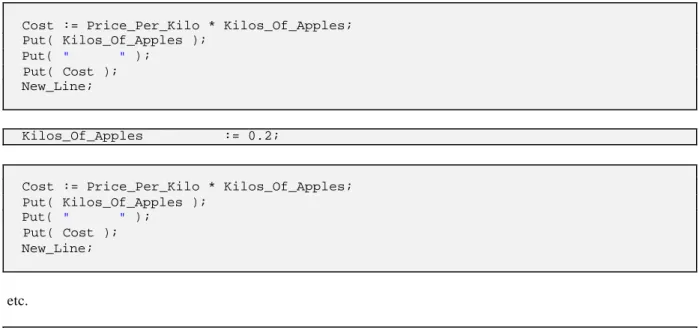
Using this strategy, to produce a program to list the cost of apples for a series of different weights would effectively involve writing out the same code many times. An example of this style of coding is illustrated below:
declare
Price_Per_Kilo : Float; --Price of apples Kilos_Of_Apples: Float; --Apples required Cost : Float; --Cost of apples begin
Price_Per_Kilo := 1.20;
Put( "Cost of apples per kilo : " ); Put( Price_Per_Kilo );
New_Line;
Cost := Price_Per_Kilo * Kilos_Of_Apples; Put( Kilos_Of_Apples );
Put( " " ); Put( Cost ); New_Line;
Kilos_Of_Apples := 0.2;
Cost := Price_Per_Kilo * Kilos_Of_Apples; Put( Kilos_Of_Apples );
Put( " " ); Put( Cost ); New_Line;
etc.
end;
Whilst this is a feasible solution, if we want to calculate the cost of 100 different weights this will involve considerable effort and code. Even using copy and paste operations in an editor to lessen the typing effort, will still involve considerable effort! In addition, the resultant program will be large and consume considerable resources.
1.13
Introduction to the
while
statement
In Ada 95 a while statement is used to repeat program statements while a condition holds true. A while
statement can be likened to a rail track as illustrated in Figure 1.2. While the condition is true the flow of control is along the true track. Each time around the loop the condition is re-evaluated. Then, when the condition is found to be false, the false track is taken.
Statements Executed while condition is true False
True Condition
Figure 1.2 The while statement as a rail track.
1.13.1
Conditions
In the language Ada 95, a condition is expressed in a very concise format which at first sight may seem strange if you are not used to a mathematical notation. For example, the conditional expression: ‘the contents of the memory location count is less than or equal to 5’ is written as follows:
count <= 5
Note: The memory location named count will need to be declared as:
count : Integer;
The symbols used in a condition are as follows:
Symbol Means Symbol Means
< Less than <= Less than or equal to
= Equal to /= Not equal to
> Greater than >= Greater than or equal to
If the following memory locations contain the following values:
Memory location Assigned the value Temperature : Integer; Temperature := 15;
Weight : Float; Weight := 50.0;
then the following table shows the truth or otherwise of several conditional expressions written in Ada 95.
In English In Ada 95 Condition is
The temperature is less than 20 Temperature < 20 true
The temperature is equal to 20 Temperature = 20 false
The weight is greater than or equal to 30 Weight >= 30.0 true
20 is less than the temperature 20 < Temperature false
Note: As a memory location that holds a Float value represents a number that is held only to a certain number of digits accuracy, it is not a good idea to compare such a value for equality = or not equality
/=.
1.13.2
A
while
statement in Ada 95
Illustrated below is a fragment of code that uses a while statement to write out the text message Hello five times:
declare
Count : Integer; begin
Count := 1; --Set count to 1
while Count <= 5 loop --While count less than or equal 5 Put( "Hello" ); --Print Hello
New_Line;
Count := Count + 1; --Add 1 to count end loop;
end;
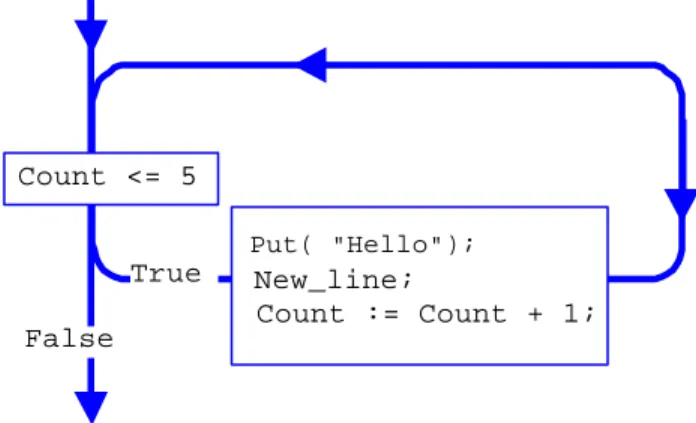
In this code fragment, the statements between loop and end loop; are repeatedly executed while the contents of Count are less than or equal to 5. The flow of control for the above while statement is illustrated in Figure 1.3.
Put( "Hello"); New_line;
Count := Count + 1; False
True Count <= 5
Figure 1.3 Flow of control for a while statement in Ada 95.
1.13.3
Using the
while
statement
The real advantage of using a computer program accrues when the written code is repeated many times, thus saving the implementor considerable time and effort. For example, if we wished to produce a table representing the cost of different weights of apples, then a computer program is constructed that repeats the lines of Ada 95 code that evaluate the cost of a specific weight of apples. However, for each iteration of the calculation the memory location that contains the weight of the apples is changed. A fragment of Ada 95 code to implement this solution is illustrated below:
declare
Price_Per_Kilo : Float; --Price of apples Kilos_Of_Apples: Float; --Apples required Cost : Float; --Cost of apples begin
Price_Per_Kilo := 1.20;
Put( "Cost of apples per kilo : " ); Put( Price_Per_Kilo ); New_Line;
Put( "Kilo's Cost" ); New_Line;
Kilos_Of_Apples := 0.1;
while Kilos_Of_Apples <= 10.0 loop --While lines to print Cost := Price_Per_Kilo * Kilos_Of_Apples; --Calculate cost Put( Kilos_Of_Apples ); --Print results Put( " " );
Put( Cost ); New_Line;
Kilos_Of_Apples := Kilos_Of_Apples + 0.1; --Next value end loop;
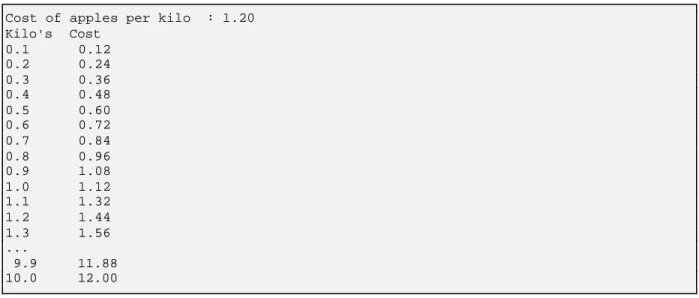
which when compiled with suitable peripheral code produces output of the form:
Cost of apples per kilo : 1.20 Kilo's Cost
0.1 0.12 0.2 0.24 0.3 0.36 0.4 0.48 0.5 0.60 0.6 0.72 0.7 0.84 0.8 0.96 0.9 1.08 1.0 1.12 1.1 1.32 1.2 1.44 1.3 1.56 ...
9.9 11.88 10.0 12.00
Note: Using Put(Price_Per_Kilo), Put(Kilos_Of_Apples) and Put(Price) will cause the value to be output in scientific notation. To get the effect of the format shown above the Put statements would need to be changed to:
Put(Price_Per_Kilo) -> Put(Price_Per_Kilo,Exp=>0,Aft=>2) Put(Kilos_Of_Apples) -> Put(Kilos_Of_Apples,Exp=>0,Aft=>2) Put(Cost) -> Put(Cost,Exp=>0,Aft=>2).
This is fully explained in Section 4.6.1.
1.14
Selection
The if construct is used to conditionally execute a statement or statements depending on the truth of a condition. This statement can be likened to the rail track illustrated in Figure 1.4 in which the path taken depends on the truth of a condition. However, unlike the while statement there is no loop back to re-execute the condition.
Statements Executed if
condition is true Condition
False True
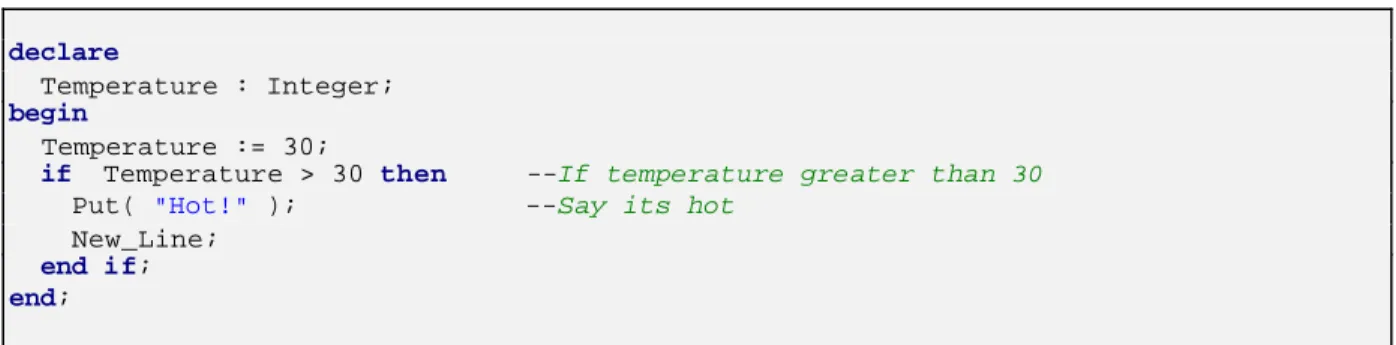
For example, the following fragment of an Ada 95 program only prints out Hot! when the contents of the memory location Temperature are greater than 30.
declare
Temperature : Integer; begin
Temperature := 30;
if Temperature > 30 then --If temperature greater than 30 Put( "Hot!" ); --Say its hot
New_Line; end if; end;
In this code fragment, the statements between then and end if; are only executed if the condition
Temperature > 30 is true. The flow of control for the above fragment of code is illustrated in Figure 1.5.
Put("Hot!"); New_Line Temperature > 30
False True
Figure 1.5 The if statement represented as a rail track.
1.14.1
Using the
if
statement
The fragment of program code which was used earlier to tabulate a list of the price of different weights of apples can be made more readable by separating every 5 lines by a blank line. This can be achieved by having a counter
count to count the number of lines printed and after the 5th line has been printed to insert a blank line. After a blank line has been printed the counter count is reset to 0. This modified program is shown below:
declare
Price_Per_Kilo : Float := 1.20; Kilos_Of_Apples : Float := 0.0; Cost : Float;
Lines_Output : Integer := 0; begin
Put( "Cost of apples per kilo : " ); Put( Price_Per_Kilo ); New_Line; Put( "Kilo's Cost" ); New_Line;
while Kilos_Of_Apples <= 10.0 loop --While lines to print Cost := Price_Per_Kilo * Kilos_Of_Apples; --Calculate cost Put( Kilos_Of_Apples ); --Print results Put( " " );
Put( Cost ); New_Line;
Kilos_Of_Apples := Kilos_Of_Apples + 0.1; --Next value Lines_Output := Lines_Output + 1; --Add 1
which when compiled with additional statements would produce output of the form shown below:
Cost of apples per kilo : 1.20 Kilo's Cost
0.0 0.00 0.1 0.12 0.2 0.24 0.3 0.36 0.4 0.48
0.5 0.60 0.6 0.72 0.7 0.84 0.8 0.96 0.9 1.08
1.0 1.20 1.1 1.32 1.2 1.44 1.3 1.56 1.4 1.68
etc.
Note: Using Put(Price_Per_Kilo), Put(Kilos_Of_Apples) and Put(Price) will cause the value to be output in scientific notation. To get the effect of the format shown above the Put statements would need to be changed to:
Put(Price_Per_Kilo) -> Put(Price_Per_Kilo,Exp=>0,Aft=>2) Put(Kilos_Of_Apples) -> Put(Kilos_Of_Apples,Exp=>0,Aft=>2) Put(Cost) -> Put(Cost,Exp=>0,Aft=>2).
This is fully explained in Section 4.6.1.
1.15
Self-assessment
l What is a computer programming language?
l What do the following fragments of Ada 95 code do?
declare
I : Integer; begin
I := 10;
while I > 0 loop Put( I ); I := I - 1; end loop; New_Line; end;
declare
Temperature : Integer; begin
Temperature := 10; if Temperature > 20 then Put( "It's Hot!" ); end if;
l Write an Ada 95 fragment of code for the following conditions. In your answer show how any memory location you have used has been declared.
l The temperature is less than 15 degrees centigrade.
l The distance to college is less than 15 kilometres.
l The distance to college is greater than or equal to the distance to the football ground.
l The cost of the bike is less than or equal to the cost of the hi-fi system.
1.16
Paper exercises
Write down on paper Ada 95 statements to implement the following. You do not need to run these solutions.
l Name
Write out your name and address.
l Weight
Calculate the total weight of 27 boxes of paper. Each box of paper weighs 2.4 kilograms.
l Name
Write out the text message "Happy Birthday" 3 times using a while loop.
l Times table
Print the 7 times table. The output should be of the form:
7 * 1 = 7 7 * 2 = 14 etc.
Hint: Write the Ada 95 code to print the line for the 3rd row, use a variable row of type Integer to hold the value 3.
7 * 3 = 21
Enclose these statements in a loop that varies the contents of row from 1 to 12. l Weight table
Print a table listing the weights of 1 to 20 boxes of paper, when each box weighs 2.4 kilograms.
l Times table
Print a multiplication table for all values between 1 and 5. The table to look like:
| 1 2 3 4 5 ---1 | ---1 2 3 4 5 2 | 2 4 6 8 10 3 | 3 6 9 12 15 4 | 4 8 12 16 20 5 | 5 10 15 20 25
Hint: Write the Ada 95 code to print the line for the 2nd row, use a variable row of type Integer to hold the value 2.
2 | 2 4 6 8 10
Enclose these statements in a loop that varies the contents of row from 1 to 5. Add statements to print the heading:
This chapter looks at software production in the large. In particular it looks at problems that occur in the development of large and not so large software systems. The notation used by UML (Unified Modelling Language) is introduced as a mechanism for documenting and describing a solution to a problem that is to be implemented on a computer system.
2.1
The software crisis
In the early days of computing, it was the hardware that was very expensive. The programs that ran on these computers were by today’s standards incredibly small. In those distant times computers only had a very limited amount of storage; both random access memory and disk storage.
Then it all changed. Advances in technology enabled computers to be built cheaper, with a far greater capacity than previous machines. Software developers thought, “Great! We can build bigger and more comprehensive programs”. Software projects were started with an increase in scope and great optimism.
Soon, with projects running over budget and not meeting their client’s expectations, the truth dawned: large scale software construction is difficult. The early techniques that had been used in small scale software construction did not scale up successfully for large scale software production.
This can be likened to using a bicycle to travel a short dis tance. Whilst this is adequate for the purpose, the use of a bicycle is inappropriate if a long distance has to be travelled in a short space of time. You cannot just peddle faster and faster.
2.2
A problem, the model and the solution
In implementing any solution to a problem, we must first understand the problem that is to be solved. Then, when we understand the problem fully, a solution can be formulated.
There are many different ways of achieving an understanding of a problem and its solution. Usually, this involves modelling the problem and its solution using either a standard notation or a notation invented by the programmer. The advantage of using a standard notation is that other people may inspect and modify the description of the problem and its proposed solution. For example, in building a house, an architect will draw up a plan of the various components that are to be built. The client can view the plans and give their approval or qualified approval subject to minor modifications. The builders can then use the plan when they erect the house.
Architect’s plan (model) Finished house
Writing a computer program involves the same overall process. First, we need to understand the task that the computer program will perform. Then we need to implement a solution using the model that we have created.