M A R C H 2 0 0 7
Using Centrify DirectAudit
Centrify DirectAudit enhances regulatory compliance and troubleshooting through detailed auditing, logging and real-time monitoring of UNIX/Linux user activity.
A B S T R A C T
Centrify® DirectAudit™ helps you comply with regulatory requirements, perform in-depth troubleshooting, and protect against insider threats for your UNIX and Linux systems. DirectAudit’s detailed logging strengthens your compliance reporting and helps you spot suspicious activity by showing which users accessed what systems, what commands they executed, and what changes they made to key files and data. With DirectAudit you can also perform
immediate, in-depth troubleshooting by replaying and reporting on user activity that may have contributed to system failures. And its real-time monitoring of current user sessions enables you to spot suspicious activity.
This white paper examines the compelling business and technical case for centralized UNIX/Linux auditing, describes how DirectAudit’s integrated architecture enables you to meet regulatory requirements and protect against insider threats, and describes how DirectAudit can help you better troubleshoot UNIX/Linux availability problems.
Information in this document, including URL and other Internet Web site references, is subject to change without notice. Unless otherwise noted, the example companies, organizations, products, domain names, e-mail addresses, logos, people, places and events depicted herein are fictitious, and no association with any real company, organization, product, domain name, e-mail address, logo, person, place or event is intended or should be inferred. Complying with all applicable copyright laws is the responsibility of the user. Without limiting the rights under copyright, no part of this document may be reproduced, stored in or introduced into a retrieval system, or transmitted in any form or by any means (electronic, mechanical, photocopying, recording, or otherwise), or for any purpose, without the express written permission of Centrify Corporation.
Centrify may have patents, patent applications, trademarks, copyrights, or other intellectual property rights covering subject matter in this document. Except as expressly provided in any written license agreement from Centrify, the furnishing of this document does not give you any license to these patents, trademarks, copyrights, or other intellectual property.
© 2007 Centrify Corporation. All rights reserved.
Centrify is a registered trademark, and DirectControl and DirectAudit are trademarks of Centrify Corporation in the United States and/or other countries. Microsoft, Active Directory, Windows, Windows NT, and Windows Server are either registered trademarks or trademarks of Microsoft Corporation in the United States and/or other countries.
The names of actual companies and products mentioned herein may be the trademarks of their respective owners.
Contents
Introduction ... 1
1 The Case for Detailed User-Level Auditing of UNIX and Linux Systems ... 2
1.1 Addressing Compliance and Regulatory Requirements... 2
1.2 Protecting Against the Threat of Insider Attacks ... 3
1.3 Troubleshooting and Diagnosing System Problems ... 4
1.4 Detailed User-Leveling Auditing vs. Log Aggregation... 5
2 Introducing DirectAudit... 5
2.1 How DirectAudit Works ... 5
2.1.1 DirectAudit Agent... 6
2.1.2 DirectAudit Collector Service ... 6
2.1.3 DirectAudit Repository... 7
2.1.4 DirectAudit Console... 7
2.2 Key Features of DirectAudit ... 8
2.3 Key Benefits of DirectAudit ... 9
2.4 Why Customers Choose DirectAudit Over Other Solutions ... 10
2.5 Comparing DirectAudit to Existing Products ... 12
3 Summary ... 12
Introduction
Organizations today are facing a growing list of compliance-related regulations such as Sarbanes-Oxley, HIPAA and the Payment Card Industry’s Data Security Standard (aka PCI DSS). These regulations mandate that organizations implement standardized and centralized ways of controlling which users can access which systems, applications and data, and for auditing what those users did when they were granted that access. One common misconception is that only large and/or public companies need to meet such requirements. But, in fact, the requirements can be equally applicable to small companies. For example, any organization that accepts credit cards must now comply with the payment card industry's data security requirements or risk fines for failure to do so. At the same time that organizations are grappling with a growing list of compliance requirements, a new security challenge has emerged — the threat of insider attacks. A recent InformationWeek article stated that “Insider attacks against IT infrastructure are among the security breaches most feared.” In fact, a Goldman Sachs survey of Chief Security Officers published in August of 2006 shows that the threat of insider attacks is a bigger concern than the threat of outsider attacks. Both challenges — addressing
regulatory compliance requirements and decreasing the likelihood of insider attacks — can be addressed by implementing detailed user-level auditing on the most mission-critical systems, such as those running on UNIX and Linux servers.
Centrify Corporation delivers software solutions that help organizations both better address compliance requirements and protect against the threat of insider attacks. Centrify’s auditing, access control and identity management solutions enable a secure, connected computing environment by centrally securing your heterogeneous systems, web applications, databases and storage systems using Microsoft Active Directory. Centrify DirectControl secures your non-Microsoft platforms using the same authentication, authorization and Group Policy services deployed for your Windows environment. Centrify DirectAudit complements DirectControl by delivering auditing, logging and real-time monitoring of user activity on your non-Microsoft systems. Together, they help you improve IT efficiency, better comply with regulatory
requirements, and centrally audit and control access to your heterogeneous computing environment.
This white paper focuses specifically on DirectAudit and how it can help you comply with regulatory requirements through detailed auditing and logging of user activity on your UNIX and Linux systems. In addition, it will describe how DirectAudit can also assist you in performing immediate, in-depth troubleshooting by replaying user activity that may have contributed to system failures, and spot suspicious activity through real-time monitoring of current user sessions. A detailed discussion of the DirectAudit architecture is also included.
1 The Case for Detailed User-Level Auditing of UNIX and Linux Systems
Implementing detailed user-level auditing for your UNIX and Linux environment is an essential ingredient in achieving the following business-critical goals:
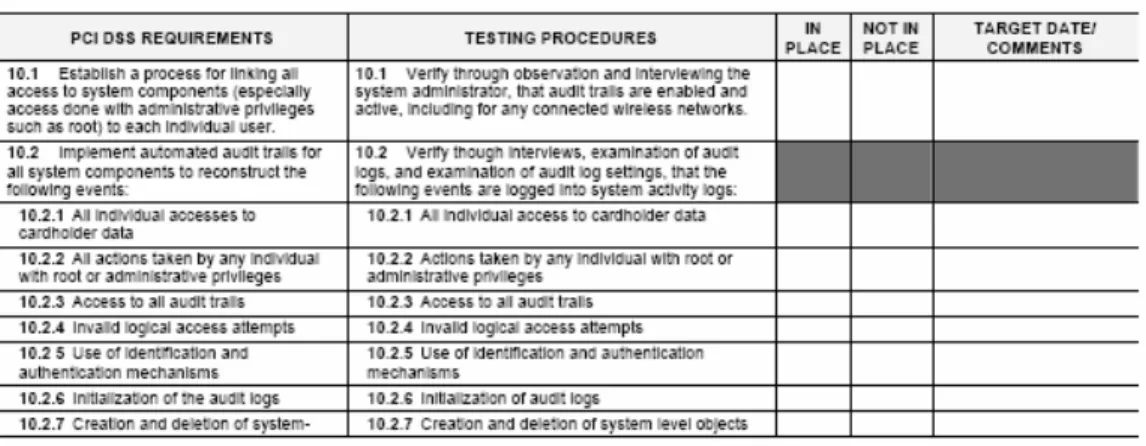
• Complying with regulatory requirements. Most regulations such as SOX and PCI require detailed user-level auditing. For example, the PCI standard states in section 10 that you must “implement automated audit trails for all system components to reconstruct the following events” down to the level of recording “all actions taken by any individual with root or administrative privileges.”
• Protecting against the threat of insider attacks. Auditing user activity, especially users who have root or privileged access, decreases the threat of insiders performing malicious tasks and increases the ability to spot insider attacks. This is a critical requirement because a recent survey by the Secret Service and CERT indicated that 86% of internal computer sabotage incidents were perpetrated by technical workers inside the organization.
• Troubleshooting and diagnosing system availability issues. The reality is that many system outages do occur, and the ability to play back the actions that preceded a system crash can provide quick, unambiguous insight into how to resolve a problem.
The following sections discuss each of these goals in more detail.
1.1 Addressing Compliance and Regulatory Requirements
Regulatory requirements are very explicit regarding the need for detailed user-level auditing. For example, take the Payment Card Industry Data Security Standard (version 1.1), specifically Section 10. It reads: “Requirement 10: Track and monitor all access to network resources and cardholder data” and later says “Logging mechanisms and the ability to track user activities are critical. The presence of logs in all environments allows thorough tracking and analysis if something does go wrong. Determining the cause of a compromise is very difficult without system activity logs.”
Therefore, to pass Section 10 of the PCI audit (or else face fines of up to $500,000), not only must you track who logged on and off and when, but you must track user-level activity at a much more granular level than that. For example, Section 10.2.2 of the PCI standard states that you “implement automated audit trails” down to the level of “all actions taken by any individual with root or administrative privileges.”
Figure 1-1. Payment Card Industry Data Security Standard, Sections 10.1 and 10.2 This example is also true of other regulatory requirements. The Healthcare Insurance Portability and Accountability Act (HIPPA) calls for detailed auditing in Section 164.312(b) when it states that a solution must be in place that “record(s) and examine(s) activity in information systems” that store and process sensitive medical information. Likewise, Sarbanes-Oxley (“SOX”) Section 404 requires that organizations produce “an assessment, as of the end of the most recent fiscal year of the issuer, of the effectiveness of the internal control structure,” and the only way to report on the effectiveness of the internal control structure is to produce audit reports that can be backed up by detailed user-level audit records.
1.2 Protecting Against the Threat of Insider Attacks
Besides meeting compliance requirements, detailed user-level auditing of UNIX and Linux systems can be both a key deterrent in protecting against insider attacks and also help identify if such an attack has occurred. As mentioned above, a recent Goldman Sachs security survey identified thwarting insider attacks as the #2 driver for improvements in security spending (compliance being #1). An InformationWeek magazine article, “How To Spot Insider-Attack Risks In The IT Department,” also weighed in on this topic; some interesting quotes included:
“Insider attacks against IT infrastructure are among the security breaches most feared.”
“About half of all insider attacks take place between the time an IT employee is dismissed and his or her privileges are taken away.”
“Managers must not only monitor system access, but also let employees know their system changes can be tracked.”
“A recent survey by the Secret Service and CERT indicates that 86% of internal computer sabotage incidents are perpetrated by tech workers.” Another article on this topic in TheStreet.com mentioned several major cases:
“Sometime in 2005, Gary Min, a research scientist with Dupont decided to move on from the company he had spent a decade with. But unlike most employees, Min didn't just put in his papers and leave. Instead, he accessed intellectual property documents and data worth more than $400 million, allegedly with the intent of giving them to Victrex, a DuPont rival and his new employer. DuPont caught the unusual network activity and brought charges against Min, who pleaded guilty in November 2006.
The disclosure by the U.S. Attorney's office in Delaware last week of the details in the massive insider data breach turned the spotlight on one of the biggest security challenges for businesses: the growing threat of company insiders -- employees or contractors -- who leak information deliberately or by accident. Incidents of insider threats or cases of data breaches, such as the loss of customer information last month from retailer T.J. Maxx, have also helped turn information leak management into one of the fastest-growing segments in enterprise security.”
The clear conclusion is that tracking what privileged users are doing – what commands they are typing, what files they are copying and editing, and other activity – can help significantly reduce the risk of insider threats in two ways. First, users won’t be tempted to transgress when they know their sessions are being audited. Second, you’ll have the tools to potentially spot suspicious activity before significant damage can be done. Privileged users in such environments in fact welcome this level of auditing because it serves to ensure that they were not the source of any incidents that do occur.
1.3 Troubleshooting and Diagnosing System Problems
Detailed user-level auditing can also strengthen system administration in several ways. First, it can help in troubleshooting problem systems. A system administrator may inadvertently make a change that has undesirable outcomes. With user-level auditing in place, IT management can reconstruct what actions preceded the problem. Second, organizations can monitor expert consultants, vendors or other third parties to record what they did to a system. These session recordings can be used as a teaching aid or as documentation of fulfillment of an agreement. Third, administrators can use the session recordings to prove that maintenance or another administrative task was performed on each system.
When a UNIX or Linux server crashes, it is critical to understand and diagnose the problem quickly. The ability to replay what users were doing and see what was changed on that system prior to the crash can provide quick, unambiguous insight that takes the guesswork out of diagnosing and fixing the problem.
1.4 Detailed User-Leveling Auditing vs. Log Aggregation
Of course, many existing UNIX and Linux environments already use tools that do some level of auditing and log aggregation. Unfortunately, these products are typically used for general system monitoring, and they frequently fall short as a compliance and diagnostic solution in several specific areas. For compliance purposes, syslogs can tell you that someone logged into a system, but not what they did. Thus, IT auditors can not verify what key files were changed or what data was accessed. In addition, syslogs may only identify the logged-on user through a generic or local system account, making it impossible to link accountability for a specific change to a specific user name. For diagnostic purposes, the syslog’s lack of detail makes troubleshooting mostly guesswork. Finally, syslog aggregation products frequently employ older architectures geared toward capturing logs that frequently contain voluminous entries for normal system events that are not pertinent to either compliance or diagnosis. Thus, they provide only an historical view (sometimes collecting data at daily intervals or longer), and the proprietary database formats geared to handle this voluminous data severely limits your ability to do queries and reports.
2 Introducing DirectAudit
Fortunately a solution does exist to address the challenges mentioned above and the inherent problems with existing log aggregation technologies: Centrify DirectAudit. DirectAudit records comprehensive user session activity: what commands were executed, what changes were made to key files and data, and what output appeared. This level of detail is required to meet compliance requirements, and takes the guesswork out of troubleshooting changes. DirectAudit also provides real-time monitoring, enabling you to proactively spot suspicious activity or immediately perform diagnostics on misbehaving systems. DirectAudit’s next-generation architecture also employs a modern SQL Server-based repository to ensure performance, scaleability and robust querying and reporting.
2.1 How DirectAudit Works
Centrify DirectAudit’s next-generation, enterprise-scale architecture was designed to be highly scaleable, secure and reliable. It consists of four components:
• The DirectAudit Agent gathers comprehensive user session activity on UNIX/Linux systems.
• The DirectAudit Collector Service gathers data from Agents and stores it in a central SQL Server repository.
• The DirectAudit Repository holds session data in a Microsoft SQL Server database.
• The DirectAudit Console delivers a centralized view of every audited UNIX and Linux system in the enterprise and delivers playback and reporting capabilities.
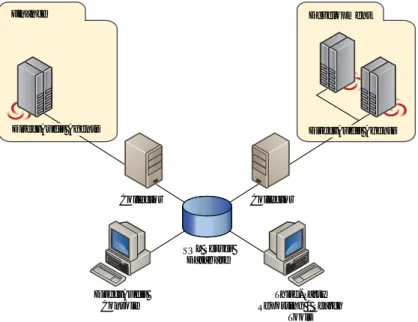
Figure 2-1 illustrates DirecAudit’s architecture, and a detailed description of each component follows.
DirectAudit Console
Third-Party Reporting / Search
Tools Collector Collector
SQL Server Database
Finance Development
DirectAudit Agents DirectAudit Agents
Figure 2-1. DirectAudit’s Architecture.
2.1.1 DirectAudit Agent
DirectAudit’s easy-to-install, low overhead Agent silently and transparently gathers comprehensive user session activity: what commands were executed, what changes were made to key files and data, and what output appeared. Or, you can tailor the auditing to record sessions for all users, specific users or specific commands.
The DirectAudit Agent continuously communicates user session activity in an authenticated and encrypted format to a DirectAudit Collector Service. Asynchronous data transfer ensures minimal impact on monitored systems.
The DirectAudit Agent was designed with enterprise-level compatibility, reliability and scaleability in mind. It is natively compiled and tested for a wide range of UNIX and Linux systems. When no network connection is available, the DirectAudit Agent continues to record user session data and subsequently forwards it to a Collector Service when the network is available. This ensures auditing continues not only during network outages but for offline use on laptops as well. The DirectAudit Agent leverages the DirectControl Agent on the audited system to determine the best Collector Service to communicate with, and it supports load-balancing among multiple DirectAudit Collector Services to provide scaleability for 100s or 1000s of audited systems.
2.1.2 DirectAudit Collector Service
The Collector Service gathers data from DirectAudit Agents and stores it in a central SQL Server repository. The Collector Service runs on a separate Windows system. You
can deploy multiple DirectAudit Collector Services to support load-balancing and to provide fail-over in case a system hosting a Collector Service goes down.
2.1.3 DirectAudit Repository
All audit data is stored in the central DirectAudit Repository running on Microsoft SQL Server, providing enterprise-scale performance and scalability. By adopting a non-proprietary SQL data format, DirectAudit enables robust reporting and querying through the DirectAudit Console as well as through third-party reporting tools. Archiving and purging session data is also easy.
The DirectAudit installation package automatically installs and configures SQL Server Express Edition for evaluation purposes. Express Edition is free and supports up to 4 GB of data; upgrading to the full version of SQL Server is straightforward.
2.1.4 DirectAudit Console
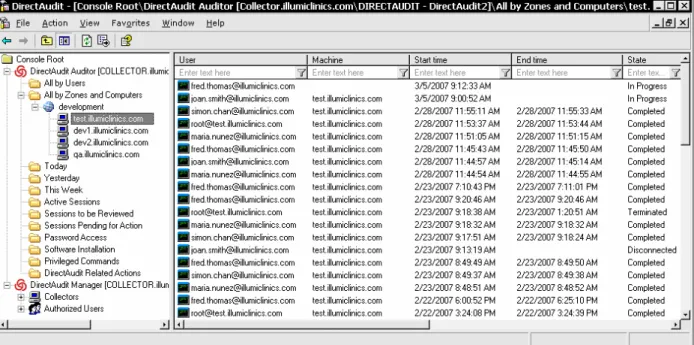
The DirectAudit Console gives you a centralized view of every audited UNIX and Linux system across your enterprise (see Figure 2-2 below). Out-of-the-box views give you easy access to lists of user sessions, including both a real-time view of current sessions and historical views of sessions in the past day, the past week, and so on. You can also build your own views that show sessions by specific users, machines, time periods, or other criteria. Workflow features enable you to flag sessions for later followup (perhaps by IT auditors).
Figure 2-2. DirectAudit Console. Here you see all sessions on a specific machine, sorted by start time. Notice you can see two sessions are currently in progress.
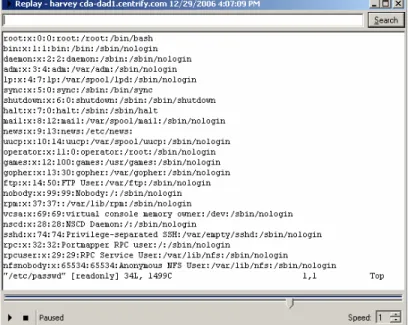
With a simple right-click you can replay any user session on any audited system to see what commands were executed, what changes were made to key files and data, and what system output appeared (see Figure 2-3). You can pause, rewind, or fast-forward – as easy as using a VCR. This is an invaluable tool for both spotting suspicious activity and quickly troubleshooting system issues.
Figure 2-3. Playing back a user session in the DirectAudit Console
You can also perform full-text searches to find, for example, all instances of a password command across all sessions. By adopting a non-proprietary SQL data format,
DirectAudit enables robust reporting and querying through third-party tools as well.
2.2 Key Features of DirectAudit
Some of the key features of DirectAudit include:
• Detailed, nonintrusive recording of user sessions on UNIX and Linux systems.
DirectAudit’s easy-to-install, low overhead Agent silently and transparently gathers comprehensive user session activity: what commands were executed, what changes were made to key files and data, and what output appeared. DirectAudit records this data without interrupting the user’s workflow.
• Secure, reliable data collection in a scaleable SQL database. The DirectAudit Agent continuously communicates user session activity in an authenticated and encrypted format to a DirectAudit Collector Service. The Collector Service in turn stores the data in the central DirectAudit Repository, a SQL Server database that provides enterprise-scale performance and scalability. For increased reliability, the DirectAudit Agent continues to record session data even when there is no network connection and subsequently forwards it to a DirectAudit Collector Service when the network is available. Centrify also supports load balancing among multiple
DirectAudit Collector Services when deployments of DirectAudit Agents range in the 100s or 1000s.
• Visual replay of user sessions through an easy-to-use console. Using the DirectAudit Console, with a simple right-click you can replay any user session on any audited system to see what commands were executed, what changes were made to key files and data, and what system output appeared. You can pause, rewind, or fast-forward – as easy as using a VCR. This unique playback feature gives you a powerful tool for monitoring activity, troubleshooting changes that may have led to a system failure, or documenting system configuration tasks.
• Comprehensive, easy-to-use query, search and reporting capabilities. You can use the DirectAudit Console’s out-of-the-box views to see active sessions and historical sessions, or build your own views that show sessions by specific users, machines, time periods, or other criteria. Or perform full-text searches to find, for example, all instances of a password command across all sessions. By adopting a non-proprietary SQL data format, DirectAudit enables robust reporting and querying through third-party tools as well.
• Real-time monitoring with an at-a-glance view of all current user activity. The DirectAudit Console gives you a centralized, real-time view of every user session on every audited UNIX and Linux system. For each session you can see who is logged on, and you can immediately drill down to see what they are currently doing. This is an invaluable tool for both spotting suspicious activity and quickly troubleshooting system issues.
2.3 Key Benefits of DirectAudit
Some of the key benefits of DirectAudit include the following:
Enhance compliance with regulatory requirements. Practically every industry and government compliance regulation (including SOX, PCI, HIPAA, FISMA, and GLBA) requires comprehensive logging and audit trails of user activity, especially on business-critical and sensitive systems. DirectAudit meets these needs by recording detailed user session information – who logged into what systems, what commands they executed, what changes they made to key files and data.
DirectAudit’s flexible querying and reporting features enhance your ability to document compliance and provide robust tools for identifying and investigating potential security breeches. With DirectAudit you can now answer questions such as:
Who has logged onto our UNIX servers running our ERP apps over the last month, and what did they do?
What was that recently fired systems administer doing on our systems last week?
Has anyone been editing these key system files, or typing any suspicious commands?
Perform in-depth troubleshooting and configuration reporting. From DirectAudit’s central console you can quickly locate and replay user activity that may have contributed to a system outage. DirectAudit records detailed session activity – both keystrokes and session output – so you can immediately diagnose problems or report on and document configuration and other changes. With DirectAudit you can now answer questions such as:
Over the last few hours, did anyone do anything to this system that just went down?
Did anybody change the Oracle config file on sol-ora-4 yesterday?
Did Operations actually apply that required patch on all 10 of our web servers over the weekend?
What steps did that consultant take to fix the problem on our file server?
Protect against insider threats and monitor real-time user activity. DirectAudit lets you centrally view who is currently accessing all of your distributed UNIX and Linux systems and immediately drill down to see what they are doing. This real-time monitoring helps you proactively spot insider threats and gives you global visibility into activity across your organization. With DirectAudit you can now answer questions such as:
Who is logged on to our HR database server, and what are they doing?
Is anyone currently logged on to those development systems that we need to restart?
2.4 Why Customers Choose DirectAudit Over Other Solutions
Centrify DirectAudit delivers unique features and value not found in other IT auditing solutions.
• Detailed logging. Most auditing tools simply capture who logged on and when — not what they did. Even products that capture keystrokes won’t show you the result of those commands. Centrify DirectAudit records comprehensive user session activity: what commands were executed, what changes were made to key files and data, and what output appeared. This level of detail is required to meet compliance requirements, and takes the guesswork out of troubleshooting changes that may have led to system failures.
• Secure and reliable communication. Most auditing tools are not designed for complex enterprise environments. For example, some tools simply stop collecting audit data on a remote system if the network goes down. DirectAudit was designed to be highly reliable. It continues to collect all audit data on a remote system if the network goes down, and subsequently forwards it to the DirectAudit Collector Service when the network is back up. To ensure audit data traffic is secure and
does not impact the network, it is communicated in an authenticated and encrypted format.
• Highly scaleable. DirectAudit is an enterprise-scale solution designed to collect data from large numbers of systems. Multiple, load-balanced DirectAudit
Collector Services can gather data from audited systems and forward it to a central SQL Server database that can act as a large-scale data warehouse.
• Non-proprietary data storage. While other tools rely on proprietary data formats that limit reporting options, DirectAudit uses a modern SQL Server database. This means you can easily report and search on all session data using the DirectAudit Console or third-party reporting tools. Archiving and purging session data is also easy as well.
• Visual user session replay. Other auditing tools may simply list who logged on and off a system. DirectAudit lets you visually replay any user session on any audited system to see just what that user saw: the commands that were executed, the changes made to key files and data, and the system output. You can pause, rewind, or fast-forward – as easy as using a VCR.
• Ad hoc querying and reporting. Many tools do not store detailed audit data in a central SQL database, severely limiting your ability do ad hoc queries. DirectAudit not only provides out-of-the-box views of user sessions, but also lets you perform a full-text search for specific keywords. Mining key audit and system availability data is as easy as searching the Internet.
• Real-time monitoring. Other auditing solutions provide a historical view of system activity. From a central console, DirectAudit gives you a real-time, at-a-glance view of activity on all your audited UNIX and Linux systems. For each session you can see who is logged on, and you can immediately drill down to see what they are currently doing. This is an invaluable tool for both spotting suspicious activity and quickly troubleshooting system issues.
• An integrated solution for accountability and access control. DirectAudit helps you prove to IT auditors that your access controls are working. To implement those access controls, Centrify DirectControl’s patent-pending Zone technology gives you the unique ability to keep sensitive systems – such a personnel, engineering, or ERP systems – restricted to specific groups of users and yet centrally manage accounts, password policies and more through Active Directory. DirectControl also gives you the ability to comply with regulatory mandates for accountability, associating a specific user session in DirectAudit with an individual, not a generic administrative account or an obscurely named UNIX account on an single system. Centrify offers a single, built-for-the-enterprise solution that is more secure, supports more platforms, and is easier to deploy and manage than the collection of acquired point products other vendors provide.
2.5 Comparing DirectAudit to Existing Products
As discussed above, log aggregation and consolidation products are typically used for general system monitoring, and they frequently fall short as an compliance and diagnostic solution in several specific areas. For compliance purposes, syslogs can tell you that someone logged into a system, but not what they did. Thus, IT auditors can not verify what key files were changed or what data was accessed. In addition, syslogs may only identify the logged-on user through a generic or local system account, making it impossible to link accountability for a specific change to a specific user name. For diagnostic purposes, the syslog’s lack of detail makes troubleshooting mostly guesswork. Finally, syslog aggregation products frequently employ older architectures geared toward capturing logs that frequently contain voluminous entries for normal system events that are not pertinent to either compliance or diagnosis. Thus, they provide only an historical view (sometimes collecting data at daily intervals or longer), and the proprietary database formats geared to handle this voluminous data severely limits your ability to do queries and reports.
By contrast, DirectAudit records comprehensive user session activity: what commands were executed, what changes were made to key files and data, and what output appeared. This level of detail is required to meet compliance requirements, and takes the guesswork out of troubleshooting changes. DirectAudit also provides real-time monitoring, enabling you to proactively spot suspicious activity or immediate perform diagnostics on
misbehaving systems. DirectAudit’s next-generation architecture also employs a modern SQL Server-based repository to ensure performance, scaleability and robust querying and reporting.
Customers sometimes ask us to compare DirectAudit to keystroke loggers. At the lowest level, keystroke loggers show you only what keystrokes the user typed, whereas
DirectAudit also shows you the system output during the session. But at a much higher level, DirectAudit is also a complete solution that stores audit data in a central SQL database and provides a management console that gives you a consolidated view of historical and current activity. By contrast, keystroke loggers frequently are modest utilities that are useful on individual systems but don’t provide the centralized,
consolidated diagnostic, monitoring, querying, and reporting capabilities of DirectAudit.
3 Summary
Centrify DirectAudit helps you comply with regulatory requirements, perform immediate in-depth troubleshooting, and protect against insider threats for your UNIX and Linux systems. DirectAudit’s detailed logging strengthens your compliance reporting and helps you spot suspicious activity by showing which users accessed what systems, what commands they executed, and what changes they made to key files and data. With DirectAudit you can also perform immediate, in-depth troubleshooting by replaying and reporting on user activity that may have contributed to system failures. And its real-time monitoring of current user sessions enables you to spot suspicious activity.
4 How to Contact Centrify North America
(And All Locations Outside EMEA)
Europe, Middle East, Africa
(EMEA)
Centrify Corporation 444 Castro St., Suite 1100 Mountain View, CA 94041 United States
Centrify EMEA Asmec Centre Merlin House Brunel Road
Theale, Berkshire, RG7 4AB United Kingdom
Sales: +1 (650) 961-1100 Sales: +44 1189 026580 Enquiries: [email protected]