The
Connection Machine System
*Graphics Reference Manual
Version 6.0
November 1990The infonnation in this document is subject to change without notice and should not be construed as a commitment by Thinking Machines Corporation. Thinking Machines Corporation reserves the right to make changes to any products described herein to improve functioning or design. Although the information in this document has been reviewed and is believed to be reliable, Thinking Machines Corporation does not assume responsibility or liability for any errors that may appear in this document. Thinking Machines Corporation does not assume any liability arising from the application or use of any information or product described herein.
Connection Machine@ is a registered trademark of Thinking Machines Corporation. C*@is a registered trademark of Thinking Machines Corporation.
CM, CM-I. CM-2. CM-2a. and DataVaultare trademarks of Thinking Machines Corporation. Paris. *Lisp. and CM Fortran are trademarks of Thinking Machines Corporation.
C/Paris. Lisp/Paris, and Fortran/Paris are trademarks of Thinking Machines Corporation. In Paralle{i) is a registered trademark of Thinking Machines Corporation.
VAX. ULTRIX, and V AXBI are trademarks of Digital Equipment Corporation. Symbolics. Symbolics 3600. and Genera are trademarks of Symbolics. Inc.
Sun. Sun-4. and Sun Workstation are registered trademarks of Sun Microsystems. Inc.
UNIX is a registered trademark of AT&T Bell Laboratories.
The X Wmdow System is a trademark of the Massachusetts Institute of Technology.
Copyright © 1990 by Thinking Machines Corporation. All rights reserved. Thinking Machines Corporation
245 F~t Street
Contents
About This Manual •.•.•.•.••.••••.•.•....•..•....••... . . • . . . . • . . . v
Customer Support... ... . .... ... ... . ... viii
Chapter 1 *Graphics: *Lisp Graphics Interface . . . 1
1.1 Overview of Display Functions ... . . . 1
1.1.1 Levels of Display Function Interface . . . 2
1.2 Overview of Rendering Functions . . . 4
1.3 Using *Graphics ... 5
Chapter 2 Display Windows ... 7
2.1 Creating a Display Window... .... ... ... .... ... . . .. 7
2.1.1 Display Window Type. Location. and Size Arguments. . . 8
2.1.2 Other Display Window Property Arguments ... . . . 10
2.2 Getting Information about a Display Window ... 11
2.3 Selecting a Display Window ... 12
2.4 Reading and Writing to Display Windows ... 12
2.5 Deleting Display Windows. . . 14
2.6 Hardware Panning and Zooming ._... . . . 14
Chapter 3 Color Maps ... 17
3.1 Overview of Device-Level and Symbolic Color Map Interfaces... .. 17
3.2 Symbolic Color Map Interface. . . • . . . • . . 18
3.2.1 Creating Colors ... 18
3.2.2 Creating Color Ranges ... 19
3.2.3 Creating Color Maps . . . • . . . 20
3.2.4 Example... 22
3.2.5 Selecting a Color Map ••••..•.••••....•••••..•...••.••. 23
3.2.6 Getting Infonnation about a Color Map ... 23
3.3 Device-Level Color Map Interface ... 25
3.3.2 Setting the Device-Level Color Map ... 26
3.3.3 Reading Contents of Device-Level Color Maps ... 27
3.4 Using 24-bit Color Maps ... 27
3.5 Color Maps on X Windows . . . 27
Chapter 4 Displays...
294.1 Ways to Use Displays... ... 29
4.2 Creating Displays ... 30
4.3 Getting Infonnation about a Display... ... 31
4.4 Displaying an Image... 31
4.4.1 Specifying How Much of the Image to Display ... 32
4.4.2 Specifying Where to Display the Image ... 32
4.4.3 Specifying the Colors for Displaying the Image . . . 33
Numeric Pvars ... . 33
Boolean Pvars ... 34
4.4.4 Specifying Multiple Images to Overlay ... . . 35
4.4.5 Specifying Other Features. . . 35
4.4.6 Example... 36
4.5 Clearing Displays ... 37
4.6 Reading a Pvar from a Display... ... . 37
4.7 Hardware Panning and Zooming of Displays .. . . 38
Chapter 5 Rendering Primitives ...
395.1 Two-Dimensional Rendering Functions... ... 39
5.2 Three-Dimensional Rendering Functions. . . 42
Chapter 6 Z-Buffer Functions ...
43About This Manual
Objectives of This Manual
This manual describes *Graphics, the *Lisp interface to the Connection Machine graphics and visualization software.
Revision Information
This manual replaces the *Graphics Reference Manual, Beta Version 5.2. You may discard that manual.
Version 6.0 Changes
Version 6.0 of the *Graphics software includes three routines not included in Version 5.2:
•
•
polygon-fill draws draws filled polygons defmed by pvars of vertices:
polygon-fill image-buffer-pvar x-vector-pvar y-vector-pvar color-pvar
&key :number-of-vertlces :comblner :overwrlte :cllp-p :edgEH:Olor-pvar
This function is described in Section 5.1 of this manual.
"'new-draw-lines-2d is a replacement for the "'draw-llnes-2d function with improved memory management
"'new-draw-llnes-2d image-buffer-pvar x-start-pvar y-start-pvar x-end-pvar y-end-pvar color-pvar
&key (combiner :overwrite) (:clip-p t)
This function is described in Section 5.1 in this manual.
• display-wlndow-cmsr-dlsplay provides a hook to the Paris-level Generic Display Inter-face by returning the Generic Display display (an instance of cmsr:display) that
implements a *Graphics display window:
This function is described in Section 2.2 of this manual.
In addition, three changes have been made to existing *Graphics routines:
•
•
•
display-Image and display-image!! now clip images that are larger than the display win-dow, rather than signalling an error. See Section 4.4.1.
display-lmage and display-lmage!! now support software zooming. The argument zoom,
which defaults to 1, is the factor by which to zoom each pixel. See Section 4.4.5. An exam-ple of zooming has also been added to Section 4.4.6.
The use of the create-clisplay-window argument :color-map has been clarified. See Sec-tion 2.1.2.
Organization of This Manual
This manual contains seven chapters:
Chapter 1 *Graphics: *Lisp Graphics Interface
An overview of the *Graphics display and rendering functions and information on using *Graphics.
Chapter 2 Display Windows
Detailed information on using *Graphics display windows, including creating, se-lecting, reading and writing, and deleting display windows.
Chapter 3 Color Maps
Detailed information on *Graphics symbolic and device-level color map inter-faces.
Chapter 4 Displays
Detailed information on setting up and using *Graphics displays.
Chapter 5 Rendering Primitives
Reference information on *Graphics 2D and 3D rendering functions.
Chapter 6 Z-ButTer Functions
About This Manual vii
Chapter 7 Math Utilities
Describes the graphics math utilities supplied by *Graphics. These utilities
pro-vide tools for creating and applying coordinate transformations.
Notation Conventions
The table below displays the notation conventions:
Convention
bo~d typewriter
bo~d typewriter
Meaning
UNIX and CM System Software commands, command options, and fllenames.
C/Paris and C language elements, such as keywords, operators, and function names, when they appear embedded in text.
italic typewri ter Parameter names and placeholders in function and command formats.
typewriter Code examples and code fragments.
Thinking Machines Customer Support encourages customers to report errors in Connection Machine operation and to suggest improvements in our products.
When reporting an error, please provide as much information as possible to help us identify and correct the problem. A code example that failed to execute, a session transcript, the record of a back-trace, or other such information can greatly reduce the time it takes Thinking Machines to respond to the report.
To contact Thinking Machines Customer Support:
u.s.
Mail:Internet
Electronic Mail:
Usenet
Electronic Mail:
Telepbone:
For Symbolics Users Only
Thinking Machines Corporation Customer Support
245 First Street
Cambridge, Massachusetts 02142-1264
ames! think! customer-support
(617) 234-1000 (617) 876-1111
The Symbolics Lisp machine, when connected to the Internet network, provides a special mail facil-ity for automatic reporting of Connection Machine system errors. When such an error occurs, simply press Ctrl-M to create a report. In the mail window that appears, the To: field should be addressed as follows:
To : [email protected]
Chapter 1
*Graphics: *Lisp Graphics Interface
The *Lisp graphics interface, *Graphics (pronounced "star-graphics"), provides a set of functions and data structures that make it easy to display and manipulate 2-dimensional and simple 3-dimensional pvar data.
*Graphics includes two main types of functionality: display and rendering. The display functions write 2-dimensional pvars to a display device. The rendering functions generate 2-dimensional pvars inside the Connection Machine system; the pvars can then be dis-played.
1.1 Overview of Display Functions
*Graphics provides a uniform interface for displaying pvars on CM Framebuffers, X win-dows, and Symbolics color and black-and-white windows from *Lisp.
The display tools provided are as follows:
1. Display windows are structures that represent a device onto which data is dis-played. Functions dealing with display windows. allow a user to create multiple windows, obtain information about each window, write pvar data to the display window, read data from the display window back into a pvar, delete display win-dows, and pan and zoom the display window's device.
Two levels of color maps are supported: device-level and symbolic color maps. At the device level, color maps are simply arrays that specify the mapping from pixel values to RGB intensities. At the symbolic level, color maps are mappings from named colors (like "red") and color ranges (like "rainbow") to pixel values. Only display window devices that s~ppon color maps in hardware have de-vice-level color maps. On the other hand, symbolic color maps can be defined for any type of display window. As a result, user code that uses colors can be run in a generic fashion on monochrome as well as color devices.
At the device level, users can change the color map of a display window and change individual entries in the color map. At the symbolic level, users can define and reference colors, color ranges, and color maps, and can change the color map of a display window.
3. Displays are rectangular regions of a display window onto which images are dis-played. Displays can be positioned either by the user or automatically by a program that keeps track of empty space on the display window.
User-managed displays are useful for implementing demos, where images are to be displayed in a predetermined format Automatically positioned displays are par-ticularly handy for debugging, with images positioned side by side.
1.1.1 Levels of Display Function Interface
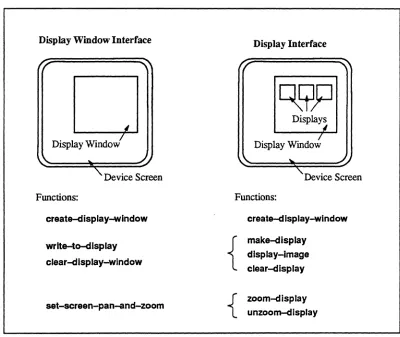
The display functions of *Graphics can viewed as providing two levels of interface.
The display-level interface is useful for interactively displaying both images and building blocks for programs. It automatically rescales, dithers, positions, and sizes images for dis-play. It lets the user overlay images, and provides functionality for defining color maps and for referencing color slots symbolically. The high-level display interface is based on that of the CM Vision Utilities written by Thinking Machines Corporation.
The display window interface, on which the higher-level display interface is built, is de-signed for users who want more detailed control or who don't require the model that the high-level interface provides. It allows the user to send pvar data to the display device, with rescaling, dithering, positioning, sizing, and color maps managed by the user. The low-lev-el interface is in tum built on *Render and the Generic Display Interface.
Chapter 1. *Graphics: *Lisp Graphics Interface
Display Window Interface
Display Windov!
Functions:
create-display-wlndow
wrlte-to-dlsplay
clear-display-window
set-screen-pan-and-zoom
Display Interface
Displays I
I
Display Window
Device Screen
Functions:
create-dlsplay-wlndow
{
make-display
display-Image clear-dlsplay
{ zoom-display unzoom-display
Figure 1 The relationship between displays and display windows, and the functions that users typically use for each level of interface
Figure 2 shows the two levels of color map interface and lists the typical functions.
Device-level Color Map Interface
R G B
Functions:
display~evice-has-color-map-p display~evice-color-map-arrays-size
set~isplay~evice-color-map-arrays set~isplay~evice-color-map-slot
color
map
Symbolic Color Map Interface
color
ranges
gray: [---] rainbow: [---]
colors { blue: [ - ] yellow: [-]
white: [-]
Functions:
{
:~:=.~-<.nge
set~olor-map
Figure 2. The two levels of color map interface. and the functions typically used at each level
1.2
Overview of Rendering Functions
The rendering utilities are built on the Paris-level package *Render (pronounced "star-render''). These utilities are as follows:
1. Z-butTers are data structures used in rendering 3-dimensional objects. They are primarily useful for doing hidden line and surface removal. Users can create and delete Z-buffers and use the rendering functions described below to create images within a Z-buffer. The data can then be displayed using the display routines. 2. Rendering primitives, both 2- and 3-dimensional, are provided, including
Chapter 1. *Graphics: *Lisp Graphics Interface 5
be displayed within a Z-buffer; the 2-dimensional versions create a pvar image that can be directly displayed.
3. Math functions are provided to deal with vector and matrix operations, especially those dealing with transfonnation matrices that allow the rotation, translation, and scaling of image coordinates.
1.3 Using *Graphics
The *Lisp graphics interface resides in the *graphlcs package. Users may wish to make the package in which they program (for example, *lIsp) use the "'graphics package, so that all *Graphics functions and variables are easily accessible. For example:
(in-package '*lisp :use ' (*graphics»
If you do not do this, then all calls to functions and references to variables described herein must be prefixed by *graphics: or by *g: (*g is a nickname for the *graphics package). Example programs using the *Graphics package may be found in the me examples. lisp.
Chapter 2
Display Windows
To use *Graphics, you must first create a display window using the function create-dis-play-window. You can create more than one display window.
Display output is directed to the current display window. There are two ways to change the current display window. The function create-display-wlndow sets by default the current display window to the window it creates. The function set-display-window sets the current display window to a display window that you specify.
Display window coordinates are specified as two-element lists of the fonn (x y), indicating offsets to the right and down, respectively, from the upper left comer of the screen or win-dow. The x and y coordinates of the display correspond to dimensions 0 and I, respectively, of a 2-dimensional pvar.
2.1 Creating a Display Window
The create-display-window function creates and returns a display window structure. Its syntax is as follows:
create-display-wlndow &key :dlsplay-window-type :physical-devlce-pointer :deslred-blts-per-plxel
:deslred-wldth :deslred-helght :name :dlsplay-paddlng :make-current :color-map
[Function]
argu-ments let you specify other options and avoid prompting. To avoid the menu, you can specify the type, location, size, and other properties of the returned display window by specifying values for the appropriate keyword arguments.
2.1.1
Display Window Type, Location, and Size Arguments
The following create-dlsplay-window arguments are used to specify the type, location, and size of the returned display window:
:display-wlndow-type :physlcal-devlce-polnter :deslred-bits-per-plxel :desired-wldth
:desired-height
Specifies type of returned window. Specifies output device for window. Specifies desired bit depth for window. Specifies desired window pixel width. Specifies desired window pizel height.
The permitted values for these arguments are interrelated, and depend on the value provided for the :dlsplay-wlndow-type argument.
The :display-wlndow-type argument must be one of the following keywords:
:cmfb :xwlndow :symbollcs :symbollcs-frame
Connection Machine Framebuffer display. X Window on either local or remote hOSL
Symbolics window (color or black-and-white screen). A frame consisting of a Lisp Listener and display panel on the Symbolics black-and-white screen.
The :cmfb and :xwindow keywords may be used on any front end.The :symbolics and
:symbollcs-frame keywords may be used only on a Symbolics front end.
The :physlcal-devlce-polnter argument directs output to a specific device, avoiding prompting or automatic defaulting. This argument may be used only if a value has been specified for :display-window-type.
The legal values for :physlcal-device-pointer depend on the value of :display-wlndow-type
as follows:
:display-window-tvpe value:
:cmfb
Legal :physlcal-device-pointer value(s):
Non-empty string, which must be a member of the list cmfb:available-displays. Defaults
Chapter 2. Display Windows
:xwindow
:symbollcs
:symbolics-frame
9
String of the fonn "hosUlame:screen" (for example "Wlix:O"). Under Lucid this defaults to th~ value of the display environment variable. On Symbolics front ends, this defaults to Symbolics host display.
The :physlcal-devlce-polnter argument is currently ignored on Symbolics front ends.
If the :deslred-blts-per-plxel is 1,
then tv:maln-screen is used; otherwise the value of (color: find-color-screen) is used.
The :physlcal-device-pointer argument is
currently ignored on Symbolics front ends. The value of tv:rnaln-screen is used.
The :desired-blts-per-plxel argument specifies the number of bits desired. It is used when a device, such as a eM Framebuffer, supports more than 1-bit depth for its display (for example, a display might support both 8- and 24-bit color).
The legal values for :deslred-blts-per-plxeJ depend on the value of :dlspJay-wlndow-type
as follows:
:dispJay-window-type value:
:cmfb
:xwlndow
:symbollcs
:symbolics-frame
Legal :deslred-blts-per-plxeJ value(s):
Can be either 8 or 24; defaults to 8. Can be 1, 8, or 24. The default value is determined by the selected output device. If color screen is available, can be I, 8, or 24. If only console screen is available, must be 1. Defaults to 1 in either case.
Must be 1, and defaults to 1.
The arguments :desired-wldth and :deslred-helght specify the dimensions of the window in pixels.
The legal values for :desired-width and :desired-height depend on :dispJay-wlndow-type
as follows:
:display-window-type value:
:cmfb
Legal :desired-blts-per-pixel value(s):
:xwindow
:symbolics
:symbolics-frame
Positive integers. Defaults to 256 by 256 display.
Positive integers. Defaults to size of screen.
Any supplied arguments are ignored; the entire screen is used.
Owing to constraints imposed by the specified output device, the returned display window may not have exactly the specified values for :deslred-blts-per-plxel, :deslred-wldth, and
:deslred-helght. For this reason, the function create-dlsplay-wlndow returns four values: • the display window
• the actual bit depth (number of bits per pixel) of the display window • the actual width of the display window
• the actual height of the display window
2.1.2 Other Display Window Property Arguments
The argument :name optionally specifies the name of the newly created display window.
If specified, it must be a string. If not specified, a name is generated that indicates the type
of window.
The argument :make-current, which defaults to t, specifies whether the display window being created is to be the current display window.
The following arguments are relevant if displays are to be used with the display window:
• :color-map, if specified, must be a symbolic color map or the name of a symbolic color map. It should be specified only for 8-bit windows (although it can be speci-fied for I-bit and 24-bit windows as well). If not specified, it defaults as follows:
• for 8-bit pseudo-color windows and I-bit dithered windows, :color-map
defaults to :gray-and-ralnbow
• for 24-bit ROB display windows, :color-map defaults to :rgb (see Section 3.4).
Otherwise, the color map is not set
To prevent create-dlsplay-wlndow from touching the color map, specify :color-map as nil.
Chapter 2. Display Wuulows 11
be created just big enough to display a single image, :dlsplay-paddlng should be set to O.
2.2 Getting Information about a Display Window
The functions listed below provide various kinds of infonnation about display windows.
dlsplay-wlndow-bits-per-plxel &optional display-window [Function]
returns the number of bits to represent a value for display window. display-window de-faults to the current display window.
display-window-width &optlonal display-window [Function]
returns the width, in pixels, of a display window. display-window defaults to the current display window.
dlsplay-window-height &optional display-window [Function]
returns the height, in pixels, of a display window. display-window defaults to the current display window.
display-window-eolor-rnap display-window [Function]
returns the symbolic color map associated with a display window. (Symbolic color maps are described in Sections 3.1 and 3.2.) display-window defaults to the current display window.
dlsplay-window-ansr-display &optional display-window [Function]
returns the generic display (an instance of cmsr:display) that implements display-window.
display-window defaults to the current display window. This function provides a hook to
the Paris-level Generic Display Interface.
valid-dlsplay-window-p object [Function]
2.3 Selecting a Display Window
The functions listed below have to do with selecting a display window.
set-display-window display-window [Function]
makes display-window be the current display window. It is an error if display-window is not a valid display window ..
wlth-display-window display-window &body body [Macro]
evaluates body in the context of display-window being the current display window. After the form has been exited, the current display window reverts to what it was before the form was entered. display-window must be a valid display window.
*current-dlsplay-window* [Variable]
displays the current display window, or nil if no display window is current.
*all-display-windows* [Variable]
displays a list of all valid (non-deleted) display windows.
2.4 Reading and Writing to Display Windows
The functions listed below have to do with reading and writing to display windows, clear-ing display windows,' and rescalclear-ing the pvar argument.
wrlte-dlsplay-window pvar &key :pvar-start :display-start :size [*Defun]
The data within pvar is displayed on the device represented by the current display window. The data with pvar must be coercible into a field pvar of length (display-wlndow-blts-per-pixel) bits. That is. floating-point data is not acceptable but a signed pvar that contains only non-negative values is acceptable as long as the values are small enough.
pvar itself must belong to a 2-dimensional VP set. Its geometry can be in either grid or
Chapter 2. Display Windows 13
:pvar-start specifies a grid address of the upper left comer from which the data to be written is taken. It is a two-element list (x y).
:display-start specifies the display coordinates of the upper left comer to which the data is written. It is a two-element list (x y).
:size specifies the extent in each dimension. :slze defaults to the maximum extent possible, given the pvar size, the display size, and the start arguments (if provided). It is a two-element list (width, height).
To rescale the pvar argument of function wrlte-d isp lay-window, use the following function:
rescale-pvar-for-dlsplay-window!! pvar &key : result-type :result-mln :result-max :pvar-mln :pvar-max :result-underflow :result-overflow
[Function]
This function rescales pvar, returning a new PVar of element-type :result-type, which de-faults to a field pvar of size (dlsplay-wlndow-bits-per-plxel).
pvar must belong to the current VP set, and must be of a non-complex numeric or boolean
type.
The function linearly maps each value of pvar so that :pvar-rnln maps to :result-rnln and :pvar-rnax maps to :result-max. :pvar-rnin and :pvar-rnax default to the actual minimum and maximum values of pvar, :result-mln, and :result-rnax default to the minimum and maximum values which can be stored in the result pvar, except that if the :result-type is floating point, then the minimum value defaults to 0.0 and the maximum value defaults to 1.0.
read-dlsplay-window &key :result-pvar [Function]
:pvar-start display-start :size
copies contents of display window into :result-pvar, if provided. If not provided, an un-signed-byte pvar of the appropriate length is created and returned.
If :result-pvar is not provided, the current VP set must be 2-dimensional. If :resuH-pvar is provided, it must be an unsigned-byte pvar of length greater than or equal to display-window-bits-per-pixel bits. The pvar must belong to a 2-dimensional VP set, which need not be the current VP set and may be in either grid or framebuffer order. Framebuffer-or-dered geometries are explained in the Graphics Programming Release Notes for Version 5.2.
The arguments :pvar-start, :display-start, and :size are as in write-display-wlndow.
clear-display-wlndow [Function]
clears the current display window by setting all values to 0 (the background color). Oears pointers to any displays automatically created by the function display-Image.
2.5 Deleting Display Windows
-There are two functions for deleting display windows:
delete-dlsplay-wlndow display-window [Function]
kills the display-window, clearing it from screen. It is an error to use the deleted display window again. All displays within the display window are deleted.
delete-all-dlsplay-wlndows [Function]
kills all display windows.
2.6 Hardware Panning and Zooming
Chapter 2. Display Windows 15
screen-pan-and-zoom-p [Function]
returns t if the screen containing the current display window supports hardware panning and zooming; otherwise returns nil.
set-screen-pan-and-zoom &optional pan-x pan-y
zoom-x zoom-y
[Function]
pans and zooms the screen containing the current display window, if it supports hardware panning and zooming;. otherwise, it does nothing. pan-x and pan-yare the coordinates to appear in the upper left comer of the screen; these arguments both defrault to O. zoom-x and zoom-yare the additional amount by which each pixel is replicated in each dimension.
zoom-x defaults to 0, zoom-y defaults to the value at zoom-x. Thus, 0 means no zooming,
I means double each pixel, 2 means triple each pixel, etc. Because zoom-y defaults to
zoom-x, the zoom argument need not be repeated if it is the same in both dimensions.
Be-cause the arguments default to 0, calling the function with no arguments resets the screen to its initial state (no panning or zooming).
This function returns the new values of pan-x.pan-y, zoom-x, and zoom-yo If the screen does not support hardware panning and zooming, each of these values will be O.
get-screen-pan-and-zoom [Function]
Chapter 3
Color Maps
*Graphics provides facilities for defining color maps for pseudo-color (8-bit) and 24-bit screens.
Two levels of interface are provided: a device-level interface, and a higher-level, symbolic interface.
3.1 Overview of Device-Level and
Symbolic Color Map Interfaces
With the device-level interface, color maps are simply specified as a set of three arrays that map screen pixel values to red, green, and blue intensities. Each display window on a de-vice that suppons color maps has its own device color map. The following functions comprise the device-level interface:
dlsplay-device-has-color-map-p dlsplay-devlce-color-map-array-slze set-display-devlce-color-map-arrays
display-devlc~lor-map-arrays
set-display-devlctH:olor-map-slot dlsplay-device-color-map-slot
The high-level, symbolic color map interface allows you to define a named color map as a combination of named component colors and color ranges. The symbolic interface serves several purposes:
•
•
It lets you reference the color and color ranges by name rather than by slot number . (See function dlsplay-image, Section 4.4, which makes use of symbolic color maps.)
Since a symbolic color map is associated with every display window, whether or not the underlying device actually supports color maps, you can write generic code that uses colors and color ranges. On black-and-white devices the system does its best to display such images instead of signaling an error.
The symbolic color map functions include:
def-color create-eolor
def-llnear-color-range create-llnear-color-range def-color-map
create-eolor-map set-color-map current-color-map
Functions for getting infonnation about color maps are also provided.
3.2 Symbolic Color Map Interface
The symbolic color interface lets you defme and reference pseudo-color (8-bit) color maps.
The following subsections describe functions for defining colors, color ranges, and color maps. Examples using these functions are provided in Section 3.2A Functions for activat-ing color maps and for gettactivat-ing infonnation about color maps are also described.
3.2.1 Creating Colors
A color is a named RGB triple, which can be referred to symbolically in a color map.
See Section 3.2.4 for examples.
create-eolor name space value [Function]
Chapter 3. Color Maps 19
name must be a keyword. like :red. name can be used to symbolically refer to the color when it is used in a color map.
space is the color space used for defining the color. Currently. the only legal value for space is :rgb.
The value provided is dependent on space. Currently. value must be a list or vector of three floating-point numbers between 0.0 and 1.0 inclusive. representing the red, green. and blue intensities.
def-color name space value [Macro]
creates a color, by calling the function create-color, and pushes the color onto the list
*defined-colors*, replacing any previously defmed colors having the same name.
*deflned-colors* [Variable]
is a list of all colors defined by def-color.
color name [Function]
returns the color named name. if one has been defined by def-color. If none is found, re-turns nil.
3.2.2 Creating Color Ranges
A color range is a set of colors. Currently, a color range is defmed as a piecewise linear wash between a set of specified RGB triples or colors. A color range is defmed indepen-dently of how many actual slots it will take up in a color map.
See Section 3.2.4 for examples.
create-llnear-color-range name space &key :knots :Interval-welghts [Function]
creates and returns an object of type color-range, a range of color values linearly interpo-lated between specified knot points.
space specifies the color space for defining the range. Currently, the only legal space value is :rgb.
The :knots argument must be provided, and must be a list of at least two elements. Each element must be a list or vector of three floating-point numbers between 0.0 and 1.0 inclu-sive. The :knots specify the color values to be interpolated in order to fill the color range.
:interval-welghts specify relatively how many color slots of the color map are to be devoted
to each interval between two knot points. The :Interval-welghts argument must be a list of positive numbers, of length one less than the length of the :knots list It defaults to a list of 1.0's.
def-linear-color-range name &key : knots :Interval-welghts [Macro]
creates a linear color range by calling function create-linear-color-range, and pushes it onto the list *defined-color-ranges*, replacing any previously defined color ranges having the same name.
Two linear color ranges are pre-defined:
:gray a linear wash from black to white
:rainbow a linear wash through the colors of the spectrum, violet to red
*defined-color-ranges* [Variable]
is a list of all color ranges defined by def-linear-color-range.
color-range name [Function]
returns a color-range named name defined by def-linear-color-range. If none is found,
re-turns nil.
describe-color-range color-range &key :stream [Function]
prints out in a pretty format information about the color-range object.
3.2.3 Creating Color Maps
Chapter 3. Color Maps
See Section 3.2.4 for examples.
create-color-rnap name ranges &key :relative-range-Iengths :colors
creates and returns an object of type color-map.
:background :foreground :t-color :nil-color :size
21
[Function)
name must be a keyword like :my-color-map. name can be used to symbolically refer to the the color map when it is used by other functions.
ranges is a list, each element of which is either a range object or the name of a color-range object. The function display-image will treat the fIrst color color-range as the default color range.
:relative-range-Iengths is a list of positive numbers of length equal to the length of the
ranges argument. It specifies the relative number of slots to be allocated to each range. It defaults to a list of all 1.0's.
:colors.is a list, possibly null, of color objects. It defaults to nil.
The arguments :background, :foreground, :t-color, and :nll-color, if provided, must be the
names of color objects defmed in the :colors argument. The names of color objects are keyword symbols. :background, which defaults to black, is mapped to slot 0, and :fore-ground, which defaults to white, is mapped to the highest slot in the color map (typically 255). The arguments :nil-color and :t-color define default colors for displaying boolean values with function display-image. :nll-color and :t-color default to the same color as
:background and: foreground, respectively.
def-coJor-map name ranges &key :reJative-range-Jengths :coJors
:background :foreground :slze
[Macro]
creates a color map by calling create-coJor-map, and pushes it onto the list *defined-coJor-maps*, replacing any previously defined color map having the same name.
*deflned-color-maps* [Variable]
is a list of all color maps defined by def-color-map.
color-map name [Function]
returns a color map named name defined by def-color-map. If none is found, returns nil.
3.2.4 Example
This is how the color map :gray is defined:
(def-linear-color-range :gray :rgb
: knots
, «0.0 0.0 0.0) (1.0 1.0 1.0»)
(defparameter *standard-colors* (list
(create-color :dim-blue :rgb ' (0.00 0.00 0.30» (create-color :black :rgb ' (0.00 0.00 0.00» (create-color :gray :rgb ' (0.50 0.50 0.50» (create-color :white :rgb ' (1.00 1.00 1.00» (create-color :red :rgb ' (0.97 0.0 0.15)} (create-color :orange :rgb f (0.98 0.79 0.05»
(create-color :yellow :rgb f (0.96 0.95 0.04»
(create-color :green :rgb ' (0.25 0.72 0.13» (create-color :blue :rgb' (0.20 0.33 0.74» (create-color :violet :rgb-f (0.55 0.00 0.59»
Chapter 3. Color Maps
(def-color-map :gray (list :gray) :colors *standard-colors*
:background :dim-blue :foreground :white :nil-color :black :t-color :red
3.2.5 Selecting a Color Map
set-color-map color-map &key :display-window
23
[Function]
changes the color map for a display window. The :display-window argument defaults to the current display window.
When the color map for a display window is changed, the colors on the display change immediately. Under X Windows, however, the mouse must be positioned over the window for the window's color map to be activated (see Section 3.5).
The following pseudo-color color maps are defmed:
:gray :rainbow
. :gray-and-ralnbow
includes color range :gray
includes color range :rainbow
includes color ranges :gray and :ralnbow
All three color maps include the following overlay colors: :red, :orange, :yellow, :green, :blue, :vlolet, :black, :whlte, :gray, and :dlm-blue.
current-color-rnap [Function]
returns the color map associated with the current display window, or nil, if no display win-dow is current See also function dlsplay-window-color-map, in Section 2.2.
3.2.6 Getting Information about a Color Map
descrlbe-color-rnap &optional color-map stream [Function]
descrlbe-color-map-color-arrays color-map &key :start :end :stream
[Function]
prints out in tabular fonnat the RGB values of each color slot in the color-map.
color-rnap-size color-map [Function]
returns the size of the color-map (the number of slots in its color table).
color-map-color-ranges &optlonal color-map [Function]
returns the names of the color ranges used to defme color-map, which defaults to the cur-rent color map. Function color-rnaP-color-ranges returns nil if there is no color map.
(color-rnap-color-ranges (color-map :gray-and-rainbow» - > (: GRAY : RAINBOW)
color-rnap-color-names &optlonal color-map [Function]
returns the names of the colors used to define color-map, which defaults to the current color map. Since more than one name can be associated with a color, only the first name is returned. Function color-map-color-names returns nil if there is no color map.
(color-rnap-color-narnes (color-map :gray-and-rainbow»
-> (:VIOLET :BLUE :GREEN :YELLOW :ORANGE :RED :GRAY :BLACK :WHITE : DIM-BLUE)
color-map-color-allases &optlonal color-map [Function]
returns a nested list of all the names of each color used to define color-map, which defaults to the current color map. Each element of the list is either a single name or a list of two or more names of each color in the color map. Function color-map-color-aliases returns nil
if there is no color map.
(color-map-color-aliases (color-map :gray-and-rainbow»
-> « : VIOLET) (:BLUE) (:GREEN) (:YELLOW) (:ORANGE) (:T-COLOR :RED) (:GRAY) (:NIL-COLOR : BLACK) (:FOREGROUND :WHITE)
Chapter 3. Color Maps 25
color-nam~lor color-name &optlonal color-map [Function] returns the color named color-name of color-map, which defaults to the current color map. Function color-nam~lor returns nil if color-name is not present color-map, or if there is no color map.
color-slot color-name &optlonal color-map [Function]
returns the index into the color table, color-map. which contains the color referenced by color-name. The argument color-map defaults to the current color map. Function
color-slot returns nil if color-name is not present in color-map or if there is no color map.
color-range-slots color-range-name &optional color-map [Function]
returns, as a list, the minimum index and maximum index of the interval of color slots that are spanned by the color range referenced by color-range-name. The argument coior-map defaults to current color map. Function color-range-slots returns nil if color-range-name is not present in color-map or if there is no color map.
color-map-index-value index &optional color-map [Function]
returns a three-element list of floats between 0.0 and 1.0, representing the red, green, and blue intensities stored in the coior-map at slot index. Function color-map-lndex-value
returns nil if there is no color map.
3.3
Device-Level Color Map Interface
The device-level color map interface lets you specify each slot (entry) of the color map in tenns of its red, green, and blue values. These functions are useful if the calling program manages its own color maps.
If color maps are managed at this level, the. symbolic color maps should be disabled by evaluating the expression (set-color-map nil). Also, the color and color-range arguments to function display-image cannot be specified. Instead, you can use function wrlte-dlsplay
3.3.1 Getting Information about Device Color Maps
dlsplay-clevlce-has-color-map-p [Function] returns t if the current display device supports color maps, nil otherwise.
The following functions can be called only when the current display device supports color maps (Le., function display-clevice-has-color-map-p returns t).
dlsplay-clevice-color-map-arrays-slze [Function] returns the length of the color map arrays of the current display device.
3.3.2 Setting the Device-Level Color Map
These functions can only be called when the current display device supports color maps (i.e., function display-clevlce-has-color-map-p returns t).
set-clisplay-clevice-color-map-arrays red-array green-array blue-array
[Function]
sets the color map arrays of the current display device. The arguments red-array, green-array, and blue-array must each be arrays of type single float and be of length
displ~y-window-color-map-sIZ8. The arrays must contain values between 0.0 and 1.0, inclusive.
Chapter 3. Color Maps 27
3.3.3 Reading Contents of Device-Level Color Maps
display-device-color-map-arrays [Function]
returns the color map arrays of current display device as three values: red-array,
green-array, and blue-array. Each array is of length display-device-color-map-size and of
element type single-float.
display-device-color-map-slot index [Function]
Returns the red, green, and blue intensity values, as three values, of color slot index. index
must be greater than or equal to 0 and less than display-window-color-map-size.
3.4 Using 24-bit Color Maps
On 24-bit devices, color maps are intetpreted differently than they are on 8-bit devices. On a 24-bit device, the three bytes of a 24-bit image value index the red, green, and blue color map arrays independently.
For convenience, the symbolic color map :rgb is defined for displaying RGB images on 24-bit devices. Each red, green, and blue map is a linear ramp. No overlay, background, or foreground colors are defined.
Since the symbolic color map interface is designed for pseudo-color (8-bit) color maps, other 24-bit color maps are best specified using using the device-level interface.
3.5 Color Maps on X Windows
Chapter 4
Displays
Displays are rectangular regions of a display window onto which images are displayed. Displays can be positioned either by the user or automatically by a program that keeps track of empty space on the display window.
4.1 Ways to Use Displays
The function display-Image (and its variant, display-image!!) provide a high-level interface for displaying images. There are three different ways to display images using the high-level interface:
1. To display images in predetennined positions, a program can create its own dis-plays and use them over and over. This mode is especially useful for implementing demos that display output in a predetennined fonnat In this case, your program keeps a pointer to the display and passes it to the function display-Image, as in the following example:
(setq top-display
(make-display :size (list 256 256) :position (list 32 20»)
(display-image my-image!! :display top-display)
2. If you wish to display an image in a predetennined position only once, you can simply specify a position argument to dlsplay-lmage as follows:
(display-image my-image!! :position (list 32 30»
In this case, no display object gets created.
(display-image my-image!!)
In this case, the image appears on the next free space on the window-either beside the last display or on a new row. Function dlsplay-lmage actually creates a display for this purpose, which is accessible using function last-display, and which can be ''undone'' by function clear-dlsplay. The auto-positioning feature is especially use-ful for debugging, since it automatically places images side by side.
Function display-image is documented in Section 4.4.
4.2 Creating Displays
Displays are created in one of two ways: by the function create-display and by the function
display-Image (when neither of the arguments display or position is specified).
Function create-display is used when you wish to explicitly allocate and position your own displays. It is useful for demonstration programs that have a fixed-format display window for output, where each display is used over and over.
Function display-Image is documented in Section 4.4.
create-cflsplay size position &key :dlsplay-wlndow :Iabel [Function]
returns a display object. The display object is associated with the :dlsplay-wlndow speci-fied, which defaults to the current display window. The display object defines a certain region of the display window, delineated by size and position. position specifies the upper left comer of the display (x y), and size specifies the extent (x-extent y-extent).
An error is signalled if the size and position arguments specify an area that is not totally
within the boundaries of the display window. The arguments size and position must both be two-element lists of non-negative integers.
Chapter 4. Displays 31
4.3 Getting Information about a Display
descrlba-dlsplay display &optional stream [Function] prints out in a pretty format infonnation about display.
display-position display [Function]
returns the position of display with respect to its display window. The position is returned as a two-element (x y) list of integers.
dlsplay-slze display [Function]
returns the size of display, in pixels. The size is returned as a two-element list of integers of the fonn (width height).
dlsplay-clisplay-wlndow display [Function]
returns the display window object to which display belongs.
display-label display [Function]
returns the label associated with display.
valid-display-p object [Function]
returns t if object is a display associated with an allocated display window.
4.4 Displaying an Image
display-image display-image!!
image &key :rescale-p :color-range :image-min :image-max :position :image-start :Iabel :zoom
:t-color :display :size
[*Defun] [*Defun]
:nil-color :display-wlndow :overlay
image is a 2-dimensional pvar of numeric or boolean type. Its geometry can be in either grid or framebuffer order. Framebuffer-ordered geometries are explained in the Graphics
Programming Release Notes for Version 5.2.
display-Image returns nil. You can call display-Image at top level to display an image with-out consuming stack space. dlsplay-image!! returns image. It is especially useful for displaying a pvar in the middle of debugging a program.
When the operations display-Image and display-Image!! are called with only the image ar-gument specified, they automatically rescale, position, and, possibly. dither the entire image. The keyword arguments allow you to manually specify scaling. colors, position. and sizing of the image, and also allow you to overlay additional images.
4.4.1 Specifying How Much of the Image to Display
The entire image is displayed by default, but :Image-start and :size can be used to display only a portion of the image.
Arguments :Image-start plus :slze. if specified. must not exceed the dimensions of image.
If :display is specified. the portion of tinage displayed is the maximum amount possible. given the constraints imposed by the size of :dlsplay and by :Image-start and :size. Portions of the image that extend beyond the boundaries of the display are clipped.
4.4.2 Specifying Where to Display the Image
If :dlsplay is specified. :position must not be specified, because :positlon defaults from
:display. Otherwise. display-image creates a display for displaying the image.
If :posltion is specified. it must be a list (x y) of two non-negative integers specifying the
x and y coordinates. where the upper left comer of the image is displayed.
Chapter 4. Displays 33
:display, if :display is specified. If :display-wlndow and :dlsplay are specified, the :display
must belong to :display-window.
4.4.3 Specifying the Colors for Displaying the Image
Numeric Pvars
If image is a numeric pvar, then the keywords :rescale-p, :color-range, :Image-min, and
:Image-max are meaningful.
If: rescale-p is t, the default, then image is assumed to be a monochrome or pseudo-color image, and it is rescaled as follows.
:color-range specifies a color range for displaying the image. It is meaningful only if image
is numeric. If specified, :color-range must be of the values returned by the function color-map-color-ranges; othelWise, it defaults to the first color range of the current color map.
If the default color map :gray-and-ralnbow is used, then :color-range can be either :gray
(the default color range), which displays the image using gray levels, or :rainbow, which displays the image using spectral colors.
The values in the image within the viewing area (specified by :Image-start and :slze) are mapped to indices in the :color-range such that :Image-mln (which defaults to the minimum image value in the area specified) is mapped to the minimum index and :image-max (which defaults to the maximum image value in the area specified) is mapped to the maximum index. Any values outside this range are clipped to either :Image-mln or :Image-max.
n-tnt~ ~~~ =~:::D
~§J~
- B - . .numeric image color map n-bit
color-mapped device
• rescale /
\ (rescale-p
=
nil)- - - - . . dither
I-bitimage
0
•
8-bitimage
I-bit device
Figme 3. Display stages for monochrome and pseudo-color images on color-mapped and black-and-white windows
To display a 24-bit RGB image on a 24-bit screen, set the color map to :rgb and call
display-image with :rescale-p set to nil. Figme 4 illustrates the stages for displaying a 24-bit image on a 24-bit window.
8-bitimages
24-bitRGB image ~ - R image --.
---.~ ~ - 0 image -..
(rescale-p = nil) - B image -..
color map :rgb
- R - - . - 0 - "
- B - . .
o
24-bit device
Figure 4. Display stages for 24-bit images on a 24-bit device
Boolean Pvars
If image is a boolean pvar, then the keywords :t-eolor and :nlkolor are meaningful.
:t-color and :niJ-color specify the colors for displaying t and nil values of image. :t-color
and :nlJ-color, if specified, must be the names of colors in the current color map. They default to the color map's :t-color and :nlJ-color, respectively (which are :white and :black
Chapter 4. Displays 35
pvar and if the current color window supports color maps. On monochrome devices, nil always maps to 0 (black) and t maps to I (white).
4.4.4 Specifying Multiple Images to Overlay
The keyword argument overlay optionally specifies a list of images to overlay or superim-pose onto the original image, image. overlay is either an overlay specification or a list of overlay specifications, with each specification of the fonn
(overlay-mask &key :overlay-Image :rescale-p :color-range :t-color :nil-color :image-min :Image-max)
overlay-mask is an a boolean pvar that specifies where the image to overlay, :overlay-image, is to be drawn. :overlay-image is either a boolean or numeric pvar. It defaults to t!!. When :overlay-mask is t within the specified image area, :image-min and :image-max de-fault to the minimum and maximum value of :overlay-image.
The remaining arguments mean the same thing and follow the same restrictions as the cor-responding top-level arguments to display-Image, but in this case apply to the overlay image. Every :overlay-mask and :overlay-Image must be in the same VP set as image.
Wherever overlay-mask is t, the overlay image is displayed instead of the original image. Where two or more overlays satisfy this condition, the first overlay satisfying this condi-tion is displayed. Where no overlays satisfy this condicondi-tion, the original image is displayed.
4.4.5 Specifying Other Features
label is a string to be drawn under the image. It defaults to an empty string or to the label of display, if display is specified.
NOTE: Currently, the drawing of labels is not implemented.
4.4.6
Example
(in-package '*lisp :use ' (*graphics»
(*cold-boot :initial-dimensions (list 256 64» ; let this be the image size
(create-display-window)
; choose a color device, if available.
(set-color-map :gray-and-rainbow)
; this is the default color map anyway
(*defvar ramp!! (self-address-grid!! (!! 0») ; define a numeric pvar
(display-image ramp!!)
; displays ramp using gray levels
(display-image ramp!! :size (list 128 64» ; display only the left half of the image
(display-image ramp!! :color-range : rainbow) ; displays ramp using rainbow colors
(*defvar random!! (zerop!! (random!! (!! 20»» ; define a random boolean pvar
(display-image random!! :t-color :red :nil-color :black) ; display random in red and black
(display-image random! :size (list 40 10) :zoom 6) ;; display zoomed in section of random
(display-image ramp!! :overlay (list random!! :t-color :green» ; display ramp in gray, overlaying t values of random in green
(display-image ramp!! :image-max (* 2 (*max ramp!!» :overlay (list random!! :t-color :green»
display same thing, but use only lower half of gray levels for ramp
(*defvar overlay-mask!! (>!! (self-address-grid!! (!! 0» (!! (round (dimension-size 0) 2»»
Chapter 4. Displays 37
(display-image overlay-mask!!)
(display-image ramp!! :overlay '«,overlay-mask!! :overlay-image ,random!!))) superimpose random over ramp where overlay-mask is t.
; note that random is drawn using default t-color and nil-color.
4.5 Clearing Displays
last~isplay [Function]
returns the last display object automatically created by function display-image. This func-tion is useful for redisplaying an image over the last display used:
(display-image wrong-image!!)
(display-image right-image!! :display (last-display»
clear~lsplay &optlonal display [Function]
clears the contents of display.
If display is not specified, it ''undoes'' the last display by clearing the display returned by
last~isplay, and by freeing its space for the next image automatically positioned by
display-Image. Thus, the example above is equivalent to the following:
(display-image wrong~image!!)
(clear-display)
(display-image right-image!!)
4.6 Reading a Pvar from a Display
read~isplay &key :dlsplay :result-pvar :dlsplay-start :size
:pvar-start [Function]
reads data from a device represented by the display window to which :display belongs into
Returns :result-pvar or the newly created pvar.
Note that this function, in general, is not the inverse of function dlsplay-lmage, since dis-play-lmage may rescale the image, but read-display does not.
The :display from which data is read defaults to the value of the function last-display.
:result-pvar, if specified, must be an unsigned pvar of length greater than or equal to dis-play-window-bits--per-plxel. It must be a 2-dimensional pvar, not necessarily in the current VP set, in either grid or framebuffer order.
:pvar-start is a list (x y) that specifies the location where the data is placed within the result-ing pvar, and defaults to (00). :display-start and :slze are lists (x y) that specify the area of the :display from which data is read. :dlsplay-start defaults to the position (0 0). :slze
defaults to "as much as possible," given the constraints specified by the dimensions of :dls-play and :result-pvar, and the arguments :dlsplay-start and :result-start.
4.7 Hardware Panning and Zooming of Displays
These functions allow you to closely inspect a display on a device that supports hardware panning and zooming. The CM Framebuffer and some Symbolics color screens have this capability.
zoom-display &optional display [Function]
pans and zooms the device so that display takes up as much of the screen as possible, if the hardware supports pamrlng and zooming; otherwise does nothing. Returns t or nil to indi-cate whether the operation was performed. The display argument defaults to last-dispJay.
unzoom-display [Function]
Chapter 5
Rendering Primitives
None of these routines actually display data on a display device. They all render data into a separate pvar (an image-buffer-pvar for 2d, or a pvar within a Z buffer, for 3d). Data is then displayed to display devices using display functions such as write-display-window and
display-image.
5.1 Two-Dimensional Rendering Functions
*draw-Image image-bujJer-pvar source-color-pvar
image-start source-start size &key :combiner
[*Defun]
copies a specified region source-color-pvar to a specified region of image-bujJer-pvar.
The regions are specified using image-start, source-start, and size, which must all be two-element lists of integers.
The :comblner argument dictates how the source-color-pvar data is combined with data already existing in image-buffer-pvar. The :comblner, which defaults to :overwrlte, can be
specified as one of the following: :default, :overwrlte, :Ioglor, :Iogand, :Iogxor, :u-add, :s-add, :u-rnin, :s-mln, :u-max, :s-max.
*draw-lines-2d image-bujJer-:pvar x-start-pvar y-start-pvar x-end-pvar y-end-pvar source-color-pvar
&key :combiner :cllp-p : draw-end-polnt-p
[*Defun]
defines lines using start and end X and Y coordinates in x-start-pvar, y-start-pvar,
x-end-pvar, and y-end-pvar. Each active processor defines a line. Each line has a color
The color value for each line is written into image-buffer-pvar at the processors (pixels) that constitute the line.
The argument image-bufJer-pvar must be a 2-dimensional pvar.
The combiner argument is as defined with *draw-lmage and defaults to :overwrite . The argument :cllp-p specifies what action to ~e if lines extend beyond the limits of the
image-bufJer-pvar. If :cllp-p is t (the default), such lines are clipped; if :clip&;l is nil, an
error is signalled.
*new-draw-lines-2d image-buffer-pvar x-start-pvar y-start-pvar [*Defun]
x-end-pvar y-end-pvar color-pvar
&key (combiner :overwrlte) (:clip-p t)
*new-draw-llnes-2d is a replacement for the *draw-llnes-2d function, which tended to run out of memory. *new-draw-lines-2d is less likely to run out of CM memory.
*new-draw-lines-2d modifies image-bujJer-pvar such that image-bufjer-pvar contains the values of color-pvar in processors representing the points of the lines defined by
x-start-pvar, y-start-pvar, x-end-pvar, and y-end-pvar.
If :clip-p is non-nil, then points defined by the lines outside the region defined by
image-bufJer-pvar are discarded. If :cllp-p is nil, and any point in any line is outside the
region defined by image-bujJer-pvar, an error is signalled.
The :comblner argument is used to combine color values destined for the same pro-cessor/pixel in image-buffer-pvar. Its legal values are the same as those for
*dra~oints-2d.
x-start-pvar, y-start-pvar, x-end-pvar, and y-end-pvar must be vector pvars of type
single-float. However, all floating-point values are rounded towards minus infinity (floor'ed) before any computation on them is done. Thus, a point stored inx-start-pvar and
y-start-pvar as #(0.3 0.9) actually represents the point #(0 0) in image-bujJer-pvar space.
Therefore it is not possible to specify that a line starts or ends "between pixels."
draw-line-2d image-bujJer-pvar x-start y-start x-end y-end color
&key :combiner :clip-p :draw-end-point-p
[Function]
Chapter 5. Rendering Primitives
*draw-points-2d image-buffer-pvar x-pvar y-pvar source-color-pvar
&key :comblner :cllp-p :draw-end-polnt-p
41
[*Defun]
draws points using the X and Y coordinates in x-pvar and y-pvar. Each active processor defmes a point. Each point has the color value specified by source-color-pvar.
The color value for each point is written into image-buffer-pvar at the processor (pixel) defmed by X and Y. image-buffer-pvar must be a 2-dimensional pvar.
The :combiner and :clip-p arguments are as defined and default as in the function
*draw-lines-2d.
draw-polnt-2d image-buffer-pvar x y color
&key :comblner
[Function]
This is the scalar analog of *draw-points-2d. Draws a single point with value color into the
image-buffer-pvar at grid address (x y).
polygon-fill image-buffer-pvar x-vector-pvar y-vector-pvar color-pvar
&key :number-of-vertlces :combiner :overwrlte :clip-p :edge-color-pvar
[Function]
modifies image-buffer-pvar such that image-buffer-pvar contains the values of
color-pvar in processors representing the interiors of the polygons defined by
x-vector-pvar and y-vector-pvar.
If :edgEH:Olor-pvar is nil (the default). then the processors representing the edges of the polygons also contain the values of color-pvar; otherwise they contain the colors specified by :edgEH:Olor-pvar.
The polygons are defined in tenns of their vertices. The coordinates can define a polygon in either clockwise or counterclockwise order.
Polygons of different numbers of sides can be drawn in different processors. If
If :cllp-p is non-nil (it defaults to t), then polygon points outside the region defIDed by image-buf/er-pvar are discarded. If :c/lp-p is nil, and any point in any polygon is outside the region defined by image-buf/er-pvar, an error is signalled.
The :comblner argument is used to combine color values destined for the same processor! pixel in image-buf/er-pvar. Its legal values are the same as those for *draw-points-2d and it defaults to :overwrite.
image-buJfer-pvar must be a fixed-size pvar large enough to contain values from :edge-color-pvar and color-pvar. An error is signalled if image-bujfer-pvar is a mutable pvar.
x-vector-pvar and y-vector-pvar must be vector pvars of element type single-float. How-ever, all floating-point values are rounded towards minus infinity (floor'ed) before any computation on them is done. Thus, a point stored in x-vector-pvar and y-vector-pvar as
#(0.3 0.9) actually represents the point #(0 0) in image-bujfer-pvar space. Therefore it is not possible to specify that a vertex is located "between pixels."
5.2 Three-Dimensional Rendering Functions
*draw-points-3d z-buJfer &optional
vector3-pvar :clip-p
color-pvar [*Defun]
defines points using X, Y, and Z coordinates stored in the zeroth, first, and second elements of the vector pvar vector3-pvar.
The X and Y coordinates specify a processor (pixel) in z-bujfer. The value of color-pvar is written into the Z-buffer at that location. If more than one color value is to be written at a single location, the color value with the smallest associated Z coordinate is used.
z-bujfer must be a Z-buffer structure created previously with create-z-buffer.
:clip-p detennines whether coordinates defining points outside the Z-buffer space are ig-nored (the default, t) or signal an error.
draw-polnt-3d z-bufJer vector3 color &optional clip-p
[Function]
Chapter 6
Z-Buffer Functions
Z-buffers are a type of data structure used to perfonn hidden surface removal. For each pixel in an image, a Z-buffer records the most recent color assigned to that pixel, along with a measure of the Z distance of the surface that made that color assignment. As surfaces are added to the image, their distances are compared with the value stored in the Z-buffer for each point. If a surface is closer than the most recently stored Z value, its color overrides any previous color assignment, and the Z distance is updated; otherwise, the surface's color at that point is ignored.
This chapter describes the Z-buffer functions provided by *Graphics.
The create-z-buffer function is used to create a Z-buffer data structure.
creat~-buffer color-length [Function]
&key :float-type :inltlal-color-value
creates and returns a Z-buffer object. The Z-buffer object internally consists of two pvars: an unsigned color value pvar of length color-length, and a floating-point Z pvar o~ either single- or double-float type. The cOlor value pvar records the most recent color value as-signment for a point, and the Z pvar records the "distance" of the surface that made that color assignment.
When creat~-buffer is called, the current VP set must be a 2-dimensional VP set. The image size of the Z-buffer is detennined by the size of the current VP set.
The color value pvar is initialized to the specified :initiaJ-color-value in all processors. The
:initiaJ-color-value argument defaults to