Cloud Drives Forensic Artifacts
A Google Drive Case
Tariq Z. Khairallah
Information Systems Security and Digital Criminology King Hussein School of Computing Sciences Princess Sumaya University for Technology (PSUT)
[email protected] Amman, Jordan
Abstract— This research proposed in this paper focuses on gathering evidence from devices with Windows 10 operating systems in order to discover and collect artifacts left by cloud storage applications that suggest their use even after the deletion of the Google client application. We show where and what type of data remnants can be found using our analysis which can be used as evidence in a digital forensic investigations.
Keywords— Cloud Storage Forensics, Cloud Application Artifacts, Data Remnants, Data Carving, Digital Forensic Investigations
I. INTRODUCTION
Cloud computing is a quite recent term to describe computer resources available as a service accessible over a network, The National Institute of Standards and Technology (NIST) define cloud computing in its publication (SP 800-145)[1]:” Cloud computing is a model for enabling ubiquitous, convenient, on-demand network access to a shared pool of configurable computing resources (e.g., networks, servers, storage, applications, and services) that can be rapidly provisioned and released with minimal management effort or service provider interaction. This cloud model is composed of five essential characteristics, three service models, and four deployment models.”
The mandate for Storage as a Service (StaaS) grounded by Cisco Global Cloud Index: Forecast and Methodology, 2015– 2020 [2] is increasing because of the popularity and availability of digital devices and the wide use of the Internet over these devices, which leads to the increased utilization of cloud storage apps that allows users to access their data anywhere, anytime.
There is a range of cloud storage hosting providers, and many offer free cloud storage services; such as Dropbox, Microsoft SkyDrive, and Google Drive Accessing the various cloud storage services can be undertaken in a variety of ways; a user can install client software on a personal computer (PC), mobile device, or use a web browser to access the cloud storage service.
Cloud storage services are an important source of evidence in investigations for both cybercrime and traditional crimes. It is possible nowadays to abuse cloud storage services for malicious activities. Cloud storage services are being used to distribute Malware [3][4][5], or as command and control to distribute infections. Cloud storage has also been used to launch DDoS attack on US banks [6], in child pornography, and data exfiltration.
The objective of this paper is contribute to digital forensic investigation of cloud storage services through the identification of data forensic artifacts of user activities by conducting an experiment on Google Drive on Windows 10.
II. LITERATURE REVIEW
This section aims to explore the techniques and approaches used by other researchers in this particular field.
Available studies used for the purpose of this paper suggest that types of artifacts collected can be:
1. Artifacts related to files that have been accessed, modified or deleted by the cloud storage applications on the client machine,
2. Artifacts related to web-based activities which are accessed through a web browser.
Two main approaches were used to identify the artifacts: 1. Assumption approach: of where artifacts should
be located on a device, and then perform a search in those specifics locations, based on the examiner’s knowledge.
2. Dynamic approach: this approach uses tools and programs such as Process Monitor by Sysinternals Suite [7] to determine the location and changes made by the application.
The paper, Digital Forensic Investigation of Cloud Storage Services [8] proposes a procedure to examine devices ( PCs and smartphones) that depends on the type of the device being investigated to collect and analyze data; If the device is a PC then it is very important to collect volatile data from physical memory (if live forensic analysis is possible) and nonvolatile data such as files, directories, internet history, and log files. The physical memory contains useful information about users and their activities. For example, physical memory can contain
login attempts and login credentials used to access cloud storage accounts through a web browser, and different approach for mobile devices.
The rest of the paper provides examples where artifacts are found on PC or a smartphone. The cloud services that were investigated in this work, are Amazon S3, Dropbox, Google Docs, and Evernote.
The research Cloud Storage Forensics [9] provides a structured methodology and a very comprehensive analysis of artifacts left by cloud storage applications. This research is done on a Windows 7 Machine and the cloud storage services analyzed are SkyDrive Dropbox and Google Drive.
The research explains about the artifacts either accessed or modified, and remnants left behind by the applications are found inside:
• Prefetch files • Registry files • link files
• thumbnails pictures within the thumb cache, • event logs
• Directory lists file ($MFT files). • Memory
• $Recycle.Bin
• analysis of installation path • sample files
• synchronized files and folders
• account accessed through a web browser
Researchers of the Cloud Storage Forensics [10] on SkyDrive Google Drive, Dropbox, and iCloud use a methodology of the following process :Reg-Shot execution and state saving, Disk-Pulse start, Client installation, Disk-Pulse stop, Reg-Shot execution and state saving, Reg-Shot differences, Registry keys analysis, and File created analysis.
Researchers have collected evidence from the same locations as the previous researches.
The methods and techniques applied in these aforementioned studies came to the conclusion that the locations analyzed and the data remnants found were similar.
III. PROBLEM
The digital forensic analysis is the process of examining the electronic evidence for legal purposes. for an examiner, it is also important to have a current understanding of the location and type of data remnants left behind by cloud storage incidents, so a proper studies for such services should asses the investigator in collecting evidences an artifacts in systematic manner.
IV. PREPARATION FOR EXPERIMENTATION & TESTING ENVIRONMENT
In preparation for the experiment, a virtual machine (VM) using Oracle VM VirtualBox was download from Microsoft developer website [12] to be ready to host Google Drive; the
machine was loaded with following tools prior installation of Google Drive:
• Sysinternals Process Monitor to record any and all changes/additions that the cloud services made during their use, from the installation to when the services were uninstalled[7],
• Windows System State Analyze: The basic functionality of the System State Analyzer tool is to allow you to compare two snapshots taken at different points in time. This allows you to compare the state of a machine both before and after an application install for instance[13]. • Windows System State Monitor: the application
is capable of keeping an eye on certain areas of your computer, such as the file system, registries, services, and drivers. Once monitoring is started, changes are detected
• SysTracer: System utility tool that can scan and analyze your computer to find changed (added, modified or deleted) data into registry and files[14].
• WinHex: WinHex is at its core a universal hexadecimal editor, particularly helpful in the realm of computer forensics, data recovery, low-level data processing, and IT security[15]. • AccessData FTK Imager: Data preview and
imaging tool used to acquire data (evidence) in a forensically sound manner.
• DB Browser for SQLite[16]: DB Browser for SQLite Database.
• Active Disk editor[17]: Advanced tool for viewing & editing raw sectors on Physical Disks, Partitions & Files content in hexadecimal form • Registry Explorer[18]: Registry. Full-featured,
offline Registry parser in C#.
• Windows 10 64 bit Operating System [12] • Google Drive client
V. RESEARCHMETHODOLOGY
In this research, the dynamic process method was used to determine the artifacts and remnants found on windows 10 system as following
• System Snapshot acquisition (File and registry) state saving (SysTracer [14], Windows System State Analyze [13])
• Prepare system to collect changes during installation (Windows System State Monitor[13]) • Google Drive Client installation on targeted
system,
• Stop Windows System State Monitor and generate reports.
• System Snapshot acquisition (File and registry) state saving(After installation),
• Generate system Snapshot differences,
• Registry keys analysis • File created analysis
• Add /update/delete files (drive functionality • Monitor actions using process monitor • Revalidate changes made by the system,
VI. RESULTS AND ANALYSIS
A. Summary of changes
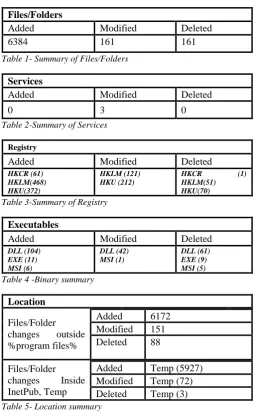
Using Window System State Monitor the below results summarized by files, folders, Executables, Services, registry entries and location, describes changes done by installing Google drive on our windows 10 system.
Files/Folders
Added Modified Deleted
6384 161 161
Table 1- Summary of Files/Folders
Services
Added Modified Deleted
0 3 0
Table 2-Summary of Services
Registry
Added Modified Deleted
HKCR (61) HKLM(468) HKU(372)
HKLM (121) HKU (212)
HKCR (1) HKLM(51) HKU(70)
Table 3-Summary of Registry
Executables
Added Modified Deleted
DLL (104) EXE (11) MSI (6)
DLL (42) MSI (1)
DLL (61) EXE (9) MSI (5)
Table 4 -Binary summary
Location
Files/Folder changes outside %program files%
Added 6172 Modified 151 Deleted 88
Files/Folder changes Inside InetPub, Temp
Added Temp (5927) Modified Temp (72) Deleted Temp (3)
Table 5- Location summary
B. Analysis
Google client uses the googledrivesync.exe executable file located in C:\Program Files (x86)\Google\Drive
During installation google drive downloaded and used other executable files form temp folders shown in below list. After installation all these executable files were deleted, temp folder in our experiment was C:\Program Files (x86)\G UM5678.tmp :
• GoogleCrashHandler.exe • GoogleCrashHandler64.exe • GoogleUpdate.exe
• GoogleUpdateBroker.exe
• GoogleUpdateComRegisterShell64.exe • GoogleUpdateCore.exe
• GoogleUpdateOnDemand.exe • GoogleUpdateSetup.exe • GoogleUpdateWebPlugin.exe
1) SQLite databases
An important artifact location is the virtual user folder files, which is located on the following location C:\Users\IEUser\AppData\Local\Google\Drive
The most important files are the following files 2 SQLite format 4 database files:
1. sync_config.db : Small SQLite database that contains one table named data and have the following fields
o entry_key, o data_key, o data_value
The table contains google drive configuration shown in Appendix 1, the most important value is the username value. In our case the entry value was equal to “user_email” and the data_key was equal to “value”, and the data_value equal to “[email protected]”, the latter is the user account used in this experiment. Another important entry_key is the root_config 0 and its data_key varies between “rowkey” and the full path to the mapped folders to monitor and use for google drive sync.
2. snapshot.db :Another Small SQLite database that contains 7 tables:
o cloud_entry o cloud_relations o local_entry o local_relations o mapping o pre_mapping o volume_infos
3. cloud_graph.db: another SQLight database contains 3 tables and contains files synced files information same as snapshop.db.
4. Global.db: this data base file located in the following path C:\Users\IEUser\AppData\Local\Google\Drive And contains user name for the uses using goggle drive.
2) Account folders
Each added account have another account folder in the same path for the user but in a different folder. Another file in interest is a json file named com.google.drive.nativeproxy.json in the same directory of the SQLite Databases, contains the location, description of an another exe file called nativeproxy.exe
3) Prefetch
As any windows exe fil a , Prefetch file was also created in the Windows Prefetch folder with the named ‘GOOGLEDRIVESYNC.EXE-XXXXXXXX.pf’. 4) Other locations
Software references were also placed in a variety of places, such as; $LogFile, $MFT, $UsnJrnl, and pagefile.sys. Link files were created on the Windows Desktop and in the Windows Start Menu.
5) Registry
Analyzing the registry we found that there is different references for after installing Google Drive client most of the values was related to installation path for googledrivesync.exe and temp installation files, MRU values, and Google Docs.
At the registry ShellIconOverlayIdentifiers keys were added for google drive contains GoogleDriveBlacklisted, GoogleDriveSynced and GoogleDriveSyncing entryes keys are used by google drive client for Icons and Icon Overlays [19].
Another important registry are shown in below table’s
Key Description
HKEY_CLASSES_ROOT\inst aller\features\865bd809af5e7c0 42aaaba43100958b8
Contains the value of GoogleDriveSync and ProductName that
indicates the installation of the files
HKEY_LOCAL_MACHINE\s oftware\microsoft\windows\cur rentversion\installer\folders
Contains the location for the installer folder that is used when installing the client the drive
HKEY_LOCAL_MACHINE\s oftware\wow6432node\microso ft\internet
explorer\main\featurecontrol\fe ature_browser_emulation
Contains reference for googledrivesync.exe
HKEY_LOCAL_MACHINE\s oftware\microsoft\windows\cur rentversion\installer\folders
Contains the installation folder for google client
HKEY_USERS\msedgewin10\i euser\software\google\drive
Contains the installation folder for google client and some settings information , and an OAuthToken HKEY_USERS\msedgewin10\i
euser\software\google\chrome\e xtensions\apdfllckaahabafndbhi eahigkjlhalf
Chrome Extension path and version
6) Log Files
Event Log & Log files are sources of information and artifacts, Gogol Drive maintain a verbose log client folder, the log contains data about actions and along with time and dates, with notable python script references
7) Network Trafic analsys
Traffic capture was done during installation and during adding, deleting files using Wireshark , the network communication showing its encrypted using TLS V1.2 and APPENDIX 2 showing resolved addresses during installation, all data exchange was done using TCP with no reference for http connections, though the folder contains some reference for cached responses in cash folder resident in uses folder.
VII. CONCLUSION
Remnants and artifacts of cloud drive activity can be found on local machines found on local folders. The username, the cache files, and log activity which helps in recovering the deleted files and data.
It was concluded during investigating that findings in the initial stages for cloud service files changes and user account details, this includes the places of these artifacts and details for pinpointing these evidences during an investigation on windows 10 operating system and extracting these to be mapped to the under investigated case, the artifacts are
inode
562949953421366
volume
serial:3661233214
filename psut.bmp
modified 1516118514
checksum d41d8cd98f00b204e9800998ecf8427e
size
0
matching for ones that can be found on windows 7 operating systems, except that earlier researchers missed out that there is another artifacts found, these are also important artifact for the investigation (cloud_graph.db , Global.db, log files and the rejestry i, OpenAuth IDs ), one important artifact is the registry ShellIconOverlayIdentifiersthat google drive uses for file icons while process its state(synced, syncing, error ) , one notable point; running a forensic image in vm can access the user cloud storage.
VIII. REFERENCES
[1] P. Mell and T. Grance, “NIST Special Publication 800-145: The NIST Definition of Cloud Computing,” 2011.
[2] “What You Will Learn,” pp. 2015–2020.
[3] “Dropbox used by Chinese hackers to spread malware - NBC News.” [Online]. Available:
https://www.nbcnews.com/tech/security/dropbox-used-chinese-hackers-spread-malware-f6C10642402. [Accessed: 16-Jan-2018].
[4] “Attackers turning to legit cloud services firms to plant malware | Computerworld.” [Online]. Available: https://www.computerworld.com/article/2484596/cybe rcrime-hacking/attackers-turning-to-legit-cloud-services-firms-to-plant-malware.html. [Accessed: 16-Jan-2018].
[5] “Cloud Services Being Used to Distribute Malware | CloudWedge.” [Online]. Available:
http://www.cloudwedge.com/cloud-services-used-distribute-malware/. [Accessed: 16-Jan-2018]. [6] “How Iranian Hackers Used The Cloud To Attack
Major Banks And Why It Matters – ThinkProgress,” 2013. [Online]. Available:
https://thinkprogress.org/how-iranian-hackers-used- the-cloud-to-attack-major-banks-and-why-it-matters-1f8c722b7fcc/. [Accessed: 16-Jan-2018].
[7] “Process Monitor - Windows Sysinternals | Microsoft Docs,” 2017. [Online]. Available:
https://docs.microsoft.com/en-us/sysinternals/downloads/procmon. [Accessed:
16-Jan-2018].
[8] H. Chung, J. Park, S. Lee, and C. Kang, “Digital forensic investigation of cloud storage services,” Digit. Investig., vol. 9, no. 2, pp. 81–95, 2016. [9] D. Quick, B. Martini, and K.-K. R. Choo, Cloud
Storage Forensics. .
[10] B. Martini and K. K. R. Choo, “Cloud storage
forensics: OwnCloud as a case study,” Digit. Investig., vol. 10, no. 4, pp. 287–299, 2013.
[11] H. Guo, B. Jin, and T. Shang, “Forensic investigations in Cloud environments,” in Proceedings - 2012 International Conference on Computer Science and Information Processing, CSIP 2012, 2012, pp. 248– 251.
[12] “Free Virtual Machines from IE8 to MS Edge - Microsoft Edge Development.” [Online]. Available: https://developer.microsoft.com/en-us/microsoft-edge/tools/vms/. [Accessed: 16-Jan-2018]. [13] Tim Newton, “An Introduction to the Windows
System State Analyzer | Ask the Performance Team Blog,” 2010. [Online]. Available:
https://blogs.technet.microsoft.com/askperf/2010/01/1 1/an-introduction-to-the-windows-system-state-analyzer/. [Accessed: 16-Jan-2018].
[14] “SysTracer - Track file and registry changes in your computer,” 2018. [Online]. Available:
http://www.blueproject.ro/systracer. [Accessed: 16-Jan-2018].
[15] “WinHex: Hex Editor & Disk Editor, Computer Forensics & Data Recovery Software,” 2018. [Online]. Available: https://www.x-ways.net/winhex/. [Accessed: 16-Jan-2018].
[16] “DB Browser for SQLite.” [Online]. Available: http://sqlitebrowser.org/. [Accessed: 16-Jan-2018]. [17] “Active@ Disk Editor Freeware - Hex Data Viewer
& Hex Editor,” 2018. [Online]. Available: http://www.disk-editor.org/. [Accessed: 16-Jan-2018]. [18] “Eric Zimmerman’s Tools,” 2018. [Online].
Available: https://ericzimmerman.github.io/. [Accessed: 16-Jan-2018].
[19] “How to Register Icon Overlay Handlers (Windows).” [Online]. Available: https://msdn.microsoft.com/en-us/library/windows/desktop/hh127455(v=vs.85).aspx. [Accessed: 20-Jan-2018].
IX. APPENDIXIES
A. Appendix 1
entry_
key data_key data_value upgra
de_nu mber
value 40
highes
_versi on cloud _docs _feed _mod e
value 0
rlz_br and_c ode
value GGLS
featur e_swit ch
value
HGVuYWJsZV9hbHdheXNfc2hvd1 9pbl9waG90b3NxjYhVGHBlcmZfd Ghyb3R0bGVfcGVyY2VudGFnZX GOR0BYwAAAAAAAVRd1c2VyX 2NvbmZpcm1hdGlvbl9kZWxheXGP R0AAAAAAAAAAVR1yZWd1bGF yX3BvbGxpbmdfaW50ZXJ2YWxfc 2Vjc3GQSx5VGHB2b19yYXdfcGh vdG9fZXh0ZW5zaW9uc3GRXXGS KFgEAAAALmFyd3GTWAQAAA AuZG5ncZRYBAAAAC5uZWZxlV gEAAAALm5yd3GWWAQAAAAu b3JmcZdYBAAAAC5wZWZxmFgE AAAALnJhZnGZWAQAAAAucncy cZpYBAAAAC5zcndxm1gEAAAA LmNyMnGcZVUcZG93bmxvYWRf Y2hhbmdlX3Rocm90dGxlX3NlY3G dRz+pmZmZmZmaVSVtYXhfcGFn ZV9zaXplX3NlbGVjdGl2ZV9zeW5j X2ZhbGxiYWNrcZ5N6ANVGW1he F9zaGExX21hdGNoX2JhdGNoX3N pemVxn0syVSNpbXByZXNzaW9uc 19oZWFydGJlYXRfaW50ZXJ2YW xfc2Vjc3GgTTAqVRNlbmFibGVfY 29udGV4dF9tZW51caGIVRZlbmFi bGVfbmV0d29ya19zdG9yYWdlcaK JVRtlbmFibGVfaWdub3JhYmxlX2 V4dGVuc2lvbnNxo4h1Yi4= shown
_setup _overl ays
setup_ov
erlay_id choose_folders_setup_overlay
machi ne_fol der_d oc_id
value 1VyoeICinNi6u-MHRAosw-gcs84Za5azF
machi ne_fol der_n ame
value My PC (3)
shown _setup _overl ays
setup_ov
erlay_id google_drive_setup_overlay
selecti ve_sy nc
value 0
usb_s ync_e nabled
value 1
show_ unpar ent_w arning
value 1
delete _mod e
storag e_poli cy_m ode
value original
alway s_sho w_in_ photos
value 1
share_ notific ation
value 1
local_ sync_r oot_p ath
value \\?\C:\Users\IEUser\Google Drive
copy_ duplic ate_ph otos
value 1
user_e
mail value [email protected] domai
n_poli cy
default_s ync_all 1
domai n_poli cy
domain_ policy_d escriptio n_url win10
_icons _upgr aded
value 1
cloud _grap h_gen eratio n
value 7
tango _stora ge
value
gAJ9cQFVC0NsaWVudFRva2VucQ JVVENpY0tKUW9HQ2dRSUF4QU JFaElKWmZteTBScjVhb0VSTUVV L1JqcHVwaVlhQndpQ01oQURHQ UVTRkMvb3BENnhRNzFqdTZIU0 pjNWZqaHlqbkpxSnMu
snaps hot_re constr uct
value 0
root_c onfig_ _0
rowkey \\?\X:\PSUT
root_c onfig_ _1
\\?\X:\PS
UT 2
root_c onfig_ _2
\\?\X:\PS
root_c onfig_ _0
rowkey \\?\C:\Users\IEUser\Google Drive
root_c onfig_ _1
\\?\C:\Us ers\IEUs er\Googl e Drive
2
root_c onfig_ _2
\\?\C:\Us ers\IEUs er\Googl e Drive
1
root_c onfig_ _0
rowkey \\?\X:\images
root_c onfig_ _1
\\?\X:\im
ages 2
root_c onfig_ _2
\\?\X:\im
ages 1
root_c onfig_ _0
rowkey \\?\X:\DFI
root_c onfig_ _1
\\?\X:\D
FI 2
root_c onfig_ _2
\\?\X:\D
FI 1
user_p
aused value 0
B. APPENDIX 2
172.217.16.202 googleapis.l.google.com
216.239.36.10 ns3.google.com
204.79.197.1 ns1.a-msedge.net
172.217.22.42 googleapis.l.google.com
23.50.155.27 e8218.dscb1.akamaiedge.net
88.221.81.192 n0dscb1.akamaiedge.net
213.57.23.181 n5dscb1.akamaiedge.net
8.254.37.27 es-2.ns.nsatc.net
216.58.205.234 googleapis.l.google.com
172.217.21.234 googleapis.l.google.com
216.58.214.42 googleapis.l.google.com
199.93.59.27 b.ns.nsatc.net
172.217.23.138 googleapis.l.google.com
216.239.34.10 ns2.google.com
13.79.239.82 smartscreensvc.microsoft.com.nsatc.net
172.217.18.10 googleapis.l.google.com
172.217.22.74 googleapis.l.google.com
213.57.23.183 n2dscb1.akamaiedge.net
216.58.210.10 googleapis.l.google.com
192.229.254.5 ns3.edgecastcdn.net
4.26.227.27 e.ns.nsatc.net
68.232.35.139 cs479.wac.edgecastcdn.net
216.239.32.10 ns1.google.com
216.58.207.42 googleapis.l.google.com
192.229.254.6 ns4.edgecastcdn.net
172.217.18.170 googleapis.l.google.com
82.212.80.76 r1.sn-q5h5h5m-5hhl.gvt1.com
82.102.180.204 n7dscb1.akamaiedge.net
172.217.23.161 googlehosted.l.googleusercontent.com
4.23.39.155 nl-1.ns.nsatc.net
172.217.22.106 googleapis.l.google.com
213.57.23.176 n4dscb1.akamaiedge.net
216.58.214.106 googleapis.l.google.com
8.254.92.155 b.ns.nsatc.net
216.58.207.74 googleapis.l.google.com
82.102.180.206 n3dscb1.akamaiedge.net
172.217.23.163 accounts-cctld.l.google.com
172.217.23.173 accounts.google.com
216.239.38.10 ns4.google.com
64.233.167.125 talk.l.google.com
198.78.208.155 b.ns.nsatc.net
82.102.180.207 n6dscb1.akamaiedge.net
216.58.206.10 googleapis.l.google.com
72.21.80.5 ns1.edgecastcdn.net
172.217.22.10 googleapis.l.google.com
172.217.23.174 drive.google.com
8.253.92.27 b.ns.nsatc.net
13.107.21.200 a-0001.a-msedge.net
72.21.80.6 ns2.edgecastcdn.net
2606:2800:e::5 ns3.edgecastcdn.net
2606:2800:e::6 ns4.edgecastcdn.net
2606:2800:1::5 ns1.edgecastcdn.net
2606:2800:1::6 ns2.edgecastcdn.net