SPHINX: A Password Store that Perfectly Hides
Passwords from Itself
Maliheh Shirvanian
∗, Stanislaw Jarecki
†, Hugo Krawczyk
‡and Nitesh Saxena
∗ ∗University of Alabama at Birmingham Email: [email protected] , [email protected]
†
University of California at Irvine Email: [email protected]
‡IBM Research Email:[email protected]
Abstract—Password managers (aka stores or vaults) allows a user to store and retrieve (usually high-entropy) passwords for her multiple password-protected services by interacting with a “device” serving the role of the manager (e.g., a smartphone or an online third-party service) on the basis of a single memorable (low-entropy) master password. Existing password managers work well to defeat offline dictionary attacks upon web service compromise, assuming the use of high-entropy passwords is enforced. However, they are vulnerable to leakage of all passwords in the event the device is compromised or malicious, due to the need to store the passwords encrypted under master password and/or the need to input the master password to the device (as in smartphone managers). Evidence exists that password managers can be attractive attack targets.
In this paper, we introduce a novel approach to password management, called SPHINX,which remains secure even when the password manager itself has been compromised. In SPHINX, the information stored on the device is information theoretically in-dependent of the user’s master password — an attacker breaking into the device learnsno informationabout the master password or the user’s individual passwords. Moreover, an attacker with full control of the device, even at the time the user interacts with it, learns nothing about the master password — the password is not entered into the device in plaintext form or in any other way that may leak information on it. Unlike existing managers, SPHINX produces strictly high-entropy passwords and makes it compulsory for the users to register these randomized passwords with the web services, hence fully defeating offline dictionary at-tack upon service compromise. As an important added advantage over existing managers, that require some form of secure channels between the device and the client machine from which the user logs in, SPHINX can work with non-confidential channels. The design and security of SPHINX is based on the device-enhanced PAKE model of Jarecki et al. that provides the theoretical basis for this construction and is backed by cryptographic proofs of security.
While SPHINX is suitable for different device platforms, in this paper, we report on its concrete instantiation on smartphones given their popularity and trustworthiness as password managers (or even two-factor authentication). We present the design, implementation and performance evaluation of SPHINX, offering prototype browser plugins, smartphone apps and transparent device-client communication. Based on our inspection analysis, the overall user experience of SPHINX is better than the current smartphone managers. We also report on a lab-based usability study of SPHINX, which indicates that users’ perception of SPHINX security and usability is high and satisfactory when compared to regular password-based authentication. Finally, we discuss how SPHINX may be extended to an online service for the purpose of back-up or as an independent password manager.
This document is an extension to a paper published in 2017 IEEE 37th International Conference on Distributed Computing Systems (ICDCS). This version provides more details on the protocol and expands information on the usability study as presented in the appendix.
I. INTRODUCTION
The central role of passwords for authentication and for gaining access to resources, from casual website visits to national security, is well known. Equally well known are the major security vulnerabilities of such mechanisms spawned by the limitations of human memory and the consequent low entropy of passwords (e.g., [15], [18], [36], [41]). Such low-entropy passwords are vulnerable to both online guessing and offline dictionary attacks that build on password dictionaries from which a significant portion of passwords are chosen. Candidate passwords for authenticating a user to a server can be tested by an attacker through online interactions with the server. Even more seriously, an attacker breaking into a server can mount an offline attack that uses information stored on the server to test the different passwords in the dictionary. Such offline dictionary attacks are an increasingly important concern (see, e.g. [12], [13]), especially in light of frequent attacks against major commercial vendors, as recently experienced, e.g., by PayPal [2], LinkedIn [7], Blizzard [3] and Gmail [6]. The offline attacks are particularly devastating as a single server break-in may lead to extraordinary numbers of com-promised passwords [5], [14]. Furthermore, since many users re-use their passwords across multiple services, compromising one service often compromises user accounts at other services. Numerous approaches have been proposed by researchers and practitioners to improve the security of passwords from the client-side or user-side alone (i.e., without making any changes to a persistent server that uses traditional password-based authentication). One broad class of such approaches is referred to as password managers (also known as password stores or vaults) and forms the central focus of this paper.
Traditional password managers (e.g., [1], [11]) allow the user to store and retrieve (usually high-entropy) passwords, denoted by rwd, for her multiple password-protected services by interacting with a “device” serving the role of the manager (a smartphone or an online third-party service)1on the basis of a single (low-entropy) master password, denotedpwd. These
rwd’s are usually stored on the device encrypted under pwd. In case of online password managers, the user providespwd
to the service, which then unlocks and sends rwdto the user (over a protected channel). In case of smartphone managers, the user enterspwddirectly on the device, the device unlocks
1Password managers that storerwd’s on the client machine (browser) itself
rwdand displays it on the screen, and the user then manually copies pwdover to the client machine.
These password managers clearly alleviate the memoriza-tion burden on the user, and work well to defeat offline dictionary attacks upon web service compromise, assuming the use of high-entropy rwd’s is enforced. However, they are vulnerable to leakage of rwd’s in the event the device is compromised or is itself malicious, due to: (1) the storing of the passwords rwd’s encrypted under pwd, and/or (2) the need to input the master password to the device (smartphone managers). In the first case, after retrieving encrypted rwd’s from the storage unit of the manager, the attacker can launch an offline dictionary attack against pwd. Such attacks are a serious concern in light of recent breaches against commercial online managers [40] and exfiltration approaches discussed in the literature [33]. In the second case,pwdis directly exposed to the attacker. With the advent of mobile computing, malware that can compromise devices is becoming a major threat [4], [9], [43], and thus existing smartphone managers open up a significant vulnerability of exposing pwd upon entry and/or leaking rwd’s upon offline dictionary attack.
Password encoding strategies have been proposed in the literature to render offline dictionary attacks ineffective [20]. They introduce the notion of outputting decoy passwords to an attacker who compromises the manager and attempts to decrypt the passwords with a wrong master password. Since the attacker is not aware of the correct password, any attempt to login with the decoy passwords can be prevented and raise an alert. However, such a scheme seems to be vulnerable to an attack presented in [26], based on differences in the distribution of the passwords.
Other advanced password management solutions have been proposed that do not require storage of rwd’s [27], [37], [42]. For example, PwdHash [37], maps pwd to arwd by hashing
(pwd,domain) pair and registering it as a strong password with
the server. PwdHash deterministically transforms a user’s pass-word into a more complex passpass-word but this transformation does not protect against dictionary attacks at a compromised server. Moreover, if a user uses the same memorable password
pwd with PwdHash for different services, the compromise of a single server leads to the discovery of pwd via an offline dictionary attack and then to the (deterministic) calculation of all the user’s passwords derived frompwd.
In this paper, we introduce, build and study SPHINX, a new password manager that offers a high level of security even in case the password manager itself is compromised. SPHINX’s most appealing features are: (1) the information stored in the device is information theoretically independent of the user’s master password pwd; hence, an attacker breaking into the device learns no information onpwd or the user’s individual passwords rwd’s; and (2) an attacker with full control of the device, even at the time the user interacts with it, learns nothing about pwd; pwd is never entered into the device in plaintext form or in any other way that may leak information on it. The above properties hold unconditionally, even against a computationally unbounded attacker.
Moreover, SPHINX produces strictly high-entropy rwd’s and enforces the users to register these passwords with the web
services, while current managers may let the users choose low-entropy passwords thereby still opening up the vulnerability to offline dictionary attacks upon web service compromise. As an added advantage over existing managers that require some form of secure channels between the device and the client machine from which the user logs in, SPHINX can work with non-confidential channels. In particular, SPHINX does not rely on PKI, an important advantage given the numerous vulnerabilities of PKI to certification failures and man-in-the-middle (MitM) attacks (either due to programmatic errors or human mistakes), e.g., [22], [25], [38].
The design and security of SPHINX is based on the device-enhanced password authenticated key exchange (DE-PAKE) model of Jarecki et al. [29] that provides the theoretical basis for this construction and is backed by cryptographic proofs of security. The core technique is the use of an efficient oblivious pseudo random function (OPRF) scheme [23], [24] that transforms a human-memorable password into a random password with the aid of a device without the need to store the passwords on the device and without the device learning anything about the password even when computing on it. Specifically, when using SPHINX, for each service with which the user has an account, the device stores a unique key k. This key is used to map the user-memorized password pwd
(input by the user into the client) into a randomized password
rwd=Fk(pwd|domain)using the (oblivious) PRF Fk based
on a simple protocol between the device and the client. The details of the protocol are described in the next section.
In sum, SPHINX offers the followingsimultaneous combi-nation of security features:
1) Resistance to offline dictionary attacks under server com-promise (or server being malicious), thanks to the use of high-entropy (pseudo) random rwd.
2) Resistance to phishing attacks, due to the use of website
domainin the computation ofrwd.
3) Resistance to offline dictionary attacks under device com-promise (or device being malicious), in particular hiding the user’s master password with information theoretic se-curity.
4) Resistance to eavesdropping and MitM on the device-client channelwithoutthe need to establish a secure channel (the properties of the OPRF protocol executed over this channel ensure that no additional protection is needed).
The last two security properties areuniqueto SPHINX, not offered by any existing password managers. The first security property is provided by default in SPHINX, while this property may or may not be provided by existing managers depending upon whether or not high-entropy passwords are enforced by the manager. The contrasts are summarized in Table I.
Security is not the only attractive feature of SPHINX. SPHINX also strives to provide a level of user experience close to that of password-only authentication but without the burden of remembering multiple passwords, and with full-entropy per-site derived passwords.
Detailed Contributions:While SPHINX is suitable for
TABLE I:Security properties of SPHINX in contrast to current managers. Highlighted cells represent the unique advantages offered by SPHINX compared to other managers.
Resistance to: SPHINX Current Managers
Offline dictionary attacks under server compromise (or server being malicious)
Yes, by enforcing random independent passwords per site.
Only if manager enforces high-entropy per-site passwords.
Phishing attacks Yes, by incorporating domain name. Only the hash-based managers [27], [37], [42].
Offline dictionary attacks under device compromise (or device being malicious)
Yes,perfect security
(information theoretic secrecy).
No, passwords are stored or entered on the manager.
Eavesdropping and/or man-in-the-middle attacks on the device-client channel
Yes, without the need to establish a confidential channel.
Enforced by external mechanisms or physical security assumptions∗.
∗Current online managers require confidential and authenticated channels, while current smartphone managers require confidential channels.
popularity and trustworthiness as password managers (or even two-factor authentication) as suggested in the study of [30].
1) A Secure Password Manager (Section II): We introduce SPHINX, a cryptographic password manager application that perfectly hides passwords from itself, from eaves-droppers and from active attackers. SPHINX is a novel application of the general device-enhanced password key exchange (DE-PAKE) framework from [29]. DE-PAKE is a broad modular cryptographic primitive with several possible applications. SPHINX uses an instantiation of DE-PAKE that works with no modificationon the current web services that use password-only authentication (in partic-ular, allowing for the use of SPHINX with typical TLS-enabled services that use the password-over-TLS protocol). This practical application was not studied by the authors of [29].
2) System Design and Implementation (Section III): We present the design, implementation and performance evalu-ation of a full smartphone-based SPHINX system offering a prototype browser (Chrome) plugin and a device (Android) app2. As a main component of our design, we highlight and address the challenges associated in building transparent bidirectional browser-device channel.
3) Usability Study(Sections IV and V): We report on a usabil-ity study of our SPHINX smartphone manager conducted in lab settings with participants of different educational back-grounds but none skilled in computer security. The study follows a methodology in line with prior notable studies of password managers [21], [31]. Our results suggest that users’ perception of SPHINX security and usability is high, and that SPHINX user experience is satisfactory when compared to regular password authentication using a human-memorable password (a baseline used in our study). We also show that SPHINX imposes lesser cognitive load on the users than traditional smartphone managers.
Scope of the Work: Just like any other smartphone
man-ager (and even currently deployed two-factor authentication schemes), our studied SPHINX instantiation assumes the avail-ability of the smartphone during the authentication process. Based on this assumption, it simultaneously provides security properties 1-4 above, and a satisfactory level of user experi-ence when compared to regular password-only authentication. Like any password management approach, providing pro-tection in the event of client compromise is beyond the scope of SPHINX. While some protection is provided by SPHINX in the form of anti-phishing defenses and the ability to block
2A brief video, demonstrating the implemented prototype can be found at
https://sites.google.com/site/stopsmanager/demo
remote adversarial activity by requiring user confirmation on the device upon SPHINX invocation, comprehensive defenses based on two-factor authentication (TFA) techniques would entitle server-side changes which password managers avoid. Integrating SPHINX with a TFA solution is possible but we leave this as an item of future work.
A further extension of our work could support a SPHINX online instantiation that replaces or complements the smartphone-based instantiation (e.g., as a main password manager or as a backup to the smartphone instantiation). The security properties of SPHINX, particularly its resistance to device compromise and security against active man-in-the-middle attackers on client-device channel without the need for confidential channels, make the online variant very appealing. Although we discuss how our work can be extended in the future to such an online case, building and testing the full implementation is beyond the scope of the current paper.
II. OURAPPROACH
A. Background
We first review the notion of Device-Enhanced Password-Authenticated Key Exchange (DE-PAKE) introduced in [29], a cryptographic primitive which gives rise to our SPHINX appli-cation. DE-PAKE [29] securely transforms a user-memorable password into a full-entropy random string (strong password) by leveraging a secondary device, and then uses this random password as an input to any password-based authenticated key exchange protocol (PAKE) [16]. In [29], authors developed such a “password-to-random” (PTR) protocol functionality and studied its composition with any PAKE protocol, giving rise to a DE-PAKE protocol that is resistant to online guessing and offline dictionary attacks (under server and device com-promise), without the need for confidential communication between device and the authentication terminal (client).
In DE-PAKE protocol model, there are four parties: user, client, server, and device, individually denoted U, C, S, and
D, respectively.U’s goal is to authenticate itself toSviaCby making use of a simple password and a personal deviceD. The protocol has two phases: initialization and authenticated key exchange. In the initialization phase, U chooses a password from a given dictionary Dict. The initialization phase also includes the device-client communication that establishes the state stored at D, as well as interaction with S producing a user’s state σS(U) that S stores while U only remembers
its password. After initialization, the link between U and D
Fk(pwd|domain)
OPRF
(FK-PTR) username, rwd
pwd Only k is stored
k is unique to each service pwd or rwd is not stored Secure to offline dict. attack Alternative devices possible
pwd is human-memorable pwd can be reused
rwd is randomized rwd is unique to each service Secure to offline dict. attack
Non-confidential authenticated D-C channel
Secure to guessing attack Phishing protection
TLS protected S-C channel
C: Browser extension D: Android App
U: User
k H(rwd)
S: Server
outputs inputs
rwd =
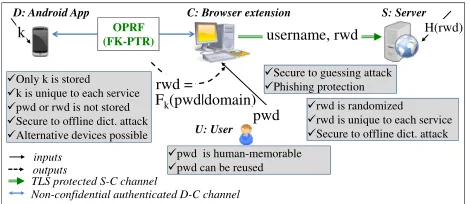
Fig. 1: A high-level overview of SPHINX.Uenters memorable passwordpwdand approves the communication onD(explicit consent),DandCrun an OPRF protocol (instantiated as FK-PTR) to construct a randomized passwordrwd,CsendsrwdtoS
over SSL/TLS to authenticate to the service. A smartphone instantiation is developed and tested in the paper. However, the phone can be replaced with an online service. (adversary-controlled) channel to authenticate itself to S and establish session keys to protect subsequent communication withS (e.g., to download emails).
The PTR protocol design [29] follows the “password hard-ening” approach of Ford and Kaliski [23] (hence termed FK-PTR). DE-PAKE model assumes a fully capable man-in-the-middle attacker active on all the links between all parties and one is allowed to compromise servers and devices at will.
B. SPHINX Overview and Features
SPHINX is a compelling application of the DE-PAKE approach [29]. It is a password manager, transparent to any existing web service that deploys password authentication. As shown in Figure 1, U registers a hardened randomized password rwd with S, but only remembers a memorable password pwd that could be the same for multiple accounts (we use the terms master password and memorable password interchangeably). For each serverSwith which the userUhas an account, the deviceDstores a unique keyk. The key is used to mappwd into rwdusing the (oblivious) PRF Fk such that
rwd=Fk(pwd|domain).pwd andrwd are never stored inC and (in contrast to the current password managers neitherrwd
norpwdis ever stored in or exposed toD. Instead,DandCrun the PTR protocol toobliviouslycomputerwdat the login time. The details of the protocol are described in the next subsection. SPHINX offers several key security guarantees simultaneously (individually as well as combined), namely:
1) Resistance to offline dictionary attacks under server
compromise (or server being malicious): In SPHINX, the
server stores the salted-hash of the randomized password
rwd, and hence the compromise of a server does not help the attacker to learn rwd (or pwd). Note that a dictionary attack isinfeasiblesincerwddoes not belong to a dictionary known to the attacker (unlike other managers which may not necessarily use randomized passwords).
2) Resistance to phishing attacks: SPHINX combines pwd
with the domain name of the web service to computerwd
to provide protection under a phishing attack. The phisher can not even perform an offline dictionary attack to learn
rwd orpwd.
3) Resistance to offline dictionary attacks under device
compromise (or device being malicious): SPHINX does
not leak any information about pwd or rwd to the device or a potential malicious code running on the device, since
neither thepwdnorrwdis stored or entered on the device. Therefore, any offline attack against the device (remote or physical) does not reveal any information about the pwd
or rwd, even during a user’s active session.
4) Resistance to eavesdropping and man-in-the-middle
attacks on the device-client channel: SPHINX does not
require a confidential channel between the device and client, but is secure against eavesdropping and MITM attack over device-client channel.
As far as online guessing attacks are considered, the security provided by smartphone SPHINX is equivalent to that of the high-entropyrwd. Other smartphone managers have the same level of security against online guessing attack, however,rwd’s may or may not be high-entropy in other managers. When considering the online instantiation of SPHINX, the security against online guessing attack is equivalent to that of the master password pwd, in line with other online managers.
Security is not the only compelling feature of SPHINX. It also offers the following usability advantages:
1) Use of a human-memorable password: In SPHINX,
the user simply remembers pwd but registers a strong randomized rwd with the service. Moreover, pwd can be reused over multiple accounts without compromising security, whilerwdis unique to each service.
2) Easy password updates: Rather than asking the user to
frequently change the password and memorize the updated password (as is a common practice today), only the key on the device can be changed, which provides an improved level of usability.
3) Use of multiple types of devices: Since no information
aboutpwdorrwdis learned by the device and the device-client channel does not need to be a confidential channel, a personal device could be a smartphone, a wearable device (e.g., smartwatch) or even an online service (as will be discussed in Section VI).
All the security and usability features are offered by SPHINX simultaneously, while other password management schemes only provide a partial subset of these properties, especially no other scheme provides the last two properties.
C. SPHINX Protocol and System Details
In the standard password-only authentication schemes,U au-thenticates toSusingpwd. In the SPHINX protocol as shown in Figure 3, C runs an instance of password authentication protocol not on pwd, but on value rwd = Fk(pwd|domain) where F is a pseudorandom function (PRF) and k is a key held by D. Before authenticating to S, C contacts D
(through a client application) and obtains therwdvalue using a special-purpose (oblivious) PRF-evaluation protocol. Without knowledge ofk, the valuerwd has full entropy in the range set of function F and hence dictionary attacks do not apply against rwd (not even if the server is compromised). Since
D holds only the PRF key k and S holds only information related to pseudorandom valuerwd, we can ensure that offline attacks against pwd are also infeasible when S and/or D
security of the memorable password (the attacker who obtains
D can attempt to guess pwd only in an online attack against
S).
The PRF protocol used in SPHINX is defined asPTR[29], and is designed in a way that neither D or a MITM learn anything about the password (pwd or rwd) and no one other thanDlearns anything about the key.
The implementation of the SPHINX protocol is based on an instantiation of the DE-PAKE primitive [29]. This instantiation assumes a cyclic group G of prime order q, |q| = τ, with generator g. At initialization,Uchooses and remembers password pwd while D chooses and stores k ← Zq. To retrieve rwd, C first blinds pwd by raising the hashed value H0(pwd|domain)to a random exponent ρ, and sends it to D. This perfectly hides pwd fromD and from any eavesdropper on the U−Dlink.Dchecks that the received value is in the group Gand if so it raises it to the secret exponent k. Now,
C can de-blind this value by raising it to the power 1/ρ to obtain H0(pwd|domain)k. Finally, C hashes this value with
pwd to obtain rwd. The security of SPHINX directly follows from the security of PTR and DE-PAKE (for formal security arguments we refer the reader to [29]).
III. DESIGN, IMPLEMENTATION& PERFORMANCEEVALUATION
In this paper, we instantiate SPHINX using the smartphone as the device serving the role of the password manager. The resulting system has two essential components as shown in Figure 1, namely, the SPHINX browser extension and the SPHINX Android application communicating with each other over an authenticated channel to reconstruct the hardened randomized password from the memorable password.
A. SPHINX Browser Extension
Step 1–Reading the password: The browser extension gets
activated once a predefined “@@” password prefix or the “F2” function key is entered in the password field. This design decision is similar to the approach of PwdHash [37] and allows the user to choose whether to use the service for a particular website or not (i.e., only passwords that are preceded by the prefix undergo the protocol). After getting activated, the extension reads the input password. The password prefix is only a design choice and can be discarded from the design at no additional security/usability cost.
Step 2–Hashing the password into the elliptic curve: The
password is input in a “Hash-into-Elliptic-Curve” function H0. We implemented H0 using the Stanford Elliptic Curve Cryptography and Core JavaScript libraries for curve and field computation, and CryptoJS library for SHA-256 computation. The Hash-into-Elliptic-Curve function maps the password into a point on NIST P-256 curve. In this implementation, SHA-256 of the input and the iteration counter is computed and truncated into an element in Zq, and the computed value is considered as the xcoordinate of a point on the curve if the y value associated with it is a quadratic residue (i.e.xandy satisfy the curve equation). Otherwise, the same computation
is repeated until a curve element is obtained. Such a point on the curve is the output of the hash function3. To add resistance against phishing, password is concatenated with the domain name and input intoH0.
Step 3–FK-PTR OPRF protocol: After computing the hash,
the extension follows its role in the OPRF function to blind the password. The OPRF function [28] is defined asFk(x) = H(x,(H0(x))k)with inputxfrom the client and k from the device. The OPRF works over group G of prime order p, which in our implementation is an elliptic curve NIST P-256 group. The input to the OPRF function is the password concatenated with the domain name of the visited page. As described in Figure 3, the extension picks a random number ρ ∈ Zq and raises hash value of the input to the power ρ (note that the use of the blinding factorρhides the password with information-theoretic security), and sends it to the device (we call this value α). In response, the extension receives β=αkfrom the device. After checking the group membership of β, the extension reconstruct the randomized password by raising the received value to the power of ρ−1 ∈ Z
q and then computing SHA-256 hash of the calculated value. We used Stanford Random Number Generator JavaScript API and CryptoJS SHA-256 to generate the random number ρ. The communication channel between the extension and the device will be discussed in more detail in Section III-C.
Step 4–Entering the randomized password: The final step
performed by the extension is in line with the PwdHash implementation. The output of the OPRF is encoded to a random combination of letters, numbers and symbols matching the password requirement of the visited website, and is re-entered in the password field of the login page.
B. SPHINX Android Application
Step 1–Starting the FK-PTR protocol: In the first step the
Android app receivesα=H0(pwd|domain)ρ from the client, checks the group membership ofα, and computesβ=αk. The OPRF keykis picked by the device at the initialization phase and is stored on the device. All elliptic curve functions in our app are based on Java Security and Spongy Castle libraries.
Step 2.1–Explicit Consent Mode: In this optional step, which
we consider as the primary design option for SPHINX an alert message is displayed on the device to make the user aware of the ongoing login process. The user is required to confirm the alert before the protocol continues to the next step. We call this alert box the explicit consent on the device. This design choice is made to ensure that the device does not respond to unauthorized requests (without user’s awareness), preventing an attacker who obtains the user’s master password from authenticating to the service. We evaluated this option in our usability study presented in Section V.
Step 2.2–Zero-Interaction Mode: In the second option, user
can disable the explicit consent requirement, for the appli-cation to run on the device with zero interaction with the
3An alternative, robust to side channels, is to use a hashing-into-the-curve
user, without seeking for user’s approval. This design choice is assumed to be more usable and transparent to the user. Using this option, an attacker who has obtained the master password (e.g., with a shoulder surfing attack), might be able to login to the service. Our hypothesis is that since this model does not require any extra action from the user’s side, compared to the password-only authentication model, its usability should be similar to password-only systems, therefore, we did not evaluate this option in our study.
Step 3–Completing the FK-PTR OPRF Protocol: The
device sendsβ to the client to complete its role in the OPRF.
C. Device-Client Authenticated Channel
In our first implementation of the SPHINX system for Google Chrome browser, which was used in our lab-based study (described Section IV), we used the WebSocket proto-col to establish communication between the device and the Chrome Extension. For the client to initiate the WebSocket communication by sendingα, the device needs to be set-up as an HTTP server, the client being the HTTP client. We set up an HTTP server on the device using NanoHttpd Java application [8], adapted for Android.
In later implementation of SPHINX we decided to use Google Cloud Messaging (GCM) to provide a more stable connection between the device and the client. Note that since our application does not require the device-client channel to be secure, trusting on GCM would not at all affect the security of our approach. To our knowledge, this is the first implemen-tation of GCM that makes a bi-directional connection between two typically considered GCM clients (a phone and a browser) without the need for any additional relaying server.
D. Performance Evaluation
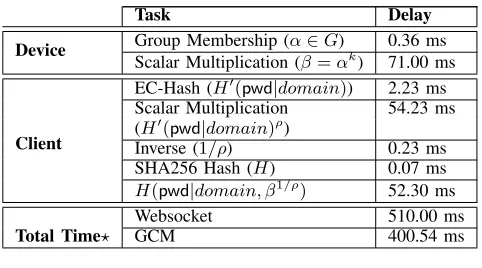
The overall execution time of the SPHINX and performance of different major tasks on the Android device (LG G3 smart-phone) and the client-side Chrome extension (on MacBook Air laptop with a 1.3 GHz Intel Core i5 processor and 4GB of memory) is evaluated over10,000iterations, and the averaged results are reported in Table II. The total execution time for both the WebSocket and GCM implementation are shown. We excluded the time of human interaction with the system (manual pwd entry, and explicit consent on the device) from the evaluation. We also excluded authentication to the service, as this is the same in all schemes. Communication betweenC
andDis timed for a 10Gbps WiFi Internet.
Based on our evaluation, for all parties, the most costly computation is Elliptic Curve exponentiation (71.00 ms on the extension, and 52.30 ms on the Android app with the mentioned libraries). The overall execution time of SPHINX protocol is around 500 ms and 400 ms, for WebSocket and GCM communication, respectively (excluding human interac-tion), which seems reasonably efficient. The total execution time including the interaction of human and the device are reported in the lab-based usability study (Section V).
TABLE II: Performance Analysis of SPHINX for NIST P-256 Curve and 128 Bit OPRF Key;?The total time excludes users’ interaction with the system.
Task Delay
Device Group Membership (α∈G) 0.36 ms
Scalar Multiplication (β=αk
) 71.00 ms
Client
EC-Hash (H0(pwd|domain)) 2.23 ms Scalar Multiplication 54.23 ms (H0(pwd|domain)ρ)
Inverse (1/ρ) 0.23 ms
SHA256 Hash (H) 0.07 ms
H(pwd|domain, β1/ρ) 52.30 ms
Total Time?
Websocket 510.00 ms
GCM 400.54 ms
IV. USABILITYSTUDYDESIGN
To analyze the effectiveness of the developed smartphone-based SPHINX system from the point of view of security (as perceived by the users), usability and adoption potential, we conducted a formal lab-based study, where participants logged into a popular web email service (Gmail) in a controlled observable environment with credentials (master password and device) provided to the participants. The design details and the flow of the study are presented in this section. The study was approved by our University’s IRB. The participation in the study was voluntary, and standard ethical procedures were fully followed, e.g., participants being informed, given choice to discontinue, and not deceived.
A. Goals and Methodology
We first reasoned as to the optimal scheme in our study that should be used as a baseline for comparison with SPHINX. The candidate schemes we analyzed were: password-only, SPHINX in Zero-Interaction Mode, SPHINX in Explicit Con-sent Mode, and current device-based password manager. Com-pared to password-only systems, SPHINX in Zero-Interaction Mode does not impose any additional burden to the user, and SPHINX in Explicit Consent Mode requires the confirmation on the device. In contrast, current device-based password managers require the user to input master password on the device, and then copy the password from the device to the terminal manually. Based on inspection of the user task flows, it is clear that current device-based managers have much lower usability compared to the other three approaches, and hence we ruled it out as the candidate for comparison. SPHINX in Zero-Interaction Mode also seems very close to password-only in terms of usability, so we do not use these schemes for comparison. We were left with SPHINX in Explicit Consent Mode and password-only scheme, which appeared to be two ideal schemes to compare via our usability study.
using SPHINX compared to the password-only login). To test these hypotheses, our study aims to answer the following:
• Transparency: How close is the SPHINX user experience
to a password-only authentication (login with a plain pass-word in the absence of SPHINX)?
• Security and Trust: How much do the users trust the
system? Do they feel that it might expose their password?
• Necessity:Would the users be willing to adopt the system
in practice?
• Portability:Can users easily login from multiple terminals?
• Efficiency:What delay the system incurs in logging in?
• Comfort and Learnability: How comfortable are users
with the system? Can users quickly learn to use the system?
B. Study Flow
We recruited 25 participants from the members of our uni-versity. A similar number of participants are well-established in usability study research of password managers and mobile-based security applications [21], [31], [34], [35], [39]. After a brief introduction about the study, the participants were navigated by an examiner to a computer desk, and were provided an Android phone that had SPHINX app installed and a laptop that had the SPHINX Chrome extension installed. They were asked to consider this laptop as their home/personal (primary) computer. The examiner supervised and observed the participants throughout the study, and took notes of their questions and their performance. Upon completion of the study, the examiner filled out a form about success and errors that occurred in each assigned task. To assure that all users received equal guidance, all information and the instructions were shown in QuestionPro online survey format. The par-ticipants could read the instructions related to each task and answer questions related to the task online. We also logged the execution time of the protocol, excluding the manual password entry and including the approval on the phone.
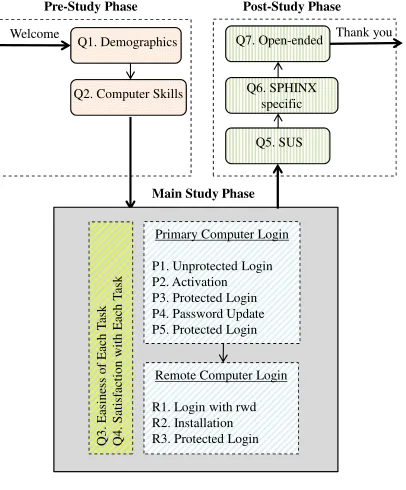
The study was composed of three phases: the pre-study questionnaire, the main study tasks, and the post-study ques-tionnaire. Analysis of the participants’ answers, error rates, and behaviors in the study helped us to: (1) demonstrate the us-ability of SPHINX, (2) compare the usus-ability of SPHINX with the password-only authentication, and (3) investigate possible security issues arising from usability problems. The study took about 30 minutes for each user. To value participants’ time and effort, we offered a $5 Starbucks gift card to each.
C. Pre-Study Phase
The quantitative/qualitative pre-study questions were grouped into three categories, displayed in three consecutive pages, as summarized below (the questions asked are included in Appendix C):
Q1. Demographics: The participants were asked to fill out a demographic questionnaire. These questions polled for each participant’s age, gender and education.
Q2. Technical Background: The participants were asked about their general computer and security skills, and technical background to uncover their initial attitude towards security.
D. Main Study Phase
The main part of the experiment was anexperience-oriented study. The study methodology is in line with that of prior studies of password managers [21], [31]. The participants were provided with a short description of SPHINX i.e., what it is, how it is activated, and how it is used. Then, they were given a username and a password to authenticate to Gmail (this service was chosen for its popularity among users), and a set of tasks to perform. Each task was shown in a web-page with an instruction followed by two multiple choice usability questions related to users’ comfort in performing the task. After finishing each task and answering the two questions, users were instructed to move to the next available task.
1) Primary Computer Login: Following is the list of the first five tasks that was performed from the laptop provided to the participants (primary computer):
P1. Unprotected Login:As a baseline for our study, we asked the participants to login to Gmail using the given username and password (i.e., without using SPHINX). The username was the name of our research lab and the password was their name followed by a four digit number. We asked the participants to perform this task once. This task captures traditional password-only authentication.
P2. Activation:To evaluate the usability of the SPHINX reg-istration process, we asked the users to update their password. The updated password was used as their master password in the next task. To activate SPHINX, the new password should start with “@@” or the user should click on the “F2” key before entering the password. After entering the password, user should accept a prompt displayed on the phone to assure that SPHINX is run only by the user who possesses the phone (and not by a remote attacker). We suggested them to set the extension to show the randomized password once. They could take a note of the randomized password in order to be able to login without SPHINX extension on a remote computer.
P3. Protected Login: To evaluate the usability of SPHINX login process, we asked the users to login to Gmail with their new password (established in the Activation task). After entering the master password, user accepts the prompted alert on the phone. Then the protocol continues and fills the password field automatically with the randomized password. The participants repeated this task 5 times.
P4. Password Update:To evaluate the usability of password update when using SPHINX, we asked the participants to update their SPHINX protected password to a new SPHINX protected password.
P5. Protected Re-Login: To gather more data, and also to provide participants with another chance to try SPHINX with a different master password (one established in the Password Update task), we asked them to follow the protected login process and login to Gmail with the updated password.
2) Remote Computer Login: After completing the primary computer login experiment, the participants were asked to move to another computer, which did not have the SPHINX plugin installed considering it as their office or friend’s com-puter, and instructed them to perform the following tasks:
P1. Unprotected
Login
P2. Acti
vation
P3. Protected
Login
P4. Passw
ord Update
P5. Protected
Re-Login
R1. Direct
Login with
rwd
R2. Plugin
Installation
R3. Protected
Re-Login
0 2 4 6
Easiness Satisfaction
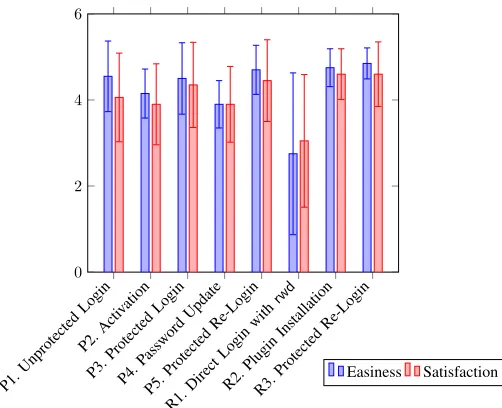
Fig. 2:Main Study Task Easiness & Satisfaction Scores (out of 5) extension is unavailable or users’ phone is unavailable (e.g., out of battery) users were asked to login to Gmail using their randomized password without SPHINX.
R2. Plugin Installation:An email was sent to the participants containing a link to the SPHINX browser extension. They were asked to download and install the extension on the remote computer.
R3. Protected Re-Login:Finally, after installing and configur-ing SPHINX on the remote computer, participants were asked to login using SPHINX (i.e., using their master password) as in the case of login from their primary computer.
To record participants’ opinion about the system, each task above was followed by the following two questions that the participants had to answer on a 5-point Likert scale.
Q3. Easiness:How easy it was to execute this task, Extremely easy, Very easy, Neither easy nor difficult, Very difficult, Extremely Difficult?
Q4. Satisfaction: How satisfied are you with SPHINX at performing this task, Extremely satisfied, Very satisfied, Nei-ther satisfied nor dissatisfied, Very dissatisfied, Extremely dissatisfied?
E. Post-Study Phase
The post-study phase consists of the following set of ques-tionnaires (for precise questions, see Appendix D):
Q5. System Usability Scales: At the end of the experiment, in the first set of post-study questions, users were asked to fill out the System Usability Scale (SUS) questionnaire [19] for password-only systems, as well as for SPHINX. SUS has been designed to measure the usability of a system with respect to users’ experience and satisfaction.
Q6. SPHINX Specific Usability Questions: In the sec-ond questionnaire, we asked more specific questions about SPHINX to figure out how users’ experience was in com-parison to password only systems, and how confident they were about system’s security and reliability. This questionnaire included: two “Transparency”, five “Security and Trust”, two “Necessity”, and one “Portability” questions.
Q7. Open Ended Questions: The study concluded with six open-ended questions (Appendix D).
V. STUDYRESULTS ANDANALYSIS
A. Pre-Study Analysis
The 25 participants were from the age groups of 18-24 years (40%) and 25-34 years (60%), with equal number of undergraduate and graduate students fromdiverse educational background, including: education, engineering, health care, arts, science, and in particular, none of themwas specialized in computer security. 20% of the participants were female and 80% were male. They ranked their general computer background as: Poor (20%), Average (40%), and Excellent (40%), and their general computer security skills as Poor (40%), and Average (60%). Our participant samples are in line with those reported in prior password manager studies [21], [31], [34], [35].
In our pre-study questionnaire, we posed participants with several questions about their technical background, habits of using managers and choice of password. Most participants stated that they visit web-pages that require authentication several times a day. 25% of them said they do not login to their Gmail account on daily basis, 50% log in “once a day” and the rest of them login “several times a day”. Only one participant said he/she uses a manager, around 30% said they do not use any manager, and the rest rely on the browser or the cookies of the visited web-site to remember their password for “fast and easy login process”. Among the password choices that we questioned (easy to remember, difficult for others to guess, strong randomized password, similar over multiple accounts), 50% of the participants said they choose passwords that are easy to remember, all participants said they pick password that are difficult for others to guess, and 67% said they reuse the same password over multiple accounts, and none of the users had confidence that their passwords are random or strong. These numbers serve to re-confirm the need for a tool like SPHINX that can strengthen users’ passwords.
B. Main Study Analysis
Answer to the two questions at the end of each task (P1-P5 and R1-R3, as described in Section IV-D) polls for easiness of each task and satisfaction of the participants with the system. Figure 2 presents the Likert scores corresponding to each task for the first question (easiness) and the second question (satisfaction). Unprotected Login, which is the baseline for the rest of the study, shows how easy users found SPHINX-free login to Gmail. Based on the results, and as expected, participants found login to Gmail (with the test username and password that was provided to them) very easy. No error occurred in performing this task by the participants.
in calling SPHINX from the extension side. Other issues were entering an incorrect password and forgetting to accept the alert (the consent message) shown on the phone. We believe this result is mainly because of the unfamiliarity of the users with the new system. These resultsdo notdegrade the security of the system in any way, since the attacker still needs to have access to the device to login even if pwd is exposed. In a practical setting it is sensible to assume that users would remember to enter the prefix as part of their password (with first two publicly known characters). The need for entering the prefix can be avoided by enabling SPHINX on services by default. Password update in SPHINX, just like other hash-based managers, is essential to update the currently used, possibly weak, password to a randomized one. However, we note that users do not frequently update their passwords so lower score could still be acceptable.
The averaged users’ ranking over multiple “Protected Lo-gins” (i.e., first, second and third protected logins, as described in Section IV-D) is 4.70. The high average score of 4.70 shows that users found login with SPHINX easy. This score is comparable to the unprotected login score (4.55) in which the user logged in using a username and a memorable password. We further compared the score of unprotected login and the average score of protected login using Wilcoxon Signed Rank Testbut the result was not statistically significant atp <0.05. The average error rate in performing this task was eleven percent and the main cause of failure was forgetting to enter the predefined prefix especially in the first attempts, which is perhaps due to unfamiliarity with the system. It can be observed in Figure 2 (P3, P5, and R3 – protected login) that, as the users were repeating the task and becoming more familiar with the system, they scores slightly improved and they had less error. However, the result of the Friedman Test did not show any statistical significance when we compared the scores. The next task was to log in directly with the strong SPHINX generated password. This scenario might happen when the user cannot run the protocol (e.g., due to a missing browser plugin). A similar situation with a password only system happens when the user picks a strong randomized password. As anticipated, the users did not find this task very easy (score of 2.75) and were not as satisfied as they were with in other tasks. Average error rate in performing this task was also understandably high, around 45%. In this task, in addition to Likert score answer options, we included an extra answer option for those who did not remember the password or did not take or have a note of it. 40% of users picked this option in the answers, and said in real-life it would be very probable that they would not remember a strong randomized password. This answer in fact shows an advantage of SPHINX: in general users avoid strong passwords as was shown in the pre-study questions, therefore a system like SPHINX that generates a strong password based on a memorable one would be beneficial to many users.
The final task was the installation of the SPHINX plugin. Based on the study it seems the installation task was extremely easy and users were extremely satisfied with it.
C. Post-Study Analysis
Here, we summarize the results from the post study ques-tionnaires. The score of “Transparency” was 3.55 (std dev
= 0.87), which is in line with the main study and shows that most of the users found their experience working with SPHINX similar to the password-only mechanism. The score of “Security and Trust” was 4.13 (std dev = 0.97), which shows that users perception of security of SPHINX was high. The users generally agreed that SPHINX helps them to secure their system, they could trust SPHINX to harden their password, and they do not have any issue with not knowing and not remembering their strong password. This insight suggests that users, not only found SPHINX to be easy to use but also perceived it to be secure. This is an important result for SPHINX that may push it towards real-world deployment.
The “Necessity” score was 3.32 (std dev = 1.12) which suggests that users are more in agreement (than disagreement) that they will need SPHINX to protect their account. Finally, the “Portability” score was 3.75 (std dev = 1.25) which shows that logging from a remote computer would be generally convenient. This result is also in line with our main study where users found login from a remote computer easy and did not commit errors setting up the system.
SUS Score: The average SUS score for SPHINX reported
by our study was 79.4 (std dev = 8.9). Considering that industry averages for SUS scores tend to hover in the 60 to 70 range [32], results show that users found the systems to be much more usable than the average. Users scored SUS of a password-only authentication 77.5 (std dev = 11.9), which compered to SPHINX does not show statistical significance using Wilcoxon signed-rank test. This is a promising result demonstrating the overall attractive usability of SPHINX.
Efficiency Results:In our experiments, we timed the SPHINX
login protocol while users were performing the protected login tasks. The start point was the time the password was entered and the end point was the time the randomized password was received by the browser extension (inclusive of the time for user explicit consent). The averaged execution time was 1968.00ms with an standard deviation of 579.76ms.
Qualitative Feedback: In answers to the open-ended
ques-tionnaire, almost all users correctly described SPHINX as a system that helps them to—more securely and more easily— authenticate to web services, and many of them said they would be willing to use SPHINX in daily life especially to protect their accounts with financial sites and email providers.
VI. DISCUSSION, LIMITATION& FUTUREDIRECTIONS
Online SPHINX Service: Our current implementation of
The online SPHINX service can act as a full replacement of the smartphone as an independent password manager. Online SPHINX can also serve as the password manager to allow for login from the smartphone itself, which in our current setting (smartphone instantiation) is not supported. Finally, the online service can also be a complement to the smartphone instantiation for backup purposes (see next discussion item).
Online SPHINX can also benefit from a distributed service in which the OPRF keys for web accounts is distributed among several servers. This prevents learning specific keys upon the compromise of one server or a subset of servers (with a thresh-old scheme). It also provides better “availability” guarantees. OPRF computation in SPHINX can be thersholdized using polynomial secret sharing.
Further work is warranted to carefully design an online version of SPHINX, which can retain all the security and usability advantages of SPHINX while providing increased service availability. Our assumption is that such setting will provide the same security features as SPHINX in Zero Inter-action mode, while it may provide better usability since the reliance on the smartphone would not be needed. In a real-world system, both online and smartphone implementations can be offered to the users as a holistic solution, similar to many currently-deployed commercial password managers.
Key Back-Up and Device Upgrade: One natural concern
about any smartphone password manager, like the smartphone-based instantiation of SPHINX, is the permanent loss of the phone. To deal with such situations, SPHINX users should back-up the OPRF key on an external storage. When using a new device, this key can then be recovered from the back-up device. Similarly, when back-upgrading to a new device (e.g., when buying a new phone), the key from the old phone or the back-up device can be copied over to the new device. Such a key transfer should be performed over a secure channel (e.g., a wired connection between the devices). The current device-based password managers also recommend backing up the list of stored passwords on the device in the same way. Even the current two-factor authentication (2FA) systems recommend similar strategies. SPHINXonline service could be used to facilitate such a back-up (as discussed above).
Alternative Devices: Other types of smart wearable devices,
such as smart watches and glasses, are additional viable platforms on which SPHINX can be instantiated (Wearable SPHINX). “Security keys”, such as the FIDO Universal sec-ond factor USB devices, are yet another alternative (USB SPHINX). Login from smartphone with SPHINX will be pos-sible if the wearable is used as the manager. Future SPHINX prototypes might be developed on such alternatives.
Client Compromise: Password managers are not intended,
designed or capable of resisting against client side compro-mise. Indeed, none of the password managers that we studied are secure against client compromise. The reason is that the password is entered in the webpage manually by the user or automatically by the password manager. In either case, an attacker who resides on a client can theoretically intercept the password. Malicious code and key-loggers are always a threat to browsers in spite of security enhancements in the browsers.
However, in our SPHINX system, because we use a “key-ed” password hardening scheme, an attacker who learnspwdusing a key-logger cannotsucceed in logging into the web service. An attacker, who compromises the client machine and get it to execute a malicious code, can obtain rwd of an on-going session, and thereby succeed in logging to onlythat service, even if the user uses the samepwd for all services.
One potential solution to offer security under client com-promise could be to employ a 2FA mechanism. Since 2FA mechanisms require a password as well as a one-time PIN code produced by the device (the second factor), they can offer better resistance in the event of client compromise (key-logging one PIN code from the client machine will not be sufficient for the attacker to log in over newsessions). Since 2FA and SPHINX both use a device during the authentication process, it seems natural to integrate the two schemes together so as to achieve all the security advantages provided by the latter and the resilience to client compromise offered by the former. Such integration may work transparently with current web services that already use 2FA as a means to login users. However, a thorough future investigation is necessary to for-malize and realize such SPHINX-enhanced 2FA mechanisms.
Limitation, and Further User Studies:We note that while
our reported usability study of the smartphone-based SPHINX system serve to demonstrate its promising feasibility (as is customary in usable security research), further studies may need to be conducted with larger and more diverse set of participant samples, possibly in field settings. We are pursuing this line of research in our ongoing work.
VII. CONCLUSIONS
Passwords are a “necessary evil”. In this paper, we at-tempted to respond to the growing security and usability prob-lems with passwords by proposing SPHINX, a cryptographic password manager. Unlike other password managers, SPHINX perfectly hides passwords and the master password from itself, and thus remains secure under the realistic threat of the com-promise of password managers. Also, unlike other password managers, SPHINX does not require a confidential device-client channel. At the same time and like many other password managers, SPHINX can resist online guessing, offline dictio-nary under web service compromise and phishing attacks. We designed and implemented a smartphone-based instantiation of SPHINX. Our performance and usability evaluation of this instantiation shows that it is efficient, relatively simple to use and perceived to be secure and trustworthy by the users.
Acknowledgments
REFERENCES
[1] 1Password: Simple, Convenient Security. https://1password.com/. [2] Anonymous hackers claim to leak 28,000 PayPal passwords on global
protest day. Available at: http://goo.gl/oPv2h.
[3] Blizzard servers hacked; emails, hashed passwords stolen. Available at: http://goo.gl/OTNWJC.
[4] Current Android Malware . Available at: http://goo.gl/0sWbXz. [5] Fine the source of your leaks. Available at:
https://www.leakedsource.com/.
[6] Hackers compromised nearly 5M Gmail passwords. Available at: http: //goo.gl/IRu07u.
[7] LinkedIn Confirms Account Passwords Hacked. Available at: http://goo. gl/AWB5KC.
[8] Nanohttpd java app. https://nanohttpd.com.
[9] One Year Of Android Malware. Available at: http://goo.gl/2UkUJS. [10] Password Manager - Remember, delete, change and import saved
passwords in Firefox. https://goo.gl/Qve4l7.
[11] Password Manager, Auto Form Filler, Random Password Generator & Secure Digital Wallet App. https://lastpass.com/.
[12] RSA breach leaks data for hacking securid tokens. Available at: http: //goo.gl/tcEoS.
[13] RSA SecurID software token cloning: a new how-to. Available at: http: //goo.gl/qkSFY.
[14] Russian Hackers Amass Over a Billion Internet Passwords. Available at: http://goo.gl/aXzqj8.
[15] A. Adams and M. A. Sasse. Users are not the enemy. Commun. ACM, 42(12), 1999.
[16] M. Bellare, D. Pointcheval, and P. Rogaway. Authenticated key ex-change secure against dictionary attacks. InAdvances in Cryptology – Eurocrypt, 2000.
[17] D. J. Bernstein, M. Hamburg, A. Krasnova, and T. Lange. Elligator: elliptic-curve points indistinguishable from uniform random strings. 2013.
[18] J. Bonneau. The science of guessing: analyzing an anonymized corpus of 70 million passwords. InSecurity and Privacy (SP), 2012 IEEE Symposium on. IEEE, 2012.
[19] J. Brooke. SUS: a “quick and dirty” usability scale. In P. W. Jordan, B. Thomas, B. A. Weerdmeester, and A. L. McClelland, editors,
Usability Evaluation in Industry. Taylor and Francis, London, 1996. [20] R. Chatterjee, J. Bonneau, A. Juels, and T. Ristenpart.
Cracking-resistant password vaults using natural language encoders. In2015 IEEE Symposium on Security and Privacy, pages 481–498. IEEE, 2015. [21] S. Chiasson, P. C. van Oorschot, and R. Biddle. A usability study and
critique of two password managers. InUsenix Security, 2006. [22] I. Dacosta, M. Ahamad, and P. Traynor. Trust no one else: Detecting
MITM attacks against SSL/TLS without third-parties. In European Symposium on Research in Computer Security, 2012.
[23] W. Ford and B. S. Kaliski Jr. Server-assisted generation of a strong secret from a password. InEnabling Technologies: Infrastructure for Collaborative Enterprises, 2000.
[24] M. J. Freedman, Y. Ishai, B. Pinkas, and O. Reingold. Keyword search and oblivious pseudorandom functions. In Theory of Cryptography. 2005.
[25] M. Georgiev, S. Iyengar, S. Jana, R. Anubhai, D. Boneh, and V. Shmatikov. The most dangerous code in the world: Validating ssl certificates in non-browser software. In Proceedings of the ACM Conference on Computer and Communications Security, 2012. [26] M. Gollam, B. Beuscher, and M. Drmuth. On the security of
cracking-resistant password vaults. In ACM Conference on Computer and Communications Security, 2016.
[27] J. A. Halderman, B. Waters, and E. W. Felten. A convenient method for securely managing passwords. InProceedings of the 14th international conference on World Wide Web. ACM, 2005.
[28] S. Jarecki, A. Kiayias, and H. Krawczyk. Round-optimal password-protected secret sharing and T-PAKE in the password-only model. In
Advances in Cryptology–ASIACRYPT. 2014.
[29] S. Jarecki, H. Krawczyk, M. Shirvanian, and N. Saxena. Device-Enhanced Password Protocols with Optimal Online-Offline Protection. Technical report available at: http://eprint.iacr.org/2015/1099. To appear at ASIACCS 2016.
[30] A. Karole, N. Saxena, and N. Christin. A Comparative Usability Eval-uation of Traditional Password Managers. InInternational Conference on Information Security and Cryptology (ICISC), December 2010. [31] A. Karole, N. Saxena, and N. Christin. A comparative usability
evaluation of traditional password managers. InInformation Security and Cryptology-ICISC. 2011.
[32] J. R. Lewis. Ibm computer usability satisfaction questionnaires: psy-chometric evaluation and instructions for use. Int. J. Hum.-Comput. Interact., 7(1), 1995.
[33] Z. Li, W. He, D. Akhawe, and D. Song. The emperor’s new password manager: Security analysis of web-based password managers. In
USENIX Security Symposium, 2014.
[34] D. McCarney, D. Barrera, J. Clark, S. Chiasson, and P. C. van Oorschot. Tapas: design, implementation, and usability evaluation of a password manager. In Proceedings of the 28th Annual Computer Security Applications Conference. ACM, 2012.
[35] S. E. McGregor, P. Charters, T. Holliday, and F. Roesner. Investigating the computer security practices and needs of journalists. In24th USENIX Security Symposium (USENIX Security 15), 2015.
[36] R. Morris and K. Thompson. Password security: a case history.Commun. ACM, 22(11), 1979.
[37] B. Ross, C. Jackson, N. Miyake, D. Boneh, and J. C. Mitchell. Stronger password authentication using browser extensions. InUSENIX Security Symposium, 2005.
[38] J. Sunshine, S. Egelman, H. Almuhimedi, N. Atri, and L. F. Cranor. Crying wolf: An empirical study of ssl warning effectiveness. In
USENIX Security Symposium, 2009.
[39] E. Uzun, K. Karvonen, and N. Asokan. Usability analysis of secure pairing methods. InFinancial Cryptography and Data Security. 2007. [40] L. Whitney. LastPass CEO reveals details on security breach. CNET:
http://www.cnet.com/news/lastpass-ceo-reveals-details-on-security-breach/, 2011.
[41] J. Yan, A. Blackwell, R. Anderson, and A. Grant. Password memora-bility and security: Empirical results. IEEE Security and Privacy, 2(5), 2004.
[42] K.-P. Yee and K. Sitaker. Passpet: convenient password management and phishing protection. InSymposium on Usable privacy and security, 2006.
[43] Y. Zhou and X. Jiang. Dissecting android malware: Characterization and evolution. InSecurity and Privacy (SP), 2012.
APPENDIX
A. SPHINX Protocol Details
In Figure 3, the initialization and authentication phases of the SPHINX protocol based on an instantiation of the DE-PAKE primitive [29], is shown. This approach runs a PTR protocol betweenDandU. At initialization,Dpicks an OPRF key kd and U memorizes the nominal password pwd but computesrwdand registers it with the server. At login,Upicks a random ρand sends α= (H0(pwd))ρ toD,D checks that α∈Gand if so it sendsβ=αkd toU.Uchecks thatβ ∈G
and if so computesrwd=H(pwd, β1/ρ)and authenticates to
S using rwd over TLS, like a standard PKI-model password protocol.
B. Study Flow
Figure 4 provides the high-level flow of our study.
C. Pre-Study Questionnaire
Q1. Demographic Information
The demographic information of participants in our study is summarized in Section V-A.
Q2. Computer Skills and Technical Background
1) How do you rank your general computer skills? (Poor, Average, Excellent)
2) How do you rank your general computer security skills? (Poor, Average, Excellent)
Setup
• GroupG.The scheme works over a cyclic groupGof prime orderq,|q|=τ, with generatorg.
• Hash functionsH, H0map arbitrary-length strings into elements of{0,1}τ andG, respectively, whereτis a security parameter.
• OPRF.For a keyk←Zq, we define functionFkasFk(x) =H(x,(H0(x))k).
• Parties.UserU, ClientC, DeviceD, ServerS.
Initialization Phase
• Dchooses and stores OPRF keyk←Zq;
• Uchooses and remembers a memorable passwordpwd←Dict;
• CandDinteract to construct “randomized password”rwd=Fk(pwd|domain)on inputpwdfromUandkfromD;
• ServerSstores one-way hash of the “randomized password”rwd.
Login Phase
• Client-Device Interaction (FK-PTR)
1) Cchoosesρ←Zq; sendsα= (H0(pwd|domain))ρtoD.
2) Dchecks that the receivedα∈Gand if so it responds withβ=αk.
3) C setsrwd=H(pwd|domain, β1/ρ).
• Client-Server Interaction
Uauthenticates toSusing the “randomized password”rwdsubmitted over SSL/TLS channel. Fig. 3: SPHINX Protocol Details
Q1. Demographics
Q5. SUS
Welcome Thank you
Main Study Phase
Pre-Study Phase Post-Study Phase
Q2. Computer Skills Q6. SPHINX specific Q7. Open-ended
Primary Computer Login
P1. Unprotected Login P2. Activation P3. Protected Login P4. Password Update P5. Protected Login
Remote Computer Login
R1. Login with rwd R2. Installation R3. Protected Login
Q
3. E
as
ine
ss
of
E
ac
h T
as
k
Q
4. S
at
is
fa
ct
ion
w
it
h E
ac
h T
as
k
Fig. 4:Lab Study Design Flow
4) How familiar are you with browser extensions, plugins or add-ons? (Extremely, Very, Moderately, Slightly, Not at all) 5) How often do you visit websites that require password from your computer(e.g. Gmail, Facebook, Twitter,... )? (Not on a daily basis, Once a day, Twice a day, Several times a day)
6) How often do you login to Gmail? (Not on a daily basis, Once a day, Twice a day, Several times a day)
7) How do you usually choose a password? (Easy to re-member, Difficult for others to guess, Strong randomized password, Similar over multiple accounts)
8) Have you used any password manager before (e.g. storing password on the browser or on the mobile phone, or applications such as LastPass or PwdHash, ... )? (Always, Most of the time, About half the time, Once in a while, Never)
9) Which of the following password managers have you used before?(Basic browsers password managers, LastPass, PwdHash, 1Password, Roboform2Go, KeePass)
10) What is your primary reason for using a password man-agers? (I do not use them, Fast and easy logins, Increasing security, Personal choice)
D. Post-Study Questionnaire
Q5. System Usability Score:
Considering the recent experience logging in to Gmail using SPHINX the participants rated the 10 SUS questions [19].
Q6. SPHINX Specific Questions: Compared to a
password-only authentication mechanism that does not require the de-vice, how much do you agree with the following statements: (Answer Options: Strongly disagree, Somewhat disagree, Nei-ther agree nor disagree, Somewhat agree, Strongly agree)
• Transparency: My experiment logging in with SPHINX is similar to logging in with password only.
• Security and Trust: (1) I feel my passwords are more secure using SPHINX; (2) I trust SPHINX to protect my password; (3) I am uncomfortable with not knowing my actual passwords for a web site; (4) Passwords are safer when users do not know their actual password; (5) am comfortable with letting SPHINX decide a strong password for me.
• Necessity: (1) My passwords are safe even without using SPHINX; (2) I need to use SPHINX on my computer to protect my passwords.
• Portability: I am confident that logging in from remote computers will be convenient.
Q6. Open Ended Questions:
Following is the list of open ended questions. 1) From your understanding, what does SPHINX do? 2) Did you face any problem/issue/difficulty when using
SPHINX?
3) Do you have any suggestions for SPHINX that can make it more useful or easier to use?
4) Do you think SPHINX is better than other password managers?
5) Will you be willing to use SPHINX in your day-to-day use?