The International Journal of Digital Curation
Issue 1, Volume 6 | 2011
Dependency Analysis of Legacy Digital Materials
to Support Emulation Based Preservation
Aaron Hsu and Geoffrey Brown,
Indiana University School of Informatics and Computing
Abstract
Emulation has been widely discussed as a preservation strategy for digital documents that depend upon proprietary executables, as well as for legacy programs. The fundamental assumption of this strategy is that an artifact (document or program) will be bundled with any required contemporaneous software in an archival information package (AIP) which can be loaded and executed in an emulation environment by patrons wishing to access the preserved artifact, yet little has been written about how to identify the required components for such an AIP. Even where a digital document was distributed with a binary viewer, there may be dependencies on other software libraries. In this paper we discuss a pilot study that performed dependency analysis for digital materials originally distributed on CD-ROM. In particular, we show how to utilize a small number of existing off-the-shelf libraries to build a tool that can analyze executables within ISO (CD-ROM) images, and then examine the results of applying this tool to a body of archived images.1
1 This paper is based on the paper given by the authors at the 6th International Digital Curation Conference, December 2010; received December 2010, published March 2011.
Introduction
In spite of the extreme positions taken on the viability of emulation as a preservation strategy (Rothenberg, 1995; Granger, 2000; Bearman, 1999) there are digital artifacts that cannot be migrated from their original execution environments. For example, H. R. Haldeman’s2 diaries were published in abridged form on paper and
unabridged form on a multimedia CD-ROM that depends upon 16-bit versions of QuickTime (Haldeman & Ambrose, 1994). With the recent revelation of William Mark Felt Sr. as Deep Throat3, access to this CD-ROM took new importance to
historians as:
H. R. Haldeman ... refers to Felt on April 26 and 27, 1973, in the CD-ROM version of his diaries. These references do not appear in the print version of The Haldeman Diaries (Deep Throat Unveiled, 2007).
There are many commercial and open source tools available to execute legacy
operating systems such as Windows and Mac OS, yet developing a practical emulation environment for the preservation of a large document collection has many challenges. The major components of such an environment (for a single artifact) were summarized by Granger (2000):
•Developing generalizable techniques for specifying emulators that will run on unknown future computers and that capture all of those attributes required to recreate the behavior of current and future digital documents;
•developing techniques for saving – in human-readable form – the metadata needed to find, access and recreate digital documents so that emulation techniques can be used for preservation; and,
•developing techniques for encapsulating documents, their attendant metadata, software, and emulator specifications in ways that ensure their cohesion and prevent their corruption.
In this paper we describe preliminary work aimed at addressing this last point. In particular, we describe a program that is capable of drilling down into CD-ROM images (ISO9660) and other digital media, finding the executables buried within installers, executable archives and other distribution formats, and analyzing these executables to determine their dependence upon foreign libraries (DLLs). This work is part of a larger project to build a virtual archive of documents encapsulated with their necessary execution environments (Woods & Brown, 2009a).
This work focuses on the Windows 3.0 and greater class of executable programs. These programs are interesting because they are some of the earliest Windows
programs that contain dynamically linked dependencies. DOS programs before these versions did not have dynamically linked libraries that were distributed as a separate element of the program. These programs affect emulation environments because they are no longer self-contained executables, but require that the compatible versions of their dynamic dependencies are installed on the system. Not all dynamic libraries work well together, and it is the case that some programs will not interact reliably with other programs when they are both installed on the same system.
The tool that we developed provides a means of inspecting these dependencies. This allows one to examine dependencies without having to install the programs. Moreover, we use the program to develop statistics on the distribution, frequency and relative popularity of dynamic libraries in a software archive.
Windows GUI Executables constitute a large corpus of software artifacts, but they are by no means the only dynamically linked programs. Both Macintosh and UNIX or UNIX-like operating systems have support for dynamically linked executables. We have not examined or considered this class of software in our study, though these are important programs to consider.
While our program is built using widely available libraries that enable the analysis of binary archive formats and executables for DLL references, there were numerous issues that arose in applying these tools, including the discovery of a wide variety of legacy distribution formats and significant bugs in the off-the-shelf libraries when applied to legacy CD-ROMs. We summarize these pitfalls and describe our solutions.
We tested our program on nearly 2700 ISO images of CD-ROMs distributed by the United States Government Printing Office under the Federal Depository Library program (FDLP). These images were created as part of our larger research effort. Recognizing that these images may be a special case, as many of the distributed binaries were relatively simple data access tools, we have also applied our program to a smaller number of commercial CD-ROMs. Nevertheless, this legacy collection reveals a large number of referenced DLLs, including both 16-bit and 32-bit modules. The most common of these are standard Windows libraries, although some are unique to the distributed software.
The remainder of this paper is organized as follows. We begin with a discussion of the technical problem this work addresses and the issues that arose in creating a program to perform the necessary dependency analysis. We then describe the results of applying this tool to the GPO and commercial images, along with key observations, and discuss our implementation. We conclude with a discussion of related work, the open issues in our work and how it might be extended.
Module Dependencies
A program contains module dependencies when the program references or imports such external modules. In order to emulate such software, the emulation environment must contain installations of all of the program’s dependencies. Unfortunately, due to a wide variety of executable formats and a large number of modules which may conflict, a single emulation environment does not suffice to satisfy a suitably broad selection of software without careful analysis of the installed modules. For example, the QuickTime supplied with the Haldeman diaries conflicts with later versions of QuickTime. In an emulation environment, and especially one that deploys software packages semi- or fully-automatically, the myriad of potential conflicts aggravates an already complex problem. Often, while the vendor may ship the dependencies with the software, installing these modules in a compatible way proves challenging. The QuickTime libraries shipped with the Haldeman diaries are a good example. While the dependency was in fact shipped, the information about what QuickTime version shipped, whether it is compatible with newer versions and where the real dependencies actually reside in the archive are not easy to answer, and
extracting this information can be a fragile process. Indeed, these QuickTime libraries are not compatible with later versions of Windows (e.g. XP), yet the viewer can successfully be run with the final 16-bit version of QuickTime on Windows XP.
In order to build an artifact specific emulation environment we must know the module dependencies of any required software. Tools exist that present this
information for single executables, but they have limitations and do not always present the information in a convenient format. Additionally, these tools cannot extract this information from a large set of files that may contain executables. We have
implemented a tool that can recursively traverse a set of files and extract the module dependency information. It produces machine-readable output to enable a more programmatic analysis of dependencies. The general process can be summarized as:
1. Find executables within sets of files and archives; 2. Extract executables;
3. Determine executable dependencies.
The process omits an important step, which is unfortunately outside the scope of this paper: determining which dependent modules are readily available and which of them have potential version conflicts. Ideally, our analysis would produce a report, for a given artifact, of compatible operating system versions and necessary modules to be loaded from a related database.
While it is often possible to simply install software directly into an instance of a system, this creates a trial-and-error situation where one must install the set of
programs that are desired and then test them experimentally to determine whether they are stable when existing together on a single system or not. This is not a reliable testing methodology, and it has implications for scaling. One of the important benefits of an external tool for analyzing dependencies is that software dependencies may be captured en masse before installation, and examined for software conflicts before the time and energy is wasted on installing a potentially conflicting set of packages.
may be a simple task (in isolation) to install the requisite dependencies of a software package, which are often shipped with the software in question, there are non-trivial considerations that require additional support when this task is scaled to the level of a software archive.
Even with the tool chain to achieve a reliable and full-scale dependency and conflict database, there is significant effort required to actually create it. In its own right, this task would require the accumulation of a very large number of software artifacts, possibly gathered through the collaborative efforts of many institutions, and would require difficult-to-automate testing of the various potential software
interactions. While there are anecdotes concerning these problems, and various knowledge bases have a limited form of documentation of these problems, they are of limited use when performing automatic processing. We discuss some examples of such technical issues further on in this paper.
Basic Results
In order to test our tool, we processed a collection of roughly 2700 ISO images containing a variety of applications and data on them. Our program deeply traversed the images, found executable files based on extension and extracted the module dependency information from them. The program traversed the internal contents of a number of archive formats, the chief being various forms of Zip archives. Other archives were traversed, but usually led to no additional executables, such as Tar and Gzip archives. For the moment, our tool ignores Microsoft Cab files but we did not encounter a significant number of them in our program, since many of the images were created before Cab files were popular as an executable archive format. We intend to implement this to support other archives containing such files.
The choice to filter executables by extension was a pragmatic one. Inspecting the contents of files to determine whether they contain executable content would have identified mangled or purposefully obscured executables, but the complexity of doing so was deemed to be impractical for this study. Further studies would benefit from deeper and more thorough heuristics both in identifying the type of executable as well as determining the executable status of a file. Tools such as DROID4 and the
libsharedmime5 provide much of the infrastructure necessary for deeper file analysis.
Executables
We encountered a number of different executables, but ignored those that were not 16 or 32-bit Windows executables since most do not contain dependencies (DOS executables, for example, do not contain dependencies). 32-bit Windows executables store the most DLL information. Each 32-bit executable contains zero or more import entries in the header. Each entry specifies the name of the DLL as well as its version number and a set of procedures imported from the DLL. We currently extract only the name of the DLL from these entries. The 16-bit Windows executables contain only a single import entry that lists the modules that it imports. 32-bit and 16-bit imports also differ in their form. 32-bit executables may import modules that have a number of different extensions, of which the vast majority are “dll,” but 16-bit imports list only the name of the import, without an extension.
4 DROID: http://droid.sourceforge.net.
As a concrete example, consider a 32-bit Windows executable “RS32E301.EXE,” which is a 32-bit version of Adobe Acrobat Reader. The dependency information for one of the DLL imports looks like this when it comes from the Open Watcom6 dump
utility:
Import Directory Table
================================================================= rva of the start of import lookup tbl = 0001B050H
time/date stamp = 00000000H
major version number = 0000H minor version number = 0000H rva of the Dll asciiz name = 0001B936H rva of the start of import addresses = 0001B260H
DLL name = <GDI32.dll>
Import Lookup Table ===================
import hint name/ordinal
====== ==== ============
0001B8A2 64 CreateSolidBrush
0001B886 55 CreatePen
0001B892 70 DeleteObject
0001B8B6 284 MoveToEx
0001B8C2 331 SelectObject
0001B8D2 281 LineTo
0001B8DC 98 ExtTextOutA
0001B8EA 371 SetTextColor
0001B8FA 337 SetBkColor
0001B908 262 GetTextExtentPoint32A
0001B920 322 RestoreDC
0001B92C 324 SaveDC
Import Address Table ====================
00:0001B8A2 01:0001B886 02:0001B892 03:0001B8B6 04:0001B8C2 05:0001B8D2 06:0001B8DC 07:0001B8EA 08:0001B8FA 09:0001B908 10:0001B920 11:0001B92C
The dump utility extracts a number of elements including the name of the DLL, “GDI32.dll,” the minor and major versions, and the set of procedures that are imported from the DLL. Each import entry in the executable contains information of this type. At present, our program produces an XML summary of this information:
<program path="RS32E301.EXE">
<checksum>2aa93dc52cda47731b77d90dc2773ce1d5710b9e</checksum> <imports>
<module>GDI32.dll</module> <module>USER32.dll</module> <module>KERNEL32.dll</module> </imports>
</program>
Programs can only successfully run when they are given modules that sufficiently match the version with which the program was original compiled. Therefore, to
emulate multiple software packages the emulator may need to provide multiple, possibly conflicting, modules to different programs. Unfortunately, it is not always
clear what compatibility issues exist, and the related information is currently diffuse and not in machine readable form. For example, the MSDN7 contains some resources,
including knowledge base entries and other tables indicating what versions are compatible with what installations, operating system versions, or other systems, but these entries consist of English prose and present a problem for any program that tries to extract this information. The problem of DLL incompatibility (“DLL Hell”) is nicely summarized in Wikipedia8 along with a number of specific examples; however,
there is a significant amount of work remaining to convert this folk-knowledge into a useful tool.
A problem related to missing modules occurs when an application installs its own, incompatible versions of common DLLs on a system. In principle, the tool described in this paper can be used to determine the DLLs distributed with an artifact and that information could be used to flag such DLL “stomping.”
Detailed Results
Total Executables 3596 + 48 16-bit Modules 75 + 18
Unique Executables 690 + 41 32-bit Modules 83 + 14
Unique Modules 158 + 32 Frequent Modules
(>100 References)
26
Table 1. Basic Dataset Statistics.
Table 1 details the results of processing our collection of images. The results show the counts for the GPO collection plus the counts of the commercial CD-ROMs that we tested. Programs were compared for uniqueness based on their SHA-1 hashes. Interestingly, only 26 of these modules were used more than roughly 100 times.
Note that while we have identified the vast majority of executables in our archive, because of the conservative and relatively simple heuristics that we employ (detailed in the next section), there could have been additional executables that we did not
recognize.
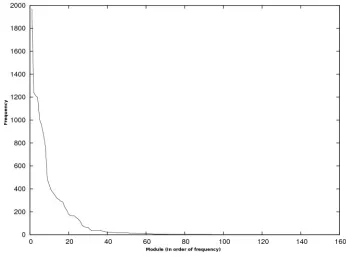
Most programs imported modules that related in some way to Microsoft products, including references to Visual Basic, Office and Windows. Indeed, all of the most frequently used modules were Microsoft related DLLs or 16-bit versions of the same. The frequency of each module quickly drops into the single digits after the most frequent modules. Figure 1 graphs this trend.
Figure 1 reveals a steep decline in frequencies for less popular modules. Many of these programs were installers or viewers, so it makes sense that they would use fewer non-standard modules. Among the discovered 32-bit DLLs, 34 of them did not appear to have any relation to Microsoft products or services, but the other 49 were related to Microsoft in some way or another. As previously noted, programs rarely imported these 34 modules, and often a module was imported by only one program.
No programmable interface exists to see which DLLs relate to Microsoft and which do not. Instead, we manually searched for each DLL in the Microsoft Developer Network, looking for references. If we found a reference indicating that the DLL had some relation to a Microsoft product, we recorded this as a positive relation.
7 MSDN: http://msdn.microsoft.com.
Otherwise, we classified it as a third party module. We do not know of any publicly available API for accessing this information without requiring time consuming and tedious manual searching.
Figure 1. Frequencies of Each Module.
While the majority of these ISOs came from the GPO archive, and thus, some regularity was expected, the commercially available CD-ROMs that we tested were from a wider and more varied sample. The results for these commercial CDs were consistent with the results from the GPO archive, namely, that there was a strong decreasing curve from the most common libraries to the least common.
Implementation and Evaluation
Our program relies on the libarchive library (Libarchive, 2010) to traverse archives and file systems. Libarchive simplifies the traversal of these archive formats by providing a uniform API for accessing many different archive formats. To extract the actual dependencies, we used the Open Watcom compiler toolchain, which supports module imports for both 16-bit and 32-bit Windows executables. Each of these presented a unique set of challenges when targeting our intended task.
Our program was implemented in Scheme and made heavily utilization of the libarchive extraction library. Libarchive’s easy to use interface architecture and stream-oriented API made it quite suitable to the task of bulk analysis and extraction. It also handles a wide range of archive formats, particularly ISO and Zip formats, excepting some of the Microsoft archive formats, for which we investigated the use of additional libraries. Libarchive’s architecture made it quite easy to recur through nested levels of archives and to avoid excessive memory requirements during the extraction.
Libarchive did not perform flawlessly, however. A number of changes and bug reports were filed and subsequently fixed upstream due to non-standard ISO images or features of the images (such as dual filesystem ISOs). The developer community for libarchive responded rapidly to these reports, so their impact was, fortunately, minimal. However, for certain tasks, libarchive may not be the most suitable, so additional functionality pulled from other libraries could improve the overall robustness of the system.
As our program walks through the archives, if it identifies an executable
(currently, we identify executables by extension), it spawns a subprocess to operate on that executable. We parse the output from the Open Watcom toolchain, which gives us the necessary dependency information. We found that Open Watcom provides a more cohesive and encompassing solution for 16-bit and 32-bit executables than other common utilities, though in the future we may modify these utilities to support programmatic access that does not require sub-process communication.
We chose to use file extension and pattern matching to recognize valid executables instead of doing more complex file inspection because of the relative complexity of the two solutions. While file inspection is a more robust and complete way of identifying executable content, it is also much more complex to implement. However, if we were to deploy our toolset in a wider context, using file inspection is the more robust choice.
Related Work
Emulation has been widely discussed as a preservation strategy for digital artifacts such as multimedia presentations that are intimately tied to their original
hardware/software platform for interpretation (McCray & Gallagher, 2001; Gilheany,
Many research projects have explored the use emulation to preserve data or programs for which strategies involving migration or encapsulation with additional metadata are not appropriate. Some focus on the use of dedicated emulation
environments to provide a high level of authenticity or closely replicate the “look and feel” of the original environment, particularly where historical and cultural factors associated with the software are significant (Mellor, 2003). Emulation is also
frequently discussed in the context of preservation planning (Strodl et al., 2007). Until recently, however, there has been a dearth of published technical material on support for end-user interaction with emulated systems.
Recently, researchers have begun to directly address formal requirements for the use of virtualization tools. These include abstractions defined in Preservation Layer Models, as developed in the IBM Digital Information Archival System (DIAS) (IBM,
2009), and ongoing efforts to provide flexible access to a variety of emulation environments in client-server model such as GRATE (Global Remote Access to Emulation), as described by von Suchodoletz (Suchodoletz & Hoeven, 2008) and Rechert (Rechert et al., 2009). The HUBzero Platform for Scientific Collaboration (Purdue University, 2009) is a distributed system enabling scientists to conduct
simulations in software tools written for legacy platforms via a VNC client, accessible via a web site.
Conclusions
This paper addresses the problem of determining software library dependencies for programs (executables) distributed with digital artifacts. As we have discussed, even where a digital document is distributed with supporting executables, executing them in an emulation environment requires providing compatible versions of the necessary software libraries. In this paper, we addressed a key step in this process – determining the required software libraries for a large collection of artifacts originally distributed on CD-ROM.
As we show, existing open source tools provide much of the functionality
necessary for extracting dependency information for an archive of such programs, but a single tool capable of traversing an artifact containing compressed archives was not available. We implemented such a tool, producing the dependency information in a machine readable format.
Our results indicate that the Operating System itself will likely provide for a significant majority of the modules, while a small number of external dependencies will need to be managed explicitly to ensure that the right versions are available. Additionally, there are issues of compatible versions of modules across operating system and software versions.
Disclaimer
This material is based upon work supported by the National Science Foundation under grant No. IIS-1016967. Any opinions, findings, conclusions or
recommendations expressed in this material are those of the author(s) and do not necessarily reflect the views of the National Science Foundation.
References
Bearman, D. (1999). Reality and chimeras in the preservation of electronic records. D-Lib Magazine 5, (4). Retrieved January 11, 2011, from
http://www.dlib.org/dlib/april99/bearman/04bearman.html.
Nixon Presidential Library & Museum. (2007). Deep Throat Unveiled. Retrieved January 11, 2011, from
http://www.nixonlibrary.gov/forresearchers/find/subjects/deepthroat.php. Gilheany, S. (1998). Preserving digital information forever and a call for emulators.
Digital Libraries Asia 98: The Digital Era: Implications, Challenges, and Issues. Singapore: Archive Builders.
Granger, S. (2000). Emulation as a digital preservation strategy. D-lib Magazine 6, (10). Technical Report: Corporation for National Research Initiatives.
Haldeman, H.R. & Ambrose, S. (1994). The Haldeman diaries inside the Nixon White House: The complete multimedia edition. Santa Monica: Sony Electronic Publishing.
Heminger, A. R., & Robertson, S. (2000) The digital rosetta stone: a model for maintaining long-term access to static digital documents. Communications of AIS 3, (1). Atlanta, GA: Association for Information Systems.
Purdue University. (2009). HUBzero: Platform for Scientific Collaboration. Retrieved January 11, 2011, from http://hubzero.org.
IBM. (2009) IBM NL’s Center of Excellence for Long Term Digital Information Usability. Retrieved January 11, 2011, from
http://www-935.ibm.com/services/nl/dias/.
Libarchive. (2010). Retrieved August 5, 2010, from http://libarchive.googlecode.com. McCray, A.T., & Gallagher, M.E. (2001). Principles for digital library development.
Commun. ACM 44, (5). New York, NY: ACM.
Rechert, K., von Suchodoletz, D., Welt, R., van den Dobblesteen, M., Roberts, B., van der Hoeven, J., & Schroder, J. (2009). Novel workflows for abstract handling of complex interaction processes in digital preservation. Proceedings of the Sixth International Conference on the Preservation of Digital Objects. San Francisco, California.
OpenBSD. (2010). OpenBSD reference manual. Retrieved August 6, 2010, from
http://www.openbsd.org/cgi-bin/man.cgi?query=file.
Rothenberg, J. (1995). Ensuring the longevity of digital information. Scientific American 272, (1). New York: Communications Data Services.
Rothenberg, J. (2000a). An experiment in using emulation to preserve digital publications. Technical report for Koninklijke Bibliotheek. Zuid-Holland, Netherlands: The Koninklijke Bibliotheek.
Rothenberg, J. (2000b). Using emulation to preserve digital documents. Technical report for Koninklijke Bibliotheek. Zuid-Holland, Netherlands: The
Koninklijke Bibliotheek.
Solomon R. Guggenheim Museum. (2004). Seeing double: Emulation theory and practice. Retrieved January 11, 2011, from
http://www.variablemedia.net/e/seeingdouble/home.html.
Strodl, S., Becker, C., Neumayer, R., & Rauber, A. (2007). How to choose a digital preservation strategy: evaluating a preservation planning procedure.
Proceedings of the 7th ACM/IEEE-CS joint conference on digital libraries. New York, NY: ACM.
von Suchodoletz, D., & van der Hoeven, J. (2008). Emulation: From digital artifact to remotely rendered environments. iPRES 2008: Proceedings of the Fifth International Conference on Preservation of Digital Objects. St. Pancras, London.
Woods, K., & Brown, G. (2008). Creating virtual CD-ROM collections. Proceedings of the 5th International Conference on Preservation of Digital Objects. London: UK.
Woods, K., & Brown, G. (2009a). Creating virtual CD-ROM collection. International Journal of Digital Curation 4, (2).