A NOVEL TEXT AND IMAGE BASED
AUTHENTICATION SYSTEM PRESERVING HIGH
SECURITY
Vaibhav Sharma
1, Sonu Singh
2, Prashant Kumar
3, Ramakant
41,2,3,4
Department of Electronics and Communication Engineering, TMU, Moradabad, (India)
ABSTRACT
Authentication plays an important role in protecting resources against unauthorized use. Many authentication
processes exist from password based authentication system to costly and computation intensive Biometric
authentication systems. But still the most widely used authentication system is based on the use of text passwords.
Even though the full textual password space for 8- character passwords consisting of letters and numbers is almost
(2 × 1024) possible passwords, by using a small subset of the full space, 25% of the passwords were guessed
correctly. This fact is due to the user's carelessness in selecting their textual passwords and to the fact that most
users do not select random passwords. Many graphical passwords schemes have been proposed. The strength of
graphical passwords comes from the fact that users can recall and recognize pictures more than words. Most
graphical passwords are vulnerable for shoulder surfing attacks, where an attacker can observe or record the
legitimate user’s graphical password by camera. Today it is not unusual that one has to authenticate himself on
several IT systems. Most of the time, these systems require a password or a PIN, but faced with the requirement to
remember such information, many users encounter difficulties, which tends to result in poor choices or other bad
practices. For example, passwords are often based upon dictionary words or personal information, resulting in
vulnerability to brute force attacks or social engineering. To address this problem, researchers have developed
alternative authentication mechanisms, ranging from password enhancement techniques, to token-based
authentication systems and biometrics. In particular, graphical passwords and keystroke dynamics are promising
alternatives to password-based authentication.
The proposed system is a two factor authentication scheme. In this we are combining text based password and
Graphical image based password into a single authentication system. Graphical passwords use pictures instead of
textual passwords and are partially motivated by the fact that humans can remember pictures better than a string of
characters.
Keywords: Dual Level Authentication, Image Authentication, Biometric, Graphical Password
I INTRODUCTION
There are so many mechanism by which a user can access its own data or resources. The basic problem is to be
authentication is defined as being the process of verifying a claimed identity [9]. The most common computer
authentication method is a password-based authentication mechanism which uses alphanumerical usernames and
passwords. Even though this method is easy to implement and to use it has shown to have significant drawbacks. For
example, users tend to choose passwords which can be easily guessed. On the other hand, if a password is hard to
guess, then it is often hard to remember. Additionally, many users forget their passwords [10], and with the number
of passwords increasing per user, the rate of forgetting further increases [11]. A visible consequence is that password
users require extensive support. Passwords must be reseted by IT support. Despite the costs for the support,
password mechanisms are often not as secure as expected. The passwords chosen by most users are relatively easy
to crack [12].
1.1 Authentication
Authentication is a function where a user presents some credentials to the system. If the system recognizesthis set of
credentials or the credentials match a given set on the system, then the user is said to be authorized otherwise the
user is not authorized [7]. Authentication is needed to let the system perform some tasks for the user. The user needs
to be authorized to request services from the system. Before a user can be authenticated to the system, he has to be
registered with the system for the first time. This step is called registration. So, for a new user, he has to get
registered with a system and then authenticated before he can request services.
In a basic authentication process, a user presents some credentials like user ID and some more information to prove
that the user is the true owner of the user ID. This process is simple and easy to implement. An example of this type
of authentication process is the use of user ID and password.
A complicated process involves a user ID, password and a key value generated with time and which changes
constantly at fixed intervals. A user is authenticated only if all three values are right. This is better and more secure
than the basic authentication process as the user has to be there physically to use the changing key. An example of
this process is use of smart cards [6].
The third authentication process uses biometrics. Biometrics can measure finger prints, retinal scan, facial image
scan and many more. In this case, a user always has these credentials on him. User has to present physically for
authentication. The most widely used authentication process uses user ID and a password. Our authentication system
can be classified under the simple authentication process which is more secure and powerful than the password
based system.
II COMPARISON OF PASSWORDS, BIOMETRICS AND IBDLA SYSTEMS
2.1 Password Based Authentication System
This is a simple system where a user presents a user ID and a password to the system. If the user ID and password
match with the one stored on the system, then the user is authenticated. A user may have many accounts on many
computers. He has to remember many passwords. Research on human cognitive ability has generated a lot of
knowledge on what an individual can remember [1]. For example, domain names are used instead of IP addresses
individuals can remember images more easily than the text. The general tendency is that an individual may not
remember text passwords easily and he may write it down. This can lead to stealing password to gain unauthorized
access to a system.
Since passwords cannot be very long, they are easy to break using brute force attacks like attempting different
passwords (online attack) or by offline attack on the password hash file. There are many other ways to break
passwords like packet sniffing, by accidental discovery. Network traffic is easy to capture and analyze using the
tools available in the web. Network protocol analyzers, such as Ethereal Packet Sniffer and tcpdump can be used to
accumulate both incoming and outgoing network data including text based passwords.
2.2 Biometric Based Authentication System
Biometrics, the application of statistical analysis to identify individuals through their biological or physiological
characteristics, is emerging as a key aspect in new security systems. Using biometrics, it is possible to avoid pitfalls
encountered with traditional security systems where users are required to keep information, such as passwords, safe
[3]. Biometric authentication systems may be very safe and secure and reliable but these systems are costly and need
additional hardware and software support. These systems are difficult to change and maintain. Deploying such
systems for internet may be very complex and not suitable.
2.3 Image Based Dual Level Authentication System (IBDLA)
IBDLA is a simple authentication system, which uses text password and image co-ordinates as passwords[5],[8].
The user submits user ID and choose 5 co-ordinates of an image as credentials to the system. If the text password
and image co-ordinates matches with the one stored in the system, the user is authenticated. Certain locations of an
image are easy to remember, which are stored in the form of co-ordinates. It is not easy to guess both text password
and certain image locations . Performing brute force attacks on such systems is very difficult. A first time user has to
register him with the system by providing all his details. The only difference come when system ask him to click on
any five locations on an image, which get stored as password . No major change is to be made to the existing
password based systems to incorporate the use of images. The system remains simple as the password based one.
The images are not stored in the system just the coordinates get saved. This system is easy to implement and we
don’t need any extra resource to implement it.
IBDLA was designed as an experimental security tool, which can be used in classroom for demonstrating basic
security mechanisms or as an access control system in any of the applications needing authorization.
2.4 Image-Based Authentication
Image-based authentication is an area that is being researched as a way of eliminating the standard text-based
password. In previous research on image or graphical authentication systems, the studies have shown that this
approach produces better recall results than non-dictionary text passwords (Tari, 2006). Unlike passwords
which image-based authentication presents itself is wide ranging, from grids containing images of faces, to everyday
natural scenes where a user clicks on specific areas
.
III IMPLEMENTATION
Proposed authentication system is based on new concept that is text password and image .In this technology we are
using number of choice constraint on user mean that there is a constant limited choice to image pass code. if the user
is not able to do this then this will be treated as unauthorized user. And after the max attempts the system will block
to the hacker. And actual user will receive a warning mail. Now user can update their password easly. if an
unauthorized user try to login and trying some wrong combination of password then a warning mail with IP address
and time send to the actual user and if hacker has been tried up to max limit of attempts then it will be locked
3.1 Working
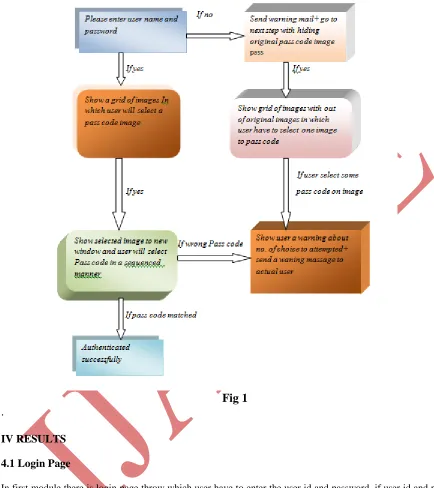
You have to enter the user name and password and press login button if id and password matched then go to next
step i.e. image based password in which user have to select one right image from grid and after selecting it should
enter a pass code on image by selecting some co-ordinate point on image in a registered sequence and have to press
verify button now user will get a new window of in which user can create new user update help and exit. Shown in
Fig 1
Now come to some wrong attempts by user if user enter a wrong text password then our system will send a warning
mail to actual id holder and hacker without any information navigate to next step in which the original image will
not be present in grid of images so hacker cannot authenticate .suppose that a hacker has hack the text password of
the actual user and navigated to next image based module now hacker select an image and try to make combination
but it not so easy so it will give some wrong combination also now one mail will be sent to user’s id as well as
number of choices will being decreased and after 5 times of wrong attempts hacker will be locked by system. So this
is the unique idea of the project which makes it different from others. In step first step user have to enter the Id and
password and press login button after it system will navigate to step 2 .here user find a grid of images from which
user have to select one image and have to click some positions in sequenced manner. But the main background
working of the project is start now if user enter a wrong password then system will go to next step without informing
to user but actual image will not show in the grid of image and system will send a warning mail on actual user id and
it make impossible to intruder to hack data. Now suppose that hacker hacked id and data then it will navigate to
next page, but now intruder have to select an image to complete authentication within five attempts and with every
wrong attempt our system will send a warning mail to actual user and after five times our system will lock the user
id now it can we unlock by admin only so we can say this concept provide an additional and important security to
Fig 1
.
IV RESULTS
4.1 Login Page
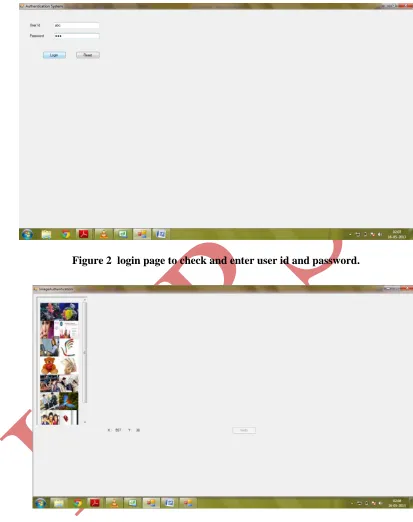
In first module there is login page throw which user have to enter the user id and password .if user id and password
are correct then it will go to next step but if password is wrong then system will send waning mail to user’s id and
forward to next step with same manner. The process is showing in figure 2
4.2- Image Authentication
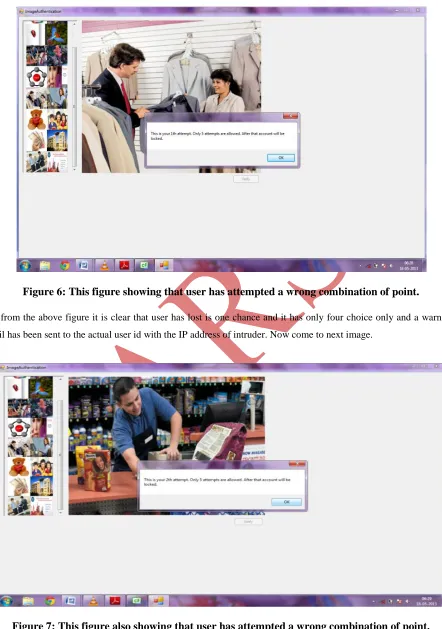
In second module user have a grid of pass code image throw which user have to select one image at a time and then
have to click 5 times to make right combination on right positions in right sequence. This process can under stand
Figure 2 login page to check and enter user id and password.
Figure 3: grid of images to select one right image from which user have to select one image to make password.
Figure 4: selected image from grid of images at which user have select some right sequence to
make password.
Now suppose that user has been made right combination at the image then it will be authenticated successfully. Now
following window will be open which is shown in figure 5. This window provide facility to create new user and
maintenance user means that we can update user’s record t also provide help tool to guide the users.
Figure 5 Windows After Successful Authentication. This Window Is Operated By Administrator.
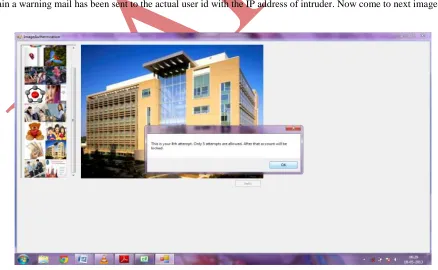
Now suppose that user to do not enter right image or right combination on image then the following result comes.
Figure 6: This figure showing that user has attempted a wrong combination of point.
So from the above figure it is clear that user has lost is one chance and it has only four choice only and a warning
mail has been sent to the actual user id with the IP address of intruder. Now come to next image.
So from the above figure it is clear that user has lost is another one chance and it has only three choices only and
once again a warning mail has been sent to the actual user id with the IP address of intruder. Now come to next
image.
Figure 8: This figure also showing that user has attempted a wrong combination of point again.
So from the above figure it is clear that user has lost is another one chance and it has only two choices only and once
again a warning mail has been sent to the actual user id with the IP address of intruder. Now come to next image.
So from the above figure it is clear that user has lost is another one chance and it has only one
choice only and once again a warning mail has been sent to the actual user id with the IP address
of intruder. Now come to next image.
Figure 10: this figure show that user has attempts maximum choices so it has been locked
Now it is clear from the figure 6.8 that user has attempted maximum attempt now it is locked by the authentication
system. Now intruder is blocked so we can say that our system is providing more security compare then other
authentication system.
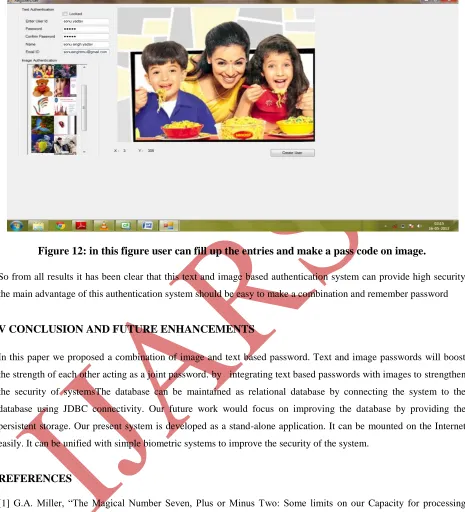
Figure 12: in this figure user can fill up the entries and make a pass code on image.
So from all results it has been clear that this text and image based authentication system can provide high security
the main advantage of this authentication system should be easy to make a combination and remember password
V CONCLUSION AND FUTURE ENHANCEMENTS
In this paper we proposed a combination of image and text based password. Text and image passwords will boost
the strength of each other acting as a joint password. by integrating text based passwords with images to strengthen
the security of systemsThe database can be maintained as relational database by connecting the system to the
database using JDBC connectivity. Our future work would focus on improving the database by providing the
persistent storage. Our present system is developed as a stand-alone application. It can be mounted on the Internet
easily. It can be unified with simple biometric systems to improve the security of the system.
REFERENCES
[1] G.A. Miller, “The Magical Number Seven, Plus or Minus Two: Some limits on our Capacity for processing
Information”, The Psychological Review, vol. 63, pp. 81-97, 1956.
[2] Art Conklin, Glenn Dietrich, Diane Walz, “Password-Based Authentication: A System Perspective”,
Proceedings of the 37th Hawaii International Conference on System Sciences – 2004.
[3] Ross A.J. Everitt, Peter W. McOwan, “Java-Based Internet Biometric Authentication System”, IEEE
[4] Takada Tetsuji, Koike Hideki, “Awase-E: Image-based Authentication for Mobile Phones using User’s Favorite Images”.
[5] Dhamija Rachna, Perrig Adrian, “Déjà Vu: A User Study Using Images for Authentication”, 9th Usenix Security
Symposium, August 2000.
[6] Hyun-Sung Kim, Sung-Woon Lee, Kee-Young Yoo, “ID-based password authentication scheme using smart
cards and fingerprints”, ACM SIGOPS Operating Systems Review, Volume 37, Issue 4 (October 2003), Pages:
32 – 41.
[7] Michael Burrows, Martin Abadi, Roger Needham, “A logic of authentication”, ACM Transactions on Computer
Systems (TOCS), Volume 8, Issue 1 (February 1990), Pages: 18 – 36.
[8] Trevor Pering, Murali Sundar, John Light, Roy Want, “Photographic Authentication through Untrusted
Terminals”, IEEE Pervasive Computing , January 2003, pp. 30-36.
[9] D. Gollman. Computer security. John Wiley and Sons Ltd, 1999.
[10] M. Zviran and W.J. Haga. A comparison of password techniques for multilevel authentication mechanisms. The
Computer Journal, pages 227–237, 1993.
[11] A. Adams, M. Sasse, and P. Lunt. Making Passwords Secure and Usable. People and Computers XII, pages 1–
20, 1997.
[12] A. Adams and M.A. Sasse. Users are not the enemy: Why users compromise computer security mechanisms