Papers presented in NCRET-2K16 Conference can be accessed from
Green Droid: An Android application for energy Optimization
Jayashri Khedkar
SP’s IOK COE, PUNE
[email protected]
Sonali Mukhekar
SP’s IOK COE, PUNE
[email protected]
Ganesh Hiwale
SP’s IOK COE, PUNE
[email protected]
S. Pratap Singh
(Assistant Professor)SP’s IOK COE, PUNE
[email protected]
Abstract- In the advancing world of technology, Mobile applications are a rapidly growing segment of the global mobile market. As the Android operating system is getting more popular, the application based on Android SDK attracts much more attention. Many Android applications are not energy efficient. In this paper, energy inefficiency problem and GreenDroid application which is developed for the automatic energy optimization in Android phone are discussed.
Google released Android which is an open-source mobile phone operating system with Linux-based platform. It consists of the operating system, middleware, and user interface and application software. Certainly, Android is about to become the most widely used OS on mobile phones, but with Android comes an energy inefficiency problem. Because of large number of installed applications and unutilized sensors, Wi-Fi, Bluetooth, Mobile Data etc takes unnecessary battery power of Android phone. GreenDroid application is useful for solve such energy inefficiency problem, it provides automatic energy optimization in phone. In this application, there are different types of energy saving modes. In this paper, the basic introduction of Android and GreenDroid application development is discussed.
Keywords: Android OS; Applications; Energy inefficiency problem; Sensors; GreenDroid; Energy optimization.
I. Introduction
Android is a new, next-gen mobile operating system that runs on the Linux Kernel. Android Mobile Application development is based on Java language codes, as it allows
developers to write codes in the Java language. These codes can control mobile devices via Google-enabled Java libraries. It is an important platform to develop mobile applications using the software stack provided in the Google Android SDK. Android mobile OS provides a flexible environment for Android Mobile Application Development as the developers can not only make use of Android Java Libraries but it is also possible to use normal Java IDEs. The software developers at
Mobile Development India have expertise in developing applications based on Android Java Libraries and other important tools. Android Mobile Application Development can be used to create innovative and dynamic third party applications.
Now the Android system in the electronics market is becoming more and more popular, especially in the Smartphone market. Because of the open source, some of the development tools are free, so there are plenty of applications generated. This greatly inspired the people to use the Android system. In addition, it provides a very convenient hardware platform for developers so that they can spend less effort to realize their ideas. This makes Android can get further development.
Fig. 1: Four core features of the android platform
A. Android Platform overview:
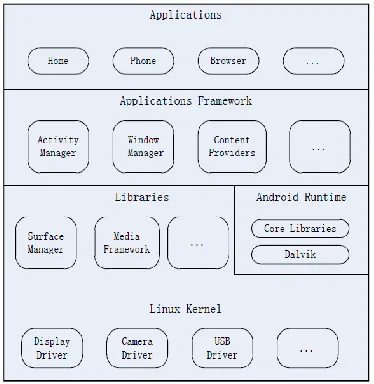
Android is a software stack for mobile devices that includes an operating system, middleware and key applications. The Android SDK provides the tools and APIs necessary to begin developing applications on the Android platform using the Java programming language [3]. Android based on Linux version 2.6. The system services such as security, memory management, process management are controlled by Linux. Fig 2 shows android architecture.
Fig. 2: Architecture of android
a) Applications:
Android app will be shipped with a set of core applications including client, SMS program, calendar, maps, browser, contacts, and others. All these application programs are developed in Java.
b) Application Framework :
The developer is allowed to access all the API framework of the core programs. The application framework simplifies the reuse of its components. Any other app can release its functional components and all other apps can access and use this component (but have to follow the security of the framework). Same as the users can be able to substitute the program components with this reuse mechanism.
c) Libraries and Android Runtime :
The library is divided in to two components: Android Runtime and Android Library. Android Runtime is consisted of a Java Core Library and Dalvik virtual machine. The Core Library provides Java core library with most functions. Dalvik virtual machine is register virtual machine and makes some specific improvements for mobile device. Android system library is support the application framework and it is also an important link connecting between application framework and Linux Kernel. This system library is developed in C or C++ language. These libraries can also be utilized by the different components in the Android system. They provide service for the developers through the application framework.
d) Linux Kernel:
The kernel system service provided by Android inner nuclear layer is based on Linux 2.6 kernel, Operations like internal storage, process management, internet protocol, bottom-drive and other core service are all based on Linux kernel.
B. Android Applications:
Android applications are written in Java programming language. However, it is important to remember that they are not executed using the standard Java Virtual Machine (JVM). Instead, Google has created a custom VM called Dalvik which is responsible for converting and executing Java byte code. All custom Java classes must be converted (this is done automatically but can also be done manually) into a Dalvik compatible instruction set before being executed into an Android operating system. Dalvik VM takes the generated Java class files and combines them into one or more Dalvik Executable (.dex) files. It reuses duplicate information from multiple class files, effectively reducing the space requirement (uncompressed) by half from a traditional .jar file. Dalvik was created to support the nature of lightweight mobile operating systems require because of the limited hardware capabilities compared to conventional desktops or laptops.
Papers presented in NCRET-2K16 Conference can be accessed from
among one another and access shared resources on the system securely.
By providing an open development platform, Android offers developers the ability to build extremely rich and innovative applications. Developers are free to take advantage of the device hardware, access location information, run background services, set alarms, add notifications to the status bar, and much, much more. Developers have full access to the same framework APIs used by the core applications. The application architecture is designed to simplify the reuse of components; any application can publish its capabilities and any other application may then make use of those capabilities (subject to security constraints enforced by the framework). This same mechanism allows components to be replaced by the user. Underlying all applications is a set of services and systems, including:
A rich and extensible set of Views that can be used to build an application, including lists, grids, text boxes, buttons, and even an embeddable web browser
Content Providers that enable applications to access data from other applications (such as Contacts), or to share their own data
A Resource Manager, providing access to non-code resources such as localized strings, graphics, and layout files
A Notification Manager that enables all applications to display custom alerts in the status bar
An Activity Manager that manages the lifecycle of applications and provides a common navigation backstack.
II. GreenDroid Application
GreenDroid is an Android application which is used for energy optimization in Smartphone. It has 3 different modes in which there are more sub modes. This application is very user friendly. These all modes are used to save unnecessary battery use by applications or respective sensors. Modes are listed below,
a. Power Saver Mode b. Hibernate Mode c. GreenDroid Mode
Power Saver Mode:
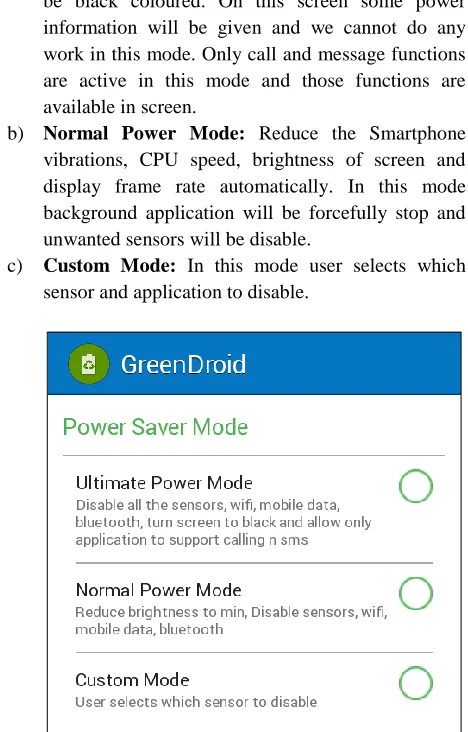
Now days many costly smart phones have different power saving modes like Power Saving Mode, Ultra Power saving mode etc. But for small range mobiles, there is no any power saving modes. So we added 3 power saving modes in our application. Power saving mode is used to save battery life for more efficient use of Smartphone
a) Ultimate Power saving Mode: Cannot run third-party applications. In this mode mobile screen will be black coloured. On this screen some power information will be given and we cannot do any work in this mode. Only call and message functions are active in this mode and those functions are available in screen.
b) Normal Power Mode: Reduce the Smartphone vibrations, CPU speed, brightness of screen and display frame rate automatically. In this mode background application will be forcefully stop and unwanted sensors will be disable.
c) Custom Mode: In this mode user selects which sensor and application to disable.
Fig. 3: Power Saver Mode in GreenDroid Application
Hibernate Mode:
In hibernate mode hibernation concept is used. This is also known as low power sleep mode. Hibernation saves power. After hibernating, the hardware is powered down like a regular shutdown. Hibernation is a means of avoiding the burden of saving unsaved data before shutting down and restoring all running programs after powering back on. It mostly used in laptops and desktops. But we use this technique in mobile devices for energy optimization. This mode is work on the installed applications in the mobile device.
a) Normal Mode: In this mode all least recently used applications will be forcefully stop. It will disable the sensors which were enabled b those applications. b) Custom Mode: In this mode user selects the applications to force stop. It works same as normal mode but user manually.
Fig. 4: Hibernate Mode in GreenDroid Application
GreenDroid Mode:
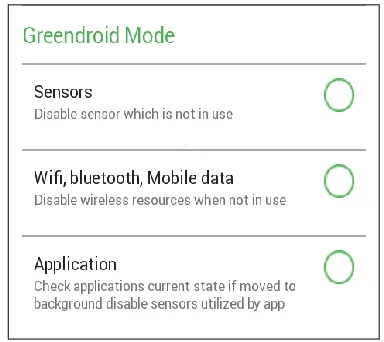
GreenDroid mode is main objective in our project. The module of GreenDroid mode has three different modes. GreenDroid mode is divided into three modes for good user understanding and interaction.
a) Sensors: Check the current status of sensors and disable the sensors which are not in use.
b) Wi-Fi, Bluetooth, Mobile data: Check source data for internet. If there is no data utilization then disable the internet source i.e. Wi-Fi, Mobile data. Check data transactions for Bluetooth. If there is no data transformation using Bluetooth then disable it. c) Application: Check current state of applications. If
any applications moves to background and its useless then disable the sensor which is utilized b that application. After reopening of application resume the work and utilization of its sensor.
Fig 5: GreenDroid Mode in GreenDroid Application
III. GreenDroid Application Development:
There are various IDEs for Android application development. We select Android Studio IDE for GrennDroid application development. Android Studio is the official integrated development environment (IDE) for developing the android platform. Android is freely available under the Apache License 2.0. Android Studio is designed specifically for Android development.
The new features are expected to be rolled out with each release of Android Studio. The following features are provided in the current version.
Flexible Gradle-based build system (Android project view).
Build variants and multiple apk file generation.
Code templates to help you build common app features.
Android-specific refactoring and quick fixes.
Rich layout editor with support for drag and drop theme editing.
ProGuard and app-signing capabilities.
Support for building Android Wear apps.
Built-in support for Google Cloud Platform, making it easy to integrate Google Cloud messaging and App Engine.
System Requirements:
Android Device Requirements
a) Operating System : Android 2.3 b) Internal : 1 GB
Papers presented in NCRET-2K16 Conference can be accessed from
Software Requirements
a) Operating System : Windows 7 b) Language : JAVA/Android
c) Tool : Android Studio IDE, JDK 7, JRE 6, Android SDK
Hardware Requirements
a) System : Dual Core b) Hard Disk : 120 GB c) RAM : 2 GB
IV. Conclusion
In this paper, we represent the overview of android application development. GreenDroid is an android application for automatic energy optimization in Android phones. This application has various modes for energy optimization. User can choose any mode as per need or as per remain battery percentage. It will help to save unwanted battery consumption by applications or mobile sensors.
References
[1]A. Pathak, Y. C. Hu, and M. Zhang, “Bootstrapping energy debugging on smartphones: A first look at energy bugs in mobile devices,” in Proc. ACM Workshop Hot Topics Netw., 2011, pp. 5:1–5:6.
[2] Android Sensor Management. (2013). [Online]. Available:
http://developer.android.com/reference/android/hardware/Sen sorManager.html
[3] Suhas Holla, Mahima M Katti, “Android based mobile application development and its security” in International Journal of Computer Trends and Technology- volume3Issue3- 2012.
[4] S. Anand, M. Naik, M. J. Harrold, and H. Yang, “Automated concolic testing of smartphone apps,” in Proc. ACM SIGSOFT 20th Int. Symp. Found. Softw. Eng., 2012, pp. 59:1–59:11.
[5] Li Ma, Lei Gu, Jin Wang, “Research and Development of Mobile Application for Android Platform” in
International Journal of Multimedia and Ubiquitous Engineering Vol.9, No.4 (2014), pp.187-198
http://dx.doi.org/10.14257/ijmue.2014.9.4.20.
[6] “Android Power Management.” URL:
http://develpers.android.com/reference/android/os/PowerMan ger.html.
[7] Mingyuan Xia, Lu Gong, Yuanhao Lyu, Zhengwei Qi, Xue Liu, “Effective Real-time Android Application Auditing” in 2015 IEEE Symposium on Security and Privacy.
[8]W. Visser, K. Havelund, G. Brat, and S. Park, “Model checking programs,” in Proc. Int. Conf. Automated Softw. Eng., 2000, pp. 3–11.
[9] S. Hao, D. Li, W. G. J. Halfond, and R. Govindan, “Estimating mobile application energy consumption using program analysis,” in Proc. 35th Int. Conf. Softw. Eng., pp. 92–101.