Design and Implementation of the User Interfaces and
the Applications for Mobile Devices
Ahmed S. Ghiduk
Department of Computer Science, College of Computers and Information Technology
Taif University, Saudi Arabia
Mohammed Elashiry
Department of Management Academy of Specialized Studies,
Beni-Suef, Egypt
ABSTRACT
Mobile devices such as cellular phones (CPs) are crucial in our daily life. A lot of work has been done to handle the problems of designing and developing of GUI and applications for CPs. In this paper, we survey the existing strategies to design and implement of GUI for CPs. In addition, the paper reviews the methods to develop the applications for CPs and the guidelines to overcome the problems which face these methods especially using XHTML in mobile devices and ordinary web browsers. In addition, we present a bug study and categorization of android-specific bugs that shows an important number of android bugs. We introduce a new approach for testing GUI. The new approach focus on generating set of actions to test the user interface. The approach detects android GUI bugs, based on a combination of android application analysis tool and event generation with runtime monitoring technique. We introduce an empirical study to shows the efficiency of our approach.
General Terms
User interface, Development application.
Keywords
Performance, Requirements, UI design.
1.
INTRODUCTION
Mobile technologies open up a lot of opportunities to serve and make our daily life easier. Hand-held computers got great popularity and the capabilities of such devices are increasing at an accelerated rate. Mobile devices vary greatly in the built-in capabilities, functions, portability, and cost. Pager, Cellular telephone, PDA, Tablet, Laptop and Global Positioning System (GPS) are examples for the mobile devices [1]. Hand-held computers are shifted from low resolution and gray-scale graphics and text based interfaces to interactive applications, which take the full advantages of new technologies such as high resolution, high incremental memory, full color graphics, and full motion and music jukebox [2].
Mobile wireless technologies have been early started since 1970s. In the last few years, mobile wireless technologies have experienced four or five generations of technology development namely from 0G to 3.75G. Concepts of CPs were established in 1G technology which facilitated a wide variety of mobile wireless communication. Analog technologies have been replaced by the digital communications in 2G, which significantly improved the quality of wireless communication. In 3G generation, data and voice communications have been the major and center of attention of this generation. Finally, a converged network for both voice and data communications was emerged [3].
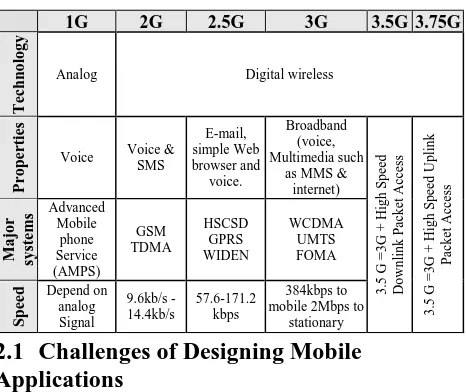
Table 1 gives a summary of the comparison between the different generations from 1G to 3.75G according to the used technologies (e.g. technology, system, speed and protocols) in each generation [4].
The paper is organized as follows: Section 2 gives a survey about user interface and its designing methods. Section 3 gives a review of the application tailoring for mobile. Section 4 presents the mobile applications development methods. Section 5 navigates of XHTML application. Section 6 presents a background for android applications testing. Section 7 presents our GUI testing approach and the results of our empirical study. Section 8 presents the conclusions and future work.
2.
DESIGNING USER INTERFACES
Designing the user interface (UI) is a very important feature for developing the application for mobile devices. There are many restrictions on mobile devices such as limited memory and processing power. In addition, understanding the behavior of the users is even more essential for developing UI for mobile’s devices. In mobile devices environment, each architecture layer of the application must be considered and prioritized carefully to maximize the physical capacity of the devices. Designing UI for mobile applications is so difficult. Therefore, developing applications for mobile devices is challenging and rewarding in its outcome [2, 5].
2.1
Challenges of Designing Mobile
Applications
The initial step for designing an application for mobile devices is to know the environment of the application and consider the limitations and capacities of the hardware components of the mobile. Developing software for mobile devices varies Table 1. Generations of the mobile wireless communications
1G 2G 2.5G 3G 3.5G3.75G
T ec h n o lo g y
Analog Digital wireless
Pr o p er ti es
Voice Voice &
SMS E-mail, simple Web browser and voice. Broadband (voice, Multimedia such
as MMS & internet) 3. 5 G = 3G + High S pe ed Dow nli nk P ac ke t Ac ce ss 3. 5 G = 3G + High S pe ed Uplink P ac ke t Ac ce ss M a jo r sy st ems Advanced Mobile phone Service (AMPS) GSM TDMA HSCSD GPRS WIDEN WCDMA UMTS FOMA S p ee
d Depend on
analog Signal 9.6kb/s - 14.4kb/s 57.6-171.2 kbps 384kbps to mobile 2Mbps to
[image:1.612.327.560.474.670.2]considerably from desktop or notebook environments because mobile devices are small and portable and have small screens and keypads, and limited memory, CPU, and bandwidth capacity. Each of the previous features has an influence on designing of mobile devices applications [5].
Small screen is a key challenge for developing a significantly usable graphically based user interface for mobile devices because it restricts the amount of data to transmit on the screen. In addition, small screen limits the size and placement of the textual and graphical elements as well. Developing a standard application for multiple environments with different screen sizes is particularly important. Thus, placing items dynamically in the screen by calculating its dimensions through the application is more efficiency than placing the items statically in the screen.
2.2
Performance of UI Design
There are many factors that impact the performance and functionality of mobile application. One may be considered the most hardware impacting user interface design for mobile applications is screen size. There are other factors that impact the performance and functionality of mobile application such as available memory, CPU, and bandwidth capacity [5]. In the following, we will discuss these factors in more details.
Memory considered as problem in mobile application design. Today, there are some mobile devices that feature memory capacity with respect to their size. For example, MIDP applications which developed to work on different phones takes into account the wide ranging memory capacity of these devices. CPU shows up similar issues. Many developers accustomed to work on a desktop environment to developed applications for mobile devices based on the processing capacity of CPU of today's desktop computers. Sometime this method becomes a careless programming style. Applications which developed based on desktop environment would run very slowly on a typical mobile device. The solution here is to carefully analyze programming style such as analyze loops in programs.
Testing data handling routines is a problem, since testing goes relatively well with small amounts of data but slows significantly as data builds up.
Handling Server Side data is also a challenge, since mobile devices connect to the Internet using wifi. Generally, wireless connection speed is typically slow. Thus, most mobile devices don't have the capability to process large amounts of data from server-side systems.
While the impact of bandwidth, memory, and CPU, on application performance is in general approached from a functional perspective, it is also important to understand how these factors will impact in user interface design. For example, each mobile device has many capacities and limitations in terms of how much data it can hold in its memory and process in its CPU, and the speed of its network connections. The different factors in the UI design not only help to develop a more usable user interface, but also free up the device functionality.
2.3
Requirements Analysis and the
Implementation of UI
Requirements analysis is mainly a critical feature of UI design because it gives a functional overview of the application's data
requirements and related actions for designing an effective UI [5].
Defining application core data and its actions can be done by sketching of the various screens that comprise the user interface, as well as by using use cases or flowchart of the flow of the screens. Some applications launch most actions from a main menu on screens, whereas others are organized in a more task-oriented order. The task-task-oriented mobile environments are easy to use and work better than the large main menus environments. One has to pay special attention to the amount of data and actions that are placed on the screen of the mobile. The small size of screen and keyboard is a challenge to incorporate all of an application's possibilities on a single screen. Therefore, it is better to divide the information and actions into several screens. In addition, it is essential to maintain mobile applications and their UIs simple and practicable because it will be very difficult for the user to navigate all screens within the limited framework of the mobile environment or even to remember how to get back to a particular screen if there are a lot of screens. A main part of the design process of the application is to decide what is the most important about the application and how this will be reflected in the UI.
After description of basic model of UI requirements in terms of data, actions, and flow of screens, one must see if the UI has all the functionality and data it requires. One can implement some of the screens to test the UI.
2.3.1
Some Guidelines for UI Design
We brief some guidelines of interface design for mobile devices which have been suggested by Gong and Tarasewich [6]: 1. Facilitate Frequency Uses: Time is important to mobile
device users. Thus, they desire to reduce interactions times and increase pace of interaction.
2. Feedback: It should be some system feedback for each action such as ―HTTP404 ERROR‖ and ―THE PAGE CANNOT BE FOUND‖.
3. Dialogs: actions sequence should be organized into groups with beginning, middle, and end.
4. Internal Control: Users desire to that the system direct, control and respond to their actions. Systems should allow users to initiate and respond to actions.
5. Consistency: an application can be running on multiple platforms and devices.
6. Reversal of Actions: it should allow easy reversal of actions. 7. Error Prevention and Simple Error Handling: have to take
the physical devices into account.
8. Reduce short-term memory load: UI should use any little memorization during tasks performance.
9. Design for Small Device: mobile platforms will be smaller in size and include items such as buttons, and key chains, new techniques may be necessary to overcome the physical limitations.
10.Design for ―Top-Down‖ Interaction: multilevel and
hierarchical mechanisms are better ways of presenting large amount of information.
11.Flexibility: any item of menu can easy move during other item is chosen. It is easy to return to that item again 12.Design must allow personal setting and enjoyment.
1. Collecting valuable data for later analysis. 2. Testing within the context of use. 3. Testing on real devices.
4. Testing as early as possible.
2.3.2
Implementation of UI
Applications’ designing should not be fixed to one particular screen size. In contrast, it is very difficult to support the range between a small mobile phone and a large Personal Digital Assistant or PDA. To solve this problem, we have to introduce two or three versions from the application such that each version suited to a particular environment, or tie the application to a certain screen category [5].
If UI prototype consists of standard HTML page, the resulting prototype can be used and testing in standard Web browser. This facilitates developing, debugging and testing of this prototype. If the application uses client-server architecture it is important to decide which operations or functions are implemented on the server and which are on the client. For example, if an application is time critical it is very important that the application uses the correct time in the execution of its operations. In this case, the application should rely on the server-side time rather than the client-side time. Similarly, if an application uses a lot of data, then the server-side database may be used to hold it all. On the other hand, we might want to store selected data on the client device. The synchronizing data between the client and server notably impacts the performance of mobile device applications.
3.
APPLICATION TAILORING FOR
MOBILE
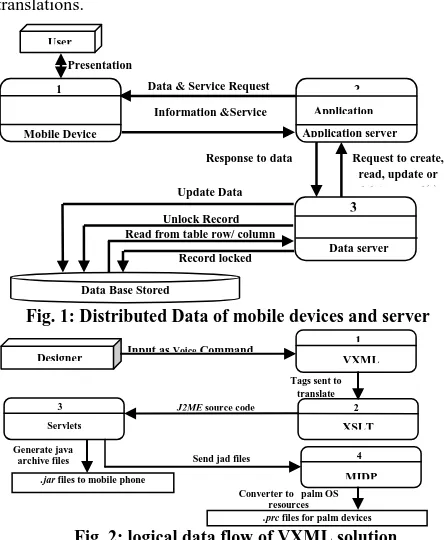
The heterogeneity of mobile devices requires that the software be customized and tailored for each device [7]. Mobile device has distributed data since data and data manipulating are placed on server, application logic placed on server and presentation placed on mobile devices as shown in Figure 1.
The screen size and the operating environment are two important differences among wireless devices. These differences require the application to be adapted specifically for each device. That section describes two approaches for providing application tailoring; application tailoring solutions are needed due to the increase in availability and the popularity of mobile devices.
3.1
Tailoring Based on VXML
That section will be presented a specifically structured VoiceXML file or VXML as input to an XSL transformation. The transformation produces J2ME source code. Java servlets are used to compile the resulting code and package it with respect to a specific device as shown in Figure 2.
This first approach works well for users who have programming experience and are comfortable with editing XML files as the following [7]:
Voice XML: VXML enables users to interact with the Web through voice commands. It is also used for applications providing automatic answering services. VXML provides a consistent structure that has been standardized by the World Wide Web Consortium. Some of applications not using voice then the structure of VXML tags are used as the foundation for the input file that specifies the details of the mobile application.
VXML uses tags such as <prompt> tag, <item> tag and <field> tag. One Voice XML document provides a single input for many translations.
XSLT: mean eXtensible Stylesheet Language Transformation of VoiceXML, XSLT translates VXML to J2ME also; XSLT can be applied to the VXML document. XSLT is a transformation language that consists of a set of rules for transforming a source tree into a result tree. The XSLT allows output to be directed to three necessary translation files, the translations needed are: one for J2ME, one for MF file and last for JAD file.
J2ME: is a collection of Java APIs for developing software on resource constrained devices such as PDAs, cell phones and other consumer appliances see Figure 3. Java is isolated from rest of the device to make development easier and improves security and it is important to have a virtual execution environment [8]. J2ME solves part of the application tailoring problem by addressing "the needs of the operating system and screen sizes" as shown in Figure 4. Screen size problem is solved by using J2ME’s high level APIs, which allows device to choose how to display objects such as buttons and text onto the screen. The low level API requires programmers to be responsible for everything that is displayed on the screen. High level APIs remove the screen size dilemma from the programmer and place the responsibility on the mobile device. Many mobile devices are capable of using J2ME, but require the code to be packaged specifically to run in each different mobile environment then J2ME applications alone are not sufficient for porting the code to different mobile devices [7].
[image:3.612.326.548.96.366.2]The servlet: it accesses the command line again to finish the tailoring process, to produce an application for a mobile phone. Servlet must compile, pre-verify, and generate a Java Archive (JAR), file of the J2ME code. To produce a Palm application, additional steps must be taken such as the servlet must start the MIDP for the Palm OS converter, this application can run from
Fig. 1: Distributed Data of mobile devices and server
Request to create, read, update or delete record(s) Response to data
manipulating request
Presentation User
Data & Service Request Information &Service
Responses
Application Application server
2
User Interface Mobile Device
1
Data Manipulating Data server 3 Update Data
Unlock Record Read from table row/ column
Record locked
Data Base Stored
Fig. 2: logical data flow of VXML solution
.prc files for palm devices
1 VXML Designer Input as Voice Command
Generate java archive files
2
XSLT
4
MIDP
3 Servlets
Tags sent to translate
Converter to palm OS resources
J2ME source code
Send jad files
the command line to convert the JAD file to the Palm OS Resource Collection file PRC. Then application is ready to be deployed on a Palm device.
The next section describes the possibilities of generative programming applied to application tailoring in order to assist in porting software to specific devices without rewriting code.
3.2
Tailoring Based on Modeling
Metamodeling (Generic Modeling Environment or GME) is used to create a domain specific modeling language and environment. The end user will be responsible for building a model of the menu in a customized modeling environment provided by the GME. GME environment allows end users to capture the essence of a design in a notation that is familiar to the users, and from the specified models an application can be generated directly from a model interpreter which can be used to generate all of the artifacts needed for application tailoring [7]. There are three elements are needed to produce the metamodel a model, an atom and a connection. The model element is used to represent a message and also a menu item. The atoms represent the choices contained within the menu item model. The connection entity specifies the relationship between the models and the atoms. GME access the data by several ways such as the Builder Object Network or BON, which accesses the internal representation of the model through C++ objects [7].
The abstraction level of metamodeling approach is higher than the VoiceXML approach. In GME model, application tailoring occurs at design time. Generative programming approaches eliminate the need to rewrite the code manually. It improves productivity by allowing the essence of a problem to be the primary focus. Manual rewriting errors of code can be reduced by putting the burden on the automated translators [7].
The XML approach provides a run time application tailoring solution by running the tailoring on a server. This allows a tailoring solution to be created when it is requested by a mobile client. It requires the end user to be familiar with XML, but
offers fresh content every time a change is made to the VXML file. Table 2 summarized differences between VXML and GME.
4.
MOBILE APPLICATIONS
DEVELOPMENT
[image:4.612.79.288.112.360.2]The failure in design and development efficient and effective applications may lead to un-usable devices. However, designing usable interfaces for small mobile devices and performing usability tests are challenging tasks. Their hardware and software have special characteristics compared to Desktop PCs.
Table 2. Comparison between GME and VXML
Diff.
Prop. GME VXML
Abstraction Higher Normal Application
tailoring Design time Run time Code
Eliminate the need to rewrite the code manually, it contained an
interpreter
Depend on Voice XML or write tags handled by
servlets. Dealing with End User End User
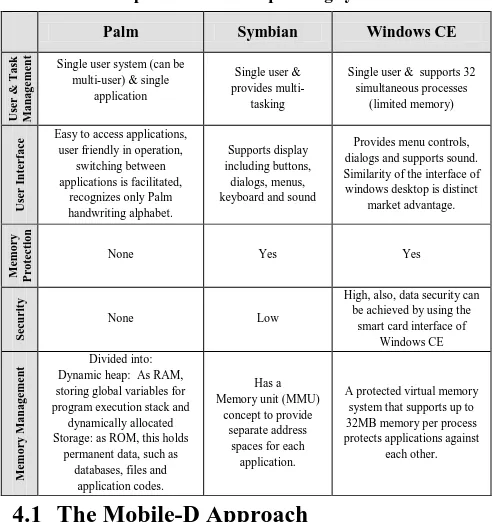
[image:4.612.326.560.193.270.2]The principal differences in mobile devices are concerned with their physical characteristics (Hardware), such as size, weight, display size, expandability, and data input mechanism. Important hardware variations include frame buffer orientations, cache memory sizes, memory access latencies and timer granularities [9]. The technical characteristics (Software) of these devices also play an important role, some of technical characteristics are: memory space, operating system, and processing power and battery capabilities. The specific demands and characteristics of selected target devices need to be carefully considered in application development. Differences between main operating systems are summarized in Table 3 [2, 12].
Table 3: Comparison of main operating systems features
Palm Symbian Windows CE
Us er & T as k M an age m en t
Single user system (can be multi-user) & single
application
Single user & provides multi-tasking
Single user & supports 32 simultaneous processes (limited memory) Us er I n te rf ac
e Easy to access applications, user friendly in operation,
switching between applications is facilitated,
recognizes only Palm handwriting alphabet.
Supports display including buttons, dialogs, menus, keyboard and sound
Provides menu controls, dialogs and supports sound. Similarity of the interface of windows desktop is distinct
market advantage. M em or y P rot ec tion
None Yes Yes
S
ec
u
rit
y
None Low
High, also, data security can be achieved by using the
smart card interface of Windows CE M em or y M an age m en
t Divided into: Dynamic heap: As RAM, storing global variables for program execution stack and
dynamically allocated Storage: as ROM, this holds
permanent data, such as databases, files and
application codes.
Has a Memory unit (MMU)
concept to provide separate address
spaces for each application.
A protected virtual memory system that supports up to 32MB memory per process protects applications against
each other.
4.1
The Mobile-D Approach
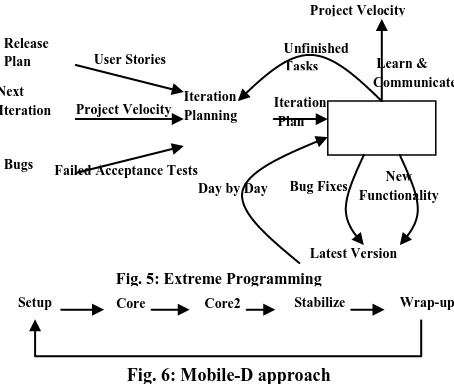
To overcome the challenges involved in mobile application development. Abrahamsson developed an agile development approach called the Mobile-D [9]. The approach is based on Extreme Programming (Development practices) see Figure 5
Set-top
boxes
PDAs
Fig. 4: J2ME and MIDP
J2SE Desktop
CLDC CDC
Profiles
Profiles MIDP
J2ME Mobile Phone Java Card Smart Cards Server J2EE
Fig. 3: J2ME as part of some devices.
PDA's .prc files
J2ME
[image:4.612.318.564.410.671.2][13], Crystal methodologies (method scalability), and Rational Unified Process (life cycle coverage).
A development project, following the Mobile-D approach, is divided into five iterations, these phases are set-up, core, core2, stabilize, and wrap-up see Figure 6 [9].
Each phase consists of different types of development days planning day, working day, release day, and integration day. The practices of the different phases comprise nine principal elements as Phasing and Pacing, Architecture Line, Mobile
Test-Driven Development, Continuous Integration, Pair
Programming, Metrics, Agile Software Process Improvement, Off-Site Customer, and User-Centered Focus.
5.
NAVIGATING OF XHTML
APPLICATION
Most Internet technologies are designed for desktop and large computers running on reliable networks with relatively high bandwidth. Handheld wireless devices, on the other hand, have a more constrained computing environment. Their wireless networks have less bandwidth and more latency compared to wired computer networks.
Navigation is defined as the path and actions needed to find a piece of information on a site and get back when needed. XHTML Mobile Profile is the new language of WAP (Wireless Application Protocol) version 2.0. The biggest change from the old WAP system is that an XHTML MP site can be viewed with both mobile devices and an ordinary Web browser. When developers start to build their sites for both mobile devices and the fixed Web, they need to know which kind of navigation works in both. There are plenty of navigation guidelines for the Web, but not so many for WAP [8] examined if the guidelines for the Web are applicable to mobile browsing [10].
Mobile devices are differs from fixed systems, like PCs, dramatically in some point as follows: the small size of display, the lot of variation in display dimensions, the number of color displays has just started to grow, text input frequency, no mouse for activating an object, supporting only vertical scrolling, varying the number and purpose of soft-keys between devices from different manufacturers, transferring data between the terminal and the server is slow, the limited amount of cookie
data that can be stored in a mobile device, context of use is harder to predict than with an office PC application, and the user may have to pay for each piece of data. One cannot access all the information available on the Internet with a small mobile device. Also, the mobile browsers running on mobile devices are different, and they interpret the standards and protocols in different ways [10].
Even the basic link activation differs considerably according to the manufacturer of the browser software. Because of the small display size, there is not always space for a navigation bar or other navigation aids on the page. Current WAP applications use a simple tree hierarchy for sites to ensure streamlined navigation. Because of the limited bandwidth of the current wireless networks, the slowness of WAP is a similar problem for WAP site users as Web slowness was in the early days of the World Wide Web [10].
5.1
Mobile Applications Protocols
The protocol which is used in applications in most parts of the world is WAP (Wireless Application Protocol). At first commercial applications were developed for WAP 1.1. Later, the mobile browsers started to support WAP 1.2 features. Then, the markup language for both protocols was defined to be WML (Wireless Markup Language). The former WAP Forum specified the language for WAP 2.0 to be XHTML Mobile Profile. This change of the markup language brings the mobile Internet closer to the fixed Internet, since the same sites will be available for both fixed and wireless devices. Developing wireless applications using WAP technologies is similar to developing Web pages with a markup language because it is browser based. Another approach to developing wireless applications is to use the MIDP [10]. With either WAP or MIDP, the Java programming language plays an important role [8, 11]:
In WAP: simple syntax, use built in browser, Java Servlets and Java Server Pages or JSPs can be used to generate
Wireless Markup Language or WML pages dynamically.
In MIDP: applications (also called MIDlets) are written in the Java programming language, so In Java the syntax is complex, powerful language
Because XHTML Mobile Profile is very similar to HTML, the guidelines for developing sites for mobile use could also be very similar, illustrates some of requirements or guidelines for developers that develop XHTML applications and services, focus on the following navigation issues [8]: Knowing where you are: the unique page titles are the
primary way to communicate the location information to users
Finding your way forward: The keyword search was
surprisingly popular in our study. This finding is conflicting with the current guideline to minimize text input in WAP services. On the other hand, users did not have problems with streamlined tree navigation with links
[image:5.612.62.289.432.624.2] Finding your way back: The browser Back function is the most important way to go back. When users need to go back several steps, links to home and subsection main pages are useful.
Fig. 5: Extreme Programming Unfinished
Tasks
Latest Version Day by Day Bug Fixes New
Functionality Learn & Communicate New User Story, Project Velocity
Development
Release
Plan Next
Iteration
Bugs
User Stories
Project Velocity Iteration Planning Iteration Plan
Failed Acceptance Tests
Fig. 6: Mobile-D approach
Long page and flat hierarchy, or short pages and deep hierarchy: Close-knit information should not be split on too many pages. The optimal length of a page depends on the type of the page (informative vs. interactive).
Navigating in list of items: A compact list of items on one page was clearly preferred by the users. From the list of all items, the user should be able to go to a detailed view of one item.
Minimizing steps in navigation should not increase the users’ feeling of insecurity.
6.
ANDROID APPLICATIONS TESTING
This section introduces a user interface testing method. The method concentrates on testing GUI of android applications.
6.1
Android Architecture
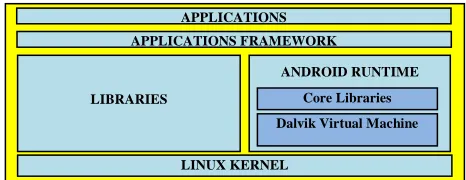
In this section, we present an overview of the android platform and the components of an android application. As shown in Figure 7, the android platform is composed of 4 layers: 1) Applications layer at the top, 2) Application Framework layer that provides services to applications, e.g., controlling activities or providing data access, 3) Library/virtual machine layer, and, 4) at the bottom, the Linux kernel [15].
Applications run at the very top of the platform. Services for applications, e.g., the Activity Manager, which controls activities for each application, or Content Providers which load the content provider defined by each application while restricting data accessibility across applications are located in the Application Framework layer. The Library/VM layer contains static libraries and the Android runtime environment. Static libraries provide common system and application libraries for applications. The Android runtime environment is composed of core runtime libraries and the Dalvik virtual machine (VM)— an optimized Android-specific Java virtual machine. Finally, the Linux kernel completes the OS and the software stack. Each Android application runs with a unique user ID, in its own copy of the Dalvik virtual machine, which ensures separation between applications and provides protection.
Android applications are written in the Java programming language. The Android SDK tools compile the code into an Android package, an archive file with an .apk suffix. All the code in a single .apk file is considered to be one application and is the file that android devices use to install the application.
6.2
Static Analysis of Android applications
Static analysis of Android applications can increase quality and reliability of android applications [16]. Klocwork [17] extended its analysis tools from Java to Android, currently limited in power and incorrect: if the analyzed program contains a bug, it will often miss it. Nevertheless, this shows that industry recognizes the importance of the static analysis of Android code. Julia is a static analyzer for Java and Android online [18]. Julia
analyzes Java or Android applications and finds bugs in them. Currently, it finds bugs related to null pointer exceptions, non-termination and a set of checks on the structure of the application’s code [18]. If the application contains a bug, of a kind considered by the analyzer, then Julia reports it. Julia faces many problems to analyze Android programs in a correct and precise way [19]. Payet and Spoto have adapted Julia to Android [19]. It can be freely used through the web interface at http://julia.scienze.univr.it.
6.3
Unit Testing for Android Application
Unit testing is a method for quickly assessing the building blocks of a program and for obtaining accurate error localizations.
The GUI can be tested using standard instrumentation tests, which are included in the Android Software Development Kit (SDK) [20]. Android’s own Instrumentation Testing Framework launches an emulator and runs the application and its test simultaneously, allowing the testing to interact with the whole application. This method requires the tests to be run inside an emulator, it performs slower while being more difficult to isolate. Ben Sadeh et al. studied different ways to assess the validity of the GUI code for an Android mobile application with special focus on unit testing. They described the available testing techniques and detail the difficulty in writing unit tests for GUI code [21, 22]. The approach of Ben Sadeh et al. avoids initializing classes by extracting the method under test into a different class and testes the code without initializing main class. In addition, code that interacts directly with Android classes, which cannot run in a unit test because they cannot be instantiated, is extracted into a separate class in the unit test.
6.4
Model-Based GUI Testing of an Android
Application
Takala et al. presented a model-based testing technique to test automatically Android applications. The technique includes how applications are modeled, how tests are designed and executed, and what kinds of problems are found in the tested application during the whole process [23]. In addition, they introduced a description of a keyword-based test automation tool that was implemented for the Android emulator during.
7.
OUR PROPOSED APPROACH FOR
TESTING ANDROID APPLICATIONS
In this section, we describe our proposed approach for testing the android applications. This approach automatically testes the android applications and focuses on GUI bugs. C. Hu and I. Neamtiu [24] conducted a bug mining study to understand the nature and frequency of bugs affecting android applications. To compare our approach, we will re-conduct and update the bug mining study and collect and categorize the bugs on the same android applications. This empirical study uses the same applications in the official repository for android applications (http://code.google.com). The criteria for selecting the applications are: these applications are popular, have a long lifetime, have a detailed bug history, have the source code available for free in android market, have high download counts, and cover most of application categories. Figure 8 gives an overview of our proposed approach.
Our proposed approach performs the following tasks:
APPLICATIONS APPLICATIONS FRAMEWORK
LIBRARIES
ANDROID RUNTIME Core Libraries Dalvik Virtual Machine
LINUX KERNEL
[image:6.612.58.291.312.402.2]1. Update the empirical study of C. Hu and I. Neamtiu [24] using 10 android applications to find the new bugs affecting android applications.
2. Use Julia analyzer to analyze the Android applications and finds bugs in them. We use Julia to find bugs related to null pointer exceptions, non-termination and a set of checks on the structure of the application’s code [18].
3. Use the method suggested by C. Hu and I. Neamtiu [24] to
find the activity, event, and dynamic bugs. This method uses JUnit (Java test case generation tool) [25] to generate a set of test cases and Monkey [27] to generate a set of events. Then, it feeds the events to the application under test and records the discovered errors.
7.1
Bugs of Android Applications
To analyze the types of bugs in android application, we use set of applications which are used by many other researchers. The brief description of each application is presented in the following. Opensudoku [28] is a popular Sudoku game which allows users to download and create their own puzzle in the game. Skylight1 [29] is a Java mobile projects framework and collection of Android mobile applications and demos. CMIS [30] is a browser, which enables the user to browse and search
CMIS (Content Management Interoperability Services)
repositories. Delicious [31] (our abbreviation for Android delicious bookmarks) allows users to save bookmarks to the Delicious social bookmarking service from the Android web browser. ConnectBot [32] is a Secure Shell client, which allows Android users to securely connect to remote servers. DealDroid [33] is a small application for Android devices that continuously watches for new deals on deal sites. Rokon [34] is a 2D game engine, intended as a flexible game creation framework with several demo games embedded. MonolithAndroid [35] (recently renamed to Robotic Space Rock) is an OpenGL-based 3D game. GuessTheNumber [36] is a number guessing game. Sudoku-puzzle [37] is Sudoku-type Sudoku-puzzle game.
7.2
Detecting Exceptions, Non-termination
and Checks Bugs
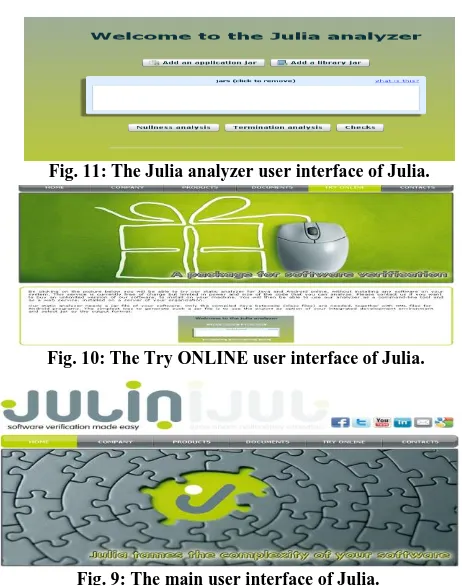
To find the exceptions, non-termination and checks bugs in the set of applications in our study, we use the free online system called Julia analyzer [18]. It is a semantical tool, based on a mathematical theory known as abstract interpretation. Julia will check all possible executions of the application and find all possible bugs, inside the categories considered by the tool. Julia is very simple to use as follows:
1. Go online to the main page and select try online (Figure 9). 2. Click on the welcome to Julia analyzer picture. We will be
able to try Julia analyzer for Java and Android online (see Figure 10).
3. Provide one or more jar files making up of application (see Figure 11) or export them from preferred development
4. environment and select the kind of analyses to
perform: checks, nullness analysis, and termination analysis.
7.3
Detecting Activity, Event, and Dynamic
Bugs
To find the activity, event, and dynamic bugs in the set of applications in our study, we will use the method suggested by C. Hu and I. Neamtiu [24] (see Figure 8).
This method can apply as follows:
1. Apply JUnit (Java test case generation tool) [25] to generate a set of test cases. JUnit can generate several classes of test cases based on the application source code. Test case generation is based on activities because activities are the main entry points and control flow drivers in android applications. The method first identifies all activities in an application and then uses the Activity Testing class in JUnit to generate test cases for each activity.
2. Apply Monkey [27] to generate a set of events. To generate
GUI events, the method uses the Monkey event generator, which comes with the Android SDK. Monkey can generate random or deterministic event sequences and feed these events to an application. To discover a wide range of issues, the method uses random sequences: the method generates these sequences using Monkey, and feed the sequences to the application under test.
[image:7.612.326.557.99.392.2]3. Feed the events to the application under test and record the discovered errors. Once the test cases are generated, the method executes them on the application through the Dalvik VM. To monitor the execution of test cases, the method configures the VM to log the details of each test case into a Fig. 8: Overall diagram of our approach.
Application Activity 1 Activity 2 Activity 3
Pass Julia Analyzer
JUint Monkey
Set of Test Cases
Set of Events Log file 1 Generate Pass
Pass
Feed Generate
Generate
Application Activity 1 Activity 2 Activity 3 Feed
Log file 2 Generate
Fig. 9: The main user interface of Julia. Fig. 11: The Julia analyzer user interface of Julia.
[image:7.612.55.307.178.308.2]trace file. It traces three kinds of events: GUI events, method calls, and exceptions.
7.4
Results
[image:8.612.348.535.75.239.2]The reported issues of the android applications which are included in our study are divided into three categories: defects, required enhancements, and new tasks. Table 4 shows all the reported issues of the android applications which are included in our study. The first column contains the application number, the second column contains the application name, the third column shows the number of defects, the fourth column shows the number of the required enhancements, the fifth column gives the number of tasks, and the sixth column gives the total number of reports issues. Source code of each application was collected from Google Code [38].
Table 4: Reported Issues
App.
No. Application Name
Reported Issues
Defects Enhancements Tasks Total App#1 Opensudoku 66 97 0 163 App#2 Skylight1 75 6 21 102
App#3 CMIS 16 13 1 30
App#4 Delicious 11 5 0 16 App#5 ConnectBot 493 64 2 559 App#6 DealDroid 20 0 0 20
App#7 Rokon 171 0 0 171
App#8 MonolithAndroid 11 1 0 12 App#9 GuessTheNumber 4 1 0 5 App#10 Sudoku-puzzles 3 0 0 3 Total 870 187 24 1081
[image:8.612.54.289.235.350.2]We categorized the set of defects in each application into bug types which were introduced by C. Hu and I. Neamtiu [24]. We now provide a description of each bug type. Activities are the main GUI components of an Android application; an activity error usually occurs due to incorrect implementations of the activity protocol. Event errors occur when the application performs a wrong action as a result of receiving an event. Dynamic type errors arise from runtime type. Unhandled exceptions are exceptions the user code does not catch and lead to an application crash. API errors are caused by incompatibilities between the API version assumed by the application and the API version provided by the system. I/O errors stem from I/O interaction, e.g., file or card access errors. Concurrency errors occur due to the interaction of multiple processes or threads. Bugs categorized as other are due to errors in the program logic. Table 5 shows the categorization of the defects of each application according to the pervious definitions. Figure 12 gives a comparison between categorization of the defects of each application.
Table 5: Reported Issues
App. No.
Errors Types
Activity Event Dynamic Unhandled
Exceptions API I/O Concurrency Other Total
App#1 1 4 2 0 0 0 0 59 66 App#2 2 14 0 2 0 7 0 50 75 App#3 0 0 1 5 1 0 1 8 16 App#4 0 0 0 0 2 0 0 9 11 App#5 0 2 2 12 0 0 0 477 493 App#6 2 1 0 0 0 0 0 17 20 App#7 4 9 7 5 0 1 0 145 171 App#8 0 2 2 0 2 3 0 2 11 App#9 1 1 0 0 0 0 0 2 4 App#10 0 0 2 0 0 0 0 1 3 Total 10 33 16 24 5 11 1 770 870
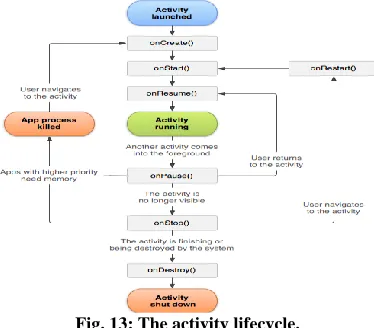
An activity of any android application has a life cycle described by a state machine. Any violations of this state machine lead to activity bugs. Figure 13 shows the full state machine of the activity of any android application which is taken from android developer website [39]. Each activity can be in one of five states: Active, Pause, Stop, Restore or Destroy. If an activity occupies the screen’s foreground, it is running, hence in the Active state. If another non-full screen or transparent activity overlaps the current activity, the current activity will be moved into the Pause state. An activity is in state Stop once it is fully covered by another activity. Activities in states Stop or Pause can be killed by system if memory is needed elsewhere. If the activity is killed and the user has restarted it again after some time, that activity will be in state Restore and then Active. Once an activity needs to be killed, it will be in the Destroy state.
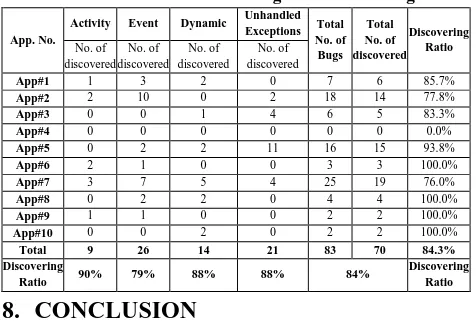
For each class of error in each application, Table 6 gives the number of bugs, the number of discovered bugs, the total number of bugs, the total number of discovered bugs, and the discovering ratio.
From Table 6, the proposed method detected 84.3% of the total number of the reported errors (i.e., 70 errors from 83 errors). In the following, we give the details of the detected errors of each class of errors. From Table 6, we can see that 90% of the activity errors, which have been reported in Table 5, are discovered. Table 6 shows that our technique has detected 26 event errors from 33 event bugs (i.e., 79% of event errors have been discovered). From Table 6, the proposed method has detected 88% of the dynamic errors which have been reported in Table 5. From Table 6, the proposed method has detected 88%
[image:8.612.330.568.403.530.2] [image:8.612.53.292.554.700.2]of the unhandled exceptions errors which have been reported in Table 5.
Table 6: Number of discovered bugs and discovering ratio.
App. No.
Activity Event Dynamic Unhandled Exceptions Total
No. of Bugs
Total No. of discovered
Discovering Ratio No. of
discovered No. of discovered
No. of discovered
No. of discovered
App#1 1 3 2 0 7 6 85.7% App#2 2 10 0 2 18 14 77.8% App#3 0 0 1 4 6 5 83.3%
App#4 0 0 0 0 0 0 0.0%
App#5 0 2 2 11 16 15 93.8% App#6 2 1 0 0 3 3 100.0% App#7 3 7 5 4 25 19 76.0% App#8 0 2 2 0 4 4 100.0% App#9 1 1 0 0 2 2 100.0% App#10 0 0 2 0 2 2 100.0% Total 9 26 14 21 83 70 84.3% Discovering
Ratio 90% 79% 88% 88% 84%
Discovering Ratio
8.
CONCLUSION
One of the challenges is to design appropriately user interface for more than one device. We illustrated two methods to development of the application both of them depended on end user and finally the XHTML is good way to overcome problems with mobile devices and an ordinary Web browser. In addition, we presented a bug study and categorization of android-specific bugs that shows an important number of android bugs. We introduced a new approach for testing the user interfaces. The new approach focused on generating set of actions to test the user interface. The approach detects android GUI bugs, based on a combination of android application analysis tool and event generation with runtime monitoring technique. The future work will concentrate on detecting other types of errors such as API errors, I/O errors, and concurrency errors.
9.
REFERENCES
[1] P. Abrahamsson, A. Hanhineva, H. Hulkko, T. Ihme, J. Jaalinoja, M. Korkalal, Mobile-D: An Agile Approach for
Mobile Application Development. 9th Annual ACM
Conference on Object-Oriented Programming, Systems, Languages, and Applications (OOPSLA'04), 2004. [2] V. Davis, J. Gray, J. Jones, Generative approaches for
application tailoring of mobile devices. 43rd annual Southeast regional conference, Georgia, USA, 2005.
[3] N. Dholakia, M. Lehrer, N. Kshetri, Patterns,
Opportunities, and Challenges in the Emerging Global M-Commerce Landscape Unpublished Working Papers. College of Business Administration, 2002.
[4] J. Gong, P. Tarasewich, Guidlines for handheld mobile device interface design. College of Computer and Inforamtion Science, Northeastern University, 2003. [5] A. Kaikkonen, V. Roto, Navigating in a mobile XHTML
application. Conference on Human Factors in Computing Systems, Ft. Lauderdale, Florida, USA, 2003.
[6] S. Kajewski, P. Tilley, J. Crawford, T. Remmers, D. Lenard, Handheld Technology Review. 2001.
[7] J. Karvonen, J. Warsta, Mobile Multimedia Services
Development Value Chain Perspective. Third International Conference on Mobile and Ubiquitous Multimedia, 2004.
[8] M. Kontio, Designing mobile user interfaces: An
architectural approach to working in mobile environments. 2004.
[9] M. Krauß, D. Krannich, Ripcord: rapid interface
prototyping for cordless devices. Proceedings of the 8th conference on Human-computer interaction with mobile devices and services Helsinki, Finland, 2006.
[10]V. Lee, H. Schneider, R. Schell, Mobile Applications: Architecture, Design, and Development Prentice Hall,2004. M. Sharon, An Introduction to Mobile Technologies and Services. 2007. http://itp.nyu.edu:80/ubicompmobile/2007/ mike_sharon_intro_to_mobile_wk12_2007.pdf
[11]K. Systä, Requirements and Issues of VXEs for Mobile Terminals. Invitational Workshop on the Future of Virtual Execution Environments Armonk, New York, USA, 2004.
[12]J. D. Wells,. Extreme Programming: A gentle introduction.
2006, from http://www.extremeprogramming.org/
[13]J. L. Whitten, L. D. Bentley, K. Dittman, Systems Analysis and Design Methods: Mc Graw-Hill, 2004.
[14]http://developer.android.com/index.html.(March 20, 2012).
[15]http://www.android.com/market. (cited March 20, 2012).
[16]http://www.klocwork.com. (cited March 20, 2012).
[17]http://www.juliasoft.com. (cited March 20, 2012).
[18]E. Payet, F. Spoto, Static Analysis of Android Programs, CADE 2011, LNAI 6803, pp. 439–445, 2011.
[19]http://developer.android.com/guide/topics/testing/testing_a ndroid.html. (cited March 25, 2012)
[20]B. Sadeh, K. Ørbekk, M. M. Eide, N. C. A. Gjerde, T. A. Tønnesland, S. Gopalakrishnan, Towards Unit Testing of User Interface Code for Android Mobile Applications, ICSECS 2011, Part III, CCIS 181, pp. 163–175, 2011.
[21]B. Sadeh, S. Gopalakrishnan, A Study on the Evaluation of
Unit Testing for Android Systems, International Journal on New Computer Architectures and Their Applications (IJNCAA), vol. 1, no. 3, pp. 962-977, 2011.
[22]T. Takala, M. Katara, J. Harty, Experiences of System-Level Model-Based GUI Testing of an Android Application, 4th IEEE International Conference on Software Testing, Verification and Validation, pp.377-386, 2011. [23]C. Hu, I. Neamtiu, Automating GUI Testing for Android
Applications, 6th International Workshop on Automation of Software Test, pp. 77-83, 2011.
[24]JUnit, March 2012. http://www.junit.org/.
[25]A. Rauf, S. Anwar, M. Jaffer, A. Shahid, Automated GUI Test Coverage Analysis using GA, 17th Conference on Information Technology, pp.1057-1062, 2010.
[26]UI/Application Exerciser Monkey, April 2012.
[27]Opensudoku-android. April 2012. http://code.google.com/p /opensudoku-android/.
[28]Skylight1. http://code.google.com/p/skylight1/. April 2012. [29]Android-cmis-browser. April 2012.
http://code.google.com/p/android-cmis-browser/.
[30]Android-delicious-bookmarks. April 2012.
http://code.google.com/p/android-delicious-bookmarks/. [31]Connectbot. April 2012.
http://code.google.com/p/connectbot/.
[32]Dealdroid. April 2012. http://code.google.com/p/dealdroid/.
[33]Rokon. April 2012. http://code.google.com/p/rokon/. [34]Monolithandroid. April 2012.
http://code.google.com/p/monolithandroid/.
[35]Guessthenumber. April 2012.
http://code.google.com/p/guessthenumber/. [36]Sudoku-puzzles. April 2012. http://code.google.com/p/sudoku-puzzles/.
[37]Google code, March 2012. http://code.google.com/.