University of Twente
Master thesis
Multimodal user interface for robotized
flexible endoscopy
Author:
I.G.J. Grisel (s0219215)
Supervisors:
Dr. E.M.A.G. van Dijk
-
University of Twente
Dr. D.K.J. Heylen
-
University of Twente
Ir. J.G. Ruiter
-
Demcon and University of Twente
Contents
Summary 1
1 Introduction 2
2 Analysis of socio-technical system 4
2.1 Current scenario: Colonoscopy . . . 5
2.2 Users . . . 7
2.3 Work environment: The outpatient room . . . 8
2.4 Technology . . . 8
2.5 Tasks . . . 8
2.5.1 Preprocedure . . . 9
2.5.2 Procedure . . . 10
2.5.3 Postprocedure . . . 12
3 Requirements 13 3.1 Critical requirements . . . 13
3.2 Situation dependent requirements . . . 17
3.3 Additional requirements . . . 18
4 Iterative design 21 4.1 First iteration . . . 21
4.1.1 First design . . . 21
4.1.2 Second design . . . 25
4.1.3 Evaluation first iteration designs . . . 27
4.2 Second iteration . . . 30
4.2.1 Third design . . . 30
4.2.2 Fourth design . . . 36
4.2.3 Evaluation second iteration designs . . . 36
4.3 Third iteration . . . 40
4.3.1 Fifth design . . . 41
4.3.2 Multimodality . . . 44
5 First experimental evaluation 46 5.1 Background . . . 46
5.2 Method . . . 47
5.2.1 Participants . . . 47
5.2.2 Design . . . 48
5.2.3 Setup, materials and measurements . . . 48
5.2.4 Procedure . . . 53
5.3 Results . . . 54
5.3.1 Observations . . . 59
5.4 Discussion and conclusions . . . 59
5.4.1 Factors . . . 59
6 Final design 62
6.1 Endoscopic video output window . . . 62
6.2 Additional functionalities window . . . 62
6.2.1 Persistent elements . . . 62
6.2.2 Dynamic elements . . . 63
7 Second experimental evaluation 67 7.1 Research questions . . . 67
7.2 Method . . . 67
7.2.1 Participants . . . 67
7.2.2 Design . . . 67
7.2.3 Setup, materials and measures . . . 68
7.2.4 Procedure . . . 69
7.3 Results . . . 69
7.3.1 Observations . . . 71
7.4 Discussion and conclusions . . . 71
8 General discussion and conclusions 73 8.1 Effectiveness, efficiency and satisfaction . . . 73
8.2 System setup . . . 73
8.3 Software improvements . . . 75
8.4 Future research . . . 76
A Task analysis 80 A.1 Preprocedure . . . 80
A.2 Procedure . . . 83
A.3 Postprocedure . . . 96
B Consent form 99 C NASA-TLX 100 C.1 NASA-TLX items . . . 100
C.2 Example of NASA-TLX pair comparison . . . 101
D STAI 102
Abstract
This thesis has set out to describe the creation of a multimodal interface that is to be used in com-bination with a robotized system for controlling a flexible endoscope. It falls within the TeleFLEX project that is conducted as a cooperation between Demcon, located in Oldenzaal, the University of Twente and several hospitals located in the Netherlands.
First, an introduction about the main topics is given. These topics include endoscopic proce-dures, the TeleFLEX project, the human factors that are associated with endoscopic procedures and the reason behind the steps taken in the process. Following the introduction, an analysis was conducted which resulted in information about the working environment in which endoscopic pro-cedures are conducted, the end users of the interface and the tasks that the end users perform now and are going to perform in the future when using the interface. The future tasks will be executed using a system to help the therapist perform
Based on the information gained in the analysis, requirements were created for the system. The requirements consist of critical requirements (for example, the endoscopic output should always be visible), situation dependent requirements (for example, the settings of the system should be adjustable) and additional requirements (for example, the system should have setting profiles).
The information from the analysis and the requirements were then used in iteratively designing the interface, with each iteration consisting of creating one or more designs and letting these designs be evaluated. After three iterations, a prototype was created consisting of two screens with one screen presenting the endoscopic output and the other additional functionalities.
After completing the iterations and having one prototype and two possible setups for that prototype (seperate screens or a console setup), an experiment was conducted to test the prototype on effectiveness, efficiency and satisfaction in a high workload situation, comparing the two different setups. In this first experiment, there appeared a small preference for the seperate screen setup, with this setup scoring a bit better on all three factors. Several observations were made in regard to the usage as well as the layout of the interface.
The results from the first experiment and the made observations were then used to finalize the prototype into a system. Still using two monitors, the system has more color and better distinguishes between important and less important information.
The final system was again tested in an high workload setting. The system in itself scored acceptable on the three factors earlier mentioned. Compared to the first experiment, the results remained mostly the same. Again some observations regarding the complete system were made.
After the second experiment, it was concluded that the information that is present in the system is at this time sufficient. Considering the information gathered in the analysis and during the two experiments, a choice was made to combine the two setups and give therapists the possibility of deciding themselves which setup they prefer. The addition of audio is imperative in the system, but should mostly be used for errors and warnings, as not to divert the attention of the therapist unnecessarily.
1
Introduction
With the development of novel technologies it has become possible for therapists (doctors and surgeons) to conduct a procedure (examination or surgery) without having to make any external incisions into the body of the patient. By using this kind of technique, it can become possible to perform surgery on the inside of the body of the patient using one of the patients natural orifices. This kind of procedure is termed as Natural orifice transluminal endoscopic surgery (NOTES). To be able to conduct these kinds of procedures, flexible endoscopes are used.
An endoscope is a flexible tube that is entered into the body of the patient using natural orifices (mouth, anus or vagina). In this thesis, the focus will be on procedures that use the anus as the natural orifice for either colonoscopy (examination) or colon surgery. For both the colonoscopy as well as surgery, the endoscope has to be moved to the beginning of the colon (at the end of the small intestine). This is done by the therapist who uses the dominant hand (most often the right hand) to insert the endoscope and the non-dominant hand (most often the left hand) to control the tip of the endoscope. Once the beginning has been reached, the endoscope will slowly be retracted, stopping at locations which are of interest to the therapist (most often polyps). The polyp is photographed and will be filed for the planning of the follow up surgery. If the polyp is small enough, instruments that are used to remove the polyp will be entered through the endoscope and the polyp will be removed and collected. Once the examination or surgery is successfully completed, the endoscope will be completely retracted from the patients body.
There are both up- and downsides to an endoscopic procedure. The upside is that the postpro-cedure physical trauma for the patient is reduced and the post propostpro-cedure care is shortened. The downside is that patients are semi conscious during the procedure and can experience pain due to the stretching of the colon. For therapists, the down side to the usage of the endoscope is the chal-lenging control that is needed to successfully complete a procedure. The endoscope is considered to be hard to use due to non-ergonomic single hand control and the need for a team of medical professionals to assist with the use of the different instruments while controlling the endoscope (Shergill et al., 2009). These factors result in physical discomfort for the therapist and/or might also result in medical errors, which have a negative effect on the health of the patient.
To improve the comfort and performance of the therapist, the TeleFLEX project was started. The goal of this project is to create a multi modal system used for telemanipulating a robotized flexible endoscope. It is important to note that inserting the endoscope will be done manually because of the necessary force feedback. The system will be active during the insertion, but will not have any control over the entry of the endoscope.
The TeleFLEX project has four modules which will be added to the endoscope, making it possible to stepwise introduce the new system into the clinic. These modules are 1) the robotizing of the control of the tip of the endoscope with the manipulation done on a touchpad, 2) robotizing the endoscopic shaft movement, adding a master console for control, 3) robotizing the instrument insertion and usage, and 4) creating a multi modal master console for all of the existing functionality as well as additional features (e.g. vital signs, retrieving patient information). This thesis falls within the fourth module. A scientific approach will be taken in developing the multi modal part of the system that is responsible for communicating task relevant information to the therapist and providing required controls to manipulate this information. It will result in a prototypical system, with a validation of user friendliness and the goal of trying to increase the overall performance of the therapist.
stress the importance of the more prominent role human factors engineering should play within the development of biomedical systems in the clinic. The authors propose a human factors engineering framework to be followed in the development of these systems. The first analysis done in the human factors engineering framework is to get the goals and expected benefits of the system clear. Next, an analysis of the work situation, also known as the socio-technical system, is done. This includes the users, tasks, technology, characteristics of the care process and local, national and possibly international constraints on the system. Then a cooperative design phase takes place in which the requirements for the system are created. This is followed by an iterative evaluation phase in which prototypes are tested on the created requirements. Once the requirements are met, the product can be used for placement. The last step following product placement consists of an ongoing monitoring on any changes to the working environment in which the product is placed, changing the system where necessary to obtain any new requirements that arise due to these changes.
2
Analysis of socio-technical system
Before the development of (a prototype of) a system can start, an analysis of the socio-technical system is done. This analysis entails a scenario description of a non sterile intraluminal colonoscopy without an in depth discussion of the colonoscopy actions taken. Although the system can eventually also be used for a sterile, transluminal intervention (NOTES), only a small amount of this thesis will be spend on design choices in regard to this procedure, because the procedure is not a common practice in hospitals at this time. More advanced interface developments that are needed for the NOTES procedure will be discussed further along in the TeleFLEX project.
The scenario of the colonoscopy is followed by a description of the users for which the system is being developed, the current working environment of these users and the technology they are familiar with, and concluded with the tasks that the users have to perform during such a procedure. This task analysis will consist of both the current procedure and the procedure using the new system, considering all of the four modules.
The analysis will be done based on information from several sources. The first source is semi-open ended interviews that were done with therapists that perform endoscopic procedures in differ-ent medical domains. These interviews were already conducted within the TeleFLEX project. The information gained from the interviews will be recapitulated here. A total of five therapists have been interviewed, consisting of two gastro-entereologists, two cardiac therapists and one urology therapist. In these interviews several topics in regard to current endoscopic usage were discussed with the main topics being procedural knowledge, feedback received by the therapist using a flexible endoscope, manipulation of the flexible endoscope, ergonomical issues, ethical issues and opinion of robotic technology in the clinic.
The second source of information is the attendance of a laparoscopic procedure using the DaVinci system and an examination using a flexible endoscope in the Meander Lichtenberg hospital located in Amersfoort, Netherlands. The DaVinci is a surgical system developed by Intuitive Surgical. It enables the surgeons to perform complex laparoscopic procedures with robotic arms and an isolated console (for an impression see figure 2.0.1) with advanced technologies like tremor filtering, scaling of movements and three dimensional vision. Next to the information from both attendances, videos of endoscopic procedures as created by Waye et al. (2009) are also used. The attendance is used to describe a scenario of the procedure which will be used for a general task analysis, including pre- and post procedure tasks. The videos enable a more specific task analysis of the examination or surgical procedure as it is conducted. The combination of the attendance and the videos is described in theScenario section. The resulting task analysis of the existing procedure as well as the procedure including the new system is to be found in theTasks section.
Figure 2.0.1: Image of the DaVinci console as developed by Intuitive Surgical and used in the Meander Lichtenberg hospital
2.1
Current scenario: Colonoscopy
Before the procedure is started, the attending nurses prepare the outpatient room. The first nurse boots up all the needed electronical units. The second nurse goes to the so-called dry room where the endoscope was left to dry after being cleaned after the last procedure. The nurse then attaches the video output of the endoscope to the master information unit. The first nurse checks the settings of the system and sets them to the preferred values of the therapist if this is not already the case. During this time, the doctor reads through the patient file. Based on this information, the therapist plans a course of action for the execution of the procedure.
The nurses get the patient. After the patient is brought in, the therapist and nurses introduce themselves to the patient. If the patient has any questions, they are answered by the therapist. The patient is then placed on the table. The nurse attaches the necessary tools for the vital sign measurement. A needle is entered into the blood vein of the patient. A nurse fills a syringe with a sedative. The patient is then injected with the sedative. After a check to see if the patient is sedated, the procedure is started.
The endoscope is entered at the anus. The therapist enters the endoscope with his right hand. He controls the direction of the endoscope with the use of gears on the control element of the endoscope. The endoscope goes through the rectum and moves through the sigmoid colon. If a loop in the sigmoid colon is present (see figure 2.1.3a and 2.1.3b), the therapist will take the necessary steps to remove the loop (figure 2.1.3c). Then the endoscope is moved through the descending and the transverse colon. The endoscope is moved in such a way that the transverse colon can be pulled straight (figure 2.1.4). As soon as the ascending colon is entered (figure 2.1.5) the entry to the small bowel has to be found. At this point, the therapist knows he has found the beginning of the large intestine and can start the planned procedure.
Figure 2.1.3: Figure showing the positioning of the sigmoid colon with a (a) ’N’ loop and a (b) ’alpha’ loop formation, as well as a (c) straightened formation
Figure 2.1.4: Figure showing the endoscope moving through the transverse colon
food remains like bones). A polyp is discovered and a picture is made which is saved digitally on the main information unit. The therapist studies the video input and decides that the polyp is small enough to remove at this time.
First he asks the nurse to get the saline solution. The therapist moves the endoscope just under the polyp and the nurse makes an injection of the saline. The polyp rises of the colon wall. The nurse then hands a snare to the therapist. The therapist enters the snare into the endoscope. The snare is moved over the polyp and is placed at the base of the polyp. The therapist instructs the nurse to close the loop. The loop is closed just under the polyp. The therapist then sends an electrical current through the loop. This dissects the polyp from the colon wall. The base of the polyp starts to bleed. The therapist looks at the vital signs of the patient to see if nothing is wrong. Seeing as the vital signs have not changed dangerously, the nurse is instructed to give the therapist the argon plasma coagulation. He removes the wire loop and enters the coagulation. Before using the burner, the therapist flushes away the blood using a spray of water. Then the burner makes a superficial burn to stop the bleeding as well as remove any remaining polyp tissue. He injects the wall near the base of the polyp with India ink making it easier to recognize in a possible check-up or follow-up procedure. A mesh basket is entered into the endoscope, which the therapist uses to retrieve the dissected polyp and pull it out of colon by extracting the endoscope from the patient’s body.
After the endoscope is extracted, the polyp is released from the mesh basket and is moved to the laboratory for research. The patient is moved from the outpatient room to the recovery room. Another nurse disconnects the endoscope and takes it and the used instruments into another room where they are cleaned either by a nurse or by another assistant.
In the meantime, the therapist looks through the pictures that have been made and selects the ones that might be relevant for future referencing. He also uses a template report to describe what he did during the procedure, changing the template if deemed necessary. The pictures and the description are printed two times, one for the patient file and one for the overview of the procedures of the day. The complete procedure took 32 minutes.
Figure 2.1.5: Figure showing the endoscope moving into the ascending colon
2.2
Users
room and conduct the additional tasks that come with an endoscopic procedure. Although they will not be the main operators of the system, the development of the system will also take their tasks into account.
2.3
Work environment: The outpatient room
The working environment of the therapists and staff consists of an outpatient room. The room is filled with equipment consisting of but not limited too a patient bed, a console showing the vital signs of the patient, an instrument table, main control unit for the flexible endoscope, screen for video output from the endoscope, and a computer console used for the postprocedure tasks. The therapist is standing on one side of the bed on which the patient is laying, with the endoscope unit and instrument table behind him. The screen showing the endoscopic output is located on the other side of the bed. The console showing the vital signs is located at the head of the bed on the same side as the screen with the video output. The post procedure computer console is located on a desk somewhere near the wall in the room. This setting was observed in the Meander hospital in Amersfoort, so is not expected to be generally used throughout hospitals. Around three staff members will be present in the room during the current procedure.
The outpatient working environment can have several factors that negatively influence the ef-fectiveness (procedural quality) and efficiency (procedure time) of a procedure. These factors are physical (work clothing, space and product manipulation), visual (lighting, location of monitors, eye fatigue and headaches) and cognitive (product manipulation and complicated tasks) in nature (van Veelen et al., 2003). These factors will be taken into account during the development of the system.
2.4
Technology
The TeleFLEX project is focused on facilitating the current tasks of the medical staff. This means that the therapists are (expected to be) familiar with the use of flexible endoscopes and the in-struments as described in section 7 (chapters 21 to 26) in Waye et al. (2009). The familiarity and experience is dependent on the level of expertise of the therapist as mentioned earlier (Datta et al., 2006). It can be assumed that the therapists are also familiar with more general computer systems as used in a medical or personal setting, with skills relating to using templates and forms, navigating through menus and using different input modalities like mouse, keyboard and touchscreen.
The technology that will be added within the TeleFLEX project will be a mechanized unit that will control the movement of the flexible endoscope, the instruments (both embedded and entered) and a touchpad to control the direction of the movement and several other functionalities of the endoscope. The mechanized unit will house the flexible endoscope which can be inserted and extracted from the unit. It will also have entries for the instruments that can be inserted into the endoscope. This unit will result in additional tasks for the users and will be incorporated in the task analysis. It will be considered as the slave unit for the remains of the thesis. Another unit will be used as the master console, which will depict information and grant control of the slave unit.
2.5
Tasks
Due to the availability of video material, the task analysis of the procedure itself will be more extensive than the pre- and postprocedure task analysis, which will only be based on the attended procedures.
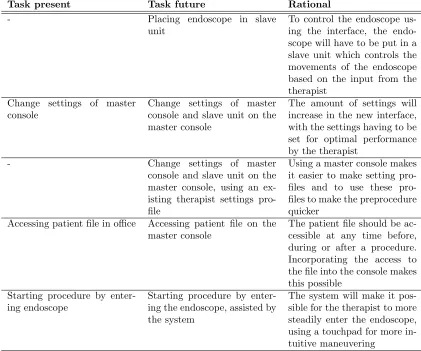
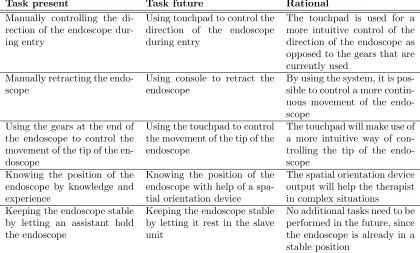
The analysis will not give an extensive description of all the tasks that are done. The complete overview of the tasks can be found in appendix A. The most important tasks are described below. Each part of the procedure will have one or several lists. These lists will have three colums, with the first containing the tasks in the current procedure and the second column containing the tasks in the procedure as it wil be performed with the robotic system and the user interface. The third column will give a rational about why the current task is replaced with the future task.
2.5.1 Preprocedure
Task present Task future Rational
- Placing endoscope in slave
unit
To control the endoscope us-ing the interface, the endo-scope will have to be put in a slave unit which controls the movements of the endoscope based on the input from the therapist
Change settings of master console
Change settings of master console and slave unit on the master console
The amount of settings will increase in the new interface, with the settings having to be set for optimal performance by the therapist
- Change settings of master
console and slave unit on the master console, using an ex-isting therapist settings pro-file
Using a master console makes it easier to make setting files and to use these pro-files to make the preprocedure quicker
Accessing patient file in office Accessing patient file on the master console
The patient file should be ac-cessible at any time before, during or after a procedure. Incorporating the access to the file into the console makes this possible
Starting procedure by enter-ing endoscope
Starting procedure by enter-ing the endoscope, assisted by the system
[image:13.612.94.515.96.447.2]The system will make it pos-sible for the therapist to more steadily enter the endoscope, using a touchpad for more in-tuitive maneuvering
Table 2.5.1: Preprocedure tasks in the present and the future, with a description about the future tasks
2.5.2 Procedure
Task present Task future Rational
Manually controlling the di-rection of the endoscope dur-ing entry
Using touchpad to control the direction of the endoscope during entry
The touchpad is used for a more intuitive control of the direction of the endoscope as opposed to the gears that are currently used
Manually retracting the endo-scope
Using console to retract the endoscope
By using the system, it is pos-sible to control a more contin-uous movement of the endo-scope
Using the gears at the end of the endoscope to control the movement of the tip of the en-doscope
Using the touchpad to control the movement of the tip of the endoscope
The touchpad will make use of a more intuitive way of con-trolling the tip of the endo-scope
Knowing the position of the endoscope by knowledge and experience
Knowing the position of the endoscope with help of a spa-tial orientation device
The spatial orientation device output will help the therapist in complex situations
Keeping the endoscope stable by letting an assistant hold the endoscope
Keeping the endoscope stable by letting it rest in the slave unit
[image:14.612.96.516.97.350.2]No additional tasks need to be performed in the future, since the endoscope is already in a stable position
Table 2.5.2: Tasks performed to maneuver the endoscope in the present and the future, with a description about the future tasks
Task present Task future Rational
Executing the main feature of an embedded instrument (i.e. suctioning away fluids, blow-ing gas into intestine, cleanblow-ing lens, making photo or video) with a button located on the endoscope or a foot pedal
Executing the main feature of an embedded instrument by pressing the necessary button on the master console
All of the instrument options are combined into the master console, giving the therapist quicker access to all the func-tionalities
Task present Task future Rational
Inserting instru-ment in endoscope
Inserting
instru-ment in slave
unit
Once the endoscope is located in the slave unit, instruments will be entered through an entry in the slave unit
Maneuvering the entered instrument by manually mov-ing the endoscope, possibly placing the instrument on the colon tissue
Maneuvering the entered instrument by using the con-trols at the master console
Moving the endoscope can be done with increased dexterity due to the sensitivity and scaling options of the controls of the system
Executing the main feature of an en-tered instrument (i.e. increase snare
or mesh basket
size, starting and stopping coagula-tion) with a button
located on the
endoscope or a foot pedal
Executing the main feature of an en-tered instrument by pressing the neces-sary button on the master console
All of the instrument options are combined into the master console, giving the therapist quicker access to all the functionalities
Table 2.5.4: Tasks performed with the additional instruments in the present and the future, with a description about the future tasks
2.5.3 Postprocedure
The tasks that are performed with the system after the procedure are listed here. A more extensive list of tasks can be found in appendix A.3.
Task present Task future Rational
- Endoscope is removed from
slave unit
Since the endoscope has been placed in the slave unit, it will have to be removed for clean-ing
The therapist writes a report, with images, of the procedure on one of the desktop comput-ers
The therapist writes a report, with images, on the master console
Immediately writing a report after the procedure will in-crease the report’s accuracy
3
Requirements
This section will discuss the requirements that the system will have to adhere to. They are created based on the previous section and any additional literature. A requirement consists of the require-ment to the system, the rationale behind creating the requirerequire-ment, the actors that are (possibly) involved, the objective the system tries to achieve by adhering to the requirement and the expected positive effects on the performance of the operators and the well-being of the patient that result from implementing the requirement. The negative effects should be seen as possible risks that might arise by implementing the requirement.
A subdivision is made between several requirements. The division consists of critical require-ments which are imperative in the development of the system and will have the highest priority in the design of the system. These are followed by requirements that are situation dependent. These requirements are also imperative, but only in situations in which the need arises for the function-ality. These requirements will also have a high priority in the design process, since the occuring situations might be life threatening for a patient. The last division of requirements are the system wishes, refered to as the additional requirements. These requirements do not have to be incorpo-rated into the system, but do provide some additional value on top of the other requirements and to the overall system. They will have the lowest priority being incorporated in the design of the system.
3.1
Critical requirements
Requirement 1 The video output of the endoscope should be visible during the complete procedure
Rationale As can been seen in a large number of tasks in the analysis of a procedure (e.g. task 17, 19, 21, 39, 41, 48, 83 in tables in appendix A), the endoscopic output is used for orientation during maneuvering. Visual feedback is needed to perform these tasks succesfully, without errors, resulting in the necessity to present the endoscopic video output at all times
Actor(s) Therapist; Additional medical staff (optional)
Objective Granting the therapist continuous access to the video outut of the endo-scope
Effects No effects are discussed because this functionality will be implemented in disregard of any negative effects
Table 3.1.1: Requirement 1
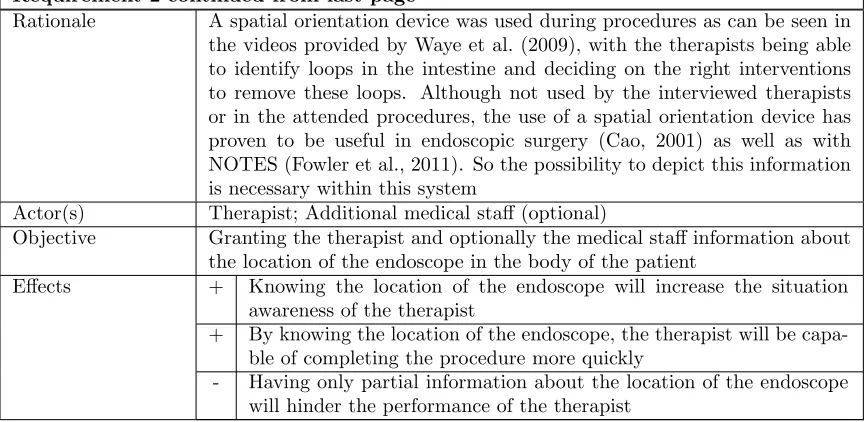
Requirement 2 continued from last page
Rationale A spatial orientation device was used during procedures as can be seen in the videos provided by Waye et al. (2009), with the therapists being able to identify loops in the intestine and deciding on the right interventions to remove these loops. Although not used by the interviewed therapists or in the attended procedures, the use of a spatial orientation device has proven to be useful in endoscopic surgery (Cao, 2001) as well as with NOTES (Fowler et al., 2011). So the possibility to depict this information is necessary within this system
Actor(s) Therapist; Additional medical staff (optional)
Objective Granting the therapist and optionally the medical staff information about the location of the endoscope in the body of the patient
Effects + Knowing the location of the endoscope will increase the situation awareness of the therapist
+ By knowing the location of the endoscope, the therapist will be capa-ble of completing the procedure more quickly
[image:17.612.92.524.103.314.2]- Having only partial information about the location of the endoscope will hinder the performance of the therapist
Table 3.1.2: Requirement 2
Requirement 3 A representation of the spatial orientation of the endoscope tip should be available during the complete procedure
Rationale Several therapists mentioned during the interviews that they would like information about the orientation of the tip of the endoscope. This has proven to reduce the amount of errors being made and would also decrease the workload (Cao, 2001)
Actor(s) Therapist; Additional medical staff (optional)
Objective Granting the therapist and optionally the medical staff information about the orientation of the tip of the endoscope
Effects + Knowing the orientation of the tip of the endoscope will increase the situation awareness of the therapist
+ By knowing the orientation of the tip of the endoscope, the therapist will make less errors during the procedure
- Having partial information about the orientation of the endoscope will hinder the performance of the therapist
Requirement 4 Vital signs measurements should be presented during the com-plete procedure
Rationale Representing the vital signs of the patient is a common during an endo-scopic procedure. It is needed to ensure the safety of the patient. Thus, it should be implemented in this system
Actor(s) Therapist; Additional medical staff (optional)
Objective Granting the therapist, and optionally the medical staff, information about the well-being of the patient
Effects + The integration of the vital sign depiction with the system will remove the necessity for the additional equipment for vital sign measurement in the polyclinical room. The resulting space can be used by the staff, increasing the performance of the team
+ Having the vital sign measurements integrated into the system will reduce the time spent looking at another screen by the therapist, decreasing possible errors by loss of attention
- An added source of information might lead to an cognitive overload or loss of attention
Table 3.1.4: Requirement 4
Requirement 5 The system has to relay a warning signal using audio and visual modalities when a problem in the system or with the patient occurs
Rationale Communicating warnings is common practice in the medical profession. The combination of audio and visual modalities works best with expert therapists, with the novice therapists often focussing on the visual part of the screen and missing the audio (Tien et al., 2010). The combination of video and audio will result in less errors and a higher level of usability (Brewster, 1997)
Actor(s) Therapist; Additional medical staff (optional)
Objective Granting the therapist and optionally the medical staff information about any problems or errors that arise during a procedure
Requirement 5 continued from last page
+ The warnings will result in the therapist becoming aware of his sur-roundings, having an increased situation awareness
- The multi modality might distract the therapist during a critical mo-ment, increasing the number of errors
Table 3.1.5: Requirement 5
Requirement 6 The information presentation of the system has to enable the operator to easily retrieve the information that is necessary for succesfully completing the procedure
Rationale The amount of information that becomes available with the creation of this system can result in a cognitive overload of the therapist. Cognitive overload consists of the number of decisions that need to be made, number of interruptions, time pressure and the drive to be efficient (Kirsch, 2000). The cognitive overload will be especially present if all of the information is presented visually (Brewster, 1997). Developing the system to prevent this is thus a necessary requirement
Actor(s) Therapist
Objective The information presentation is created in such a way that cognitive over-load is lowered, enabling the therapist to quickly retrieve important infor-mation
Effects + The system will enable the therapist to have a better performance by making it easy to access important information and implementing the use of additional information
- The system might overload the therapist with information, resulting in a lower level of performance
Table 3.1.6: Requirement 6
Requirement 7 The system needs to give feedback about the current status of all of the parts within the system
Requirement 7 continued from last page
Actor(s) Therapist; Additional medical staff (optional)
Objective Inform the therapist about the status of the complete system
Effects + Since the system gives the therapist all of the information about its status the therapist can decide when to intervene, increasing the sat-isfaction for the system
- The additional information being presented to the therapist might result in a higher workload
Table 3.1.7: Requirement 7
3.2
Situation dependent requirements
Requirement 8 The operator should be capable of making a photo of the endo-scopic output without having to remove his gaze from this output
Rationale Making a photo for later referencing is something that is done during a procedure as can be seen in scenario and in the task analysis (task 39)
Actor(s) Therapist
Objective Enabling the therapist to make a photo without the therapist having to remove his gaze from the endoscopic video output
Effects + The therapist can make a photo without looking away from the video output, making it possible for the therapist to more quickly do the procedure
- To be able to make a photo without removing the gaze of the therapist from the endoscopic output might result in the necessity of obstruct-ing the output partially with a button for makobstruct-ing a photo, possibly resulting in errors
Table 3.2.8: Requirement 8
Requirement 9 continued from last page
Rationale The instruments available to the therapist, as can be found in the task analysis in the appendix tables A.2.2 and A.2.3 and as mentioned in the scenario description, all have different capabilities and associated informa-tion. This information should be presented to the therapist so he is capable of making informed decisions regarding the procedure
Actor(s) Therapist; Additional medical staff (optional)
Objective Granting the therapist the necessary information about the inserted in-struments
Effects + The therapist can make informed decisions, improving the quality of the procedure
+ The system relays the status of the instruments to the therapist, giv-ing him the capability of intervengiv-ing if deemed necessary, improvgiv-ing the satisfaction for the system
- Changing between the information sources from the instruments might increase the cognitive workload of the therapist, lowering the performance and increasing the amount of errors
Table 3.2.9: Requirement 9
Requirement 10 The settings of the system should be changeable for all of the different parts of the system
Rationale The addition of functionality to the current endoscope results in additional settings to the system. Changing the current settings is already a possi-bility (table 2.5.1), so this system should also incorporate it to be able to be adjusted to the operators specifications
Actor(s) Therapist; Additional medical staff (optional)
Objective Make it possible for the medical staff to change all of the possible settings Effects + The system can be changed to the desire of the medical staff,
improv-ing the satisfaction of the system
- The amount of settings can induce an increase in workload if the settings have to be changed for every usage by a different therapist
Table 3.2.10: Requirement 10
3.3
Additional requirements
Requirement 11 continued from last page
Rationale Making a video of the endoscopic output will make later referencing of larger parts of the procedure possible.
Actor(s) Therapist
Objective Enabling the therapist to make a video without the therapist having to remove his gaze from the endoscopic video output
Effects + The therapist can make a video without looking away from the video output, making it possible for the therapist to more quickly do the procedure
- The additional option might distract the therapist, resulting in errors
Table 3.3.11: Requirement 11
Requirement 12 The system has the capability of having profiles with the desired settings
Rationale Being able to change the system settings might result in additional work (see requirement 10) if the settings need to be changed for every user. Simplifying this proces is desired
Actor(s) Therapist; Additional medical staff (optional)
Objective Implementing profiles which contain the desired settings of a therapist Effects + By simplifying the proces of changing settings, the satisfaction for the
system will increase
Table 3.3.12: Requirement 12
Requirement 13 The system should be capable of giving the operator help about the systems functionality at any time
Rationale It is possible for the medical staff to forget certain commands or actions when using a system, or forgetting what some information represents. To prevent this is to incorporate a way for the operator to access information that is focused on helping the operator to use the system (Zhang et al., 2008)
Actor(s) Therapist; Additional medical staff (optional)
Objective Granting the medical staff the possibility to request the system for help using the system itself
Requirement 13 continued from last page
- The presentation of any information for helping will take the attention away from the procedure at hand, resulting in lower performance
Table 3.3.13: Requirement 13
Requirement 14 The operator should have the capability to look into the patient file using the system as well as change the file
Rationale During a procedure, the need might arise for the therapist to look in the patient file (as mentioned in one of the interviews with the experts)
Actor(s) Therapist
Objective Giving the therapist access to open and possibly alter a patient file during a procedure
Effects + In case of doubt about possible interventions, the therapist will be able to use the patient file for additional information to the current issue, increasing the effectiveness of the procedure
+ The file can be changed, making entries more accurate in comparison to postprocedure entries, resulting in a higher quality patient file - The introduction of this additional information can remove the
atten-tion from the patient, possibly resulting in negative consequences for the patient
4
Iterative design
The procedural tasks and end user’s wishes will be fully facilitated by iteratively developing the system. As a result of the iterative development, a prototype is created that will be tested on performance and user friendliness with an experiment. Each iteration starts with designs that are created based on gathered information from different sources, including literature, evaluations and feedback by end users, the task analysis and the requirements. These designs will be evaluated by employees within the TeleFLEX project, therapists and/or other experts in other fields that are relevant to the development of the system. The last design will be considered ready for testing if it is concluded from the evaluation that the design adheres to the set requirements, and will be used as the prototype.
4.1
First iteration
In the first iteration, two designs have been created. The first design is based solely on the require-ments and the second design is based on both the requirerequire-ments and design elerequire-ments as can be found in the DaVinci surgical system that was used during the attendance at the Meander hospital.
4.1.1 First design
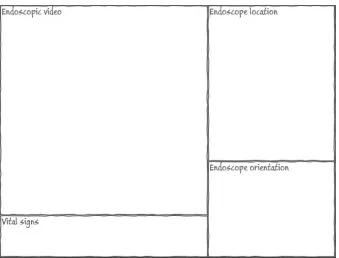
The first design consists of two separate screens, which would be presented on two different monitors, with the first screen (figure 4.1.1) consisting of passive interface elements and the second screen (figure 4.1.2) of interactive interface elements. Segmentation between two screens will reduce the cognitive overload of the therapist in using the system (Mayer and Moreno, 2003), which is in accord to requirement 6. Using two monitors will also lower the amount of interface elements per screen, letting the therapist maintain his cognitive resources (Albers, 1997; Adams, 2007). Using more than two monitors would demand too much space to be used in an outpatient room. The segmentation of active and passive elements will also reduce the cognitive overload (Mayer and Moreno, 2003).
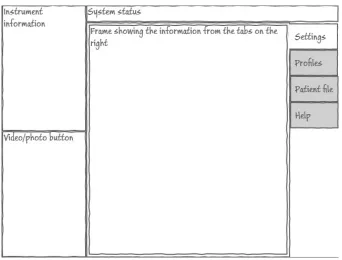
Figure 4.1.1: Impression of composed first screen
Second screen The second screen (figure 4.1.2) will incorporate elements with which the therapist can interact. It will be a touchscreen because this makes the interaction more intuitive. Additional functionalities that have the need for textual input (adding information to the patient file, searching for profiles) result in the need for a keyboard. The preference for this input is a touchscreen keyboard, since it is easier to make it sterile and it can be changed to make it easier to use with gloved hands (slightly bigger keys) and with the interface (make interface specific buttons). To make the usage treshold as low as possible, the basic layout of a keyboard will be used and will be placed underneath the monitor with the second screen.
instrument information (requirement 9) and the system status (requirement 7). Although it is of yet uncertain if these elements will need any input, they are located on the second screen because they are of less importance than the elements that are located on the first screen. The instrument element has a higher importance than the system status, since this information is directly related to the procedure. That is why the element is located on the left of the screen, giving it a location close to the endoscopic video ouput. The system status takes up the remaining space.
Figure 4.1.2: Impression of the composed second screen
Figure 4.1.4: Setup of monitors during attended procedure
4.1.2 Second design
Figure 4.1.5: Image of the DaVinci interface as developed by Intuitive Surgical and used in the Meander Lichtenberg hospital
The implementation of the DaVinci system has taken the laparoscopic output as its main feature, giving all of the other elements (system feedback, orientation compass, instrument information) limited spacing. This results in a low cognitive overload (requirement 6) because of the small intrusion of these elements in the visual work area of the therapist. This is the reason that the endoscopic video output is receiving a large amount of space on the screen. The vital signs need less space than assumed in the first design, if the same information is used as the vital sign measurement in the Meander hospital. It used letters to depict the measurement, making it suited for overlapping the endoscope output, in turn making it easily accessible to the therapist. The overlap of the letters might obscure small anomalies, but it is expected that due to the continuous movements of the endoscope these anomalies will quickly fall outside of the overlap (as opposed to a complete overlap). The instrument information also has a small amount of necessary information, making the representation comparible to the DaVinci by only giving the name of the inserted instrument. The photo and video buttons have been relocated to the left screen. The reason behind this is that they are more easily accessible to the therapist, leaving his gaze near the endoscopic output (as per requirements 8 and 11). Above these buttons there is some space to depict the system status information. On the right of the endoscopic output, the orientation and location of the endoscope will be depicted, combined in one frame because it is expected that the information can easily be combined. Depending on the availability of this information, they can be hidden from the output, creating more room for the already discussed elements of the first design.
resulting one screen can be seen in figure 4.1.6.
Figure 4.1.6: Impression of the second design of the second screen
4.1.3 Evaluation first iteration designs
The first iteration evaluation will start with an overview of the questions that arose during the development of the above described designs. This is followed by a description of the interviewees and the setting in which they were interviewed. Conclusions based on the comments given by the interviewees will be drawn. These conclusions are used to create new designs. Questions that arise during the evaluation or the conclusions will be listed last.
Questions After the creation of the first two designs, the questions that need to be answered are: • Which first impressions and comments do the interviewees have in regard to the first design?
• Which first impressions and comments do the interviewees have in regard to the second design?
Since the two designs are in the first iteration, there are a lot of uncertainties about the designs. Testing specific questions might result in a too narrow view on the complete interface. That is reason why these global questions will be answered.
their work and how they would like to see their work improved with the addition of a robotized flexible endoscope. The second interviewee has experience in designing interfaces for both medical and non-medical applications.
The interview took place at Demcon, Oldenzaal. It was done in the office of one of the intervie-wees. During the presentation of the designs, both interviewees were present. They were prompted to freely comment on the interface during the presentation of the designs. The presentation con-sisted of showing the designs to the interviewees and explaining the different elements of the design and explaining the choices that were made in regard to the elements and the design as a whole. After the presentation, a dialogue was done in which more specific questions were asked and the two designs were compared. All comments were noted down by the interviewer.
Conclusions Most of the comments by the interviewees were in regard to both designs, focussing on the shared elements across the designs. Some design specific comments were given. Both the general and the specific comments will be discussed.
General comments
1. The buttons for making a photo and video can be removed from the screens. They will be incorporated into the joysticks (phantom omni’s, Sensable) to control the endoscope, which is not a part in the further iterative design phase. Placing these options on the joysticks does result in design choices which will be mentioned where necessary. The output from these interactions still be presented in the interface and will be implemented in the new designs.
2. In regard to the endoscopic output, it was remarked that it should take up a larger part of the screen. This would result in an even more prominent place in the interface, because the presentation of this information will be the main focus of the therapist. This was followed by an idea of switching from a landscape oriented screen to a portrait oriented screen. This idea will be incorporated in the next designs.
3. It was unclear if some of the elements should be implemented due to unaccessibility of the necessary information or uncertainty about the information presentation. For example, it is uncertain if the location and orientation of the endoscope will be accessible, or if the presentation of the patient file information is clear to the therapist. If this information is inaccessible but technologically available, or the presentation is unclear, these elements will still be implemented in following designs and will be evaluated again.
5. To both interviewees, it was uncertain what kind of information the system status would depict. That is why for now this elements has been removed from the interface, but might be implemented later on.
Comments on first design In regard to the first design, the main comment was that the elements took up too much space in the interface. It was hard to distinguish between important and less important elements based purely on the size of the element. In line of the general remarks, the video and photo button should be removed. There was uncertainty in the depiction of the endoscope location and orientation, both about if they should be implemented and if so, how they should be implemented. There was also uncertainty about the need and specific implementation of the system status, settings, profiles, patient file and help elements. Albeit this uncertainty, the elements will still be incorporated in the next designs, unless considered to be obsolete.
Comments on second design The second design received less comments compared to the first design. The endoscopic video output was regarded as being more prominent compared to the first design due to its size, although the size itself was still regarded as being too small. The smaller depiction of the vital signs and instrument information and the location of these elements nearer to the endoscopic video output were remarked as being a positive design choice and should be maintained.
Additions to the prototype After the feedback phase, it became clear that additional information and functionality needs to be implemented. These are:
1. The newer endoscopes have the possibility for entering up to three different instruments. The interface should thus have the possibility to depict the information for up to three instruments.
2. The video output from the endoscope is in high definition and therapists have already re-marked within the TeleFLEX project that the addition of high definition imaging is important for performance during a flexible endoscope procedure. The interface should thus incorporate the ability to present the high definition information.
3. Although the system will be created for a situation in which the nurses and therapist are needed for safely using the flexible endoscope, there will be elements which are designed based on a situation in which the system is capable of performing the same actions autonomously.
Remaining questions As a result of the interview, the following questions for the therapists have arisen and will be answered in the next interview:
• Is the endoscopic video output considered to be large enough?
• Should the location and orientation of the endoscope be implemented in the system? If so, how would the therapists prefer the implementation?
4.2
Second iteration
In the last interview it was apparent that the employees preferred the second design, due to its limited amount of information and clear layout. This is the reason why the second design is taken as the basis for the designs in this iteration.
4.2.1 Third design
For the third design (see figure 4.2.7 and 4.2.8), the endoscopic output has been enlarged due to the comments as given in the feedback phase. It will need to take up a larger part of a screen and should be free of (too much) obstructions. This choice dictates that additional information should be presented around the sides of the endoscopic output (top, bottom, left or right).
Figure 4.2.8: Impression of the second screen of the third design
Endoscopic output, instruments and vital signs An element showing the name of the in-serted instrument is needed because with the new system, the therapist is not responsible for entering the instrument anymore which will be performed by a nurse. The element will help the therapist in distinguishing which instrument is entered. If no instrument is entered, no information is given. In the case of an older endoscope with the possibility of entering just one instrument, the reference to the left and right instruments can be hidden. The embedded instrument information is needed to show which actions the therapist is doing with the embedded instruments, making it unneccesary for the therapist to remove his gaze from the information. These elements are placed at the bottom of the endoscopic output so as to correspond with instruments visible in the endo-scopic output. The information can either overlap the endoendo-scopic output, but using an transparent background, or can be presented in an individual frame.
The vital signs are still an important part of the necessary elements. The above choice to place the instrument information at the bottom dictates that the vital signs should be put on the topside of the endoscopic output, since this will create an information symmetry in the overlap of the endoscopic output. This results in a more aestheticly pleasing design (Bauerly and Liu, 2008) and a better usable interface (Thimbleby, 2002). As with the instrument information elements, they can overlap the endoscopic output, again using a transparent background, or can be presented in an individual frame.
with the patient standing. However, it is unclear if another orientation might increase the situation awareness of the therapist, since another orientation might be in accord with how the patient is lying resulting in less needed mental rotations of the information. This rotation might lead to annoyance with the interface, since having an upright orientation might be more natural or might be a learned skill. This difference will be presented to the therapists to gain expert information about this topic. The influence it has on the situation awareness does not fall within the scope of this thesis. At this point, the choice is made to make it possible to rotate the view.
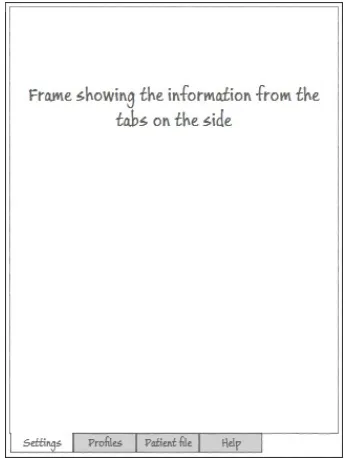
Additional functionalities In regard to the additional functionalities (settings, profiles, patient file and help), it is unclear if there would be a preference for placing the functionalities on a separate monitor. The reason to place it on a second monitor is that these functionalities are mostly used pre- en postprocedure. The settings are expected to be set before the procedure starts and will probably not be changed during the procedure. During the attendence of the endoscopic procedure in the Meander Lichtenberg hospital, the patient file was used after the procedure, updating the file with the procedure information. The file was probably also used to prepare for the procedure, but this was not done during the attendance. Since these functionalities are all secondary in regard to the endoscopic procedure itself, they are preferred to be put on a separate monitor (Grudin, 2001). A reason to use one monitor for the complete interface is that all the functionality that comes with the system is combined in one screen, possibly increasing usability (Robertson et al., 2005). This will make the workflow of the therapist more continuous and will also enable him/her to more easily access the information if he would prefer some information (for example from the patient file). The latter will result in a smaller distance the therapist will have to gaze away. The assumptions about one or two monitors will have to be verified with therapists, possibly using an experimental setting to see the usage of either one.
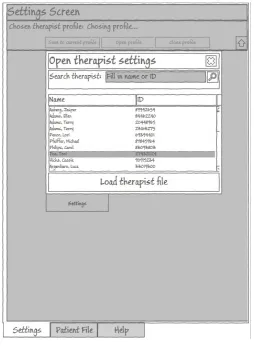
Figure 4.2.10: Example of using full screen to open a profile
Therapist profile The therapist profile will consist of the settings that the therapist has set on an earlier time and has saved for his convenience. A new profile with settings can be created and the settings can be set without using a profile. The settings values as set in the settings screen will be used by the system to adjust the associated system setting. If the choice is made to use a dialog box to choose the profile, the profile tab will be removed (as in figure 4.2.9).
Figure 4.2.11: Impression of patient file depiction
4.2.2 Fourth design
The fourth design is similar to the third design. The difference is that instead of locating the additional functionalities on the right of the screen, or on a separate monitor, it is presented at the bottom. The monitor will be put into a portrait position for this.
Again, this will result in the user being able to access the information with limited gaze straying because all of the information is on one screen. This easy accessibility will possibly result in the therapist using the information more often than if presented in a separate monitor. The easy access to the information might improve the execution of the procedure (Williams et al., 2007).
4.2.3 Evaluation second iteration designs
The second iteration evaluation will start with questions that still need to be answered after the last iteration. These are followed by questions that arose during the development of the above described designs. This if followed by a description of the interviewees and the setting in which they were interviewed. Conclusions based on the comments given by the interviewees will be drawn. These conclusions are used to create new designs. Questions that arise during the evaluation or the conclusions will be listed last.
Questions Questions for the therapists from the last iteration that need to be answered in this iteration:
• Is the endoscopic video output considered to be large enough?
• Should the location and orientation of the endoscope be implemented in the system?
• Should the patient file be created from the start, or should the existing patient file system of a hospital be embedded?
Questions for the therapsists that have risen after creating the designs in this iteration:
• Is there a clear preference for the usage of one or two monitors? If so, what is the reasion behind this preference?
• In what orientation should the depiction of location and orientation of the endoscope be implemented?
• Which elements of the third and fourth design are an improvement compared to the first and second design, and why?
simulators as well as actual flexible endoscope usage. Her knowledge in ergonomical and interface design in the field of medicine are benificial to (the evaluation of) the designs.
The interview with the employees was again done at Demcon, Oldenzaal, in one of the offices of employees. The therapist specialized in laparoscopy was interviewed at his office on the university of Twente. The colonoscopist was interviewd in a room at the Meander Lichtenberg Hospital in Amersfoort. The graduation student was interviewed in a room at the university of twente.
The employees were again interviewed with both of them present in the room. The therapists and graduation student were all interviewed individually. The interviewees were interviewed in the same way as in the first iteration evaluation: they are free to comment during the presentation, which consisted of showing the designs to the interviewees and explaining the different elements of the design and explaining the choices that were made. After the presentation, a dialogue was done in which more specific questions were asked and the two designs were compared. All comments were noted down by the interviewer. In the case of the therapists and graduation student, some procedure specific information was gained.
Conclusions Some comments of the interviewees were in regard to both designs. These general comments are to be expected since the third and fourth design share elements. No design specific comments were given. The general comments will be discussed.
General comments
1. Independently from each other, the therapists commented that they would prefer to have the endoscopic output clear of information and have all of the information on a separate (part of the) screen. They agreed with our notion that the vital signs and instrument information are important and should always be visible, but should also be moved to the separate (part of the) screen. Both of the therapists remarked that this information could ideally be combined with the location and orientation of the endoscope depiction.
2. The therapists, again independently, came up with the idea to use the separate (part of the) screen to switch between different information sources. The first source would be a view consisting of the information that is necessary at the time of the procedure. This view would consist of the vital signs, instrument information, the location and orientation of the endoscope and the patient information. Additional elements to this source were proposed by the colonoscopist and the graduation student and will be discussed in the paragraphAdditions to the prototype below.
3. The second source in the separate (part of) the screen would be the patient file. The therapists remarked that they would prefer to use an embedded version of the patient file system that the hospital has in use. Therapists would prefer this since they are already familiar with the software and they would have access to all the preferred information that is available in the hospital or even across hospitals. During the procedure, the source would be used for referencing only and would not need any textual input. The colonoscopist remarked that doing this would take up too much time and would result in discomfort for the patient. Before and after the procedure, the software should be accessible and changeable.
settings of the therapist with every usage of the system. Loading the therapist profile might be (more) easily done by incorporating the ID login system already in use in some hospitals. The colonoscopist also mentioned that the accessibility of the settings should be varied. The settings that do not result in severe consequences during the procedure (e.g. white balance, contrast, brightness) should be easily accessible and changeable. Settings that might result in more severe consequences should be hard to access and change.
5. The fourth source is the help information. No comments were given on this element and remains incorporated into the interface.
6. In the first source as described above, the depiction of the orientation and location of the endoscope has to be in the upright orientation as depicted in figure 4.2.12. This was re-marked by both therapists. They also commented that this element should most definitely be implemented, since it will improve the performance during a procedure.
[image:41.612.243.371.346.592.2]7. The employees commented that the depiction of instruments in the location and orientation of the endoscope might work counter productive, due to mental rotations that the therapists might have to make. As an alternative, the instrument depiction should be removed from the location and orientation depiction and should be given its own place inside the first source.
Figure 4.2.12: ScopeGuide image shown in an upright position
into the system, for example EndoBase (Olympus) to process all of the endoscopic output. Adding the keyboard will enable the therapist to perform all of his tasks from one console. The keyboard will be located underneath a monitor.
[image:42.612.140.466.398.699.2]9. The choice has been made to use two monitors. This choice was made because the information separation will be easier and because there exists uncertainty about the positioning of some information. The colonoscopist mentioned that he would like the endoscopic output to be the most prominent part in an interface, but should not envelop his complete view. He should not have to turn around his head or gaze away too much to be able to see the endoscopic ouput. This would, according to the colonoscopist, leave him without an overview of his working area. Since the endoscopic output is high definition and it will be presented on a monitor that is capable of presenting that amount of information, it will have to be located about 1,5 meters from the therapist, as was mentioned by one of the interviewed therapists as being an often used distance. The touchscreen and keyboard part of the interface need to be reachable by the therapist, dictating that this monitor is located closely to the therapist. The result is a design which uses two monitors (see figure 4.2.13). The distance might have a negative impact on how (much) the therapists uses the additional information. To make sure that the therapist will use the additional information, the setup with two monitors adjacent to each other might be preferable (see figure 4.1.3). This would result in the need to downscale the endoscopic output on the first screen for the therapist to be able to perceive the output without having to move his/her head. At this time, the choice is made to use the latter setup, but will be reviewed in the first experiment.
Additions to the prototype After the comments given by the colonoscopist and the gradua-tion student, it became clear that addigradua-tional informagradua-tion and funcgradua-tionality needs to be implemented. This additional information and functionality are:
1. The first additional element inside the first view is the depiction of patient information in this view, possibly on top of the location and orientation of the endoscope. Normally, this information would be presented on top of the endoscopic output, but the colonoscopist experi-ences this as annoying and removes this information from the endoscopic output. Placing this information in the separate (part of the) monitor would make him use the information more often. Additions to the standard information would be references to important issues that might arise during a procedure (e.g. patient allergies, specific colon issues, lower heartrate threshold) and performance measures. These issues should be set by a therapist before a procedure, either using the patient file to contain this information or letting the therapist manually enter the information.
2. The second additional element inside the first view is the lower or higher threshold for vital signs example given with the patient information. This element was mentioned by the grad-uation student. The reason to set the threshold might be necessary in case of patients with a lower or higher threshold on some vital signs (for example the heart of a heart patient will not be able to take the amount of stress as compared to a relative healthy patient). The therapist should be capable of setting these thresholds before the procedure, either using the values on those found in the patient file or letting the therapist manually enter the thresholds.
3. The third element inside the first view is the performance measures, also already mentioned with the additional patient information. These measures were mentioned by the colonoscopist and consist of measuring the time taken to withdraw the endoscope and a total polyp count. The former is already being used, but lacks certain nuances. The colonoscopist would prefer a way to easily start and stop a timer, with stopping being necessary in the case of actions that need to be performed which are not related to withdrawing the endoscope itself and might take considerable time (e.g. removing a polyp, solving technical problems, determining possible colon problems). The polyp count can be done with a simple counter which the therapist would use to add or subtract to the total number of polyps.
Remaining questions As a result of the interview, the following questions have arisen and will be answered in the next interview. It is possible that questions remain from the previous iteration.
• In which monitor setup will the therapist be able to more easily gather the necessary infor-mation?
4.3
Third iteration
4.3.1 Fifth design
[image:44.612.102.514.195.429.2]The fifth design consists of two different monitors with different screens. The first screen will present the therapist with only the endoscopic output (figure 4.3.14). The endoscopic output can use the whole screen or just a part of the screen, dependent on what the therapist would prefer. He can change this in the settings screen, which is located on the second monitor.
Figure 4.3.14: First screen with only endoscopic video output
Figure 4.3.15: Persistent elements in the second screen
Figure 4.3.16: Actual view with location and orientation of endoscope and patient file image
The second and third views are used for the hospital software to access the patient file database (in the Netherlands called the Elektronisch Patienten Dossier, E.P.D.) and software for processing the endoscopic output and other information from the procedure (most often used in the Netherlands is EndoBase, Olympus). Both of these views can be used before, during and after the procedure. The E.P.D. can provide images that can be moved to the actual view (figure 4.3.16).
Figure 4.3.17: Settings view
The fifth view is the help view, which will depict the same information as mentioned in the third and fourth design. Added information will be about the EndoBase view.
Monitor setup As has already been discussed in the previous iteration, the locat