“The beginnings and endings of all human undertakings are untidy, the building of a house, the writing of a novel, the demolition of a bridge, and, eminently, the finish of a voyage.”
— John Galsworthy Over the River, 1933
Chapter 1:
Introduction
Chances are that you groaned when you first picked up this book, seeing how heavy and thick it was. The prospect of reading such a long, technical book is enough to make anyone gloomy; fortunately, just as long journeys take place one day at a time, and ultimately one step at a time, so long books get read one chapter at a time, and ultimately one sentence at a time.
1.1 Why is systems analysis interesting?
Long books are often dull; fortunately, the subject matter of this book — systems analysis — is interesting. In fact, systems analysis is more interesting than anything I know, with the possible exception of sex and some rare vintages of Australian wine. Without a doubt, it is more interesting than computer programming (not that programming is dull) because it involves studying the interactions of people, and disparate groups of people, and computers and organizations. As Tom DeMarco said in his delightful book, Structured Analysis
and Systems Specification (DeMarco, 1978),
[systems] analysis is frustrating, full of complex interpersonal relationships, indefinite, and difficult. In a word, it is fascinating. Once you’re hooked, the old easy pleasures of system building are never again enough to satisfy you.
This may come as a surprise to you if you have any experience writing computer programs. [1] Programming is enormous fun, and it’s enormously satisfying to see a program execute successfully, especially after spending several hours debugging it. It’s hard to imagine that things could be even more rewarding and exciting when you begin to move away from the computer and the writing of computer programs to study the overall system in which the programs play a part. But by the end of this book, I hope to have convinced you that the real challenge, and the real joy, of working with computer systems is that of carrying out systems analysis. No matter what profession you decide to pursue, it will be important for you to understand what systems analysis is all about. If you work in the computer industry as something other than an electrical engineer or hardware designer, there is a good chance that your career will progress from programmer to systems designer to systems analyst before you finally move on to the ranks of management. [2]
In this chapter, you will learn:
1. Why systems analysis is interesting;
1.2 Whom this book is intended for
This book is intended for two audiences: first, the person who is new to the field of systems analysis, and, second, the experienced systems analyst who needs to acquaint himself with systems modeling tools and techniques that have evolved over the past decade. Many readers will be university computer science students who have completed earlier courses on computer programming; some may be students in a business training program.
However, the book should be equally readable by people who have finished their university training and who are now working in industry. Many people in the computer industry spend their first several years working as a computer programmer, and then suddenly find themselves promoted to a position of systems analyst, without ever being told what systems analysis is all about or what a systems analyst does. If you are in such a position, this book is for you. You should also find the book useful if you began working as a systems analyst in the 1970s or 1980s and never had an opportunity to learn about classical analysis methods such as structured analysis, or the newer methods such as object-oriented analysis.
More and more often today, people outside the computer profession are finding it necessary to become familiar with the field of systems analysis. If you are a business person or a manager, there is a good chance that you will be involved in a systems analysis activity. You will have systems analysts working for you, spending their time trying to understand what kind of automated system you want them to build. Similarly, if you are an administrator, a clerk, a scientist, a politician, an engineer, or an accountant — or virtually any other professional in today’s society — there is a good chance that you will spend a significant amount of time during your career interacting with systems analysts who will be designing and specifying sophisticated computer systems for you. The more you know about what these people do, and what they expect of you, the better off you will be.
Even if you have no expectation of working in a white collar job — that is, even if you expect to be an artist, a writer, a musician, or an athlete — you should know what systems analysis is all about. Citizens in every walk of life are affected by computer systems of all sorts. Even if you never intend to build a computer system or have one built for you, it is inevitable that you will be using computer systems for your banking, for your education, for your interactions with the IRS and Social Security, and for virtually every aspect of your interactions with modern society. As John Gall says in Systemantics (Gall, 1977),
No one, these days, can avoid contact with systems. Systems are everywhere: big systems, little systems, systems mechanical and electronic, and those special systems that consist of organized associations of people. In self-defense, we must learn to live with systems, to control them lest they control us. As Humpty Dumpty said to Alice (though in another context): “The question is: which is to be master — that’s all.”
1.3 What this book will do for you
A major purpose of this book is to teach you about systems analysis: what it is and how one goes about doing it. But there is more: my real purpose is to excite you, to make you so eager to begin practicing systems analysis that you will want to rush through the last pages of the book and begin working on your first project. Seymour Papert recalls in Mindstorms (Papert, 1980),
I found particular pleasure in such systems as the differential gear, which does not follow a simple linear chain of causality since the motion in the transmission shaft can be distributed in many different ways to the two wheels depending on what resistance they encounter. I remember quite vividly my excitement at discovering that a system could be lawful and completely comprehensible without being rigidly deterministic.
And as Sir Arthur Stanley Eddington said in Space, Time and Gravitation: An Outline of the General Theory (Eddington, 1987),
We have found that where science has progressed the farthest, the mind has but regained from nature that which the mind put into nature. We have found a strange footprint on the shores of the unknown. We have devised profound theories, one after another, to account for its origin. At last we have succeeded in reconstructing the creature that made the footprint. And lo! it is our own.
Another purpose of the book is to make you understand and appreciate that we live in a world of systems — and systems within systems, which are part of even larger systems. Thus, everything we do in our personal and professional lives has an impact on the various systems of which we are a part. This “systems thinking” approach is not only vital for professional systems analysts, but for all members of modern society.
Alas, this book cannot make you an experienced systems analyst, any more than a book on music theory can make you an experienced pianist. By the end of the book, you will be armed with a tremendous amount of technical information that will help you develop accurate models of complex systems, and you will know the step-by-step techniques for carrying out a systems analysis effort. But you will still need a great deal of real-world work to learn the people skills: how to interview a variety of disparate users to understand the true essence of a system; how to present the results of your systems analysis work so that everyone can see a credible estimate of the costs and benefits of developing a new system; and how to distinguish problems from symptoms. As Barry Boehm pointed out in his classic work, Software Engineering Economics (Boehm, 1981):
It takes some practice to do this well, and to learn how to balance human relations concerns with programming and quantitative economic concerns. The big thing to remember in doing so is to keep our priorities straight between programming, budgetary, and human considerations.
1.4 The organization of this book
This book is organized in four major parts, followed by a series of appendixes. Part I serves as an introduction to the entire book; it begins, in Chapter 2, with an introduction to the concept of systems and to the nature of systems analysis. In this chapter, we will see that information systems are usually composed of people, hardware, software (computer programs), procedures, data, and information. Chapter 3 describes the people who are typically involved in the development of a modern information system — the users, managers, operations personnel, members of the quality assurance group, and the like — as well as the special role and responsibilities of the systems analyst. Chapter 4 introduces two popular modeling approaches that systems analyst use: structured analysis and object-oriented modeling approaches. Chapter 5 introduces the procedures (or methodology) that the systems analyst follows when developing a system.
Even if you think you know many of these things already, there are some chapters in Part I that are important for you to read, for they set the tone for the rest of the book. Chapter 2, for example, introduces and discusses the fundamental axioms and principles that we can expect to find in all systems analysis work: the development of system models, the notion of iteration, and the notion of top-down partitioning. And Chapter 6 outlines the major issues facing systems analysts today: issues of productivity, system quality, maintainability, and strategic use of information. Finally, Chapter 7 summarizes the major changes that took place in the field of systems analysis during the tumultuous decade of the 1990s.
Part II discusses systems modeling tools in detail. Individual chapters cover the topics of dataflow diagrams (Chapter 9), object-oriented models (Chapter 10), data dictionaries (Chapter 11), process specifications (Chapter 12), and state-transition diagrams (Chapter 13). Chapters 14 and 15 discuss various other modeling tools that systems analysts use when studying a system: PERT charts, Gantt charts, flowcharts, HIPO diagrams, structure charts, and so on. As we will see, these modeling tools allow us to selectively focus on individual aspects of a system whose characteristics are important to understand: the functions that the system must perform, the data that it must keep track of, and its time-dependent behavior. Even if you never see a computer after you finish reading this book, the modeling tools in Part II will be useful in whatever you do. You will find that modeling tools can be useful to model (or describe or “picture”) virtually any kind of system: biological systems, business systems, ecosystems, manufacturing systems, political systems, material-flow systems, and so on. We live in a world of systems, and much of our daily life is spent trying to comprehend and work with the many different systems with which we come in contact; modeling tools are enormously helpful in this respect.
Regardless of its name, it becomes the input to the person (or people) who are responsible for actually building the system — that is, designing the overall architecture of computer hardware and software and ultimately writing and testing the computer programs.
This leads us to Part IV: life after systems analysis. We will explore the transition from systems analysis to systems design and briefly discuss the final details of programming and testing. Since most automated information systems have a lifetime of several years (and often several decades), we will also discuss the subject of maintenance in Chapter 24; but our concern will not be with maintenance programming, but rather with the maintenance of the product of systems analysis. The last chapter deals with the future: evolutionary changes in the field of systems analysis that we can expect to see during the 1990s and on into the next century.
Appendixes at the end of the book deal with separate issues that may or may not affect you when you begin working as a systems analyst. Appendix A, for example, deals with the subject of automated tools for developing systems analysis models. Appendix B discusses estimating formulas and metrics used to calculate the size, duration, and cost of a project. Appendix C discusses the economics of cost-benefit calculations. Appendix D covers the subject of walkthroughs and inspections, which are often used to review the technical products of systems analysis. Appendix E discusses interviewing and data-gathering techniques, particularly those interviews that take place between user and systems analyst. All of these have been arranged as appendixes so that experienced systems analysts can skip them easily; beginning students can turn to the appendixes whenever convenient to cover topics that will surely emerge during real-world projects.
References
1. Tom DeMarco, Structured Analysis and Systems Specification. Englewood Cliffs, N.J.: Prentice-Hall, 1979, page 6.
2. John Gall, Systemantics. New York: Quadrangle/The New York Times Book Company, 1977, page xiii.
3. Barry Boehm, Software Engineering Economics. Englewood Cliffs, N.J.: Prentice-Hall, 1981.
4. Seymour Papert, Mindstorms. New York: Basic Books, 1980.
5. Edward Yourdon, Nations at Risk. Englewood Cliffs, N.J.: YOURDON Press, 1986.
Endnotes
1. If you are under 30 years of age, it’s hard to imagine that you have not written a computer program; after all, virtually every school and college now teaches something about computer programming. But you may not have written a really complicated computer program. If you haven’t spent at least a month working on the same program — working 16 hours a day, dreaming about it during the remaining 8 hours of restless sleep, working several nights straight through trying to eliminate that “one last bug” from the program — then you haven’t really written a complicated computer program. And you may not have the sense that there is something exhilarating about programming. (By the way, everyone in the industry will tell you that you should not be building large, complex computer programs — and that the object of the game is to build simple, comprehensible programs. This is true: but imagine the mental energy and the sleepless nights that must have gone into the creation and development of something like the Macintosh MacPaint program, or the first version of Lotus 1-2-3.)
2. There are a variety of other career paths that you might follow, too. You might specialize in the area of telecommunications and network design; or you might concentrate on database design, or “data administration.” While most of this book assumes that you will be concerned with application systems (payroll, inventory, accounting, or real-time applications like missile guidance, telephone switching, and process control), you might also concentrate on systems programming projects — for example, compilers or operating systems. All of this is likely to represent your second or third job in the computer industry: chances are that you’ll start in the business as a junior programmer (where you will be expected to know how to write relatively simple programs, or make maintenance changes to existing programs), and then progress to senior programmer before finally being promoted to the position of systems analyst. As a systems analyst, you will be expected to have broader skills than that of a programmer: in addition to knowledge of computer hardware and software, you will be expected to be able to communicate well with noncomputer people, and you will be expected to be familiar with their business applications.
Questions and Exercises
1. Explain how systems analysis might be useful in your job or profession even if you are not planning to become a programmer or systems analyst.
2. Research Project: How many people are employed as systems analysts in the United States today? What is their average salary? What is their average level of education?
3. Research Project: Is there a shortage of programmers and systems analysts in the United States? Try to find industry surveys or government surveys (e.g., from the U.S. Commerce Department or the National Science Foundation) that predict the nation’s requirements for systems analysts over the next ten years.
4. Give ten examples of systems that you deal with or interact with in your day-to-day life.
5. Would you be studying the subject of systems analysis if you didn’t have to? If your answer is “No,” explain why you think the material won’t be useful or relevant. Find someone else studying this same material and engage in a constructive debate about the general usefulness of systems analysis.
6. Do you think it is important for non-computer people (people who do not work in the computer field as a profession) to study systems analysis? How expert do you think they should be in the subject?
7. Why is systems analysis likely to be more interesting than programming? Do you agree with this point of view?
8. What things must a systems analyst learn besides the technical skills of building system models?
“Finally, we shall place the Sun himself at the center of the Universe. All this is suggested by the systematic procession of events and the harmony of the whole Universe, if only we face the facts, as they say, ‘with both eyes open?’”
— Nicholas Copernicus
De Revolutionibus Orbium Coelestium, 1543
Chapter 2:
The Nature of Systems
In this chapter, you will learn:
1. What the definition of a system is;
2. The difference between natural systems and man-made systems; 3. The 19 major subsystems found in all living systems;
4. The 7 major reasons why some systems should not be automated; 5. The 5 major components of a typical automated information system; 6. The definition and characteristics of several specific types of systems; and 7. The definitions of — and 3 examples of — general system principles.
We can’t say very much about systems analysis until we have a clear idea of what a system is; that is the purpose of this chapter. As we will see, there is an “official” dictionary definition of the term, which will seem rather abstract. But there are many common usages of the term that will be quite familiar to you, and there are many common types of systems that we come into contact with every day.
So what? It is important to be familiar with different kinds of systems for at least two reasons. First, even though your work as a systems analyst will probably focus on one kind of system — an automated, computerized information system — it will generally be a part of a larger system. Thus, you may be working on a payroll system, which is part of a larger “human resources” system, which in turn is part of an overall business organization (which is, in itself, a system), which is, in turn, part of a larger economic system, and so forth. Or you may be working on a process control system that is part of a chemical refinery, or an operating system that is part of a vendor-supplied “package” of system software. Thus, to make your system successful, you must understand the other systems with which it will interact.
Thus, if we understand something of general systems theory, it can help us better understand computerized (automated) information systems. This is more and more important today, because we want to build stable, reliable systems that will function well in our complex society — and there are, of course, many examples of non-computer systems that have survived for millions of years: the humble cockroach is likely to outlast every computer system ever built, and all of humanity as well.
So, let us begin with a definition of the basic term system. Every textbook covering some aspect of systems contains such a definition; I have chosen Webster’s New Collegiate Dictionary. [3] It provides several definitions:
1. a regularly interacting or interdependent group of items forming a unified whole <a number ~>: as
a. (1) a group of interacting bodies under the influence of related forces <a gravitational ~> (2) an assemblage of substances that is in or tends to equilibrium <a thermodynamic ~>
b. (1) a group of body organs that together perform one or more vital functions <the digestive ~> (2) the body considered as a functional unit
c. a group of related natural objects or forces <a river ~>
d. a group of devices or an organization forming a network, especially for distributing something or serving a common purpose <a telephone ~> <a heating ~> <a highway ~> <a data processing ~>
2. an organized set of doctrines, ideas, or principles, usually intended to explain the arrangements or working of a systematic whole <the Newtonian ~ of mechanics>
3. an organized or established procedure <the touch ~ of typing> b. a manner of classifying, symbolizing, or schematizing <a taxonomic ~> <the decimal ~>
4. harmonious arrangement or pattern: ORDER
5. an organized society or social situation regarded as stultifying: ESTABLISHMENT
2.1 Common types of systems
As we can see from the definition above, there are many different types of systems; indeed, virtually everything that we come into contact with during our day-to-day life is either a system or a component of a system (or both).
2.2 Natural systems
The vast majority of systems are not made by people: they exist in nature and, by and large, serve their own purpose. It is convenient to divide natural systems into two basic subcategories: physical systems and living systems. Physical systems include such diverse examples as:
* Stellar systems: galaxies, solar systems, and so on;
* Geological systems: rivers, mountain ranges, and so on; and
* Molecular systems: complex organizations of atoms.
Physical systems are interesting to study because, as pesky humans, we sometimes want to modify them. We also develop a variety of man-made systems, including computer systems, that must interact harmoniously with physical systems; so it is often important to be able to model those systems to ensure that we understand them as fully as possible.
Living systems, of course, encompass all of the myriad animals and plants around us, as well as our own human race. And, as James Miller elaborates in his monumental work, Living Systems (Miller, 1978), this category also includes hierarchies of individual living organisms — for example, herds, flocks, tribes, social groups, companies, and nations.
The study of living systems is a career in itself; a brief perusal of Miller’s work will show what a massive subject it is. The purpose of this book is not to study living systems per se; but some of the properties and characteristics of familiar living systems can be used to help illustrate and better understand man-made systems. We often use an analogy to better understand something unfamiliar; among the more eloquent examples of living systems as an analogy of business systems and organizational systems is Stafford Beer’s Brain of the Firm (Beer, 1972), and The Heart of Enterprise (Beer, 1978).
A more elaborate analogy can be drawn from Miller’s categorization of the 19 critical subsystems of all living systems. Miller argues that living systems, whether at the level of the cell, the organ, the organism, the group, the organization, the society, or the supranational system, all contain the following subsystems:
* The reproducer, which is capable of giving rise to other systems similar to the one it is in. In a business organization, this might be a facilities planning division that makes new plants and builds new regional offices.
* The boundary, which holds together the components that make up the system, protects them from environmental stresses, and excludes or permits entry to various sorts of matter-energy and information. In a business organization, this might consist of the physical plant (office building, factory, and so on) and the guards and other security personnel who prevent unwanted intrusion.
* The converter, which changes certain inputs to the system into forms more useful for the special processes of that particular system. Again, one could imagine a number of examples of this in a typical business organization.
* The producer, which forms stable associations that endure for significant periods among matter-energy inputs to the system or outputs from its converter, the materials synthesized being for growth, damage repair, or replacement of components of the system, or for providing energy for moving or constituting the system’s outputs of products or information markets to its suprasystem.
* The matter-energy storage subsystem, which retains in the system, for different periods of time, deposits of various sorts of matter-energy.
* The extruder, which transmits matter-energy out of the system in the form of products or wastes.
* The motor, which moves the system or parts of it in relation to part or all of its environment or moves components of its environment in relation to each other.
* The supporter, which maintains the proper spatial relationships among components of the system, so that they can interact without weighing each other down or crowding each other.
* The input transducer, which brings markers bearing information into the system, changing them to other matter-energy forms suitable for transmission within it.
* The internal transducer, which receives, from other subsystems or components within the system, markers bearing information about significant alterations in those subsystems or components, changing them to other matter-energy forms of a sort that can be transmitted within it.
* The channel and net, which are composed of a single route in physical space, or multiple interconnected routes, by which markers bearing information are transmitted to all parts of the system.
* The decoder, which alters the code of information input to it through the input transducer or internal transducer into a private code that can be used internally by the system.
* The associator, which carries out the first stage of the learning process, forming enduring associations among items of information in the system.
* The memory, which carries out the second stage of the learning process, storing various sorts of information in the system for different periods of time.
* The decider, which receives information inputs from all other subsystems and transmits to them information outputs that control the entire system.
* The encoder, which alters the code of information input to it from other information processing subsystems, from a private code used internally by the system into a public code that can be interpreted by other systems in its environment.
* The output transducer, which puts out markers bearing information from the system, changing markers within the system into other matter-energy forms that can be transmitted over channels in the system’s environment.
Keep in mind that many man-made systems (and automated systems) interact with living systems; for example, computerized pacemakers interact with the human heart. In some cases, automated systems are being designed to replace living systems; and in other cases, researchers are considering living systems (known as organic computers) as components of automated systems. See (Hall, 1983), (DeYoung, 1983), (Shrady, 1985), and (Olmos, 1984) for discussions of this viewpoint. Living systems and man-made systems are often part of a larger metasystem, and the more we understand about both, the better we will be as systems analysts.
2.3 Man-made systems
As we saw from the definition at the beginning of the chapter, a number of systems are constructed, organized, and maintained by humans. These include such things as:
* Social systems: organizations of laws, doctrines, customs, and so on.
* An organized, disciplined collection of ideas: the Dewey decimal system for organizing books in libraries, the Weight-Watcher’s system for shedding ugly extra pounds, and so on.
* Transportation systems: networks of highways, canals, airlines, ocean tankers, and the like. * Communication systems: telephone, telex, smoke signals, the hand signals used by stock market traders, and so on.
* Manufacturing systems: factories, assembly lines, and so on.
* Financial systems: accounting, inventory, general ledger, stock brokerage, and the like.
Most of these systems include computers today; indeed, many could not survive without computers. However, it is equally important to point out that such systems existed before there were computers; indeed, some of these systems are still completely non-computerized and may remain that way for many more decades. Others contain a computer as a component, but also include one or more non-computerized (or manual) components.
Consider, for example, the common phrase, “John has a system for doing this job” or “Mary sure does have a systematic way of going about her work.” Such phrases do not necessarily suggest that Mary has computerized her work or that John has used some of the formal modeling tools discussed in Chapters 9 and 10 to document (or model) how he proposes to do his job. But certainly the phrases imply that John and Mary have broken their work into a series of discrete steps, the cumulative sum of which will accomplish some overall purpose.
Why should some information processing systems not be automated? There may be many reasons, but here are some of the more common ones:
* Cost — it may be cheaper to continue carrying out the system functions and storing the system’s information manually. It’s not always true that computers are faster and cheaper than the “old-fashioned” way! This is particularly likely to be true if the system under consideration requires only a limited functionality.
* Convenience — an automated system may take up too much room, make too much noise, generate too much heat, or consume too much electricity, or, in general, it may be a pain in the neck to have around. This is becoming less true with the pervasive influence of microprocessors — but it’s still a factor. And even a compact microprocessor-based system might not be considered “convenient” by everyone; notice, for example, how some people prefer a Palm Pilot (or other hand-held PDAs) while others strongly prefer the convenience of their old-fashioned Filofax.
* Security — if the information system is maintaining sensitive, confidential data, the user may not feel that an automated system is sufficiently secure. The user may want the ability to keep the information physically protected and locked up.
* Maintainability — the user might argue that a computerized information system would be cost-effective except that there is nobody on the staff that can maintain the computer hardware and/or software, so nobody would be able to repair the system if it broke down nor would anyone be able to make changes and enhancements.
* Politics — the user community may feel that computers threaten their jobs or make their jobs too boring and “mechanical,” or they may have a dozen other reasons that the system analyst may regard as irrational. But since it’s the users’ system, their feelings are paramount. If they don’t want an automated system, they will do their best to make it fail if it gets shoved down their throats.
* Inability to articulate policy and procedures in a precise fashion — the user community may have been carrying out the required behavior of a system for decades, or even centuries, without ever having documented the precise rules, data definitions, and other aspects of their behavior. Indeed, their behavior might be somewhat “fuzzy,” occasionally contradictory, somewhat error-prone in nature, and subject to personal interpretation. This is the kind of situation that drives computer professionals crazy, but it may be perfectly acceptable to the user community.
* Inability to automate a system within the required amount of time — sometimes, the prospect of an automated system is enticing, but the time required to perform the analysis, design, implementation, and testing may be unacceptable. This was often the case with Y2K projects at the end of the last decade; the inexorable deadline of December 31, 1999 meant that some of the aging legacy systems had to be maintained, because there was not enough time to develop a new, Y2K-compliant replacement system.
2.4 Automated systems
Subsystems that process both matter-energy and information: Boundary (Bo), wall of radio room (artifact).
Subsystems that process matter-energy: Ingestor (IN), stewardess who brings food into radio room from ship’s galley; Distributor (DI), steward who hands out food to members of communications team; Converter (CO), steward who cuts bread, meat, and cheese for sandwiches; Producer (PR), steward who makes sandwiches and coffee; Matter-Energy Storage (MS), steward who stores various sorts of artifacts, including food in refrigerator, coats and hats of team members in closet, blankets and pillows in closet, and tools and equipment in chest of drawers; Extruder (EX), steward who removes used dishes, wastepaper, and other wastes from radio room; Supporter (SU), floor, walls, ceiling, furniture of radio room (artifacts).
Subsystems that process information: Input Transducer (it), radio operator who receives radio messages; Internal Transducer (in), day-shift foreperson who reports to chief signal officer on efficiency and morale of team members on his or her shift; Channel and Net (cn), all members of group who intercommunicate by speech that travels through the air of the radio room; Decoder (dc), radio operator who transcribes into English messages received in Morse code; Memory (me), secretary who keeps records of all messages received and transmitted; Decider (de), chief signal officer, who commands communications team; Encoder (en), radio operator who encodes English messages into Morse code; Output Transducer (ot), radio operator who transmits radio messages.
Figure 2.1(a): Subsystems for an ocean liner communications team
* Computer hardware — CPUs, disks, terminals, printers, magnetic tape drives, and so on.
* Computer software — systems programs such as operating systems, database systems, and telecommunication control programs, plus application programs that carry out the functions that the user wants.
* People — those who operate the system, those who provide its inputs and consume its outputs, and those who provide manual processing activities in a system.
* Data — the information that the system remembers over a period of time.
One way of categorizing automated systems is by application: manufacturing systems, accounting systems, military defense systems, and so on; however, this turns out not to be terribly useful, for the techniques that we will discuss in this book for analyzing, modeling, designing, and implementing automated systems are generally the same regardless of the application. [5] However, it may be useful to categorize a system by application if an organization intends to develop a system and then sell it to numerous clients within the same industry.
Subsystems that process both matter-energy and information: Reproducer (Re), representatives of the owning corporation; Boundary (Bo), ship’s hull and personnel who guard and maintain it. Subsystems that process matter-energy: Ingestor (IN), hatchway into ship’s hold and personnel who load passengers, baggage, and freight into the ship; Distributor (DI), gangways, decks, staircases, and stewards, waiters, and porters who carry food, beverages, baggage, and various other sorts of matter-energy on them, as well as passengers who move about the ship on them; Converter (CO), galley personnel peeling vegetables and preparing other food for cooking; Producer (PR), chefs cooking food and bakers baking in ship’s galley; Matter-Energy Storage (MS), ship’s hold and fuel tanks and personnel in charge of them; Extruder (EX), smokestack for gaseous wastes, garbage and sewage outlets for liquid and solid wastes, and operating personnel responsible for seeing that wastes are properly removed; Motor (MO), ship’s engines, drive shaft, propellers, and the entire hull of the ship, which moves passengers, crew, and freight in the sea, as well as engineers responsible for managing this movement; Supporter (SU), hull, sides, walls, and decks of ship and personnel who maintain them.
Subsystems that process information: Input Transducer (in), radio operator and other members of communications team who receive messages to ship; Internal Transducer (in), officer who reports to senior officer of the watch on states of various components that make up the ship; Channel and Net (cn), air between watch officers on the bridge of the ship over which they transmit and receive messages; Decoder (dc), radio operator in communications team who decodes Morse code messages into English after they are received; Memory (me), logbooks of past trips, charts of the seas, and those personnel who consult them in the ship’s chart room; Decider (de), captain and other ship’s officers; Encoder (en), radio operator in communications team who encodes English messages into Morse code in order to transmit them; Output Transducer (or), radio operator and other members of communications team who transmit messages from ship.
A more useful categorization of automated systems is as follows:
* On-line systems
* Real-time systems
* Decision-support systems
* Knowledge-based systems We will examine each of these next.
2.4.1 On-line systems
In an earlier book (Yourdon, 1972), I defined on-line systems in the following way: An on-line system is one which accepts input directly from the area where it is created. It is also a system in which the output, or results of computation, are returned directly to where they are required. This usually means that the computer system has a hardware architecture that looks like that in Figure 2.4.
A common characteristic of on-line systems is that data are entered into the computer system and received from the computer system remotely. That is, the users of the computer system typically interact with the computer from terminals [6] that may be located hundreds of miles from other terminals and from the computer itself.
Another characteristic of an on-line system is that its stored data, that is, its files or its database, are usually organized so that individual pieces of data (such as an individual airline reservation record or an individual personnel record) can be retrieved and/or modified (1) quickly and (2) without necessarily accessing any other piece of data in the system. This is in stark contrast to the batch systems, which were more common in the 1960s and 1970s. In a batch computer system, information is usually retrieved on a sequential basis, which means that the computer system reads through all the records in its database, processing and updating those records for which there is some activity. The difference between a batch computer system and an on-line system is analogous to the difference between finding a specific musical selection on a tape cassette and a musical selection on a CD player; one involves sequential access through all the tracks, while the other allows “random” access to any one of the tracks without listening to the others.
Because on-line systems usually need to retrieve data quickly (in order to respond to inquiries and commands from on-line terminals), it is usually very important to design the files and databases as efficiently as possible. Indeed, it is often true that the computations performed by an on-line system are relatively trivial, while the data (especially the structure and organization of the data maintained by the on-line system) are rather complex. Hence the data modeling tools discussed in Chapter 12 are of great importance to the systems analyst and systems designer.
The decision to make a system on-line or not is, in the context of this book, an implementation decision, that is, not something that ought to be determined by the systems analyst, but rather by the people implementing the system. However, since the decision has such an obvious impact on the user (the presence or absence of computer terminals, and so on), it is an implementation decision in which the users will generally want to participate. Indeed, it is part of the user implementation model, which we will discuss in Chapter 21.
2.4.2 Real-time systems
A real-time system is considered by many to be a variant of an on-line system; indeed, many people use the terms interchangeably. However, it is important to distinguish between the two; we will use the following definition from (Martin, 1967):
A real-time computer system may be defined as one which controls an environment by receiving data, processing them, and returning the results sufficiently quickly to affect the environment at that time.
The term “sufficiently quickly” is, of course, subject to many interpretations. And the issue of “quickness” is just one of the characteristics of a typical real-time system. As Paul Ward and Steve Mellor point out (Ward-Mellor, 1985), a more comprehensive list of characteristics would include the following:
The problem formulation vocabulary for real-time systems is drawn from science and engineering disciplines ... The environment of a real-time system often contains devices that act as the senses of the system. Real-time system often require concurrent processing of multiple inputs. The time scales of many real-time systems are fast by human standards.The precision of response required of real-time systems is greater than that required of other systems.
Certainly there are many on-line systems — banking systems, airline reservation systems, stock brokerage systems — that are expected to react within one or two seconds to a message typed on the terminal. However, in most real-time systems, the computer must react within milliseconds and sometimes within microseconds to inputs that it receives. This is characteristic of the following kinds of systems:
* Process control systems — the computer systems that are used to monitor and control oil refineries, chemical manufacturing processes, milling and machining operations are examples.
* High-speed data acquisition systems — computer systems that receive high-speed telemetry data from orbiting satellites, or computers that capture massive amounts of data from laboratory experiments are examples.
* Missile guidance systems — computer systems that must track the trajectory of a missile and make continuous adjustments to the orientation and thrust of the missile engines.
* Telephone switching systems — computer systems that monitor voice and data transmissions over thousands of telephone calls, detecting phone numbers being dialed, on-hook and off-hook conditions, and all of the other many conditions of the typical telephone network.
* Patient monitoring systems — computer systems that monitor various patient “vital signs” (e.g., temperature and pulse) and either adjust medication or sound an alarm if those vital signs stray outside some predetermined condition.
Because of this concern with instant response to system inputs, a systems analyst working with real-time systems is generally very concerned with the time-dependent behavior of the system. We will discuss tools for modeling time-dependent system behavior in Chapter 13.
Figure 2.5: A real-time system
From an implementation point of view, real-time systems (as well as some on-line systems) are characterized by the following features:
* Many processing activities that are taking place simultaneously;
* Assignment of different priorities to different processing tasks — some need to be serviced immediately, while others can be delayed for reasonable periods of time;
* Interruption of one processing task before it is finished in order to begin servicing another, higher-priority task;
* Extensive communication between tasks, especially since many of the tasks are working on different aspects of an overall process like controlling a manufacturing process;
* Simultaneous access to common data, both in memory and on secondary storage, thus requiring elaborate “hand-shaking” and “semaphore” procedures to ensure that common data do not become corrupted; and
* Dynamic use of and allocation of RAM memory in the computer system, since it is often uneconomical (even in today’s world of cheap memory) to assign enough fixed memory to handle high-volume peak situations
2.4.3 Decision-support systems and strategic planning systems
These systems, also known as transaction-processing systems, include such familiar examples as payroll systems, order entry systems, accounting systems, and manufacturing systems. In organizations around the United States, these operational systems have been developed slowly, painfully, and at great cost; since many of them were initially developed more than 20 years ago, they are on the verge of collapse; thus, new operational systems are continuously being built in major organizations around the world.
But to the extent that today’s operational systems continue to wobble along, many organizations are focusing their attention on a new kind of system: decision-support. As the term implies, these computer systems do not make decisions on their own, but instead help managers and other professional “knowledge workers” in an organization make intelligent, informed decisions about various aspects of the operation. Typically, the decision-support systems are passive in the sense that they do not operate on a regular basis: instead, they are used on an ad hoc basis, whenever needed.
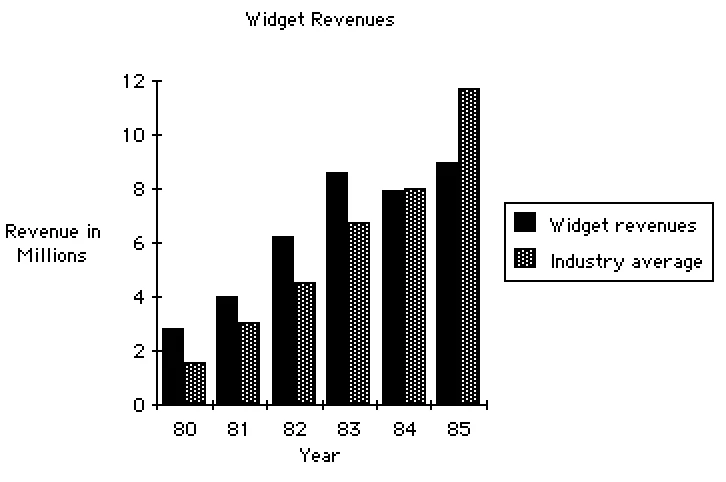
There are a number of simple examples of decision-support systems: spreadsheet programs (e.g., Microsoft’s Excel, and Lotus 1-2-3), statistical analysis systems, marketing forecast programs, and others. Indeed, a common characteristic of the decision-support systems is that they not only retrieve and display data, but also perform a variety of mathematical and statistical analyses of the data; decision-support systems also have the capability, in most cases, of presenting information in a variety of graphic forms (tables, charts, etc.) as well as conventional reports. Figure 2.6 shows a typical financial spreadsheet that a manager might use to evaluate the profitability of a division within the organization; Figure 2.7 shows a typical chart showing the division’s revenues as compared to the industry average. Note that in both cases the output produced by this system does not “make” a decision, but rather provides relevant information in a useful format so that the manager can make the decision.
Strategic planning systems are used by senior management to evaluate and analyze the mission of the organization. Rather than providing advice about an isolated business decision, these systems provide broader, more general advice about the nature of the marketplace, the preferences of the customers, the behavior of competition, and so on. This is usually within the province of the Strategic Planning Department, or the Long Range Planning Department, though it may be a more informal activity carried out by one or two senior managers.
Strategic planning is a concept that became popular during World War II (though some organizations were obviously doing it long before that), and it is the subject of many books; see (Steiner, 1979), (Drucker, 1974), and (Ackoff, 1970). Strategic planning systems are not computer programs per se; they are a complex combination of activities and procedures, much of it carried out by humans using information gleaned from outside sources (market surveys and the like) and internal data from the organization’s operational systems and decision-support systems. Steiner points out that there can be many types of strategic planning systems, depending on the size and nature of the organization.
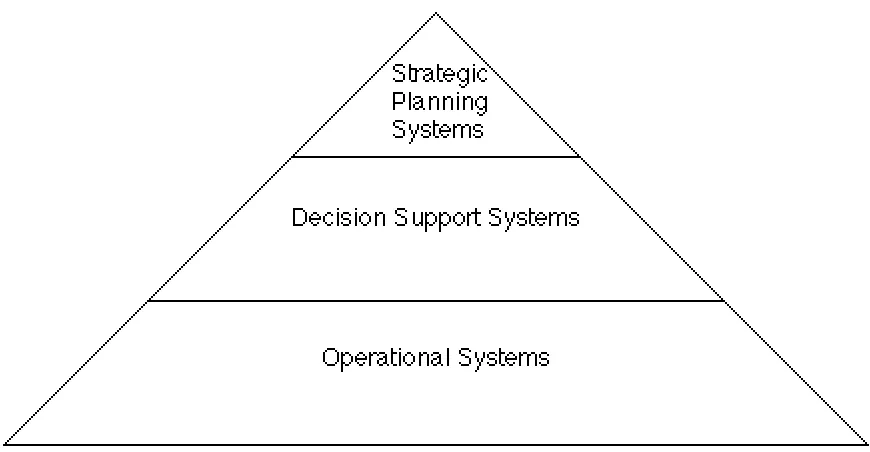
Note the relationship between the three different kinds of systems discussed in this section. As shown in Figure 2.11, the operational systems represent the foundation upon which the decision-support systems and strategic planning systems rest. The operational systems create the data required by the higher-level systems, and they continue to update those data on a continuous basis.
Fribble Division Profit/Loss Projections
1Q 2Q 3Q 4Q TOTAL Domestic Sales 400 425 250 375 1450 International Sales 100 150 200 125 575
License Fees 25 60 50 25 160
Miscellaneous Income 10 10 15 10 45 TOTAL REVENUE 535 645 515 535 2230 Cost of Sales 123 148 118 123 513
Salaries 100 120 120 125 465
Other employment costs 15 18 18 19 70 Rent & Occupancy 15 15 15 18 63
Telephone 20 20 20 20 80
Postage 5 6 5 7 23
Travel & Entertainment 10 10 10 10 40 Legal/Accounting 10 10 15 10 45
Depreciation 12 13 13 14 52
Misc expenses 5 5 5 5 20
TOTAL EXPENSES 315 365 339 351 1371 PROFIT/LOSS 220 280 176 184 859
Figure 2.6: A typical spreadsheet
2.4.4 Knowledge-based systems
Another popular term in the computer industry is that of “expert systems” or “knowledge-based systems.” Such systems are associated with the field of artificial intelligence, defined in the following way by Elaine Rich (Rich, 1984):
The goal of computer scientists working in the field of artificial intelligence is to produce programs that imitate human performance in a wide variety of “intelligent” tasks. For some expert systems, that goal is close to being attained; for others, although we do not yet know how to construct programs that perform well on their own, we can begin to build programs that significantly assist people in their performance of a task.
Two eminent writers in the field of artificial intelligence, Feigenbaum and McCorduck, describe knowledge-based systems and expert systems in the following way (Feigenbaum and McCorduck, 1983):
Figure 2.9: A strategic planning model centered on gap analysis
Knowledge-based systems, to labor the obvious, contain large amounts of varied knowledge which they bring to bear on a given task. Expert systems are a species of knowledge-based system, though the two terms are often used interchangeably. Just what is an expert system? It is a computer program that has built into it the knowledge and capability that will allow it to operate at the expert’s level. Expert performance means, for example, the level of performance of M.D.’s doing diagnosis and therapeutics, or Ph.D.’s or very experienced people doing engineering, scientific, or managerial tasks. The expert system is a high-level intellectual support for the human expert, which explains its other name, intelligent assistant.
Expert systems are usually built to be able to explain the lines of reasoning that led to their decisions. Some of them can even explain why they rejected certain paths of reasoning and chose others. This transparency is a major feature of expert systems. Designers work hard to achieve it because they understand that the ultimate use of an expert system will depend on its credibility to the users, and the credibility will arise because the behavior is transparent, explainable.
While expert systems are beyond the scope of this book, they will gradually become a more and more important component of the “typical” system that you work on as a systems analyst. Beginning in the late 1980s, researchers have begun studying the relationship between classical software development techniques and artificial intelligence; typical of this is (Jacob and Froscher, 1986). Keller (Keller, 1987) foresees a time in the near future when AI and expert systems will be part of the “normal” activity of systems analysis; others, such as (Barstow, 1987) and (Lubars and Harandi, 1987) expected that artificial intelligence would be useful for helping systems analysts document user requirements by the mid-1990s. Unfortunately, this prediction proved to be too optimistic; we will return to this point later.
2.5 General systems principles
All the examples given above have one thing in common: they are all systems. While they may be different in many ways, they also share many common characteristics. The study of these “common characteristics” is known as general systems theory, and it is a fascinating topic to explore. For an initial glimpse of the subject, read (Weinberg, 1976); for another, more formal view, consult (Bertalanffy, 1969); and for a more humorous view of the often perverse nature of systems, read Gall’s delightful Systemantics (Gall, 1977).
While the subject of general systems theory is beyond the scope of this book, there are a few “general” principles that are of particular interest to people building automated information systems. They include the following:
1. The more specialized a system is, the less able it is to adapt to different circumstances. This is often used to describe biological systems (e.g., animals that have difficulty adapting to new environments), but it applies to computer systems, too. The more “general-purpose” a system is, the less “optimized” it is for any particular situation; but the more the system is optimized for a particular situation, the less adaptable it will be to new circumstances. This is a real problem for many real-time systems, which must be optimized in order to provide sufficiently fast responses to external stimuli; but the optimization process generally takes advantage of the idiosyncrasies of the special computer hardware and systems software used on the project, which means that it may be very difficult to transport the system to different hardware. This principle is also important for many business systems, which “mirror” the user’s policies, which might also be extremely specialized. The more specialized the user’s requirements for a payroll system, for example, the less likely that an off-the-shelf commercial package can be used.
2. The larger a system is, the more of its resources that must be devoted to its everyday maintenance. Biology is, once again, the most familiar example of this principle: dinosaurs spent a major portion of their waking life stuffing food into their mouth in order to maintain their huge carcasses. But it applies to armies, companies, and a variety of other systems, too, including the automated systems that you will be studying in this book. A small “toy” system, the kind that you can develop in an afternoon, will usually involve very little “bureaucracy,” whereas a large system will require enormous effort in such “unproductive” areas as error-checking, editing, backup, maintenance, security, and documentation. [10]
3. Systems are always part of larger systems, and they can always be partitioned into smaller systems. This point is important for two reasons: first, it suggests an obvious way to organize a computer system that we are trying to develop — by partitioning it into smaller systems (we will see much of this in later chapters of this book). More important, though, it suggests that the definition of the system we are trying to develop is arbitrary — we could have chosen a slightly smaller system or a slightly larger system. Choosing the scope of a system and defining it carefully so that everyone knows what is inside the system and what is outside is an important activity; we discuss it in detail in Chapter 18. This is more difficult than it might seem: both users and systems analysts often think that the system boundary is fixed and immutable and that everything outside the boundary is not worth studying. I am indebted to Lavette Teague and Christopher Pidgeon (Teague and Pidgeon, 1985) for locating the following example of systems within systems, taken from (Eberhard, 1970):
One anxiety inherent in design methods is the hierarchical nature of complexity. This anxiety moves in two directions, escalation and infinite regression. I will use a story, “The Warning of the Doorknob,” to illustrate the principle of escalation.
“No, I’m not sure at all.” “Well I want to worry about that problem.” He comes back a week later and says, “The only reason we have to worry about the aperture problem is that you insist on having four walls around your office. Are you sure that is the best way of organizing this space for the kind of work you do as a bureaucrat?” I say, “No, I’m not sure at all.” Well, this escalates until (and this has literally happened in two contracts, although not through this exact process) our physical designer comes back with a very serious face. “Mr. Eberhard, we have to decide whether capitalistic democracy is the best way to organize our country before I can possibly attack your problem.”
On the other hand is the problem of infinite regression. If this man faced with the design of the doorknob had say, “Wait. Before I worry about the doorknob, I want to study the shape of man’s hand and what man is capable of doing with it,” I would say, “Fine.” He would come back and say, “The more I thought about it, there’s a fit problem. What I want to study first is how metal is formed, what the technologies are for making things with metal in order that I can know what the real parameters are for fitting the hand.” “Fine.” But then he says, “You know I’ve been looking at metal-forming and it all depends on metallurgical properties. I really want to spend three or four months looking at metallurgy so that I can understand the problem better.” “Fine.” After three months, he’ll come back and say, “Mr. Eberhard, the more I look at metallurgy, the more I realize that it is atomic structure that’s really at the heart of this problem.” And so, our physical designer is in atomic physics from the doorknob. That is one of our anxieties, the hierarchical nature of complexity.
4. Systems grow. Of course, this could not really be true for all systems or it would violate a very familiar general systems principle, the law of conservation of energy. But many of the systems with which we are familiar do grow, and it is important to recognize this, because we often fail (as systems analysts and systems designers) to take it into account when we begin developing the system. A typical information system, for example, will grow to include more software than initially planned, more data, more functions, and more users. For example, Lientz and Swanson found in a classic survey of nearly 500 data processing organizations around the country (Lientz and Swanson, 1980), that the amount of code in an existing automated system increases by approximately 10% per year, and the size of the database increases by about 5% each year. You cannot assume that a system you build will remain static; the cost of expanding it over time should be included in your “cost-benefit” calculations, which we discuss in Chapter 5 and in Appendix C.
Even in less dramatic situations, it’s often important to remember that a change in system component A can cause a change in B, which can “ripple” into component C. But even more important is the realization that the change in C can cause a “feedback” effect on the original component A. Such a feedback loop may not operate on an instantaneous basis; that is, days, weeks, or even years could elapse between the original activity in component A, and the feedback impact upon A caused by C. These concepts are part of a discipline known as “system dynamics,” and more detail can be found in such textbooks as (Abdel-Hamid and Madnick, 1991), (Richardson and Pugh,1981), (Senge, 1990), and (Randers, 1992).
2.6 Summary
Systems analysts in the data processing profession are often victims of the law of specialization discussed above: they become experts in their own field, without realizing that there are other kinds of “system builders” and that some general principles might apply. The primary purpose of this chapter has been to broaden your horizon and provide you with a larger perspective before we plunge more deeply into the study of automated information systems.
References
1. Edward Yourdon, Design of On-Line Computer Systems. Englewood Cliffs, N.J.: Prentice-Hall, 1972, page 4.
2. James Martin, Design of Real-Time Computer Systems. Englewood Cliffs, N.J.: Prentice-Hall, 1967.
3. James Grier Miller, Living Systems. New York: McGraw-Hill, 1978.
4. George Steiner, Strategic Planning. New York: Free Press, 1979.
5. Peter Drucker, Management: Tasks, Responsibilities, Practices. New York: Harper & Row, 1974.
6. Russell L. Ackoff, A Concept of Corporate Planning. New York: Wiley, 1970.
7. Stafford Beer, Brain of the Firm. New York: Wiley, 1972.
8. Stafford Beer, The Heart of Enterprise. New York: Wiley, 1978.
9. Stephen Hall, “Biochips,”High Technology, December 1983.
10. H. Garrett DeYoung, “Biosensors,” High Technology, November 1983.
11. Nicholas Shrady, “Molecular Computing,” Forbes, July 29, 1985.
12. David Olmos, “DOD Finances Case Western Biochip Research Center,” Computerworld, September 3, 1984.
13. Elaine Rich, “The Gradual Expansion of Artificial Intelligence,” IEEE Computer, May 1984.
14. Edward Feigenbaum and Pamela McCorduck, The Fifth Generation. Reading, Mass.: Addison-Wesley, 1983.
15. R.J.K. Jacob and J.N. Froscher, “Software Engineering for Rule-Based Software Systems,” Proceedings of the 1986 Fall Joint Computer Conference. Washington, D.C.: IEEE Computer Society Press, 1986.
16. Robert E. Keller, Expert Systems Technology: Development and Application. Englewood Cliffs, N.J.: Prentice-Hall, 1987.
17. Robert Alloway and Judith Quillard, “User Managers’ Systems Needs,” CISR Working Paper 86. Cambridge, Mass.: MIT Sloan School Center for Information Systems Research, April 1982.
18. Ludwig von Bertalanffy, General Systems Theory. New York: George Braziller, 1969.
19. Gerald Weinberg, An Introduction to General Systems Thinking. New York: Wiley, 1976.
20. John Gall, Systemantics. New York: Quadrangle/The New York Times Book Company, 1977.
21. D. Barstow, “Artificial Intelligence and Software Engineering,” Proceedings of the 9th International Software Engineering Conference, April 1987.
22. M.D. Lubars and M.T. Harandi, “Knowledge-Based Software Design Using Design Schemas,” Proceedings of the 9th International Software Engineering Conference, April 1987.
24. Lavette Teague and Christopher Pidgeon, Structured Analysis Methods for Computer Information Systems. Chicago: Science Research Associates, 1985.
25. John P. Eberhard, “We Ought to Know the Difference,” Engineering Methods in Environmental Design and Planning, Gary T. Moore, ed. Cambridge, Mass.: MIT Press, 1970, pp. 364-365.
26. Paul T. Ward and Stephen J. Mellor, Structured Development for Real-Time Systems. Englewood Cliffs, NJ: YOURDON Press/Prentice-Hall, 1985.
27. Tarek Abdel-Hamid and Stuart E. Madnick. Software Project Dynamics: An Integrated Approach. Englewood Cliffs, NJ: Prentice-Hall, 1991.
28. George P. Richardson, and G.L. Pugh III. Introduction to Systems Dynamics Modeling with Dynamo. Cambridge, MA: Productivity Press, 1981.
29. Senge, Peter M. The Fifth Discipline: The Art and Practice of the Learning Organization. New York: Doubleday, 1990.
30. Jorgen Randers (editor). Elements of the System Dynamics Method. Cambridge, MA: Productivity Press, 1992.
1. Paleontologists are still arguing about this issue: some feel that dinosaurs vanished in a relatively brief period of time after a massive meteor hit the earth, creating such a dense dust cloud that most plant life died. Others argue that the change was much more gradual, occurring over a period of nearly a million years. In any case, dinosaurs were highly adapted to one kind of environment and eventually proved unable to adapt to a different one.
2. It can also help the systems analyst understand the phenomenon of a user whose current practices are so specialized that there is no way to change them even if they are computerized. And it reminds the systems analyst that if he or she develops a computer system that is highly specialized for the user’s current application, it will be difficult to adapt as the user’s requirements (and the external environment in which the user operates) change and evolve.
3. Webster’s New Collegiate Dictionary, Springfield, Mass.: G. & C. Merriam Company, 1977.
4. We will discuss the essence of a system and essential models in Chapter 17.
5. However, each application does have its own vocabulary, and culture, and set of procedures. The user generally expects that the systems analyst will know something about the details and business policy and procedures of his or her application so that everything won’t have to be explained from the beginning. Thus, if you’re going to be a systems analyst in a bank, it will probably be very useful to learn as much as you can about the business of banking. This is not a one-way street: bankers are learning more about the technology of information systems each day.
6. The word “terminal” is so commonly used throughout society today that it scarecely needs to be defined. However, you should be aware that there are many synonyms: “screen,” “workstation,” “keyboard,” and “display unit” are among the more common ones. And there are common abbreviations used to describe the input/ output device with which one communicates with the computer: “CRT” for “cathode ray tube,” “VDU” for “visual display unit,” and so on. These terms will be used interchangeably throughout the book.
7. This is sometimes referred to as the machine dialogue,” or the “man-machine interface.” More and more systems development organizations are changing to “human-computer interface,” or just “human interface,” to avoid any unnecessary bias.
8. One of the more interesting examples of such a real-time situation involved a project team whose job was to attach a small computer to a nuclear bomb. When the bomb was detonated (as part of an underground testing program), the computer had only a very few microseconds to capture as much data as possible and transmit it to a remote computer system before the hardware and software vaporized as part of the explosion. Now that is a real-time processing requirement.
9. There are some exceptions: smaller organizations that have not yet computerized much of their day-to-day operation; old operational systems developed by Fortune 500 companies in the 1960s that are on the verge of collapse; and new operational systems required by mergers, acquisitions, and forays into new markets and products; and the defense community has an apparently never-ending list of new operational systems to be built. Overall, though, the trend is that of a slow movement away from operational systems and toward the decision support systems.
10. Users often don’t appreciate this phenomenon, and it may be one of the reasons for the current fascination with fourth generation languages and prototyping tools. You can quickly build a system in a fourth generation language that does the main processing parts (and thus provide instant gratification for the user), but it takes a lot of work to put in the additional intelligence for error-checking, backup, maintenance, security, performance tuning, documentation, and so on. You must keep this point in mind or you are likely to be “railroaded” by the user into building a “quick and dirty” system that ultimately fails. To give you an idea of the extent of something as mundane as documentation, consider this statistic reported by Capers Jones in Programming Productivity (New York: McGraw-Hill, 1986): a large telecommunication system had 120 English words for each line of source code, totaling 30 million words and 60,000 pages; a large government system had 200 English words per line of source code, totaling 125 million words and 250,000 pages of documentation.