Scrumban
Scrumban
Bhargavi Kunapareddy
Iowa State University, [email protected]
Follow this and additional works at: https://lib.dr.iastate.edu/creativecomponents
Part of the Business and Corporate Communications Commons, and the Entrepreneurial and Small Business Operations Commons
Recommended Citation Recommended Citation
Kunapareddy, Bhargavi, "Scrumban" (2018). Creative Components. 77.
https://lib.dr.iastate.edu/creativecomponents/77
Scrumban
by
Bhargavi Kunapareddy
A report submitted to the graduate faculty in partial
fulfillment of the requirements for the degree of
MASTER OF SCIENCE
Major: Computer Science
Program of Study Committee: Christopher J Seeger, Co-major Professor
Shashi Gadia, Co-major Professor Simanta Mitra
Iowa State University
Ames, Iowa
Copyright c Bhargavi Kunapareddy, 2018. All rights reserved.
TABLE OF CONTENTS
Page
LIST OF FIGURES 3
ACKNOWLEDGEMENTS 4
ABSTRACT 5
CHAPTER 1. Introduction 6
1.1 Background 6
1.2 Project Objective 7
1.3 Report Organization 8
CHAPTER 2. SCRUMBAN 9
2.1 Overview 9
2.1.1 Architecture 9
2.1.2 Software Description 9
2.2 Implementation 10
CHAPTER 3. Results 12
CHAPTER 4. Impact and Future Scope 15
CHAPTER 5. Conclusion 16
LIST OF FIGURES
Page
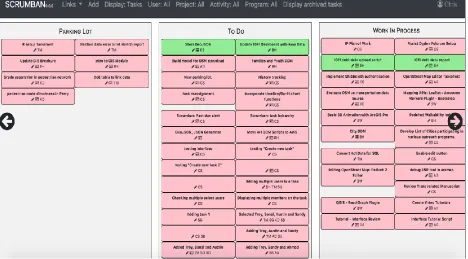
Figure 3.1 Scrumban User Interface . . . .. . . .. . . 13 1
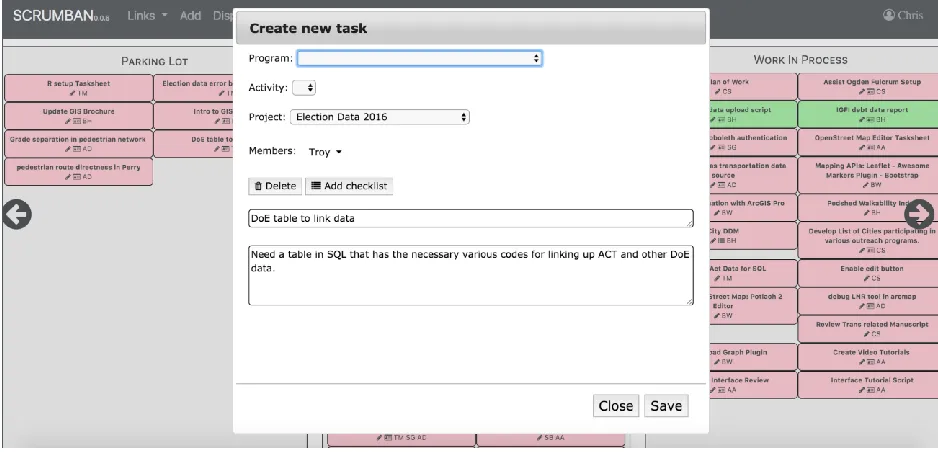
Figure 3.2 Task Add/Edit dialog box. . . .14
ACKNOWLEDGEMENTS
I wish to convey gratitude to my advisor, Professor Christopher J Seeger for his guidance and
support throughout the course of this project. I would like to thank my committee members Dr.
Shashi Gadia and Professor Simanta Mitra for their help and support.
ABSTRACT
To deliver a project of any magnitude successfully and on time, good project management is a
necessity. This is especially true in software development. Project planning, scheduling and
tracking are important activities of project management. [3] A critical part of project planning is to
itemize the tasks, develop an initial schedule and assign team members as needed to accomplish
those tasks. As development progresses, it is important to monitor the completion of those tasks, to
review the associated products and to determine if changes, alternative plans, or reassignments are
required. Effective tracking of projects and tasks helps software teams focus on priorities and
allocate resources wisely.
Scrumban is a project management application developed for projectand task tracking. This report
presents the design and assessment of this tool. The interface helps developers collaborate, plan
projects and manage tasks. The main targeted user-group of this application is the department of
Extension and Outreach at Iowa State University. The major theme of this application is to increase
efficiency in developing, recording and tracking of projects with improved visibility and immediate
CHAPTER 1. INTRODUCTION
1.1 Background
Software development is a highly complex process, with a myriad of variables affecting the system.
A good plan reduces risk, uncertainty, and supports better decision making. Scrum is a process
framework that has been used to manage complex product development since early 1990s. It helps
people address complex adaptive problems, while productively and creatively delivering products
of the highest possible value. [1] Scrum methodology defines scrum team as its minimal functional
unit. Each functional team serves a specific purpose and is essential to Scrum’s success and usage.
Kanban is a scheduling system for lean manufacturing and just-in-time manufacturing. [2] Kanban
has five main principles: visualize workflow, limit work in progress, measure and manage flow,
make process policies explicit, and use models to recognize improvement and opportunities.
Kanban focuses on communication, collaboration and integration between software developers,
testers and support teams, resulting in rapid software development and continuous delivery to the
customer. [2]
With a shift to agile methodologies, the traditional ways of managing projects like Gantt project
plans, whiteboards, yellow post-it notes etc are no longer able to provide the real-time visibility
needed in demanding project schedules.
Traditionally, Software Development organizations use the following tools to manage their project
●
MS-Word documents, MS-Excel spreadsheets or standalone requirements capture tools●
High-level project plan (GANTT chart) developed in tools such as Microsoft Project,Primavera and printed out for reference
●
Project estimates prepared using a combination of the high-level project plan andspecialized standalone MS-Excel spreadsheets
As the static project plans, have become replaced by the more flexible agile approach, the old set of
task management software tools no longer work:
●
The project schedule is constantly evolving, with tasks being reallocated to differentiterations and team members re-estimating the number of requirements and associated
tasks they can complete in a given timeframe
●
With the evolving teams, there is need for common platform for better visibility of theproject status and progress.
●
Defects, tasks and requirements need to be managed in the same environment, with theproject estimates and schedules taking account of both at all times.
1.2
Project Objective
This project is developed to:
●
Provide a hassle free and effective medium to manage projects and tasks for the departmentof Extension and Outreach
●
Provide a medium for individual or groups of individuals to collaborate for theaccomplishment of collective goals of a project.
●
Monitor and track project tasks and processes1.3
Report Organization
The rest of the report is organized as follows. Chapter 2 gives an overview of the project, the
software description, its architecture and implementation. Chapter 3 shows the results of the work.
CHAPTER 2. SCRUMBAN
2.1
Overview
2.1.1 Architecture
The application consists of the following components.
User Interface: The user interface is a dashboard to visualize the different components which are
as follows:
a. Tasks: Each task is like a card that gives brief information about the task. Additionally,
checklist can be created for a task and members can be assigned to a task.
b. Boards: Scrumban essentially consists of 5 boards – ‘Parking lot’, ‘To do’, ‘Waiting’,
‘Work in progress’ and ‘Done’.
c. Programs, Activities and Projects: Programs, activities and projects are entities that are
interlinked with one another, with programs being on top of the hierarchy. Each
program has any number of activities associated with it and each activity has multiple
projects associated with it.
d. Users: Users of Scrumban are the members of the project teams. Only certain users are
allowed to add projects, activities and programs. All users can view, add and edit tasks.
PHP queries are made to the MySQL database via ajax calls to load up information on the
dashboard.
2.1.2 Software Description
Scrumban’s user Interface is developed using jQuery, HTML, CSS, Bootstrap. jQuery is a JavaScript
are simply handled via ajax. MySQL is used as the database engine. Request is made to the PHP files
via ajax. A query is made to the MySQL table from the PHP files which returns results that are
fetched by ajax and displayed.
2.2 Implementation
The application is a simple one, for task management. This is a single page application which
contains dashboard that displays various tasks that belong to different projects, activities and
programs. These data are taken from Tasks table. An ajax call to the php file to get the task data
from Tasks table is made. These tasks are then filtered into the various boards based on their
status. The tasks can be dragged and dropped from one board to another using jQuery UI draggable
and droppable methods. These methods allow the DOM elements to be dragged and dropped with
the help of mouse anywhere within the view port. The task cards are colored in a way to distinguish
based on the program they belong to. If no program has been assigned to a task, the default color is
LightPink.
The page also contains an add button which can be used to add new project, activity, program or
task, the details of which are entered into the respective tables in the MySQL database using ajax
calls to the PHP files. A task can be added by any user, while a project/ activity/ program can only
be added by authorized users. This validation currently is being done using the userId which is
unique for each user.
To keep the dashboard current and efficient, any task that is “Done” and is beyond a month old is
archived. The tasks that need to be archived are moved from `tasks` table to `tasks_archive`. Every
tasks into `tasks_archive` and deletes the same from `tasks` table. If the archived tasks need to be
viewed, there is a button ‘Display archived tasks’ which will load up the archived tasks from
`tasks_archive` table. This button toggles to display/hide archived tasks.
To create local server, XAMPP 5.6.14 has been used. It makes setting up a local test server on laptop
easier. XAMPP provides the (W)AMP stack - Apache, MySQL and PHP. It also includes PHPMyAdmin
CHAPTER 3. RESULTS
Task organization:
Scrumban provides the ability to edit and track project tasks. One can search and filter the list of
tasks to quickly find those that are assigned to a particular member, which tasks have been
completed or are still in progress. It gives each individual and the team an overview of the effort
being put in and helps them better allocate the time towards the projects. Tasks can also be filtered
based on the project, program and activities or different combinations of the aforementioned. The
tasks can be dragged and dropped across different boards such as “To do”, “Work in process”,
“Done” etc depending upon their status.
Task editing
Task editing allows the task to be assigned to a different project, program or activity, assigning and
removal of members on a task. Checklists are essentially simple, nested subtasks. Items within
these checklists are either done or not done. Checklists allow you to create and group items within
a task. A checklist can be added for a task to help stay on top of the to-do list. A task can be deleted if
Figure 3.2 Task dialog box.
CHAPTER 4. IMPACT AND FUTURE SCOPE
Impact
Scrumban can be used by the department of Extension and Outreach to collaborate on project.
From managing simple to-do lists to helping teams work and collaborate better, Scrumban will help
track the progress of the project. The visibility of the status and requirements of the project makes
it very helpful. It allows for optimization of resource allocation. By filtering the tasks allocated to
each member, one can observe the work load. It helps understand what the resources are working
on, what else a person has on his plate, what work is not assigned to anyone. This is mainly
important for the executives to ensure that resources are being utilized in an optimal way.
Future scope
The application can be further improved by introducing new features into the system. Prioritize
and schedule requirements for each project, load-balance project resources to maximize project
velocity. Users being able to enter project issues and defects during lifecycle and track issues,
defects against project schedule can be helpful. View project velocity, burndown and burnup
reports. Effective tracking also helps the resources to keep track of their normal work time as well
CHAPTER 5. CONCLUSION
Planning, management and tracking are integral part of any software project. A task management
tool is especially helpful for this purpose. Getting a tool that is going to improve productivity rather
than creating more work than it saves is very important. Scrumban is a simple task management
application that allows for the creation and assignment of tasks. Along with the current features of
Scrumban, being able to prioritize and schedule requirements would make this application more
REFERENCES
[1]What is Scrum? https://www.scrum.org/resources/what-is-scrum
[2]Kanban https://en.wikipedia.org/wiki/Kanban
[3]Pressman, R. (2001). Software Engineering A practitioner’s approach. (5th ed.)
Berkeley: McGrawHill
[4] https://financesonline.com/project-management-software-useful-benefits-importance-features/
[5]https://getbootstrap.com/docs/4.1/getting-started/introduction/