InTrans Project Reports Institute for Transportation
9-2014
Electronic Construction Collaboration System –
Final Phase
Jose A. Perez Reboredo Charles T. Jahren
Iowa State University, [email protected]
Follow this and additional works at:http://lib.dr.iastate.edu/intrans_reports
Part of theCivil Engineering Commons
This Report is brought to you for free and open access by the Institute for Transportation at Iowa State University Digital Repository. It has been accepted for inclusion in InTrans Project Reports by an authorized administrator of Iowa State University Digital Repository. For more information,
Recommended Citation
Perez Reboredo, Jose A. and Jahren, Charles T., "Electronic Construction Collaboration System – Final Phase" (2014).InTrans Project Reports. 85.
Electronic Construction Collaboration System – Final Phase
Abstract
This phase of the research project involved two major efforts: (1) Complete the implementation of AEC-Sync (formerly known as Attolist) on the Iowa Falls Arch Bridge project and (2) develop a web-based project management system (WPMS) for projects under $10 million. For the first major effort, AEC-Sync was provided for the Iowa Department of Transportation (DOT) in a software as a service agreement, allowing the Iowa DOT to rapidly implement the solution with modest effort. During the 2010 fiscal year, the research team was able to help with the implementation process for the solution. The research team also collected feedback from the Broadway Viaduct project team members before the start of the project and
implementation of the solution. For the 2011 fiscal year, the research team collected the post-project surveys from the Broadway Viaduct project members and compared them to the pre-project survey results. The result of the AEC-Sync implementation in the Broadway Viaduct project was a positive one. The project members were satisfied with the performance of AEC-Sync and how it facilitated document management and transparency. In addition, the research team distributed, collected, and analyzed the pre-project surveys for the Iowa Falls Arch Bridge project. During the 2012 fiscal year, the research team analyzed the post-project surveys for the Iowa Falls Arch Bridge project AEC-Sync implementation and found a positive outcome when compared to the pre-project surveys. The second major effort for this project involved the identification and implementation of a WPMS solution for smaller bridge and highway projects. During the 2011 fiscal year, Microsoft SharePoint was selected to be implemented on these smaller highway projects. In this year, workflows for the shop/working drawings for the smaller highway projects specified in Section 1105 of the Iowa DOT Specifications were developed. These workflows will serve as the guide for the development of the SharePoint pages. In order to implement the Microsoft SharePoint pages, the effort of an integrated team proved to be vital because it brought together the expertise required from researchers, programmers, and webpage developers to develop the SharePoint pages.
Keywords
Bridges, Construction projects, Data sharing, Highways, Implementation, Information management, Project management, Software, Websites (Information retrieval), Iowa Department of Transportation, Iowa, WPMS, web-based-electronic collaboration
Disciplines Civil Engineering
Electronic Construction
Collaboration System—
Final Phase
Final Report
September 2014
About the Institute for Transportation
The mission of the Institute for Transportation (InTrans) at Iowa State University is to develop and implement innovative methods, materials, and technologies for improving transportation efficiency, safety, reliability, and sustainability while improving the learning environment of students, faculty, and staff in transportation-related fields.
Disclaimer Notice
The contents of this report reflect the views of the authors, who are responsible for the facts and the accuracy of the information presented herein. The opinions, findings and conclusions expressed in this publication are those of the authors and not necessarily those of the sponsors.
The sponsors assume no liability for the contents or use of the information contained in this document. This report does not constitute a standard, specification, or regulation.
The sponsors do not endorse products or manufacturers. Trademarks or manufacturers’ names appear in this report only because they are considered essential to the objective of the document.
Iowa State University Non-Discrimination Statement
Iowa State University does not discriminate on the basis of race, color, age, ethnicity, religion, national origin, pregnancy, sexual orientation, gender identity, genetic information, sex, marital status, disability, or status as a U.S. veteran. Inquiries regarding non-discrimination policies may be directed to Office of Equal Opportunity, Title IX/ADA Coordinator, and Affirmative Action Officer, 3350 Beardshear Hall, Ames, Iowa 50011, 515-294-7612, email [email protected].
Iowa Department of Transportation Statements
Federal and state laws prohibit employment and/or public accommodation discrimination on the basis of age, color, creed, disability, gender identity, national origin, pregnancy, race, religion, sex, sexual orientation or veteran’s status. If you believe you have been discriminated against, please contact the Iowa Civil Rights Commission at 800-457-4416 or the Iowa Department of Transportation affirmative action officer. If you need accommodations because of a disability to access the Iowa Department of Transportation’s services, contact the agency’s affirmative action officer at 800-262-0003.
The preparation of this report was financed in part through funds provided by the Iowa Department of Transportation through its “Second Revised Agreement for the Management of Research Conducted by Iowa State University for the Iowa Department of Transportation” and its amendments.
Technical Report Documentation Page
1. Report No. 2. Government Accession No. 3. Recipient’s Catalog No.
Part of InTrans Project 08-325
4. Title and Subtitle 5. Report Date
Electronic Construction Collaboration System – Final Phase September 2014
6. Performing Organization Code
7. Author(s) 8. Performing Organization Report No.
Jose A. Perez Reboredo and Charles T. Jahren Part of InTrans Project 08-325
9. Performing Organization Name and Address 10. Work Unit No. (TRAIS)
Institute for Transportation Iowa State University
2711 South Loop Drive, Suite 4700 Ames, IA 50010-8664
11. Contract or Grant No.
12. Sponsoring Organization Name and Address 13. Type of Report and Period Covered
Iowa Department of Transportation 800 Lincoln Way
Ames, IA 50010
Federal Highway Administration U.S. Department of Transportation 1200 New Jersey Avenue SE Washington, DC 20590
Final Report
14. Sponsoring Agency Code SPR RB02-008
15. Supplementary Notes
Visit www.intrans.iastate.edu for color PDF files of this and other research reports.
16. Abstract
This phase of the research project involved two major efforts: (1) Complete the implementation of AEC-Sync (formerly known as Attolist) on the Iowa Falls Arch Bridge project and (2) develop a WPMS for projects under $10 million.
For the first major effort, AEC-Sync was provided for the Iowa DOT in a software as a service agreement, allowing the Iowa DOT to rapidly implement the solution with modest effort. During the 2010 fiscal year, the research team was able to help with the
implementation process for the solution. The research team also collected feedback from the Broadway Viaduct project team members before the start of the project and implementation of the solution. For the 2011 fiscal year, the research team collected the post-project surveys from the Broadway Viaduct project members and compared them to the pre-project survey results. The result of the AEC-Sync implementation in the Broadway Viaduct project was a positive one. The project members were satisfied with the performance of AEC-Sync and how it facilitated document management and transparency. In addition, the research team distributed, collected, and analyzed the pre-project surveys for the Iowa Falls Arch Bridge project. During the 2012 fiscal year, the research team analyzed the post-project surveys for the Iowa Falls Arch Bridge project AEC-Sync implementation and found a positive outcome when compared to the pre-project surveys.
The second major effort for this project involved the identification and implementation of a WPMS solution for smaller bridge and highway projects. During the 2011 fiscal year, Microsoft SharePoint was selected to be implemented on these smaller highway projects. In this year, workflows for the shop/working drawings for the smaller highway projects specified in Section 1105 of the Iowa DOT Specifications were developed. These workflows will serve as the guide for the development of the SharePoint pages. In order to implement the Microsoft SharePoint pages, the effort of an integrated team proved to be vital because it brought together the expertise required from researchers, programmers, and webpage developers to develop the SharePoint pages.
17. Key Words 18. Distribution Statement
bridge—highway—WPMS—web-based-electronic collaboration No restrictions.
19. Security Classification (of this report)
20. Security Classification (of this page)
21. No. of Pages 22. Price
Unclassified. Unclassified. 67 NA
E
LECTRONIC
C
ONSTRUCTION
C
OLLABORATION
S
YSTEM
–
F
INAL
P
HASE
Final Report September 2014
Principal Investigator Charles T. Jahren
Professor, Civil, Construction and Environmental Engineering Institute for Transportation, Iowa State University
Research Assistant Jose A. Perez Reboredo
Authors
Jose A. Perez Reboredo and Charles T. Jahren
Sponsored by
the Iowa Department of Transportation and the Federal Highway Administration
(SPR RB02-008)
Preparation of this report was financed in part
through funds provided by the Iowa Department of Transportation through its Research Management Agreement with the
Institute for Transportation (InTrans Project 08-325)
A report from
Institute for Transportation Iowa State University 2711 South Loop Drive, Suite 4700
TABLE OF CONTENTS
ACKNOWLEDGMENTS ... ix
EXECUTIVE SUMMARY ... xi
INTRODUCTION ...1
Problem Statement ...1
Research Objectives ...1
AEC-SYNC IMPLEMENTATION ...3
Overview ...3
Iowa Falls Arch Bridge Project Post-Project Surveys ...3
WORKFLOW DEVELOPMENT ...7
Methodology ...7
Results ...9
Request for Information Workflow ...10
Analysis...16
SHAREPOINT IMPLEMENTATION ...17
Microsoft SharePoint and Project Initiation ...19
Microsoft SharePoint throughout the Project’s Duration ...19
LESSONS LEARNED AND CONCLUSIONS ...22
APPENDIX A. IOWA FALLS ARCH BRIDGE PROJECT SURVEY RESULTS ... A-1
APPENDIX B. SHOP/WORKING DRAWINGS WORKFLOWS FOR ACTIVITIES IN
IOWA DOT SPECIFICATION SECTION 1105 ...B-1
APPENDIX C. REQUEST FOR INFORMATION WORKFLOWS BY FRANCIS O.
DAYAMBA ...C-1
vi
LIST OF FIGURES
Figure 1. Survey results – learning the system ...4
Figure 2. Survey results – transparency of document management ...5
Figure 3. Survey results – accountability of project participants...5
Figure 4. Survey results – project implementation size ...6
Figure 5. Legend of symbols ...9
Figure 6. Structural erection manual workflow ...11
Figure 7. Workflow for the steel and aluminum pedestrian handrails ...12
Figure 8. Cofferdam design workflow ...13
Figure 9. Safety grates workflow ...14
Figure 10. Temporary sheet pile retaining walls workflow ...15
Figure 11. The SharePoint development team ...18
Figure 12. SharePoint page initiation workflow ...19
Figure C.1. RFI Workflow for the Iowa DOT ...C-5
LIST OF TABLES
ACKNOWLEDGMENTS
The authors would like to thank the Iowa Department of Transportation for sponsoring this research and the Federal Highway Administration for state planning and research (SPR) funds used for this project. The authors would also like to thank everyone involved in the technical advisory committee (TAC) and any other meetings in relation to the current phase of the research project, especially the following people:
Jim Nelson
Kim Powell
Karla Hocker
Annette Jeffers
Charles Lee
Cherice Ogg
Dennis Peperkorn
James Hauber
John Narigon
John Smythe
Kelly Popp
EXECUTIVE SUMMARY
Complexities in bridge projects caused a need for the Iowa Department of Transportation (Iowa DOT) to identify and implement a web-based project management system (WPMS) as part of its construction administration system. Throughout the various electronic collaboration project phases, the research team, alongside Iowa DOT staff, was able to identify and test solutions for various bridge projects. For the first project phase, the solution selected was an in-house website developed for document sharing. From this implementation, it was identified that a solution that had email notification capabilities was something more desirable. For this reason, the second phase of the research consisted of the implementation of a solution that had this feature: Google Groups along with an FTP site. At the end of the research phase, it was concluded that a more automated solution could be more beneficial.
This phase of the research project involved two major efforts: (1) Complete the implementation of AEC-Sync (formerly known as Attolist) on the Iowa Falls Arch Bridge project and (2)
develop a WPMS for projects under $10 million. These efforts are explained in more detail in the following paragraphs.
AEC-Sync was provided for the Iowa DOT in a software as a service agreement, allowing the Iowa DOT to rapidly implement the solution with modest effort. During the 2010 fiscal year, the research team was able to help with the implementation process for the solution. The research team also collected feedback from the Broadway Viaduct project team members before the start of the project and implementation of the solution. For the 2011 fiscal year, the research team collected the post-project surveys from the Broadway Viaduct project members and compared them to the pre-project survey results. The result of the AEC-Sync implementation in the Broadway Viaduct project was a positive one. The project members were satisfied with the performance of AEC-Sync and how it facilitated document management and transparency. In addition, the research team distributed, collected, and analyzed the pre-project surveys for the Iowa Falls Arch Bridge project. During the 2012 fiscal year, the team analyzed the post-project surveys for the Iowa Falls Arch Bridge project AEC-Sync implementation and found a positive outcome when compared to the pre-project surveys.
INTRODUCTION
Problem Statement
Bridge construction projects are becoming more complex in terms of the project team composition, design aspects, and construction processes. Project teams are becoming more diverse in terms of their location (not centrally located) and team member compositions. Design aspects are becoming more complex due to code requirements and emphasis on the aesthetics of the bridge. Lastly, new construction methods such as lean and rapid accelerated bridge
construction are becoming more common within the industry. In 2008 the Iowa Department of Transportation (Iowa DOT) was entering a phase of complex bridge construction, beginning with the I-80 bridge, the US 34 bridge over the Missouri River, and the I-74 bridge over the
Mississippi River. Because of this, the Iowa DOT contacted the researchers to identify a web-based project management system (WPMS) that could ease the document management of shop drawings and requests for information (RFIs) for these projects.
For the first two phases of this research project, the team sought a WPMS that met the needs and requirements for large and complex bridge projects. The results of the implementation of a WPMS for these types of projects have proven to be positive. The researchers recommended to the Iowa DOT that a similar solution could also benefit smaller highway projects (less than $10 million). The previous research phase studied several WPMS that could be implemented for these projects. It was expected that a WPMS would increase efficiency specifically for the shop drawing approval process for smaller highway projects. For this reason, the research team and the Iowa DOT selected Microsoft SharePoint, a web content management system, to be used for these smaller projects. For the current and final phase of the research project, the research team documented workflows for other Iowa DOT projects as stated in Section 1105 of the Iowa DOT Specifications. This project phase also consisted of developing and implementing the SharePoint pages for the smaller projects.
Research Objectives
To study the implementation of a WPMS on complex bridge projects, the Iowa Falls Arch Bridge project’s AEC-Sync (formerly known as Attolist) implementation was evaluated. The post-project surveys were distributed to the Iowa Falls Arch Bridge project members, and the results were analyzed by the research team.
2
AEC-SYNC IMPLEMENTATION
Overview
Work on the AEC-Sync implementation continued during the 2012 fiscal year. The post-project surveys were distributed to the Iowa Falls Arch Bridge project team members. These results were compared to the pre-project surveys in order to demonstrate how the WPMS
implementation affected the project team’s performance and opinions of the system.
Iowa Falls Arch Bridge Project Post-Project Surveys
Post-Project Survey Respondent Population
The surveys were sent to 35 project team members. Nine project members responded, representing a 25.7% response percentage. From those nine responses, one mentioned that his/her involvement with AEC-Sync (Attolist) was not significant. This member did not complete the survey questionnaire. The survey responses, then, includes eight respondents, which represents 22.9% of the initial population of people who were sent the surveys.
Among the survey respondents, 62.5% were Iowa DOT staff and employees, 25% were
subcontractors or suppliers, and 12.5% were consultants to the project. There were no responses from the contracting agency (contractors).
Survey Responses and Analysis
For the scope of this report, only several questions are shown in this section; the rest are found in Appendix A.
4
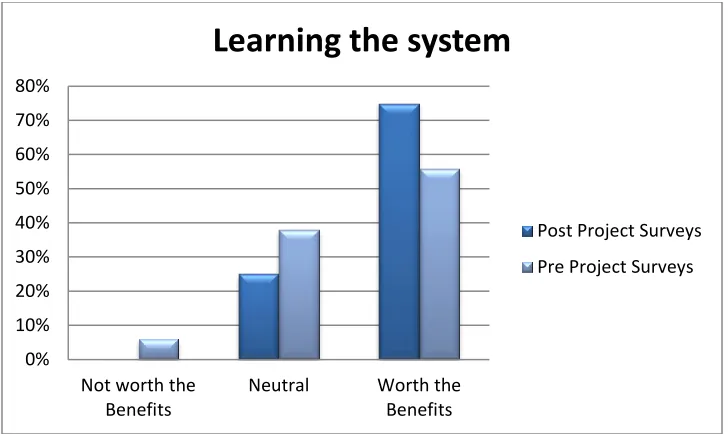
Figure 1. Survey results – learning the system
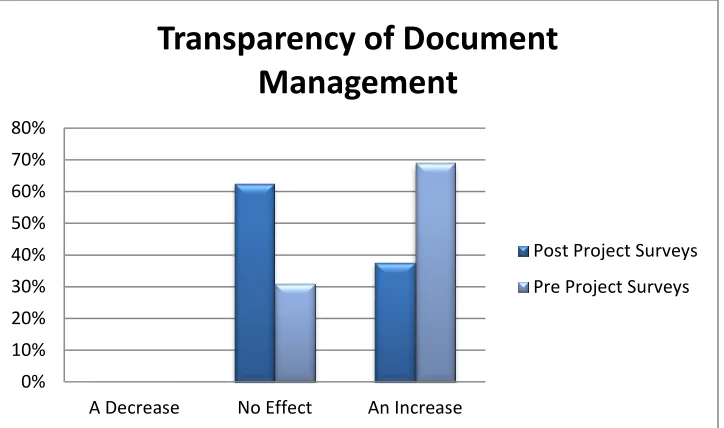
When respondents were asked about the effect of the WPMS on the transparency of document management, it was found that the respondents were expecting the WPMS, during the pre-project phase, to increase the transparency of document management. When respondents were asked the same question in the post-project surveys, the results showed that the respondents found no change in the transparency of document management. Even though the result was not the one that was expected, it is still a positive response related to the implementation of the WPMS. This indicates that the WPMS did not affect negatively document management within the Iowa DOT and that the current document management strategies within the Iowa DOT are transparent enough compared to what the WPMS can offer. Figure 2 shows the results
concerning this topic. A similar result was seen concerning the topic of the accountability of the project member participants. During the pre-project survey stage, it was expected for the WPMS to increase the accountability of the project members by around 60%. After the post-project surveys were analyzed, it was found that half of the respondents believed that the WPMS positively affected the accountability of the project members, while the other half said that there was no effect. This can be seen in Figure 3.
0% 10% 20% 30% 40% 50% 60% 70% 80%
Not worth the Benefits
Neutral Worth the
Benefits
Learning the system
Post Project Surveys
Figure 2. Survey results – transparency of document management
Figure 3. Survey results – accountability of project participants
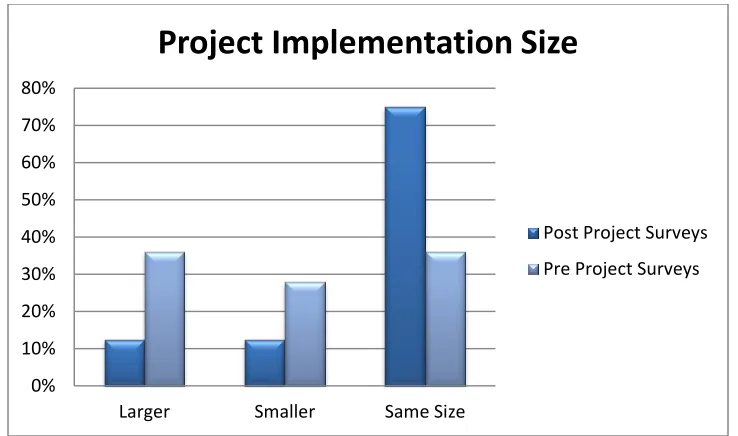
When respondents were asked about the size of projects that they considered could benefit from a system like AEC-Sync, the answers from the pre-project surveys differed from the post-project survey results. During the pre-project phase, the answers were almost evenly spread between smaller, larger, or same-sized projects. During the post-project phase, around 75% of the respondents found that a WPMS like AEC-Sync could most benefit a project that is around the same size as the Iowa Falls Arch Bridge project. This answer indicates that maybe AEC-Sync is too simple for larger projects, but too complex for smaller projects. This result can be seen in Figure 4.
0% 10% 20% 30% 40% 50% 60% 70% 80%
A Decrease No Effect An Increase
Transparency of Document
Management
Post Project Surveys
Pre Project Surveys
0% 10% 20% 30% 40% 50% 60% 70%
A Decrease No Effect An Increase
Accountability Project Participants
Post Project Surveys
6
Figure 4. Survey results – project implementation size
In Appendix A, the rest of the responses are graphed and compared to the pre-project surveys. It should be noted that because the percentage of respondents was low in comparison to the
population, only limited generalization can be drawn from the results. 0%
10% 20% 30% 40% 50% 60% 70% 80%
Larger Smaller Same Size
Project Implementation Size
Post Project Surveys
WORKFLOW DEVELOPMENT
Workflow documentation is one of the main objectives for this research project. It not only helped to identify an available commercial system that meets the Iowa DOT requirements, but also allowed the research team to select Microsoft SharePoint as the WPMS to implement for the smaller highway projects. These workflows can also be used as a guide for future SharePoint or WPMS implementation that the Iowa DOT might encounter.
Workflows are being used to manage complex processes that are internet- and virtual-based (Müller et al. 2004). Workflows are able to document, regulate, and separate business and office work activities into defined tasks, roles, rules, and procedures (Georgakopoulos et al. 1995). According to Casati et al. (1997), tasks are work units within the workflow model that are assigned to agents to perform; tasks are also referred to as the agent’s role within the workflow process model. Workflows can be used to re-engineer information and automated business processes within an organization (Georgakopoulos et al. 1995). Three types of workflows available are as follows:
Material process workflows: Model the assembly and delivery of physical products. Information process workflows: Model automated tasks that are involved in the
creation, process, and management of information. This usually involves systems that provide basic technological infrastructure that support information processes.
Business process workflows: Model market-centered processes within an
organization (Georgakopoulos et al. 1995)
Methodology
One of the important aspects of documenting Iowa DOT workflows for future WPMS
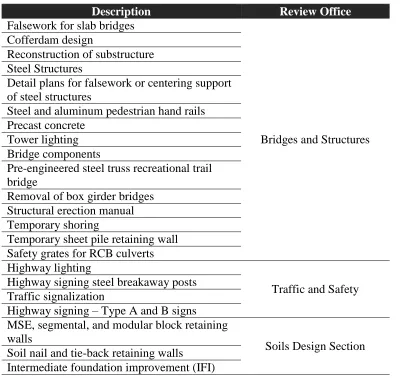
implementation is to identify different work components or projects that could benefit from a WPMS implementation. After a discussion with the TAC, the decision was made to document the workflow for all the shop drawings or working drawings that are documented in Section 1105 of the Iowa DOT Specifications, “Control of Work”. Table 1, based on Table 1105.03-1: Review Offices for Working Drawings (Iowa DOT 2011), lists the different shop/working drawings with the respective main review office.
After the various shop/working drawings that could benefit from a WPMS implementation were identified, interviews were held with the various review offices. These interviews helped the research team identify the required tasks and the relationships involved in the approval process for these drawings. An important aspect of these interviews was that they were held
independently and individually per office. This gave the research team the opportunity to understand and better capture the approval process for each of the respective offices and offer a workflow that best suited their respective needs. After conducting these initial meetings, the research team developed the workflows based on the requirements identified during the
Follow-8
up meetings were also scheduled in order to review the documented workflows for accuracy with the respective offices.
[image:24.612.65.470.193.571.2]All the workflows were created in word processing software, such as Microsoft Word, using the drawing tools option. Arrows were used to connect the various tasks and symbols, shown in Figure 5, and to represent various tasks, actions, and processes within the workflow.
Table 1. Shop/working drawings for Iowa DOT (Iowa DOT 2011)
Description Review Office
Falsework for slab bridges
Bridges and Structures Cofferdam design
Reconstruction of substructure Steel Structures
Detail plans for falsework or centering support of steel structures
Steel and aluminum pedestrian hand rails Precast concrete
Tower lighting Bridge components
Pre-engineered steel truss recreational trail bridge
Removal of box girder bridges Structural erection manual Temporary shoring
Temporary sheet pile retaining wall Safety grates for RCB culverts Highway lighting
Traffic and Safety Highway signing steel breakaway posts
Traffic signalization
Highway signing – Type A and B signs MSE, segmental, and modular block retaining walls
Soils Design Section Soil nail and tie-back retaining walls
Figure 5. Legend of symbols
Results
After the researchers met with the various offices within the Iowa DOT responsible for each corresponding shop drawing review, the workflows were established and documented. These workflows can be used to identify and evaluate WPMS that could ease the document
management and shop/working drawing review process. Later, after identifying a WPMS that can be implemented, these workflows can be used as the model to develop the various processes and pages for the selected WPMS.
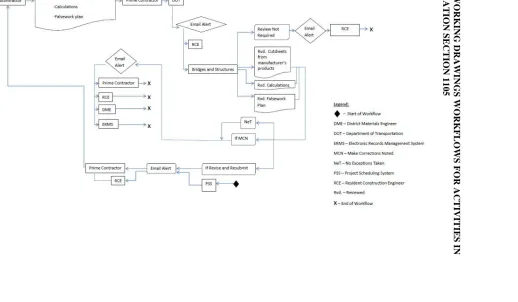
An interesting observation found during the workflow interviews was that, even though there are multiple working drawing processes, many of these share the same tasks, relationships, and processes. These can clearly be seen with the shop drawings that have to be reviewed by the Bridges and Structures office. There are 15 shop drawing review processes for which this office is responsible, but these can be categorized into five different workflow models.
The first of these workflow models covers working drawings for various procedures for bridge construction and demolition, including falsework for slab bridges, detail plans for falsework, or centering support of steel structures, structural erection manuals, and precast concrete, removal of box girder bridges, and pre-engineered steel truss recreational trail bridges. Figure 6 illustrates the structural erection manual workflow.
The second workflow model corresponds to the handrails and steel structures and the bridge components workflows. This workflow model is somewhat similar to the first model, but it incorporates an additional office, Central Materials, that reviews the drawings. This model is represented in Figure 7.
The third model also is derived from or is similar to the first workflow model. The most noticeable difference is that it includes an alternate process that is used if the drawing has to be reviewed by the Office of Soils Design. If the drawing has to be reviewed by the Office of Soils Design, it has to be reviewed by this office before Bridges and Structures, the responsible office
Person/Entity
Documents
Review Comments Automated
10
workflow with dashed lines. There are two shop drawing processes that share this model: cofferdam design and reconstruction of substructure. This third model can be seen in Figure 8.
The fourth model involves two additional offices, aside from the Office of Bridges and
Structures, to revise the shop/working drawings. This model corresponds to drawings that also involve the review of the Central Office of Materials and the Office of Traffic and Safety. The components that need to be reviewed are sent for review to the pertinent office. For example, the weld procedures are sent to the Central Office of Materials for review. Figure 9 presents the workflow for the following types of projects: safety grates, highway sign support structures, and tower lighting.
The fifth and last model corresponds to the sheet pile retaining walls and temporary shoring systems workflows. These are different from the previous workflows because they first have to be reviewed by the Office of Soils Design before being reviewed by the Office of Bridges and Structures. The workflow model is depicted in Figure 10.
The same observation was found in the other shop/working drawings to be reviewed by the other offices of the Iowa DOT. In the case of the Office of Soils Design, the three working drawings workflows were represented in two models. For the working drawings under the responsibility of the Office of Traffic and Safety, there were four workflows, represented in two models. For brevity, these models are not shown in the body of this report. However, the workflows for submittals investigated for this project are displayed in Appendix B.
Request for Information Workflow
A request was made by Iowa DOT to also develop workflows for requests for information (RFI). This request was addressed by a separate author, Francis O. Dayamba, and the requested
11
F
igu
re
6. S
tr
u
ctural e
re
ction m
an
u
al w
or
k
flo
w
I
Slbcon~ractor ~ +Uploads·
·Shop Dnwines
·CIIculalions
X
t-- - - +x
1--- - - +X
1-- - - +x
Workflow: Structural Erection Manual
~
L
~
Bride~s and Structures
-
_l
~~
~'"---~---
-
-~ ~andResubmrt
~-+
+x
+
-
Start of Worlcflow DME-District Materials Ene~n~er DOT-~partm~ntof Transportation ERMS-Electronic Records Manaeement SystemMCN-Make Corrections Noted
NeT-No Exceptions Taken
PSS - Project Scheduhne System
RCE-~sident Connructlon Ene~r Rvd.- Reviewed
[image:27.612.83.715.170.466.2]12
F
igu
re
7
. Wo
rk
flow
f
or
the st
ee
l an
d
alu
m
in
u
m
p
ed
estr
ian
h
an
d
rail
s
Workflow: Steel and Aluminum Pedestrian Handrails
lu-
-~
I-.a..
~·
- - -
-~
EJ
~
~
~
~
...
~
x
~ed_)~
X
~
~(1
I
ll'rltT"t~ I•
=1
ftNIINctt J<- tfRf!Yisundltnubrm·
~
L[§=;
-
• - St•• ol WO<UicwDME-Dlsttl« Mtterf.tl• (~!nur
DOT -OtPirtmtnt of l~uon
fbi$ .. tl«tronlc Rt<Ords Mat~a~etnent System
MCH -M.a.e Corrections Noted MIT-No~sT•ken
1'$$ .. Prottct sehtoc.Uinc sYstem ACE -Rd•dl:nt CCW~ttrudlon f:t~~lnnt
...,
_
_
13
F
igu
re
8
.
Cof
fe
rd
am
d
esign
w
or
k
flo
w
Uploads:
I Subco:tractor ~ -Shop Drawings -Calculations
X
1---~x
f ---7-X
f---~x
Workflow: Cofferdam Design
~
[
~
------: Rvd. Shop :
' '
1 Drawings L- , ... ~
·---·---:.: : : ,---, ,-' ',,
>l Soils0es€n 1---, 1 ... -1 i?' lfNeTor ' / Email ' , "---' L
-
>t~
R
~
~
~~~
c
;~
;
~~~
}1!-
~~
---
_;
--
:>
{'
,,
~
:
(//
~--
...
---~
I
:
:
~:
.
:~
· ~
I
-
·
-
-
-
JLegend:
+ -
Start of Workflow OME-District Materials EngineerPrimeContractor I~E llfRev;seandRewbnVt r---1
~
DOT-Department of Transportation
ERMS-Bectronic Records Management System
MCN-Make Corrections Noted
NeT-N.o Exceptions Taken
PSS-Project Scheduling System RCE-Resident Construction Engineer Rvd. -Reviewed
X-End of Workflow
--- • If process is required
14
F
igu
re
9
. S
af
ety gr
a
te
s
w
or
k
flow
Uploads:
4Weld Procedures
I
Subco:tractor ~~4 Truss Shop Drawings
-Sigm Shop Drawings
4And'lor Bolts
4Han:l Holes
Prime Contractor
Workflow: Safety Grates
~
l
~
Traffic and Safety
Central Materials
~
-
~
RCE~
X
~
legend:
+
-
Start of WorkflowOM£-Di~rict M:~tcrkal~ Ef'lsinecr DOT-Oepa.rtment of Transpottation ERMS-Electronic Records Management System MCN -Make Corrections N.oted
NeT-No Exceptions Takeo
PSS-Project Scheduling Ststem RCE-Resident Construction Engineer
15
F
igu
re
10
. Te
m
p
o
rar
y s
h
ee
t pi
le r
etain
in
g w
all
s w
or
k
flow
Uploads:
I Subco:tractor ~ -Shop Drawings -Calculations
Workflow: Temporary Sheet Pile Retaining Walls
X
1---~x 1-- - - - ?X
1---~x
~
L
~
Pr;me Contractor ~~ E Ill Rev;se and RewbnVt
~
Legend:
+ -
Start of Workflow OME-District Materials Engineer DOT-Department of Transportation ERMS-Bectronic Records Management System MCN-Make Corrections NotedNeT-~ Exceptions Taken PSS-Project Scheduling System RCE-Resident Construction Engineer Rvd. -Reviewed
16 Analysis
As noted in the results section, various work processes for the respective shop drawing approval processes were able to be grouped together. At the beginning of the project, this was unexpected, but during the interviews it was found that a number of working drawings shared the same evaluation process and workflow. This highlighted the importance of documenting and
developing workflows for these processes. It gave the reviewing offices at the Iowa DOT and the research team the opportunity to graphically visualize the review processes of these
shop/working drawings and realize that most of their review processes share tasks and
SHAREPOINT IMPLEMENTATION
As stated previously, Microsoft SharePoint was the software tool that was selected for
implementing electronic collaboration for smaller highway projects. SharePoint is a document management system that can be integrated and allowed to communicate with other software applications, such as email and personal content management systems (such as Microsoft
Outlook); previously existing programs; and users. At the time SharePoint was selected, the State of Iowa was considering the use of SharePoint for several applications, and the selection of SharePoint for this project was intended to provide synergy with other applications. Since the selection was made, the State of Iowa is re-evaluating SharePoint and may choose a different software tool that has a similar function. Although the platform may change, the workflows and basic concepts will remain as described herein.
The Microsoft SharePoint pages are developed in-house by specialist information technology personnel, herein referred to as SharePoint Page developers, using SharePoint’s established rules and settings. The server space and the storage capacity depend on the in-house server capacity. There are two types of licenses available when purchasing SharePoint: the internal and external licenses. With the internal license, only the people within the internal network (in this case, usually employees of the contracting authority) can access the SharePoint page and contribute to the document exchange process. With the external license, people outside of the network (such as, in this case, contractors, subcontractors, suppliers, and consultants) can access the documents for which the SharePoint page developer has given permission.
An important requirement for successfully developing and implementing a WCMS, such as Microsoft SharePoint, in construction projects is to form a team that can understand the
requirements needed for the site implementation. This team can be created by the client requiring the development of the SharePoint page. The client or the client’s representative determines and selects the team members involved in the SharePoint page development based on their
18
Figure 11. The SharePoint development team
The responsibility of the workflow specialist is to document the workflows of work processes that are going to be automated in Microsoft SharePoint. To document the workflows, interviews with relevant personnel have to be scheduled so that the various tasks and their relationships within the work process can be identified. These workflows need to correctly depict the work processes because they will serve as the backbone for the SharePoint page development.
The SharePoint page developer is involved in the development of the various work processes managed by the SharePoint page. The developer uses the workflows developed by the workflow specialist to create the document libraries within SharePoint and set the restrictions to these. The restrictions set the required rules and specifications for the established workflows. The
SharePoint page developer may need to communicate with computer programmers to devise a way to initiate the SharePoint page at the beginning of the project in such a way that it is preloaded with important project information, known as metadata.
The programmer’s responsibility is to help identify a way that the SharePoint page can be initiated automatically at the beginning of the work process. The programmer is also responsible for integrating the SharePoint page into any electronic systems or server spaces that the client may have already established.
The web page developer is responsible for developing the portal. The portal is the web page on which a user initially lands when accessing SharePoint, which includes branding for the
contracting authority and important partners, authentication for application users, and other miscellaneous notices and web links that may be helpful to users.
Application Development
Client
Representative
Workflow
Specialist
Programmers
SharePoint
Page
Developer
Microsoft SharePoint and Project Initiation
One of the goals for the SharePoint system was to initialize a page automatically after a contract for a project has been signed. After discussing this with the TAC, it was chosen to have this process automated based on the project’s metadata, types of shop drawing submittals required, and project letting date.
The Iowa DOT uses an executable procedure that runs every night to identify projects that are newly under contract or that have new project information that has been entered into the Iowa DOT Projects Letting Table. The procedure is able to redistribute the information to other internal databases or servers and to initiate other programs associated with the project. This executable procedure was chosen to initiate the project’s SharePoint page. A developmental specification (DS) number, a number recorded with a specific project and metadata, is added to the Projects Letting Table by the Project Scheduling System (PSS) office after the project is let and the contract is executed. After this DS number is entered into the Projects Letting Table, the executable procedure runs, triggering the creation of a general SharePoint page. The workflow that summarizes this process is shown in Figure 12.
Figure 12. SharePoint page initiation workflow
Microsoft SharePoint throughout the Project’s Duration
After the SharePoint page is created, additional project metadata are entered into the SharePoint page. This allows for all the different workflows involved in the project to execute properly. The
Project is let Project infromation
passed to PSS
Project information is gathered in the Project Letting Table
Project Contractor is assigned
Contractor information passed to
PSS
Contractor information is added to the Project Letting
Table
The DS number is assigned to the
project
Executable Procedure takes place overnight
20
developed. The workflow depicts a process that is still in the development stage and that has not been tested. After implementation, the process will be evaluated to identify any possible
opportunities for improvement. A note about this workflow is that the metadata provided by PSS at the initiation of the project SharePoint page will be updated as the project continues until its completion.
Figure 13. SharePoint project cycle
The activity in Figure 13 corresponding to the initiation of the SharePoint workflows includes several processes. The first process that SharePoint will go through is to identify that the SharePoint site has been created. It is through this process that various “SharePoint Member Groups” will be created using the information provided by PSS. “SharePoint Member Groups” is a SharePoint feature that allows project members and participants that share the same
responsibilities within the SharePoint site to be grouped together so they receive the same notifications. The act of creating these groups will grant access permission to the various parties involved in the project and the shop/working drawing submittal and review process. The various groups created will also allow for the automatic SharePoint notifications to take place. The second and third processes involved in the SharePoint workflows activity are the shop drawing review workflow, which was documented earlier in this paper, and the workflow for the outcomes of the review. The review workflow will distribute the uploaded document to the corresponding Iowa DOT office so the review can take place. The outcomes workflow will be based on the result of the review process, and the reviewer will categorize the document based on the result of the review. If a resubmission is required, the contractor will be notified, and the review and outcomes workflows will be launched again. If a resubmission is not required, the outcomes workflow will end.
The last two activities in Figure 13 go hand in hand. When PSS signals the process for the completion of the project, the Iowa DOT will save a record of the documents involved in the projects in an archival system named the Electronic Record Management System (ERMS). The project’s metadata will also be sent to ERMS if queried by PSS. Recall that the initial project metadata can be transferred from PSS to SharePoint. At the end of the project, the metadata can
PSS kicks-off the
Executable
Procedure
SharePoint page is
created
SharePoint project
workflows initiate
PSS signals project
completion
22 LESSONS LEARNED AND CONCLUSIONS
The post-project surveys from the AEC-Sync Iowa Arch Bridge project implementation
turned out to be positive. This result suggests that other Iowa DOT projects can benefit from a similar WPMS implementation.
Documenting workflows for the review process before identifying a WPMS solution
allowed the research team to understand the stakeholders’ needs and compile all the requirements and specifications. This helped the research team identify a solution most suited for the Iowa DOT’s needs.
Documenting workflows allowed the implementation team to set the requirements and
features for SharePoint, the selected WPMS solution for smaller projects. Documenting the workflows allowed the development and implementation team to understand the uses and features that SharePoint needed to provide to the end user in order to handle the document management involved in the shop/working drawings approval process.
Even though the SharePoint pages for the Iowa DOT’s smaller projects were not tested
by actual users at the time this report was written, the workflows documented during this research were used to evaluate which software solutions would be capable of
successfully implementing the WPMS application. If the SharePoint pages are able to perform all the tasks based on the established relationships, it appears that the likelihood of successful implementation could be high. If SharePoint pages do not appear to meet the requirements established in the original workflows, the SharePoint page
implementation does not have to be classified as completely unsuccessful. The
documented workflow allows either the re-engineering and possible modification of the SharePoint pages to better meet the users’ needs and requirements or for the users to reconsider their needs.
For successful WPMS development and implementation, a capable and integrated team
has to be created. The project team should integrate various specializations. In the case of this research project, a team was formed that included information technologists, engineers, and academic researchers.
APPENDIX A. IOWA FALLS ARCH BRIDGE PROJECT SURVEY RESULTS
Figure A.1 Submittal process
Figure A.2. Usage per month 0%
10% 20% 30% 40% 50% 60% 70% 80% 90%
More Difficult No Effect Easier
Submittal Process
Post Project Surveys
Pre Project Surveys
0% 10% 20% 30% 40% 50% 60% 70% 80%
More than 20 Less than 10 10 to 20
Usage per month
Post Project Surveys
A-2
Figure A.3. RFI process
Figure A.4. Project Information 0%
10% 20% 30% 40% 50% 60% 70% 80%
More difficult No Effect Easier
RFI Process
Post Project Surveys
Pre Project Surveys
0% 10% 20% 30% 40% 50% 60% 70% 80% 90% 100%
Less Available No Effect More Available
Project Information
Post Project Surveys
Figure A.5. Overall cost of document management
Figure A.6. Project role 0%
10% 20% 30% 40% 50% 60%
A Decrease No Effect An Increase No Information
Overall Cost of Document
Management
Series1
Series2
0% 10% 20% 30% 40% 50% 60% 70% 80% 90% 100%
Harder No Effect Easier
Project Role
Post Project Surveys
A-4
Figure A.7. Computer and internet requirements
Figure A.8. Bridge project management 0%
10% 20% 30% 40% 50% 60% 70% 80%
Unreasonable Neutral Reasonable No Information
Computer and Internet Requirements
Series1
Series2
0% 10% 20% 30% 40% 50% 60% 70% 80% 90% 100%
Worsen No effect Improve
Effect of Bridge Project Management
Post Project Surveys
B -1 APP E N DIX B . S HO P /WORK IN G DR AWI N G S W ORKF L OWS F OR AC T IVIT IE S IN IOW A D OT S P E CIF IC ATI ON S E CTIO N 110 5 F igu re B. 1. F alsew or k f or slab b rid ge s w or k flo w
I
Subco:tractor ~Uploads:
-CUtsheets from manufacturer's. products.
Workflow: Falsework for Slab Bridges
I Prime Contractor ~cp
L
~
~
~
~
~
~
X
f---~X
f---~x
I
RCE ~XLegend:
+ -
StartofWorkflow DME-District Materials EngineerDOT-Department of Transportation
ERMS-Electronic Records Management System MCN-Make Corrections Noted
NeT-No Exceptions Taken PSS-Project Scheduling System RCE-Resident Construction Eng,ineer
Rvd. -Reviewed
[image:43.612.94.686.150.452.2]B -2 F igu re B .2. Cof fe rd a m d esign w or k flo w 2
Uploads:
I
Subco~tractor!--+
-Shop Drawings-Calculations
X
1---~x
I ---.;,. X
1---~x
Workflow: Cofferdam Design
~
[
~
:;.;;.
-
~
----
j
-.: Oraw;ngs
:
-1
,
-
---,
,·
-'
.
''
,
,
·---~---:>, J !»• lfNeTor : ,' Emaol
>
;.: SoBsOesign ,---, : , • .-· ' :Met< •--:>', Alert , '
"---·
:
~~=====---:-o::;
',,,
/
•-->: Rvd.Calcul~~~--• •'· · · ~
-
-
-
---
--
-
i
I
::
~:
.
:~
d
~
~
·
·
-
-
-
·
·
-
-
J---~---'f
.
.
.
.
Legend:
+ -
Start of WorkflowOME-District Materials Engineer
- - - - 'I' •
Pr;me Contractor ~~ E Ill Rev;se and Resuborit
)<---
J~
DOT-Department of Transportation
ERMS-Bectronic Records Management System MCN-Make Corrections Noted
NeT-N.o Exceptions Taken
PSS-Project Scheduling System
RCE-Resident Construction Engineer
Rvd. -Reviewed
X-End of Workflow --- ·If process is required
[image:44.612.89.710.140.464.2]B -3 F igu re B .3. R ec on str u ct ion of s u b str u cture w or k flo w
Uploads:
I
Subco~tractor ~ -Shop Drawing~-Calculations
Workflow: Reconstruction of Substructure (detailed plans for supporting the superstructure)
X
1---~x
f -- - - ?X
f---~x
~
[
I
RCEI
:
-R
~
~
-
;~
----
1
,, : Oraw;ngs:
-1
,
-
---,
,-
-'
.
''
,
,
.---~---:>, J !»• lfNeTor : ,' Emaol
>
~ SoBsOesign ,---, : ,---- o :Met< •--:>•, Alert , '"---·
:
~~=====---:-o::;
'
•
,
,
/
'··>: Rvd.C.Ic~l~~~~--• :~--- ~
·
·
--
--
·
:
I
sr;dgesandI
·1 J: :Structures
!
.
·
··
----
-
-
---
·
- - - -'{'
.
.
.
.
Legend:
+ -
Start of Workflow OME-District Materials Engineer- - - - 'I' • Pr;me Contractor ~~ E Ill Rev;se and Resuborit
)<---
J~
DOT-Department of Transportation ERMS-Bectronic Records Management System MCN -Make Corrections Noted
NeT-N.o Exceptions Taken
PSS-Project Scheduling System
RCE-Resident Construction Engineer
Rvd. -Reviewed
X-End of Workflow
[image:45.612.82.720.145.479.2]B
-4
F
igu
re
B
.4
. S
te
el str
u
ct
u
re
s w
or
k
flo
w
I
Subco~tractor ~ Uploads:-Structural Steel Details Shop
Drawings
-Weld Procedures
Workflow: Steel Structures
I
Prime Contractor ~~L
~
Bridges and Structures
X
1----~X
X
1--- - - : .x
~
~
:
I
:
~~-
..
·
~
;
·
··
I
I
RCE ~Xlegend:
• - Start of Workflow
DME-District Materials Engineer DOT- Department of Transportation
ERMS-Electronic Records Management System MCN-Make Corrections Noted
NeT-No Exceptions Taken
PSS-Project Scheduling System
RCE-Resident Construction Engineer
Rvd.-Reviewed
[image:46.612.98.714.167.468.2]B -5 F igu re B. 5. D etail p lan s f or f alse w or k or c en te rin g su p p or t of ste el str u cture s w or k flow
Workflow: Detail Plans for Falsework or Centering Support of Steel Structur,es
Uploads:
I
Subco~tractor ~ -Shop Drawings-GatctJiations
I
PrimeContractor j-?~L
~
I
RCE ~XBridges and Structures
X
1---?x legend:
I -- - - ? X
+ -
Stan of WorkflowDME-District Materials Engineer
f---~x DOT-Depanment of Transponation
ERMS-Electronic Re<ords Management System MCN-Make Corrections Noted
NeT-No Exceptions Taken
Email Alen J E [ If Revise and Resubmil J
LB=+
PSS-Project S<heduling System RCE-Resident Construction Engineer
[image:47.612.114.711.167.467.2]B-6
B
-7
F
igu
re
B
.7.
P
re
cast
con
cr
et
e w
or
k
flo
w
Workflow: Precast Concrete
Uploads:
I
Subco~tractor ~ -Shop Drawings-calculations
I
Prime Contractor ~~L
~
~
~
l
r-;;;
.,
and StructuresI
RCE ~XX
I X
legend:
• - Start of Workflow
1---~X
DME-District Materials Engineer
1---- - - ?x DOT-Department of Transportation
ERMS-Electronic Records Management System
MCN-Make Corrections Noted
NeT-No Exceptions Taken
L,---__J~ ( [ If Revise and Resubmit ]
LB=+
PSS-Project Scheduling System
RCE-Resident Construction Engineer Rvd.-Reviewed
[image:49.612.94.717.144.445.2]B
-8
F
igu
re
B
.8. To
w
er
li
gh
ting w
or
k
flo
w
8
u
-
·Weld Procedures·Truss Shop Drawings ~gns Shop Drawings -Anchor Bolts
-Hand Holes
Workflow: Tower Lighting
I X
~---+X
~X
+
~
l
~
~~
1
ACE1
--+
x
~
lecendj
• - Statt of Workftow OME- District Materials E111inMr DOT-Otpartmtflt of TraNponation ER.MS-EIKCroruc Re<Drds Mlnl&etMnt System
MCH -Mab Corr«tions Noted
fteT-No bc.fi'(ION Taken
FSS-••OJO<t
sc-...,.-F.CE-RoJidontc:onnrua-~
F.:vd.-R...-wed
[image:50.612.90.721.150.463.2]B
-9
F
igu
re
B
.9. Brid
ge
c
o
m
p
on
en
ts w
or
k
flo
w
I
ds-·Shop Dfawl'lCS
I
SUbcontraaor ~ .O.kUiatJOns+ •Wold Prore!IK.,
Prime Contractor
X
1-- - - - +x
] ) X
X
Workflow: Bridge Components
~
L
~
~
~
1
RcEf
+
x
~
Bridees and Structure.s
~
Central Materials
• - SUrt ol WOfttlow
OME-Dmnct Mattn.als Engwt~r
DOT-~artm~t of TransportatiOn ERMS- El«tronic Records Management System
_
_1
~
MCN- Make Corrections NotedNeT-No EJ<ceptions Taken PSS- Project Scheduling System RCE- R.,ident Construction Eng1neer
Rlld.-R~ed
[image:51.612.59.702.152.477.2]B -10 F igu re B .10. P re-en gin ee re d ste el tr u ss r ec re at ion al tr ail b rid ge w or k flow
Workflow: Pre-engineered Steel Truss Recreational Trail Bridge
Uploads:
I
Subcontractor ~ -Shop Drawings-Galct!lations
I
PrimeContractor ~~L
~
Bridges and Structures
X
1-- - - ?x legend:
I -- - - ? X
+
-Stcrt of Workflow DME-District Materials Engineer
1---~x DOT-Department of Transportation
ERMS-Electronic Records Management System
MCN-Make Corrections Noted
NeT-No :xceptions Taken
Prime Contractor
PSS-Project Scheduling System
RCE-Resident Construction Engineer
Email Alen J E [ If Revise and Resubmit J
LB=+
Rvd. -Re,·iewed~
[image:52.612.95.712.164.470.2]B
-11
F
igu
re
B
.11. R
em
oval
o
f b
ox girder
b
rid
ge
s
w
o
rk
flo
w
Uploads:
I
Subcontractor ~ -Shop Drawings-Galctllations
Workflow: Removal of Box Girder Bridges
I
PrimeContractor j-?~L
~
Bridges and Structures
X
1---- - - - ?X X
Email Alen J ( [ If Revise and Resubmit J
LB=+
~
~
I
RCE~
X
~
Legend:
+
-
Start of WorkflowDME-District Materials Engineer
DOT-Department of Transportation
ERMS-Electronic Records Management System MCN -Make Corrections Noted
NeT-No Exceptions Taken
PSS-Project Scheduling System
RCE-Resident Construction Engineer
[image:53.612.91.708.169.467.2]B
-12
F
igu
re
B
.12. S
tr
u
ctural e
re
ction
m
an
u
al w
or
k
flow
Uploads:
I
Subcontractor ~ -Shop Drawings-catrolations
Workflow: Structural Erection Manual
I
PrimeContractor j-?~L
~
Bridges and Structures
X
X
I -- - - ? X
f---~x
Email Alen J E [ If Revise and Resubmit J
~
I
RCE ~Xlegend:
+ -
Stan of Workflow OME-District Materials EngineerDOT-Department of Transponation ERMS-Electronic Records Management System MCN-Make Corrections Noted
NeT-No Exceptions Taken
PSS-Project Scheduling System
RCE-Resident Construction Engineer Rvd.-Reviewed
[image:54.612.105.708.169.467.2]B
-13
F
igu
re
B
.13. T
em
p
or
a
ry sh
or
in
g w
or
k
flo
w
Uploads:
I Subco:tractor ~ -Shop Drawings
-Calculations
Workflow: Temporary Shoring
X
1---~x
f-- - - - ?X
f---~x
¥J
L
~
Pr;me Contractor ~~ E
I
l
l
Rev;se and RewbnVt~
Legend:
+ -
Start of Workflow OME-District Materials EngineerDOT-Department of Transportation ERMS-Bectronic Records Management System MCN-Make Corrections Noted
NeT-N.o Exceptions Taken
PSS-Project Scheduling System
RCE-Resident Construction Engineer
Rvd. -Reviewed
X-End of Workflow
[image:55.612.95.713.155.463.2]B
-14
F
igu
re
B
.14. T
em
p
or
a
ry sh
ee
t pi
le r
etaini
n
g walls
w
or
k
flo
w
Uploads:
I
Subco::ractor ~ -Shop Drawings-Calculations
Workflow: Temporary Sheet Pile Retaining Walls
X
1---~x
I----;,. X 1----~x
~
L
~
Prime Cowactor ~~ E
I
"
Rev;se and Resuborit~
Legend:
+ -
Start of Workflow OME-District Materials EngineerDOT-Department of Transportation
ERMS-Bectronic Records Management System
MCN-Make Corrections Noted
NeT-N.o Exceptions Taken
PSS-Project Scheduling System
RCE-Resident Construction Engineer Rvd. -Reviewed
X-End of Workflow
I
RCEI
[image:56.612.89.710.152.475.2]B
-15
F
igu
re
B
.15. S
af
ety gr
at
es w
or
k
flo
w
Uploads:
4Weld Procedures
I
Subco:tractor ~~4 Truss Shop Drawings -Signs Shop Drawings
4Anchor Bolts 4Hand Holes
Prime Contractor
Workflow: Safety Grates
~
l
~
Traffic and Safety
C:ntral Materials
~
-~
RCE~
X
~
lecend:
t
-
Start of WorkflowOME-District Materials Engineer
OOT-Oepa.rtment of Transpottation
ERMS-Electronic Records Management System
MCN -Make Corrections N.oted NeT-No Exceptions Taken PSS-Project Scheduling System F:CE-Resident Construction Engineer F:vd. -Reviewed
[image:57.612.72.729.148.469.2]B
-16
F
igu
re
B
.16. Hi
gh
w
ay li
gh
ting
w
or
k
flo
w
Uploads:
-Weld Procedures•
-Poles
I Subco:tractor ~~
·Pole's Foundations
-Catalog Cuts
Legend:
• - :Start of Workflow DME -District Materials Engineer DOT-Department of Transportation
ERMS- Electronic Records Management System MC:N- Make Corrections Noted
NeT-No Exceptions Taken
PSS-Project Scheduling System RCE-Resident Construction Engineer
Rvd.-Reviewed
X- End of Workflow
•only for Tower Lights
Workflow: Highway Lighting
I
Prime Contractor ~~L
~
Review NotRequired
,---1~ Rvd. Catalog
.1 Traffic and Safety )
I
Cuts Central Materials~
1---- - ?X
X
1
ERMSI
)
XPrime
[image:58.612.84.711.133.501.2]B -17 F igu re B .17. Hi gh w ay s ign in g ste el b re ak aw ays p osts w or k flo w
Uploads:
I
Subco:tractor ~~ -Working/Shop DrawingsLegend:
Workflow: Highway Signing Steel Breakaways Posts
I
Prime Contractor ~~L
~
l~
l
1
Traffic and SafetyX
I X
Review Not
Required
Rvd.
Shop/Working
.
~I Prime Contractor
• - Start of Workflow
DME- District Materials Engineer l ERMS I ) X
DOT- Department of Transportation
ERMS- Electronic Records Management System
MCN- Make Corrections Noted NeT-No Exceptions Taken
PSS-Project Scheduling System
RC: -Resident Construction Engineer Rvd.-Reviewed
X-End of Workflow
E