Think! Interactive Systems
Need Safety Locks
∗Harold Thimbleby
Future Interaction Laboratory, FIT Lab, Swansea University, Wales, United Kingdom
This paper uses a simple analogy. A gun is designed to shoot bullets, but it is obvious that accidentally shooting is a danger one should avoid if at all possible. Thus guns have safety locks, which aim to protect users and bystanders.
Interactive computer systems sometimes accidentally do bad things too, but something like “safety locks” are not often enough implemented to help protect users or bystanders from harm.
Worse, user interfaces often behave quite unpredictably with erroneous input — rather than blocking errors and requiring the user to correct them. This is a bit like guns that misbehave.
Computers and computers embedded in everyday devices are not always as dangerous as guns, although there are many cases where they can be as dangerous. Medical devices may give patients undetected overdoses. In-car entertainment devices, like radios, may, through their badly-designed user interfaces, cause a driver to have an accident. A slip in a spreadsheet may be the first step towards an organisation going bankrupt. And so on. The solution should include better design, including the concept of safety locks, that block some forms of user error.
Keywords: safety locks, human error, number entry, user interface design
1. Introduction
Machine guns have triggers, which the user squeezes to make them shoot. Machine guns also havesafety locksso that they cannot shoot by accident. Safety locks do not signficantly interfere with normal use of a gun, but they sig-nificantly reduce the probability of accidental misuse.
Why do guns have safety locks? Here are two facts: guns are dangerous, and even the best-trained users make slips from time to time. Safety locks significantly reduce the chances of unintended firing.
By analogy, any system that may have unwanted or potentially undesirable effects should have some sort of analogue to safety locks. More specifically:
• Any system that may have unwanted effects that are large compared to the final effort to make them happen, or are hard to undo, should have safety locks.
Safety locks are thus one way to follow the de-sign law of commensurate effort [9], whereby results should be broadly proportionate to user effort. (You should not be able to delete an entire day’s work with a single keystroke. . .)
The only argument against safety locks is that they may add complexity or cost to a design, and may then in themselves cause types of error that would not or could not occur without them. For example, safety locks on guns may slightly slow down shooters taking their first shot. Somebody may then be shot because a gun was delayed, locked in safe mode and so was not immediately usable to protect them. And even if we want to avoid safety locks so guns are faster to use, it is also a priority to ensure that a gun user doesn’t get killed by their own gun! A user being killed by accident would be far more inefficient than all of the small delays of using a safety lock each time the gun is needed to be deliberately fired.
∗Revised paper based on: H. Thimbleby, “Interactive Systems Need Safety Locks”, Proceedings of the ITI 2010 32nd International
Taking account of such complexities, a more considered design rule is
• Any system with potentially unwanted ef-fects should have a safety lock (or equiva-lent) unless the safety lock itself increases the risk of problems more than the prob-lems it is supposed to reduce.
In other words, having a safety lock is a de-sign trade-off. The key argument to be made by this paper is that this design rules fits in-teractive computer systems, and moreover, that what is obvious for a machine gun is too often overlooked in the case of interactive computer systems.
Computer systems are in many ways very much like machine guns. A simple action, perhaps intentional, perhaps a slip, can have enormous and quite unintended consequences. Like a ma-chine gun, any system controlled by a human requires some sort of trigger so that it can be made to operate when its user wants to operate it. (Of course, many systems are more complex than guns: the actions triggered may require further control and refinement.)
Imagine: a single keystroke triggers sending an unfortunate email to thousands of people. A button press triggers a patient receiving an over-dose of a drug. Clicking “save” overwrites a file the user wanted to keep, and there is no undo to recover all the work that has been lost.
Where are the safety locks when they are needed? This question is wrapped up within deeper, con-textual questions: sometimes the user really wants to do something unfortunate, but which only too late they realisewasunfortunate. The user might really want to send the email, and perhaps nothing the computer can do will make it safer, and the user only realises their er-ror when thousands of complaints start coming back to them much later.
Paul Cairns observes that “safety lock” is a con-cept much more general than what is needed on obviously dangerous devices like guns. In electrical wiring systems, there are fuses. A fuse blowing is an inconvenience (it causes a black-out and has to be replaced), but it stops an electrical fault of some sort escalating into perhaps a fire. A climber’s safety rope stops them falling uncontrollably. It does not stop them falling in the first place, and it may not
save their lives (occasionally safety ropes are cut to saveotherpeople’s lives, so that not ev-eryone is pulled off together), but a safety rope is a simple device that increases safety at small cost.
In this paper, whilst we use machine guns as a dramatic background motivation for safety locks, conceptually we see them as a far more general idea, and ones that could be very widely used in many sorts of applications. Somehow we do not think of computers ever needing safety locks in the same sense.
Just because there are different sorts of safety lock and sometimes complicated answers to the questions do not mean we should ignore funda-mental issues. . .
2. Ignoring Safety Locks in Programming
A leading undergraduate textbook on algorithms
[2], “the bible” of the field according to its blurb, explicitly says that it does not cover error han-dling. Almost 1,000 pages of text assume all data is correct, and, if so, how to process it. The book has no sanity checks, no assertions, noth-ing on exception handlnoth-ing — in short, no safety locks anywhere. This is an example of how we train undergraduate programmers.
If any data originates from a human — or orig-inates from a program written by a human — there is no guarantee the data is error-free. In the worst case, the program it is fed into may behave sort-of like a machine gun with all the possible untoward consequences.
3. Not just Safety Locks – Design for Error
Fortunately, most errors are corrected by re-silient mechanisms around the user. For exam-ple, other users or people may intervene and stop things escalating. A patient may ask a nurse, “. . .Stop! Yesterday you gave me 1mL not 10mL!” Then the error that led to the nurse incorrectly preparing 10mL is intercepted, and the patient gets the correct dose(or an explana-tion why the dose has changed).
When using a computer system, errors happen all the time! Many applications will have an undo key, and the user will simply correct the error before proceeding. It is interesting to note that devices(such as phones rather than applica-tions on computers)rarely have undo keys. It is also interesting to note that undo keys are often inconsistent and somewhat limited in what they can undo. For example, in Microsoft Word, I can undo any error — so long as it has nothing to do with the whole file! If I accidentally save a file over some other file I wanted, the other file will be lost and undo will not help me. However, because errors are so frequently in-tercepted and corrected before they lead to bad outcomes, the impression is that users get on with their work without making errors. Thus the organization they work for may specify and procure computer systems assuming errors do not happen. Thus when an error does happen, as it surely will sooner or later, the system is less supportive of correcting the error.
Consider this real example. Staff in an organi-zation can submit expense claim forms, so that they are paid for their personal expenses sup-porting the organization. Typically, expenses have to be charged to accounting codes. Staff fill in forms, make mistakes, and pass the forms on to administrators, who then fix the mistakes. Then the forms go to Finance, who authorize payment of the expenses.
So this simple paper-based form-filling system is replaced by a computer system, specified by the people who work in Finance. The intention is that staff will use a web-based form, which they fill in, and then submit directly to Finance. Of course, the Finance Department is now inun-dated with incorrectly filled-in forms. Finance did not know staff were making mistakes, be-cause their administrators who understood what was going on corrected their paper forms for them. Finance never knew staff made so many
mistakes, because they only saw the corrected forms. The computer system developed did not allow for user error, because management never got to hear about user error; it was always corrected before they saw anything. The com-puter system did not allow for administrators, because they were “invisible” in the previous paper-based approach.
How would a safety lock help? The simplest step would be to have an “are you sure?” check before the form is submitted — a bit like, “you’ve pulled the trigger, but do you really want to shoot?” Then, of course, the designer should ask, “how can a user answer such a ques-tion?” In the pre-computer, paper days, the an-swer was provided by a colleague, another user, or the administrator, who reviewed the com-pleted form. Why not let other users view the forms to answer the safety lock question, and help correct the forms? This way, local exper-tise and best practice about form-filling would naturally spread through the organization and everyone will get more skilled at filling in forms correctly, or helping others fill in forms cor-rectly. This simple idea not only increases the effectiveness of the system — reduces errors — but probably also increases job satisfaction for all the helpful bystanders.
last one. Clearly, such(unfortunately common)
thinking is not as strategic or as realistic as de-signing interactive systems that are better able to help users manage errors.
We now turn from these general comments to exploring errors and safety locks in an ubiqui-tous issue: numbers.
4. Ignoring Safety in Numbers
Number entry is one of the most basic and widely-encountered tasks (and is even a step in filling in expense claims forms, the example used in the previous section).
A user presses keys, say, 1, 2, ·, then 3(where I am using ·to mean a decimal point)and then the computer will convert the sequence of key presses, 12 ·3, to the number 12.3. Often the user will have to press ENTER or GO or some other key (perhaps starting the next step of the data entry)to indicate when they have finished entering each number.
Although we write 12 · 3 or 12.3 (the keys)
and 12.3(the number), to a computer these are quite different concepts, and one has to be care-fully converted to the other. Humans gener-ally think of numbers as particular sequences of digits rather than as abstract values, so the subtle differences between keys, numerals and numbers are often glossed over. Recall that computers use binary; what we write in this paper as 34, say, may be represented inside the computer as 100010 — and even then one would search in vain to find anything thatlooks like 100010, as the 1s and 0s are represented as electrical states, not as anything humanly readable. Indeed, our habitual ways of talking about numbers makes them look very easy, and correspondingly makes it quite hard to grasp how complex number entry really is. Another way of helping see the difference is that our choice of representing the number 34 as the two characters 3 and 4 is an arbitrary decision; Ro-mans would have written XXXIV, and, conceiv-ably, if Roman numerals had not given way to Arabic numerals, we might have numeric key-boards with I, V and X on them! But both 34 and XXXIV, though different numerals, are the same number, but the way we talk about that number is to call it thirty four — and that’s writing the numeral in English words instead!
In summary, we press keys to describe the nu-meral we want to enter, and the computer has to do some interesting work to convert the keys into the actual number (which in fact it will represent inside itself as a binary numeral or in some other notation).
A typical approach to converting keystrokes to numbers is as follows.
The computer starts off with the number 0. When a user hits a digit key, the number is mul-tiplied by 10 and the value of the digit(not the key itself!) is added to it. So if the user presses the key with the label ‘3’ on it, then the calcula-tion 0×10+valueof(key3), which in this case works out to be 3, is performed, and then the computer gets the number 3. This may seem rather obvious and perhaps a little complex for what it achieves, but exactly the same process will work on the next key too. If the user keys ‘4’ next, another digit key, then the same pro-cess is repeated: 3×10+valueof(key4)will be 34.
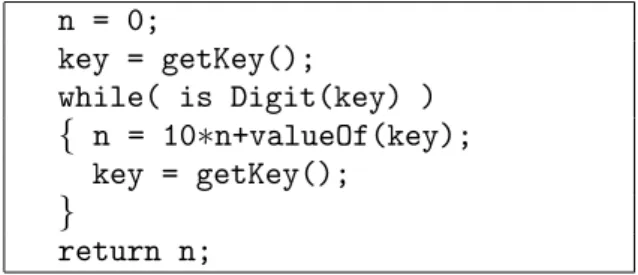
In this example, as can be seen, the userkeyed ‘3’ then ‘4’ and the computer determined that they entered the numerical value34. The pro-cess is repeated so long as the user is keying dig-its. Figure 1 shows the algorithm as it would be written in a typical programming language, like Java. The simple algorithm described above works very nicely until the user keys a dot or DELETE, or keys so many digits that the com-puter loses track of the value of the large number intended; then things get more complex and the consequences will be unpredictable. In some languages, 10 times a positive number may be-come negative, or perhaps an exception will be raised and the program will start doing some-thing else entirely. The point is that the sim-ple program code we wrote above implicitly assumes the user enters a number without error. Any deviation, and the results are undefined — and the user will not be notified, as the program makes no attempt to check that what the user does is what it expects. Indeed, nowhere does the program define what it expects!
We will not pursue the elementary programming details further in this paper. Nevertheless, it is interesting to note that when the user has done nothing, the computer isalready thinkingzero
(thanks to the very first line of code,n = 0, in
n = 0;
key = getKey();
while( is Digit(key) )
{ n = 10∗n+valueOf(key);
key = getKey();
}
return n;
Figure 1.Simple code to read a number.
the same, and perhaps this confusion — on the computer’s part — will cause what may seem like user errors from time to time. Here’s how: Many devices display the initial number as 0.0, which may further confuse the user, as display-ing 0.0 cannot possibly distdisplay-inguish between a user who has keyed nothing, keyed zero, keyed a decimal point, keyed a decimal point followed by zero . . . and so on. To illustrate the prob-lem: if a user walks up to a device displaying 0.0 and they immediately key just a single 5, the display could legitimatelybut unpredictablygo to any of these values: 5.0, 0.5 or 0.05. This is explained in the table below:
Display shows 0.0 but some user previously keyed:
What the display shows after keying 5
Nothingor0(or00000. . .) 5.0
·or0· 0.5
·0or0·0 0.05
This does not seem satisfactory for devices that are used in safety critical environments, such as in healthcare. If a nurse casually keys 5 (say, wanting to set the equipment to deliver 5 millil-itres of drug per hour)and then presses ENTER or GO, then the device may deliver 5, 0.5, or 0.05 millilitres per hour — the erroneous data could be out by a factor of 10 or 100 toosmall. Some devices take a drug concentration from the nurse, such as 5 mg/mL from which they calculate the rate of delivery in mL/hr. Here, entering a number too small would result in a delivery rate that is too high: so the same user interface problem may result in a delivery rate potentially a factor of 10 or 100 too high. In fact, neither under nor over-doses are good for patients, though it may be easier to understand how an overdose can have adverse effects.
Treating nothing as zero(and hence treating 0· and 0·0 as different sorts of nothing) is per-haps a bit like a machine gun that fires a bullet even when the user has done nothing. The al-gorithm we gave in Figure 1 is standard: the routine gives the rest of the program a number whateverthe user does, even if they do nothing. A different sort of problem arises if a user makes a slip when entering numbers. Hypothetically, consider that they press 12· ·3. This is clearly nota number; it is not even well-formed. What does a typical device or program do? Does it treat this as a “trigger squeeze” for some number or other, or does it recognize it as an inappropri-ate sequence of actions for number entry, and safely lock it out?
If the computer’s number entry algorithm is as trivial as the one sketched above, then the pro-gram will get as far as 12 and then terminate with 12.0 as the number, rather than reporting an error.
Programmers rarely program number entry code themselves: it is often built-in so that there is a way of doing it automatically.
Consider the programming language JavaScript, which is one of the most widely used program-ming languages, as it is used to script web browsers. In JavaScript, keystrokes can be con-verted to numbers automatically, and few pro-grammers worry about how this works because it is so easy to do. Yet erroneous sequences of characters are incorrectly converted. For ex-ample, 1, 2, ·, ·, 3 is converted to “12” — it is treated as a valid number, but is given the wrong value.
In fact, the treatment of the·key is more com-plex than we have so far given it credit. The symbol embossed on the keymaybe·. On my computer keyboard, a small . is combined with > on a single dual-purpose key, but on many devices, the·is on a dedicated key. On an Ab-bott infusion pump,·is combined with a menu selection key(it is drawn inside an arrow sym-bol), which means that entering numbers and changing modes are easily confused [11]. In any case, whatever a key is labelled, when it is pressed an electric contact is made, which has nothing to do with the symbols on the key; some electronics and program working together then(hopefully!) converts the electrical signal
the ASCII or Unicode for a dot. Programmers rarely concern themselves with these technical details: in a normal program · always looks like “.” and it is not given a second thought — which may well be why devices like the Ab-bott just mentioned end up making unfortuntate design choices.
Sometimes the program code for converting keystrokes to codes is faulty because it has ignored serious details of the electronics; this most often causes key bounce problems, such as ignored or extra keys apparently getting pressed. Users are often warned to check that what they keyed is what appears in the display; if they think they entered 5, they should check that the display shows 5, not 55, for instance.
JavaScript provides several ways to convert se-quences of keystrokes to numbers; for exam-ple, the built-in routineparseFloatconverts the same string of characters 12..3 into “NaN” — now it is treated as “Not a Number.” It is then up to the programmer to check that NaN is not used as a number in the rest of the program, as this would cause knock-on problems.
Trying parseFloaton 1.2.3 gives 1.2. It looks like parseFloat reads as much of a number as it can make sense of, then returns that as the value and ignores the rest. Indeed, parseFloat gives 0 as the value for 0m(where ‘m’ is some non-digit, perhaps a letter), but gives NaN for m0.
In other words, JavaScript programs can try to convert a sequence of user actions into a num-ber using any of the various built-in mechanisms provided by the designers of the language, and depending on how they do it, they will get dif-ferent results.
Sometimes JavaScript recognizes errors(though it never blocks them), sometimes it ignores the error and generates some sort of number. Generally, JavaScript assumes errors can prop-agate, meaning that some other part of the pro-gram has to block NaN and do something sen-sible, rather than treating NaN as some number
(maybe zero)or worse.
If the programmer chooses to handle numbers explicitly themselves, different things may hap-pen again, especially considering the building blocks of the language (including parseFloat) are unreliable.
The keys of the computer or the keys of a de-vice are the triggers that make it do things. We have shown that pressing some keys can trigger the computer to work incorrectly. Conceptu-ally trivial, but a safety lock would only have to block invalid number entry, and like a gun’s safety lock, need not interfere at all with normal — correct — number entry.
Many more examples of the problem are given in [10], and some details of safety locks and their effectiveness are also presented (though the present paper introduces and motivates the term ‘safety lock’ itself).
5. Complex Inter-twining
Our observations make clear thatparsinga num-ber, which we’ve discussed thoroughly above, displaying a number as the user enters it and editingit are very different activities, and their programming has to be very carefully inte-grated.
Most likely many errors happen because the overall properties of number entry are not con-sistent: a DELETE key may delete a key, but not have a predictable effect on the parsed num-ber. We shall see various examples below of this and other related problems.
6. Does it Happen? Does it Matter?
There have been no reports of mass incorrect number entry on the web. People seem to pay their bills correctly. So itseemslike poor pro-gramming is not a serious problem.
Suppose you pay your bills online and acciden-tally enter an incorrect number, and you either over-pay or under-pay your bills. You probably say “oops,” and sort out the problem. It seems you made a mistake, so you fix the problem — and nobody else learns about it. Who would think of complaining to the designers of the pro-grams they were using, or even to the designers of the programming language?
though virtually nobody needed to do the par-ticular sum, once people knew what the sum was, they could reproduce it and see that the result was incorrect. This undermined the cred-ibility of the processor, and Intel had to retract and replace affected processors at cost.
Nobody has complained about number errors, and nobody has said the Intel-equivalent of “try doing 4195835÷3145727 with these particular numbers as it will go wrong”. [6][7] Perhaps if somebody said “try entering 1·2·3 and see what happens” would lead to improvements in the quality of programming, and force develop-ers to introduce safety locks?
Whenever you use an interactive system that ac-cepts numbers, try entering 1·2·3 and see what it does. Few systems, from Excel to Mathemat-ica, from infusion pumps to web search engines, handle it correctly(see[10]).
Evidently, systems do not process number entry errors dependably. Also, users seem not to com-plain and not to notice. (We gave some more general comments along these lines in Section 3, above.) The next question, then, is: does it matter?
7. Errors that Happen and that Matter
Syedet al[8]report an unfortunate medical in-cident where a nurse entered the number 0.5 instead of 5, an error that led to respiratory ar-rest (i.e., potential death) of a patient. In the paper it is clearly assumed that the design of the device used was correct: the device behaved as designed, and its logs showed the nurse had entered 0.5. Problem solved; nurse error. Nurse A apparently entered a morphine concen-tration of 0.5 mg per mL instead of 5 mg per mL into the infusion pump; this is what the device has logged. With the device initialized with a concentration that is ten times too low, it would naturally pump a volume ten times too much of morphine into the patient.
The patient was finally dosed with 153 mg of morphine. The then empty supply of morphine caused the device to alarm, which led to an-other nurse attending and detecting and correct-ing the error. The full details of the incident are very interesting and are beyond the scope of the present paper — for example, nurse A also made
a separate error, which had the consequence of delaying the impact of the morphine overdose. Nevertheless, the patient arrested and the log of the device showed a number entry error.
The paper reports that nurse A was uncertain how to set up the infusion pump, and asked for the assistance of a second nurse, nurse B. This suggests that the human factors engineering of the device was substandard or that the training of the nurse was inadequate relative to the work they were supposed to do. While the paper does not make clear whether this was suppos-edly a routine job for the nurse, it does make clear that poor training for nurses was a con-tributory factor to the error. One might more correctly rephrase this as poor trainingrelative to the complexity of the device was inadequate. Presumably, prior to the incident the complexity of the device and/or the inadequacy of the train-ing to enable nurses to use the device effectively was not recognized by management.
It is presumably beyond the scope of the Syed et alpaper to suggest it: but the manufacturers simplifying and fixing their designs so they are easier and more reliable to use would be more strategic than retraining all the nurses that use the systems. Or hospital procurement should avoid purchasing systems that allow this sort of error. If procurement checked whether systems had safety locks, then eventually manufacturers would provide better systems. In the meantime, we note that it is surprising that manufacturers continue to design systems with trivial faults; the expertise to make them properly is readily available if they want to make use of it.
The user apparently made a number entry er-ror. The infusion pump involved, an Abbott Lifecare PCS Plus II Infuser type 4100, does not have number keys, but has “increase” and “decrease” buttons. Nor does it have a deci-mal point. This reduces the number of keys
(numbers can be entered with 2 keys rather than 11)and perhaps makes the device look simpler, but it inevitably creates modes — for example, which digit(units, tens, etc)is being increased or decreased when pressing up or down buttons? Or is a value increased and decreased, and any digit in its decimal representation might change
(e.g., going from 99 to 100 in one button press changes 3 digits simultaneously)?
press increments by 0.1 and if held down longer increments by 1 then by 10)?
Every mode a user interface has increases the chance that the user mistakes the mode the de-vice is in, and hence makes errors.
The paper indicates that the infusion pump was set to adefaultsetting of 0.5, and it suggests(but does not make it sufficiently clear)that nurse A selected0.5 rather than entered it explicitly. It appears the device was set up so that 0.5 is the initial value, and the user would then increase or decrease it to the desired target value. If so, there are various ways to explain the error, including the following:
• A single key press error could have caused the error; the keying error may not have been noticed by the nurse. We note that the de-vice does not beep when keys are pressed, thus making it hard to keep track of which buttons work.
• Misreading the display as 5 would mean the nurse would accept it with no further action required.
Another problem(described in the paper)is the device has an out-of-range check, which should have helped protect the patient. If a dose is to take longer than 4 hours, this is blocked. Unfortunately, entering the wrong concentra-tion need not make the infusion of the drug take longer. It appears that the device does not check concentrations(or the calculated drug delivery rates which are functions of the concentrations).
8. Other Scenarios
We have discussed in some detail ways in which the nurse error may have been induced by de-vice design. We know that other number errors cause incidents in healthcare and that the infu-sion pump involved in the story above is not the only style of pump. In general, then, there are other potential sources of number error.
We now briefly consider other ways the number entry error could happen(on a different device) using numeric keys rather than increase/ decrea-se keys.
(1) We’ve already considered a simple possi-bility above. Assume that a · has already
been pressed (perhaps some time ago, or by accident), but the display will show 0.0, which is also what it would display if·has notbeen pressed. (The standard initial dis-play of 0.0 does not tell a user whether · has already been pressed.) If nurse A now presses 5, the value entered is 0.5 even though the nurse expects it to be 5.0 — based on the fact that on many previous oc-casions, pressing 5 when the device shows 0.0 has got it to 5.0.
(2) Laura Gosby has pointed out that many de-vices have a fixed position for the decimal point, but digits move right-to-left as they are keyed. So many devices display 0.0 as their initial display. As a user presses 123 in that order, the display would change successively through 0.1, 1.2, 12.3. (Cash machines/ATMs often work like this.) In this scenario, nurse A simply presses 5, thinks they have pressed 5, but the device would treat it as 0.5, the wrong value and out by a factor of ten.
(3) Perhaps nurse A keys 0· ·. This is a simple slip: 0· ·is not the start of a well-formed number. Nurse A recognizes this error, and presses the DELETE or CANCEL key to correct the erroneous keystroke. On any sensible device(like Microsoft Word)
pressing··DELETE has the meaning same as·alone.
However, most medical devices do not keep track of how many decimal points a nurse has keyed: a number either has no decimal points or one. So 0· ·is recorded by a device as 0·with only a single decimal point. But then nurse A presses DELETE to correct the error. The result will be as if the nurse pressed 0, not 0·, because, ef-fectively, both dots keyed by the user have gone. Next, nurse A presses 5, and the device has got 05 as the number entered, presumably equal to the numeric value 5, yet nurse A believes they have entered 0.5.
This is a tenfold error(but, as it hap-pens, in the wrong direction for the specific Syedet alscenario). Nevertheless, it illus-trates how a user’s reasonable expectations
Written around 1790BC, the Code of Hammurabi says things like, “If a builder builds a house for someone, and does not build it properly, and the house falls down and kills its owner, then the builder shall be put to death.” Likewise, today’s programmers should be plugged into their devices: not only is it a de-terrent for bad programming, but if the programmer is killed by their own bad programming, they won’t have any children.Eventuallyevolution will take care of improving programming standards. . .
Figure 2.Updating the Code of Hammurabi?
word processors)may be seriously under-mined by poor programming.
(4) Another possibility is that the device ini-tially displays 0.0, and as the user keys in digits and dots, the display updates. The nurse keys 5, and the display shows 0.5; if the nurse continued and keyed 0, the dis-play would update to 5.0, as the 5 “scrolls” to the left. Who knows? But this is a plau-sible way that nurse A thinks they have keyed 5, but the device logs 0.5.
(5) The nurse keyed· by mistake as their first key press, and noticed this slip. The nurse hit DELETE, but the delete did not work, perhaps because the nurse did not press the key hard enough. Keying the digit 5 next would have led to the device treating the number as 0.5, not as 5.
(6) Another, sadly common, possibility is that the device has timeouts. The nurse presses 0· and then is maybe distracted for a few seconds (perhaps to say something or at-tend to the patient)then continues by press-ing 5. The nurse knows they pressed 0·5, but the device timed-out after the·and ig-nored it. The nurse has, so far as the device is concerned, entered 5.0.
(7) On devices with up/down keys, the up/
down keys may change the value displayed by 0.1. The user pressed UP and the num-ber being entered cycles via 0.9 to 0.0(or 0.1), because some other operation is re-quired for UP to increment units and tens digits. On seeing the number reach 5, the nurse may have thought “I have increased the number, and it has changed to 5, there-fore I have finished.” Unfortunately, this is also a misreading error: the number is 0.5, even though the nursesawit increase from 0.5 to 0.6, 0.7. . .etc. This error would be
even more likely if the user interface accel-erates the rate of change the longer UP is pressed.
(8) We know that the infusion pump involved uses 7 segment digit displays. A display of 0.5 (which was selected), rather than 5(which should have been selected), may easily have been misread, as decimal points in 7 segment displays are not very salient. Possibly the decimal point was faulty; pos-sibly the machine was positioned so the dot could not be seen because of parallax. Pos-sibly 0.5 is displayed as 05, with a slightly
smaller decimal 5, but no decimal point at all.
(9) The hypothetical scenarios above were lim-ited to the specific 0.5 or 5.0 confusion, though they obviously generalize to other values, such as 0.1 and 1.0 confusions. The literature explores many other forms of nu-merical confusion — for example, Johnson et al [4] show how keying 135·0 can be taken as 1,350 because the device gratu-itously ignores decimal points on values larger than 100. Cairns and Thimbleby[9] show how keying 10·5 gets 10.5 but 100·5 gets 1,005 on the Baxter Colleague. In these two examples, the device’s handling of·depends on contingent modes that may not be, and probably are not, obvious to the user.
(10)All the hypothetical examples above as-sume the user made a slip in the opera-tion of the device. The soluopera-tion to these sorts of problem are better device design and/or better user training. (We prefer better device design, since users will even-tually make slips regardless of their train-ing.) A different possibility is that the user intendedto enter 0.5, but by mistake. haps the prescription was misread? Per-haps there was a smudge before the 5 that was misread as a·? Perhaps if the dose had been written as 5·0 it would have been less likely to have been misread as 0·5? Most probably, if the training of everybody was that a little dot(.) isneverwritten when•
intend to make a mistake, perhaps mak-ing some drug dose deliberately easy to misread, but knowing perfectly well what the correct dose is; this is then a violation rather than a mistake or a slip.)
∗ ∗ ∗
Sadly, these ten hypothetical scenarios explored above (in addition to the ones, which we de-scribed earlier, that are possible on the specific device actually involved in the incident)are all plausible: user interfaces are often badly de-signed, and it is all too easy to imagine the errors not being blocked by safety locks. In summary, there are many hypothetical ways that a device can log an apparent “user error” which has been induced by design, not by unrea-sonable behavior on the part of the user. Logs should at least record the exact keystrokes the user performed and their timings, not the final value the device somehow works out, perhaps erroneously, from the keystrokes.
• Device logs should allow investigators to distinguish between different possible cau-ses of error.
One can infer in the Syed et al case that the device log wasnotsufficiently clear to suggest alternatives other than “obvious nurse error” to the authors of the paper.
9. Discussion
The list of possible causes of error is not in-tended to be exhaustive, nor are all possibilities suggested equally likely on the particular device at the centre of the reported case. The point is to raise a variety of ways in which the absence of safety locks can cause problems. Almost cer-tainly one or more safety locks on the device in question failed or, more likely, were never designed into the device.
Sadly, without more detailed information (of the device condition and set up, including de-fault values, and of the incident itself)one can only speculate as to the specifics.
The Syed et al paper mentions documented cases of concentration errors made before on the same device. Evidently, concentration er-rors are well known and encountered relatively
often. One wonders whether there is a sys-tematic reason for this class of error other than independent human error. The unvarying com-mon factor in all the errors is the device(and its design).
The paper says,
“. . . the primary error involved incorrect programming of the PCA pump.”
— where “programming” means the nurse pressing a sequence of keystrokes to set the timing, rate or quantity of drug infu-sion,notprogramming as in the software programming of the device;
— where “PCA” means patient controlled analgesia; i.e., an infusion pump with features for the patient to have some con-trol over their drug dose, for instance to give themselves a bolus, an extra few mL, of pain-killer, on top of the baseline rate programmed by the nurse.
We would beg to disagree. The primary error, in our opinion, lies in the design of the device. Moreover, fixing the design would solve many of the paper’s recommendations, such as im-proved training. Why have better training for something that is over-complex, as it would be more strategic to improve the device — and re-programming the device(e.g., in a firmware up-date)could be done without any training costs.
The Syed et al paper makes six recommenda-tions, including better nurse training (they do not mention that perhaps prescriptions should be written out more carefully, which would be an issue of pharmacy or consultant training).
None of their recommendations cover better procurement of devices (why are bad devices purchased?) nor better design of devices(why are bad devices designed in the first place?) Nor is there any explicit learning from the investiga-tion that might lead to better device design.
10. Conclusions
Machine guns are dangerous, but they are made considerably safer without significantly com-promising their effectiveness by having safety locks. Now imagine this: there is a machine gun available on the international market with-out a safety lock. I think we would all know about it: films would be made of exploits with it!
Now imagine that somebody has been shot by a machine gun, but nobody mentions that the machine gun involved had no safety lock. If a gun had no safety lock, that fact would be likely to be mentioned in any accident inves-tigation. Yet, let’s say, nobody mentions the missing safety lock. For some reason, people are not thinking about it.
That would be a bizarre story for guns, maybe, but the story makes a point: it implies we are very familiar with safety locks when lives are obviously at risk.
The need for safety locks on machine guns can be easily and dramatically demonstrated. Imag-ine there is no “safety lock: press the trigger, and the gun sprays bullets. . .and the gun’s re-coil creates chaos. . .
Without a safety lock, a gun is clearly lethal. Guns have the advantage, both for the rhetoric of this paper and in reality, that there is a very small psychological distance between pressing the trigger and a dangerous bullet emerging noisily!
For completeness we note that safety locks on guns are not without controversy. If a user mis-takenly thinks the safety is on, when in fact it is off, they may be worse off than if the gun had no safety lock at all. If the safety is on, and the gun user knows this, they may take more risks with the gun than otherwise. Not hav-ing a round in the chamber may be better, but whether a gun is loaded is generally harder to see than whether the safety is engaged. And if you are being attacked by a frenzied polar bear and you are wearing gloves, do you really want to fiddle with the possibly frozen safety catch? However, regardless of the controversy and the differences in opinion in what’s best, it is not controversial tothinkabout safety catches. Yet nobody is familiar with safety locks when it comes to programming, for instance in devices
like hospital infusion pumps. Nobody notices “safety lock absence.” This paper has argued, as is very obvious with guns, that safety locks in “ordinary” programming could lead to lives being saved. Elsewhere[10]we’ve shown they could halve mortality.
In summary:
• Many devices have no safety locks in num-ber entry;
• Number entry errors may cause significant problems;
• Analyses do not discuss details of use in suf-ficient detail to be certain of relevant design factors;
• Although human factors can improve per-formance and safety, no connection is made between particular incidents and general so-lutions.
Although the present paper has concentrated on number entry(because of its familiarity, clarity and ubiquity), there are problems with all forms of user interface. Number entry is, for the sake of exposition, merely easier to demonstrate as flawed. With any device, try entering 1·2·3
(or make some other keying error)and see what happens.
We considered the Syed et al paper as a case study to help support our points; worryingly, the paper’s concerns and approach are not unusual
11. Acknowledgments
This work was funded by EPSRC grant nos. EP/G003971/1 and EP/G059063/1. The au-thor is grateful for discussions with Chitra Acha-rya, Paul Cairns, Laura Gosby and Ray Paul.
References
[1] A. BLANDFORD, G. BUCHANAN, D. FURNISS, P.
CURZON, H. THIMBLEBY, Few are Looking:
In-visible Problems with Interactive Medical Devices. Workshop on Interactive Systems in Healthcare
(WISH),Proceedings ACM CHI,(2010) Atlanta, G.R. Hayes and D.S. Tan, eds, pp.–12.
[2] T.H. CORMEN, C.E. LEISERSON, R.L. RIVEST, C. STEIN,Introduction to Algorithms. 3rd edition, MIT Press, 2010.
[3] ISMP, INSTITUTE FOR SAFE MEDICATION PRAC
-TICES, (2007) Fluorouracil Incident Root Cause Analysis,http://www.ismp-canada.org
[4] T.R. JOHNSON, X. TANG, M.J. GRAHAM, J. BRIXEY, J.P. TURLEY, J. ZHANG, A. KESELMAN, V.L. PATEL, Attitudes toward Medical Device Use Errors and the Prevention of Adverse Events.The Joint Commis-sion Journal on Quality and Patient Safety,33(11) (2007), pp. 689–694.
[5] L. LIN, K.J. VICENTE, D.J. DOYLE, Patient Safety,
Potential Adverse Drug Events, and Medical Device Design: A Human Factors Engineering Approach. Journal Biomed Inform,34(2001), pp. 274–284.
[6] C.B. MOLER, A Tale of Two Numbers. MATLAB
News and Notes,(1995), pp. 10–12.
[7] P. SODERQUIST, M. LEESER, Area and Performance
Tradeoffs in Floating Point Divide and Square-Root Implementations.ACM Computing Surveys,28(3) (1996), pp. 519–564.
[8] S. SYED, J.E. PAUL, M. HUEFTLEIN, M. KAMPF, R.F.
MCLEAN, Morphine Overdose from Error Propaga-tion on an Acute Pain Service.Canadian Journal of Anesthesia,53(6) (2006), pp. 586–590.
[9] H. THIMBLEBY, User Interface Design. Addison-Wesley, 1990.
[10] H. THIMBLEBY, P. CAIRNS, Reducing Number Entry
Errors: Solving a Widespread, Serious Problem. Journal Royal Society Interface,7(51) (2010)pp. 1429–1439.
Received:June, 2010
Accepted:November, 2010
Contact address:
Harold Thimbleby Future Interaction Laboratory FIT Lab Swansea University Wales, United Kingdom e-mail:[email protected]
HAROLDTHIMBLEBYis a professor of computer science at Swansea Uni-versity, Wales, where he established the Future Interaction Technology Lab, FIT Lab(www.fitlab.eu). His passion is designing dependable
computer systems to accommodate human error. He has been a Royal Society Wolfson Research Merit award holder, has published over 400 papers and wrote the bookPress On, which won the American Publish-ers’ Association best book award in computer science. His web site is