About the author, book and versions ... viii
1. The author ... viii
2. The book ... viii
3. Library Versions ... ix
I. Introduction ... 1
1. Introduction to Hibernate ... 2
1.1. A first Hibernate example ... 2
1.2. Hibernate basics ... 19
2. Hibernate Concepts - State of Objects ... 21
2.1. The three states of objects ... 21
2.2. Lazy initialization, a Hibernate problem ... 23
3. Working with Objects ... 27
3.1. Java Persistence versus Hibernate ... 27
3.2. Hibernate API ... 27
3.3. EntityManager API ... 34
4. A more complex example – web application ... 40
4.1. Summary ... 49
II. Mapping, Queries ... 51
5. Basic Mappings ... 52
5.1. Annotation versus XML ... 52
5.2. Annotation mapping ... 53
5.3. XML Mapping ... 58
6. Primary key mapping ... 63
6.1. Natural versus Surrogate Ids ... 63
6.2. Assigned Id ... 64
6.3. Generated with Auto Strategy ... 64
6.4. Other Annotation Strategies ... 64
6.5. Composite Id ... 65
6.6. Equals and Hashcode ... 68
6.7. Other XML Id tags ... 72
7. Relation mapping ... 75
7.1. Selecting between List, Set, Map or array to hold many side ... 75
7.2. Uni- and Bi-directional relations ... 84
7.3. Cascading ... 86
7.4. 1:1 relation ... 88
7.5. 1:n ... 94
7.6. m:n ... 104
7.7. 1:n:1 ... 109
7.8. Recursive relation ... 111
7.9. Typed relation (XML only) ... 113
7.10. Typed relation (annotation workaround) ... 115
8. Components = Composition mapping ... 119
8.1. Composition versus entity relations ... 119
8.2. Composed class in one table ... 120
8.3. Composition as set of many classes ... 123
8.4. Equals implementation ... 124
8.6. Advanced details ... 127
8.7. Composition 1:n:1 ... 127
8.8. Not included mappings ... 129
9. Inheritance ... 131
9.1. Use Case ... 131
9.2. Overview on mapping approaches ... 131
9.3. Single Table ... 134
9.4. Joined Inheritance ... 137
9.5. Joined Inheritance with Discriminator ... 140
9.6. Mixing Single table and Joined ... 142
9.7. Union Inheritance ... 142
9.8. XML Includes ... 145
9.9. Mapped Super Class ... 147
10. Lob with Oracle and PostgreSQL ... 150
10.1. PostgreSQL ... 150
10.2. Oracle ... 152
11. Querying data ... 156
11.1. Useful tools ... 156
11.2. HQL ... 157
11.3. Criteria Queries ... 165
11.4. Native SQL ... 170
III. Building applications and Architecture ... 176
12. Data Access Objects ... 177
12.1. Best practices and DAO ... 177
12.2. Data Access Objects DAO ... 177
12.3. Weaving the application structure ... 178
13. Session and Transaction Handling ... 185
13.1. Hibernate Session ... 185
13.2. JTA versus JDBC Transactions ... 186
13.3. Transaction handling – default pattern ... 186
13.4. JDBC transactions with ThreadLocal ... 187
13.5. JTA transaction with a single database ... 188
13.6. JDBC or JTA with the Spring framework ... 190
13.7. Conversations and Session Lifetime ... 190
13.8. Concurrent Access ... 194
14. Integration with other technologies ... 199
14.1. Hibernate and Spring ... 199
14.2. Hibernate and Struts ... 205
IV. Configuration, Performance, Validation and Full Text Search ... 208
15. Hibernate Full Text Search ... 209
16. Performance Tuning ... 212
16.1. Analysing performance problem ... 212
16.2. Iterating through relations – batches ... 213
16.3. Iterating through relations – subqueries ... 214
16.4. Iterating through relations – single query ... 214
16.5. Reporting queries ... 215
16.6. Iterating through large resultsets ... 216
16.7. Caches ... 217
17.1. Connection Pools ... 224
A. Appendix ... 226
A.1. Annotation Reference ... 226
6.1. Example of a table having a unique Integer as primary key ... 63
6.2. Example of a table having name and surname as primary key ... 63
6.3. Example of a table having a natural primary key ... 63
6.4. Id Generator Strategies ... 65
7.1. Sample hash ... 77
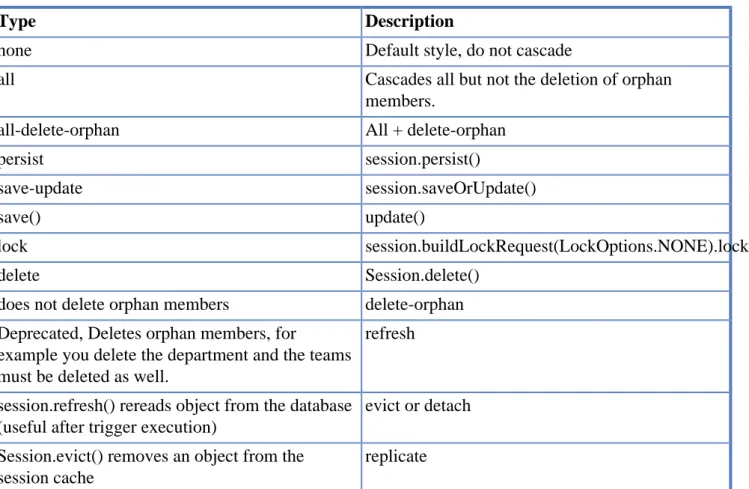
7.2. JPA Annotation Cascade Types ... 87
7.3. Hibernate Annotation and XML cascade types ... 87
Revision Mai 2013
1. The author
Well, my name is Sebastian Hennebrueder. I am a freelancer and work as trainer, software developer and architect. I am located at Bad Vilbel, a small town close to Frankfurt in Germany. I am
passionated about technologies, publish articles and participate in conferences like JavaOne in San Francisco or Devoxx in Antwerpen.
You can contract me for your projects.
Hibernate, Java Persistence and JEE training
I offer basic and advanced training in Europe, the training can happen onsite in your company but you will find as well a regular schedule for Frankfurt, Germany on my website
http://www.laliluna.de
With more than 25 trainings in Europe in the last 3 years, I have a solid experience. I can teach in German, English and French.
Software development
I am a freelancer and you can contract me as software developer and/or architect. I have a vast experience as software developer and architect in Hibernate / Java Persistence, Jboss Seam, Spring, GWT and a number of other web framework.
2. The book
I want to provide you with an easy-to-follow introduction to Java Persistence and Hibernate including not only code snippets but complete working examples. For this reason the guide is based on the following principles:
Explanations with complete working examples Whenever something is explained you will find a
complete sample application. If a specific mapping is demonstrated you can find a sample application, too. It shows how to insert, update, delete or query the classes included in this mapping. Larger
sample applications show the implementation of real applications using Hibernate in detail. Each application has an increasing complexity. Cache configurations, deployment configurations for particular application server rounds off the examples. Altogether the book provides about 30 mapping examples + variations, 4 real projects and some smaller projects showing a specific configuration.
Potential problems are investigated in detail Hibernate has some problem zones where you can
Best Practices One chapter is completely focussing on how to implement well designed Hibernate
applications. DAO patterns and business layers are discussed. Pros and cons and the logic behind this structure are explained.
Focus on important features Deliberately, I did not explain some rare concepts which I consider
to be either not stable or very rarely used. Instead I referred to the corresponding chapters of the Hibernate reference - the documentation available with Hibernate. In my opinion the Hibernate reference is far too complex for people learning Hibernate. However, it is a valuable resource for people who already know Hibernate.
What this book is not… The texts are short and frequently you are referred to parts of sample
applications. If you prefer larger narrative parts you should not read this book. Feel free to contact me and to comment on the book in the forum at http://www.laliluna.de
Best Regards / Viele Grüße Sebastian Hennebrueder
3. Library Versions
Hibernate is a solution for object relational mapping and a persistence management solution or persistence layer. This is probably not understandable for anybody learning Hibernate.
What you can imagine is probably that you have your application with some functions (business logic) and you want to save data in a database. Using Java, the business logic normally works with objects of different class types. Your application is object-oriented. Your database tables are not object oriented but relational.
The basic idea of object relation mapping - ORM is to map database tables to a class. One row of the database data is copied to a class instance. On the other hand, if an object is saved, one row is inserted in the database table.
Saving data to a storage is called persistence. The process of copying of table rows to objects and vice versa is called object relational mapping.
1.1. A first Hibernate example
1.1.1. Introduction
Our use case is sweet. We will use an example from the honey production. You need a lot of bees to get honey. Our use case includes Honey and Bee as model and a 1:n relation from Bee to Honey. Using object oriented terms: There is a 1:n association between the class Bee and Honey.
We will create a class Honey which is mapped to the table honey in the database and a class Bee mapped to the table bee. The following picture shows our database schema.
In order to get complete our application, we must undertake the following steps: • create classes
• create mapping from classes to tables • configure Hibernate libraries
• configure the Hibernate datasource • write code to use our mapped classes
Source code
For this example you will find the complete source code in the ebook. Normally, I show only the relevant part of the source code in the ebook. But you can find the complete source code in the provided sources.
1.1.2. Creating Java Project and classes
Create a new project using your development environment. I used Eclipse for this example. Using Eclipse press the keys Ctrl+n (Strg+n) to create a new project. Select Java project. We will call it FirstHibernateExample.
Create a new class named Honey in the package de.laliluna.example. Our class has four fields: • Integer id – an Integer value as primary key
• String taste – description of the taste
• java.util.Set<Bee> bees – bees, having produced the honey Furthermore we need:
• Getter and setter methods for our fields. In eclipse you can generate them (Context menu → Source
→ Generate Getter and Setter). • A default constructor
• Implementation of the Serializable interface
• Overwrite the toString method. We will need it for debugging.
Java version: I used Java generics, which was introduced with Version 5 (alias 1.5). Annotations always starts with @.
Your source code should look like the code below:
Honey class.
package de.laliluna.example;
import java.io.Serializable; import java.util.HashSet; import java.util.Set;
public class Honey implements Serializable {
private Integer id; private String name; private String taste;
private Set<Bee> bees = new HashSet<Bee>();
public Honey() { }
public Honey(String name, String taste) { this.name = name;
this.taste = taste; }
public Integer getId() { return id;
}
public void setId(Integer id) { this.id = id;
}
public String getName() { return name;
}
public void setName(String name) { this.name = name;
}
public String getTaste() { return taste;
public void setTaste(String taste) { this.taste = taste;
}
public Set<Bee> getBees() { return bees;
}
public void setBees(Set<Bee> bees) { this.bees = bees;
}
public String toString() {
return "Honey: " + getId() + " Name: " + getName() + " Taste: " + getTaste();
} }
Requirements of domain classes
There are a couple of requirements for a mapped class, you should always consider to meet:
• An id property
• A default constructor (= no parameter) with at least protected scope. Either omit the constructor or create an empty one.
• Implementation of the Serializable interface, if and only if you want to serialize your entity. This may happen indirectly if you put an entity for example into a HTTPSession. Hibernate does not require the Serializable interface in entities.
• A useful toString method for debugging. (recommendation) Create a class Bee with the fields:
• Integer id • String name • Honey honey
The field id is once again the primary key. Please don’t forget the important requirements, I stated above.
Bee class.
package de.laliluna.example;
import java.io.Serializable; import java.text.MessageFormat;
public class Bee implements Serializable {
private Integer id; private String name; private Honey honey;
}
public Bee(String name) { this.name = name; }
public Integer getId() { return id;
}
public void setId(Integer id) { this.id = id;
}
public String getName() { return name;
}
public void setName(String name) { this.name = name;
}
public Honey getHoney() { return honey;
}
public void setHoney(Honey honey) { this.honey = honey;
}
public String toString() {
return MessageFormat.format("{0}: id={1}, name={2}", new Object[] { getClass().getSimpleName(), id, name });
} }
1.1.3. Hibernate configuration
The Hibernate configuration will define • which database we connect to
• the type of database (MySQL, PostgreSQL, Oracle, …) • Hibernate configuration settings
• classes or XML mapping files holding our mappings.
Create a new file named hibernate.cfg.xml in your src directory.
1.1.4. Annotation or XML
You have to choices to map documents: Annotations and XML. They’ll be discussed later in this book. I explain both approaches for this example.
If you can use Java 1.5 alias 5 or later, I recommend to use annotations.
Below you can find a configuration for PostgreSQL using annotation based mapping. Afterwards, I will explain required changes for other databases and XML based mapping. Do not forget to change the username and the password to suit your database configuration.
hibernate.cfg.xml.
<?xml version='1.0' encoding='UTF-8'?> <!DOCTYPE hibernate-configuration PUBLIC
"-//Hibernate/Hibernate Configuration DTD 3.0//EN"
"http://hibernate.sourceforge.net/hibernate-configuration-3.0.dtd"> <hibernate-configuration>
<session-factory>
<!-- postgre SQL configuration--> <property name="connection.url">
jdbc:postgresql://localhost:5432/learninghibernate </property>
<property name="connection.username">postgres</property> <property name="connection.password">p</property>
<property name="connection.driver_class"> org.postgresql.Driver
</property>
<property name="dialect">
org.hibernate.dialect.PostgreSQLDialect </property>
<property name="cache.provider_class"> org.hibernate.cache.NoCacheProvider </property>
<property name="current_session_context_class">thread</property> <property name="hibernate.show_sql">true</property>
<property name="hibernate.hbm2ddl.auto">create</property> <mapping class="de.laliluna.example.Honey" />
<mapping class="de.laliluna.example.Bee" /> </session-factory>
</hibernate-configuration>
At the beginning of the configuration, you can find the database connection. Afterwards, the dialect is specified. Hibernate will translate all queries into this dialect. Then, I configured the cache implementation and the session and transaction behaviour. The setting hbm2ddl.auto instructs
Hibernate to update or create the table schema when the configuration is initialized. You only have to create the database.
The tag <mapping class> at the end of the file defines which classes are mapped using annotations. If you want to use XML based mappings then you need to reference the XML mapping files instead:
<mapping resource="de/laliluna/example/Honey.hbm.xml" /> <mapping resource="de/laliluna/example/Bee.hbm.xml" />
Other databases
A configuration for MySQL requires the following changes:
<property name="connection.url">jdbc:mysql://localhost/learninghibernate</property> <property name="connection.username">root</property>
<property name="connection.password">r</property>
<property name="connection.driver_class">com.mysql.jdbc.Driver</property> <property name="dialect">org.hibernate.dialect.MySQLDialect</property>
A short extract of frequently used dialects: • MySQL5Dialect
• OracleDialect • SybaseDialect • SQLServerDialect • HSQLDialect • DerbyDialect
The connection.url is a normal JDBC connection URL.
1.1.5. Mapping
With the mapping we define in which table column a field of a class is saved. As already stated, we have two options for the mapping. The first one is based on annotation, it is new and the future and I recommend to use it. But it requires Java 5. The second one is based on XML mapping files. I will explain both:
Annotation mapping
An annotation always starts with an @. You just have to add annotations to your java file. Annotations must be imported just like other classes.
Honey class with annotations.
...
import javax.persistence.Entity;
import javax.persistence.GeneratedValue; import javax.persistence.GenerationType; import javax.persistence.Id;
import javax.persistence.OneToMany;
import javax.persistence.SequenceGenerator; @Entity
@SequenceGenerator(name = "honey_seq", sequenceName = "honey_id_seq") public class Honey implements Serializable {
@Id
@GeneratedValue(strategy=GenerationType.SEQUENCE, generator="honey_seq") private Integer id;
private String name; private String taste;
@OneToMany(mappedBy="honey")
private Set<Bee> bees = new HashSet<Bee>();
The annotation @Entity defines that our class is a mapped class. The primary key is defined by the @Id annotations. It is generated by Hibernate using a database sequence. It is defined with
@SequenceGenerator before it is used by the id (@GeneratedValue).
The class Bee uses two other annotations. @ManyToOne describes the association/relation from class Bee to Honey. With the annotation @JoinColumn we configure that the table bee contains a foreign key column. We did not specify a column name, so Hibernate will choose honey_id.
Bee class with annotations.
...
import javax.persistence.Entity;
import javax.persistence.GeneratedValue; import javax.persistence.GenerationType; import javax.persistence.Id;
import javax.persistence.JoinColumn; import javax.persistence.ManyToOne;
import javax.persistence.SequenceGenerator;
@Entity
public class Bee implements Serializable { @Id
@GeneratedValue(strategy = GenerationType.SEQUENCE, generator = "bee_gen") @SequenceGenerator(name = "bee_gen", sequenceName = "bee_id_seq")
private Integer id; private String name;
@ManyToOne @JoinColumn
private Honey honey;
Other databases
If your database does not support sequences, you might try
@Id
@GeneratedValue(strategy=GenerationType.AUTO) private Integer id;
This selects a generator depending on the configured database dialect.
XML mapping
You only need the XML mapping files, if you don’t use annotations.
In the mapping file the mapping from our class Honey to the database table honey is configured. Create a file Honey.hbm.xml in the package de.laliluna.example.
Honey.hbm.xml.
<?xml version="1.0" encoding="UTF-8"?>
<!DOCTYPE hibernate-mapping PUBLIC "-//Hibernate/Hibernate Mapping DTD 3.0//EN" "http://hibernate.sourceforge.net/hibernate-mapping-3.0.dtd" >
<hibernate-mapping package="de.laliluna.example"> <class name="Honey" table="thoney" >
<id name="id" column="id"> <generator class="sequence">
</id>
<property name="name" column="name" type="string" /> <property name="taste" column="taste" type="string" /> <set name="bees" inverse="true">
<key column="honey_id"></key> <one-to-many class="Honey" /> </set>
</class>
</hibernate-mapping>
The tag <id> specifies the primary key and how it is generated. Normal fields are mapped to a column using the <property> tag. If we didn’t specify a column name (column=”xyz”), than Hibernate would have chosen the name of the field as default column name.
<set> describes the relation to the class Bee.
Our example used a sequence to generate the id. If your database does not support sequences, you might try
<generator class="native"/>
This will choose a generator depending on your database dialect. Why using type=”string” and not type=”java.lang.String”?
The Hibernate type can be more precise than the java types. A database field like date, timestamp, time is always handled by a java.util.Date. When you define a type as java.util.Date Hibernate does not know which kind of database type to choose when it generates tables. This is why I use Hibernate types in general.
In most cases you don’t need to set the type. Hibernate will guess the column type from the Java class.
Needed Libraries
To use Hibernate, we need a couple of libraries, alias JAR files.
Maven Setup
In the sample projects, I have used Maven dependencies. If you know Maven, just copy the POM from the source code and use it. I have declared all dependencies in a parent pom.xml, which is in the root of the workspace.
Just switch into the FirstHibernateAnnotation directory and input
mvn dependency:resolve
in a shell. Alternatively, you can choose a run task from within Eclipse as well by right-clicking on a pom.xml and choosing "Run…"
Non Maven Setup
In Eclipse Open your project properties, select “Java Build Path”, click on “Add External Jars” and add at least the libraries shown below to your project path.
Included in the Hibernate Core Download.
+- junit:junit:jar:4.5:test
+- org.slf4j:slf4j-log4j12:jar:1.6.0:compile | +- org.slf4j:slf4j-api:jar:1.6.0:compile | \- log4j:log4j:jar:1.2.14:compile
+- c3p0:c3p0:jar:0.9.1.2:compile
+- org.hibernate:hibernate-core:jar:3.6.4.Final:compile | +- antlr:antlr:jar:2.7.6:compile
| +- commons-collections:commons-collections:jar:3.1:compile | +- dom4j:dom4j:jar:1.6.1:compile
| +- org.hibernate:hibernate-commons-annotations:jar:3.2.0.Final:compile
| +- org.hibernate.javax.persistence:hibernate-jpa-2.0-api:jar:1.0.0.Final:compile | \- javax.transaction:jta:jar:1.1:compile
+- javassist:javassist:jar:3.9.0.GA:compile
Some projects use caching and Hibernate validation.
Included in Hibernate Core, Hibernate Validator and Ehcache Download.
+- org.hibernate:hibernate-ehcache:jar:3.6.4.Final:compile +- net.sf.ehcache:ehcache-core:jar:2.4.2:compile
+- org.hibernate:hibernate-validator:jar:4.1.0.Final:compile | \- javax.validation:validation-api:jar:1.0.0.GA:compile
Database Driver.
+- postgresql:postgresql:jar:8.3-603.jdbc3:compile \- hsqldb:hsqldb:jar:1.8.0.7:compile
Database Driver
We need a database driver as well. Find the appropriate JDBC Driver for your database and add it to the project libraries.
I used PostgreSQL. You can get the driver from http://jdbc.postgresql.org/ . You can use the JDBC 3 driver if you are running a current j2sdk like 1.4 and 1.5/5.0.
For MySQL you can use the MySQL connector which can be found at http://www.mysql.com/ products/connector/j/
An Oracle database driver is available at Oracle: http://www.oracle.com
1.1.6. Create a session factory
A session factory is important for Hibernate. As the name already indicates, it creates Hibernate sessions for you. A session is all you need to access a database using Hibernate. In addition, a session factory initialises your Hibernate configuration.
Create a class named InitSessionFactory in the package de.laliluna.hibernate and add the source code below. This class guaranties that there is only once instance (Singleton pattern) and that the initialisation happens only once when the class is loaded.
package de.laliluna.hibernate;
import org.hibernate.SessionFactory;
import org.hibernate.cfg.AnnotationConfiguration;
public class InitSessionFactory {
/** The single instance of hibernate SessionFactory */ private static org.hibernate.SessionFactory sessionFactory; private InitSessionFactory() {
}
static {
final Configuration cfg = new Configuration(); cfg.configure("/hibernate.cfg.xml");
sessionFactory = cfg.buildSessionFactory(); }
public static SessionFactory getInstance() { return sessionFactory;
} }
1.1.7. Configuring Log4J
Hibernate uses log4j as logging output. As you can see above we added the log4j library. This library needs a configuration file in the source directory or it welcomes you with the following error.
log4j:WARN No appenders could be found for logger (TestClient). log4j:WARN Please initialize the log4j system properly.
Create a file named log4j.properties in the root directory. We will configure a simple logging output in the Console.
# configuration is adapted from www.hibernate.org ### direct log messages to stdout ###
log4j.appender.stdout=org.apache.log4j.ConsoleAppender log4j.appender.stdout.Target=System.out
log4j.appender.stdout.layout=org.apache.log4j.PatternLayout
log4j.appender.stdout.layout.ConversionPattern=%d{ABSOLUTE} %5p %c{1}:%L - %m%n ### set log levels - for more verbose logging change 'info' to 'debug' ### log4j.rootLogger=debug, stdout
log4j.logger.org.hibernate=info #log4j.logger.org.hibernate=debug ### log just the SQL
log4j.logger.org.hibernate.SQL=debug
1.1.8. Create database and tables
We have defined in hibernate.cfg.xml that the tables should be recreated each time when the Hibernate configuration is initialized.
<property name="hibernate.hbm2ddl.auto">create</property>
The setting create will drop and create any tables. It is only suitable during development. You might use update as well. In this case Hibernate tries to update existing tables or create missing tables. This works in most cases but not always. Therefore, I recommend to disable this for production.
1.1.9. Create a test client
We will create a Java class, which will create, update, delete and query our data. Create a Java Class TestExample in the package de.laliluna.example.
Please look through the source code carefully and try it. I will just give you some general informations before:
• you always need a session to access data
• all access read and write happens within a transaction
• when a transaction fails you should role back your transaction (see the discussion below as well). In this first example, we will skip the exception handling.
In the main method we call other methods creating, updating, deleting and querying data.
package de.laliluna.example;
import java.util.Iterator; import java.util.List;
import org.apache.log4j.Logger; import org.hibernate.Criteria; import org.hibernate.FetchMode; import org.hibernate.Hibernate; import org.hibernate.Session; import org.hibernate.Transaction;
import de.laliluna.hibernate.InitSessionFactory;
public class TestExample {
private static Logger log = Logger.getLogger(TestExample.class); public static void main(String[] args) {
/* clean tables */ clean();
/* simple create example */ createHoney();
/* relation example */ createRelation();
/* delete example */ delete();
/* query example */ query();
}
The method createHoney creates a new object and saves it in the database by calling session.save.
private static Honey createHoney() { Honey forestHoney = new Honey(); forestHoney.setName("forest honey"); forestHoney.setTaste("very sweet");
Session session = InitSessionFactory.openSession(); Transaction tx = session.beginTransaction();
session.save(forestHoney); tx.commit();
session.close(); return forestHoney; }
The method update creates a new object using our last method, changes the name and updates the object using session.update.
private static void update() { Honey honey = createHoney();
Session session = InitSessionFactory.openSession(); Transaction tx = session.beginTransaction();
honey.setName("Modern style"); session.update(honey);
tx.commit(); session.close(); }
The method delete creates an object and deletes it by calling session.delete.
private static void delete() { Honey honey = createHoney();
Session session = InitSessionFactory.openSession(); Transaction tx = session.beginTransaction();
session.delete(honey); tx.commit();
session.close(); }
The tables are emptied with the method clean. The method session.createQuery creates a new query and runs it by calling executeUpdate.
private static void clean() {
Session session = InitSessionFactory.openSession(); Transaction tx = session.beginTransaction();
session.createQuery("delete from Bee").executeUpdate(); session.createQuery("delete from Honey").executeUpdate(); tx.commit();
session.close(); }
The method createRelation shows, how to create objects and set an association between these objects. This will write a foreign key relation to the database.
Session session = InitSessionFactory.openSession(); Transaction tx = session.beginTransaction();
Honey honey = new Honey(); honey.setName("country honey"); honey.setTaste("Delicious"); session.save(honey);
Bee bee = new Bee("Sebastian"); session.save(bee);
/* create the relation on both sides */ bee.setHoney(honey);
honey.getBees().add(bee); tx.commit();
session.close(); }
The method query shows how to query all honeys in the database. The call to session.createQuery creates the query and list() runs the query and returns a list of Honey objects.
private static void query() {
Session session = InitSessionFactory.openSession(); Transaction tx = session.beginTransaction();
List honeys = session.createQuery("select h from Honey as h").list(); for (Iterator iter = honeys.iterator(); iter.hasNext();) {
Honey element = (Honey) iter.next(); log.debug(element);
}
tx.commit(); session.close(); }
This was a fast example and it is not required to have understood anything.
Lessons learned
• how to create a class, which can be used for mappings (constructor, Serializable, …) • how to add the mapping
• how to create, update and delete entries • how to create a simple query
Exception handling was ignored in this example
You should be aware, that in case of an exception, some databases keep resources open, if you do not rollback or commit a transaction. I will speak about transaction handling in detail in chapter Session handling and Transactions Chapter 13, Session and Transaction
Handling.
Deployment in Jboss Application-Server
If you try to use the code by a JSP and deploy it to JBoss or deploy any of the later examples to Jboss you might encounter problems. The reason is that Jboss provides already Hibernate libraries and a configuration which conflicts with the Session
or have a look in chapter Session handling and Transactions Chapter 13, Session and
Transaction Handling explaining how to configure Hibernate in JTA environments.
1.1.10. Using MyEclipse for Hibernate projects
MyEclipse is a plugin provided by Genuitec on http://www.myeclipseide.com/ . I use it for development of all kinds of Web applications including Hibernate, EJB 2 and EJB3. MyEclipse is very up-do-date with the support of current versions of web frameworks, EJB and of course Hibernate.
1.1.11. Adding libraries and Hibernate capabilities
Create a webproject first and open the context menu of the project (click with right mouse button on the project in the package view). Select add Hibernate capabilities.
The wizard let you select the Hibernate version and add the needed libraries to your project. I recommend to add the libraries to the build path and not to copy them to the lib folder of the
To stage your finished application you should pack all the libraries with your project. You can configure in the project properties to deploy user libraries like the MyEclipse library in your application server.
During development, I prefer to copy all the Hibernate and Struts libraries to the shared library
directory of the application server. I configure the MyEclipse configuration in the project properties to not deploy any user libraries. This makes redeployment very fast.
Lets continue with the wizard. You can select an existing Hibernate configuration file hibernate.cfg.xml or you can create a new one.
Then you can select a database connection profile for a JDBC connection or select a JNDI datasource. A connection profile is the complete configuration of a JDBC database with connection string, user name, password and DB driver.
Finally you can create a session factory. I prefer to use my own session factory as it is simpler but the MyEclipse session factory works perfectly, as well.
1.1.12. Generate Hibernate mappings from existing
db
Open the connection profile you specified before.
Select the two tables we have just created. Right click and choose Create Hibernate Mapping.
Follow the wizard to select where to create the mapping files and classes. You can even generate DAOs.
1.2. Hibernate basics
1.2.1. What is Hibernate?
persistence layer for your application. This chapter explains some basic features and will explain the Hibernate architecture. You should read this first if you do not want face any problems later.
1.2.2. Powerful mapping
The mapping is not limited to one class or to one table but you can also map a wide range of object-oriented concepts. The following classes represent an inheritance hierarchy.
public class Plant { private Integer id; private String name; ...
public class Tree extends Plant { private boolean hasFruits; ...
public class Flower extends Plant { private String color;
....
They can be mapped to one table containing all columns and having a discriminator column, which distinguish what type a row is. In the picture below plant_type is the discriminator.
There are other options to map classes and subclasses, e.g. One table per subclass.
Another feature is the mapping of relations 1:n, m:n and 1:1. You can map components. For example you create an Address component which is used in Customer and Supplier.
1.2.3. Powerful query languages
Hibernate provides a powerful object-oriented query language named Hibernate Query Language (HQL).
select i from Invoice i inner join fetch i.order
If you have to create queries dynamically, you can use the Hibernate Criteria Queries. The following query filters the player by name, but only if the name is not null:
Criteria criteria = session.createCriteria(Player.class); if(name != null)
criteria.add(Restrictions.eq("name", name)); List players = criteria.list();
Objects
States of an entity is a very important concept of Hibernate. An entity can have different states. Using Hibernate is different from using SQL. If you call session.save(customerObject) then there is no insert
into customer… query into the database. Hibernate will set the id property (if the id is generated) and
bind the entity to a persistence context. The persistence context is synchronized with the database when transaction.commit() is called.
This approach has various advantages:
• You can continue to update an entity and all changes to the Java object are persisted with a single database insert/update.
• The update of a database table row causes a row lock. Having a row lock only for a short moment at the end of a transaction, prevents locking of concurrent users or dead lock situations.
2.1. The three states of objects
An object can have three states: transient, persistent and detached.
When it is just created and has no primary key, the state is called transient.
Car car = new Car(); car.setName(“Porsche”);
When the session is opened and the object is just saved in or retrieved from the database. This state is called persistent. During this state Hibernate manages the object and saves your changes, if you commit them. Below you can see an example. A car is saved and the name is changed afterwards. As the car is in persistent state, the new name will be saved.
session.save(car); car.setName(“Peugeot”); tx.commit();
The following code loads a car by id and changes the name. There is no session.update involved. Every object which is loaded by session.get, session.load or a query is in persistent state. It is stored in the persistence context of the session. When tx.commit() is called, Hibernate will flush the persistence context and all not yet written insert, update and delete statements are executed.
Session session = HibernateSessionFactory.currentSession(); tx = session.beginTransaction();
Car car = (Car) session.get(Car.class, 4711); car.setName(“Peugeot”);
tx.commit();
When the session was closed, the state changes to detached. The object is detached from its session. Understanding these states is important in order to know how to deal with instances. Imagine you do a web dialogue
• retrieve an instance of Car from the database
• save instance in the HTTP request and close session • show a dialog to edit the instance
• user submits form
Now, you would normally save the changes. But you cannot just call
transaction = session.beginTransaction(); car.setname(newName);
transaction.commit();
If you want to save the changes, you have to reattach your instance. This means the instance must be brought to a persistent state. You can not save an instance when it is not in persistent state, except if it was transient before and has no primary key set.
You must reattach an object before you can update it.
transaction = session.beginTransaction();
session.buildLockRequest(LockOptions.NONE).lock(car); car.setname(newName);
transaction.commit();
The following picture show the change of status how it could happen in a web application.
Deprecation
How to deal with reattaching and state changes carefully is explained in detail in the chapter Working with Objects Chapter 3, Working with Objects.
2.2. Lazy initialization, a Hibernate
problem
There is a popular exception which a lot of Hibernate newbees encounter. In order to prevent this exception you need to understand the concept of Lazy Initialization.
1) When Hibernate reads data from the database, the data is hold in the session. You can save
references to the data - for example in your HTTP request. Once the transaction is committed and the session is closed you can not load any further data with this session.
In the first example, we have seen that Honey has a collection of Bee. If we load a Honey instance, Hibernate will not load the bees automatically. There is a good reason for this behaviour. Imagine you load a Company and get all orders, order details and articles. Basically you load most of your database just by loading a single Company object. This would result into a memory problem. Therefore
Hibernate loads only the first object and replaces collections of other objects by a proxy. If you access the proxy, Hibernate uses the current session to initialize the proxy and load the entries from the database.
2) Imagine a Struts framework application. If you do not know Struts: it is a framework to develop web applications. When a user requests something, e.g. he has submitted a form on a website, the following happens:
• central servlet is called
• application logic opens a session, saves or retrieves data
• application logic stores retrieved data in the request and closes the session • control returns to servlet
• servlet calls a JSP to render the dialog • the JSP uses the data in the request
What is the consequence of 1) and 2)? When you look through the process 2) you can see that the session is already closed, when the dialogue is rendered. Your application logic has finished processing. If you have not initialized any objects while your session is open, you will not be able to display them. Have a look on the following diagram, which explains the situations quite well. \newline
When you access a not initialized object you will get a LazyInitializationException explaining that the session is already closed.
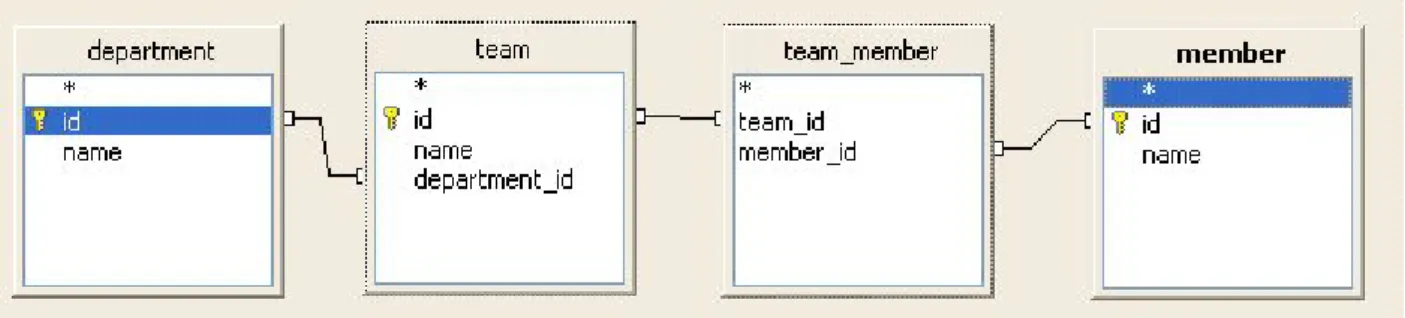
When can this happen? I have mentioned that Hibernate can map relations. Imagine a class department having a number of teams.
public class Department { private Integer id; private String name;
private Set teams = new HashSet();
If you want to output a list of departments and teams in your JSP, you must not only fetch all instances of department but also all instances of teams which are associated with one of the departments you are retrieving.
Having relations in your mapping you must ensure that the object and related objects are initialized as long as the session is open.
There are three solutions to this problem: • Define lazy=”false” in your mapping
• Explicitly fetch the associated data in your query
• Make use of a trick and postpone the close of the session to a later time, when your JSP is already rendered.
The first solution is dangerous. Imagine a relation like
ApplicationUser → KeyAccounter → Customer → Company → all customers of company → all orders of customers
Every access would load the complete database. Be very careful when you set lazy to false.
The second solution is simple but have some caveats. The trick is named Open-Session-In-View and is explained in chapter Open Session in View Section 13.7.2, “Lifetime until the view is rendered (Open-Session-in-View)”.
The third solution initializes the data before closing the session. We have two options to initialize data.
Approach a)
List honeys = session.createQuery("select h from Honey as h").list(); for (Iterator iter = honeys.iterator(); iter.hasNext();) {
Honey element = (Honey) iter.next(); log.debug(element);
Hibernate.initialize(element.getBees());
Approach b)
honeys = session.createQuery("select h from Honey as h left join fetch h.bees") .list()
If you use approach a) you have to call to call Hibernate.initialize on each proxy. Each call will generate one query.
Approach b) generates a left join statement. We will only require one query. Consider to use b) if you query a lot of data.
You must be aware of a draw back of this approach. Left join results in double entries for Invoice when there are multiple orders. Think of the underlying sql query, which leads to a result like
invoice 1, joined order line 1 invoice 1, joined order line 2 invoice 2, joined order line 1 ...
You can use the following approach to get unique invoices (have a look in the HQL and Criteria Query chapter for detailed examples):
session.createCriteria(Honey.class).setFetchMode("bees",FetchMode.JOIN) .setResultTransformer(Criteria.DISTINCT_ROOT_ENTITY).list();
3.1. Java Persistence versus Hibernate
There are two APIs you can use with your mappings. One is the Hibernate Session and the other one the Java Persistence EntityManager. The latter is standardised as Java Persistence which is the replacement for Entity Beans in EJB 3.
With Java Persistence (JPA) 2.1 the API is good enough to be used instead of the Hibernate Session. Some people argue that it is better to use the Entity Manager as it is already included in any JEE application server like Glassfish, JBoss etc. and it allows to swap the Java Persistence implementation. Well, in theory this is true. In practice you will use implementation specific optimisations for data loading, caching and tuning. In fact, it is easier to deploy a Hibernate application on a different application server.
My opinion
I prefer to use Hibernate for most cases as deployment on different application server or servlet engines is easier and I consider the criteria queries of JPA to be very hard to use as compared to Hibernate criteria queries. But there is an exception as well. If JEE with Session Beans is used as business layer technology, it is very easy to use Java Persistence. It is already provided. If in addition, the team has JPA experience, then I tend to prefer the JPA API.
The EntityManager of Hibernate is based on the Hibernate session. Basically, the EntityManager wraps a Hibernate session and adds some behaviour. The following code, shows how to get the underlying Hibernate session to get access to additional API methods like session.update.
Session hibernateSession = entityManager.unwrap(Session.class); hibernateSession.update(country);
I will introduce the Hibernate API first. You will find the EntityManager API in the next chapter.
3.2. Hibernate API
3.2.1. Saving
Saving or persisting an object is actually not very complicated. The following code will do it.
Transaction tx = session.beginTransaction(); Concert c = new Concert();
c.setName("Peter"); session.save(c); tx.commit();
It is the tx.commit() of the transaction, which leeds to sending the SQL insert statement to the database. Calling save makes an object persistent. If the id is configured to be generated then
Hibernate will ensure that it is generated and set the value of the id property. In addition the entity is added to the persistence context of the session.
Persistence Context
Simplified: the persistence context contains a map for each entity. The key of the map is the id and the value is a composite of the entity instance itself and the original values of all fields when the object was added to the persistence context. The latter allows Hibernate to determine if a persistent object needs to be updated in the database.
When the persistence context is flushed, Hibernate will send all insert statements to the database, determines all required updates by comparing the entities to the original field values and sends all updates to the database and finally all deletes are sent.
The call to commit will cause a flush of the persistence context before the commit is sent to the database.
There are multiple reasons for this behavior:
Less update statements
If you change multiple fields, add a relation while an entity is in persistent state, Hibernate will only send one update statement at the end.
JDBC batching
Hibernate can group updates and make use of JDBC batching. This is more efficient as compared to send statements one by one.
Reduced duration of locks
Sending an insert or update statement will cause a row or page lock depending on the database. Sending such statement at the end just before the transaction commit, will cause the lock to exist only for a short timespan. It reduces the risk of concurrent users waiting for locks or dead lock situations. Therefor, Hibernate will do only the minimum required to determine the id of the entity and add the entity to the persistence context of the session. If the id is a generated value and the generator is a sequence or a table, Hibernate will just select the value. But if the id is generated on inserting - for example increment column in MS SQL server - then Hibernate needs to send the SQL insert statement to get an id generated.
Saving becomes more complex, when you start to use relations.
We are having the following tables mapped as 1:n relation. We will define that developer_id must not be null, an idea cannot exist without a developer. The database will create a not null constraint for the column developer_id.
Developer d = new Developer(); Idea idea = new Idea();
You must take care that the idea is not saved before the developer_id is defined. If you save the idea first, then the developer_id is not yet defined and you will receive a constraint violation exception.
Use case: no cascading defined
You must call save in the following order:
session.save(developer); session.save(idea);
Use case: cascading from developer to idea
You only need to call
session.save(developer);
3.2.2. Updating
Considerations
We talked in chapter Hibernate States Chapter 2, Hibernate Concepts - State of Objects about the states of an object. Below you can find the figure we used in that chapter.
Updating an entity requires that you get your object in persistent state. One approach is to fetch an object from the database within a transaction, apply your changes and commit the transaction.
session.beginTransaction();
Visitor visitor = session.get(Visitor.class, aVisitorId); visitor.setName("Edgar");
session.getTransaction().commit();
Another approach to change an entity, is to reattach a detached object.
session.beginTransaction();
session.buildLockRequest(LockOptions.NONE).lock(visitor); // reattach visitor visitor.setName("Edgar");
session.getTransaction().commit();
Detached objects What is Reattaching?
Reattaching changes the state of an object from detached to persistent.
When you load an object within a session and close the session, your object is detached from the session and any changes to the object have no influence to the session or the database.
This happens normally if you use the recommended approach of session handling. Read more about session handling in chapter Session Handling Chapter 13, Session and Transaction Handling. If you want to apply any updates you have to reattach the object to a session.
Reattaching
You have different options to reattach an object to a session. The main difference between these approaches are three criteria:
• Can the object be changed before it is reattached.
• A second instance of the same instance (database Id) may exist in the Session. • Does the object have to exist in the database.
Session.lock
Use session.lock when you expect that the object is unchanged and a new instance is not loaded within the same session.
If you apply any changes before you lock the instance, your session will end in an inconsistent state. To be more precise the changes will exist in the session but they will not be written to the database. Hibernate thinks that it is unchanged.
contact1.setFirstName("Peter"); tx = session.beginTransaction();
session.buildLockRequest(LockOptions.NONE).lock(contact1, LockMode.None); tx.commit();
lock(..) throws an org.hibernate.NonUniqueObjectException when the instance is already in the
session.
This problem can happen in the following situations:
You have methods retrieving new object instances without using the existing detached object.
You have different options for the LockOptions:
LockOptions.NONE Tries to get object from cache, if not present read it from the database. It does
not create a database lock. LockOptions.READ Bypasses cache and reads object from the database.
LockOptions.UPGRADE Bypasses cache and creates a lock using select for update statement. This
might wait for a database timeout. By default the lock request will wait for ever. If supported by your database and your JDBC driver, you can set a timeout. A timeout value of 0 is nowait.
session.getTransaction().begin();
Session.LockRequest lockRequest = session.buildLockRequest(LockOptions.UPGRADE); lockRequest.setTimeOut(10);
lockRequest.lock(john);
session.getTransaction().commit(); session.close();
If Hibernate does not find the object in the database it will throw an exception.
org.hibernate.StaleObjectStateException: Row was updated or deleted by another
transaction (or unsaved-value mapping was incorrect): [de.laliluna.hibernate.Concert#1]
You should handle this Exception as it can happen when multiple users access your application concurrently. You can find an example in the Hibernate Struts chapter.
Session.update
If the object was changed, use session.update to save the changes in the database.
tx = session.beginTransaction(); contact1.setFirstName("Peter"); session.update(contact1);
tx.commit();
The method throws an org.hibernate.NonUniqueObjectException if an instance is already in the session. I explained in the last paragraph, in which situation this can happen.
Session.saveOrUpdate
If you do not want to distinguish between inserting or updating an object, you can use
session.saveOrUpdate. This is a combination of save and update.
The following code will insert the object in the first statement and will automatically update it in the second part.
log.debug("saveOrUpdate to insert");
Session session = HibernateSessionFactory.currentSession(); session.beginTransaction();
Concert c = new Concert(); c.setName("Peter");
session.saveOrUpdate(c);
session.getTransaction().commit();
log.debug("saveOrUpdate to reattach and update");
session = HibernateSessionFactory.currentSession(); session.beginTransaction();
session.getTransaction().commit();
Like lock and update, saveOrUpdate does not like a second instance of an object in the same session. Please, have a look at the explanation in the session.lock chapter.
Session.merge
Use session.merge, if you consider that a new instance could exist in this session. Hibernate loads the object from the session or the cache or if it is not there from the database. Then it copies the values of your old object to the new object and returns the loaded object. This object is in persistent state. The old object is not attached to the session.
Pit fall using merge
Imagine you have created an object contact.
Contact contact = new Contact(); contact.setFirstName("Peter");
Session session = sessionFactory.openSession(); Transaction tx = session.beginTransaction(); session.save(contact);
tx.commit(); session.close();
Later you want to reattach your object to a Hibernate session and change the name to Peter. Do you think you have successfully changed the name?
session = sessionFactory.openSession(); tx = session.beginTransaction();
session.merge(contact);
contact.setFirstName("Peter4"); tx.commit();
session.close();
You have not! The method merge looks up the object in the session. If it is not found, a new instance is loaded. Then the attributes of contact are copied to the found/created object. If you change contact it has no influence on the object in the session. You must apply your changes to the new object.
The solution is to assign the found/created object to the newInstance variable. Than you can access the variable directly.
Contact newInstance =(Contact) session.merge(contact); newInstance.setFirstName("Peter4");
3.2.3. Deleting
We have already seen how to delete an object. A call to session.delete deletes an object.
session = sessionFactory.openSession(); session.beginTransaction();
session.delete(concert);
session.getTransaction().commit(); session.close();
When the object was already deleted from the database before, you will encounter an exception.
org.hibernate.StaleStateException: Batch update returned unexpected row count from update: 0 actual row count: 0 expected: 1
To prevent this you might consider to validate that the object exists before deleting it. You might even consider to lock the object with a UPGRADE{}-lock.
Concert freshObject = (Concert) session.get(Concert.class, concert.getId()); if (freshObject != null)
session.delete(freshObject);
Further attention is needed when relations are used. Let us reuse the example we took above for the update problem.
We will define that an idea can only exist with a developer. This means that developer_id must not be null.
In this case you cannot delete a developer without deleting the ideas first. We have two options to delete the objects.
Deletion without cascading
Reattach your developer, delete all the ideas first, and then delete the developer.
session.buildLockRequest(LockOptions.None).lock(developer);
for (Iterator iter = developer.getIdeas().iterator(); iter.hasNext();) { Idea element = (Idea) iter.next();
session.delete(element); }
session.delete(developer);
Have a look at the test class of the relation mapping examples for further examples.
Configure cascading
Cascading is explained in detailed in chapter Cascading Section 7.3, “Cascading”. Here, I present only a short description. If you have set cascading to delete or all, then you just need to delete the developer and Hibernate will delete the ideas for you.
3.2.4. Additional commands
The Hibernate session provides more commands. I will explain the most important in this chapter. If a column of a table is calculated by a database trigger, it might be required to reload the object. A call to refresh will reread the object from the database.
An object in persistent state is stored in the persistence context and cannot be garbage collected even if it is no longer referenced from your code. Sometimes you want to limit the size of the session for example to keep memory consumption low. The command evict removes one object from the session. If the object was changed, the SQL update statement is most likely not yet send to the database. If you do not want to loose your changes, then you should call flush to send all open changes to your database.
session.flush();
session.evict(developer);
The manual call to flush is only required in use cases as the one just described. By default flush is called when you commit a transaction.
3.3. EntityManager API
3.3.1. Saving
Saving or persisting an object is actually not very complicated. The following code will do it.
EntityTransaction tx = entityManager.getTransaction(); tx.begin();
Concert c = new Concert("Peter"); entityManager.persist(c);
tx.commit();
entityManager.close();
If you debug the code of the first example, you will see that entityManager.persist does not create an insert statement immediately but just selects the next sequence value. This is at least true, if you use a sequence as id generator.
It is the tx.commit() of the transaction, which leeds to sending the SQL insert statement to the database. Calling persist makes an object persistent. If the id is configured to be generated then Hibernate will ensure that it is generated and set the value of the id property. In addition the entity is added to the persistence context of the session.
Persistence Context
Simplified: the persistence context contains a map for each entity. The key of the map is the id and the value is a composite of the entity instance itself and the original values of all fields when the object was added to the persistence context. The latter allows Hibernate to determine if a persistent object needs to be updated in the database.
When the persistence context is flushed, Hibernate will send all insert statements to the database, determines all required updates by comparing the entities to the original field values and sends all updates to the database and finally all deletes are sent.
The call to commit will cause a flush of the persistence context before the commit is sent to the database.
Less update statements
If you change multiple fields, add a relation while an entity is in persistent state, Hibernate will only send one update statement at the end.
JDBC batching
Hibernate can group updates and make use of JDBC batching. This is more efficient as compared to send statements one by one.
Reduced duration of locks
Sending an insert or update statement will cause a row or page lock depending on the database. Sending such statement at the end just before the transaction commit, will cause the lock to exist only for a short timespan. It reduces the risk of concurrent users waiting for locks or dead lock situations. Therefor, Hibernate will do only the minimum required to determine the id of the entity and add the entity to the persistence context of the session. If the id is a generated value and the generator is a sequence or a table, Hibernate will just select the value. But if the id is generated on inserting - for example increment column in MS SQL server - then Hibernate needs to send the insert table to get an id generated.
Saving becomes more complex, when you start to use relations.
We are having the following tables mapped as 1:n relation. We will define that developer_id must not be null, an idea cannot exist without a developer. The database will create a not null constraint for the column developer_id.
Developer d = new Developer(); Idea idea = new Idea();
d.getIdeas().add(idea); idea.setDeveloper(d);
You must take care that the idea is not saved before the developer_id is defined. If you save the idea first, then the developer_id is not yet defined and you will receive a constraint violation exception.
Use case: no cascading defined
You must call save in the following order:
entityManager.persist(developer); entityManager.persist(idea);
Use case: cascading from developer to idea
You only need to call
3.3.2. Updating
Considerations
We talked in chapter Hibernate States Chapter 2, Hibernate Concepts - State of Objects about the states of an object. Below you can find the figure we used in that chapter.
Updating an entity requires that you get your object in persistent state. One approach is to fetch an object from the database within a transaction, apply your changes and commit the transaction.
EntityTransaction tx = entityManager.getTransaction(); tx.begin();
Country country = entityManager.find(Country.class, 4711); country.setName("United Kingdom");
tx.commit();
entityManager.close();
In the code above there is no merge. Working with Hibernate means working with objects and states. It is quite different from JDBC and sending insert or update SQL statements to the database.
Java Persistence has only one method to make an existing object persistent: merge.
Hibernate loads the object from the session or the cache or if it is not there from the database. Then it copies the values of your old object to the new object and returns the loaded object. This object is in persistent state. The old object is not attached to the session.
Pit fall using merge
Imagine you have a reference to a detached object. You want to reattach your object to a
EntityManager and change the name to Peter. Do you think you have successfully changed the name?
EntityTransaction tx = entityManager.getTransaction(); tx.begin();
entityManager.merge(contact); contact.setFirstName("Peter4"); tx.commit();
The solution is to assign the found/created object to the newInstance variable. Than you can access the variable directly.
Contact newInstance = entityManager.merge(contact); newInstance.setFirstName("Peter4");
3.3.3. Deleting
An object can be removed by calling entityManager.remove.
EntityTransaction tx = entityManager.getTransaction(); tx.begin();
Contact merged = entityManager.merge(contact); entityManager.remove(merged);
tx.commit();
entityManager.close();
There is a difference compared to Hibernate Session API. You need to make the object persistent before removing it. When the object was already deleted from the database before, you will encounter an exception.
org.hibernate.StaleStateException: Batch update returned unexpected row count from update: 0 actual row count: 0 expected: 1
Further attention is needed when relations are used. Let us reuse the example we took above for the update problem.
We will define that an idea can only exist with a developer. This means that developer_id must not be null.
In this case you cannot delete a developer without deleting the ideas first. We have two options to delete the objects.
Deletion without cascading
Reattach your developer, delete all the ideas first, and then delete the developer.
em = factory.createEntityManager(); em.getTransaction().begin();
paolo = em.merge(paolo);
for (Idea idea : paolo.getIdeas()) { em.remove(idea);
}
em.remove(paolo);
em.getTransaction().commit(); em.close();
Have a look at the test class of the relation mapping examples for further examples.
Cascading is explained in detailed in chapter Cascading Section 7.3, “Cascading”. Here, I present only a short description. If you have set cascading to delete or all you can just delete the developer and Hibernate will delete the ideas for you.
3.3.4. Additional commands
In this section, I will describe further commands provided by the EntityManager.
EntityManager.lock
Use entityManager.lock can be used to place a lock on an object in persistent state. This method behaves differently as Hibernate’s session, which makes an object persistent as well.
EntityManager em = factory.createEntityManager(); em.getTransaction().begin();
player = em.merge(player);
em.lock(player, LockModeType.PESSIMISTIC_READ); em.getTransaction().commit();
em.close();
There are different options for the LockModeType:
LockModeType.NONE This is the default behaviour. If entites are cached, the cache is used.
If a version column is present, the version is incremented and verified during the update SQL
statement. You will find more details about @Version in chapter Optimistic Locking Section 13.8.1, “Optimistic Locking”. LockModeType.OPTIMISTIC The object is read from the database
and not from the cache. If it was already read from the database, it will not be read again. If a version column is defined and the object was changed, then the version is incremented and verified during the update. This is the same as the JPA 1 option: LockModeType.READ
LockModeType.OPTIMISTIC_FORCE_INCREMENT Same as OPTIMISTIC but will
increment the version even if the object was unchanged. This is the same as the JPA 1 option:
LockModeType.WRITE LockModeType.PESSIMISTIC_READ Reads the object from the database for
shared usage. For a PostgreSQL database the SQL looks like select id from Player where id =? for
share. LockModeType.PESSIMISTIC_WRITE Tries to create an update lock and throws an exception
if this is not immediately possible. This is not supported by all databases. The object is read from the database for shared usage. For a PostgreSQL database the SQL looks like select id from Player where
id =? for update. If a version column exists and the object was changed, the version is incremented
and verified during the update.
I could not find a lock with no wait option as supported by the Hibernate Session API. The query hint to timeout the lock seems to be database dependent. It does not work with PostgreSQL, though it is supported by the database.
Map<String,Object> map = new HashMap<String, Object>(); map.put("javax.persistence.lock.timeout", 2);
em.find(Player.class, 1, LockModeType.PESSIMISTIC_WRITE, map);
There are bugs related to locking which were fixed with version 3.6 Final See https:// hibernate.onjira.com/browse/HHH-5032
If a column of a table is calculated by a database trigger, it might be required to reload the object. A call to refresh will reread the object from the database.
em.refresh(developer);
An object in persistent state is stored in the persistence context and cannot be garbage collected even if it is no longer referenced from your code. Sometimes you want to limit the size of the session for example to keep memory consumption low. The command evict removes one object from the session. If the object was changed, the update statement is most likely not yet send to the database. If you do not want to loose your changes, then you should call flush to send all open changes to your database.
em.flush();
em.detach(developer);