Project Management Methodology for the Development of M-Learning
Web Based Applications
Adrian VIŞOIU
Academy of Economic Studies, Bucharest, Romania [email protected]
M-learning web based applications are a particular case of web applications designed to be operated from mobile devices. Also, their purpose is to implement learning aspects. Project management of such applications takes into account the identified peculiarities. M-learning web based application characteristics are identified. M-learning functionality covers the needs of an educational process. Development is described taking into account the mobile web and its influences over the analysis, design, construction and testing phases. Activities building up a work breakdown structure for development of m-learning web based applica-tions are presented. Project monitoring and control techniques are proposed. Resources re-quired for projects are discussed.
Keywords: Software Project Management, M-Learning Applications, Web Applications,
Me-thodology
Introduction
M-learning is an educational process based on mobile technologies. M-learning as a concept is practically implemented via learning applications. Developing an m-learning application is a complex task. Edu-cational, technological and management ele-ments are taken into account when develop-ing an m-learndevelop-ing application is established as an objective. In higher education institu-tions there are research centers that deal with research projects, such that organizational in-frastructure is fit to a project type approach. A common development approach for m-learning applications is organizing all the ac-tivities under the form of a project. The pro-ject has as obpro-jective delivering a working m-learning application. In the project numerous people are involved. Teachers, students, ana-lysts, designers, developers collaborate in the project team. Numerous types of material re-sources are involved.
A dedicated project management is required for specific elements of this type of software development. Further, mobile application de-velopment has many directions. Project man-agement, as well as specific tasks vary with the type of application that is intended to ob-tain. This paper covers the problem of project management for web based m-learning appli-cations.
2 M-Learning Web Based Applications Characteristics
M-learning web based applications are a very particular case found at the intersection of three categories of applications: e-learning applications, mobile applications and web applications.
Mobile applications are applications de-signed to run on mobile devices like smart-phones. Compared to applications that run on personal computers, there are differences re-garding the development technologies and al-so important hardware differences. Consider-ing the architecture, there are similar classifi-cations:
web based/distributed applications ac-cessible via web browsers;
client – server applications where certain aspects of the application run natively on the device and other modules are ad-dressed remotely;
standalone applications that run entirely on the device.
Web applications are applications that are accessed over the Internet or intranet. The common structure of a web application con-sists of tiers. The presentation tier resides on the client web browser that renders the user interface. The functionality and the applica-tion logic reside at the second tier, called business tier, on the web/application server
running a dynamic content generation en-gine. The third tier is the storage tier residing on a database server. When interacting with the application at client level, data containing both required information and commands are posted from the web page to the web server. At web server level, queries are run against the database server to retrieve useful infor-mation for the user. The retrieved informa-tion is processed on the web server using the dynamic technologies like ASP.NET, JSP or PHP. Processing results are stored back into the database or presented to the user via dy-namically generated web pages.
Advantages of web applications are:
they do not require following special in-stallation procedures on client machines; installation and configuration is done on the necessary servers;
the client has little performance require-ments as all the intensive processing is distributed to the web/application server and database server;
any change/patch/upgrade in the product is reflected to all clients instantaneously without effort;
they are accessed via a web browser; web browsers implement industry standards, web applications being compatible with all operating systems;
users that commonly use web browsers will easily accept such application.
Disadvantages of web applications are: the weak link is the connection between
the client and the web server and also the connection between the web/application server and the database server; each of these components is placed remotely one from another and an unavailable
connec-tion leads to interrupconnec-tions in work;
security problems related to information transport over the networks and user activ-ity tracking;
scarce interfaces due to the web limita-tions; there are ways of improving inter-faces’ look but any complicated approach is subject to compatibility problems as certain features are not implemented the same way on different web browsers.
M-learning applications refer to software intended to support learning process using the mobile technologies. If mobile devices like smartphones are taken into account then m-learning applications are likely to become widespread as the number of devices having important processing capabilities rises.
Advantages of m-learning applications in-clude:
student’s contact with new technology; easy carrying everywhere as opposed to a
laptop/desktop computer;
collaboration between students;
m-learning applications encourage students to contribute with content and give feed-back on content;
they are motivational for students if they have game like approaches;
There are also many aspects that have to be overpassed, aspects the come from the device characteristics:
device’s batteries run out;
the devices have small screen for viewing; small storage space compared to a PC; device processing power is small.
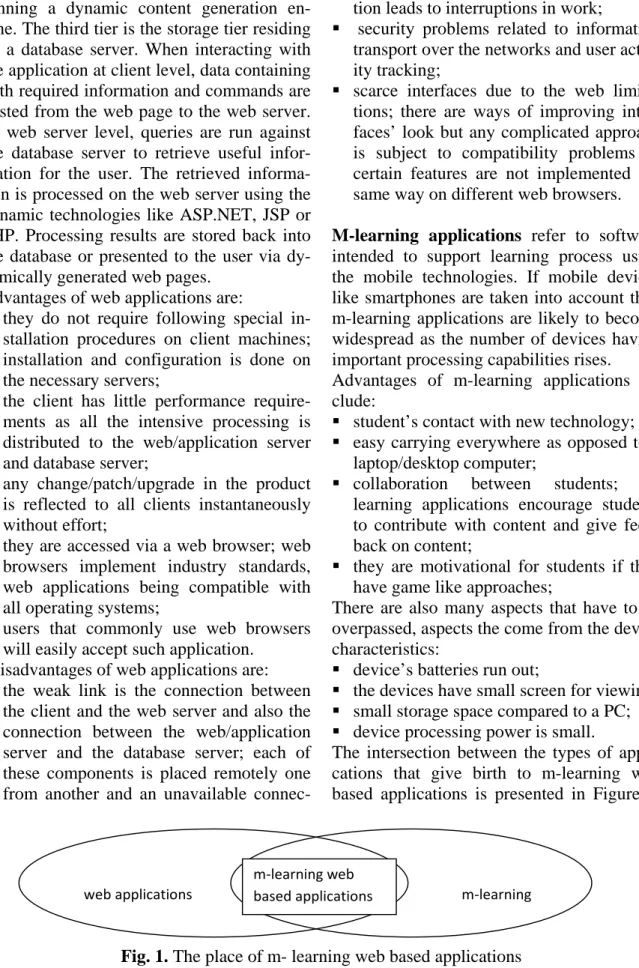
The intersection between the types of appli-cations that give birth to m-learning web based applications is presented in Figure 1.
web applications m-learning
m-learning web based applications
Fig. 1. The place of m- learning web based applications Developing m-learning applications is where
mobile developers and teachers come in
con-tact. Solid mobile development is required to obtain high quality software in this particular
environment. The Web content is standar-dized by markup languages, styles, scripts and multimedia, all these being viewed using web browsers.
There are differences between the mobile web and desktop web as presented in [1]: there are markup languages and styles
specific for mobile devices; different MIME types;
browsers differ in capabilities; network proxies that adapt content.
The context of m-learning web based appli-cations is given by:
small screen sizes; small resolutions; browser bugs; ignored standards;
available languages: XHTML, HTML,
XHTML Mobile Profile, CHTML, WML; Javascript and AJAX, not on all the
phones;
browser plugins; not all browsers support or implement the same way.
The web browsers differ in functionality: Internet Explorer (Windows Mobile) –
markup support: HTML 4.01, XHTML 1.0 and 1.1, XHTML MP, XHTML Basic; style support: CSS 2.1, CSS mobile pro-file 1.0, Wireless CSS 1.1; scripting
sup-port: Jscript 5.6, DOM 1 and partially 2 and 3, AJAX; AJAX is handled via Acti-veX object Microsoft.HMLHTTP not Ja-vaScript’s XMLHTTPREQUEST; also has ActiveX objects and Flash support; Opera Mini/Mobile (J2ME/platform
spe-cific); markup support: XHTML 1.0, HTML 4.01 and partially 5, WML 1.3; style support CSS 2 and 3; scripting sup-port JavaScript, DOM 2, AJAX; Flash plugin;
BlackBerry browser; implements mobile web standards: XHTML-MP, WML, Wireless CSS, HTML 4.01, DOM 2, Ja-vaScript, AJAX;
Nokia Browser; Based on WebKit brows-er; supports XHTML, JavaScript AJAX, Flash plugin;
Android Browser; based on WebKit
browser; supports web standards;
Safari for IPhone; WebKit based browser; Generic WebKit browser; open source
project implemented on many platforms; supports HTML 4.01, XHTML 1.0, par-tially HTML 5; styles: CSS 2.1, parpar-tially 3; scripting JavaScript, AJAX, DOM 1-2-3.
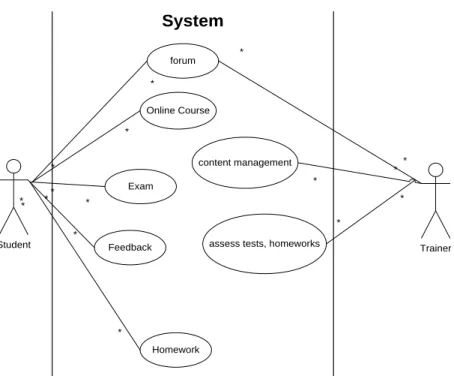
M-learning applications are intended to offer functionality both to students and teachers.
Student Trainer Online Course Exam Feedback Homework content management
assess tests, homeworks forum * * * * * * * * * * * * * * System * *
Fig. 2. Use case diagram for an m-learning application
use cases that reflect general functionality of m-learning applications.
The administration of the m-learning applica-tions is achieved via a content management system. The content management system is structured into modules:
online courses/lessons; lectures and semi-nars as study material that has to be ac-cessed by the students;
assignments; there are deadlines for signments; teacher adds notes received as-signments giving feedback to students; re-submission is possible;
chatting; permits a direct contact between teachers and students;
forum; permits offline interaction between the study group;
quiz/test; offers testing and functionality; wiki; collaborative environment where
everybody contributes with information on relevant subjects.
The m-learning web based application is a complex content management system. Mod-ules are developed according to priorities. First the online course/lessons is developed. Assignments and tests follow. These cover the main aspects needed for learning. Then forums and wiki’s are developed to round up the image of a complex m-learning applica-tion.
An important aspect of an m-learning appli-cation is security. The appliappli-cation is accessed by many users. Users have different roles. Students may read course information freely. Course information is added only by teach-ers. The students submit assignments. They must be correctly identified. Also only teach-ers can see submitted assignments. The notes the teacher adds to assessed assignments can be seen only by the corresponding student. As seen above, the functionality of the appli-cation is put in correspondence to user roles such way a certain role has limited access to information. This part covers security autho-rizations. Further, a proper identification of users must be done in order to ensure that an authenticated user is the person it pretends to be. A classical approach is the use of a user-name and password. We are not discussing here the problems associated to network
traf-fic security and required encryption. Strictly form usability point of view, this approach is difficult as the screen size is small and avail-able keyboards are difficult to operate even on touch screen devices. Also, a non QWERTY keyboard requires many pressings to obtain a character, leading to high proba-bility of wrong login data to be entered. On some devices, the letter pressed in a pass-word field is shown for a small time reducing input errors but increases the probability of password interception. An improvement for the username password technique is the use of additional questions having personal in-formation required. Personal inin-formation is stored securely in the application database or taken from the institution’s database and a random question is put.
Best practices for web application security suggest:
working with no cookies; passing session id in URL;
usage of security certificates and HTTPS protocol for authentication.
These security elements are placed at mobile browser – web server interaction. Further se-curity regards stored information. The data-base contains sensitive information such as: account information;
personal information; students’ marks; submitted assignments;
test and quizzes questions and answers; history of taken tests and exams for each
student.
Each of these elements may be subject to un-authorized access. Security measures must take care of the following aspects:
data integrity; protect the existing data from intentional or accidental corruption; keeping the integrity of submitted assign-ments is useful as they prove that the stu-dent accomplished assigned tasks and re-ceived marks or points for the work done; every mark given by a teacher needs a support to be assessed and every student that sent his assignment needs to be sure that submitted information is not lost and will be subject to evaluation; the same procedure applies to exams as well;
protection against unauthorized access; if database is read by unauthorized persons such way that table definitions, table data are visible, sensitive information must not be understandable to such attackers; the solution is to keep sensitive data en-crypted; account information such as username and password may be stored as hashes; sensitive personal information is subject to encryption using recommended standards;
backup; the database has to be backed up on a regular basis; in case of incidents, da-tabase content must be recovered rapidly such way the educational process is not affected.
Security measures do not apply only to static aspects of the web application. Security pro-cedures must address complex activities such as exams. When taking exams, the following aspects must be covered:
identity of the examinee must be estab-lished;
access to course information must be blocked; when a student is logged in to the application in exam mode access to study resources is automatically blocked; this is a feature of the m-learning application; further access to other network resources must be limited by the network adminis-trator; if the exam takes place in a class-room, then the wireless router is confi-gured to permit access only to the m-learning application server; this latter fea-ture is not opposable to the application, but is covered at institutional level;
ensuring exam consistency; all the exami-nees must submit a variant of the answers, either intentionally or automatic submit at expiration time;
non-repudiation – once submitting the an-swers the examinees cannot negate their actions and answers to the questions.
3 Project Management Cycle
The project management of m-learning web based applications takes into account the pe-culiarities of such applications.
In order to create a work breakdown structure for m-learning web based applications, an
in-ventory of the work packages or tasks from the literature is done.
in [2] there are presented: research, scriptwriting, implementation, validation, project management, testing, closing, les-sons learned;
in [3] there are presented: planning, de-sign, construction, testing, documentation, deployment;
in [4] there are presented: project man-agement and implementation, planning and concept, design, construction, testing, implementation and closing.
As seen above, there are common work packages with other software projects. The differences come into light when looking at the specific tasks for each work package.
Project management work package is a main component of the WBS. This work package consists of tasks that cover the whole duration of the project. These tasks are the following, as presented in [5]:
project initiation; project planning; project execution; project monitoring; project closing.
Other work packages and tasks cover aspects both of the m-learning field and web devel-opment.
Documentation is a work package contain-ing the activities needed to obtain the content that later fills the application. The tasks for documentation are:
researching relevant bibliographic
sources; the outcome is the list of identi-fied relevant sources;
elaboration of study materials: includes courses, seminar support, homework; the outcome is the electronic content with the mentioned elements;
elaboration of tests; includes questions and answers, thresholds, reward points. Documentation obtains all the materials needed to run the discipline and later to be introduced in the application.
Analysis is a work package grouping tasks related to obtaining a clear description of what has to be done. The tasks are:
learning activity takes place;
requirements specification; what are the requirements for the application; the re-quirements include functional require-ments regarding the logic of the applica-tion and non-funcapplica-tional requirements lated to: technical restrictions, security re-quirements, interface rere-quirements, prod-uct quality characteristics.
Results of the analysis are reports containing the best and recommended approaches.
Design is a work package grouping tasks re-lated to the definite way the application will be built. Related tasks are:
website design; includes the structure as a sitemap;
interface design; each page is designed in terms of areas and controls; design fulfill mobile web standards and address mobile restrictions that represent a peculiar fea-ture of these applications; also design must be in concordance with specified quality characteristics of usability and readability as defined in requirements; database design is a task which is
inde-pendent from the type of application; detailed use cases; each functionality is
detailed to highlight the algorithms that lead to obtaining significant results for us-ers; further those algorithms will be trans-lated into code in the next phases;
storyboard; a nonfunctional prototype is built to create an actual representation of the product.
For designing the site structure, some ele-ments are taken into account:
users that access the site; the context of accessing – teaching, exam, homework; target devices; is the institution endowed
with mobile devices all of a kind for cer-tain classes or the application is meant to run on personal mobile devices which have different characteristics;
tests must be done using XHTML to ob-tain the look and feel of the final product. At design time there are established:
technologies used; programming languages; multimedia elements; database systems; devices needed; hosting requirements.
The result of finishing the design work pack-age is a structure ready to be implemented. After everything is known in detail, acquisi-tions are made.
Acquisition work package deals with obtain-ing the material support to run the project. Tasks include:
hosting acquisition; if it is decided that the application is hosted on external servers, then a hosting plan must be bought;
materials acquisition; the necessary mate-rials needed to implement the application are: mobile devices, if the objective is to built a class based on m-learning, then de-vices must be available to all students; network elements, such as, routers, cables and other materials identified as necessary for implementation;
licenses acquisition; if in the design phase it is decided to use proprietary software, licenses must be acquired.
Construction is a work package containing tasks related to the actual translation of the design into a real working product. Tasks for construction are:
database creation; the design model is im-plemented on a database server;
application development: includes inter-face development, server side develop-ment;
database populating; the content devel-oped in documentation stage is inserted into the database;
Construction gives a working application.
Testing is a work package containing tasks related to checking that the product is in con-formity with the specifications and works correctly. Tasks are:
detail testing; as the modules are devel-oped they are tested for correctness in a standalone manner;
ensemble testing; the application is tested as a whole, in lab conditions, on phones or phone emulators;
user testing; the application is tested by the actual categories of users that come in contact with it: small groups of students and teachers; this testing must cover as
many mobile devices as possible such way to reduce the probability of encountering devices that are not compatible with the application.
In testing both device emulators and actual devices are used. Emulator testing and devel-opment has both advantages and disadvan-tages:
development environments are easily in-tegrated with device emulators;
emulators cover the major functionality of a real device; this includes operating sys-tem, built-in applications; third-party ap-plications; phone functionality is covered via instruments that simulate a telephony network and allow fake phone calls, mes-sages;
emulators are easily configured for inter-net/intranet access;
testing critical applications is harmless as any destructive change to the emulator can be undone via hard reset;
some functionality is unavailable on emu-lators; for example, on some platforms Bluetooth development cannot be done on emulators as Bluetooth functionality is not supported; the respective vendors encour-age development on real devices;
the crucial debug-on-device feature is available both on emulators and real de-vices for the main development platforms; emulators are operated via computer
in-puts which differs from real life usage; complex interface and sensor support
can-not be reproduced on emulators on devel-opment PC; touch screens,
multi-touch gestures, accelerometer gestures, continuously changing GPS position are elements difficult to implement or test on an emulator;
not in the last place, emulators are mainly free as devices with high capabilities are very expensive.
Implementation and closing is a work package related to transferring the working application in the real environment. Tasks in-clude:
application deployment; the application is published from the production server to the public server; settings are changed ac-cordingly;
database deployment; the database is pub-lished on the public server;
training; teachers and students are trained to use the application; if quality require-ments are specified according to mobile world restrictions with emphasis on usa-bility, readausa-bility, simplicity training is easy as the application is accepted by the users;
closing; if all phases ended successfully the project is terminated with positive re-view.
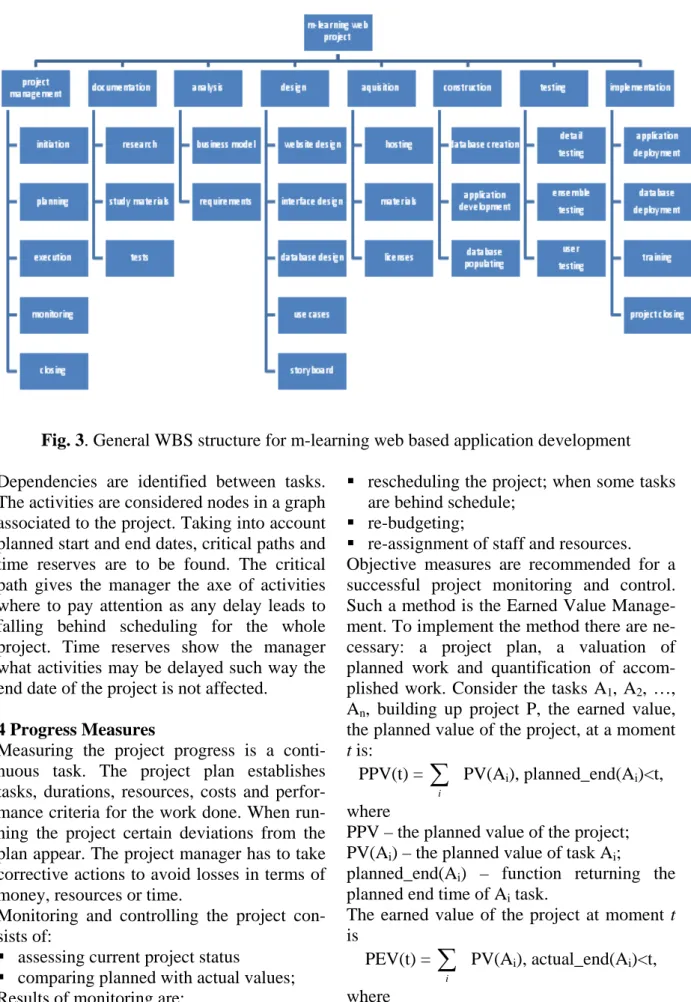
All these work packages are gathered in a general work breakdown structure for m-learning web based application projects as presented in Figure 3.
Further, each of these identified tasks is di-vided in subtasks. This level of granularity is specific to each project as some activities have different priorities given different re-quirements.
Fig. 3. General WBS structure for m-learning web based application development Dependencies are identified between tasks.
The activities are considered nodes in a graph associated to the project. Taking into account planned start and end dates, critical paths and time reserves are to be found. The critical path gives the manager the axe of activities where to pay attention as any delay leads to falling behind scheduling for the whole project. Time reserves show the manager what activities may be delayed such way the end date of the project is not affected.
4 Progress Measures
Measuring the project progress is a conti-nuous task. The project plan establishes tasks, durations, resources, costs and perfor-mance criteria for the work done. When run-ning the project certain deviations from the plan appear. The project manager has to take corrective actions to avoid losses in terms of money, resources or time.
Monitoring and controlling the project con-sists of:
assessing current project status
comparing planned with actual values; Results of monitoring are:
rescheduling the project; when some tasks are behind schedule;
re-budgeting;
re-assignment of staff and resources. Objective measures are recommended for a successful project monitoring and control. Such a method is the Earned Value Manage-ment. To implement the method there are ne-cessary: a project plan, a valuation of planned work and quantification of accom-plished work. Consider the tasks A1, A2, …,
An, building up project P, the earned value,
the planned value of the project, at a moment
t is:
PPV(t) =
∑
i
PV(Ai), planned_end(Ai)<t,
where
PPV – the planned value of the project; PV(Ai) – the planned value of task Ai;
planned_end(Ai) – function returning the
planned end time of Ai task.
The earned value of the project at moment t
is
PEV(t) =
∑
i
PV(Ai), actual_end(Ai)<t,
PEV – the planned value of the project; PV(Ai) – the planned value of task Ai;
actual_end(Ai) – function returning the actual
end time of Ai task.
Also, another indicator comes in to enlarge the analysis area, the actual cost:
PAC(t) =
∑
i
AV(Ai), actual_end(Ai)<t,
where
PAC – the actual cost of the project up to moment t;
AV – actual value to complete task Ai;
actual_end(Ai) – function returning the actual
end time of Ai task.
Based on these indicators, other measures are derived to interpret project status. The project scheduled variance PSV is computed as:
PSV = PEV-PPV.
The project cost variance is computed as: PCV = PEV- PAC.
If PSV is positive then the project is ahead schedule. If PCV is positive then costs were under budget.
Also another set of indicators is derived. The Schedule Performance Index, SPI is
SPI = PEV/PPV.
The cost performance index is CPI = PEV/PAC.
Positive interpretations arise when SPI>1 and CPI>1.
Monitoring these indicators at certain mo-ments of time the project manager may tell whether the project fell behind schedule or not, whether the project was under budgeted or not.
Beside the financial point of view there are indicators showing progress of individual tasks. For development stage progress may be assessed by indicators taking the form of:
DI = DM/TM, where
DI – application’s degree of implementation; DM – number of developed modules;
TM – total number of modules.
The DI indicator shows what fraction of the implementation activity is finished.
In a similar manner, in testing phase, when dealing with applications designed to run on various platforms, the degree of portability testing, DP, has the form:
DP = NTP/TNP, where
DP – degree of testing for portability; NTP – number of tested platforms; TNP – total number of platforms.
Accordingly, indicators are built for each phase or work package. Indicators must be built such way that:
they reflect correctly the aspects under-going analysis;
they are easy to interpret;
data collection is straightforward, without burdening the project work;
the mathematical expressions are simple. Project monitoring and control is efficient only if the manager not only looks at perfor-mance indicators but also if corrective tions and decisions are taken to lead to ac-complishments of established objectives.
5 Resource Allocation, Costs and Risks
Many resources are necessary to complete an m-learning project.
Regarding human resources, the project manager has to build a team where roles are well defined. The common roles in a team, taking into account the peculiarities of the m-learning web application project management are:
chief writer: the person who decides what the content must contain; it the higher education can be the chief of the discip-line the application is developed for; technical writer: the person who has the
responsibility of creating content for the m-learning application according to the indications of the chief writer; both pro-fessors and best students may be involved in this activity;
analyst: analyses the requirements of the m-learning application;
database designer: designs a database ac-cording to necessary data for the applica-tion;
software designer: designs the architecture of the application;
programmer: translates into code the de-sign specifications;
tester: verifies application behavior ac-cording to test cases;
database administrator: manages the data-base server;
server administrator: manages the web server;
Material resources are used by people to ex-ecute the tasks they have been assigned to. Material resources relevant to web based m-learning application development include: PC stations with office applications and
internet access; they are used for writing documentation;
development stations; computers with software development tools, used by ana-lysts and programmers;
development server; necessary to host the web application under development; after the application is completed it is further deployed to a production if server; the production server is not a resource as it is a deliverable of acquisition phase; if the production is external to the compa-ny/university then in acquisition a hosting plan is acquired; if it is internal to the uni-versity, then the device is bought also in acquisition phase;
network devices: routers, access points, cables; if the application is meant to be accessed via the university network, then the classroom must be equipped with wireless access devices such as routers; printers, paper, cartridges; the elaboration
of management documents, the reports of analysis and design phases, the didactic materials require printed versions;
CD/DVD, external hdd or other storage devices; the work performed is kept elec-tronically; backups are required for writ-ten code and database information;
mobile devices for development; they are required to develop/test the application in a real environment; must not be confused with the devices from acquisition phase which are deliverables and will supply the classroom; the development devices are assigned to programmers; many features have to be tested on real devices as there are still many differences between real devices and emulators;
The resources that are not enough, are sche-duled the manager having the role of
assign-ing resources.
Costs that the project manager has to pay at-tention to are:
software licenses; some software products have per computer license; in order to keep legal aspects of software develop-ment licenses must be acquired;
hosting plans;
service maintenance: devices are subject to failures;
salaries; the amount of work a person does is multiplied with hourly wage; the amount of work for a person is obtained from the duration of the tasks that person has been assigned to;
costs of materials; the manager invento-ries the necessary materials for the project and estimates costs;
Many cost categories are subject to restric-tions. The manager has to pay attention to maximum or minimum thresholds imposed by law or by higher level management.
Risks must be taken into account for a suc-cessful project management. Risks are inven-toried by the project manager. They are de-scribed, the probability of appearance is as-sessed and predefined actions to reduce the impact are established.
There are risks common with other types of projects and specific risks for the particular type of the project.
Common risks with software projects in-clude:
schedule risks; wrong estimations of task durations;
budget risks; wrong estimations or unex-pected cost overruns;
operational risks; related to the implemen-tation of working processes;
technical risks; specific problems to soft-ware development.
Particular risks for software development of m-learning applications are:
changing requirements; requirement stage is an early step in development; if changes to requirements occur when development is in late stages such as construction and testing, the induced modifications propa-gate through all stages causing additional work to be performed;
incompatibilities between platforms is a major risk; it may occur inclusively when deploying the application from the devel-opment server to the production server; inconsistent rendering content; the same
content is rendered differently on separate devices of different platforms;
application is rejected by the users; acces-sibility and usability must play an impor-tant role in the design of the application.
6 Conclusions
M-learning web based applications have cer-tain particularities among mobile and web applications. These particularities lead to specific project management approaches. These peculiarities are found in:
mobile technology as built-in;
functionality of m-learning application; project management cycle;
resources used; costs;
risks;
project team;
software development.
Each m-learning web based project is unique. The project manager has to evaluate the situ-ation and based on the proposed structure has to identify the needed elements to define the project accordingly in terms of objectives, tasks, resources, budgets, risks.
Acknowledgements
This work was supported by CNCSIS – UEFISCSU, project number PNII – IDEI
2637/2008, project title: Project management methodologies for the development of mobile applications in the educational system.
References
[1] G.R. Frederick and R. Lal, Beginning
Smartphone Web Development. Apress
Publishing, 2009, pp. 195-210
[2] European Air Traffic Management, Best Practices for E-Learning Developers in
ATM. [Online]. Available:
www.eurocontrol.int/humanfactors/galler y/content/public/docs/
DELIVERABLES/E_learning_Practices_ V1_Aug07_REP_HUM.pdf
[3] D. Brandon, Project management for modern information systems. Idea Group, 2006, pp. 130-133
[4]http://www.icteksolutions.com/company/ work-breakdown-structure.aspx
[5] P. Pocatilu, “Using cloud computing for E-learning systems,” in Proc. 8th WSEAS international conference on Data
net-works, communications, computers,
Bal-timore MD USA, 2009, pp. 54-59
[6] M. Firtman, Programming the Mobile Web. Sebastopol: O’Reilly Media, 2010, pp. 45-50
[7] N. Mehta, Mobile Web Development. Birmingham: Packt Publishing, 2008, pp. 89-98
[8] T. Shelford and G. Remillard, Real Web
Project Management. Addison-Wesley,
2003, pp. 22-39
Adrian VIŞOIU graduated the Bucharest Academy of Economic Studies, the Faculty of Cybernetics, Statistics and Economic Informatics. He has a master degree in Project Management. He holds a PhD in the field of Eco-nomic Informatics. He is an assistant lecturer in the EcoEco-nomic Informatics Department of the Bucharest Academy of Economic Studies. He published 16 articles alone or in collaboration and he is co-author of three books. His interests include: object oriented programming, data structures, multimedia programming, software quality management, software metrics refinement.