University of Huddersfield Repository
Taylor, Andrew and Bond, Terry
An Investigation into Pattern Design & Construction In a 3D virtual Environment
Original Citation
Taylor, Andrew and Bond, Terry (1999) An Investigation into Pattern Design & Construction In a
3D virtual Environment. In: Fit for Profit – A Conference on Pattern Technology and its Teaching,
1st July 1999, Manchester, UK. (Unpublished)
This version is available at http://eprints.hud.ac.uk/id/eprint/14920/
The University Repository is a digital collection of the research output of the
University, available on Open Access. Copyright and Moral Rights for the items
on this site are retained by the individual author and/or other copyright owners.
Users may access full items free of charge; copies of full text items generally
can be reproduced, displayed or performed and given to third parties in any
format or medium for personal research or study, educational or notforprofit
purposes without prior permission or charge, provided:
•
The authors, title and full bibliographic details is credited in any copy;
•
A hyperlink and/or URL is included for the original metadata page; and
•
The content is not changed in any way.
For more information, including our policy and submission procedure, please
contact the Repository Team at: [email protected].
FIT FOR PROFIT
A CONFERENCE ON PATTERN TECHNOLOGY AND ITS TEACHING
1
stJULY 1999
An Investigation into
Pattern design & Construction
In a 3D virtual Environment
Andrew Taylor & Terry Bond
Department of Clothing Design & Technology Manchester Metropolitan University
INTRODUCTION
During the last ten years many clothing companies have invested in expensive, dedicated packages, which were intended to do everything but lacked connectivity rather than flexibility.
Now due to the convergence of windows technologies the days of these ‘one size fits all’ systems are surely numbered. Challenges in the software market, by growing low-cost dealers, to the high-end vendors of high-priced systems has enabled everyone to realise the importance of software integration. The use of open and compatible system architecture is becoming increasingly more accepted, and more widely integrated into all aspects of the Clothing industry.
Traditionally, garment patterns are developed through the use of fit or toile stands. The first set of patterns are represented by specific size, and are created using Anthropometric data. Further pattern development is achieved by switching between the model and the basic block, this method provides the foundation upon which patterns are created and enables the accurate representation of a garment when its pieces are sewn together, a fact which is confirmed by Jones, who states that,
“…the most straight forward way of taking 2D data and presenting it as 3D data is to use a 3D model.”1
The paper discusses a practical element of the research project currently being investigated for the CAD department, of Clothing Design &Technology at the Hollings Faculty, Manchester Metropolitan University.
The 3D CAD research project aims to develop a teaching and learning module for pattern construction and visualisation using interactive low-cost software. Project aims are:
1
• To further develop CAD applications in use for teaching and learning
• To demonstrate the interface between the model and the parallel applications
• To visualise style developments and modelling in a 3D environment
INTERFACES FOR 3D GARMENT CONSTRUCTION
DESIGN ILLUSTRATION
The concept designs for long sleeved and short sleeved men’s shirts were freehand drawn using Corel Draw 6, a PC based graphics software package.
Alternative design methods for or inputting 2D- sketched images on to computer would be to use a scanner or a digital camera. Garment illustrations are then further developed using Gerber Accumark PDS, to be demonstrated in the later section of the paper.
Figure1: Digital shirt illustrations showing front and back views in 2D.
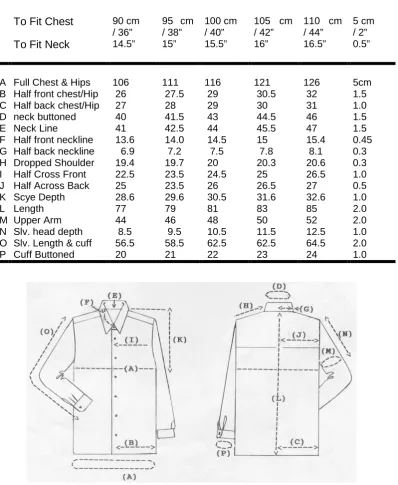
SIZE SPECIFICATION
SIZES
To Fit Chest 90 cm / 36”
95 cm / 38”
100 cm / 40”
105 cm / 42”
110 cm / 44”
5 cm / 2”
To Fit Neck 14.5” 15” 15.5” 16” 16.5” 0.5”
A Full Chest & Hips 106 111 116 121 126 5cm
B Half front chest/Hip 26 27.5 29 30.5 32 1.5
C Half back chest/Hip 27 28 29 30 31 1.0
D neck buttoned 40 41.5 43 44.5 46 1.5
E Neck Line 41 42.5 44 45.5 47 1.5
F Half front neckline 13.6 14.0 14.5 15 15.4 0.45 G Half back neckline 6.9 7.2 7.5 7.8 8.1 0.3
H Dropped Shoulder 19.4 19.7 20 20.3 20.6 0.3
I Half Cross Front 22.5 23.5 24.5 25 26.5 1.0
J Half Across Back 25 23.5 26 26.5 27 0.5
K Scye Depth 28.6 29.6 30.5 31.6 32.6 1.0
L Length 77 79 81 83 85 2.0
M Upper Arm 44 46 48 50 52 2.0
N Slv. head depth 8.5 9.5 10.5 11.5 12.5 1.0
O Slv. Length & cuff 56.5 58.5 62.5 62.5 64.5 2.0
[image:5.595.96.495.106.592.2]P Cuff Buttoned 20 21 22 23 24 1.0
Figure 2
Size specification and detailed sketch of a mans loose-fitting shirt
2D PATTERN DESIGN: PAD System software
The software tested in the research project to integrate 2D pattern development process with 3D pattern of the shirt styles is PAD system software. PAD System is a modular Pattern Design software system that operates using a windows environment. The software integrates virtual pattern design and 3D visualisation in a graphic interface.
The application of the software enables the practitioner to approach garment creation through the use of either digitised in or conventionally designed within the system 2D- pattern shapes.
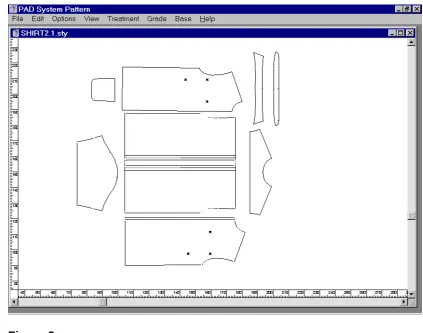
The pattern pieces displayed were imported from Gerber Accumark Pattern Design System, into PAD System Pattern Module. Using the windows toolbar functions; edit, copy and paste, the practitioner made a copy of the selected 2D styles illustrated as Style1 and Style 2, and pasted these into 3D sample module shown below in figure 3
Style2
Figure 3
THE 3D GARMENT VISUALISATION
Figure4
Firstly, to establish the 3D working parameters regarding the model, the Model Option window is activated. From this window the Bodice options, working side preferences and collar options are selected.
In (fig4) the garment pieces have all been selected and are active. From the toolbox menu the reference point tool is selected and the software prompts the user through the model options window to identify the required reference points on the bodice shapes.
ADDING COLOUR AND TEXTURE
The fabrics were selected and scanned in using PC graphics software Corel 6 Photopaint.™
Applying the texture and colouring function of the options box allows the practitioner freedom to paint fill or to import bit-mapped images into the software from most other graphic interfaces.
Figure5
SEWING THE PATTERN PIECES
The pattern shapes have been texturised and completely defined, the next step is to simulate the sewing sequence.
The windows environment of the 2D/3D sample mode encourages the practitioner to follow a sequential procedure of seam association.
Figure6
3D SIMULATION
The link from pattern development to sample garment visualisation is made, once the 2D pieces are activated and sewing lines have been associated to the seams of each piece.
The practitioner can now toggle between 2D pattern mode and 3D sample mode selected in the View menu.
Figure7
For enhancement of the visualisation, creative presentation tools within the 3D options window were also applied. The user was able to experiment with the colours of the virtual body and these modifications are shown in figure7. Also the ability to affect colours and create contrast between the model within the background setting, by moveable spot lighting encourages designer to be experimental with the concept in relation to the garment.
The user selected dress form options, inputting established dimensions from the size specification chart will accurately define the virtual model.
Figure8
The play button is clicked to activate the garment simulation process. (fig9)
The software then renders the garment allowing rapid prototyping of the initial shapes.
Figure9
The garment design is displayed as a Quickdraw 3D wire frame image which is an option that enables a visual assessment of fit and drape in relation to the body form.
The visualisation and navigation tools provide the designer or buyer with panoramic freedom for viewing the virtual garment. The interface offers the user a variety of views, allowing isometric options to zoom, pan and rotate the model around any axis. These proximity location tools provide the user with an accurate representation of the garment on a virtual model which can be viewed from any angle.
Conclusion
This early stage exploratory research has demonstrated that 3D CAD software applications can be applied for teaching and learning. Tools within 3D pattern design, and construction software provide an interactive design environment for educational garment development and presentation. For the purposes of teaching and learning, these basic steps are intended to support and the introduction of digital pattern development skills and computer aided visualisation which could be incorporated into the CAD classroom. Pattern pieces created from a garment block are almost immediately available for 3D visualisation. The PAD system software assembles these shapes into a garment and fits, or virtually ‘sews’ the pieces onto body form as a garment. Once construction is achieved the student is able to view the process from a number of different view points, toggling between the two modes for interaction and associative assessment of the garments.