A Graphical User Interface Framework for Detecting
Intrusions using Bro IDS
Shaffali Gupta
M.Tech Scholar Thapar University, Patiala
Rachit Goel
M.tech Scholar Doon Valley, Karnal
ABSTRACT
Internet has transformed and greatly improved the way we do business, the network and its associated technologies have opened the door to an increasing number of threats from which corporations must protect them. To protect the network, Network Security is needed. To make network secure, an Intrusion Detection System is needed. An intrusion is used to monitor network traffic, check for suspicious activities and notifies the system or network administrator. Many open source tools are available for detecting intrusions in a network. Most common of these are Snort and Bro .In this paper, the main emphasis will be to explore Bro. However, based upon CPU utilization and memory constraints, performance analysis of Bro and Snort is done. Taking a closer look at open source Network Intrusion Detection System, there is a very powerful open source system that is termed as Bro. It passively monitors network traffic and looks for suspicious activity by comparing network traffic against scripts. In this paper, various policy scripts written in Bro language to filter out the network traffic will be discussed. Also, a Graphical Interface called Bro GUI Framework is designed to automate the creation and run of the policy scripts.
Keywords
Analyzer, Event Handler, Policy scripts, sendmail client.
1.
INTRODUCTION
Network security is a complicated subject, historically only tackled by well-trained and experienced experts. However, as more and more people become ``wired'', an increasing number of people need to understand the basics of security in a networked world [1]. To secure networks, two systems extensively explored under IDS are: Snort and Bro. Snort is small, lightweight open source IDS capable of performing packet logging and real time traffic analysis on IP networks. Snort shows some technical limitations that indicate that it is not always an optimal solution. So, there is at least one other very powerful open source system that is largely unknown: termed as Bro. Bro is originated as a research system. It is designed and developed by Vern Paxson at the International Computer Science Institute in Berkeley, CA [2]. Bro monitors network traffic and detects intrusion attempts based on the traffic characteristics and content. By judiciously leveraging packet filtering techniques, Bro is able to achieve the performance necessary to do so while running on commercially available PC hardware and thus can serve as a cost effective means of monitoring a site’s Internet connection. Bro is a signature-based IDS, meaning that it attempts to match a signature to network traffic in order to find the attack [3]. Bro also comes with its own language
which advanced users can utilize to program policy scripts. Policy scripts allow network administrators to fine-tune their Bro installation in order to specifically search out certain types and patterns of traffic, and define them as malicious [4]. However, the policy scripts are few in number and there are various types of traffic that are still not captured by Bro IDS. Moreover, policy scripts that are executed to block, alert or log information about network traffic are yet needed to be explored. Much of the work has already been done to capture and filter traffic of various network classes. The network traffic of classes like SMTP, FTP is further needed to be worked on. Currently, Bro biggest shortfall is that it only report information to log files and does not have a Graphical User Interface (GUI). Till now the traffic is captured by typing the commands which is an overhead for users. So a GUI framework is required that could capture traffic more effectively and easily. Also, a framework is needed to automate the creation of policy scripts and run those scripts to capture and filter the network traffic.
2.
Comparison of Bro and Snort IDS
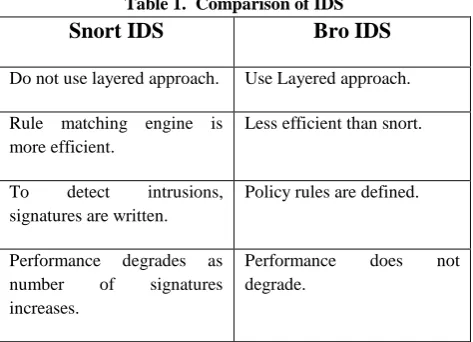
[image:1.595.311.548.558.729.2]Snort provides a very up-to-date, well documented and tested set of rules but it is found that as the number of signature increases, the Snort CPU utilization and memory usage increases. To overcome this problem of Snort, Bro provides a complete different architecture. The great feature of Bro is that it can memorize the states of each flow, and can use it for detecting malicious activities. Despite having several dissimilarities, both are oriented towards high speed links. Table 1 shows major differences between Snort and Bro.
Table 1. Comparison of IDS
Snort IDS
Bro IDS
Do not use layered approach. Use Layered approach. Rule matching engine is
more efficient.
Less efficient than snort.
To detect intrusions, signatures are written.
Policy rules are defined.
Performance degrades as number of signatures increases.
Packet missing rate is high. Bro includes both signature matching engine and an application analysis scripting language.
Highly documented. Less documentation.
\\
3.
Bro POLICY SCRIPTS
A live traffic consists of packets going through various protocols like HTTP, TCP SMTP, DNS, ARP etc. In this section various policy scripts are designed to filter out the desired protocol packets from live captured traffic. In this section, traffic of SMTP, HTTP, FTP, TCP protocol is filtered and analyzed.
3.1
Script To Filter SMTP Packets From
Live Captured Traffic.
The live traffic consists of HTTP, TCP, FTP, DNS etc protocol packets. To filter out the smtp packets from the live traffic this script is written. Bro instantiates a smtp analyzer to processes the traffic associated with the email service, coming on port 25 providing the appropriate event handler is defined. To capture the smtp packets, sendmail [5] client is used. The script is written as:
smtp_sample.bro script:
@load weird @load alarm @load smtp global path: string; redef ignore checksums= T;
event smtp_request(c: connection, is_orig: bool, command: string, arg: string)
{
print fmt ("IP: %s, WITH PORT NO: %s IS TRYING TO ACCESS SMTP PACKETS", c$id$orig_h, c$id$orig_p); }
To get the filtered output, following set of command are run at the terminal:
1. broctl install
2. bro –i eth0 smtp_sample.bro
To get the smtp packets, sendmail client is run on terminal by typing command as:
sendmail –v [email protected] < test.mail
OUTPUT:
Snapshot 1: Filtered Traffic containing only SMTP packets.
3.2
Script To Filter HTTP Packets From
Live Captured Traffic.
Generally, the live traffic consists of various protocol packets like HTTP, TCP, FTP, DNS etc. To filter out the HTTP packets from the live traffic this script is written. Bro instantiates a http analyzer to processes the traffic associated with the HTTP [6] protocol, coming on port 80 providing the appropriate event handler is defined. The script is written as: http_sample.bro script:
@load weird @load alarm @load http-body global path: string; redef ignore_checksums= T;
event http_request(c: connection, method: string, original_URI: string, unescaped_URI: string, version: string) {
print fmt ("IP: %s WITH PORT NO:%s IS TRYING TO ACCESS HTTP PACKETS" ,c$id$orig_h ,c$id$orig_p); }
To get the filtered output, following set of command are run at the terminal:
1. broctl install
2. bro –i eth0 http_sample.bro OUTPUT:
Snapshot 2: Filtered Traffic containing only HTTP packets.
3.3
Script To Filter TCP Packets From
Live Captured Traffic.
providing the appropriate event handler is defined. The script is written as:
tcp_sample.bro script: @load weird @load alarm @load tcp
event tcp_packet(c: connection, is_orig: bool, flags: string, seq: count, ack: count, len: count, payload: string)
{
print fmt("IP : %s WITH PORT NO:%s IS TRYING TO ACCESS TCP PACKETS" ,c$id$orig_h, c$id$orig_p); }
To get the filtered output, following set of command are run at the terminal:
1. broctl install
2. bro –i eth0 tcp_sample.bro OUTPUT:
Snapshot 3: Filtered Traffic containing only TCP packets.
3.4
Script To Count The Number Of
Connections Established By Each Local
Host.
A sample script is written to count the number of connections established by each local host. The script is written as: count.bro script:
@load weird @load alarm @load tcp
global hosts: table[addr] of count &default=0; event connection_established(c: connection) {
local orig = c$id$orig_h; if ( ! is_local_addr(orig) ) return;
++hosts[orig]; }
event bro_done() {
for ( h in hosts ) print h, hosts[h]; }
• To get the required output, following set of command are run at the terminal:
1. broctl install 2. bro –i eth0 count.bro OUTPUT:
Snapshot 4: Filtered Traffic containing count of connections.
3.5
Script To Filter FTP Packets From
Live Captured Traffic.
Generally, the live traffic consists of various protocol packets like SMTP, HTTP, TCP, FTP, DNS etc. To filter out the packets going through FTP protocol, from the live traffic this script is written. Bro instantiates a ftp analyzer to processes the traffic associated with the FTP file transfer service. To capture the ftp packets, vsftpd [8] client is installed on client machine.The script is written as:
ftp_sample.bro script: @load weird @load alarm @load ftp
redef ignore checksums= T;
event ftp_request (c: connection, command: string, arg: string)
{
print fmt("IP ADDRESS: %s WITH PORT NO:%s IS TRYING TO ACCESS FTP PACKETS”, c$id$orig_h ,c$id$orig_p); }
To get the filtered output, following set of command are run at the terminal:
1. broctl install
2. bro –i eth0 ftp_sample.bro
To get the ftp packets, vsftpd client is installed and run on the client machine.
OUTPUT:
Snapshot 5: Filtered Traffic containing only FTP packets.
3.6
Script To Display Source And
Destination Address Of Captured Traffic.
This script is used to display the IP address and port number of the source and destination machines. The analyzer used is http and event handler is http_header. The script is shown as: ip_sample.bro script:
@load weird @load alarm @load http global path: string; redef ignore_checksums= T;
event http_header(c: connection, is_orig: bool, name: string, value: string)
{
print fmt ("CONNECTION IS: %s: %s ->%s: %s", c$id$orig_h, c$id$orig_p, c$id$resp_h, c$id$resp_p); }
To get the filtered output, following set of command are run at the terminal:
1. broctl install
2. bro –i eth0 ip_sample.bro OUTPUT:
Snapshot 6: Filtered Traffic containing source and destination machine address.
4.
INTRODUCTION OF BRO GUI
FRAMEWORK
Bro is a UNIX based Network Intrusion Detection System. The shortfall is that there is no GUI Framework for Bro IDS. The traffic is captured by using the commands which is an overhead for user. So a GUI framework is required that could capture traffic more effectively and easily. The “Bro GUI Framework” is developed in JDK 1.7 environment. The input to the Bro GUI Framework is live traffic. The scripts designed
using Bro GUI Framework are saved in a file having .bro extension. The live traffic is run on the scripts. The output is the filtered traffic. The filtered output is shown on the screen so that users can analyze it and also the filtered traffic is saved in a file on the pre-decided path so that it can be examined for future reference. Various Sections of GUI contain information about bro and define sample scripts so that a user can understand execution of policy scripts and Bro GUI Framework in an easy manner. On starting the GUI, “start-up” form as shown in Snapshot 7 is displayed.
Snapshot 7: Start-up Form.
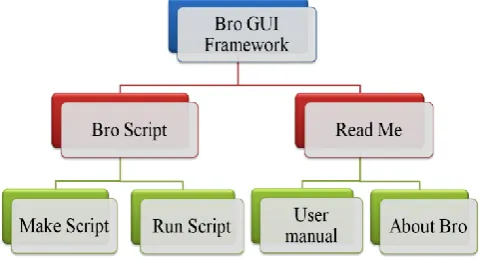
[image:4.595.314.554.529.660.2]The Start-up form mainly consists of two menu bars named as Bro Script and Read Me. These main modules are further divided into menu items. The menu bar Bro Script is further divided into two menu items namely Make Script and Run Script. The menu bar Read Me is further divided into two menu items called About Bro and User Manual while menu bar Bro Script is divided into Make Script and Run Script menu items.
Fig 1: Tree Hierarchy of Bro GUI Framework.
Snapshot 8: About Bro IDS Form.
“User Manual” Form shows the various steps needed to run the Bro GUI Framework. This form contains the series of steps necessary to run the Framework. A sample script is written to build the user understanding about the making of scripts.
Snapshot 9: User Manual Form
4.1
Example To Demonstrate Working of
Bro GUI Framework
To start the process, “Make Script” Form as shown in Snapshot 10 present under Bro Script menu bar is selected. Various Combo box and check boxes present on this form contain different arguments and event handlers necessary for the creation of policy scripts. To make the desired script, appropriate options are selected. All the data chosen from these boxes is added to a file after concatenation to make the script. After clicking on “Make Script!” button, policy script will be saved in the on the pre-decided path and Capture form will be displayed.
Snapshot 10: Make Script Form.
Now, the policy script created in “Make Script” form is applied on live traffic in this form. To achieve this, shell script containing a series of commands is written and saved. On clicking the “START CAPTURING TRAFFIC” button, shell script is run.
Snapshot 11: Capture Form
Snapshot 12: Run Script Form.
5.
CONCLUSION
Today network is very complex and whole world is focusing on ease of use and functionality. Unfortunately security policies and rules needed to govern these networks have not progressed as rapidly. So there is huge need of detecting the threats and intrusions as rapidly as possible. An intrusion detection system is used to monitor network traffic, check for suspicious activities and notifies the system or network administrator. Bro is one of the most effective IDS which can be used to detect these threats.
In this paper, new policy scripts are designed to filter out the needed packets from traced traffic and generate alert on desired incoming network packets. Policy scripts are written to filter E-mail and File Transfer traffic going via SMTP and FTP protocol respectively. These policy scripts display web traffic sent on HTTP and TCP protocol after analyzing them. These scripts help to know the source and destination address of the captured traffic. Also a policy script is built to count the number of established connections by each local host. A GUI framework is integrated in Bro that analyzes and filters the traced network traffic. It eliminates the need of writing the commands at terminal and makes it easy for users to create the scripts and run them on captured traffic.
6.
FUTURE WORK
Presently the traffic of SMTP, TCP, HTTP and FTP is examined and filtered. The work can be enhanced to trace the traffic of SSl, bit torrent and P2P. In this paper, scripts are created that generate alerts on desired incoming network packets. In future, scripts can be created that will used to block the desired network traffic. The proposed GUI framework can be further extended to report events to database instead of log files so that data can be stored safely for future reference.
7. REFERENCES
[1] Forrest S., Homeyr S. and Sommayaji A., “Computer Immunology”, Communications of the ACM, vol. 40, no. 10, pp. 88- 96, October 1997.
[2] Paxson V., “Bro: A System for Detecting Network Intruders in Real-Time”, in Proceedings of 7th USENIX Security Symposium, pp. 2435-2463, December 1999. [3] Sommer R., “BRO: An Open Source Network Intrusion
Detection System”, in Security, E-Learning, E-Services, 17 DFN- Arbeitstagung uber Kommunikationsnetze, vol. 44, Dusseldorf, Germany: Gesellschaft fur Informatik (GI), 2004, pp. 273-288
[4] Sommer R., Slides on the Bro Network Intrusion Detection System, Lawrence Berkeley National Laboratory, Berkeley, CA, 2009.
[5] Allman E., Shapiro G. N. and Assmann C., “Sendmail Installation and Operation guide”, US Patent 6865671, 6986037, October 2001.
[6] Hypertext Transfer Protocol, Available at: http://en.wikipedia.org/wiki/Hypertext_Transfer_Protoco l.
[7] Transmission Control Protocol, Available at: http:en.wikipedia.org/wiki/Transmission_Control_Protoc ol